fuel consumption LEXUS LS500 2019 Owners Manual
[x] Cancel search | Manufacturer: LEXUS, Model Year: 2019, Model line: LS500, Model: LEXUS LS500 2019Pages: 512, PDF Size: 9.71 MB
Page 2 of 512
2
LS500_OM_(U)_1810 TABLE OF CONTENTS
For your information ...................................... 6
Reading this manual .................................... 10
How to search ................................................. 11
Pictorial index ................................................. 12
1-1. For safe use
Before driving .................................... 22
For safe driving.................................. 23
Seat belts ............................................. 24
SRS airbags ........................................ 29
Pop Up Hood ................................... 38
Front passenger occupant classifi-
cation system ................................. 40
Exhaust gas precautions .............. 44
1-2. Child safety
Riding with children........................ 45
Child restraint systems ................. 45
1-3. Lexus Enform
Lexus Enform Safety Connect .. 58
1-4. Theft deterrent system
Engine immobilizer system ......... 63
Alarm.................................................... 65
2-1. Instrument cluster
Warning lights and indicators .... 68
Gauges and meters (except F
SPORT models) ........................... 73
Gauges and meters (F SPORT
models) ............................................. 76
Multi-information display............. 80
Head-up display .............................. 87
Fuel consumption information ..... 91 3-1. Key information
Keys ....................................................... 96
3-2. Opening, closing and locking the
doors and trunk
Doors ................................................. 100
Trunk .................................................. 104
Smart access system with push-but-
ton start ............................................. 111
3-3. Adjusting the seats
Front seats.......................................... 119
Power rear seat .............................. 126
Driving position memory ........... 130
Rear seat position memory........ 134
Head restraints .............................. 135
3-4. Adjusting the steering wheel and
mirrors
Steering wheel ............................... 138
Inside rear view mirror ............... 139
Outside rear view mirrors......... 140
3-5. Opening, closing the windows and
moon roof
Power windows .............................. 142
Moon roof ........................................ 145
Panoramic moon roof .................. 147
4-1. Before driving
Driving the vehicle........................ 154
Cargo and luggage...................... 160
Vehicle load limits.......................... 162
Trailer towing.................................. 163
Dinghy towing ................................ 1631
For safety and security
2
Vehicle status information and
indicators 3
Before driving
4
Driving
Page 67 of 512
67
LS500_OM_(U)_1810 2 2
Vehicle status information and indicators Vehicle status information
and indicators .
2-1. Instrument cluster
Warning lights and indicators
........................................................... 68
Gauges and meters (except F
SPORT models) ........................ 73
Gauges and meters (F SPORT
models) .......................................... 76
Multi-information display.......... 80
Head-up display ........................... 87
Fuel consumption information
............................................................ 91
Page 82 of 512
82 2-1. Instrument cluster
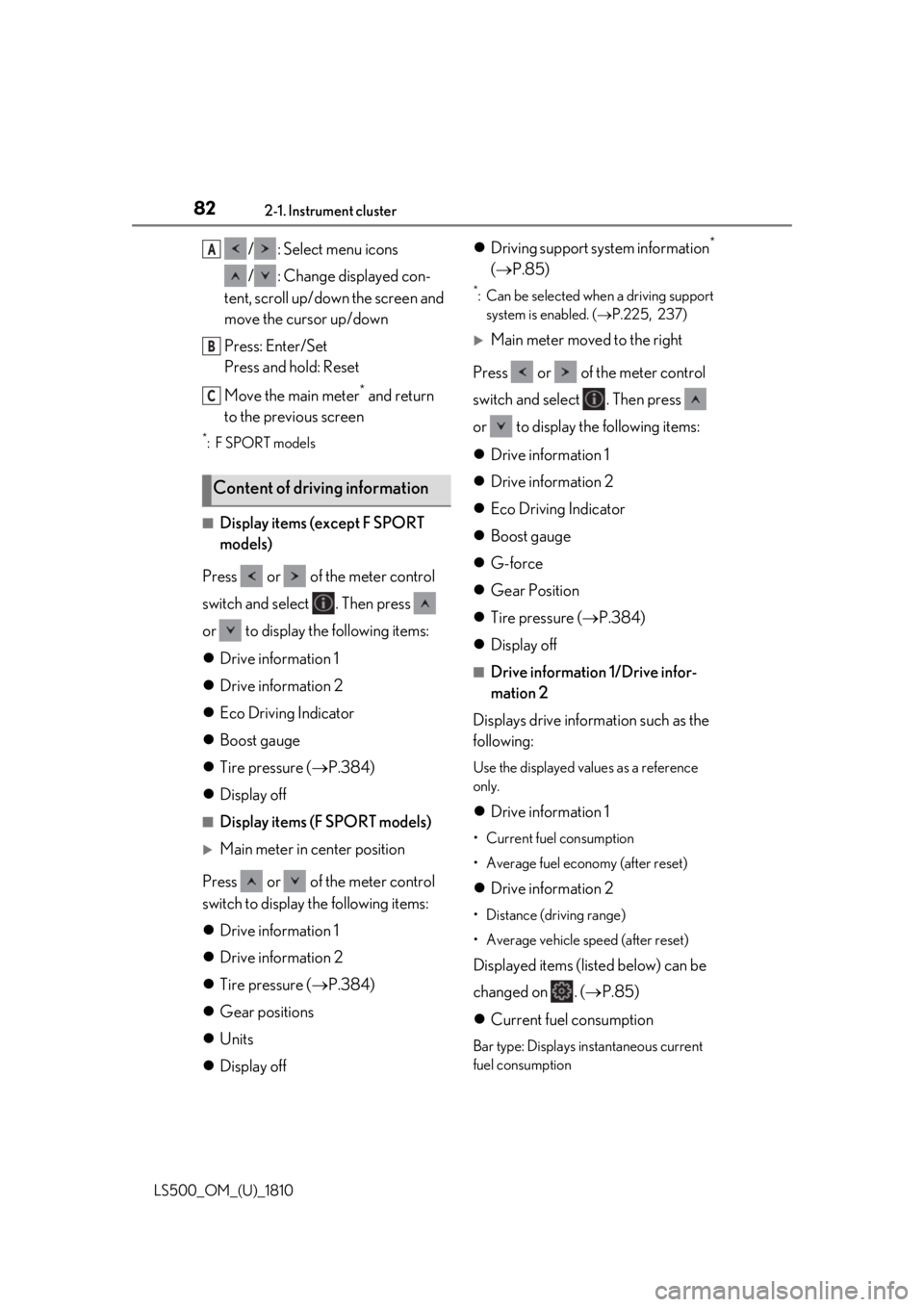
LS500_OM_(U)_1810 / : Select menu icons
/ : Change displayed con-
tent, scroll up/down the screen and
move the cursor up/down
Press: Enter/Set
Press and hold: Reset
Move the main meter *
and return
to the previous screen *
:F SPORT models
■
Display items (except F SPORT
models)
Press or of the meter control
switch and select . Then press
or to display the following items:
Drive information 1
Drive information 2
Eco Driving Indicator
Boost gauge
Tire pressure ( P.384)
Display off ■
Display items (F SPORT models)
Main meter in center position
Press or of the meter control
switch to display the following items:
Drive information 1
Drive information 2
Tire pressure ( P.384)
Gear positions
Units
Display off Driving support system information *
( P.85) *
: Can be selected when a driving support
system is enabled. ( P.225, 237)
Main meter moved to the right
Press or of the meter control
switch and select . Then press
or to display the following items:
Drive information 1
Drive information 2
Eco Driving Indicator
Boost gauge
G-force
Gear Position
Tire pressure ( P.384)
Display off ■
Drive information 1/Drive infor-
mation 2
Displays drive information such as the
following: Use the displayed values as a reference
only.
Drive information 1 • Current fuel consumption
• Average fuel economy (after reset)
Drive information 2 • Distance (driving range)
• Average vehicle speed (after reset)
Displayed items (listed below) can be
changed on . ( P.85)
Current fuel consumption Bar type: Displays instantaneous current
fuel consumptionContent of driving information A
B
C
Page 83 of 512
832-1. Instrument cluster
LS500_OM_(U)_1810 2
Vehicle status information and indicators Average fuel economy After reset: Displays average fuel con-
sumption since the display was reset *1
After start: Displays average fuel con-
sumption since engine start
After refuel: Displays average fuel con-
sumption since refuel
Average vehicle speed After reset: Displays average vehicle
speed since the display was reset *1
After start: Displays average vehicle speed
since engine start
Elapsed time After reset: Displays elapsed time since the
display was reset *1
After start: Displays elapsed time since
engine start
Distance Driving range: Displays driving range with
remaining fuel *2, 3
After start: Displays the distance driven
since engine start
Other Blank: No item *1
: To reset, display the desired item and
press and hold of the meter control
switch. *2
: This distance is computed based on
your average fuel consumption. As a
result, the actual distance that can be
driven may differ from that displayed. *3
: When only a small amount of fuel is
added to the tank, the display may not
be updated.
When refueling, turn the engine switch
off. If the vehicle is refueled without
turning the engine switch off, the display may not be updated. ■
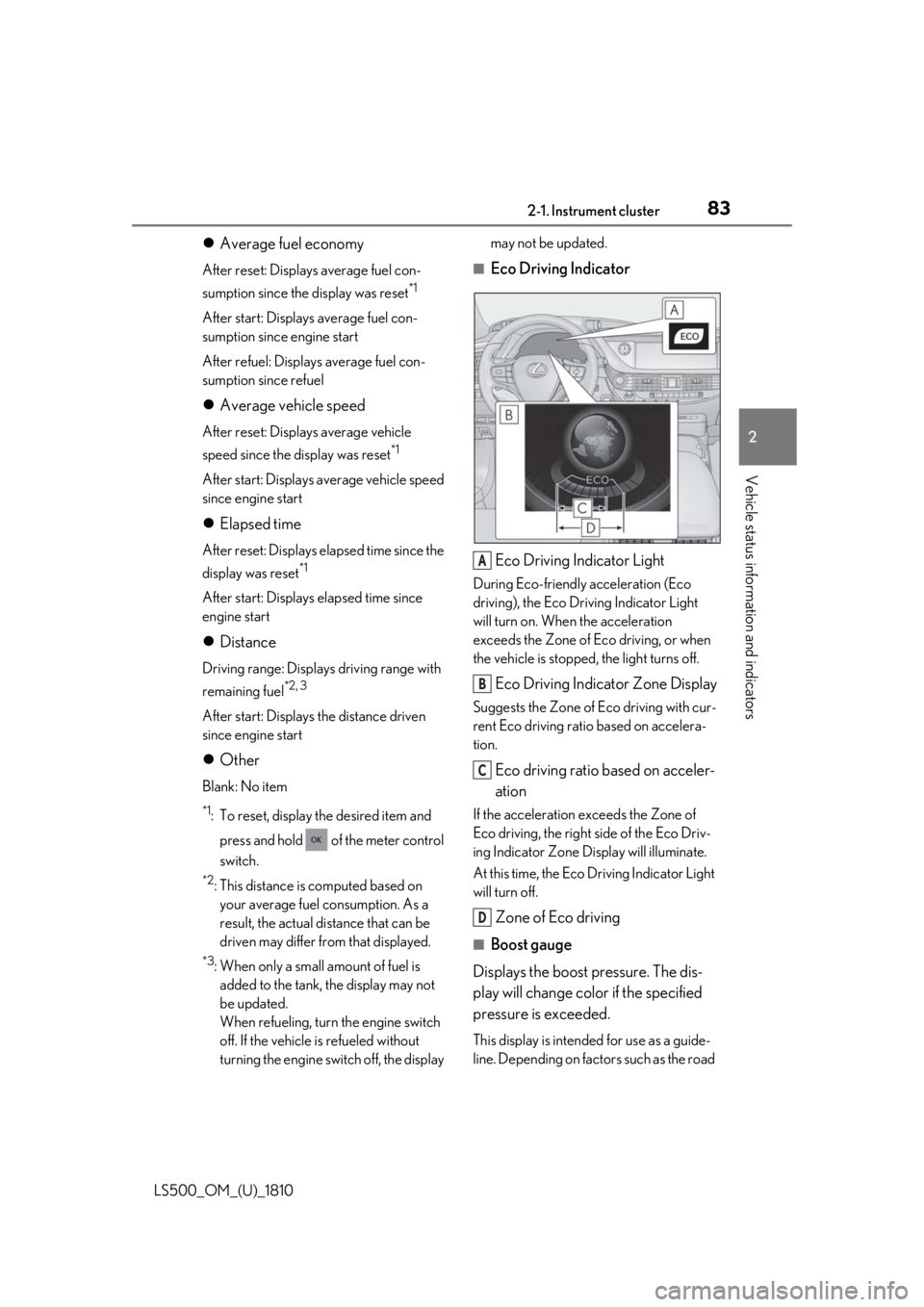
Eco Driving Indicator
Eco Driving Indicator Light During Eco-friendly acceleration (Eco
driving), the Eco Driving Indicator Light
will turn on. When the acceleration
exceeds the Zone of Eco driving, or when
the vehicle is stopped, the light turns off.
Eco Driving Indicator Zone Display Suggests the Zone of Eco driving with cur-
rent Eco driving ratio based on accelera-
tion.
Eco driving ratio based on acceler-
ation If the acceleration exceeds the Zone of
Eco driving, the right side of the Eco Driv-
ing Indicator Zone Display will illuminate.
At this time, the Eco Driving Indicator Light
will turn off.
Zone of Eco driving ■
Boost gauge
Displays the boost pressure. The dis-
play will change color if the specified
pressure is exceeded. This display is intended for use as a guide-
line. Depending on fact ors such as the road A
B
C
D
Page 91 of 512
912-1. Instrument cluster
LS500_OM_(U)_1810 2
Vehicle status information and indicators tions per minute. ■
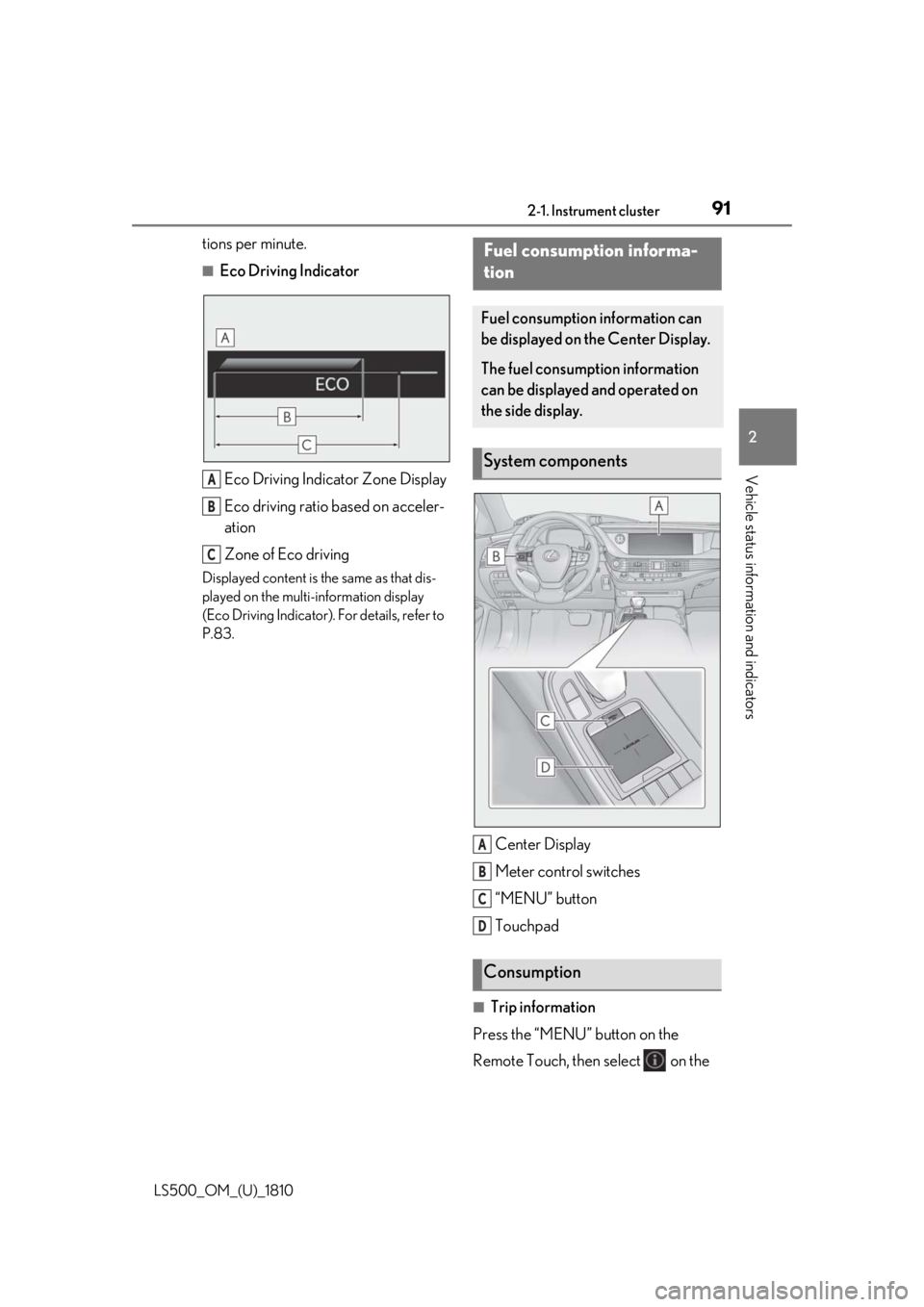
Eco Driving Indicator
Eco Driving Indicator Zone Display
Eco driving ratio based on acceler-
ation
Zone of Eco drivingDisplayed content is the same as that dis-
played on the multi-information display
(Eco Driving Indicator). For details, refer to
P.83.
Center Display
Meter control switches
“MENU” button
Touchpad
■
Trip information
Press the “MENU” button on the
Remote Touch, then select on the A
B
C Fuel consumption informa-
tion Fuel consumption information can
be displayed on the Center Display.
The fuel consumption information
can be displayed and operated on
the side display.
System components
Consumption A
B
C
D
Page 92 of 512
92 2-1. Instrument cluster
LS500_OM_(U)_1810 menu screen.
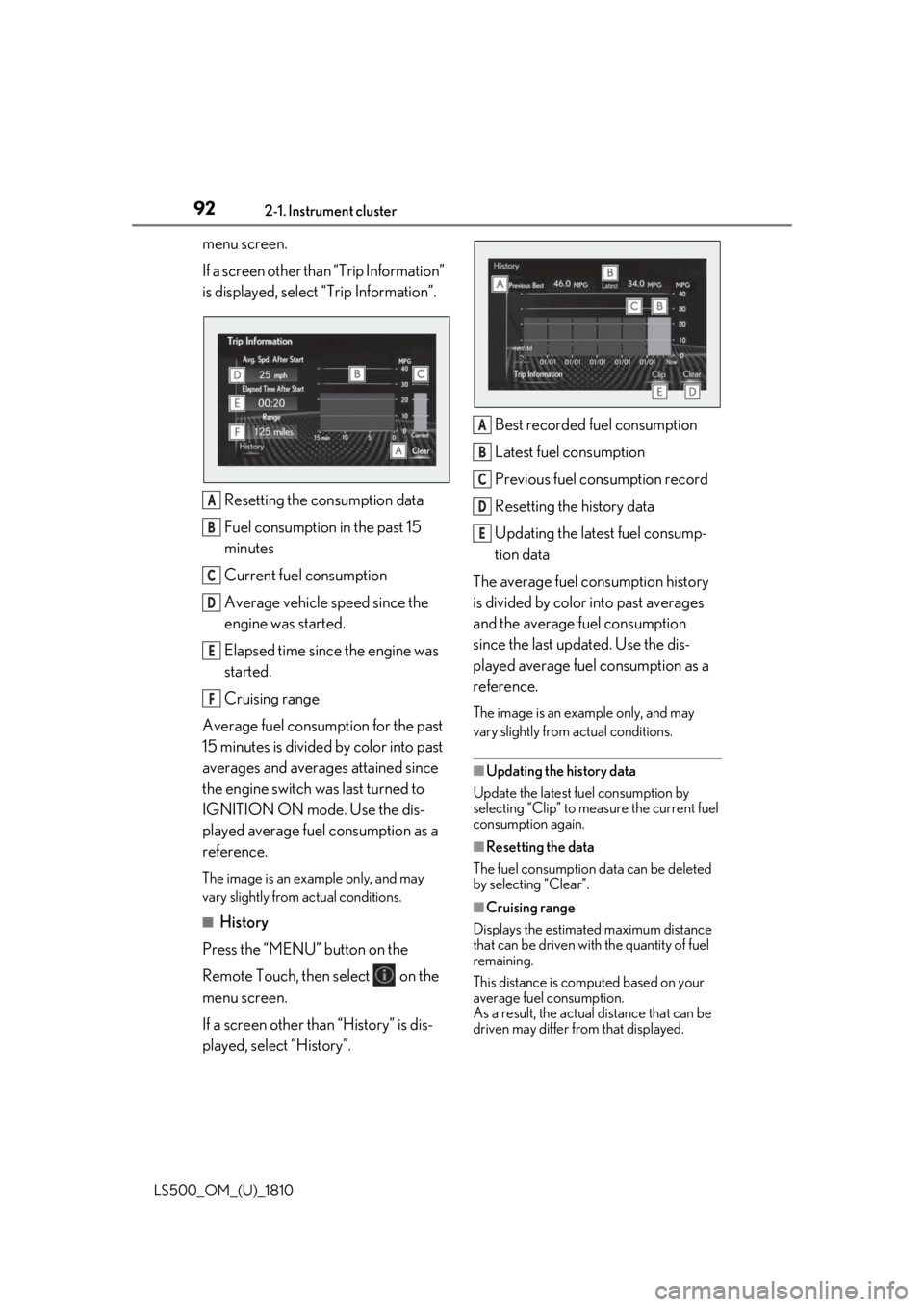
If a screen other than “Trip Information”
is displayed, select “Trip Information”.
Resetting the consumption data
Fuel consumption in the past 15
minutes
Current fuel consumption
Average vehicle speed since the
engine was started.
Elapsed time since the engine was
started.
Cruising range
Average fuel consumption for the past
15 minutes is divided by color into past
averages and averages attained since
the engine switch was last turned to
IGNITION ON mode. Use the dis-
played average fuel consumption as a
reference. The image is an example only, and may
vary slightly from actual conditions.
■
History
Press the “MENU” button on the
Remote Touch, then select on the
menu screen.
If a screen other than “History” is dis-
played, select “History”. Best recorded fuel consumption
Latest fuel consumption
Previous fuel consumption record
Resetting the history data
Updating the latest fuel consump-
tion data
The average fuel consumption history
is divided by color into past averages
and the average fuel consumption
since the last updated. Use the dis-
played average fuel consumption as a
reference. The image is an example only, and may
vary slightly from actual conditions.
■
Updating the history data
Update the latest fuel consumption by
selecting “Clip” to meas ure the current fuel
consumption again.
■
Resetting the data
The fuel consumption data can be deleted
by selecting “Clear”.
■
Cruising range
Displays the estimated maximum distance
that can be driven with the quantity of fuel
remaining.
This distance is computed based on your
average fuel consumption.
As a result, the actual distance that can be
driven may differ from that displayed.A
B
C
D
E
F A
B
C
D
E
Page 93 of 512
932-1. Instrument cluster
LS500_OM_(U)_1810 2
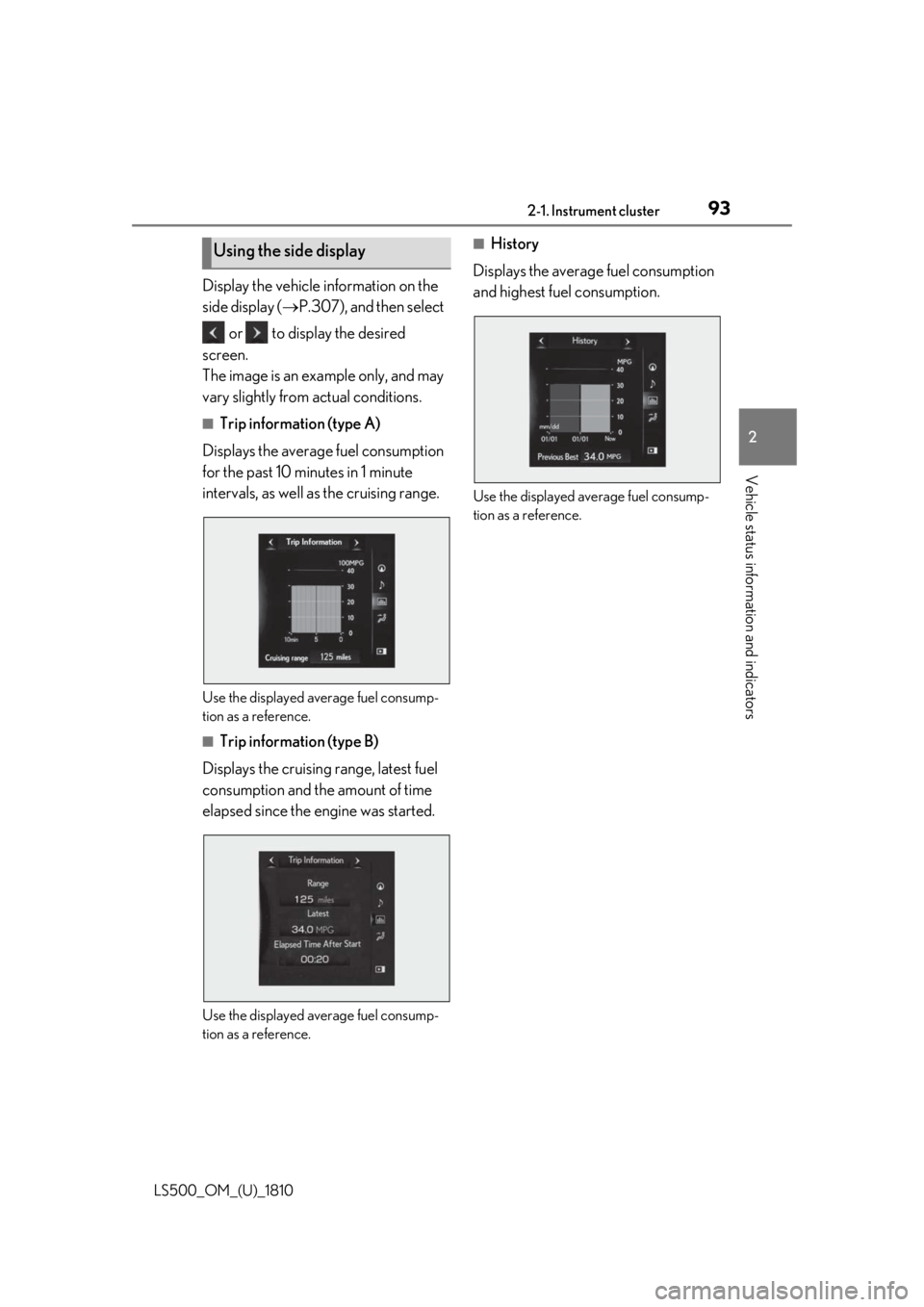
Vehicle status information and indicators Display the vehicle information on the
side display ( P.307), and then select
or to display the desired
screen.
The image is an example only, and may
vary slightly from actual conditions. ■
Trip information (type A)
Displays the average fuel consumption
for the past 10 minutes in 1 minute
intervals, as well as the cruising range.
Use the displayed average fuel consump-
tion as a reference. ■
Trip information (type B)
Displays the cruising range, latest fuel
consumption and the amount of time
elapsed since the engine was started.
Use the displayed average fuel consump-
tion as a reference. ■
History
Displays the average fuel consumption
and highest fuel consumption.
Use the displayed average fuel consump-
tion as a reference.Using the side display
Page 306 of 512
306 5-1. Remote Touch/Display
LS500_OM_(U)_1810 ■
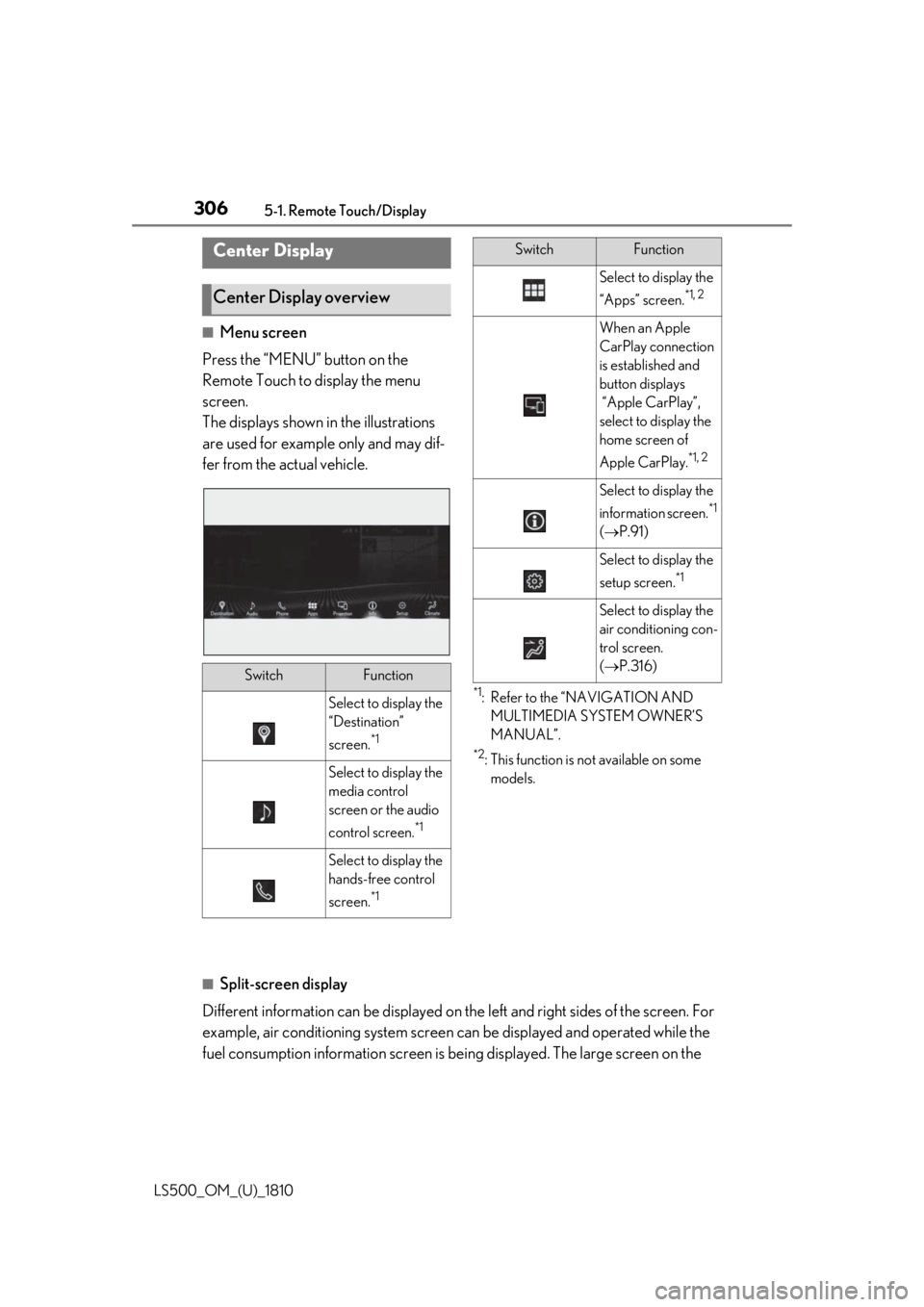
Menu screen
Press the “MENU” button on the
Remote Touch to display the menu
screen.
The displays shown in the illustrations
are used for example only and may dif-
fer from the actual vehicle. *1
: Refer to the “NAVIGATION AND
MULTIMEDIA SYSTEM OWNER’S
MANUAL”. *2
: This function is not available on some
models.
■
Split-screen display
Different information can be displayed on the left and right sides of the screen. For
example, air conditioning system screen can be displayed and operated while the
fuel consumption information screen is be ing displayed. The large screen on the Center Display
Center Display overview
Switch Function
Select to display the
“Destination”
screen. *1
Select to display the
media control
screen or the audio
control screen. *1
Select to display the
hands-free control
screen. *1 Select to display the
“Apps” screen. *1, 2
When an Apple
CarPlay connection
is established and
button displays
“Apple CarPlay”,
select to display the
home screen of
Apple CarPlay. *1, 2
Select to display the
information screen. *1
( P.91)
Select to display the
setup screen. *1
Select to display the
air conditioning con-
trol screen.
( P.316)Switch Function
Page 314 of 512
314 5-3. Using the air conditioning system and defogger
LS500_OM_(U)_1810 ■
Changing the air flow mode
P.316 ■
Switching between outside air and
recirculated air modes
Press the outside/recirculated air
mode switch. The mode changes as follows each time
the switch is pressed.
automatic mode (outside air
mode) (recirculated air mode)
automatic mode
When the system is switched to automatic
mode, the air conditioning system operates
automatically. ■
Defogging the windshield
Defoggers are used to defog the wind-
shield and front side windows.
Press the windshield defogger switch. Set the outside/reci rculated air mode
switch to outside air mode if the recircu-
lated air mode is used. (It may switch auto-
matically.)
To defog the windshield and the side win-
dows quickly, turn the air flow and tem-
perature up.
To return to the previous mode, press the
windshield defogger switch again when the
windshield is defogged.
■
Defogging the rear window and
outside rear view mirrors
Defoggers are used to defog the rear
window, and to remove raindrops, dew
and frost from the outside rear view
mirrors.
Press the rear window and outside rear
view mirror defoggers switch.
The defoggers will automatically turn off after a while. The operation time changes
according to the ambient temperature and
vehicle speed. ■
Windshield wiper de-icer (if
equipped)
P.319 ■
When the outside temperature exceeds
75°F (24°C) and the air conditioning
system is on ●
In order to reduce the air conditioning
power consumption, the air conditioning
system may switch to recirculated air
mode automatically. This may also
reduce fuel consumption. ●
It is possible to switch to outside air mode
at any time by pressing the outside/recir-
culated air mode switch. ■
Fogging up of the windows
The windows will easily fog up when the
humidity in the vehicle is high. Turning
“A/C” on will dehumidify the air from the
outlets and defog the windshield effectively. ●
If you turn “A/C” off, the windows may
fog up more easily. ●
The windows may fog up if the recircu-
lated air mode is used. ■
Outside/recirculated air mode ●
When driving on dusty roads such as tun-
nels or in heavy traffic, set the out-
side/recirculated air mode switch to the
recirculated air mode. This is effective in
preventing outside air from entering the
vehicle interior. During cooling opera-
tion, setting the recirc ulated air mode will
also cool the vehicle interior effectively.
●
Outside/recirculated air mode may auto-
matically switch depending on the tem-
perature setting or the inside
temperature.
■
Registering air conditioning settings to
electronic keys
●
Unlocking the vehicle using an electronic
key and turning the engine switch to
IGNITION ON mode will recall that
key’s registered air conditioning settings.
Page 498 of 512
498 Alphabetical Index
LS500_OM_(U)_1810 Brightness control
Instrument panel light control ........75, 79
BSM (Blind Spot Monitor)....................... 250
Buzzer
Hands off steering wheel alert (LTA)
............................................................. 236, 236 C
Card key ............................................................ 96
Care
Aluminum wheels ..................................... 358
Exterior .......................................................... 358
Interior ...............................................................361
Seat belts..........................................................361
Cargo capacity............................................... 162
Cargo net ....................................................... 340
Center Display ............................................. 306
Chains ............................................................... 301
Child restraint system
Fixed with a LATCH system .................. 53
Fixed with a seat belt................................... 49
Front passenger occupa nt classification
system ............................................................. 40
Points to remember .................................... 45
Riding with children ..................................... 45
Types of child restraint system installation
method ........................................................... 46
Using an anchor bracket .......................... 55
Child safety
Airbag precautions...................................... 34
Battery precautions ....................... 381, 439
Child restraint system................................. 46
Heated steering wheel and seat heater
precautions................................................ 327
How your child should wear the seat belt
............................................................................ 25
Moon roof precautions ............................146
Panoramic moon roof precautions ... 150
Power window lock switch..................... 144
Power window precautions ................... 143
Rear door child-protectors ................... 103 Removed electronic key battery precau-
tions .............................................................. 400
Seat belt extender precautions.............. 25
Seat belt precautions .................................. 45
Trunk precautions....................................... 104
Child-protectors........................................... 103
Cleaning
Aluminum wheels ..................................... 358
Exterior........................................................... 358
Interior .............................................................. 361
Radar sensor .......................................192, 198
Seat belts ......................................................... 361
Clock ................................................ 73, 76, 345
Clock light ........................................................331
Coat hooks..................................................... 344
Coin holder .................................................... 337
Condenser ..................................................... 378
Console box .................................................. 338
Consumption screen ...................................... 91
Cooling system..............................................377
Engine overheating.................................. 440
Cornering lights .............................................. 181
Cruise control
Dynamic radar cruise control with
full-speed range .......................... 237, 247
Cup holders ................................................... 337
Current fuel consumption .......................... 82
Curtain shield airbags .................................. 29
Customizable features .............................. 466
D
Daytime running light system ................... 179
Defogger
Outside rear view mirrors.......................314
Rear window ..................................................314
Windshield ......................................................314
Differential
Front differential oi l............. ...................... 450
Rear differential oil. .................... ........... ...... 451
Dimension ...................................................... 446
Dinghy towing.................................................163