ignition LEXUS LS500 2021 User Guide
[x] Cancel search | Manufacturer: LEXUS, Model Year: 2021, Model line: LS500, Model: LEXUS LS500 2021Pages: 520, PDF Size: 9.81 MB
Page 108 of 520
1083-2. Opening, closing and locking the doors and trunk
■Trunk opener switch
Press the trunk opener switch.
If the vehicle is equipped with a power
trunk opener and closer, the trunk lid will
fully open.
WARNING
●On an incline, the trunk lid may sud-
denly shut after it opens automatically.
Make sure the trunk lid is fully open
and secure before using the trunk.
●In the following situations, the power
trunk opener and closer may detect an
abnormality and automatic operation
may be stopped. In this case, the trunk
lid has to be operated manually. Take
extra care in this situation, as the
stopped trunk lid ma y suddenly shut,
causing an accident.
• When the trunk lid contacts an obsta- cle
• When the battery voltage suddenly drops, such as when the engine switch
is turned to IGNITION ON mode or
the engine is started during automatic
operation
●Do not attach any accessories other
than genuine Lexus parts to the trunk
lid. The power trunk opener and closer
may not operate, caus ing itself to mal-
function, or the trun k lid may suddenly
shut again after it is opened.
■Hands Free Power Trunk Lid (if
equipped)
Observe the following precautions.
Failure to do so may cause serious injury.
●Exhaust gasses cause the exhaust
pipes to become quite hot. When
operating the Hands Free Power Trunk
Lid, be careful not to touch the exhaust
pipe.
●Do not operate the Hands Free Power
Trunk Lid if there is little space under
the rear bumper.
■Jam protection function
Observe the following precautions.
Failure to do so may cause serious injury.
●Never use any part of your body to
intentionally activate the jam protec-
tion function.
●The jam protection function may not
work if something gets caught just
before the trunk lid fully closes. Be
careful not to catch fingers or anything
else in the trunk lid.
●The jam protection function may not
work depending on the shape of the
object that is caught. Be careful not to
catch fingers or anything else.
NOTICE
■To prevent trunk easy closer malfunc-
tions
Do not apply force to the trunk lid while
the trunk easy closer is operating.
■To prevent damage to the power
trunk opener and closer (vehicles
with power trunk opener and closer)
●Make sure that there is no luggage or
snow on the trunk lid before operating
the power trunk opener and closer. In
addition, make sure that there is no ice
between the trunk lid and frame that
prevents movement of the trunk lid.
Operating the power trunk opener
and closer when excessive load is
present on the trunk lid may cause a
malfunction.
●Do not apply excessive force to the
trunk lid while the power trunk opener
and closer is operating.
Opening/closing the trunk
Page 127 of 520
1273-3. Adjusting the seats
3
Before driving
“Lumbar”
Applies pressure sequentially from the bot-
tom to the top of the lumbar area of the
seatback
4 Select the desired intensity and
then confirm the setting.
The intensity can be adjusted in 5 steps.
To stop the operation select “Stop”.
If a seat is not occupi ed, do not operate the
front seat refresh system for that seat.
■Refresh system
●Operating conditions
• The engine switch is in IGNITION ON mode.
• The temperature in the cabin is not
extremely high.
• For the front passenger’s seat: The weight of an occupant is detected on the front
passenger’s seat or the front passenger’s
seat belt is fastened.
Once weight is detect ed on the seat, the
seat will be judged as occupied until the
front passenger’s door is opened then
closed or the engine switch is turned off.
●Automatic stop function
• The operation will be canceled automati-
cally after approximately 15 minutes.
•If the power easy ac cess system begins
operating, the front seat refresh system
will stop.
WARNING
■Important points while driving
Do not adjust the driver’s seat refresh
system while driving.
Using it may affect your ability to control
the vehicle, possibly leading to an acci-
dent resulting in death or serious injury.
■Using the refresh system
●Those who are pregnant, have recently
given birth, or suffer from ailments
requiring rest (heart disease etc.)
should consult a doctor before use.
●Do not allow children to use the
refresh function.
●Do not use immediately after consum-
ing a meal or alcohol, or for an
extended period of time.
●If you feel sick while using the refresh
function, immediately discontinue use.
Page 131 of 520
1313-3. Adjusting the seats
3
Before driving
The rear seat relaxation system utilizes
pneumatic chambers and dedicated
heaters, and applies pressure to the
occupant’s body at different modes
and intensities.
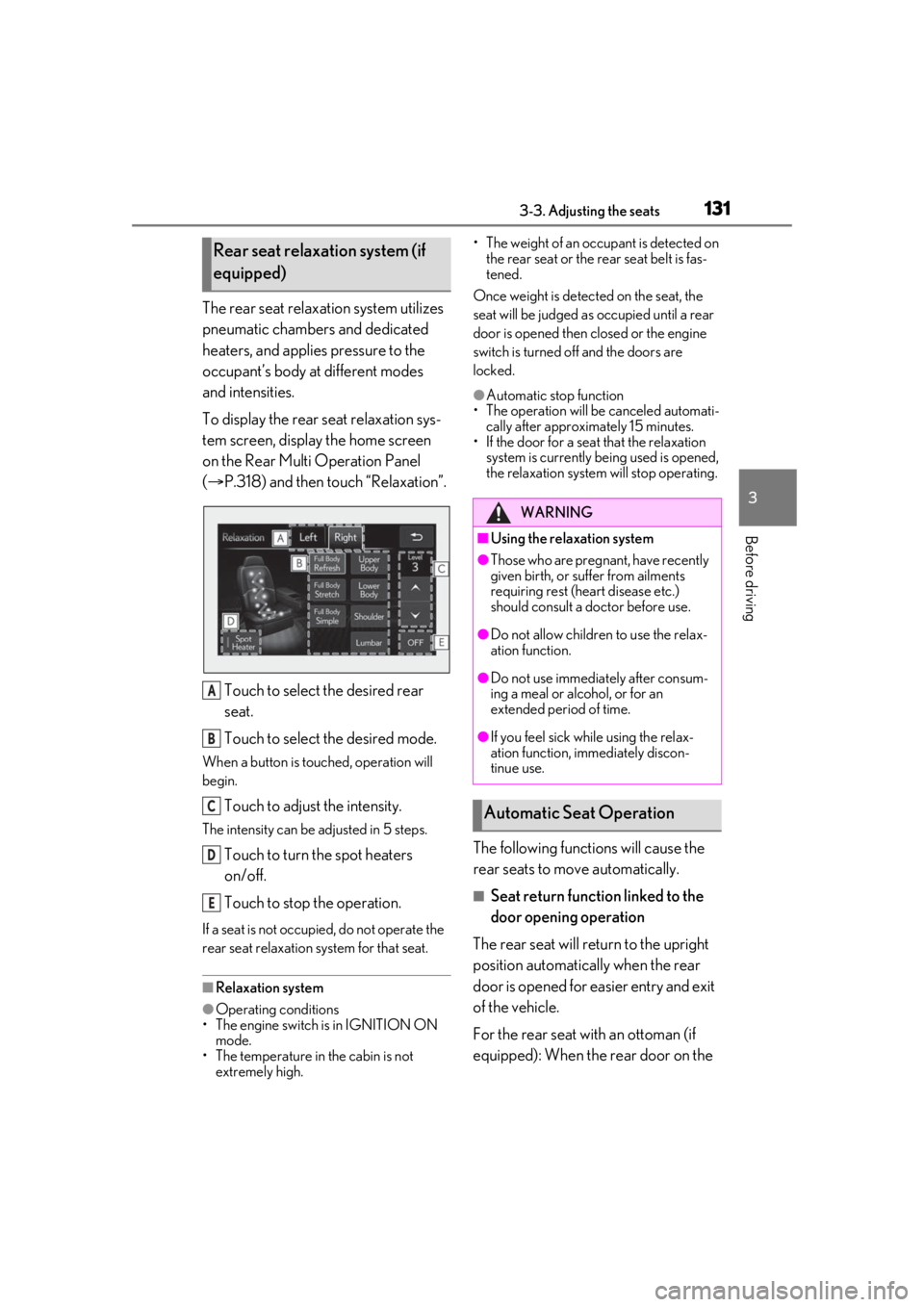
To display the rear seat relaxation sys-
tem screen, display the home screen
on the Rear Multi Operation Panel
( P.318) and then touch “Relaxation”.
Touch to select the desired rear
seat.
Touch to select the desired mode.
When a button is touched, operation will
begin.
Touch to adjust the intensity.
The intensity can be adjusted in 5 steps.
Touch to turn the spot heaters
on/off.
Touch to stop the operation.
If a seat is not occupi ed, do not operate the
rear seat relaxation system for that seat.
■Relaxation system
●Operating conditions
• The engine switch is in IGNITION ON mode.
• The temperature in the cabin is not extremely high. • The weight of an occupant is detected on
the rear seat or the rear seat belt is fas-
tened.
Once weight is detected on the seat, the
seat will be judged as occupied until a rear
door is opened then closed or the engine
switch is turned off and the doors are
locked.
●Automatic stop function
• The operation will be canceled automati-
cally after approximately 15 minutes.
• If the door for a seat that the relaxation
system is currently be ing used is opened,
the relaxation system will stop operating.
The following functions will cause the
rear seats to move automatically.
■Seat return function linked to the
door opening operation
The rear seat will return to the upright
position automatically when the rear
door is opened for ea sier entry and exit
of the vehicle.
For the rear seat with an ottoman (if
equipped): When the rear door on the
Rear seat relaxation system (if
equipped)
A
B
C
D
E
WARNING
■Using the relaxation system
●Those who are pregnant, have recently
given birth, or suffer from ailments
requiring rest (heart disease etc.)
should consult a doctor before use.
●Do not allow children to use the relax-
ation function.
●Do not use immediately after consum-
ing a meal or alcohol, or for an
extended period of time.
●If you feel sick while using the relax-
ation function, immediately discon-
tinue use.
Automatic Seat Operation
Page 136 of 520
1363-3. Adjusting the seats
If the button could not be registered, the
buzzer sounds continuously for approxi-
mately 3 seconds.
■Cancelation procedure
Carry only the key you want to cancel
and then close the driver’s door.
If 2 or more keys are in the vehicle, the
driving position cannot be canceled
properly.
1 Turn the engine switch to IGNI-
TION ON mode.
2 Check that the shift position is in P.
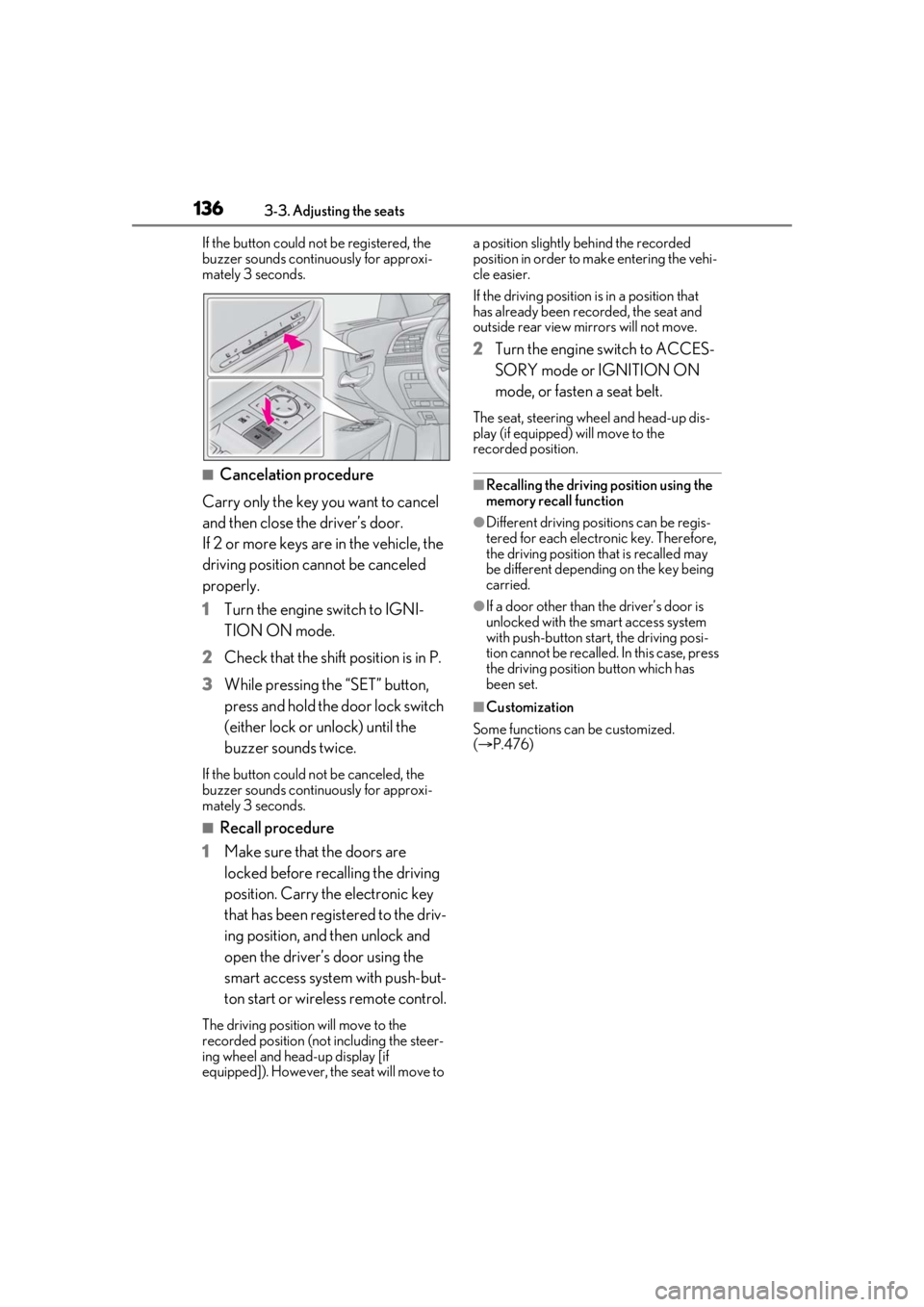
3 While pressing the “SET” button,
press and hold the door lock switch
(either lock or unlock) until the
buzzer sounds twice.
If the button could not be canceled, the
buzzer sounds continuously for approxi-
mately 3 seconds.
■Recall procedure
1 Make sure that the doors are
locked before recalling the driving
position. Carry the electronic key
that has been registered to the driv-
ing position, and then unlock and
open the driver’s door using the
smart access system with push-but-
ton start or wireless remote control.
The driving position will move to the
recorded position (not including the steer-
ing wheel and head-up display [if
equipped]). However, the seat will move to a position slightly behind the recorded
position in order to make entering the vehi-
cle easier.
If the driving position is in a position that
has already been recorded, the seat and
outside rear view mirrors will not move.
2
Turn the engine switch to ACCES-
SORY mode or IGNITION ON
mode, or fasten a seat belt.
The seat, steering wheel and head-up dis-
play (if equipped) will move to the
recorded position.
■Recalling the driving position using the
memory recall function
●Different driving positions can be regis-
tered for each electronic key. Therefore,
the driving position that is recalled may
be different depending on the key being
carried.
●If a door other than the driver’s door is
unlocked with the smart access system
with push-button start, the driving posi-
tion cannot be recalled. In this case, press
the driving position button which has
been set.
■Customization
Some functions can be customized.
( P.476)
Page 141 of 520
1413-4. Adjusting the steering wheel and mirrors
3
Before driving
3-4.Adjusting the steering wheel and mirrors
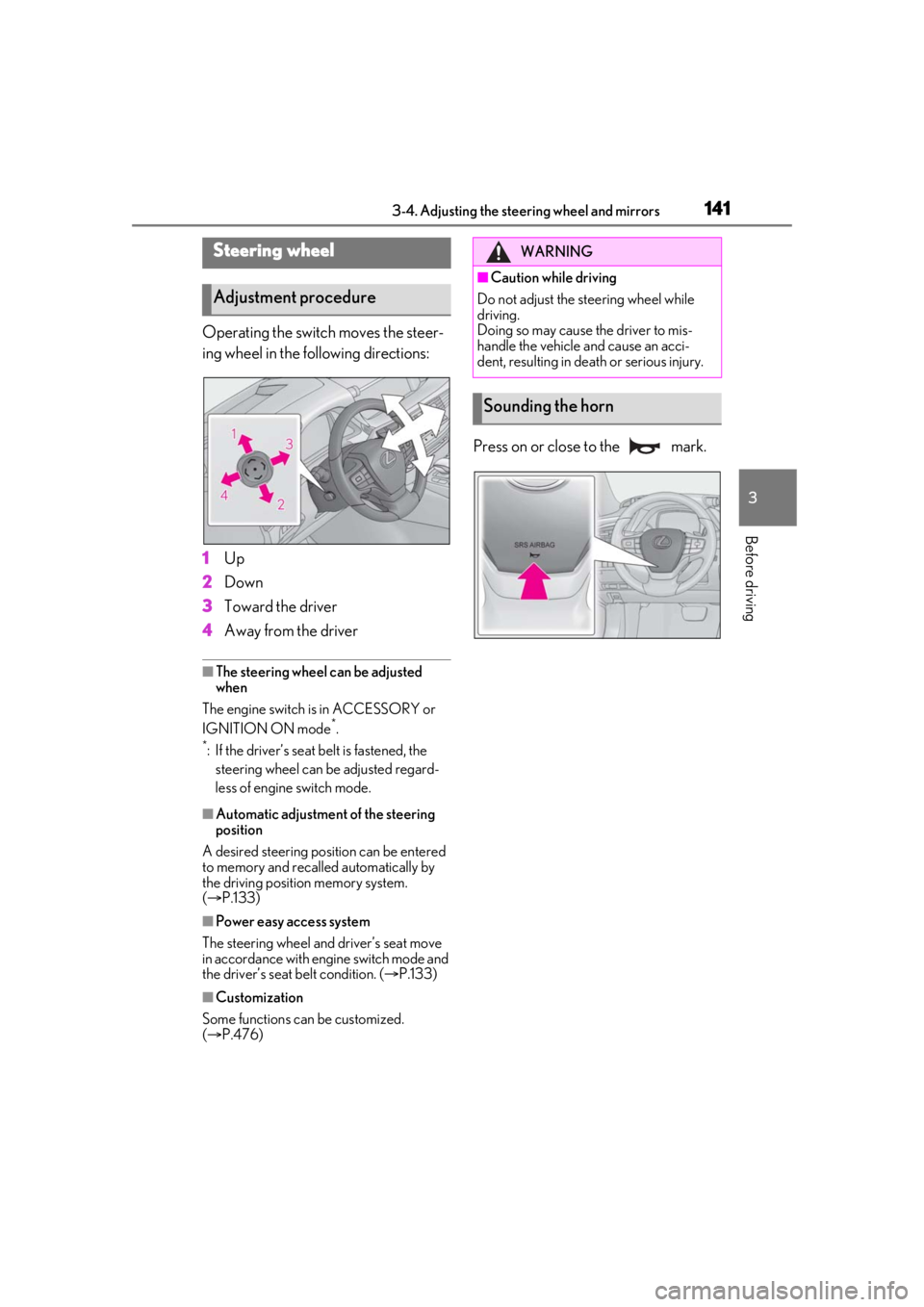
Operating the switch moves the steer-
ing wheel in the following directions:
1Up
2 Down
3 Toward the driver
4 Away from the driver
■The steering wheel can be adjusted
when
The engine switch is in ACCESSORY or
IGNITION ON mode
*.
*: If the driver’s seat belt is fastened, the steering wheel can be adjusted regard-
less of engine switch mode.
■Automatic adjustment of the steering
position
A desired steering position can be entered
to memory and recalled automatically by
the driving position memory system.
( P.133)
■Power easy access system
The steering wheel and driver’s seat move
in accordance with engine switch mode and
the driver’s seat belt condition. ( P.133)
■Customization
Some functions can be customized.
( P.476)
Press on or close to the mark.
Steering wheel
Adjustment procedure
WARNING
■Caution while driving
Do not adjust the steering wheel while
driving.
Doing so may cause the driver to mis-
handle the vehicle and cause an acci-
dent, resulting in death or serious injury.
Sounding the horn
Page 144 of 520
1443-4. Adjusting the steering wheel and mirrors
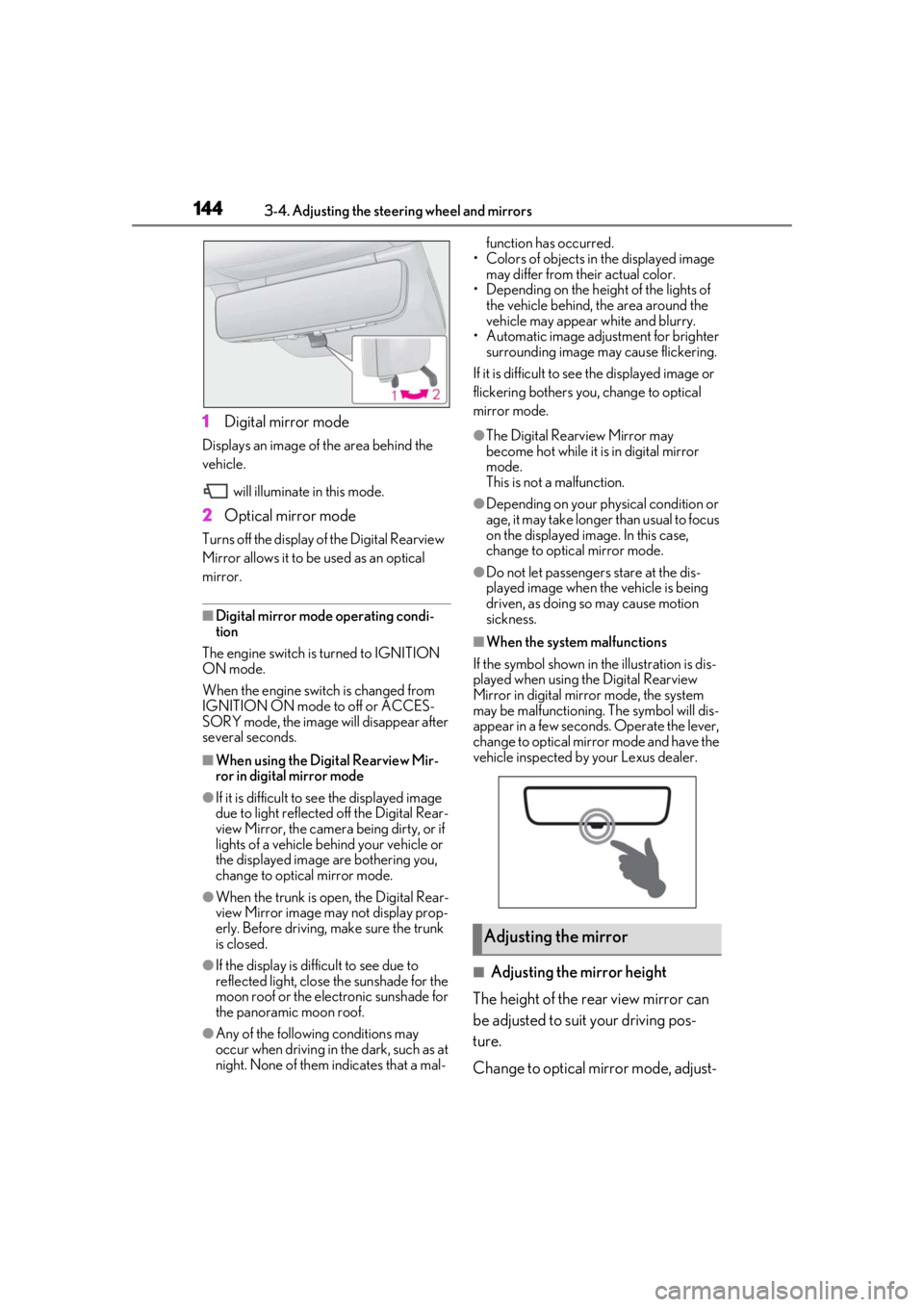
1Digital mirror mode
Displays an image of the area behind the
vehicle.
will illuminate in this mode.
2Optical mirror mode
Turns off the display of the Digital Rearview
Mirror allows it to be used as an optical
mirror.
■Digital mirror mode operating condi-
tion
The engine switch is turned to IGNITION
ON mode.
When the engine switch is changed from
IGNITION ON mode to off or ACCES-
SORY mode, the image will disappear after
several seconds.
■When using the Digital Rearview Mir-
ror in digital mirror mode
●If it is difficult to see the displayed image
due to light reflected off the Digital Rear-
view Mirror, the camera being dirty, or if
lights of a vehicle behind your vehicle or
the displayed image are bothering you,
change to optical mirror mode.
●When the trunk is open, the Digital Rear-
view Mirror image may not display prop-
erly. Before driving, make sure the trunk
is closed.
●If the display is difficult to see due to
reflected light, close the sunshade for the
moon roof or the electronic sunshade for
the panoramic moon roof.
●Any of the following conditions may
occur when driving in the dark, such as at
night. None of them indicates that a mal- function has occurred.
• Colors of objects in the displayed image may differ from their actual color.
• Depending on the height of the lights of the vehicle behind, the area around the
vehicle may appear white and blurry.
• Automatic image adjustment for brighter surrounding image may cause flickering.
If it is difficult to see the displayed image or
flickering bothers you, change to optical
mirror mode.
●The Digital Rearview Mirror may
become hot while it is in digital mirror
mode.
This is not a malfunction.
●Depending on your physical condition or
age, it may take longer than usual to focus
on the displayed image. In this case,
change to optical mirror mode.
●Do not let passengers stare at the dis-
played image when the vehicle is being
driven, as doing so may cause motion
sickness.
■When the system malfunctions
If the symbol shown in the illustration is dis-
played when using the Digital Rearview
Mirror in digital mirror mode, the system
may be malfunctioning. The symbol will dis-
appear in a few second s. Operate the lever,
change to optical mirror mode and have the
vehicle inspected by your Lexus dealer.
■Adjusting the mirror height
The height of the rear view mirror can
be adjusted to suit your driving pos-
ture.
Change to optical mirror mode, adjust-
Adjusting the mirror
Page 145 of 520
1453-4. Adjusting the steering wheel and mirrors
3
Before driving
ing the height of the rear view mirror by
moving it up and down.
■Display settings (digital mirror
mode)
Settings of the display in the digital mir-
ror mode, on/off operation of the auto-
matic anti-glare function, etc. can be
changed.
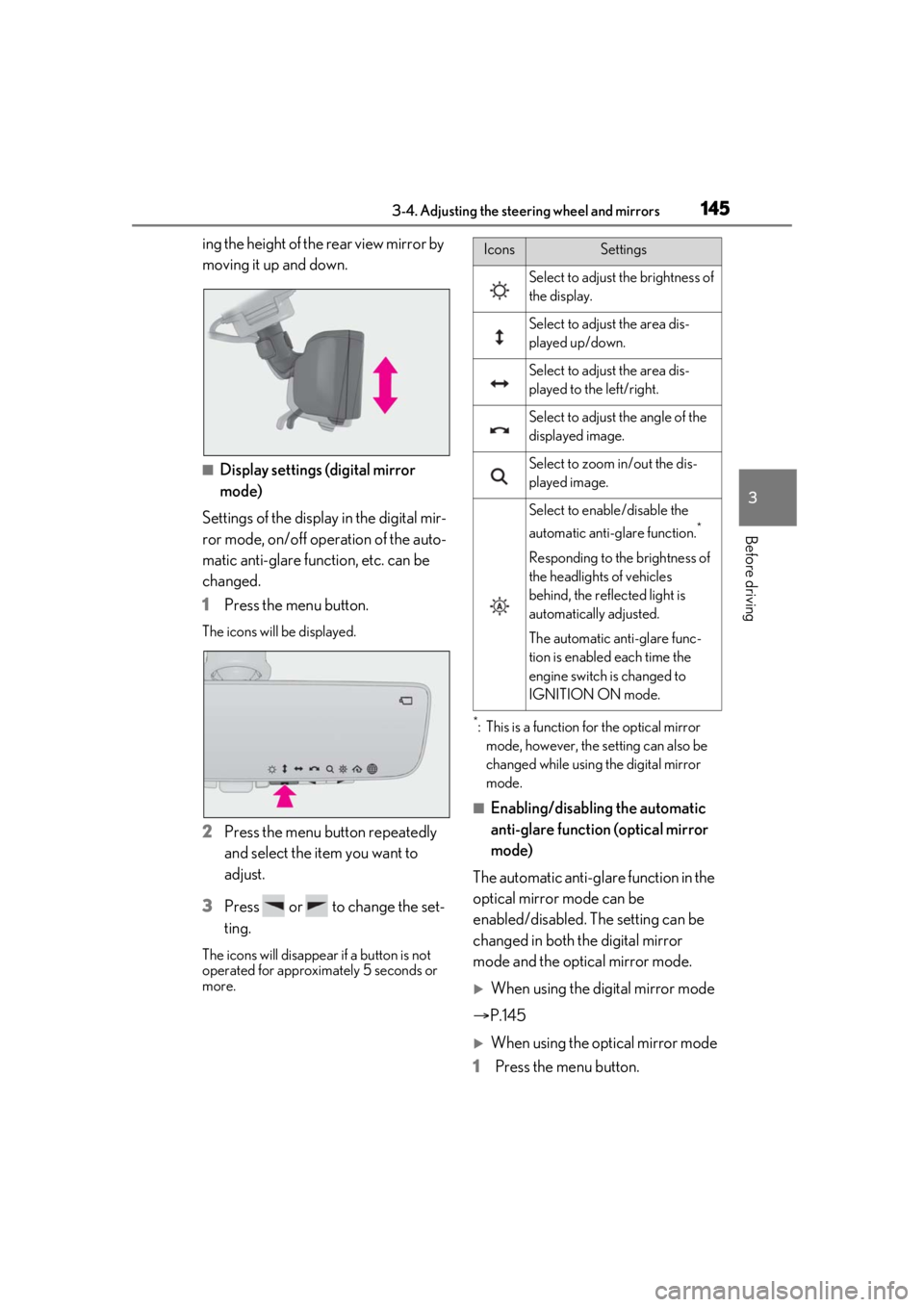
1 Press the menu button.
The icons will be displayed.
2Press the menu button repeatedly
and select the item you want to
adjust.
3 Press or to change the set-
ting.
The icons will disappear if a button is not
operated for approximately 5 seconds or
more.
*: This is a function for the optical mirror
mode, however, the setting can also be
changed while using the digital mirror
mode.
■Enabling/disabling the automatic
anti-glare function (optical mirror
mode)
The automatic anti-glare function in the
optical mirror mode can be
enabled/disabled. The setting can be
changed in both the digital mirror
mode and the optical mirror mode.
When using the digital mirror mode
P.145
When using the op tical mirror mode
1 Press the menu button.
IconsSettings
Select to adjust the brightness of
the display.
Select to adjust the area dis-
played up/down.
Select to adjust the area dis-
played to the left/right.
Select to adjust the angle of the
displayed image.
Select to zoom in/out the dis-
played image.
Select to enable/disable the
automatic anti-glare function.
*
Responding to the brightness of
the headlights of vehicles
behind, the reflected light is
automatically adjusted.
The automatic anti-glare func-
tion is enabled each time the
engine switch is changed to
IGNITION ON mode.
Page 151 of 520
1513-4. Adjusting the steering wheel and mirrors
3
Before driving
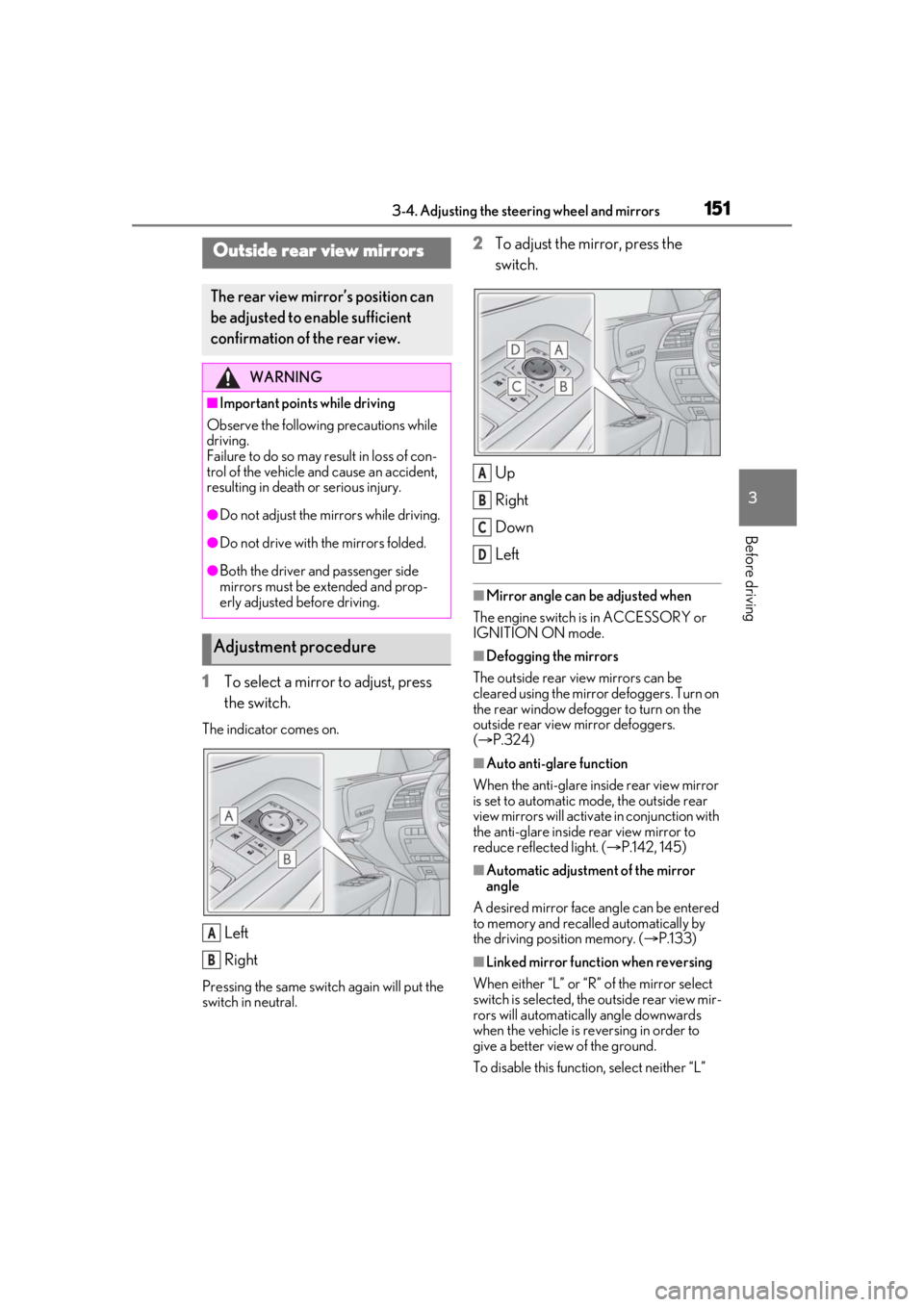
1To select a mirror to adjust, press
the switch.
The indicator comes on.
Left
Right
Pressing the same switch again will put the
switch in neutral.
2To adjust the mirror, press the
switch.
Up
Right
Down
Left
■Mirror angle can be adjusted when
The engine switch is in ACCESSORY or
IGNITION ON mode.
■Defogging the mirrors
The outside rear view mirrors can be
cleared using the mirror defoggers. Turn on
the rear window defogger to turn on the
outside rear view mirror defoggers.
( P.324)
■Auto anti-glare function
When the anti-glare inside rear view mirror
is set to automatic mode, the outside rear
view mirrors will activate in conjunction with
the anti-glare inside rear view mirror to
reduce reflec ted light. (P.142, 145)
■Automatic adjustment of the mirror
angle
A desired mirror face angle can be entered
to memory and recalled automatically by
the driving position memory. ( P.133)
■Linked mirror function when reversing
When either “L” or “R” of the mirror select
switch is selected, the outside rear view mir-
rors will automatically angle downwards
when the vehicle is re versing in order to
give a better view of the ground.
To disable this function, select neither “L”
Outside rear view mirrors
The rear view mirror’s position can
be adjusted to enable sufficient
confirmation of the rear view.
WARNING
■Important points while driving
Observe the following precautions while
driving.
Failure to do so may result in loss of con-
trol of the vehicle and cause an accident,
resulting in death or serious injury.
●Do not adjust the mirrors while driving.
●Do not drive with the mirrors folded.
●Both the driver and passenger side
mirrors must be extended and prop-
erly adjusted before driving.
Adjustment procedure
A
B
A
B
C
D
Page 153 of 520
1533-5. Opening, closing the windows and moon roof
3
Before driving
3-5.Opening, closing the windows and moon roof
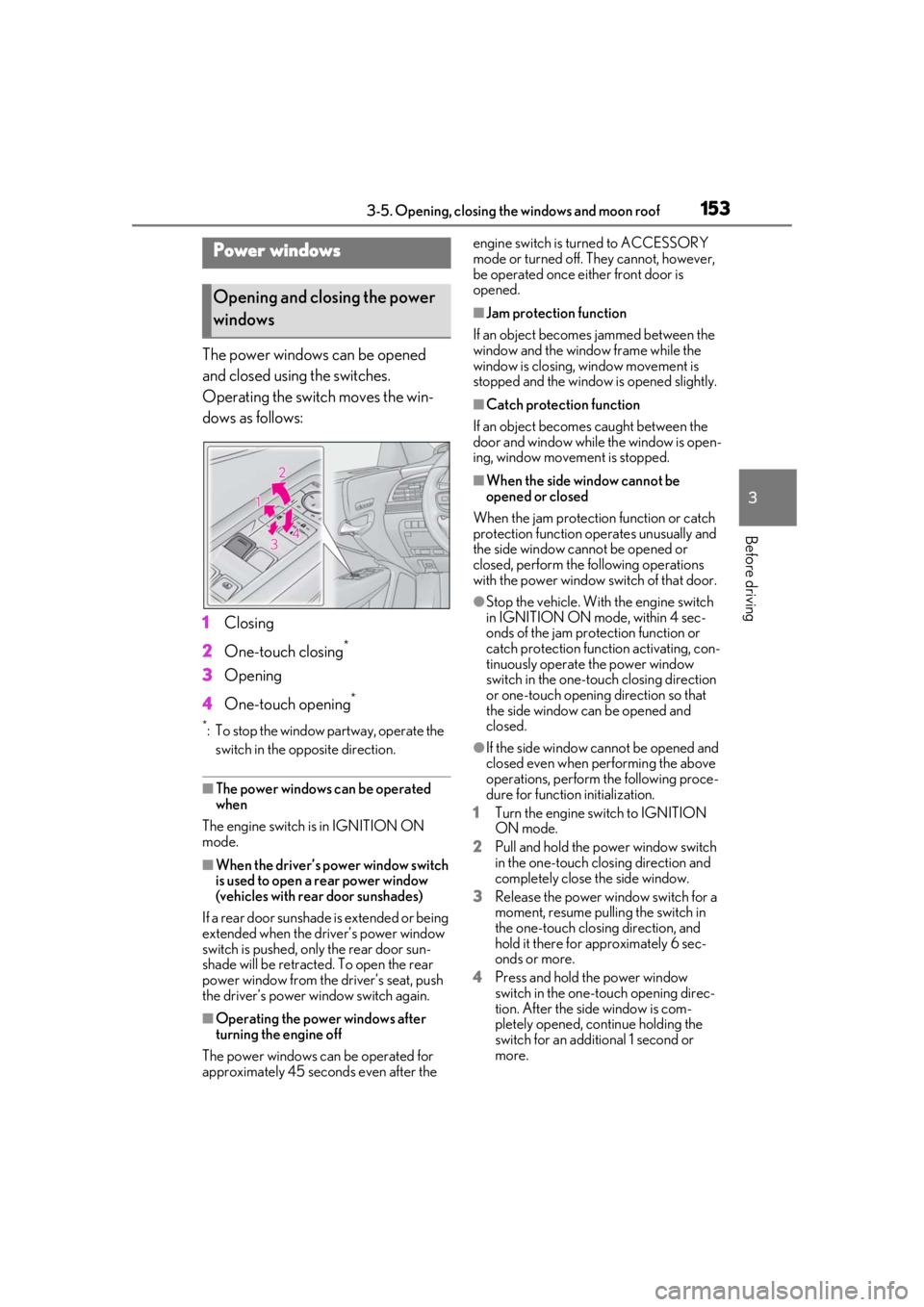
The power windows can be opened
and closed using the switches.
Operating the switch moves the win-
dows as follows:
1Closing
2 One-touch closing
*
3Opening
4 One-touch opening
*
*: To stop the window partway, operate the
switch in the op posite direction.
■The power windows can be operated
when
The engine switch is in IGNITION ON
mode.
■When the driver’s power window switch
is used to open a rear power window
(vehicles with rear door sunshades)
If a rear door sunshade is extended or being
extended when the driver’s power window
switch is pushed, only the rear door sun-
shade will be retracted. To open the rear
power window from the driver’s seat, push
the driver’s power window switch again.
■Operating the power windows after
turning the engine off
The power windows can be operated for
approximately 45 seconds even after the engine switch is turned to ACCESSORY
mode or turned off. They cannot, however,
be operated once either front door is
opened.
■Jam protection function
If an object becomes jammed between the
window and the window frame while the
window is closing, window movement is
stopped and the window is opened slightly.
■Catch protection function
If an object becomes caught between the
door and window while the window is open-
ing, window movement is stopped.
■When the side window cannot be
opened or closed
When the jam protection function or catch
protection function operates unusually and
the side window cannot be opened or
closed, perform the following operations
with the power window switch of that door.
●Stop the vehicle. With the engine switch
in IGNITION ON mode, within 4 sec-
onds of the jam protection function or
catch protection function activating, con-
tinuously operate the power window
switch in the one-touch closing direction
or one-touch opening direction so that
the side window can be opened and
closed.
●If the side window cannot be opened and
closed even when performing the above
operations, perform the following proce-
dure for function initialization.
1 Turn the engine switch to IGNITION
ON mode.
2 Pull and hold the power window switch
in the one-touch closing direction and
completely close the side window.
3 Release the power window switch for a
moment, resume pulling the switch in
the one-touch closing direction, and
hold it there for approximately 6 sec-
onds or more.
4 Press and hold the power window
switch in the one-touch opening direc-
tion. After the side window is com-
pletely opened, continue holding the
switch for an additional 1 second or
more.
Power windows
Opening and closing the power
windows
Page 155 of 520
1553-5. Opening, closing the windows and moon roof
3
Before driving
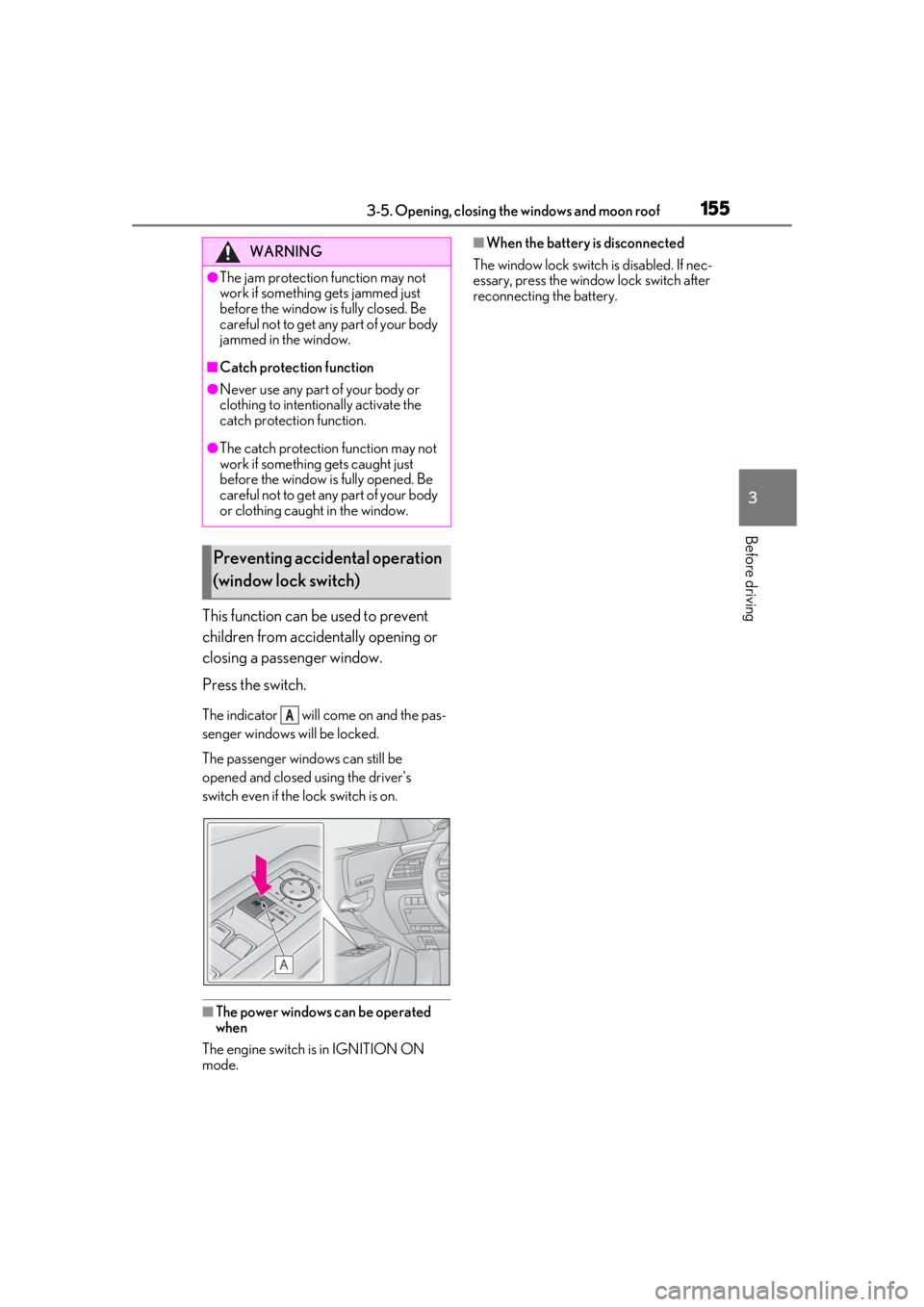
This function can be used to prevent
children from accidentally opening or
closing a passenger window.
Press the switch.
The indicator will come on and the pas-
senger windows will be locked.
The passenger windows can still be
opened and closed using the driver’s
switch even if the lock switch is on.
■The power windows can be operated
when
The engine switch is in IGNITION ON
mode.
■When the battery is disconnected
The window lock switch is disabled. If nec-
essary, press the window lock switch after
reconnecting the battery.WARNING
●The jam protection function may not
work if something gets jammed just
before the window is fully closed. Be
careful not to get any part of your body
jammed in the window.
■Catch protection function
●Never use any part of your body or
clothing to intentio nally activate the
catch protection function.
●The catch protection function may not
work if something gets caught just
before the window is fully opened. Be
careful not to get any part of your body
or clothing caught in the window.
Preventing accidental operation
(window lock switch)
A