ignition LEXUS LS500 2021 Owner's Manual
[x] Cancel search | Manufacturer: LEXUS, Model Year: 2021, Model line: LS500, Model: LEXUS LS500 2021Pages: 520, PDF Size: 9.81 MB
Page 156 of 520
1563-5. Opening, closing the windows and moon roof
*:If equipped
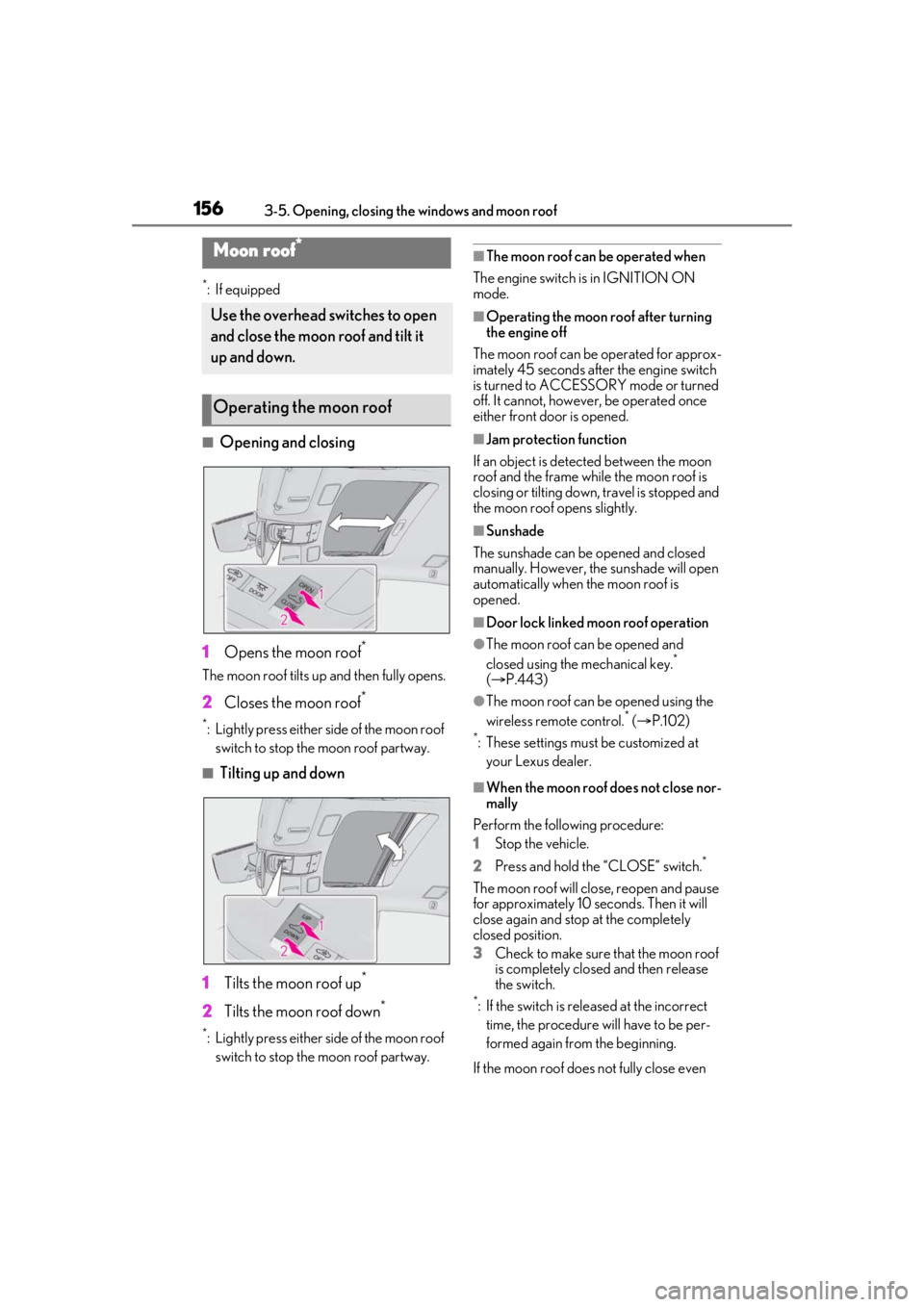
■Opening and closing
1 Opens the moon roof
*
The moon roof tilts up and then fully opens.
2Closes the moon roof*
*: Lightly press either side of the moon roof
switch to stop the moon roof partway.
■Tilting up and down
1 Tilts the moon roof up
*
2Tilts the moon roof down*
*: Lightly press either side of the moon roof
switch to stop the moon roof partway.
■The moon roof can be operated when
The engine switch is in IGNITION ON
mode.
■Operating the moon roof after turning
the engine off
The moon roof can be operated for approx-
imately 45 seconds after the engine switch
is turned to ACCESSORY mode or turned
off. It cannot, howeve r, be operated once
either front door is opened.
■Jam protection function
If an object is dete cted between the moon
roof and the frame while the moon roof is
closing or tilting down, travel is stopped and
the moon roof opens slightly.
■Sunshade
The sunshade can be opened and closed
manually. However, the sunshade will open
automatically when the moon roof is
opened.
■Door lock linked moon roof operation
●The moon roof can be opened and
closed using the mechanical key.*
( P.443)
●The moon roof can be opened using the
wireless remote control.* ( P.102)*: These settings must be customized at
your Lexus dealer.
■When the moon roof does not close nor-
mally
Perform the following procedure:
1 Stop the vehicle.
2 Press and hold th e “CLOSE” switch.
*
The moon roof will close, reopen and pause
for approximately 10 seconds. Then it will
close again and stop at the completely
closed position.
3Check to make sure that the moon roof
is completely closed and then release
the switch.
*: If the switch is released at the incorrect
time, the procedure will have to be per-
formed again from the beginning.
If the moon roof does not fully close even
Moon roof*
Use the overhead switches to open
and close the moon roof and tilt it
up and down.
Operating the moon roof
Page 160 of 520

1603-5. Opening, closing the windows and moon roof
■The panoramic moon roof can be oper-
ated when
The engine switch is in IGNITION ON
mode.
■Operating the panoramic moon roof
after turning the engine off
The panoramic moon roof and electronic
roof sunshade can be operated for approxi-
mately 45 seconds afte r the engine switch
is turned to ACCESSORY mode or turned
off. It cannot, however, be operated once
the driver’s door is opened.
■Jam protection function
If an object is detected between the pan-
oramic moon roof and the frame in the fol-
lowing situations, travel is stopped and the
panoramic moon roof opens slightly:
●The panoramic moon roof is closing or
tilting down.
●The electronic roof sunshade is closing.
■Door lock linked panoramic moon roof
operation
●The panoramic moon roof can be
opened and closed using the mechanical
key.
* ( P.443)
●The panoramic moon roof can be
opened using the wireless remote con-
trol.
*( P.102)
*: These settings must be customized at
your Lexus dealer.
■When the panoramic moon roof or elec-
tronic front roof sunshade does not
close normally
Perform the following procedure:
1 Stop the vehicle.
2 Turn the engine switch to IGNITION
ON mode.
3 Press and hold the “CLOSE” switch or
the front roof sunshade close switch.
Continue pressing the switch for
approximately 10 seconds after the
panoramic moon roof or electronic
front roof sunshade closes and reopens.
The panoramic moon roof and elec-
tronic front roof sunshade will start to
close.
*
4Check that the panoramic moon roof
and electronic front roof sunshade are
fully closed and release the switch.
*: If the switch is released at the incorrect
time, the procedure will have to be per-
formed again from the beginning.
If the panoramic moon roof or electronic
front roof sunshade does not fully close
even after performing the above procedure
correctly, have the vehicle inspected by
your Lexus dealer.
■When the electronic rear roof sunshade
does not close normally
Perform the following procedure:
1 Stop the vehicle.
2 Turn the engine switch to IGNITION
ON mode.
3 Press and hold the rear roof sunshade
switch. Continue pressing the switch for
approximately 10 seconds after the
electronic rear roof sunshade closes
and reopens. The elec tronic rear roof
sunshade will start to close.
*
4 Check that the electronic rear roof sun-
shade are fully closed and release the
switch.
*: If the switch is released at the incorrect
time, the procedure will have to be per-
formed again from the beginning.
If the panoramic moon roof or electronic
front roof sunshade does not fully close
even after performing the above procedure
correctly, have the vehicle inspected by
your Lexus dealer.
■If the panoramic moon roof or elec-
tronic front roof sunshade does not
move normally
If the panoramic moon roof or electronic
front roof sunshade does not open or close
normally or the automatic opening function
does not operate, perform the following ini-
tialization procedure.
1 Stop the vehicle.
2 Turn the engine switch to IGNITION
ON mode.
3 Fully close the panoramic moon roof
and electronic front roof sunshade.
Page 161 of 520
1613-5. Opening, closing the windows and moon roof
3
Before driving
4Press and hold the “CLOSE” switch.*
The electronic front roof sunshade will open
after approximately 10 seconds. Then the
panoramic moon roof will open, close, tilt
up and tilt down. After that, the electronic
front roof sunshade w ill fully close and stop.
5 Check that the panoramic moon roof
and electronic front roof sunshade are
fully closed and release the switch.
*: If the switch is released at the incorrect
time, the procedure will have to be per-
formed again from the beginning.
If, after performing the above procedures
correctly, the panoramic moon roof and
electronic front roof sunshade still does not
open or close normally or the automatic
opening function does not operate, have
the vehicle inspected by your Lexus dealer.
■If the electronic rear roof sunshade
does not move normally
If the electronic rear roof sunshade does
not open or close normally or the automatic
opening function does not operate, per-
form the following initialization procedure.
1 Stop the vehicle.
2 Turn the engine switch to IGNITION
ON mode.
3 Open the rear roof sunshade.
4 Press and hold the rear roof sunshade
switch.
*
Continue pressing th e switch for approxi-
mately 10 seconds after the electronic rear
roof sunshade closes. The electronic rear
roof sunshade will be gin operating again
and stop at the fully closed position.
5 Check that the electronic rear roof sun-
shade are fully closed and release the
switch.
*: If the switch is released at the incorrect
time, the procedure will have to be per-
formed again from the beginning.
If, after performing the above procedures
correctly, the electronic rear roof sunshade
still does not open or close normally or the
automatic opening function does not oper-
ate, have the vehicle inspected by your
Lexus dealer.
■Panoramic moon roof open warning
buzzer
A buzzer sounds and a message is shown
on the multi-informat ion display in the
instrument cluster when the engine switch
is turned off and the driver’s door is opened
with the panoramic moon roof open.
■Customization
Some functions can be customized.
( P.476)
WARNING
Observe the following precautions.
Failing to do so may cause death or seri-
ous injury.
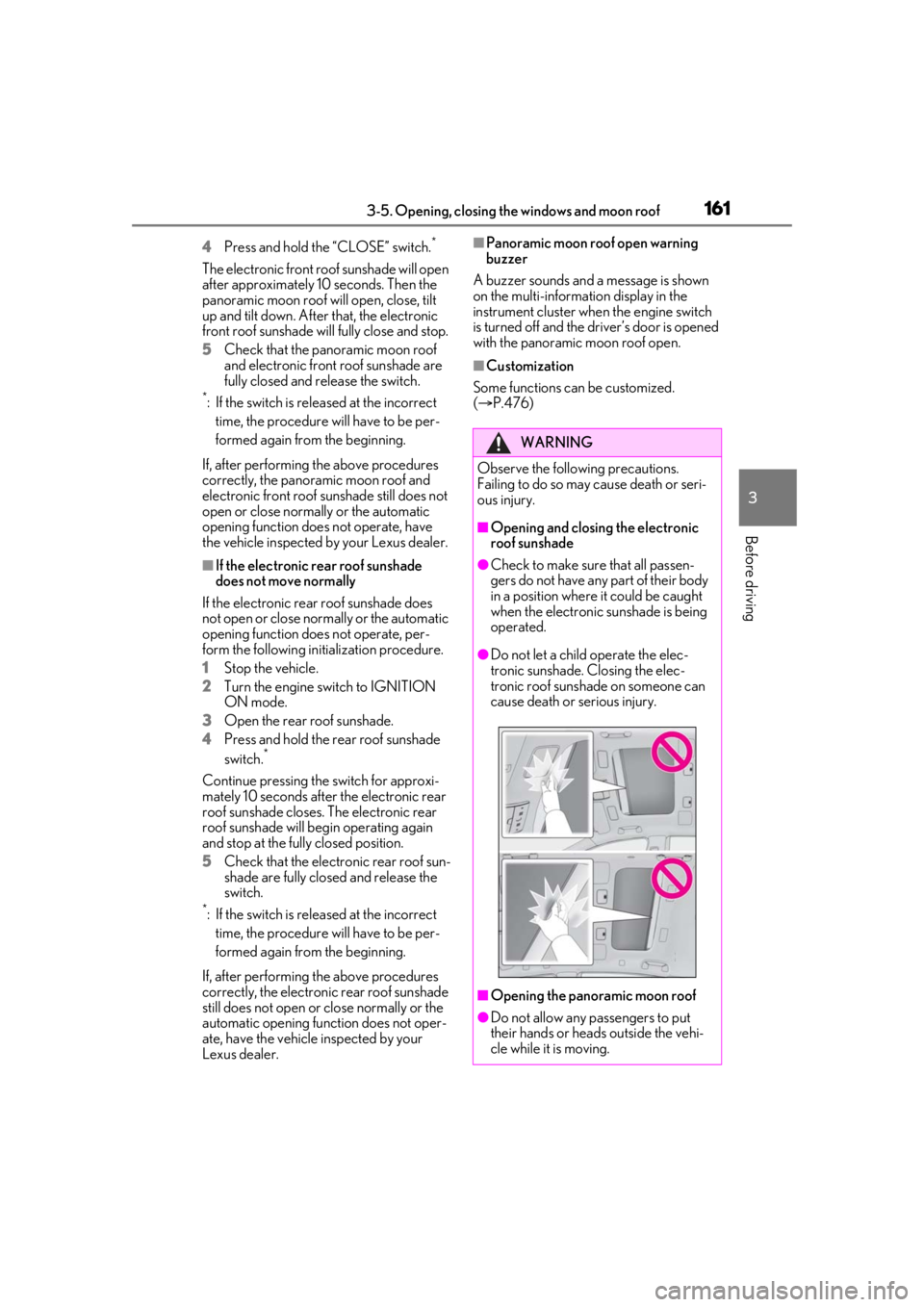
■Opening and closing the electronic
roof sunshade
●Check to make sure that all passen-
gers do not have any part of their body
in a position where it could be caught
when the electronic sunshade is being
operated.
●Do not let a child operate the elec-
tronic sunshade. Closing the elec-
tronic roof sunshade on someone can
cause death or serious injury.
■Opening the panoramic moon roof
●Do not allow any passengers to put
their hands or heads outside the vehi-
cle while it is moving.
Page 163 of 520
163
4
4
Driving
Driving
.4-1. Before drivingDriving the vehicle ..................... 164
Cargo and luggage ................... 170
Vehicle load limits ...................... 172
Trailer towing ............................... 173
Dinghy towing ............................. 173
4-2. Driving procedures Engine (ignition) switch ........... 174
Automatic transmission........... 178
Turn signal lever.......................... 185
Parking brake .............................. 186
Brake Hold.................................... 188
4-3. Operating the lights and wipers Headlight switch ......................... 190
AHB (Automatic High Beam) ......................................................... 193
Windshield wipers and washer ......................................................... 196
4-4. Refueling Opening the fuel tank cap..... 200
4-5. Using the driving support sys- tems
Lexus Safety System + A........ 202
Lexus Safety System + 2.0 .... 209
PCS (Pre-Collision System) (vehi- cles with Lexus Safety System +
A) ................................................... 215
PCS (Pre-Collision System) (vehi- cles with Lexus Safety System +
2.0)............................................... 227FCTA (Front Cross Traffic Alert)
....................................................... 235
LTA (Lane Tracing Assist) .... 238
RSA (Road Sign Assist)........... 251
Dynamic radar cruise control with full-speed range...................... 254
BSM (Blind Spot Monitor) .... 264
PKSA (Parking Support Alert) ......................................................... 271
Intuitive parking assist .............. 272
RCTA (Rear Cross Traffic Alert) function....................................... 277
RCD (Rear Camera Detection) function........................................ 281
PKSB (Parking Support Brake) ....................................................... 284
Parking Support Brake function (static objects) ......................... 288
Parking Support Brake function (rear-crossing vehicles) ...... 293
Parking Support Brake function (rear pedestrians) .................. 296
Driving mode select switch .. 299
Electronically modulated air sus- pension ........................................ 301
Driving assist systems.............. 304
4-6. Driving tips Winter driving tips .................... 309
Page 174 of 520
1744-2. Driving procedures
4-2.Driving procedures
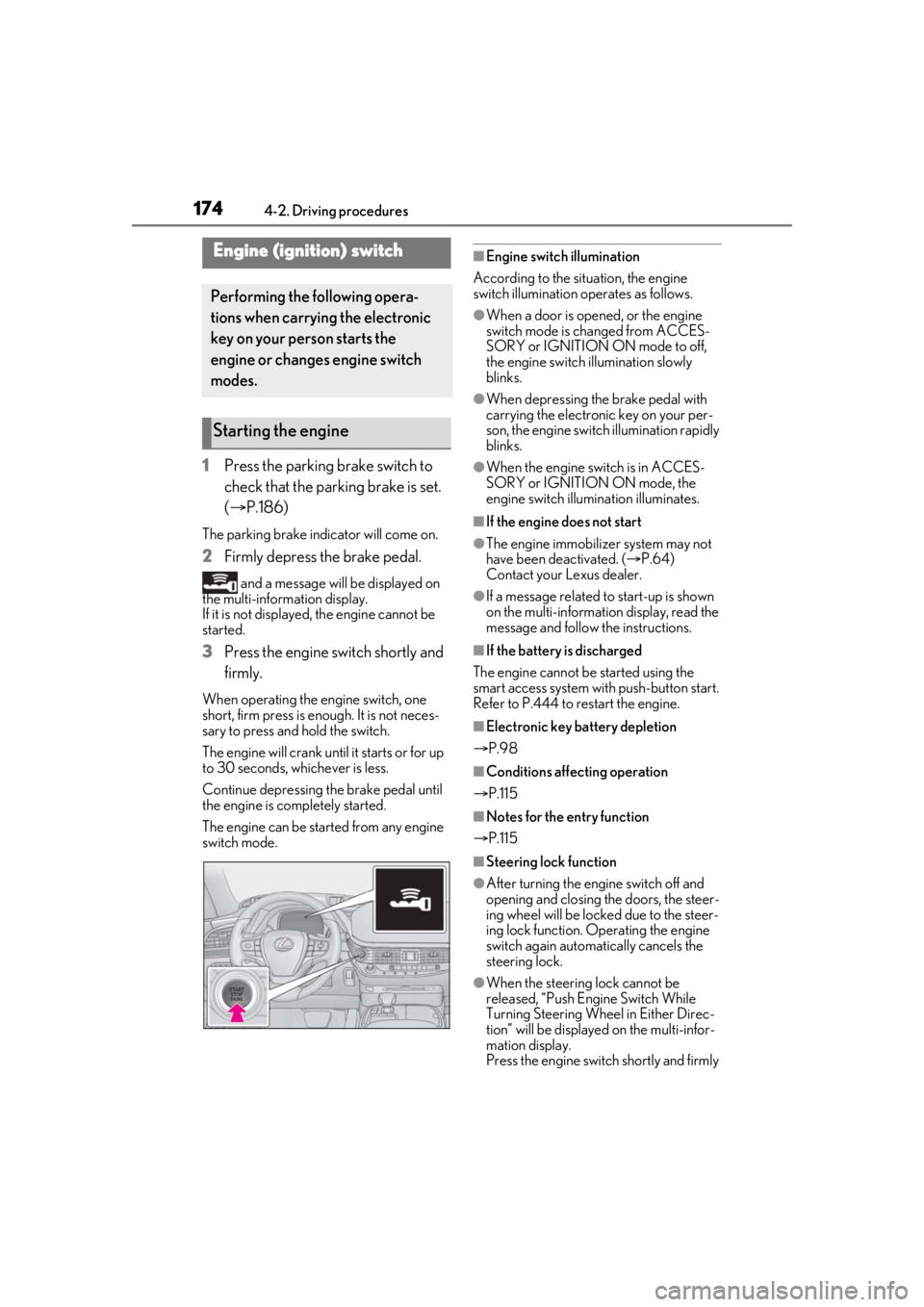
1Press the parking brake switch to
check that the parking brake is set.
(P.186)
The parking brake indicator will come on.
2 Firmly depress the brake pedal.
and a message will be displayed on
the multi-information display.
If it is not displayed, the engine cannot be
started.
3 Press the engine switch shortly and
firmly.
When operating the engine switch, one
short, firm press is enough. It is not neces-
sary to press and hold the switch.
The engine will crank until it starts or for up
to 30 seconds, whichever is less.
Continue depressing the brake pedal until
the engine is completely started.
The engine can be started from any engine
switch mode.
■Engine switch illumination
According to the situation, the engine
switch illumination operates as follows.
●When a door is opened, or the engine
switch mode is changed from ACCES-
SORY or IGNITION ON mode to off,
the engine switch illumination slowly
blinks.
●When depressing the brake pedal with
carrying the electronic key on your per-
son, the engine switch illumination rapidly
blinks.
●When the engine sw itch is in ACCES-
SORY or IGNITION ON mode, the
engine switch illumination illuminates.
■If the engine does not start
●The engine immobilizer system may not
have been deactivated. ( P.64)
Contact your Lexus dealer.
●If a message related to start-up is shown
on the multi-information display, read the
message and follow the instructions.
■If the battery is discharged
The engine cannot be started using the
smart access system with push-button start.
Refer to P.444 to restart the engine.
■Electronic key battery depletion
P.98
■Conditions affecting operation
P.115
■Notes for the entry function
P.115
■Steering lock function
●After turning the engine switch off and
opening and closing the doors, the steer-
ing wheel will be lock ed due to the steer-
ing lock function. Operating the engine
switch again automatically cancels the
steering lock.
●When the steering lock cannot be
released, “Push Engine Switch While
Turning Steering Whee l in Either Direc-
tion” will be displayed on the multi-infor-
mation display.
Press the engine switch shortly and firmly
Engine (ignition) switch
Performing the following opera-
tions when carrying the electronic
key on your person starts the
engine or changes engine switch
modes.
Starting the engine
Page 177 of 520
1774-2. Driving procedures
4
Driving
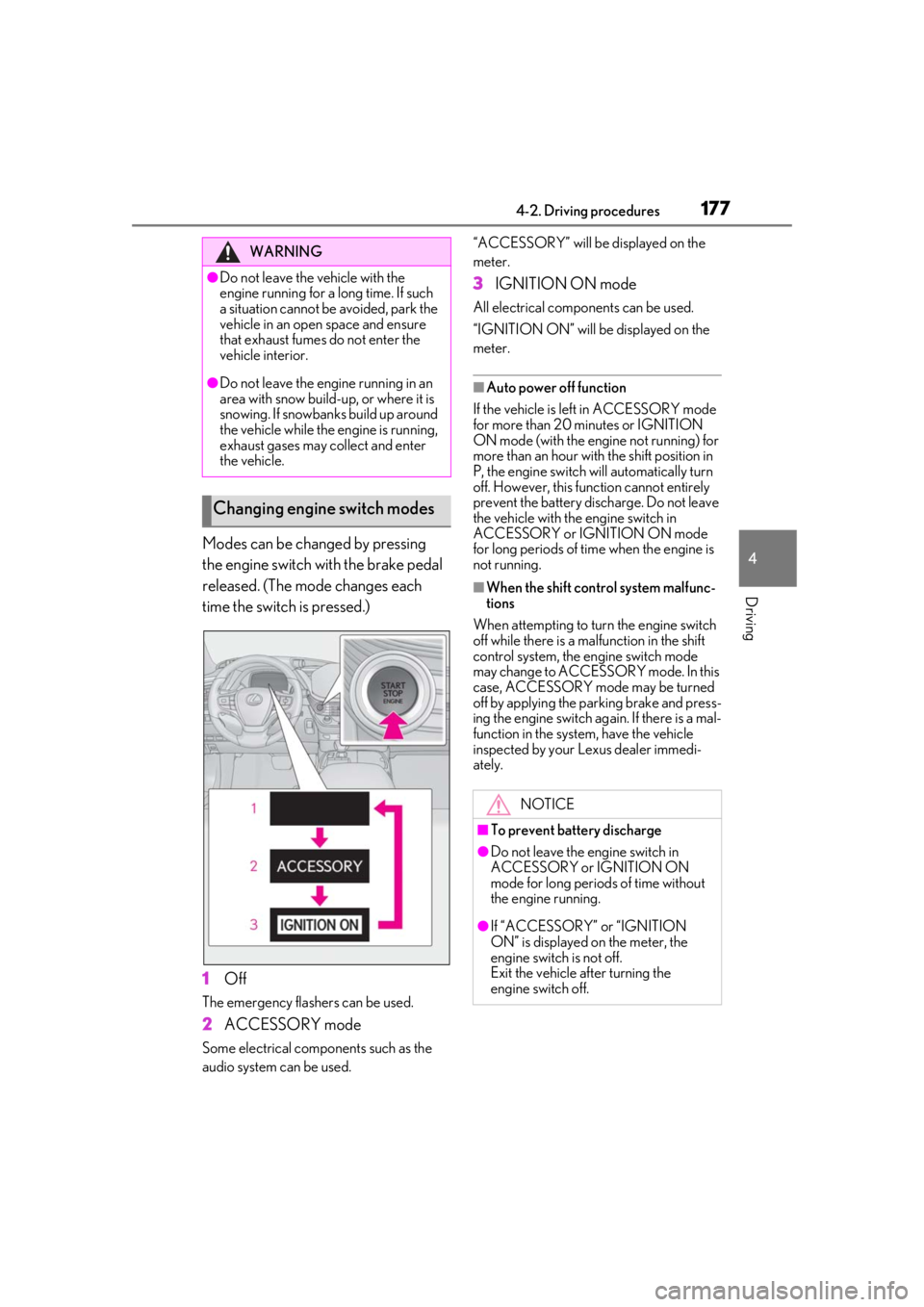
Modes can be changed by pressing
the engine switch with the brake pedal
released. (The mode changes each
time the switch is pressed.)
1Off
The emergency flashers can be used.
2ACCESSORY mode
Some electrical components such as the
audio system can be used. “ACCESSORY” will be displayed on the
meter.
3
IGNITION ON mode
All electrical components can be used.
“IGNITION ON” will be displayed on the
meter.
■Auto power off function
If the vehicle is left in ACCESSORY mode
for more than 20 minutes or IGNITION
ON mode (with the engine not running) for
more than an hour with the shift position in
P, the engine switch will automatically turn
off. However, this function cannot entirely
prevent the battery discharge. Do not leave
the vehicle with the engine switch in
ACCESSORY or IGNITION ON mode
for long periods of time when the engine is
not running.
■When the shift control system malfunc-
tions
When attempting to turn the engine switch
off while there is a ma lfunction in the shift
control system, the engine switch mode
may change to ACCESSO RY mode. In this
case, ACCESSORY mode may be turned
off by applying the parking brake and press-
ing the engine switch ag ain. If there is a mal-
function in the system, have the vehicle
inspected by your Lexus dealer immedi-
ately.
WARNING
●Do not leave the vehicle with the
engine running for a long time. If such
a situation cannot be avoided, park the
vehicle in an open space and ensure
that exhaust fumes do not enter the
vehicle interior.
●Do not leave the engine running in an
area with snow build-up, or where it is
snowing. If snowbanks build up around
the vehicle while the engine is running,
exhaust gases may collect and enter
the vehicle.
Changing engine switch modes
NOTICE
■To prevent battery discharge
●Do not leave the engine switch in
ACCESSORY or IGNITION ON
mode for long periods of time without
the engine running.
●If “ACCESSORY” or “IGNITION
ON” is displayed on the meter, the
engine switch is not off.
Exit the vehicle after turning the
engine switch off.
Page 178 of 520
1784-2. Driving procedures
*1: To improve fuel efficiency and reduce noise, set the shift position in D for nor-
mal driving. You can choose gear range
suitable for your driving situation by
operating the paddle shift switches.
*2: Any gear range can be fixed when driv-
ing in M mode.
■For the shift positions
●When the engine switch is off or in
ACCESSORY mode, the shift position
cannot be changed.
●When the engine swit ch is in IGNITION
ON mode, the shift position can only be
changed to N.
●When the engine is running, the shift
position can be changed from P to D, N
or R.
●The shift position can only be changed to
M directly from D.
In addition, if an atte mpt is made to change the shift position by mo
ving the shift lever or
by pressing the P position switch in any of
the following situations, the buzzer will
sound and the shifting operation will be dis-
abled or the shift posi tion will automatically
change to N. When this happens, select an
appropriate shift position.
●Situations where the shifting operation
will be disabled:
• When an attempt is made to change the shift position from P to another position
by moving the shift lever without depress-
ing the brake pedal.
• When an attempt is made to change the
shift position from P or N to M by moving
the shift lever.
• When the P position switch is pressed
while the vehicle is running.
*1
• When the shift lever is moved to attempt to change the shift position from P or N
with the accelerator pedal depressed and
the vehicle stopped
●Situations where the shift position will
automatically change to N:
• When an attempt is made to select the R position by moving the shift lever when
the vehicle is moving forward.
*2
• When an attempt is made to select the D
position by moving the shift lever when
the vehicle is moving in reverse.
*3
• When the shift position is changed from R to M
●If N is selected while driving at a certain
speed, even if the shift lever is not held in
the N position, the shift position changes
to N. In this situation, the buzzer sounds
and a confirmation message is displayed
on the multi-information display to inform
the driver that the shift position has
changed to N.
*1: Shift position may be changed to P
when driving at extremely low speeds.
*2: Shift position may be changed to R
when driving at low speeds.
*3: Shift position may be changed to D when driving at low speeds.
■Reverse warning buzzer
When shifting into R, a buzzer will sound to
inform the driver that the shift position is in
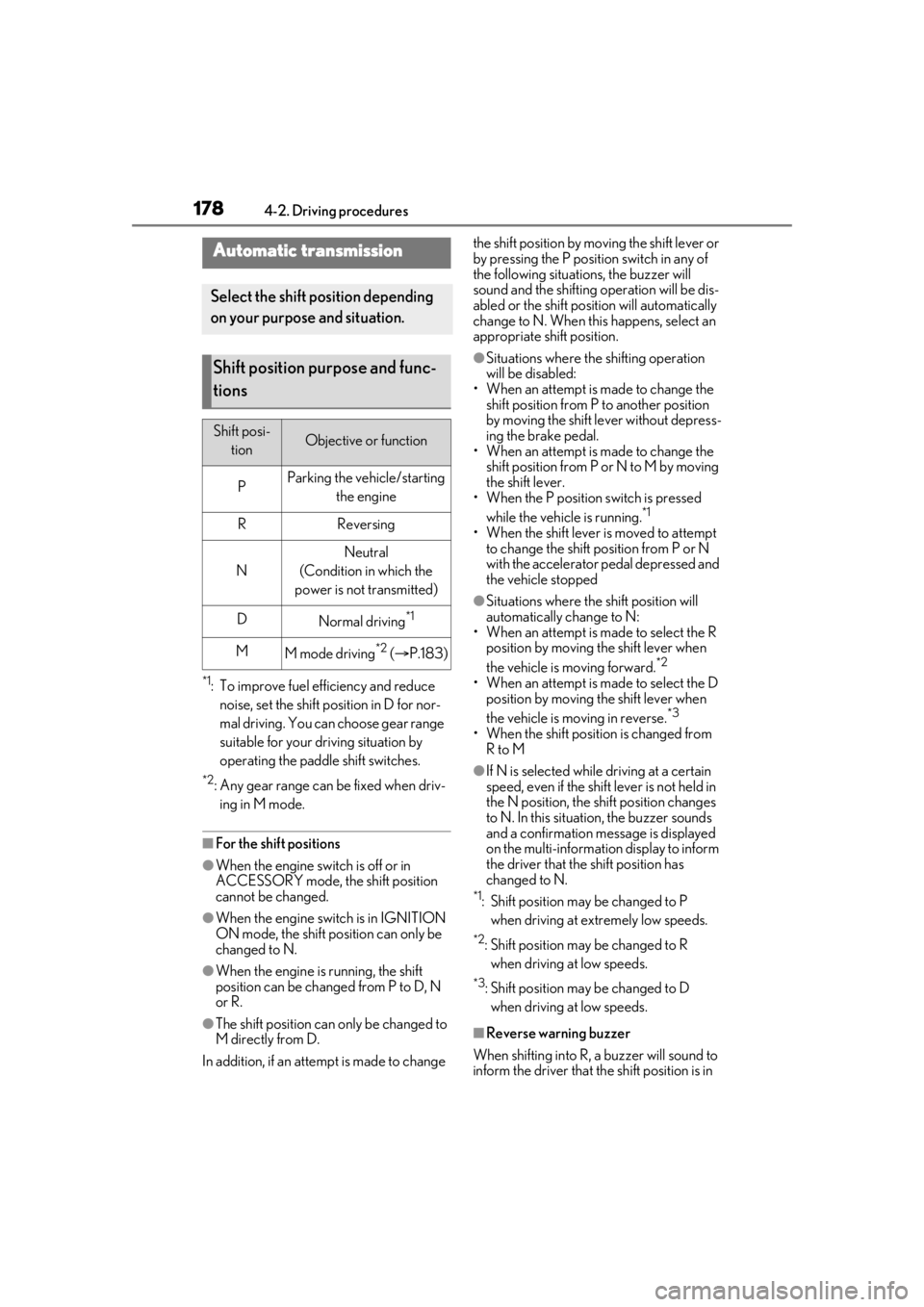
Automatic transmission
Select the shift position depending
on your purpose and situation.
Shift position purpose and func-
tions
Shift posi- tionObjective or function
PParking the vehicle/starting the engine
RReversing
N
Neutral
(Condition in which the
power is not transmitted)
DNormal driving*1
MM mode driving*2 ( P.183)
Page 181 of 520
1814-2. Driving procedures
4
Driving
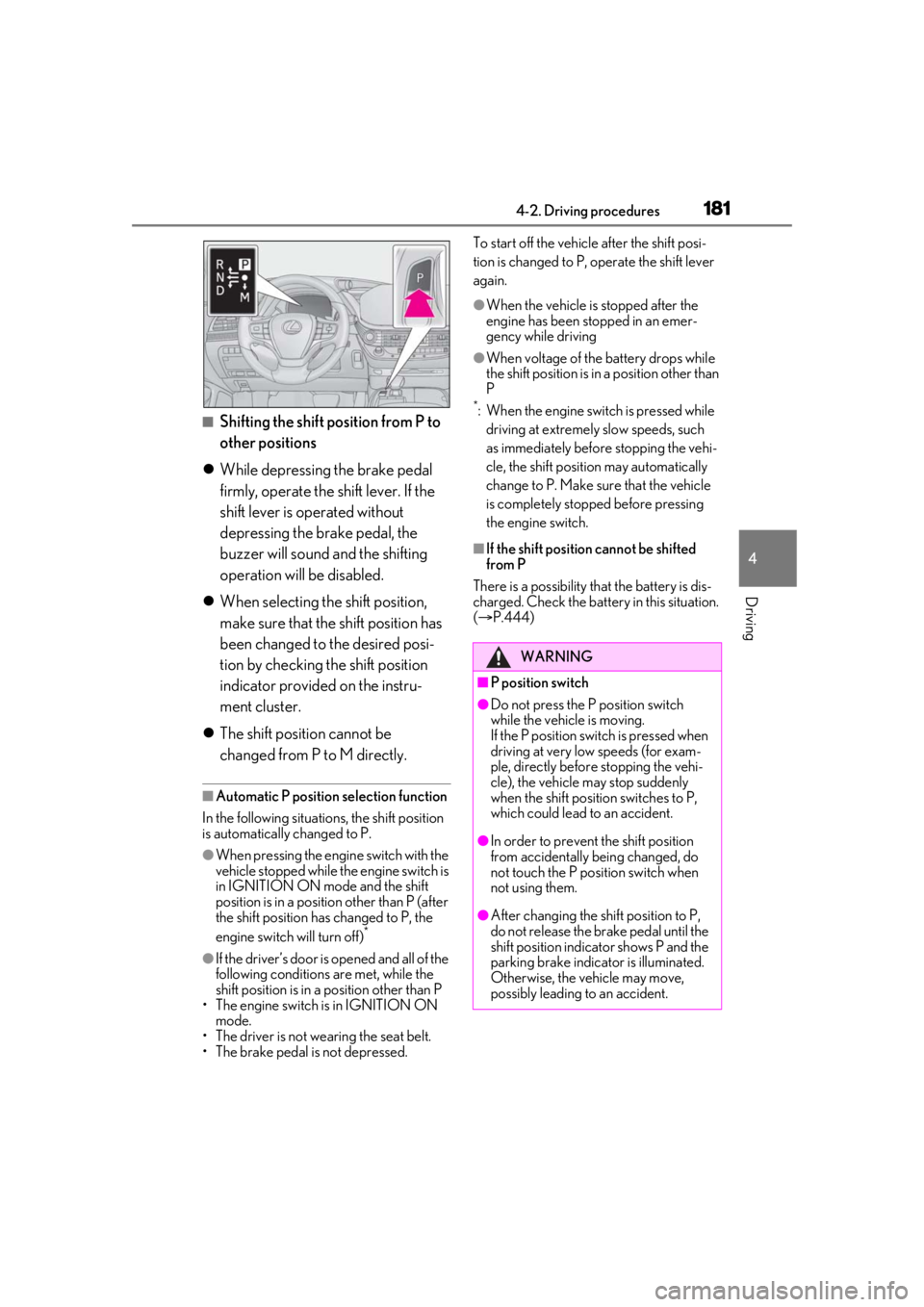
■Shifting the shift position from P to
other positions
While depressing the brake pedal
firmly, operate the shift lever. If the
shift lever is operated without
depressing the brake pedal, the
buzzer will sound and the shifting
operation will be disabled.
When selecting the shift position,
make sure that the shift position has
been changed to the desired posi-
tion by checking the shift position
indicator provided on the instru-
ment cluster.
The shift position cannot be
changed from P to M directly.
■Automatic P position selection function
In the following situations, the shift position
is automatically changed to P.
●When pressing the engine switch with the
vehicle stopped while the engine switch is
in IGNITION ON mode and the shift
position is in a position other than P (after
the shift position has changed to P, the
engine switch will turn off)
*
●If the driver’s door is opened and all of the
following conditions are met, while the
shift position is in a position other than P
• The engine switch is in IGNITION ON mode.
• The driver is not wearing the seat belt.
• The brake pedal is not depressed. To start off the vehicle after the shift posi-
tion is changed to P, operate the shift lever
again.
●When the vehicle is stopped after the
engine has been stopped in an emer-
gency while driving
●When voltage of the battery drops while
the shift position is in a position other than
P
*: When the engine switch is pressed while
driving at extremely slow speeds, such
as immediately before stopping the vehi-
cle, the shift position may automatically
change to P. Make su re that the vehicle
is completely stopped before pressing
the engine switch.
■If the shift position cannot be shifted
from P
There is a possibility th at the battery is dis-
charged. Check the batter y in this situation.
( P.444)
WARNING
■P position switch
●Do not press the P position switch
while the vehicle is moving.
If the P position switch is pressed when
driving at very low speeds (for exam-
ple, directly before stopping the vehi-
cle), the vehicle may stop suddenly
when the shift position switches to P,
which could lead to an accident.
●In order to prevent the shift position
from accidentally being changed, do
not touch the P position switch when
not using them.
●After changing the shift position to P,
do not release the brake pedal until the
shift position indicator shows P and the
parking brake indicator is illuminated.
Otherwise, the vehicle may move,
possibly leading to an accident.
Page 185 of 520
1854-2. Driving procedures
4
Driving
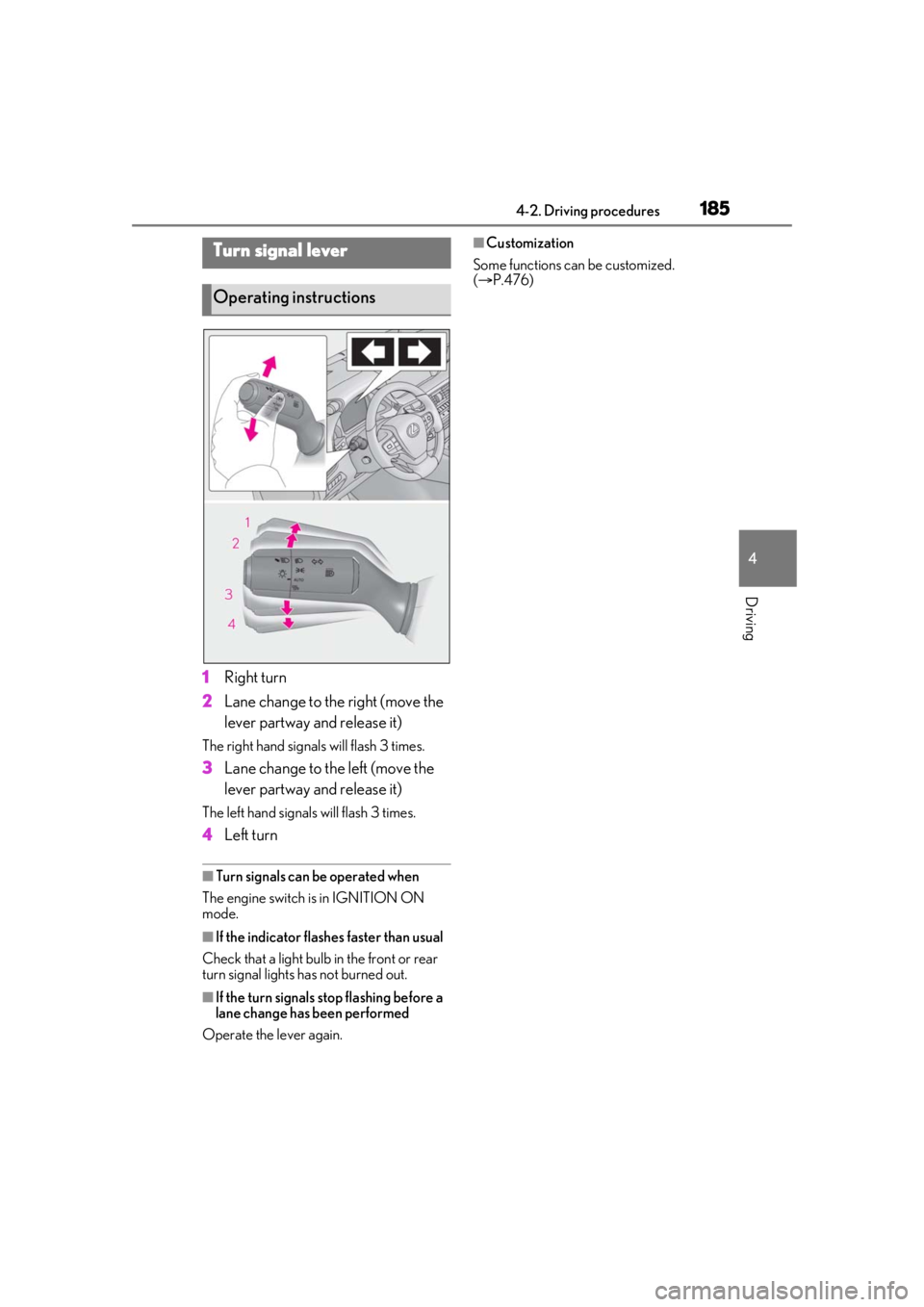
1Right turn
2 Lane change to the right (move the
lever partway and release it)
The right hand signals will flash 3 times.
3Lane change to the left (move the
lever partway and release it)
The left hand signals will flash 3 times.
4Left turn
■Turn signals can be operated when
The engine switch is in IGNITION ON
mode.
■If the indicator flashes faster than usual
Check that a light bulb in the front or rear
turn signal lights has not burned out.
■If the turn signals stop flashing before a
lane change has been performed
Operate the lever again.
■Customization
Some functions can be customized.
( P.476)Turn signal lever
Operating instructions
Page 187 of 520
1874-2. Driving procedures
4
Driving
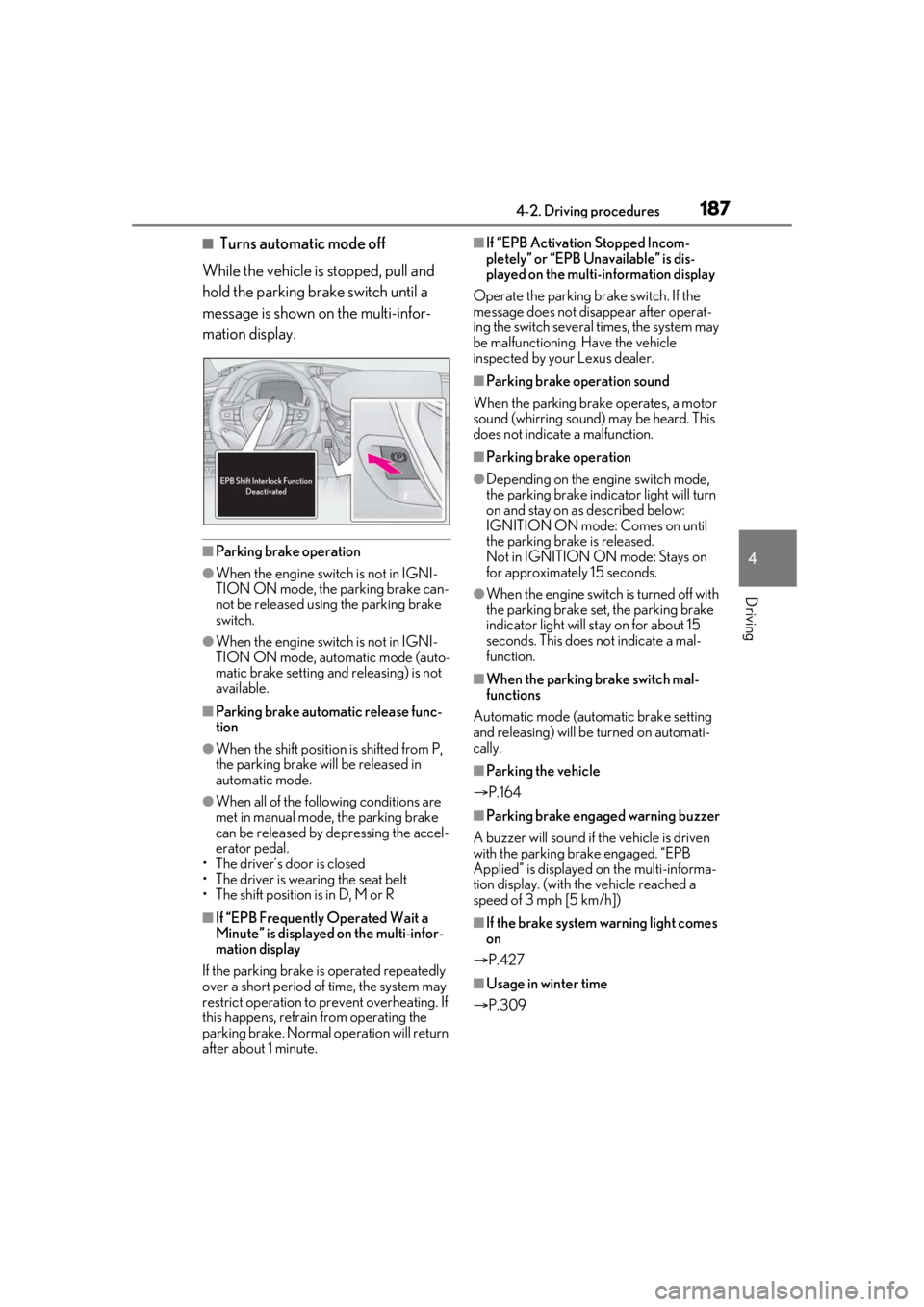
■Turns automatic mode off
While the vehicle is stopped, pull and
hold the parking brake switch until a
message is shown on the multi-infor-
mation display.
■Parking brake operation
●When the engine swit ch is not in IGNI-
TION ON mode, the parking brake can-
not be released using the parking brake
switch.
●When the engine swit ch is not in IGNI-
TION ON mode, automatic mode (auto-
matic brake setting and releasing) is not
available.
■Parking brake automatic release func-
tion
●When the shift position is shifted from P,
the parking brake will be released in
automatic mode.
●When all of the foll owing conditions are
met in manual mode, the parking brake
can be released by depressing the accel-
erator pedal.
• The driver’s door is closed
• The driver is wearing the seat belt
• The shift position is in D, M or R
■If “EPB Frequently Operated Wait a
Minute” is displayed on the multi-infor-
mation display
If the parking brake is operated repeatedly
over a short period of time, the system may
restrict operation to prevent overheating. If
this happens, refrain from operating the
parking brake. Normal operation will return
after about 1 minute.
■If “EPB Activation Stopped Incom-
pletely” or “EPB Unavailable” is dis-
played on the multi-information display
Operate the parking brake switch. If the
message does not disappear after operat-
ing the switch several times, the system may
be malfunctioning. Have the vehicle
inspected by your Lexus dealer.
■Parking brake operation sound
When the parking brake operates, a motor
sound (whirring sound) may be heard. This
does not indicate a malfunction.
■Parking brake operation
●Depending on the engine switch mode,
the parking brake indicator light will turn
on and stay on as described below:
IGNITION ON mode: Comes on until
the parking brake is released.
Not in IGNITION ON mode: Stays on
for approximately 15 seconds.
●When the engine switch is turned off with
the parking brake set, the parking brake
indicator light will stay on for about 15
seconds. This does not indicate a mal-
function.
■When the parking brake switch mal-
functions
Automatic mode (automatic brake setting
and releasing) will be turned on automati-
cally.
■Parking the vehicle
P.164
■Parking brake engaged warning buzzer
A buzzer will sound if the vehicle is driven
with the parking brake engaged. “EPB
Applied” is displayed on the multi-informa-
tion display. (with the vehicle reached a
speed of 3 mph [5 km/h])
■If the brake system warning light comes
on
P.427
■Usage in winter time
P.309