mirror LEXUS LS500 2021 User Guide
[x] Cancel search | Manufacturer: LEXUS, Model Year: 2021, Model line: LS500, Model: LEXUS LS500 2021Pages: 520, PDF Size: 9.81 MB
Page 133 of 520
1333-3. Adjusting the seats
3
Before driving
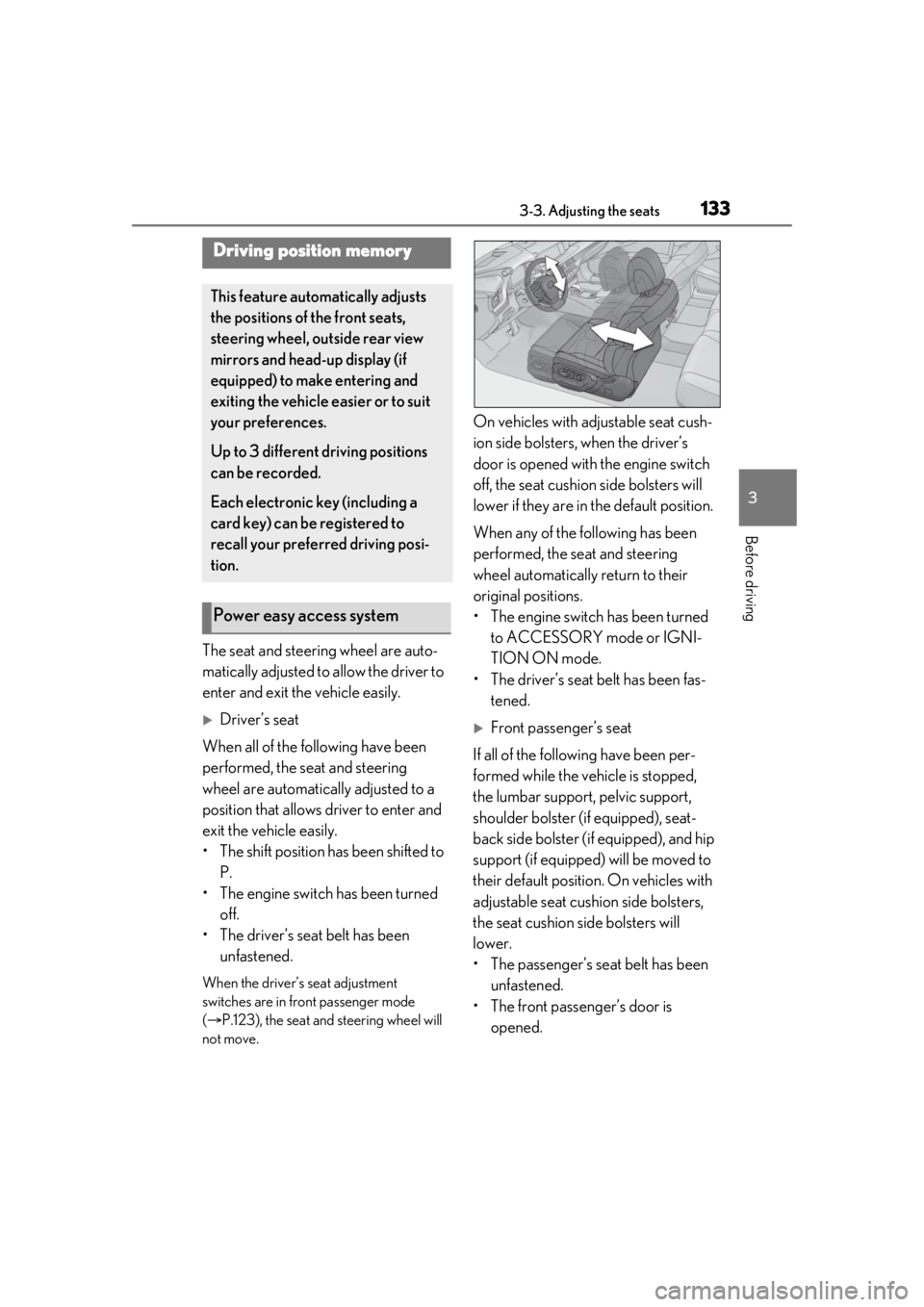
The seat and steering wheel are auto-
matically adjusted to allow the driver to
enter and exit the vehicle easily.
Driver’s seat
When all of the following have been
performed, the seat and steering
wheel are automatically adjusted to a
position that allows driver to enter and
exit the vehicle easily.
• The shift position has been shifted to P.
• The engine switch has been turned off.
• The driver’s seat belt has been unfastened.
When the driver’s seat adjustment
switches are in front passenger mode
( P.123), the seat and steering wheel will
not move.
On vehicles with adjustable seat cush-
ion side bolsters, when the driver’s
door is opened with the engine switch
off, the seat cushion side bolsters will
lower if they are in the default position.
When any of the following has been
performed, the seat and steering
wheel automatically return to their
original positions.
• The engine switch has been turned
to ACCESSORY mode or IGNI-
TION ON mode.
• The driver’s seat belt has been fas- tened.
Front passenger’s seat
If all of the following have been per-
formed while the vehicle is stopped,
the lumbar support, pelvic support,
shoulder bolster (if equipped), seat-
back side bolster (if equipped), and hip
support (if equipped) will be moved to
their default position. On vehicles with
adjustable seat cushion side bolsters,
the seat cushion side bolsters will
lower.
• The passenger’s seat belt has been unfastened.
• The front passenger’s door is opened.
Driving position memory
This feature auto matically adjusts
the positions of the front seats,
steering wheel, outside rear view
mirrors and head-up display (if
equipped) to make entering and
exiting the vehicle easier or to suit
your preferences.
Up to 3 different driving positions
can be recorded.
Each electronic key (including a
card key) can be registered to
recall your preferred driving posi-
tion.
Power easy access system
Page 134 of 520
1343-3. Adjusting the seats
■Operation of the power easy access sys-
tem
●When exiting the vehicle, the power easy
access system may not operate if the seat
is already in the rearmost or uppermost
position or close to the rear seat.
●If the seat position is adjusted during
power easy access sy stem operation, the
automatic operation w ill stop. (The seat
will change to manual operation.)
●If the seat position is adjusted during or
after the power easy access system oper-
ation when the driver is exiting the vehi-
cle, the power easy access system will not
operate when entering the vehicle.
■Seat cushion side bo lster adjustment (if
equipped)
If the seat cushion si de bolsters have been
lowered, when the front door is closed, the
seat cushion side bolsters will move to their
default position.
If the seat is adjusted while the seat cushion
side bolsters are moving to the default posi-
tion, their movement will be temporarily
suspended. (The seat cushion side bolsters
will move to the default position after a cer-
tain amount of time.)
■Customization
Some functions can be customized.
( P.476)
1 Turn the engine switch to IGNI-
TION ON mode.
2 Check that the shift position is in P.
3 Adjust the driver’s seat, steering
wheel, outside rear view mirrors
and head-up display (if equipped)
to the desired positions.
4 While pressing the “SET” button, or
within 3 seconds after the “SET” button is pressed, press button “1”,
“2” or “3” until the buzzer sounds.
If the selected button has already been
preset, the previously recorded position
will be overwritten.
When the driver’s seat adjustment
switches are in front passenger mode
(
P.123), the position of the driver’s seat
cannot be registered.
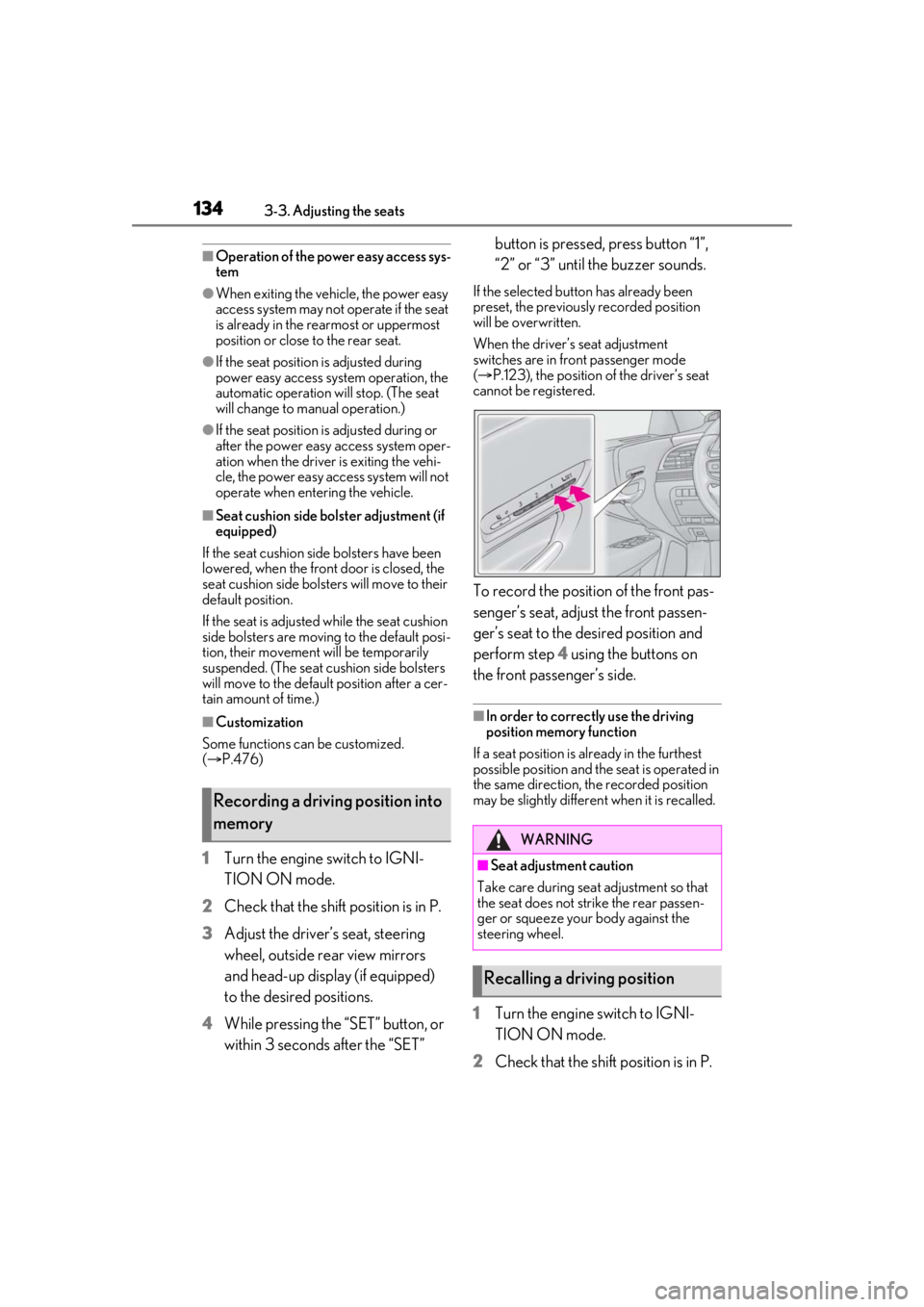
To record the position of the front pas-
senger’s seat, adjust the front passen-
ger’s seat to the desired position and
perform step 4 using the buttons on
the front passenger’s side.
■In order to correctly use the driving
position memory function
If a seat position is already in the furthest
possible position and the seat is operated in
the same direction, the recorded position
may be slightly differen t when it is recalled.
1Turn the engine switch to IGNI-
TION ON mode.
2 Check that the shift position is in P.
Recording a driving position into
memory
WARNING
■Seat adjustme nt caution
Take care during seat adjustment so that
the seat does not strike the rear passen-
ger or squeeze your body against the
steering wheel.
Recalling a driving position
Page 136 of 520
1363-3. Adjusting the seats
If the button could not be registered, the
buzzer sounds continuously for approxi-
mately 3 seconds.
■Cancelation procedure
Carry only the key you want to cancel
and then close the driver’s door.
If 2 or more keys are in the vehicle, the
driving position cannot be canceled
properly.
1 Turn the engine switch to IGNI-
TION ON mode.
2 Check that the shift position is in P.
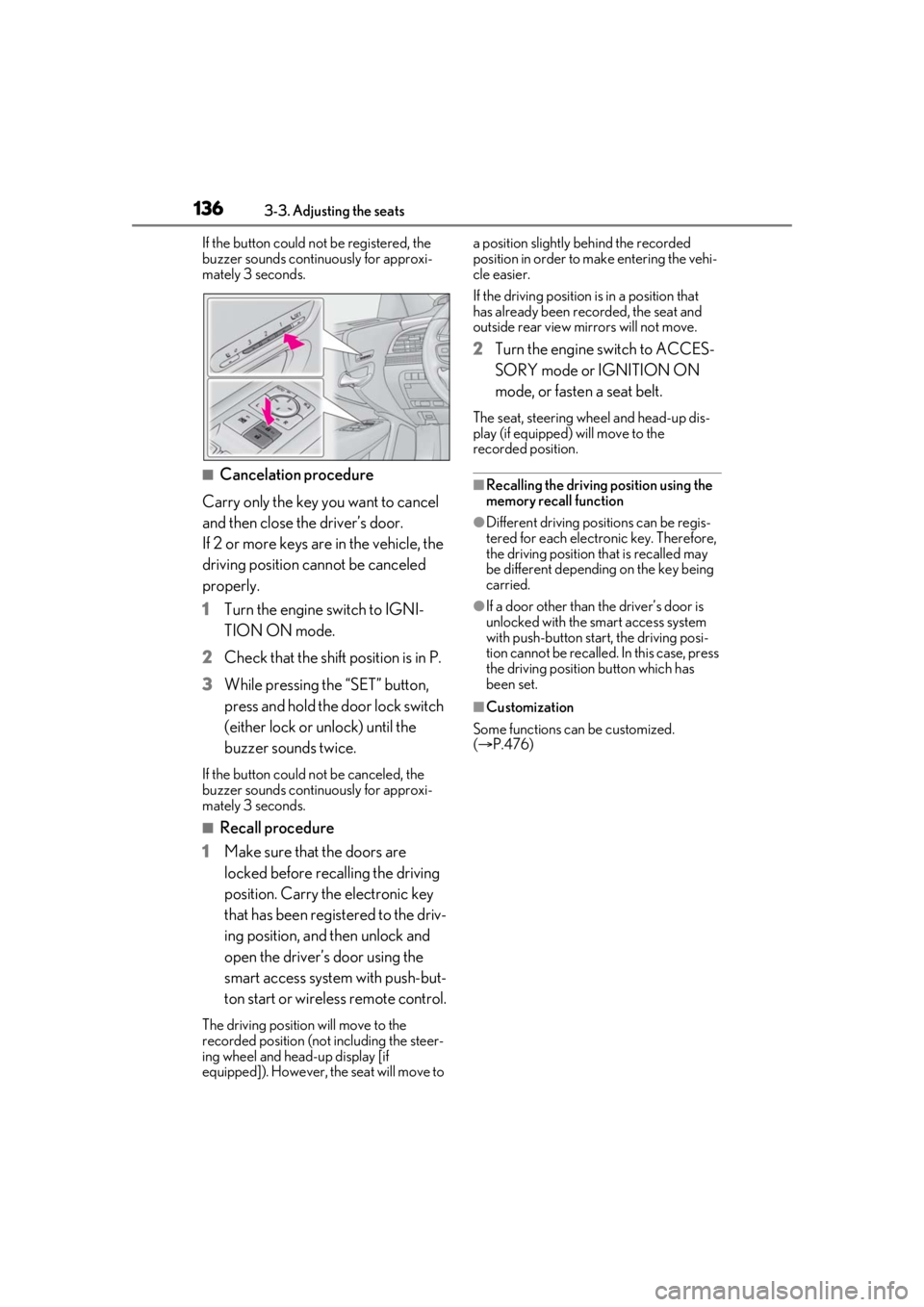
3 While pressing the “SET” button,
press and hold the door lock switch
(either lock or unlock) until the
buzzer sounds twice.
If the button could not be canceled, the
buzzer sounds continuously for approxi-
mately 3 seconds.
■Recall procedure
1 Make sure that the doors are
locked before recalling the driving
position. Carry the electronic key
that has been registered to the driv-
ing position, and then unlock and
open the driver’s door using the
smart access system with push-but-
ton start or wireless remote control.
The driving position will move to the
recorded position (not including the steer-
ing wheel and head-up display [if
equipped]). However, the seat will move to a position slightly behind the recorded
position in order to make entering the vehi-
cle easier.
If the driving position is in a position that
has already been recorded, the seat and
outside rear view mirrors will not move.
2
Turn the engine switch to ACCES-
SORY mode or IGNITION ON
mode, or fasten a seat belt.
The seat, steering wheel and head-up dis-
play (if equipped) will move to the
recorded position.
■Recalling the driving position using the
memory recall function
●Different driving positions can be regis-
tered for each electronic key. Therefore,
the driving position that is recalled may
be different depending on the key being
carried.
●If a door other than the driver’s door is
unlocked with the smart access system
with push-button start, the driving posi-
tion cannot be recalled. In this case, press
the driving position button which has
been set.
■Customization
Some functions can be customized.
( P.476)
Page 141 of 520
1413-4. Adjusting the steering wheel and mirrors
3
Before driving
3-4.Adjusting the steering wheel and mirrors
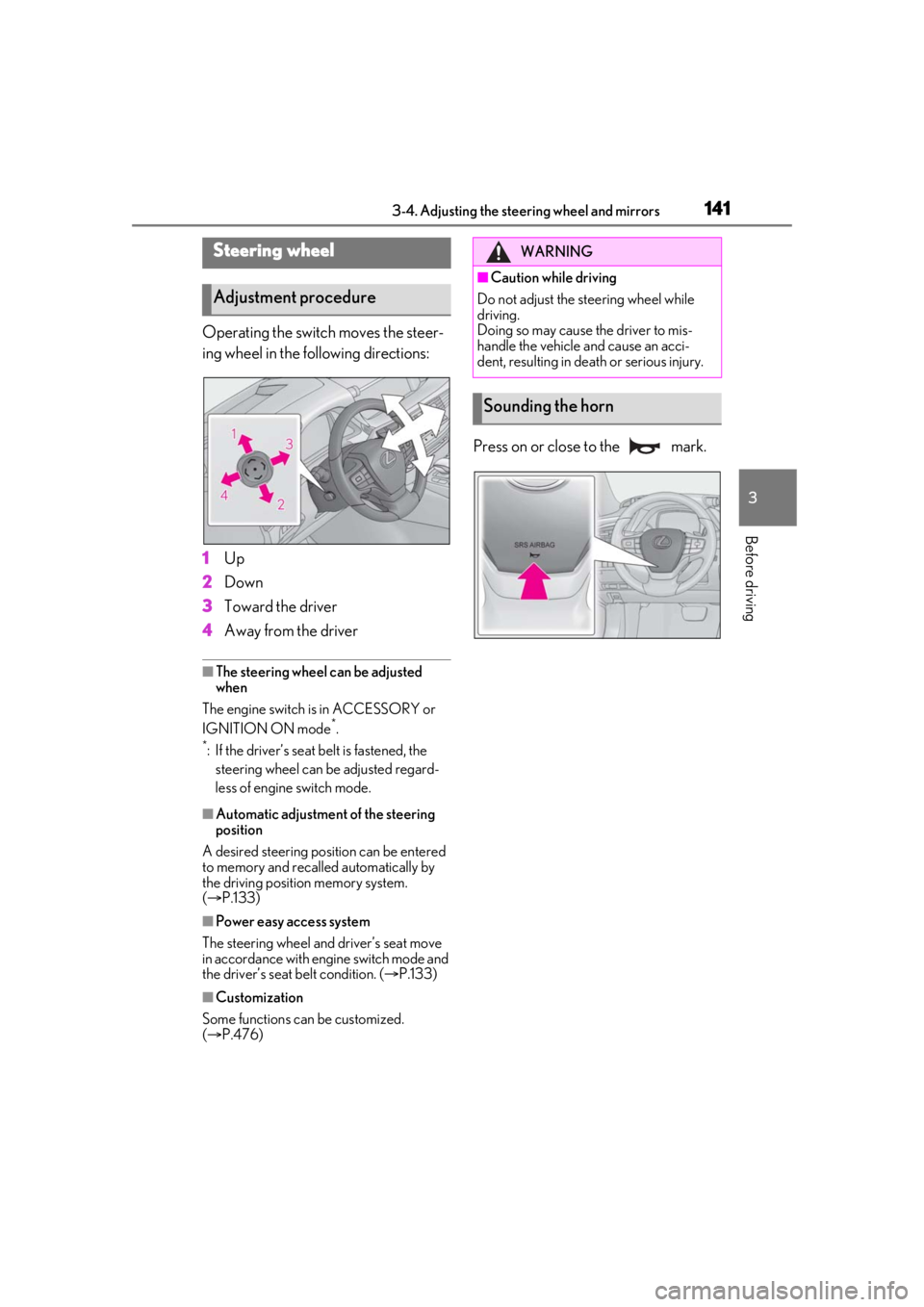
Operating the switch moves the steer-
ing wheel in the following directions:
1Up
2 Down
3 Toward the driver
4 Away from the driver
■The steering wheel can be adjusted
when
The engine switch is in ACCESSORY or
IGNITION ON mode
*.
*: If the driver’s seat belt is fastened, the steering wheel can be adjusted regard-
less of engine switch mode.
■Automatic adjustment of the steering
position
A desired steering position can be entered
to memory and recalled automatically by
the driving position memory system.
( P.133)
■Power easy access system
The steering wheel and driver’s seat move
in accordance with engine switch mode and
the driver’s seat belt condition. ( P.133)
■Customization
Some functions can be customized.
( P.476)
Press on or close to the mark.
Steering wheel
Adjustment procedure
WARNING
■Caution while driving
Do not adjust the steering wheel while
driving.
Doing so may cause the driver to mis-
handle the vehicle and cause an acci-
dent, resulting in death or serious injury.
Sounding the horn
Page 142 of 520
1423-4. Adjusting the steering wheel and mirrors
*:If equipped
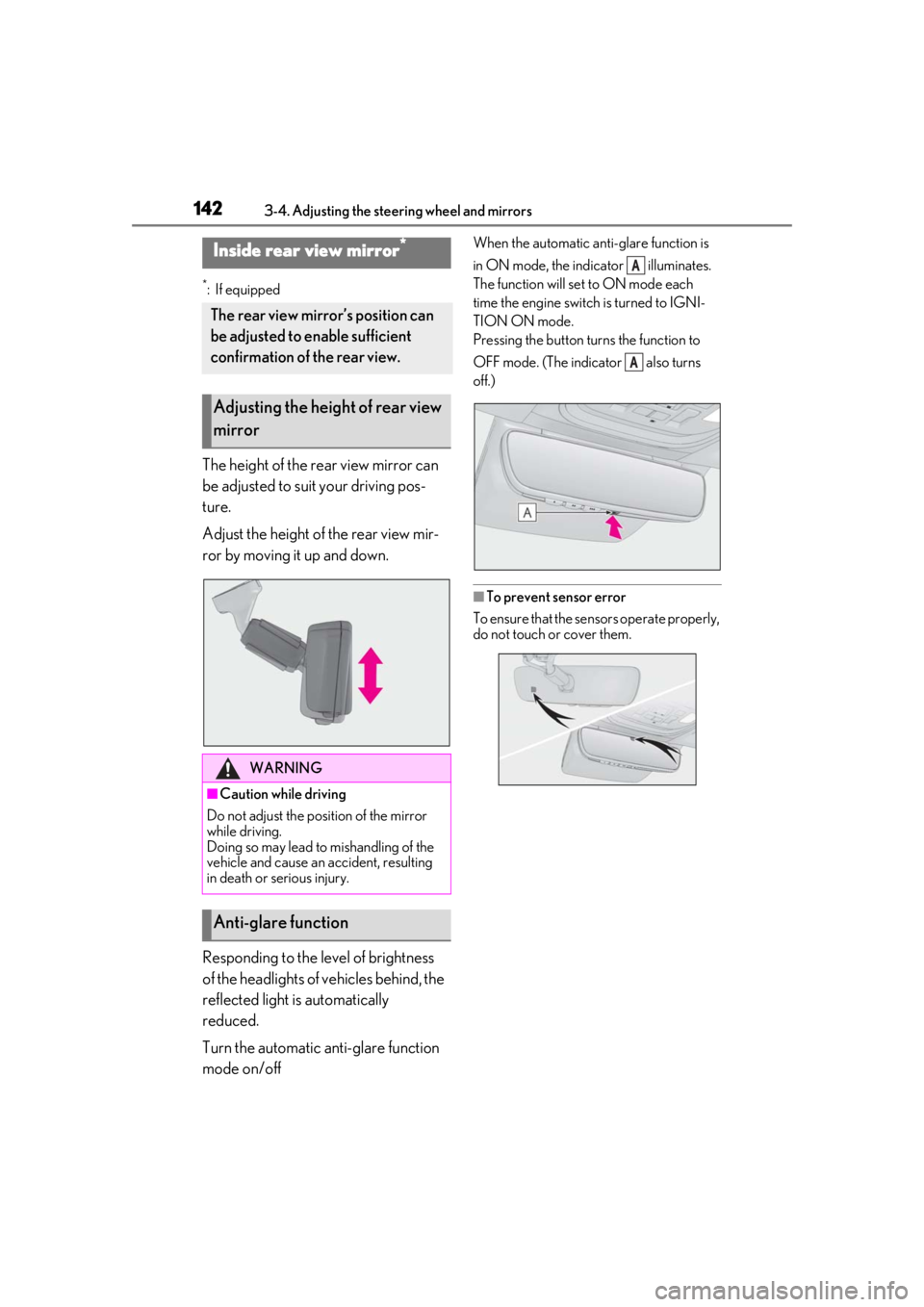
The height of the rear view mirror can
be adjusted to suit your driving pos-
ture.
Adjust the height of the rear view mir-
ror by moving it up and down.
Responding to the level of brightness
of the headlights of vehicles behind, the
reflected light is automatically
reduced.
Turn the automatic anti-glare function
mode on/off
When the automatic anti-glare function is
in ON mode, the indicator illuminates.
The function will set to ON mode each
time the engine switch is turned to IGNI-
TION ON mode.
Pressing the button turns the function to
OFF mode. (The indicator also turns
off.)
■To prevent sensor error
To ensure that the sensors operate properly,
do not touch or cover them.
Inside rear view mirror*
The rear view mirror’s position can
be adjusted to enable sufficient
confirmation of the rear view.
Adjusting the height of rear view
mirror
WARNING
■Caution while driving
Do not adjust the position of the mirror
while driving.
Doing so may lead to mishandling of the
vehicle and cause an accident, resulting
in death or serious injury.
Anti-glare function
A
A
Page 143 of 520
1433-4. Adjusting the steering wheel and mirrors
3
Before driving
*:If equipped
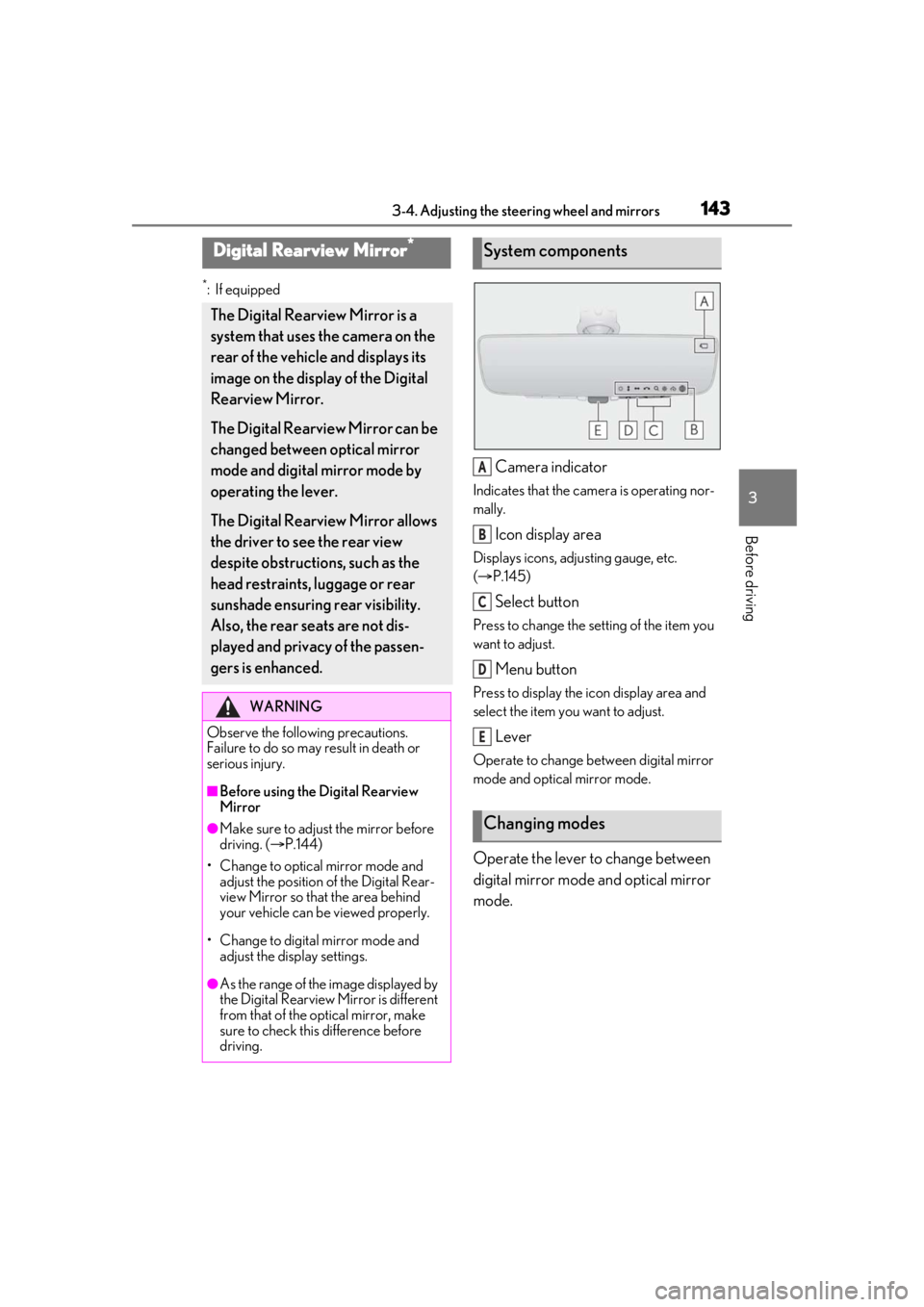
Camera indicator
Indicates that the camera is operating nor-
mally.
Icon display area
Displays icons, adjusting gauge, etc.
( P.145)
Select button
Press to change the setting of the item you
want to adjust.
Menu button
Press to display the ic on display area and
select the item you want to adjust.
Lever
Operate to change between digital mirror
mode and optical mirror mode.
Operate the lever to change between
digital mirror mode and optical mirror
mode.
Digital Rearview Mirror*
The Digital Rearview Mirror is a
system that uses the camera on the
rear of the vehicle and displays its
image on the display of the Digital
Rearview Mirror.
The Digital Rearview Mirror can be
changed between optical mirror
mode and digital mirror mode by
operating the lever.
The Digital Rearview Mirror allows
the driver to see the rear view
despite obstructions, such as the
head restraints, luggage or rear
sunshade ensuring rear visibility.
Also, the rear seats are not dis-
played and privacy of the passen-
gers is enhanced.
WARNING
Observe the following precautions.
Failure to do so may result in death or
serious injury.
■Before using the Digital Rearview
Mirror
●Make sure to adjust the mirror before
driving. ( P.144)
• Change to optical mirror mode and adjust the position of the Digital Rear-
view Mirror so that the area behind
your vehicle can be viewed properly.
• Change to digital mirror mode and adjust the display settings.
●As the range of the image displayed by
the Digital Rearview Mirror is different
from that of the optical mirror, make
sure to check this difference before
driving.
System components
Changing modes
A
B
C
D
E
Page 144 of 520
1443-4. Adjusting the steering wheel and mirrors
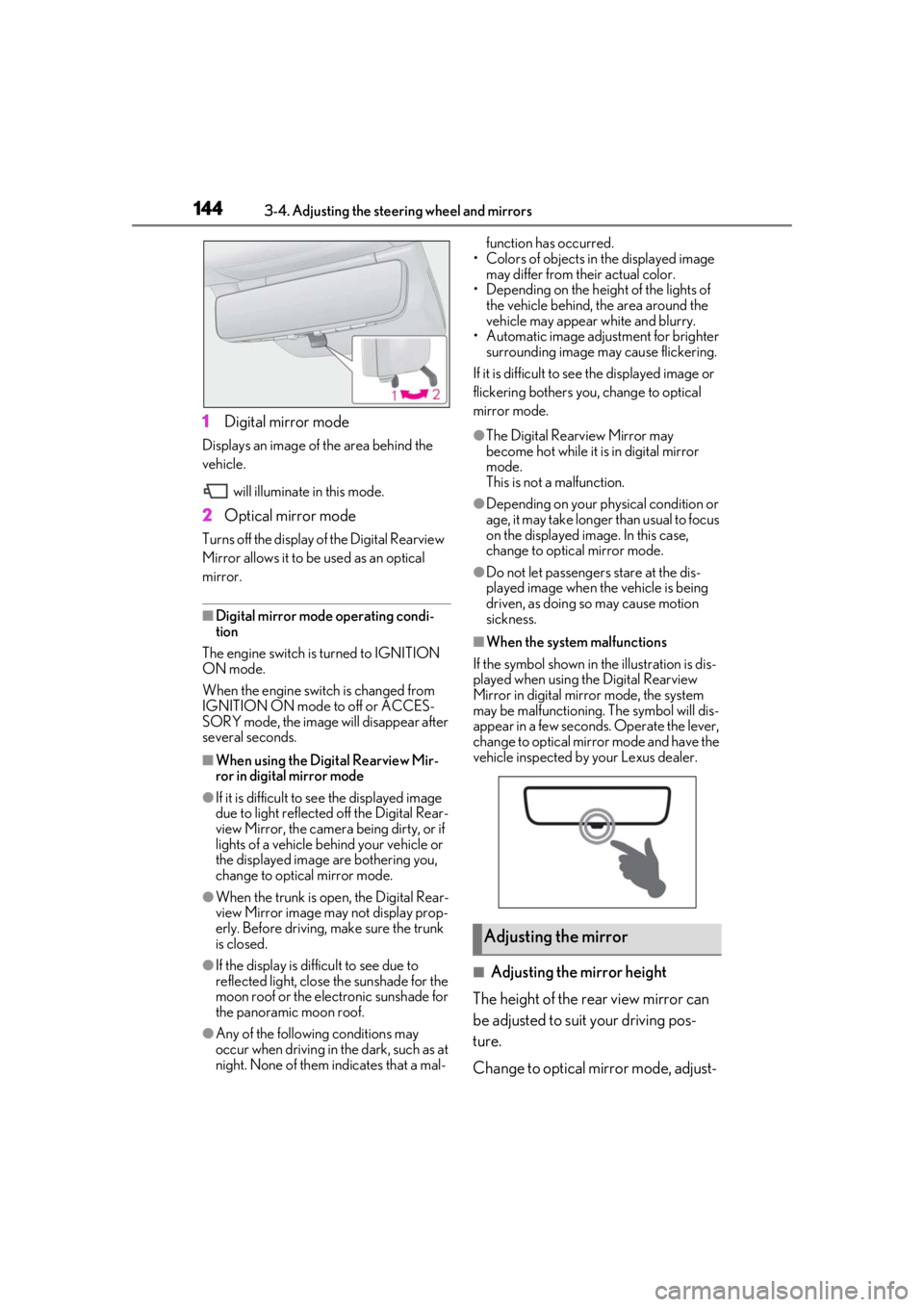
1Digital mirror mode
Displays an image of the area behind the
vehicle.
will illuminate in this mode.
2Optical mirror mode
Turns off the display of the Digital Rearview
Mirror allows it to be used as an optical
mirror.
■Digital mirror mode operating condi-
tion
The engine switch is turned to IGNITION
ON mode.
When the engine switch is changed from
IGNITION ON mode to off or ACCES-
SORY mode, the image will disappear after
several seconds.
■When using the Digital Rearview Mir-
ror in digital mirror mode
●If it is difficult to see the displayed image
due to light reflected off the Digital Rear-
view Mirror, the camera being dirty, or if
lights of a vehicle behind your vehicle or
the displayed image are bothering you,
change to optical mirror mode.
●When the trunk is open, the Digital Rear-
view Mirror image may not display prop-
erly. Before driving, make sure the trunk
is closed.
●If the display is difficult to see due to
reflected light, close the sunshade for the
moon roof or the electronic sunshade for
the panoramic moon roof.
●Any of the following conditions may
occur when driving in the dark, such as at
night. None of them indicates that a mal- function has occurred.
• Colors of objects in the displayed image may differ from their actual color.
• Depending on the height of the lights of the vehicle behind, the area around the
vehicle may appear white and blurry.
• Automatic image adjustment for brighter surrounding image may cause flickering.
If it is difficult to see the displayed image or
flickering bothers you, change to optical
mirror mode.
●The Digital Rearview Mirror may
become hot while it is in digital mirror
mode.
This is not a malfunction.
●Depending on your physical condition or
age, it may take longer than usual to focus
on the displayed image. In this case,
change to optical mirror mode.
●Do not let passengers stare at the dis-
played image when the vehicle is being
driven, as doing so may cause motion
sickness.
■When the system malfunctions
If the symbol shown in the illustration is dis-
played when using the Digital Rearview
Mirror in digital mirror mode, the system
may be malfunctioning. The symbol will dis-
appear in a few second s. Operate the lever,
change to optical mirror mode and have the
vehicle inspected by your Lexus dealer.
■Adjusting the mirror height
The height of the rear view mirror can
be adjusted to suit your driving pos-
ture.
Change to optical mirror mode, adjust-
Adjusting the mirror
Page 145 of 520
1453-4. Adjusting the steering wheel and mirrors
3
Before driving
ing the height of the rear view mirror by
moving it up and down.
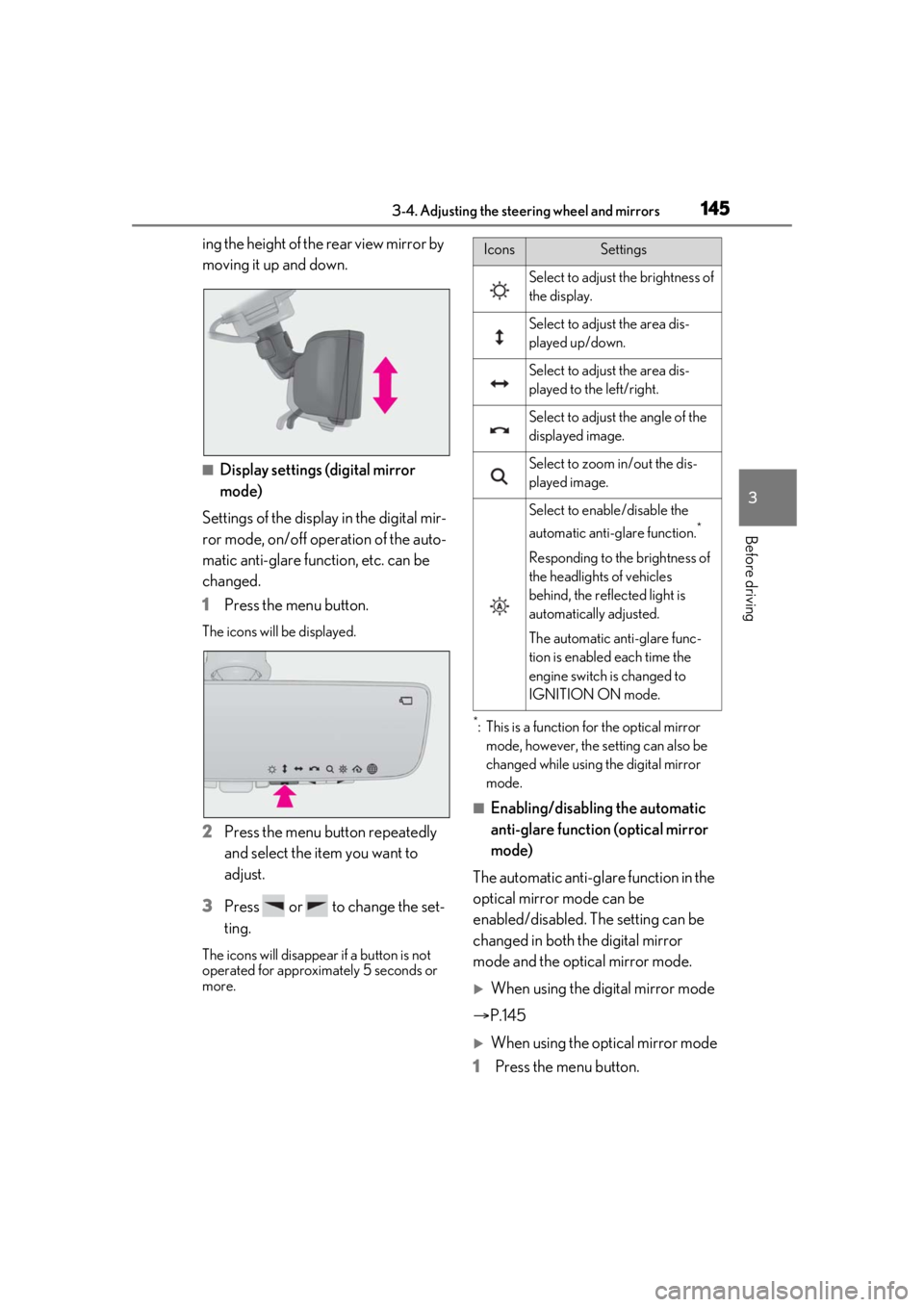
■Display settings (digital mirror
mode)
Settings of the display in the digital mir-
ror mode, on/off operation of the auto-
matic anti-glare function, etc. can be
changed.
1 Press the menu button.
The icons will be displayed.
2Press the menu button repeatedly
and select the item you want to
adjust.
3 Press or to change the set-
ting.
The icons will disappear if a button is not
operated for approximately 5 seconds or
more.
*: This is a function for the optical mirror
mode, however, the setting can also be
changed while using the digital mirror
mode.
■Enabling/disabling the automatic
anti-glare function (optical mirror
mode)
The automatic anti-glare function in the
optical mirror mode can be
enabled/disabled. The setting can be
changed in both the digital mirror
mode and the optical mirror mode.
When using the digital mirror mode
P.145
When using the op tical mirror mode
1 Press the menu button.
IconsSettings
Select to adjust the brightness of
the display.
Select to adjust the area dis-
played up/down.
Select to adjust the area dis-
played to the left/right.
Select to adjust the angle of the
displayed image.
Select to zoom in/out the dis-
played image.
Select to enable/disable the
automatic anti-glare function.
*
Responding to the brightness of
the headlights of vehicles
behind, the reflected light is
automatically adjusted.
The automatic anti-glare func-
tion is enabled each time the
engine switch is changed to
IGNITION ON mode.
Page 146 of 520
1463-4. Adjusting the steering wheel and mirrors
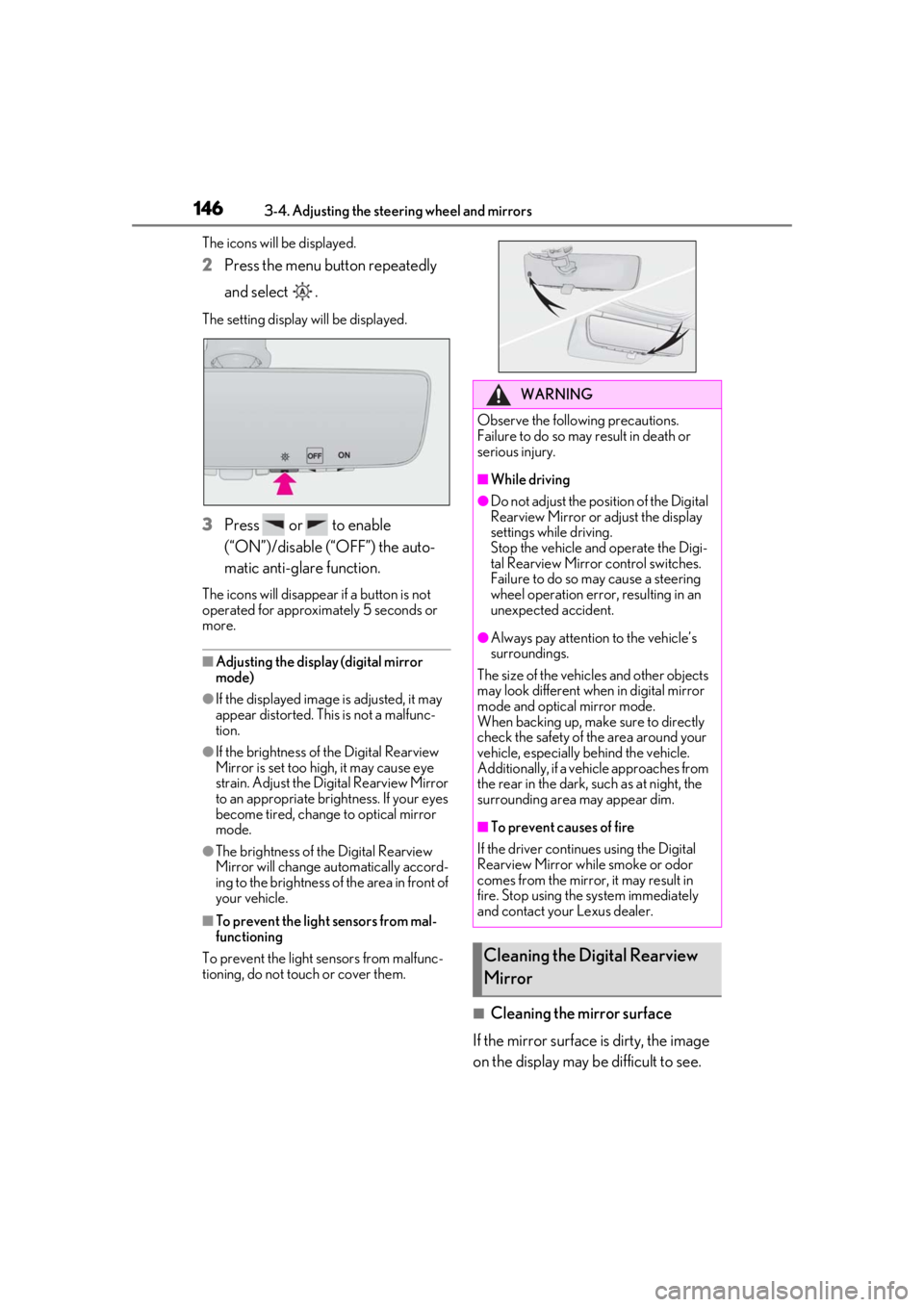
The icons will be displayed.
2Press the menu button repeatedly
and select .
The setting display will be displayed.
3Press or to enable
(“ON”)/disable (“OFF”) the auto-
matic anti-glare function.
The icons will disappear if a button is not
operated for approximately 5 seconds or
more.
■Adjusting the display (digital mirror
mode)
●If the displayed image is adjusted, it may
appear distorted. This is not a malfunc-
tion.
●If the brightness of the Digital Rearview
Mirror is set too high, it may cause eye
strain. Adjust the Di gital Rearview Mirror
to an appropriate brig htness. If your eyes
become tired, change to optical mirror
mode.
●The brightness of the Digital Rearview
Mirror will change automatically accord-
ing to the brightness of the area in front of
your vehicle.
■To prevent the light sensors from mal-
functioning
To prevent the light sensors from malfunc-
tioning, do not touch or cover them.
■Cleaning the mirror surface
If the mirror surface is dirty, the image
on the display may be difficult to see.
WARNING
Observe the following precautions.
Failure to do so may result in death or
serious injury.
■While driving
●Do not adjust the position of the Digital
Rearview Mirror or adjust the display
settings while driving.
Stop the vehicle and operate the Digi-
tal Rearview Mirror control switches.
Failure to do so may cause a steering
wheel operation error, resulting in an
unexpected accident.
●Always pay attention to the vehicle’s
surroundings.
The size of the vehicles and other objects
may look different when in digital mirror
mode and optical mirror mode.
When backing up, make sure to directly
check the safety of the area around your
vehicle, especially behind the vehicle.
Additionally, if a vehicle approaches from
the rear in the dark, such as at night, the
surrounding area may appear dim.
■To prevent causes of fire
If the driver contin ues using the Digital
Rearview Mirror while smoke or odor
comes from the mirror, it may result in
fire. Stop using the system immediately
and contact your Lexus dealer.
Cleaning the Digital Rearview
Mirror
Page 147 of 520
1473-4. Adjusting the steering wheel and mirrors
3
Before driving
Clean the mirror surface gently using a
soft dry cloth.
■Cleaning the camera
If the camera lens is dirty or covered
with foreign matter, such as water
droplets, snow, mud, etc., the displayed
image may not be clear. In this case,
rinse the camera lens with a large
quantity of water and then wipe it clean
with a soft cloth dampened with water.
Dirt on the camera lens can be cleaned
by operating the dedicated camera
cleaning washer. ( P.196)
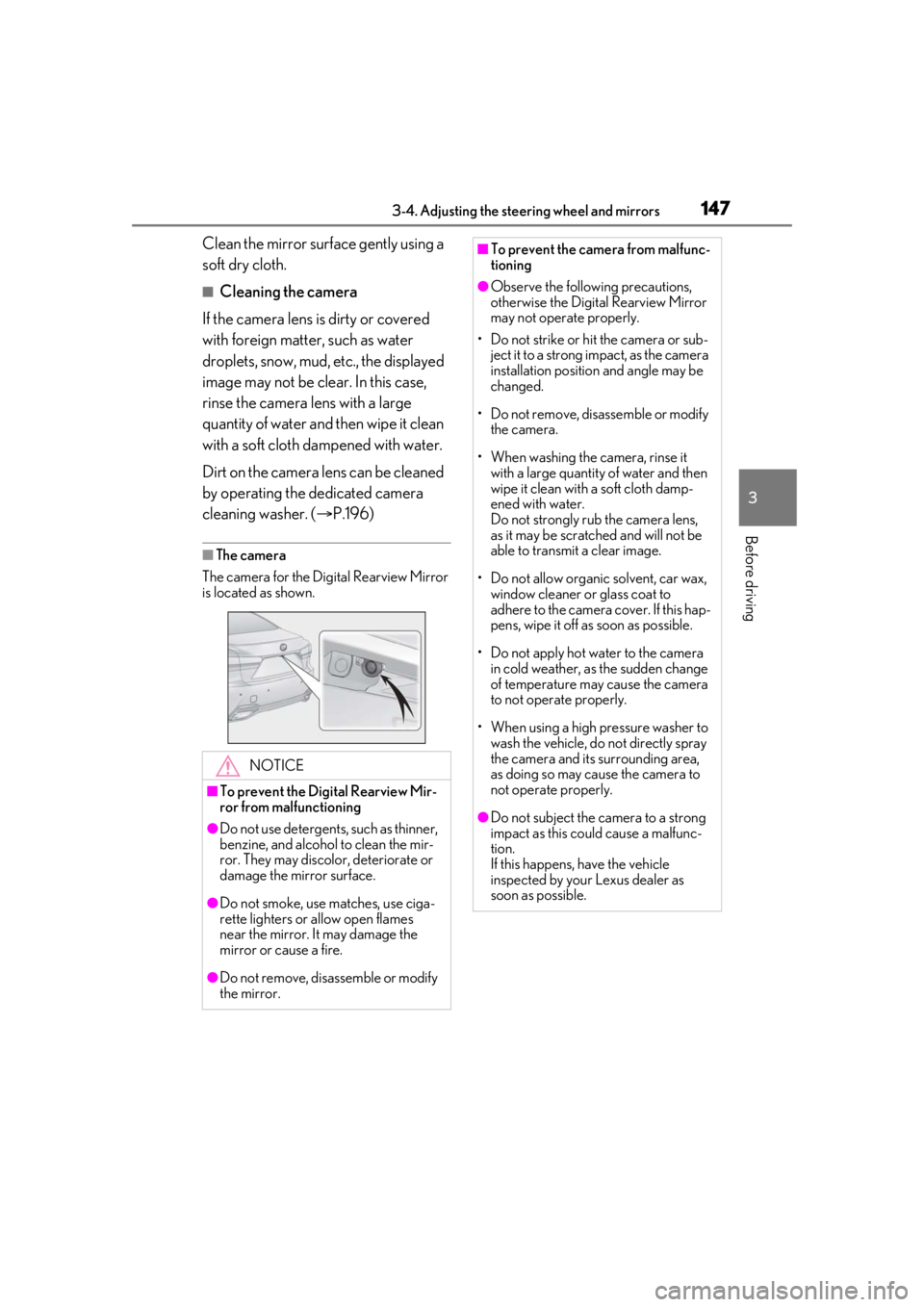
■The camera
The camera for the Digital Rearview Mirror
is located as shown.
NOTICE
■To prevent the Digital Rearview Mir-
ror from malfunctioning
●Do not use detergents, such as thinner,
benzine, and alcohol to clean the mir-
ror. They may discolor, deteriorate or
damage the mirror surface.
●Do not smoke, use matches, use ciga-
rette lighters or allow open flames
near the mirror. It may damage the
mirror or cause a fire.
●Do not remove, disassemble or modify
the mirror.
■To prevent the camera from malfunc-
tioning
●Observe the following precautions,
otherwise the Digital Rearview Mirror
may not operate properly.
• Do not strike or hit the camera or sub- ject it to a strong impact, as the camera
installation position and angle may be
changed.
• Do not remove, disassemble or modify the camera.
• When washing the camera, rinse it with a large quantity of water and then
wipe it clean with a soft cloth damp-
ened with water.
Do not strongly rub the camera lens,
as it may be scratched and will not be
able to transmit a clear image.
• Do not allow organic solvent, car wax,
window cleaner or glass coat to
adhere to the camera cover. If this hap-
pens, wipe it off as soon as possible.
• Do not apply hot water to the camera in cold weather, as the sudden change
of temperature may cause the camera
to not operate properly.
• When using a high pressure washer to wash the vehicle, do not directly spray
the camera and its surrounding area,
as doing so may cause the camera to
not operate properly.
●Do not subject the camera to a strong
impact as this could cause a malfunc-
tion.
If this happens, have the vehicle
inspected by your Lexus dealer as
soon as possible.