park LEXUS LS500 2021 User Guide
[x] Cancel search | Manufacturer: LEXUS, Model Year: 2021, Model line: LS500, Model: LEXUS LS500 2021Pages: 520, PDF Size: 9.81 MB
Page 88 of 520
882-1. Instrument cluster
■Suspension of the settings display
●Some settings cannot be changed while
driving. When changing settings, park
the vehicle in a safe place.
●If a warning message is displayed, opera-
tion of the settings display will be sus-
pended.
Displays suggestions to the driver in
the following situations. To select a
response to a displayed suggestion,
use the meter control switches.
■Suggestion to turn off the head-
lights
If the headlights are left on for a certain
amount of time with the headlight
switch in after the engine switch
has been turned off, a suggestion mes-
sage will be displayed asking if you
wish to turn the headlights off.
To turn the headlights off, select “Yes”.
If a front door is opened after the engine
switch is turned off, this suggestion mes-
sage will not be displayed.
■Customization
Some functions can be customized.
( P.476)
WARNING
■Cautions during setting up the dis-
play
As the engine needs to be running
during setting up the display, ensure that
the vehicle is parked in a place with ade-
quate ventilation. In a closed area such as
a garage, exhaust gases including harm-
ful carbon monoxide (CO) may collect
and enter the vehicle. This may lead to
death or a serious health hazard.
NOTICE
■During setting up the display
To prevent battery discharge, ensure that
the engine is running while setting up the
display features.
Suggestion function
Page 91 of 520
912-1. Instrument cluster
2
Vehicle status information and indicators
■Enabling/disabling the head-up dis-
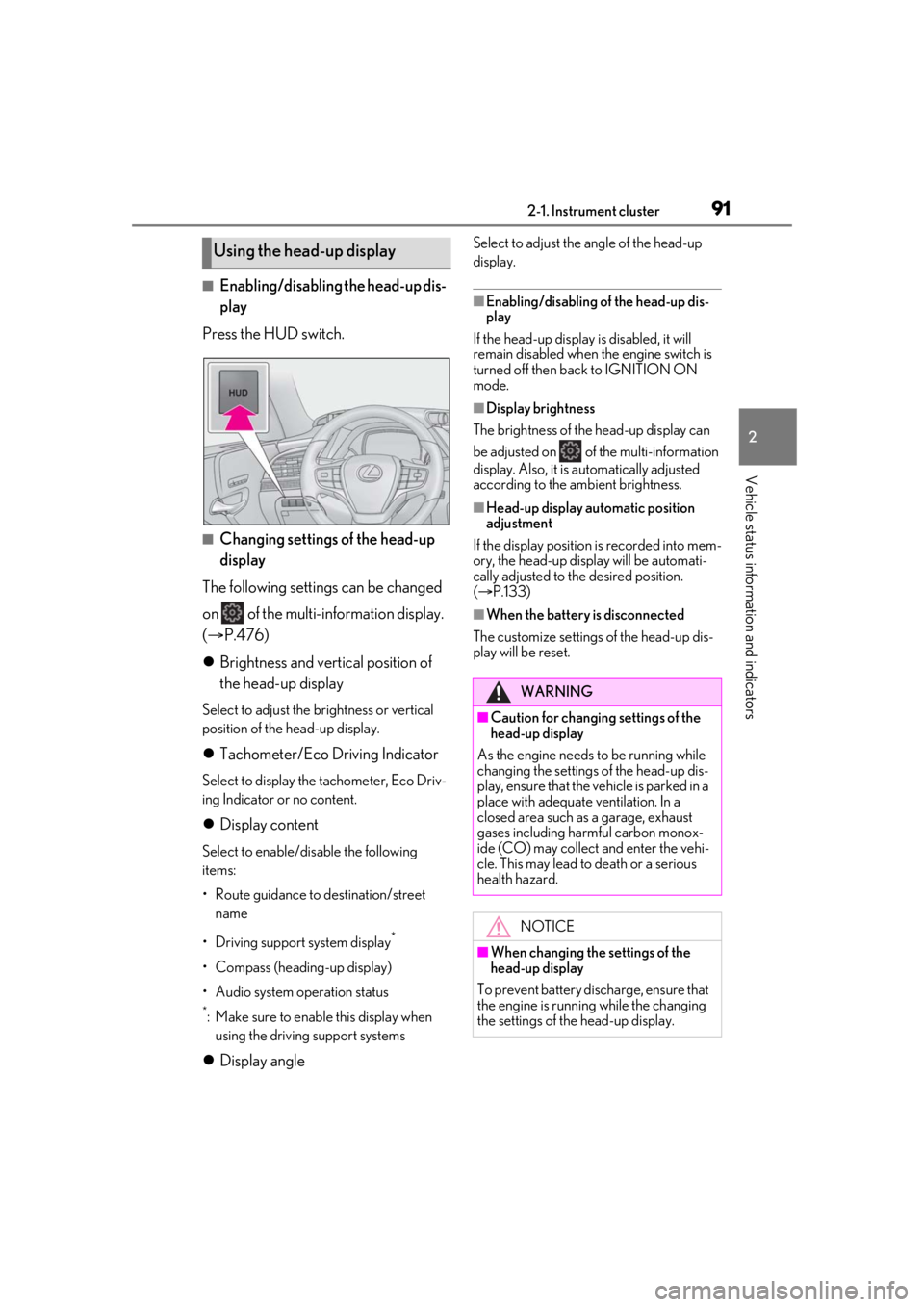
play
Press the HUD switch.
■Changing settings of the head-up
display
The following settings can be changed
on of the multi-information display.
( P.476)
Brightness and vertical position of
the head-up display
Select to adjust the brightness or vertical
position of the head-up display.
Tachometer/Eco Driving Indicator
Select to display the tachometer, Eco Driv-
ing Indicator or no content.
Display content
Select to enable/dis able the following
items:
• Route guidance to destination/street
name
• Driving support system display
*
• Compass (heading-up display)
• Audio system operation status
*: Make sure to enable this display when using the driving support systems
Display angle
Select to adjust the angle of the head-up
display.
■Enabling/disabling of the head-up dis-
play
If the head-up display is disabled, it will
remain disabled when the engine switch is
turned off then back to IGNITION ON
mode.
■Display brightness
The brightness of the head-up display can
be adjusted on of the multi-information
display. Also, it is automatically adjusted
according to the ambient brightness.
■Head-up display automatic position
adjustment
If the display position is recorded into mem-
ory, the head-up display will be automati-
cally adjusted to th e desired position.
( P.133)
■When the battery is disconnected
The customize settings of the head-up dis-
play will be reset.
Using the head-up display
WARNING
■Caution for changing settings of the
head-up display
As the engine needs to be running while
changing the settings of the head-up dis-
play, ensure that the vehicle is parked in a
place with adequate ventilation. In a
closed area such as a garage, exhaust
gases including harmful carbon monox-
ide (CO) may collect and enter the vehi-
cle. This may lead to death or a serious
health hazard.
NOTICE
■When changing the settings of the
head-up display
To prevent battery discharge, ensure that
the engine is running while the changing
the settings of the head-up display.
Page 92 of 520

922-1. Instrument cluster
Displays the operational status of the
following systems:
LTA (Lane Tracing Assist)
( P.238)
Dynamic radar cruise control with
full-speed range ( P.254)
Details of content displayed on the
head-up display may differ from that dis-
played on the multi-information display. For
details, refer to the explanation of each sys-
tem.
Pop-up displays for the following sys-
tems will be displayed when necessary.
■Driving support systems
Displays a warning/suggestion/advice
message or the operating state of a rel-
evant system.
PCS (Pre-Collision System)
( P.215, 227)
FCTA (Front Cross Traffic Alert) (if
equipped) ( P.235)
Intuitive parking assist (if equipped)
( P.272)
Parking Support Brake function (for
static objects) (if equipped)
( P.288)
Brake Override System ( P.165)
Drive-Start Control ( P.170)
Details of content displayed on the
head-up display may differ from that dis-
played on the multi-information display. For details, refer to the explanation of each sys-
tem.
■/ icons
These icons are linked to the
multi-information display
: Master warning icon
Displayed when a warn ing message is dis-
played on the multi-information display.
( P.436)
: Information icon
Displayed when a suggestion pop-up dis-
play ( P.88) or advice pop-up display is
displayed on the multi-information display.
■Warning message
Some warning messages are displayed
when necessary, according to certain
conditions.
Details of content displayed on the
head-up display may differ from that dis-
played on the multi-information display.
■Audio system operation status
Displayed when an audio remote con-
trol switch on the steering wheel is
operated.
■Hands-free system status
Displayed when the hands-free system
is operated.
■When a pop-up display is displayed
When a pop-up display is displayed, a cur-
rent display may no long er be displayed. In
this case, the display will return after the
pop-up display disappears.
Driving support system display
area
Pop-up display
Page 101 of 520
1013-1. Key information
3
Before driving
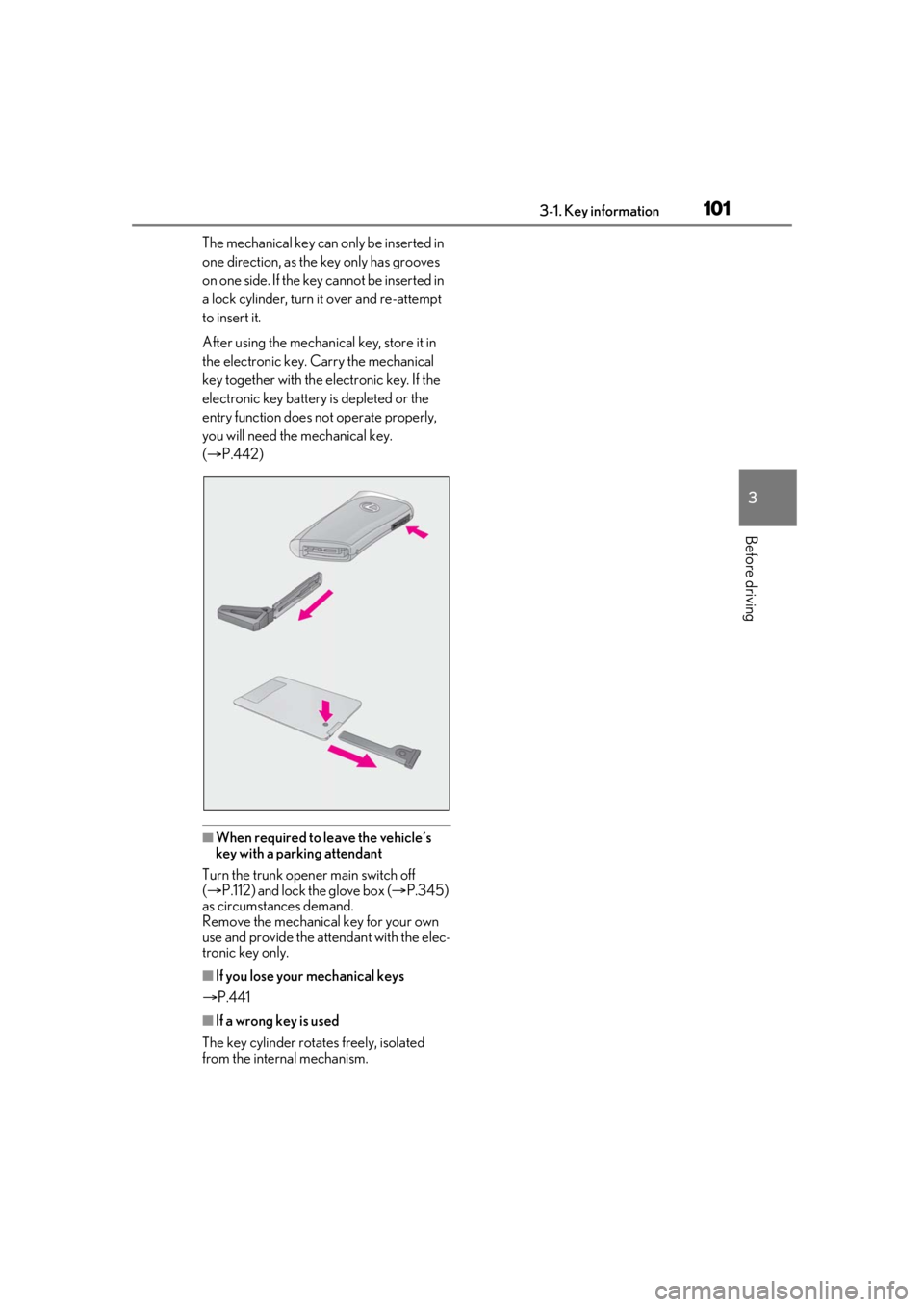
The mechanical key can only be inserted in
one direction, as the key only has grooves
on one side. If the key cannot be inserted in
a lock cylinder, turn it over and re-attempt
to insert it.
After using the mechanical key, store it in
the electronic key. Carry the mechanical
key together with the electronic key. If the
electronic key battery is depleted or the
entry function does not operate properly,
you will need the mechanical key.
( P.442)
■When required to leave the vehicle’s
key with a parking attendant
Turn the trunk opener main switch off
( P.112) and lock the glove box ( P.345)
as circumstances demand.
Remove the mechanical key for your own
use and provide the attendant with the elec-
tronic key only.
■If you lose your mechanical keys
P.441
■If a wrong key is used
The key cylinder rotates freely, isolated
from the internal mechanism.
Page 112 of 520

1123-2. Opening, closing and locking the doors and trunk
●When a foot remains under the rear
bumper
●If the rear bumper is strongly hit with a
foot or is touched for a while
If the rear bumper has been touched for a
while, wait for a short time before
attempting to operate the Hands Free
Power Trunk Lid again.
●When standing excessively close to the
rear bumper
●When an external radio wave source
interferes with the communication
between the electronic key and the vehi-
cle ( P.115)
●When the vehicle is parked near an elec-
trical noise source which affects the sen-
sitivity of the Hands Free Power Trunk Lid,
such as a pay parking spot, gas station,
electrically heated road, or fluorescent
light
●When the vehicle is near a TV tower,
electric power plant, radio station, large
display, airport or other facility that gen-
erates strong radio waves or electrical
noise
●When a large amount of water is applied
to the rear bumper, such as when the
vehicle is being washed or in heavy rain
●When mud, snow, ice, etc. is attached to
the rear bumper
●When the vehicle has been parked for a
while near objects that may move and
contact the rear bumper, such as plants
●When an accessory is installed to the rear
bumper
If an accessory has been installed, turn the
Hands Free Power Trunk Lid (kick sensor)
operation setting off.
■Preventing unintentional operation of
the Hands Free Power Trunk Lid (if
equipped)
When an electronic ke y is in the operation
detection area, the Ha nds Free Power Trunk
Lid may operate unintentionally, so be care-
ful in the following situations:
●When a large amount of water is applied
to the rear bumper, such as when the
vehicle is being washed or in heavy rain
●When dirt is wiped off the rear bumper
●When a small animal or small object, such
as a ball, moves under the rear bumper
●When an object is moved from under the
rear bumper
●If someone is swinging their legs while sit-
ting on the rear bumper
●If the legs or another part of someone’s
body contacts the rear bumper while
passing by the vehicle
●When the vehicle is parked near an elec-
trical noise source which affects the sen-
sitivity of the Hands Free Power Trunk Lid,
such as a pay parking spot, gas station,
electrically heated road, or fluorescent
light
●When the vehicle is near a TV tower,
electric power plant, radio station, large
display, airport or ot her facility that gen-
erates strong radio waves or electrical
noise
●When the vehicle is parked in a place
where objects such as plants are near the
rear bumper
●If luggage, etc. is set near the rear
bumper
●If accessories or a vehicle cover is
installed/removed ne ar the rear bumper
●When the vehicle is being towed
To prevent unintentiona l operation, turn the
Hands Free Power Trunk Lid (kick sensor)
operation setting off.
■Open door warning buzzer
P.105
■Customization
Some functions can be customized.
( P.476)
The trunk opener switch can be tem-
porarily disabled to protect luggage
stored in the trunk against theft.
Turn the main switch in the glove box
off to disable the trunk opener.
Luggage security system
Page 113 of 520
1133-2. Opening, closing and locking the doors and trunk
3
Before driving
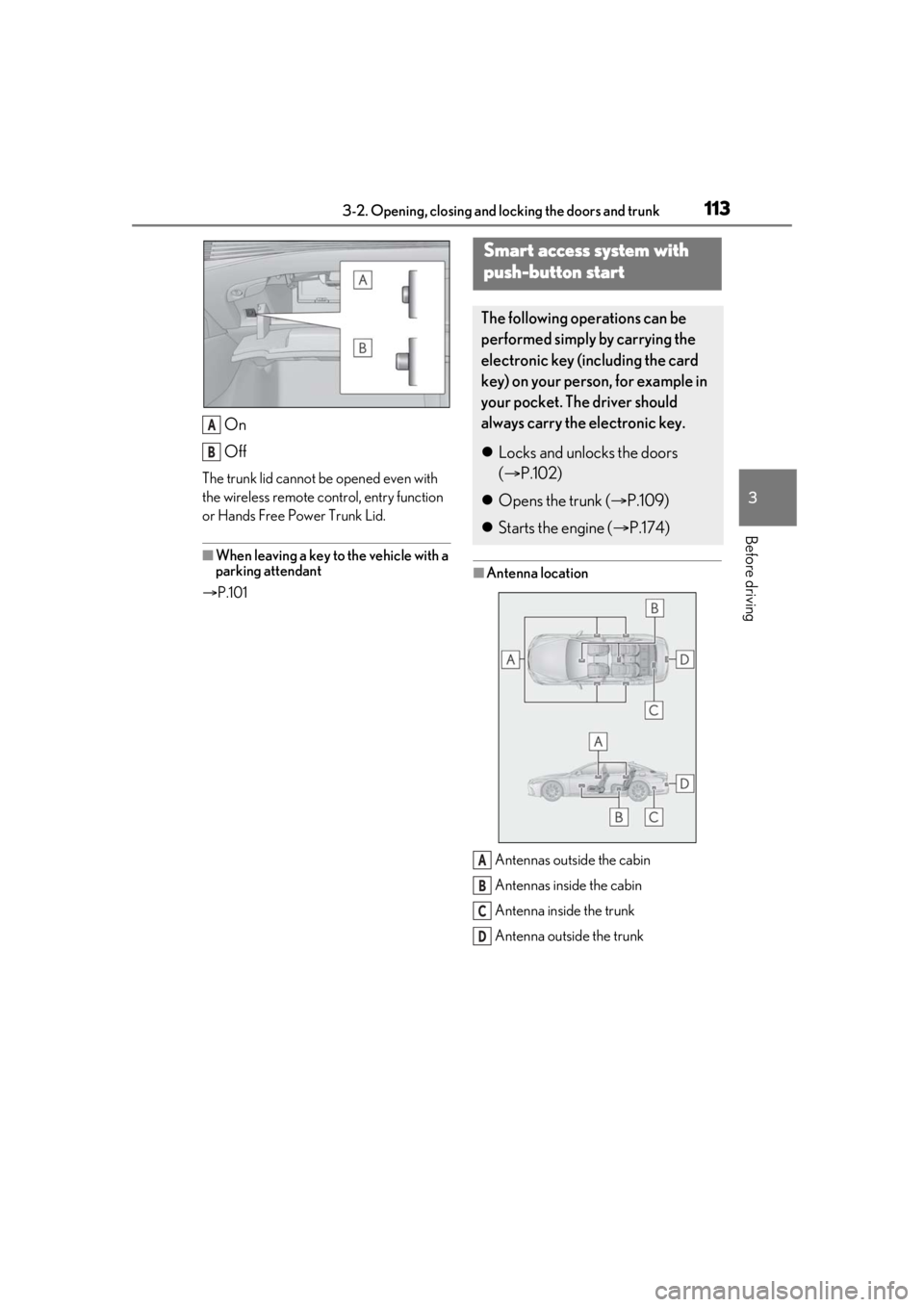
On
Off
The trunk lid cannot be opened even with
the wireless remote control, entry function
or Hands Free Power Trunk Lid.
■When leaving a key to the vehicle with a
parking attendant
P.101
■Antenna location
Antennas outside the cabin
Antennas inside the cabin
Antenna inside the trunk
Antenna outside the trunk
A
B
Smart access system with
push-button start
The following operations can be
performed simply by carrying the
electronic key (including the card
key) on your person, for example in
your pocket. The driver should
always carry the electronic key.
Locks and unlocks the doors
( P.102)
Opens the trunk ( P.109)
Starts the engine ( P.174)
A
B
C
D
Page 115 of 520
1153-2. Opening, closing and locking the doors and trunk
3
Before driving
take some time to unlock the doors.
• The electronic key has been left in an area of approximately 6 ft. (2 m) of the
outside of the vehicle for 10 minutes or
longer.
• The smart access system with push-but-
ton start has not been used for 5 days or
longer.
●If the smart access system with push-but-
ton start has not been used for 14 days or
longer, the doors cannot be unlocked at
any doors except the driver’s door. In this
case, take hold of the driver’s door han-
dle, or use the wireless remote control or
the mechanical key, to unlock the doors.
■Turning an electronic key to bat-
tery-saving mode
When battery-saving mode is set, battery
depletion is minimized by stopping the elec-
tronic key from re ceiving radio waves.
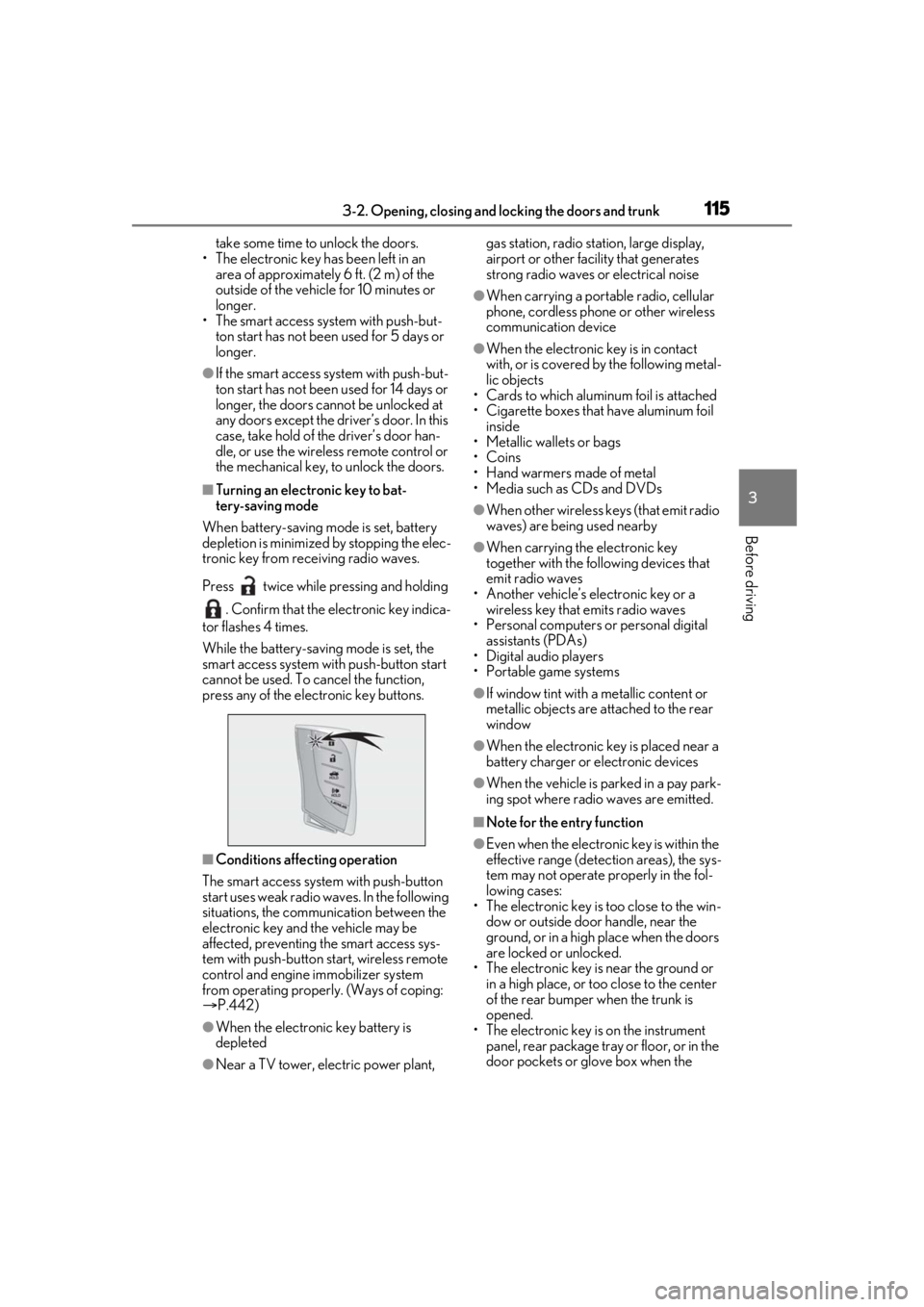
Press twice while pressing and holding . Confirm that the electronic key indica-
tor flashes 4 times.
While the battery-saving mode is set, the
smart access system with push-button start
cannot be used. To cancel the function,
press any of the electronic key buttons.
■Conditions affe cting operation
The smart access system with push-button
start uses weak radio waves. In the following
situations, the communication between the
electronic key and the vehicle may be
affected, preventing the smart access sys-
tem with push-button start, wireless remote
control and engine immobilizer system
from operating properly. (Ways of coping:
P.442)
●When the electronic key battery is
depleted
●Near a TV tower, electric power plant, gas station, radio stat
ion, large display,
airport or other fac ility that generates
strong radio waves or electrical noise
●When carrying a portable radio, cellular
phone, cordless phone or other wireless
communication device
●When the electronic key is in contact
with, or is covered by the following metal-
lic objects
• Cards to which aluminum foil is attached
• Cigarette boxes that have aluminum foil
inside
• Metallic wallets or bags
•Coins
• Hand warmers made of metal
• Media such as CDs and DVDs
●When other wireless keys (that emit radio
waves) are being used nearby
●When carrying the electronic key
together with the following devices that
emit radio waves
• Another vehicle’s electronic key or a wireless key that emits radio waves
• Personal computers or personal digital assistants (PDAs)
• Digital audio players
• Portable game systems
●If window tint with a metallic content or
metallic objects are attached to the rear
window
●When the electronic key is placed near a
battery charger or electronic devices
●When the vehicle is parked in a pay park-
ing spot where radio waves are emitted.
■Note for the entry function
●Even when the electronic key is within the
effective range (detection areas), the sys-
tem may not operate properly in the fol-
lowing cases:
• The electronic key is too close to the win- dow or outside door handle, near the
ground, or in a high place when the doors
are locked or unlocked.
• The electronic key is near the ground or in a high place, or too close to the center
of the rear bumper when the trunk is
opened.
• The electronic key is on the instrument
panel, rear package tray or floor, or in the
door pockets or glove box when the
Page 163 of 520
163
4
4
Driving
Driving
.4-1. Before drivingDriving the vehicle ..................... 164
Cargo and luggage ................... 170
Vehicle load limits ...................... 172
Trailer towing ............................... 173
Dinghy towing ............................. 173
4-2. Driving procedures Engine (ignition) switch ........... 174
Automatic transmission........... 178
Turn signal lever.......................... 185
Parking brake .............................. 186
Brake Hold.................................... 188
4-3. Operating the lights and wipers Headlight switch ......................... 190
AHB (Automatic High Beam) ......................................................... 193
Windshield wipers and washer ......................................................... 196
4-4. Refueling Opening the fuel tank cap..... 200
4-5. Using the driving support sys- tems
Lexus Safety System + A........ 202
Lexus Safety System + 2.0 .... 209
PCS (Pre-Collision System) (vehi- cles with Lexus Safety System +
A) ................................................... 215
PCS (Pre-Collision System) (vehi- cles with Lexus Safety System +
2.0)............................................... 227FCTA (Front Cross Traffic Alert)
....................................................... 235
LTA (Lane Tracing Assist) .... 238
RSA (Road Sign Assist)........... 251
Dynamic radar cruise control with full-speed range...................... 254
BSM (Blind Spot Monitor) .... 264
PKSA (Parking Support Alert) ......................................................... 271
Intuitive parking assist .............. 272
RCTA (Rear Cross Traffic Alert) function....................................... 277
RCD (Rear Camera Detection) function........................................ 281
PKSB (Parking Support Brake) ....................................................... 284
Parking Support Brake function (static objects) ......................... 288
Parking Support Brake function (rear-crossing vehicles) ...... 293
Parking Support Brake function (rear pedestrians) .................. 296
Driving mode select switch .. 299
Electronically modulated air sus- pension ........................................ 301
Driving assist systems.............. 304
4-6. Driving tips Winter driving tips .................... 309
Page 164 of 520

1644-1. Before driving
4-1.Before driving
■Starting the engine
P.174
■Driving
1 With the brake pedal depressed,
shift the shift position to D.
(P.178)
Check that the shift position indicator
shows D.
2 If the parking brake is in manual
mode, release the parking brake.
(P.186)
3 Gradually release the brake pedal
and gently depress the accelerator
pedal to accelerate the vehicle.
■Stopping
1 With the shift position in D, depress
the brake pedal.
2 If necessary, set the parking brake.
If the vehicle is to be stopped for an
extended period of time, shift the shift posi-
tion to P. ( P.180)
■Parking the vehicle
1 With the shift position in D, depress
the brake pedal to stop the vehicle
completely.
2 If the parking brake is in manual
mode, set the parking brake.
(P.186)
3 Shift the shift position to P.
(P.180)
Check that the shift position indicator
shows P and the parking brake indicator is
illuminated.
4 Press the engine switch to stop the
engine.
5 Slowly release the brake pedal.
6 Lock the door, making sure that you
have the electronic key on your
person.
If parking on a hill, block the wheels as
needed.
■Starting off on a steep uphill
1 Make sure that the parking brake is
set and shift the shift position to D.
2 Gently depress the accelerator
pedal.
3 Release the parking brake.
■Driving in the rain
●Drive carefully when it is raining, because
visibility will be reduced, the windows
may become fogged-up, and the road
will be slippery.
●Drive carefully when it starts to rain,
because the road surface will be espe-
cially slippery.
●Refrain from high speeds when driving on
an expressway in the rain, because there
may be a layer of wa ter between the tires
and the road surface, preventing the
steering and brakes from operating prop-
erly.
■Engine speed while driving
In the following conditions, the engine
speed may become high while driving. This
is due to automatic up-shifting control or
down-shifting implementation to meet driv-
ing conditions. It does not indicate sudden
acceleration.
●The vehicle is judged to be driving uphill
or downhill
●When the accelerato r pedal is released
●When the brake pedal is depressed
Driving the vehicle
The following procedures should be
observed to ensure safe driving:
Driving procedure
Page 165 of 520
1654-1. Before driving
4
Driving
■Restraining the engine output (Brake
Override System)
●When the accelerator and brake pedals
are depressed at the same time, the
engine output may be restrained.
●A warning message is displayed on the
multi-information display while the sys-
tem is operating.
■Breaking in your new Lexus
To extend the life of the vehicle, observing
the following precautions is recommended:
●For the first 186 miles (300 km):
Avoid sudden stops.
●For the first 621 miles (1000 km):
• Do not drive at extremely high speeds.
• Avoid sudden acceleration.
• Do not drive continuously in low gears.
• Do not drive at a constant speed for extended periods.
■Drum-in-disc type parking brake system
Your vehicle has a drum-in-disc type park-
ing brake system. This type of brake system
needs bedding-down of the brake shoes
periodically or whenev er the parking brake
shoes and/or drum are replaced. Have your
Lexus dealer perform the bedding down
operation.
■Operating your vehicle in a foreign
country
Comply with the relevant vehicle registra-
tion laws and confirm the availability of the
correct fuel. ( P.457)
■Idling time before engine stop
To prevent damage to the turbocharger,
allow the engine to id le immediately after
high-speed driving or hill climbing.
Driving conditionIdling time
Normal city drivingNot neces-
sary
High-speed driving (Con-stant speed of approx. 62
mph [100km/h])Not neces- sary
Steep hill driving or continu-ous driving at 62 mph (100 km/h) or more (race track driving etc.)Approxi-mately 1 minute
WARNING
Observe the following precautions.
Failure to do so may result in death or
serious injury.
■When starting the vehicle
Always keep your foot on the brake
pedal while stopped with the engine run-
ning. This prevents the vehicle from
creeping.
■When driving the vehicle
●Do not drive if you are unfamiliar with
the location of the brake and accelera-
tor pedals to avoid depressing the
wrong pedal.
• Accidentally depressing the accelera- tor pedal instead of the brake pedal
will result in sudden acceleration that
may lead to an accident.
• When backing up, you may twist your body around, leading to a difficulty in
operating the pedals. Make sure to
operate the pedals properly.
• Make sure to keep a correct driving posture even when moving the vehicle
only slightly. This allows you to depress
the brake and accelerator pedals
properly.
• Depress the brake pedal using your right foot. Depressing the brake pedal
using your left foot may delay
response in an emer gency, resulting in
an accident.
Driving conditionIdling time