tire LEXUS LS500 2021 User Guide
[x] Cancel search | Manufacturer: LEXUS, Model Year: 2021, Model line: LS500, Model: LEXUS LS500 2021Pages: 520, PDF Size: 9.81 MB
Page 110 of 520
1103-2. Opening, closing and locking the doors and trunk
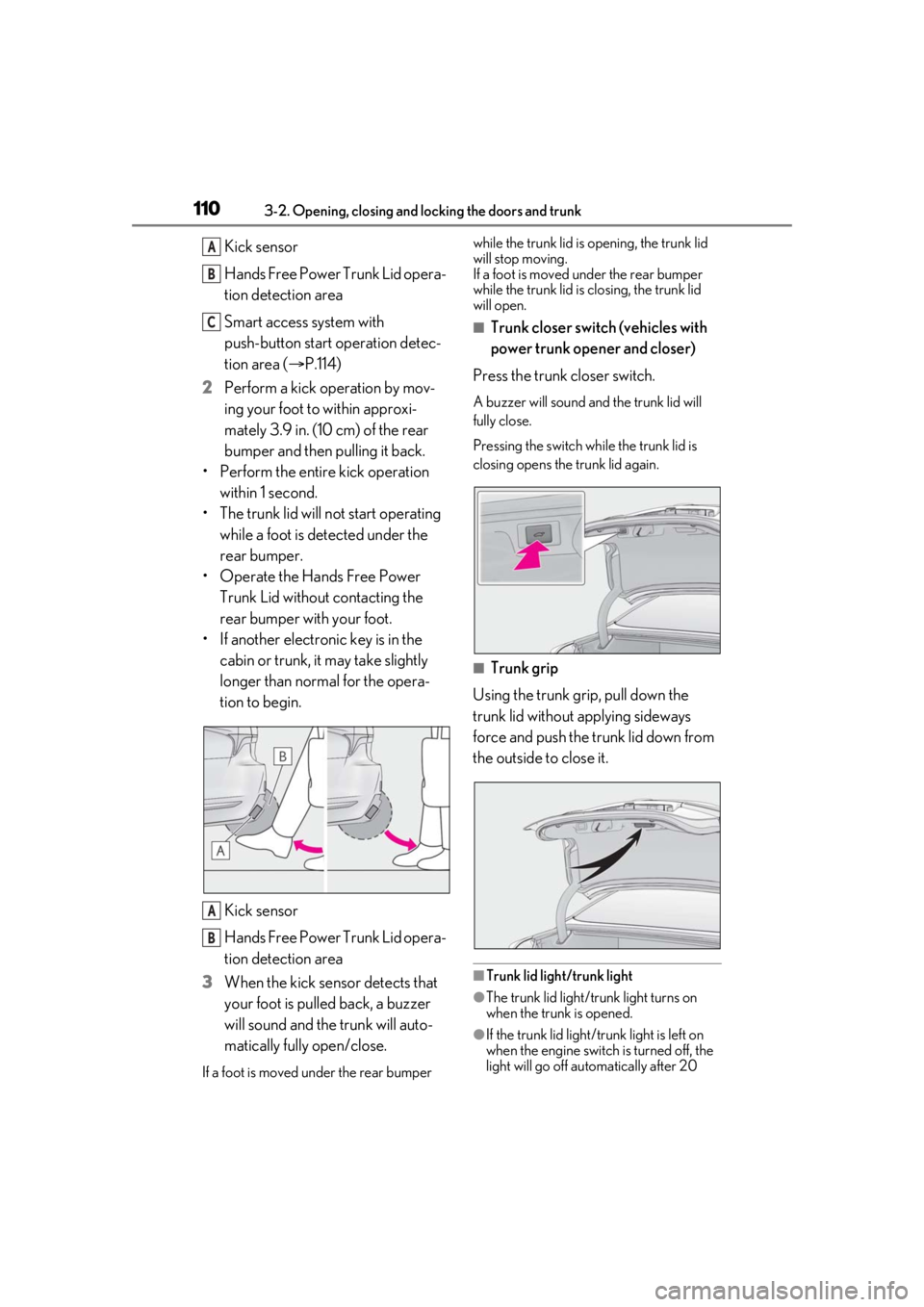
Kick sensor
Hands Free Power Trunk Lid opera-
tion detection area
Smart access system with
push-button start operation detec-
tion area (P.114)
2 Perform a kick operation by mov-
ing your foot to within approxi-
mately 3.9 in. (10 cm) of the rear
bumper and then pulling it back.
• Perform the entire kick operation within 1 second.
• The trunk lid will not start operating while a foot is detected under the
rear bumper.
• Operate the Hands Free Power Trunk Lid without contacting the
rear bumper with your foot.
• If another electronic key is in the cabin or trunk, it may take slightly
longer than normal for the opera-
tion to begin.
Kick sensor
Hands Free Power Trunk Lid opera-
tion detection area
3 When the kick sensor detects that
your foot is pulled back, a buzzer
will sound and the trunk will auto-
matically fully open/close.
If a foot is moved under the rear bumper while the trunk lid is
opening, the trunk lid
will stop moving.
If a foot is moved under the rear bumper
while the trunk lid is closing, the trunk lid
will open.
■Trunk closer switch (vehicles with
power trunk opener and closer)
Press the trunk closer switch.
A buzzer will sound and the trunk lid will
fully close.
Pressing the switch while the trunk lid is
closing opens the trunk lid again.
■Trunk grip
Using the trunk grip, pull down the
trunk lid without applying sideways
force and push the trunk lid down from
the outside to close it.
■Trunk lid light/trunk light
●The trunk lid light/trunk light turns on
when the trunk is opened.
●If the trunk lid light/trunk light is left on
when the engine switch is turned off, the
light will go off automatically after 20
A
B
C
A
B
Page 146 of 520
1463-4. Adjusting the steering wheel and mirrors
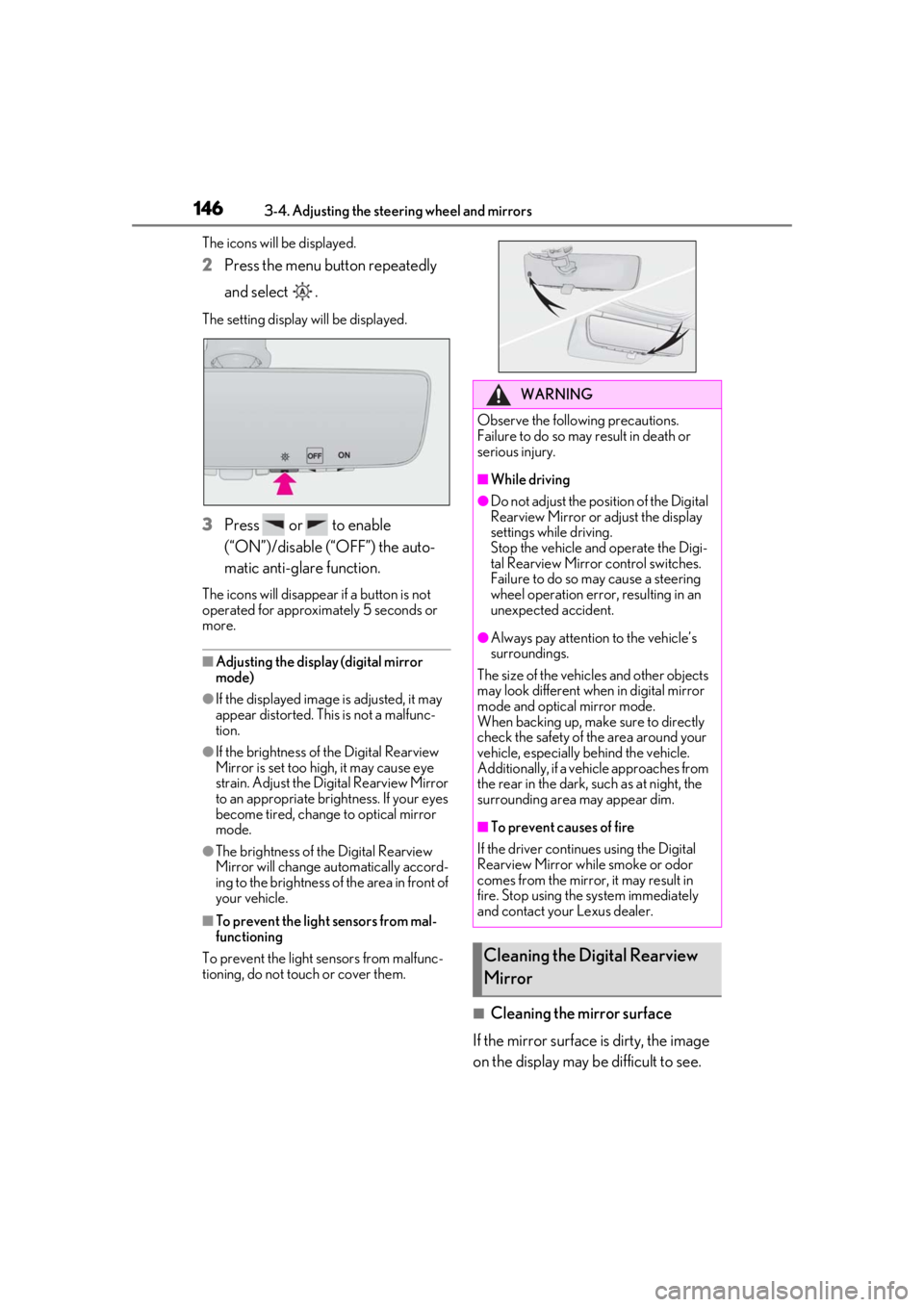
The icons will be displayed.
2Press the menu button repeatedly
and select .
The setting display will be displayed.
3Press or to enable
(“ON”)/disable (“OFF”) the auto-
matic anti-glare function.
The icons will disappear if a button is not
operated for approximately 5 seconds or
more.
■Adjusting the display (digital mirror
mode)
●If the displayed image is adjusted, it may
appear distorted. This is not a malfunc-
tion.
●If the brightness of the Digital Rearview
Mirror is set too high, it may cause eye
strain. Adjust the Di gital Rearview Mirror
to an appropriate brig htness. If your eyes
become tired, change to optical mirror
mode.
●The brightness of the Digital Rearview
Mirror will change automatically accord-
ing to the brightness of the area in front of
your vehicle.
■To prevent the light sensors from mal-
functioning
To prevent the light sensors from malfunc-
tioning, do not touch or cover them.
■Cleaning the mirror surface
If the mirror surface is dirty, the image
on the display may be difficult to see.
WARNING
Observe the following precautions.
Failure to do so may result in death or
serious injury.
■While driving
●Do not adjust the position of the Digital
Rearview Mirror or adjust the display
settings while driving.
Stop the vehicle and operate the Digi-
tal Rearview Mirror control switches.
Failure to do so may cause a steering
wheel operation error, resulting in an
unexpected accident.
●Always pay attention to the vehicle’s
surroundings.
The size of the vehicles and other objects
may look different when in digital mirror
mode and optical mirror mode.
When backing up, make sure to directly
check the safety of the area around your
vehicle, especially behind the vehicle.
Additionally, if a vehicle approaches from
the rear in the dark, such as at night, the
surrounding area may appear dim.
■To prevent causes of fire
If the driver contin ues using the Digital
Rearview Mirror while smoke or odor
comes from the mirror, it may result in
fire. Stop using the system immediately
and contact your Lexus dealer.
Cleaning the Digital Rearview
Mirror
Page 164 of 520
1644-1. Before driving
4-1.Before driving
■Starting the engine
P.174
■Driving
1 With the brake pedal depressed,
shift the shift position to D.
(P.178)
Check that the shift position indicator
shows D.
2 If the parking brake is in manual
mode, release the parking brake.
(P.186)
3 Gradually release the brake pedal
and gently depress the accelerator
pedal to accelerate the vehicle.
■Stopping
1 With the shift position in D, depress
the brake pedal.
2 If necessary, set the parking brake.
If the vehicle is to be stopped for an
extended period of time, shift the shift posi-
tion to P. ( P.180)
■Parking the vehicle
1 With the shift position in D, depress
the brake pedal to stop the vehicle
completely.
2 If the parking brake is in manual
mode, set the parking brake.
(P.186)
3 Shift the shift position to P.
(P.180)
Check that the shift position indicator
shows P and the parking brake indicator is
illuminated.
4 Press the engine switch to stop the
engine.
5 Slowly release the brake pedal.
6 Lock the door, making sure that you
have the electronic key on your
person.
If parking on a hill, block the wheels as
needed.
■Starting off on a steep uphill
1 Make sure that the parking brake is
set and shift the shift position to D.
2 Gently depress the accelerator
pedal.
3 Release the parking brake.
■Driving in the rain
●Drive carefully when it is raining, because
visibility will be reduced, the windows
may become fogged-up, and the road
will be slippery.
●Drive carefully when it starts to rain,
because the road surface will be espe-
cially slippery.
●Refrain from high speeds when driving on
an expressway in the rain, because there
may be a layer of wa ter between the tires
and the road surface, preventing the
steering and brakes from operating prop-
erly.
■Engine speed while driving
In the following conditions, the engine
speed may become high while driving. This
is due to automatic up-shifting control or
down-shifting implementation to meet driv-
ing conditions. It does not indicate sudden
acceleration.
●The vehicle is judged to be driving uphill
or downhill
●When the accelerato r pedal is released
●When the brake pedal is depressed
Driving the vehicle
The following procedures should be
observed to ensure safe driving:
Driving procedure
Page 166 of 520
1664-1. Before driving
WARNING
●Do not drive the vehicle over or stop
the vehicle near flammable materials.
The exhaust system and exhaust gases
can be extremely hot. These hot parts
may cause a fire if there is any flamma-
ble material nearby.
●Vehicles without Lexus Safety System
+ A: During normal driving, do not turn
off the engine. Turning the engine off
while driving will not cause loss of
steering or braking control, but the
power assist to these systems will be
lost. This will make it more difficult to
steer and brake, so you should pull
over and stop the vehicle as soon as it
is safe to do so.
However, in the event of an emer-
gency, such as if it becomes impossible
to stop the vehicle in the normal way:
P.418
●Vehicles with Lexus Safety System + A:
During normal driving, do not turn off
the engine. Turning the engine off
while driving will not cause loss of
steering or braking control, however,
power assist to the steering will be lost.
This will make it more difficult to steer
smoothly, so you should pull over and
stop the vehicle as soon as it is safe to
do so.
In the event of an emergency, such as if
it becomes impossible to stop the vehi-
cle in the normal way:
P.418
●Use engine braking (downshift) to
maintain a safe speed when driving
down a steep hill.
Using the brakes continuously may
cause the brakes to overheat and lose
effectiveness. (
P.178)
●Do not adjust the positions of the
steering wheel, the seat, or the inside
or outside rear view mirrors while driv-
ing.
Doing so may result in a loss of vehicle
control.
●Always check that all passengers’
arms, heads or other parts of their
body are not outside the vehicle.
●Do not drive in excess of the speed
limit. Even if the legal speed limit per-
mits it, do not drive over 85 mph (140
km/h) unless your vehicle has
high-speed capability tires. Driving
over 85 mph (140 km /h) may result in
tire failure, loss of control and possible
injury. Be sure to consult a tire dealer
to determine whether the tires on your
vehicle are high-speed capability tires
or not before driving at such speeds.
■When driving on slippery road sur-
faces
●Sudden braking, acceleration and
steering may cause tire slippage and
reduce your ability to control the vehi-
cle.
●Sudden acceleration, engine braking
due to shifting, or changes in engine
speed could cause the vehicle to skid.
●After driving through a puddle, lightly
depress the brake pedal to make sure
that the brakes are functioning prop-
erly. Wet brake pads may prevent the
brakes from functioning properly. If the
brakes on only one side are wet and
not functioning properly, steering con-
trol may be affected.
■When shifting the shift position
●Do not let the vehicle roll backward
while a forward driving position is
selected, or roll forw ard while the shift
position is in R.
Doing so may cause the engine to stall
or lead to poor brake and steering
performance, resulting in an accident
or damage to the vehicle.
●Do not shift the shift position to P while
the vehicle is moving.
Doing so can damage the transmission
and may result in a loss of vehicle con-
trol.
Page 169 of 520
1694-1. Before driving
4
Driving
WARNING
●Vehicles with Lexus Safety System + A:
The brake system consists of 2 or more
individual hydraulic systems; if one of
the systems fails, the other(s) will still
operate. In this case, the brake pedal
should be depressed more firmly than
usual and the braking distance will
increase. Have your brakes fixed
immediately.
■If the vehicle becomes stuck
Do not spin the wheels excessively when
a driven wheel is up in the air, or the vehi-
cle is stuck in sand, mud, etc. This may
damage the driveline components or
propel the vehicle forward or backward,
causing an accident.
NOTICE
■When driving the vehicle
●Do not depress the accelerator and
brake pedals at the same time during
driving, as this may restrain the engine
output.
●Do not use the accelerator pedal or
depress the accelerator and brake
pedals at the same time to hold the
vehicle on a hill.
■When parking the vehicle
Always set the parking brake, and shift
the shift position to P. Failure to do so
may cause the vehicle to move or the
vehicle may accelerate suddenly if the
accelerator pedal is accidentally
depressed.
■Avoiding damage to vehicle parts
●Do not turn the steering wheel fully in
either direction and hold it there for an
extended period of time.
Doing so may damage the power
steering motor.
●When driving over bumps in the road,
drive as slowly as possible to avoid
damaging the wheels, underside of the
vehicle, etc.
●Make sure to idle the engine immedi-
ately after high-load driving. Stop the
engine only after the turbocharger has
cooled down.
Failure to do so may cause damage to
the turbocharger.
■If you get a flat tire while driving
A flat or damaged tire may cause the fol-
lowing situations. Hold the steering
wheel firmly and gradually depress the
brake pedal to slow down the vehicle.
●It may be difficult to control your vehi-
cle.
●The vehicle will make abnormal
sounds or vibrations.
●The vehicle will lean abnormally.
Information on what to do in case of a flat
tire (
P.438)
■When encountering flooded roads
Do not drive on a road that has flooded
after heavy rain etc. Doing so may cause
the following serious damage to the vehi-
cle:
●Engine stalling
●Short in electrical components
●Engine damage caused by water
immersion
In the event that you drive on a flooded
road and the vehicle is flooded, be sure
to have your Lexus dealer check the fol-
lowing:
●Brake function
●Changes in quantity and quality of oil
and fluid used for the engine, transmis-
sion, transfer (AWD models), differen-
tial, etc.
●Lubricant condition for the propeller
shaft, bearings and suspension joints
(where possible), and the function of
all joints, bearings, etc.
Page 172 of 520
1724-1. Before driving
■Total load capacity and seating capacity
These details are also described on the tire
and loading information label. ( P.406)
WARNING
●Do not place cargo or luggage in or on
the following locations.
• At the feet of the driver
• On the front passenger or rear seats (when stacking items)
• On the package tray
• On the instrument panel
•On the dashboard
• In front of the Center Display
●Secure all items in the occupant com-
partment.
■Capacity and distribution
●Do not exceed the maximum axle
weight rating or the total vehicle
weight rating.
●Even if the total load of occupant’s
weight and the cargo load is less than
the total load capacity, do not apply the
load unevenly. Improper loading may
cause deterioration of steering or
braking control which may cause
death or serious injury.
Vehicle load limits
Vehicle load limits include total
load capacity, seating capacity,
towing capacity and cargo capac-
ity.
Total load capacity (vehicle
capacity weight): P.456
Total load capacity means the com-
bined weight of occupants, cargo
and luggage.
Seating capacity: P.456
Seating capacity means the maxi-
mum number of occupants whose
estimated average weight is 150 lb.
(68 kg) per person.
Towing capacity
Lexus does not recommend towing
a trailer with your vehicle.
Cargo capacity
Cargo capacity may increase or
decrease depending on the weight
and the number of occupants.
WARNING
■Overloading the vehicle
Do not overload the vehicle.
It may not only cause damage to the tires,
but also degrade steering and braking
ability, resulting in an accident.
Page 177 of 520
1774-2. Driving procedures
4
Driving
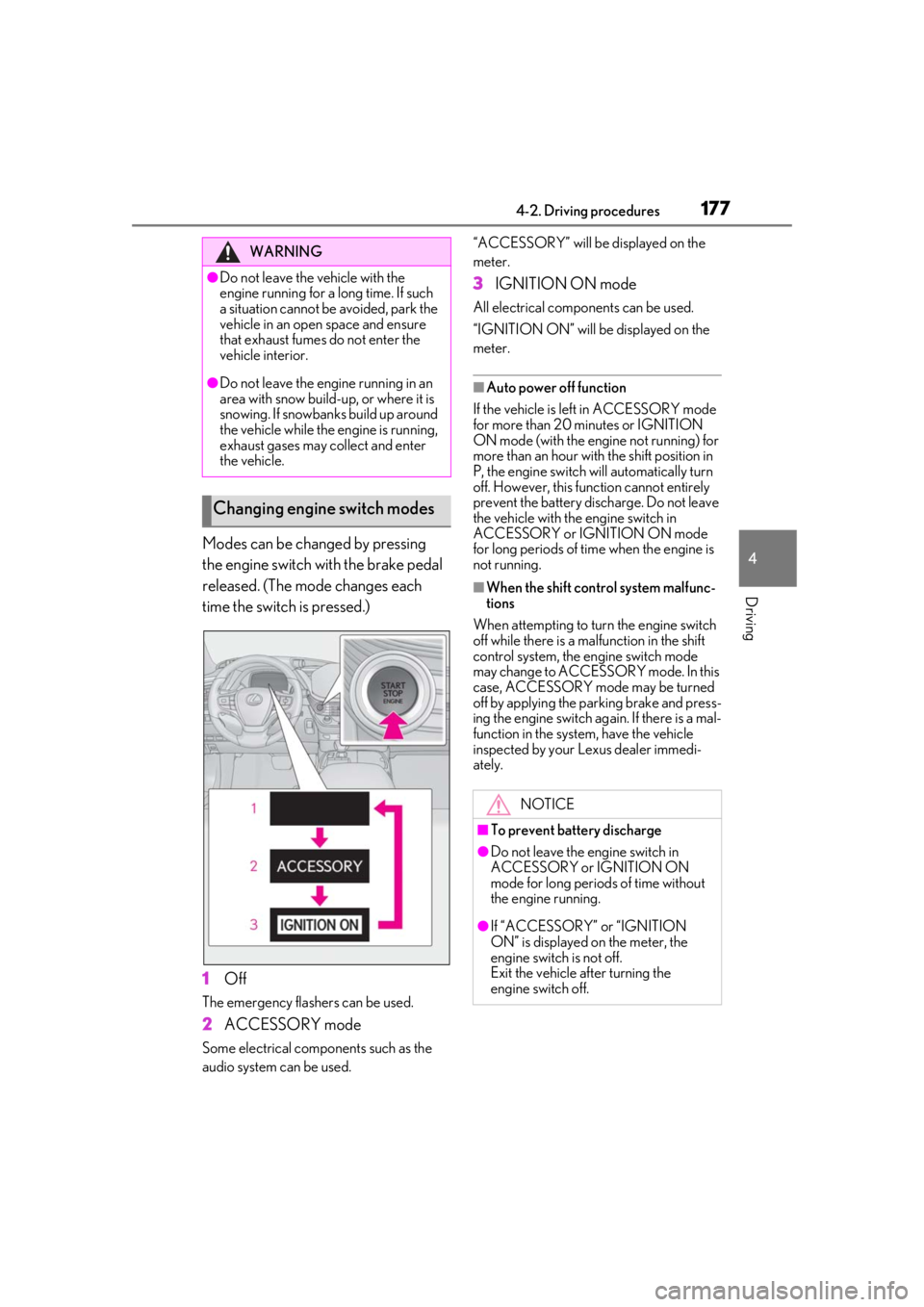
Modes can be changed by pressing
the engine switch with the brake pedal
released. (The mode changes each
time the switch is pressed.)
1Off
The emergency flashers can be used.
2ACCESSORY mode
Some electrical components such as the
audio system can be used. “ACCESSORY” will be displayed on the
meter.
3
IGNITION ON mode
All electrical components can be used.
“IGNITION ON” will be displayed on the
meter.
■Auto power off function
If the vehicle is left in ACCESSORY mode
for more than 20 minutes or IGNITION
ON mode (with the engine not running) for
more than an hour with the shift position in
P, the engine switch will automatically turn
off. However, this function cannot entirely
prevent the battery discharge. Do not leave
the vehicle with the engine switch in
ACCESSORY or IGNITION ON mode
for long periods of time when the engine is
not running.
■When the shift control system malfunc-
tions
When attempting to turn the engine switch
off while there is a ma lfunction in the shift
control system, the engine switch mode
may change to ACCESSO RY mode. In this
case, ACCESSORY mode may be turned
off by applying the parking brake and press-
ing the engine switch ag ain. If there is a mal-
function in the system, have the vehicle
inspected by your Lexus dealer immedi-
ately.
WARNING
●Do not leave the vehicle with the
engine running for a long time. If such
a situation cannot be avoided, park the
vehicle in an open space and ensure
that exhaust fumes do not enter the
vehicle interior.
●Do not leave the engine running in an
area with snow build-up, or where it is
snowing. If snowbanks build up around
the vehicle while the engine is running,
exhaust gases may collect and enter
the vehicle.
Changing engine switch modes
NOTICE
■To prevent battery discharge
●Do not leave the engine switch in
ACCESSORY or IGNITION ON
mode for long periods of time without
the engine running.
●If “ACCESSORY” or “IGNITION
ON” is displayed on the meter, the
engine switch is not off.
Exit the vehicle after turning the
engine switch off.
Page 189 of 520
1894-2. Driving procedures
4
Driving
play. The parking brake will then be set
automatically.
■Brake hold function
●If the brake pedal is left released for a
period of about 3 minutes after the sys-
tem has started holding the brake, the
parking brake will be set automatically. In
this case, a warning buzzer sounds and a
message is shown on the multi-informa-
tion display.
●To turn the system off while the system is
holding the brake, firmly depress the
brake pedal and press the button again.
●The brake hold function may not hold the
vehicle when the vehicle is on a steep
incline. In this situation, it may be neces-
sary for the driver to apply the brakes. A
warning buzzer will sound and the
multi-information display will inform the
driver of this situation. If a warning mes-
sage is shown on the multi-information
display, read the message and follow the
instructions.
■When the parking brake is set automati-
cally while the system is holding the
brakes
Perform any of the follo wing operations to
release the parking brake.
●Depress the accelerator pedal. (The
parking brake will not be released auto-
matically if the seat belt is not fastened.)
●Operate the parking brake switch with
the brake pedal depressed.
Make sure that the pa rking brake indicator
light goes off. ( P.186)
■When an inspection at your Lexus
dealer is necessary
When the brake hold standby indicator
(green) does not illuminate even when the
brake hold switch is pressed with the brake
hold system operating conditions met, the
system may be malfun ctioning. Have the
vehicle inspected at your Lexus dealer.
■If “Brake Hold Malfunction Press Brake
to Deactivate Visit Your Dealer” or
“Brake Hold Malfunction Visit Your
Dealer” is displayed on the multi-infor-
mation display
The system may be ma lfunctioning. Have
the vehicle inspected by your Lexus dealer.
■Warning messages and buzzers
Warning messages and buzzers are used to
indicate a system malfunction or to inform
the driver of the need for caution. If a warn-
ing message is shown on the multi-informa-
tion display, read the message and follow
the instructions.
■If the brake hold operated indicator
flashes
P.433
WARNING
■When the vehicle is on a steep incline
When using the brake hold system on a
steep incline exercise caution. The brake
hold function may not hold the vehicle in
such a situation.
■When stopped on a slippery road
The system cannot stop the vehicle when
the gripping ability of the tires has been
exceeded. Do not use the system when
stopped on a slippery road.
NOTICE
■When parking the vehicle
The brake hold system is not designed
for use when parking the vehicle for a
long period of time. Turning the engine
switch off while the system is holding the
brake may release the brake, which
would cause the vehicle to move. When
operating the engine switch, depress the
brake pedal, shift the shift position to P
and set the parking brake.
Page 192 of 520
1924-3. Operating the lights and wipers
●When a door or the trunk is opened or
closed
■Welcome light illumination control
The parking lights and tail lights automati-
cally turn on at night when the doors are
unlocked using the entry function or wire-
less remote control if the light switch is in
the position.
■Customization
Some functions can be customized.
( P.476)
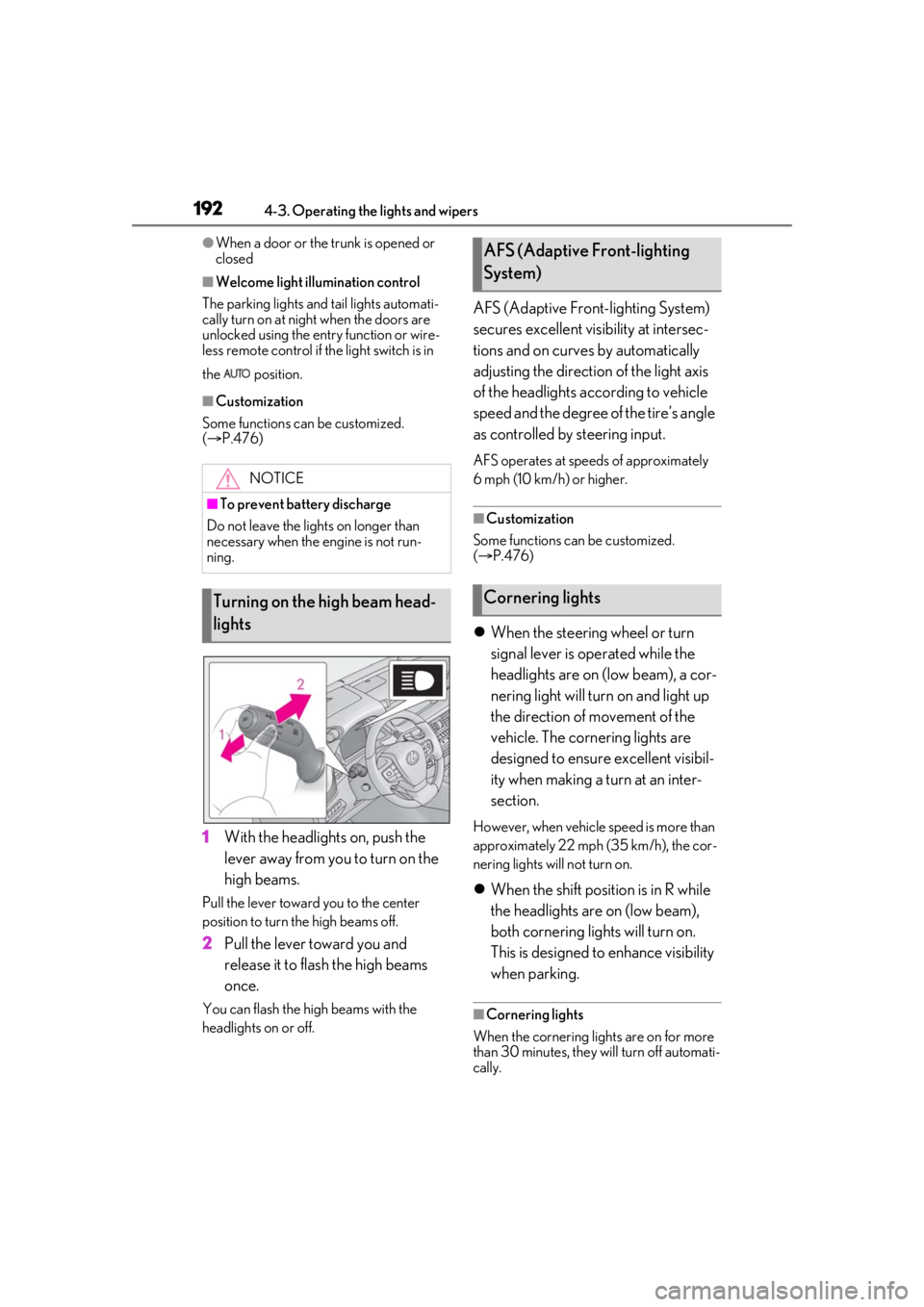
1 With the headlights on, push the
lever away from you to turn on the
high beams.
Pull the lever toward you to the center
position to turn the high beams off.
2Pull the lever toward you and
release it to flash the high beams
once.
You can flash the high beams with the
headlights on or off.
AFS (Adaptive Front-lighting System)
secures excellent visibility at intersec-
tions and on curves by automatically
adjusting the direction of the light axis
of the headlights according to vehicle
speed and the degree of the tire’s angle
as controlled by steering input.
AFS operates at speeds of approximately
6 mph (10 km/h) or higher.
■Customization
Some functions can be customized.
( P.476)
When the steering wheel or turn
signal lever is operated while the
headlights are on (low beam), a cor-
nering light will turn on and light up
the direction of movement of the
vehicle. The cornering lights are
designed to ensure excellent visibil-
ity when making a turn at an inter-
section.
However, when vehicle speed is more than
approximately 22 mph (35 km/h), the cor-
nering lights will not turn on.
When the shift position is in R while
the headlights are on (low beam),
both cornering lights will turn on.
This is designed to enhance visibility
when parking.
■Cornering lights
When the cornering lights are on for more
than 30 minutes, they will turn off automati-
cally.
NOTICE
■To prevent battery discharge
Do not leave the lights on longer than
necessary when the engine is not run-
ning.
Turning on the high beam head-
lights
AFS (Adaptive Front-lighting
System)
Cornering lights
Page 194 of 520
1944-3. Operating the lights and wipers
●The high beams may be turned off if a
vehicle ahead that is using fog lights with-
out its headlights turned on is detected.
●House lights, street lights, traffic signals,
and illuminated billboards or signs and
other reflective objects may cause the
high beams to change to the low beams,
or the low beams to remain on.
●The following factors may affect the
amount of time taken for the high beams
to turn on or off:
• The brightness of the headlights, fog lights, and tail lights of vehicles ahead
• The movement and direction of vehicles ahead
• When a vehicle ahead only has opera-
tional lights on one side
• When a vehicle ahead is a two-wheeled vehicle
• The condition of the road (gradient, curve, condition of th e road surface, etc.)
• The number of passengers and amount of
luggage in the vehicle
●The high beams may turn on or off unex-
pectedly.
●Bicycles or similar vehicles may not be
detected.
●In the following situations the system may
not be able to correctly detect the sur-
rounding brightness le vel. This may cause
the low beams to remain on or the high
beams to flash or dazzle pedestrians or
vehicles ahead. In such a case, it is neces-
sary to manually switch between the high
and low beams.
• When driving in inclement weather
(heavy rain, snow, fog, sandstorms, etc.)
• When the windshield is obscured by fog, mist, ice, dirt, etc.
• When the windshield is cracked or dam-
aged
• When the camera sensor is deformed or dirty
• When the temperature of the camera sensor is extremely high
• When the surrounding brightness level is equal to that of head lights, tail lights or
fog lights
• When headlights or tail lights of vehicles ahead are turned off, dirty, changing
color, or not aimed properly
• When the vehicle is hit by water, snow, dust, etc. from a preceding vehicle
• When driving through an area of inter- mittently changing brightness and dark-
ness
• When frequently and repeatedly driving ascending/descending roads, or roads
with rough, bumpy or uneven surfaces
(such as stone-paved roads, gravel roads,
etc.)
• When frequently and repeatedly taking curves or driving on a winding road
• When there is a highly reflective object
ahead of the vehicle, such as a sign or
mirror
• When the back of a preceding vehicle is
highly reflective, such as a container on a
truck
• When the vehicle’s headlights are dam-
aged or dirty, or are not aimed properly
• When the vehicle is listing or titling due to a flat tire, a trailer being towed, etc.
• When the headlights are changed between the high beams and low beams
repeatedly in an abnormal manner
• When the driver believes that the high beams may be flashing or dazzling
pedestrians or other drivers
■Temporarily lowering sensor sensitivity
The sensitivity of the sensor can be tempo-
rarily lowered.
1 Turn the engine switch off while the fol-
lowing conditions are met.
●The headlight switch is in or .
●The headlight switch le ver is in low beam
position.
●Automatic High Beam switch is on.
2 Turn the engine switch to IGNITION
ON mode.
3 Within 60 seconds after step 2 , repeat
pushing the headlight switch lever to the
high beam position then pulling it to the
low beam position quickly 10 times,
then leave the leve r in the low beam
position.
4 If the sensitivity is changed, the AHB
indicator is turn on and off 3 times.