air condition LEXUS LS500 2021 Service Manual
[x] Cancel search | Manufacturer: LEXUS, Model Year: 2021, Model line: LS500, Model: LEXUS LS500 2021Pages: 520, PDF Size: 9.81 MB
Page 334 of 520
3345-3. Using the air conditioning system and defogger
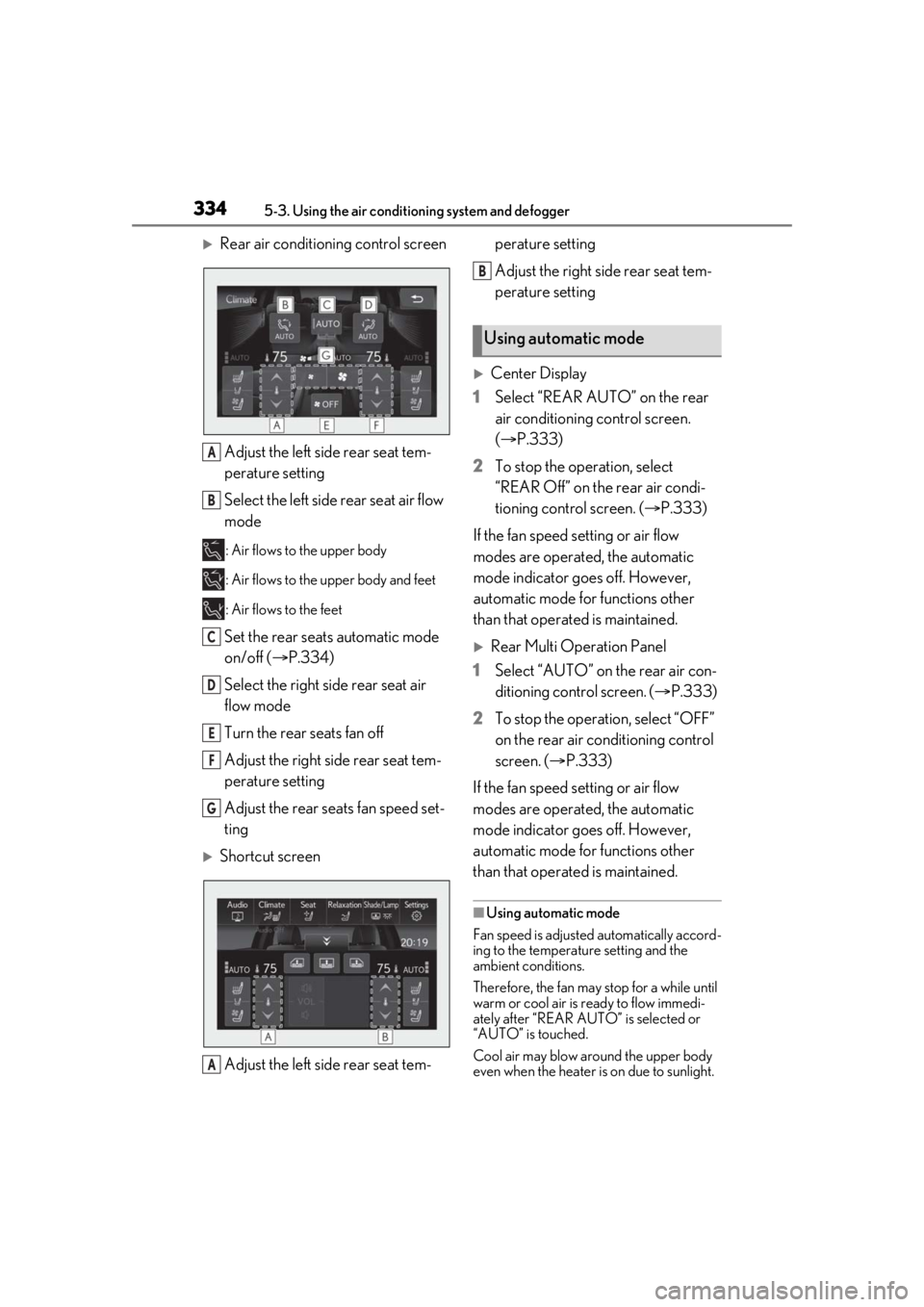
Rear air conditioning control screenAdjust the left side rear seat tem-
perature setting
Select the left side rear seat air flow
mode
: Air flows to the upper body
: Air flows to the upper body and feet
: Air flows to the feet
Set the rear seats automatic mode
on/off ( P.334)
Select the right side rear seat air
flow mode
Turn the rear seats fan off
Adjust the right side rear seat tem-
perature setting
Adjust the rear seats fan speed set-
ting
Shortcut screen
Adjust the left side rear seat tem- perature setting
Adjust the right side rear seat tem-
perature setting
Center Display
1 Select “REAR AUTO” on the rear
air conditioning control screen.
(P.333)
2 To stop the operation, select
“REAR Off” on the rear air condi-
tioning control screen. ( P.333)
If the fan speed setting or air flow
modes are operated, the automatic
mode indicator goes off. However,
automatic mode for functions other
than that operated is maintained.
Rear Multi Operation Panel
1 Select “AUTO” on the rear air con-
ditioning control screen. ( P.333)
2 To stop the operation, select “OFF”
on the rear air conditioning control
screen. ( P.333)
If the fan speed setting or air flow
modes are operated, the automatic
mode indicator goes off. However,
automatic mode for functions other
than that operated is maintained.
■Using automatic mode
Fan speed is adjusted automatically accord-
ing to the temperature setting and the
ambient conditions.
Therefore, the fan may stop for a while until
warm or cool air is ready to flow immedi-
ately after “REAR AUTO ” is selected or
“AUTO” is touched.
Cool air may blow around the upper body
even when the heater is on due to sunlight.
A
B
C
D
E
F
G
A
Using automatic mode
B
Page 335 of 520
3355-3. Using the air conditioning system and defogger
5
Interior features
The temperature setting of the rear
seats can be adjusted using the follow-
ing methods:
When the “4-ZONE” indicator is
off: Adjust the driv er’s seat tempera-
ture.
Adjust the temperature setting of each
rear seat using the Center Display or Rear
Multi Operation Panel.
Adjust the temperature setting of
each rear seat using the Center Dis-
play (rear air conditioning control
screen) or Rear Multi Operation
Panel.
The temperature setting of each rear seat
can be changed independently.
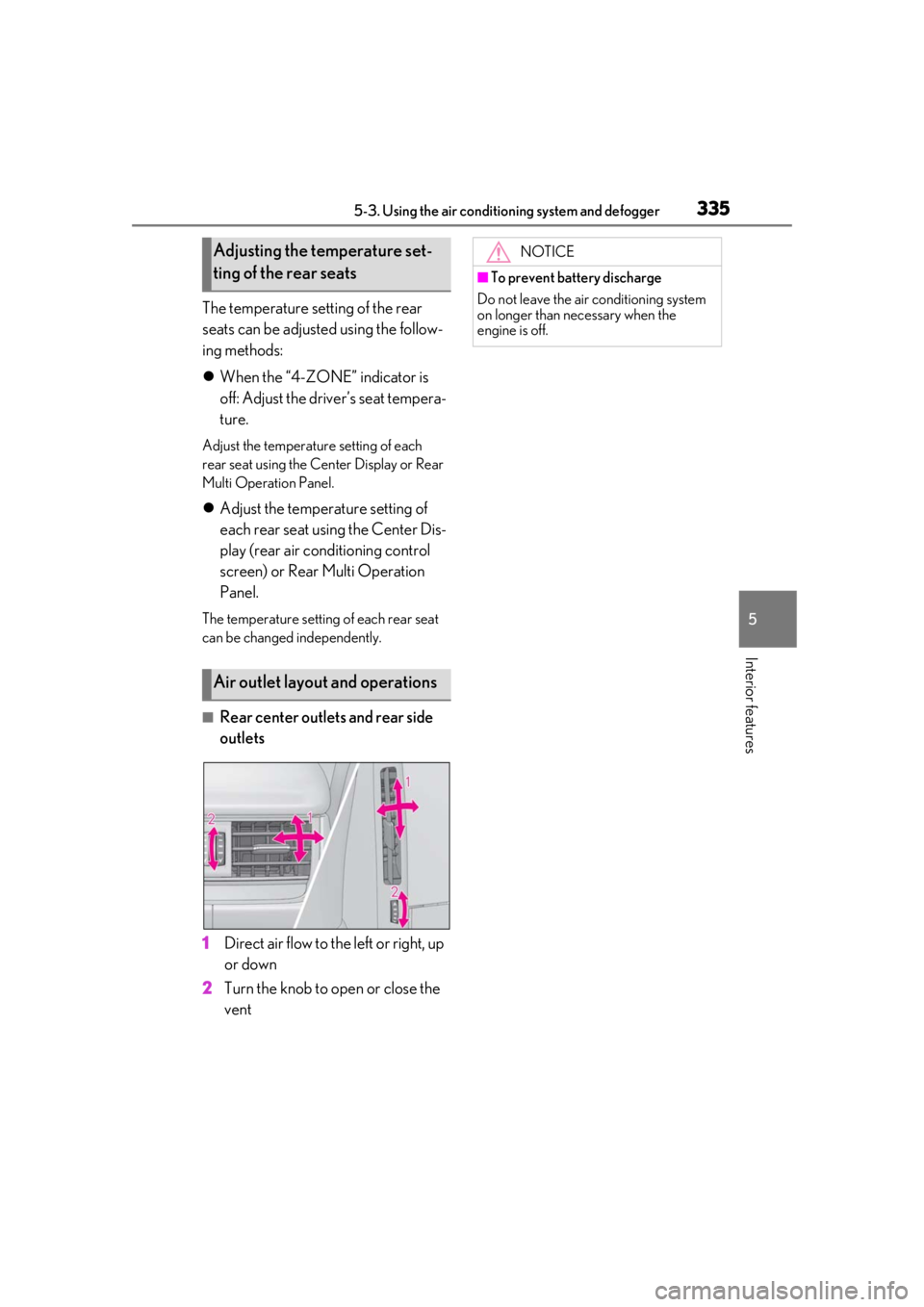
■Rear center outlets and rear side
outlets
1 Direct air flow to the left or right, up
or down
2 Turn the knob to open or close the
vent
Adjusting the temperature set-
ting of the rear seats
Air outlet layout and operations
NOTICE
■To prevent battery discharge
Do not leave the air conditioning system
on longer than necessary when the
engine is off.
Page 336 of 520
3365-3. Using the air conditioning system and defogger
*:If equipped
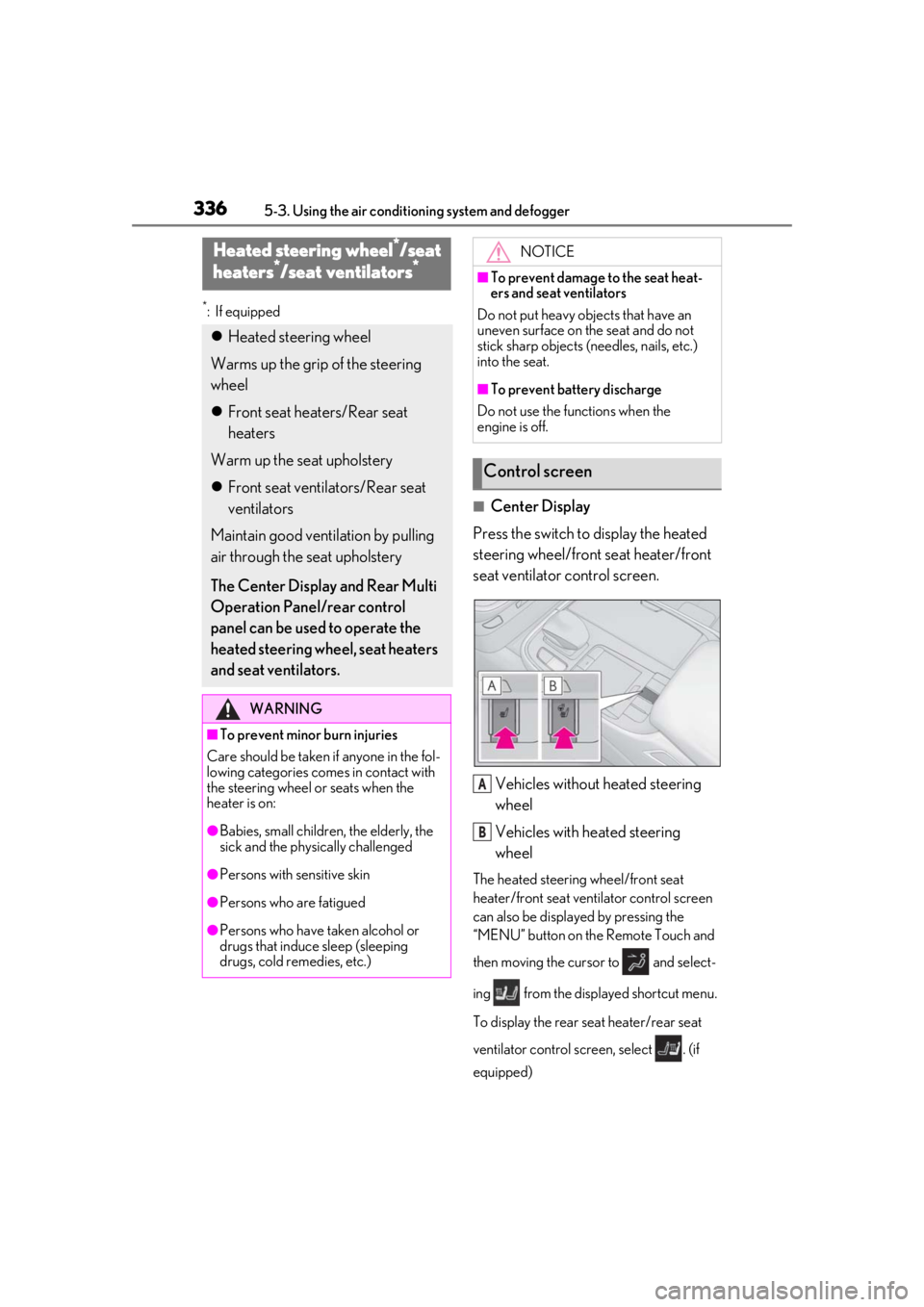
■Center Display
Press the switch to display the heated
steering wheel/front seat heater/front
seat ventilator control screen.
Vehicles without heated steering
wheel
Vehicles with heated steering
wheel
The heated steering wheel/front seat
heater/front seat ventilator control screen
can also be displayed by pressing the
“MENU” button on the Remote Touch and
then moving the cursor to and select-
ing from the displayed shortcut menu.
To display the rear seat heater/rear seat
ventilator control screen, select . (if
equipped)
Heated steering wheel*/seat
heaters*/seat ventilators*
Heated steering wheel
Warms up the grip of the steering
wheel
Front seat heaters/Rear seat
heaters
Warm up the seat upholstery
Front seat ventilators/Rear seat
ventilators
Maintain good ventilation by pulling
air through the seat upholstery
The Center Display and Rear Multi
Operation Panel/rear control
panel can be used to operate the
heated steering wheel, seat heaters
and seat ventilators.
WARNING
■To prevent minor burn injuries
Care should be taken if anyone in the fol-
lowing categories comes in contact with
the steering wheel or seats when the
heater is on:
●Babies, small children, the elderly, the
sick and the phys ically challenged
●Persons with sensitive skin
●Persons who are fatigued
●Persons who have taken alcohol or
drugs that induce sleep (sleeping
drugs, cold remedies, etc.)
NOTICE
■To prevent damage to the seat heat-
ers and seat ventilators
Do not put heavy objects that have an
uneven surface on the seat and do not
stick sharp objects (n eedles, nails, etc.)
into the seat.
■To prevent battery discharge
Do not use the functions when the
engine is off.
Control screen
A
B
Page 337 of 520
3375-3. Using the air conditioning system and defogger
5
Interior features
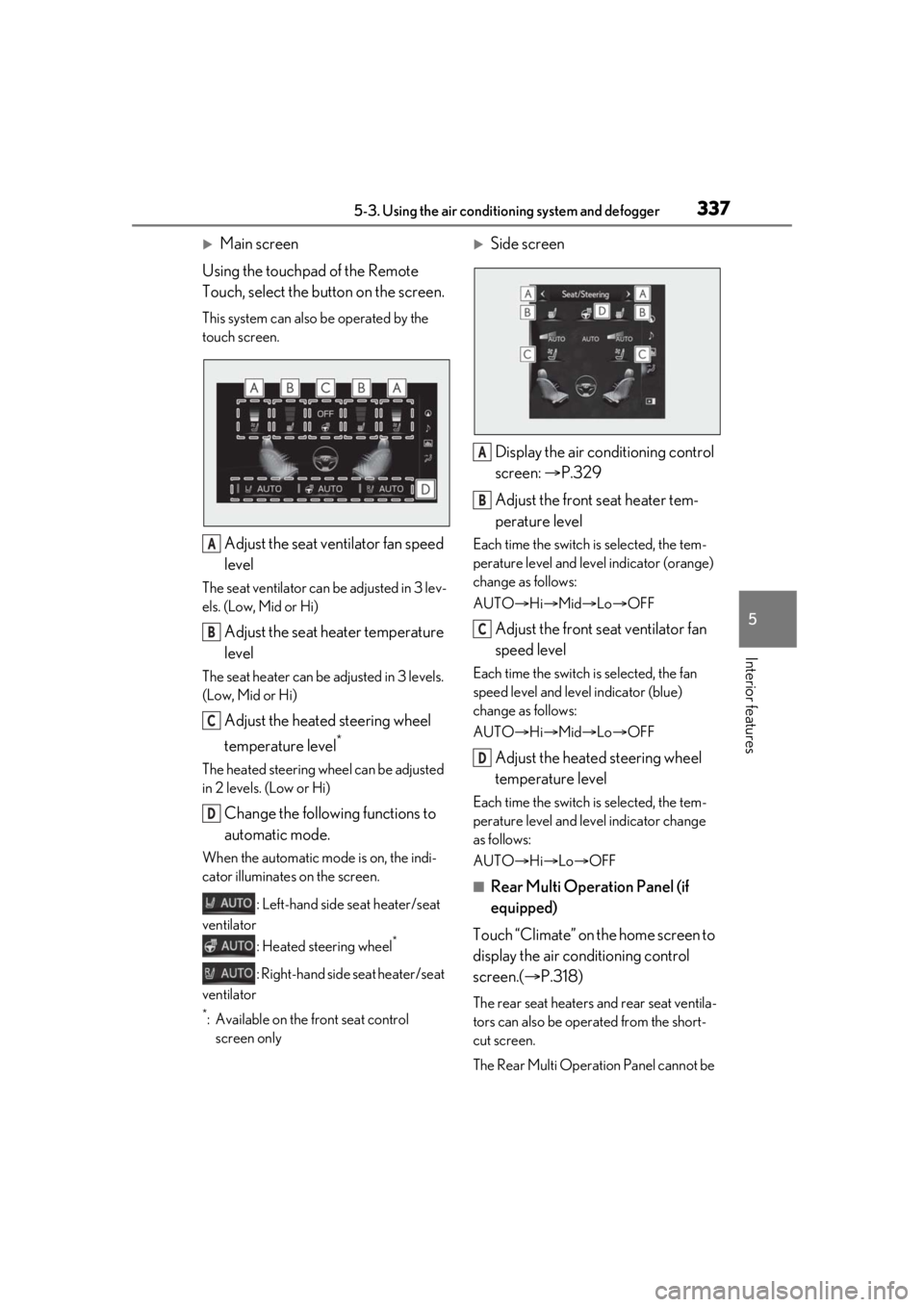
Main screen
Using the touchpad of the Remote
Touch, select the button on the screen.
This system can also be operated by the
touch screen.
Adjust the seat ventilator fan speed
level
The seat ventilator can be adjusted in 3 lev-
els. (Low, Mid or Hi)
Adjust the seat heater temperature
level
The seat heater can be adjusted in 3 levels.
(Low, Mid or Hi)
Adjust the heated steering wheel
temperature level
*
The heated steering wheel can be adjusted
in 2 levels. (Low or Hi)
Change the following functions to
automatic mode.
When the automatic mode is on, the indi-
cator illuminates on the screen.
: Left-hand side seat heater/seat
ventilator
: Heated steering wheel
*
: Right-hand side seat heater/seat
ventilator
*: Available on the front seat control screen only
Side screen
Display the air conditioning control
screen: P.329
Adjust the front seat heater tem-
perature level
Each time the switch is selected, the tem-
perature level and level indicator (orange)
change as follows:
AUTO Hi Mid Lo OFF
Adjust the front seat ventilator fan
speed level
Each time the switch is selected, the fan
speed level and level indicator (blue)
change as follows:
AUTO Hi Mid Lo OFF
Adjust the heated steering wheel
temperature level
Each time the switch is selected, the tem-
perature level and le vel indicator change
as follows:
AUTO Hi Lo OFF
■Rear Multi Operation Panel (if
equipped)
Touch “Climate” on the home screen to
display the air conditioning control
screen.( P.318)
The rear seat heaters and rear seat ventila-
tors can also be operated from the short-
cut screen.
The Rear Multi Operat ion Panel cannot be
A
B
C
D
A
B
C
D
Page 338 of 520
3385-3. Using the air conditioning system and defogger
used to operate the rear air conditioning
system if the function is disabled.
( P.333)
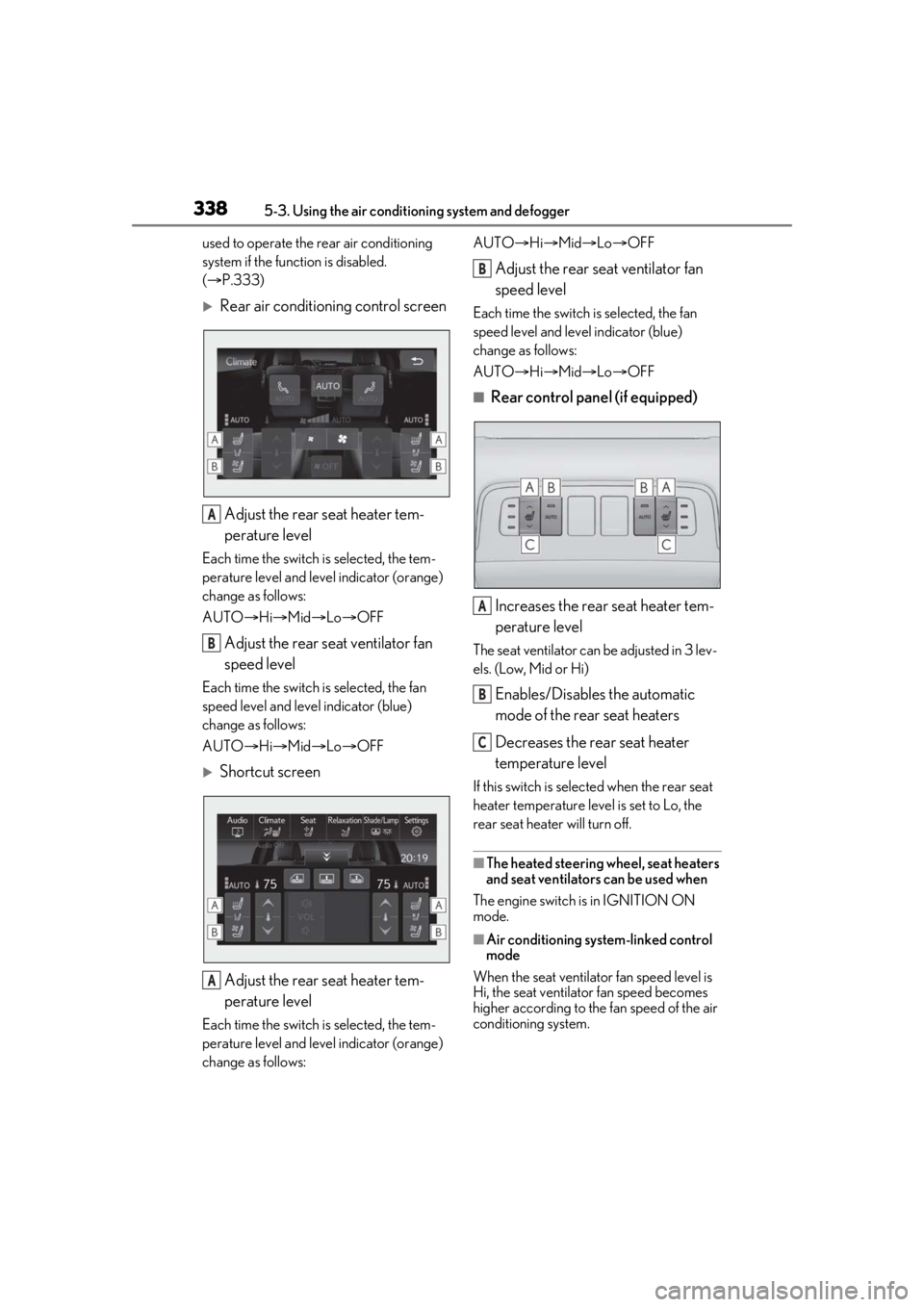
Rear air conditioning control screen
Adjust the rear seat heater tem-
perature level
Each time the switch is selected, the tem-
perature level and leve l indicator (orange)
change as follows:
AUTO Hi Mid Lo OFF
Adjust the rear seat ventilator fan
speed level
Each time the switch is selected, the fan
speed level and leve l indicator (blue)
change as follows:
AUTO Hi Mid Lo OFF
Shortcut screen
Adjust the rear seat heater tem-
perature level
Each time the switch is selected, the tem-
perature level and leve l indicator (orange)
change as follows: AUTO
Hi Mid Lo OFF
Adjust the rear seat ventilator fan
speed level
Each time the switch is selected, the fan
speed level and level indicator (blue)
change as follows:
AUTO Hi Mid Lo OFF
■Rear control panel (if equipped)
Increases the rear seat heater tem-
perature level
The seat ventilator can be adjusted in 3 lev-
els. (Low, Mid or Hi)
Enables/Disables the automatic
mode of the rear seat heaters
Decreases the rear seat heater
temperature level
If this switch is select ed when the rear seat
heater temperature level is set to Lo, the
rear seat heater will turn off.
■The heated steering wheel, seat heaters
and seat ventilators can be used when
The engine switch is in IGNITION ON
mode.
■Air conditioning system-linked control
mode
When the seat ventilator fan speed level is
Hi, the seat ventilato r fan speed becomes
higher according to the fan speed of the air
conditioning system.
A
B
A
B
A
B
C
Page 339 of 520
3395-3. Using the air conditioning system and defogger
5
Interior features
■When the air conditioning system is
operating in front seat concentrated air-
flow mode (S-FLOW)
If a passenger is not detected in the front
passenger seat, the seat ventilator and seat
heater of the front pa ssenger’s seat will be
turned off if on. ( P.330)
■Customization
Some functions can be customized.
( P.476)
WARNING
■To prevent overheating and minor
burn injuries
Observe the following precautions when
using the seat heaters.
●Do not cover the seat with a blanket or
cushion when using the seat heater.
●Do not use seat heater more than nec-
essary.
Page 343 of 520
3435-4. Using the interior lights
5
Interior features
■Illuminated entry system
The lights automatically turn on/off accord-
ing to the engine switch mode, the pres-
ence of the electronic key, whether the
doors are locked/unlocked, and whether
the doors are opened/closed.
■To prevent the battery from being dis-
charged
If the interior lights remain on when the
engine switch is turned off, the lights will go
off automatically after 20 minutes.
■When front interior light or front per-
sonal lights do not respond as normal
●When water, dirt, et c., have adhered to
the lens surface
●When operated with a wet hand
●When wearing gloves, etc.
■The interior lights may turn on automati-
cally when
If any of the SRS airbags deploy (inflate) or
in the event of a strong rear impact, the inte-
rior lights will turn on automatically.
The interior lights will turn off automatically
after approximately 20 minutes.
The interior lights can be turned off manu-
ally. However, in order to help prevent fur-
ther collisions, it is recommended that they
be left on until safety can be ensured.
(The interior lights may not turn on auto-
matically depending on the force of the
impact and conditions of the collision.)
■Customization
Some functions can be customized.
( P.476)
NOTICE
■To prevent battery discharge
Do not leave the lights on longer than
necessary when the engine is not run-
ning.
■Removing light lenses
Never remove th e lens for the front inte-
rior light and front personal lights. Other-
wise, the lights will be damaged. If a lens
needs to be removed, contact your Lexus
dealer.
Page 367 of 520
367
6
6
Maintenance and care
Maintenance and care
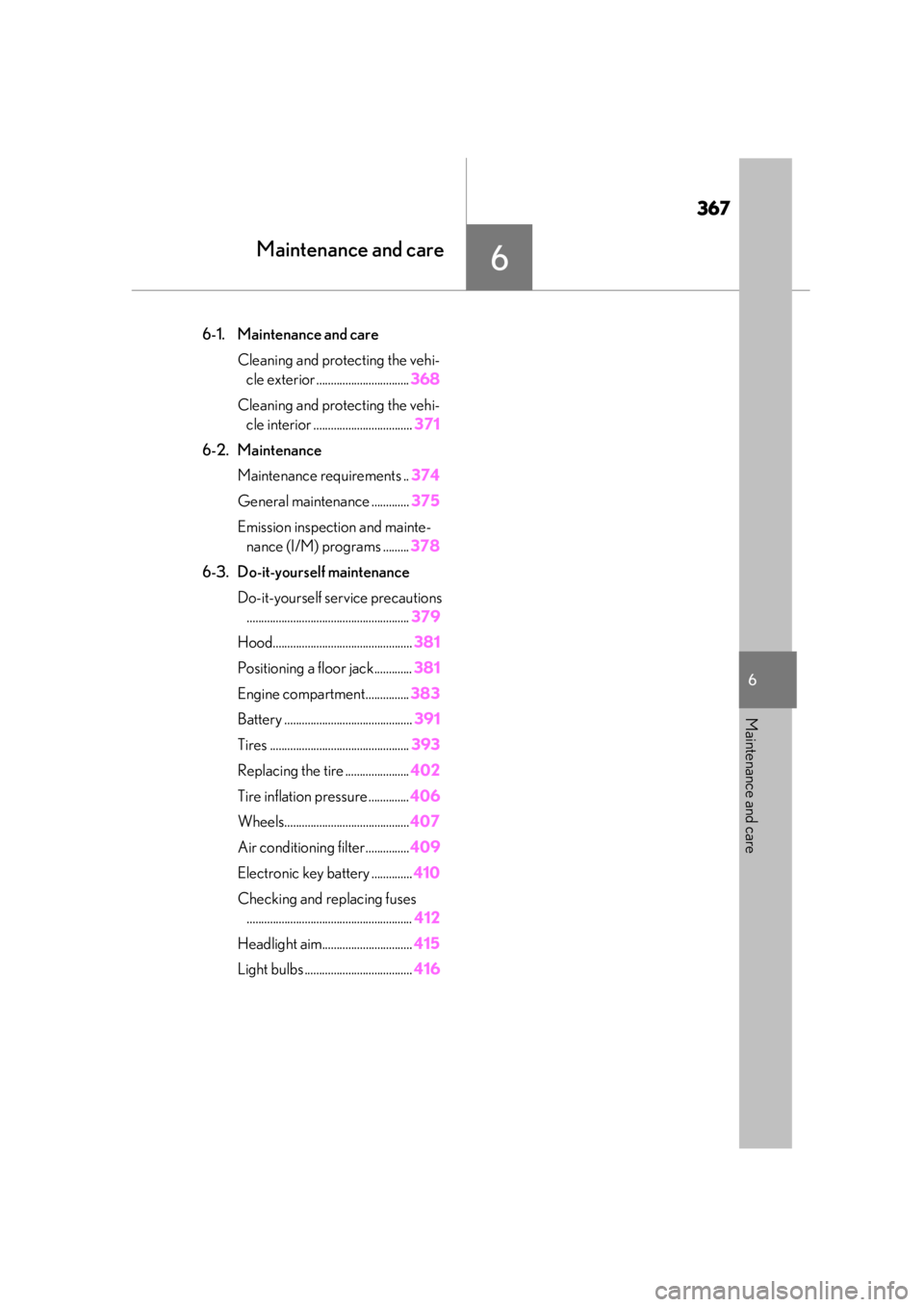
.6-1. Maintenance and careCleaning and protecting the vehi-cle exterior ................................ 368
Cleaning and protecting the vehi- cle interior .................................. 371
6-2. Maintenance Maintenance requirements .. 374
General maintenance ............. 375
Emission inspection and mainte- nance (I/M) programs ......... 378
6-3. Do-it-yourself maintenance Do-it-yourself service precautions........................................................ 379
Hood................................................ 381
Positioning a floor jack............. 381
Engine compartment............... 383
Battery ............................................ 391
Tires ................................................ 393
Replacing the tire ...................... 402
Tire inflation pressure .............. 406
Wheels........................................... 407
Air conditioning filter...............409
Electronic key battery .............. 410
Checking and replacing fuses ......................................................... 412
Headlight aim............................... 415
Light bulbs ..................................... 416
Page 371 of 520
3716-1. Maintenance and care
6
Maintenance and care
Remove dirt and dust using a vac-
uum cleaner. Wipe dirty surfaces
with a cloth dampened with luke-
warm water.
If dirt cannot be removed, wipe it off
with a soft cloth dampened with
neutral detergent diluted to approx-
imately 1%.
Wring out any excess water from
the cloth and thoroughly wipe off
remaining traces of detergent and
water.
■Shampooing the carpets
There are several commercial foaming-type
cleaners available. Use a sponge or brush
to apply the foam. Rub in overlapping cir-
cles. Do not use water. Wipe dirty surfaces
and let them dry. Excellent results are
obtained by keeping the carpet as dry as
possible.
■Handling the seat belts
Clean with mild soap and lukewarm water
using a cloth or sponge. Also check the
belts periodically for excessive wear, fraying
or cuts.
■When cleaning the carpeted portions of
the glove box, console box, etc.
If a strong adhesive ta pe is used, there is a
possibility that the su rface of the carpet
could be damaged.
NOTICE
●Do not spray the lower part of the
windshield continuously.
If water enters the air conditioning sys-
tem intake located near the lower part of
the windshield, the ai r conditioning sys-
tem may not operate correctly.
●Do not wash the underside of the vehi-
cle using a high pressure car washer.
Cleaning and protecting the
vehicle interior
Perform cleaning in a manner
appropriate to each component
and its material.
Protecting the vehicle interior
Page 389 of 520
3896-3. Do-it-yourself maintenance
6
Maintenance and care
your Lexus dealer.
■If the coolant level drops within a short
time of replenishing
Visually check the radiator, hoses, engine
coolant reservoir caps, drain cock and
water pump.
If you cannot find a leak, have your Lexus
dealer test the cap and check for leaks in
the cooling system.
Check the radiator, condenser, inter-
cooler radiator and intercooler sub
radiator and clear away any foreign
objects. If either of the above parts is
extremely dirty or you are not sure of their condition, have your vehicle
inspected by your Lexus dealer.
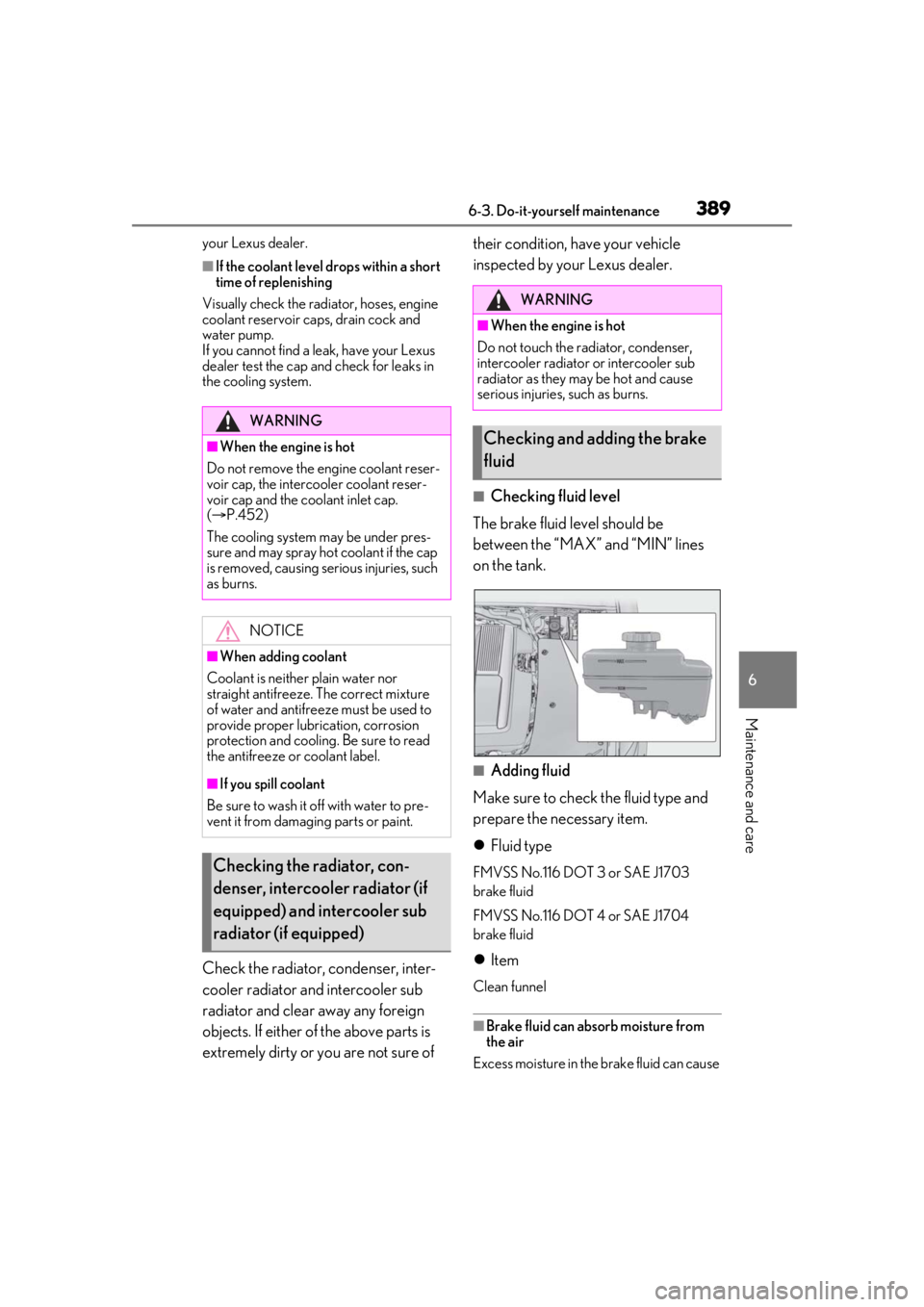
■Checking fluid level
The brake fluid level should be
between the “MAX” and “MIN” lines
on the tank.
■Adding fluid
Make sure to check the fluid type and
prepare the necessary item.
Fluid type
FMVSS No.116 DOT 3 or SAE J1703
brake fluid
FMVSS No.116 DOT 4 or SAE J1704
brake fluid
Item
Clean funnel
■Brake fluid can absorb moisture from
the air
Excess moisture in the brake fluid can cause
WARNING
■When the engine is hot
Do not remove the engine coolant reser-
voir cap, the intercooler coolant reser-
voir cap and the coolant inlet cap.
( P.452)
The cooling system may be under pres-
sure and may spray hot coolant if the cap
is removed, causing serious injuries, such
as burns.
NOTICE
■When adding coolant
Coolant is neither plain water nor
straight antifreeze. The correct mixture
of water and antifreeze must be used to
provide proper lubrication, corrosion
protection and cooling. Be sure to read
the antifreeze or coolant label.
■If you spill coolant
Be sure to wash it off with water to pre-
vent it from damagi ng parts or paint.
Checking the radiator, con-
denser, intercooler radiator (if
equipped) and intercooler sub
radiator (if equipped)
WARNING
■When the engine is hot
Do not touch the radiator, condenser,
intercooler radiator or intercooler sub
radiator as they may be hot and cause
serious injuries, such as burns.
Checking and adding the brake
fluid