heater LEXUS LS500 2021 Owners Manual
[x] Cancel search | Manufacturer: LEXUS, Model Year: 2021, Model line: LS500, Model: LEXUS LS500 2021Pages: 520, PDF Size: 9.81 MB
Page 131 of 520
1313-3. Adjusting the seats
3
Before driving
The rear seat relaxation system utilizes
pneumatic chambers and dedicated
heaters, and applies pressure to the
occupant’s body at different modes
and intensities.
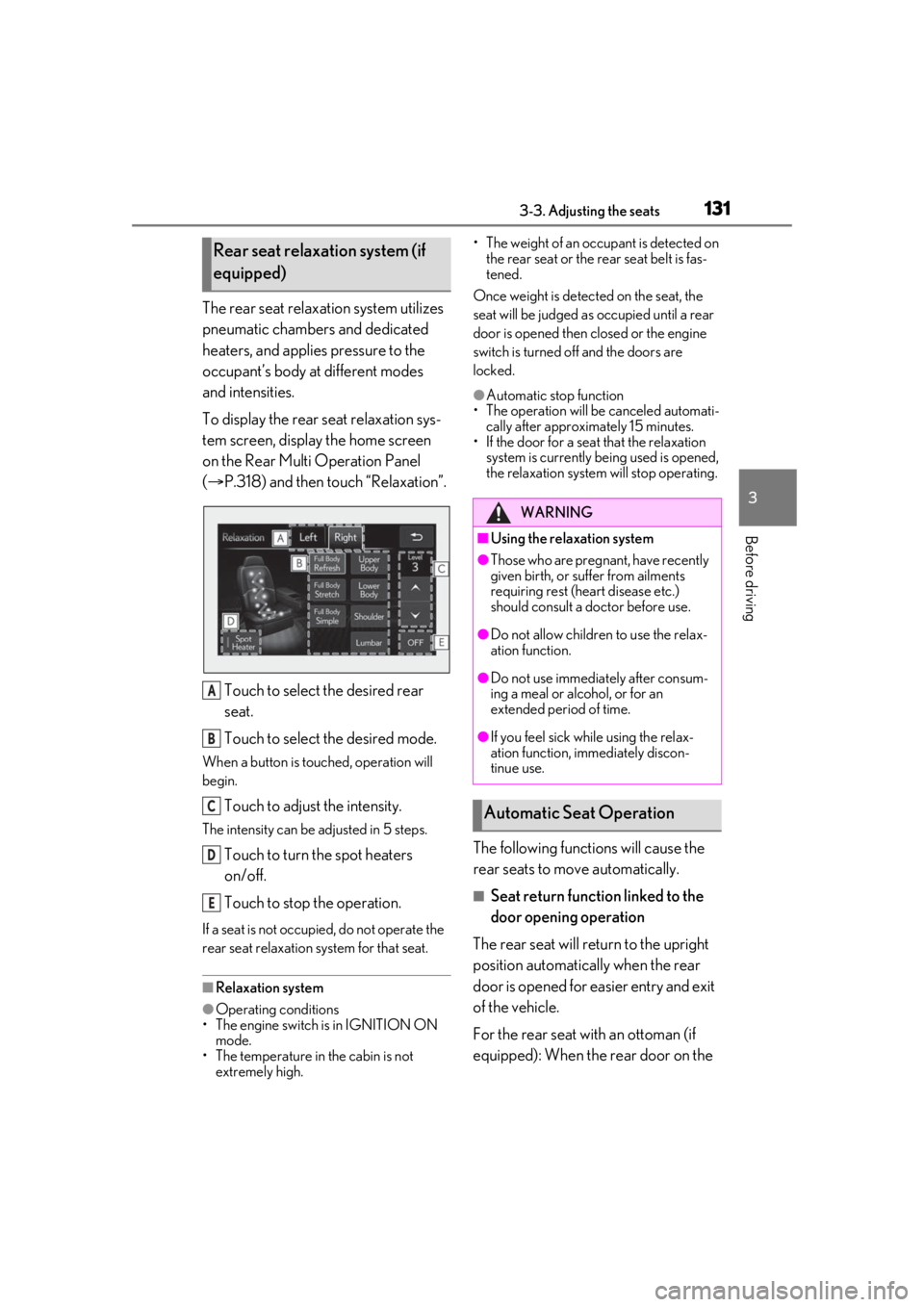
To display the rear seat relaxation sys-
tem screen, display the home screen
on the Rear Multi Operation Panel
( P.318) and then touch “Relaxation”.
Touch to select the desired rear
seat.
Touch to select the desired mode.
When a button is touched, operation will
begin.
Touch to adjust the intensity.
The intensity can be adjusted in 5 steps.
Touch to turn the spot heaters
on/off.
Touch to stop the operation.
If a seat is not occupi ed, do not operate the
rear seat relaxation system for that seat.
■Relaxation system
●Operating conditions
• The engine switch is in IGNITION ON mode.
• The temperature in the cabin is not extremely high. • The weight of an occupant is detected on
the rear seat or the rear seat belt is fas-
tened.
Once weight is detected on the seat, the
seat will be judged as occupied until a rear
door is opened then closed or the engine
switch is turned off and the doors are
locked.
●Automatic stop function
• The operation will be canceled automati-
cally after approximately 15 minutes.
• If the door for a seat that the relaxation
system is currently be ing used is opened,
the relaxation system will stop operating.
The following functions will cause the
rear seats to move automatically.
■Seat return function linked to the
door opening operation
The rear seat will return to the upright
position automatically when the rear
door is opened for ea sier entry and exit
of the vehicle.
For the rear seat with an ottoman (if
equipped): When the rear door on the
Rear seat relaxation system (if
equipped)
A
B
C
D
E
WARNING
■Using the relaxation system
●Those who are pregnant, have recently
given birth, or suffer from ailments
requiring rest (heart disease etc.)
should consult a doctor before use.
●Do not allow children to use the relax-
ation function.
●Do not use immediately after consum-
ing a meal or alcohol, or for an
extended period of time.
●If you feel sick while using the relax-
ation function, immediately discon-
tinue use.
Automatic Seat Operation
Page 318 of 520
3185-1. Remote Touch/Display
*:If equipped
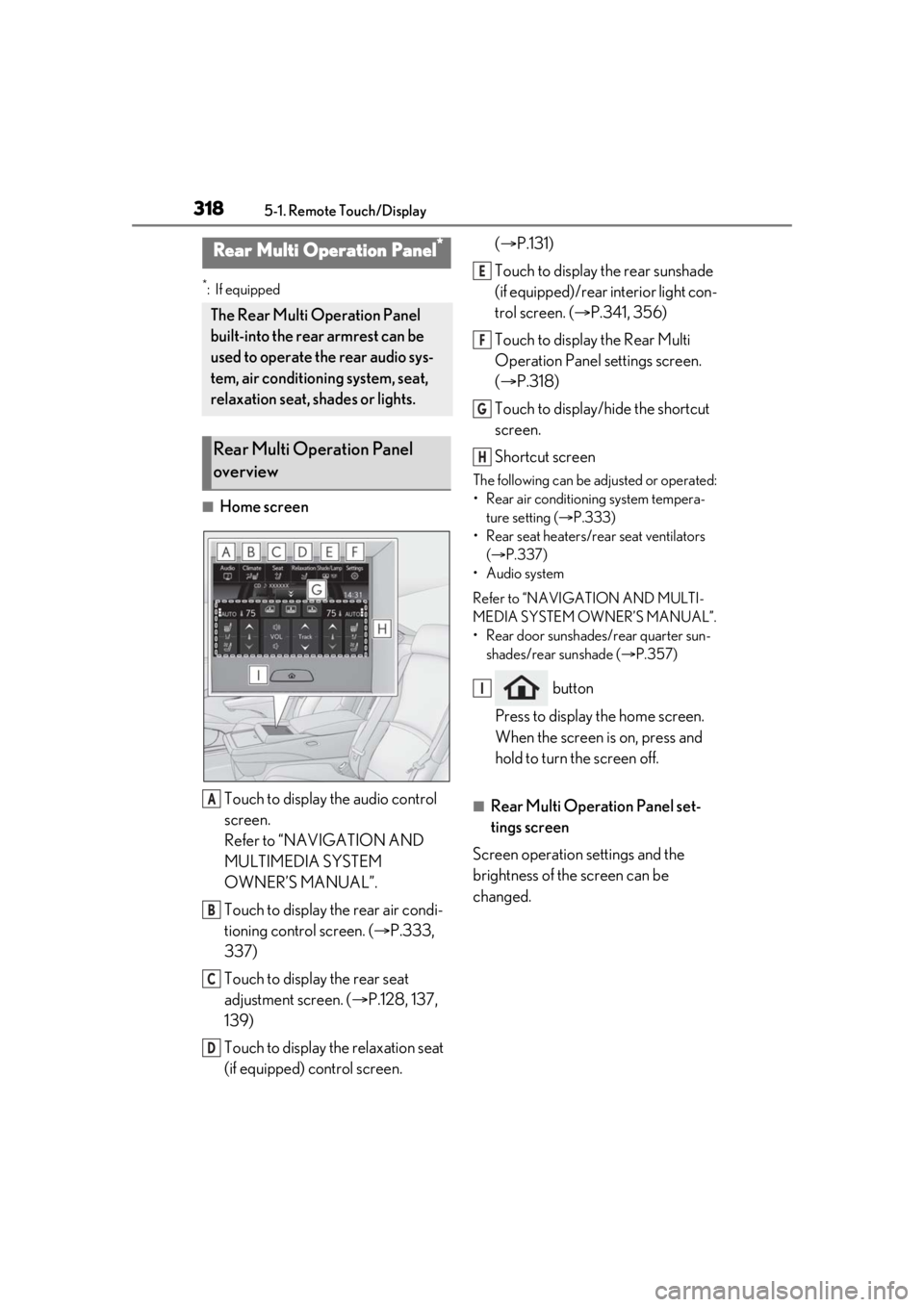
■Home screenTouch to display the audio control
screen.
Refer to “NAVIGATION AND
MULTIMEDIA SYSTEM
OWNER’S MANUAL”.
Touch to display the rear air condi-
tioning control screen. ( P.333,
337)
Touch to display the rear seat
adjustment screen. ( P.128, 137,
139)
Touch to display the relaxation seat
(if equipped) control screen. (
P.131)
Touch to display the rear sunshade
(if equipped)/rear interior light con-
trol screen. ( P.341, 356)
Touch to display the Rear Multi
Operation Panel settings screen.
( P.318)
Touch to display/hide the shortcut
screen.
Shortcut screen
The following can be adjusted or operated:
• Rear air conditioning system tempera- ture setting ( P.333)
• Rear seat heaters/rear seat ventilators ( P.337)
• Audio system
Refer to “NAVIGATION AND MULTI-
MEDIA SYSTEM OWNER’S MANUAL”.
• Rear door sunshades/rear quarter sun- shades/rear sunshade ( P.357)
button
Press to display the home screen.
When the screen is on, press and
hold to turn the screen off.
■Rear Multi Operation Panel set-
tings screen
Screen operation settings and the
brightness of the screen can be
changed.
Rear Multi Operation Panel*
The Rear Multi Operation Panel
built-into the rear armrest can be
used to operate the rear audio sys-
tem, air conditioning system, seat,
relaxation seat, shades or lights.
Rear Multi Operation Panel
overview
A
B
C
D
E
F
G
H
I
Page 321 of 520
3215-2. Lexus Climate Concierge
5
Interior features
5-2.Lexus Climate Concierge
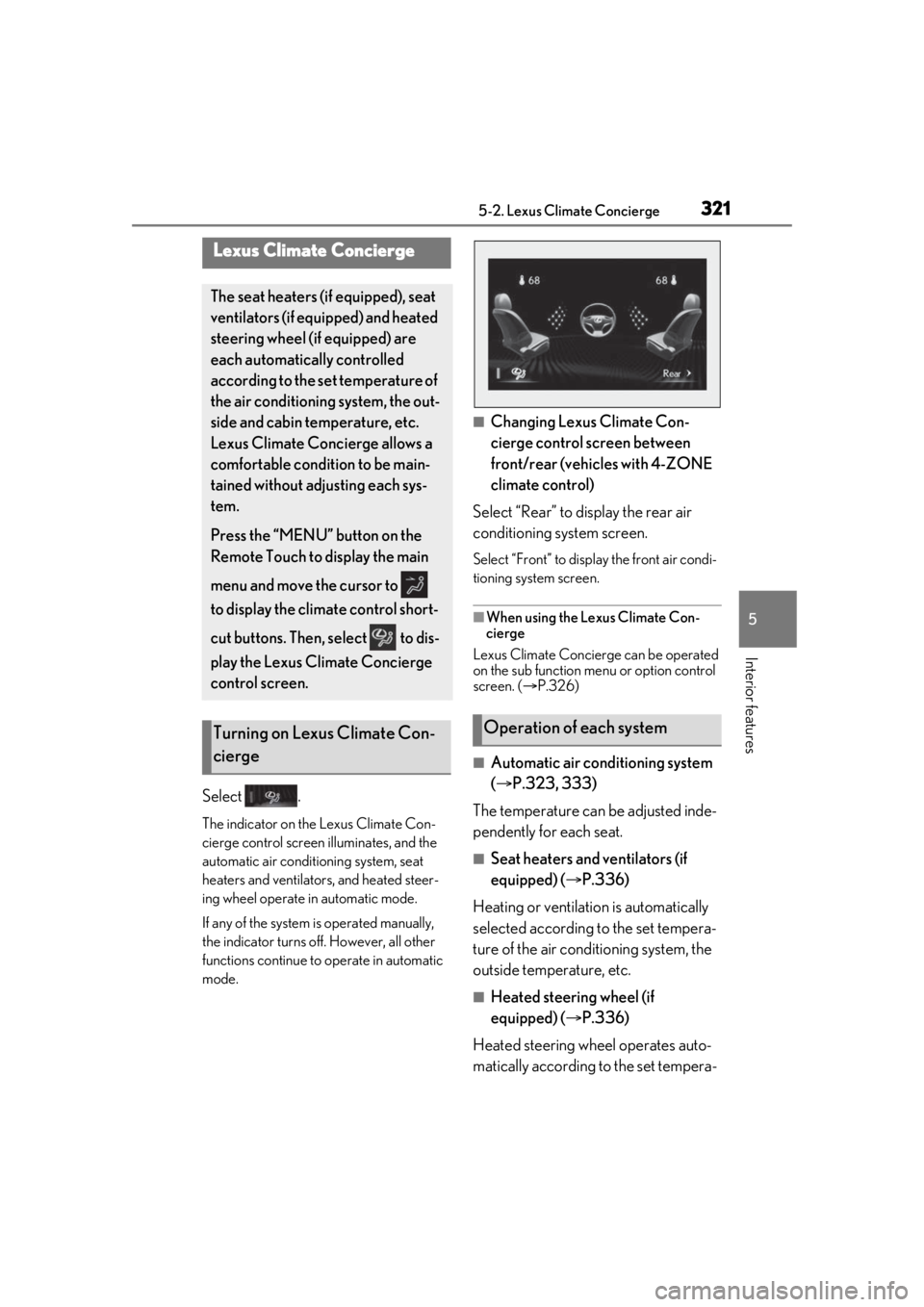
Select .
The indicator on the Lexus Climate Con-
cierge control screen illuminates, and the
automatic air conditioning system, seat
heaters and ventilators, and heated steer-
ing wheel operate in automatic mode.
If any of the system is operated manually,
the indicator turns off. However, all other
functions continue to operate in automatic
mode.
■Changing Lexus Climate Con-
cierge control screen between
front/rear (vehicles with 4-ZONE
climate control)
Select “Rear” to display the rear air
conditioning system screen.
Select “Front” to display the front air condi-
tioning system screen.
■When using the Lexus Climate Con-
cierge
Lexus Climate Concierge can be operated
on the sub function menu or option control
screen. ( P.326)
■Automatic air conditioning system
( P.323, 333)
The temperature can be adjusted inde-
pendently for each seat.
■Seat heaters and ventilators (if
equipped) ( P.336)
Heating or ventilation is automatically
selected according to the set tempera-
ture of the air conditioning system, the
outside temperature, etc.
■Heated steering wheel (if
equipped) ( P.336)
Heated steering wheel operates auto-
matically according to the set tempera-
Lexus Climate Concierge
The seat heaters (if equipped), seat
ventilators (if equipped) and heated
steering wheel (if equipped) are
each automatically controlled
according to the set temperature of
the air conditioning system, the out-
side and cabin temperature, etc.
Lexus Climate Concierge allows a
comfortable condition to be main-
tained without adjusting each sys-
tem.
Press the “MENU” button on the
Remote Touch to display the main
menu and move the cursor to
to display the climate control short-
cut buttons. Then, select to dis-
play the Lexus Climate Concierge
control screen.
Turning on Lexus Climate Con-
ciergeOperation of each system
Page 322 of 520

3225-2. Lexus Climate Concierge
ture of the air conditioning system, the
outside temperature, etc.
■Passenger detection functions
●When a passenger is detected in the
front passenger seat, the seat heater and
ventilator will operate automatically.
●When a passenger is detected in a rear
seat, the seat heater and ventilator will
operate automatically. (vehicles with
power rear seat)
■Seat heater/ventilator operation
When automatic mode is selected using the
seat heater/ventilator switch, passenger
detection is not performed.
■Rear seat heater operation (vehicles
with DUAL-ZONE climate control)
The rear seat heaters are not controlled by
the Lexus Climate Concierge.
Page 326 of 520
3265-3. Using the air conditioning system and defogger
■Customization
Some functions can be customized.
( P.476)
■Main control screen
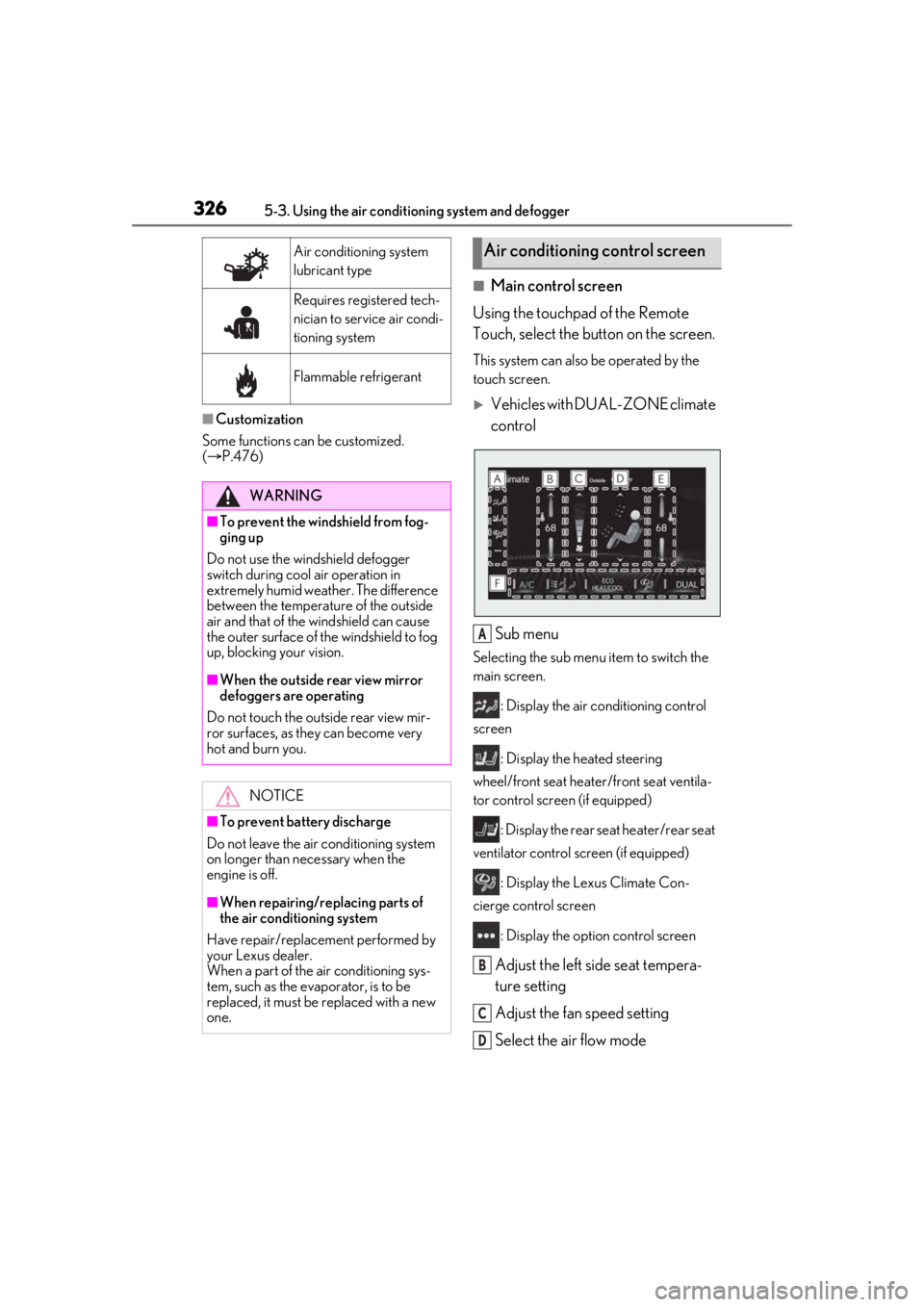
Using the touchpad of the Remote
Touch, select the button on the screen.
This system can also be operated by the
touch screen.
Vehicles with DUAL-ZONE climate
control
Sub menu
Selecting the sub menu item to switch the
main screen. : Display the air co nditioning control
screen
: Display the heated steering
wheel/front seat heater /front seat ventila-
tor control screen (if equipped)
: Display the rear seat heater/rear seat
ventilator control screen (if equipped)
: Display the Lexus Climate Con-
cierge control screen
: Display the option control screen
Adjust the left side seat tempera-
ture setting
Adjust the fan speed setting
Select the air flow mode
Air conditioning system
lubricant type
Requires registered tech-
nician to service air condi-
tioning system
Flammable refrigerant
WARNING
■To prevent the windshield from fog-
ging up
Do not use the windshield defogger
switch during cool air operation in
extremely humid weather. The difference
between the temperature of the outside
air and that of the windshield can cause
the outer surface of the windshield to fog
up, blocking your vision.
■When the outside rear view mirror
defoggers are operating
Do not touch the outside rear view mir-
ror surfaces, as they can become very
hot and burn you.
NOTICE
■To prevent battery discharge
Do not leave the air conditioning system
on longer than necessary when the
engine is off.
■When repairing/replacing parts of
the air conditioning system
Have repair/replace ment performed by
your Lexus dealer.
When a part of the air conditioning sys-
tem, such as the evaporator, is to be
replaced, it must be replaced with a new
one.
Air conditioning control screen
A
B
C
D
Page 327 of 520
3275-3. Using the air conditioning system and defogger
5
Interior features
: Air flows to the upper body
: Air flows to the upper body and feet
: Air flows to the feet
: Air flows to the feet and the wind-
shield defogger operates
Adjust the right side seat tempera-
ture setting
Switch the following functions on
and off
“A/C”: Set cooling and dehumidification
function
If the indicator is turned off, the system will
blow ambient temperature airor heated air.
: Select front seat concentrated
airflow mode (S-FLOW) (P.330)
: Set eco air conditioning mode
: Set Lexus Climate Concierge
( P.321)
“DUAL”: Adjust the temperature for driver
and passenger seats separately (“DUAL”
mode) ( P.331)
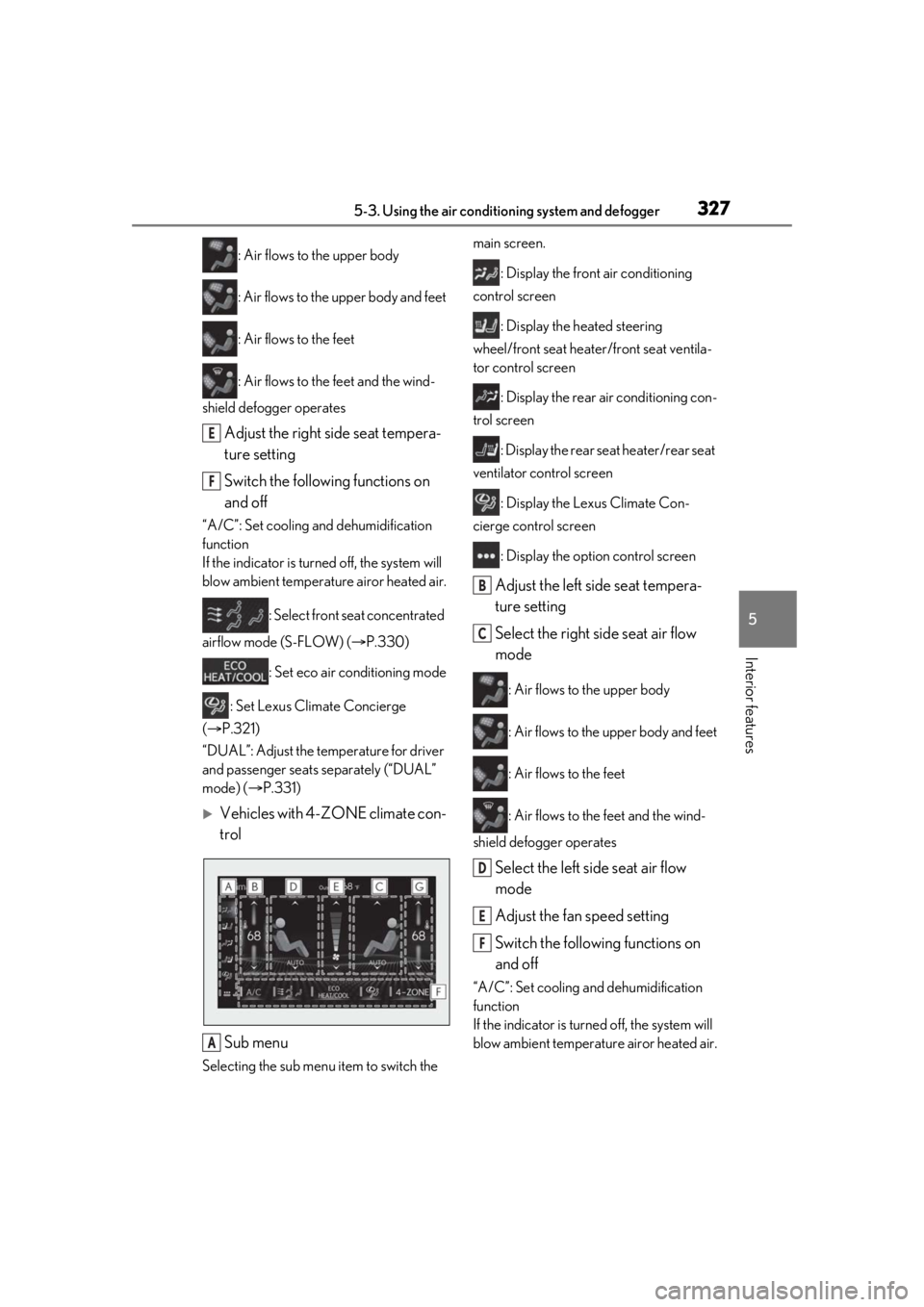
Vehicles with 4-ZONE climate con-
trol
Sub menu
Selecting the sub menu item to switch the main screen.
: Display the front air conditioning
control screen
: Display the heated steering
wheel/front seat heater /front seat ventila-
tor control screen
: Display the rear air conditioning con-
trol screen
: Display the rear seat heater/rear seat
ventilator control screen
: Display the Lexus Climate Con-
cierge control screen
: Display the option control screen
Adjust the left side seat tempera-
ture setting
Select the right side seat air flow
mode
: Air flows to the upper body
: Air flows to the upper body and feet
: Air flows to the feet
: Air flows to the feet and the wind-
shield defogger operates
Select the left side seat air flow
mode
Adjust the fan speed setting
Switch the following functions on
and off
“A/C”: Set cooling and dehumidification
function
If the indicator is turned off, the system will
blow ambient temperature airor heated air.
E
F
A
B
C
D
E
F
Page 328 of 520
3285-3. Using the air conditioning system and defogger
: Select front seat concentrated
airflow mode (S-FLOW) (P.330)
: Set eco air conditioning mode
: Set Lexus Climate Concierge
( P.321)
“4-ZONE”: Adjust the temperature for the
driver, front passenger and left and right
rear passenger se ats separately
(“4-ZONE” mode) ( P.331)
Adjust the right side seat tempera-
ture setting
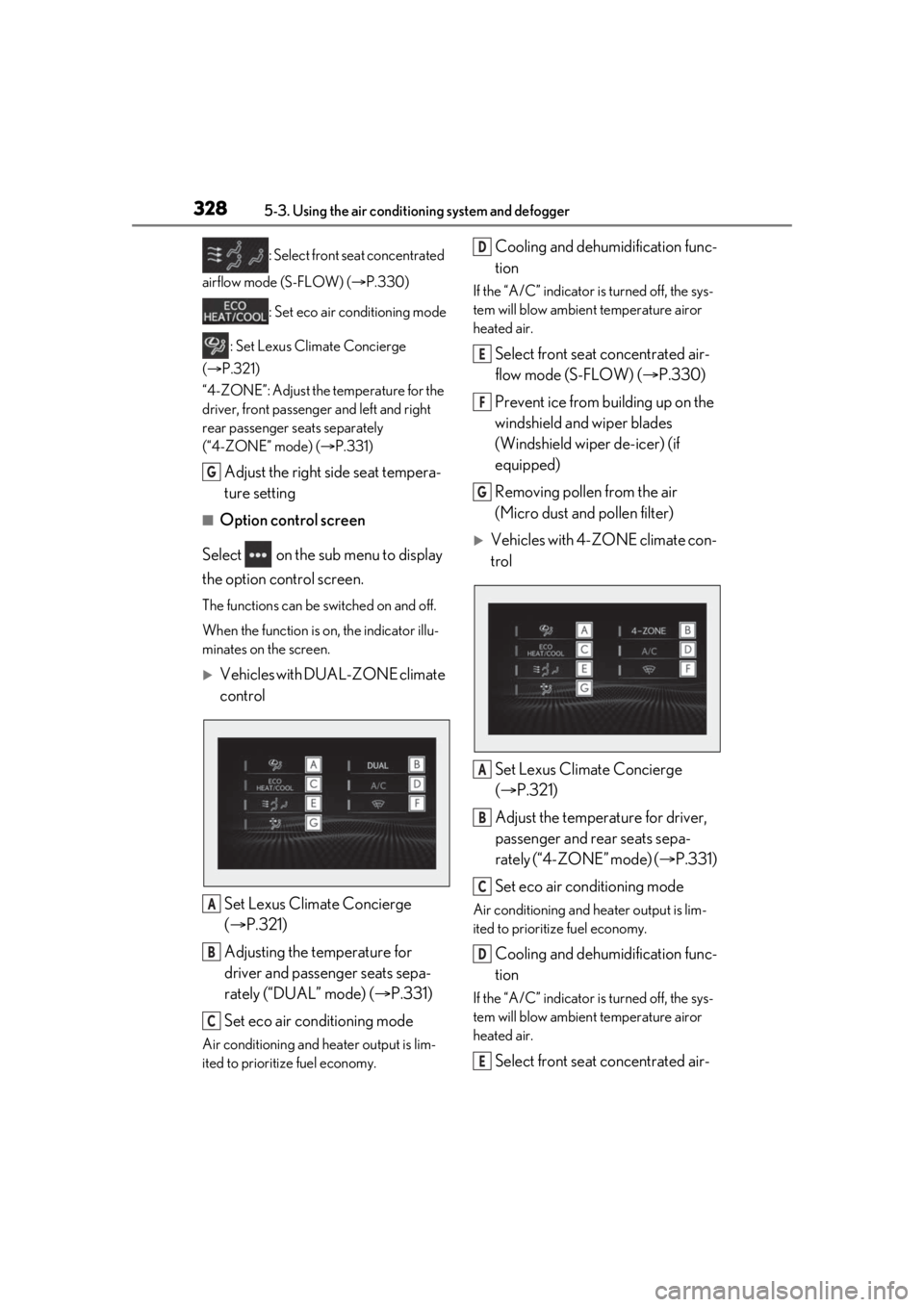
■Option control screen
Select on the sub menu to display
the option control screen.
The functions can be switched on and off.
When the function is on, the indicator illu-
minates on the screen.
Vehicles with DUAL-ZONE climate
control
Set Lexus Climate Concierge
( P.321)
Adjusting the temperature for
driver and passenger seats sepa-
rately (“DUAL” mode) ( P.331)
Set eco air conditioning mode
Air conditioning and heater output is lim-
ited to prioritize fuel economy.
Cooling and dehumidification func-
tion
If the “A/C” indicator is turned off, the sys-
tem will blow ambient temperature airor
heated air.
Select front seat concentrated air-
flow mode (S-FLOW) ( P.330)
Prevent ice from building up on the
windshield and wiper blades
(Windshield wiper de-icer) (if
equipped)
Removing pollen from the air
(Micro dust and pollen filter)
Vehicles with 4-ZONE climate con-
trol
Set Lexus Climate Concierge
( P.321)
Adjust the temperature for driver,
passenger and rear seats sepa-
rately (“4-ZONE” mode) ( P.331)
Set eco air conditioning mode
Air conditioning and heater output is lim-
ited to prioritize fuel economy.
Cooling and dehumidification func-
tion
If the “A/C” indicator is turned off, the sys-
tem will blow ambient temperature airor
heated air.
Select front seat concentrated air-
G
A
B
C
D
E
F
G
A
B
C
D
E
Page 329 of 520
3295-3. Using the air conditioning system and defogger
5
Interior features
flow mode (S-FLOW) (P.330)
Prevent ice from building up on the
windshield and wiper blades
(Windshield wiper de-icer) (if
equipped)
Removing pollen from the air
(Micro dust and pollen filter)
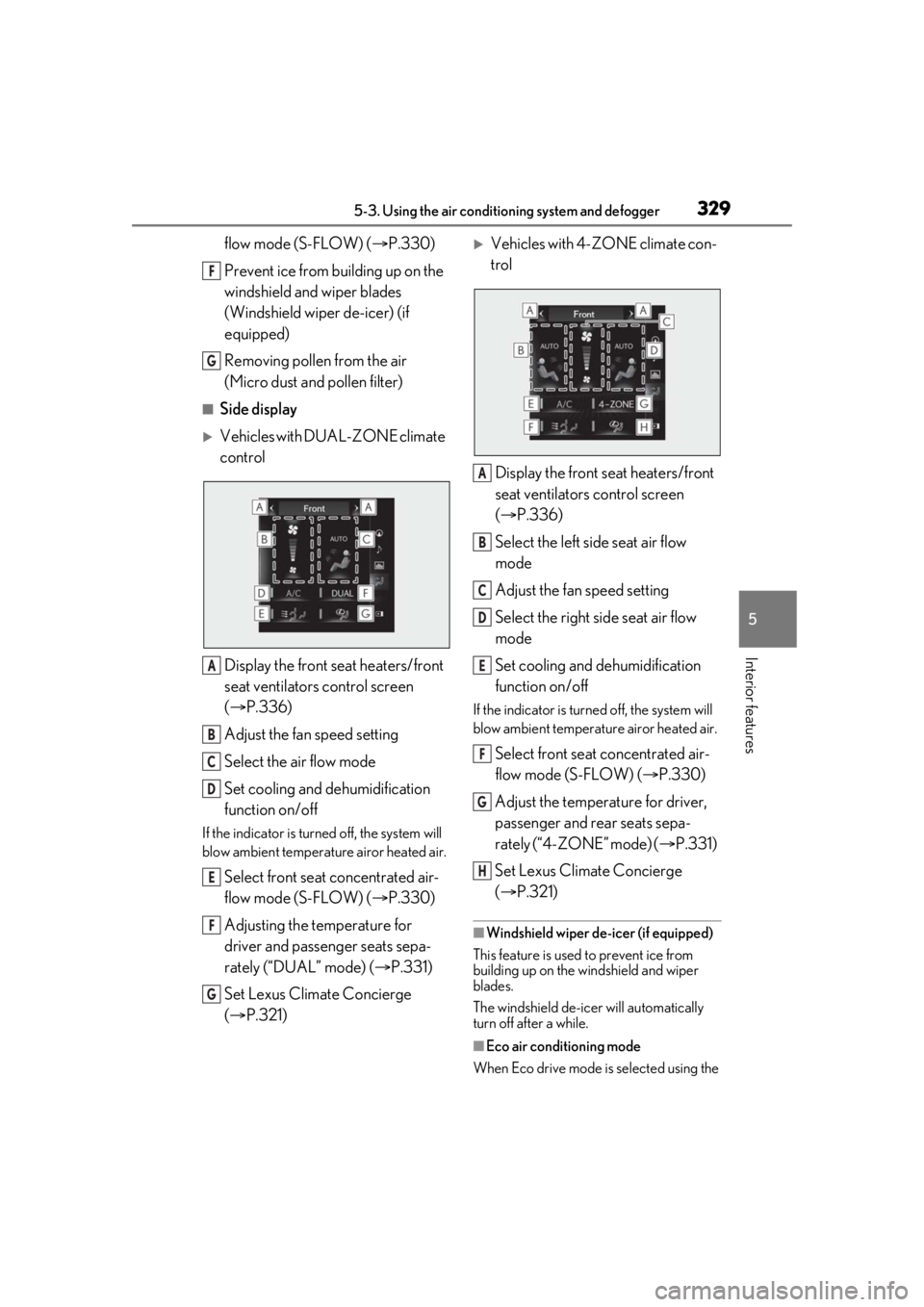
■Side display
Vehicles with DUAL-ZONE climate
control
Display the front seat heaters/front
seat ventilators control screen
( P.336)
Adjust the fan speed setting
Select the air flow mode
Set cooling and dehumidification
function on/off
If the indicator is turned off, the system will
blow ambient temperature airor heated air.
Select front seat concentrated air-
flow mode (S-FLOW) ( P.330)
Adjusting the temperature for
driver and passenger seats sepa-
rately (“DUAL” mode) ( P.331)
Set Lexus Climate Concierge
( P.321)
Vehicles with 4-ZONE climate con-
trol
Display the front seat heaters/front
seat ventilators control screen
( P.336)
Select the left side seat air flow
mode
Adjust the fan speed setting
Select the right side seat air flow
mode
Set cooling and dehumidification
function on/off
If the indicator is turned off, the system will
blow ambient temperature airor heated air.
Select front seat concentrated air-
flow mode (S-FLOW) ( P.330)
Adjust the temperature for driver,
passenger and rear seats sepa-
rately (“4-ZONE” mode) ( P.331)
Set Lexus Climate Concierge
( P.321)
■Windshield wiper de-icer (if equipped)
This feature is used to prevent ice from
building up on the windshield and wiper
blades.
The windshield de-icer will automatically
turn off after a while.
■Eco air conditioning mode
When Eco drive mode is selected using the
F
G
A
B
C
D
E
F
G
A
B
C
D
E
F
G
H
Page 330 of 520
3305-3. Using the air conditioning system and defogger
driving mode select switch, eco air condi-
tioning mode turns on.
When a drive mode other than Eco drive
mode is selected, eco air conditioning
mode may turn off.
■Micro dust and pollen filter
Outside air mode switches to
(recirculated air) mode. Pollen is removed
from the air and the air flows to the upper
part of the body.
Usually the system will automatically turn
off after a while.
In order to prevent the windshield from fog-
ging up when the outside air is cold, the
dehumidification function may operate or
the outside/recirculat ed air mode may not
switch to (recirculated air) mode.
Pollen is filtered even if the micro dust and
pollen filter is turned off.
1 Press the automatic mode switch.
2 Press the outside/recirculated air
mode switch to switch to automatic
air intake mode.
The air conditioning system automatically
switches between outside air and recircu-
lated air modes.
3Adjust the temperature setting.
4 To stop the operation, press the off
switch.
If the fan speed settin g or air flow modes
are operated, the automatic mode indica-
tor goes off. However, automatic mode for functions other than that operated is main-
tained.
■Using automatic mode
Fan speed is adjusted automatically accord-
ing to the temperature setting and the
ambient conditions.
Therefore, the fan may stop for a while until
warm or cool air is ready to flow immedi-
ately after the automatic mode switch is
pressed or “AUTO” is selected.
Cool air may blow around the upper body
even when the heater is on due to sunlight.
■Automatic mode for air intake control
In automatic mode, the system detects
exhaust gas and other pollutants and auto-
matically switches between outside air and
recirculated air modes.
When the dehumidification function is off,
and the fan is operating, turning automatic
mode on will activate the dehumidification
function.
This function automatically controls the
air conditioning airflo w so that priority
is given to the front seats. When the
front passenger seat is not occupied,
airflow may switch to only the driver's
seat. Unnecessary air conditioning is
suppressed, contributing to increased
fuel efficiency.
Front seat concentrated airflow mode
operates in the following situations.
No passengers are detected in the
rear seats
The windshield defogger is not
operating
Pollen removal mode is not operat-
ing
WARNING
■To prevent burns (vehicles with wind-
shield wiper de-icer)
Do not touch the glass at lower part of
the windshield or to the side of the front
pillars when the wind shield wiper de-icer
is on.
Using automatic mode
Front seat concentrated airflow
mode (S-FLOW)
Page 334 of 520
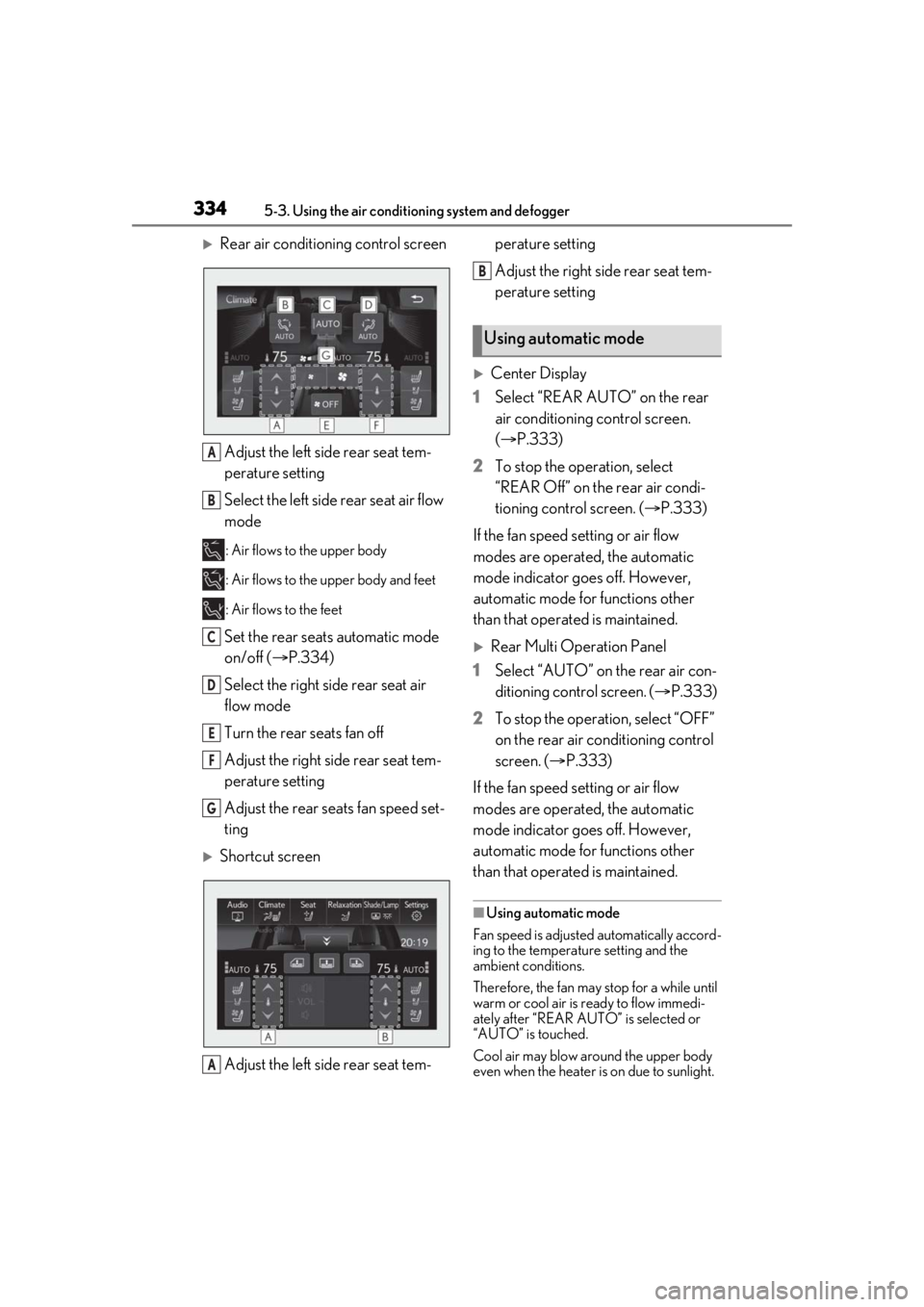
3345-3. Using the air conditioning system and defogger
Rear air conditioning control screenAdjust the left side rear seat tem-
perature setting
Select the left side rear seat air flow
mode
: Air flows to the upper body
: Air flows to the upper body and feet
: Air flows to the feet
Set the rear seats automatic mode
on/off ( P.334)
Select the right side rear seat air
flow mode
Turn the rear seats fan off
Adjust the right side rear seat tem-
perature setting
Adjust the rear seats fan speed set-
ting
Shortcut screen
Adjust the left side rear seat tem- perature setting
Adjust the right side rear seat tem-
perature setting
Center Display
1 Select “REAR AUTO” on the rear
air conditioning control screen.
(P.333)
2 To stop the operation, select
“REAR Off” on the rear air condi-
tioning control screen. ( P.333)
If the fan speed setting or air flow
modes are operated, the automatic
mode indicator goes off. However,
automatic mode for functions other
than that operated is maintained.
Rear Multi Operation Panel
1 Select “AUTO” on the rear air con-
ditioning control screen. ( P.333)
2 To stop the operation, select “OFF”
on the rear air conditioning control
screen. ( P.333)
If the fan speed setting or air flow
modes are operated, the automatic
mode indicator goes off. However,
automatic mode for functions other
than that operated is maintained.
■Using automatic mode
Fan speed is adjusted automatically accord-
ing to the temperature setting and the
ambient conditions.
Therefore, the fan may stop for a while until
warm or cool air is ready to flow immedi-
ately after “REAR AUTO ” is selected or
“AUTO” is touched.
Cool air may blow around the upper body
even when the heater is on due to sunlight.
A
B
C
D
E
F
G
A
Using automatic mode
B