power steering LEXUS LS500 2021 Owners Manual
[x] Cancel search | Manufacturer: LEXUS, Model Year: 2021, Model line: LS500, Model: LEXUS LS500 2021Pages: 520, PDF Size: 9.81 MB
Page 2 of 520
2TABLE OF CONTENTS
For your information ......................................6
Reading this manual .................................... 10
How to search ................................................. 11
Pictorial index ................................................. 12
1-1. For safe use Before driving .................................... 22
For safe driving.................................. 23
Seat belts ............................................. 24
SRS airbags ........................................ 29
Pop Up Hood ................................... 37
Front passenger occupant classifi- cation system ................................. 40
Exhaust gas precautions .............. 44
1-2. Child safety Riding with children........................ 45
Child restraint systems ................. 45
1-3. Lexus Enform Lexus Enform Safety Connect .. 58
1-4. Theft deterrent system Engine immobilizer system ......... 64
Alarm.................................................... 66
2-1. Instrument cluster Warning lights and indicators .... 70
Gauges and meters (except F SPORT models) ........................... 75
Gauges and meters (F SPORT models) ............................................. 78
Multi-information display............. 82
Head-up display .............................. 89
Fuel consumption information ... 933-1. Key information
Keys ...................................................... 98
3-2. Opening, closing and locking the doors and trunk
Doors ................................................. 102
Trunk .................................................. 106
Smart access system with push-but- ton start ............................................ 113
3-3. Adjusting the seats Front seats.......................................... 121
Power rear seat ............................. 128
Driving position memory ........... 133
Rear seat position memory........ 137
Head restraints .............................. 138
3-4. Adjusting the steering wheel and mirrors
Steering wheel ................................. 141
Inside rear view mirror ................ 142
Digital Rearview Mirror .............. 143
Outside rear view mirrors........... 151
3-5. Opening, closing the windows and moon roof
Power windows ............................. 153
Moon roof ........................................ 156
Panoramic moon roof ................. 158
4-1. Before driving Driving the vehicle........................ 164
Cargo and luggage...................... 170
Vehicle load limits.......................... 172
Trailer towing................................... 173
1For safety and security
2Vehicle status information and
indicators
3Before driving
4Driving
Page 34 of 520
341-1. For safe use
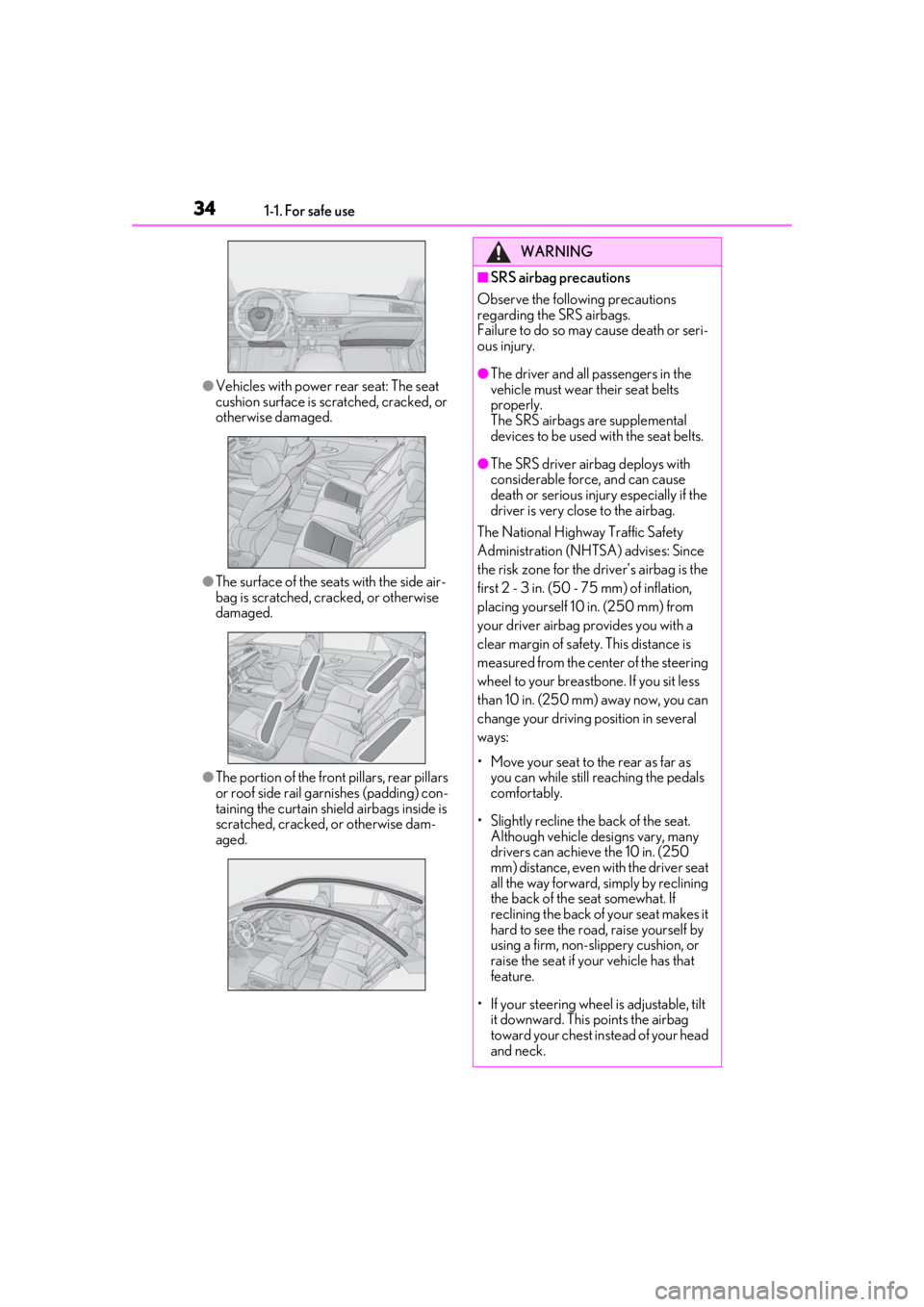
●Vehicles with power rear seat: The seat
cushion surface is scratched, cracked, or
otherwise damaged.
●The surface of the seat s with the side air-
bag is scratched, cracked, or otherwise
damaged.
●The portion of the front pillars, rear pillars
or roof side rail garnishes (padding) con-
taining the curtain shield airbags inside is
scratched, cracked, or otherwise dam-
aged.
WARNING
■SRS airbag precautions
Observe the following precautions
regarding the SRS airbags.
Failure to do so may cause death or seri-
ous injury.
●The driver and all passengers in the
vehicle must wear their seat belts
properly.
The SRS airbags are supplemental
devices to be used with the seat belts.
●The SRS driver airbag deploys with
considerable force, and can cause
death or serious injury especially if the
driver is very close to the airbag.
The National Highway Traffic Safety
Administration (NHTSA) advises: Since
the risk zone for the driver’s airbag is the
first 2 - 3 in. (50 - 75 mm) of inflation,
placing yourself 10 in. (250 mm) from
your driver airbag provides you with a
clear margin of safety. This distance is
measured from the center of the steering
wheel to your breastbone. If you sit less
than 10 in. (250 mm) away now, you can
change your driving position in several
ways:
• Move your seat to the rear as far as you can while still reaching the pedals
comfortably.
• Slightly recline the back of the seat. Although vehicle designs vary, many
drivers can achieve the 10 in. (250
mm) distance, even with the driver seat
all the way forward, simply by reclining
the back of the seat somewhat. If
reclining the back of your seat makes it
hard to see the road, raise yourself by
using a firm, non-slippery cushion, or
raise the seat if your vehicle has that
feature.
• If your steering wheel is adjustable, tilt it downward. This points the airbag
toward your chest instead of your head
and neck.
Page 71 of 520

712-1. Instrument cluster
2
Vehicle status information and indicators
Warning lights inform the driver of mal-
functions in the indicated vehicle’s sys-
tems.
*1: These lights come on when the engine switch is turned to IGNITION ON
mode to indicate that a system check is
Warning lights
(U.S.A.)
Brake system warning light*1
( P.427)
(red)
(Canada)
Brake system warning light*1
( P.427)
(yellow)
Brake system warning light*1
( P.427)
High coolant temperature
warning light
*2 ( P.427)
Charging system warning
light
*2 ( P.428)
Low engine oil pressure warn-
ing light
*2 ( P.428)
(U.S.A.)
Malfunction indicator lamp*1
( P.428)
(Canada)
Malfunction indicator lamp*1
( P.428)
SRS warning light
*1 ( P.428)
Pop Up Hood warning light
*1
( P.429)
(U.S.A.)
ABS warning light*1 ( P.429)
(Canada)
ABS warning light*1 ( P.429)
Inappropriate pedal operation
warning light
*2 ( P.429)
(red)
Electric power steering system
warning light
*1 ( P.430)
(yellow)
Electric power st eering system
warning light
*1 ( P.430)
Low fuel level warning light
( P.430)
Driver’s and front passenger’s
seat belt re minder light
( P.430)
Rear passengers’ seat
belt reminder lights
(except F SPORT mod-
els) ( P.431)
Rear passengers’ seat belt
reminder lights (F SPORT mod-
els) ( P.431)
Tire pressure warning light
*1
( P.431)
(orange)
LTA indicator ( P.431)
(flashes)
RCD OFF indicator (if
equipped) ( P.432)
(flashes or
illuminates)PCS warning light*1 ( P.432)
Slip indicator
*1 ( P.432)
(flashes)
(U.S.A.)
Parking brake indicator
( P.433)
(flashes)
(Canada)
Parking brake indicator
( P.433)
(flashes)
Brake hold operated indicator*1
( P.433)
Page 86 of 520
862-1. Instrument cluster
Zone of Eco driving
■Boost gauge
Displays the boost pressure. The dis-
play will change color if the specified
pressure is exceeded.
This display is intended for use as a guide-
line. Depending on factors such as the road
surface condition, temperature and vehicle
speed, the display may not show the actual
condition of the vehicle.
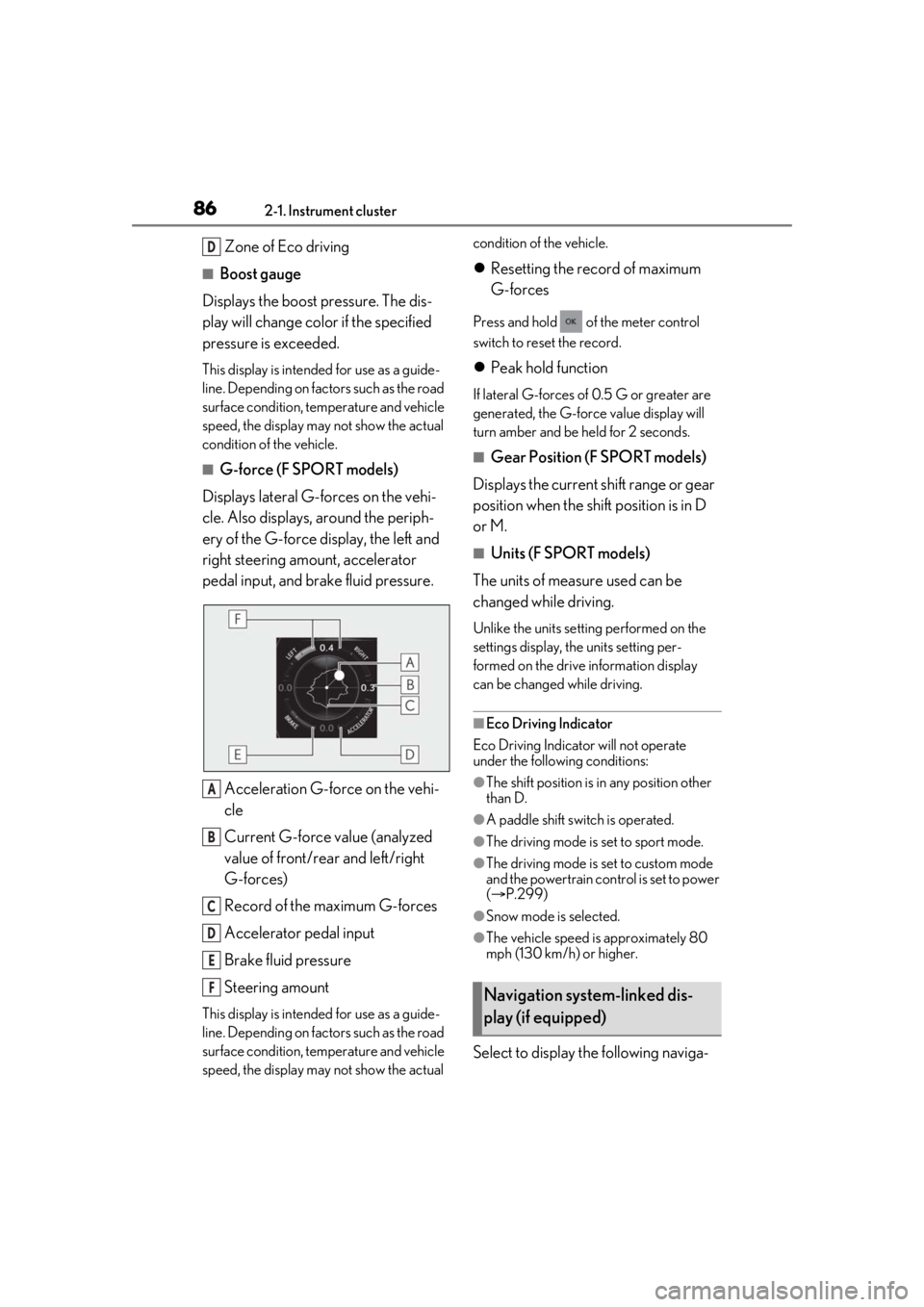
■G-force (F SPORT models)
Displays lateral G-forces on the vehi-
cle. Also displays, around the periph-
ery of the G-force display, the left and
right steering amount, accelerator
pedal input, and brake fluid pressure.
Acceleration G-force on the vehi-
cle
Current G-force value (analyzed
value of front/rear and left/right
G-forces)
Record of the maximum G-forces
Accelerator pedal input
Brake fluid pressure
Steering amount
This display is intended for use as a guide-
line. Depending on factors such as the road
surface condition, temperature and vehicle
speed, the display may not show the actual condition of the vehicle.
Resetting the record of maximum
G-forces
Press and hold of the meter control
switch to reset the record.
Peak hold function
If lateral G-forces of 0.5 G or greater are
generated, the G-forc e value display will
turn amber and be held for 2 seconds.
■Gear Position (F SPORT models)
Displays the current shift range or gear
position when the shift position is in D
or M.
■Units (F SPORT models)
The units of measure used can be
changed while driving.
Unlike the units sett ing performed on the
settings display, th e units setting per-
formed on the drive information display
can be changed while driving.
■Eco Driving Indicator
Eco Driving Indicator will not operate
under the following conditions:
●The shift position is in any position other
than D.
●A paddle shift swit ch is operated.
●The driving mode is set to sport mode.
●The driving mode is set to custom mode
and the powertrain control is set to power
( P.299)
●Snow mode is selected.
●The vehicle speed is approximately 80
mph (130 km/h) or higher.
Select to display the following naviga-
D
A
B
C
D
E
FNavigation system-linked dis-
play (if equipped)
Page 97 of 520
97
3
3
Before driving
Before driving
.3-1. Key informationKeys ................................................... 98
3-2. Opening, closing and locking the doors and trunk
Doors............................................... 102
Trunk................................................ 106
Smart access system with push-button start ...................... 113
3-3. Adjusting the seats Front seats ...................................... 121
Power rear seat........................... 128
Driving position memory ........ 133
Rear seat position memory .... 137
Head restraints............................ 138
3-4. Adjusting the steering wheel and mirrors
Steering wheel.............................. 141
Inside rear view mirror............. 142
Digital Rearview Mirror .......... 143
Outside rear view mirrors ....... 151
3-5. Opening, closing the windows and moon roof
Power windows........................... 153
Moon roof ..................................... 156
Panoramic moon roof .............. 158
Page 133 of 520
1333-3. Adjusting the seats
3
Before driving
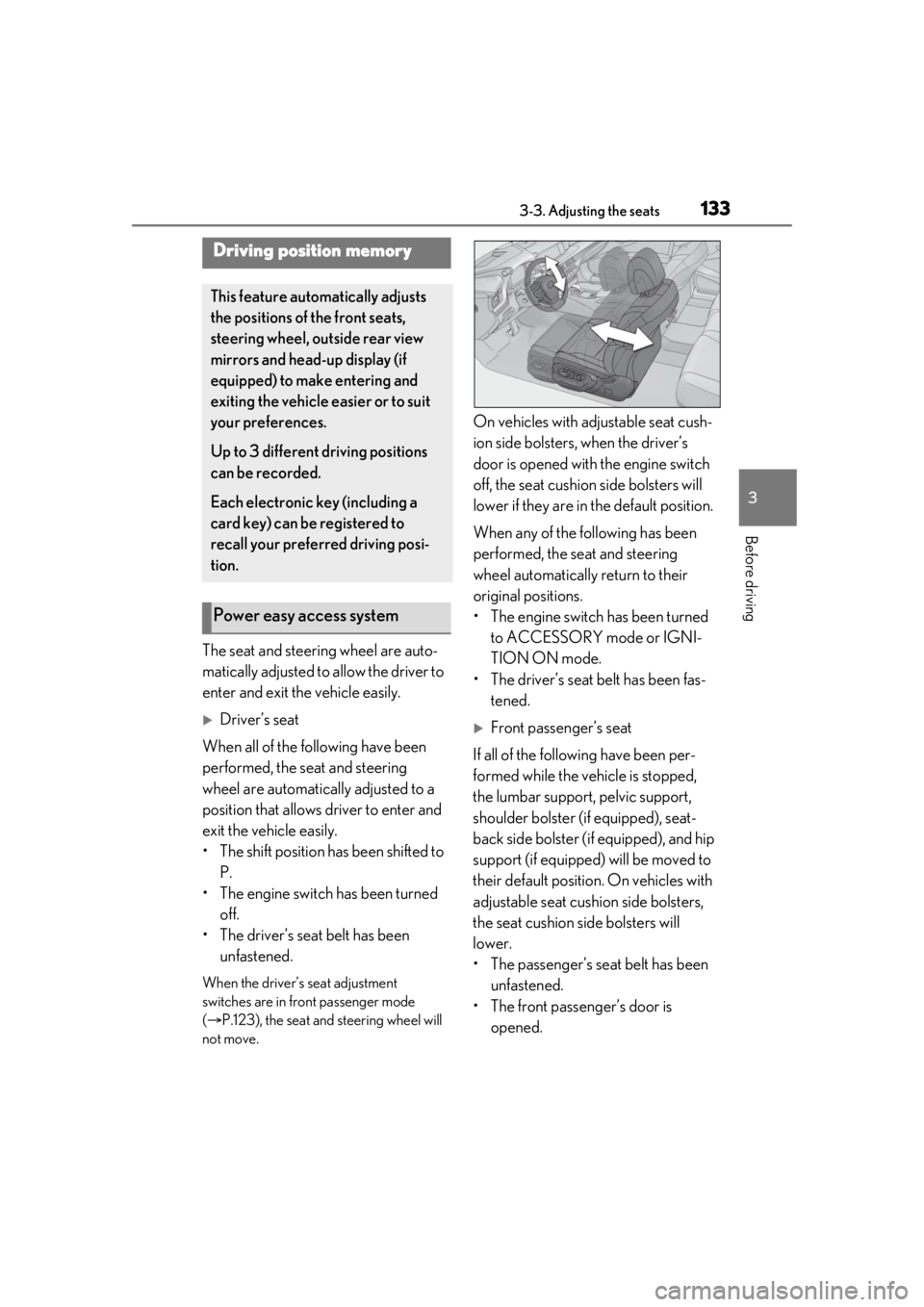
The seat and steering wheel are auto-
matically adjusted to allow the driver to
enter and exit the vehicle easily.
Driver’s seat
When all of the following have been
performed, the seat and steering
wheel are automatically adjusted to a
position that allows driver to enter and
exit the vehicle easily.
• The shift position has been shifted to P.
• The engine switch has been turned off.
• The driver’s seat belt has been unfastened.
When the driver’s seat adjustment
switches are in front passenger mode
( P.123), the seat and steering wheel will
not move.
On vehicles with adjustable seat cush-
ion side bolsters, when the driver’s
door is opened with the engine switch
off, the seat cushion side bolsters will
lower if they are in the default position.
When any of the following has been
performed, the seat and steering
wheel automatically return to their
original positions.
• The engine switch has been turned
to ACCESSORY mode or IGNI-
TION ON mode.
• The driver’s seat belt has been fas- tened.
Front passenger’s seat
If all of the following have been per-
formed while the vehicle is stopped,
the lumbar support, pelvic support,
shoulder bolster (if equipped), seat-
back side bolster (if equipped), and hip
support (if equipped) will be moved to
their default position. On vehicles with
adjustable seat cushion side bolsters,
the seat cushion side bolsters will
lower.
• The passenger’s seat belt has been unfastened.
• The front passenger’s door is opened.
Driving position memory
This feature auto matically adjusts
the positions of the front seats,
steering wheel, outside rear view
mirrors and head-up display (if
equipped) to make entering and
exiting the vehicle easier or to suit
your preferences.
Up to 3 different driving positions
can be recorded.
Each electronic key (including a
card key) can be registered to
recall your preferred driving posi-
tion.
Power easy access system
Page 134 of 520
1343-3. Adjusting the seats
■Operation of the power easy access sys-
tem
●When exiting the vehicle, the power easy
access system may not operate if the seat
is already in the rearmost or uppermost
position or close to the rear seat.
●If the seat position is adjusted during
power easy access sy stem operation, the
automatic operation w ill stop. (The seat
will change to manual operation.)
●If the seat position is adjusted during or
after the power easy access system oper-
ation when the driver is exiting the vehi-
cle, the power easy access system will not
operate when entering the vehicle.
■Seat cushion side bo lster adjustment (if
equipped)
If the seat cushion si de bolsters have been
lowered, when the front door is closed, the
seat cushion side bolsters will move to their
default position.
If the seat is adjusted while the seat cushion
side bolsters are moving to the default posi-
tion, their movement will be temporarily
suspended. (The seat cushion side bolsters
will move to the default position after a cer-
tain amount of time.)
■Customization
Some functions can be customized.
( P.476)
1 Turn the engine switch to IGNI-
TION ON mode.
2 Check that the shift position is in P.
3 Adjust the driver’s seat, steering
wheel, outside rear view mirrors
and head-up display (if equipped)
to the desired positions.
4 While pressing the “SET” button, or
within 3 seconds after the “SET” button is pressed, press button “1”,
“2” or “3” until the buzzer sounds.
If the selected button has already been
preset, the previously recorded position
will be overwritten.
When the driver’s seat adjustment
switches are in front passenger mode
(
P.123), the position of the driver’s seat
cannot be registered.
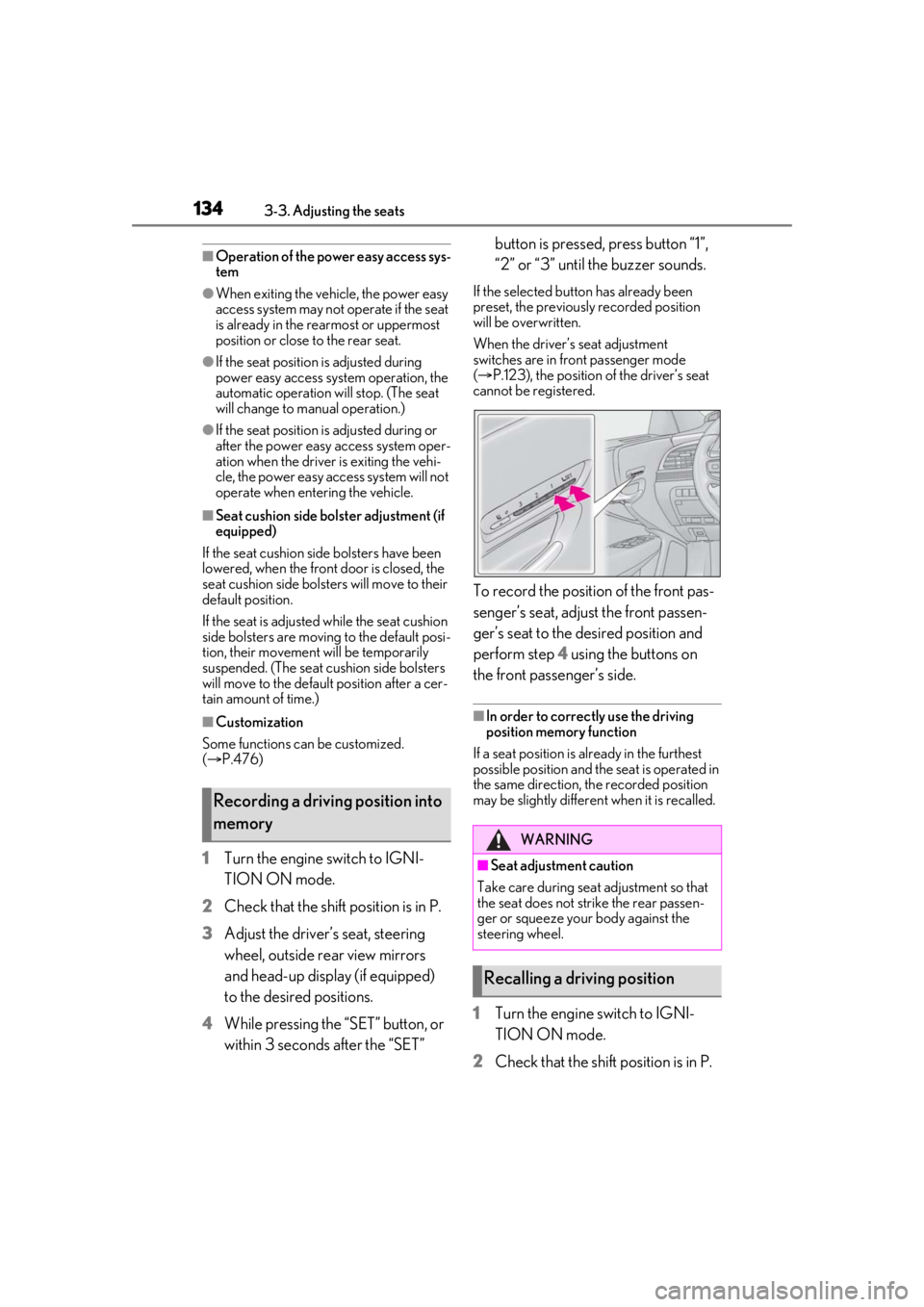
To record the position of the front pas-
senger’s seat, adjust the front passen-
ger’s seat to the desired position and
perform step 4 using the buttons on
the front passenger’s side.
■In order to correctly use the driving
position memory function
If a seat position is already in the furthest
possible position and the seat is operated in
the same direction, the recorded position
may be slightly differen t when it is recalled.
1Turn the engine switch to IGNI-
TION ON mode.
2 Check that the shift position is in P.
Recording a driving position into
memory
WARNING
■Seat adjustme nt caution
Take care during seat adjustment so that
the seat does not strike the rear passen-
ger or squeeze your body against the
steering wheel.
Recalling a driving position
Page 141 of 520
1413-4. Adjusting the steering wheel and mirrors
3
Before driving
3-4.Adjusting the steering wheel and mirrors
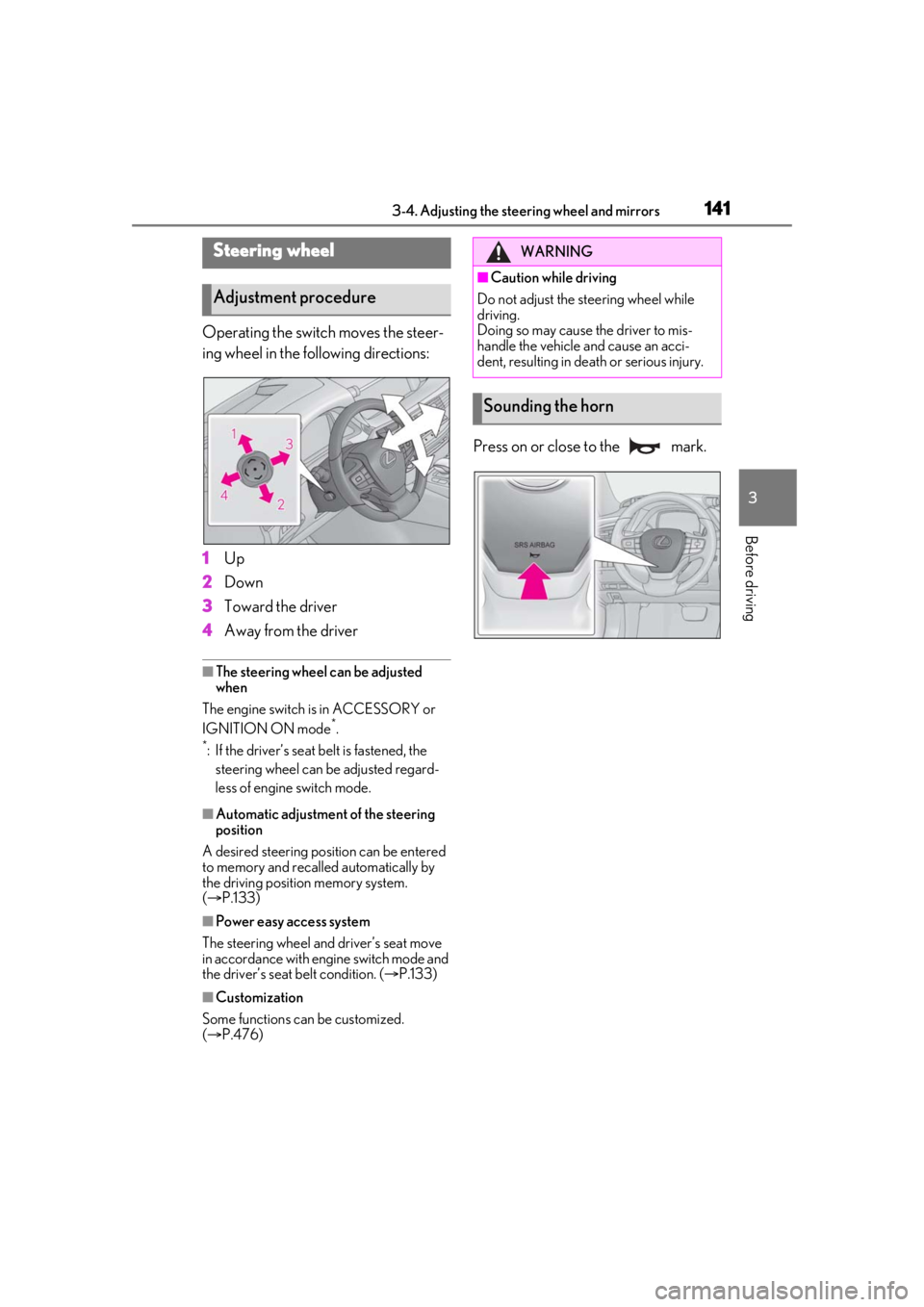
Operating the switch moves the steer-
ing wheel in the following directions:
1Up
2 Down
3 Toward the driver
4 Away from the driver
■The steering wheel can be adjusted
when
The engine switch is in ACCESSORY or
IGNITION ON mode
*.
*: If the driver’s seat belt is fastened, the steering wheel can be adjusted regard-
less of engine switch mode.
■Automatic adjustment of the steering
position
A desired steering position can be entered
to memory and recalled automatically by
the driving position memory system.
( P.133)
■Power easy access system
The steering wheel and driver’s seat move
in accordance with engine switch mode and
the driver’s seat belt condition. ( P.133)
■Customization
Some functions can be customized.
( P.476)
Press on or close to the mark.
Steering wheel
Adjustment procedure
WARNING
■Caution while driving
Do not adjust the steering wheel while
driving.
Doing so may cause the driver to mis-
handle the vehicle and cause an acci-
dent, resulting in death or serious injury.
Sounding the horn
Page 148 of 520
1483-4. Adjusting the steering wheel and mirrors
If you notice any of the following symptoms, refer to the following table for the likely
cause and the solution.
If the symptom is not resolved by the solu tion, have the vehicle inspected by your
Lexus dealer.
If you notice any symptoms
SymptomLikely causeSolution
The image is difficult to
see.
The mirror surface is dirty.Clean the mirror surface
gently, using a soft dry cloth.
Sunlight or headlights are shining
directly into the Digital Rearview
Mirror.
Change to optical mirror
mode.
(If the light is coming through
the moon roof or panoramic
moon roof, close the sun-
shade.)
• The vehicle is in a dark area.
• The vehicle is near a TV tower, broadcasting station, electric
power plant, or other location
where strong radio waves or
electrical noise may be pres-
ent.
• The temperature around the camera is extremely high/low.
• The ambient temperature is extremely low.
• It is raining or humid.
• Sunlight or headlights are shin- ing directly into the camera
lens.
• The vehicle is under fluores- cent lights, sodium lights, mer-
cury lights, etc.
• Exhaust gas is obstructing the
camera.
Change to optical mirror
mode.
(Change back to digital mir-
ror mode when the condi-
tions have improved.)
Page 166 of 520
1664-1. Before driving
WARNING
●Do not drive the vehicle over or stop
the vehicle near flammable materials.
The exhaust system and exhaust gases
can be extremely hot. These hot parts
may cause a fire if there is any flamma-
ble material nearby.
●Vehicles without Lexus Safety System
+ A: During normal driving, do not turn
off the engine. Turning the engine off
while driving will not cause loss of
steering or braking control, but the
power assist to these systems will be
lost. This will make it more difficult to
steer and brake, so you should pull
over and stop the vehicle as soon as it
is safe to do so.
However, in the event of an emer-
gency, such as if it becomes impossible
to stop the vehicle in the normal way:
P.418
●Vehicles with Lexus Safety System + A:
During normal driving, do not turn off
the engine. Turning the engine off
while driving will not cause loss of
steering or braking control, however,
power assist to the steering will be lost.
This will make it more difficult to steer
smoothly, so you should pull over and
stop the vehicle as soon as it is safe to
do so.
In the event of an emergency, such as if
it becomes impossible to stop the vehi-
cle in the normal way:
P.418
●Use engine braking (downshift) to
maintain a safe speed when driving
down a steep hill.
Using the brakes continuously may
cause the brakes to overheat and lose
effectiveness. (
P.178)
●Do not adjust the positions of the
steering wheel, the seat, or the inside
or outside rear view mirrors while driv-
ing.
Doing so may result in a loss of vehicle
control.
●Always check that all passengers’
arms, heads or other parts of their
body are not outside the vehicle.
●Do not drive in excess of the speed
limit. Even if the legal speed limit per-
mits it, do not drive over 85 mph (140
km/h) unless your vehicle has
high-speed capability tires. Driving
over 85 mph (140 km /h) may result in
tire failure, loss of control and possible
injury. Be sure to consult a tire dealer
to determine whether the tires on your
vehicle are high-speed capability tires
or not before driving at such speeds.
■When driving on slippery road sur-
faces
●Sudden braking, acceleration and
steering may cause tire slippage and
reduce your ability to control the vehi-
cle.
●Sudden acceleration, engine braking
due to shifting, or changes in engine
speed could cause the vehicle to skid.
●After driving through a puddle, lightly
depress the brake pedal to make sure
that the brakes are functioning prop-
erly. Wet brake pads may prevent the
brakes from functioning properly. If the
brakes on only one side are wet and
not functioning properly, steering con-
trol may be affected.
■When shifting the shift position
●Do not let the vehicle roll backward
while a forward driving position is
selected, or roll forw ard while the shift
position is in R.
Doing so may cause the engine to stall
or lead to poor brake and steering
performance, resulting in an accident
or damage to the vehicle.
●Do not shift the shift position to P while
the vehicle is moving.
Doing so can damage the transmission
and may result in a loss of vehicle con-
trol.