remote control LEXUS LS500 2022 Owners Manual
[x] Cancel search | Manufacturer: LEXUS, Model Year: 2022, Model line: LS500, Model: LEXUS LS500 2022Pages: 104, PDF Size: 16.15 MB
Page 8 of 104
7
LS500_QG_U
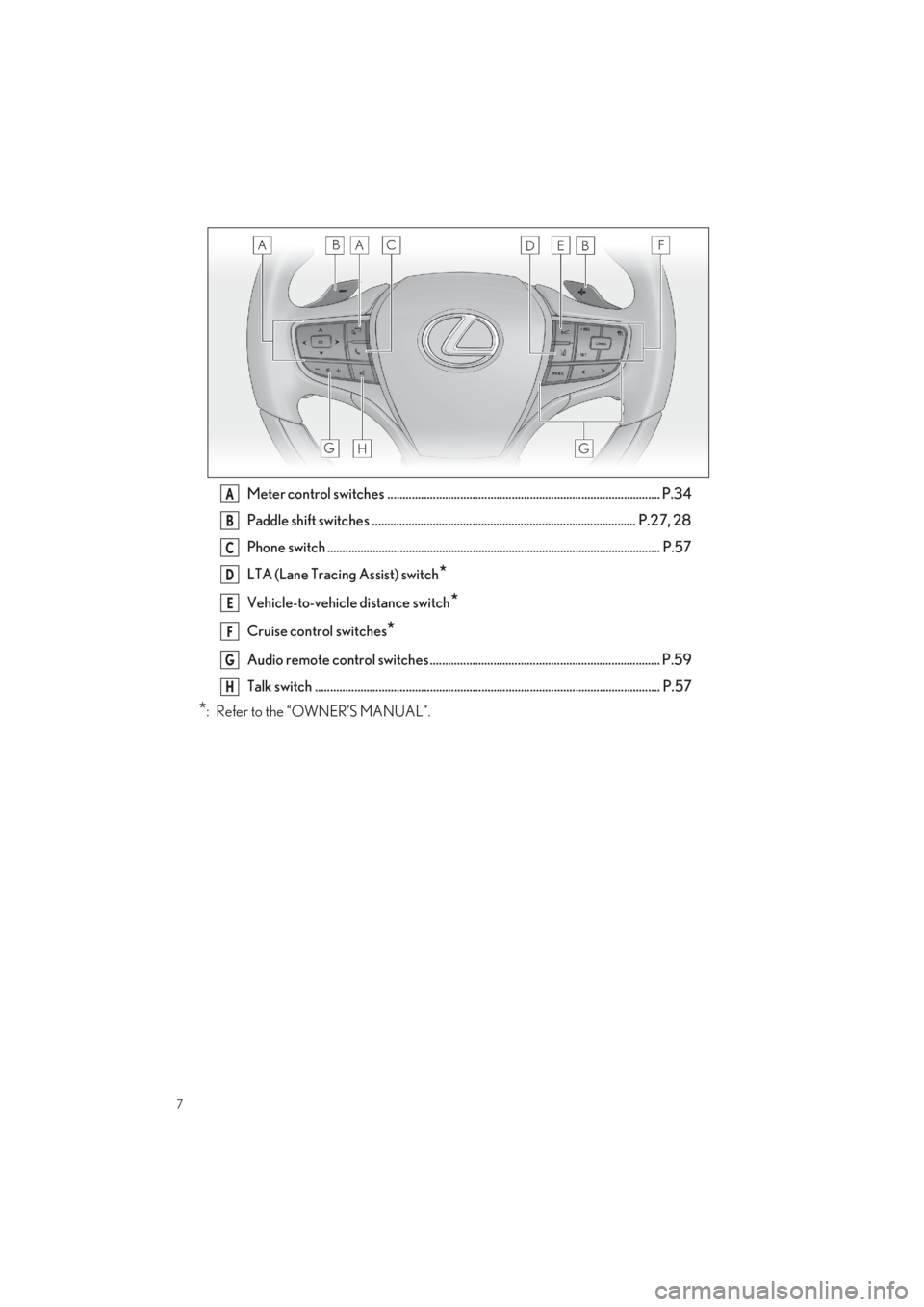
Meter control switches .......................................................................................... P.34
Paddle shift switches ....................................................................................... P.27, 28
Phone switch .............................................................................................................. P.57
LTA (Lane Tracing Assist) switch*
Vehicle-to-vehicle distance switch*
Cruise control switches*
Audio remote control switches ............................................................................ P.59
Talk switch .................................................................................................................. P. 57
*: Refer to the “OWNER’S MANUAL”.
A
B
C
D
E
F
G
H
Page 13 of 104
12
LS500_QG_U
Entering and Exiting
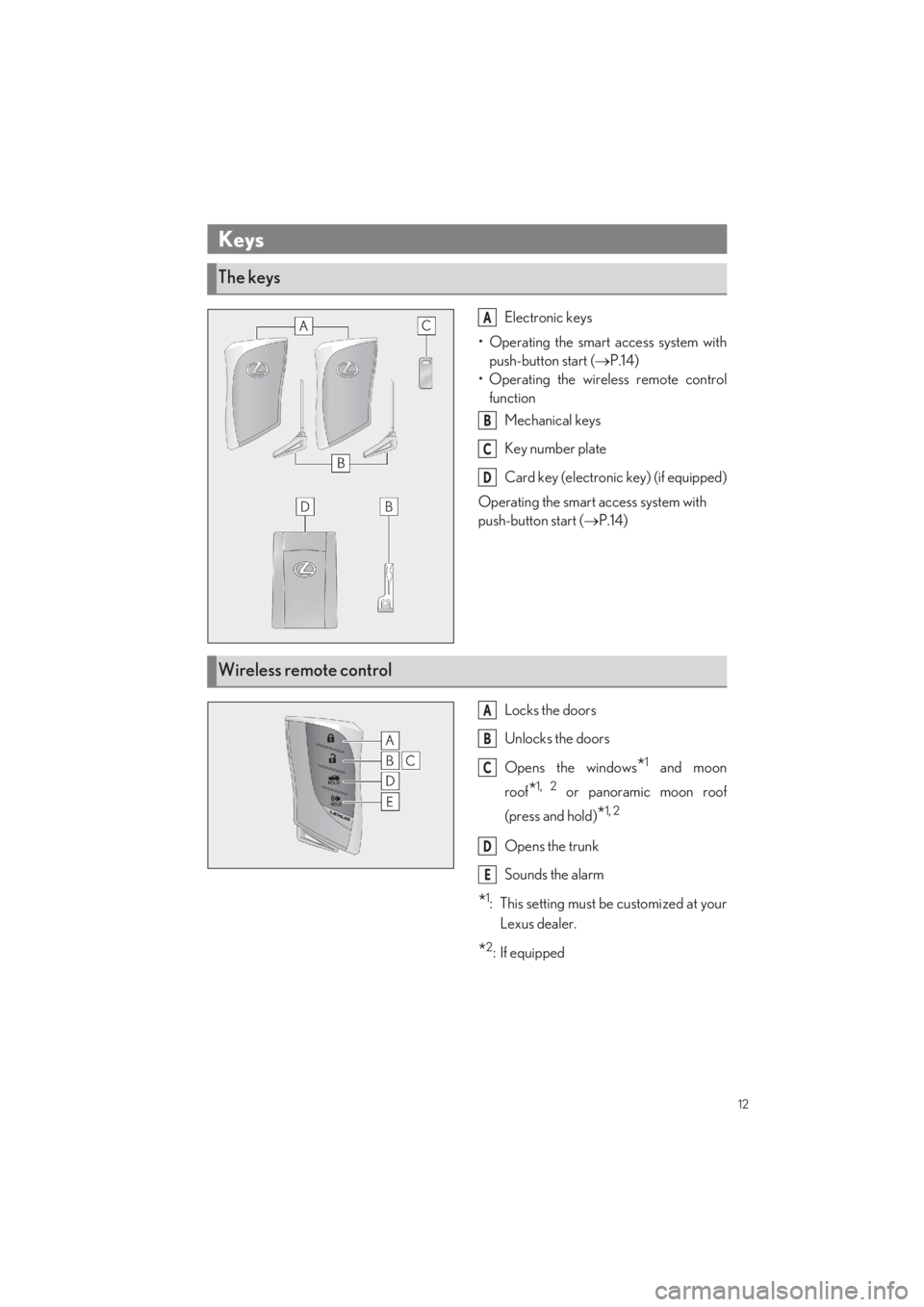
Electronic keys
• Operating the smart access system with
push-button start ( P.14)
• Operating the wireless remote control
function
Mechanical keys
Key number plate
Card key (electroni c key) (if equipped)
Operating the smart access system with
push-button start ( P.14)
Locks the doors
Unlocks the doors
Opens the windows*1 and moon
roof*1, 2 or panoramic moon roof
(press and hold)*1, 2
Opens the trunk
Sounds the alarm
*1: This setting must be customized at your
Lexus dealer.
*2:If equipped
Keys
The keys
A
B
C
D
Wireless remote control
A
B
C
D
E
Page 16 of 104
15
LS500_QG_U
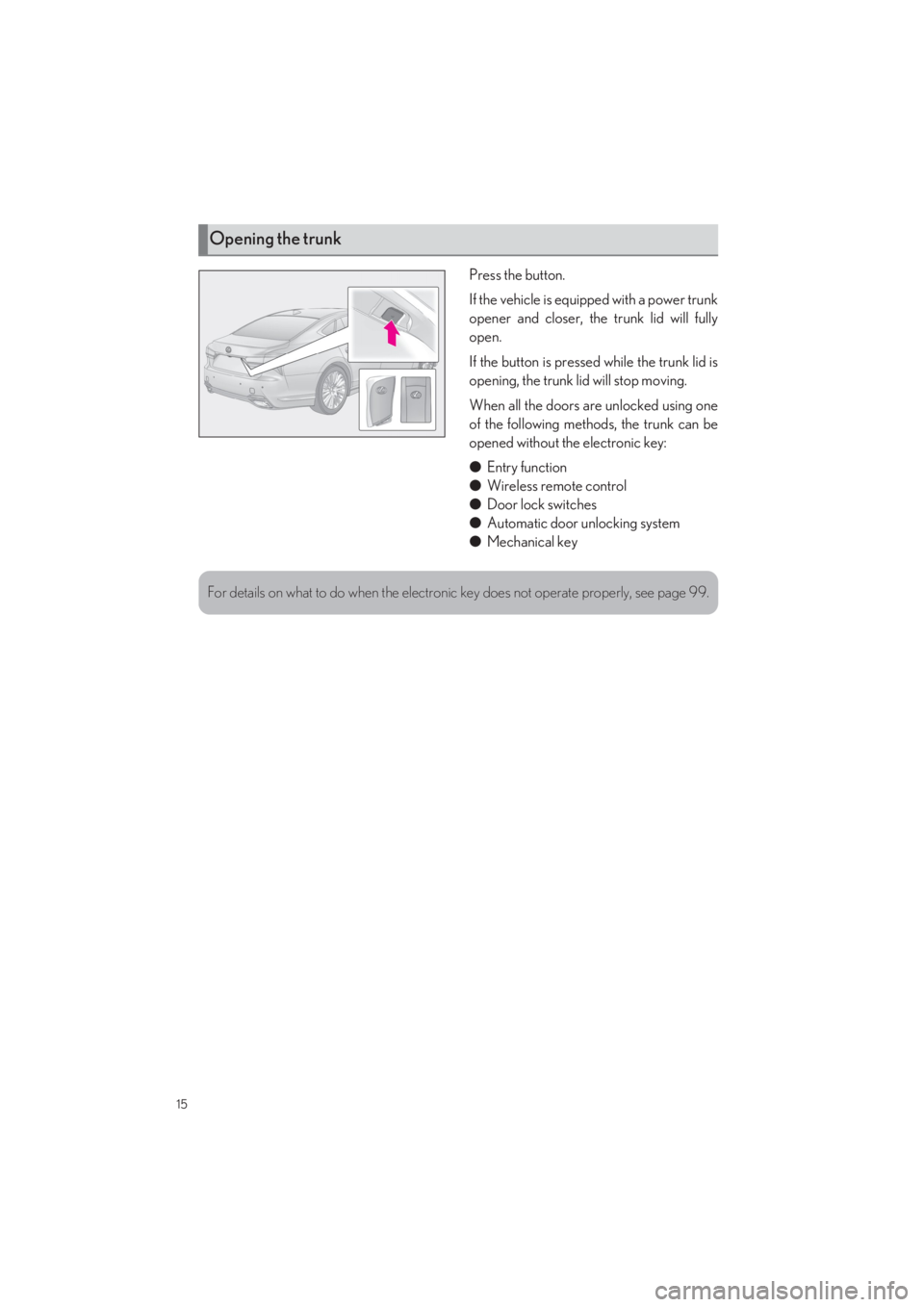
Press the button.
If the vehicle is equipped with a power trunk
opener and closer, the trunk lid will fully
open.
If the button is pressed while the trunk lid is
opening, the trunk lid will stop moving.
When all the doors are unlocked using one
of the following methods, the trunk can be
opened without the electronic key:
● Entry function
● Wireless remote control
● Door lock switches
● Automatic door unlocking system
● Mechanical key
Opening the trunk
For details on what to do when the electronic key does not operate properly, see page 99.
Page 47 of 104
46
LS500_QG_U
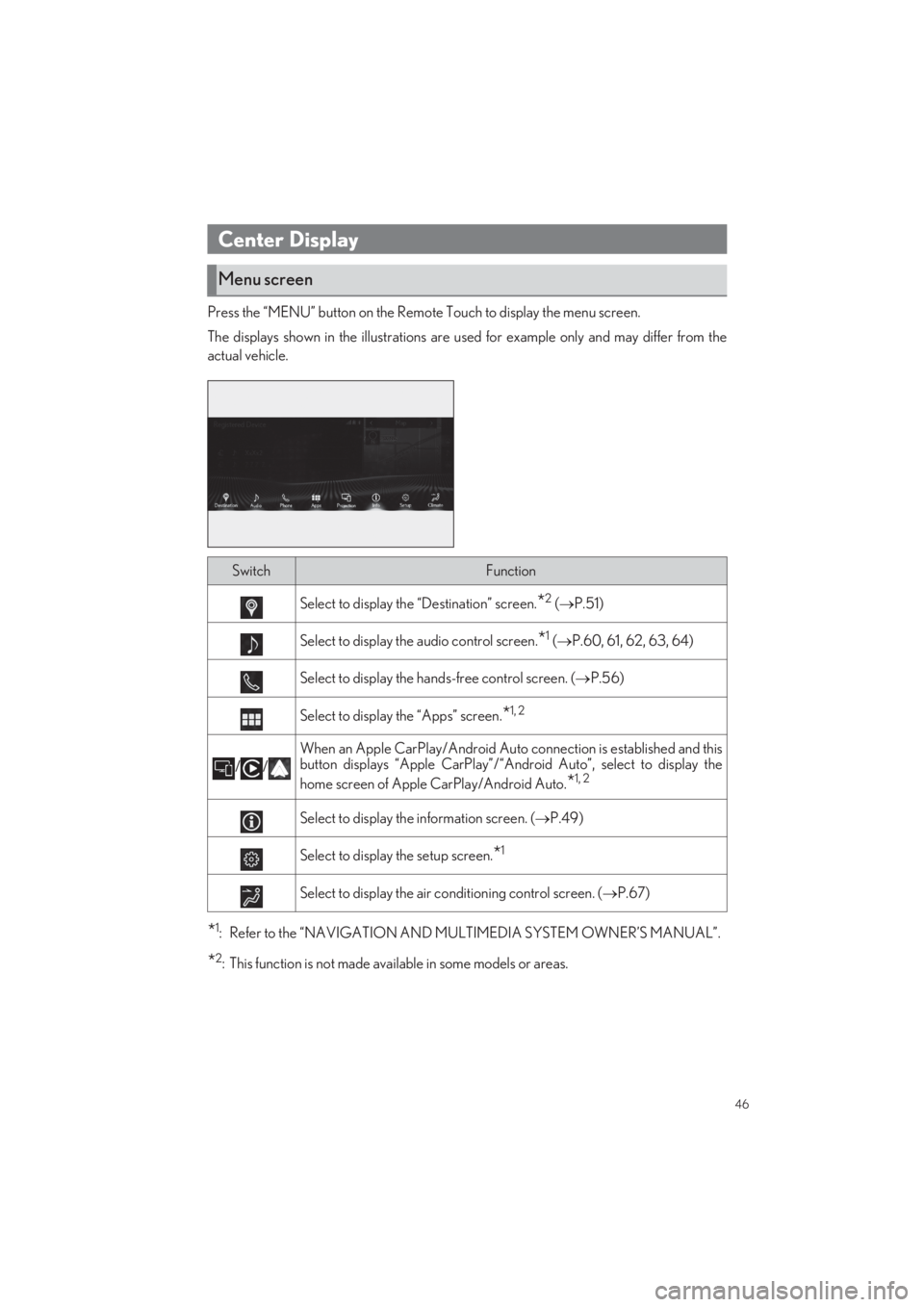
Press the “MENU” button on the Remote Touch to display the menu screen.
The displays shown in the illu strations are used for example only and may differ from the
actual vehicle.
*1: Refer to the “NAVIGATION AND MULTIMEDIA SYSTEM OWNER’S MANUAL”.
*2: This function is not made ava ilable in some models or areas.
Center Display
Menu screen
SwitchFunction
Select to display the “Destination” screen.*2 (P.51)
Select to display the audio control screen.*1 (P.60, 61, 62, 63, 64)
Select to display the hands-free control screen. (P.56)
Select to display the “Apps” screen.*1, 2
//
When an Apple CarPlay/Android Auto connection is established and this
button displays “Apple CarPlay”/“An droid Auto”, select to display the
home screen of Apple CarPlay/Android Auto.*1, 2
Select to display the information screen. ( P.49)
Select to display the setup screen.*1
Select to display the air conditioning control screen. (P.67)
Page 59 of 104
58
LS500_QG_U
Follow the procedure below to display the audio control screen.
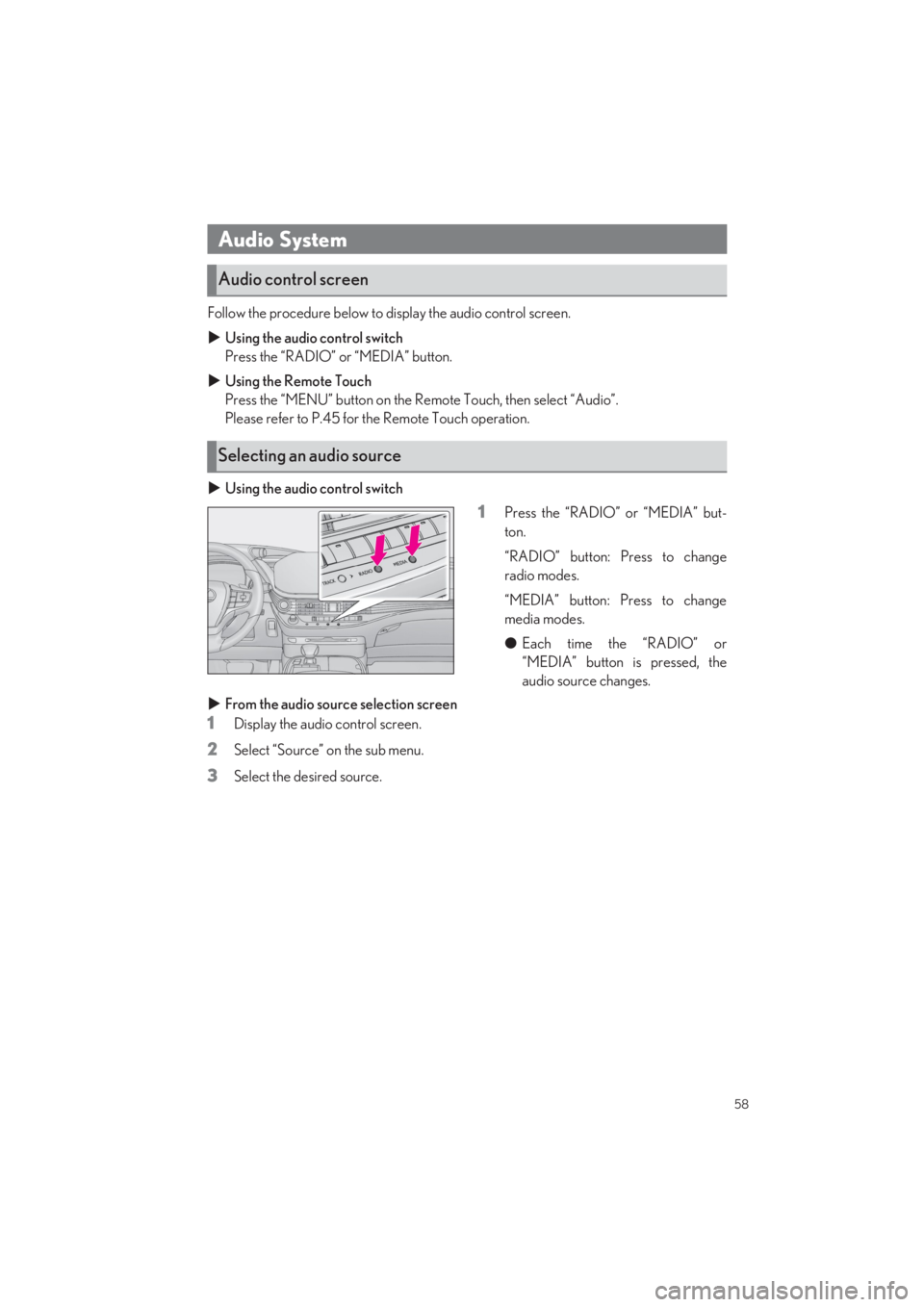
Using the audio control switch
Press the “RADIO” or “MEDIA” button.
Using the Remote Touch
Press the “MENU” button on the Re mote Touch, then select “Audio”.
Please refer to P.45 for the Remote Touch operation.
Using the audio control switch
1Press the “RADIO” or “MEDIA” but-
ton.
“RADIO” button: Press to change
radio modes.
“MEDIA” button: Press to change
media modes.
● Each time the “RADIO” or
“MEDIA” button is pressed, the
audio source changes.
From the audio source selection screen
1Display the audio control screen.
2Select “Source” on the sub menu.
3Select the desired source.
Audio System
Audio control screen
Selecting an audio source
Page 66 of 104
65
LS500_QG_U
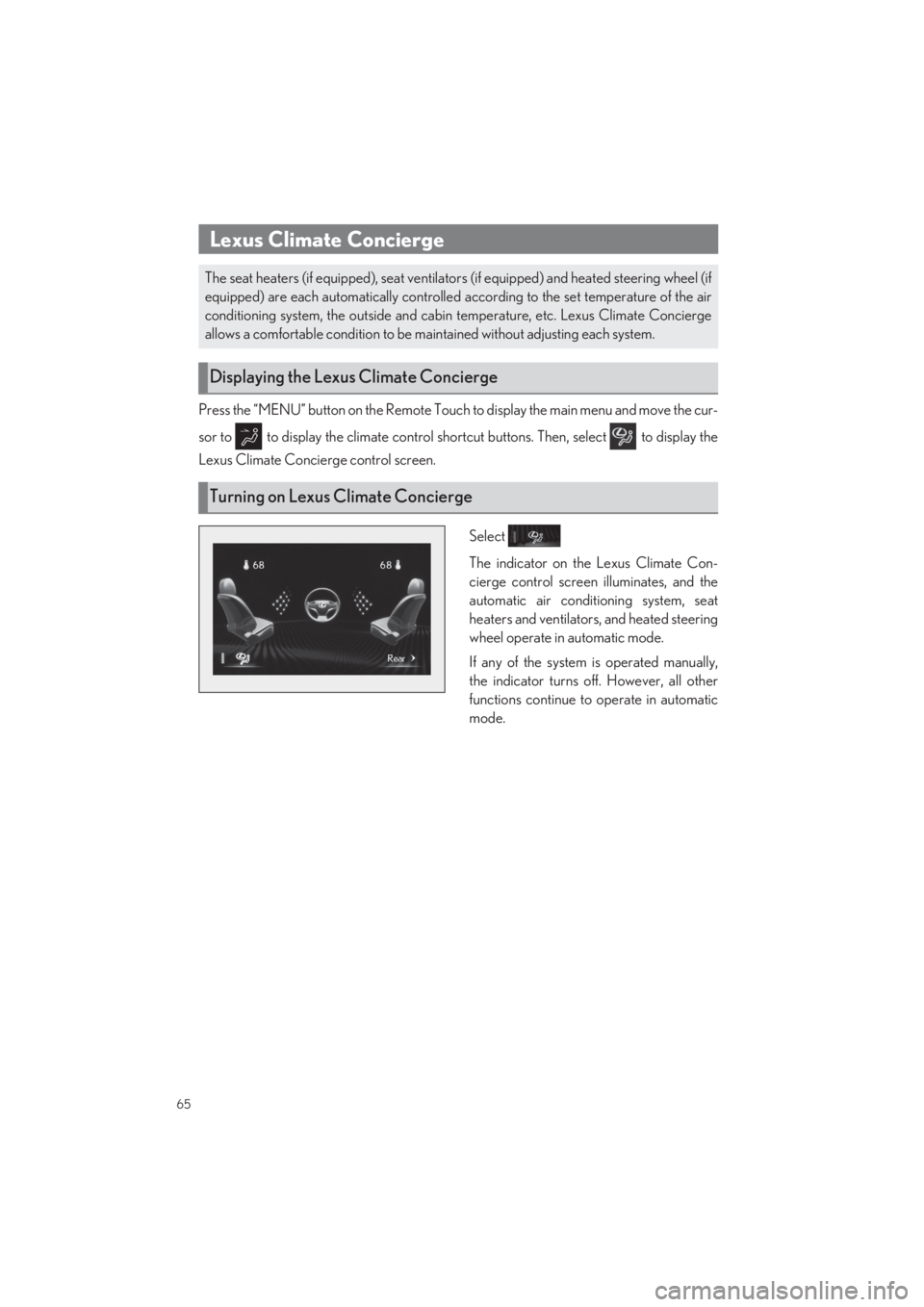
Press the “MENU” button on the Remote Touch to display the main menu and move the cur-
sor to to display the climat e control shortcut buttons. Then, select to display the
Lexus Climate Concie rge control screen.
Select
The indicator on the Lexus Climate Con-
cierge control screen illuminates, and the
automatic air conditioning system, seat
heaters and ventilators, and heated steering
wheel operate in automatic mode.
If any of the system is operated manually,
the indicator turns off. However, all other
functions continue to operate in automatic
mode.
Lexus Climate Concierge
The seat heaters (if equipped), seat ventilato rs (if equipped) and heated steering wheel (if
equipped) are each automatically controlled according to the set temperature of the air
conditioning system, the outside and cabin temperature, etc. Lexus Climate Concierge
allows a comfortable condition to be ma intained without adjusting each system.
Displaying the Lexus Climate Concierge
Turning on Lexus Climate Concierge
Page 68 of 104
67
LS500_QG_U
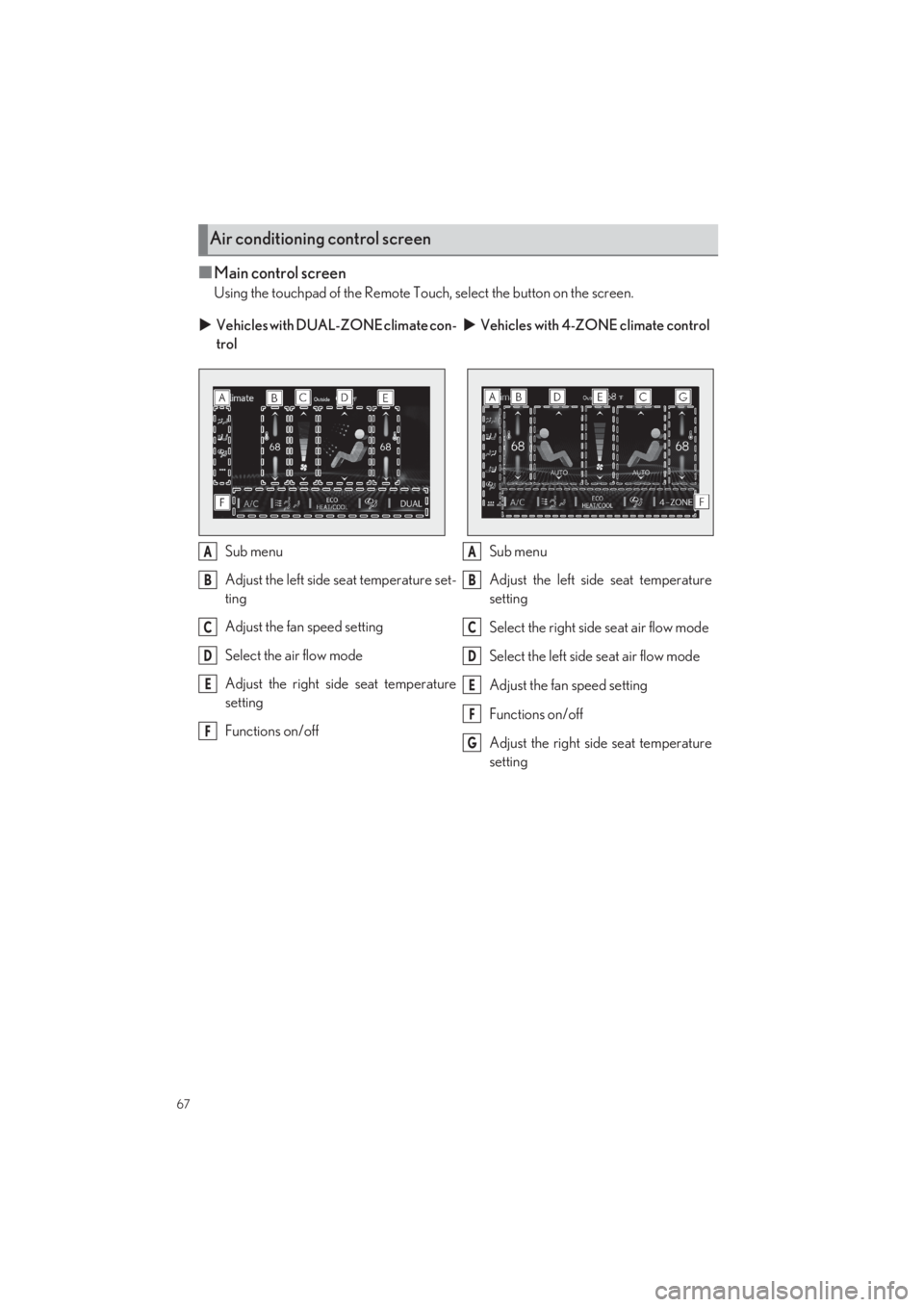
■Main control screen
Using the touchpad of the Remote Touch, select the button on the screen.
Air conditioning control screen
Vehicles with DUAL-ZONE climate con-
trol
Vehicles with 4-ZONE climate control
Sub menu
Adjust the left side seat temperature set-
ting
Adjust the fan speed setting
Select the air flow mode
Adjust the right side seat temperature
setting
Functions on/off
Sub menu
Adjust the left side seat temperature
setting
Select the right side seat air flow mode
Select the left side seat air flow mode
Adjust the fan speed setting
Functions on/off
Adjust the right side seat temperature
setting
A
B
C
D
E
F
A
B
C
D
E
F
G
Page 71 of 104
70
LS500_QG_U
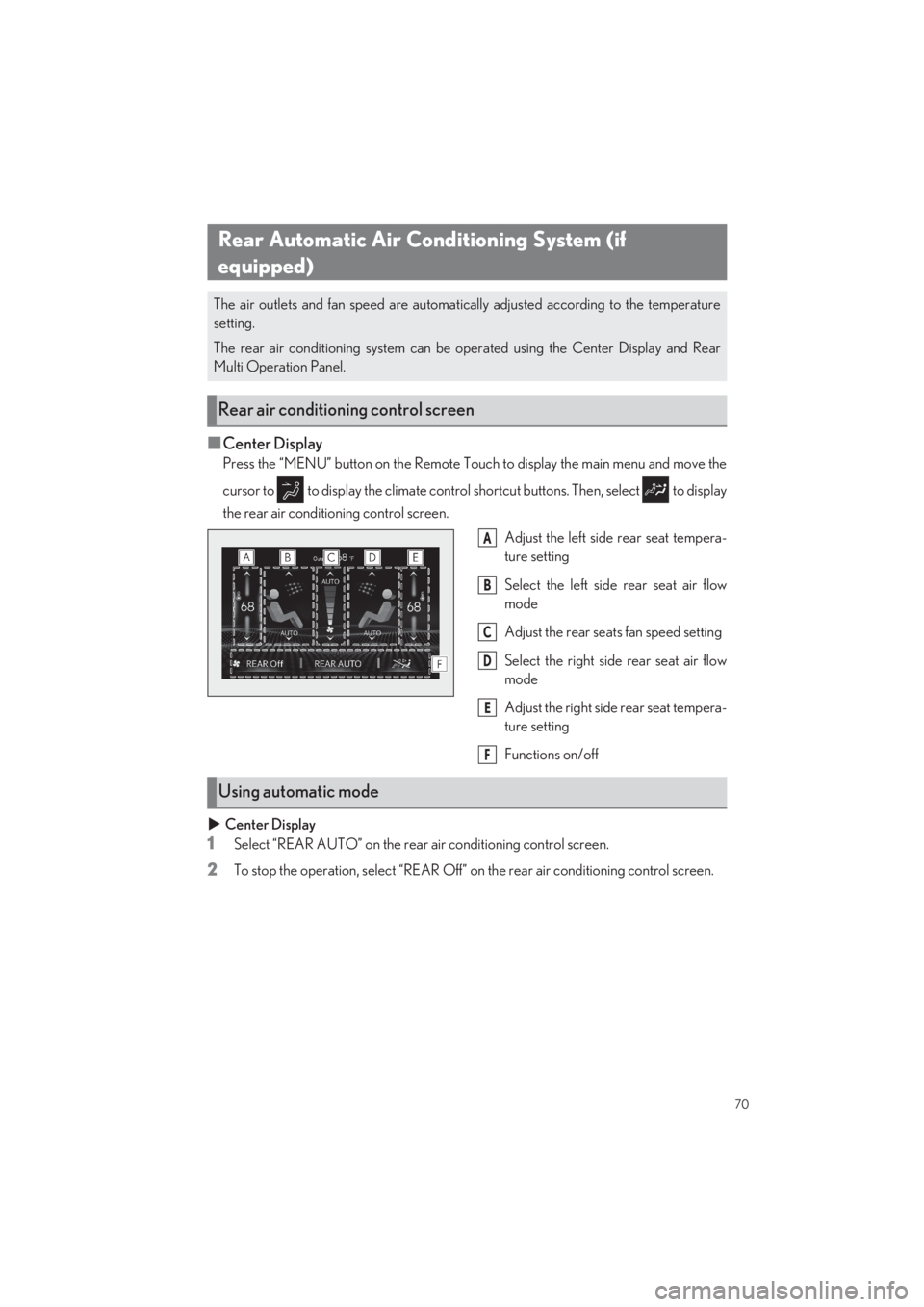
■Center Display
Press the “MENU” button on the Remote Touch to display the main menu and move the
cursor to to display the climate control sh ortcut buttons. Then, select to display
the rear air conditioning control screen.
Adjust the left side rear seat tempera-
ture setting
Select the left side rear seat air flow
mode
Adjust the rear seats fan speed setting
Select the right side rear seat air flow
mode
Adjust the right side rear seat tempera-
ture setting
Functions on/off
Center Display
1Select “REAR AUTO” on the rear air conditioning control screen.
2To stop the operation, select “REAR Off” on the rear air conditioning control screen.
Rear Automatic Air Conditioning System (if
equipped)
The air outlets and fan speed are automatically adjusted according to the temperature
setting.
The rear air conditioning system can be operated using the Center Display and Rear
Multi Operation Panel.
Rear air conditioning control screen
A
B
C
D
E
F
Using automatic mode
Page 80 of 104
79
LS500_QG_U
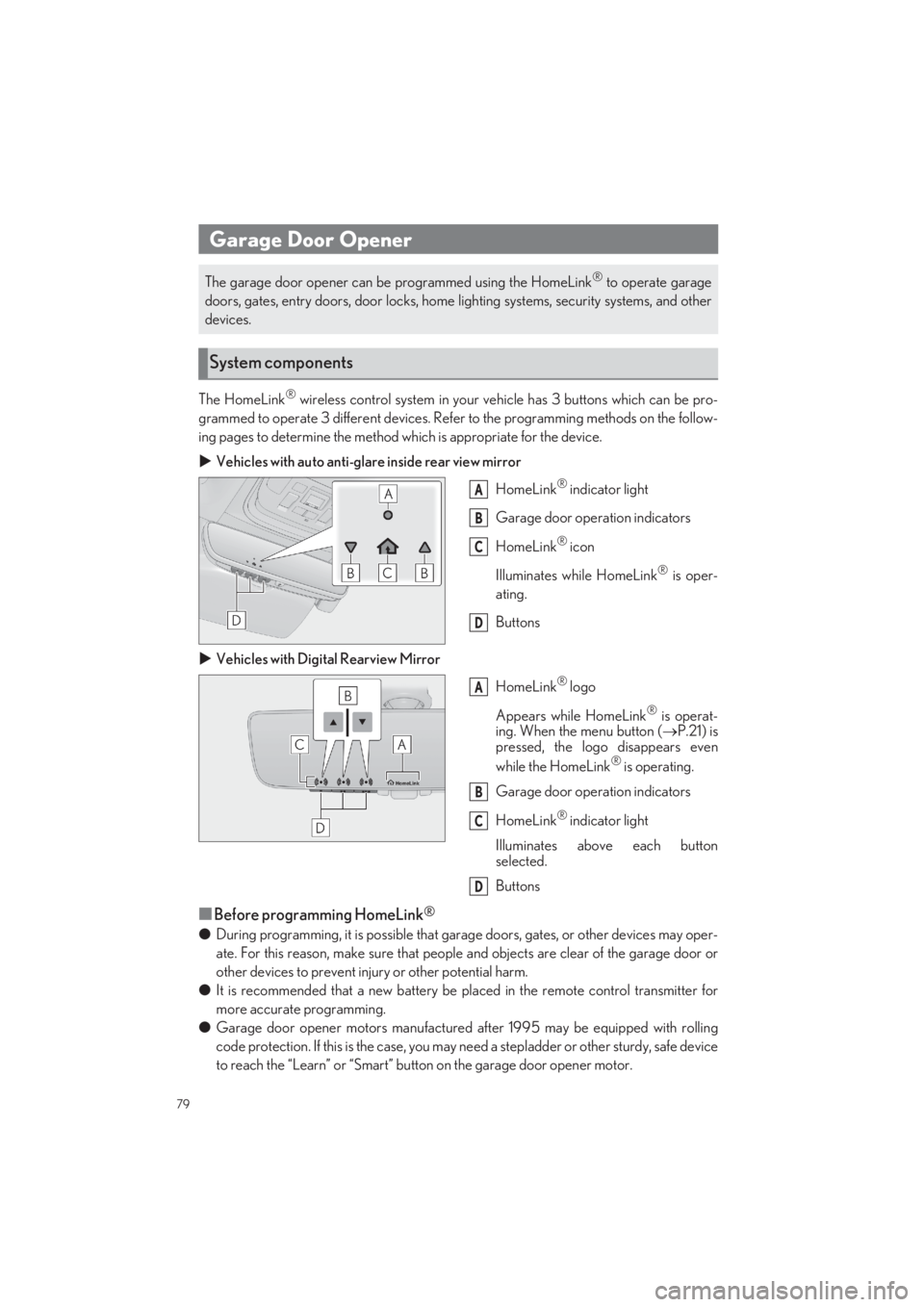
The HomeLink® wireless control system in your vehicle has 3 buttons which can be pro-
grammed to operate 3 different devices. Refe r to the programming methods on the follow-
ing pages to determine the method wh ich is appropriate for the device.
Vehicles with auto anti-glare inside rear view mirror
HomeLink® indicator light
Garage door operation indicators
HomeLink® icon
Illuminates while HomeLink® is oper-
ating.
Buttons
Vehicles with Digital Rearview Mirror
HomeLink® logo
Appears while HomeLink® is operat-
ing. When the menu button ( P.21) is pressed, the logo disappears even
while the HomeLink® is operating.
Garage door operation indicators
HomeLink® indicator light
Illuminates above each button
selected.
Buttons
■Before programming HomeLink®
● During programming, it is possible that garage doors, gates, or other devices may oper-
ate. For this reason, make su re that people and objects are clear of the garage door or
other devices to prevent inju ry or other potential harm.
● It is recommended that a new battery be placed in the remote control transmitter for
more accurate programming.
● Garage door opener motors manufactured after 1995 may be equipped with rolling
code protection. If this is the case, you may need a stepladder or other sturdy, safe device
to reach the “Learn” or “Smart” button on the garage door opener motor.
Garage Door Opener
The garage door opener can be programmed using the HomeLink® to operate garage
doors, gates, entry doors, door locks, home lighting systems, security systems, and other
devices.
System components
A
B
C
D
A
B
C
D
Page 81 of 104

80
LS500_QG_U
■HomeLink® programming procedureThe programming procedures can also be found at the following URL.
Website: www.homelink.com/lexus
For support, contact customer support at the following.
Help Line: 1-800-355-3515
■Programming HomeLink®
Steps 1 through 3 must be performed within 60 seconds, otherwise the HomeLink® indi-
cator light will stop flashing and progra mming will not be successfully completed.
1Press and release the HomeLink® button you want to program and check that the
HomeLink® indicator light flashes (orange).
2Point the remote control transmitter for the devi ce at the rear view mirror, 1 to 3 in. (25
to 75 mm) from the HomeLink® buttons.
Keep the HomeLink® indicator light in view while programming.
Vehicles with auto anti-glare inside rear view mirror
Vehicles with Digital Rearview Mirror