change time LEXUS LS500H 2018 User Guide
[x] Cancel search | Manufacturer: LEXUS, Model Year: 2018, Model line: LS500H, Model: LEXUS LS500H 2018Pages: 528, PDF Size: 10.8 MB
Page 108 of 528
108 3-2. Opening, closing and locking the doors and trunk
LS500h_OM_OM50F42U_(U) 3-2.Opening, closing and locking the doors and trunk
■
Smart access system with
push-button start
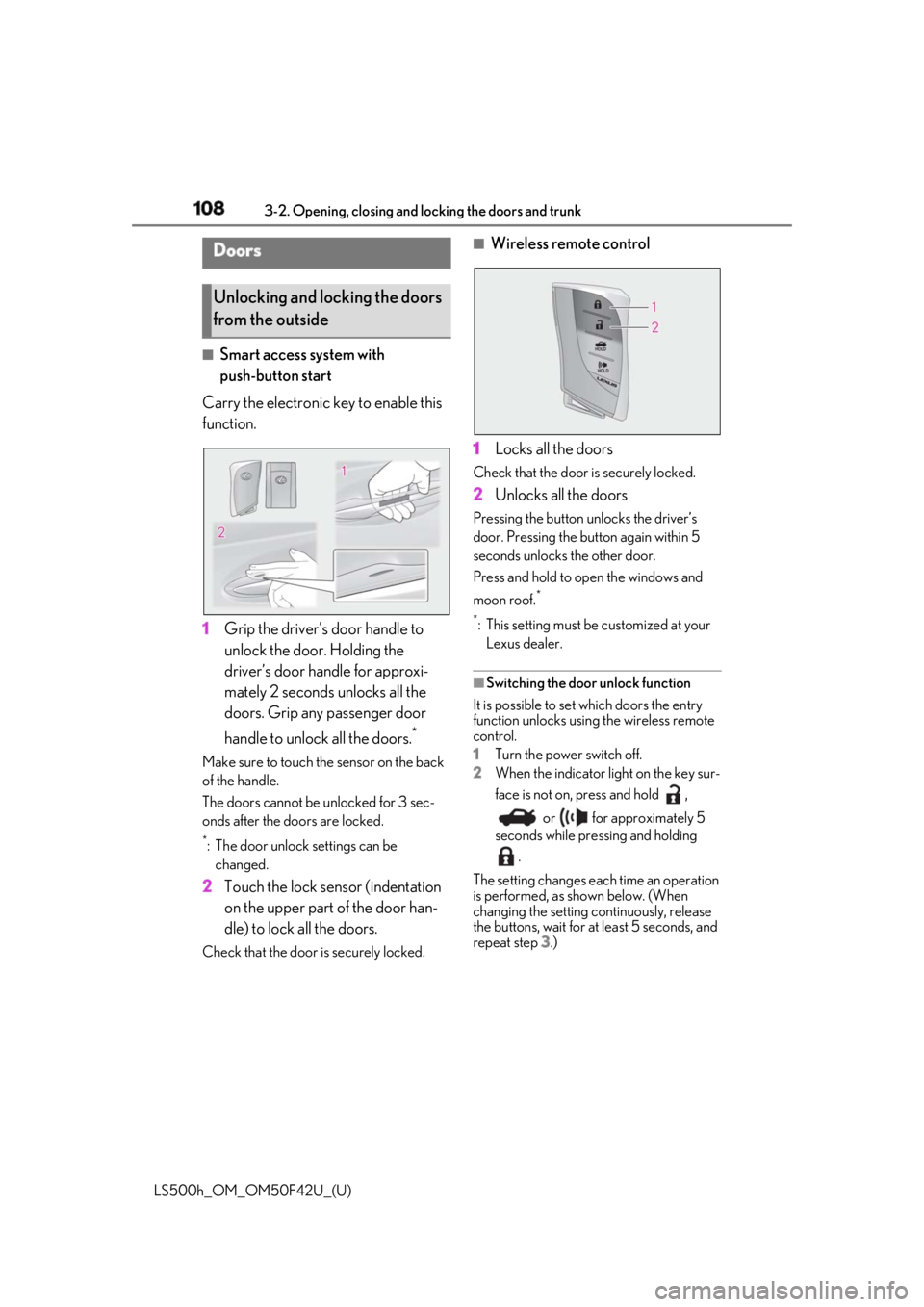
Carry the electronic key to enable this
function.
1 Grip the driver’s door handle to
unlock the door. Holding the
driver’s door ha ndle for approxi-
mately 2 seconds unlocks all the
doors. Grip any passenger door
handle to unlock all the doors. *
Make sure to touch the sensor on the back
of the handle.
The doors cannot be unlocked for 3 sec-
onds after the doors are locked. *
: The door unlock settings can be
changed.
2 Touch the lock sensor (indentation
on the upper part of the door han-
dle) to lock all the doors.Check that the door is securely locked. ■
Wireless remote control
1 Locks all the doors Check that the door is securely locked.
2 Unlocks all the doors Pressing the button unlocks the driver’s
door. Pressing the button again within 5
seconds unlocks the other door.
Press and hold to open the windows and
moon roof. *
*
: This setting must be customized at your
Lexus dealer.
■
Switching the door unlock function
It is possible to set which doors the entry
function unlocks using the wireless remote
control.
1 Turn the power switch off.
2 When the indicator light on the key sur-
face is not on, press and hold ,
or for approximately 5
seconds while pre ssing and holding
.
The setting changes each time an operation
is performed, as shown below. (When
changing the setting continuously, release
the buttons, wait for at least 5 seconds, and
repeat step 3 .)Doors
Unlocking and locking the doors
from the outside
Page 109 of 528
1093-2. Opening, closing and locking the doors and trunk
LS500h_OM_OM50F42U_(U) 3
Before driving
To prevent unintended triggering of the
alarm, unlock the doors using the wireless
remote control and open and close a door
once after the settings have been changed.
(If a door is not opened within 60 seconds
after is pressed, the doors will be
locked again and the alarm will automati-
cally be set.)
In a case that the alarm is triggered, imme-
diately stop the alarm. ( → P.68)■
Impact detection door lock release sys-
tem
In the event that the vehicle is subject to a
strong impact, all the doors are unlocked.
Depending on the force of the impact or the
type of accident, however, the system may
not operate.
■
Operation signals
A buzzer sounds and the emergency flash-
ers flash to indicate that the doors have
been locked/unlocked. (Locked: once;
Unlocked: twice)
A buzzer sounds to indicate that the win-
dows and moon roof are operating.
■
Security feature
If a door is not opened within approximately
60 seconds after the vehicle is unlocked, the security feature automatically locks the
vehicle again. ■
When the doors cannot be locked by the
lock sensor on the upper part of the
door handle
When the doors cannot be locked even if
the lock sensor on the surface of the door
handle is touched by a finger, touch the lock
sensor with the palm.
If you are wearing gloves, remove them.
■
Open door warning buzzer
If an attempt to lock the doors is made when
a door is not fully closed, a buzzer sounds
continuously for 5 seconds. Fully close the
door to stop the buzzer, and lock the vehi-
cle once more. ■
Setting the alarm
Locking the doors will set the alarm system.
( → P.68) ■
Conditions affecting the operation of
the smart access system with push-but-
ton start or wireless remote control
→ P.120 ■
If the smart access system with
push-button start or the wireless remote
control does not operate properly
Use the mechanical key to lock and unlock
the doors. ( → P.445)
Replace the key battery with a new one if it
is depleted. ( → P.413)
■
If the 12-volt batte ry is discharged
The doors cannot be locked and unlocked
using the smart access system with
push-button start or wireless remote con-
trol. Lock or unlock the doors using the
mechanical key. ( → P.445)
■
Customization
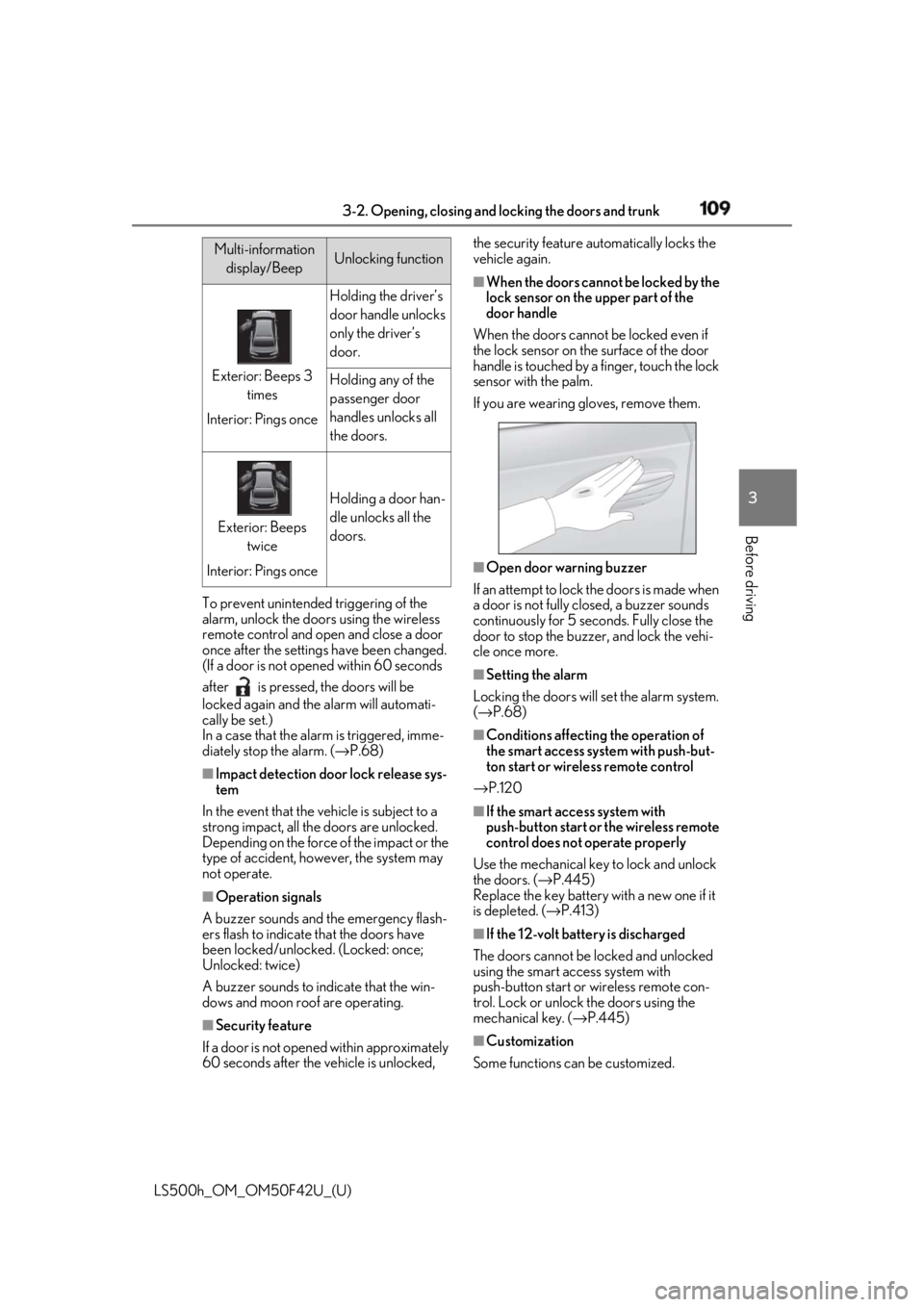
Some functions can be customized. Multi-information
display/Beep Unlocking function
Exterior: Beeps 3
times
Interior: Pings once Holding the driver’s
door handle unlocks
only the driver’s
door.
Holding any of the
passenger door
handles unlocks all
the doors.
Exterior: Beeps
twice
Interior: Pings once Holding a door han-
dle unlocks all the
doors.
Page 110 of 528
110 3-2. Opening, closing and locking the doors and trunk
LS500h_OM_OM50F42U_(U) ( → P.481)
■
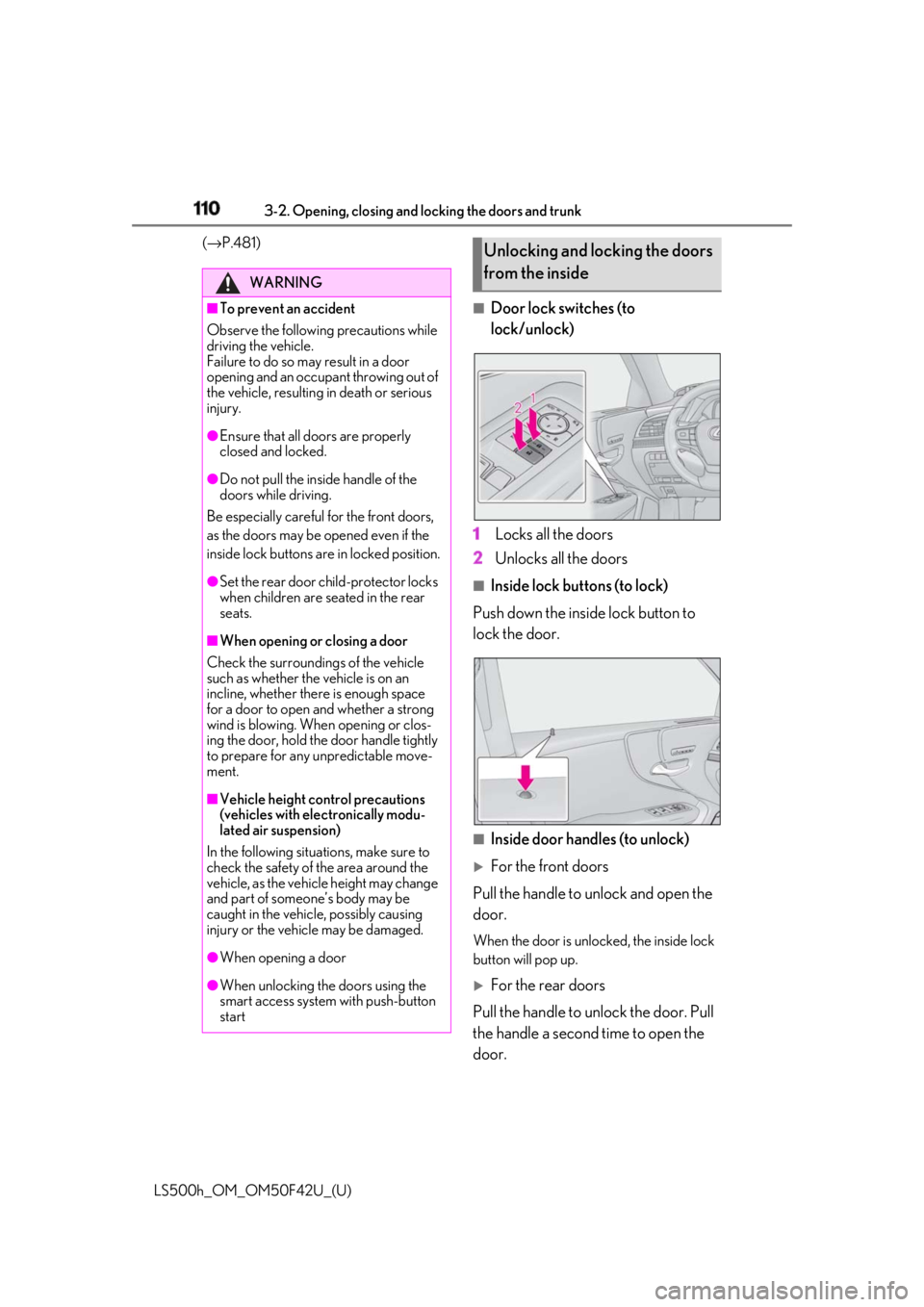
Door lock switches (to
lock/unlock)
1 Locks all the doors
2 Unlocks all the doors ■
Inside lock buttons (to lock)
Push down the inside lock button to
lock the door.
■
Inside door handles (to unlock)
For the front doors
Pull the handle to unlock and open the
door. When the door is unlo cked, the inside lock
button will pop up.
For the rear doors
Pull the handle to unlock the door. Pull
the handle a second time to open the
door.WARNING■
To prevent an accident
Observe the following precautions while
driving the vehicle.
Failure to do so may result in a door
opening and an occupant throwing out of
the vehicle, resulting in death or serious
injury. ●
Ensure that all doors are properly
closed and locked.●
Do not pull the inside handle of the
doors while driving.
Be especially careful for the front doors,
as the doors may be opened even if the
inside lock buttons are in locked position. ●
Set the rear door ch ild-protector locks
when children are seated in the rear
seats.■
When opening or closing a door
Check the surroundings of the vehicle
such as whether the vehicle is on an
incline, whether ther e is enough space
for a door to open and whether a strong
wind is blowing. When opening or clos-
ing the door, hold the door handle tightly
to prepare for any unpredictable move-
ment.
■
Vehicle height co ntrol precautions
(vehicles with electronically modu-
lated air suspension)
In the following situations, make sure to
check the safety of the area around the
vehicle, as the vehicle height may change
and part of someone’s body may be
caught in the vehicle, possibly causing
injury or the vehicle may be damaged.
●
When opening a door
●
When unlocking the doors using the
smart access system with push-button
start Unlocking and locking the doors
from the inside
Page 121 of 528

1213-2. Opening, closing and locking the doors and trunk
LS500h_OM_OM50F42U_(U) 3
Before driving airport or other faci lity that generates
strong radio waves or electrical noise●
When carrying a portable radio, cellular
phone, cordless phone or other wireless
communication device●
When the electronic key is in contact
with, or is covered by the following metal-
lic objects
• Cards to which aluminum foil is attached
• Cigarette boxes that have aluminum foil
inside
• Metallic wallets or bags
•Coins
• Hand warmers made of metal
• Media such as CDs and DVDs ●
When other wireless ke ys (that emit radio
waves) are being used nearby●
When carrying the electronic key
together with the following devices that
emit radio waves
• Another vehicle’s electronic key or a
wireless key that emits radio waves
• Personal computers or personal digital
assistants (PDAs)
• Digital audio players
• Portable game systems ●
If window tint with a metallic content or
metallic objects are attached to the rear
window●
When the electronic key is placed near a
battery charger or electronic devices●
When the vehicle is parked in a pay park-
ing spot where radio waves are emitted.■
Note for the entry function●
Even when the electronic key is within the
effective range (detection areas), the sys-
tem may not operate properly in the fol-
lowing cases:
• The electronic key is too close to the win-
dow or outside door handle, near the
ground, or in a high place when the doors
are locked or unlocked.
• The electronic key is near the ground or
in a high place, or too close to the center
of the rear bumper when the trunk is
opened.
• The electronic key is on the instrument
panel, rear package tray or floor, or in the
door pockets or glove box when the
hybrid system is star ted or power switch modes are changed. ●
Do not leave the electronic key on top of
the instrument panel or near the door
pockets when exiting the vehicle.
Depending on the radio wave reception
conditions, it may be detected by the
antenna outside the cabin and the doors
will become lockable from the outside,
possibly trapping the electronic key
inside the vehicle. ●
As long as the electronic key is within the
effective range, the doors may be locked
or unlocked by anyone. However, only
the doors detecting the electronic key
can be used to unlock the vehicle. ●
Even if the electronic key is not inside the
vehicle, it may be po ssible to start the
hybrid system if the el ectronic key is near
the window. ●
The doors may unlock or lock if a large
amount of water splashes on the door
handle, such as in the rain or in a car
wash, when the electronic key is within
the effective range. (The doors will auto-
matically be locked after approximately
60 seconds if the doors are not opened
and closed.) ●
If the wireless remote control is used to
lock the doors when the electronic key is
near the vehicle, there is a possibility that
the door may not be unlocked by the
entry function. (Use the wireless remote
control to unlock the doors.) ●
Touching the door lock sensor while
wearing gloves may delay or prevent lock
operation. ●
When the lock operation is performed
using the lock sensor, recognition signals
will be shown up to two consecutive
times. After this, no recognition signals
will be given.
●
If the door handle becomes wet while the
electronic key is within the effective
range, the door may lock and unlock
repeatedly. In this case, follow the follow-
ing correction procedures to wash the
vehicle:
• Place the electronic key in a location 6 ft.
(2 m) or more away from the vehicle.
(Take care to ensure that the key is not
stolen.)
Page 140 of 528
140 3-3. Adjusting the seats
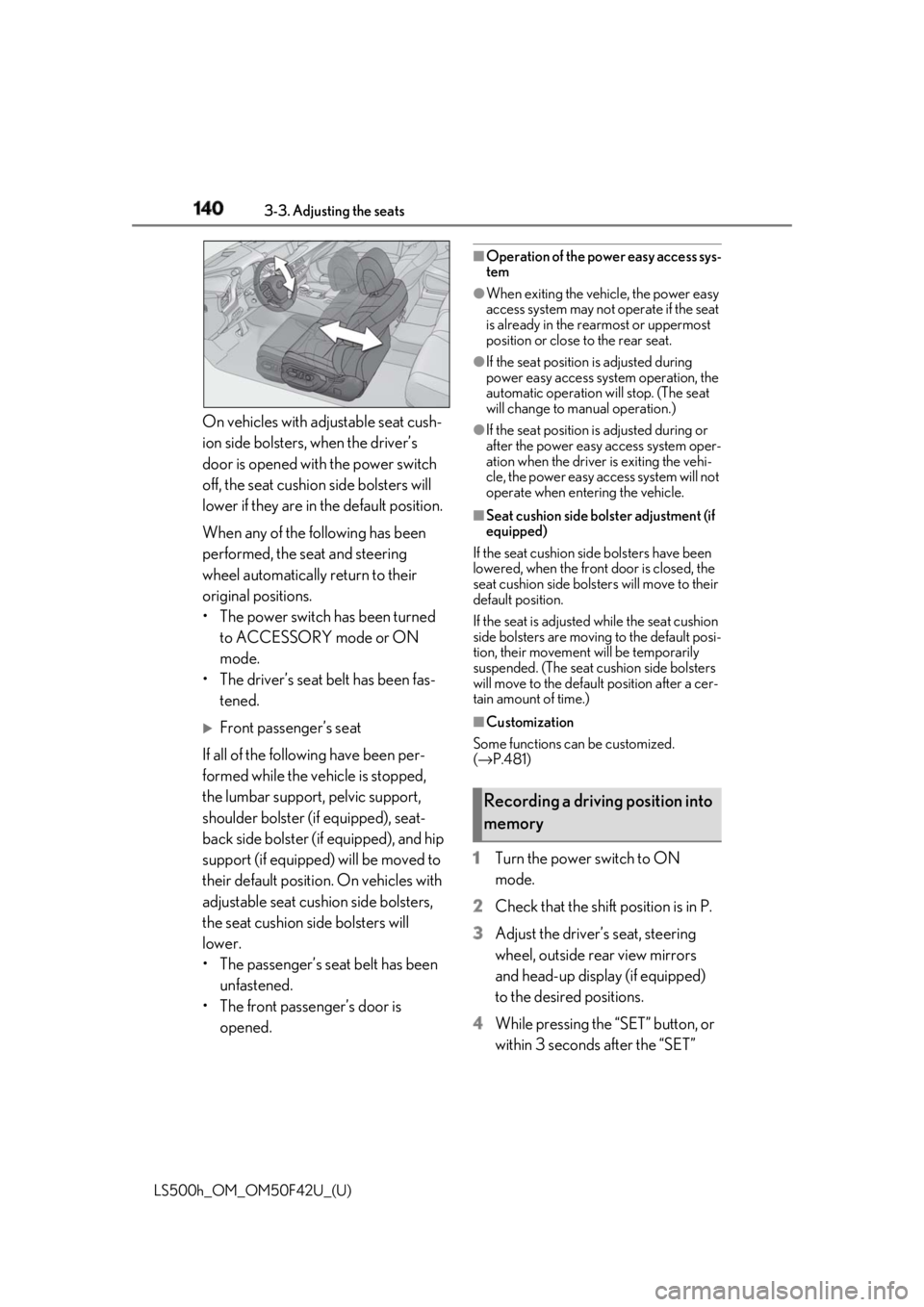
LS500h_OM_OM50F42U_(U) On vehicles with adjustable seat cush-
ion side bolsters, when the driver’s
door is opened with the power switch
off, the seat cushio n side bolsters will
lower if they are in the default position.
When any of the following has been
performed, the seat and steering
wheel automatically return to their
original positions.
• The power switch has been turned
to ACCESSORY mode or ON
mode.
• The driver’s seat belt has been fas-
tened.
Front passenger’s seat
If all of the following have been per-
formed while the vehicle is stopped,
the lumbar support, pelvic support,
shoulder bolster (if equipped), seat-
back side bolster (if equipped), and hip
support (if equipped) will be moved to
their default position. On vehicles with
adjustable seat cushion side bolsters,
the seat cushion side bolsters will
lower.
• The passenger’s seat belt has been
unfastened.
• The front passenger’s door is
opened. ■
Operation of the power easy access sys-
tem ●
When exiting the vehicle, the power easy
access system may not operate if the seat
is already in the rearmost or uppermost
position or close to the rear seat. ●
If the seat position is adjusted during
power easy access syst em operation, the
automatic operation will stop. (The seat
will change to manual operation.) ●
If the seat position is adjusted during or
after the power easy access system oper-
ation when the driver is exiting the vehi-
cle, the power easy access system will not
operate when entering the vehicle. ■
Seat cushion side bolster adjustment (if
equipped)
If the seat cushion side bolsters have been
lowered, when the front door is closed, the
seat cushion side bolsters will move to their
default position.
If the seat is adjusted while the seat cushion
side bolsters are moving to the default posi-
tion, their movement will be temporarily
suspended. (The seat cushion side bolsters
will move to the default position after a cer-
tain amount of time.) ■
Customization
Some functions can be customized.
( → P.481)
1 Turn the power switch to ON
mode.
2 Check that the shift position is in P.
3 Adjust the driver’s seat, steering
wheel, outside rear view mirrors
and head-up display (if equipped)
to the desired positions.
4 While pressing the “SET” button, or
within 3 seconds after the “SET” Recording a driving position into
memory
Page 144 of 528
144 3-3. Adjusting the seats
LS500h_OM_OM50F42U_(U) 1 Turn the power switch to ON
mode.
2 Display the home screen on the
Rear Multi Operation Panel
( → P.318) and then touch “Seat”.
3 Touch “1” or “2”.When the operating conditions are not
met, the buttons will be grayed out.
To stop the operation touch “STOP”.
If the seat is adjust ed while a memorized
position is being recalled, the automatic
operation will stop. (The seat will change to
manual operation.)
■
Operating condition
The weight of an occupant is detected on
the rear seat or the rear seat belt is fas-
tened.
Once weight is detect ed on the seat, the
seat will be judged as occupied until the
rear door is opened then closed or the
power switch is turned off. ■
Recalling a rear seat position
If a memorized rear seat position is recalled,
the seat may stop part-way to ensure suffi-
cient space for the rear passenger. ■
Recalling the ottoman position (if
equipped)
When a seat position is recalled, the otto-
man will not raise or extend. The ottoman
position can only be recalled if the memo-
rized position is lower and shorter than the
current position.
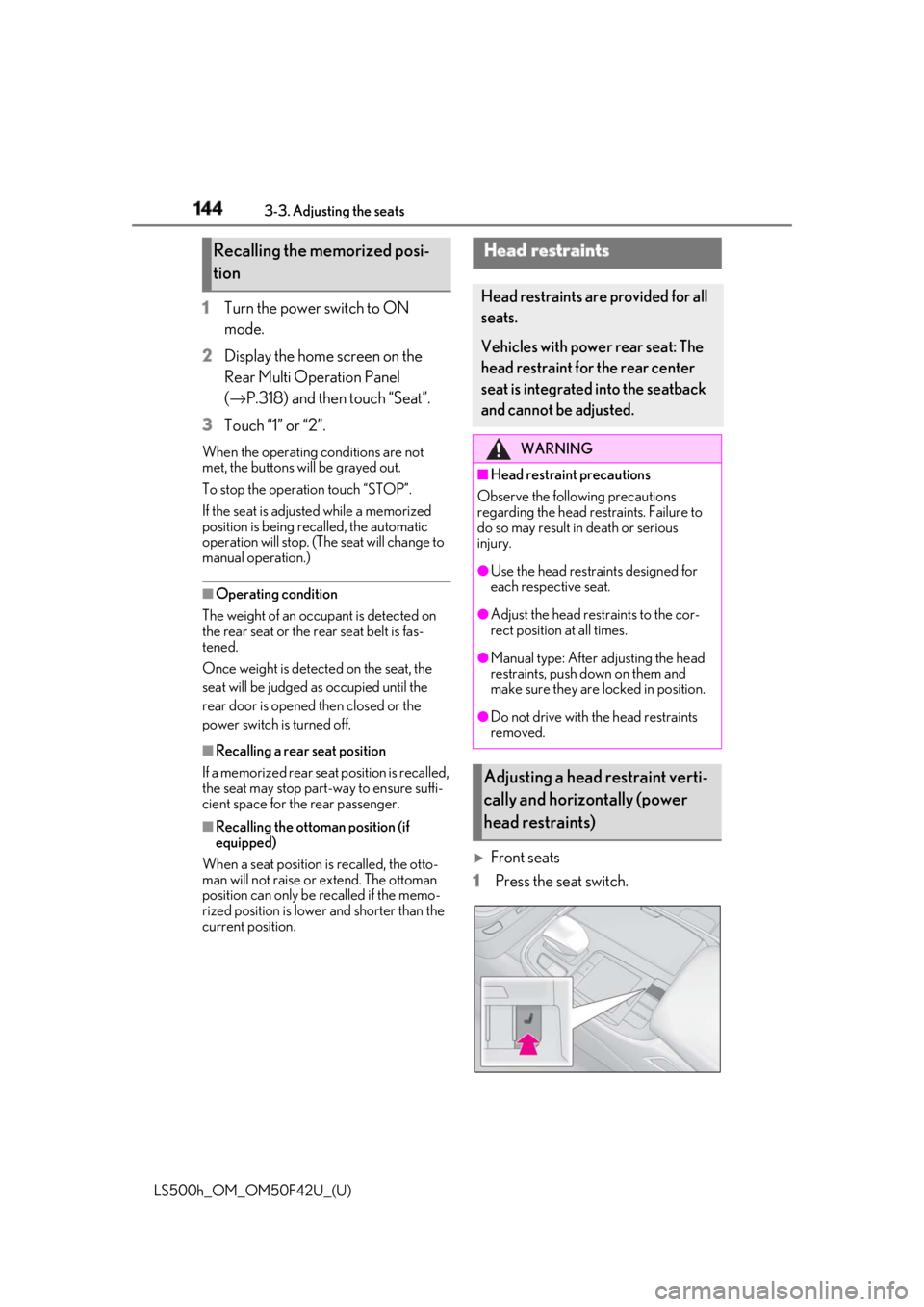
Front seats
1 Press the seat switch.Recalling the memorized posi-
tion Head restraints Head restraints are provided for all
seats.
Vehicles with power rear seat: The
head restraint for the rear center
seat is integrated into the seatback
and cannot be adjusted. WARNING■
Head restraint precautions
Observe the following precautions
regarding the head re straints. Failure to
do so may result in death or serious
injury. ●
Use the head restraints designed for
each respective seat. ●
Adjust the head restraints to the cor-
rect position at all times. ●
Manual type: After adjusting the head
restraints, push down on them and
make sure they are locked in position. ●
Do not drive with the head restraints
removed.
Adjusting a head restraint verti-
cally and horizontally (power
head restraints)
Page 150 of 528
150 3-4. Adjusting the steering wheel and mirrors
LS500h_OM_OM50F42U_(U) nor “R”.
To set the mirror angle used when the vehi-
cle is reversing, adjust the mirror angle at a
desired position with the shift position in R.
The adjusted angle will be memorized and
the mirror will automatically tilt to the mem-
orized angle whenever the shift position is
shifted to R from next time.
The memorized downward tilt position of
the mirror is linked to the normal position
(angle adjusted with the shift position in
other than R). Therefore, if the normal posi-
tion is changed after adjustment, the tilt
position will also change.
When the normal position is changed, read-
just the angle in reversing.
■
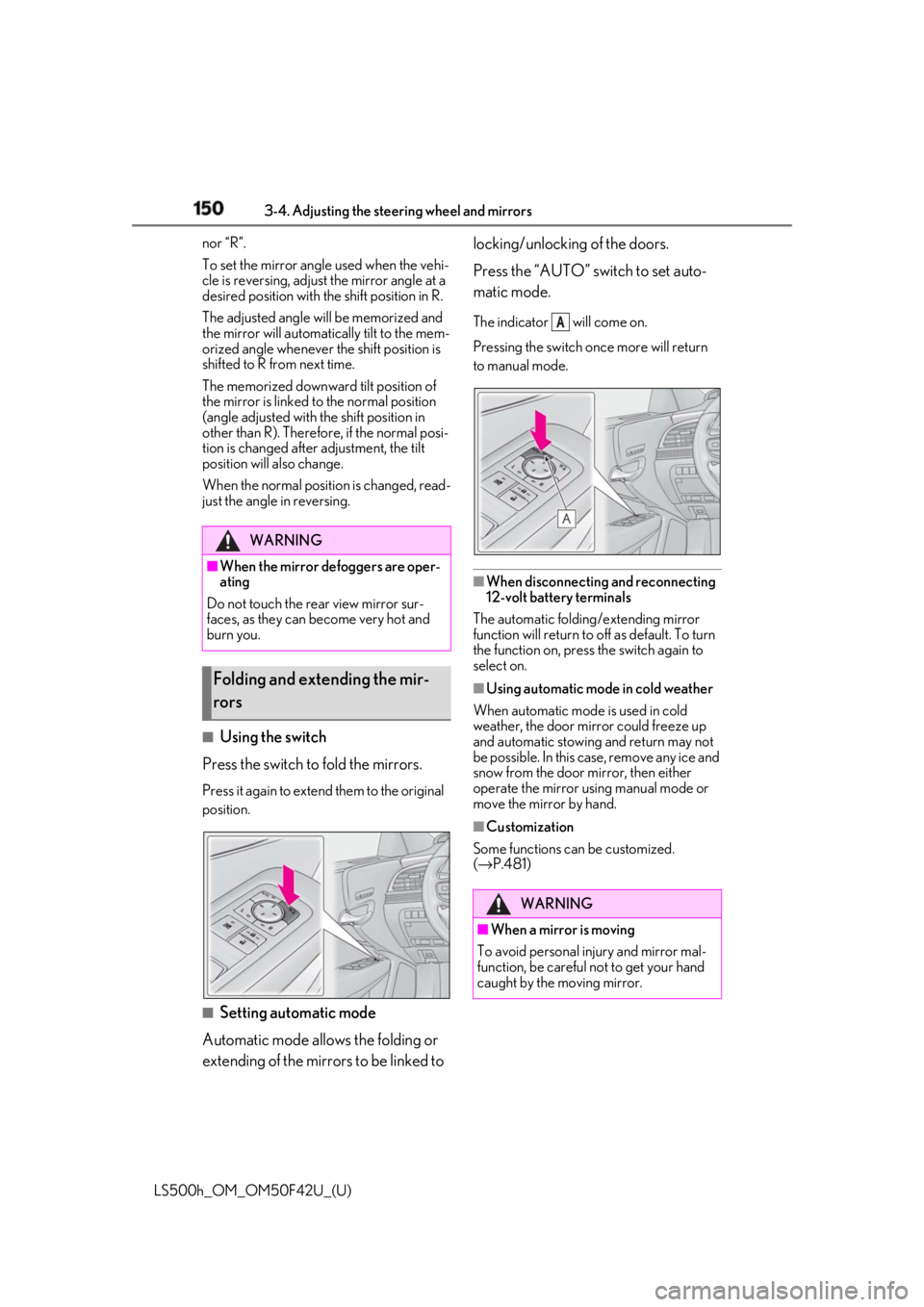
Using the switch
Press the switch to fold the mirrors. Press it again to extend them to the original
position.
■
Setting automatic mode
Automatic mode allows the folding or
extending of the mirrors to be linked to locking/unlocking of the doors.
Press the “AUTO” switch to set auto-
matic mode. The indicator will come on.
Pressing the switch on ce more will return
to manual mode.
■
When disconnecting and reconnecting
12-volt battery terminals
The automatic folding/extending mirror
function will return to off as default. To turn
the function on, press the switch again to
select on. ■
Using automatic mode in cold weather
When automatic mode is used in cold
weather, the door mirror could freeze up
and automatic stowing and return may not
be possible. In this case, remove any ice and
snow from the door mirror, then either
operate the mirror using manual mode or
move the mirror by hand. ■
Customization
Some functions can be customized.
( → P.481)WARNING■
When the mirror defoggers are oper-
ating
Do not touch the rear view mirror sur-
faces, as they can become very hot and
burn you.
Folding and extending the mir-
rors
WARNING
■
When a mirror is moving
To avoid personal injury and mirror mal-
function, be careful not to get your hand
caught by the moving mirror. A
Page 159 of 528
1594-1. Before driving
LS500h_OM_OM50F42U_(U) 4
Driving ●
When the brake pedal is depressed■
Restraining the hybr id system output
(Brake Override System)●
When the accelerator and brake pedals
are depressed at the same time, the
hybrid system output may be restrained.●
A warning message is displayed on the
multi-information display while the sys-
tem is operating.■
Restraining sudden start (Drive-Start
Control)●
When the following unusual operation is
performed, the hybrid system output may
be restrained.
• When the shift position is shifted from R
to D, D to R, N to R, P to D *
, or P to R *
(D
includes M) with the accelerator pedal
depressed, a warning message appears
on the multi-information display. If a
warning message is shown on the
multi-information disp lay, read the mes-
sage and follow the instruction.
• When the accelerator pedal is depressed
too much while the vehicle is in reverse. *
: Depending on the situation, the shift
position may not be changed.●
While Drive-Start Control is being acti-
vated, your vehicle may have trouble
escaping from the mud or fresh snow. In
such case, deactivate TRAC ( → P.304)
to cancel Drive-Start Control so that the
vehicle may become able to escape from
the mud or fresh snow.■
Breaking in your new Lexus
To extend the life of the vehicle, observing
the following precautions is recommended:
●
For the first 186 miles (300 km):
Avoid sudden stops.
●
For the first 621 miles (1000 km):
• Do not drive at extremely high speeds.
• Avoid sudden acceleration.
• Do not drive continuously in low gears.
• Do not drive at a constant speed for
extended periods.
■
Drum-in-disc type parking brake system
Your vehicle has a drum-in-disc type park-
ing brake system. This type of brake system needs bedding-down of the brake shoes
periodically or whenever the parking brake
shoes and/or drum are replaced. Have your
Lexus dealer perform the bedding down
operation. ■
Brake pads and discs (F SPORT models)
The brake pads and discs are designed for
use under high load conditions. Therefore,
brake noise may be generated depending
on the vehicle speed, braking force and
vehicle environment (temperature, humid-
ity, etc.). ■
Operating your vehicle in a foreign
country
Comply with the relevant vehicle registra-
tion laws and confirm the availability of the
correct fuel. ( → P.461)
WARNING
Observe the following precautions.
Failure to do so may result in death or
serious injury. ■
When starting the vehicle
Always keep your foot on the brake
pedal while stopped with the “READY”
indicator is illuminated. This prevents the
vehicle from creeping. ■
When driving the vehicle ●
Do not drive if you are unfamiliar with
the location of the brake and accelera-
tor pedals to avoid depressing the
wrong pedal.
• Accidentally depressing the accelera-
tor pedal instead of the brake pedal
will result in sudden acceleration that
may lead to an accident.
• When backing up, you may twist your
body around, leading to a difficulty in
operating the pedals. Make sure to
operate the pedals properly.
Page 163 of 528
1634-1. Before driving
LS500h_OM_OM50F42U_(U) 4
Driving NOTICE■
When driving the vehicle●
Do not depress the accelerator and
brake pedals at the same time during
driving, as this may restrain the hybrid
system output.●
Do not use the accelerator pedal or
depress the accelerator and brake
pedals at the same time to hold the
vehicle on a hill.■
When parking the vehicle
Always set the parking brake, and shift
the shift position to P. Failure to do so
may cause the vehicle to move or the
vehicle may accelerate suddenly if the
accelerator pedal is accidentally
depressed. ■
Avoiding damage to vehicle parts●
Do not turn the steering wheel fully in
either direction and hold it there for an
extended period of time.
Doing so may damage the power
steering motor.●
When driving over bumps in the road,
drive as slowly as possible to avoid
damaging the wheels, underside of the
vehicle, etc.
■
If you get a flat tire while driving
A flat or damaged ti re may cause the fol-
lowing situations. Hold the steering
wheel firmly and gradually depress the
brake pedal to slow down the vehicle.
●
It may be difficult to control your vehi-
cle.
●
The vehicle will make abnormal
sounds or vibrations.
●
The vehicle will lean abnormally.
Information on what to do in case of a flat
tire ( → P.442) ■
When encountering flooded roads
Do not drive on a road that has flooded
after heavy rain etc. Doing so may cause
the following serious damage to the vehi-
cle: ●
Engine stalling ●
Short in electrical components ●
Engine damage caused by water
immersion
In the event that you drive on a flooded
road and the vehicle is flooded, be sure
to have your Lexus dealer check the fol-
lowing: ●
Brake function ●
Changes in quantity and quality of oil
and fluid used for the engine, hybrid
transmission, transfer (AWD models),
differential, etc. ●
Lubricant condition for the propeller
shaft, bearings and suspension joints
(where possible), and the function of
all joints, bearings, etc.
If the shift control system is damaged by
flooding, it may not be possible to shift
the shift position to P, or from P to other
positions. In this case, contact your Lexus
dealer.
■
When parking the vehicle
Always set the parking brake, and shift
the shift position to P. Failure to do so
may cause the vehicle to move or the
vehicle may accelerate suddenly if the
accelerator pedal is accidentally
depressed.
Page 168 of 528
168 4-2. Driving procedures
LS500h_OM_OM50F42U_(U) 4-2.Driving procedures
1 Press the parking brake switch to
check that the parking brake is set.
( → P.181)The parking brake indicator will come on.
2 Firmly depress the brake pedal. and a message will be displayed on
the multi-information display.
If it is not displayed, the hybrid system can-
not be started.
When the shift position is N, the hybrid sys-
tem cannot start. Shift the shift position to P
when starting the hybrid system. ( → P.176)
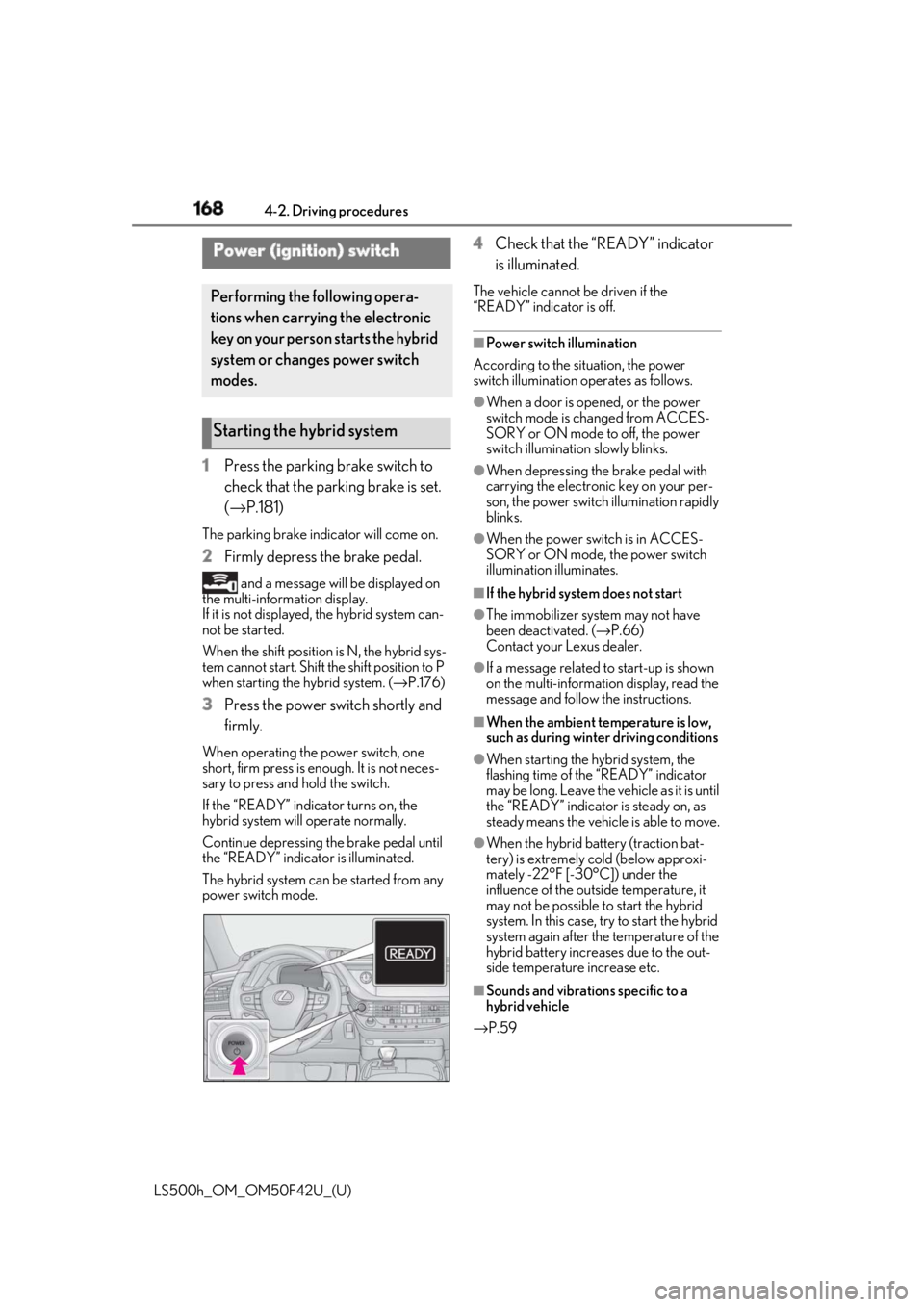
3 Press the power switch shortly and
firmly.When operating the power switch, one
short, firm press is enough. It is not neces-
sary to press and hold the switch.
If the “READY” indicator turns on, the
hybrid system will operate normally.
Continue depressing the brake pedal until
the “READY” indicator is illuminated.
The hybrid system can be started from any
power switch mode. 4 Check that the “READY” indicator
is illuminated. The vehicle cannot be driven if the
“READY” indicator is off. ■
Power switch illumination
According to the situation, the power
switch illumination operates as follows. ●
When a door is opened, or the power
switch mode is changed from ACCES-
SORY or ON mode to off, the power
switch illumination slowly blinks. ●
When depressing the brake pedal with
carrying the electronic key on your per-
son, the power switch illumination rapidly
blinks. ●
When the power switch is in ACCES-
SORY or ON mode, the power switch
illumination illuminates. ■
If the hybrid system does not start ●
The immobilizer system may not have
been deactivated. ( → P.66)
Contact your Lexus dealer. ●
If a message related to start-up is shown
on the multi-information display, read the
message and follow the instructions. ■
When the ambient temperature is low,
such as during winter driving conditions ●
When starting the hybrid system, the
flashing time of the “READY” indicator
may be long. Leave the ve hicle as it is until
the “READY” indicator is steady on, as
steady means the vehicle is able to move. ●
When the hybrid battery (traction bat-
tery) is extremely cold (below approxi-
mately -22°F [-30°C]) under the
influence of the outside temperature, it
may not be possible to start the hybrid
system. In this case, try to start the hybrid
system again after the temperature of the
hybrid battery increases due to the out-
side temperature increase etc.
■
Sounds and vibrations specific to a
hybrid vehicle
→ P.59Power (ignition) switch Performing the following opera-
tions when carryin g the electronic
key on your person starts the hybrid
system or changes power switch
modes.
Starting the hybrid system