brake LEXUS LS500H 2018 Owner's Manual
[x] Cancel search | Manufacturer: LEXUS, Model Year: 2018, Model line: LS500H, Model: LEXUS LS500H 2018Pages: 528, PDF Size: 10.8 MB
Page 168 of 528
168 4-2. Driving procedures
LS500h_OM_OM50F42U_(U) 4-2.Driving procedures
1 Press the parking brake switch to
check that the parking brake is set.
( → P.181)The parking brake indicator will come on.
2 Firmly depress the brake pedal. and a message will be displayed on
the multi-information display.
If it is not displayed, the hybrid system can-
not be started.
When the shift position is N, the hybrid sys-
tem cannot start. Shift the shift position to P
when starting the hybrid system. ( → P.176)
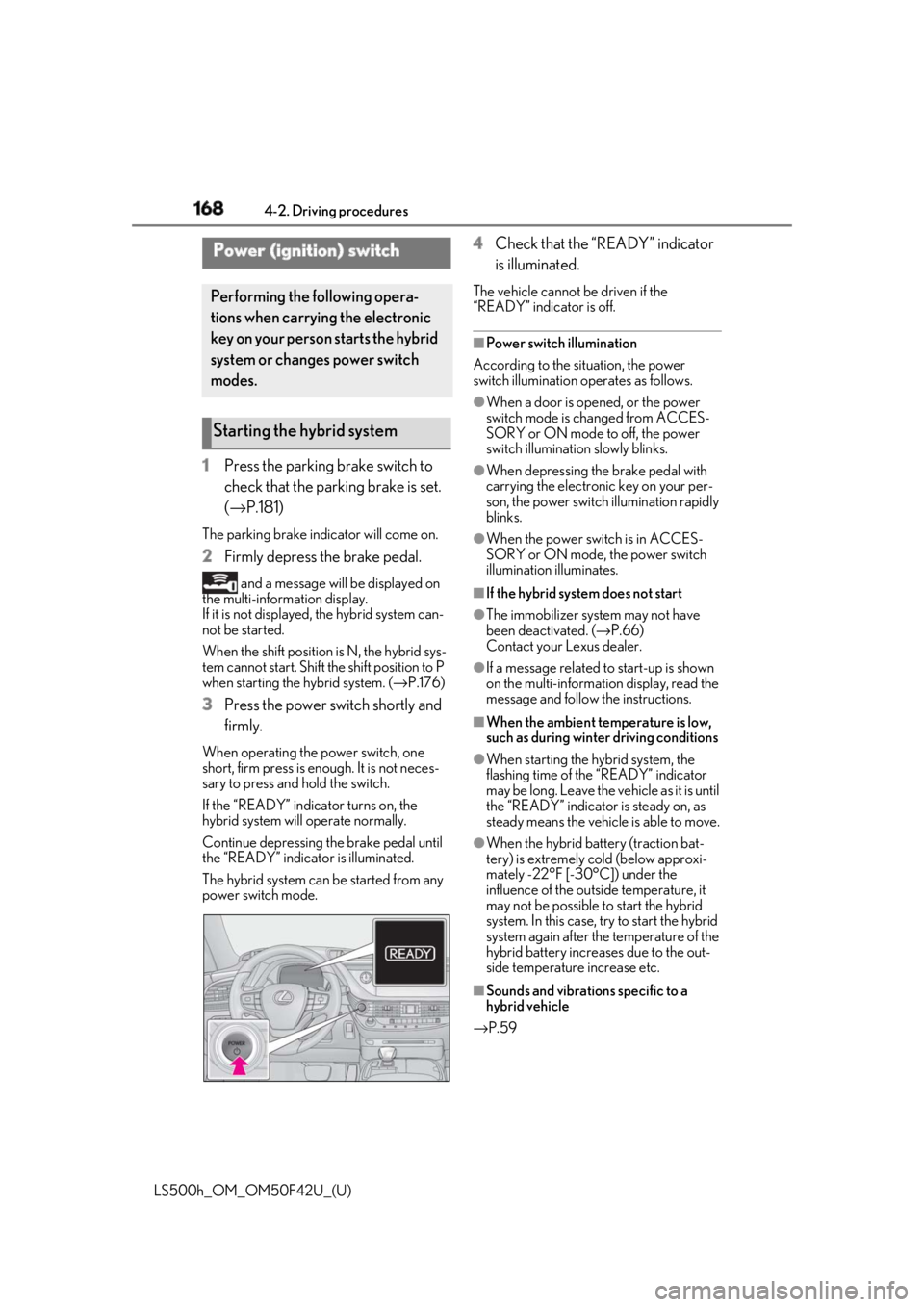
3 Press the power switch shortly and
firmly.When operating the power switch, one
short, firm press is enough. It is not neces-
sary to press and hold the switch.
If the “READY” indicator turns on, the
hybrid system will operate normally.
Continue depressing the brake pedal until
the “READY” indicator is illuminated.
The hybrid system can be started from any
power switch mode. 4 Check that the “READY” indicator
is illuminated. The vehicle cannot be driven if the
“READY” indicator is off. ■
Power switch illumination
According to the situation, the power
switch illumination operates as follows. ●
When a door is opened, or the power
switch mode is changed from ACCES-
SORY or ON mode to off, the power
switch illumination slowly blinks. ●
When depressing the brake pedal with
carrying the electronic key on your per-
son, the power switch illumination rapidly
blinks. ●
When the power switch is in ACCES-
SORY or ON mode, the power switch
illumination illuminates. ■
If the hybrid system does not start ●
The immobilizer system may not have
been deactivated. ( → P.66)
Contact your Lexus dealer. ●
If a message related to start-up is shown
on the multi-information display, read the
message and follow the instructions. ■
When the ambient temperature is low,
such as during winter driving conditions ●
When starting the hybrid system, the
flashing time of the “READY” indicator
may be long. Leave the ve hicle as it is until
the “READY” indicator is steady on, as
steady means the vehicle is able to move. ●
When the hybrid battery (traction bat-
tery) is extremely cold (below approxi-
mately -22°F [-30°C]) under the
influence of the outside temperature, it
may not be possible to start the hybrid
system. In this case, try to start the hybrid
system again after the temperature of the
hybrid battery increases due to the out-
side temperature increase etc.
■
Sounds and vibrations specific to a
hybrid vehicle
→ P.59Power (ignition) switch Performing the following opera-
tions when carryin g the electronic
key on your person starts the hybrid
system or changes power switch
modes.
Starting the hybrid system
Page 170 of 528
170 4-2. Driving procedures
LS500h_OM_OM50F42U_(U) 1 Stop the vehicle completely.
2 If the parking brake is in manual
mode, set the parking brake.
( → P.181)
3 Shift the shift position to P. ( → P.176)Check that the shift position indicator
shows P. ( → P.176)
4 Press the power switch.The hybrid system will stop, and the meter
display will be extinguished (the shift posi-
tion indicator will be extinguished a few
seconds after the meter display).
5 Release the brake pedal and check
that “ACCESSORY” or “IGNI-
TION ON” is not shown on the
meter. ■
Automatic P position selection function
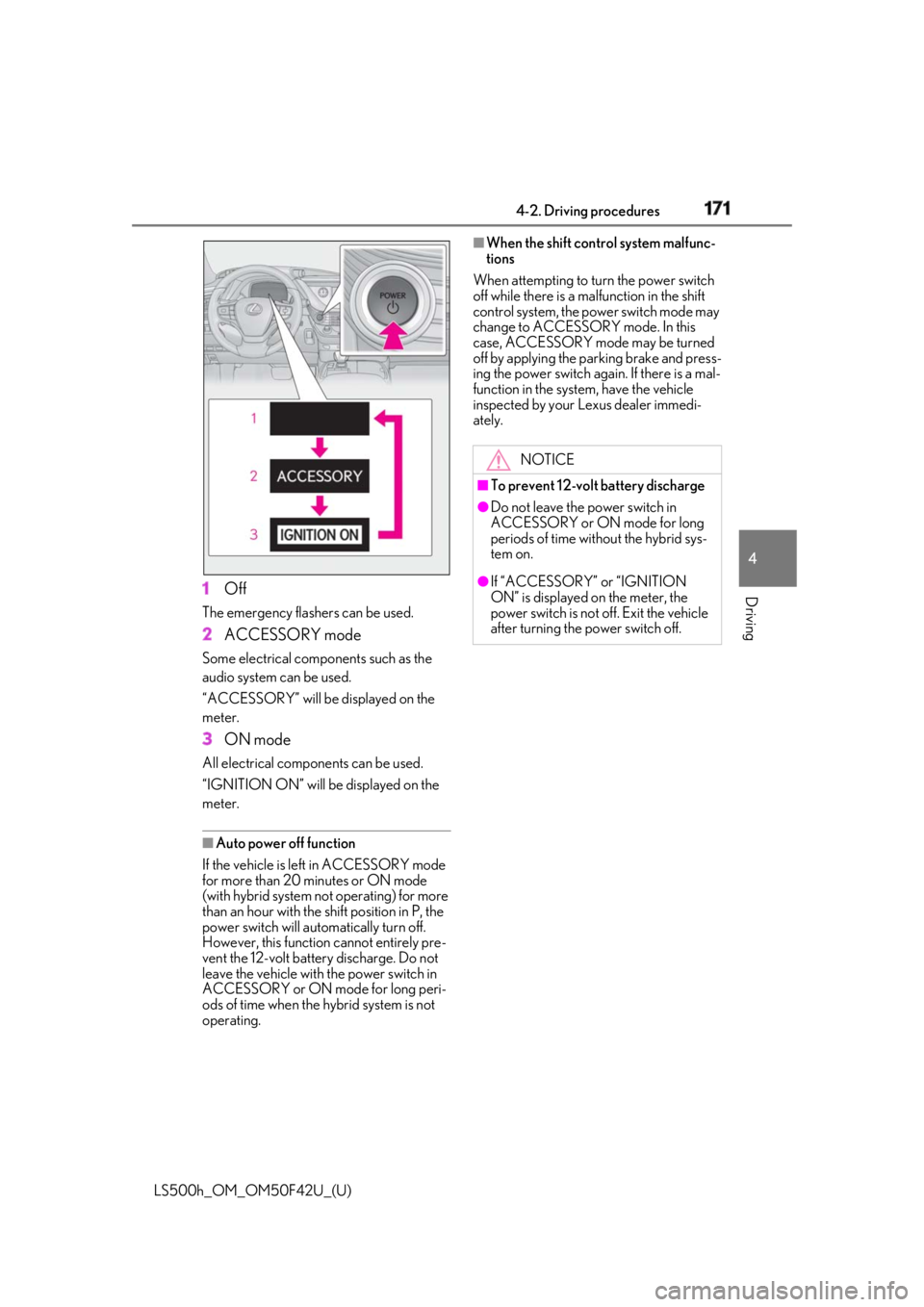
→ P.177 Modes can be changed by pressing
the power switch with the brake pedal
released. (The mode changes each
time the switch is pressed.)NOTICE■
Symptoms indicating a malfunction
with the power switch
If the power switch seems to be operat-
ing somewhat differently than usual, such
as the switch sticking slightly, there may
be a malfunction. Contact your Lexus
dealer immediately.
Stopping the hybrid system WARNING■
Stopping the hybrid system in an
emergency ●
If you want to stop the hybrid system in
an emergency while driving the vehi-
cle, press and hold the power switch
for more than 2 seconds, or press it
briefly 3 times or more in succession.
( → P.420)
However, do not touch the power
switch while driving except in an emer-
gency. Turning the hybrid system off
while driving will not cause loss of
steering or braking control, however,
power assist to the st eering will be lost.
This will make it more difficult to steer
smoothly, so you should pull over and
stop the vehicle as soon as it is safe to
do so. ●
If the power switch is operated while
the vehicle is running, a warning mes-
sage will be shown on the multi-infor-
mation display and a buzzer sounds. ●
When restarting the hybrid system
after an emergency shutdown, press
the power switch.
Changing power switch modes
Page 171 of 528
1714-2. Driving procedures
LS500h_OM_OM50F42U_(U) 4
Driving
1 OffThe emergency flashers can be used.
2 ACCESSORY modeSome electrical components such as the
audio system can be used.
“ACCESSORY” will be displayed on the
meter.
3 ON modeAll electrical components can be used.
“IGNITION ON” will be displayed on the
meter.
■
Auto power off function
If the vehicle is left in ACCESSORY mode
for more than 20 minutes or ON mode
(with hybrid system not operating) for more
than an hour with the shift position in P, the
power switch will automatically turn off.
However, this function cannot entirely pre-
vent the 12-volt battery discharge. Do not
leave the vehicle with the power switch in
ACCESSORY or ON mode for long peri-
ods of time when the hybrid system is not
operating. ■
When the shift control system malfunc-
tions
When attempting to turn the power switch
off while there is a ma lfunction in the shift
control system, the power switch mode may
change to ACCESSORY mode. In this
case, ACCESSORY mode may be turned
off by applying the parking brake and press-
ing the power switch again. If there is a mal-
function in the system, have the vehicle
inspected by your Lexus dealer immedi-
ately.
NOTICE■
To prevent 12-volt battery discharge ●
Do not leave the power switch in
ACCESSORY or ON mode for long
periods of time without the hybrid sys-
tem on. ●
If “ACCESSORY” or “IGNITION
ON” is displayed on the meter, the
power switch is not off. Exit the vehicle
after turning the power switch off.
Page 172 of 528
172 4-2. Driving procedures
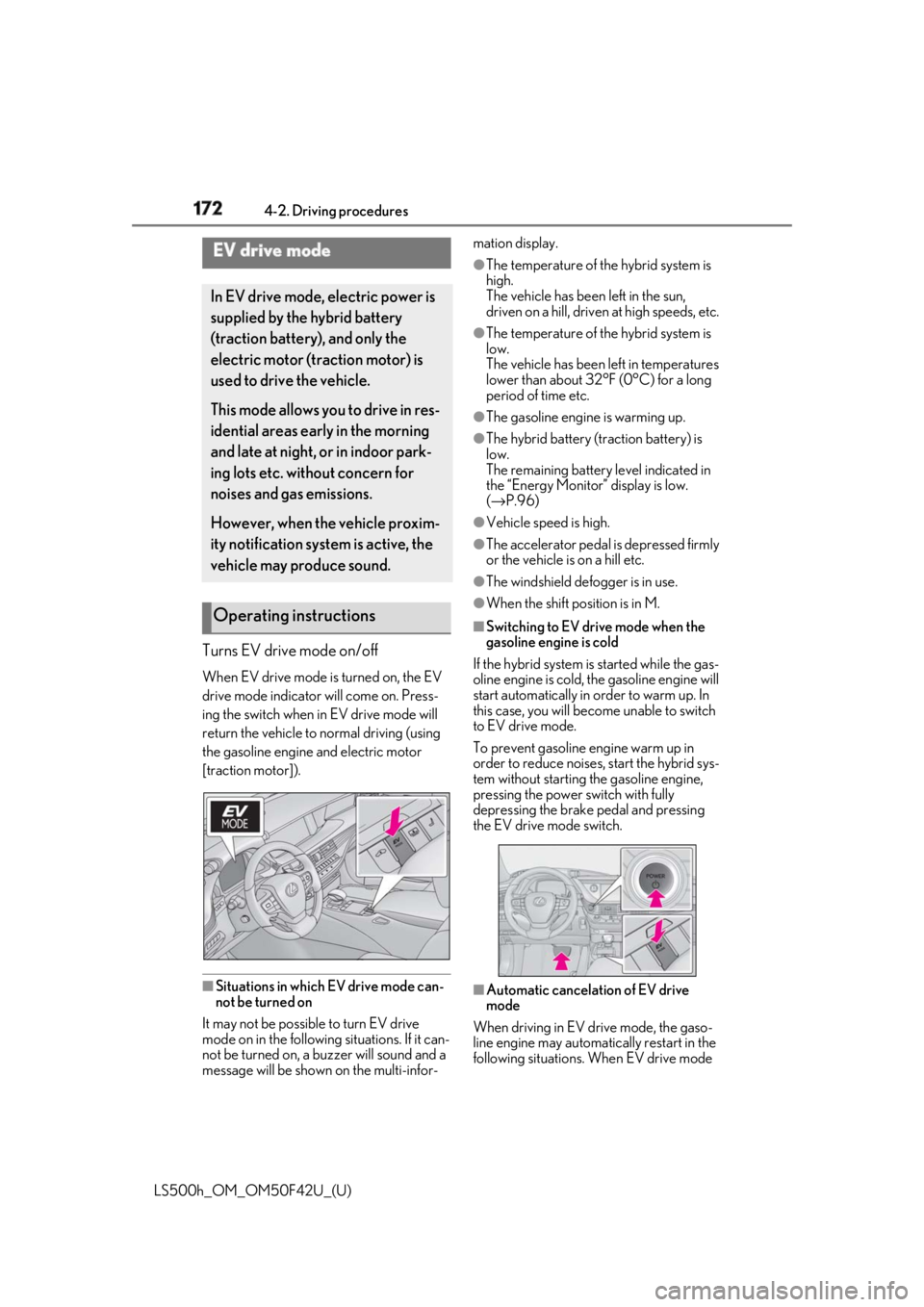
LS500h_OM_OM50F42U_(U) Turns EV drive mode on/off When EV drive mode is turned on, the EV
drive mode indicator will come on. Press-
ing the switch when in EV drive mode will
return the vehicle to normal driving (using
the gasoline engine and electric motor
[traction motor]).
■
Situations in which EV drive mode can-
not be turned on
It may not be possible to turn EV drive
mode on in the following situations. If it can-
not be turned on, a buzzer will sound and a
message will be shown on the multi-infor- mation display. ●
The temperature of the hybrid system is
high.
The vehicle has been left in the sun,
driven on a hill, driven at high speeds, etc. ●
The temperature of the hybrid system is
low.
The vehicle has been left in temperatures
lower than about 32°F (0°C) for a long
period of time etc. ●
The gasoline engine is warming up. ●
The hybrid battery (traction battery) is
low.
The remaining battery level indicated in
the “Energy Monitor” display is low.
( → P.96)●
Vehicle speed is high. ●
The accelerator pedal is depressed firmly
or the vehicle is on a hill etc. ●
The windshield defogger is in use. ●
When the shift position is in M. ■
Switching to EV dr ive mode when the
gasoline engine is cold
If the hybrid system is started while the gas-
oline engine is cold, the gasoline engine will
start automatically in order to warm up. In
this case, you will become unable to switch
to EV drive mode.
To prevent gasoline engine warm up in
order to reduce noises, start the hybrid sys-
tem without starting the gasoline engine,
pressing the power switch with fully
depressing the brake pedal and pressing
the EV drive mode switch.
■
Automatic cancelation of EV drive
mode
When driving in EV drive mode, the gaso-
line engine may automatically restart in the
following situations. When EV drive mode EV drive mode In EV drive mode, electric power is
supplied by the hybrid battery
(traction battery), and only the
electric motor (traction motor) is
used to drive the vehicle.
This mode allows you to drive in res-
idential areas early in the morning
and late at night, or in indoor park-
ing lots etc. without concern for
noises and gas emissions.
However, when the vehicle proxim-
ity notification system is active, the
vehicle may produce sound.
Operating instructions
Page 174 of 528
174 4-2. Driving procedures
LS500h_OM_OM50F42U_(U) *1
: To improve fuel efficiency and reduce
noise, set the shift position in D for nor-
mal driving. You can choose gear range
suitable for your driving situation by
operating the paddle shift switches.*2
: Any gear range can be fixed when driv-
ing in M mode.
■
For the shift positions●
When the power switch is off or in
ACCESSORY mode, the shift position
cannot be changed.
●
When the power switch is in ON mode
(the hybrid system is not operating), the
shift position can only be changed to N.
●
When the “READY” indicator is on, the
shift position can be changed from P to D,
N or R.
●
When the “READY” indicator is flashing,
the shift position cannot be changed from
P to another position even if the shift lever
is operated. Wait until the “READY” indi-
cator changes from a flashing to a solid light, and then operate the shift lever
again. ●
The shift position can only be changed to
M directly from D.
In addition, if an attempt is made to change
the shift position by mo ving the shift lever or
by pressing the P position switch in any of
the following situations, the buzzer will
sound and the shifting operation will be dis-
abled or the shift posi tion will automatically
change to N. When this happens, select an
appropriate shift position. ●
Situations where the shifting operation
will be disabled:
• When an attempt is made to change the
shift position from P to another position
by moving the shift lever without depress-
ing the brake pedal.
• When an attempt is made to change the
shift position from P or N to M by moving
the shift lever.
• When the P position switch is pressed
while the vehicle is running. *1
●
Situations where the shift position will
automatically change to N:
• When an attempt is made to select the R
position by moving the shift lever when
the vehicle is moving forward. *2
• When an attempt is made to select the D
position by moving the shift lever when
the vehicle is moving in reverse. *3
• When the shift position is changed from
R to M ●
If N is selected while driving at a certain
speed, even if the shift lever is not held in
the N position, the shift position changes
to N. In this situation, the buzzer sounds
and a confirmation message is displayed
on the multi-information display to inform
the driver that the shift position has
changed to N. *1
: Shift position may be changed to P
when driving at extremely low speeds. *2
: Shift position may be changed to R
when driving at low speeds. *3
: Shift position may be changed to D
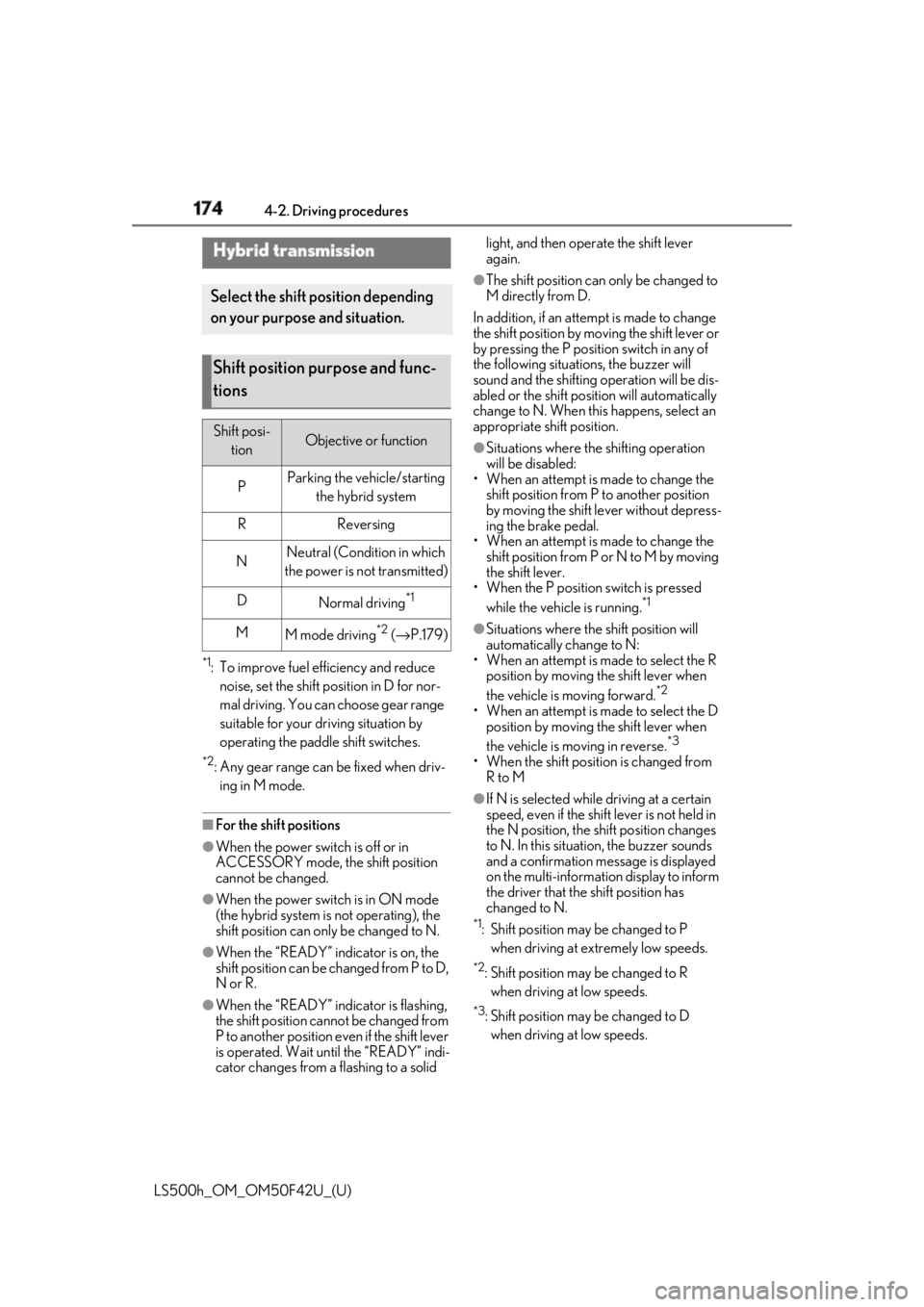
when driving at low speeds.Hybrid transmission Select the shift position depending
on your purpose and situation.
Shift position purpose and func-
tions Shift posi-
tion Objective or function
P Parking the vehicle/starting
the hybrid system
R Reversing
N Neutral (Condition in which
the power is not transmitted)
D
Normal driving *1
M
M mode driving *2
( → P.179)
Page 175 of 528
1754-2. Driving procedures
LS500h_OM_OM50F42U_(U) 4
Driving ■
Reverse warning buzzer
When shifting into R, a buzzer will sound to
inform the driver that the shift position is in
R. ■
To protect the hybrid transmission
If the transmission fluid temperature is high,
“Transmission Fluid Temp High See
Owner’s Manual” will be displayed on the
multi-information display and the vehicle
will go into transmission protection mode
automatically. Have the vehicle inspected
by your Lexus dealer. ■
When driving with the dynamic radar
cruise control with full-speed range
activated
Even when performing the following
actions with the intent of enabling engine
braking, engine braking will not be acti-
vated because the dynamic radar cruise
control with full-spe ed range will not be
canceled. ●
While driving in the D position, down-
shifting to 9, 8, 7, 6, 5 or 4.●
When switching the driving mode to
sport mode while driving in the D position
( → P.298)■
Restraining sudden start (Drive-Start
Control)
→ P.159■
AI-SHIFT
The AI-SHIFT automatica lly selects the suit-
able gear according to driver performance
and driving conditions.
The AI-SHIFT automatically operates when
the shift position is in D. (Shifting the shift
position to the M position cancels the func-
tion.)
■
If a message about a shift operation is
shown
To prevent the shift position from being
selected incorrectly or the vehicle from
moving unexpectedly, the shift position may
be changed automatically or operating the
shift lever may be required. In this case,
change the shift positi on following the mes-
sages on the multi- information display. ■
After recharging/reconnecting the
12-volt battery
→ P.393 ■
Customization
Some functions can be customized.
( → P.481)
WARNING■
When driving on slippery road sur-
faces
Do not accelerate or shift the shift posi-
tion suddenly.
Sudden changes in engine braking may
cause the vehicle to sp in or skid, resulting
in an accident.
NOTICE■
Hybrid battery (t raction battery)
charge
If the shift position is in N, the hybrid bat-
tery (traction battery) will not be
charged. To help prevent the battery
from discharging, avoid leaving the N
position selected for an extended period
of time. ■
Situations where sh ift control system
malfunctions are possible
If any of the following situations occurs,
shift control system malfunctions are
possible.
Immediately stop the vehicle in a safe
place on level ground, apply the parking
brake, and then contact your Lexus
dealer.
●
When the warning message indicating
the shift control system appears on the
multi-information display.
●
The display indicates that no shift posi-
tion is selected for more than a few
seconds.
Page 176 of 528
176 4-2. Driving procedures
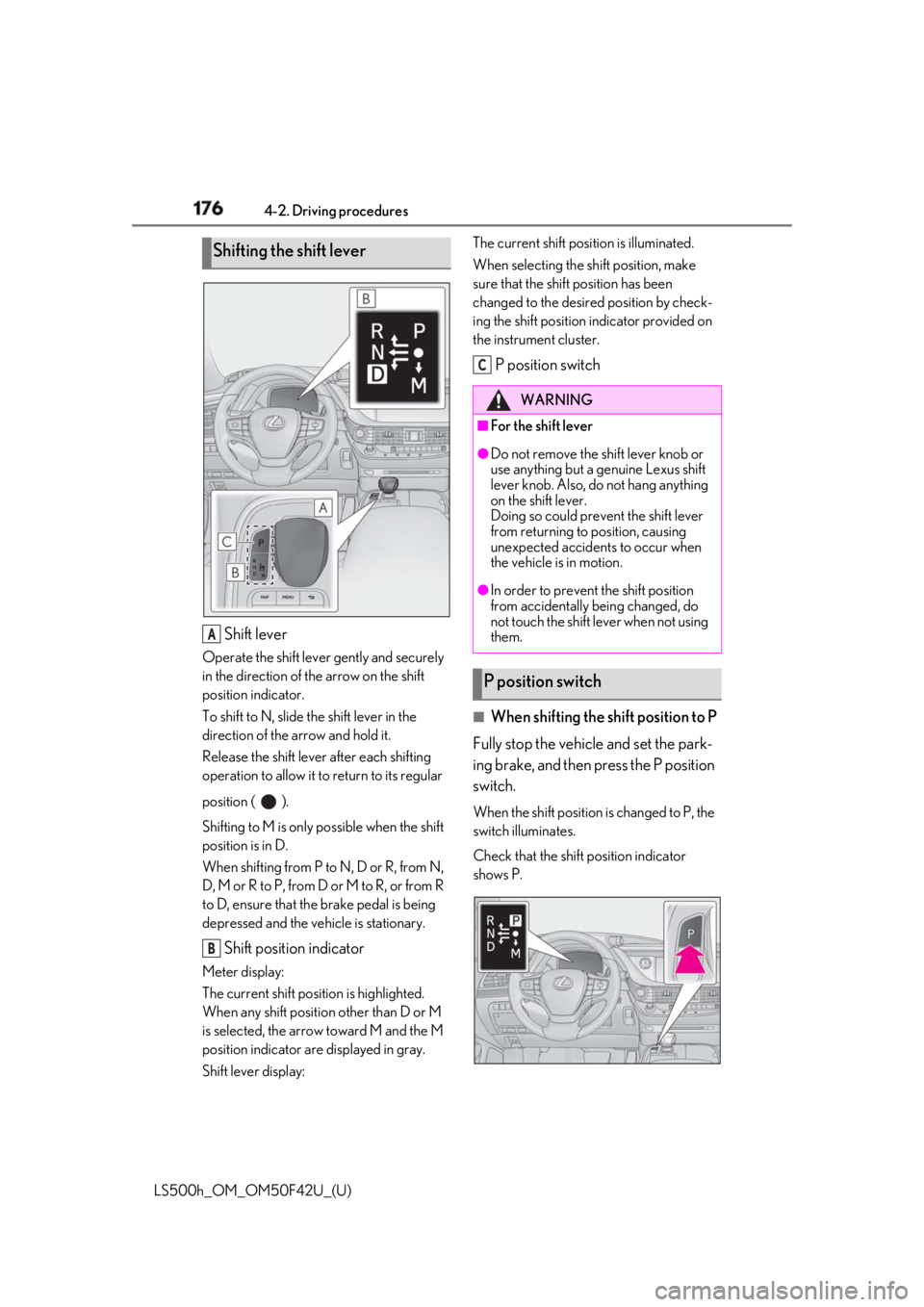
LS500h_OM_OM50F42U_(U) Shift leverOperate the shift lever gently and securely
in the direction of the arrow on the shift
position indicator.
To shift to N, slide the shift lever in the
direction of the arrow and hold it.
Release the shift lever after each shifting
operation to allow it to return to its regular
position ( ).
Shifting to M is only possible when the shift
position is in D.
When shifting from P to N, D or R, from N,
D, M or R to P, from D or M to R, or from R
to D, ensure that the brake pedal is being
depressed and the vehicle is stationary.
Shift position indicatorMeter display:
The current shift position is highlighted.
When any shift position other than D or M
is selected, the arrow toward M and the M
position indicator are displayed in gray.
Shift lever display: The current shift posi tion is illuminated.
When selecting the sh ift position, make
sure that the shift position has been
changed to the desired position by check-
ing the shift position indicator provided on
the instrument cluster.
P position switch
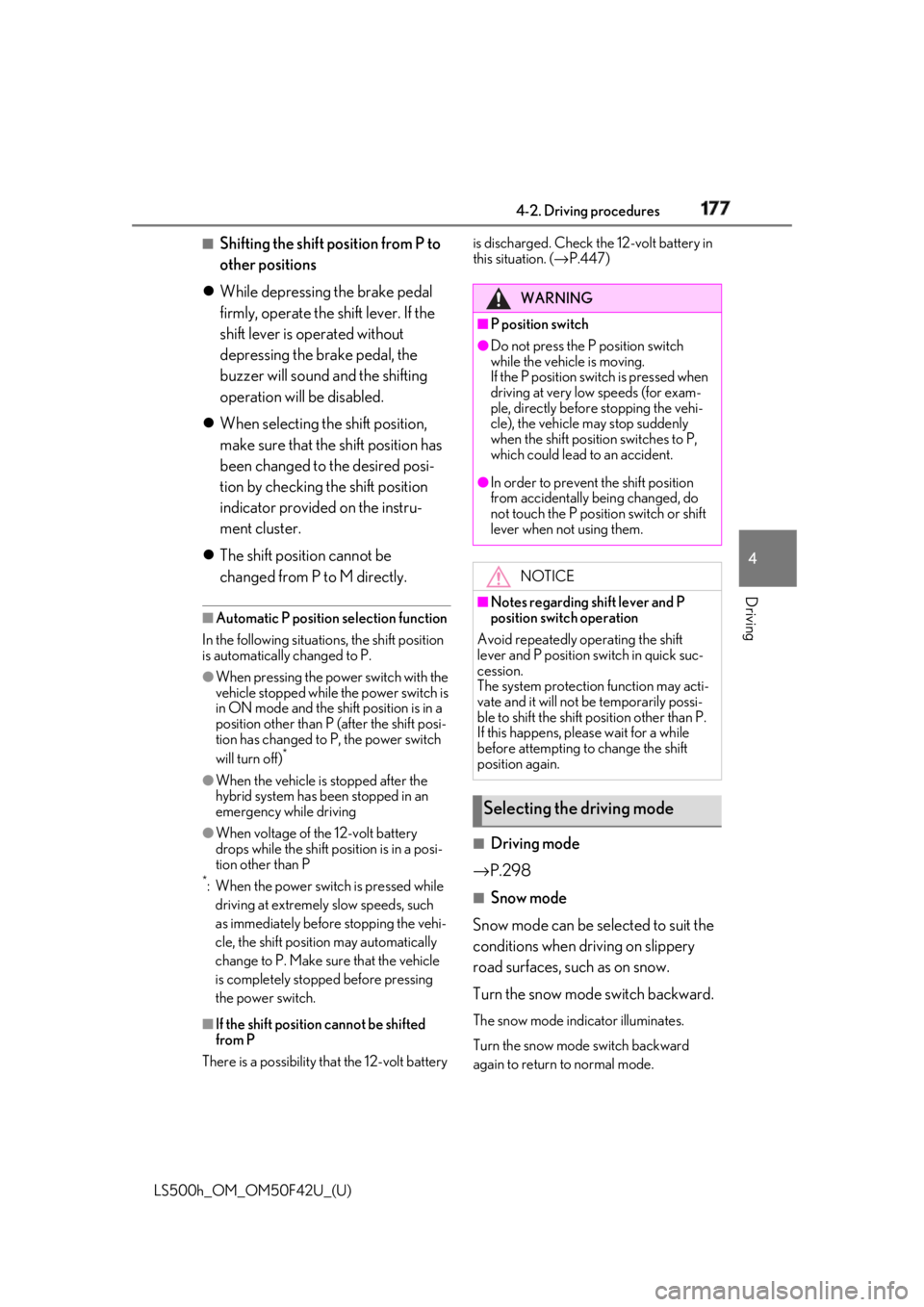
■
When shifting the shift position to P
Fully stop the vehicle and set the park-
ing brake, and then press the P position
switch. When the shift position is changed to P, the
switch illuminates.
Check that the shift position indicator
shows P.Shifting the shift lever
A
B WARNING■
For the shift lever ●
Do not remove the shift lever knob or
use anything but a genuine Lexus shift
lever knob. Also, do not hang anything
on the shift lever.
Doing so could prevent the shift lever
from returning to position, causing
unexpected accidents to occur when
the vehicle is in motion. ●
In order to prevent the shift position
from accidentally being changed, do
not touch the shift lever when not using
them.
P position switch C
Page 177 of 528
1774-2. Driving procedures
LS500h_OM_OM50F42U_(U) 4
Driving ■
Shifting the shift position from P to
other positions
While depressing the brake pedal
firmly, operate the shift lever. If the
shift lever is operated without
depressing the brake pedal, the
buzzer will sound and the shifting
operation will be disabled.
When selecting the shift position,
make sure that the shift position has
been changed to the desired posi-
tion by checking the shift position
indicator provided on the instru-
ment cluster.
The shift position cannot be
changed from P to M directly. ■
Automatic P position selection function
In the following situations, the shift position
is automatically changed to P. ●
When pressing the power switch with the
vehicle stopped while the power switch is
in ON mode and the shift position is in a
position other than P (after the shift posi-
tion has changed to P, the power switch
will turn off) *
●
When the vehicle is stopped after the
hybrid system has been stopped in an
emergency while driving●
When voltage of the 12-volt battery
drops while the shift po sition is in a posi-
tion other than P *
: When the power switch is pressed while
driving at extremely slow speeds, such
as immediately before stopping the vehi-
cle, the shift position may automatically
change to P. Make sure that the vehicle
is completely stoppe d before pressing
the power switch.
■
If the shift position cannot be shifted
from P
There is a possibility that the 12-volt battery is discharged. Check the 12-volt battery in
this situation. ( → P.447)
■
Driving mode
→ P.298 ■
Snow mode
Snow mode can be se lected to suit the
conditions when driving on slippery
road surfaces, such as on snow.
Turn the snow mode switch backward. The snow mode indicator illuminates.
Turn the snow mode switch backward
again to return to normal mode. WARNING■
P position switch ●
Do not press the P position switch
while the vehicle is moving.
If the P position switch is pressed when
driving at very low speeds (for exam-
ple, directly before stopping the vehi-
cle), the vehicle may stop suddenly
when the shift position switches to P,
which could lead to an accident. ●
In order to prevent the shift position
from accidentally being changed, do
not touch the P position switch or shift
lever when not using them.
NOTICE■
Notes regarding shift lever and P
position switch operation
Avoid repeatedly operating the shift
lever and P position switch in quick suc-
cession.
The system protection function may acti-
vate and it will not be temporarily possi-
ble to shift the shift position other than P.
If this happens, please wait for a while
before attempting to change the shift
position again.
Selecting the driving mode
Page 181 of 528
1814-2. Driving procedures
LS500h_OM_OM50F42U_(U) 4
Driving ■
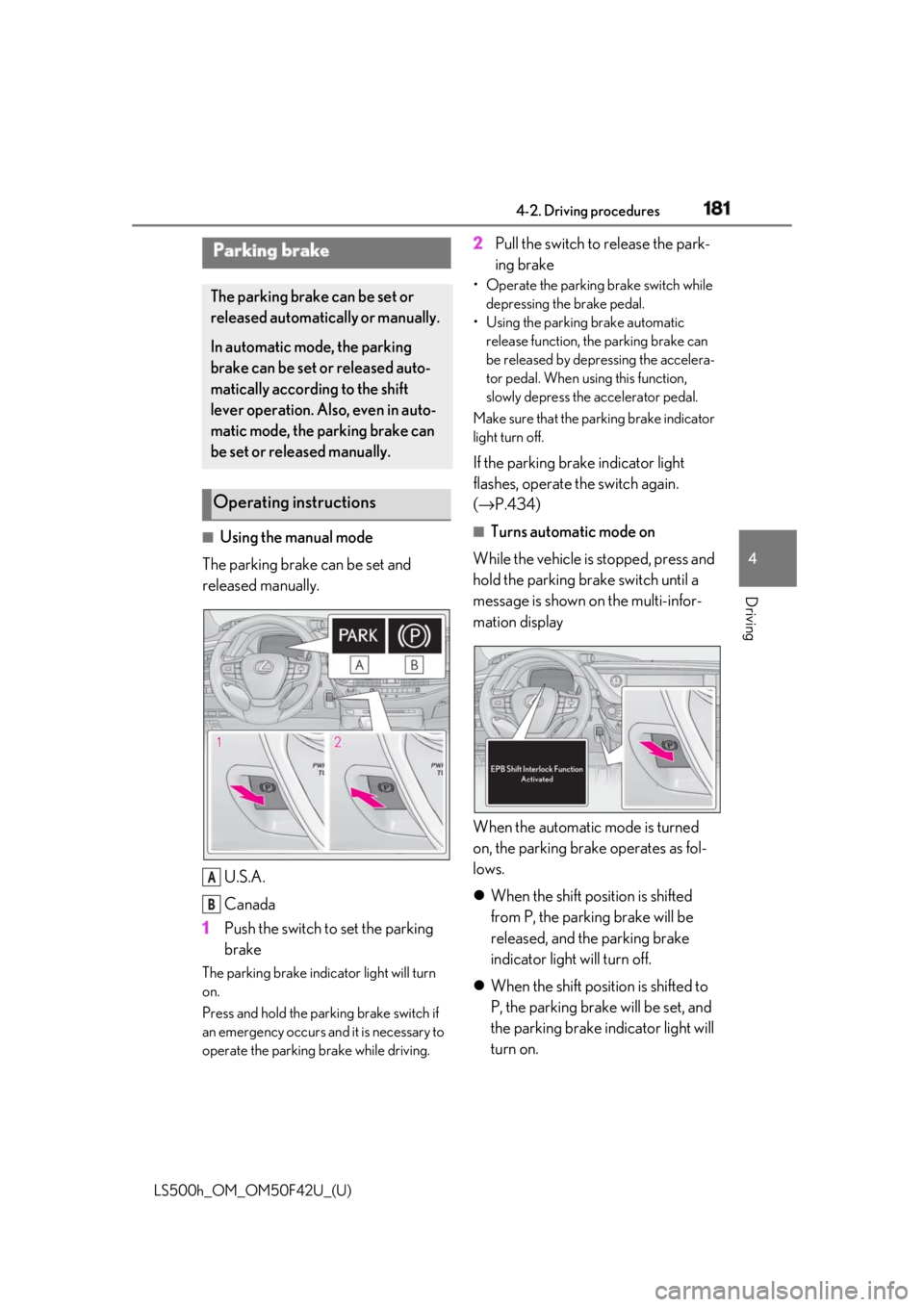
Using the manual mode
The parking brake can be set and
released manually.
U.S.A.
Canada
1 Push the switch to set the parking
brakeThe parking brake indicator light will turn
on.
Press and hold the parking brake switch if
an emergency occurs and it is necessary to
operate the parking brake while driving. 2 Pull the switch to release the park-
ing brake • Operate the parking brake switch while
depressing the brake pedal.
• Using the parking brake automatic
release function, the parking brake can
be released by depressing the accelera-
tor pedal. When using this function,
slowly depress the accelerator pedal.
Make sure that the pa rking brake indicator
light turn off.
If the parking brake indicator light
flashes, operate the switch again.
( → P.434) ■
Turns automatic mode on
While the vehicle is stopped, press and
hold the parking brake switch until a
message is shown on the multi-infor-
mation display
When the automatic mode is turned
on, the parking brake operates as fol-
lows.
When the shift position is shifted
from P, the parking brake will be
released, and the parking brake
indicator light will turn off.
When the shift position is shifted to
P, the parking brake will be set, and
the parking brake indicator light will
turn on.Parking brake The parking brake can be set or
released automatically or manually.
In automatic mode, the parking
brake can be set or released auto-
matically according to the shift
lever operation. Also, even in auto-
matic mode, the parking brake can
be set or released manually.
Operating instructions
A
B
Page 182 of 528
182 4-2. Driving procedures
LS500h_OM_OM50F42U_(U) Operate the shift lever and P position
switch with the vehicle stopped and the
brake pedal depressed. ■
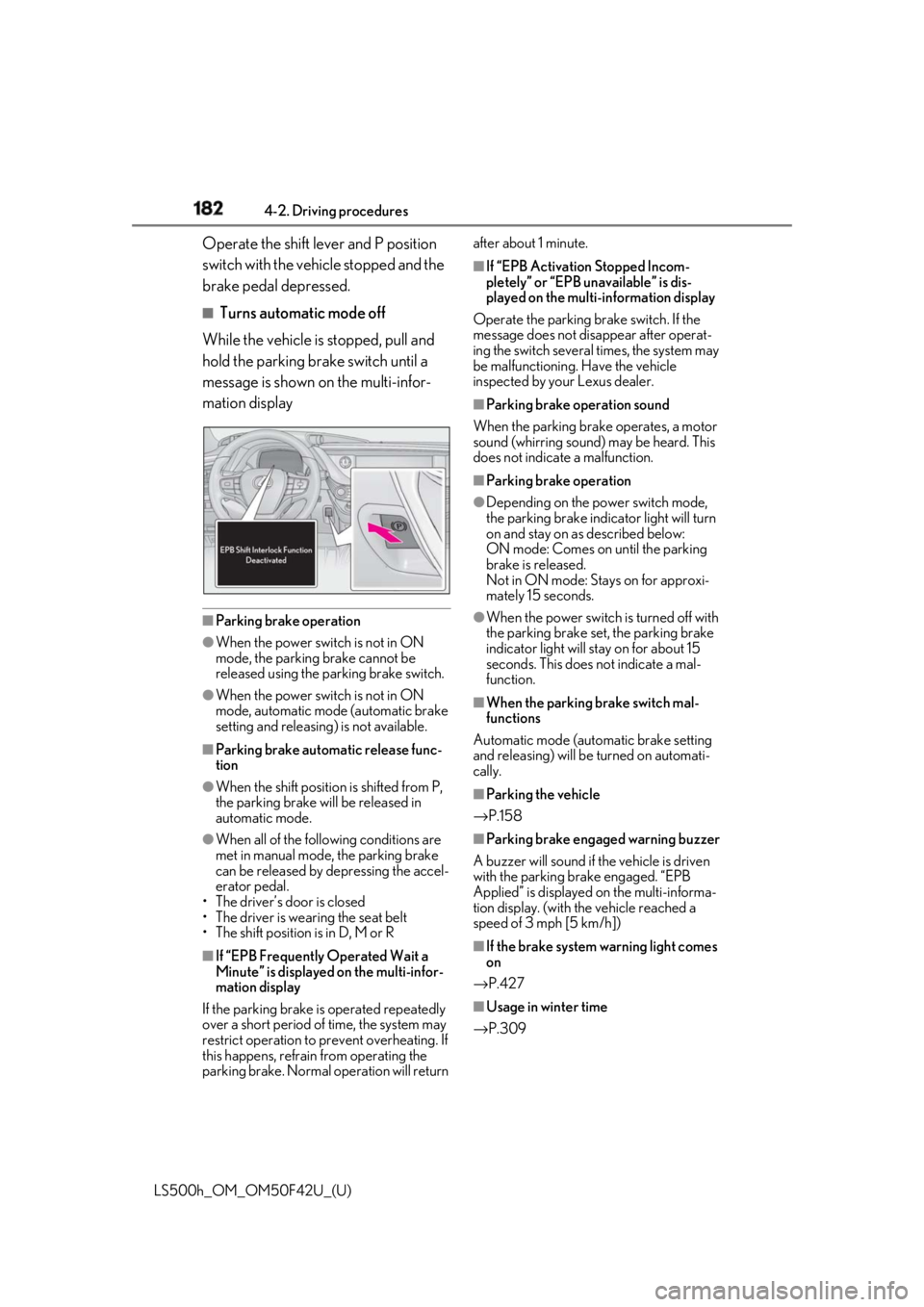
Turns automatic mode off
While the vehicle is stopped, pull and
hold the parking brake switch until a
message is shown on the multi-infor-
mation display
■
Parking brake operation●
When the power switch is not in ON
mode, the parking brake cannot be
released using the parking brake switch.●
When the power switch is not in ON
mode, automatic mode (automatic brake
setting and releasing) is not available. ■
Parking brake automatic release func-
tion●
When the shift position is shifted from P,
the parking brake will be released in
automatic mode.●
When all of the foll owing conditions are
met in manual mode, the parking brake
can be released by depressing the accel-
erator pedal.
• The driver’s door is closed
• The driver is wearing the seat belt
• The shift position is in D, M or R
■
If “EPB Frequently Operated Wait a
Minute” is displayed on the multi-infor-
mation display
If the parking brake is operated repeatedly
over a short period of time, the system may
restrict operation to prevent overheating. If
this happens, refrain from operating the
parking brake. Normal operation will return after about 1 minute. ■
If “EPB Activation Stopped Incom-
pletely” or “EPB unavailable” is dis-
played on the multi-information display
Operate the parking brake switch. If the
message does not disappear after operat-
ing the switch several times, the system may
be malfunctioning. Have the vehicle
inspected by your Lexus dealer. ■
Parking brake operation sound
When the parking brake operates, a motor
sound (whirring sound) may be heard. This
does not indicate a malfunction. ■
Parking brake operation ●
Depending on the power switch mode,
the parking brake indicator light will turn
on and stay on as described below:
ON mode: Comes on until the parking
brake is released.
Not in ON mode: Stays on for approxi-
mately 15 seconds. ●
When the power switch is turned off with
the parking brake set, the parking brake
indicator light will stay on for about 15
seconds. This does not indicate a mal-
function. ■
When the parking brake switch mal-
functions
Automatic mode (automatic brake setting
and releasing) will be turned on automati-
cally. ■
Parking the vehicle
→ P.158 ■
Parking brake engaged warning buzzer
A buzzer will sound if the vehicle is driven
with the parking brake engaged. “EPB
Applied” is displayed on the multi-informa-
tion display. (with the vehicle reached a
speed of 3 mph [5 km/h])
■
If the brake system warning light comes
on
→ P.427
■
Usage in winter time
→ P.309