ECO mode LEXUS LS500H 2018 Service Manual
[x] Cancel search | Manufacturer: LEXUS, Model Year: 2018, Model line: LS500H, Model: LEXUS LS500H 2018Pages: 528, PDF Size: 10.8 MB
Page 186 of 528
186 4-3. Operating the lights and wipers
LS500h_OM_OM50F42U_(U) The sensor may not function properly if an
object is placed on th e sensor, or anything
that blocks the sensor is affixed to the wind-
shield.
Doing so interferes with the sensor detect-
ing the level of ambient light and may cause
the automatic headlight system to malfunc-
tion. ■
Automatic light off system●
When the headlights are on: The head-
lights and tail lights tu rn off 30 seconds
after the driver’s door is opened and
closed if the power switch is turned to
ACCESSORY mode or turned off. (The
lights turn off immediately if on the
key is pressed after all the doors are
closed.)●
When only the tail lights are on: The tail
lights turn off automatically if the power
switch is turned to ACCESSORY mode
or turned off and the driver’s door is
opened.
To turn the lights on again, turn the power
switch to ON mode, or turn the light switch
off once and then back to or . ■
Light reminder buzzer
A buzzer sounds when the power switch is
turned off or turned to ACCESSORY
mode and the driver’s door is opened while
the lights are turned on. ■
Automatic headlight leveling system
The level of the headlights is automatically
adjusted according to the number of pas-
sengers and the loading condition of the
vehicle to ensure that the headlights do not
interfere with other road users.
■
Windshield wiper linked headlight illu-
mination
When driving during daytime with the
headlight switch turned to , if the wind-
shield wipers are used, the headlights will
turn on automatically after several seconds
to help enhance the visibility of your vehicle.
■
12-volt battery-saving function
In order to prevent the 12-volt battery of the
vehicle from discharging, if the headlights
and/or tail lights are on when the power switch is turned off the 12-volt battery sav-
ing function will operate and automatically
turn off all the lights after approximately 20
minutes. When the power switch is turned
to ON mode, the 12-volt battery-saving
function will be disabled.
When any of the following are performed,
the 12-volt battery-saving function is can-
celed once and then reactivated. All the
lights will turn off automatically 20 minutes
after the 12-volt battery-saving function has
been reactivated: ●
When the headlight switch is operated●
When a door is opened or closed ■
Welcome light illumination control
The front position and tail lights automati-
cally turn on at night when the doors are
unlocked using the entr y function or wire-
less remote control if the light switch is in
the position. ■
Customization
Some functions can be customized.
( → P.481)
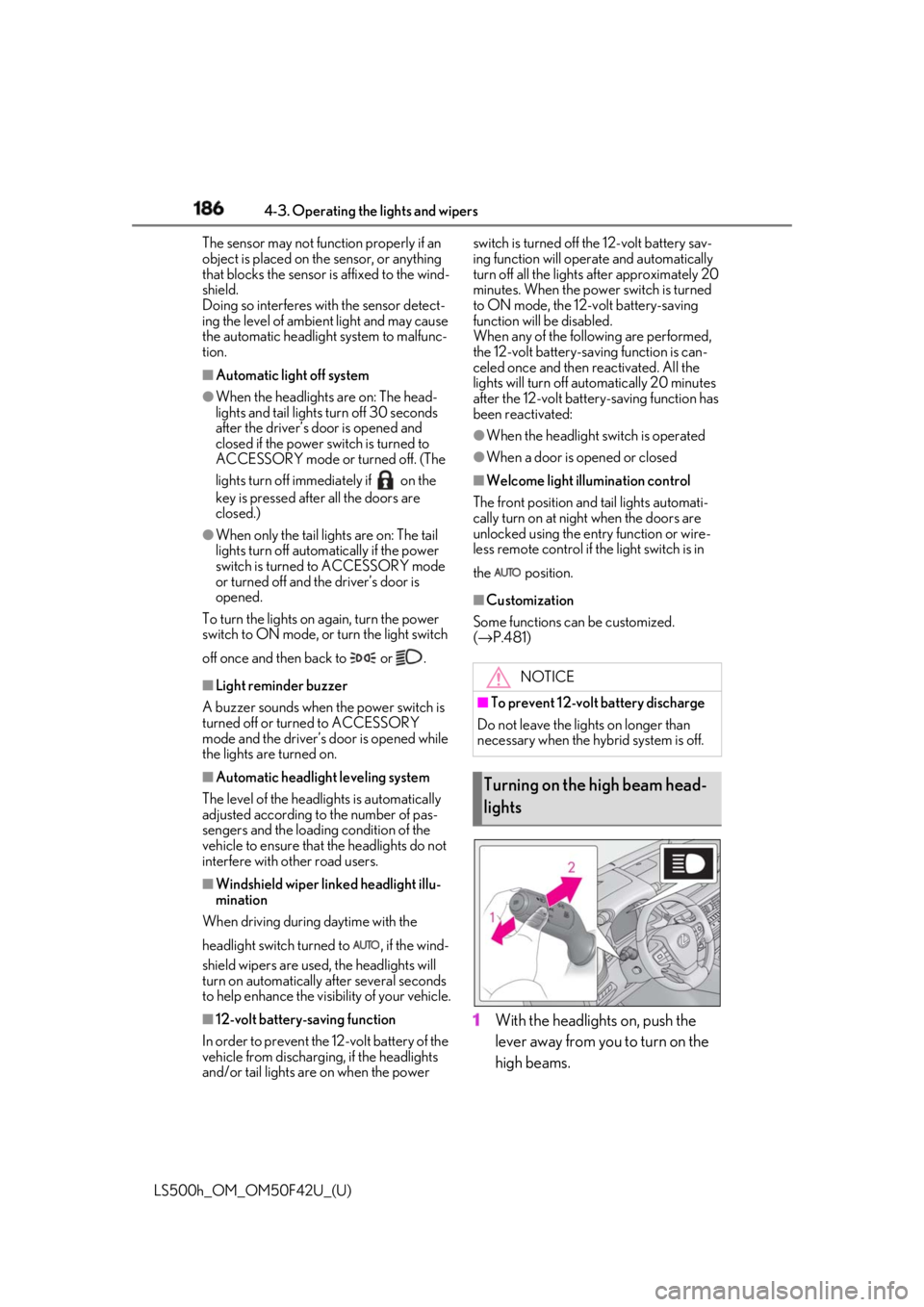
1 With the headlights on, push the
lever away from you to turn on the
high beams. NOTICE■
To prevent 12-volt battery discharge
Do not leave the lights on longer than
necessary when the hy brid system is off.
Turning on the high beam head-
lights
Page 189 of 528
1894-3. Operating the lights and wipers
LS500h_OM_OM50F42U_(U) 4
Driving vehicle ahead that is using fog lights with-
out its headlights turned on is detected.●
House lights, street lig hts, traffic signals,
and illuminated billboards or signs and
other reflective objects may cause the
high beams to change to the low beams,
or the low beams to remain on.●
The following factors may affect the
amount of time taken for the high beams
to turn on or off:
• The brightness of the headlights, fog
lights, and tail lights of vehicles ahead
• The movement and direction of vehicles
ahead
• When a vehicle ahead only has opera-
tional lights on one side
• When a vehicle ahead is a two-wheeled
vehicle
• The condition of the road (gradient,
curve, condition of th e road surface, etc.)
• The number of passengers and amount of
luggage in the vehicle●
The high beams may turn on or off unex-
pectedly.●
Bicycles or similar vehicles may not be
detected.●
In the following situations the system may
not be able to correctly detect the sur-
rounding brightness le vel. This may cause
the low beams to remain on or the high
beams to flash or dazzle pedestrians or
vehicles ahead. In such a case, it is neces-
sary to manually switch between the high
and low beams.
• When driving in inclement weather
(heavy rain, snow, fog, sandstorms, etc.)
• When the windshield is obscured by fog,
mist, ice, dirt, etc.
• When the windshield is cracked or dam-
aged
• When the camera sensor is deformed or
dirty
• When the temperature of the camera
sensor is extremely high
• When the surrounding brightness level is
equal to that of head lights, tail lights or
fog lights
• When headlights or tail lights of vehicles
ahead are turned off, dirty, changing
color, or not aimed properly
• When the vehicle is hit by water, snow,
dust, etc. from a preceding vehicle • When driving through an area of inter-
mittently changing brightness and dark-
ness
• When frequently and repeatedly driving
ascending/descending roads, or roads
with rough, bumpy or uneven surfaces
(such as stone-paved roads, gravel roads,
etc.)
• When frequently and repeatedly taking
curves or driving on a winding road
• When there is a highly reflective object
ahead of the vehicle, such as a sign or
mirror
• When the back of a preceding vehicle is
highly reflective, such as a container on a
truck
• When the vehicle’s headlights are dam-
aged or dirty, or are not aimed properly
• When the vehicle is listing or titling due to
a flat tire, a trailer being towed, etc.
• When the headlights are changed
between the high beams and low beams
repeatedly in an abnormal manner
• When the driver believes that the high
beams may be flashing or dazzling
pedestrians or other drivers ■
Temporarily lowering sensor sensitivity
The sensitivity of the sensor can be tempo-
rarily lowered.
1 Turn the power switch on while the fol-
lowing conditions are met.
●
The headlight switch is in or . ●
The headlight switch lever is in high beam
position. ●
Automatic High Beam switch is on.
2 Turn the power switch to ON mode.
3 Within 30 seconds after step 2 , repeat
pulling the headlight switch lever to the
original position then pushing it to the
high beam position quickly 10 times,
then leave the lever in high beam posi-
tion.
4 If the sensitivity is changed, the AHB
indicator is turn on and off 3 times.
Automatic High Beam (headlights) may
turn on even when the vehicle is stopped.
Page 192 of 528
192 4-3. Operating the lights and wipers
LS500h_OM_OM50F42U_(U) ●
If the wiper is turned to AUTO mode
while the power switch is in ON mode,
the wipers will operate once to show that
AUTO mode is activated.●
If the temperature of the raindrop sensor
is 185°F (85°C) or higher, or 5°F
(-15°C) or lower, automatic operation
may not occur. In this case, operate the
wipers in any mode other than AUTO
mode.■
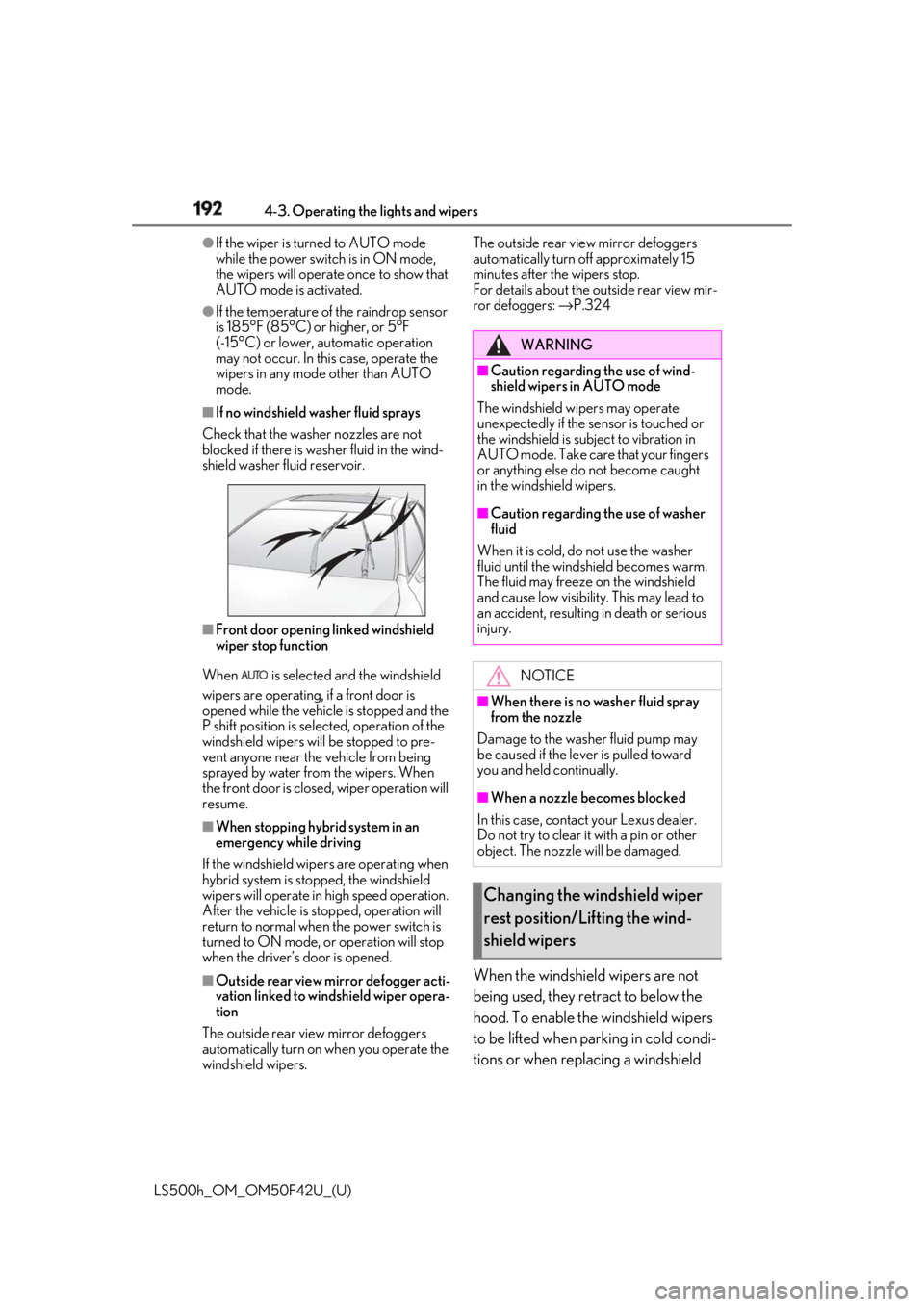
If no windshield washer fluid sprays
Check that the washer nozzles are not
blocked if there is wash er fluid in the wind-
shield washer fluid reservoir.
■
Front door opening linked windshield
wiper stop function
When is selected and the windshield
wipers are operating, if a front door is
opened while the vehicle is stopped and the
P shift position is sele cted, operation of the
windshield wipers w ill be stopped to pre-
vent anyone near the vehicle from being
sprayed by water from the wipers. When
the front door is closed, wiper operation will
resume. ■
When stopping hybrid system in an
emergency while driving
If the windshield wipers are operating when
hybrid system is stop ped, the windshield
wipers will operate in high speed operation.
After the vehicle is stopped, operation will
return to normal when the power switch is
turned to ON mode, or operation will stop
when the driver’s door is opened.
■
Outside rear view mirror defogger acti-
vation linked to windshield wiper opera-
tion
The outside rear view mirror defoggers
automatically turn on when you operate the
windshield wipers. The outside rear view mirror defoggers
automatically turn off approximately 15
minutes after the wipers stop.
For details about the outside rear view mir-
ror defoggers: → P.324
When the windshield wipers are not
being used, they retract to below the
hood. To enable the windshield wipers
to be lifted when parking in cold condi-
tions or when replacing a windshield WARNING■
Caution regarding the use of wind-
shield wipers in AUTO mode
The windshield wipers may operate
unexpectedly if the sensor is touched or
the windshield is subj ect to vibration in
AUTO mode. Take care that your fingers
or anything else do not become caught
in the windshield wipers. ■
Caution regarding the use of washer
fluid
When it is cold, do not use the washer
fluid until the windshield becomes warm.
The fluid may freeze on the windshield
and cause low visibility. This may lead to
an accident, resulting in death or serious
injury.
NOTICE■
When there is no washer fluid spray
from the nozzle
Damage to the washer fluid pump may
be caused if the lever is pulled toward
you and held continually.
■
When a nozzle becomes blocked
In this case, contact your Lexus dealer.
Do not try to clear it with a pin or other
object. The nozzle will be damaged.
Changing the windshield wiper
rest position/Lifting the wind-
shield wipers
Page 193 of 528
1934-3. Operating the lights and wipers
LS500h_OM_OM50F42U_(U) 4
Driving wiper insert, change the rest position of
the windshield wipers to the service
position using the wiper lever. ■
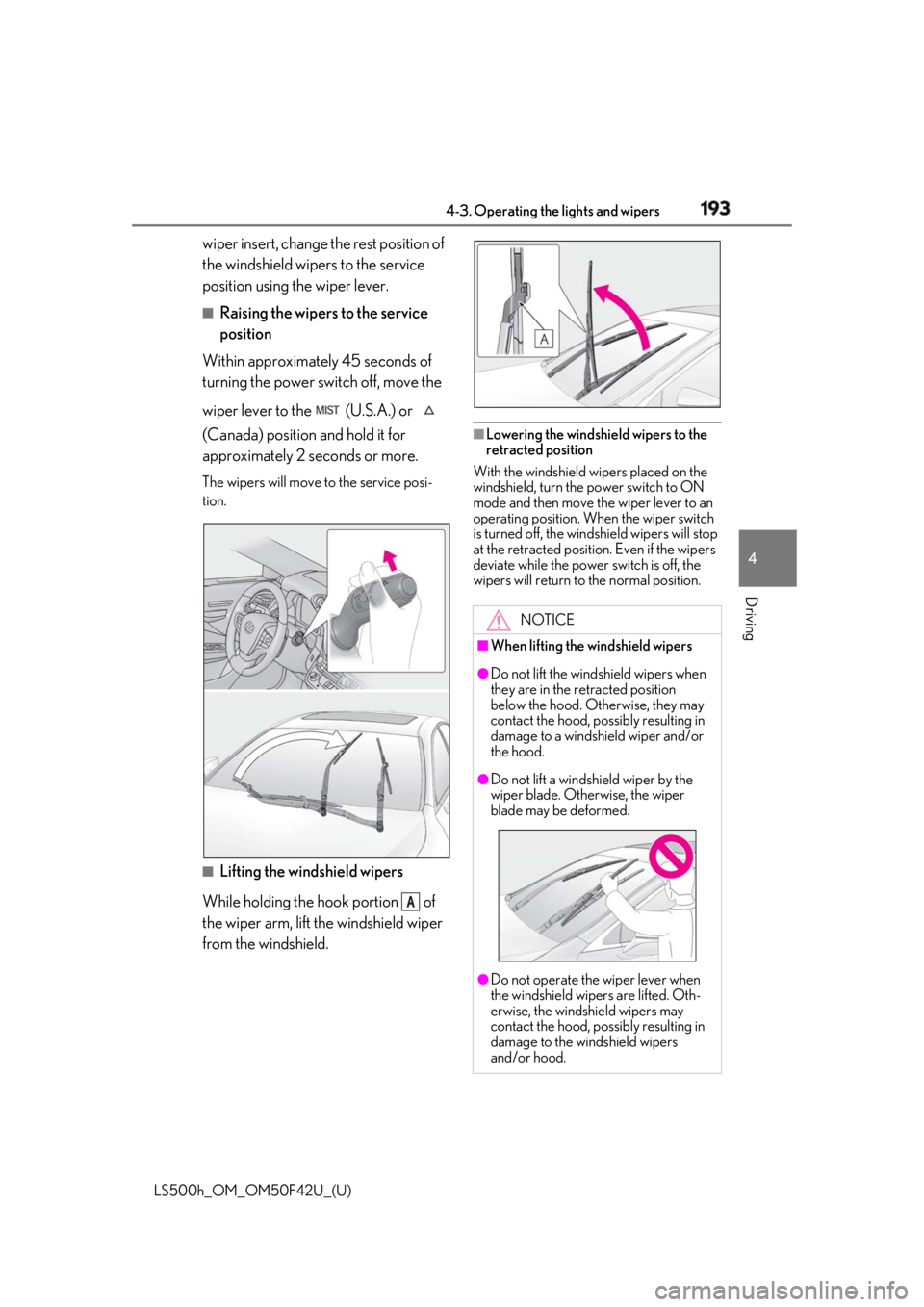
Raising the wipers to the service
position
Within approximately 45 seconds of
turning the power switch off, move the
wiper lever to the (U.S.A.) or
(Canada) position and hold it for
approximately 2 se conds or more.The wipers will move to the service posi-
tion.
■
Lifting the windshield wipers
While holding the hook portion of
the wiper arm, lift the windshield wiper
from the windshield. ■
Lowering the windshield wipers to the
retracted position
With the windshield wipers placed on the
windshield, turn the power switch to ON
mode and then move the wiper lever to an
operating position. Wh en the wiper switch
is turned off, the windshield wipers will stop
at the retracted position. Even if the wipers
deviate while the power switch is off, the
wipers will return to the normal position.
ANOTICE■
When lifting the windshield wipers ●
Do not lift the wind shield wipers when
they are in the retracted position
below the hood. Otherwise, they may
contact the hood, possibly resulting in
damage to a windshield wiper and/or
the hood.
●
Do not lift a windshield wiper by the
wiper blade. Otherwise, the wiper
blade may be deformed.
●
Do not operate the wiper lever when
the windshield wipe rs are lifted. Oth-
erwise, the windshield wipers may
contact the hood, possibly resulting in
damage to the windshield wipers
and/or hood.
Page 236 of 528

236 4-5. Using the driving support systems
LS500h_OM_OM50F42U_(U) The curve display on the head-up display
changes according to the direction and
curvature of the curve. ■
Operation conditions of each function●
Lane departure alert function
This function operates when all of the fol-
lowing conditions are met.
• LTA is turned on.
• Vehicle speed is approximately 32 mph
(50 km/h) or more.
•System recognizes wh ite (yellow) lane
lines. (When a white [yellow] line is rec-
ognized on only one side, the system will
operate only for the recognized side.)
• Width of traffic lane is approximately 9.8
ft. (3 m) or more.
• Turn signal lever is not operated. (Except
when a vehicle is in the lane on the side
the turn signal was operated)
• Vehicle is not being driven around a
sharp curve.
• No system malfunctions are detected.
( → P.238)●
Steering assist function
This function operates when all of the fol-
lowing conditions are me t in addition to the
operation conditions for the lane depar-
ture alert function.
•Setting for “Steering Assist” in of the
multi-information display is set to “On”.
( → P.86)
• Vehicle is not accelerated or decelerated
by a fixed amount or more.
• Steering wheel is not operated with a
steering force level su itable for changing
lanes.
• ABS, VSC, TRAC and PCS are not oper-
ating.
• TRAC or VSC is not turned off.
• Hands off steering wheel alert is not dis-
played. ( → P.237)
●
Vehicle sway warning function
This function operates when all of the fol-
lowing conditions are met.
• Setting for “Sway Warning” in of the
multi-information display is set to “On”.
( → P.86) • Vehicle speed is ap proximately 32 mph
(50 km/h) or more.
• Width of traffic lane is approximately 9.8
ft. (3 m) or more.
• No system malfunctions are detected.
( → P.238)●
Lane centering function
This function operates when all of the fol-
lowing conditions are met.
• LTA is turned on.
• Setting for “Steering Assist” and “Lane
Center” in of the multi-information
display are set to “On”. ( → P.86)
• This function recognizes white (yellow)
lane lines or the position of a preceding
vehicle (except when the preceding vehi-
cle is small, such as a motorcycle).
• The dynamic radar cruise control with
full-speed range is operating in vehi-
cle-to-vehicle distance control mode.
• Width of traffic lane is approximately 10
to 13 ft. (3 to 4 m).
• Turn signal lever is not operated.
• Vehicle is not being driven around a
sharp curve.
• No system malfunctions are detected.
( → P.238)
• Vehicle does not ac celerate or deceler-
ate by a fixed amount or more.
• Steering wheel is not operated with a
steering force level su itable for changing
lanes.
• ABS, VSC, TRAC and PCS are not oper-
ating.
• TRAC or VSC is not turned off.
• Hands off steering wheel alert is not dis-
played. ( → P.237)
• The driver has one or both hands on the
steering wheel.
• The vehicle is being driven in the center
of a lane.
• Steering assist function is not operating.
■
Temporary cancellation of functions
When operation condit ions are no longer
met, a function may be temporarily can-
celed. However, when the operation condi-
tions are met again, operation of the
function is automatically restored.
( → P.236)
If the operating conditions are no longer
met while the lane ce ntering function is
Page 250 of 528
250 4-5. Using the driving support systems
LS500h_OM_OM50F42U_(U) ●
Even if it is a sign not appropriate for the
currently traveled lane, such a sign exists
directly after a freeway branches, or in an
adjacent lane just before merging.●
Stickers are attached to the rear of the
preceding vehicle.●
A sign resembling a system compatible
sign is recognized.●
The front of the vehicle is raised or low-
ered due to the carried load.●
The surrounding brightness is not suffi-
cient or changes suddenly.●
When a sign intended for trucks, etc. is
recognized.●
The navigation system map data is old.●
The navigation system is not operating.●
Side road speed signs may be detected
and displayed (if positioned in sight of the
camera sensor) while the vehicle is trav-
eling on the main road.●
Roundabout exit road speed signs may
be detected and displayed (if positioned
in sight of the camera sensor) while trav-
eling on a roundabout.■
Speed limit sign display
If the power switch was last turned off while
a speed limit sign wa s displayed on the
multi-information display, the same sign dis-
plays again when the power switch is turned
to ON mode. ■
Customization
Some functions can be customized.
( → P.481) ■
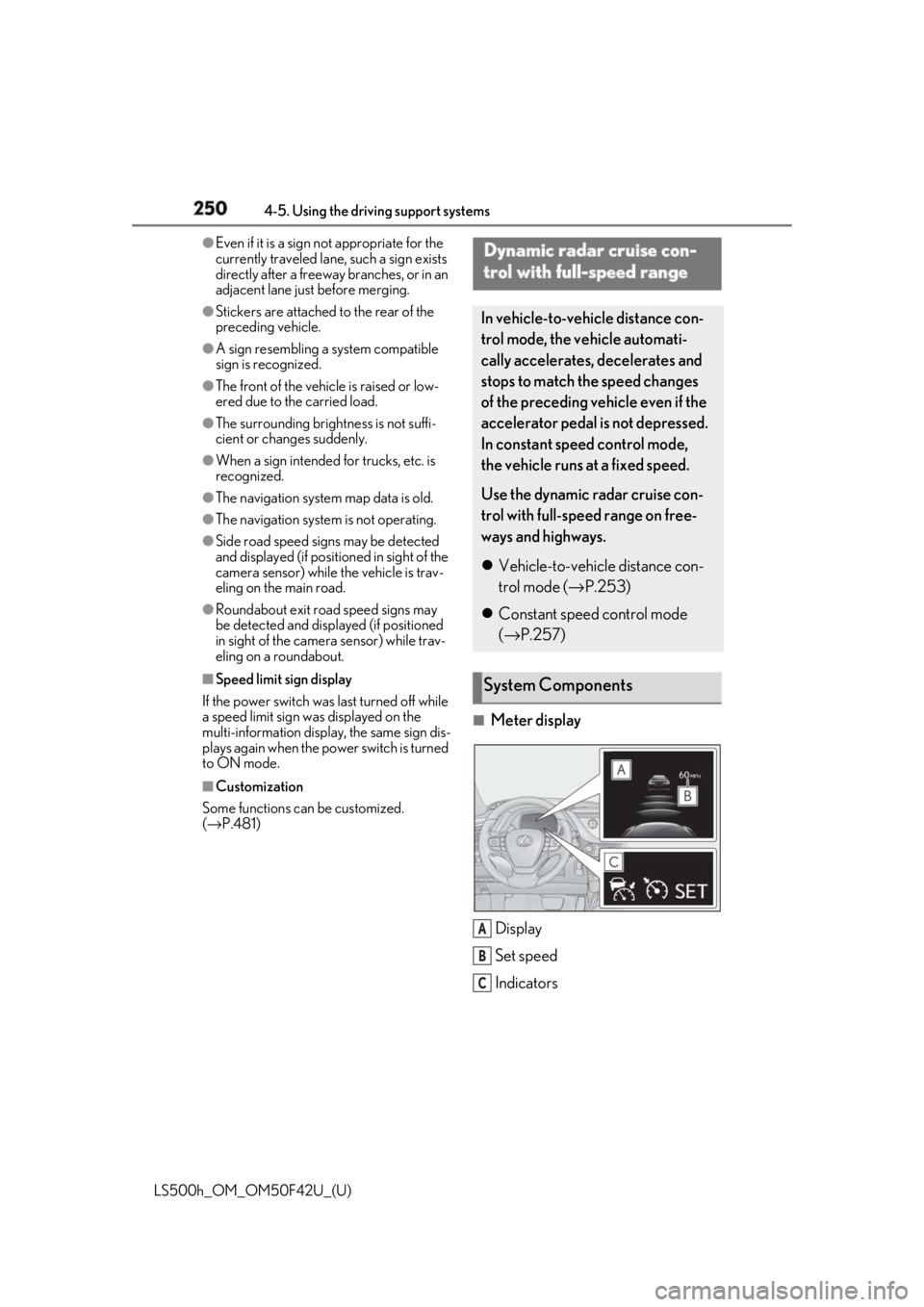
Meter display
Display
Set speed
IndicatorsDynamic radar cruise con-
trol with full-speed range In vehicle-to-vehicle distance con-
trol mode, the ve hicle automati-
cally accelerates, decelerates and
stops to match the speed changes
of the preceding vehicle even if the
accelerator pedal is not depressed.
In constant speed control mode,
the vehicle runs at a fixed speed.
Use the dynamic radar cruise con-
trol with full-speed range on free-
ways and highways.
Vehicle-to-vehicle distance con-
trol mode ( → P.253)
Constant speed control mode
( → P.257)
System Components
A
B
C
Page 254 of 528
254 4-5. Using the driving support systems
LS500h_OM_OM50F42U_(U) speedThe system accelerates until the set speed is re ached. The system then returns to constant
speed cruising.
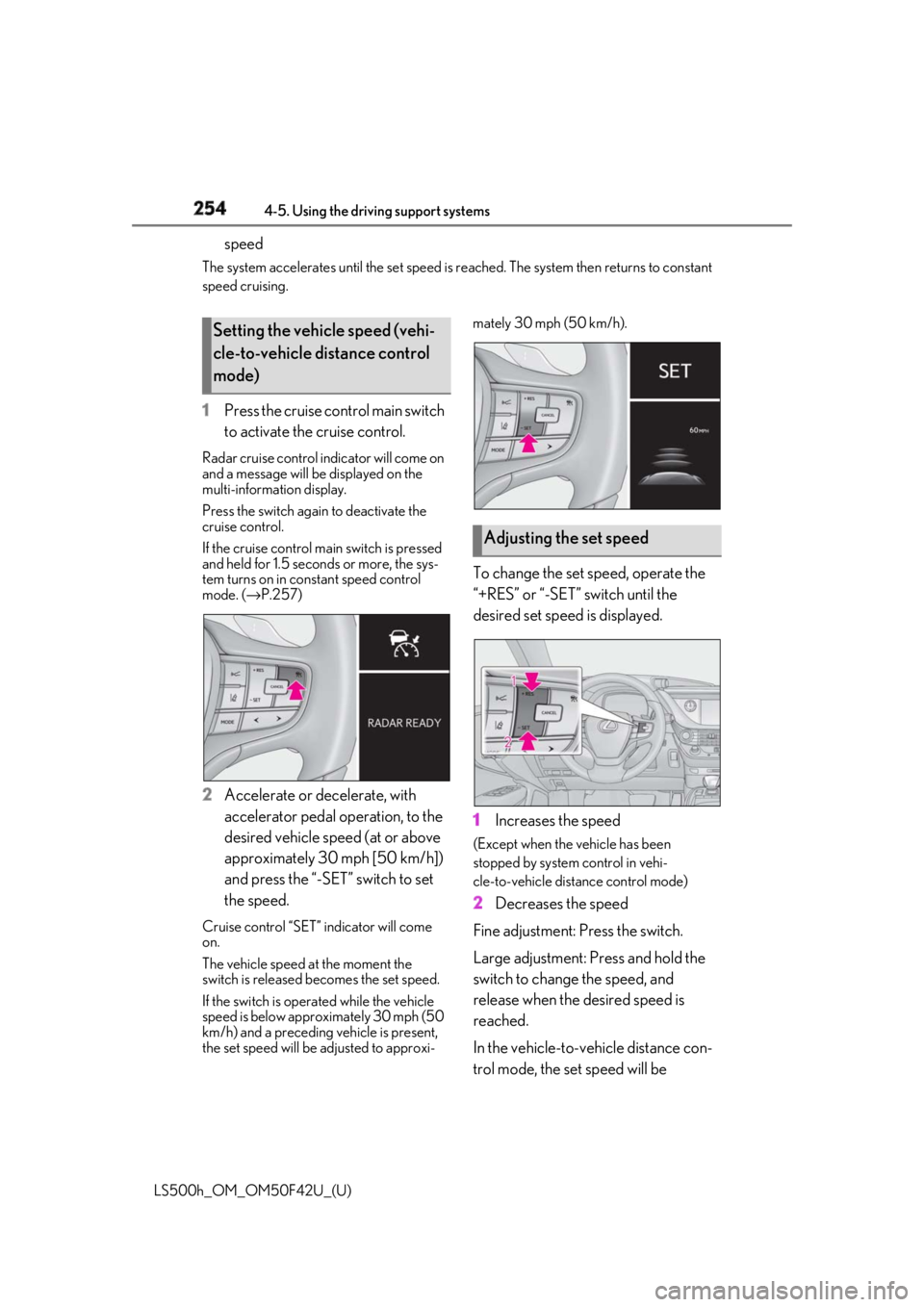
1 Press the cruise control main switch
to activate the cruise control.Radar cruise control indicator will come on
and a message will be displayed on the
multi-information display.
Press the switch again to deactivate the
cruise control.
If the cruise control ma in switch is pressed
and held for 1.5 seconds or more, the sys-
tem turns on in constant speed control
mode. ( → P.257)
2 Accelerate or decelerate, with
accelerator pedal operation, to the
desired vehicle speed (at or above
approximately 30 mph [50 km/h])
and press the “-SET” switch to set
the speed.Cruise control “SET” indicator will come
on.
The vehicle speed at the moment the
switch is released becomes the set speed.
If the switch is operated while the vehicle
speed is below approximately 30 mph (50
km/h) and a preceding vehicle is present,
the set speed will be adjusted to approxi- mately 30 mph (50 km/h).
To change the set speed, operate the
“+RES” or “-SET” switch until the
desired set speed is displayed.
1 Increases the speed (Except when the vehicle has been
stopped by system control in vehi-
cle-to-vehicle distance control mode)
2 Decreases the speed
Fine adjustment: Press the switch.
Large adjustment: Press and hold the
switch to change the speed, and
release when the desired speed is
reached.
In the vehicle-to-vehicle distance con-
trol mode, the set speed will be Setting the vehicle speed (vehi-
cle-to-vehicle distance control
mode)
Adjusting the set speed
Page 257 of 528
2574-5. Using the driving support systems
LS500h_OM_OM50F42U_(U) 4
Driving cle-to-vehicle distance.
■
Warnings may not occur when
In the following instances, warnings
may not occur even when the vehi-
cle-to-vehicle distance is small.
When the speed of the preceding
vehicle matches or exceeds your
vehicle speed
When the preceding vehicle is trav-
eling at an extremely slow speed
Immediately after the cruise control
speed was set
When depressing the accelerator
pedal
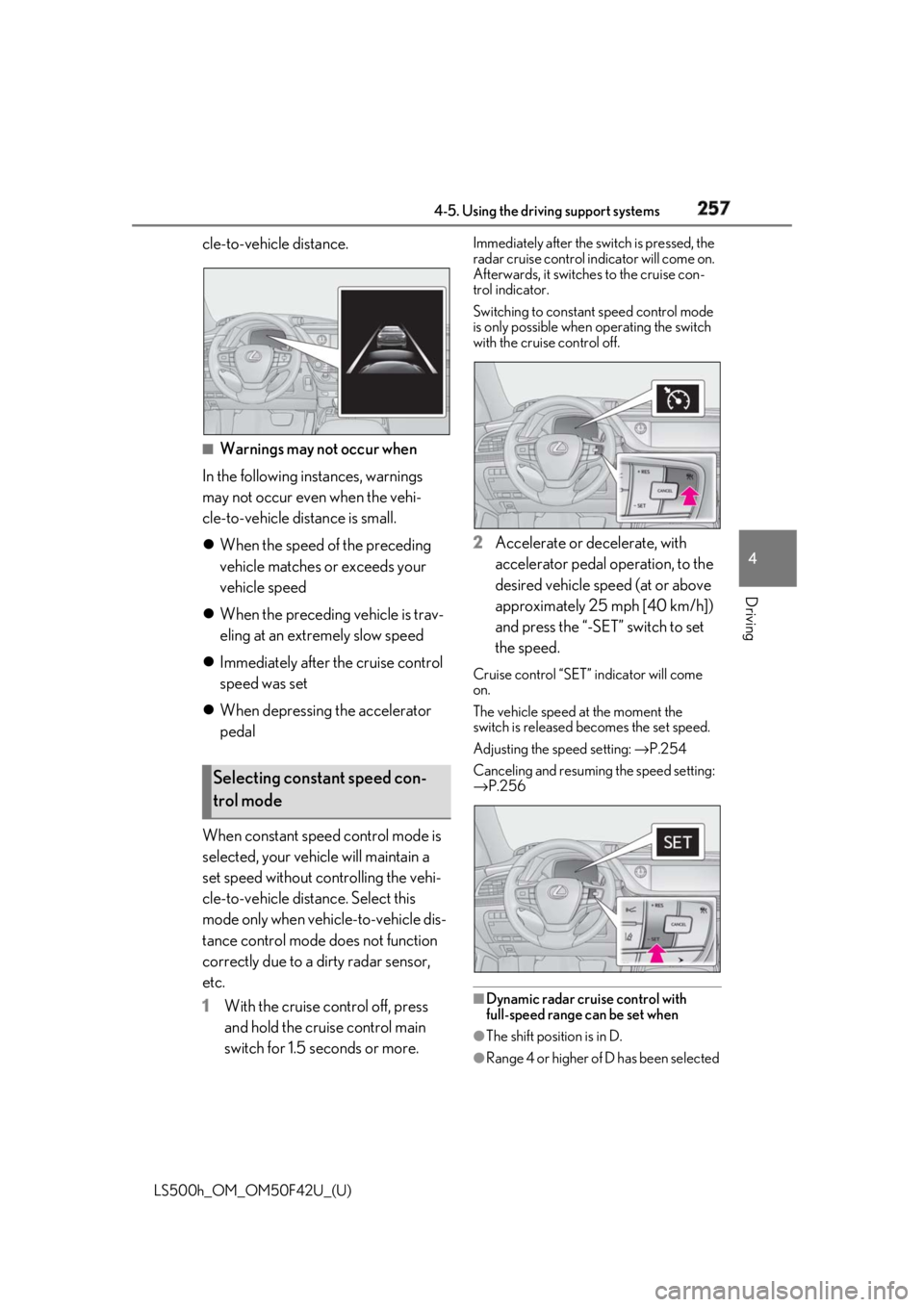
When constant speed control mode is
selected, your vehicle will maintain a
set speed without controlling the vehi-
cle-to-vehicle distance. Select this
mode only when vehicle-to-vehicle dis-
tance control mode does not function
correctly due to a dirty radar sensor,
etc.
1 With the cruise control off, press
and hold the cruise control main
switch for 1.5 seconds or more. Immediately after the switch is pressed, the
radar cruise control indicator will come on.
Afterwards, it switches to the cruise con-
trol indicator.
Switching to constant speed control mode
is only possible when operating the switch
with the cruise control off.
2 Accelerate or decelerate, with
accelerator pedal operation, to the
desired vehicle speed (at or above
approximately 25 mph [40 km/h])
and press the “-SET” switch to set
the speed. Cruise control “SET” indicator will come
on.
The vehicle speed at the moment the
switch is released becomes the set speed.
Adjusting the speed setting: → P.254
Canceling and resuming the speed setting:
→ P.256
■
Dynamic radar cruise control with
full-speed range can be set when
●
The shift position is in D.
●
Range 4 or higher of D has been selected Selecting constant speed con-
trol mode
Page 258 of 528
258 4-5. Using the driving support systems
LS500h_OM_OM50F42U_(U) by using the paddle shift switch.●
Vehicle speed is at or above approxi-
mately 30 mph (50 km/h).
However, when a preceding vehicle is
detected, the dynamic radar cruise con-
trol with full-speed range can be set even
if the vehicle speed is below approxi-
mately 30 mph (50 km/h).■
Accelerating after setting the vehicle
speed
The vehicle can accelerate by operating the
accelerator pedal. After accelerating, the
set speed resumes. However, during vehi-
cle-to-vehicle distance control mode, the
vehicle speed may decrease below the set
speed in order to maintain the distance to
the preceding vehicle. ■
When the vehicle stops while follow-up
cruising●
Pressing the “+RES” switch while the
vehicle ahead stops w ill resume follow-up
cruising if the vehicle ahead starts off
within approximately 3 seconds after the
switch is pressed.●
If the vehicle ahead starts off within 3 sec-
onds after your vehicle stops, follow-up
cruising will be resumed.■
Automatic cancelation of vehi-
cle-to-vehicle distance control mode
Vehicle-to-vehicle dist ance control mode is
automatically canceled in the following situ-
ations. ●
Actual vehicle speed falls at or below
approximately 25 mph (40 km/h) when
there are no vehicles ahead.●
The preceding vehicle leaves the lane
when your vehicle is following at a vehicle
speed at or below approximately 25 mph
(40 km/h). Otherwise, the sensor cannot
properly detect the vehicle. (“CRUISE
NOT AVAILABLE No Preceding Vehi-
cles” is displayed on the multi-information
display.)
●
VSC is activated.
●
TRAC is activated for a period of time.
●
When the VSC or TRAC system is
turned off.
●
When snow mode is set. ●
The sensor cannot detect correctly
because it is covered in some way. ●
Pre-collision braking is activated. ●
The parking brake is operated. ●
The vehicle is stopped by system control
on a steep incline. ●
The following are detected when the
vehicle has been stopped by system con-
trol:
• The driver is not wearing a seat belt.
• The driver’s door is opened.
• The vehicle has been stopped for about 3
minutes.
If vehicle-to-vehicle distance control mode
is automatically canceled for any other rea-
son, there may be a malfunction in the sys-
tem. Contact your Lexus dealer. ■
Automatic cancelation of constant
speed control mode
Constant speed control mode is automati-
cally canceled in the following situations: ●
Actual vehicle speed is more than
approximately 10 mph (16 km/h) below
the set vehicle speed. ●
Actual vehicle speed falls below approxi-
mately 25 mph (40 km/h). ●
VSC is activated. ●
TRAC is activated for a period of time. ●
When the VSC or TRAC system is
turned off. ●
Pre-collision braking is activated.
If constant speed control mode is automati-
cally canceled for any other reason, there
may be a malfunction in the system. Con-
tact your Lexus dealer.
■
If “Radar Cruise Control Unavailable” is
shown on the multi-information display
The radar cruise control system cannot be
used temporarily. Use the system when it
becomes available again.
■
Brake system operation sound
When the brakes are operated in vehi-
cle-to-vehicle distance mode, a brake oper-
ating sound may be heard. This is not a
malfunction.
Page 273 of 528
2734-5. Using the driving support systems
LS500h_OM_OM50F42U_(U) 4
Driving
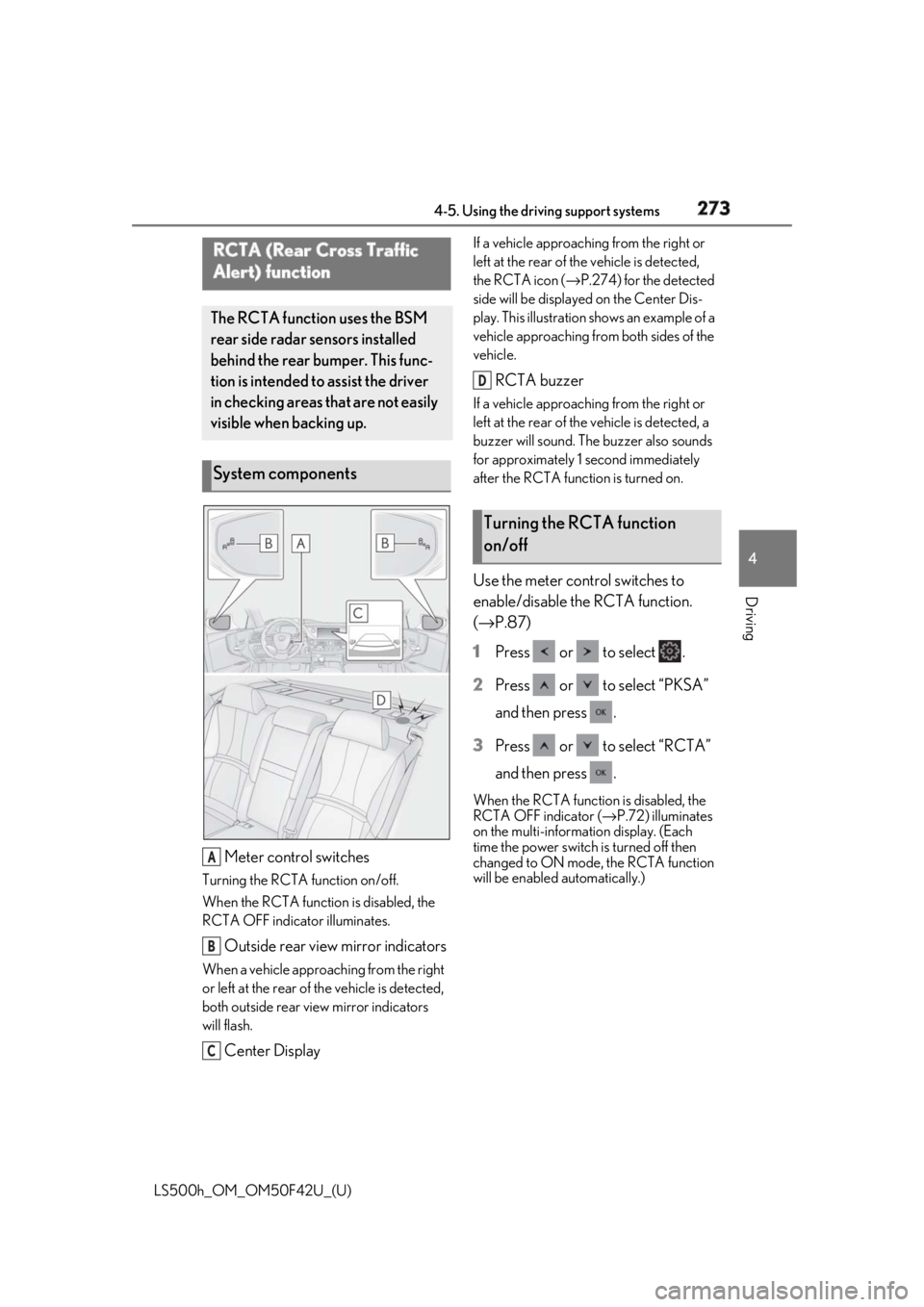
Meter control switchesTurning the RCTA function on/off.
When the RCTA function is disabled, the
RCTA OFF indicator illuminates.
Outside rear view mirror indicatorsWhen a vehicle approaching from the right
or left at the rear of the vehicle is detected,
both outside rear view mirror indicators
will flash.
Center Display If a vehicle approaching from the right or
left at the rear of th e vehicle is detected,
the RCTA icon ( → P.274) for the detected
side will be displayed on the Center Dis-
play. This illustration shows an example of a
vehicle approaching from both sides of the
vehicle.
RCTA buzzer If a vehicle approaching from the right or
left at the rear of th e vehicle is detected, a
buzzer will sound. The buzzer also sounds
for approximately 1 second immediately
after the RCTA function is turned on.
Use the meter control switches to
enable/disable the RCTA function.
( → P.87)
1 Press or to select .
2 Press or to select “PKSA”
and then press .
3 Press or to select “RCTA”
and then press . When the RCTA function is disabled, the
RCTA OFF indicator ( → P.72) illuminates
on the multi-informat ion display. (Each
time the power switch is turned off then
changed to ON mode, the RCTA function
will be enabled automatically.)RCTA (Rear Cross Traffic
Alert) function The RCTA function uses the BSM
rear side radar sensors installed
behind the rear bumper. This func-
tion is intended to assist the driver
in checking areas that are not easily
visible when backing up.
System components
A
B
C Turning the RCTA function
on/off D