ECO mode LEXUS LS500H 2018 Repair Manual
[x] Cancel search | Manufacturer: LEXUS, Model Year: 2018, Model line: LS500H, Model: LEXUS LS500H 2018Pages: 528, PDF Size: 10.8 MB
Page 327 of 528
3275-3. Using the air conditio ning system and defogger
LS500h_OM_OM50F42U_(U) 5
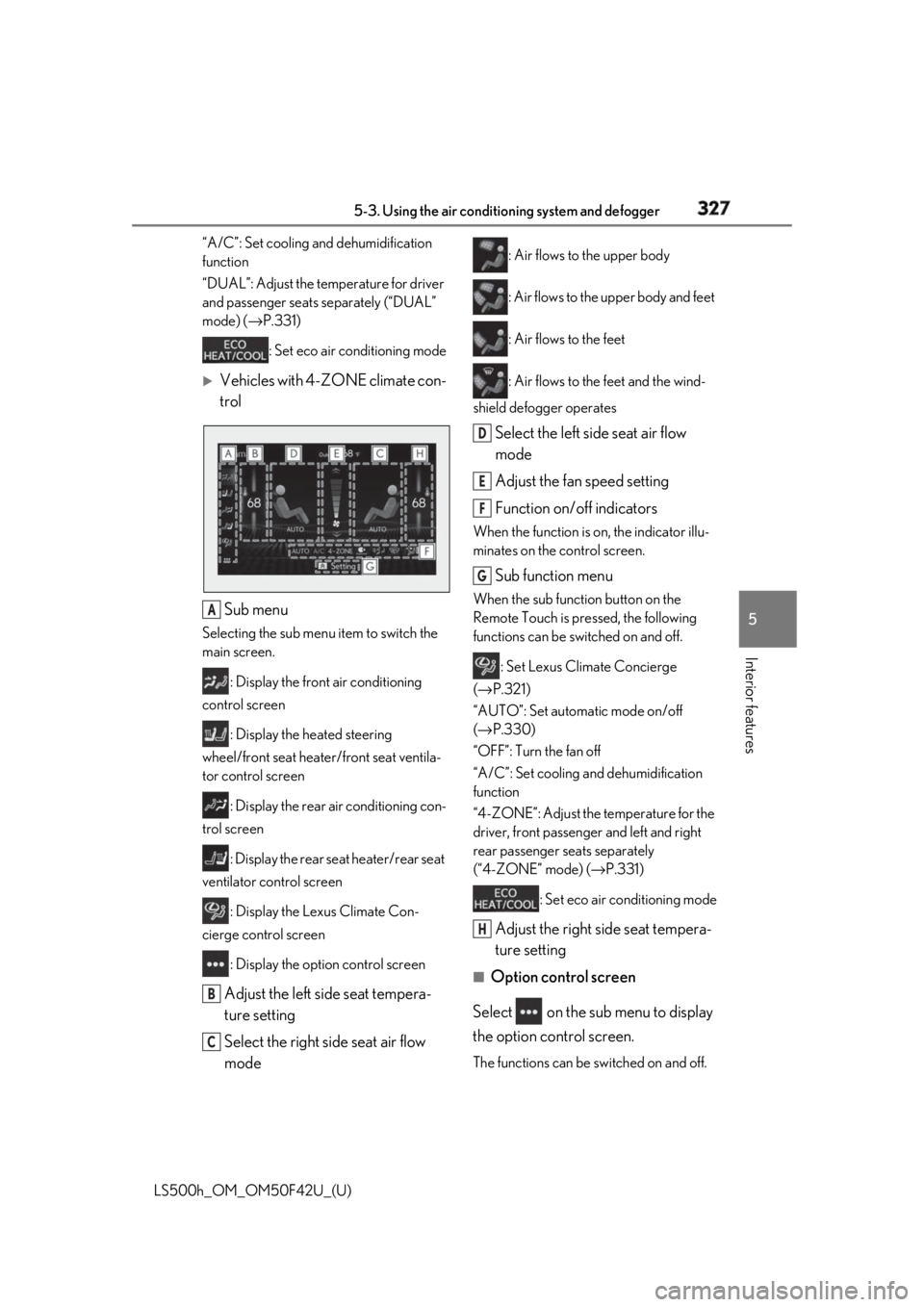
Interior features “A/C”: Set cooling and dehumidification
function
“DUAL”: Adjust the temperature for driver
and passenger seats separately (“DUAL”
mode) ( → P.331)
: Set eco air conditioning mode
Vehicles with 4-ZONE climate con-
trol
Sub menu Selecting the sub menu item to switch the
main screen.
: Display the front air conditioning
control screen
: Display the heated steering
wheel/front seat heater/front seat ventila-
tor control screen
: Display the rear air conditioning con-
trol screen
: Display the rear seat heater/rear seat
ventilator control screen
: Display the Lexus Climate Con-
cierge control screen
: Display the option control screen
Adjust the left side seat tempera-
ture setting
Select the right side seat air flow
mode : Air flows to the upper body
: Air flows to the upper body and feet
: Air flows to the feet
: Air flows to the feet and the wind-
shield defogger operates
Select the left side seat air flow
mode
Adjust the fan speed setting
Function on/off indicators When the function is on, the indicator illu-
minates on the control screen.
Sub function menu When the sub function button on the
Remote Touch is pressed, the following
functions can be switched on and off.
: Set Lexus Climate Concierge
( → P.321)
“AUTO”: Set automatic mode on/off
( → P.330)
“OFF”: Turn the fan off
“A/C”: Set cooling and dehumidification
function
“4-ZONE”: Adjust the temperature for the
driver, front passenger and left and right
rear passenger se ats separately
(“4-ZONE” mode) ( → P.331)
: Set eco air conditioning mode
Adjust the right side seat tempera-
ture setting ■
Option control screen
Select on the sub menu to display
the option control screen.
The functions can be switched on and off.A
B
C D
E
F
G
H
Page 328 of 528
328 5-3. Using the air conditioning system and defogger
LS500h_OM_OM50F42U_(U) When the function is on, the indicator illu-
minates on the screen.
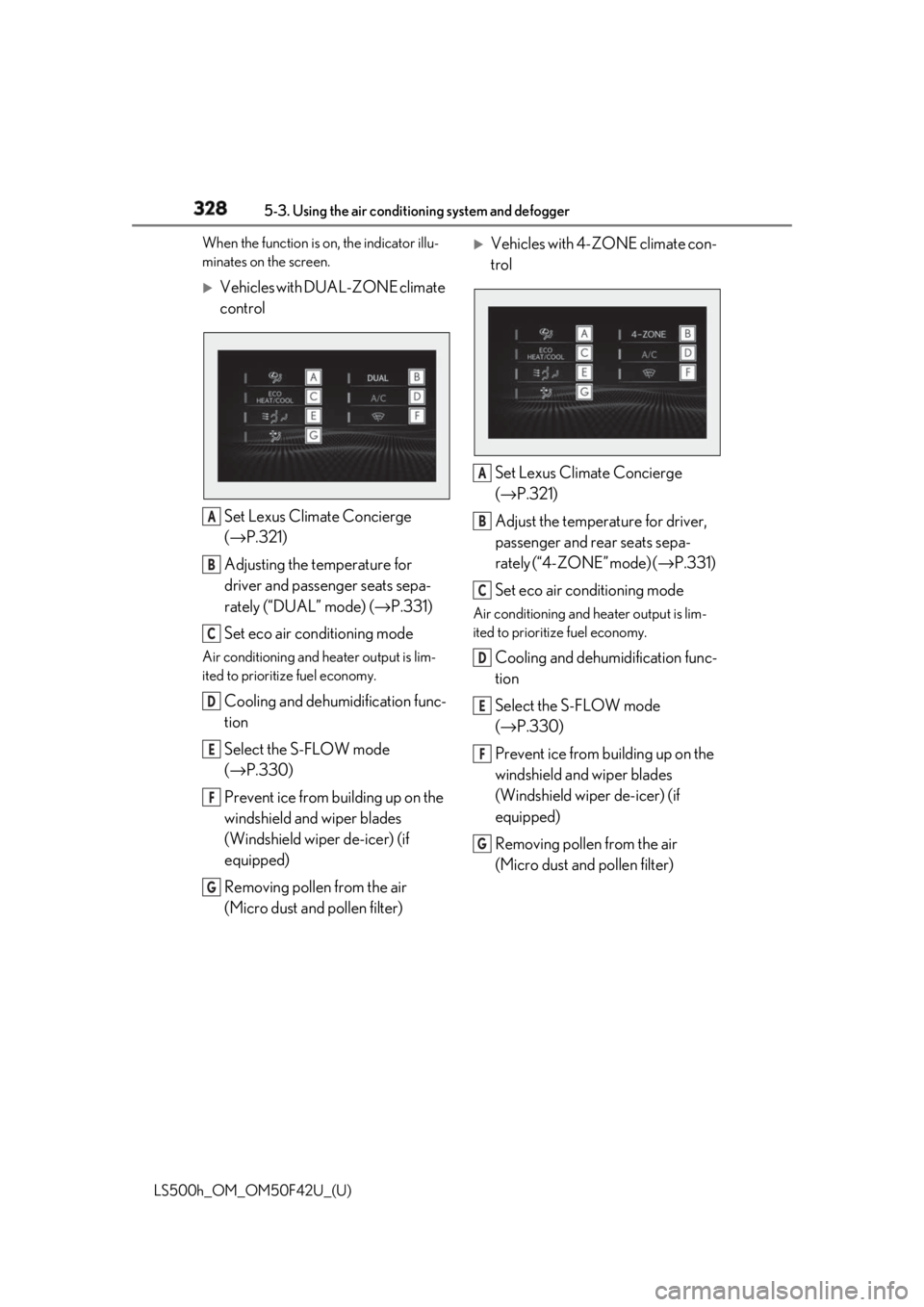
Vehicles with DUAL-ZONE climate
control
Set Lexus Climate Concierge
( → P.321)
Adjusting the temperature for
driver and passenger seats sepa-
rately (“DUAL” mode) ( → P.331)
Set eco air conditioning modeAir conditioning and heater output is lim-
ited to prioritize fuel economy.
Cooling and dehumidification func-
tion
Select the S-FLOW mode
( → P.330)
Prevent ice from building up on the
windshield and wiper blades
(Windshield wiper de-icer) (if
equipped)
Removing pollen from the air
(Micro dust and pollen filter)
Vehicles with 4-ZONE climate con-
trol
Set Lexus Climate Concierge
( → P.321)
Adjust the temperature for driver,
passenger and rear seats sepa-
rately (“4-ZONE” mode) ( → P.331)
Set eco air conditioning mode Air conditioning and heater output is lim-
ited to prioritize fuel economy.
Cooling and dehumidification func-
tion
Select the S-FLOW mode
( → P.330)
Prevent ice from building up on the
windshield and wiper blades
(Windshield wiper de-icer) (if
equipped)
Removing pollen from the air
(Micro dust and pollen filter) A
B
C
D
E
F
G A
B
C
D
E
F
G
Page 329 of 528
3295-3. Using the air conditio ning system and defogger
LS500h_OM_OM50F42U_(U) 5
Interior features ■
Side display
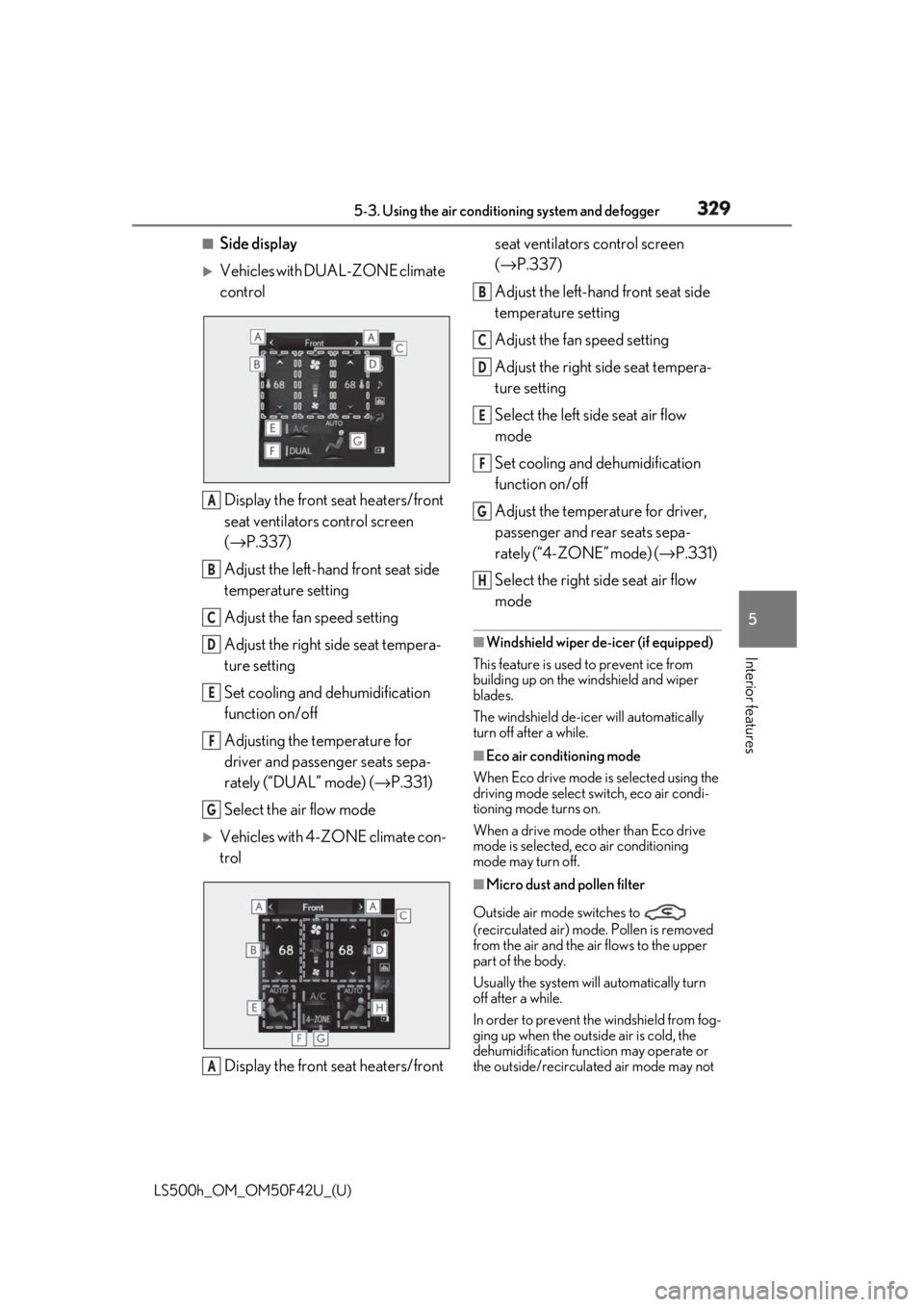
Vehicles with DUAL-ZONE climate
control
Display the front seat heaters/front
seat ventilators control screen
( → P.337)
Adjust the left-hand front seat side
temperature setting
Adjust the fan speed setting
Adjust the right side seat tempera-
ture setting
Set cooling and dehumidification
function on/off
Adjusting the temperature for
driver and passenger seats sepa-
rately (“DUAL” mode) ( → P.331)
Select the air flow mode
Vehicles with 4-ZONE climate con-
trol
Display the front seat heaters/front seat ventilators control screen
( → P.337)
Adjust the left-hand front seat side
temperature setting
Adjust the fan speed setting
Adjust the right side seat tempera-
ture setting
Select the left side seat air flow
mode
Set cooling and dehumidification
function on/off
Adjust the temperature for driver,
passenger and rear seats sepa-
rately (“4-ZONE” mode) ( → P.331)
Select the right side seat air flow
mode ■
Windshield wiper de-icer (if equipped)
This feature is used to prevent ice from
building up on the windshield and wiper
blades.
The windshield de-icer will automatically
turn off after a while. ■
Eco air conditioning mode
When Eco drive mode is selected using the
driving mode select switch, eco air condi-
tioning mode turns on.
When a drive mode other than Eco drive
mode is selected, eco air conditioning
mode may turn off.
■
Micro dust and pollen filter
Outside air mode switches to
(recirculated air) mode. Pollen is removed
from the air and the air flows to the upper
part of the body.
Usually the system will automatically turn
off after a while.
In order to prevent the windshield from fog-
ging up when the outside air is cold, the
dehumidification function may operate or
the outside/recirculated air mode may not A
B
C
D
E
F
G
A B
C
D
E
F
G
H
Page 339 of 528
3395-3. Using the air conditio ning system and defogger
LS500h_OM_OM50F42U_(U) 5
Interior features speed level and leve l indicator (blue)
change as follows:
AUTO → Hi → Mid → Lo → OFF
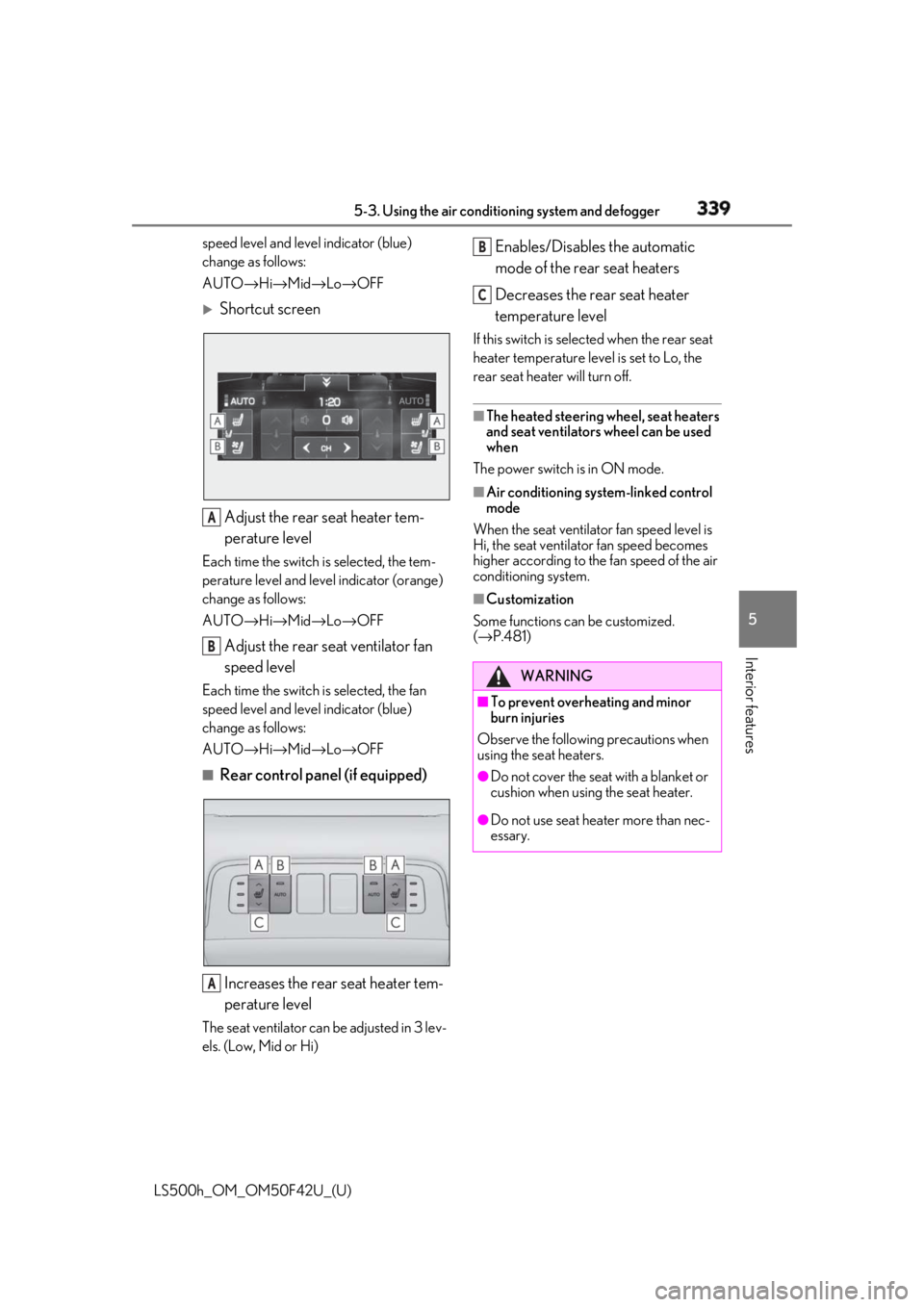
Shortcut screen
Adjust the rear seat heater tem-
perature levelEach time the switch is selected, the tem-
perature level and leve l indicator (orange)
change as follows:
AUTO → Hi → Mid → Lo → OFF
Adjust the rear seat ventilator fan
speed levelEach time the switch is selected, the fan
speed level and leve l indicator (blue)
change as follows:
AUTO → Hi → Mid → Lo → OFF■
Rear control panel (if equipped)
Increases the rear seat heater tem-
perature levelThe seat ventilator can be adjusted in 3 lev-
els. (Low, Mid or Hi) Enables/Disables the automatic
mode of the rear seat heaters
Decreases the rear seat heater
temperature level If this switch is select ed when the rear seat
heater temperature level is set to Lo, the
rear seat heater will turn off. ■
The heated steering wheel, seat heaters
and seat ventilators wheel can be used
when
The power switch is in ON mode. ■
Air conditioning system-linked control
mode
When the seat ventilator fan speed level is
Hi, the seat ventilato r fan speed becomes
higher according to the fan speed of the air
conditioning system. ■
Customization
Some functions can be customized.
( → P.481)A
B
A WARNING■
To prevent overheating and minor
burn injuries
Observe the following precautions when
using the seat heaters. ●
Do not cover the seat with a blanket or
cushion when using the seat heater.
●
Do not use seat heater more than nec-
essary. B
C
Page 351 of 528
3515-6. Using the other interior features
LS500h_OM_OM50F42U_(U) 5
Interior features 5-6.Using the other interior features
The USB charging ports are used to
supply 2.1 A of electricity at 5 V to
external devices.
The USB charging ports are for
charging only. They are not designed
for data transfer or other purposes.
Depending on the external device, it
may not charge properly. Refer to the
manual included with the device
before using a USB charging port. ■
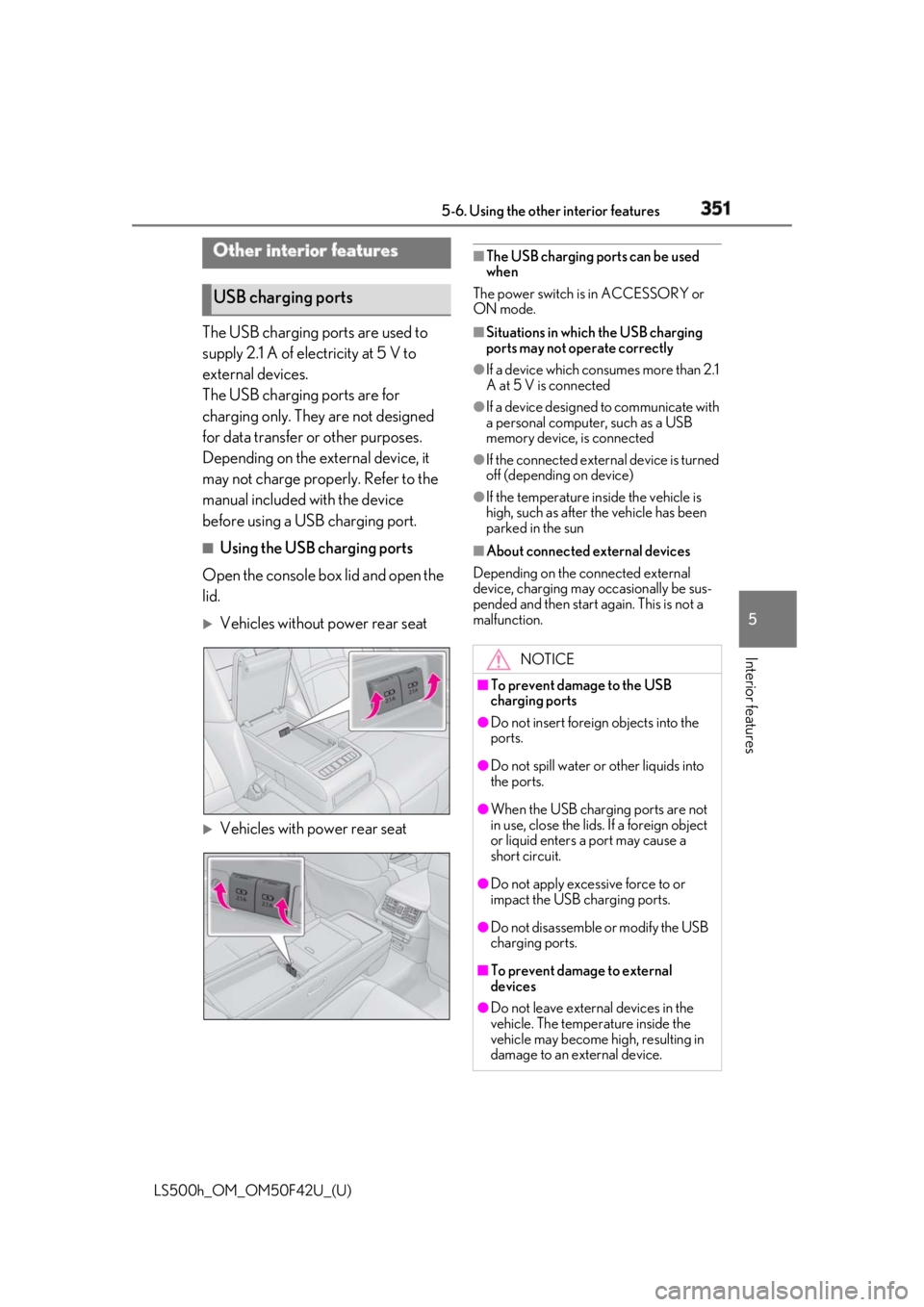
Using the USB charging ports
Open the console box lid and open the
lid.
Vehicles without power rear seat
Vehicles with power rear seat ■
The USB charging ports can be used
when
The power switch is in ACCESSORY or
ON mode. ■
Situations in whic h the USB charging
ports may not operate correctly ●
If a device which consumes more than 2.1
A at 5 V is connected ●
If a device designed to communicate with
a personal computer, such as a USB
memory device, is connected ●
If the connected external device is turned
off (depending on device) ●
If the temperature inside the vehicle is
high, such as after the vehicle has been
parked in the sun ■
About connected external devices
Depending on the connected external
device, charging may occasionally be sus-
pended and then start again. This is not a
malfunction.Other interior features
USB charging ports
NOTICE■
To prevent damage to the USB
charging ports ●
Do not insert foreign objects into the
ports.
●
Do not spill water or other liquids into
the ports.
●
When the USB charging ports are not
in use, close the lids. If a foreign object
or liquid enters a port may cause a
short circuit.
●
Do not apply excessive force to or
impact the USB charging ports.
●
Do not disassemble or modify the USB
charging ports.
■
To prevent damage to external
devices
●
Do not leave external devices in the
vehicle. The temperature inside the
vehicle may become high, resulting in
damage to an external device.
Page 356 of 528
356 5-6. Using the other interior features
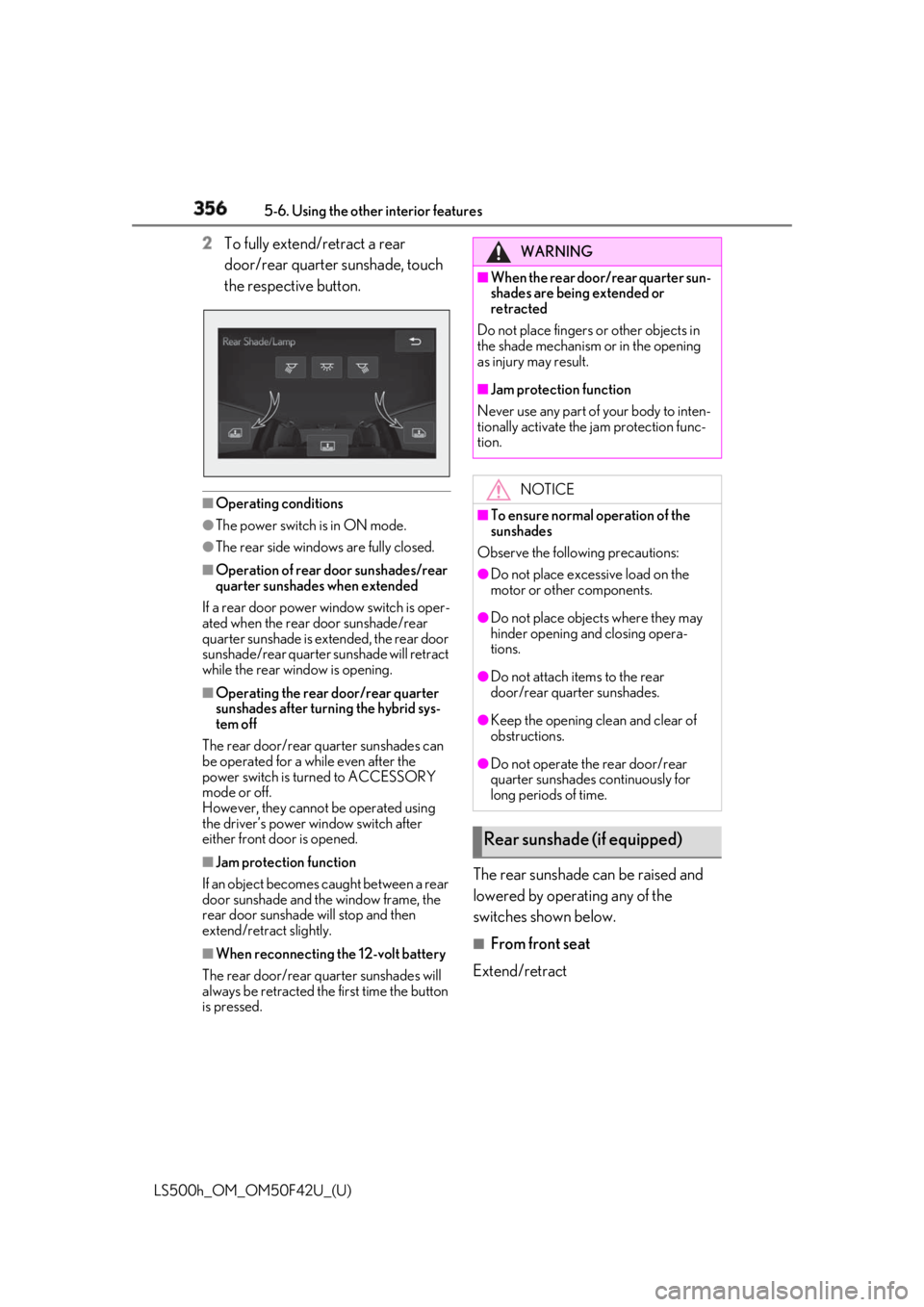
LS500h_OM_OM50F42U_(U) 2 To fully extend/retract a rear
door/rear quarter sunshade, touch
the respective button.
■
Operating conditions●
The power switch is in ON mode.●
The rear side windows are fully closed.■
Operation of rear door sunshades/rear
quarter sunshades when extended
If a rear door power window switch is oper-
ated when the rear door sunshade/rear
quarter sunshade is extended, the rear door
sunshade/rear quarter sunshade will retract
while the rear window is opening. ■
Operating the rear door/rear quarter
sunshades after turning the hybrid sys-
tem off
The rear door/rear quarter sunshades can
be operated for a while even after the
power switch is turned to ACCESSORY
mode or off.
However, they cannot be operated using
the driver’s power window switch after
either front door is opened.
■
Jam protection function
If an object becomes caught between a rear
door sunshade and the window frame, the
rear door sunshade will stop and then
extend/retract slightly.
■
When reconnecting the 12-volt battery
The rear door/rear quarter sunshades will
always be retracted the first time the button
is pressed. The rear sunshade can be raised and
lowered by operating any of the
switches shown below. ■
From front seat
Extend/retract WARNING■
When the rear door/rear quarter sun-
shades are being extended or
retracted
Do not place fingers or other objects in
the shade mechanism or in the opening
as injury may result. ■
Jam protection function
Never use any part of your body to inten-
tionally activate the jam protection func-
tion.
NOTICE■
To ensure normal operation of the
sunshades
Observe the following precautions: ●
Do not place excessive load on the
motor or other components. ●
Do not place objects where they may
hinder opening and closing opera-
tions. ●
Do not attach items to the rear
door/rear quarter sunshades. ●
Keep the opening clean and clear of
obstructions.
●
Do not operate the rear door/rear
quarter sunshades continuously for
long periods of time.
Rear sunshade (if equipped)
Page 366 of 528
366 5-6. Using the other interior features
LS500h_OM_OM50F42U_(U) *
: U.S. Patent No. 7,508,298 B2
Stolen Vehicle Location Helps drivers in the event of vehicle theft.
( →
P.367 )
Emergency Assistance Button
(“SOS”) Connects drivers to response-center sup-
port. ( →
P.367 )
Enhanced Roadside Assistance Provides drivers various on-road assis-
tance. ( →
P.367 )
After you have signed the Telematics
Subscription Service Agreement and
are enrolled, you can begin receiving
services.
A variety of subscription terms is avail-
able for purchase. Contact your Lexus
dealer, call 1-800-25-LEXUS
(1-800-255-3987) in the Unites
States (1-877-539-8777 in Puerto
Rico, 1-800-26-LEXUS in Canada) or
push the “SOS” button in your vehicle
for further subscription details. ■
Safety Connect Serv ices Information●
Phone calls using the vehicles Blue-
tooth ®
technology will not be possible
during Safety Connect.
●
Safety Connect is available beginning Fall
2009 on select Lexus models (in the
contiguous United States only). Contact
with the Safety Connect response center
is dependent upon the telematics device
being in operative co ndition, cellular con-
nection availability, and GPS satellite sig-
nal reception, which ca n limit the ability to
reach the response center or receive
emergency service support. Enrollment
and Telematics Subscription Service Agreement required. A variety of sub-
scription terms is available; charges vary
by subscription term selected and loca-
tion. ●
Automatic Collision Notification, Emer-
gency Assistance and Stolen Vehicle
Location will function in the United
States, including Hawaii and Alaska,
Puerto Rico and in Canada, and
Enhanced Roadside Assistance will func-
tion in the United States, Puerto Rico and
in Canada. ●
Automatic Collision Notification, Emer-
gency Assistance, Stolen Vehicle Loca-
tion and Enhanced Roadside Assistance
will not function in the United States Vir-
gin Islands.
No Safety Connect services will function
outside of the United States in countries
other than Canada.
For vehicles first sold in the USVI, no
Safety Connect services will function in
and outside the United States Virgin
Islands. ●
Safety Connect services are not subject
to section 255 of the Telecommunica-
tions Act and the device is not TTY com-
patible. ■
Languages
The Safety Connect re sponse center will
offer support in mult iple languages. The
Safety Connect system will offer voice
prompts in English, Spanish, and French.
Please indicate your language of choice
when enrolling. ■
When contacting the response center
You may be unable to contact the response
center if the network is busy.
When the power switch is turned to
ON mode, the red indicator light
comes on for 2 seconds then turns off.
Afterward, the green indicator light
comes on, indicating that the service is
active.Subscription
Safety Connect LED light Indi-
cators
Page 370 of 528
370 6-1. Maintenance and care
LS500h_OM_OM50F42U_(U) 6-1.Maintenance and care
Working from top to bottom, liber-
ally apply water to the vehicle body,
wheel wells and underside of the
vehicle to remove any dirt and dust.
Wash the vehicle body using a
sponge or soft cloth, such as a
chamois.
For hard-to-remove marks, use car
wash soap and rinse thoroughly with
water.
Wipe away any water.
Wax the vehicle when the water-
proof coating deteriorates. If water does not bead on a clean surface,
apply wax when the vehicle body is cool.
■
Self-restoring coat
The vehicle body has a self-restoring coat-
ing that is resistant to small surface
scratches caused in a car wash etc.
●
The coating lasts for 5 to 8 years from
when the vehicle is delivered from the
plant.
●
The restoration time differs depending on
the depth of the scratch and outside tem-
perature.
The restoration time may become
shorter when the coating is warmed by
applying warm water.
●
Deep scratches caused by keys, coins,
etc. cannot be restored.
●
Do not use wax that contains abrasives. ■
Automatic car washes ●
Before washing the vehicle:
• Fold the mirrors
• Turn off the power trunk opener and
closer
Start washing from the front of the vehicle.
Extend the mirrors before driving.●
Brushes used in automatic car washes
may scratch the vehicl e surface and harm
your vehicle’s paint. ■
High pressure car washes ●
Do not allow the nozzles of the car wash
to come within close proximity of the win-
dows and the air suspension unit (if
equipped). ●
Before using the car wash, check that the
fuel filler door on your vehicle is closed
properly. ■
When using a car wash
If the door handle becomes wet while the
electronic key is within the effective range,
the door may lock and unlock repeatedly. In
that case, follow the following correction
procedures to wash the vehicle: ●
Place the key in a position 6 ft. (2 m) or
more separate from the vehicle while the
vehicle is being wash ed. (Take care to
ensure that the key is not stolen.) ●
Set the electronic key to battery-saving
mode to disable the smart access system
with push-button start. ( → P.120)■
Aluminum wheels ●
Remove any dirt immediately by using a
neutral detergent. ●
Wash detergent off with water immedi-
ately after use.
●
To protect the paint from damage, make
sure to observe the following precau-
tions.
• Do not use acidic, alkaline or abrasive
detergent
• Do not use hard brushes
• Do not use detergent on the wheels when
they are hot, such as after driving or park-
ing in hot weatherCleaning and protecting the
vehicle exterior Perform cleaning in a manner
appropriate to each component
and its material.
Cleaning instructions
Page 384 of 528
384 6-3. Do-it-yourself maintenance
LS500h_OM_OM50F42U_(U) Tire inflation pres-
sure ( → P.408) • Tire pressure gauge
•Compressed air
source
Washer fluid
( → P.392) • Water or washer
fluid containing anti-
freeze (for winter
use)
• Funnel (used only for
adding water or
washer fluid)
WARNING
The engine compartment contains many
mechanisms and fluids that may move
suddenly, become hot, or become elec-
trically energized. To avoid death or seri-
ous injury, observe the following
precautions. ■
When working on the engine com-
partment●
Make sure that the “ACCESSORY” or
“IGNITION ON” on the multi-infor-
mation display and the “READY” indi-
cator are both off.●
Keep hands, clothi ng and tools away
from the moving fan and engine drive
belt.
●
Be careful not to touch the engine,
power control unit, radiator, exhaust
manifold, etc. right after driving as they
may be hot. Oil and other fluids may
also be hot.
●
Do not leave anything that may burn
easily, such as paper and rags, in the
engine compartment.
●
Do not smoke, cause sparks or expose
an open flame to fuel. Fuel fumes are
flammable. Items Parts and tools ■
When working near the electric cool-
ing fan or radiator grille
Be sure the power switch is off.
With the power switch in ON mode, the
electric cooling fan may automatically
start to run if the air conditioning is on
and/or the coolant temperature is high.
( → P.391) ■
Safety glasses
Wear safety glasses to prevent flying or
falling material, fluid spray, etc. from get-
ting in your eyes.
NOTICE■
If you remove the air cleaner filter
Driving with the air cleaner filter
removed may cause excessive engine
wear due to dirt in the air.
Page 393 of 528
3936-3. Do-it-yourself maintenance
LS500h_OM_OM50F42U_(U) 6
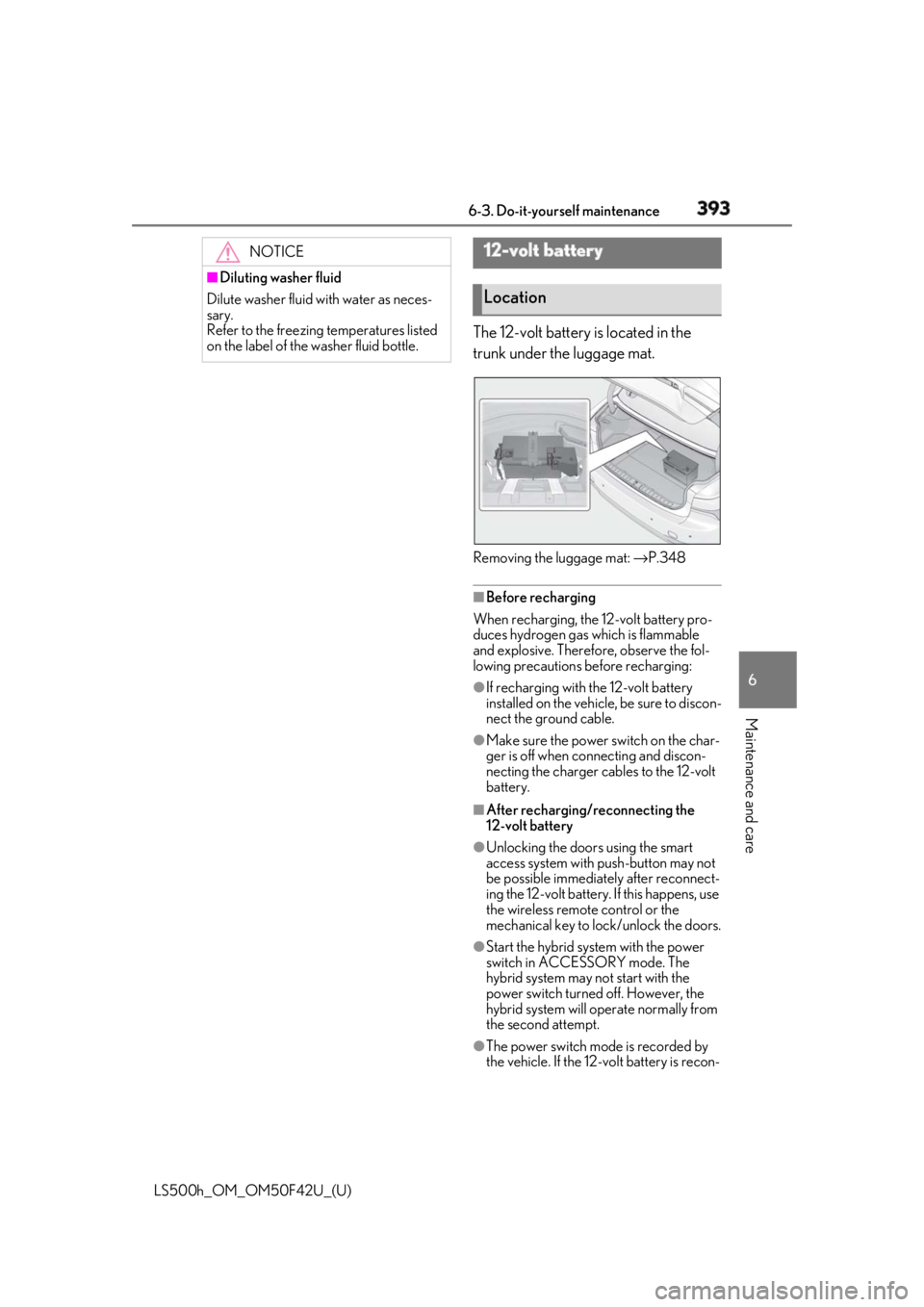
Maintenance and care The 12-volt battery is located in the
trunk under the luggage mat.
Removing the luggage mat: → P.348
■
Before recharging
When recharging, the 12-volt battery pro-
duces hydrogen gas which is flammable
and explosive. Therefore, observe the fol-
lowing precautions before recharging: ●
If recharging with the 12-volt battery
installed on the vehicle, be sure to discon-
nect the ground cable. ●
Make sure the power switch on the char-
ger is off when connecting and discon-
necting the charger cables to the 12-volt
battery. ■
After recharging/reconnecting the
12-volt battery ●
Unlocking the doors using the smart
access system with push-button may not
be possible immediately after reconnect-
ing the 12-volt battery. If this happens, use
the wireless remote control or the
mechanical key to lo ck/unlock the doors.
●
Start the hybrid system with the power
switch in ACCESSORY mode. The
hybrid system may not start with the
power switch turned off. However, the
hybrid system will operate normally from
the second attempt.
●
The power switch mode is recorded by
the vehicle. If the 12-volt battery is recon-NOTICE■
Diluting washer fluid
Dilute washer fluid with water as neces-
sary.
Refer to the freezing temperatures listed
on the label of the washer fluid bottle.
12-volt battery
Location