light LEXUS LS500H 2018 Repair Manual
[x] Cancel search | Manufacturer: LEXUS, Model Year: 2018, Model line: LS500H, Model: LEXUS LS500H 2018Pages: 528, PDF Size: 10.8 MB
Page 157 of 528
157
LS500h_OM_OM50F42U_(U) 4 4
Driving Driving .
4-1. Before driving
Driving the vehicle ..................... 158
Cargo and luggage ................... 164
Vehicle load limits ...................... 166
Trailer towing ............................... 166
Dinghy towing ............................. 167
4-2. Driving procedures
Power (ignition) switch ............ 168
EV drive mode ............................ 172
Hybrid transmission .................. 174
Turn signal lever.......................... 180
Parking brake ............................... 181
Brake Hold.................................... 183
4-3. Operating the lights and wipers
Headlight switch ......................... 185
AHB (Automatic High Beam)
......................................................... 188
Windshield wipers and washer
......................................................... 190
4-4. Refueling
Opening the fuel tank cap...... 194
4-5. Using the driving support sys-
tems
Lexus Safety System+A........... 196
Lexus Safety System+ ............. 203
PCS (Pre-Collision System) (vehi-
cles with Lexus Safety Sys-
tem+A) ....................................... 209
PCS (Pre-Collision System) (vehi-
cles with Lexus Safety System+)
........................................................ 220 FCTA (Front Cross Traffic Alert)
........................................................ 227
LTA (Lane Tracing Assist) .... 230
LKA (Lane-Keeping Assist)
....................................................... 240
RSA (Road Sign Assist).......... 247
Dynamic radar cruise control with
full-speed range...................... 250
BSM (Blind Spot Monitor) .... 260
PKSA (Parking Support Alert)
....................................................... 265
Intuitive parking assist ............. 266
RCTA (Rear Cross Traffic Alert)
function....................................... 273
RCD (Rear Camera Detection)
function....................................... 277
PKSB (Parking Support Brake)
....................................................... 280
Parking Support Brake function
(static objects) ......................... 286
Parking Support Brake function
(rear-crossing vehicles) ....... 291
Parking Support Brake function
(rear pedestrians) .................. 295
Driving mode select switch .. 298
Electronically modulated air sus-
pension ....................................... 299
Driving assist systems.............. 302
4-6. Driving tips
Hybrid vehicle driving tips .... 307
Winter driving tips .................... 309
Page 160 of 528
160 4-1. Before driving
LS500h_OM_OM50F42U_(U) WARNING
• Make sure to keep a correct driving
posture even when moving the vehicle
only slightly. This allows you to depress
the brake and accelerator pedals
properly.
• Depress the brake pedal using your
right foot. Depressing the brake pedal
using your left foot may delay
response in an emergency, resulting in
an accident.●
The driver should pay extra attention
to pedestrians when the vehicle is
powered only by the electric motor
(traction motor). As there is no engine
noise, the pedestrians may misjudge
the vehicle’s movement. Even with the
vehicle proximity notification system
activate, drive with care as pedestrians
in the vicinity may still not notice the
vehicle if the surrounding area is noisy.●
Do not drive the vehicle over or stop
the vehicle near flammable materials.
The exhaust system and exhaust gases
can be extremely hot. These hot parts
may cause a fire if there is any flamma-
ble material nearby.●
During normal driving, do not turn off
the hybrid system. Turning the hybrid
system off while driving will not cause
loss of steering or braking control,
however, power assist to the steering
will be lost. This will make it more diffi-
cult to steer smoothly, so you should
pull over and stop the vehicle as soon
as it is safe to do so.
In the event of an emergency, such as if
it becomes impossible to stop the vehi-
cle in the normal way: → P.420
●
Use engine braking (downshift) to
maintain a safe speed when driving
down a steep hill.
Using the brakes continuously may
cause the brakes to overheat and lose
effectiveness. ( → P.174) ●
Do not adjust the positions of the
steering wheel, the seat, or the inside
or outside rear view mirrors while driv-
ing.
Doing so may result in a loss of vehicle
control. ●
Always check that all passengers’
arms, heads or other parts of their
body are not outside the vehicle. ●
Do not drive in excess of the speed
limit. Even if the legal speed limit per-
mits it, do not drive over 85 mph (140
km/h) unless your vehicle has
high-speed capability tires. Driving
over 85 mph (140 km /h) may result in
tire failure, loss of control and possible
injury. Be sure to consult a tire dealer
to determine whether the tires on your
vehicle are high-speed capability tires
or not before driving at such speeds. ■
When driving on slippery road sur-
faces ●
Sudden braking, acceleration and
steering may cause tire slippage and
reduce your ability to control the vehi-
cle. ●
Sudden acceleration, engine braking
due to shifting, or changes in engine
speed could cause the vehicle to skid.
●
After driving through a puddle, lightly
depress the brake pedal to make sure
that the brakes are functioning prop-
erly. Wet brake pads may prevent the
brakes from functioning properly. If the
brakes on only one side are wet and
not functioning properly, steering con-
trol may be affected.
■
When shifting the shift position
●
Do not let the vehicle roll backward
while a forward driving position is
selected, or roll forw ard while the shift
position is in R.
Doing so may result in an accident or
damage to the vehicle.
Page 162 of 528
162 4-1. Before driving
LS500h_OM_OM50F42U_(U) WARNING■
When the vehicle is parked●
Do not leave glasses, cigarette lighters,
spray cans, or soft drink cans in the
vehicle when it is in the sun.
Doing so may result in the following:
• Gas may leak from a cigarette lighter
or spray can, and may lead to a fire.
• The temperature inside the vehicle
may cause the plastic lenses and plas-
tic material of glasses to deform or
crack.
• Soft drink cans may fracture, causing
the contents to spray over the interior
of the vehicle, and may also cause a
short circuit in the vehicle’s electrical
components.●
Do not leave cigarette lighters in the
vehicle. If a cigarette lighter is in a
place such as the glove box or on the
floor, it may be lit accidentally when
luggage is loaded or the seat is
adjusted, causing a fire.●
Do not attach adhesive discs to the
windshield or windows. Do not place
containers such as air fresheners on
the instrument pane l or dashboard.
Adhesive discs or containers may act
as lenses, causing a fire in the vehicle.
●
Do not leave a door or window open if
the curved glass is coated with a met-
allized film such as a silver-colored
one. Reflected sunlight may cause the
glass to act as a lens, causing a fire.
●
Always apply the parking brake, shift
the shift position to P, stop the hybrid
system and lock the vehicle.
Do not leave the vehicle unattended
while the “READY” indicator is illumi-
nated.
●
Do not touch the exhaust pipes while
the “READY” indicator is illuminated
or immediately after turning the hybrid
system off.
Doing so may cause burns. ■
When taking a nap in the vehicle
Always turn the hybrid system off. Other-
wise, if you accident ally move the shift
lever or depress the accelerator pedal,
this could cause an accident or fire due
to hybrid system overheating. Addition-
ally, if the vehicle is parked in a poorly
ventilated area, exhaust gases may col-
lect and enter the vehicle, leading to
death or a serious health hazard. ■
When braking ●
When the brakes are wet, drive more
cautiously.
Braking distance in creases when the
brakes are wet, and this may cause one
side of the vehicle to brake differently
than the other side. Also, the parking
brake may not securely hold the vehi-
cle. ●
If the electronically controlled brake
system does not operate, do not follow
other vehicles closely and avoid hills or
sharp turns that require braking.
In this case, braking is still possible, but
the brake pedal should be depressed
more firmly than usual. Also, the brak-
ing distance will in crease. Have your
brakes fixed immediately. ●
The brake system consists of 2 or more
individual hydraulic systems; if one of
the systems fails, the other(s) will still
operate. In this case, the brake pedal
should be depressed more firmly than
usual and the braking distance will
increase. Have your brakes fixed
immediately.
■
If the vehicle becomes stuck
Do not spin the wheels excessively when
a driven wheel is up in the air, or the vehi-
cle is stuck in sand, mud, etc. This may
damage the driveline components or
propel the vehicle forward or backward,
causing an accident.
Page 170 of 528
170 4-2. Driving procedures
LS500h_OM_OM50F42U_(U) 1 Stop the vehicle completely.
2 If the parking brake is in manual
mode, set the parking brake.
( → P.181)
3 Shift the shift position to P. ( → P.176)Check that the shift position indicator
shows P. ( → P.176)
4 Press the power switch.The hybrid system will stop, and the meter
display will be extinguished (the shift posi-
tion indicator will be extinguished a few
seconds after the meter display).
5 Release the brake pedal and check
that “ACCESSORY” or “IGNI-
TION ON” is not shown on the
meter. ■
Automatic P position selection function
→ P.177 Modes can be changed by pressing
the power switch with the brake pedal
released. (The mode changes each
time the switch is pressed.)NOTICE■
Symptoms indicating a malfunction
with the power switch
If the power switch seems to be operat-
ing somewhat differently than usual, such
as the switch sticking slightly, there may
be a malfunction. Contact your Lexus
dealer immediately.
Stopping the hybrid system WARNING■
Stopping the hybrid system in an
emergency ●
If you want to stop the hybrid system in
an emergency while driving the vehi-
cle, press and hold the power switch
for more than 2 seconds, or press it
briefly 3 times or more in succession.
( → P.420)
However, do not touch the power
switch while driving except in an emer-
gency. Turning the hybrid system off
while driving will not cause loss of
steering or braking control, however,
power assist to the st eering will be lost.
This will make it more difficult to steer
smoothly, so you should pull over and
stop the vehicle as soon as it is safe to
do so. ●
If the power switch is operated while
the vehicle is running, a warning mes-
sage will be shown on the multi-infor-
mation display and a buzzer sounds. ●
When restarting the hybrid system
after an emergency shutdown, press
the power switch.
Changing power switch modes
Page 174 of 528
174 4-2. Driving procedures
LS500h_OM_OM50F42U_(U) *1
: To improve fuel efficiency and reduce
noise, set the shift position in D for nor-
mal driving. You can choose gear range
suitable for your driving situation by
operating the paddle shift switches.*2
: Any gear range can be fixed when driv-
ing in M mode.
■
For the shift positions●
When the power switch is off or in
ACCESSORY mode, the shift position
cannot be changed.
●
When the power switch is in ON mode
(the hybrid system is not operating), the
shift position can only be changed to N.
●
When the “READY” indicator is on, the
shift position can be changed from P to D,
N or R.
●
When the “READY” indicator is flashing,
the shift position cannot be changed from
P to another position even if the shift lever
is operated. Wait until the “READY” indi-
cator changes from a flashing to a solid light, and then operate the shift lever
again. ●
The shift position can only be changed to
M directly from D.
In addition, if an attempt is made to change
the shift position by mo ving the shift lever or
by pressing the P position switch in any of
the following situations, the buzzer will
sound and the shifting operation will be dis-
abled or the shift posi tion will automatically
change to N. When this happens, select an
appropriate shift position. ●
Situations where the shifting operation
will be disabled:
• When an attempt is made to change the
shift position from P to another position
by moving the shift lever without depress-
ing the brake pedal.
• When an attempt is made to change the
shift position from P or N to M by moving
the shift lever.
• When the P position switch is pressed
while the vehicle is running. *1
●
Situations where the shift position will
automatically change to N:
• When an attempt is made to select the R
position by moving the shift lever when
the vehicle is moving forward. *2
• When an attempt is made to select the D
position by moving the shift lever when
the vehicle is moving in reverse. *3
• When the shift position is changed from
R to M ●
If N is selected while driving at a certain
speed, even if the shift lever is not held in
the N position, the shift position changes
to N. In this situation, the buzzer sounds
and a confirmation message is displayed
on the multi-information display to inform
the driver that the shift position has
changed to N. *1
: Shift position may be changed to P
when driving at extremely low speeds. *2
: Shift position may be changed to R
when driving at low speeds. *3
: Shift position may be changed to D
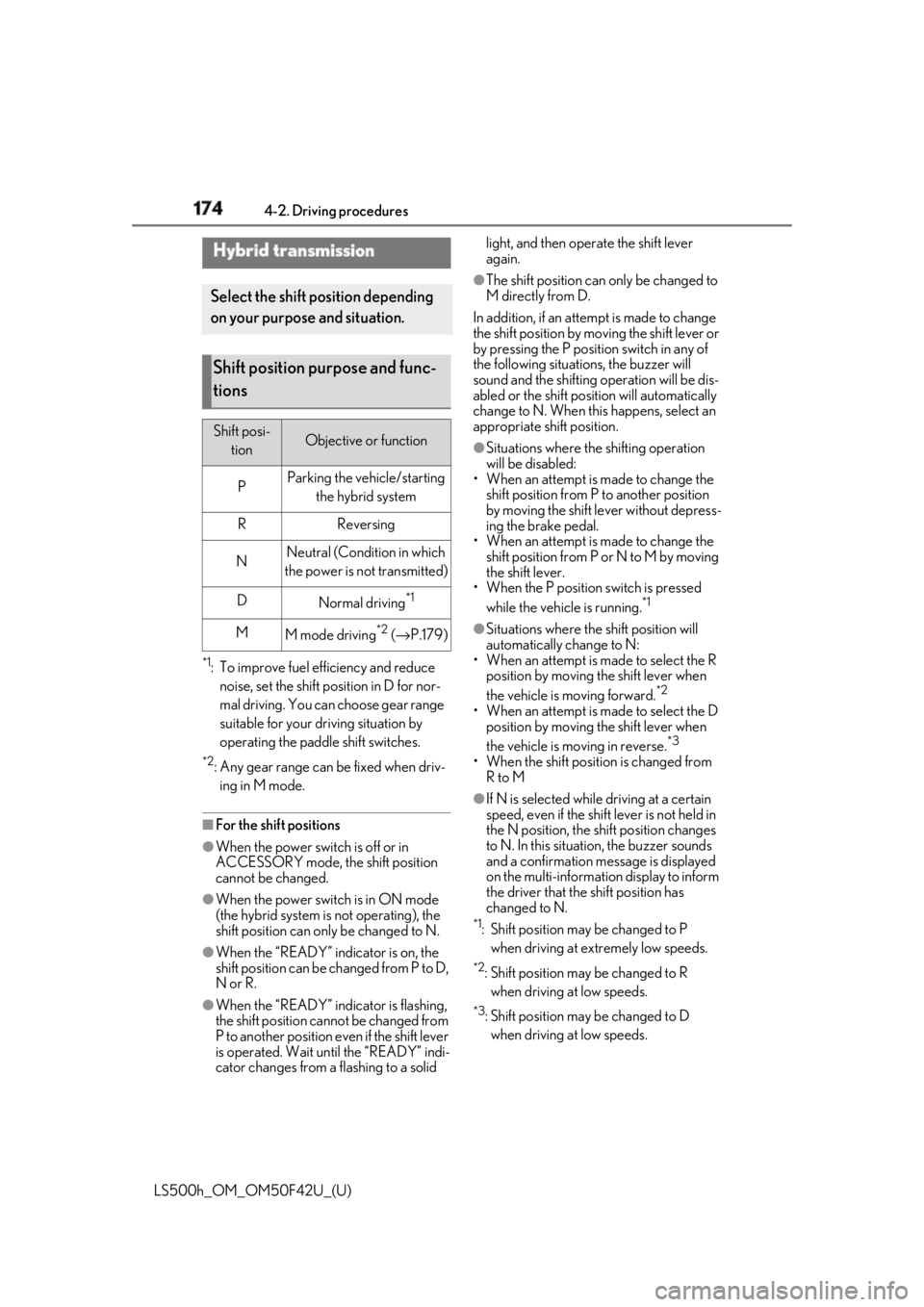
when driving at low speeds.Hybrid transmission Select the shift position depending
on your purpose and situation.
Shift position purpose and func-
tions Shift posi-
tion Objective or function
P Parking the vehicle/starting
the hybrid system
R Reversing
N Neutral (Condition in which
the power is not transmitted)
D
Normal driving *1
M
M mode driving *2
( → P.179)
Page 176 of 528
176 4-2. Driving procedures
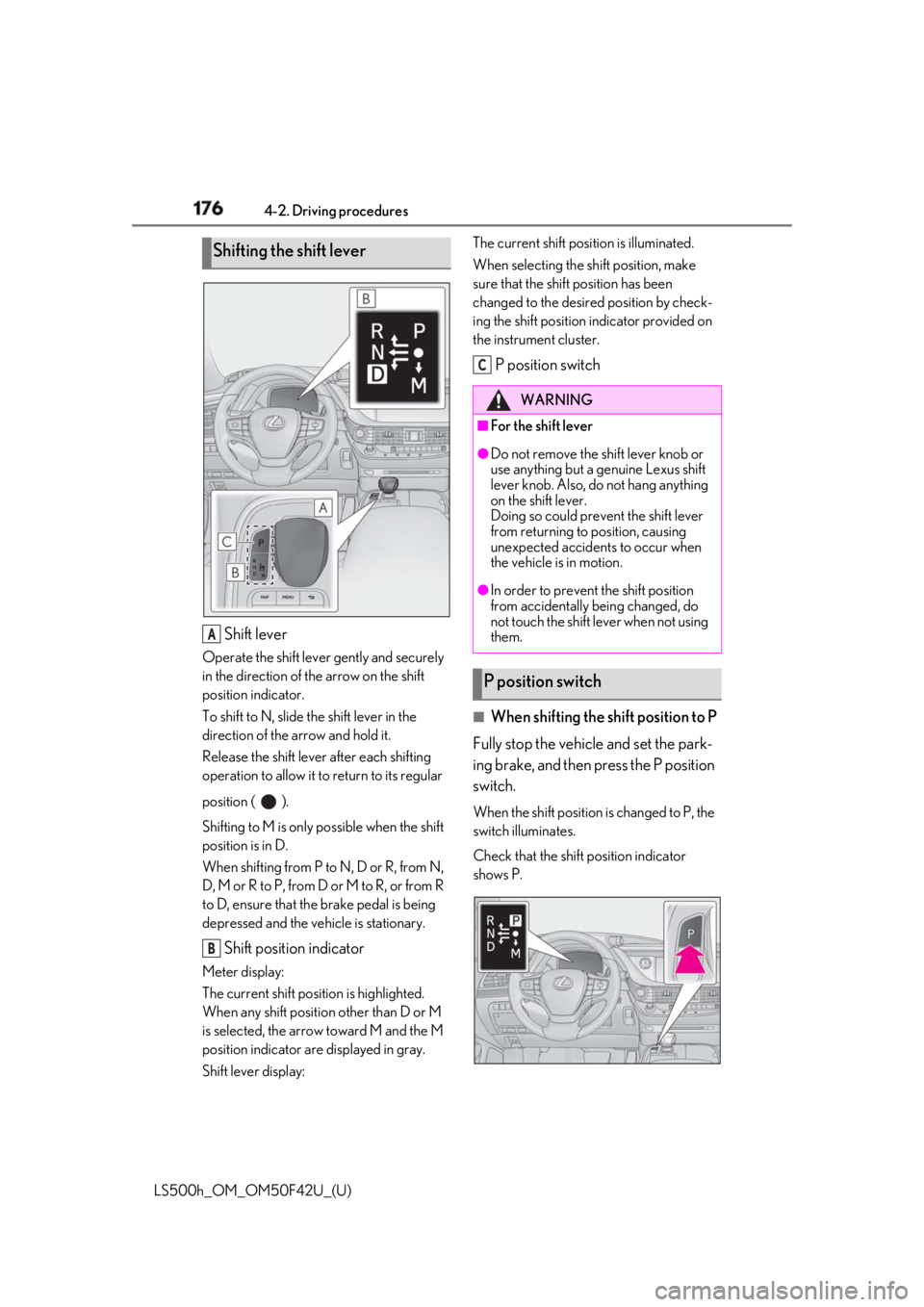
LS500h_OM_OM50F42U_(U) Shift leverOperate the shift lever gently and securely
in the direction of the arrow on the shift
position indicator.
To shift to N, slide the shift lever in the
direction of the arrow and hold it.
Release the shift lever after each shifting
operation to allow it to return to its regular
position ( ).
Shifting to M is only possible when the shift
position is in D.
When shifting from P to N, D or R, from N,
D, M or R to P, from D or M to R, or from R
to D, ensure that the brake pedal is being
depressed and the vehicle is stationary.
Shift position indicatorMeter display:
The current shift position is highlighted.
When any shift position other than D or M
is selected, the arrow toward M and the M
position indicator are displayed in gray.
Shift lever display: The current shift posi tion is illuminated.
When selecting the sh ift position, make
sure that the shift position has been
changed to the desired position by check-
ing the shift position indicator provided on
the instrument cluster.
P position switch
■
When shifting the shift position to P
Fully stop the vehicle and set the park-
ing brake, and then press the P position
switch. When the shift position is changed to P, the
switch illuminates.
Check that the shift position indicator
shows P.Shifting the shift lever
A
B WARNING■
For the shift lever ●
Do not remove the shift lever knob or
use anything but a genuine Lexus shift
lever knob. Also, do not hang anything
on the shift lever.
Doing so could prevent the shift lever
from returning to position, causing
unexpected accidents to occur when
the vehicle is in motion. ●
In order to prevent the shift position
from accidentally being changed, do
not touch the shift lever when not using
them.
P position switch C
Page 180 of 528
180 4-2. Driving procedures
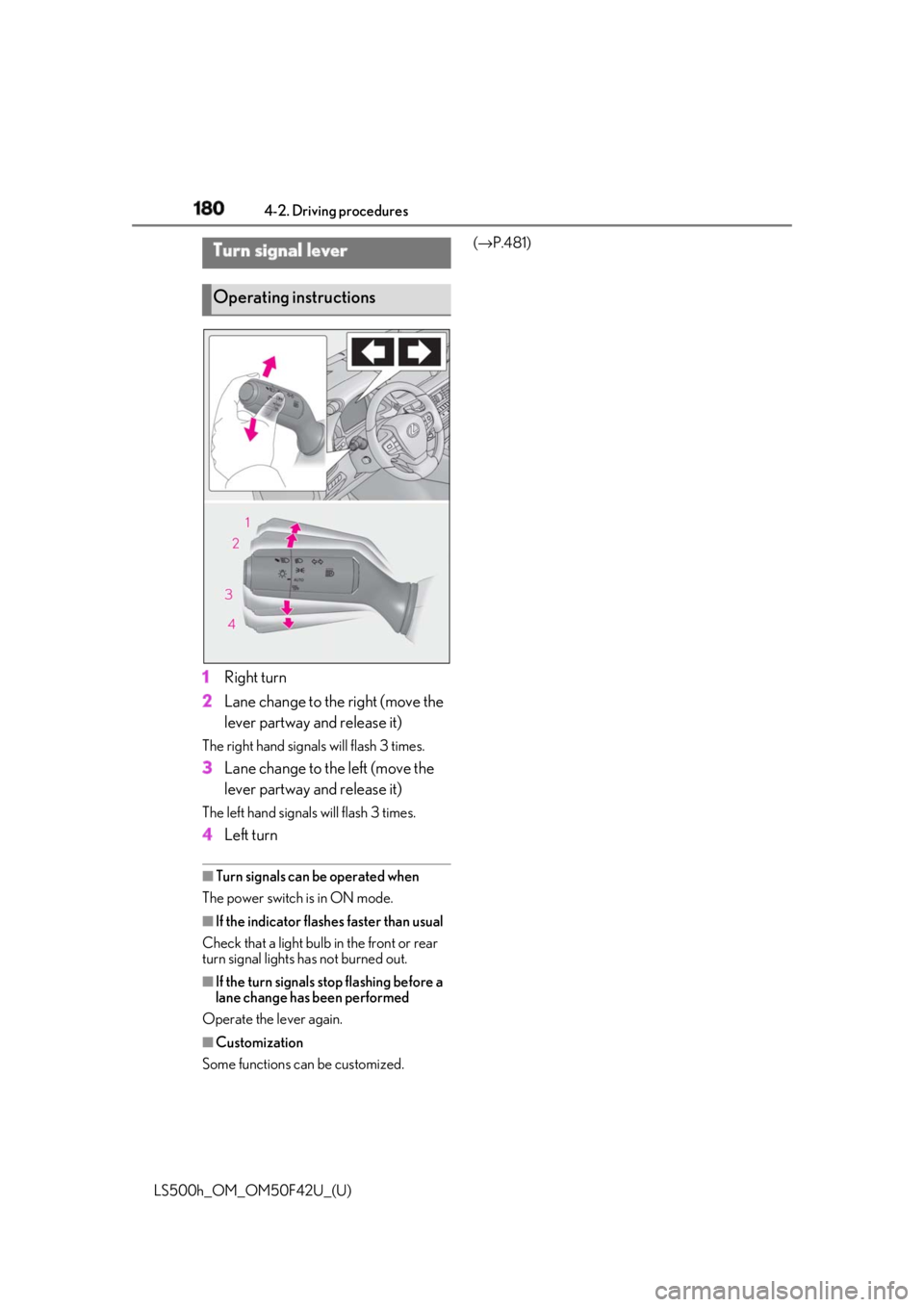
LS500h_OM_OM50F42U_(U) 1 Right turn
2 Lane change to the right (move the
lever partway and release it)The right hand signals will flash 3 times.
3 Lane change to the left (move the
lever partway and release it)The left hand signals will flash 3 times.
4 Left turn ■
Turn signals can be operated when
The power switch is in ON mode.
■
If the indicator flashes faster than usual
Check that a light bulb in the front or rear
turn signal lights has not burned out.
■
If the turn signals stop flashing before a
lane change has been performed
Operate the lever again.
■
Customization
Some functions can be customized. ( → P.481)
Turn signal lever
Operating instructions
Page 181 of 528
1814-2. Driving procedures
LS500h_OM_OM50F42U_(U) 4
Driving ■
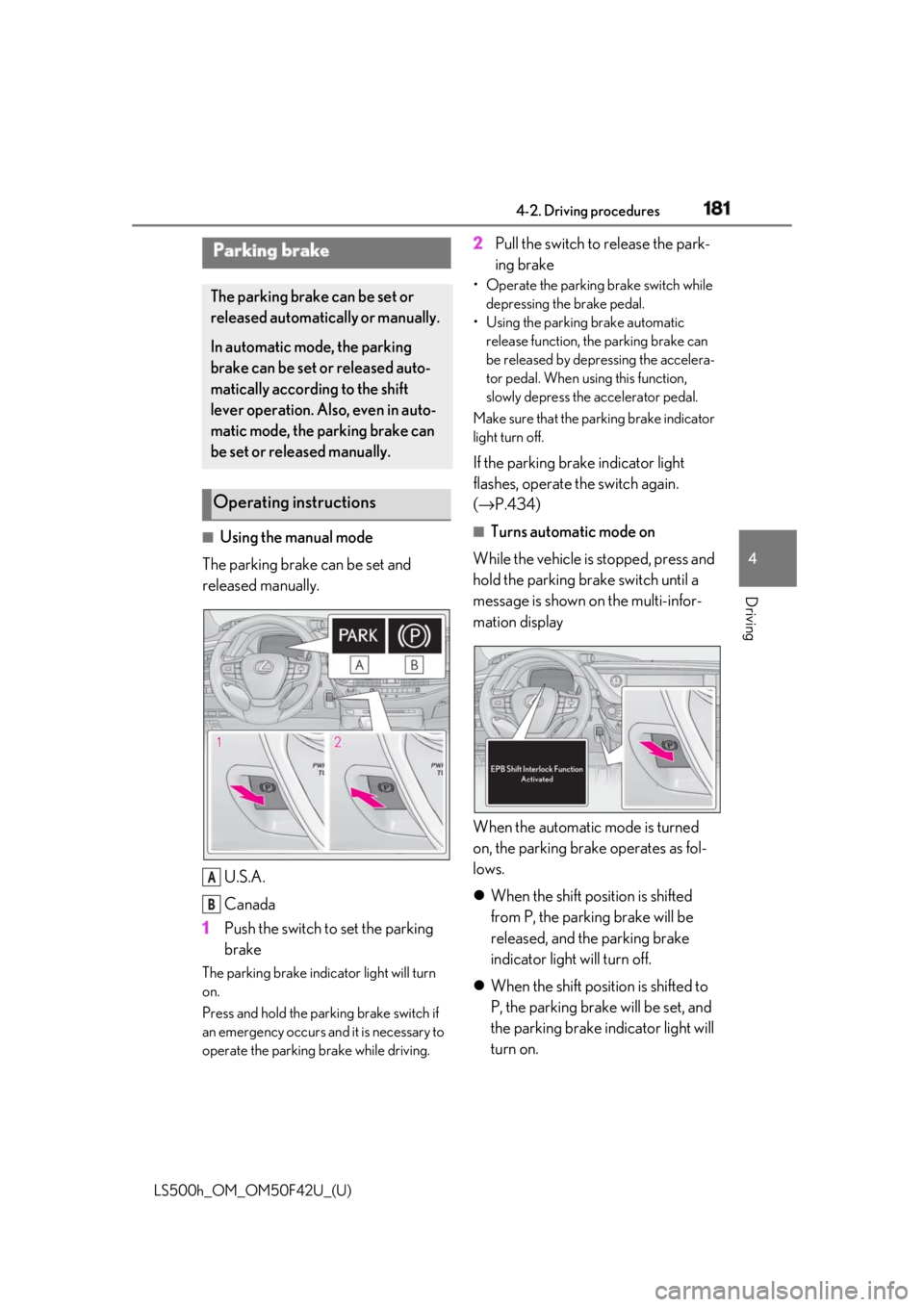
Using the manual mode
The parking brake can be set and
released manually.
U.S.A.
Canada
1 Push the switch to set the parking
brakeThe parking brake indicator light will turn
on.
Press and hold the parking brake switch if
an emergency occurs and it is necessary to
operate the parking brake while driving. 2 Pull the switch to release the park-
ing brake • Operate the parking brake switch while
depressing the brake pedal.
• Using the parking brake automatic
release function, the parking brake can
be released by depressing the accelera-
tor pedal. When using this function,
slowly depress the accelerator pedal.
Make sure that the pa rking brake indicator
light turn off.
If the parking brake indicator light
flashes, operate the switch again.
( → P.434) ■
Turns automatic mode on
While the vehicle is stopped, press and
hold the parking brake switch until a
message is shown on the multi-infor-
mation display
When the automatic mode is turned
on, the parking brake operates as fol-
lows.
When the shift position is shifted
from P, the parking brake will be
released, and the parking brake
indicator light will turn off.
When the shift position is shifted to
P, the parking brake will be set, and
the parking brake indicator light will
turn on.Parking brake The parking brake can be set or
released automatically or manually.
In automatic mode, the parking
brake can be set or released auto-
matically according to the shift
lever operation. Also, even in auto-
matic mode, the parking brake can
be set or released manually.
Operating instructions
A
B
Page 182 of 528
182 4-2. Driving procedures
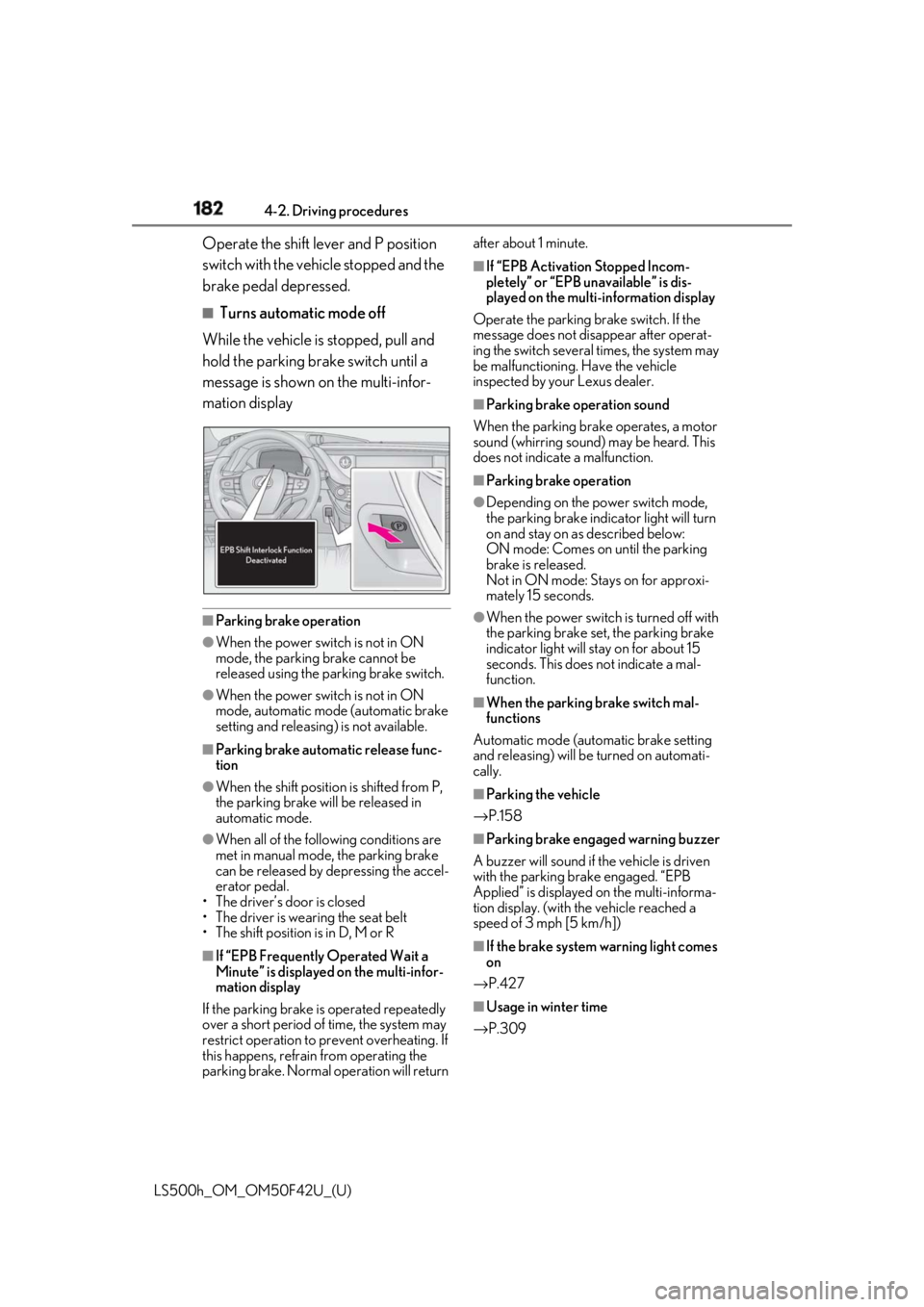
LS500h_OM_OM50F42U_(U) Operate the shift lever and P position
switch with the vehicle stopped and the
brake pedal depressed. ■
Turns automatic mode off
While the vehicle is stopped, pull and
hold the parking brake switch until a
message is shown on the multi-infor-
mation display
■
Parking brake operation●
When the power switch is not in ON
mode, the parking brake cannot be
released using the parking brake switch.●
When the power switch is not in ON
mode, automatic mode (automatic brake
setting and releasing) is not available. ■
Parking brake automatic release func-
tion●
When the shift position is shifted from P,
the parking brake will be released in
automatic mode.●
When all of the foll owing conditions are
met in manual mode, the parking brake
can be released by depressing the accel-
erator pedal.
• The driver’s door is closed
• The driver is wearing the seat belt
• The shift position is in D, M or R
■
If “EPB Frequently Operated Wait a
Minute” is displayed on the multi-infor-
mation display
If the parking brake is operated repeatedly
over a short period of time, the system may
restrict operation to prevent overheating. If
this happens, refrain from operating the
parking brake. Normal operation will return after about 1 minute. ■
If “EPB Activation Stopped Incom-
pletely” or “EPB unavailable” is dis-
played on the multi-information display
Operate the parking brake switch. If the
message does not disappear after operat-
ing the switch several times, the system may
be malfunctioning. Have the vehicle
inspected by your Lexus dealer. ■
Parking brake operation sound
When the parking brake operates, a motor
sound (whirring sound) may be heard. This
does not indicate a malfunction. ■
Parking brake operation ●
Depending on the power switch mode,
the parking brake indicator light will turn
on and stay on as described below:
ON mode: Comes on until the parking
brake is released.
Not in ON mode: Stays on for approxi-
mately 15 seconds. ●
When the power switch is turned off with
the parking brake set, the parking brake
indicator light will stay on for about 15
seconds. This does not indicate a mal-
function. ■
When the parking brake switch mal-
functions
Automatic mode (automatic brake setting
and releasing) will be turned on automati-
cally. ■
Parking the vehicle
→ P.158 ■
Parking brake engaged warning buzzer
A buzzer will sound if the vehicle is driven
with the parking brake engaged. “EPB
Applied” is displayed on the multi-informa-
tion display. (with the vehicle reached a
speed of 3 mph [5 km/h])
■
If the brake system warning light comes
on
→ P.427
■
Usage in winter time
→ P.309
Page 183 of 528
1834-2. Driving procedures
LS500h_OM_OM50F42U_(U) 4
Driving
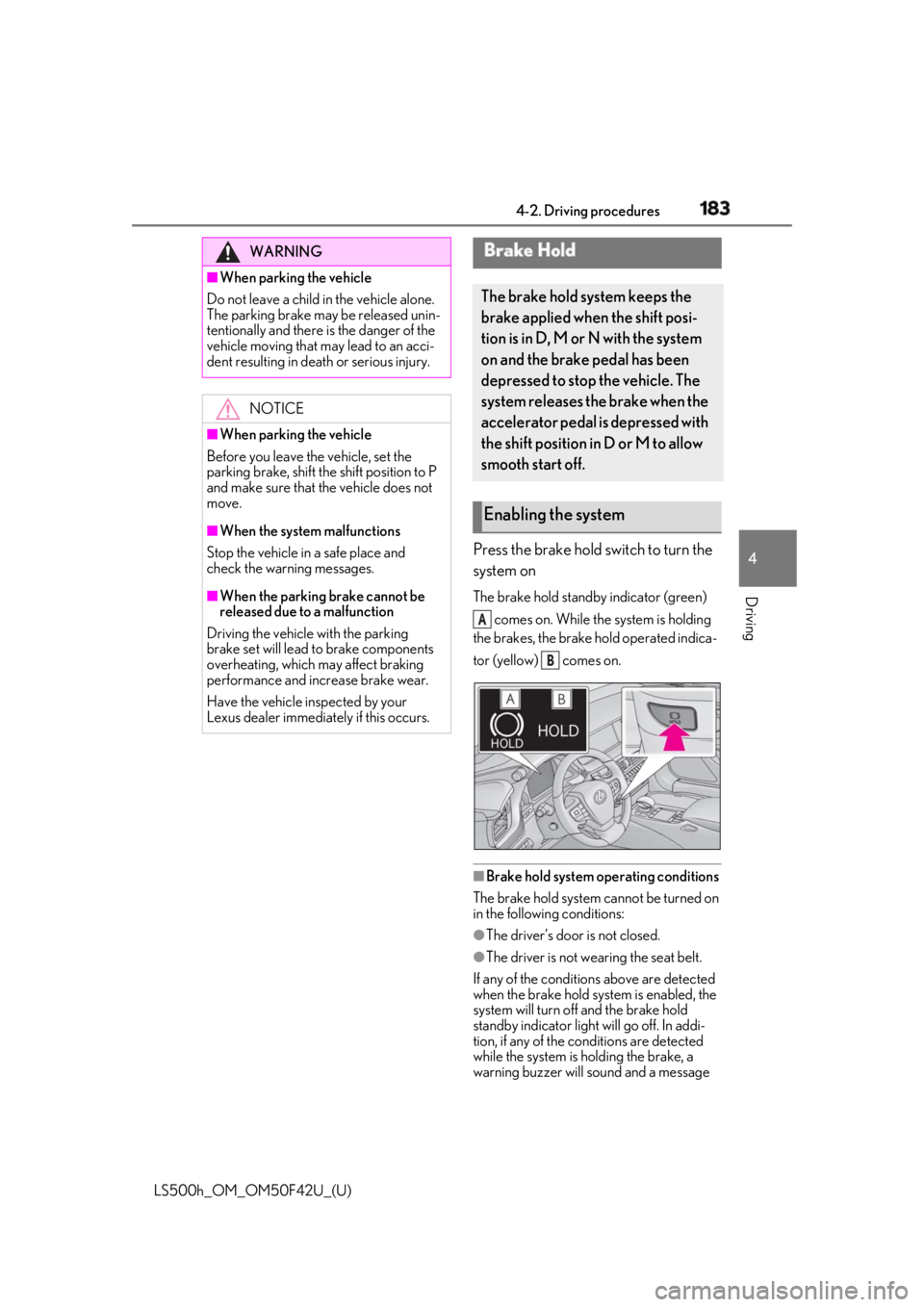
Press the brake hold switch to turn the
system on The brake hold standby indicator (green)
comes on. While the system is holding
the brakes, the brake hold operated indica-
tor (yellow) comes on.
■
Brake hold system operating conditions
The brake hold system cannot be turned on
in the following conditions:
●
The driver’s door is not closed.
●
The driver is not wearing the seat belt.
If any of the conditions above are detected
when the brake hold system is enabled, the
system will turn off and the brake hold
standby indicator light will go off. In addi-
tion, if any of the co nditions are detected
while the system is holding the brake, a
warning buzzer will sound and a message WARNING■
When parking the vehicle
Do not leave a child in the vehicle alone.
The parking brake may be released unin-
tentionally and there is the danger of the
vehicle moving that may lead to an acci-
dent resulting in death or serious injury.
NOTICE■
When parking the vehicle
Before you leave the vehicle, set the
parking brake, shift the shift position to P
and make sure that the vehicle does not
move. ■
When the system malfunctions
Stop the vehicle in a safe place and
check the warning messages. ■
When the parking brake cannot be
released due to a malfunction
Driving the vehicle with the parking
brake set will lead to brake components
overheating, which may affect braking
performance and increase brake wear.
Have the vehicle inspected by your
Lexus dealer immediately if this occurs. Brake Hold The brake hold system keeps the
brake applied when the shift posi-
tion is in D, M or N with the system
on and the brake pedal has been
depressed to stop the vehicle. The
system releases the brake when the
accelerator pedal is depressed with
the shift position in D or M to allow
smooth start off.
Enabling the system A
B