light LEXUS LS500H 2018 Manual Online
[x] Cancel search | Manufacturer: LEXUS, Model Year: 2018, Model line: LS500H, Model: LEXUS LS500H 2018Pages: 528, PDF Size: 10.8 MB
Page 195 of 528
1954-4. Refueling
LS500h_OM_OM50F42U_(U) 4
Driving
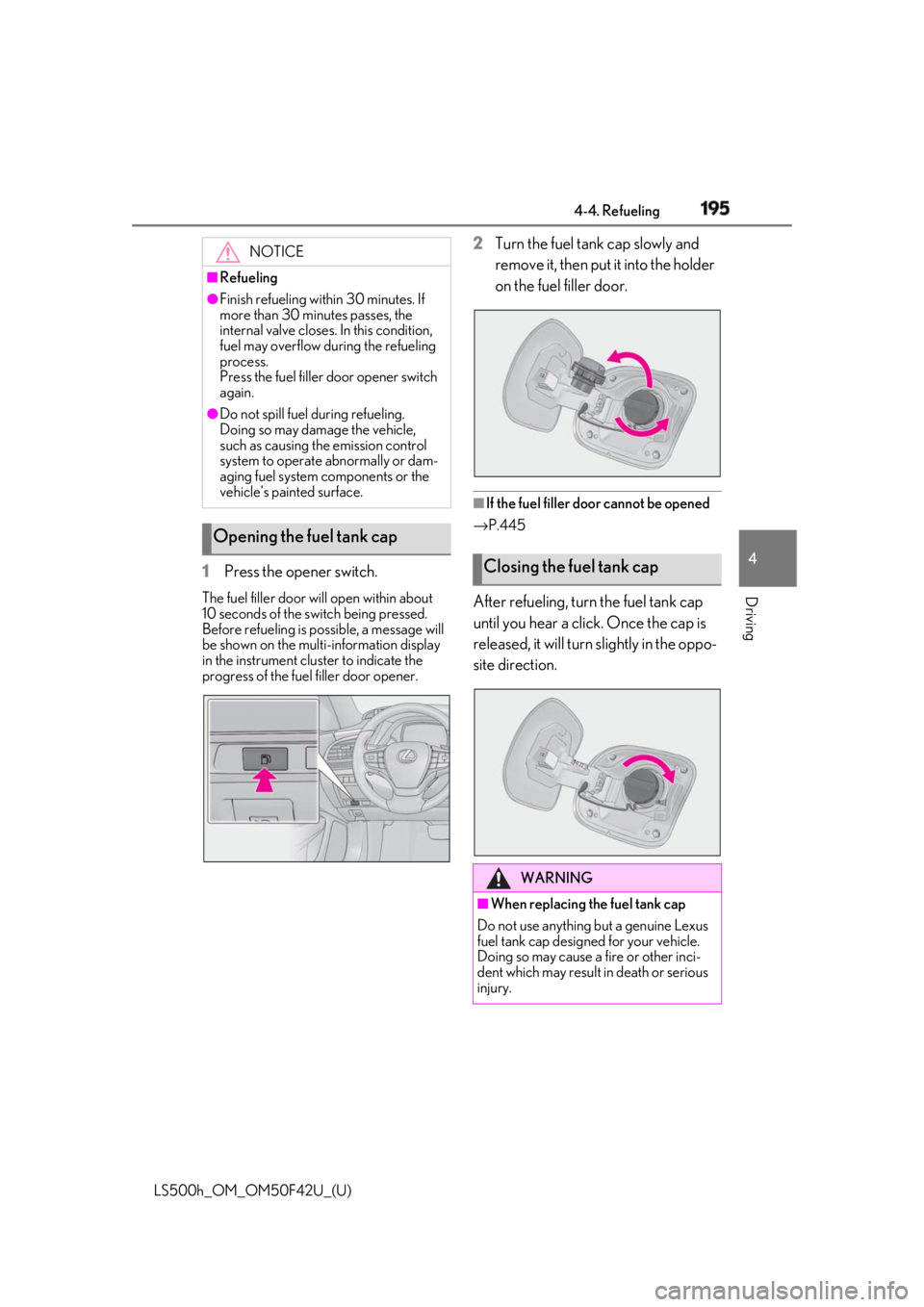
1 Press the opener switch.The fuel filler door will open within about
10 seconds of the sw itch being pressed.
Before refueling is possible, a message will
be shown on the multi-information display
in the instrument clus ter to indicate the
progress of the fuel filler door opener. 2 Turn the fuel tank cap slowly and
remove it, then put it into the holder
on the fuel filler door.
■
If the fuel filler door cannot be opened
→ P.445
After refueling, turn the fuel tank cap
until you hear a click. Once the cap is
released, it will turn slightly in the oppo-
site direction.NOTICE■
Refueling●
Finish refueling within 30 minutes. If
more than 30 minutes passes, the
internal valve closes. In this condition,
fuel may overflow during the refueling
process.
Press the fuel filler door opener switch
again.●
Do not spill fuel during refueling.
Doing so may damage the vehicle,
such as causing the emission control
system to operate abnormally or dam-
aging fuel system components or the
vehicle’s painted surface.
Opening the fuel tank cap
Closing the fuel tank cap
WARNING
■
When replacing the fuel tank cap
Do not use anything but a genuine Lexus
fuel tank cap designed for your vehicle.
Doing so may cause a fire or other inci-
dent which may result in death or serious
injury.
Page 200 of 528
200 4-5. Using the driving support systems
LS500h_OM_OM50F42U_(U) WARNING●
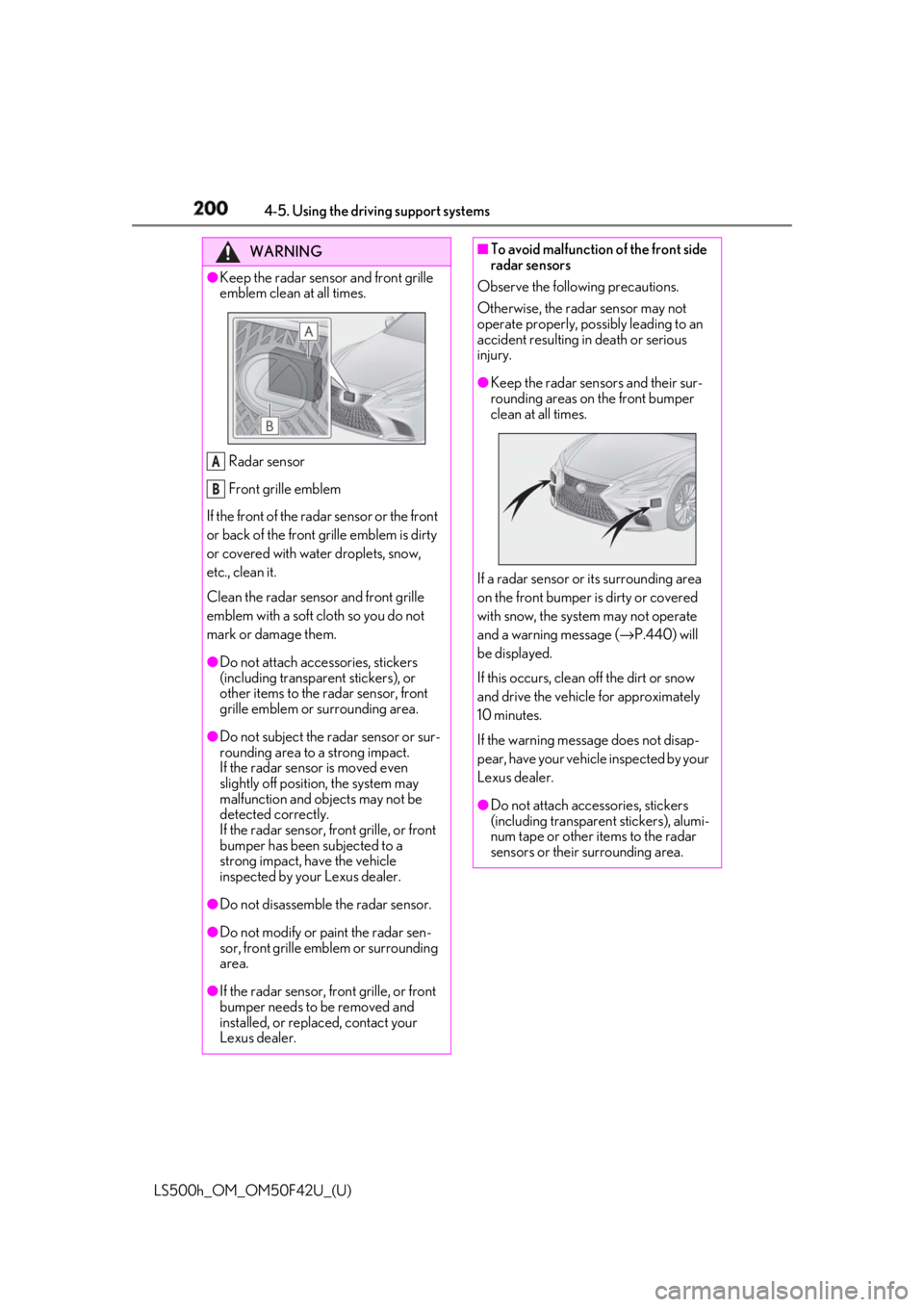
Keep the radar sensor and front grille
emblem clean at all times.
Radar sensor
Front grille emblem
If the front of the rada r sensor or the front
or back of the front grille emblem is dirty
or covered with water droplets, snow,
etc., clean it.
Clean the radar sensor and front grille
emblem with a soft cloth so you do not
mark or damage them. ●
Do not attach accessories, stickers
(including transpar ent stickers), or
other items to the radar sensor, front
grille emblem or surrounding area.●
Do not subject the radar sensor or sur-
rounding area to a strong impact.
If the radar sensor is moved even
slightly off position, the system may
malfunction and objects may not be
detected correctly.
If the radar sensor, front grille, or front
bumper has been subjected to a
strong impact, have the vehicle
inspected by your Lexus dealer.
●
Do not disassemble the radar sensor.
●
Do not modify or paint the radar sen-
sor, front grille emblem or surrounding
area.
●
If the radar sensor, front grille, or front
bumper needs to be removed and
installed, or replaced, contact your
Lexus dealer. A
B ■
To avoid malfunction of the front side
radar sensors
Observe the following precautions.
Otherwise, the radar sensor may not
operate properly, possibly leading to an
accident resulting in death or serious
injury. ●
Keep the radar sensors and their sur-
rounding areas on the front bumper
clean at all times.
If a radar sensor or its surrounding area
on the front bumper is dirty or covered
with snow, the system may not operate
and a warning message ( → P.440) will
be displayed.
If this occurs, clean off the dirt or snow
and drive the vehicle for approximately
10 minutes.
If the warning message does not disap-
pear, have your vehicle inspected by your
Lexus dealer.
●
Do not attach accessories, stickers
(including transparent stickers), alumi-
num tape or other items to the radar
sensors or their surrounding area.
Page 201 of 528
2014-5. Using the driving support systems
LS500h_OM_OM50F42U_(U) 4
Driving WARNING●
Do not subject a radar sensor or its
surrounding area on the front bumper
to a strong impact.
If a radar sensor is moved even slightly
off position, the system may malfunction
and vehicles may not be detected cor-
rectly.
In the following situations, have your
vehicle inspected by your Lexus dealer.
• If a radar sensor or its surrounding
area is subject to a strong impact
• If the area on the front bumper around
a radar sensor is scratched or dented,
or the front bumper has become par-
tially disengaged ●
Do not disassemble the radar sensors.●
Do not modify the radar sensors or
their surrounding area on the front
bumper.●
If a radar sensor or the front bumper
needs to be removed and installed, or
replaced, contact your Lexus dealer.●
Do not paint the front bumper any
color other than an official Lexus color.
■
To avoid malfunction of the camera
sensor
Observe the following precautions.
Otherwise, the camera sensor may not
operate properly, possibly leading to an
accident resulting in death or serious
injury.
●
Keep the windshield clean at all times.
• If the windshield is dirty or covered
with an oily film, water droplets, snow,
etc., clear the windshield.
• As some glass coating agents may
affect the detection performance of
the camera sensor, consult your Lexus
dealer when using a glass coating
agent. • If a glass coating agent is applied to the
windshield, it will still be necessary to
use the windshield wipers to remove
water droplets, etc. from the area of
the windshield in front of the camera
sensor.
• If the inner side of the windshield
where the camera sens or is installed is
dirty, contact your Lexus dealer. ●
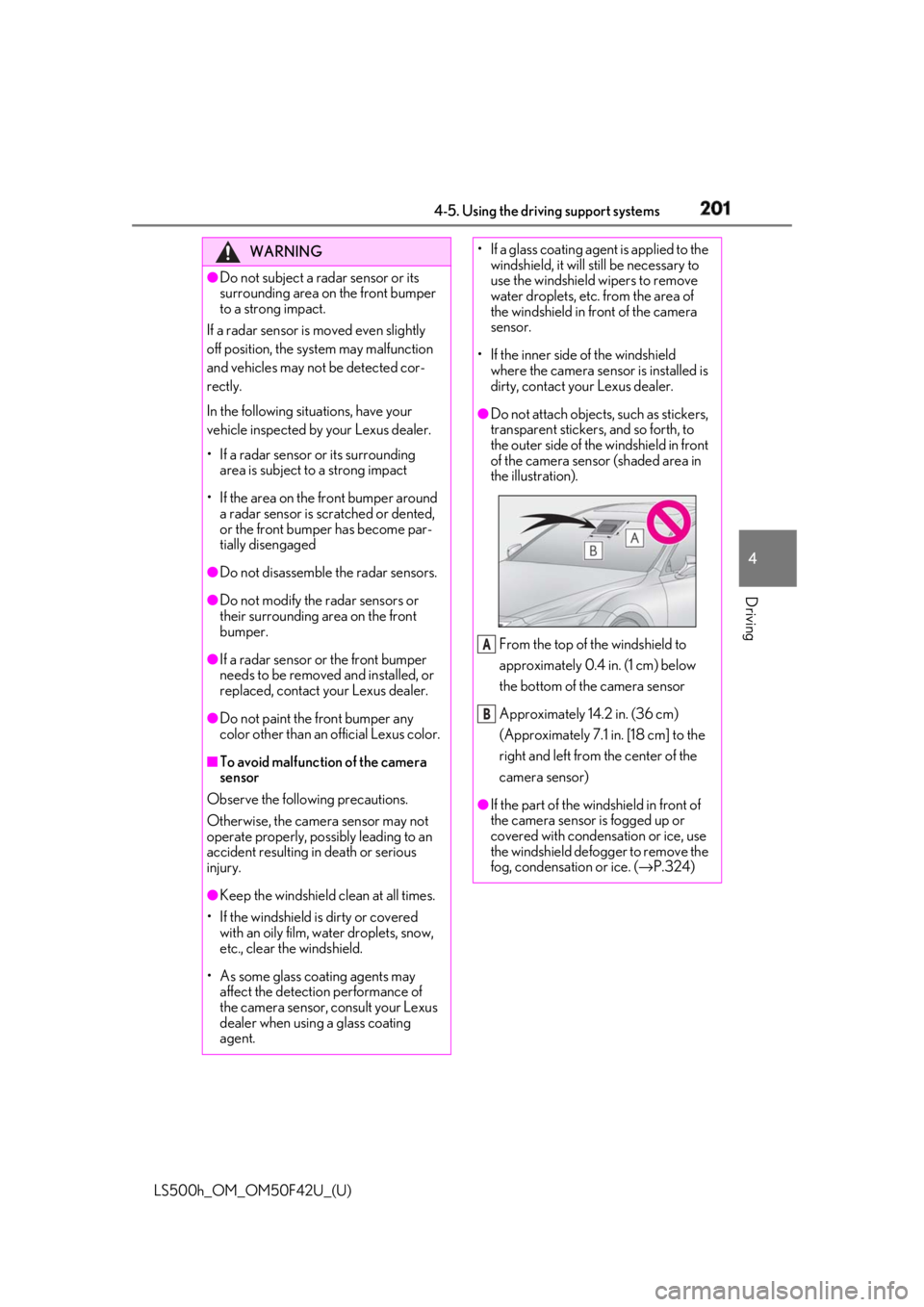
Do not attach objects, such as stickers,
transparent stickers, and so forth, to
the outer side of the windshield in front
of the camera sensor (shaded area in
the illustration).
From the top of the windshield to
approximately 0.4 in. (1 cm) below
the bottom of the camera sensor
Approximately 14.2 in. (36 cm)
(Approximately 7.1 in. [18 cm] to the
right and left from the center of the
camera sensor)
●
If the part of the wi ndshield in front of
the camera sensor is fogged up or
covered with condensation or ice, use
the windshield defogger to remove the
fog, condensation or ice. ( → P.324)A
B
Page 202 of 528
202 4-5. Using the driving support systems
LS500h_OM_OM50F42U_(U) WARNING●
If water droplets cannot be properly
removed from the area of the wind-
shield in front of the camera sensor by
the windshield wipers, replace the
wiper insert or wiper blade.
If the wiper inserts or wiper blades need
to be replaced, contact your Lexus
dealer. ●
Do not attach window tinting to the
windshield.●
Replace the windshield if it is damaged
or cracked.
If the windshield needs to be replaced,
contact your Lexus dealer.●
Do not get the camera sensor wet.●
Do not allow bright lights to shine into
the camera sensor.●
Do not dirty or damage the camera
sensor.
When cleaning the inside of the wind-
shield, do not allow glass cleaner to
contact the lens. Also, do not touch the
lens.
If the lens is dirty or damaged, contact
your Lexus dealer.
●
Do not subject the camera sensor to a
strong impact.
●
Do not change the installation position
or direction of the camera sensor or
remove it.
●
Do not disassemble the camera sen-
sor.
●
Do not modify any components of the
vehicle around the camera sensor
(inside rear view mirror, etc.) or ceiling.
●
Do not attach any accessories that
may obstruct the camera sensor to the
hood, front grille or front bumper.
Contact your Lexus dealer. ●
If a surfboard or other long object is to
be mounted on the roof, make sure
that it will not obstruct the camera sen-
sor. ●
Do not modify the headlights or other
lights.
Page 208 of 528
208 4-5. Using the driving support systems
LS500h_OM_OM50F42U_(U) WARNING●
If the part of the windshield in front of
the camera sensor is fogged up or
covered with condensation or ice, use
the windshield defogger to remove the
fog, condensation or ice. ( → P.324)●
If water droplets cannot be properly
removed from the area of the wind-
shield in front of the camera sensor by
the windshield wipers, replace the
wiper insert or wiper blade.
If the wiper inserts or wiper blades need
to be replaced, contact your Lexus
dealer. ●
Do not attach window tinting to the
windshield.●
Replace the windshield if it is damaged
or cracked.
If the windshield needs to be replaced,
contact your Lexus dealer.●
Do not get the camera sensor wet.●
Do not allow bright lights to shine into
the camera sensor.●
Do not dirty or damage the camera
sensor.
When cleaning the inside of the wind-
shield, do not allow glass cleaner to
contact the lens. Also, do not touch the
lens.
If the lens is dirty or damaged, contact
your Lexus dealer.
●
Do not subject the camera sensor to a
strong impact.
●
Do not change the installation position
or direction of the camera sensor or
remove it.
●
Do not disassemble the camera sen-
sor.
●
Do not modify any components of the
vehicle around the camera sensor
(inside rear view mirror, etc.) or ceiling. ●
Do not attach any accessories that
may obstruct the camera sensor to the
hood, front grille or front bumper.
Contact your Lexus dealer. ●
If a surfboard or other long object is to
be mounted on the roof, make sure
that it will not obstruct the camera sen-
sor. ●
Do not modify the headlights or other
lights.
Page 211 of 528
2114-5. Using the driving support systems
LS500h_OM_OM50F42U_(U) 4
Driving WARNING■
Pre-collision braking●
When the pre-collision braking func-
tion is operating, a large amount of
braking force will be applied.●
If the vehicle is stopped by the opera-
tion of the pre-collision braking func-
tion, the pre-collision braking function
operation will be canceled after
approximately 2 seco nds. Depress the
brake pedal as necessary.●
The pre-collision braking function may
not operate if certain operations are
performed by the driver. If the acceler-
ator pedal is being depressed strongly
or the steering wheel is being turned,
the system may determine that the
driver is taking evasive action and may
prevent the pre-collision braking func-
tion from operating.●
In some situations, while the pre-colli-
sion braking function is operating,
operation of the function may be can-
celed if the accelerator pedal is
depressed strongly or the steering
wheel is turned and the system deter-
mines that the driver is taking evasive
action.
●
If the brake pedal is being depressed,
the system may determine that the
driver is taking evasive action and pos-
sibly delay the operation timing of the
pre-collision braking function.
■
Active steering assist●
The steering wheel may turn automati-
cally when active steering assist is
operating.
●
As active steering assist operation will
be canceled when the system deter-
mines that a collision has been
avoided, operate the steering wheel as
necessary. ●
In the following situations, the system
may determine that th e driver is taking
evasive action. In this case, the active
steering assist may not operate or may
be canceled.
• If the accelerator pedal is being
depressed strongly or the steering
wheel is being operat ed. In this case
the system may determine that the
driver is taking evasive action and the
pre-collision braking may not operate.
• In some situations, while the active
steering assist is operating, operation
of the function may be canceled if the
accelerator pedal is depressed
strongly or the steering wheel is turned
and the system determines that the
driver is taking evasive action.
• When the active steering assist is
operating, if the stee ring wheel is held
firmly or is operated in the opposite
direction to that which the system is
generating torque, the function may be
canceled.
• If the brake pedal is depressed, the sys-
tem may determine that the driver is
taking evasive action and the active
steering assist operation may be
delayed.
■
Pre-collision seat belts with comfort
function
If the pre-collision se at belts have oper-
ated and the seat belts are locked in a
retracted position, immediately stop the
vehicle in a safe place, release and
retract the seat belts to unlock them and
then fasten them again.
Also, if a seat belt ca n be loosened, it can
be unlocked by slightly retracting it with-
out releasing it.
■
When to disable the pre-collision sys-
tem
In the following situations, disable the
system, as it may not operate properly,
possibly leading to an accident resulting
in death or serious injury:
●
When the vehicle is being towed
Page 212 of 528
212 4-5. Using the driving support systems
LS500h_OM_OM50F42U_(U) ■
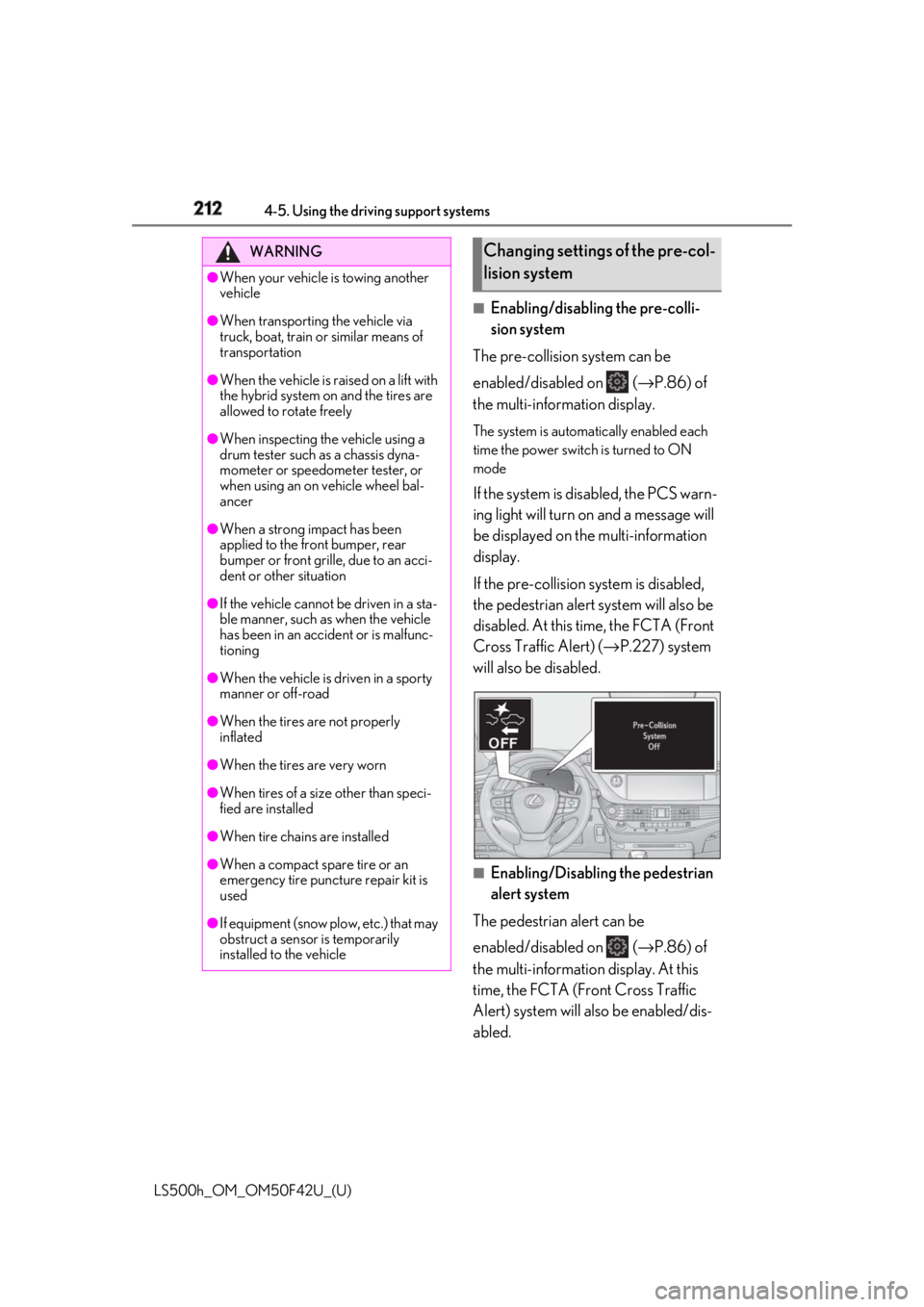
Enabling/disabling the pre-colli-
sion system
The pre-collision system can be
enabled/disabled on ( → P.86) of
the multi-information display. The system is automa tically enabled each
time the power switch is turned to ON
mode
If the system is disabled, the PCS warn-
ing light will turn on and a message will
be displayed on the multi-information
display.
If the pre-collision sy stem is disabled,
the pedestrian alert system will also be
disabled. At this time, the FCTA (Front
Cross Traffic Alert) ( → P.227) system
will also be disabled.
■
Enabling/Disabling the pedestrian
alert system
The pedestrian alert can be
enabled/disabled on ( → P.86) of
the multi-information display. At this
time, the FCTA (Front Cross Traffic
Alert) system will also be enabled/dis-
abled.WARNING●
When your vehicle is towing another
vehicle●
When transporting the vehicle via
truck, boat, train or similar means of
transportation●
When the vehicle is raised on a lift with
the hybrid system on and the tires are
allowed to rotate freely●
When inspecting the vehicle using a
drum tester such as a chassis dyna-
mometer or speedometer tester, or
when using an on vehicle wheel bal-
ancer●
When a strong impact has been
applied to the front bumper, rear
bumper or front grille, due to an acci-
dent or other situation●
If the vehicle cannot be driven in a sta-
ble manner, such as when the vehicle
has been in an accident or is malfunc-
tioning●
When the vehicle is driven in a sporty
manner or off-road●
When the tires are not properly
inflated
●
When the tires are very worn
●
When tires of a size other than speci-
fied are installed
●
When tire chains are installed
●
When a compact spare tire or an
emergency tire puncture repair kit is
used
●
If equipment (snow plow, etc.) that may
obstruct a sensor is temporarily
installed to the vehicle Changing settings of the pre-col-
lision system
Page 215 of 528
2154-5. Using the driving support systems
LS500h_OM_OM50F42U_(U) 4
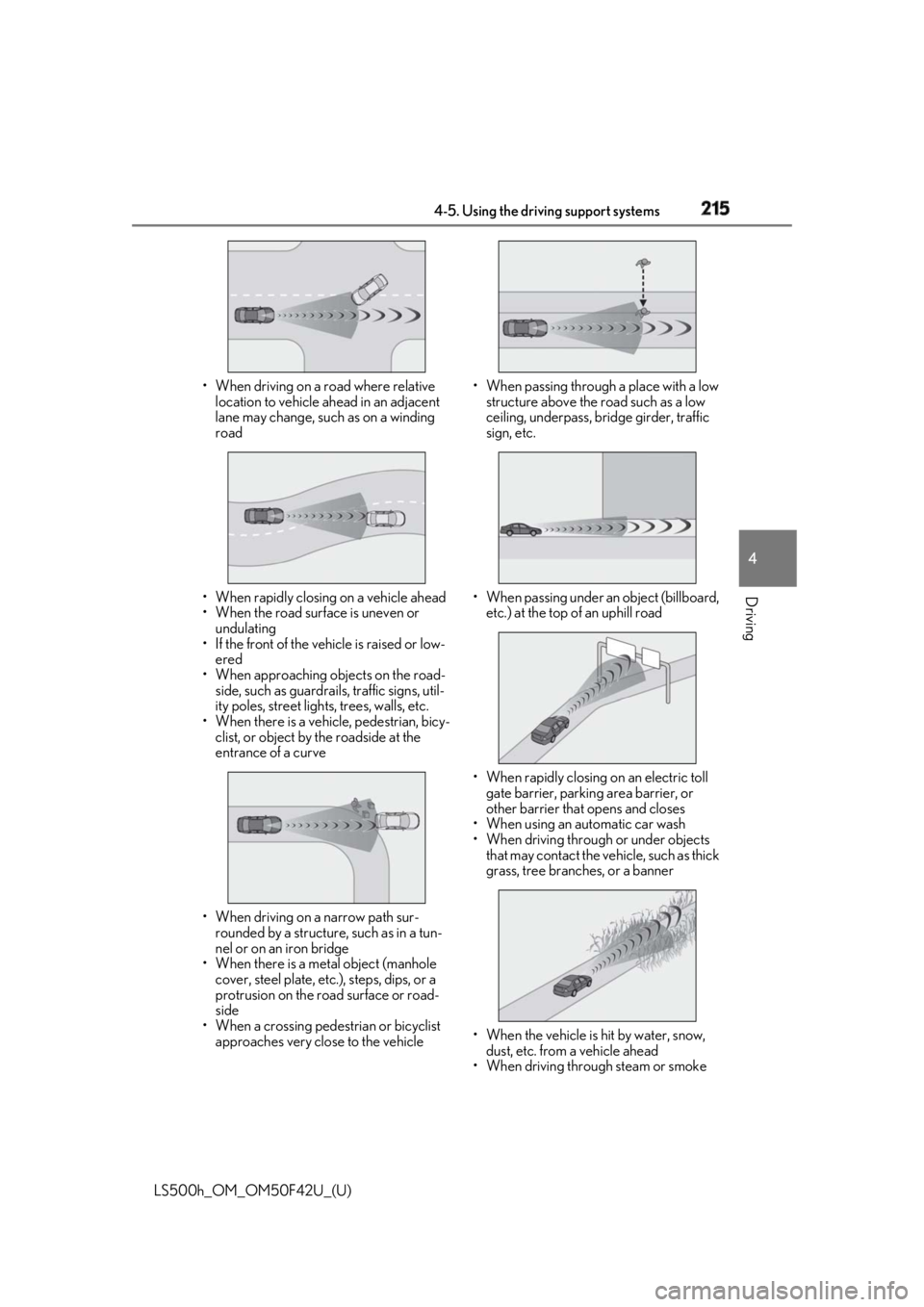
Driving • When driving on a road where relative
location to vehicle ahead in an adjacent
lane may change, such as on a winding
road
• When rapidly closing on a vehicle ahead
• When the road surface is uneven or
undulating
• If the front of the vehicle is raised or low-
ered
• When approaching ob jects on the road-
side, such as guardrails, traffic signs, util-
ity poles, street light s, trees, walls, etc.
• When there is a vehicle, pedestrian, bicy-
clist, or object by the roadside at the
entrance of a curve
• When driving on a narrow path sur-
rounded by a structure, such as in a tun-
nel or on an iron bridge
• When there is a metal object (manhole
cover, steel plate, etc.), steps, dips, or a
protrusion on the ro ad surface or road-
side
• When a crossing pedestrian or bicyclist
approaches very close to the vehicle • When passing through a place with a low
structure above the road such as a low
ceiling, underpass, bridge girder, traffic
sign, etc.
• When passing under an object (billboard,
etc.) at the top of an uphill road
• When rapidly closing on an electric toll
gate barrier, parking area barrier, or
other barrier that opens and closes
• When using an automatic car wash
• When driving through or under objects
that may contact the vehicle, such as thick
grass, tree branches, or a banner
• When the vehicle is hit by water, snow,
dust, etc. from a vehicle ahead
• When driving through steam or smoke
Page 217 of 528
2174-5. Using the driving support systems
LS500h_OM_OM50F42U_(U) 4
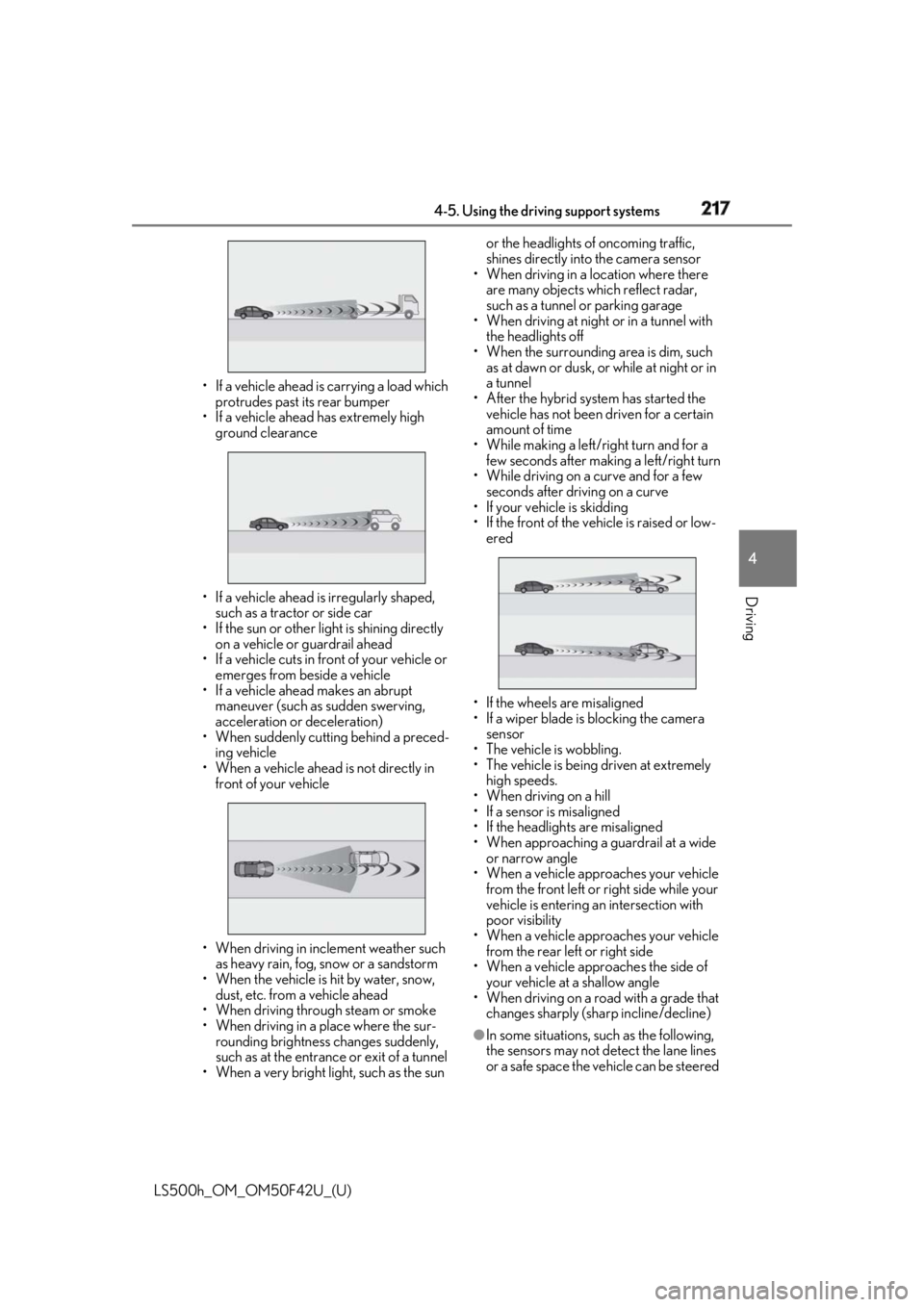
Driving • If a vehicle ahead is carrying a load which
protrudes past its rear bumper
• If a vehicle ahead has extremely high
ground clearance
• If a vehicle ahead is irregularly shaped,
such as a tractor or side car
• If the sun or other light is shining directly
on a vehicle or guardrail ahead
• If a vehicle cuts in front of your vehicle or
emerges from beside a vehicle
• If a vehicle ahead makes an abrupt
maneuver (such as sudden swerving,
acceleration or deceleration)
• When suddenly cutting behind a preced-
ing vehicle
• When a vehicle ahead is not directly in
front of your vehicle
• When driving in incl ement weather such
as heavy rain, fog, snow or a sandstorm
• When the vehicle is hit by water, snow,
dust, etc. from a vehicle ahead
• When driving through steam or smoke
• When driving in a place where the sur-
rounding brightness changes suddenly,
such as at the entrance or exit of a tunnel
• When a very bright light, such as the sun or the headlights of oncoming traffic,
shines directly into the camera sensor
• When driving in a location where there
are many objects which reflect radar,
such as a tunnel or parking garage
• When driving at night or in a tunnel with
the headlights off
• When the surrounding area is dim, such
as at dawn or dusk, or while at night or in
a tunnel
• After the hybrid system has started the
vehicle has not been driven for a certain
amount of time
• While making a left/r ight turn and for a
few seconds after making a left/right turn
• While driving on a curve and for a few
seconds after driving on a curve
• If your vehicle is skidding
• If the front of the vehicle is raised or low-
ered
• If the wheels are misaligned
• If a wiper blade is blocking the camera
sensor
• The vehicle is wobbling.
• The vehicle is being driven at extremely
high speeds.
• When driving on a hill
• If a sensor is misaligned
• If the headlights are misaligned
• When approaching a guardrail at a wide
or narrow angle
• When a vehicle approaches your vehicle
from the front left or right side while your
vehicle is entering an intersection with
poor visibility
• When a vehicle approaches your vehicle
from the rear left or right side
• When a vehicle approaches the side of
your vehicle at a shallow angle
• When driving on a road with a grade that
changes sharply (sha rp incline/decline)
●
In some situations, such as the following,
the sensors may not detect the lane lines
or a safe space the vehicle can be steered
Page 218 of 528

218 4-5. Using the driving support systems
LS500h_OM_OM50F42U_(U) into, preventing the ac tive steering assist
from operating properly:
• When the white (yellow) lane lines are
difficult to see, such as when they are
faint, diverging/merging, or a shadow is
cast upon them
• When the lane is more wide or narrow
than normal
• When there is a light and dark pattern on
the road surface , such as due to road
repairs
• If the system determines that a collision
can be avoided by only using the brakes
• When a pedestrian is detected near the
centerline of the vehicle●
In some situations such as the following,
sufficient braking force or steering force
may not be obtained, preventing the sys-
tem from performing properly:
• If the braking functions cannot operate to
their full extent, such as when the brake
parts are extremely cold, extremely hot,
or wet
• If the vehicle is not properly maintained
(brakes or tires are excessively worn,
improper tire inflation pressure, etc.)
• When the vehicle is being driven on a
gravel road or other slippery surface
• If there are deep ruts in the road
• When driving on a slope
• When driving on a horizontally slanted
road●
Some pedestrians and bicyclists, such as
the following, may not be detected by the
sensors, preventing the system from
operating properly:
• Pedestrians and bicyclists shorter than
approximately 3.2 ft. (1 m) or taller than
approximately 6.5 ft. (2 m)
• Bicyclists riding on unusual bicycles
(bicycles for small children, tricycles,
folding bicycles, BMX bicycles, tandem
bicycles, etc.)
• Pedestrians and bicyclists who are wear-
ing white and look extremely bright
• Pedestrians and bicyclists which are not
illuminated by the headli ghts at night, in a
tunnel, etc.
• Pedestrians whose clothing appears to
be nearly the same co lor or brightness as
their surroundings
• Pedestrians and bicy clists near walls,
fences, guardrails, or large objects • Pedestrians and bicyclists which are on a
metal object (manhole cover, steel plate,
etc.) on the road
• Pedestrians and bicyclists which are mov-
ing fast
• Pedestrians and bicyclists which change
speed or direction abruptly
• Pedestrians and bicyclists which suddenly
emerge from behind a vehicle or large
object
• Pedestrians and bicyclists which are
extremely close to the side of the vehicle
(outside rear view mirror, etc.)
• Pedestrians and bicyclists wearing over-
sized clothing, such as a rain coat, long
skirt, etc., making their silhouette obscure
• Pedestrians and bicyclists who are carry-
ing large baggage, ho lding an umbrella,
etc., hiding part of their body
• Pedestrians and bicyclists behind an
object that hides part of their body
• Pedestrians and bicyclists who are bend-
ing forward or squatting
• Pedestrians who are pushing a stroller,
wheelchair, bicycle or other vehicle
• Groups of pedestrians/bicyclists which
are close together ●
Some guardrails, such as the following,
may not be detected by the sensors, pre-
venting the system from operating prop-
erly:
• Guardrails which are less than approxi-
mately 1.9 ft. (60 cm) tall
• Short guardrails
• Irregularly-shaped gu ardrails (wire cable
guardrails, guardrails made of thin poles,
etc.)
• Guardrails which are not illuminated by
the headlights at nigh t, in a tunnel, etc.
• Guardrails which appear to be nearly the
same color or brightness as their sur-
roundings
• Guardrails which appear to be nearly the
same shape as their surroundings (walls,
etc.)
• Guardrails which are over a metal object
(manhole cover, steel plate, etc.)
• Guardrails which are hidden behind thick
grass
• Guardrails which are extremely close to
the side of the vehicle (outside rear view
mirror, etc.)
• Curved guardrails or guardrails at the
entrance of a curve