tow LEXUS LS500H 2019 User Guide
[x] Cancel search | Manufacturer: LEXUS, Model Year: 2019, Model line: LS500H, Model: LEXUS LS500H 2019Pages: 523, PDF Size: 15.79 MB
Page 125 of 523
1253-2. Opening, closing and locking the doors and trunk
LS500h_OM_(U)_1809
3
Before driving
take some time to unlock the doors.
• The electronic key has been left in an area of approximately 6 ft. (2 m) of the
outside of the vehicle for 10 minutes or
longer.
• The smart access system with push-but-
ton start has not been used for 5 days or
longer.
●If the smart access system with push-but-
ton start has not been used for 14 days or
longer, the doors cannot be unlocked at
any doors except the driver’s door. In this
case, take hold of the driver’s door han-
dle, or use the wireless remote control or
the mechanical key, to unlock the doors.
■Turning an electronic key to bat-
tery-saving mode
When battery-saving mode is set, battery
depletion is minimized by stopping the elec-
tronic key from re ceiving radio waves.
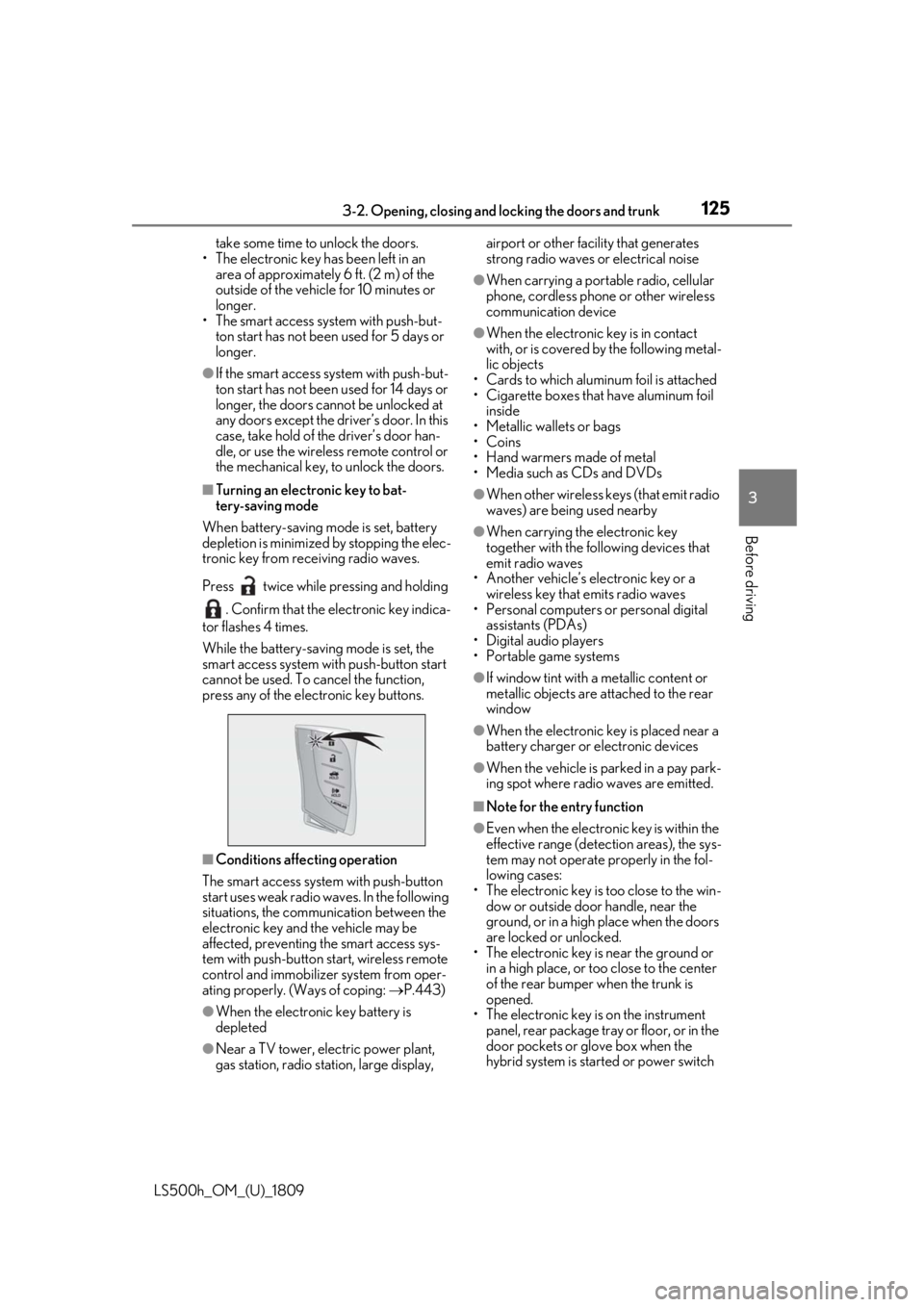
Press twice while pressing and holding . Confirm that the electronic key indica-
tor flashes 4 times.
While the battery-saving mode is set, the
smart access system with push-button start
cannot be used. To cancel the function,
press any of the electronic key buttons.
■Conditions affe cting operation
The smart access system with push-button
start uses weak radio waves. In the following
situations, the communication between the
electronic key and the vehicle may be
affected, preventing the smart access sys-
tem with push-button start, wireless remote
control and immobilizer system from oper-
ating properly. (Ways of coping: P.443)
●When the electronic key battery is
depleted
●Near a TV tower, electric power plant,
gas station, radio stat ion, large display, airport or other fac
ility that generates
strong radio waves or electrical noise
●When carrying a portable radio, cellular
phone, cordless phone or other wireless
communication device
●When the electronic key is in contact
with, or is covered by the following metal-
lic objects
• Cards to which aluminum foil is attached
• Cigarette boxes that have aluminum foil inside
• Metallic wallets or bags
•Coins
• Hand warmers made of metal
• Media such as CDs and DVDs
●When other wireless keys (that emit radio
waves) are being used nearby
●When carrying the electronic key
together with the following devices that
emit radio waves
• Another vehicle’s electronic key or a wireless key that emits radio waves
• Personal computers or personal digital
assistants (PDAs)
• Digital audio players
• Portable game systems
●If window tint with a metallic content or
metallic objects are attached to the rear
window
●When the electronic key is placed near a
battery charger or electronic devices
●When the vehicle is parked in a pay park-
ing spot where radio waves are emitted.
■Note for the entry function
●Even when the electronic key is within the
effective range (detection areas), the sys-
tem may not operate properly in the fol-
lowing cases:
• The electronic key is too close to the win- dow or outside door handle, near the
ground, or in a high place when the doors
are locked or unlocked.
• The electronic key is near the ground or in a high place, or too close to the center
of the rear bumper when the trunk is
opened.
• The electronic key is on the instrument panel, rear package tray or floor, or in the
door pockets or glove box when the
hybrid system is started or power switch
Page 136 of 523
1363-3. Adjusting the seats
LS500h_OM_(U)_1809
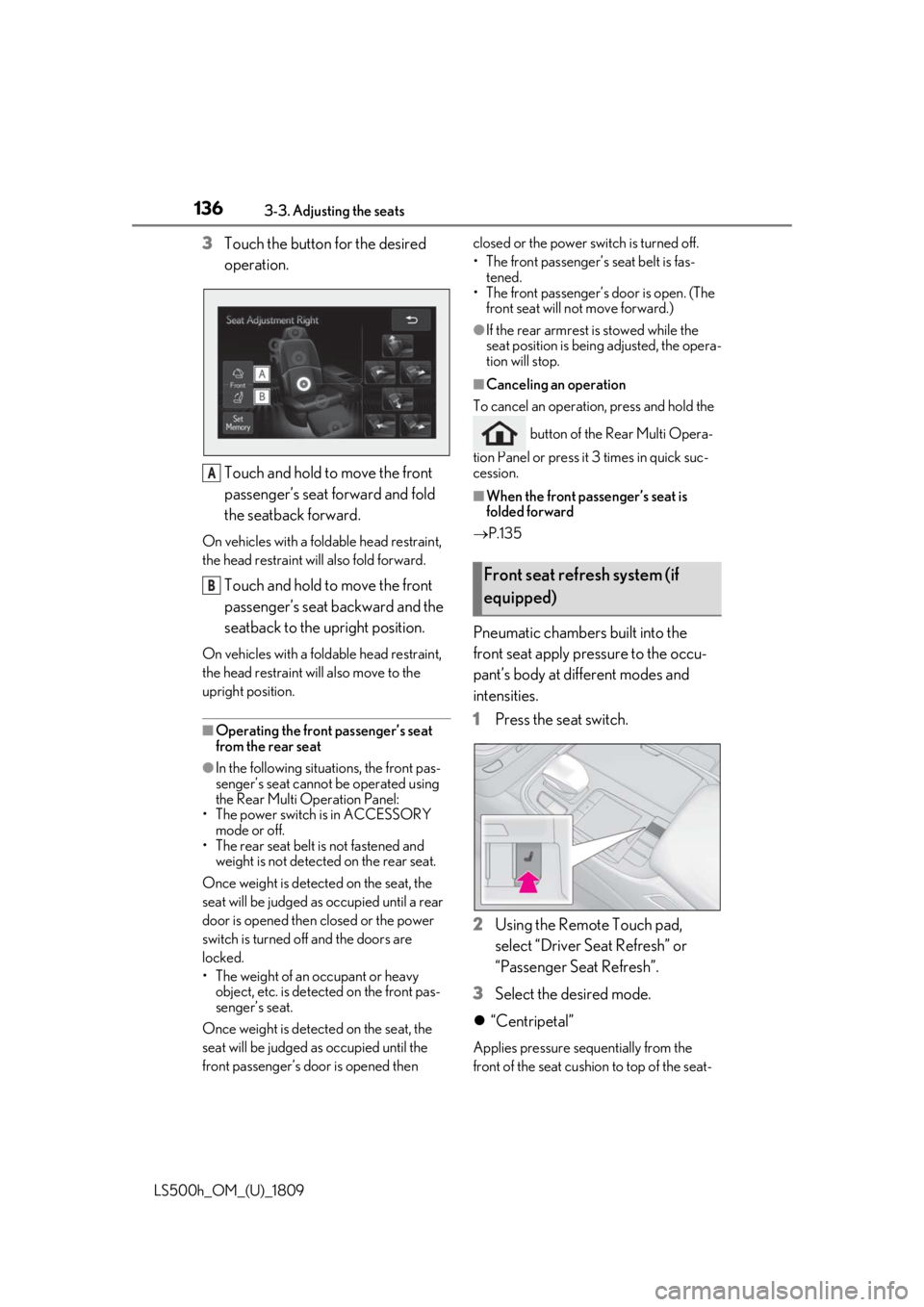
3Touch the button for the desired
operation.
Touch and hold to move the front
passenger’s seat forward and fold
the seatback forward.
On vehicles with a fold able head restraint,
the head restraint will also fold forward.
Touch and hold to move the front
passenger’s seat backward and the
seatback to the upright position.
On vehicles with a fold able head restraint,
the head restraint will also move to the
upright position.
■Operating the front passenger’s seat
from the rear seat
●In the following situations, the front pas-
senger’s seat cannot be operated using
the Rear Multi Operation Panel:
• The power switch is in ACCESSORY mode or off.
• The rear seat belt is not fastened and
weight is not detected on the rear seat.
Once weight is detect ed on the seat, the
seat will be judged as occupied until a rear
door is opened then closed or the power
switch is turned off and the doors are
locked.
• The weight of an occupant or heavy object, etc. is detected on the front pas-
senger’s seat.
Once weight is detect ed on the seat, the
seat will be judged as occupied until the
front passenger’s door is opened then closed or the power switch is turned off.
•The front passenger’
s seat belt is fas-
tened.
• The front passenger’s door is open. (The
front seat will not move forward.)
●If the rear armrest is stowed while the
seat position is bein g adjusted, the opera-
tion will stop.
■Canceling an operation
To cancel an operatio n, press and hold the
button of the Rear Multi Opera-
tion Panel or press it 3 times in quick suc-
cession.
■When the front passenger’s seat is
folded forward
P.135
Pneumatic chambers built into the
front seat apply pressure to the occu-
pant’s body at different modes and
intensities.
1 Press the seat switch.
2 Using the Remote Touch pad,
select “Driver Seat Refresh” or
“Passenger Seat Refresh”.
3 Select the desired mode.
“Centripetal”
Applies pressure sequentially from the
front of the seat cushion to top of the seat-
A
BFront seat refresh system (if
equipped)
Page 138 of 523
1383-3. Adjusting the seats
LS500h_OM_(U)_1809
*:If equipped
■Automatic operation
The seat can be moved to preset posi-
tions.
1 Display the home screen on the
Rear Multi Operation Panel
(P.318) and then touch “Seat”.
2 Touch the desired preset button.
When the operating conditions are not
Power rear seat*
WARNING
■When adjusting the seat position
●Take care when ad justing the seat
position to ensure that other passen-
gers are not injured by the moving
seat.
●When adjusting the rear seat with an
ottoman, make sure there is sufficient
space so that a foot does not get
caught between the ottoman and front
passenger seat . (If equipped)
●Vehicles with a rear seat entertainment
system: When the rear seat is moving
to the Entertainment Mode position,
do not allow hands near the rear dis-
play. Otherwise, a hand or finger may
be caught, possibly causing injury.
■Seat adjustment
To reduce the risk of sliding under the lap
belt during a collision, do not recline the
seat more than necessary.
If the seat is too reclined, the lap belt may
slide past the hips and apply restraint
forces directly to the abdomen, or your
neck may contact the shoulder belt,
increasing the risk of death or serious
injury in the event of an accident.
Adjustments should not be made while
driving as the seat may unexpectedly
move and cause the driver to lose control
of the vehicle.
■Using the ottoman (if equipped)
●Do not sit on the ottoman.
If someone sits on the ottoman, the seat
belt cannot be fitted properly, and they
may be thrown from the seat, resulting in
death or serious injury in the event of an
accident or sudden braking.
●When getting in or out of the vehicle,
retract the ottoman. If the ottoman is
not retracted, it may cause a fall, result-
ing in injury.
●Do not operate the ottoman when the
vehicle is moving.
●Do not allow anyone to put their hands
or feet under the re ar seat when stow-
ing the ottoman.
NOTICE
■To prevent an ottoman malfunction (if
equipped)
●Do not place any objects in the rear
seat footwell that could prevent the
operation of the ottoman.
●Do not place heavy luggage on the
ottoman.
●Do not place any objects under the
ottoman while it is raised for use. These
objects may interfere with the ottoman
being folded, causing damage to the
ottoman or the objects themselves.
■To prevent a rear display malfunction
(if equipped)
Do not attempt to move the rear display
by hand, as doing so may damage the
rear display.
Adjustment procedure
Page 139 of 523
1393-3. Adjusting the seats
LS500h_OM_(U)_1809
3
Before driving
met, the preset buttons will be grayed out.
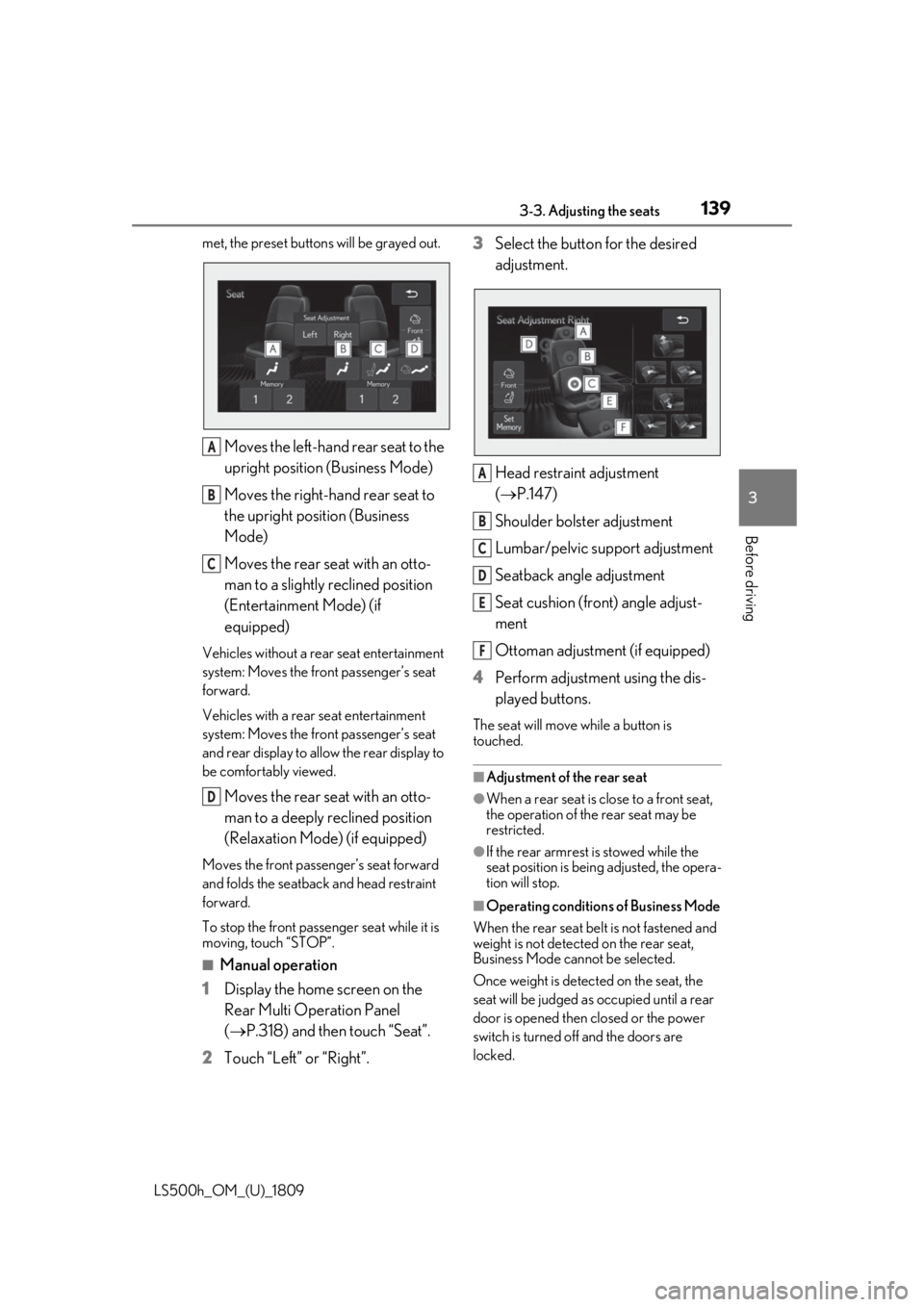
Moves the left-hand rear seat to the
upright position (Business Mode)
Moves the right-hand rear seat to
the upright position (Business
Mode)
Moves the rear seat with an otto-
man to a slightly reclined position
(Entertainment Mode) (if
equipped)
Vehicles without a rear seat entertainment
system: Moves the front passenger’s seat
forward.
Vehicles with a rear seat entertainment
system: Moves the front passenger’s seat
and rear display to allow the rear display to
be comfortably viewed.
Moves the rear seat with an otto-
man to a deeply reclined position
(Relaxation Mode) (if equipped)
Moves the front passen ger’s seat forward
and folds the seatback and head restraint
forward.
To stop the front passenger seat while it is
moving, touch “STOP”.
■Manual operation
1 Display the home screen on the
Rear Multi Operation Panel
(P.318) and then touch “Seat”.
2 Touch “Left” or “Right”. 3
Select the button for the desired
adjustment.
Head restraint adjustment
(P.147)
Shoulder bolster adjustment
Lumbar/pelvic support adjustment
Seatback angle adjustment
Seat cushion (front) angle adjust-
ment
Ottoman adjustment (if equipped)
4 Perform adjustment using the dis-
played buttons.
The seat will move while a button is
touched.
■Adjustment of the rear seat
●When a rear seat is close to a front seat,
the operation of the rear seat may be
restricted.
●If the rear armrest is stowed while the
seat position is bein g adjusted, the opera-
tion will stop.
■Operating conditions of Business Mode
When the rear seat belt is not fastened and
weight is not detected on the rear seat,
Business Mode cannot be selected.
Once weight is detected on the seat, the
seat will be judged as occupied until a rear
door is opened then closed or the power
switch is turned off and the doors are
locked.
A
B
C
D
A
B
C
D
E
F
Page 140 of 523
1403-3. Adjusting the seats
LS500h_OM_(U)_1809
■The rear seat with an ottoman cannot be
moved to Entertainment Mode/Relax-
ation Mode when (if equipped)
In the following situations, Entertainment
Mode or Relaxation Mode cannot be
selected:
●The power switch is in ACCESSORY
mode or off.
●The rear seat belt is not fastened and
weight is not detected on the rear seat.
Once weight is detect ed on the seat, the
seat will be judged as occupied until a rear
door is opened then closed or the power
switch is turned off and the doors are
locked.
●The weight of an occupant or heavy
object, etc. is detected on the front pas-
senger’s seat.
Once weight is detect ed on the seat, the
seat will be judged as occupied until the
front passenger’s door is opened then
closed or the power switch is turned off.
●The front passenger’s seat belt is fas-
tened.
●The front passenger’s door is open.
■When the front passenger’s seat is
folded forward
P.135
■Automatic angle adjustment of the rear
displays (if equipped)
When a seat is adjusted, the angle of the
rear display will be adjusted automatically
to maintain an optima l viewing angle for the
rear display from the rear seat.
■Operation after the power switch is
turned off
After a certain time el apses after the power
switch is turned off, the following parts of
the rear seats will move to their neutral
positions.
●Shoulder bolster
●Lumbar/pelvic support
■Seat return function linked to the door
opening operation
The rear seat will return to the upright posi- tion automatically when the rear door is
opened for easier entry and exit of the vehi-
cle.
For the rear seat with an ottoman (if
equipped): When the rear door on the side
with the rear seat with an ottoman is
opened, the seatback of the rear seat with
an ottoman will move to a more upright
position. The seatback
will move to the
upright position after the door is closed and
the system determines that the rear passen-
ger has exited.
However, if the armres t is stowed, the rear
seat will not move.
■Shift-linked rear seat reclining function
When the shift position is shifted from P, to
enhance rear visibility for the driver, the rear
seats will recl ine slightly.
However, the shift-linke d rear seat reclining
function will not operate in the following sit-
uations:
●The weight of an occupant or heavy
object, etc. is detected on a rear seat.
Once weight is detected on the seat, the
seat will be judged as occupied until a rear
door is opened then closed or the power
switch is turned off and the doors are
locked.
●A rear seat belt is fastened.
●A rear door is open.
●The armrest is stowed.
When a front seat is close to a rear seat, the
rear seats may not operate or the range of
movement may be restricted.
■Canceling an operation
To cancel an operatio n, press and hold the
button of the Rear Multi Opera-
tion Panel or press it 3 times in quick suc-
cession.
■Pre-collision seatback s for the passen-
ger seats
P.213, 223
■Customization
Some functions can be customized.
Page 141 of 523
1413-3. Adjusting the seats
LS500h_OM_(U)_1809
3
Before driving
( P.479)
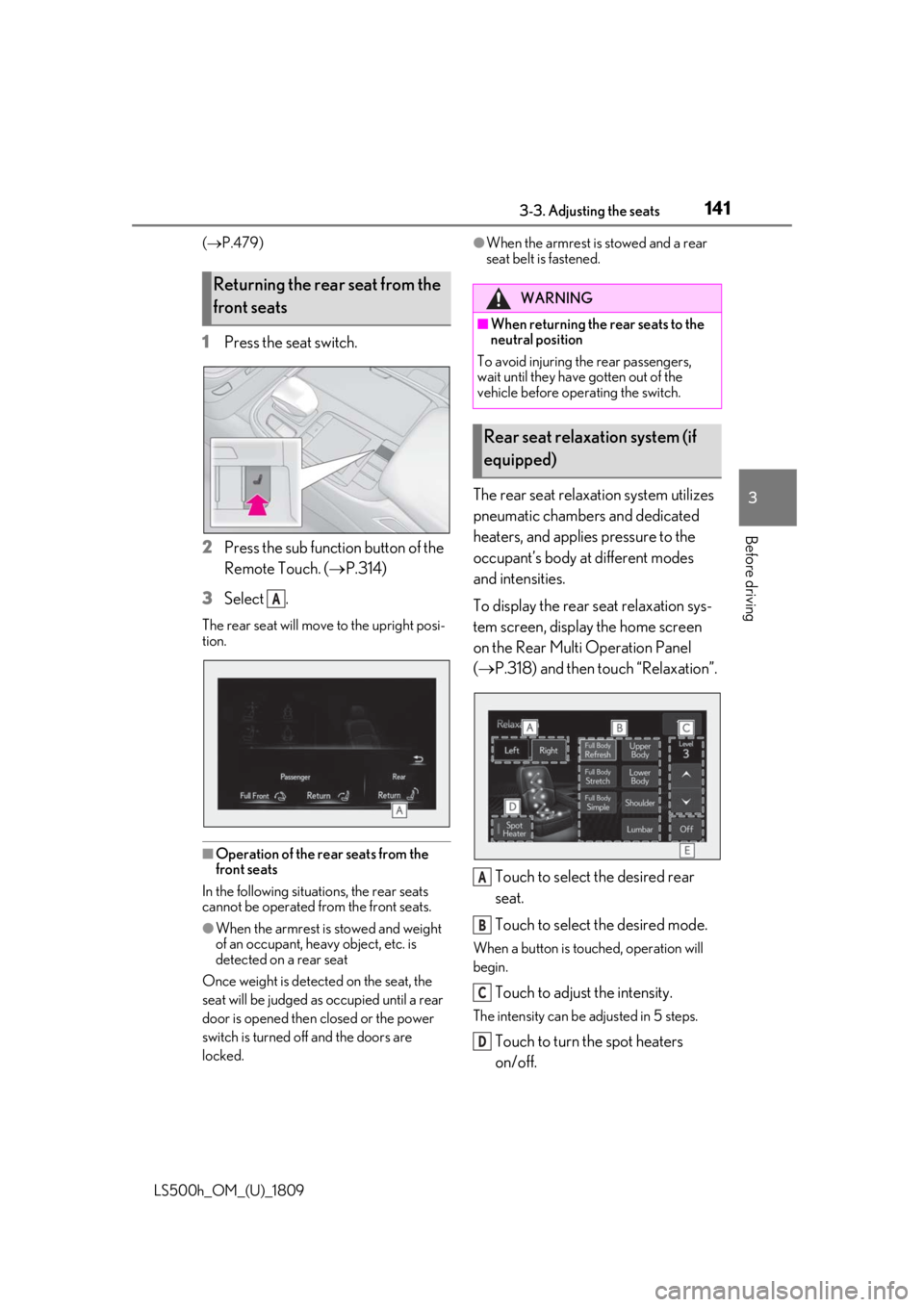
1 Press the seat switch.
2 Press the sub function button of the
Remote Touch. ( P.314)
3 Select .
The rear seat will move to the upright posi-
tion.
■Operation of the rear seats from the
front seats
In the following situations, the rear seats
cannot be operated from the front seats.
●When the armrest is stowed and weight
of an occupant, heavy object, etc. is
detected on a rear seat
Once weight is detect ed on the seat, the
seat will be judged as occupied until a rear
door is opened then closed or the power
switch is turned off and the doors are
locked.
●When the armrest is stowed and a rear
seat belt is fastened.
The rear seat relaxation system utilizes
pneumatic chambers and dedicated
heaters, and applies pressure to the
occupant’s body at different modes
and intensities.
To display the rear seat relaxation sys-
tem screen, display the home screen
on the Rear Multi Operation Panel
( P.318) and then touch “Relaxation”.
Touch to select the desired rear
seat.
Touch to select the desired mode.
When a button is touched, operation will
begin.
Touch to adjust the intensity.
The intensity can be adjusted in 5 steps.
Touch to turn the spot heaters
on/off.
Returning the rear seat from the
front seats
A
WARNING
■When returning the rear seats to the
neutral position
To avoid injuring th e rear passengers,
wait until they have gotten out of the
vehicle before operating the switch.
Rear seat relaxation system (if
equipped)
A
B
C
D
Page 149 of 523
1493-3. Adjusting the seats
LS500h_OM_(U)_1809
3
Before driving
adjusted so that the center of the head
restraint is closest to the top of your ears.
■Adjusting the rear seat head restraints
(manual head restraints)
Always raise the head restraint one level
from the stowed position when using.
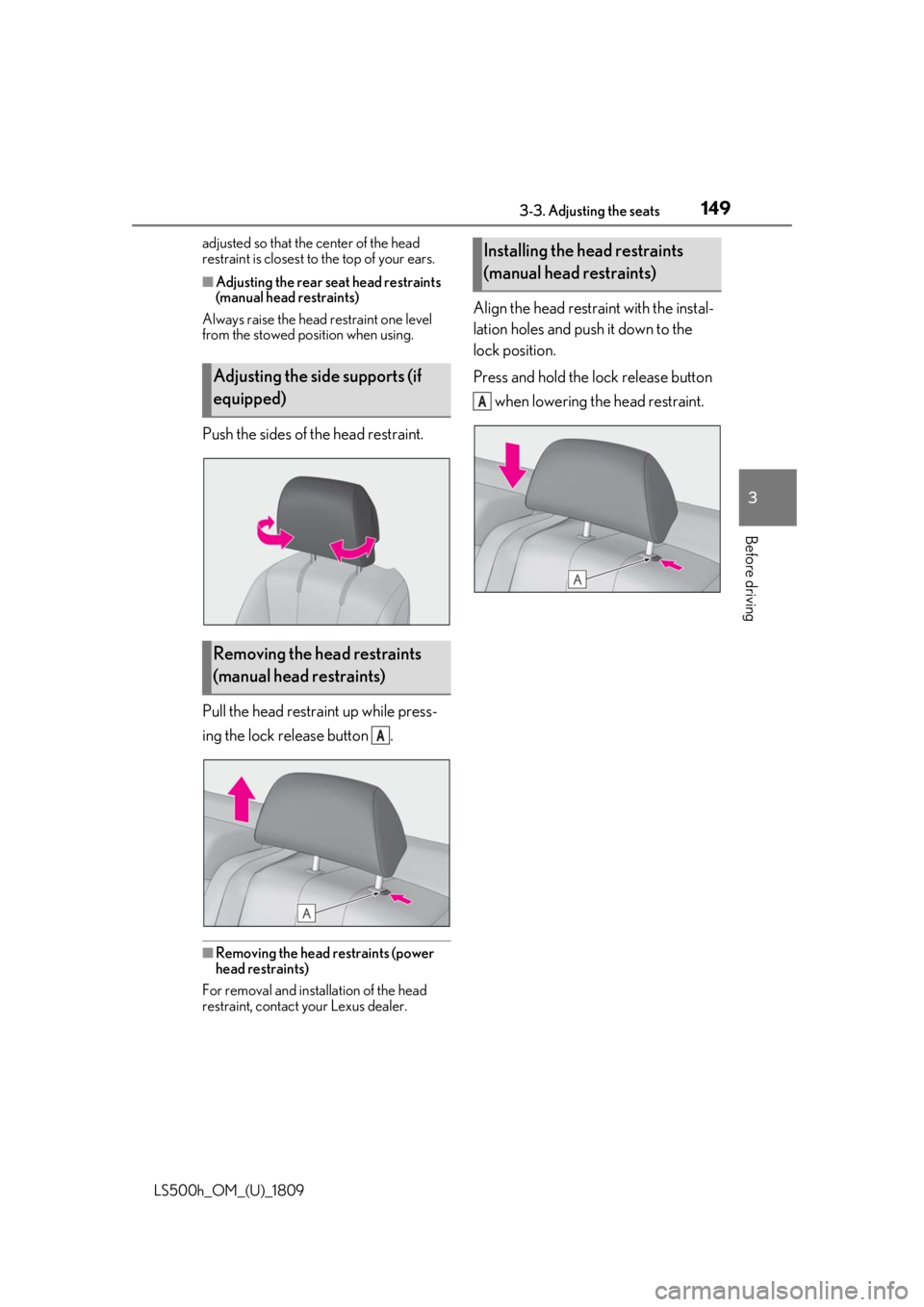
Push the sides of the head restraint.
Pull the head restraint up while press-
ing the lock release button .
■Removing the head restraints (power
head restraints)
For removal and insta llation of the head
restraint, contact your Lexus dealer.
Align the head restraint with the instal-
lation holes and push it down to the
lock position.
Press and hold the lock release button
when lowering the head restraint.
Adjusting the side supports (if
equipped)
Removing the head restraints
(manual head restraints)
A
Installing the head restraints
(manual head restraints)
A
Page 150 of 523
1503-4. Adjusting the steering wheel and mirrors
LS500h_OM_(U)_1809
3-4.Adjusting the steering wheel and mirrors
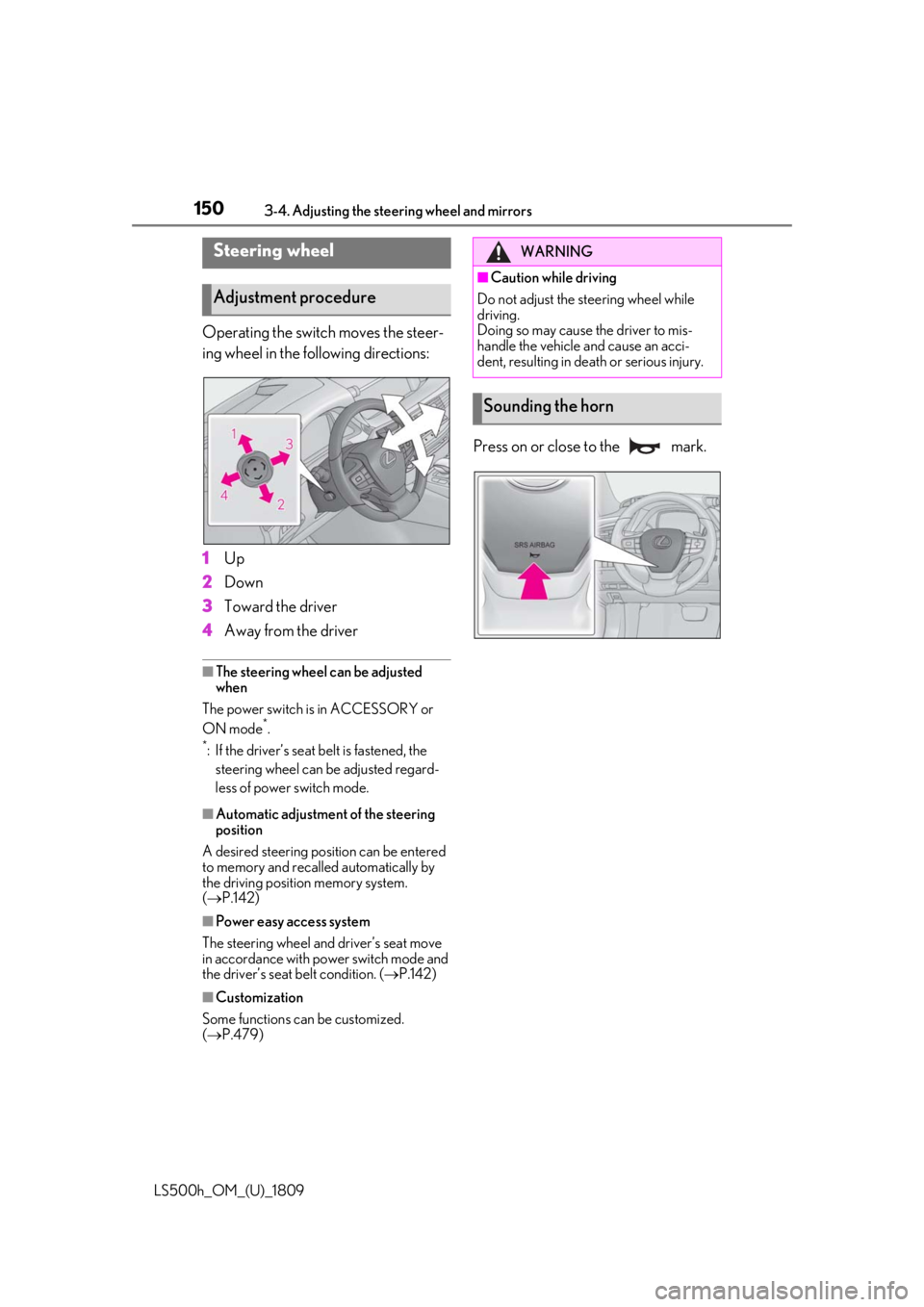
Operating the switch moves the steer-
ing wheel in the following directions:
1Up
2 Down
3 Toward the driver
4 Away from the driver
■The steering wheel can be adjusted
when
The power switch is in ACCESSORY or
ON mode
*.
*: If the driver’s seat belt is fastened, the steering wheel can be adjusted regard-
less of power switch mode.
■Automatic adjustment of the steering
position
A desired steering position can be entered
to memory and recalled automatically by
the driving position memory system.
( P.142)
■Power easy access system
The steering wheel and driver’s seat move
in accordance with power switch mode and
the driver’s seat belt condition. ( P.142)
■Customization
Some functions can be customized.
( P.479)
Press on or close to the mark.
Steering wheel
Adjustment procedure
WARNING
■Caution while driving
Do not adjust the steering wheel while
driving.
Doing so may cause the driver to mis-
handle the vehicle and cause an acci-
dent, resulting in death or serious injury.
Sounding the horn
Page 153 of 523
1533-4. Adjusting the steering wheel and mirrors
LS500h_OM_(U)_1809
3
Before driving
nor “R”.
To set the mirror angle used when the vehi-
cle is reversing, adjust the mirror angle at a
desired position with the shift position in R.
The adjusted angle will be memorized and
the mirror will automatically tilt to the mem-
orized angle whenever the shift position is
shifted to R from next time.
The memorized downward tilt position of
the mirror is linked to the normal position
(angle adjusted with the shift position in
other than R). Therefore, if the normal posi-
tion is changed after adjustment, the tilt
position will also change.
When the normal position is changed, read-
just the angle in reversing.
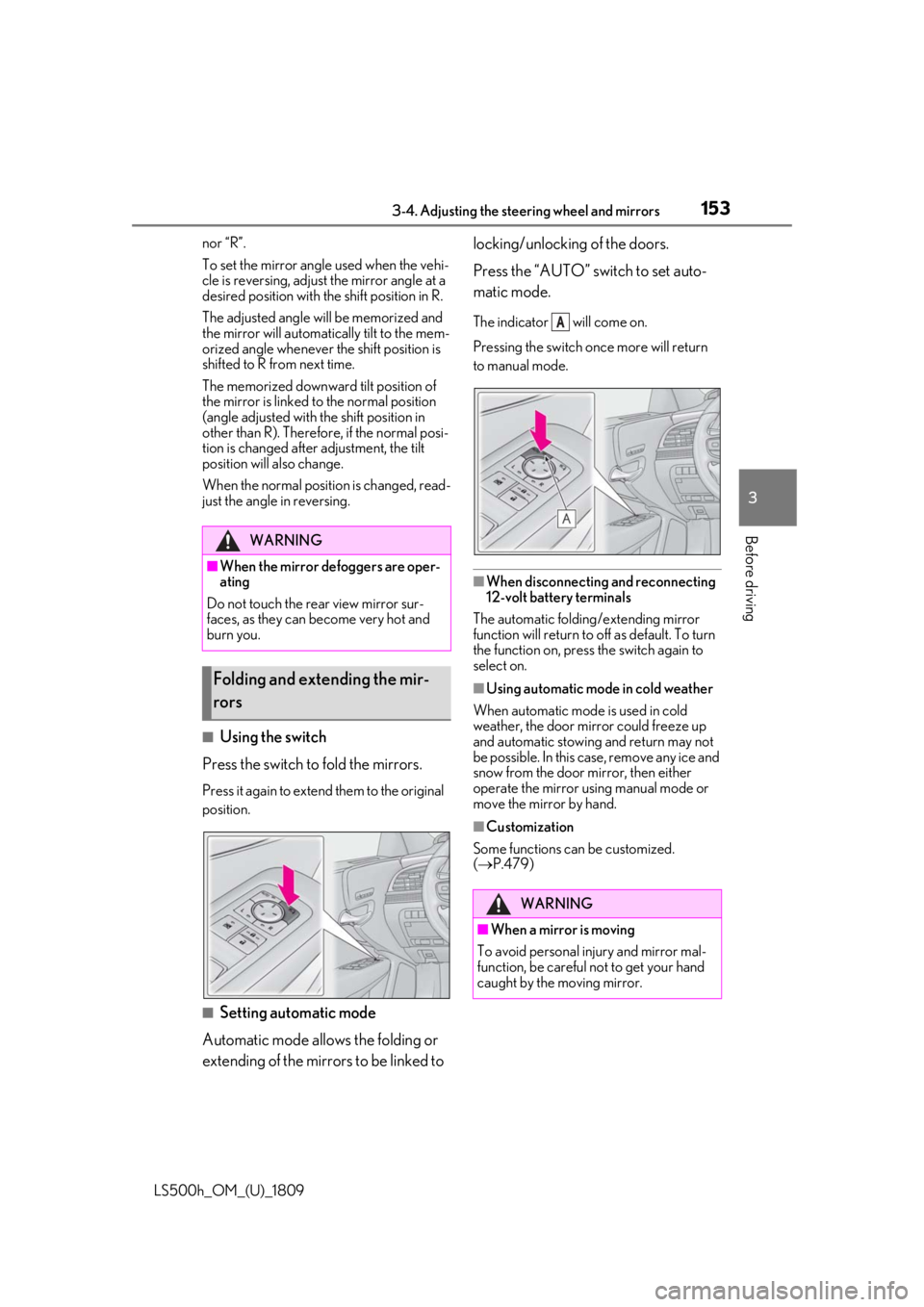
■Using the switch
Press the switch to fold the mirrors.
Press it again to extend them to the original
position.
■Setting automatic mode
Automatic mode allows the folding or
extending of the mirrors to be linked to locking/unlocking of the doors.
Press the “AUTO” switch to set auto-
matic mode.
The indicator will come on.
Pressing the switch on
ce more will return
to manual mode.
■When disconnecting and reconnecting
12-volt battery terminals
The automatic folding/extending mirror
function will return to off as default. To turn
the function on, press the switch again to
select on.
■Using automatic mode in cold weather
When automatic mode is used in cold
weather, the door mirror could freeze up
and automatic stowing and return may not
be possible. In this case, remove any ice and
snow from the door mirror, then either
operate the mirror using manual mode or
move the mirror by hand.
■Customization
Some functions can be customized.
( P.479)
WARNING
■When the mirror defoggers are oper-
ating
Do not touch the rear view mirror sur-
faces, as they can become very hot and
burn you.
Folding and extending the mir-
rors
WARNING
■When a mirror is moving
To avoid personal injury and mirror mal-
function, be careful not to get your hand
caught by the moving mirror.
A
Page 159 of 523
159
LS500h_OM_(U)_1809
4
4
Driving
Driving
.4-1. Before drivingDriving the vehicle ..................... 160
Cargo and luggage ................... 166
Vehicle load limits ...................... 168
Trailer towing ............................... 168
Dinghy towing ............................. 169
4-2. Driving procedures Power (ignition) switch ............ 170
EV drive mode ............................ 174
Hybrid transmission .................. 176
Turn signal lever.......................... 182
Parking brake .............................. 183
Brake Hold.................................... 185
4-3. Operating the lights and wipers Headlight switch ......................... 187
AHB (Automatic High Beam) ......................................................... 190
Windshield wipers and washer ......................................................... 192
4-4. Refueling Opening the fuel tank cap...... 197
4-5. Using the driving support sys- tems
Lexus Safety System + A......... 199
Lexus Safety System + 2.0 .... 206
PCS (Pre-Collision System) (vehi- cles with Lexus Safety System +
A) ................................................... 212
PCS (Pre-Collision System) (vehi- cles with Lexus Safety System +
2.0)............................................... 223FCTA (Front Cross Traffic Alert)
....................................................... 230
LTA (Lane Tracing Assist) .... 233
Dynamic radar cruise control with full-speed range...................... 245
RSA (Road Sign Assist).......... 255
BSM (Blind Spot Monitor) .... 258
PKSA (Parking Support Alert) ....................................................... 263
Intuitive parking assist ............. 265
RCTA (Rear Cross Traffic Alert) function......................................... 271
RCD (Rear Camera Detection) function....................................... 275
PKSB (Parking Support Brake) ....................................................... 278
Parking Support Brake function (static objects) ......................... 284
Parking Support Brake function (rear-crossing vehicles) ...... 290
Parking Support Brake function (rear pedestrians) .................. 294
Driving mode select switch .. 297
Electronically modulated air sus- pension ....................................... 298
Driving assist systems.............. 302
4-6. Driving tips Hybrid vehicle driving tips .... 307
Winter driving tips .................... 309