seats LEXUS LS500H 2019 Service Manual
[x] Cancel search | Manufacturer: LEXUS, Model Year: 2019, Model line: LS500H, Model: LEXUS LS500H 2019Pages: 523, PDF Size: 15.79 MB
Page 148 of 523
1483-3. Adjusting the seats
LS500h_OM_(U)_1809
2Using the Remote Touch pad,
select “Driver Seat Adjustment” or
“Passenger Seat Adjustment”.
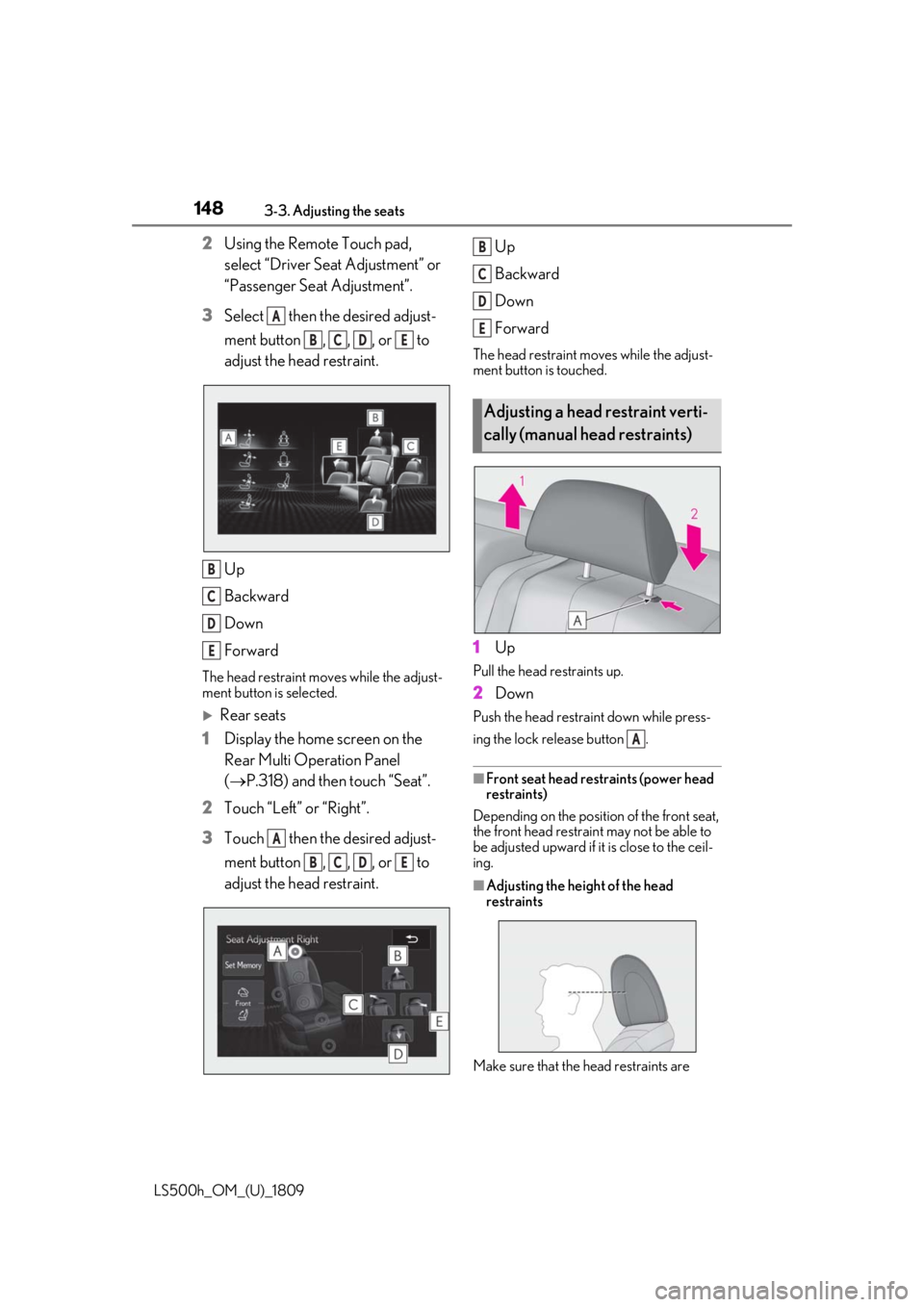
3 Select then the desired adjust-
ment button , , , or to
adjust the head restraint.
Up
Backward
Down
Forward
The head restraint mo ves while the adjust-
ment button is selected.
Rear seats
1 Display the home screen on the
Rear Multi Operation Panel
(P.318) and then touch “Seat”.
2 Touch “Left” or “Right”.
3 Touch then the desired adjust-
ment button , , , or to
adjust the head restraint. Up
Backward
Down
Forward
The head restraint mo
ves while the adjust-
ment button is touched.
1 Up
Pull the head restraints up.
2Down
Push the head restra int down while press-
ing the lock release button .
■Front seat head restraints (power head
restraints)
Depending on the positi on of the front seat,
the front head restraint may not be able to
be adjusted upward if it is close to the ceil-
ing.
■Adjusting the heig ht of the head
restraints
Make sure that the head restraints are
A
BCDE
B
C
D
E
A
BCDE
Adjusting a head restraint verti-
cally (manual head restraints)
B
C
D
E
A
Page 149 of 523
1493-3. Adjusting the seats
LS500h_OM_(U)_1809
3
Before driving
adjusted so that the center of the head
restraint is closest to the top of your ears.
■Adjusting the rear seat head restraints
(manual head restraints)
Always raise the head restraint one level
from the stowed position when using.
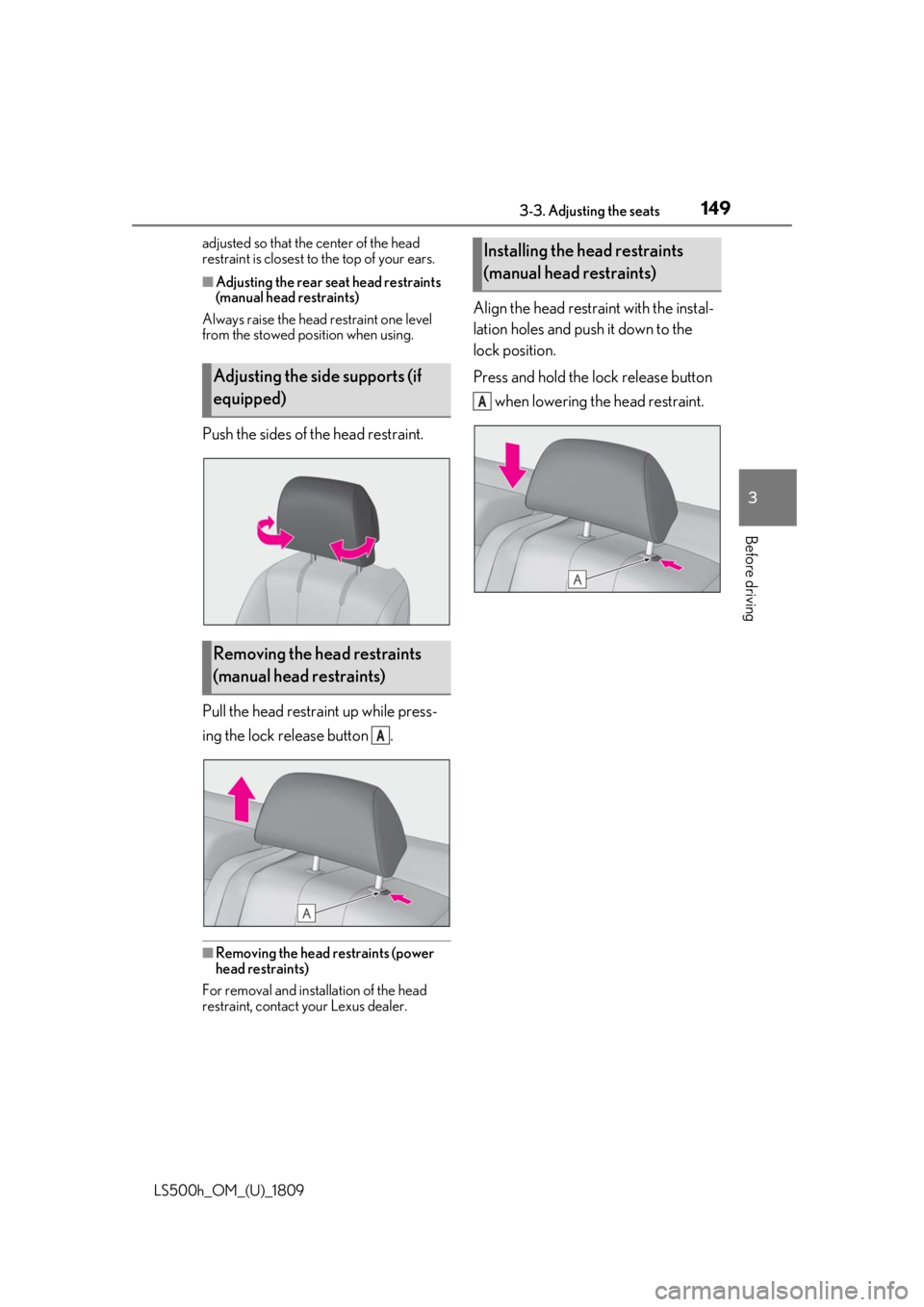
Push the sides of the head restraint.
Pull the head restraint up while press-
ing the lock release button .
■Removing the head restraints (power
head restraints)
For removal and insta llation of the head
restraint, contact your Lexus dealer.
Align the head restraint with the instal-
lation holes and push it down to the
lock position.
Press and hold the lock release button
when lowering the head restraint.
Adjusting the side supports (if
equipped)
Removing the head restraints
(manual head restraints)
A
Installing the head restraints
(manual head restraints)
A
Page 167 of 523
1674-1. Before driving
LS500h_OM_(U)_1809
4
Driving
*3: C =Available cargo and luggage load
In this condition, if 3 more passengers with
the combined weight of D lb. (kg) get on,
the available cargo and luggage load will
be reduced E lb. (kg) as follows:
C lb. (kg) - D*4 lb. (kg) = E*5 lb. (kg)
*4: D =Additional weight of people
*5: E =Available cargo and luggage load
As shown in the example above, if the
number of occupants increases, the
cargo and luggage load will be
reduced by an amount that equals the
increased weight due to the additional
occupants. In other words, if an
increase in the number of occupants
causes an excess of the total load
capacity (combined weight of occu-
pants plus cargo and luggage load),
you must reduce the cargo and lug-
gage on your vehicle.
WARNING
■Things that must not be carried in the
trunk
The following things may cause a fire if
loaded in the trunk:
●Receptacles containing gasoline
●Aerosol cans
■Storage precautions
Observe the following precautions.
Failure to do so may prevent the pedals
from being depressed properly, may
block the driver’s vision, or may result in
items hitting the driver or passengers,
possibly causing an accident.
●Stow cargo and luggage in the trunk
whenever possible.
●Do not place cargo or luggage in or on
the following locations.
• At the feet of the driver
• On the front passenger or rear seats (when stacking items)
• On the package tray
• On the instrument panel
•On the dashboard
• In front of the Center Display
●Secure all items in the occupant com-
partment.
■Capacity and distribution
●Do not exceed the maximum axle
weight rating or the total vehicle
weight rating.
●Even if the total load of occupant’s
weight and the cargo load is less than
the total load capacity, do not apply the
load unevenly. Improper loading may
cause deterioration of steering or
braking control which may cause
death or serious injury.
Page 213 of 523
2134-5. Using the driving support systems
LS500h_OM_(U)_1809
4
Driving
bility of a collision with an object, such
as a guardrail, or pedestrian is high,
even though the brakes are applied,
and that the collision may be avoidable
through steering control, the system
will steer the vehicle automatically to
help avoid the collision or help reduce
the impact of the collision.
■Pre-collision seat belts (front seat
only)
If the system determines that the possi-
bility of a frontal collision is high, the
system will retract the seat belts. Addi-
tionally, the system may retract the seat
belts if the brakes are applied suddenly
or control of the vehicle is lost.
■Pre-collision seatbacks (front pas-
senger’s seat / power rear seat [if
equipped])
If the system determines that the possi-
bility of a frontal collision is high, it may
move the seatbacks of the front pas-
senger’s seat and power rear seats to
the upright position automatically, if
reclined.
If a seat is being ad justed, it may not be
moved by the pre-collision seat function.
■Suspension control
When the system determines that the
possibility of a frontal collision is high,
the Adaptive Variable Suspension Sys-
tem ( P.302) will control the damp-
ing force of the shock absorbers to
help maintain an appropriate vehicle
posture.
■Steering control
When the system determines that the
possibility of a frontal collision is high and the driver is op
erating the steering
wheel, the LDH system ( P.303) will
control the turning angle of the front
and rear wheels and effort necessary
to turn the steering wheel to help
enhance steering responsiveness.
WARNING
■Limitations of the pre-collision system
●The driver is solely responsible for safe
driving. Always drive safely, taking
care to observe your surroundings.
Do not use the pre-collision system
instead of normal braking operations
under any circumstances. This system
will not prevent collisions or lessen col-
lision damage or injury in every situa-
tion. Do not overly rely on this system.
Failure to do so may lead to an acci-
dent, resulting in death or serious
injury.
●Although this system is designed to
help avoid a collision or help reduce
the impact of the collision, its effective-
ness may change according to various
conditions, therefore the system may
not always be able to achieve the same
level of performance.
Read the following conditions care-
fully. Do not overly rely on this system
and always drive carefully.
• Conditions under which the system may operate even if there is no possi-
bility of a collision: P.218
• Conditions under which the system may not operate properly: P.220
●Do not attempt to test the operation of
the pre-collision system yourself.
Depending on the objects used for
testing (dummies, cardboard objects
imitating detectable objects, etc.), the
system may not operate properly, pos-
sibly leading to an accident.
Page 223 of 523
2234-5. Using the driving support systems
LS500h_OM_(U)_1809
4
Driving
The system can detect the following:
Vehicles
Bicyclists
Pedestrians
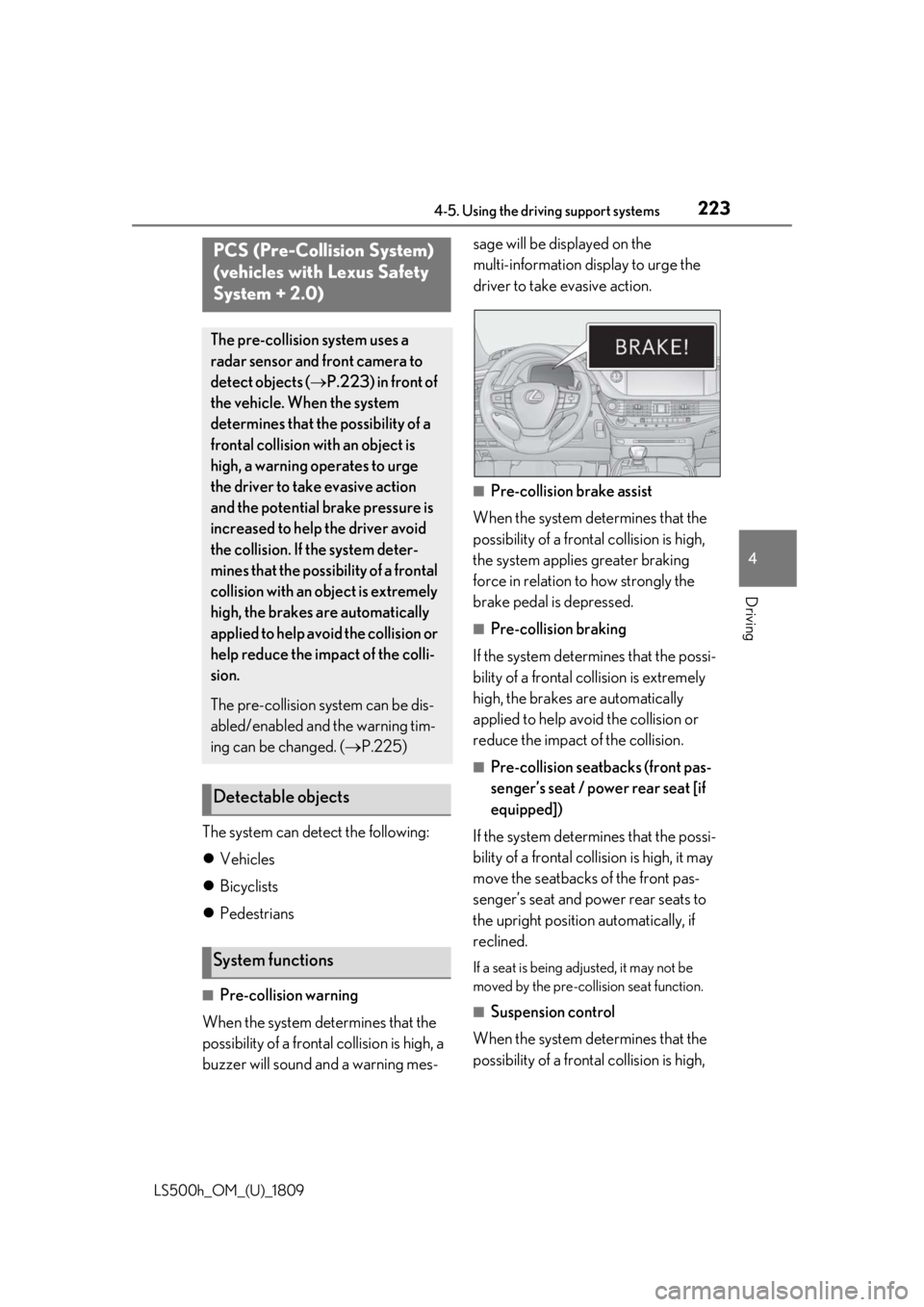
■Pre-collision warning
When the system determines that the
possibility of a frontal collision is high, a
buzzer will sound and a warning mes- sage will be displayed on the
multi-information display to urge the
driver to take evasive action.
■Pre-collision brake assist
When the system determines that the
possibility of a frontal collision is high,
the system applies greater braking
force in relation to how strongly the
brake pedal is depressed.
■Pre-collision braking
If the system determines that the possi-
bility of a frontal collision is extremely
high, the brakes are automatically
applied to help avoid the collision or
reduce the impact of the collision.
■Pre-collision seatbacks (front pas-
senger’s seat / power rear seat [if
equipped])
If the system determines that the possi-
bility of a frontal collision is high, it may
move the seatbacks of the front pas-
senger’s seat and power rear seats to
the upright position automatically, if
reclined.
If a seat is being adjusted, it may not be
moved by the pre-collis ion seat function.
■Suspension control
When the system determines that the
possibility of a frontal collision is high,
PCS (Pre-Collision System)
(vehicles with Lexus Safety
System + 2.0)
The pre-collision system uses a
radar sensor and front camera to
detect objects ( P.223) in front of
the vehicle. When the system
determines that the possibility of a
frontal collision with an object is
high, a warning operates to urge
the driver to take evasive action
and the potential brake pressure is
increased to help the driver avoid
the collision. If the system deter-
mines that the possibility of a frontal
collision with an object is extremely
high, the brakes are automatically
applied to help avoid the collision or
help reduce the impact of the colli-
sion.
The pre-collision system can be dis-
abled/enabled and the warning tim-
ing can be changed. ( P.225)
Detectable objects
System functions
Page 327 of 523
3275-3. Using the air conditioning system and defogger
LS500h_OM_(U)_1809
5
Interior features
“A/C”: Set cooling and dehumidification
function
If the “A/C” display is turned off, the system
will blow ambient temperature airor
heated air.
“DUAL”: Adjust the temperature for driver
and passenger seats separately (“DUAL”
mode) ( P.332)
: Set eco air conditioning mode
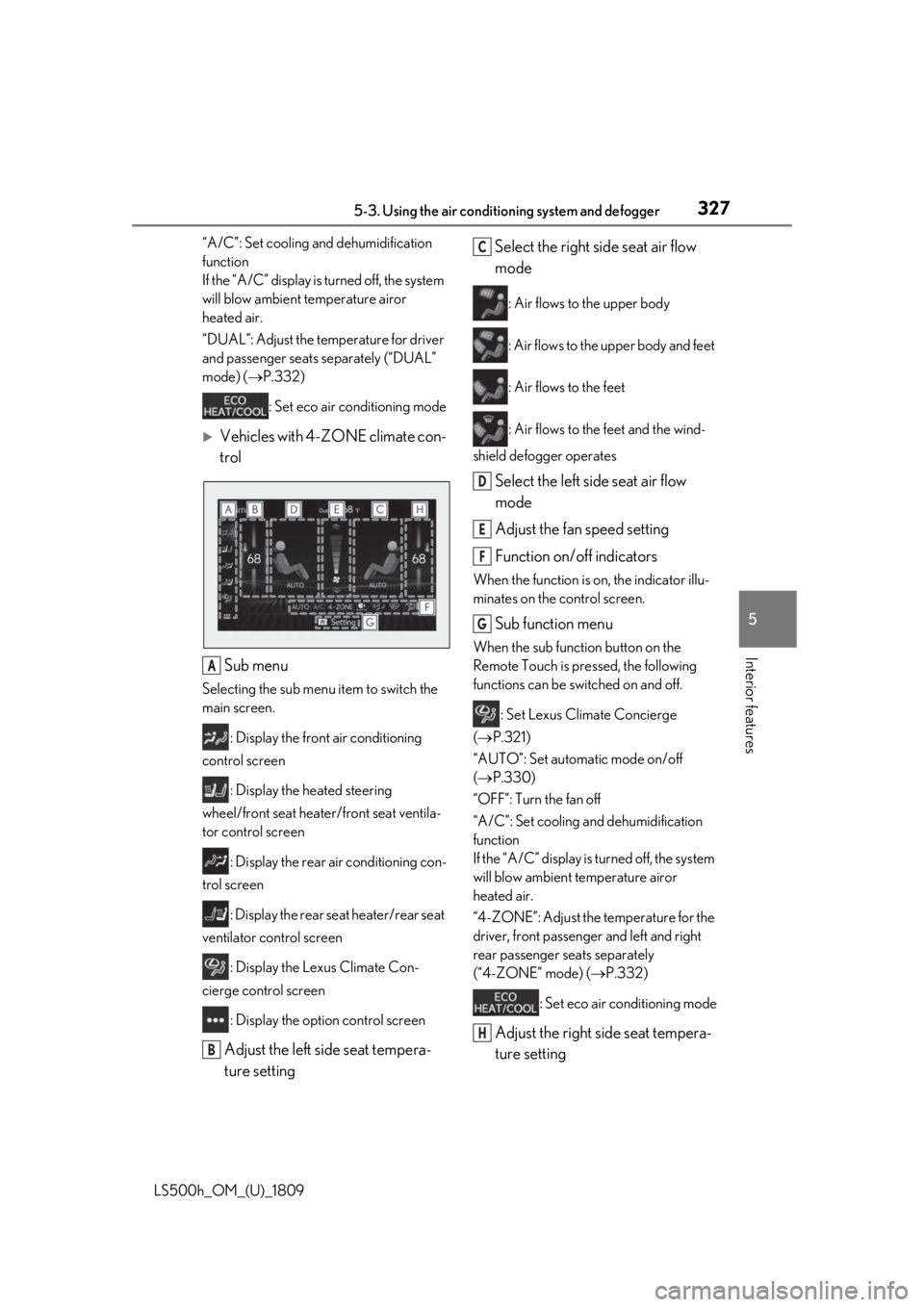
Vehicles with 4-ZONE climate con-
trol
Sub menu
Selecting the sub menu item to switch the
main screen. : Display the front air conditioning
control screen
: Display the heated steering
wheel/front seat heater/front seat ventila-
tor control screen
: Display the rear air conditioning con-
trol screen
: Display the rear seat heater/rear seat
ventilator control screen
: Display the Lexus Climate Con-
cierge control screen
: Display the option control screen
Adjust the left side seat tempera-
ture setting Select the right side seat air flow
mode
: Air flows to the upper body
: Air flows to the upper body and feet
: Air flows to the feet
: Air flows to the feet and the wind-
shield defogger operates
Select the left side seat air flow
mode
Adjust the fan speed setting
Function on/off indicators
When the function is on, the indicator illu-
minates on the control screen.
Sub function menu
When the sub function button on the
Remote Touch is pressed, the following
functions can be switched on and off.
: Set Lexus Climate Concierge
( P.321)
“AUTO”: Set automatic mode on/off
( P.330)
“OFF”: Turn the fan off
“A/C”: Set cooling and dehumidification
function
If the “A/C” display is turned off, the system
will blow ambient temperature airor
heated air.
“4-ZONE”: Adjust the temperature for the
driver, front passenger and left and right
rear passenger se ats separately
(“4-ZONE” mode) ( P.332)
: Set eco air conditioning mode
Adjust the right side seat tempera-
ture setting
A
B
C
D
E
F
G
H
Page 328 of 523
3285-3. Using the air conditioning system and defogger
LS500h_OM_(U)_1809
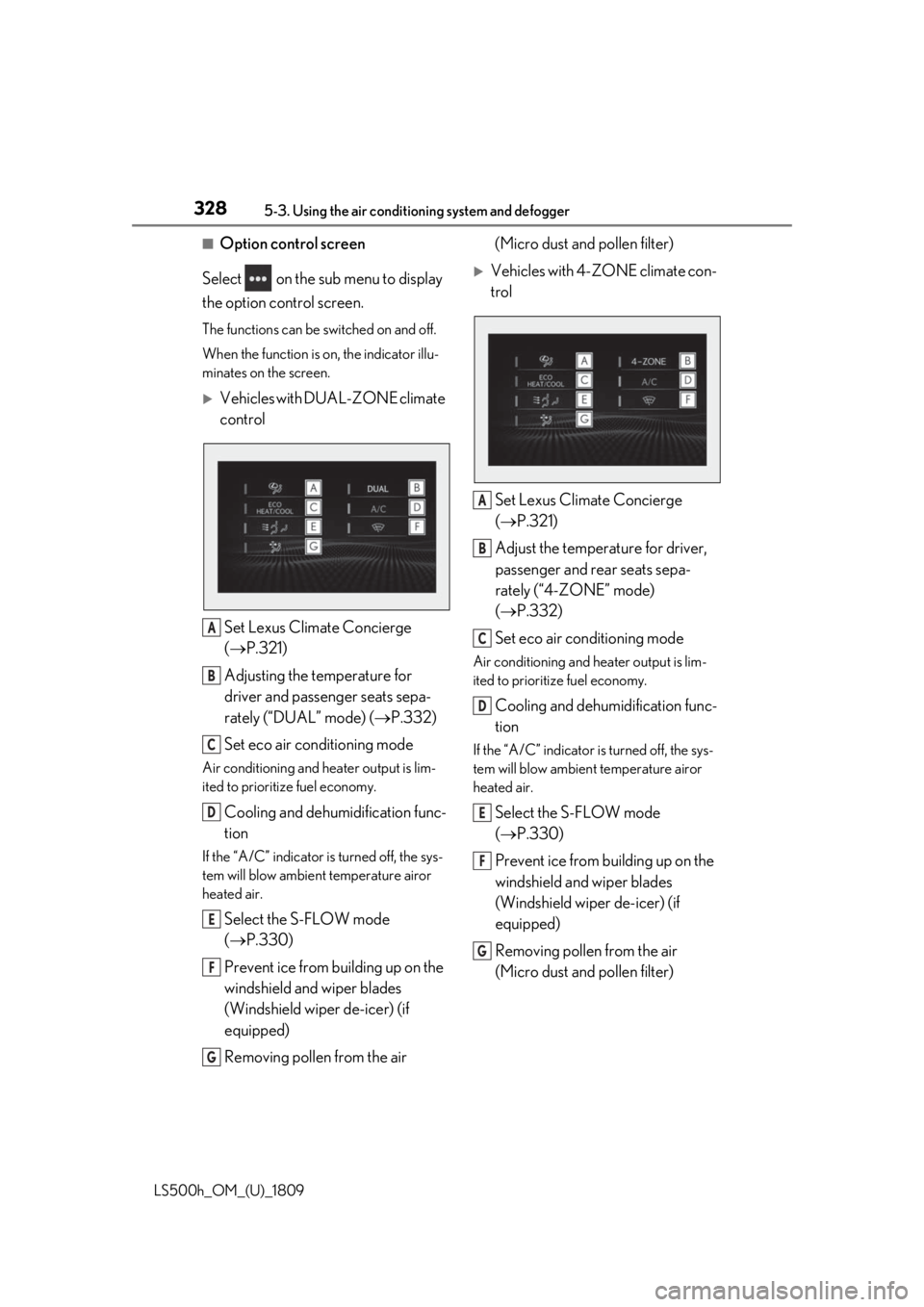
■Option control screen
Select on the sub menu to display
the option control screen.
The functions can be switched on and off.
When the function is on, the indicator illu-
minates on the screen.
Vehicles with DUAL-ZONE climate
control
Set Lexus Climate Concierge
( P.321)
Adjusting the temperature for
driver and passenger seats sepa-
rately (“DUAL” mode) ( P.332)
Set eco air conditioning mode
Air conditioning and heater output is lim-
ited to prioritize fuel economy.
Cooling and dehumidification func-
tion
If the “A/C” indicator is turned off, the sys-
tem will blow ambient temperature airor
heated air.
Select the S-FLOW mode
( P.330)
Prevent ice from building up on the
windshield and wiper blades
(Windshield wiper de-icer) (if
equipped)
Removing pollen from the air (Micro dust and pollen filter)
Vehicles with 4-ZONE climate con-
trol
Set Lexus Climate Concierge
( P.321)
Adjust the temperature for driver,
passenger and rear seats sepa-
rately (“4-ZONE” mode)
( P.332)
Set eco air conditioning mode
Air conditioning and heater output is lim-
ited to prioritize fuel economy.
Cooling and dehumidification func-
tion
If the “A/C” indicator is turned off, the sys-
tem will blow ambient temperature airor
heated air.
Select the S-FLOW mode
( P.330)
Prevent ice from building up on the
windshield and wiper blades
(Windshield wiper de-icer) (if
equipped)
Removing pollen from the air
(Micro dust and pollen filter)
A
B
C
D
E
F
G
A
B
C
D
E
F
G
Page 329 of 523
3295-3. Using the air conditioning system and defogger
LS500h_OM_(U)_1809
5
Interior features
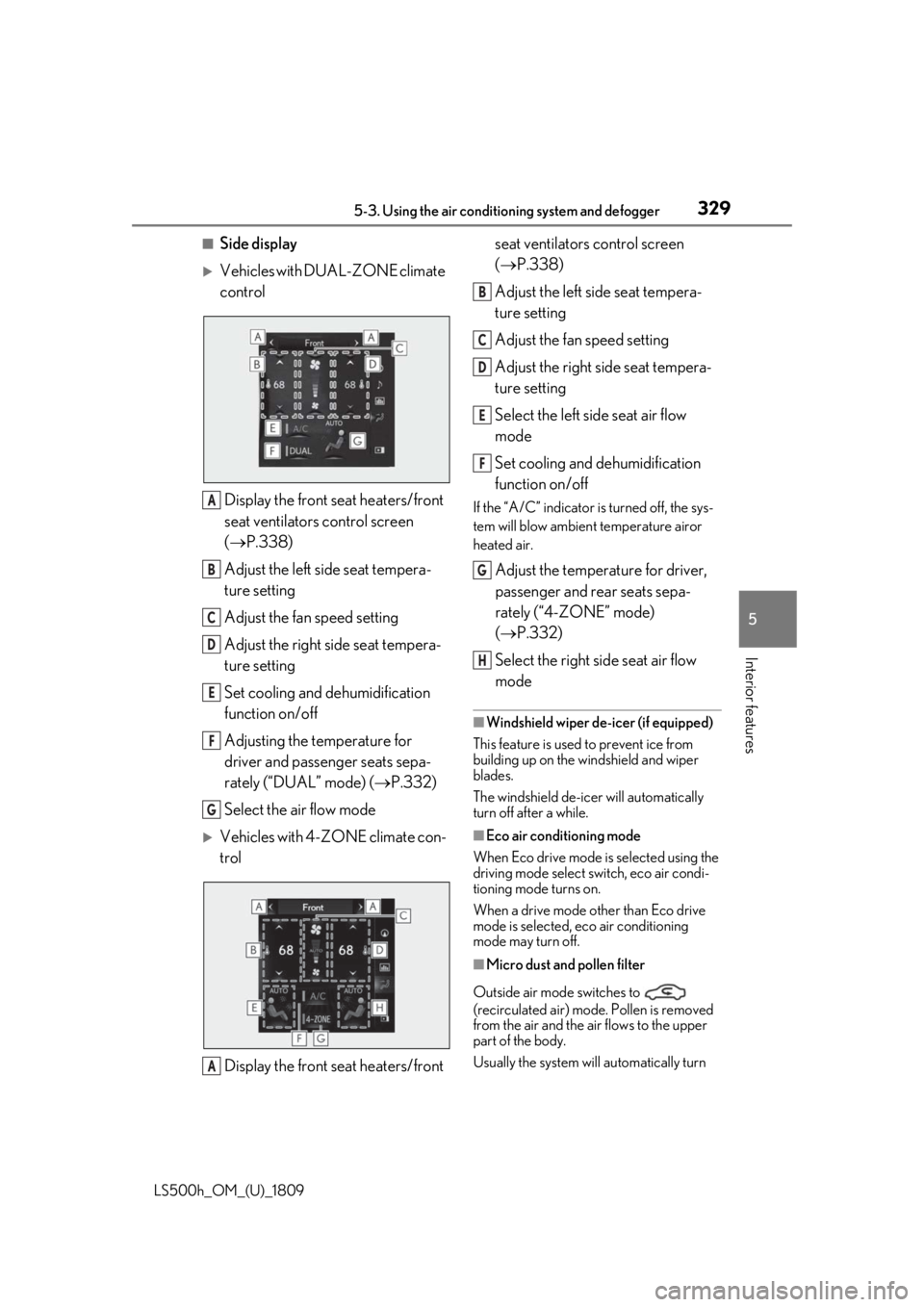
■Side display
Vehicles with DUAL-ZONE climate
control Display the front seat heaters/front
seat ventilators control screen
( P.338)
Adjust the left side seat tempera-
ture setting
Adjust the fan speed setting
Adjust the right side seat tempera-
ture setting
Set cooling and dehumidification
function on/off
Adjusting the temperature for
driver and passenger seats sepa-
rately (“DUAL” mode) ( P.332)
Select the air flow mode
Vehicles with 4-ZONE climate con-
trol
Display the front seat heaters/front seat ventilators control screen
(
P.338)
Adjust the left side seat tempera-
ture setting
Adjust the fan speed setting
Adjust the right side seat tempera-
ture setting
Select the left side seat air flow
mode
Set cooling and dehumidification
function on/off
If the “A/C” indicator is turned off, the sys-
tem will blow ambient temperature airor
heated air.
Adjust the temperature for driver,
passenger and rear seats sepa-
rately (“4-ZONE” mode)
( P.332)
Select the right side seat air flow
mode
■Windshield wiper de-icer (if equipped)
This feature is used to prevent ice from
building up on the windshield and wiper
blades.
The windshield de-icer will automatically
turn off after a while.
■Eco air conditioning mode
When Eco drive mode is selected using the
driving mode select switch, eco air condi-
tioning mode turns on.
When a drive mode other than Eco drive
mode is selected, eco air conditioning
mode may turn off.
■Micro dust and pollen filter
Outside air mode switches to
(recirculated air) mode. Pollen is removed
from the air and the air flows to the upper
part of the body.
Usually the system will automatically turn
A
B
C
D
E
F
G
A
B
C
D
E
F
G
H
Page 331 of 523

3315-3. Using the air conditioning system and defogger
LS500h_OM_(U)_1809
5
Interior features
flow is given to the front seats, reducing
the airflow and air conditioning effect
on the rear seats. When in S-FLOW
mode, airflow from the rear air condi-
tioning system is stopped.
Operation in S-FLOW mode differs
according to the following conditions:
Priority is given to the driver’s seat
only when:
Manual S-FLOW mode: When no
passenger is judged to be in the
front passenger seat.
Automatic S-FLOW mode: When
no passengers are judged to be in
the front passenger seat or rear
seats.
Priority is given to the front seats
when: Manual S-FLOW mode is
selected or no passengers are
judged to be in the rear seats when
in automatic S-FLOW mode.
S-FLOW mode will be disabled
when: A passenger is judged to be
in a rear seat when in automatic
S-FLOW mode.
Depending on the set temperature, opera-
tion in S-FLOW mode may not change as
described above.
When certain conditions are met and pri-
ority is given to the driver’s seat only, the
temperature indicator for the front passen-
ger side will turn off.
How the system judges if a passenger is in
the vehicle: P.331
The following S-FLOW modes are
available:
Automatic S-FLOW mode
In this mode, when a passenger is judged to be in a rear seat, S-FLOW
mode will be automatically disabled.
(
P.331)
The indicator will illuminate on the air con-
ditioning control screen when S-FLOW
mode is enabled.
To enable/disable S-FLOW mode and
enter manual S-FLOW mode, select the
S-FLOW mode switch.
How the system judges if a passenger is in
the vehicle: P.331
Manual S-FLOW mode
When the S-FLOW mode switch is
selected, S-FLOW mode will be manu-
ally enabled/ disabled.
The indicator will illuminate on the air con-
ditioning control screen when S-FLOW
mode is enabled.
In manual S-FLOW mode, as the system
does not judge if a passenger is in a rear
seat.
If the rear air conditioning control screen
on the Rear Multi Operation Panel (if
equipped) is operated , S-FLOW mode will
automatically be disabled
■How the system judges if a passenger is
in the vehicle when in S-FLOW mode
In S-FLOW mode, the system judges if a
passenger is in the vehicle as follows:
●Front passenger seat: A passenger is
judged to be in the front passenger seat
when the system detect s an object on the
front passenger seat, fastening of the
front passenger seat belt, changing of the
set temperature for the front passenger
seat, changing of the air outlets for the
front passenger seat or the opening and
closing of the front passenger door.
(However, when only opening and clos-
ing of the front passenger door is
detected, the system will judge that a pas-
senger is not in the front passenger seat
after the vehicle speed reaches approxi-
Page 332 of 523
3325-3. Using the air conditioning system and defogger
LS500h_OM_(U)_1809mately 12 mph (20 km/h) or more.)
●Rear seats: A passenger is judged to be in
a rear seat when the system detects the
opening and closing of a rear door (auto-
matic S-FLOW mode only) or the opera-
tion of the rear air conditioning control
screen on the Rear Multi Operation
Panel.
■Operation of automatic S-FLOW mode
When the system is operating in automatic
S-FLOW mode, if the system detects the
opening and closing of a rear door or the
operation of the rear air conditioning con-
trol screen on the Rear Multi Operation
Panel, S-FLOW mode will be disabled. To
enable S-FLOW mode, select the S-FLOW
mode switch. (In this case, the system will
operate in manual S-FLOW mode.)
■Changing from manual S-FLOW mode
to automatic S-FLOW mode
1 Select the S-FLOW mode switch to dis-
able S-FLOW mode.
2 Turn the power switch off.
3 After 60 minutes have elapsed, change
the power switch to ON mode.
Vehicles with DUAL-ZONE climate
control
To turn on the “DUAL” mode, perform
any of the following procedures:
Select “DUAL” on the sub function
menu. ( P.326)
Select “DUAL” on the option con-
trol screen.
Adjust the passenger’s side tem-
perature setting.
The indicator on the main control screen
comes on when the “DUAL” mode is on.
Vehicles with 4-ZONE climate con-
trol
To turn on the “4-ZONE” mode, per-
form any of the following procedures:
Select “4-ZONE” on the sub func-
tion menu. ( P.326)
Select “4-ZONE” on the option
control screen.
Adjust a passenger seat tempera-
ture setting.
The indicator on the main control screen
comes on when the “4-ZONE” mode is on.
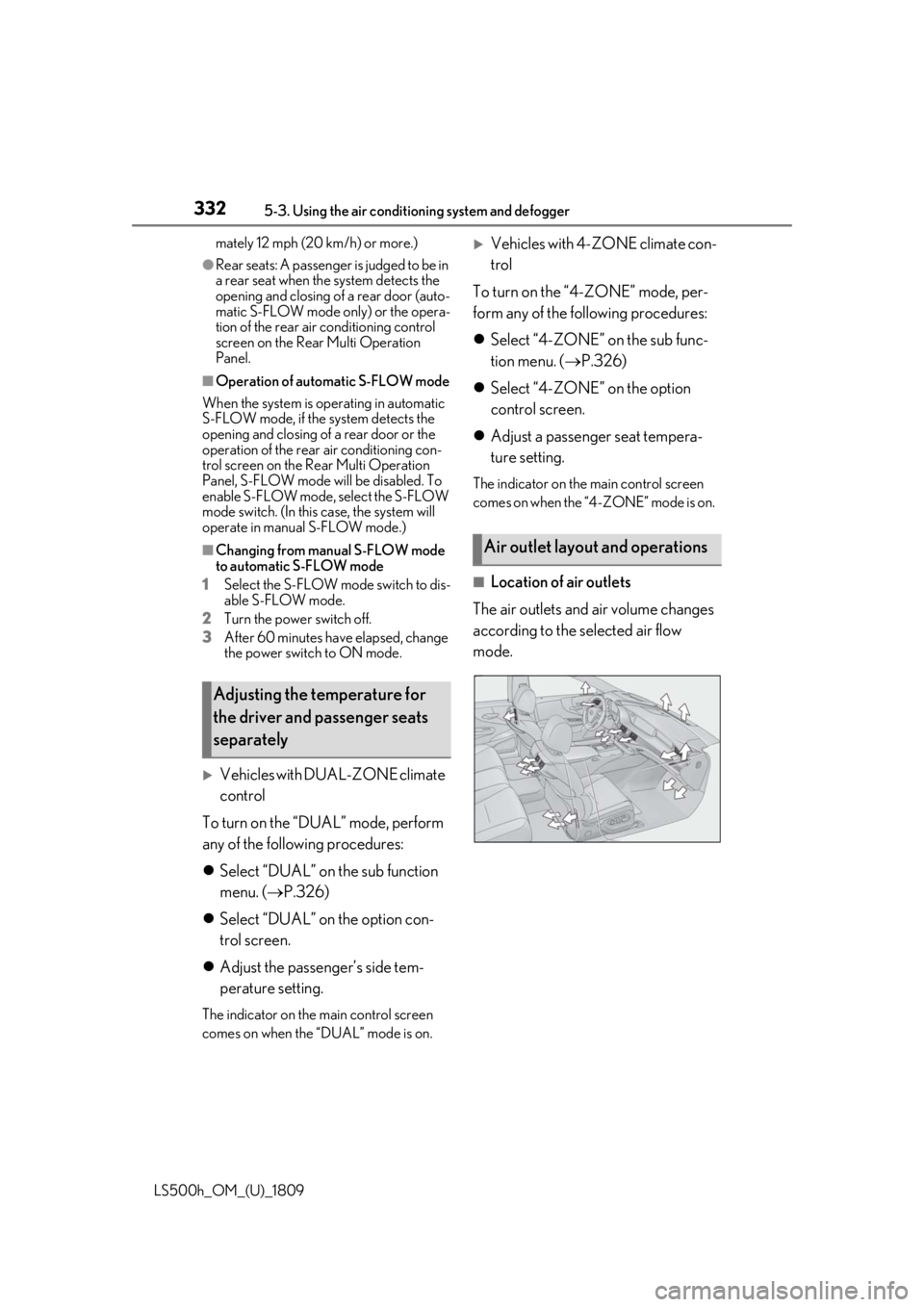
■Location of air outlets
The air outlets and air volume changes
according to the selected air flow
mode.
Adjusting the temperature for
the driver and passenger seats
separately
Air outlet layout and operations