seats LEXUS LS500H 2019 Workshop Manual
[x] Cancel search | Manufacturer: LEXUS, Model Year: 2019, Model line: LS500H, Model: LEXUS LS500H 2019Pages: 523, PDF Size: 15.79 MB
Page 334 of 523
3345-3. Using the air conditioning system and defogger
LS500h_OM_(U)_1809
*:If equipped■Center Display
Using the touchpad of the Remote
Touch, select the button on the screen.
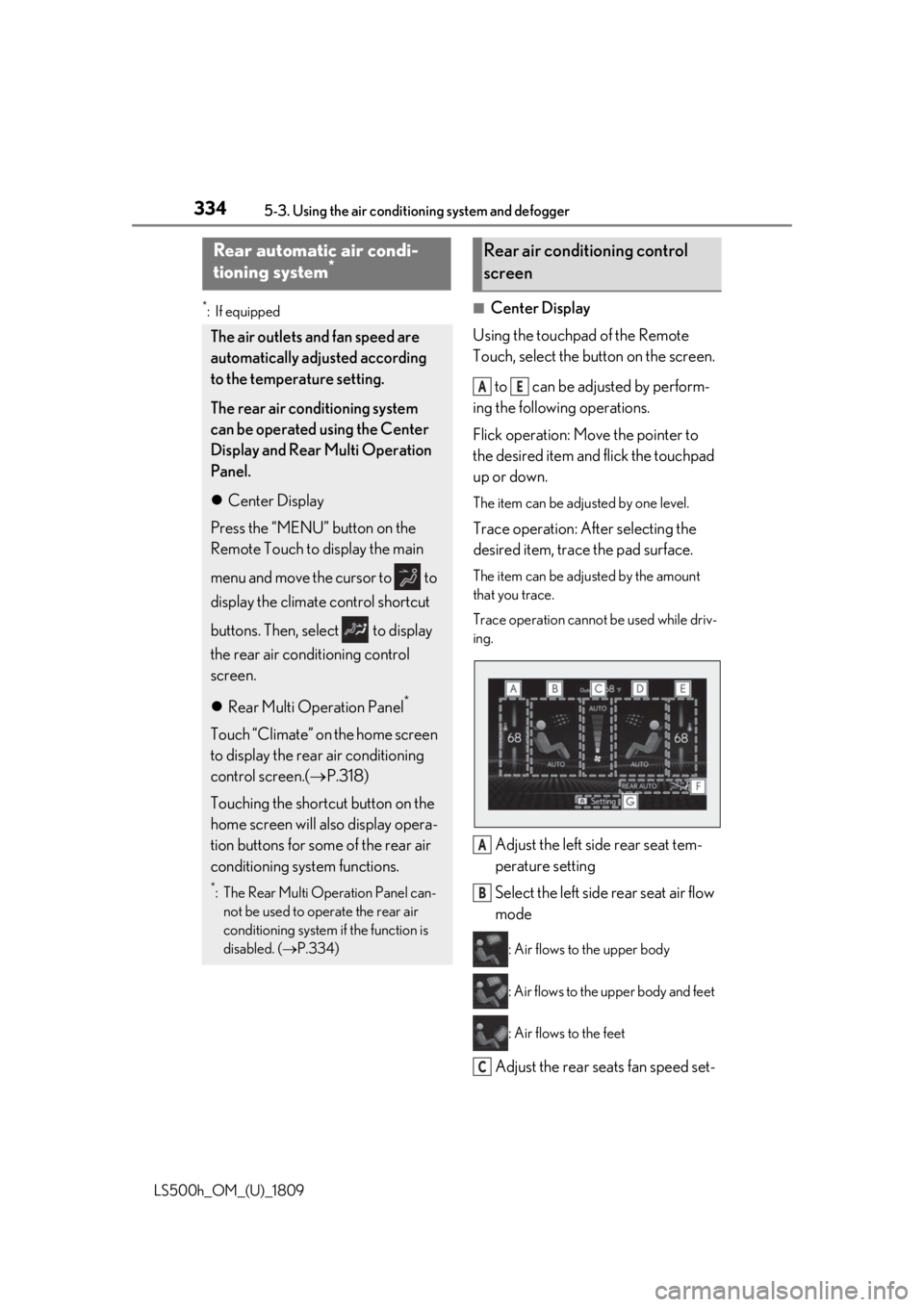
to can be adjusted by perform-
ing the following operations.
Flick operation: Move the pointer to
the desired item and flick the touchpad
up or down.
The item can be adjusted by one level.
Trace operation: After selecting the
desired item, trace the pad surface.
The item can be adjusted by the amount
that you trace.
Trace operation cannot be used while driv-
ing.
Adjust the left side rear seat tem-
perature setting
Select the left side rear seat air flow
mode
: Air flows to the upper body
: Air flows to the upper body and feet
: Air flows to the feet
Adjust the rear seats fan speed set-
Rear automatic air condi-
tioning system*
The air outlets and fan speed are
automatically adjusted according
to the temperature setting.
The rear air conditioning system
can be operated using the Center
Display and Rear Multi Operation
Panel.
Center Display
Press the “MENU” button on the
Remote Touch to display the main
menu and move the cursor to to
display the climate control shortcut
buttons. Then, select to display
the rear air conditioning control
screen.
Rear Multi Operation Panel
*
Touch “Climate” on the home screen
to display the rear air conditioning
control screen.( P.318)
Touching the shortcut button on the
home screen will also display opera-
tion buttons for some of the rear air
conditioning system functions.
*: The Rear Multi Operation Panel can- not be used to operate the rear air
conditioning system if the function is
disabled. ( P.334)
Rear air conditioning control
screen
AE
A
B
C
Page 335 of 523
3355-3. Using the air conditioning system and defogger
LS500h_OM_(U)_1809
5
Interior features
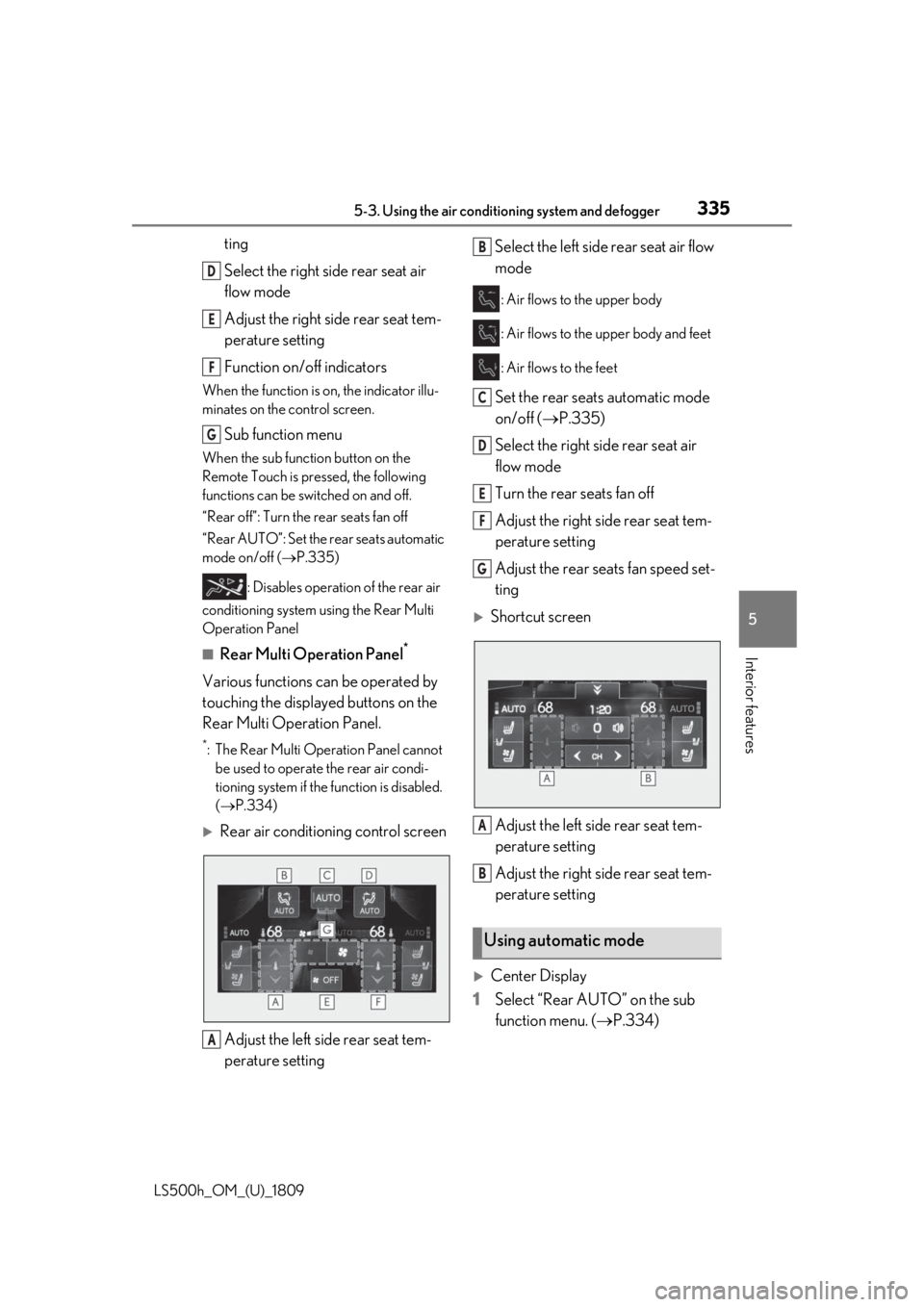
ting
Select the right side rear seat air
flow mode
Adjust the right side rear seat tem-
perature setting
Function on/off indicators
When the function is on, the indicator illu-
minates on the control screen.
Sub function menu
When the sub function button on the
Remote Touch is pressed, the following
functions can be switched on and off.
“Rear off”: Turn the rear seats fan off
“Rear AUTO”: Set the rear seats automatic
mode on/off ( P.335)
: Disables operation of the rear air
conditioning system using the Rear Multi
Operation Panel
■Rear Multi Operation Panel*
Various functions can be operated by
touching the displayed buttons on the
Rear Multi Operation Panel.
*: The Rear Multi Operation Panel cannot be used to operate the rear air condi-
tioning system if the function is disabled.
( P.334)
Rear air conditioning control screen
Adjust the left side rear seat tem-
perature setting Select the left side rear seat air flow
mode
: Air flows to the upper body
: Air flows to the upper body and feet
: Air flows to the feet
Set the rear seats automatic mode
on/off (
P.335)
Select the right side rear seat air
flow mode
Turn the rear seats fan off
Adjust the right side rear seat tem-
perature setting
Adjust the rear seats fan speed set-
ting
Shortcut screen
Adjust the left side rear seat tem-
perature setting
Adjust the right side rear seat tem-
perature setting
Center Display
1 Select “Rear AUTO” on the sub
function menu. ( P.334)
D
E
F
G
A
Using automatic mode
B
C
D
E
F
G
A
B
Page 336 of 523
3365-3. Using the air conditioning system and defogger
LS500h_OM_(U)_1809
2To stop the operat ion, select “Rear
off” on the sub function menu.
( P.334)
If the fan speed setting or air flow
modes are operated , the automatic
mode indicator goes off. However,
automatic mode for functions other
than that operated is maintained.
Rear Multi Operation Panel
1 Select “AUTO” on the rear air con-
ditioning control screen. ( P.335)
2 To stop the operation, select “OFF”
on the rear air co nditioning control
screen. ( P.334)
If the fan speed setting or air flow
modes are operated , the automatic
mode indicator goes off. However,
automatic mode for functions other
than that operated is maintained.
■Using automatic mode
Fan speed is adjusted automatically accord-
ing to the temperature setting and the
ambient conditions.
Therefore, the fan may stop for a while until
warm or cool air is ready to flow immedi-
ately after “Rear AUTO” is selected or
“AUTO” is touched.
Cool air may blow around the upper body
even when the heater is on due to sunlight.
The temperature setting of the rear
seats can be adjusted using the follow-
ing methods:
When the “4-ZONE” indicator is
off: Adjust the driv er’s seat tempera-
ture.
Adjust the temperature setting of each
rear seat using the Ce nter Display or Rear
Multi Operation Panel.
Adjust the temperature setting of
each rear seat using the Center Dis-
play (rear air conditioning control
screen) or Rear Multi Operation
Panel.
The temperature setting of each rear seat
can be changed independently.
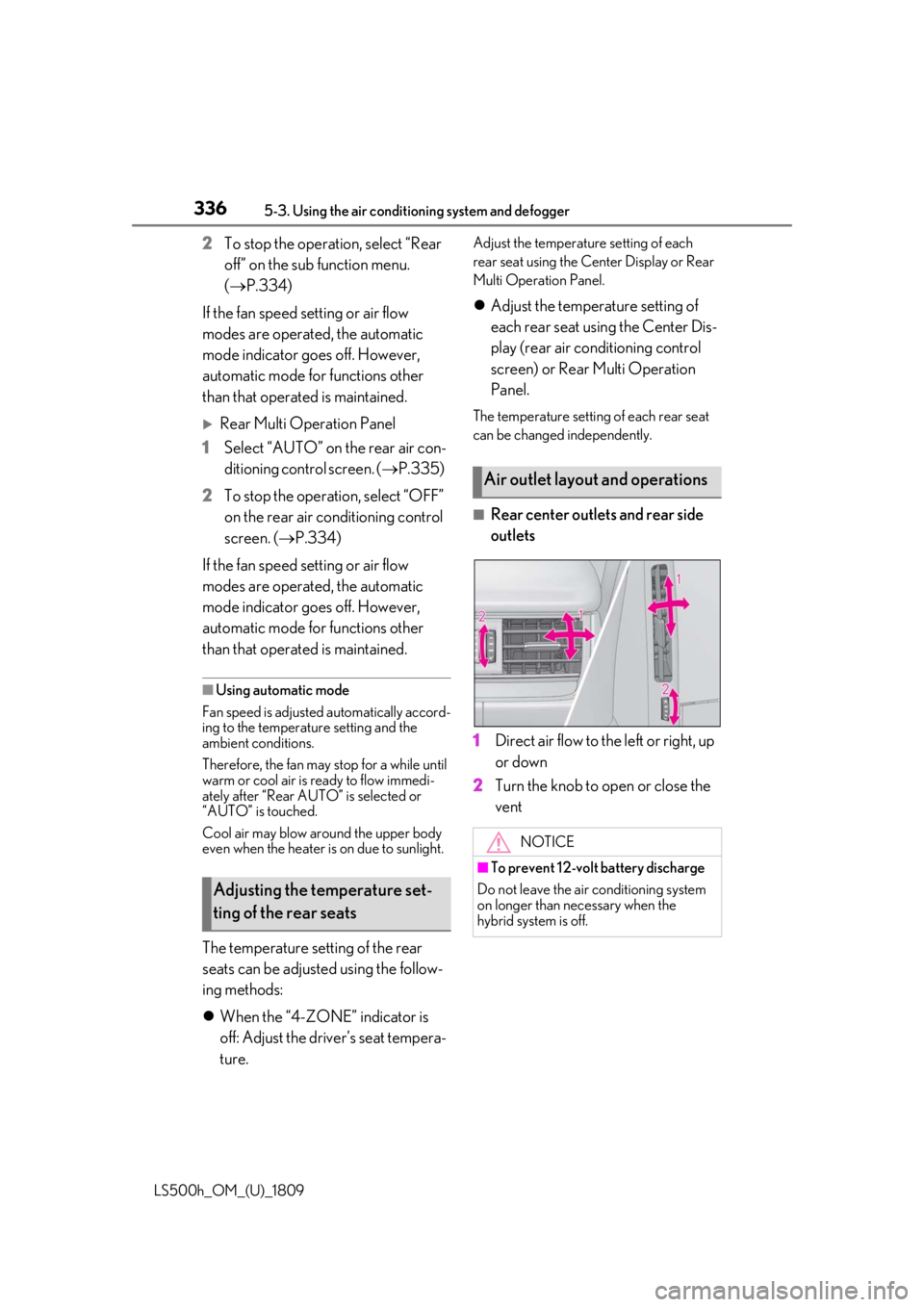
■Rear center outlets and rear side
outlets
1 Direct air flow to the left or right, up
or down
2 Turn the knob to open or close the
vent
Adjusting the temperature set-
ting of the rear seats
Air outlet layout and operations
NOTICE
■To prevent 12-volt battery discharge
Do not leave the air conditioning system
on longer than necessary when the
hybrid system is off.
Page 337 of 523
3375-3. Using the air conditioning system and defogger
LS500h_OM_(U)_1809
5
Interior features
*:If equipped
Heated steering wheel*/seat
heaters/seat ventilators
Heated steering wheel
Warms up the grip of the steering
wheel
Front seat heaters/Rear seat
heaters
Warm up the seat upholstery
Front seat ventilators/Rear seat
ventilators
Maintain good ventilation by pulling
air through the seat upholstery
The Center Display and Rear Multi
Operation Panel/rear control
panel can be used to operate the
heated steering wheel, seat heaters
and seat ventilators as follows:
Center Display
Press the “MENU” button on the
Remote Touch to display the main
menu and move the cursor to to
display the shortcut buttons. Then,
select to display the heated
steering wheel/front seat
heater/front seat ventilator control
screen.
To display the rear seat heater/rear
seat ventilator cont rol screen, select
. (if equipped)
Rear Multi Operation Panel
Touch “Climate” on the home screen
to display the air conditioning con-
trol screen.( P.318)
Touching the shortcut button on the
home screen will display operation
buttons for the rear seat heaters and
rear seat ventilators.
Rear control panel
The rear seat heaters can be oper-
ated.
WARNING
■To prevent minor burn injuries
Care should be taken if anyone in the fol-
lowing categories comes in contact with
the steering wheel or seats when the
heater is on:
●Babies, small children, the elderly, the
sick and the physically challenged
●Persons with sensitive skin
●Persons who are fatigued
Page 371 of 523

3716-1. Maintenance and care
LS500h_OM_(U)_1809
6
Maintenance and care
Remove dirt and dust using a vac-
uum cleaner. Wipe dirty surfaces
with a cloth dampened with luke-
warm water.
If dirt cannot be removed, wipe it off
with a soft cloth dampened with
neutral detergent diluted to approx-
imately 1%.
Wring out any excess water from
the cloth and thoroughly wipe off
remaining traces of detergent and
water.
■Shampooing the carpets
There are several commercial foaming-type
cleaners available. Use a sponge or brush
to apply the foam. Rub in overlapping cir-
cles. Do not use water. Wipe dirty surfaces
and let them dry. Excellent results are
obtained by keeping the carpet as dry as
possible.
■Handling the seat belts
Clean with mild soap and lukewarm water
using a cloth or spon ge. Also check the
belts periodically for excessive wear, fraying
or cuts.
■When cleaning the carpeted portions of
the glove box, console box, etc.
If a strong adhesive tape is used, there is a
possibility that the surface of the carpet
could be damaged.
Cleaning and protecting the
vehicle interior
Perform cleaning in a manner
appropriate to each component
and its material.
Protecting the vehicle interior
WARNING
■Water in the vehicle
●Do not splash or spill liquid in the vehi-
cle, such as on the floor, in the hybrid
battery (traction battery) air vents, and
in the trunk. ( P.69)
Doing so may cause the hybrid battery,
electrical components, etc. to mal-
function or catch fire.
●Do not get any of the SRS components
or wiring in the vehicle interior wet.
( P.29)
An electrical malfunction may cause
the airbags to deploy or not function
properly, resulting in death or serious
injury.
■Cleaning the interior (especially
instrument panel)
Do not use polish wax or polish cleaner.
The instrument panel may reflect off the
windshield, obstructin g the driver’s view
and leading to an accident, resulting in
death or serious injury.
NOTICE
■Cleaning detergents
●Do not use the following types of
detergent, as they may discolor the
vehicle interior or cause streaks or
damage to painted surfaces:
• Areas other than the seats and steer- ing wheel: Organic substances such as
benzene or gasoline, alkaline or acidic
solutions, dye, and bleach
• Seats: Alkaline or acidic solutions, such as thinner, benzene, and alcohol
• Steering wheel: Organic substances, such as thinner, and cleaner that con-
tains alcohol
●Do not use polish wax or polish
cleaner. The instrument panel’s or
other interior part’s painted surface
may be damaged.
Page 374 of 523
3746-1. Maintenance and care
LS500h_OM_(U)_1809vents periodically to
prevent dust, etc.,
from collecting in the air intake vents and
filters.
●If the massage in the multi-information
display does not turn off, even if the air
intake vents are cleaned, have the vehicle
inspected at your Lexus dealer.
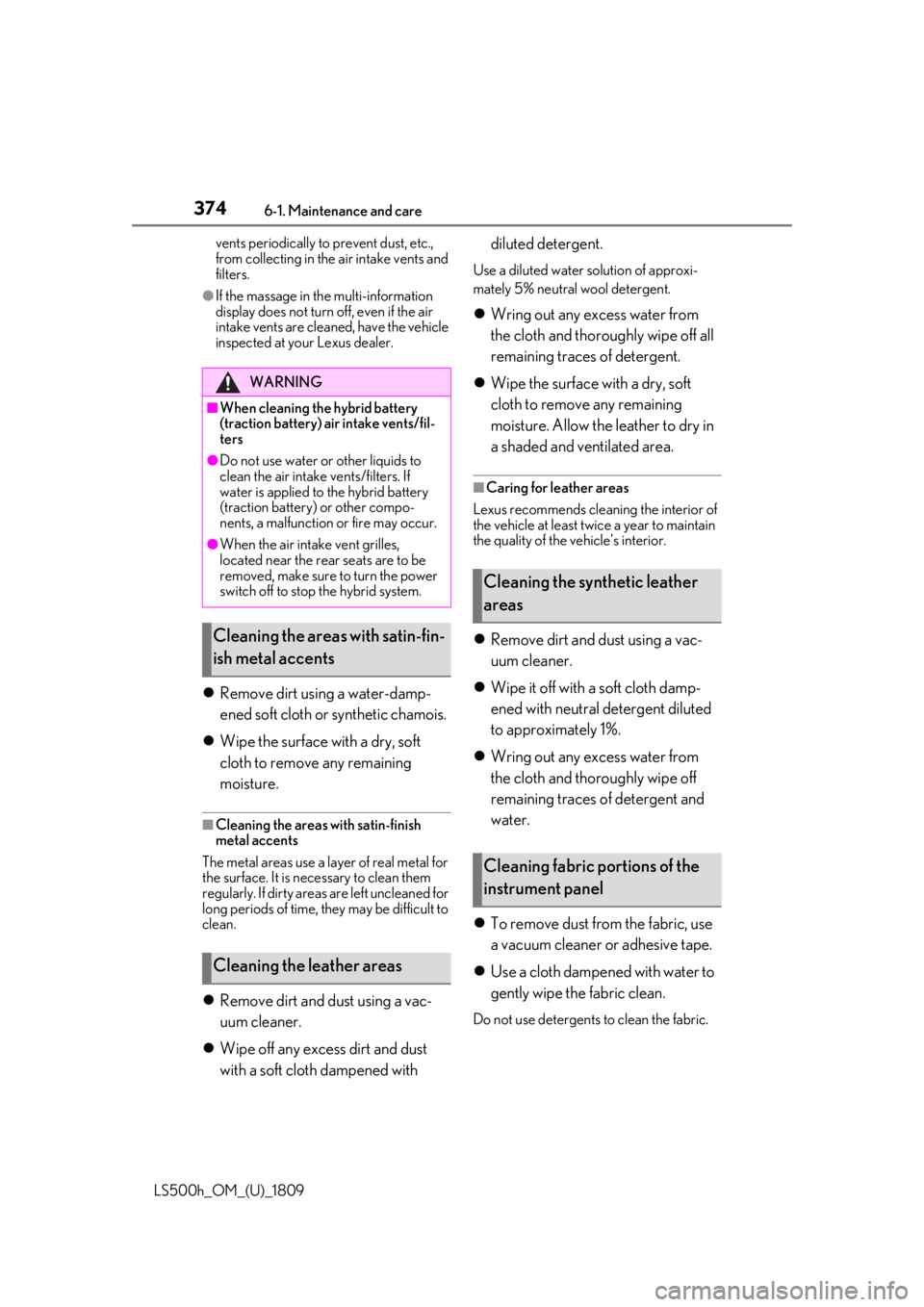
Remove dirt using a water-damp-
ened soft cloth or synthetic chamois.
Wipe the surface with a dry, soft
cloth to remove any remaining
moisture.
■Cleaning the areas with satin-finish
metal accents
The metal areas use a layer of real metal for
the surface. It is necessary to clean them
regularly. If dirty areas are left uncleaned for
long periods of time, they may be difficult to
clean.
Remove dirt and dust using a vac-
uum cleaner.
Wipe off any excess dirt and dust
with a soft cloth dampened with diluted detergent.
Use a diluted water solution of approxi-
mately 5% neutral wool detergent.
Wring out any excess water from
the cloth and thoroughly wipe off all
remaining traces of detergent.
Wipe the surface with a dry, soft
cloth to remove any remaining
moisture. Allow the leather to dry in
a shaded and ventilated area.
■Caring for leather areas
Lexus recommends cleani ng the interior of
the vehicle at least twice a year to maintain
the quality of the vehicle’s interior.
Remove dirt and dust using a vac-
uum cleaner.
Wipe it off with a soft cloth damp-
ened with neutral detergent diluted
to approximately 1%.
Wring out any excess water from
the cloth and thoroughly wipe off
remaining traces of detergent and
water.
To remove dust from the fabric, use
a vacuum cleaner or adhesive tape.
Use a cloth dampened with water to
gently wipe the fabric clean.
Do not use detergents to clean the fabric.
WARNING
■When cleaning the hybrid battery
(traction battery) air intake vents/fil-
ters
●Do not use water or other liquids to
clean the air intake vents/filters. If
water is applied to the hybrid battery
(traction battery) or other compo-
nents, a malfunction or fire may occur.
●When the air intake vent grilles,
located near the rear seats are to be
removed, make sure to turn the power
switch off to stop the hybrid system.
Cleaning the areas with satin-fin-
ish metal accents
Cleaning the leather areas
Cleaning the synthetic leather
areas
Cleaning fabric portions of the
instrument panel
Page 378 of 523
3786-2. Maintenance
LS500h_OM_(U)_1809
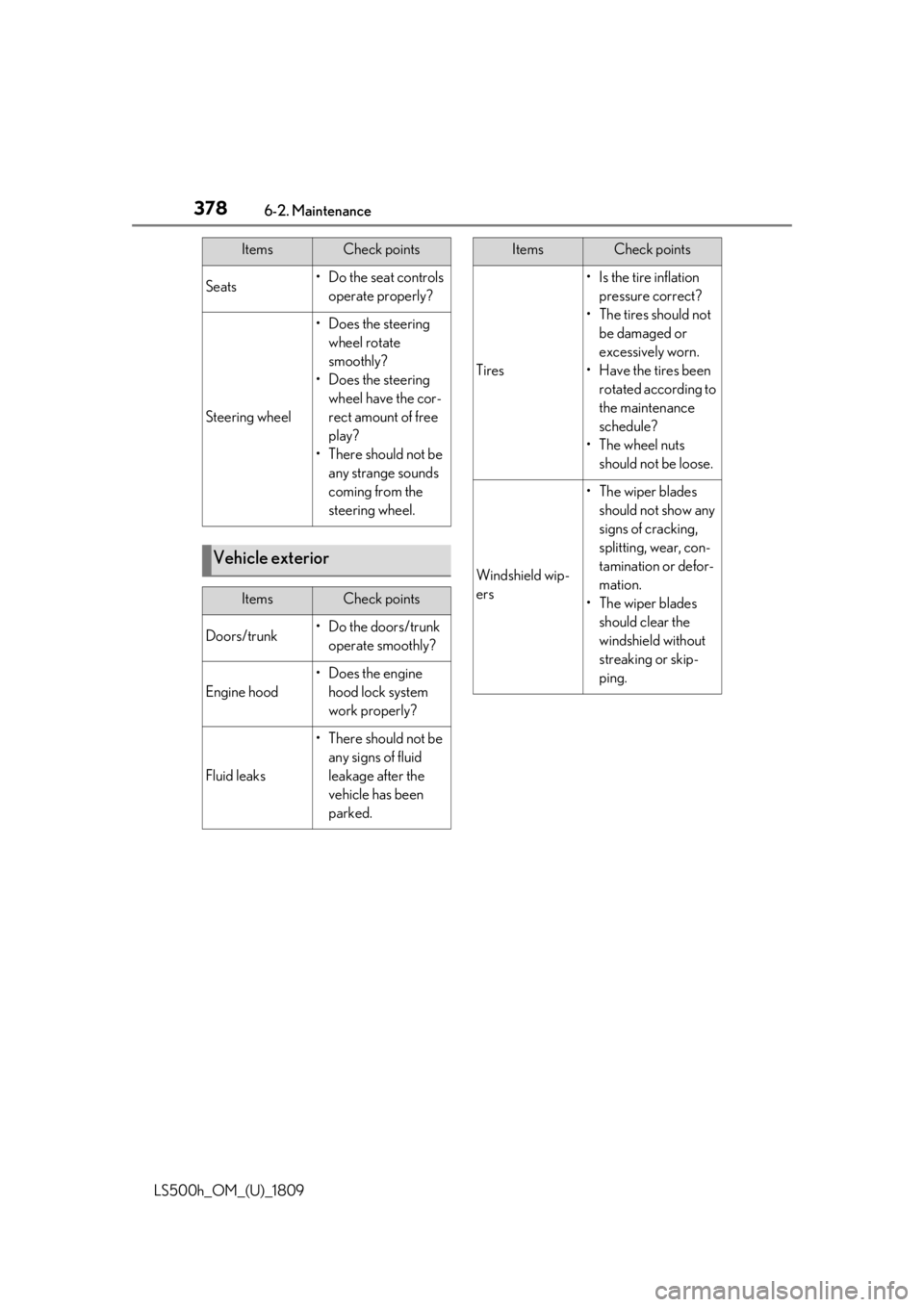
Seats• Do the seat controls operate properly?
Steering wheel
• Does the steering wheel rotate
smoothly?
• Does the steering wheel have the cor-
rect amount of free
play?
•There should not be any strange sounds
coming from the
steering wheel.
Vehicle exterior
ItemsCheck points
Doors/trunk• Do the doors/trunk operate smoothly?
Engine hood
•Does the engine hood lock system
work properly?
Fluid leaks
•There should not be any signs of fluid
leakage after the
vehicle has been
parked.
ItemsCheck points
Tires
• Is the tire inflation pressure correct?
• The tires should not be damaged or
excessively worn.
• Have the tires been rotated according to
the maintenance
schedule?
•The wheel nuts should not be loose.
Windshield wip-
ers
• The wiper blades should not show any
signs of cracking,
splitting, wear, con-
tamination or defor-
mation.
• The wiper blades should clear the
windshield without
streaking or skip-
ping.
ItemsCheck points
Page 473 of 523

4738-1. Specifications
LS500h_OM_(U)_1809
8
Vehicle specifications
■Traction AA, A, B, C
The traction grades, from highest to
lowest, are AA, A, B and C, and they
represent the tire’s ability to stop on
wet pavement as measured under con-
trolled conditions on specified govern-
ment test surfaces of asphalt and
concrete.
A tire marked C may have poor traction
performance.
Warning: The traction grade assigned to
this tire is based on braking (straight
ahead) traction tests and does not include
cornering (turning) traction.
■Temperature A, B, C
The temperature grades are A (the
highest), B, and C, representing the
tire’s resistance to the generation of
heat and its ability to dissipate heat when tested under controlled condi-
tions on a specified indoor laboratory
test wheel.
Sustained high temperature can cause the
material of the tire to degenerate and
reduce tire life, and excessive temperature
can lead to sudd
en tire failure.
Grade C corresponds to a level of perfor-
mance which all passenger car tires must
meet under the Fede ral Motor Vehicle
Safety Standard No. 109.
Grades B and A represent higher levels of
performance on the laboratory test wheel
than the minimum required by law.
Warning: The temperature grades of a tire
assume that it is properly inflated and not
overloaded.
Excessive speed, unde rinflation, or exces-
sive loading, either separately or in combi-
nation, can cause heat buildup and
possible tire failure.
Glossary of tire terminology
Tire related termMeaning
Cold tire inflation pressure
Tire pressure when the vehicle has been parked for
three hours or more, or has not been driven more
than 1 mile or 1.5 km under that condition
Maximum inflation pressureThe maximum cold inflated pressure to which a tire
may be inflated, shown on the sidewall of the tire
Recommended inflation pressureCold tire inflation pressure recommended by a
manufacturer
Accessory weight
The combined weight (in excess of those standard
items which may be replaced) of hybrid transmis-
sion, power steering, power brakes, power win-
dows, power seats, radio and heater, to the extent
that these items are available as factory-installed
equipment (whether installed or not)
Page 484 of 523
4848-2. Customization
LS500h_OM_(U)_1809
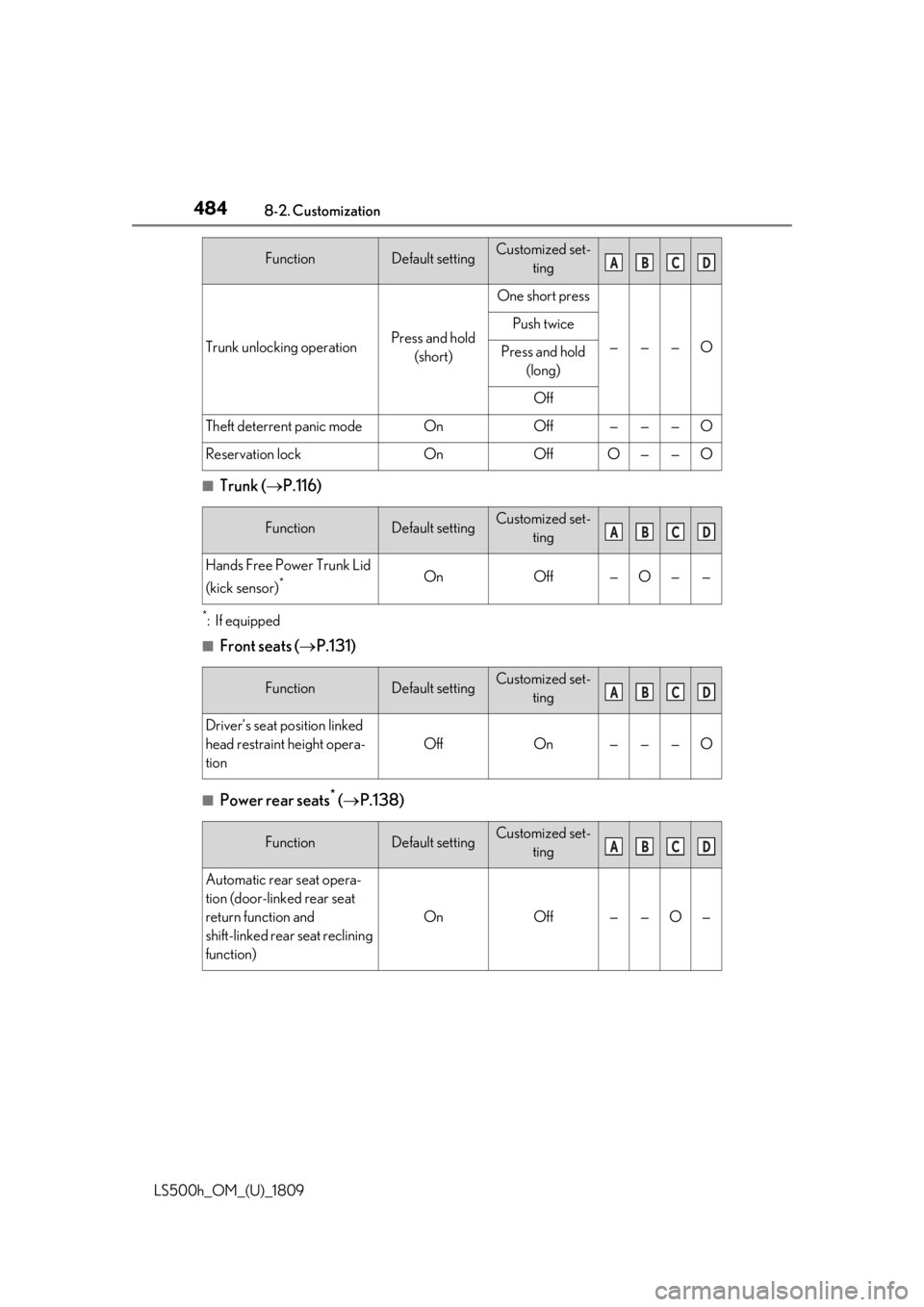
■Trunk (P.116)
*:If equipped
■Front seats ( P.131)
■Power rear seats* ( P.138)
Trunk unlocking operationPress and hold
(short)
One short press
———O
Push twice
Press and hold (long)
Off
Theft deterrent panic modeOnOff———O
Reservation lockOnOffO——O
FunctionDefault settingCustomized set- ting
Hands Free Power Trunk Lid
(kick sensor)
*OnOff—O——
FunctionDefault settingCustomized set-ting
Driver’s seat position linked
head restraint height opera-
tion
OffOn———O
FunctionDefault settingCustomized set-ting
Automatic rear seat opera-
tion (door-linked rear seat
return function and
shift-linked rear seat reclining
function)
OnOff——O—
FunctionDefault settingCustomized set- tingABCD
ABCD
ABCD
ABCD
Page 512 of 523

512Alphabetical Index
LS500h_OM_(U)_1809
If you have a flat tire .................................. 439
If you lose your keys................................. 442
If you think something is wrong ......... 423
If your vehicle becomes stuck............. 454
If your vehicle has to be stopped in an
emergency ..................................................416
If your vehicle needs to be towed .......419
If your vehicle overheats ........................450
Energy monitor .................................... 100, 101
Engine ACCESSORY mode ............................... 172
Compartment .............................................384
Engine compartment cover ................ 385
Engine switch.................................................170
Hood................................................................ 382
How to start the hybrid system ............170
Identification number ...............................459
If the hybrid system will not start ........440
If your vehicle has to be stopped in an
emergency ..................................................416
Ignition switch (power switch) ..............170
Overheating.................................................450
Power switch .................................................170
Tachometer ............................................. 81, 85
Engine compartment cover ....................385
Engine coolant Capacity ...........................................................461
Checking ....................................................... 387
Preparing and checking before winter.........................................................................309
Engine coolant temperature gauge 81, 85
Engine oil Capacity .........................................................460
Checking ...................................................... 385
Preparing and checking before winter.........................................................................309
Warning light ............................................... 425
Engine oil maintenance data .................. 387
Engine switch (power switch) ..................170 If your vehicle has to be stopped in an
emergency ..................................................416 EPS (Electric Power Steering) .............. 302
Warning light ............................................... 427
EV drive mode................................................ 174
EV indicator ...................................................... 64
Event data recorder (E DR) ........................... 8
F
FCTA (Front Cross Traffic Alert) ......... 230
First-aid kit storage belt ..............................351
Flat tire
Tire pressure warning system .............394
Floor mats ...........................................................22
Fluid Brake ................................................................463
Hybrid transmission.................................. 462
Washer .......................................................... 389
Footwell light ...................................................341
Front automatic air conditioning system .......................................................................... 323
Front Cross Traffic Alert (FCTA) ......... 230
Front passenger occupant classification system .............................................................. 40
Front seats Adjustment ....................................................... 131
Cleaning ...........................................................371
Correct driving posture ............................ 23
Driving position memory .........................142
Head restraints..............................................147
Memory recall function............................ 145
Power easy access system .....................142
Refresh system ............................................. 136
Seat heaters .................................................. 337
Seat position memory ...............................142
Seat ventilators ............................................ 337
Front side marker light Light switch .................................................... 187
Replacing light bulbs ..................................414
Front turn signal lights Replacing light bulbs ..................................414
Turn signal lever .......................................... 182
Fuel Capacity ........................................................ 459