display LEXUS LS500H 2022 User Guide
[x] Cancel search | Manufacturer: LEXUS, Model Year: 2022, Model line: LS500H, Model: LEXUS LS500H 2022Pages: 108, PDF Size: 6.79 MB
Page 25 of 108
24
LS500h_QG_U
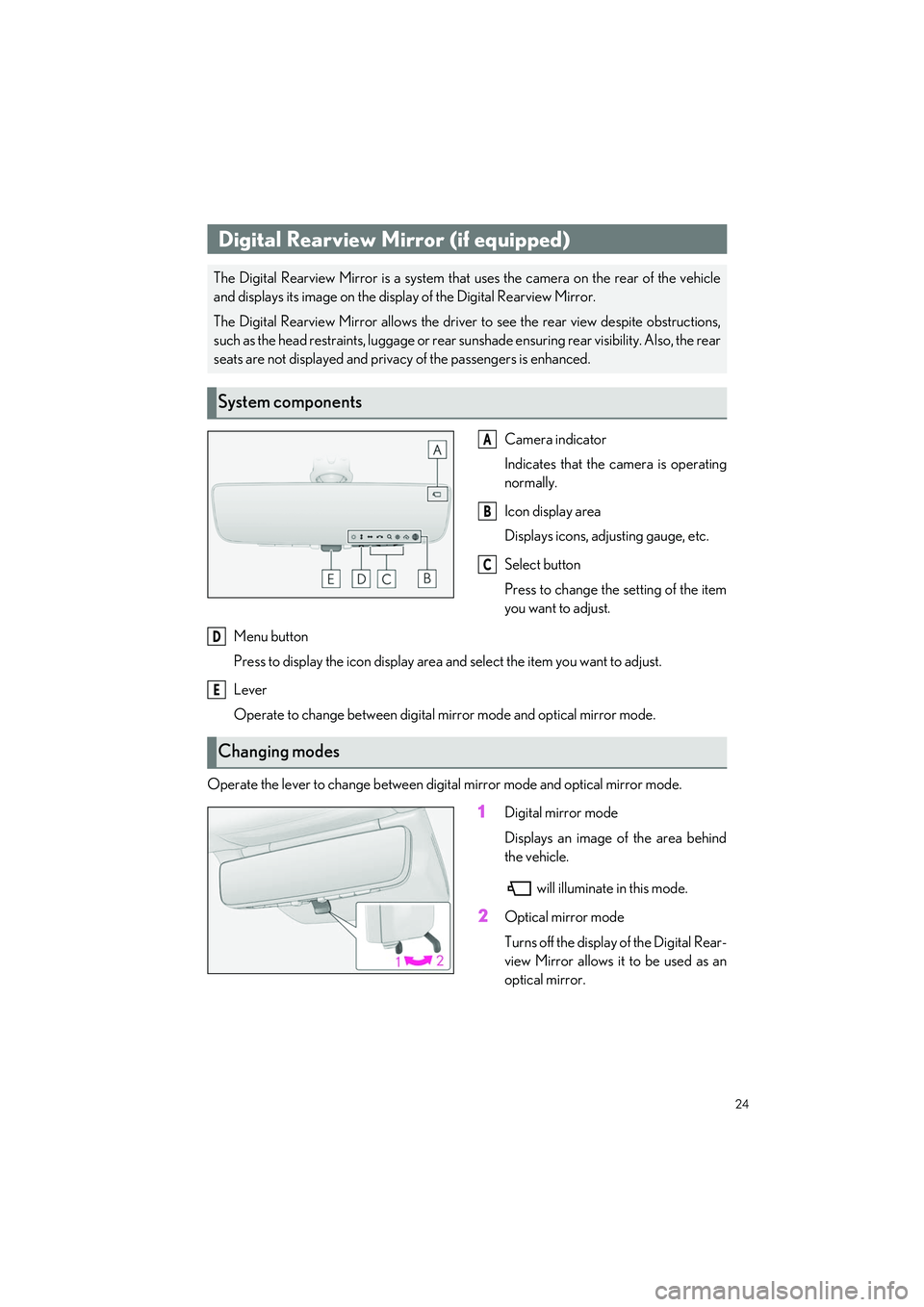
Camera indicator
Indicates that the camera is operating
normally.
Icon display area
Displays icons, adjusting gauge, etc.
Select button
Press to change the setting of the item
you want to adjust.
Menu button
Press to display the icon di splay area and select the item you want to adjust.
Lever
Operate to change between digital mirror mode and optical mirror mode.
Operate the lever to change between digital mirror mode and optical mirror mode.
1Digital mirror mode
Displays an image of the area behind
the vehicle. will illuminate in this mode.
2Optical mirror mode
Turns off the display of the Digital Rear-
view Mirror allows it to be used as an
optical mirror.
Digital Rearview Mirror (if equipped)
The Digital Rearview Mirror is a system that uses the camera on the rear of the vehicle
and displays its image on the disp lay of the Digital Rearview Mirror.
The Digital Rearview Mirror allows the driver to see the rear view despite obstructions,
such as the head restraints, lu ggage or rear sunshade ensuring rear visibility. Also, the rear
seats are not displayed and privacy of the passengers is enhanced.
System components
A
B
C
Changing modes
D
E
Page 26 of 108
25
LS500h_QG_U
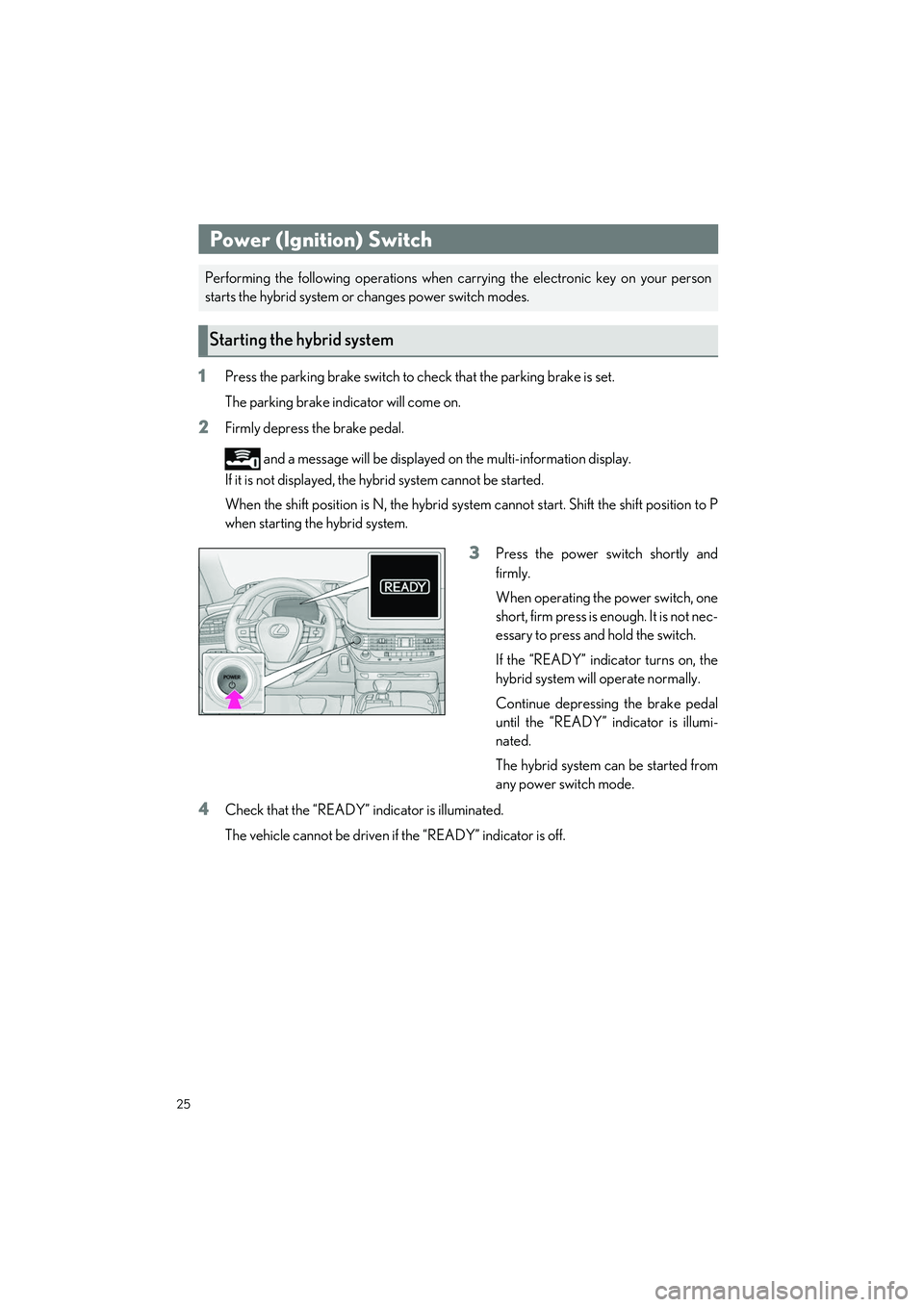
1Press the parking brake switch to check that the parking brake is set.
The parking brake indicator will come on.
2Firmly depress the brake pedal.
and a message will be displayed on the multi-information display.
If it is not displayed, the hybrid system cannot be started.
When the shift position is N, the hybrid system cannot start. Shift the shift position to P
when starting the hybrid system.
3Press the power switch shortly and
firmly.
When operating the power switch, one
short, firm press is enough. It is not nec-
essary to press and hold the switch.
If the “READY” indicator turns on, the
hybrid system will operate normally.
Continue depressing the brake pedal
until the “READY” indicator is illumi-
nated.
The hybrid system can be started from
any power switch mode.
4Check that the “READY” in dicator is illuminated.
The vehicle cannot be driven if the “READY” indicator is off.
Power (Ignition) Switch
Performing the following operations when ca rrying the electronic key on your person
starts the hybrid system or changes power switch modes.
Starting the hybrid system
Page 27 of 108
26
LS500h_QG_U
1Stop the vehicle completely.
2If the parking brake is in manual mode, set the parking brake.
3Press the P position switch. (P.28)
Check that the shift po sition indicator shows P and the parking brake indicator is illumi-
nated.
4Press the power switch.
5Release the brake pedal an d check that “ACCESSORY” or “IGNITION ON” is not
shown on the meter.
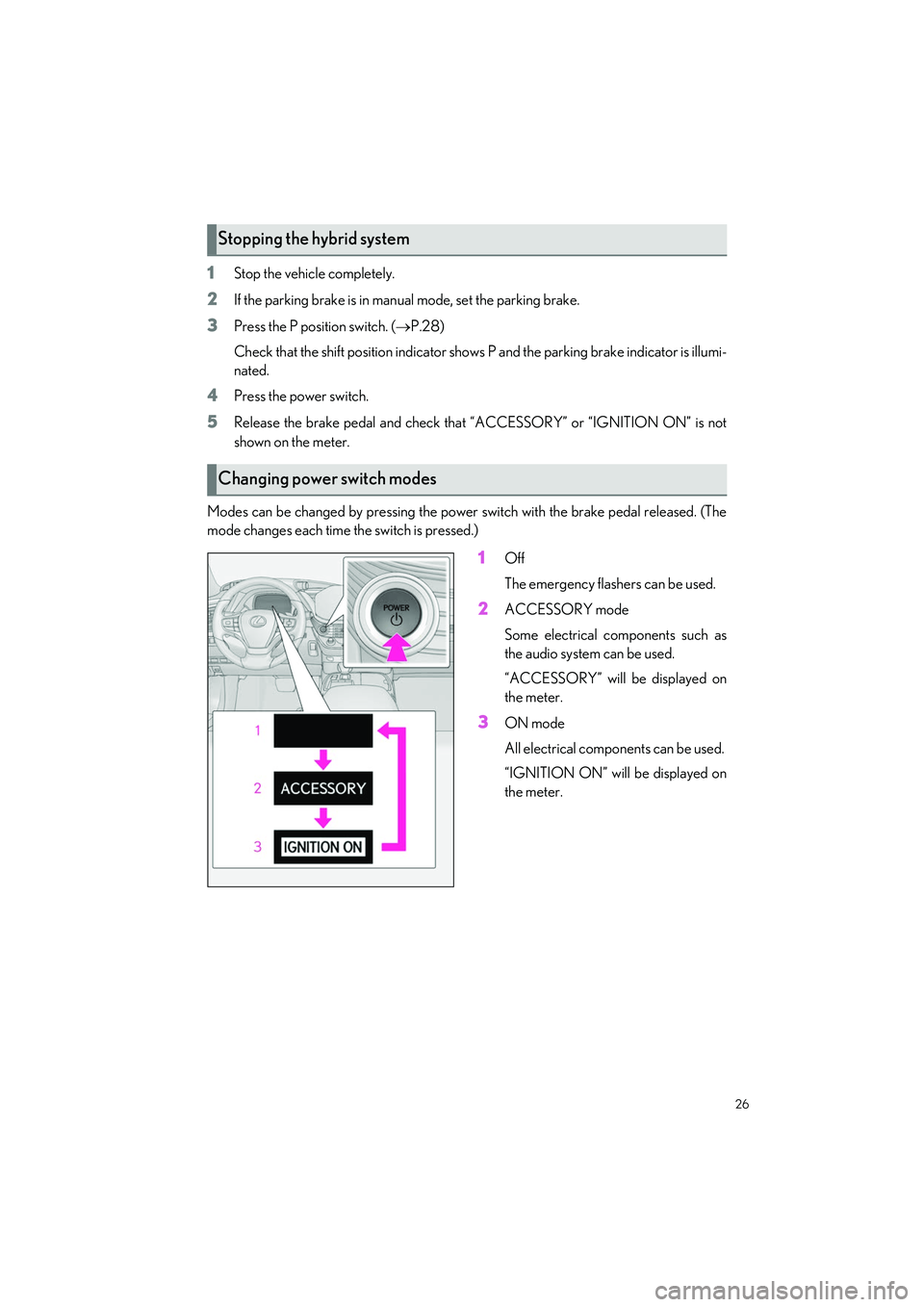
Modes can be changed by pressing the power switch with the brake pedal released. (The
mode changes each time the switch is pressed.)
1Off
The emergency flashers can be used.
2ACCESSORY mode
Some electrical components such as
the audio system can be used.
“ACCESSORY” will be displayed on
the meter.
3ON mode
All electrical components can be used.
“IGNITION ON” will be displayed on
the meter.
Stopping the hybrid system
Changing power switch modes
Page 29 of 108
28
LS500h_QG_U
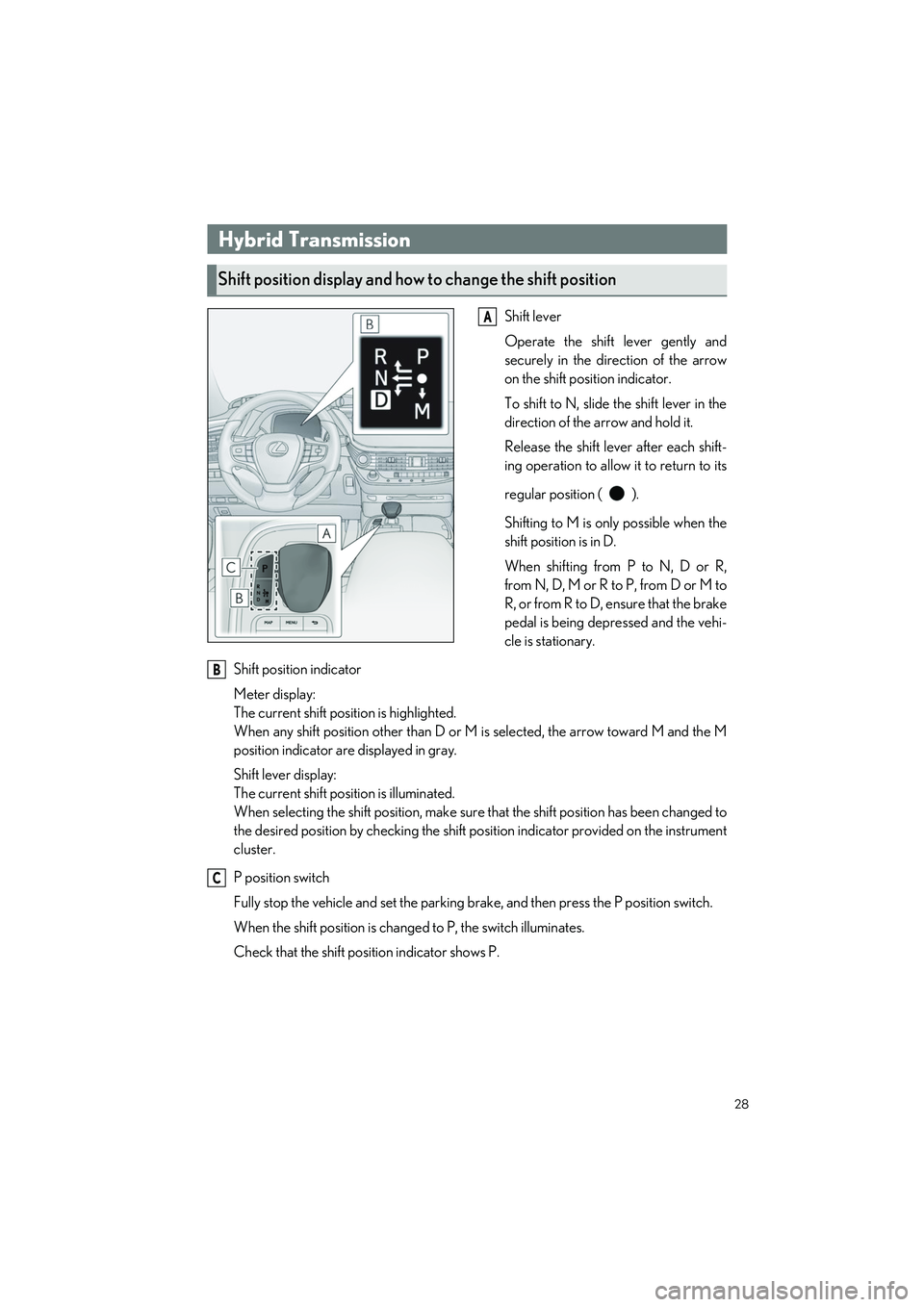
Shift lever
Operate the shift lever gently and
securely in the direction of the arrow
on the shift position indicator.
To shift to N, slide the shift lever in the
direction of the arrow and hold it.
Release the shift lever after each shift-
ing operation to allow it to return to its
regular position ( ).
Shifting to M is only possible when the
shift position is in D.
When shifting from P to N, D or R,
from N, D, M or R to P, from D or M to
R, or from R to D, ensure that the brake
pedal is being depressed and the vehi-
cle is stationary.
Shift position indicator
Meter display:
The current shift position is highlighted.
When any shift position other than D or M is selected, the arrow toward M and the M
position indicator are displayed in gray.
Shift lever display:
The current shift position is illuminated.
When selecting the shift position, make sure that the shift position has been changed to
the desired position by checking the shift po sition indicator provided on the instrument
cluster.
P position switch
Fully stop the vehicle and set the parking br ake, and then press the P position switch.
When the shift position is changed to P, the switch illuminates.
Check that the shift posi tion indicator shows P.
Hybrid Transmission
Shift position display and how to change the shift position
A
B
C
Page 31 of 108

30
LS500h_QG_U
When the “-” paddle shift switch is operated, the shift range switches to a range that enables
engine braking force that is suit able to driving conditions. When the “+” paddle shift switch is
operated, the shift range switches to a range that is one range higher than the current range.
1Upshifting
2Downshifting
The selected shift range, from D1 to D10,
will be displaye d on the meter.
A lower shift range will provide greater engine braking forces than a higher shift range.
To enter M mode, shift the shift position to M. Gears can be selected by operating the pad-
dle shift switches, allowing you to drive in the gear of your choosing.
1Upshifting
2Downshifting
The gear changes once every time the pad-
dle shift switch is operated.
The selected gear, from M1 to M10, will be
fixed and displayed on the meter.
Selecting shift ranges in the D position
Meter displayFunction
D2 - D10
A gear in the range between D1 and the selected shift range is automatically chosen depending on vehicle speed and driving conditions
D1Setting the shift range at D1
Selecting gears in the M position
Page 34 of 108
33
LS500h_QG_U
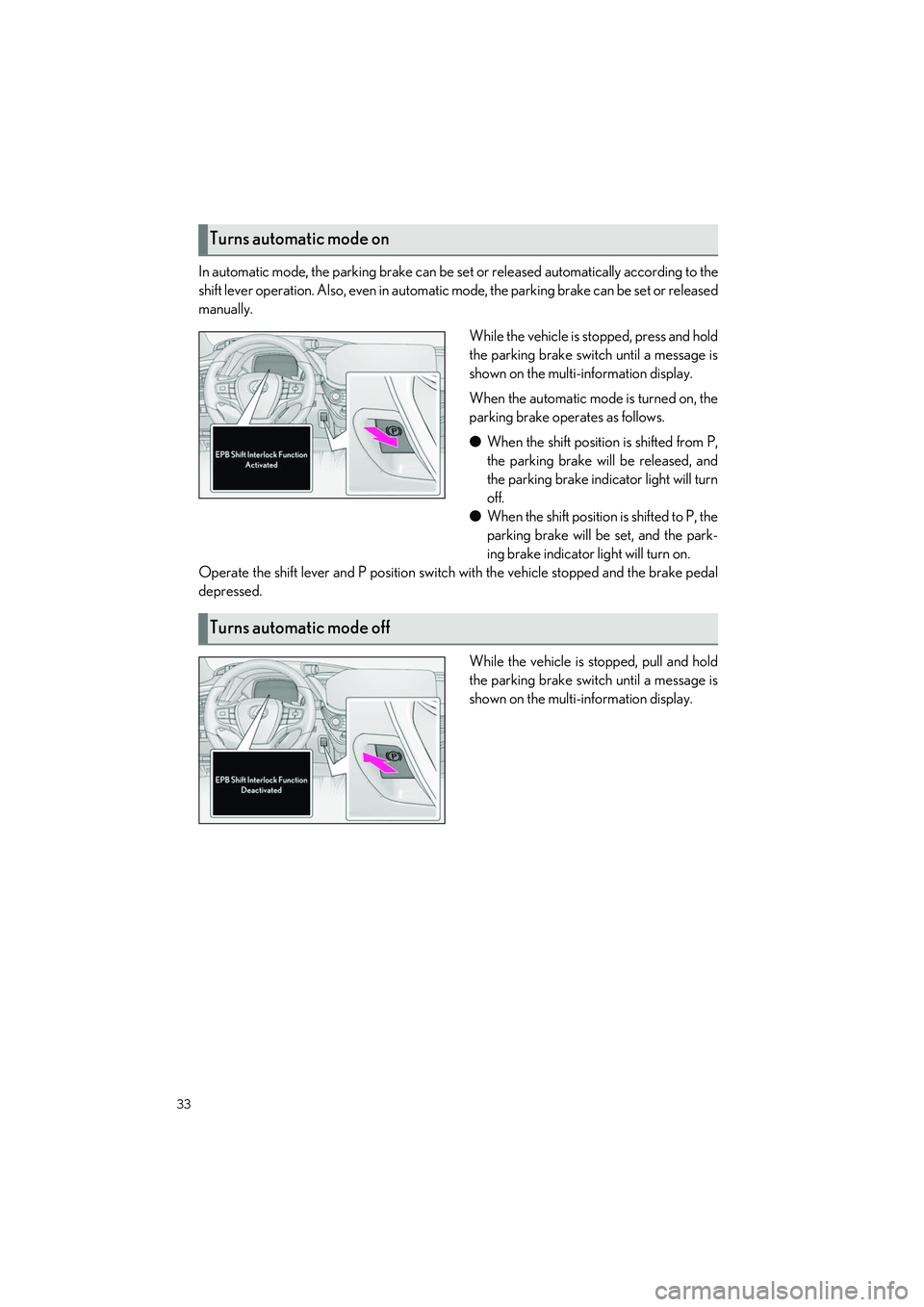
In automatic mode, the parking brake can be set or released automatically according to the
shift lever operation. Also, even in automatic mode, the parkin g brake can be set or released
manually.
While the vehicle is stopped, press and hold
the parking brake switch until a message is
shown on the multi-information display.
When the automatic mode is turned on, the
parking brake operates as follows.
●When the shift position is shifted from P,
the parking brake will be released, and
the parking brake indicator light will turn
off.
● When the shift position is shifted to P, the
parking brake will be set, and the park-
ing brake indicator light will turn on.
Operate the shift lever and P position switch with the vehicle stopped and the brake pedal
depressed.
While the vehicle is stopped, pull and hold
the parking brake switch until a message is
shown on the multi-information display.
Turns automatic mode on
Turns automatic mode off
Page 36 of 108
35
LS500h_QG_U
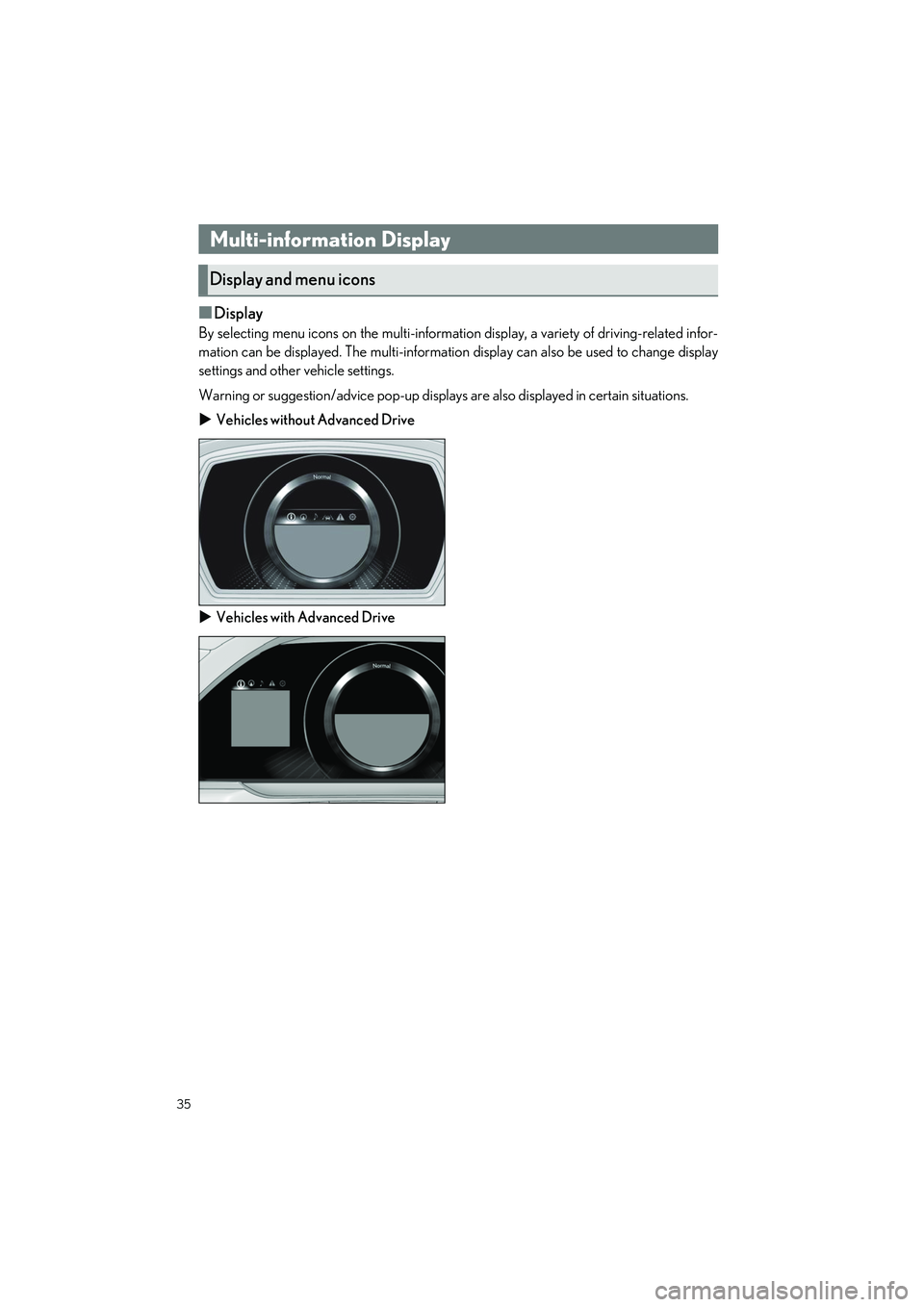
■Display
By selecting menu icons on the multi-information display, a variety of driving-related infor-
mation can be displayed. The multi-information display can also be used to change display
settings and other vehicle settings.
Warning or suggestion/advice pop-up displays are also displayed in certain situations.
Vehicles without Advanced Drive
Vehicles with Advanced Drive
Multi-information Display
Display and menu icons
Page 37 of 108
36
LS500h_QG_U
■Menu icons
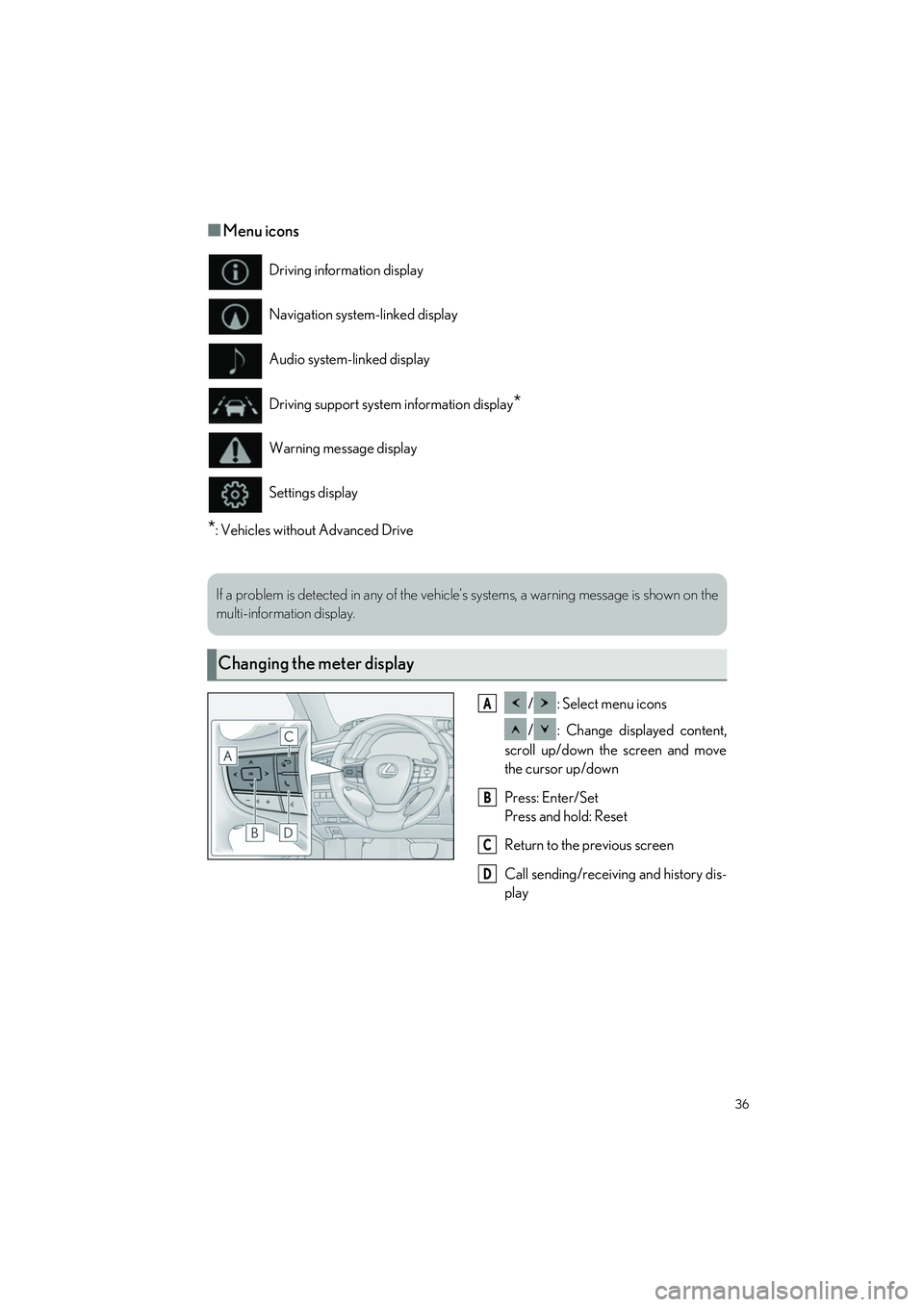
*: Vehicles without Advanced Drive/ : Select menu icons
/ : Change displayed content,
scroll up/down the screen and move
the cursor up/down
Press: Enter/Set
Press and hold: Reset
Return to the previous screen
Call sending/receiving and history dis-
play
Driving information display
Navigation system-linked display
Audio system-linked display
Driving support system information display
*
Warning message display
Settings display
If a problem is detected in any of the vehicl
e’s systems, a warning message is shown on the
multi-information display.
Changing the meter display
A
B
C
D
Page 38 of 108
37
LS500h_QG_U
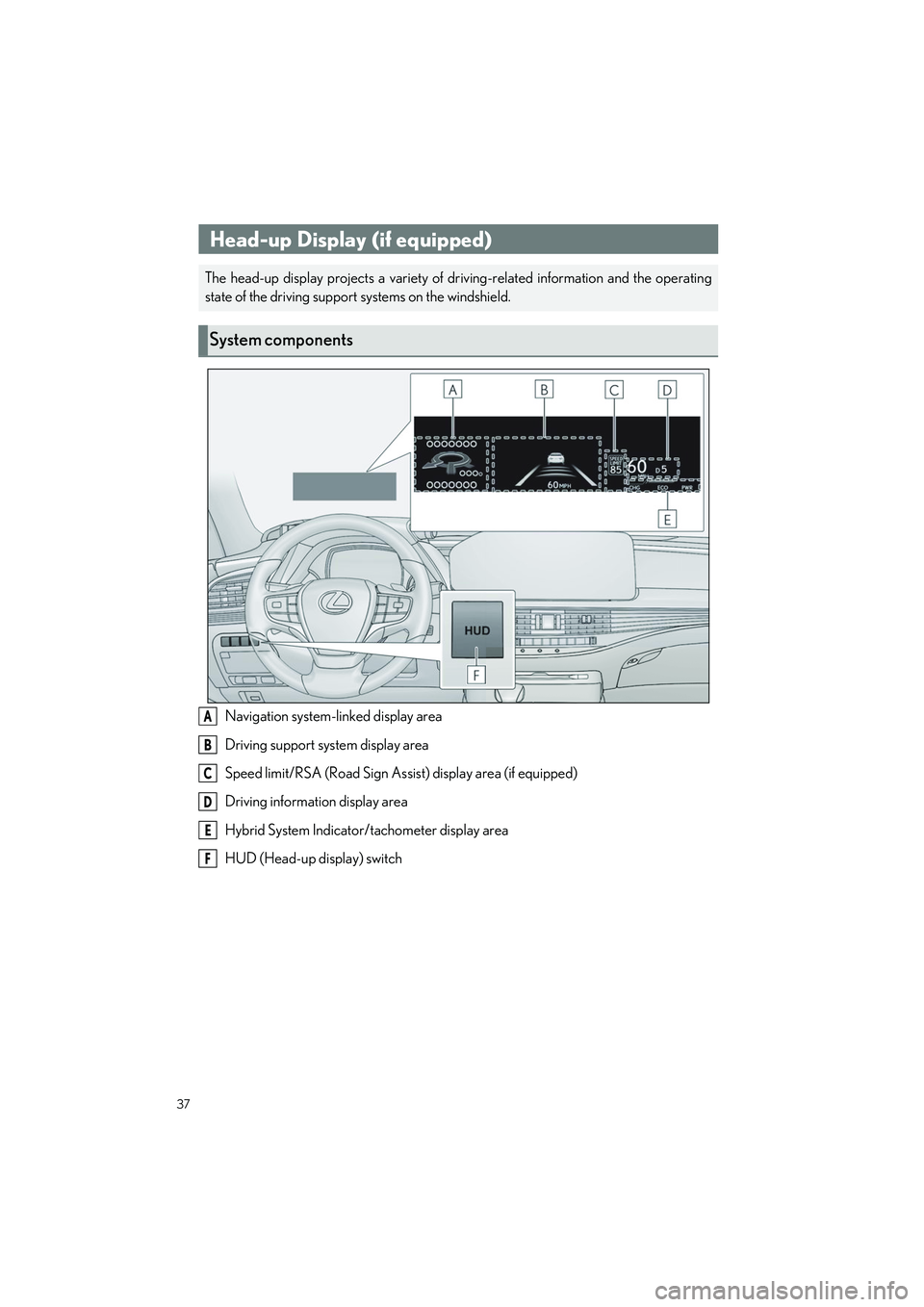
Navigation system-linked display area
Driving support system display area
Speed limit/RSA (Road Sign Assist) display area (if equipped)
Driving information display area
Hybrid System Indicator/tachometer display area
HUD (Head-up display) switch
Head-up Display (if equipped)
The head-up display projects a variety of dr iving-related information and the operating
state of the driving support systems on the windshield.
System components
A
B
C
D
E
F
Page 39 of 108
38
LS500h_QG_U
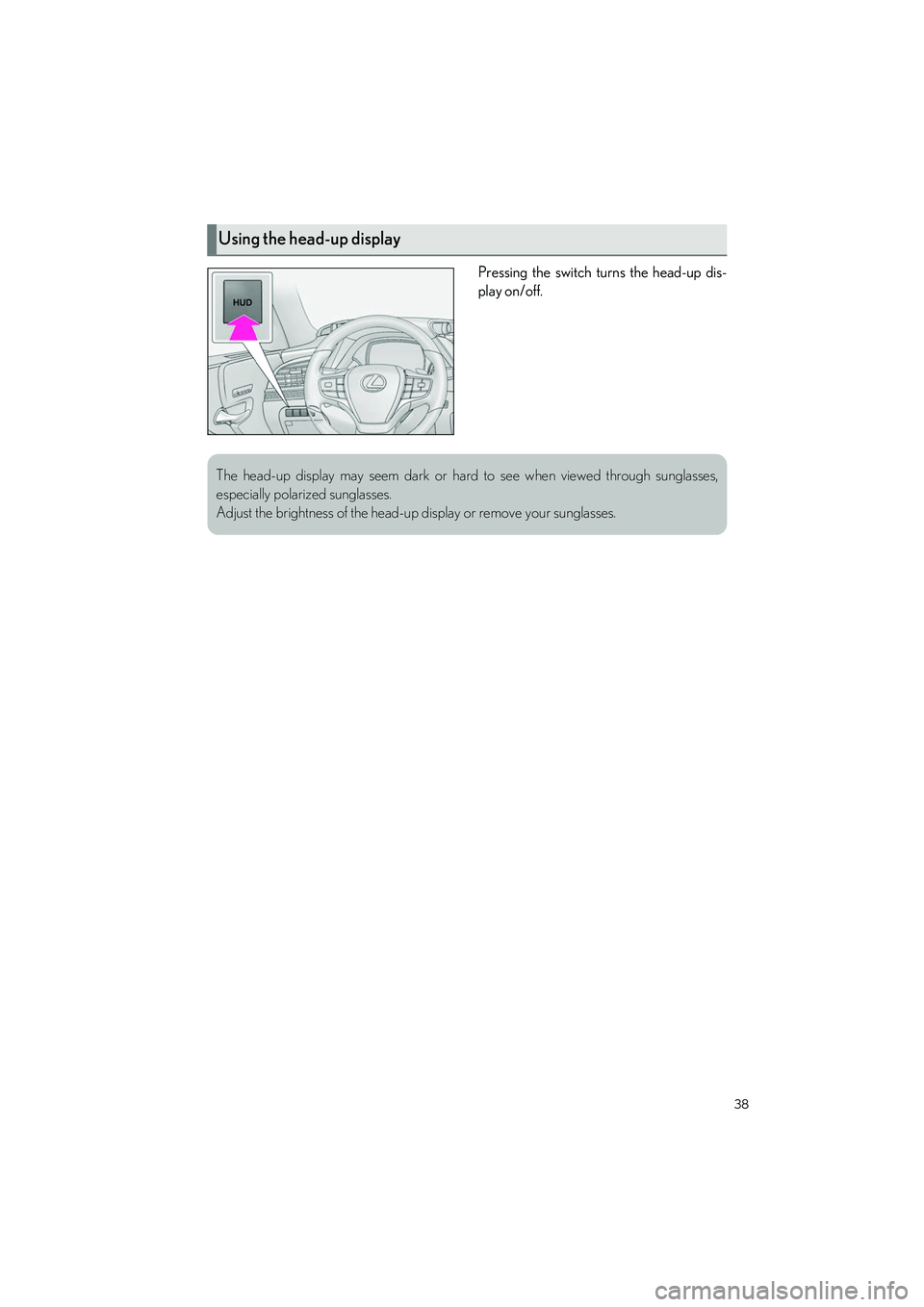
Pressing the switch turns the head-up dis-
play on/off.
Using the head-up display
The head-up display may seem dark or hard to see when viewed through sunglasses,
especially polarized sunglasses.
Adjust the brightness of the head-up display or remove your sunglasses.