phone LEXUS LS500H 2022 User Guide
[x] Cancel search | Manufacturer: LEXUS, Model Year: 2022, Model line: LS500H, Model: LEXUS LS500H 2022Pages: 108, PDF Size: 6.79 MB
Page 75 of 108
74
LS500h_QG_U
Continue on to pages 75-80 for a detailed list of Voice Commands for the following cate-
gories:
Common . . . . . . . . . . . . . . . . . . . . . . . . . . . . . . . . . . . . . . . . . . . . . . . . P.75
Top menu . . . . . . . . . . . . . . . . . . . . . . . . . . . . . . . . . . . . . . . . . . . . . . . . P.75
Navi . . . . . . . . . . . . . . . . . . . . . . . . . . . . . . . . . . . . . . . . . . . . . . . . . . . . . P.76
Phone . . . . . . . . . . . . . . . . . . . . . . . . . . . . . . . . . . . . . . . . . . . . . . . . . . . P.77
Radio . . . . . . . . . . . . . . . . . . . . . . . . . . . . . . . . . . . . . . . . . . . . . . . . . . . . P.78
Audio . . . . . . . . . . . . . . . . . . . . . . . . . . . . . . . . . . . . . . . . . . . . . . . . . . . . P.79
Info . . . . . . . . . . . . . . . . . . . . . . . . . . . . . . . . . . . . . . . . . . . . . . . . . . . . . . P.79
Apps. . . . . . . . . . . . . . . . . . . . . . . . . . . . . . . . . . . . . . . . . . . . . . . . . . . . . P.80
Climate . . . . . . . . . . . . . . . . . . . . . . . . . . . . . . . . . . . . . . . . . . . . . . . . . . P.80
■ Important voice commands information and tips
Voice commands can be used while driving.
You must wait until after the beep to say a command.
If you know what command to use, you can press the talk switch at any time to inter-
rupt the voice guidance.
Page 78 of 108

77
LS500h_QG_U
■Phone
*: If the system does not recognize the name of a contact, create a voice tag. The name of acontact can also be recognized by adding a voice tag.
■While in a phone call
CommandAction
“Call
book
“Call
from the phone book
“Dial
“Redial”Places a call to the phone number of the latest outgo-
ing call
“Call Back”Places a call to the phone number of latest incoming
call
“Show Recent Calls”Displays the call history screen
“Send a message to
phone book
CommandAction
“Send
“Mute”Mutes the microphone (far side cannot hear the con-
versation)
“Unmute”Unmutes the microphone
Page 79 of 108

78
LS500h_QG_U
■While incoming message notification is displayed*
*
: Full screen message notifi cation must be turned on within the phone settings
■Radio
*1: A station list must be built first using the radio screen
*2: Requires a satellite radio subscription
CommandAction
“Read Message”Reads the incoming message over the vehicle speak-
ers
“Ignore”Ignores the incoming message notification
“Reply”Initiates sending a reply to the incoming message
“Call”Places a call to the phone number of incoming mes-
sage
CommandAction
“Tune to
“Tune to
“Play a
genre
*1
“Tune to preset <1-36>”Changes the radio to the specified preset radio station
“Tune to a
tion”Changes the radio to a satellite radio channel of the
specified genre
*2
“Tune to
the specified name*2
“Tune to channel
XM”Changes the radio to a satellite radio channel of the
specified number
*2
Page 88 of 108
87
LS500h_QG_U
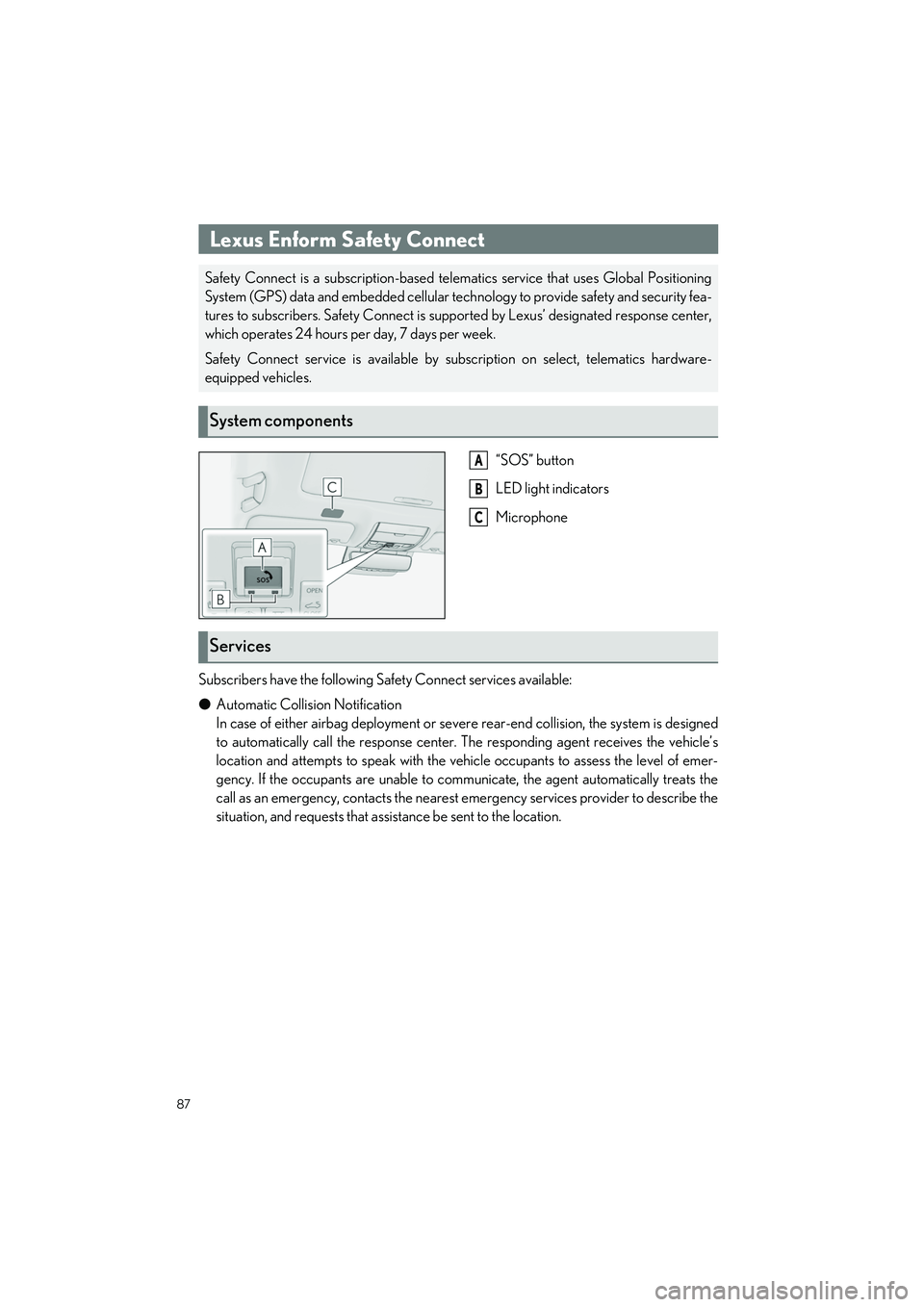
“SOS” button
LED light indicators
Microphone
Subscribers have the following Sa fety Connect services available:
● Automatic Collision Notification
In case of either airbag deployment or seve re rear-end collision, the system is designed
to automatically call the response center. The responding agent receives the vehicle’s
location and attempts to speak with the vehicle occupants to assess the level of emer-
gency. If the occupants are unable to comm unicate, the agent automatically treats the
call as an emergency, contacts the nearest emergency services provider to describe the
situation, and requests that assi stance be sent to the location.
Lexus Enform Safety Connect
Safety Connect is a subscription-based telematics service that uses Global Positioning
System (GPS) data and embedded cellular tech nology to provide safety and security fea-
tures to subscribers. Safety Connect is supp orted by Lexus’ designated response center,
which operates 24 hours per day, 7 days per week.
Safety Connect service is available by subs cription on select, telematics hardware-
equipped vehicles.
System components
A
B
C
Services
Page 90 of 108
89
LS500h_QG_U
After you sign the Telematics Subscription Service Agreement, download the Lexus app
from your smartphone’s app store, and register within the app (or enroll and complete regis-
tration at the dealer), you can begin using these services.
A variety of subscription terms are available. Contact your Lexus dealer, or call 1-800-25-
LEXUS (1-800-255-3987) for fu rther subscription details.
Lexus Enform Remote (if equipped)
Lexus Enform Remote is a smart phone applic ation that lets you view and remotely con-
trol certain aspects of your vehicle.
For details about the functions and services of this application, refer to
http://www.lexus.com/enform/
.
Function of the Lexus Enform Remote is achieved by using DCM (Data Communication
Module).
Subscription
Lexus Enform Service Connect (if equipped)
Lexus Enform Service Connect uses DCM (D ata Communication Module) to collect and
transmit vehicle data that allows Lexus to provide:
● Vehicle Health Report (VHR) (Safety Recalls, Service Campaigns, Current Vehicle
Alerts, Required Maintenance, and Vehicle Condition Status)
● Maintenance Notifications
● Vehicle Alert Notifications
For details about this service and how to register, refer to http://www.lexus.com/enform/
.
The Lexus Enform Service Connect is achieved by using a DCM (Data Communication
Module) built in the vehicle.