audio LEXUS LS500H 2022 Owners Manual
[x] Cancel search | Manufacturer: LEXUS, Model Year: 2022, Model line: LS500H, Model: LEXUS LS500H 2022Pages: 108, PDF Size: 6.79 MB
Page 3 of 108
2
LS500h_QG_U
Driving ComfortRemote Touch ................................................................................................................... ............. 46
Center Display ................................................................................................................. ...............47
Energy Monitor/Consumption Screen ................ ............................................................... 50
Navigation System
*..................................................................................................................... 53
Hands-free System For Cellular Phone
*........................................................................... 56
Audio System
*............................................................................................................................... 60
Lexus Climate Concierge ........................................................................................................ ..67
Front Automatic Air Conditioning System
*..................................................................... 68
Rear Automatic Air Conditioning System .......... ................................................................72
Voice Command System
*.........................................................................................................73
USB/AUX Ports .................................................................................................................. ...........81
Garage Door Opener ............................................................................................................. ... 82
Lexus Enform Safety Connect................................................................................................. 87
Lexus Enform Remote ................................................................................................................ 89
Lexus Enform Service Connect.............................................................................................. 89
SiriusXM Satellite Radio ....................................................................................................... ..... 90
Opening and Closing
Door Locks ..................................................................................................................... ................... 91
Power Windows .................................................................................................................. .......... 92
Moon Roof ...................................................................................................................... ................. 93
Fuel Tank Cap ................................................................................................................................ 94
Trunk................................................................................................................................................... 95
What to do if...
List of Warning/Indicator Lights............................................................................................. 98
If the electronic key does not operate properly ..............................................................102
If the hybrid system will not start ..................... .......................................................................104
*: This feature may be operated by Voice command (See P.73)
Page 5 of 108
4
LS500h_QG_U
Parking brake switch ............................................................................................... P.32
Applying/releasing the parking brake ........................................................................P.32
Precautions for winter season
*
Warning buzzer/messages*
Turn signal lever ......................................................................................................... P.31
Headlight switch ....................................................................................................... P.39
Headlights/parking lights/tail lights/license plate lights/
daytime running lights ........................................................................................................P.39
AHB (Automatic High Beam) ........................................................................................P.40
Windshield wiper and washer switch ................................................................. P.42
Usage .......................................................................................................................... .............. P.42
Adding washer fluid
*
Warning messages*
Emergency flasher switch*
Hood lock release lever*
Tilt and telescopic steering control switch*
Adjustment*
Driving position memory .................................................................................................. P.22
Air conditioning system .......................................................................................... P.68
Usage .......................................................................................................................... ............. P.68
Rear window defogger ..................................................................................................... P.68
Audio system.............................................................................................................. P.60
Brake hold switch ..................................................................................................... P.34
Trunk opener main switch
*
*
: Refer to the “OWNER’S MANUAL”.
E
F
G
H
I
J
K
L
M
N
Page 8 of 108
7
LS500h_QG_U
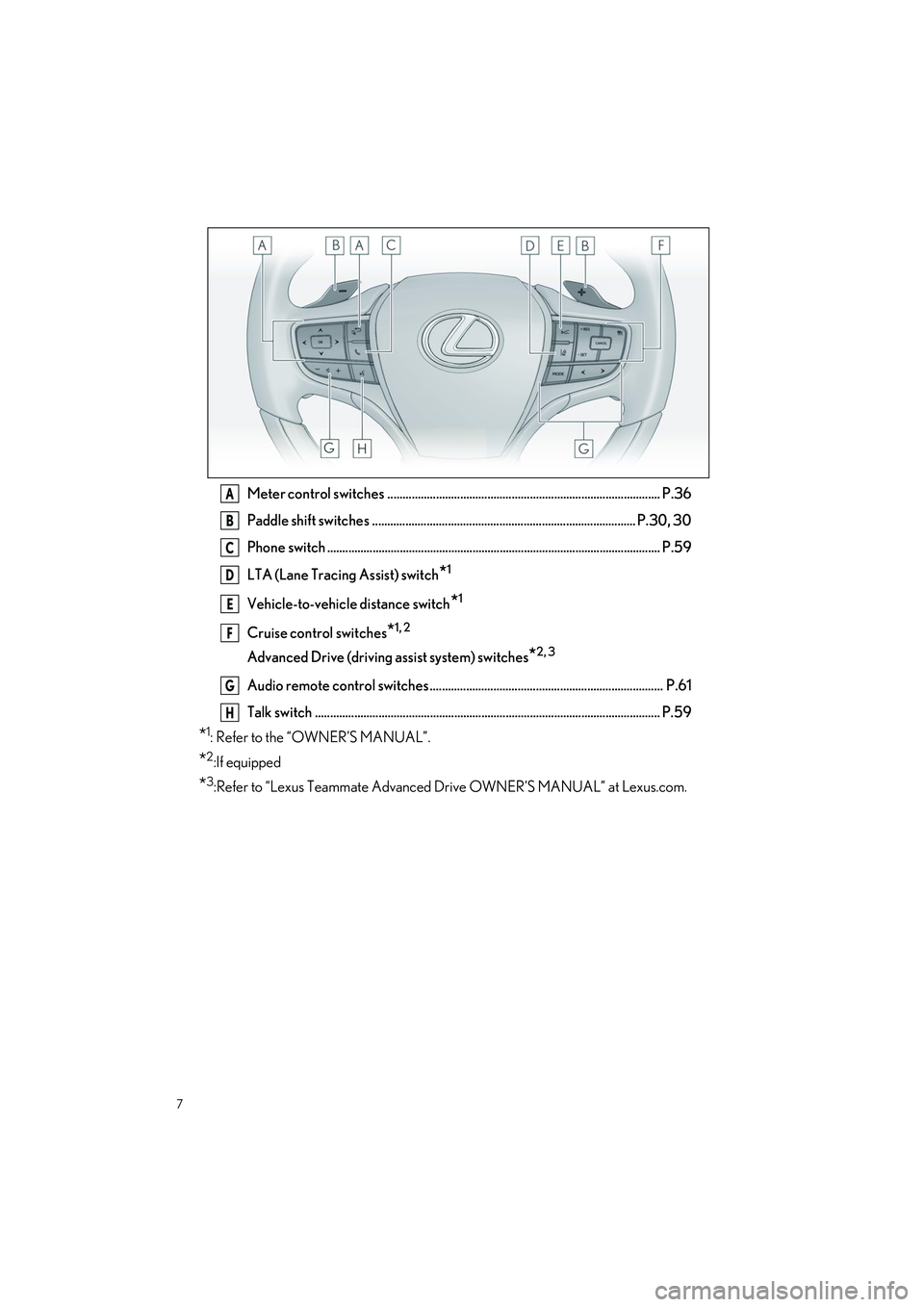
Meter control switches .......................................................................................... P.36
Paddle shift switches ....................................................................................... P.30, 30
Phone switch .............................................................................................................. P.59
LTA (Lane Tracing Assist) switch
*1
Vehicle-to-vehicle distance switch*1
Cruise control switches*1, 2
Advanced Drive (driving assist system) switches*2, 3
Audio remote control switches ............................................................................. P.61
Talk switch .................................................................................................................. P.59
*1: Refer to the “OWNER’S MANUAL”.
*2:If equipped
*3:Refer to “Lexus Teammate Advanced Drive OWNER’S MANUAL” at Lexus.com.
A
B
C
D
E
F
G
H
Page 27 of 108
26
LS500h_QG_U
1Stop the vehicle completely.
2If the parking brake is in manual mode, set the parking brake.
3Press the P position switch. (P.28)
Check that the shift po sition indicator shows P and the parking brake indicator is illumi-
nated.
4Press the power switch.
5Release the brake pedal an d check that “ACCESSORY” or “IGNITION ON” is not
shown on the meter.
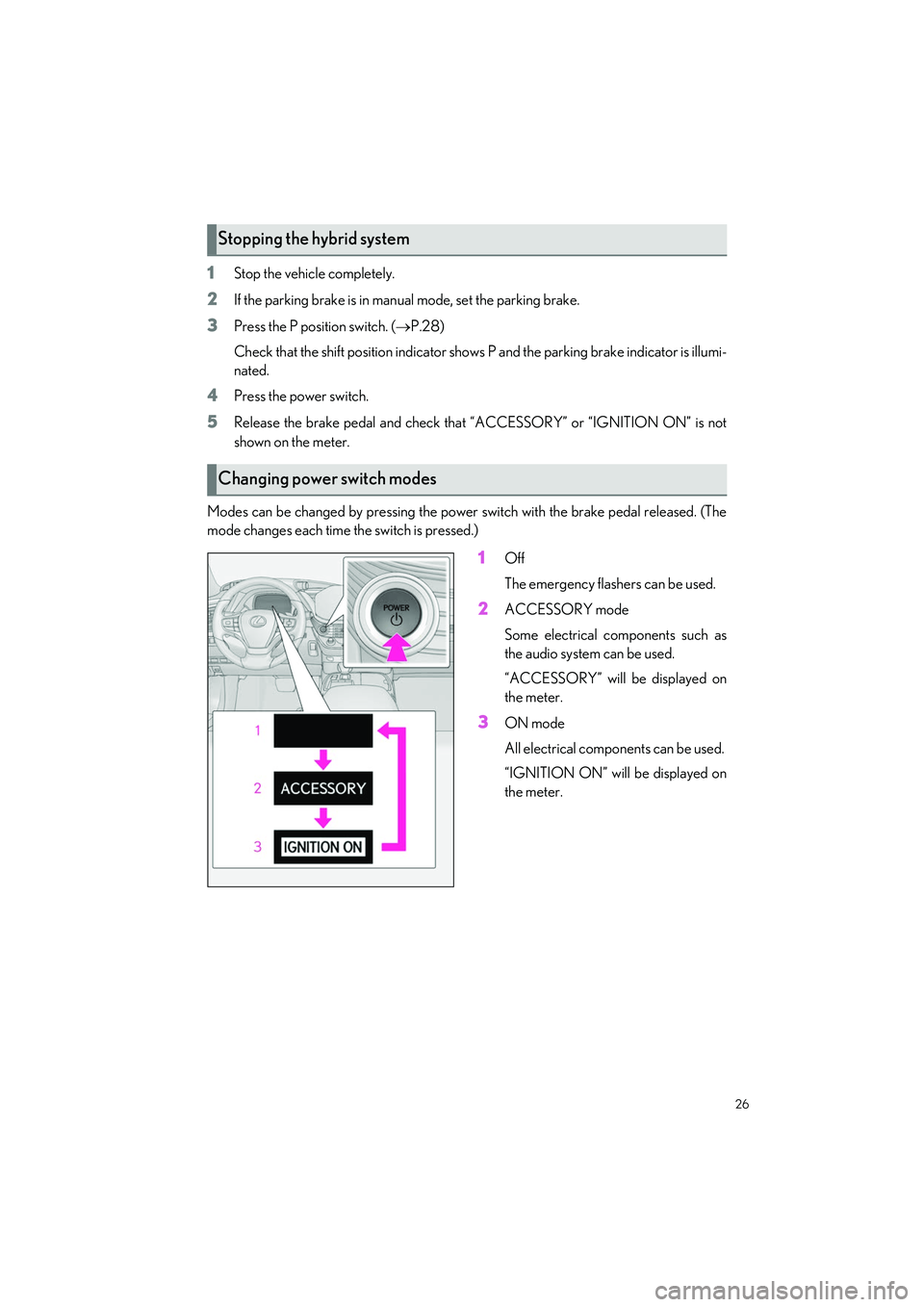
Modes can be changed by pressing the power switch with the brake pedal released. (The
mode changes each time the switch is pressed.)
1Off
The emergency flashers can be used.
2ACCESSORY mode
Some electrical components such as
the audio system can be used.
“ACCESSORY” will be displayed on
the meter.
3ON mode
All electrical components can be used.
“IGNITION ON” will be displayed on
the meter.
Stopping the hybrid system
Changing power switch modes
Page 37 of 108
36
LS500h_QG_U
■Menu icons
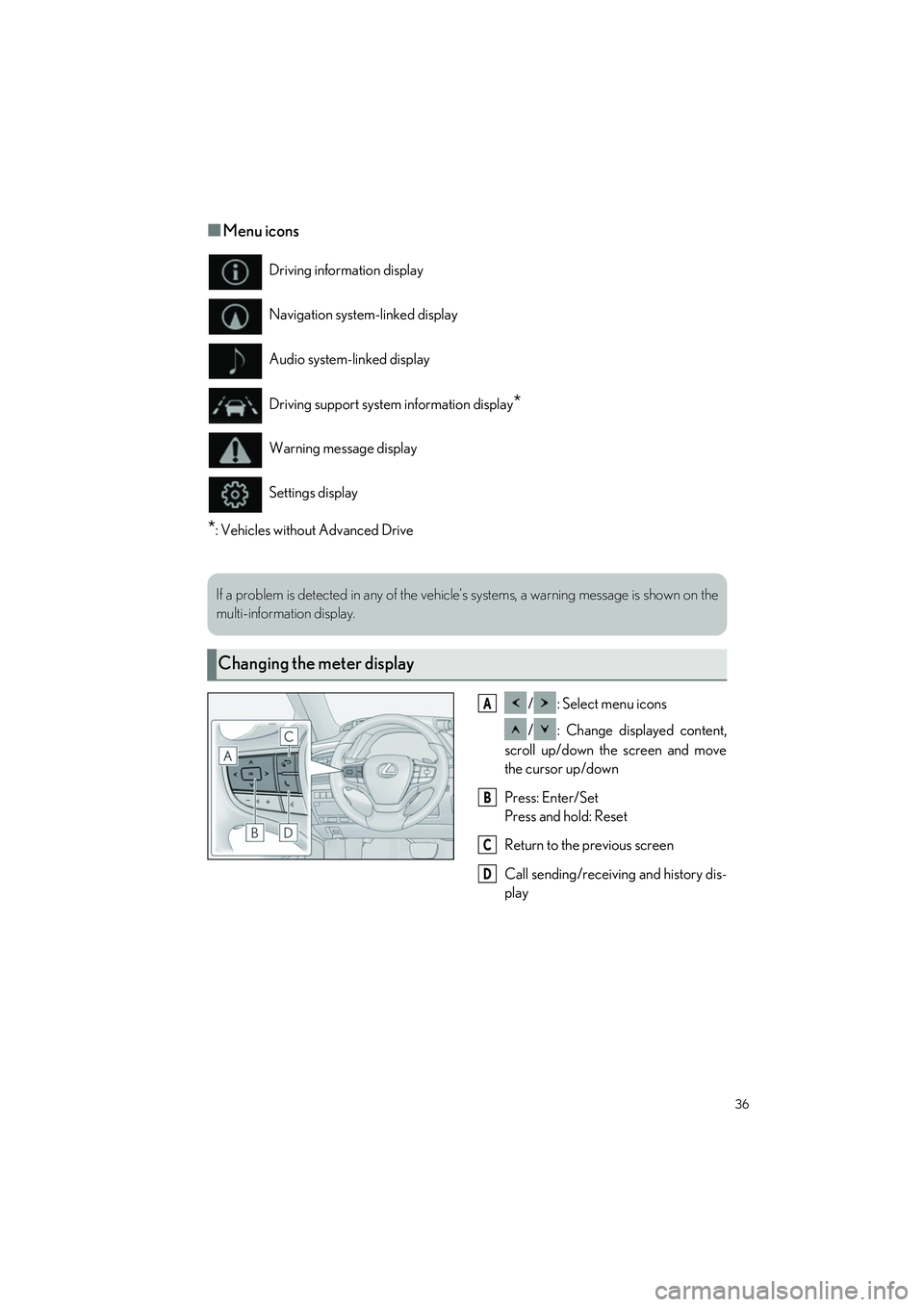
*: Vehicles without Advanced Drive/ : Select menu icons
/ : Change displayed content,
scroll up/down the screen and move
the cursor up/down
Press: Enter/Set
Press and hold: Reset
Return to the previous screen
Call sending/receiving and history dis-
play
Driving information display
Navigation system-linked display
Audio system-linked display
Driving support system information display
*
Warning message display
Settings display
If a problem is detected in any of the vehicl
e’s systems, a warning message is shown on the
multi-information display.
Changing the meter display
A
B
C
D
Page 48 of 108

47
LS500h_QG_U
Press the “MENU” button on the Remote Touch to display the menu screen.
The displays shown in the illust rations are used for example on ly and may differ from the
actual vehicle.
*1: Refer to the “NAVIGATION AND MU LTIMEDIA SYSTEM OWNER’S MANUAL”.
*2: This function is not made available in some models or areas.
Center Display
Menu screen
SwitchFunction
Select to display the “Destination” screen.*2 (P.53)
Select to display the audio control screen.*1 (P.62, 63, 64, 65, 66)
Select to display the hands-free control screen. ( P.58)
Select to display the “Apps” screen.*1, 2
//
When an Apple CarPlay/Android Auto connection is established and this
button displays “Apple CarPlay”/“An droid Auto”, select to display the
home screen of Apple CarPlay/Android Auto.
*1, 2
Select to display the information screen. ( P.50)
Select to display the setup screen.*1
Select to display the air co nditioning control screen. ( P.69)
Page 49 of 108

48
LS500h_QG_U
Different information can be displayed on the left and right sides of the screen. For example,
audio control screen can be displayed and oper ated while the fuel consumption information
screen is being displayed. The large screen on the left of the display is called the main dis-
play, and the small screen to the right is called the side display.
The following function s can be displayed
and operated on the side display.
Navigation system ( P.53)
Audio ( P.62, 63, 64, 65, 66)
Vehicle information (P.52)
Air conditioning system ( P.71)
Show/hide the side display
Split-screen display
Side display
A
B
C
D
E
Page 61 of 108

60
LS500h_QG_U
Follow the procedure below to display the audio control screen.
Using the audio control switch
Press the “RADIO” or “MEDIA” button.
Using the Remote Touch
Press the “MENU” button on the Re mote Touch, then select “Audio”.
Please refer to P.46 for the Remote Touch operation.
Using the audio control switch
1Press the “RADIO” or “MEDIA” but-
ton.
“RADIO” button: Press to change
radio modes.
“MEDIA” button: Press to change
media modes.
●Each time the “RADIO” or
“MEDIA” button is pressed, the
audio source changes.
From the audio source selection screen
1Display the audio control screen.
2Select “Source” on the sub menu.
3Select the desired source.
Audio System
Audio control screen
Selecting an audio source
Page 62 of 108
61
LS500h_QG_U
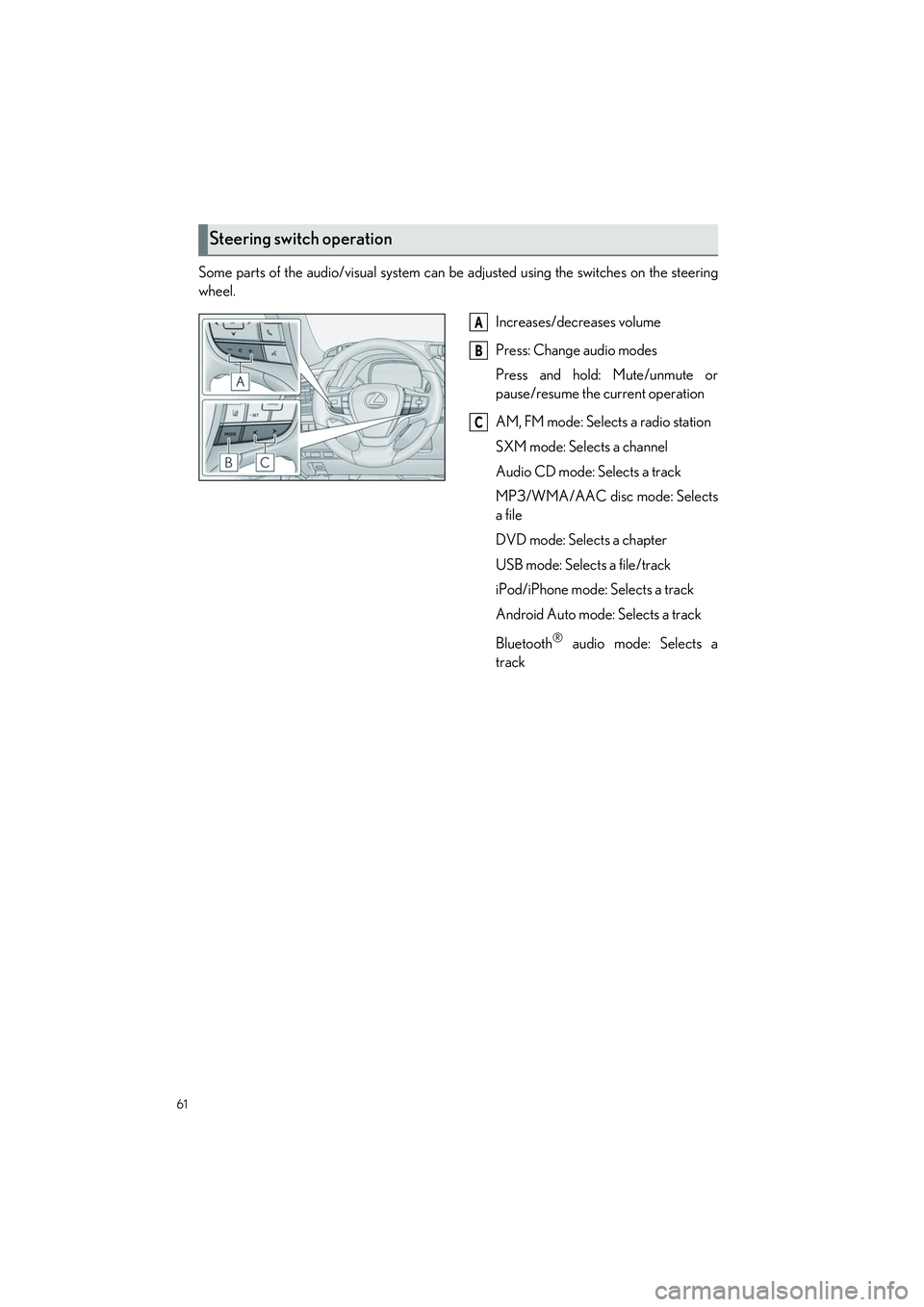
Some parts of the audio/visual system can be adjusted using the switches on the steering
wheel.
Increases/decreases volume
Press: Change audio modes
Press and hold: Mute/unmute or
pause/resume the current operation
AM, FM mode: Selects a radio station
SXM mode: Selects a channel
Audio CD mode: Selects a track
MP3/WMA/AAC disc mode: Selects
a file
DVD mode: Selects a chapter
USB mode: Selects a file/track
iPod/iPhone mode: Selects a track
Android Auto mode: Selects a track
Bluetooth
® audio mode: Selects a
track
Steering switch operation
A
B
C
Page 63 of 108

62
LS500h_QG_U
■Audio control switch
Turn to step up/down frequencies/
channels.
Press to seek up/down.
Press and hold for continuous seek.
■Control screen
Displays cover art
Select to display HD) multicast chan-
nels available
Displays the artist info and song title or
album and genre
Select to tune to preset stations/chan-
nels
Display items on the channels regis-
tered to smart favorites
■Presetting a station
1
Tune in the desired station.
2Select and hold “(Hold Edit)”.
Radio
A
B
A
B
C
D
E