buttons LEXUS LS500H 2022 Owners Manual
[x] Cancel search | Manufacturer: LEXUS, Model Year: 2022, Model line: LS500H, Model: LEXUS LS500H 2022Pages: 108, PDF Size: 6.79 MB
Page 7 of 108
6
LS500h_QG_U
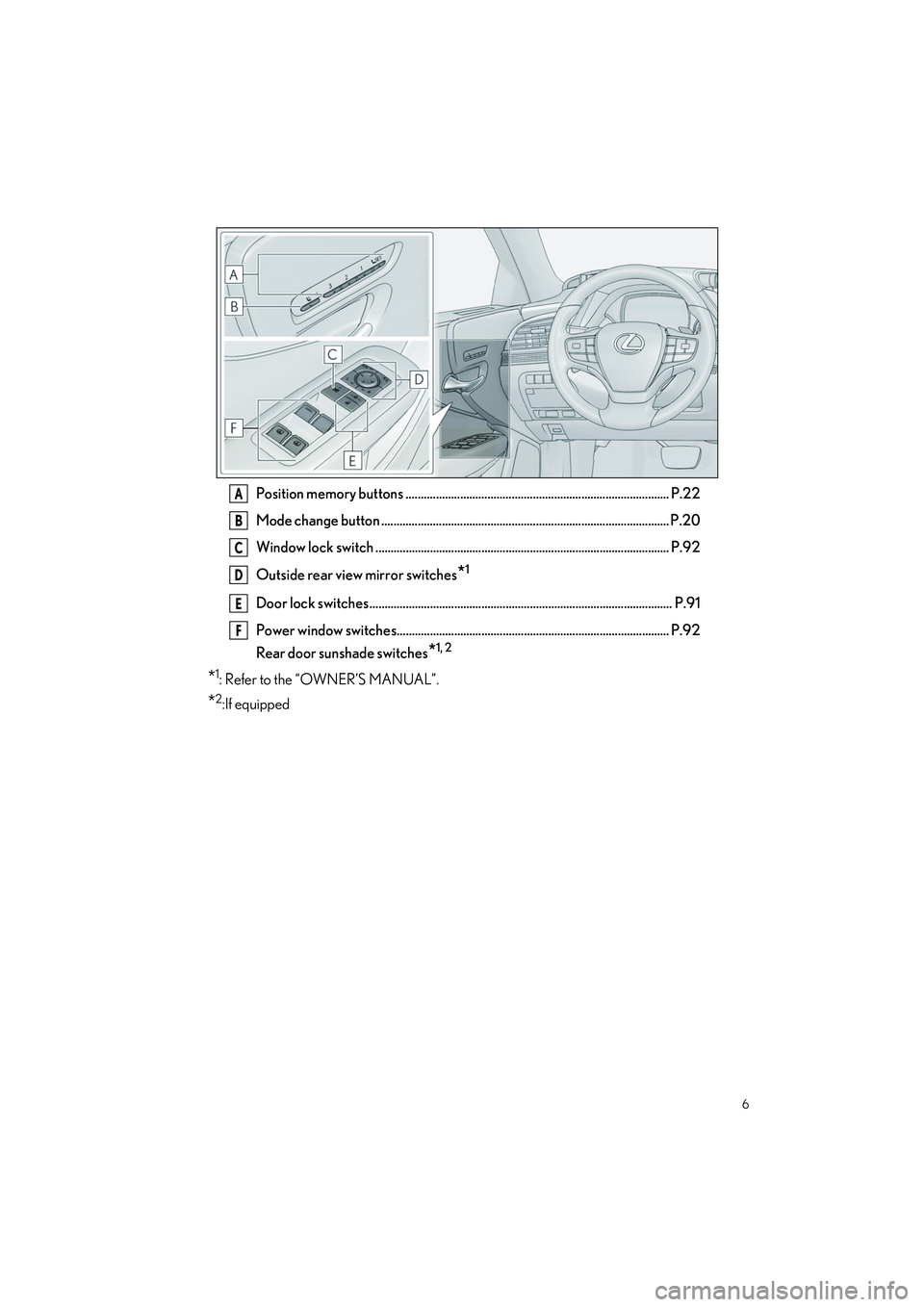
Position memory buttons ....................................................................................... P.22
Mode change button ............................................................................................... P.20
Window lock switch ................................................................................................. P.92
Outside rear view mirror switches
*1
Door lock switches .................................................................................................... P.91
Power window switches.......................................................................................... P.92
Rear door sunshade switches
*1, 2
*1: Refer to the “OWNER’S MANUAL”.
*2:If equipped
A
B
C
D
E
F
Page 10 of 108
9
LS500h_QG_U
■Interior
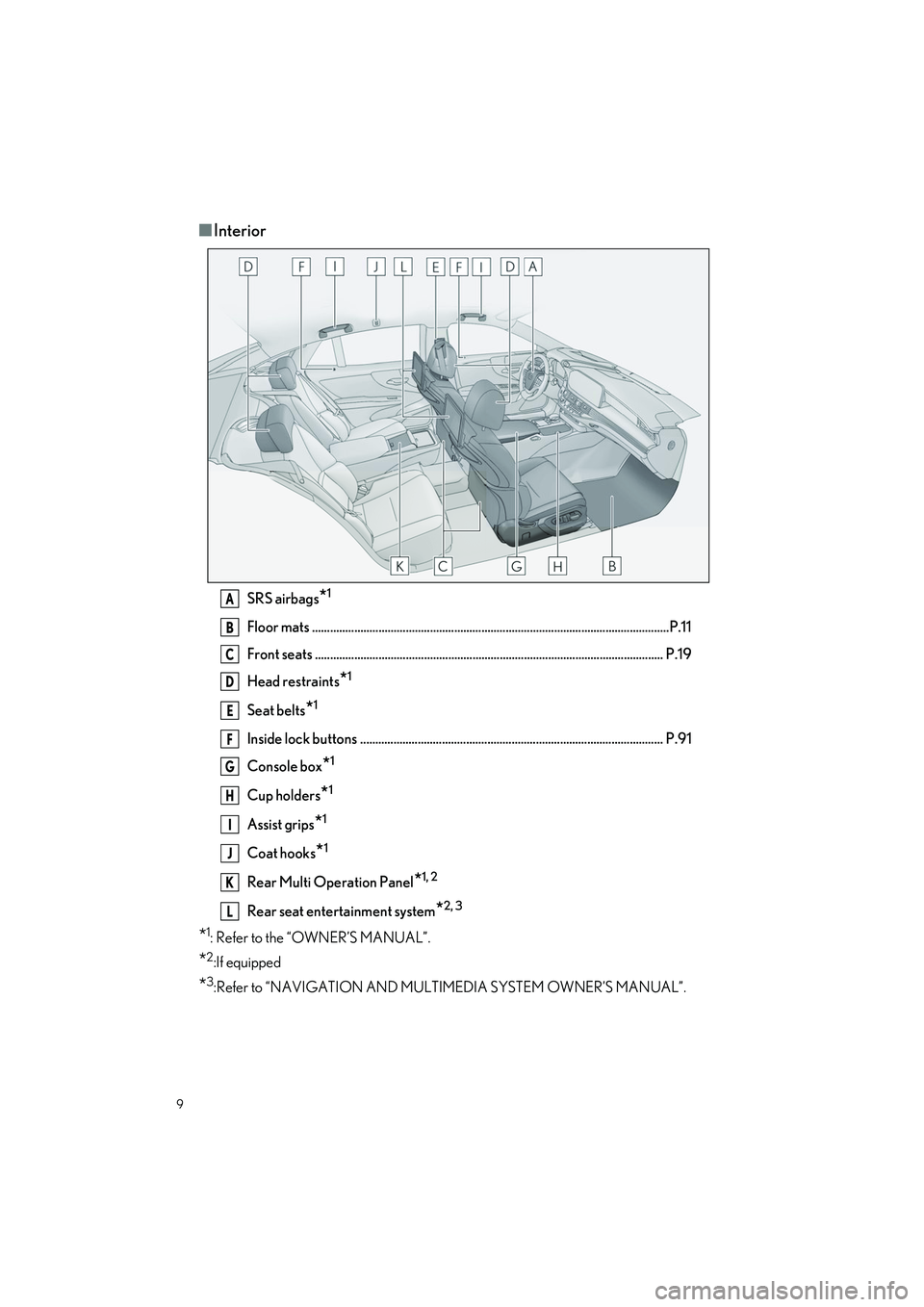
SRS airbags*1
Floor mats ..................................................................................................................... .P.11
Front seats ................................................................................................................... P .19
Head restraints
*1
Seat belts*1
Inside lock buttons .................................................................................................... P.91
Console box
*1
Cup holders*1
Assist grips*1
Coat hooks*1
Rear Multi Operation Panel*1, 2
Rear seat entertainment system*2, 3
*1: Refer to the “OWNER’S MANUAL”.
*2:If equipped
*3:Refer to “NAVIGATION AND MULTIMEDIA SYSTEM OWNER’S MANUAL”.
A
B
C
D
E
F
G
H
I
J
K
L
Page 11 of 108
10
LS500h_QG_U
■Ceiling
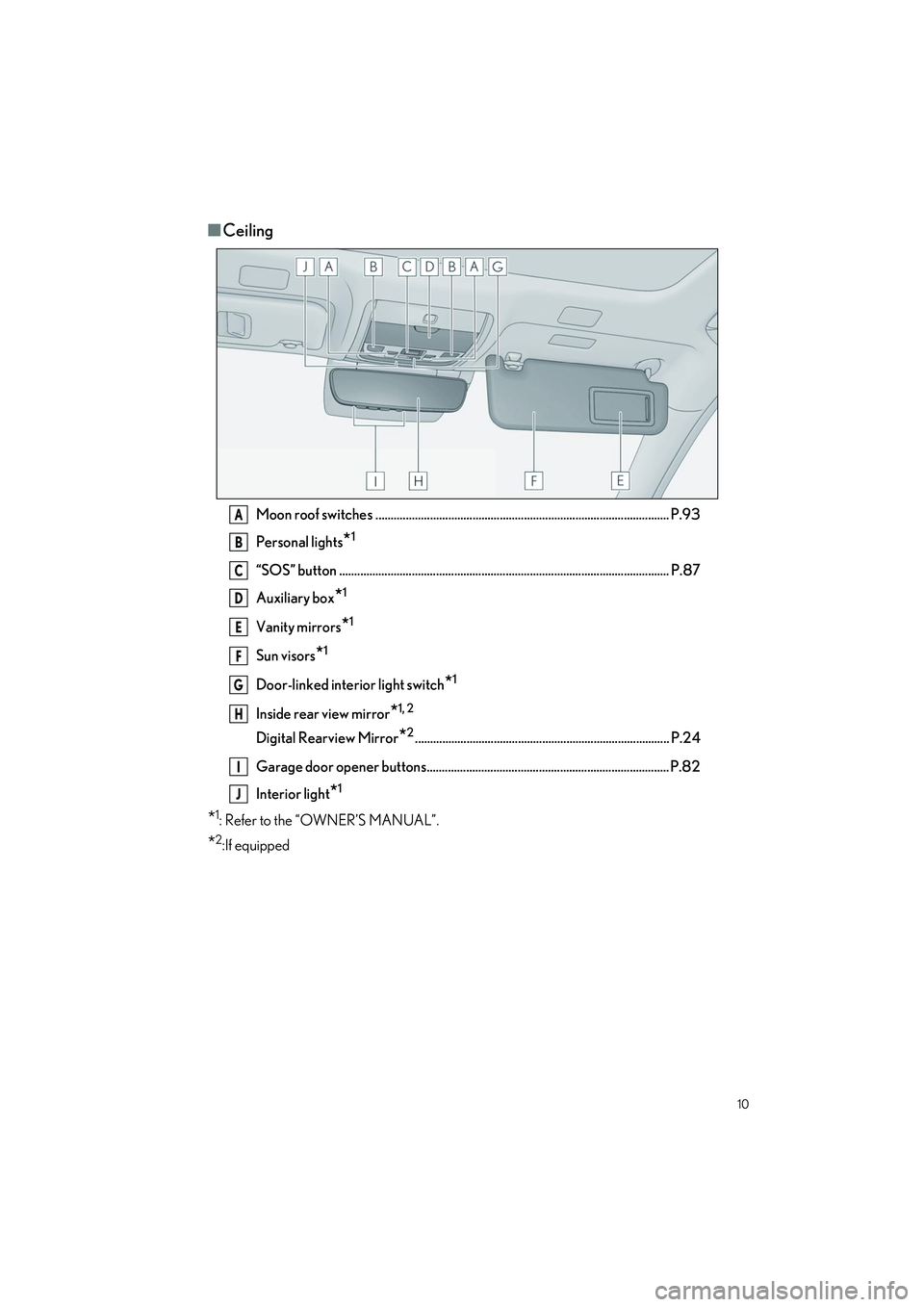
Moon roof switches ................................................................................................. P.93
Personal lights
*1
“SOS” button ............................................................................................................. P.87
Auxiliary box
*1
Vanity mirrors*1
Sun visors*1
Door-linked interior light switch*1
Inside rear view mirror*1, 2
Digital Rearview Mirror*2.................................................................................... P.24
Garage door opener buttons................................................................................ P.82
Interior light
*1
*1: Refer to the “OWNER’S MANUAL”.
*2:If equipped
A
B
C
D
E
F
G
H
I
J
Page 21 of 108
20
LS500h_QG_U
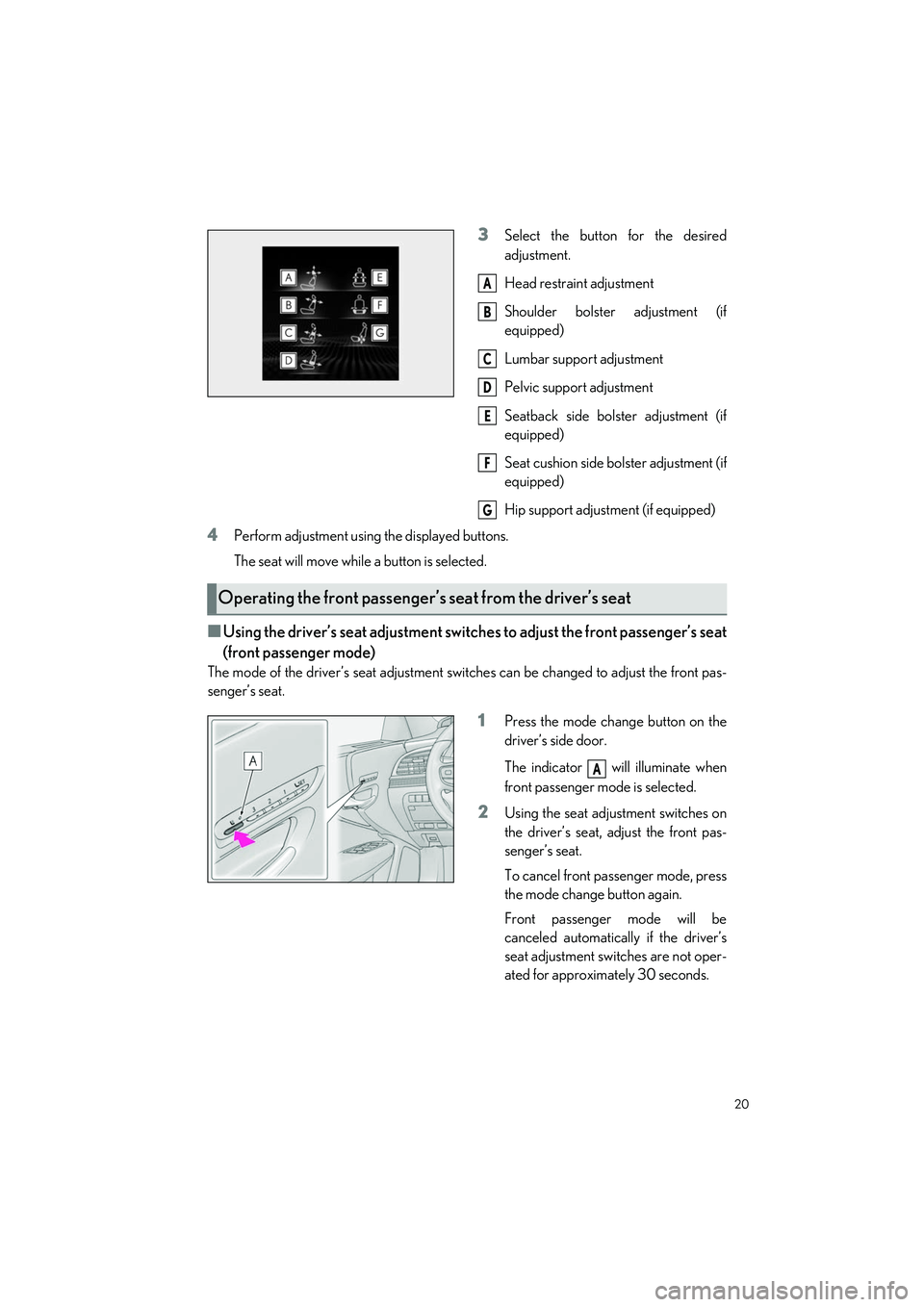
3Select the button for the desired
adjustment.
Head restraint adjustment
Shoulder bolster adjustment (if
equipped)
Lumbar support adjustment
Pelvic support adjustment
Seatback side bolster adjustment (if
equipped)
Seat cushion side bolster adjustment (if
equipped)
Hip support adjustment (if equipped)
4Perform adjustment using the displayed buttons.
The seat will move while a button is selected.
■Using the driver’s seat adjustment switches to adjust the front passenger’s seat
(front passenger mode)
The mode of the driver’s seat adjustment switches can be changed to adjust the front pas-
senger’s seat.
1Press the mode change button on the
driver’s side door.
The indicator will illuminate when
front passenger mo de is selected.
2Using the seat adju stment switches on
the driver’s seat, adjust the front pas-
senger’s seat.
To cancel front passenger mode, press
the mode change button again.
Front passenger mode will be
canceled automatically if the driver’s
seat adjustment switches are not oper-
ated for approximately 30 seconds.
A
B
C
D
E
F
G
Operating the front passenger’s seat from the driver’s seat
A
Page 23 of 108
22
LS500h_QG_U
1Turn the power switch to ON mode.
2Check that the shift position is in P.
3Adjust the driver’s seat, steering wheel, outside rear view mirrors and head-up display
(if equipped) to the desired positions.
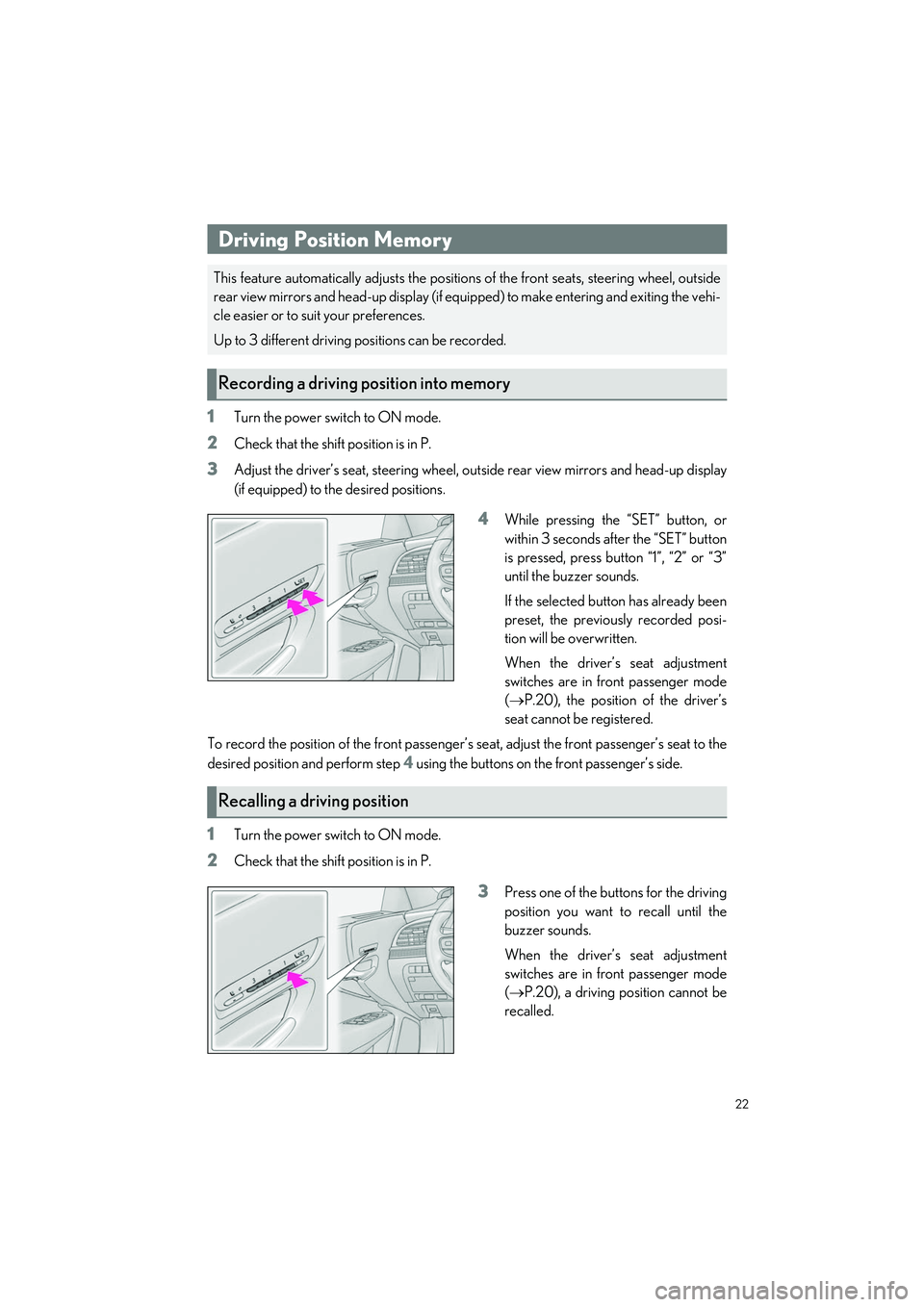
4While pressing the “SET” button, or
within 3 seconds after the “SET” button
is pressed, press button “1”, “2” or “3”
until the buzzer sounds.
If the selected button has already been
preset, the previously recorded posi-
tion will be overwritten.
When the driver’s seat adjustment
switches are in front passenger mode
( P.20), the position of the driver’s
seat cannot be registered.
To record the position of the front passenger’s seat, adjust the front passenger’s seat to the
desired position and perform step
4 using the buttons on the front passenger’s side.
1Turn the power switch to ON mode.
2Check that the shift position is in P.
3Press one of the buttons for the driving
position you want to recall until the
buzzer sounds.
When the driver’s seat adjustment
switches are in front passenger mode
( P.20), a driving position cannot be
recalled.
Driving Position Memory
This feature automatically adjust s the positions of the front seats, steering wheel, outside
rear view mirrors and head-up display (if equi pped) to make entering and exiting the vehi-
cle easier or to suit your preferences.
Up to 3 different driving positions can be recorded.
Recording a driving position into memory
Recalling a driving position
Page 68 of 108

67
LS500h_QG_U
Press the “MENU” button on the Remote Touch to display the main menu and move the cur-
sor to to display the climat e control shortcut buttons. Then, select to display the
Lexus Climate Concie rge control screen.
Select
The indicator on the Lexus Climate Con-
cierge control screen illuminates, and the
automatic air conditioning system, seat
heaters and ventilators, and heated steering
wheel operate in automatic mode.
If any of the system is operated manually,
the indicator turns off. However, all other
functions continue to operate in automatic
mode.
Lexus Climate Concierge
The seat heaters, seat ventilators and heated steering wheel (if equipped) are each auto-
matically controlled according to the set temp erature of the air conditioning system, the
outside and cabin temperature, etc. Lexus Climate Concierge allows a comfortable con-
dition to be maintained wi thout adjusting each system.
Displaying the Lexus Climate Concierge
Turning on Lexus Climate Concierge
Page 73 of 108

72
LS500h_QG_U
■Center Display
Press the “MENU” button on the Remote Touch to display the main menu and move the cur-
sor to to display the climate control shortcut buttons. Then, select to display the
rear air conditioning control screen.
Adjust the left side rear seat tempera-
ture setting
Select the left side rear seat air flow
mode
Adjust the rear seats fan speed setting
Select the right side rear seat air flow
mode
Adjust the right side rear seat tempera-
ture setting
Functions on/off
Center Display
1Select “REAR AUTO” on the rear air conditioning control screen.
2To stop the operation, select “REAR Off” on the rear air conditioning control screen.
Rear Automatic Air Conditioning System (if
equipped)
The air outlets and fan speed are automatically adjusted according to the temperature
setting.
The rear air conditioning system can be operated using the Center Display and Rear
Multi Operation Panel.
Rear air conditioning control screen
A
B
C
D
E
F
Using automatic mode
Page 83 of 108
82
LS500h_QG_U
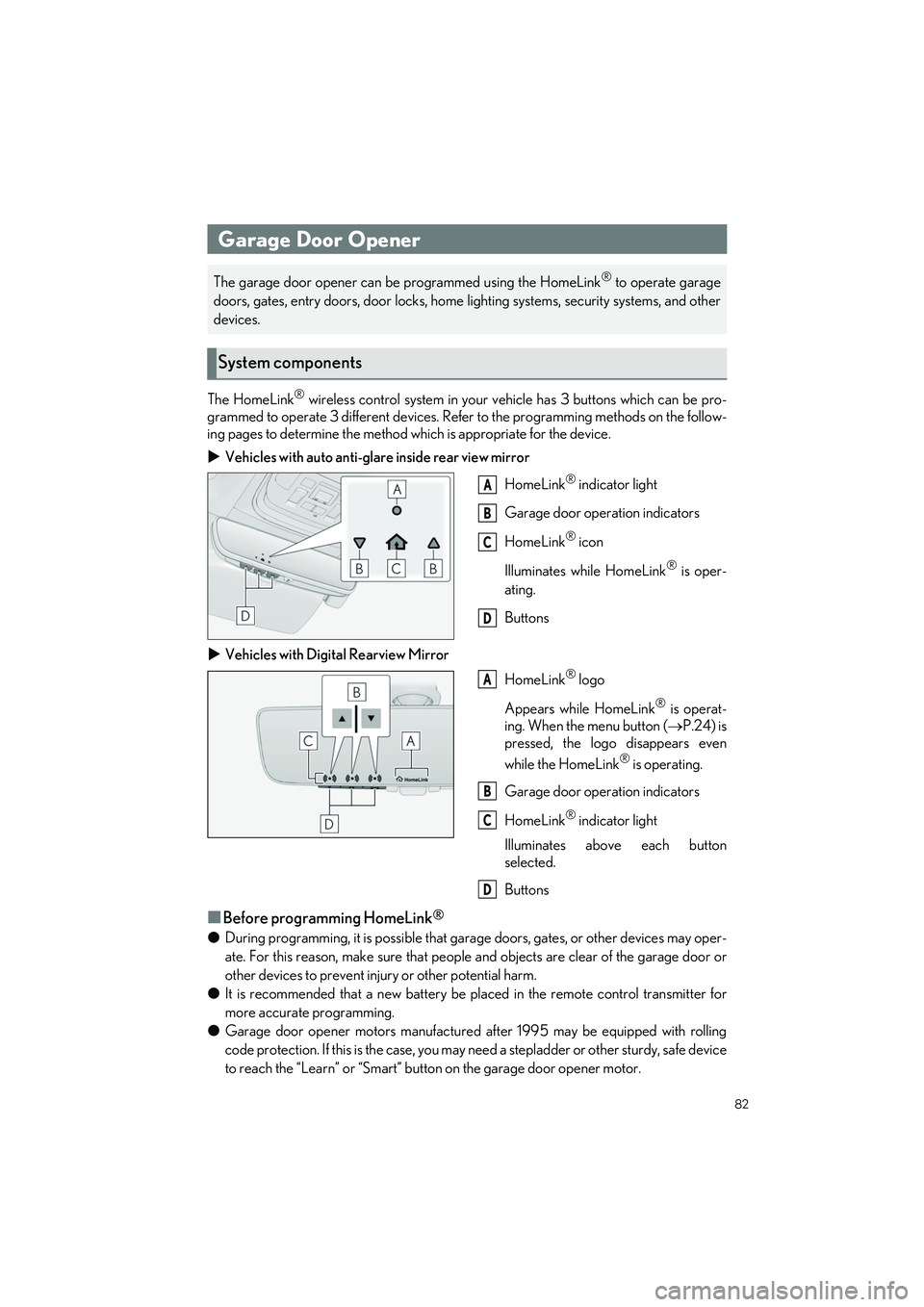
The HomeLink® wireless control system in your vehicle has 3 buttons which can be pro-
grammed to operate 3 different devices. Refe r to the programming methods on the follow-
ing pages to determine the method wh ich is appropriate for the device.
Vehicles with auto anti-glare inside rear view mirror
HomeLink
® indicator light
Garage door operation indicators
HomeLink
® icon
Illuminates while HomeLink
® is oper-
ating.
Buttons
Vehicles with Digital Rearview Mirror
HomeLink
® logo
Appears while HomeLink
® is operat-
ing. When the menu button ( P.24) is
pressed, the logo disappears even
while the HomeLink
® is operating.
Garage door operation indicators
HomeLink
® indicator light
Illuminates above each button
selected.
Buttons
■Before programming HomeLink®
● During programming, it is possible that gara ge doors, gates, or other devices may oper-
ate. For this reason, make su re that people and objects ar e clear of the garage door or
other devices to prevent injury or other potential harm.
● It is recommended that a new battery be placed in the remote control transmitter for
more accurate programming.
● Garage door opener motors manufactured after 1995 may be equipped with rolling
code protection. If this is the case, you may need a stepladder or other sturdy, safe device
to reach the “Learn” or “Smart” button on the garage door opener motor.
Garage Door Opener
The garage door opener can be programmed using the HomeLink® to operate garage
doors, gates, entry doors, door locks, home lighting systems, security systems, and other
devices.
System components
A
B
C
D
A
B
C
D
Page 84 of 108
83
LS500h_QG_U
■HomeLink® programming procedureThe programming procedures can also be found at the following URL.
Website: www.homelink.com/lexus
For support, contact customer support at the following.
Help Line: 1-800-355-3515
■Programming HomeLink®
Steps 1 through 3 must be performed within 60 seconds, otherwise the HomeLink® indi-
cator light will stop flashing and programming will not be successfully completed.
1Press and release the HomeLink® button you want to program and check that the
HomeLink® indicator light flashes (orange).
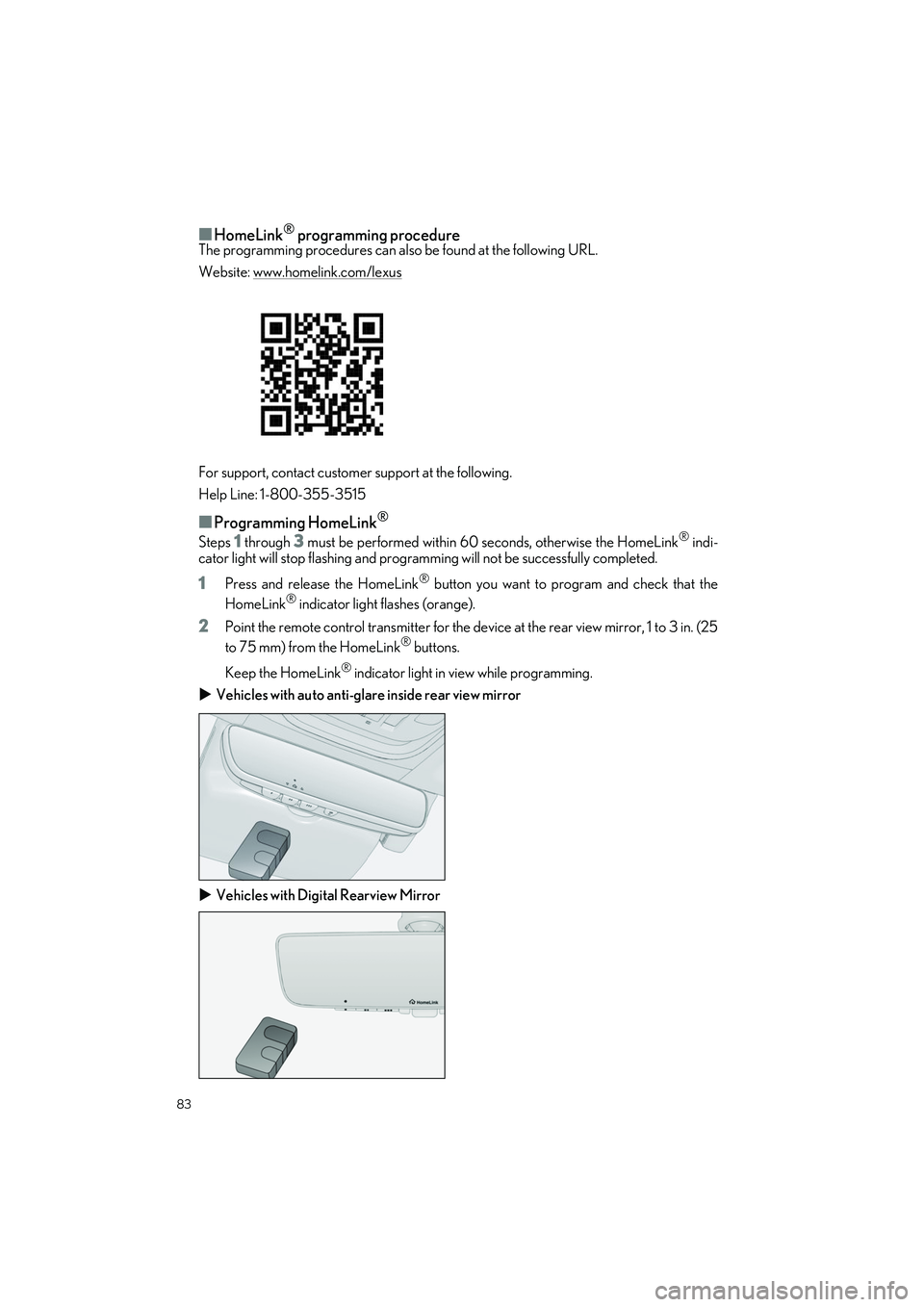
2Point the remote control transmitter for the device at the rear view mirror, 1 to 3 in. (25
to 75 mm) from the HomeLink® buttons.
Keep the HomeLink
® indicator light in view while programming.
Vehicles with auto anti-glare inside rear view mirror
Vehicles with Digital Rearview Mirror
Page 86 of 108
85
LS500h_QG_U
5Repeat the steps above to program another device for any of the remaining
HomeLink
® buttons.
■Programming a rolling code system
Two or more people may be necessary to complete rolling code programming.
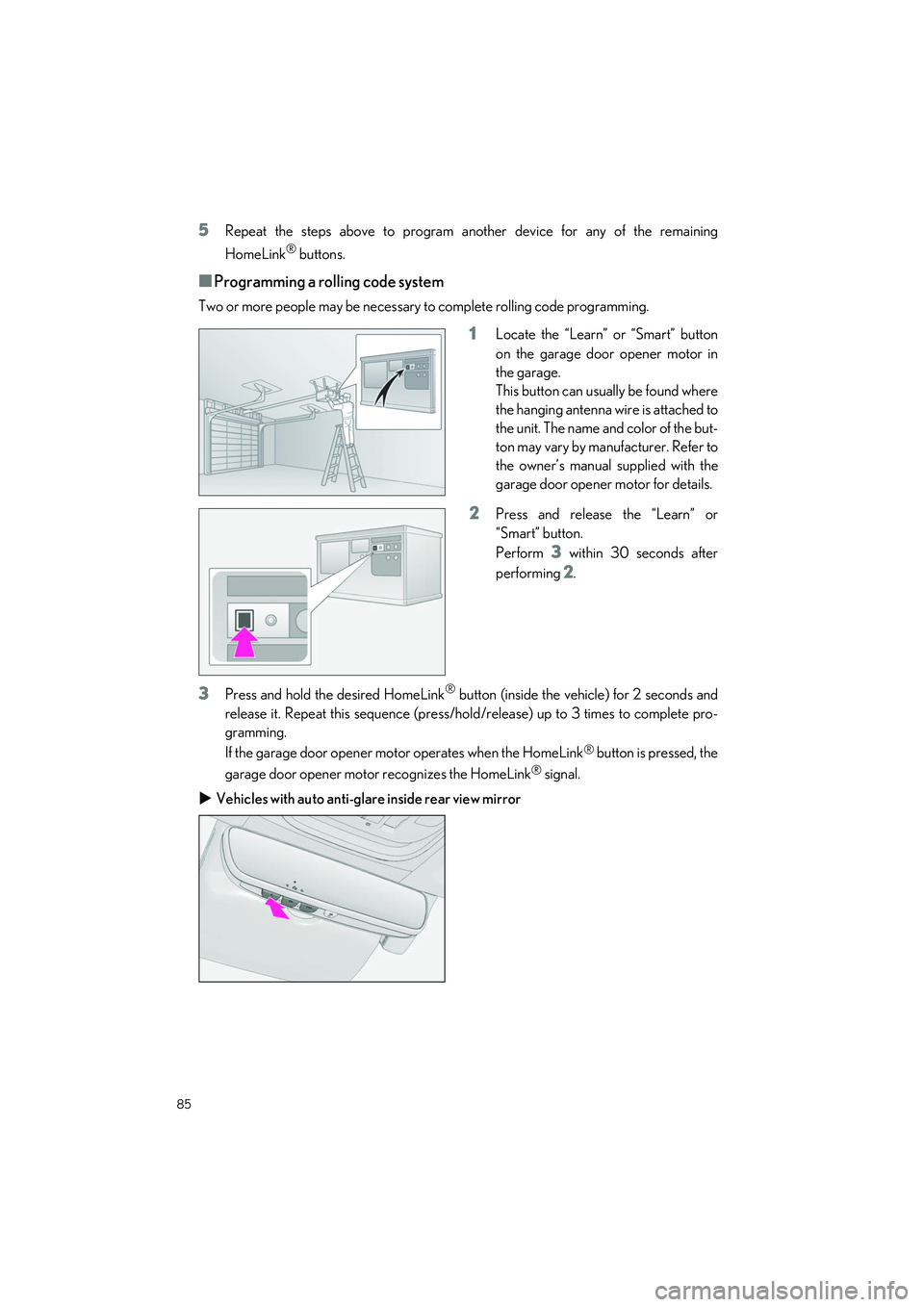
1Locate the “Learn” or “Smart” button
on the garage door opener motor in
the garage.
This button can usually be found where
the hanging antenna wire is attached to
the unit. The name and color of the but-
ton may vary by manufacturer. Refer to
the owner’s manual supplied with the
garage door opener motor for details.
2Press and release the “Learn” or
“Smart” button.
Perform
3 within 30 seconds after
performing
2.
3Press and hold the desired HomeLink® button (inside the vehicle) for 2 seconds and
release it. Repeat this sequence (press/hold/release) up to 3 times to complete pro-
gramming.
If the garage door opener mo tor operates when the HomeLink
® button is pressed, the
garage door opener motor recognizes the HomeLink
® signal.
Vehicles with auto anti-glare inside rear view mirror