light LEXUS LS600H 2015 Owners Manual
[x] Cancel search | Manufacturer: LEXUS, Model Year: 2015, Model line: LS600H, Model: LEXUS LS600H 2015Pages: 620, PDF Size: 7.66 MB
Page 254 of 620
2524-4. Refueling
LS600hL_U(OM50E41U)
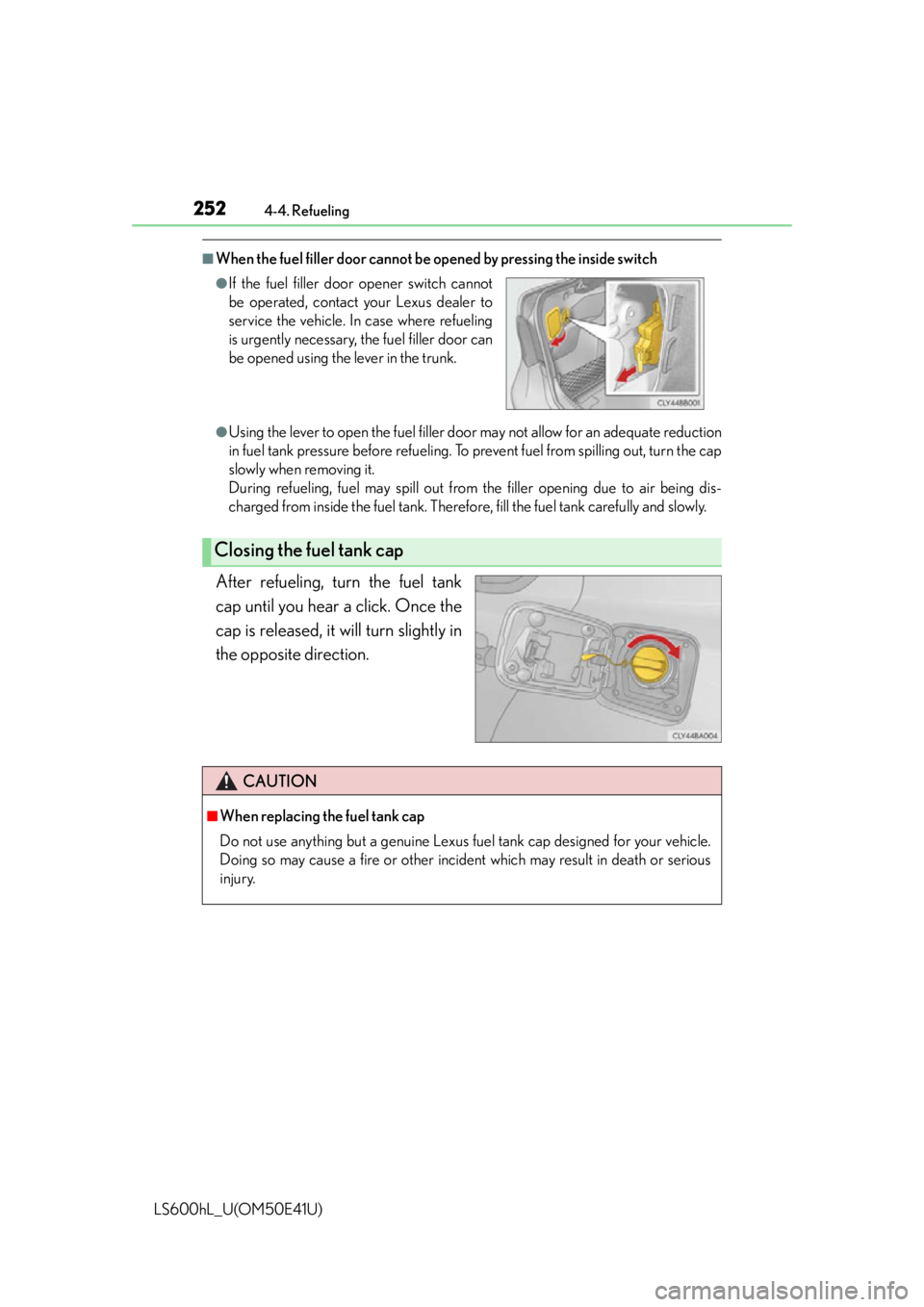
■When the fuel filler door cannot be opened by pressing the inside switch
●Using the lever to open the fuel filler door may not allow for an adequate reduction
in fuel tank pressure before refueling. To prevent fuel from spilling out, turn the cap
slowly when removing it.
During refueling, fuel may spill out from the filler opening due to air being dis-
charged from inside the fuel tank. Therefore, fill the fuel tank carefully and slowly.
After refueling, turn the fuel tank
cap until you hear a click. Once the
cap is released, it will turn slightly in
the opposite direction.
●If the fuel filler door opener switch cannot
be operated, contact your Lexus dealer to
service the vehicle. In case where refueling
is urgently necessary, the fuel filler door can
be opened using the lever in the trunk.
Closing the fuel tank cap
CAUTION
■When replacing the fuel tank cap
Do not use anything but a genuine Lexus fu el tank cap designed for your vehicle.
Doing so may cause a fire or other incide nt which may result in death or serious
injury.
Page 274 of 620

2724-5. Using the driving support systems
LS600hL_U(OM50E41U)
CAUTION
■Handling the radar sensor
Observe the following to ensure the cruise control system can function effectively.
Otherwise, the system may not function co rrectly and could result in an accident.
●Keep the sensor and grille cover clean at all times.
Clean the sensor and grille cover with a soft cloth so you do not mark or damage
them.
●Do not subject the sensor or surr ounding area to a strong impact.
If the sensor moves even slightly off position, the system may malfunction. If the
sensor or surrounding area is subject to a strong impact, always have the area
inspected and adjusted by your Lexus dealer.
●Do not disassemble the sensor.
●Do not attach accessories or stickers to the sensor, grille cover or surrounding
area.
●Do not modify or paint th e sensor and grille cover.
●Do not replace the sensor or grill cover with non-genuine parts.
Page 276 of 620
2744-5. Using the driving support systems
LS600hL_U(OM50E41U)
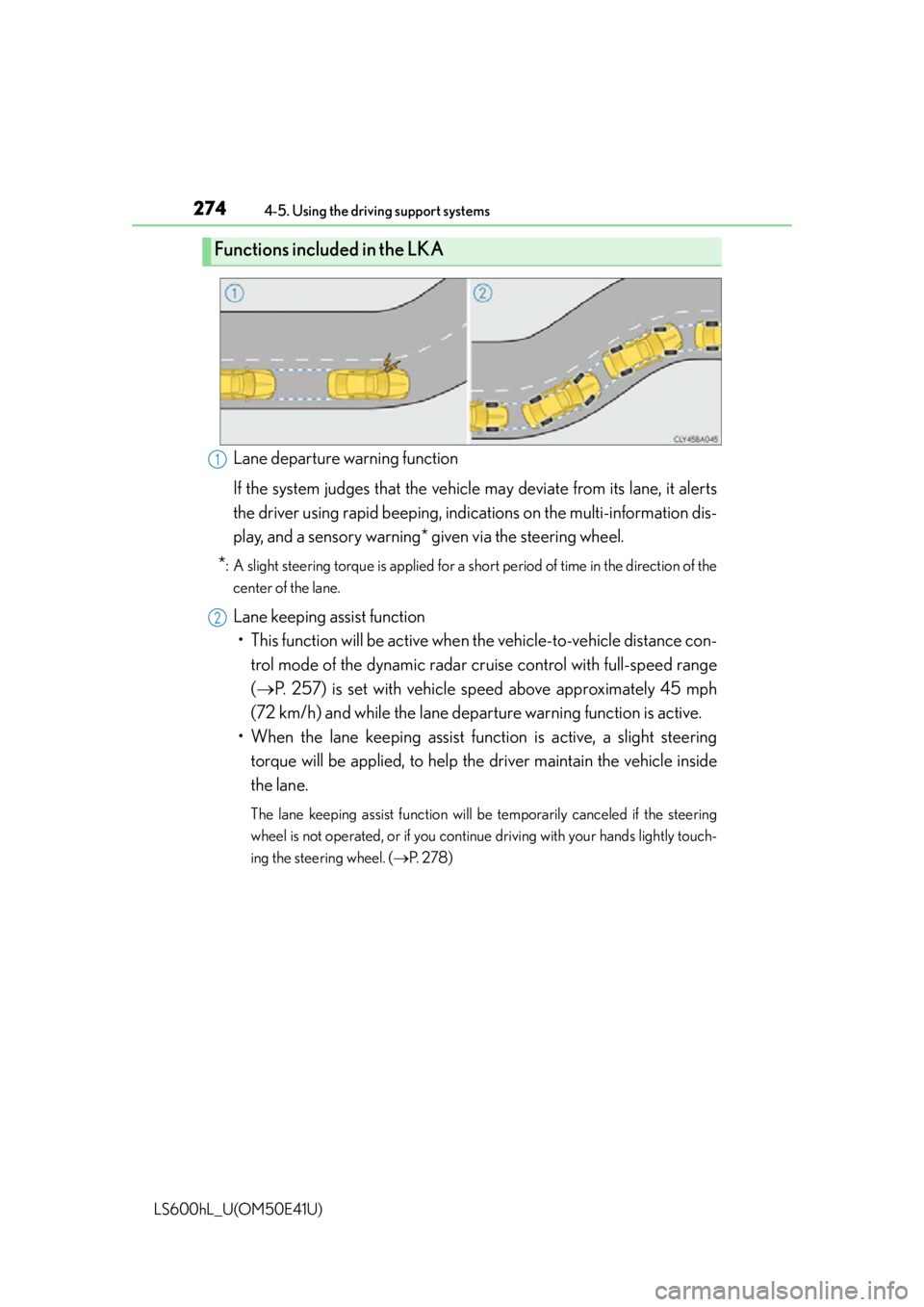
Lane departure warning function
If the system judges that the vehicle may deviate from its lane, it alerts
the driver using rapid beeping, indi cations on the multi-information dis-
play, and a sensory warning* given via the steering wheel.
*: A slight steering torque is applied for a short period of time in the direction of the
center of the lane.
Lane keeping assist function• This function will be active when the vehicle-to -vehicle distance con-
trol mode of the dynamic radar crui se control with full-speed range
( P. 257) is set with vehicle sp eed above approximately 45 mph
(72 km/h) and while the lane depa rture warning function is active.
• When the lane keeping assist fu nction is active, a slight steering
torque will be applied, to help the driver maintain the vehicle inside
the lane.
The lane keeping assist function will be temporarily canceled if the steering
wheel is not operated, or if you continue driving with your hands lightly touch-
ing the steering wheel. ( P. 2 7 8 )
Functions included in the LKA
1
2
Page 280 of 620

2784-5. Using the driving support systems
LS600hL_U(OM50E41U)
■Temporary cancelation of the LKA system functions
If any of the following occurs, the LKA system functions will be temporarily canceled.
The functions will resume after the necessary operating conditions have returned.
●The steering wheel is turned as far as necessary to cause the vehicle to change
lanes.
●When the system detects no-handed driving. (The lane keeping assist function will
be temporarily canceled, but the lane departure warning function will continue.)
●The turn signal lever is operated.
●The vehicle speed deviates from the operating range of the LKA system functions.
(The buzzer will beep twice when the lane keeping assist function is being can-
celed.)
●When the lane lines cannot be recognized while driving.
●When the wiper switch is in the high speed position or is set to “AUTO” mode with
the wipers operating at high speed. (The la ne keeping assist function will be tempo-
rarily canceled, but the lane departure warning function will continue.)
●If the vehicle crosses a line for approximately half a minute or more. (The lane keep-
ing assist function will be temporarily canceled, but the lane departure warning
function will continue.)
●When the lane departure warning function is activated.
The lane departure warning function will not operate again for several seconds
after it has been activated, even if the vehicle leaves the lane again.
■The lane departure warning
It may be difficult to feel the sensory warning depending on the road conditions.
■No-handed driving warning
If the steering wheel is not operated for approximately 15 seconds on a straight road
or approximately 5 seconds on a curve, the buzzer will beep twice, indicators on the
multi-information display will flash, and the lane keeping assist function will be tem-
porarily canceled. If you drive the vehicle with your hands lightly touching the steer-
ing wheel, this may also be detected as no-handed driving.
Page 281 of 620

2794-5. Using the driving support systems
4
Driving
LS600hL_U(OM50E41U)
■After the vehicle has been parked in the sun
The LKA system functions may not be available and a warning message (P. 5 0 3 )
will be displayed for a while after driving ha s started. In such cases, turn the LKA sys-
tem off and turn it on again after normal temperature returns. When the temperature
in the cabin decreases and the temperature around the camera sensor ( P. 2 7 3 )
becomes suitable for its operation, the functions will begin to operate.
■If there are lane markers on only one side of the vehicle
The lane keeping assist function will not operate. Also, the lane departure warning
will not operate for the side on which lane markers could not be recognized.
■Conditions in which the function may not operate correctly
In the following conditions, the LKA system functions may not operate, or it may not
be possible to ensure adequate performance. Also, the camera sensor may be
unable to recognize lane lines causing the lane departure warning function to oper-
ate incorrectly, or the lane keeping assist function may not operate properly. How-
ever, this does not indicate a malfunction.
●When driving through an area with no lane markers, such as a tollbooth, a crossing
or before a ticket checkpoint
●When driving on a sharp curve
●When lanes are extremely narrow or extremely wide
●When the vehicle leans to one side an unusual amount due to a heavy load or
improper tire inflation pressure
●When the following distance between your vehicle and the vehicle ahead is
extremely short
●When the lane markers are yellow (These may be more difficult for the system to
recognize compared to white markers.)
●When the lane markers are broken, “Botts’ dots”, “Raised pavement marker” or
stones
●When lane markers are obscured or pa rtially obscured by sand, dirt, etc.
●When there are shadows on the road running parallel with lane markers, or if a
shadow covers the lane markers
●When driving on a particularly bright road surface, such as concrete
●When driving on a road surface that is bright due to reflected light
●When driving in a location where the light level changes rapidly, such as the
entrance to or exit from a tunnel
●When sunlight or the headlights of oncoming vehicles are shining directly into the
camera lens
●When driving on roads that are branching or merging
Page 282 of 620

2804-5. Using the driving support systems
LS600hL_U(OM50E41U)
●When driving on a road surface that is wet due to rain, previous rainfall, standing
water, etc.
●When the vehicle experiences strong up-and-down motion such as when driving
on an extremely rough road or on a seam in the pavement
●When headlight brightness at nighttime is reduced due to dirt on the lenses, or
when the headlights are misaligned
●When driving with a strong crosswind
●When driving on winding roads or roads that are uneven
●When driving on rough or unpaved roads
■When changing the tires
Depending on the tires used, sufficient performance may not be maintainable.
■Warning messages for LKA
Warning messages are used to indicate a system malfunction or to inform the driver
of the need for caution while driving. ( P. 5 0 3 )
CAUTION
■Before using the LKA system
Do not rely solely on the LKA system. The LKA system does not drive the vehicle
automatically, nor does it reduce the amount of care you need to take. As such, the
driver must always assume full responsi bility for understanding his/her surround-
ings, for operating the steering wheel to correct the driving line, and for driving
safely.
Inappropriate or negligent driving could lead to an accident.
■To avoid operating the LKA by mistake
Switch the LKA off using the LKA switch when not in use.
Page 283 of 620

2814-5. Using the driving support systems
4
Driving
LS600hL_U(OM50E41U)
CAUTION
■Situations unsuitable for LKA
Do not use LKA in any of the following situations.
Otherwise, the system may not function correctly and could result in an accident.
●When driving with snow tires, ti re chains, or similar equipment
●When the tires have been excessively worn, or when the tire inflation pressure is
low
●When there are objects or structures along the roadside that might be misinter-
preted as lane markers (such as guardrails, curb, reflector posts, etc.)
●When driving on snowy roads
●When pavement lane markers are difficult to see due to rain, snow, fog, sand, dirt,
etc.
●When there are visible lines on the pavement from road repairs, or if the remains
of old lane markers are still visible on the road
●When driving on slippery roads, such as those covered with rain, ice or snow
●When driving in a lane other than the driving or passing lanes on a freeway or
highway
●When driving on a road with lane closures due to maintenance, or when driving
in a temporary lane
NOTICE
■To prevent damage to or incorrect operation of the LKA system
●Do not modify the headlights or attach stickers to the surface of the lights.
●Do not modify the suspension.
If any suspension parts need to be replaced, contact your Lexus dealer.
●Do not install or place anything on the h ood or the grille. Also, do not install a
grille guard (bull bars, kangaroo bar etc.).
●Do not modify the sun visor.
If the sun visor needs to be replaced, contact your Lexus dealer.
●If the windshield needs to be replaced, contact your Lexus dealer.
Page 293 of 620
2914-5. Using the driving support systems
4
Driving
LS600hL_U(OM50E41U)
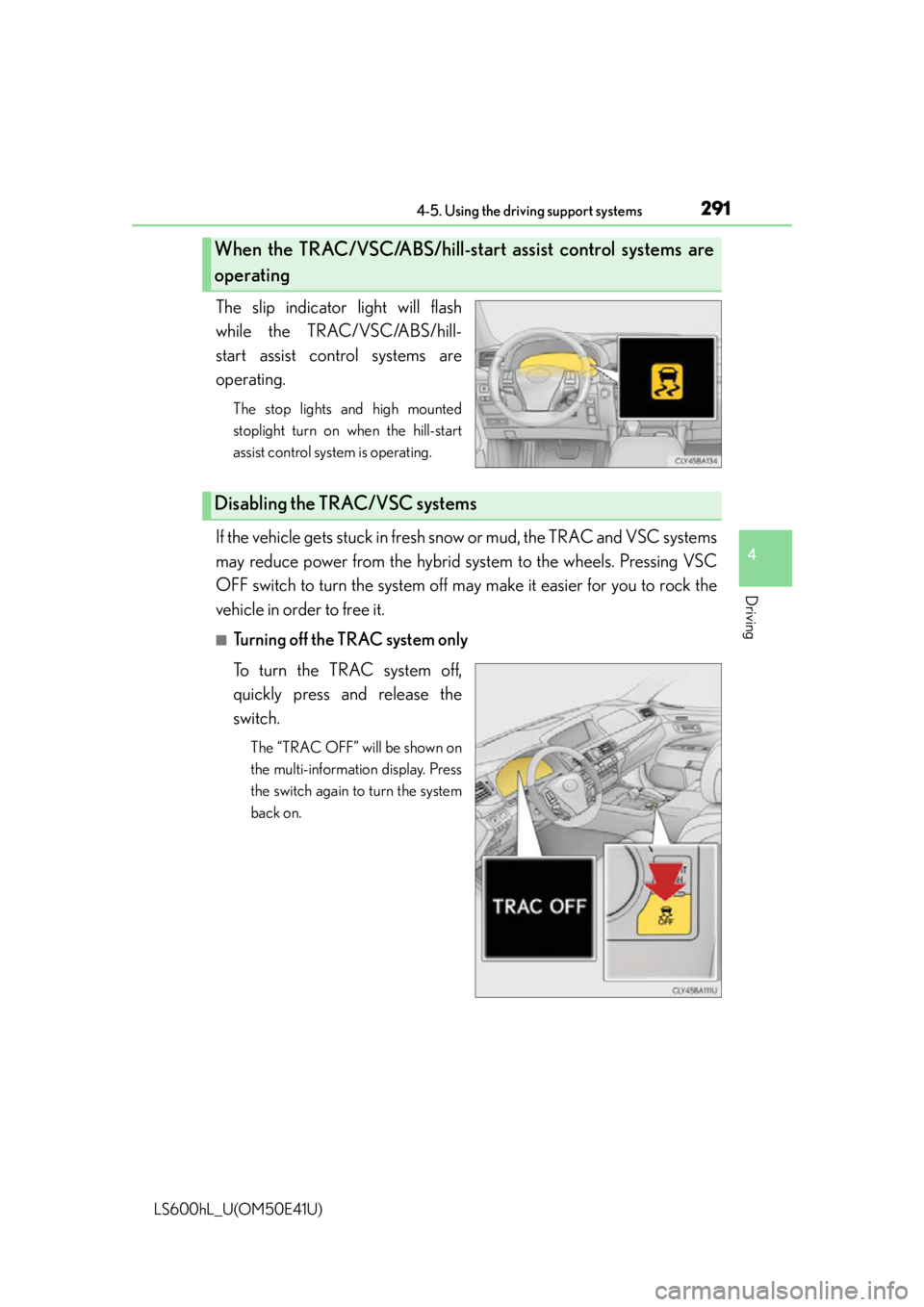
The slip indicator light will flash
while the TRAC/VSC/ABS/hill-
start assist control systems are
operating.
The stop lights and high mounted
stoplight turn on when the hill-start
assist control system is operating.
If the vehicle gets stuck in fresh snow or mud, the TRAC and VSC systems
may reduce power from the hybrid sy stem to the wheels. Pressing VSC
OFF switch to turn the sy stem off may make it easier for you to rock the
vehicle in order to free it.
■Turning off the TRAC system only
To turn the TRAC system off,
quickly press and release the
switch.
The “TRAC OFF” will be shown on
the multi-information display. Press
the switch again to turn the system
back on.
When the TRAC/VSC/ABS/hill-sta rt assist control systems are
operating
Disabling the TRAC/VSC systems
Page 294 of 620
2924-5. Using the driving support systems
LS600hL_U(OM50E41U)
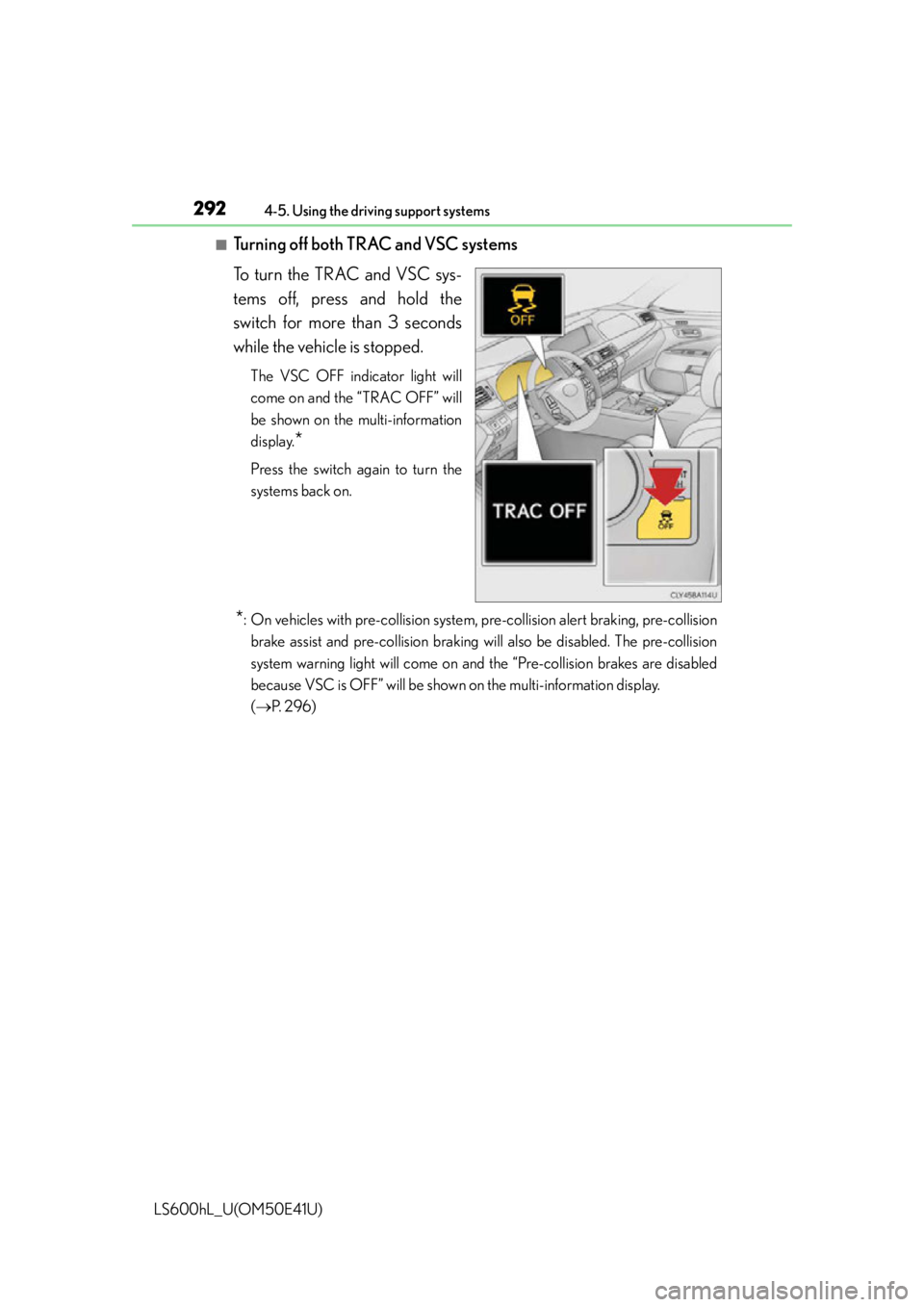
■Turning off both TRAC and VSC systems
To turn the TRAC and VSC sys-
tems off, press and hold the
switch for more than 3 seconds
while the vehicle is stopped.
The VSC OFF indicator light will
come on and the “TRAC OFF” will
be shown on the multi-information
display.
*
Press the switch again to turn the
systems back on.
*: On vehicles with pre-collision system, pre-collision alert braking, pre-collisionbrake assist and pre-collision braking will also be disabled. The pre-collision
system warning light will come on an d the “Pre-collision brakes are disabled
because VSC is OFF” will be shown on the multi-information display.
( P. 2 9 6 )
Page 295 of 620

2934-5. Using the driving support systems
4
Driving
LS600hL_U(OM50E41U)
■Hill-start assist control is operational when
●The system has detected that the vehicle is moving backward.
●The shift lever is in the D or S position.
●The brake pedal is not depressed.
■VGRS is disabled when
VGRS may stop operating in the following situations.
In this event, the steering wheel may move from its straight forward position, but it
will return when the system restarts.
●When the steering wheel is operated for an extended period of time while the vehi-
cle is stopped or is moving very slowly
●When the steering wheel has been held fully to the left or right
●When the 12-volt battery is low or the voltage temporarily drops
The center position of the steering wheel may change when VGRS is disabled. How-
ever, the position will return to normal after VGRS is reactivated.
■Sounds and vibrations caused by the ABS, brake assist, TRAC, VSC, hill-start assist
control and VGRS systems
●A sound may be heard from the engine compartment when the brake pedal is
depressed repeatedly, when the hybrid syst em is started or just after the vehicle
begins to move. This sound does not indicate that a malfunction has occurred in
any of these systems.
●Any of the following conditions may occur when the above systems are operating.
None of these indicates that a malfunction has occurred.
• Vibrations may be felt through the vehicle body and steering.
• A motor sound may be heard after the vehicle comes to a stop.
●The steering wheel may be moved slightly or a sound may be heard when the
hybrid system is started or stopped. None of these indicate that a malfunction has
occurred.
■EPS operation sound
When the steering wheel is operated, a motor sound (whirring sound) may be heard.
This does not indicate a malfunction.
■Reactivation of the TRAC/VSC systems
Even after the TRAC/VSC systems have been turned off, turning the hybrid system
off and then on again will automatically reactivate the TRAC/VSC systems.