light LEXUS LS600H 2015 Repair Manual
[x] Cancel search | Manufacturer: LEXUS, Model Year: 2015, Model line: LS600H, Model: LEXUS LS600H 2015Pages: 620, PDF Size: 7.66 MB
Page 156 of 620
1543-2. Opening, closing and locking the doors and trunk
LS600hL_U(OM50E41U)
CAUTION
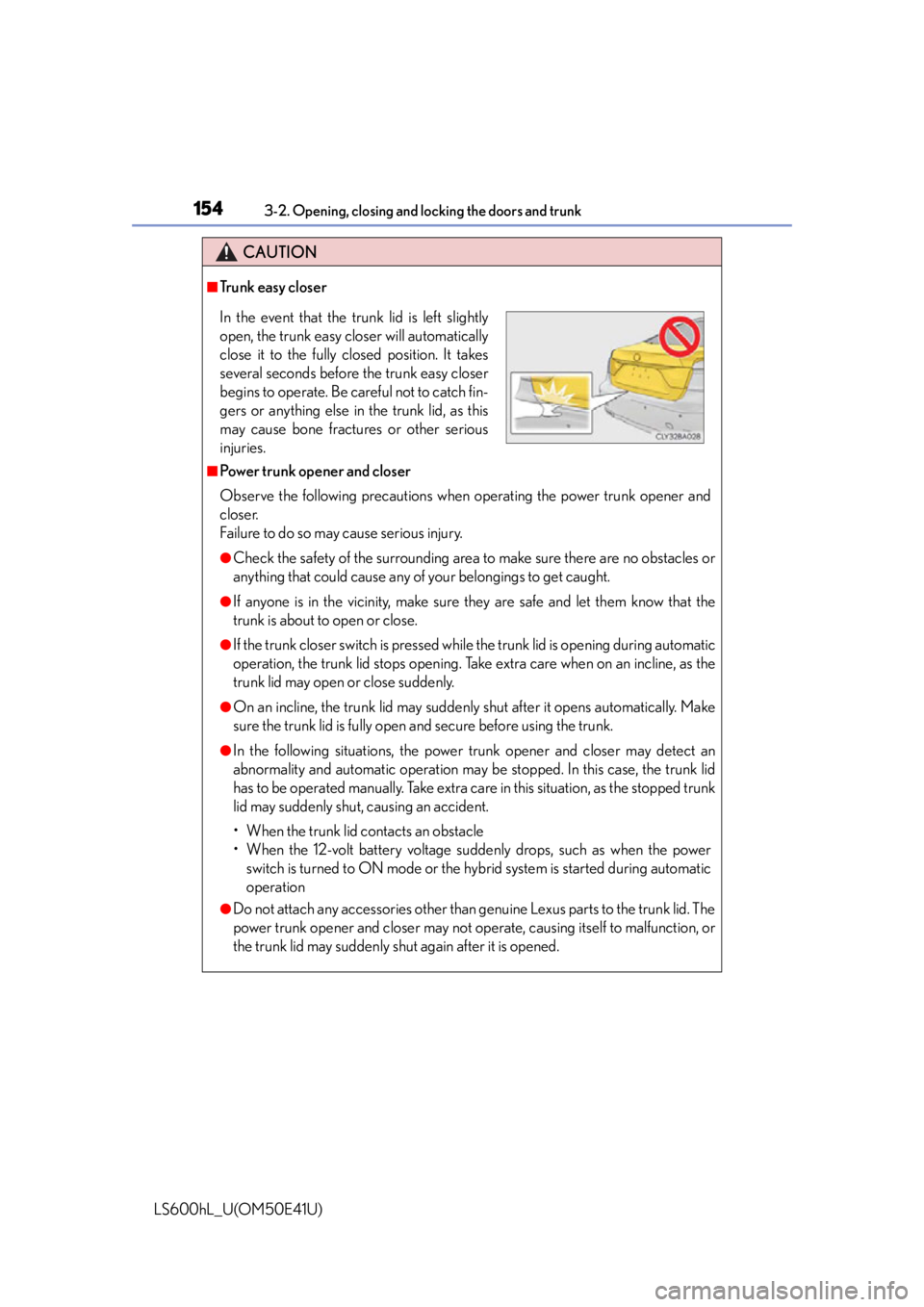
■Trunk easy closer
■Power trunk opener and closer
Observe the following precautions when operating the power trunk opener and
closer.
Failure to do so may cause serious injury.
●Check the safety of the surrounding area to make sure there are no obstacles or
anything that could cause any of your belongings to get caught.
●If anyone is in the vicinity, make sure they are safe and let them know that the
trunk is about to open or close.
●If the trunk closer switch is pressed whil e the trunk lid is opening during automatic
operation, the trunk lid stops opening. Take extra care when on an incline, as the
trunk lid may open or close suddenly.
●On an incline, the trunk lid may suddenly shut after it opens automatically. Make
sure the trunk lid is fully open and secure before using the trunk.
●In the following situations, the power trunk opener and closer may detect an
abnormality and automatic operation may be stopped. In this case, the trunk lid
has to be operated manually. Take extra care in this situation, as the stopped trunk
lid may suddenly shut, causing an accident.
• When the trunk lid contacts an obstacle
• When the 12-volt battery voltage suddenly drops, such as when the power switch is turned to ON mode or the hybrid system is started during automatic
operation
●Do not attach any accessories other than genuine Lexus parts to the trunk lid. The
power trunk opener and closer may not op erate, causing itself to malfunction, or
the trunk lid may suddenly shut again after it is opened.
In the event that the trunk lid is left slightly
open, the trunk easy closer will automatically
close it to the fully closed position. It takes
several seconds before the trunk easy closer
begins to operate. Be careful not to catch fin-
gers or anything else in the trunk lid, as this
may cause bone fractures or other serious
injuries.
Page 164 of 620
1623-3. Adjusting the seats
LS600hL_U(OM50E41U)
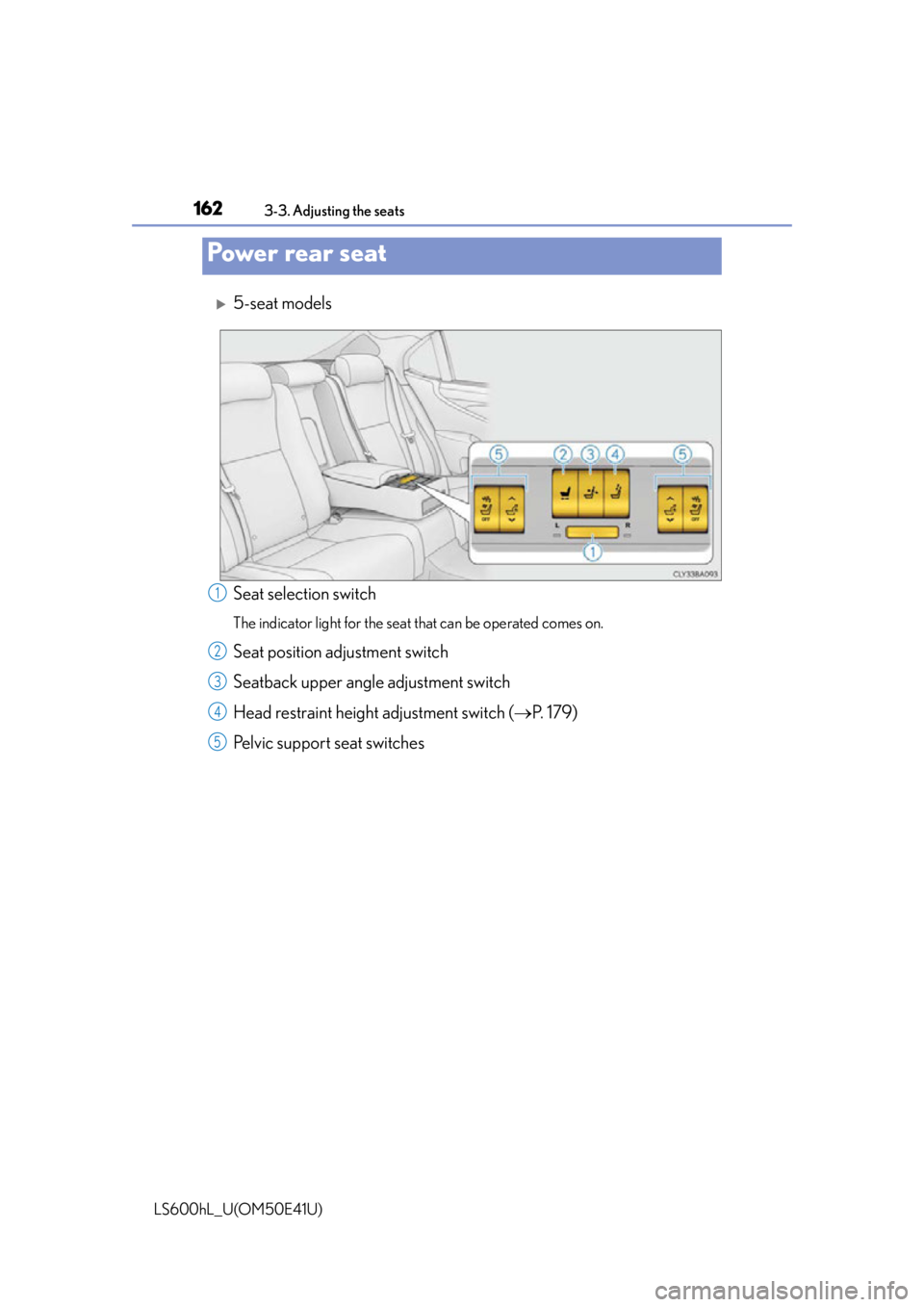
5-seat models
Seat selection switch
The indicator light for the seat that can be operated comes on.
Seat position adjustment switch
Seatback upper angle adjustment switch
Head restraint height adjustment switch (P. 1 7 9 )
Pelvic support seat switches
Power rear seat
1
2
3
4
5
Page 165 of 620
1633-3. Adjusting the seats
3
Operation of each component
LS600hL_U(OM50E41U)
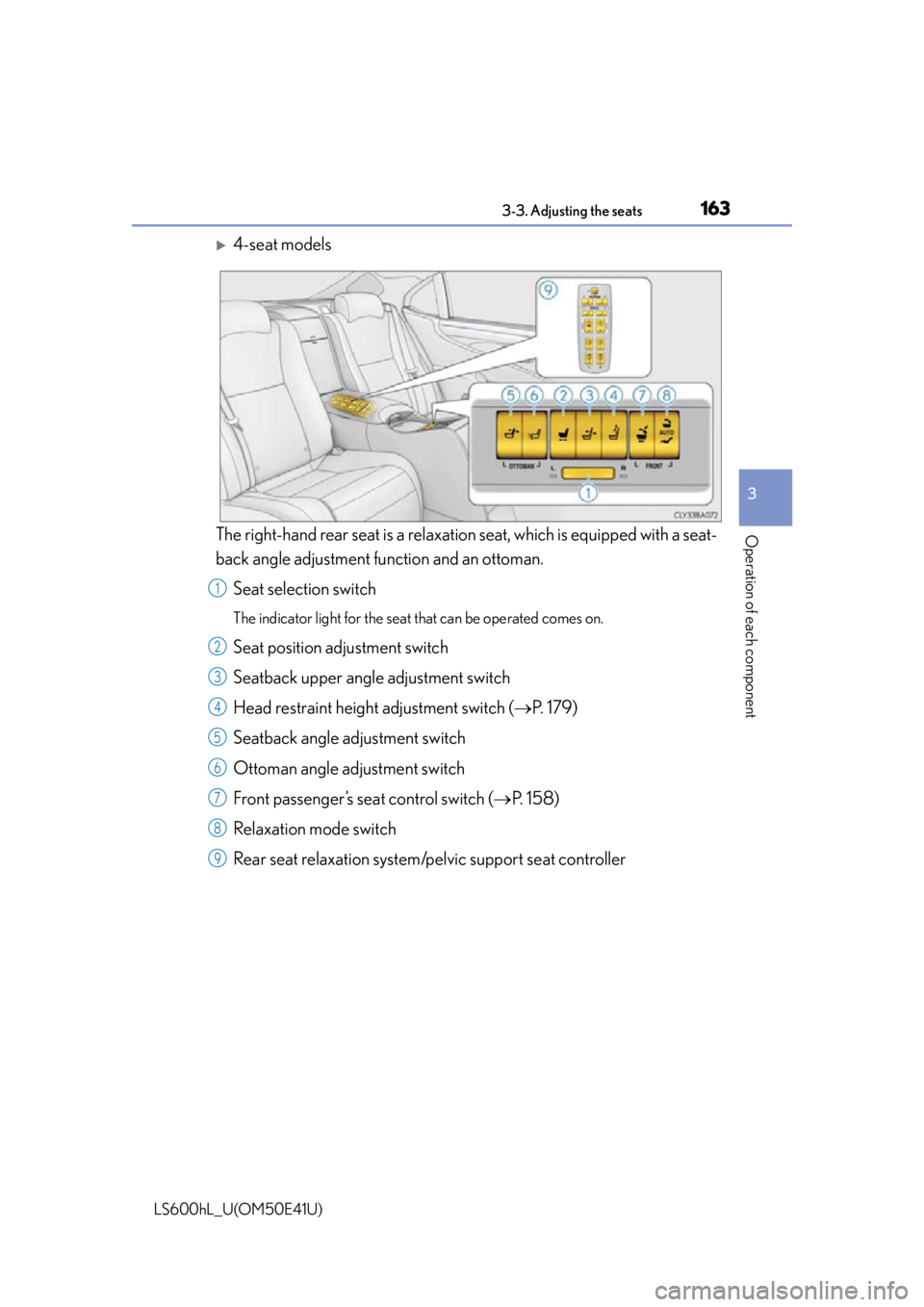
4-seat models
The right-hand rear seat is a relaxation seat, which is equipped with a seat-
back angle adjustment function and an ottoman.
Seat selection switch
The indicator light for the seat that can be operated comes on.
Seat position adjustment switch
Seatback upper angle adjustment switch
Head restraint height adjustment switch ( P. 1 7 9 )
Seatback angle adjustment switch
Ottoman angle adjustment switch
Front passenger’s seat control switch ( P. 1 5 8 )
Relaxation mode switch
Rear seat relaxation system/pelvic support seat controller
1
2
3
4
5
6
7
8
9
Page 170 of 620
1683-3. Adjusting the seats
LS600hL_U(OM50E41U)
■Seat return function linked to the door opening operation
●Operating conditions
The power switch is in ON mode.
●Canceling operation partway through
During the seat return operation, performing either of the following actions cancels
the operation:
• Pressing the “SET”, “M” or “C” button ( P. 1 7 7 )
• Pressing any of the seat adjustment switches
●Seat return operation after turning the power switch off
The seat will automatically return to the neutral position if the door is opened within
approximately 45 seconds of the power switch being turned off.
■Relaxation mode (relaxation seat)
●Operating conditions
Relaxation mode can be entered when the power switch is in ON mode. However,
in the following situations, relaxation mode cannot be entered even when the
switch is operated:
• The weight of an occupant or heavy obje ct etc. is detected on the front passen-
ger's seat.
• The front passenger's se at belt is fastened.
• The front passenger's door is open. (The front seat will not move forward.)
●Operation after turning the power switch off
The rear seat can be returned to the neutra l position as long as the relaxation mode
switch is operated within approximately 45 seconds of the power switch being
turned off.
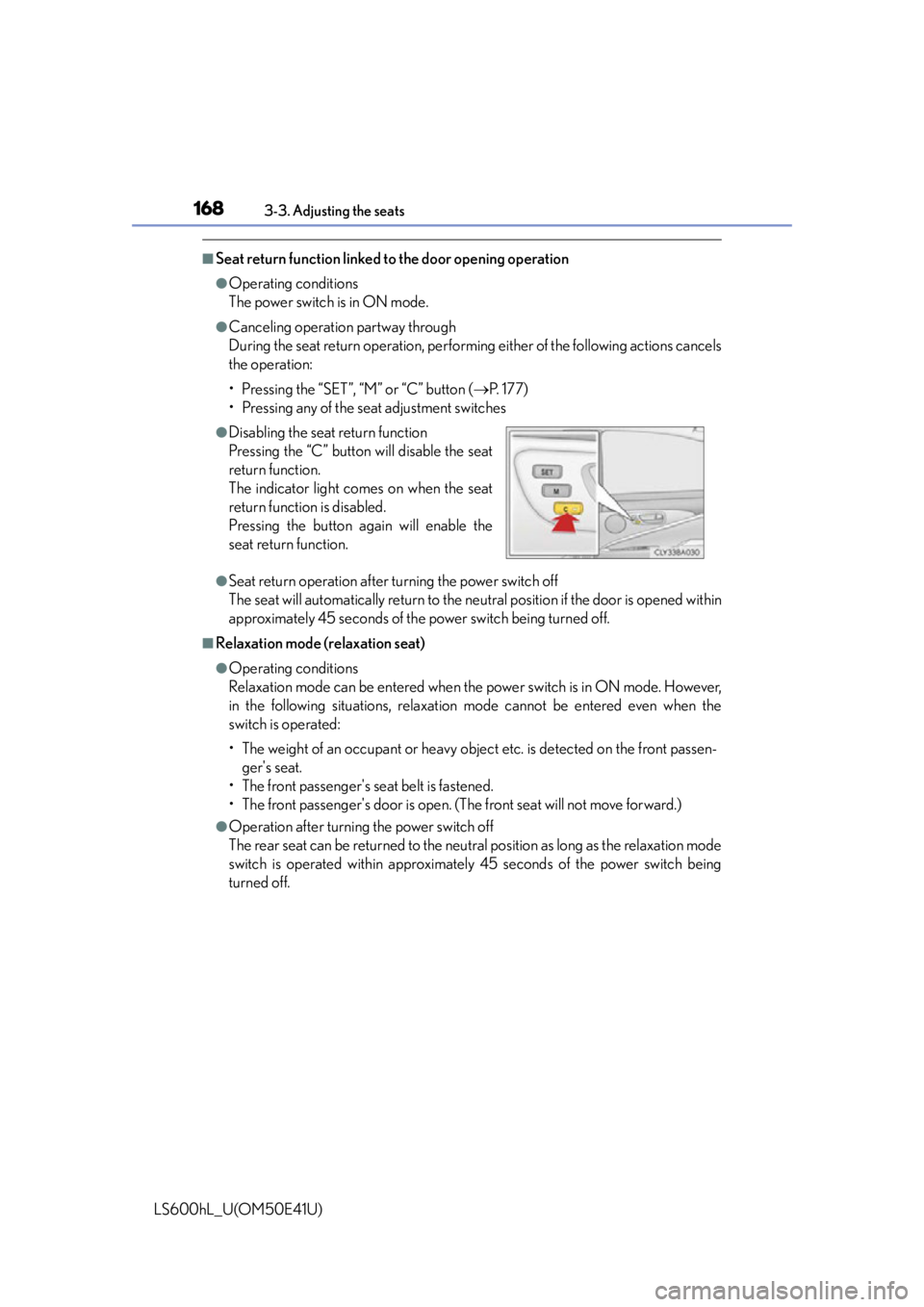
●Disabling the seat return function
Pressing the “C” button will disable the seat
return function.
The indicator light comes on when the seat
return function is disabled.
Pressing the button again will enable the
seat return function.
Page 175 of 620
1733-3. Adjusting the seats
3
Operation of each component
LS600hL_U(OM50E41U)
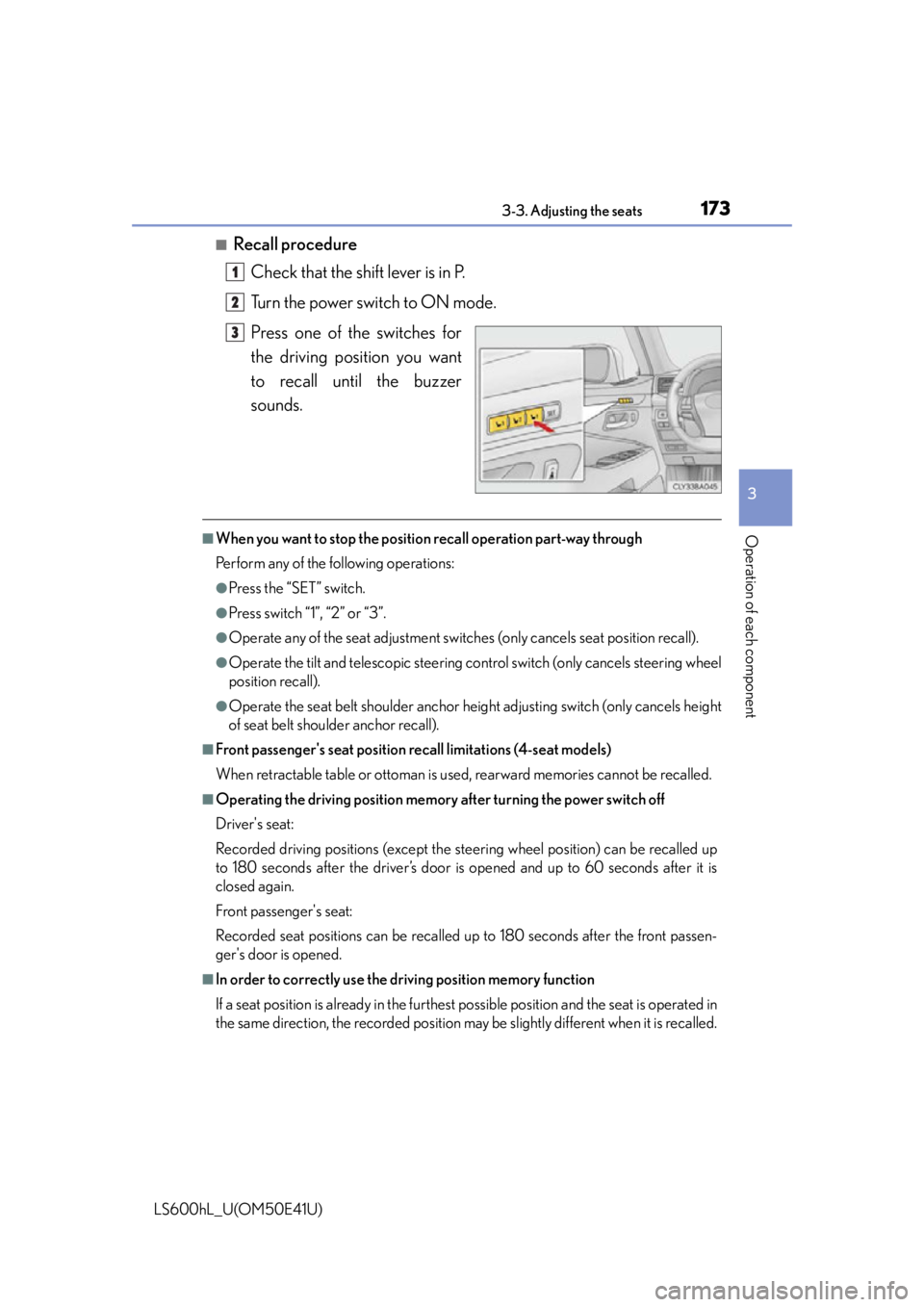
■Recall procedureCheck that the shift lever is in P.
Turn the power switch to ON mode.
Press one of the switches for
the driving position you want
to recall until the buzzer
sounds.
■When you want to stop the position recall operation part-way through
Perform any of the following operations:
●Press the “SET” switch.
●Press switch “1”, “2” or “3”.
●Operate any of the seat adju stment switches (only cancels seat position recall).
●Operate the tilt and telescopic steering co ntrol switch (only cancels steering wheel
position recall).
●Operate the seat belt shoulder anchor he ight adjusting switch (only cancels height
of seat belt shoulder anchor recall).
■Front passenger's seat position recall limitations (4-seat models)
When retractable table or ottoman is used, rearward memories cannot be recalled.
■Operating the driving position memory after turning the power switch off
Driver's seat:
Recorded driving positions (except the steering wheel position) can be recalled up
to 180 seconds after the driver’s door is opened and up to 60 seconds after it is
closed again.
Front passenger's seat:
Recorded seat positions can be recalled up to 180 seconds after the front passen-
ger's door is opened.
■In order to correctly use the dr iving position memory function
If a seat position is already in the furthest possible position and the seat is operated in
the same direction, the recorded position ma y be slightly different when it is recalled.
1
2
3
Page 177 of 620
1753-3. Adjusting the seats
3
Operation of each component
LS600hL_U(OM50E41U)
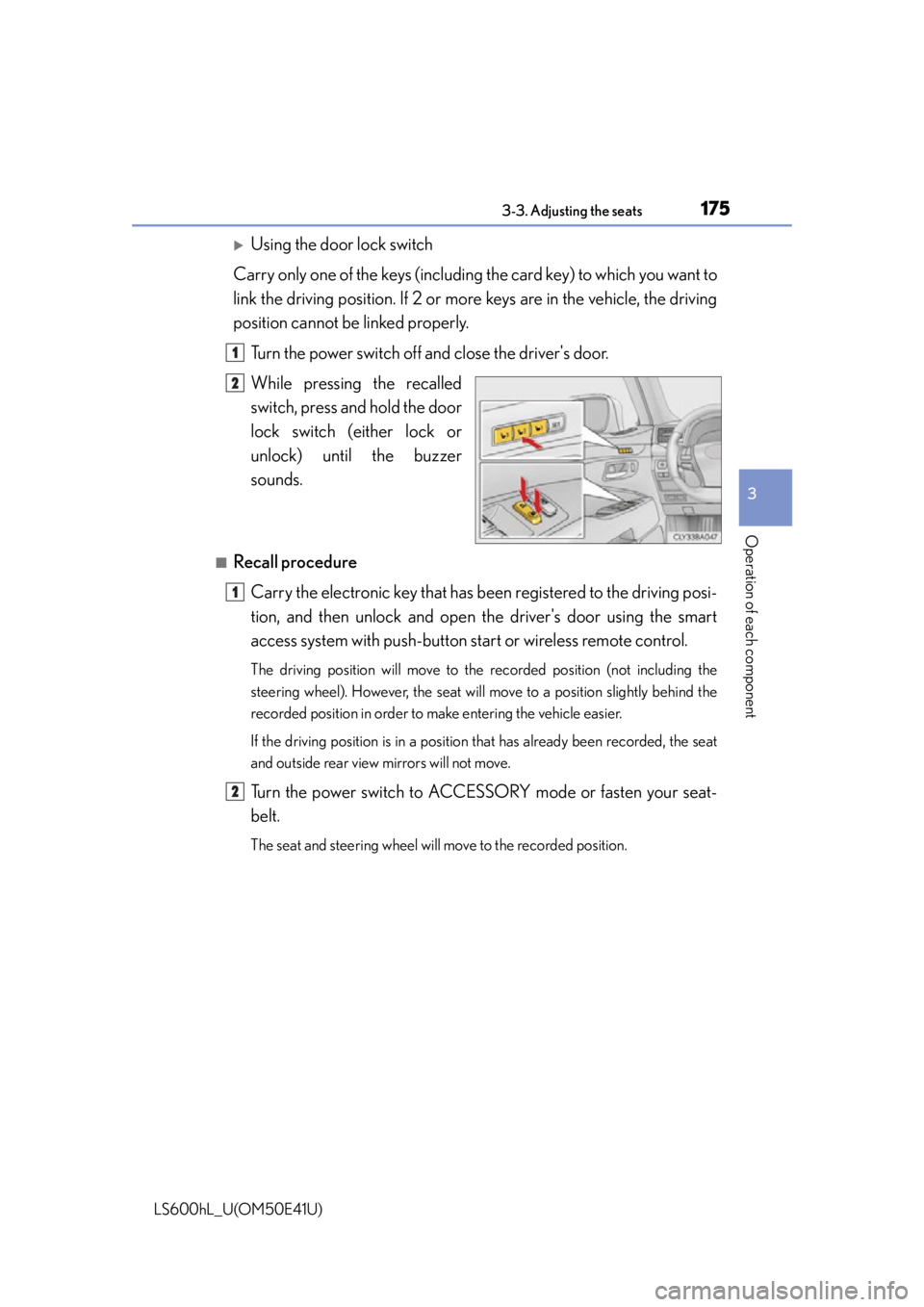
Using the door lock switch
Carry only one of the keys (including the card key) to which you want to
link the driving position. If 2 or mo re keys are in the vehicle, the driving
position cannot be linked properly.
Turn the power switch off and close the driver's door.
While pressing the recalled
switch, press and hold the door
lock switch (either lock or
unlock) unt il the buzzer
sounds.
■Recall procedure
Carry the electronic key that has b een registered to the driving posi-
tion, and then unlock and open the driver's door using the smart
access system with pu sh-button start or wireless remote control.
The driving position will move to the recorded position (not including the
steering wheel). However, the seat will move to a position slightly behind the
recorded position in order to make entering the vehicle easier.
If the driving position is in a position that has already been recorded, the seat
and outside rear view mirrors will not move.
Turn the power switch to ACCESSORY mode or fasten your seat-
belt.
The seat and steering wheel will move to the recorded position.
1
2
1
2
Page 180 of 620
1783-3. Adjusting the seats
LS600hL_U(OM50E41U)
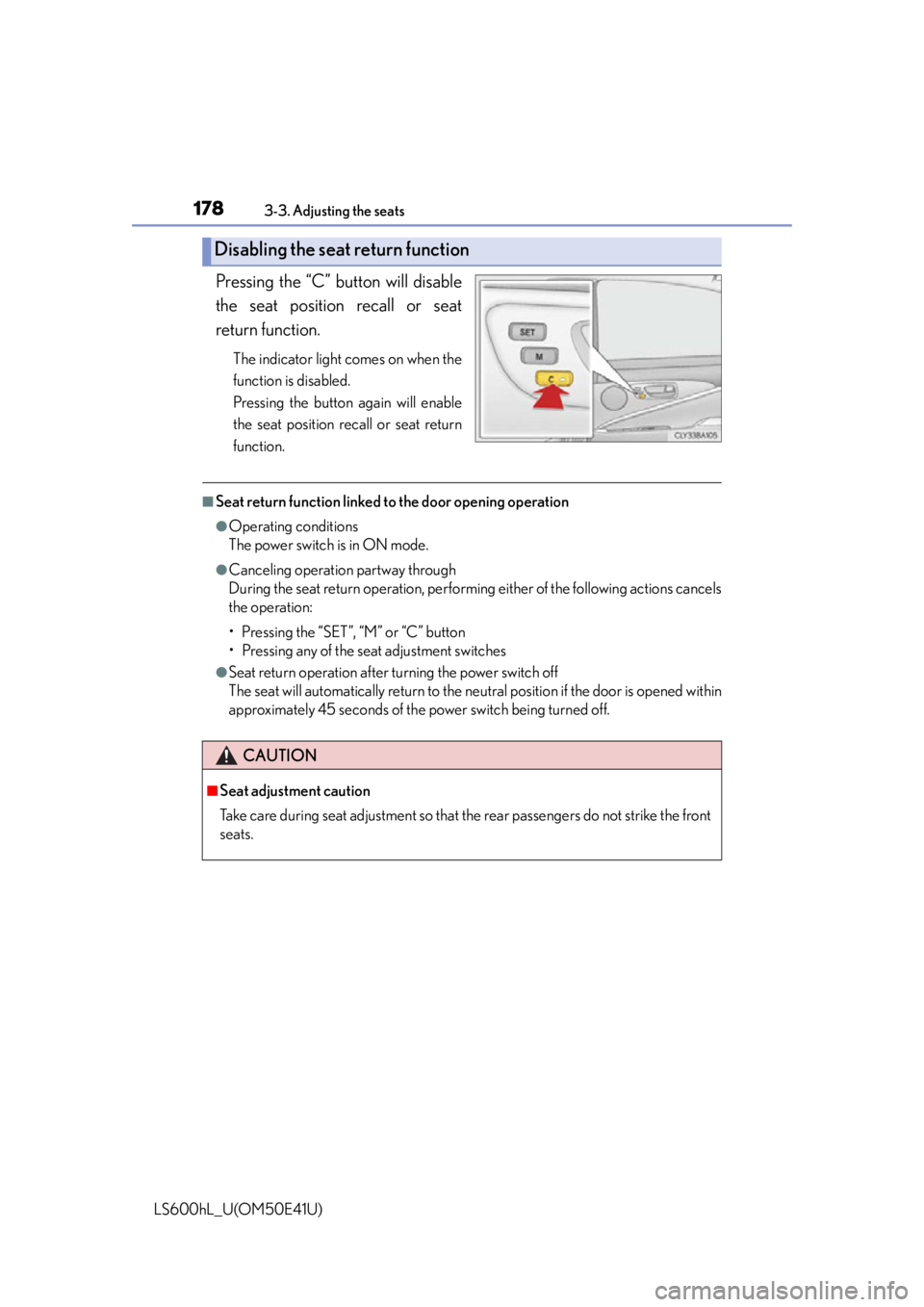
Pressing the “C” button will disable
the seat position recall or seat
return function.
The indicator light comes on when the
function is disabled.
Pressing the button again will enable
the seat position recall or seat return
function.
■Seat return function linked to the door opening operation
●Operating conditions
The power switch is in ON mode.
●Canceling operation partway through
During the seat return operation, performi ng either of the following actions cancels
the operation:
• Pressing the “SET”, “M” or “C” button
• Pressing any of the seat adjustment switches
●Seat return operation after turning the power switch off
The seat will automatically return to the neutral position if the door is opened within
approximately 45 seconds of the power switch being turned off.
Disabling the seat return function
CAUTION
■Seat adjustment caution
Take care during seat adjustment so that the rear passengers do not strike the front
seats.
Page 185 of 620
1833-4. Adjusting the steering wheel and mirrors
3
Operation of each component
LS600hL_U(OM50E41U)
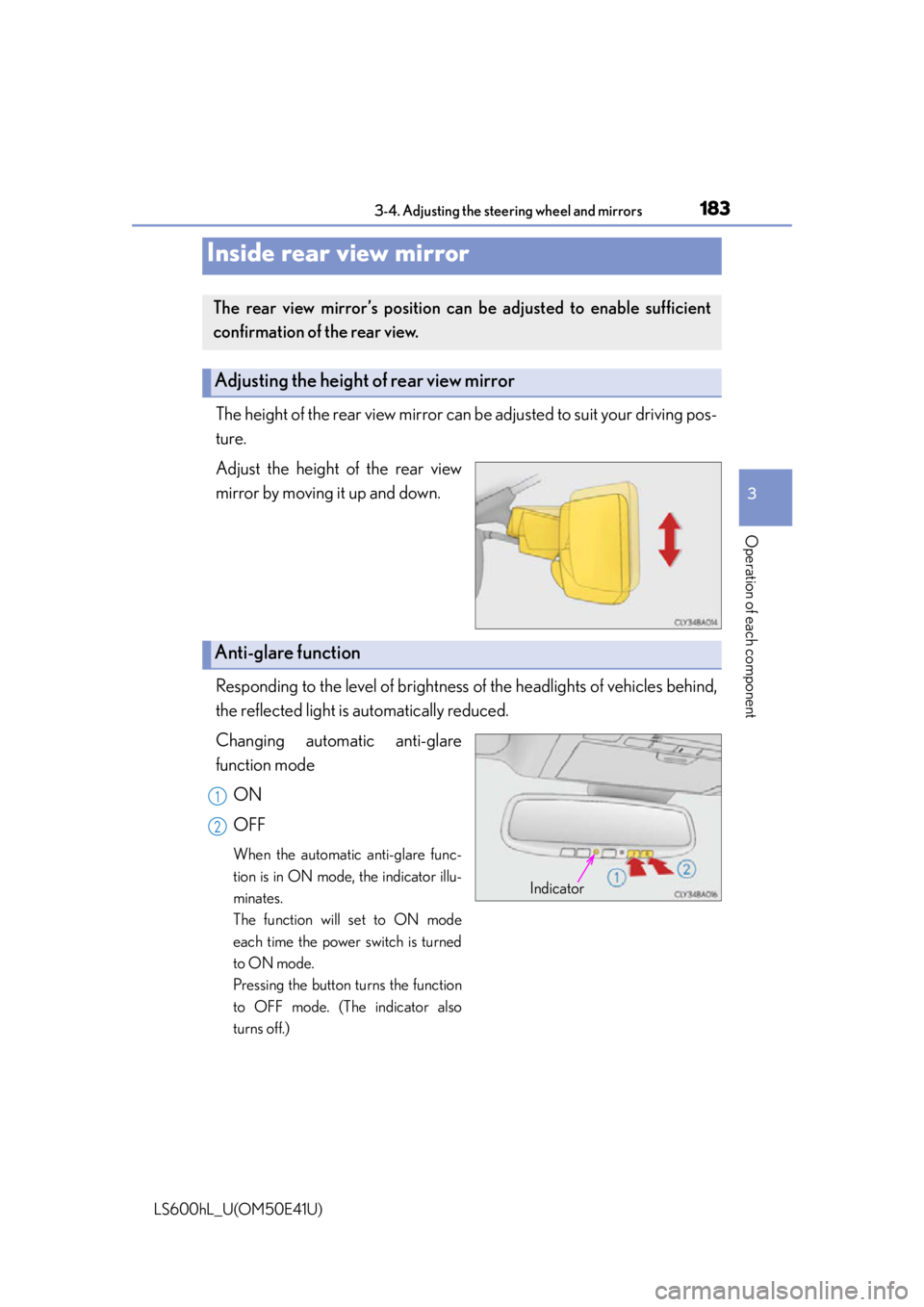
The height of the rear view mirror can be adjusted to suit your driving pos-
ture.
Adjust the height of the rear view
mirror by moving it up and down.
Responding to the level of brightness of the headlights of vehicles behind,
the reflected light is automatically reduced.
Changing automatic anti-glare
function mode
ON
OFF
When the automatic anti-glare func-
tion is in ON mode, the indicator illu-
minates.
The function will set to ON mode
each time the power switch is turned
to ON mode.
Pressing the button turns the function
to OFF mode. (The indicator also
turns off.)
Inside rear view mirror
The rear view mirror’s position can be adjusted to enable sufficient
confirmation of the rear view.
Adjusting the height of rear view mirror
Anti-glare function
Indicator
1
2
Page 189 of 620

1873-4. Adjusting the steering wheel and mirrors
3
Operation of each component
LS600hL_U(OM50E41U)
When the mirror select switch is in the “L” or “R” position, the outside rear
view mirrors will automatically angle downwards when the vehicle is
reversing in order to give a better view of the ground.
To disable this function, move the mirr or select switch to the neutral posi-
tion (between “L” and “R”).
■Adjusting the mirror angle when the vehicle is reversing
With the shift lever in R, adjust the mirror angle at a desired position.
The adjusted angle will be memorized and the mirror will automatically
tilt to the memorized angle whenever the shift lever is shifted to R from
next time.
The memorized downward tilt position of the mirror is linked to the normal
position (angle adjusted with the shift lever in other than R). Therefore, if the
normal position is changed after adjustment, the tilt position will also change.
When the normal position is changed, readjust the angle in reversing.
■Mirror angle can be adjusted when
The power switch is in ACCESSORY or ON mode.
■When the mirrors are fogged up
The outside rear view mirrors can be cleare d using the mirror defoggers. Turn on the
rear window defogger to turn on the outside rear view mirror defoggers. ( P. 3 5 8 )
■Automatic adjustment of the mirror angle
A desired mirror face angle can be entered to memory and recalled automatically
by the driving position memory. (P. 1 7 2 )
■Auto anti-glare function
When the anti-glare inside rear view mirror is set to automatic mode, the outside
rear view mirrors will activate in conjunction with the anti-glare inside rear view mir-
ror to reduce reflected light. ( P. 1 8 3 )
■Using automatic mode in cold weather
When automatic mode is used in cold weather, the door mirror could freeze up and
automatic stowing and return may not be possible. In this event, remove any ice and
snow from the door mirror, then either operate the mirror using manual mode or
move the mirror by hand.
Linked mirror function when reversing
Page 192 of 620

1903-5. Opening, closing the windows and moon roof
LS600hL_U(OM50E41U)
■The power windows can be operated when
The power switch is in ON mode.
■Operating the power windows after turning the hybrid system off
The power windows can be operated for approximately 45 seconds even after the
power switch is turned to ACCESSORY mode or turned off. They cannot, however,
be operated once either front door is opened.
■Jam protection function
If an object becomes caught between the window and the window frame, window
travel is stopped and the wi ndow is opened slightly.
■When the power window does not close normally
If the jam protection function is operating abnormally and a window cannot be
closed, perform the following operations using the power window switch on the rele-
vant door.
●After stopping the vehicle, the window ca n be closed by holding the power window
switch in the one-touch closing position while the power switch is turned to ON
mode.
●If the window still cannot be closed even by carrying out the operation as explained
above, initialize the function by performing the following procedure.
Hold the power window switch in th e one-touch closing position. Continue
holding the switch for a further 6 seconds after the window has closed.
Hold the power window switch in the one-touch opening position. Continue
holding the switch for a further 2 seco nds after the window has opened com-
pletely.
Hold the power window switch in the one-touch closing position once again.
Continue holding the switch for a further 2 seconds after the window has
closed.
If you release the switch while the window is moving, start again from the beginning.
If the window continues to close but then re-open slightly even after performing the
above procedure correctly, have the vehicle inspected by your Lexus dealer.
1
2
3