lock LEXUS LS600H 2015 Owners Manual
[x] Cancel search | Manufacturer: LEXUS, Model Year: 2015, Model line: LS600H, Model: LEXUS LS600H 2015Pages: 620, PDF Size: 7.66 MB
Page 521 of 620
5197-2. Steps to take in an emergency
7
When trouble arises
LS600hL_U(OM50E41U)
Turn the power switch to ON mode (P. 217) and check that the park-
ing brake is set.
Turn the power switch to ACCESSORY mode.
Depress the brake pedal.
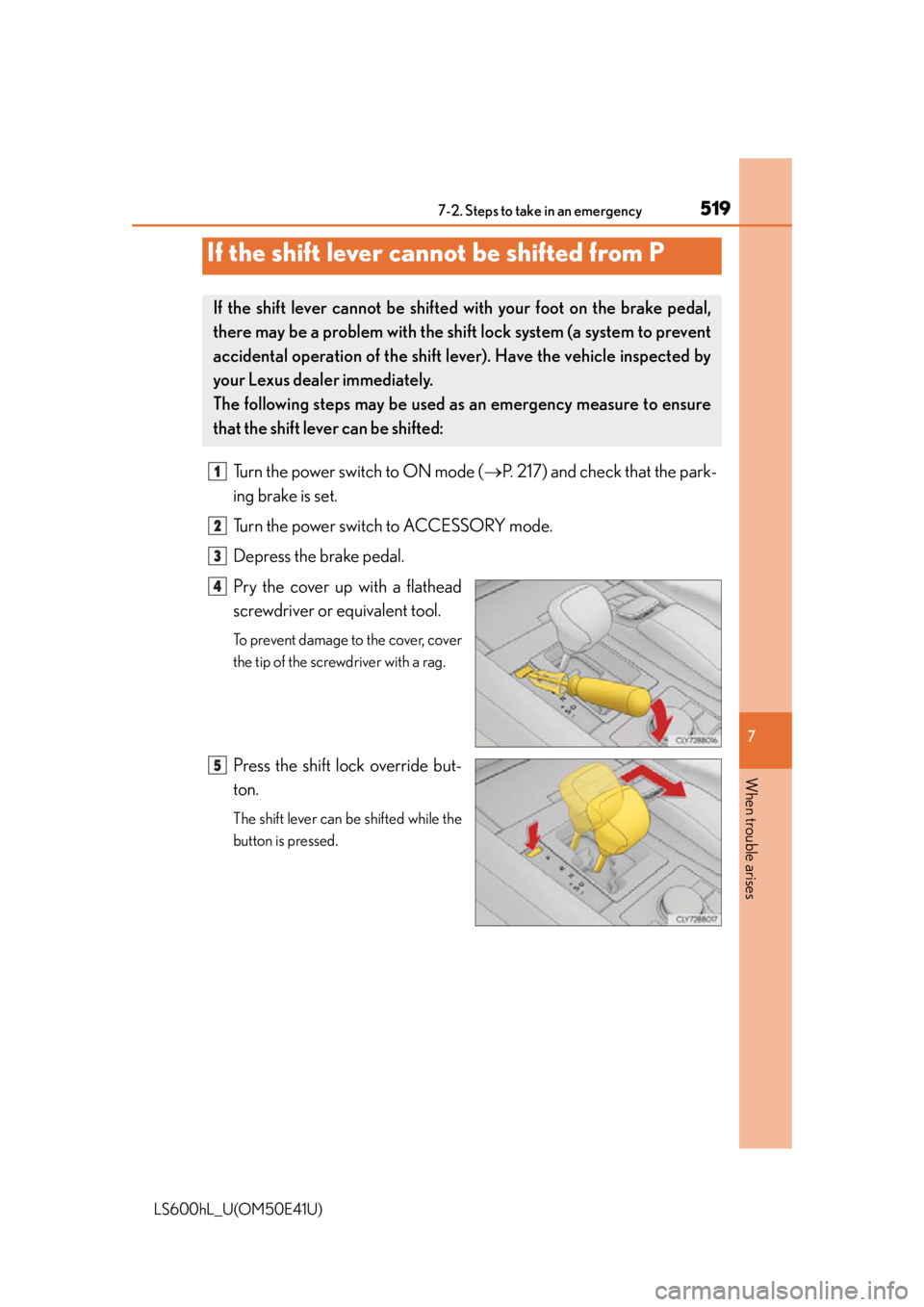
Pry the cover up with a flathead
screwdriver or equivalent tool.
To prevent damage to the cover, cover
the tip of the screwdriver with a rag.
Press the shift lock override but-
ton.
The shift lever can be shifted while the
button is pressed.
If the shift lever cannot be shifted from P
If the shift lever cannot be shifte d with your foot on the brake pedal,
there may be a problem with the shift lock system (a system to prevent
accidental operation of the shift lever). Have the vehicle inspected by
your Lexus dealer immediately.
The following steps may be used as an emergency measure to ensure
that the shift lever can be shifted:
1
2
3
4
5
Page 523 of 620
5217-2. Steps to take in an emergency
7
When trouble arises
LS600hL_U(OM50E41U)
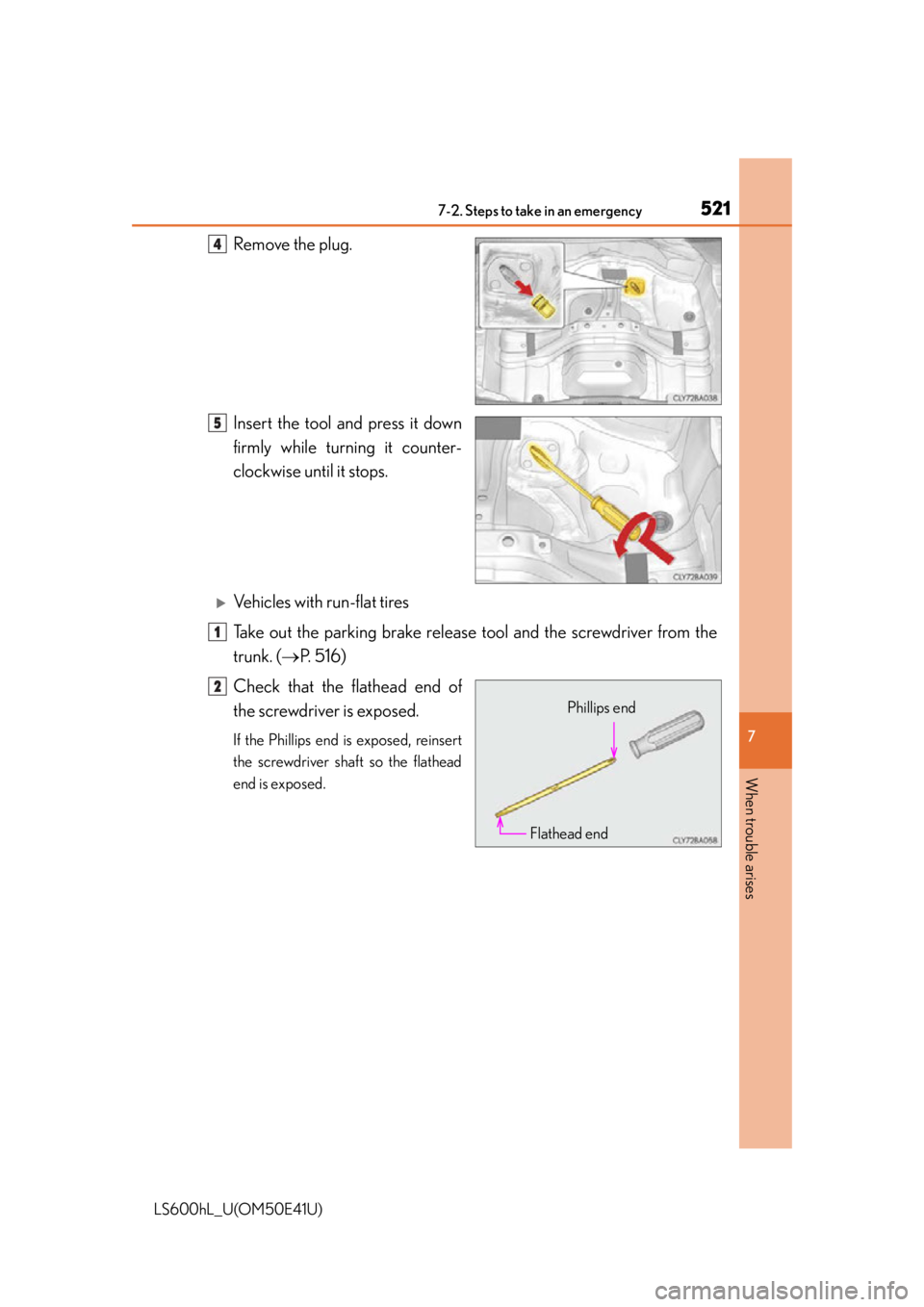
Remove the plug.
Insert the tool and press it down
firmly while turning it counter-
clockwise until it stops.
Vehicles with run-flat tires
Take out the parking brake release tool and the screwdriver from the
trunk. ( P. 5 1 6 )
Check that the flathead end of
the screwdriver is exposed.
If the Phillips end is exposed, reinsert
the screwdriver shaft so the flathead
end is exposed.
4
5
1
Phillips end
Flathead end
2
Page 525 of 620
5237-2. Steps to take in an emergency
7
When trouble arises
LS600hL_U(OM50E41U)
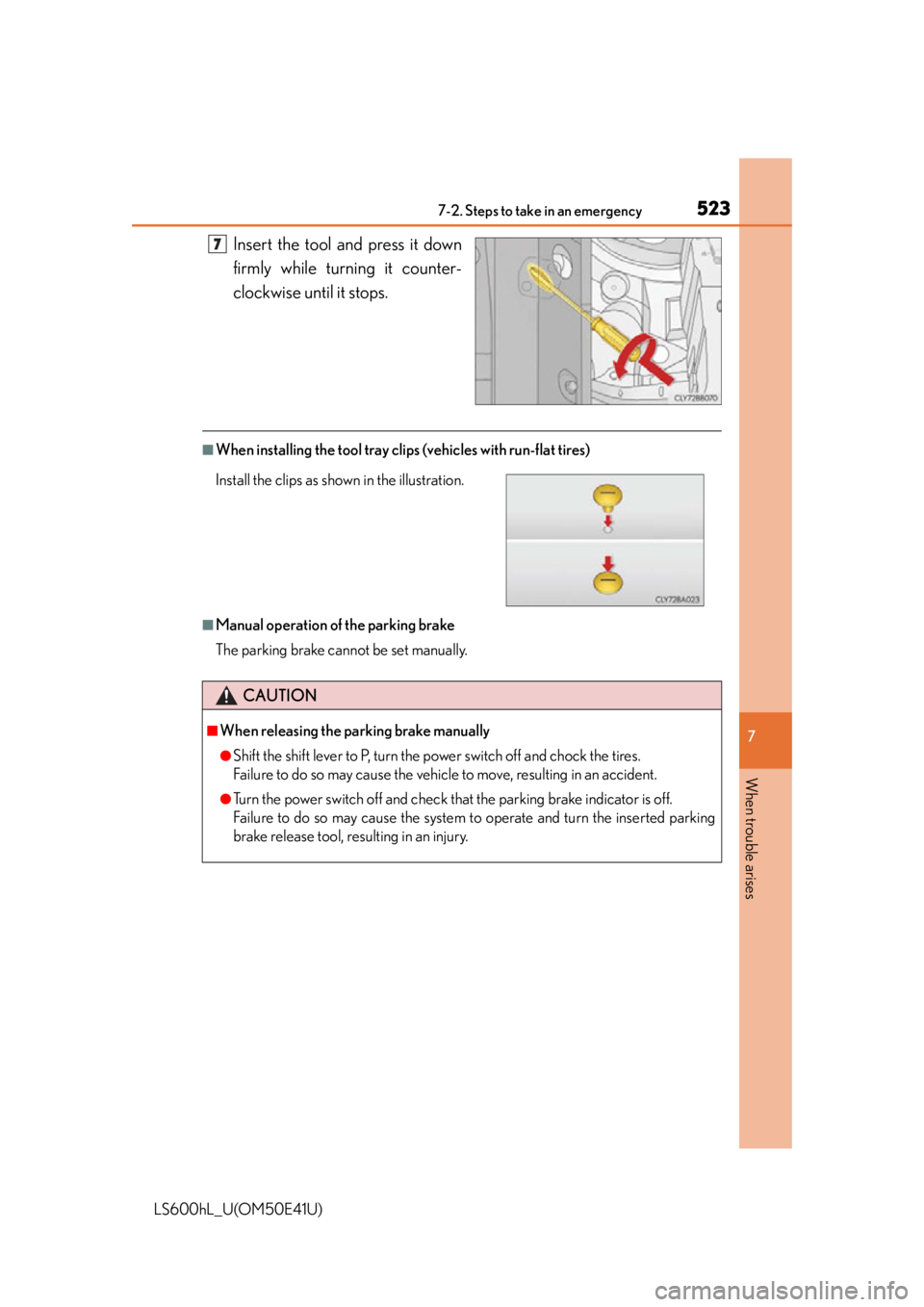
Insert the tool and press it down
firmly while turning it counter-
clockwise until it stops.
■When installing the tool tray cl ips (vehicles with run-flat tires)
■Manual operation of the parking brake
The parking brake cannot be set manually.
7
CAUTION
■When releasing the parking brake manually
●Shift the shift lever to P, turn the power switch off and chock the tires.
Failure to do so may cause the vehicle to move, resulting in an accident.
●Turn the power switch off and check that the parking brake indicator is off.
Failure to do so may cause the system to operate and turn the inserted parking
brake release tool, resulting in an injury.
Install the clips as shown in the illustration.
Page 526 of 620
5247-2. Steps to take in an emergency
LS600hL_U(OM50E41U)
Use the mechanical key built in to the electronic keys to operate the
doors. ( P. 121)
■Doors
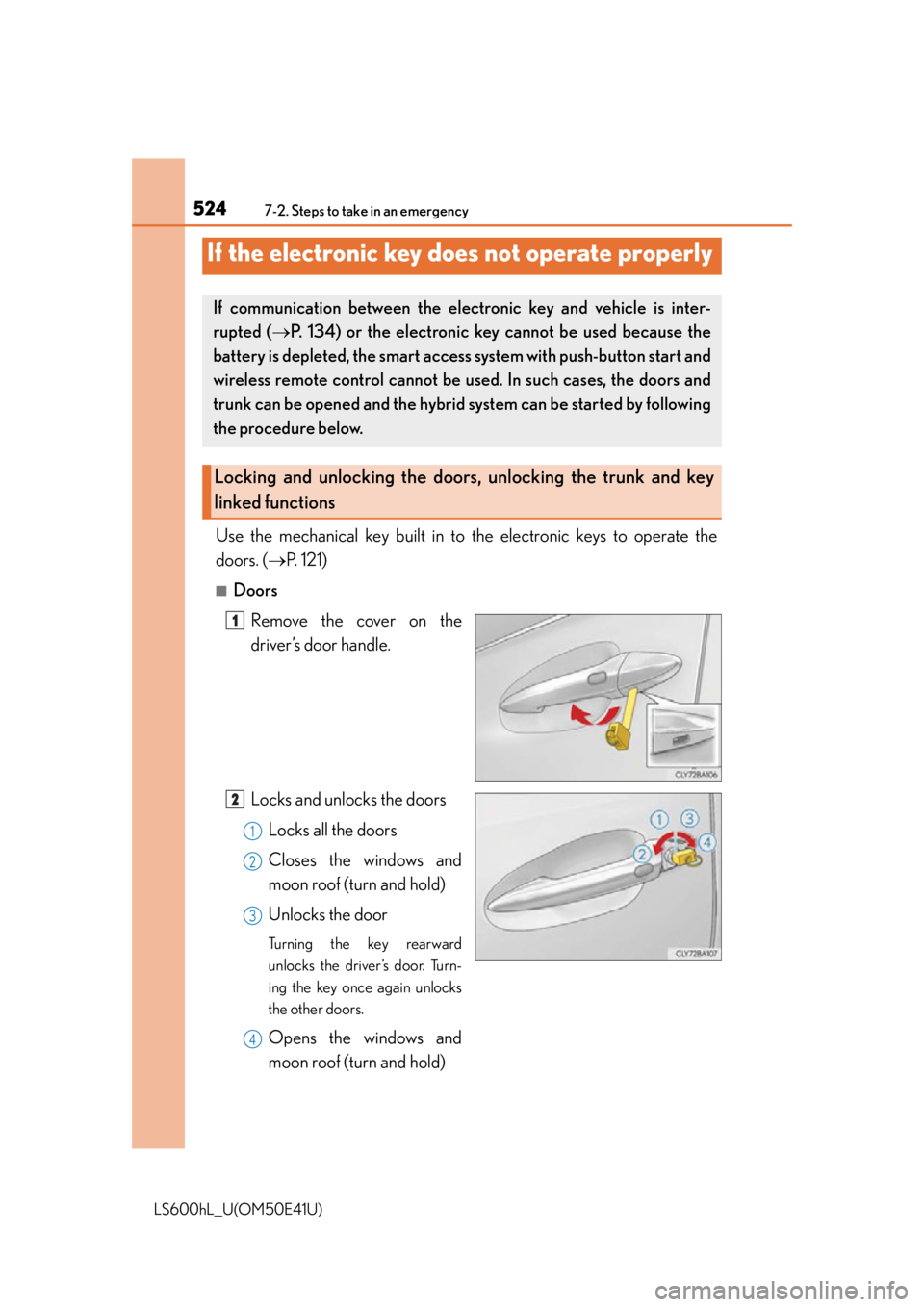
Remove the cover on the
driver’s door handle.
Locks and unlocks the doorsLocks all the doors
Closes the windows and
moon roof (turn and hold)
Unlocks the door
Turning the key rearward
unlocks the driver’s door. Turn-
ing the key once again unlocks
the other doors.
Opens the windows and
moon roof (turn and hold)
If the electronic key does not operate properly
If communication between the ele ctronic key and vehicle is inter-
rupted ( P. 134) or the electronic key cannot be used because the
battery is depleted, the smart access system with push-button start and
wireless remote control cannot be us ed. In such cases, the doors and
trunk can be opened and the hybrid system can be started by following
the procedure below.
Locking and unlocking the doors, unlocking the trunk and key
linked functions
1
2
1
2
3
4
Page 527 of 620
5257-2. Steps to take in an emergency
7
When trouble arises
LS600hL_U(OM50E41U)
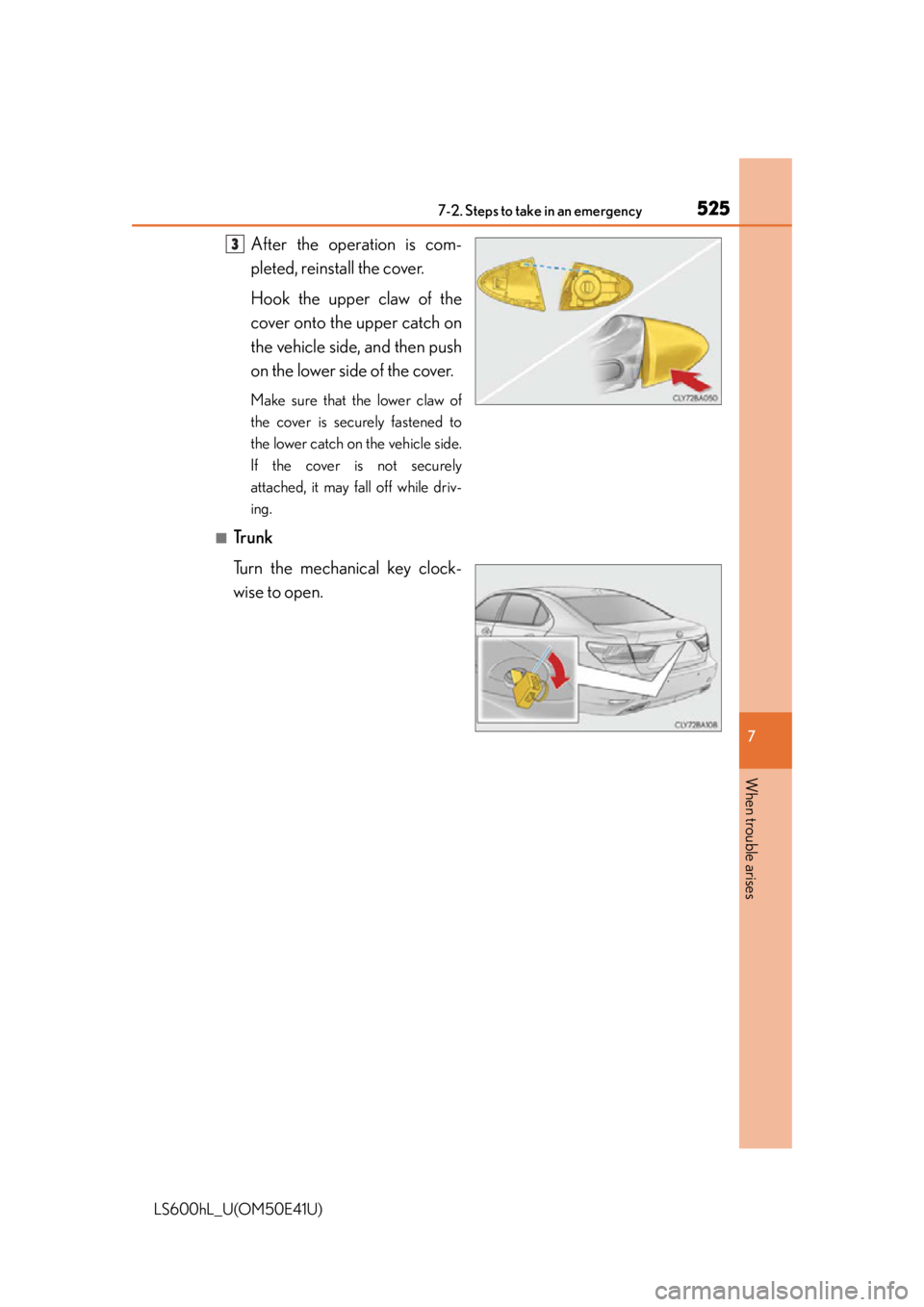
After the operation is com-
pleted, reinstall the cover.
Hook the upper claw of the
cover onto the upper catch on
the vehicle side, and then push
on the lower side of the cover.
Make sure that the lower claw of
the cover is securely fastened to
the lower catch on the vehicle side.
If the cover is not securely
attached, it may fall off while driv-
ing.
■Trunk
Turn the mechanical key clock-
wise to open.
3
Page 530 of 620

5287-2. Steps to take in an emergency
LS600hL_U(OM50E41U)
Maintain the engine speed of the second vehicle and start the hybrid
system of your vehicle by turning the power switch to ON mode.
Make sure the “READY” indicator co mes on. If the indicator does not
come on, contact your Lexus dealer.
Once the hybrid system has started, remove the jumper cables in the
exact reverse order from wh ich they were connected.
Once the hybrid system starts, have the vehicle inspected at your Lexus
dealer as soon as possible.
■Starting the hybrid system when the 12-volt battery is discharged
The hybrid system cannot be started by push-starting.
■To prevent 12-volt battery discharge
●Turn off the headlights and the audio system while the hybrid system is off.
●Turn off any unnecessary electrical compon ents when the vehicle is running at a
low speed for an extended period, such as in heavy traffic.
■When the 12-volt battery is removed or discharged
The hybrid system may not start.
( P. 4 5 1 )
■Charging the 12-volt battery
The electricity stored in the 12-volt battery will discharge gradually even when the
vehicle is not in use, due to natural discharge and the draining effects of certain elec-
trical appliances. If the vehicle is left for a long time, the 12-volt battery may dis-
charge, and the hybrid system may be unable to start. (The 12-volt battery recharges
automatically while the hybrid system is operating.)
■When recharging or replacing the 12-volt battery
●Make sure that the key is not inside the vehicle when recharging or replacing the
12-volt battery. The key may be locked in the vehicle if the alarm is activated.
( P. 9 1 )
●In some cases, it may not be possible to unlock the doors using the smart access
system with push-button start when the 12-volt battery is discharged. Use the wire-
less remote control or the mechanical key to lock or unlock the doors.
■If the 12-volt battery is discharged
The information stored in the computer will be deleted.
If the 12-volt battery is discharged, have the vehicle inspected by your Lexus dealer.
5
6
7
Page 541 of 620
5398-1. Specifications
8
Vehicle specifications
LS600hL_U(OM50E41U)
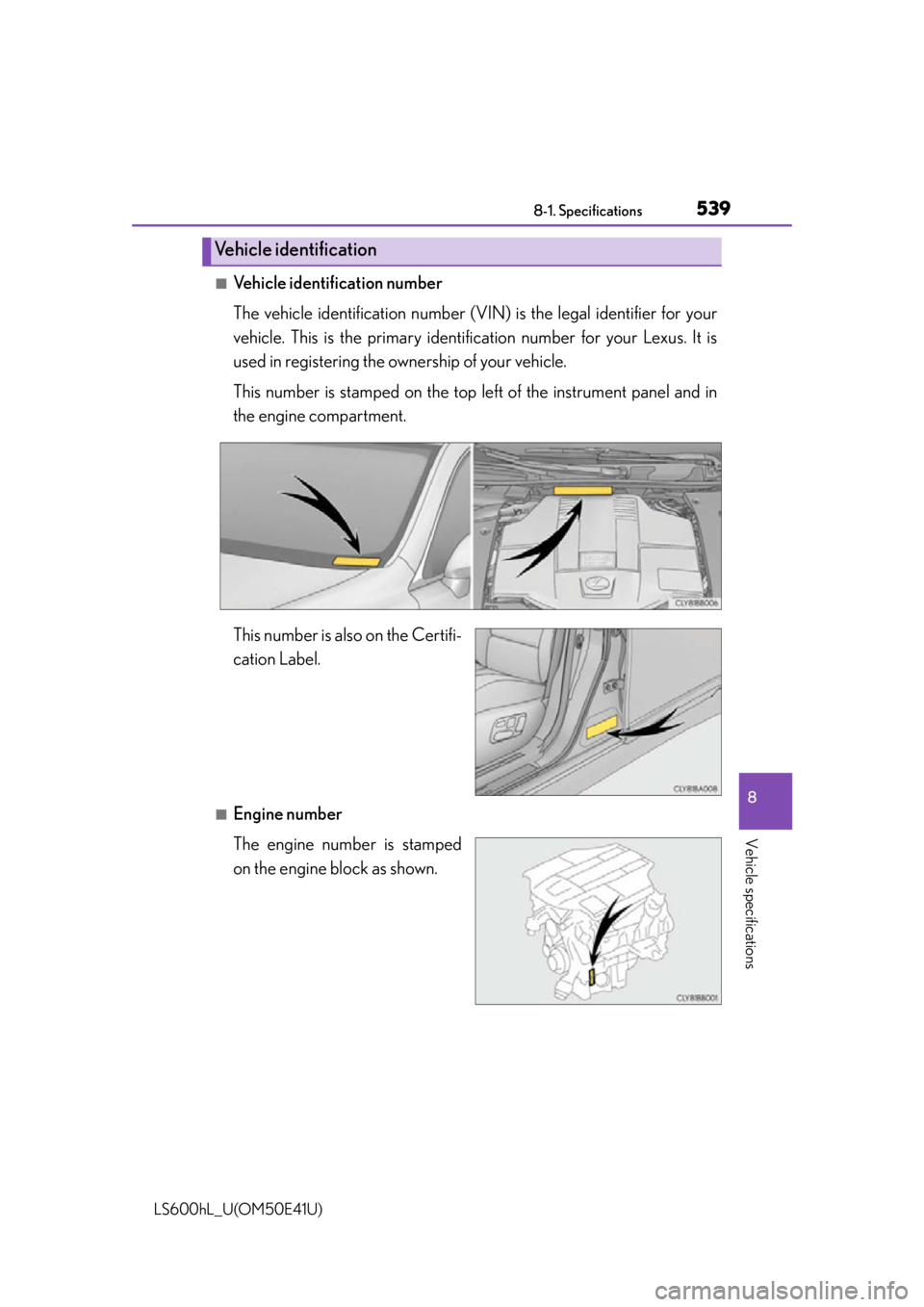
■Vehicle identification number
The vehicle identification number (VIN) is the legal identifier for your
vehicle. This is the primary ident ification number for your Lexus. It is
used in registering the ownership of your vehicle.
This number is stamped on the top le ft of the instrument panel and in
the engine compartment.
This number is also on the Certifi-
cation Label.
■Engine number
The engine number is stamped
on the engine block as shown.
Vehicle identification
Page 568 of 620
5668-2. Customization
LS600hL_U(OM50E41U)
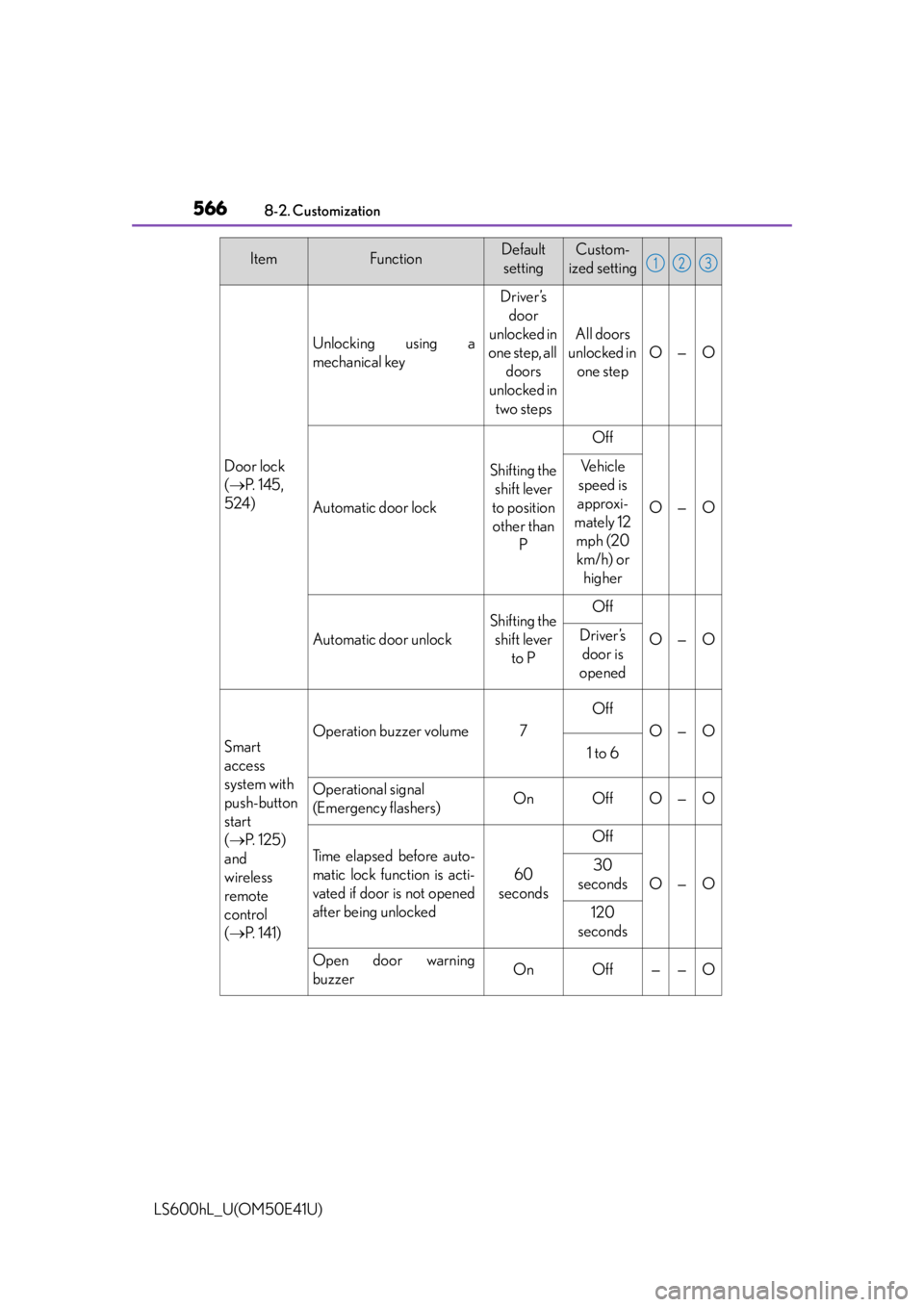
Door lock
( P. 1 4 5 ,
524)
Unlocking using a
mechanical key
Driver’s door
unlocked in
one step, all doors
unlocked in
two steps
All doors
unlocked in one step
O—O
Automatic door lock
Shifting the shift lever
to position other than P
Off
O—O
Ve h i c l e
speed is
approxi-
mately 12 mph (20 km/h) or higher
Automatic door unlock
Shifting the shift lever to POff
O—ODriver’s door is
opened
Smart
access
system with
push-button
start
( P. 1 2 5 )
and
wireless
remote
control
( P. 141)
Operation buzzer volume7
Off
O—O
1 to 6
Operational signal
(Emergency flashers)OnOffO—O
Ti m e e l a p s e d b e f o r e a u t o -
matic lock function is acti-
vated if door is not opened
after being unlocked
60
seconds
Off
O—O
30
seconds
120
seconds
Open door warning
buzzerOnOff——O
ItemFunctionDefault settingCustom-
ized setting123
Page 569 of 620
5678-2. Customization
8
Vehicle specifications
LS600hL_U(OM50E41U)
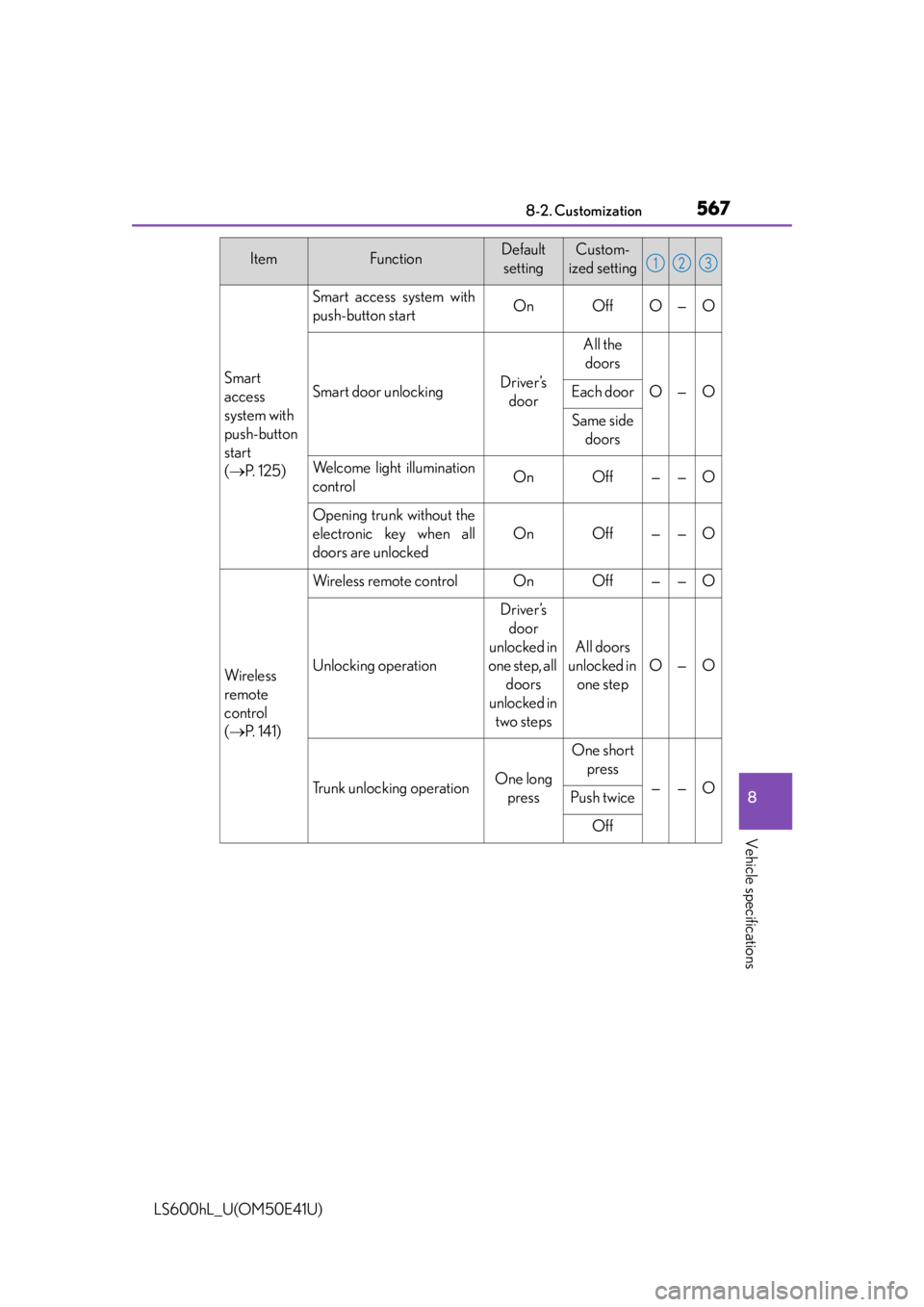
Smart
access
system with
push-button
start
( P. 1 2 5 )
Smart access system with
push-button startOnOffO—O
Smart door unlockingDriver’s
door
All the doors
O—OEach door
Same side doors
Welcome light illumination
controlOnOff——O
Opening trunk without the
electronic key when all
doors are unlocked
OnOff——O
Wi re less
remote
control
( P. 141)
Wireless remote controlOnOff——O
Unlocking operation
Driver’s
door
unlocked in
one step, all doors
unlocked in two steps
All doors
unlocked in one step
O—O
Trunk unlocking operationOne long press
One short press
——OPush twice
Off
ItemFunctionDefault settingCustom-
ized setting123
Page 573 of 620
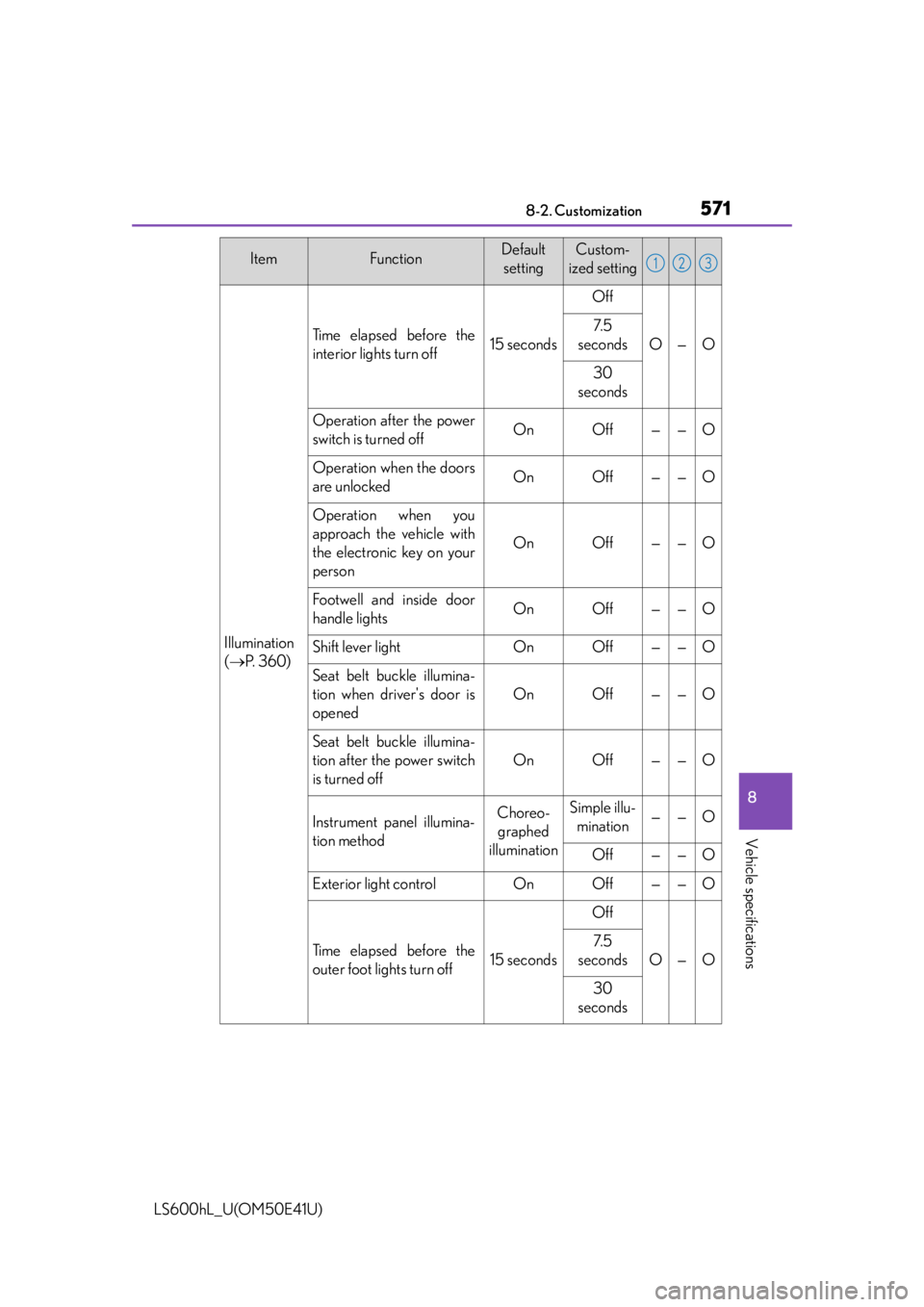
5718-2. Customization
8
Vehicle specifications
LS600hL_U(OM50E41U)
Illumination
( P. 3 6 0 )
Ti m e e l a p s e d b e f o r e t h e
interior lights turn off15 seconds
Off
O—O
7. 5
seconds
30
seconds
Operation after the power
switch is turned offOnOff——O
Operation when the doors
are unlockedOnOff——O
Operation when you
approach the vehicle with
the electronic key on your
person
OnOff——O
Footwell and inside door
handle lightsOnOff——O
Shift lever lightOnOff——O
Seat belt buckle illumina-
tion when driver's door is
opened
OnOff——O
Seat belt buckle illumina-
tion after the power switch
is turned off
OnOff——O
Instrument panel illumina-
tion methodChoreo- graphed
illuminationSimple illu- mination——O
Off——O
Exterior light controlOnOff——O
Ti m e e l a p s e d b e f o r e t h e
outer foot lights turn off15 seconds
Off
O—O
7. 5
seconds
30
seconds
ItemFunctionDefault settingCustom-
ized setting123