mirror LEXUS LS600H 2015 User Guide
[x] Cancel search | Manufacturer: LEXUS, Model Year: 2015, Model line: LS600H, Model: LEXUS LS600H 2015Pages: 620, PDF Size: 7.66 MB
Page 97 of 620
952. Instrument cluster
2
Instrument cluster
LS600hL_U(OM50E41U)
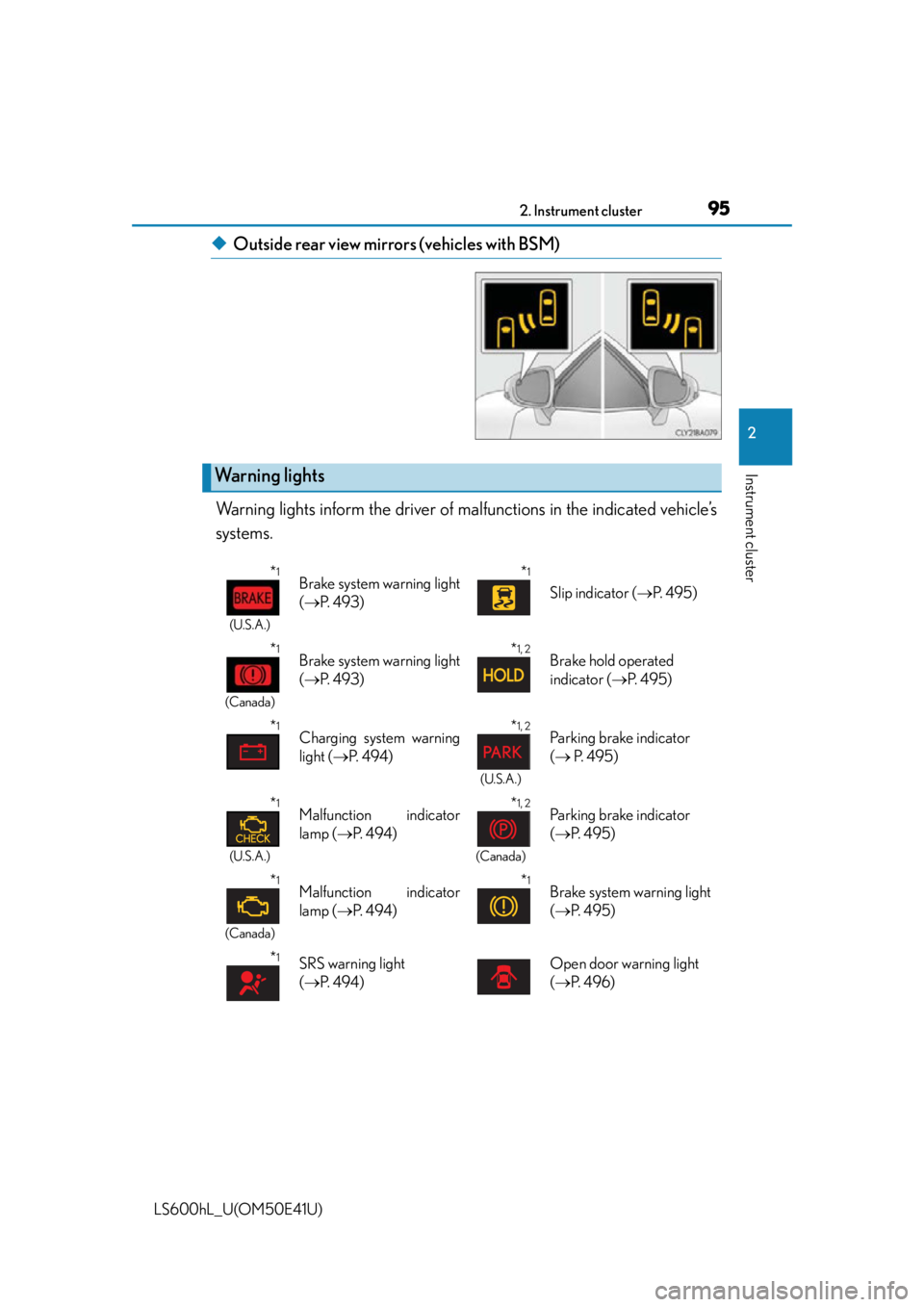
◆Outside rear view mirrors (vehicles with BSM)
Warning lights inform the driver of ma lfunctions in the indicated vehicle’s
systems.
Warning lights
*1
(U.S.A.)
Brake system warning light
( P. 4 9 3 )*1
Slip indicator ( P. 4 9 5 )
*1
(Canada)
Brake system warning light
( P. 4 9 3 )*1, 2Brake hold operated
indicator ( P. 495)
*1Charging system warning
light ( P. 4 9 4 )*1, 2
(U.S.A.)
Parking brake indicator
( P. 495)
*1
(U.S.A.)
Malfunction indicator
lamp ( P. 4 9 4 )*1, 2
(Canada)
Parking brake indicator
( P. 495)
*1
(Canada)
Malfunction indicator
lamp ( P. 4 9 4 )*1Brake system warning light
( P. 495)
*1SRS warning light
( P. 4 9 4 )Open door warning light
( P. 4 9 6 )
Page 100 of 620

982. Instrument cluster
LS600hL_U(OM50E41U)
*1: These lights come on when the power switch is turned to ON mode to indicatethat a system check is being performed. They will go off after the hybrid system is
on, or after a few seconds. There may be a malfunction in a system if the lights do
not come on, or go off. Have the vehicle inspected by your Lexus dealer.
*2: The light flashes to indicate that the system is operating.
*3: The light comes on when the system is turned off. The light flashes faster than
usual to indicate that the system is operating.
*4: In order to confirm operation, the BSM ou tside rear view mirror indicators illumi-
nate in the following situations:
• When the power switch is turned to ON mode while the BSM main switch is set to ON.
• When the BSM main switch is set to ON while the power switch is in ON mode.
If the system is functioning correctly, the BSM outside rear view mirror indicators
will turn off after a few seconds.
If the BSM outside rear view mirror indicato rs do not illuminate or do not turn off,
there may be a malfunction with the system.
If this occurs, have the vehicle inspected by your Lexus dealer.
*1
(U.S.A.)
Parking brake indicator
( P. 2 2 8 )
*4
(if equipped)
BSM (Blind Spot Monitor)
outside rear view mirror
indicators ( P. 3 0 8 )
*1
(Canada)
Parking brake indicator
( P. 2 2 8 )*1“A I R B A G O N /
OFF” indicator
( P. 5 5 )
CAUTION
■If a safety system warning light does not come on
Should a safety system light such as the ABS and SRS warning light not come on
when you start the hybrid system, this co uld mean that these systems are not avail-
able to help protect you in an accident, wh ich could result in death or serious injury.
Have the vehicle inspected by your Lexus dealer immediately if this occurs.
Page 121 of 620

119
Operation of
each component
3
LS600hL_U(OM50E41U) 3-1. Key information
Keys .................................................. 120
3-2. Opening, closing and locking the doors and
trunk
Smart access system with push-button start...................... 125
Wireless remote control ............ 141
Doors ................................................145
Trunk ..................................................149
3-3. Adjusting the seats Front seats ...................................... 156
Power rear seat .............................162
Driving position memory .......... 172
Rear seat position memory......................................... 177
Head restraints .............................179
3-4. Adjusting the steering wheel and mirrors
Steering wheel ............................. 182
Inside rear view mirror.............. 183
Outside rear view mirrors .......................................... 185
3-5. Opening, closing the windows and moon roof
Power windows ............................ 189
Moon roof ...................................... 192
Page 174 of 620
1723-3. Adjusting the seats
LS600hL_U(OM50E41U)
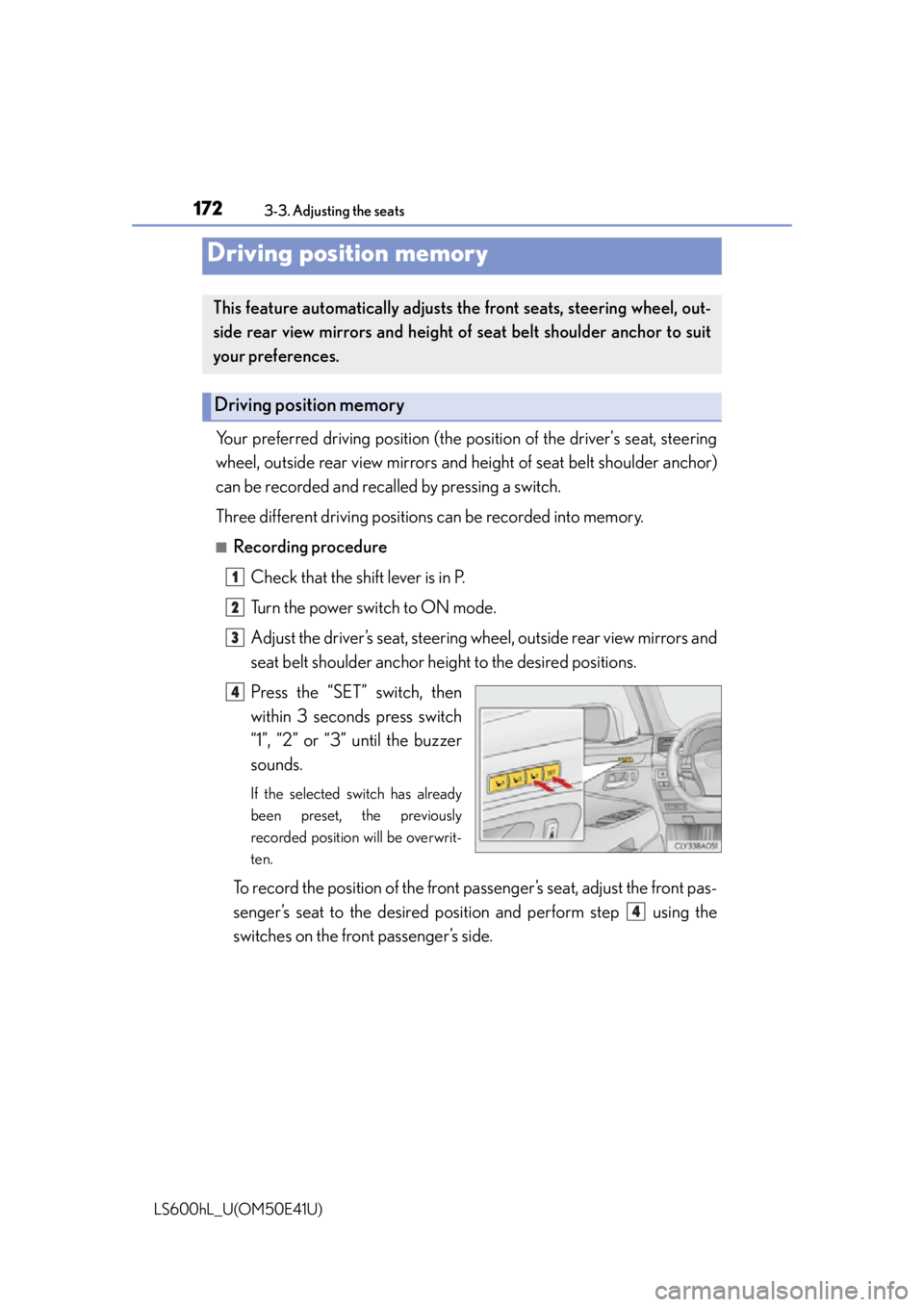
Your preferred driving position (the position of the driver's seat, steering
wheel, outside rear view mirrors and height of seat belt shoulder anchor)
can be recorded and recalled by pressing a switch.
Three different driving positions can be recorded into memory.
■Recording procedure
Check that the shift lever is in P.
Turn the power switch to ON mode.
Adjust the driver’s seat, steering wheel, outside rear view mirrors and
seat belt shoulder anchor height to the desired positions.
Press the “SET” switch, then
within 3 seconds press switch
“1”, “2” or “3” until the buzzer
sounds.
If the selected switch has already
been preset, the previously
recorded position will be overwrit-
ten.
To record the position of the front pa ssenger’s seat, adjust the front pas-
senger’s seat to the desired posi tion and perform step using the
switches on the front passenger’s side.
Driving position memory
This feature automatically adjusts the front seats, steering wheel, out-
side rear view mirrors and height of seat belt shoulder anchor to suit
your preferences.
Driving position memory
1
2
3
4
4
Page 177 of 620
1753-3. Adjusting the seats
3
Operation of each component
LS600hL_U(OM50E41U)
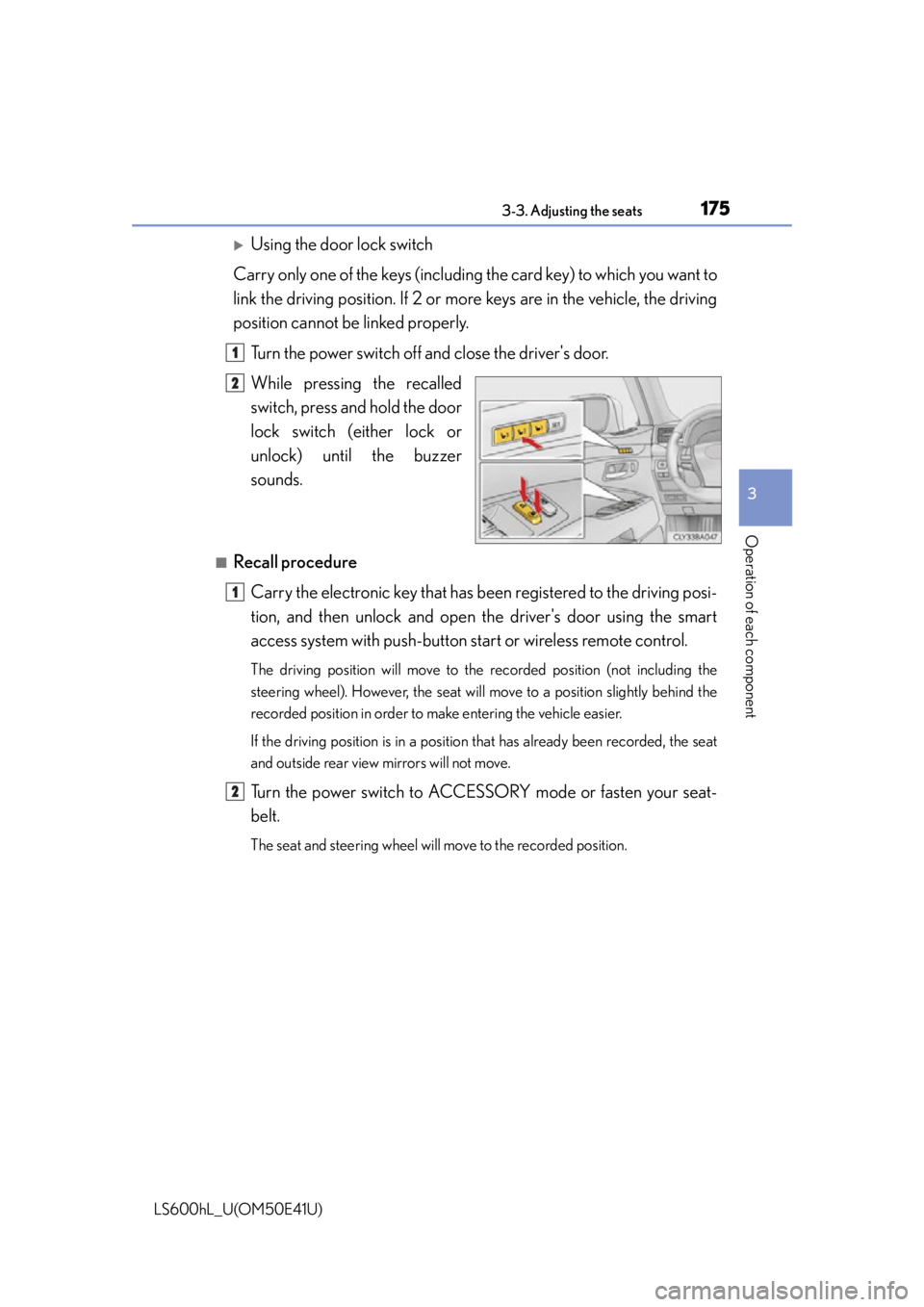
Using the door lock switch
Carry only one of the keys (including the card key) to which you want to
link the driving position. If 2 or mo re keys are in the vehicle, the driving
position cannot be linked properly.
Turn the power switch off and close the driver's door.
While pressing the recalled
switch, press and hold the door
lock switch (either lock or
unlock) unt il the buzzer
sounds.
■Recall procedure
Carry the electronic key that has b een registered to the driving posi-
tion, and then unlock and open the driver's door using the smart
access system with pu sh-button start or wireless remote control.
The driving position will move to the recorded position (not including the
steering wheel). However, the seat will move to a position slightly behind the
recorded position in order to make entering the vehicle easier.
If the driving position is in a position that has already been recorded, the seat
and outside rear view mirrors will not move.
Turn the power switch to ACCESSORY mode or fasten your seat-
belt.
The seat and steering wheel will move to the recorded position.
1
2
1
2
Page 184 of 620
182
LS600hL_U(OM50E41U)
3-4. Adjusting the steering wheel and mirrors
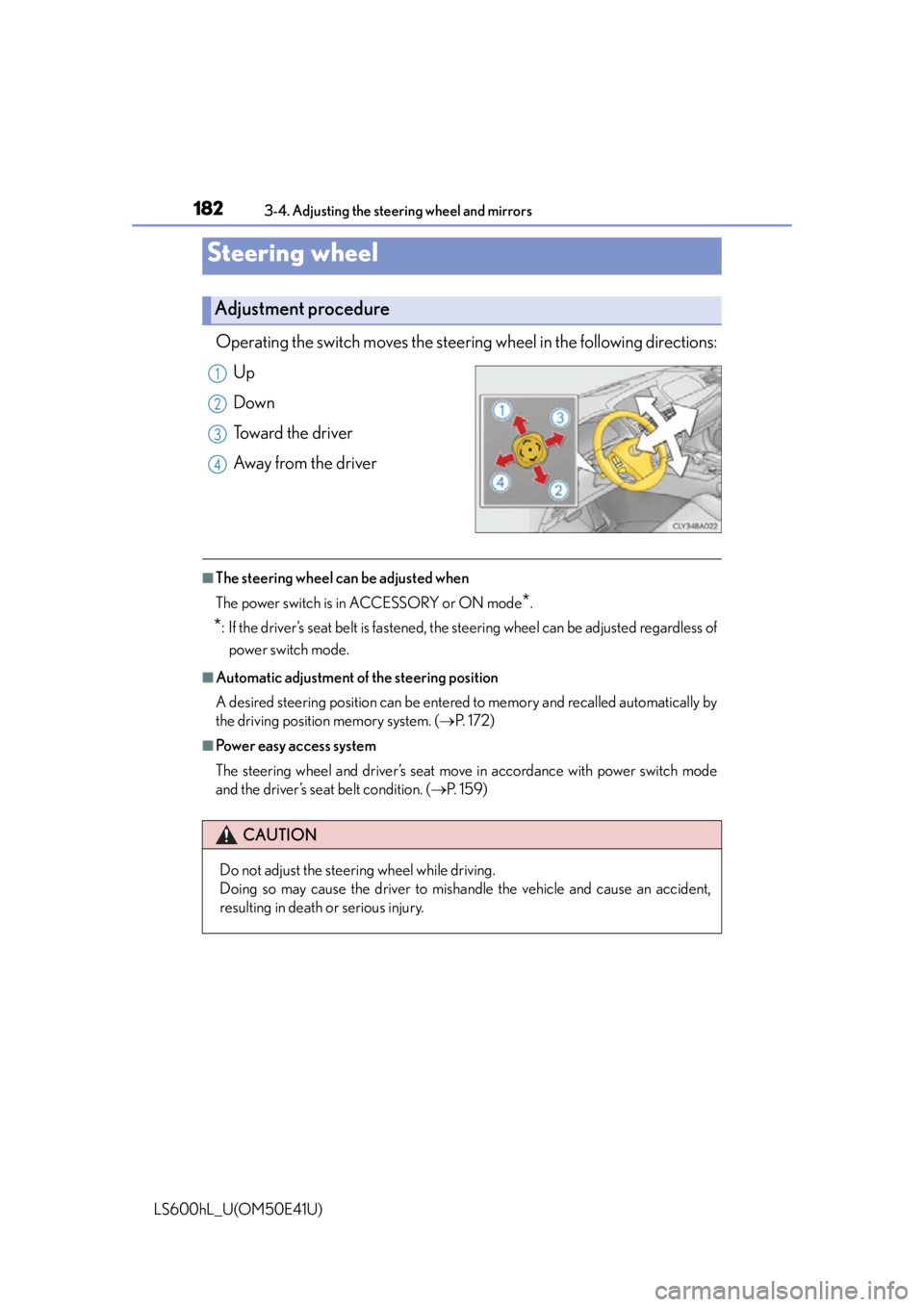
Operating the switch moves the steering wheel in the following directions:
Up
Down
Toward the driver
Away from the driver
■The steering wheel can be adjusted when
The power switch is in ACCESSORY or ON mode
*.
*: If the driver’s seat belt is fastened, the steering wheel can be adjusted regardless of power switch mode.
■Automatic adjustment of the steering position
A desired steering position can be entered to memory and recalled automatically by
the driving position memory system. ( P. 1 7 2 )
■Power easy access system
The steering wheel and driver’s seat move in accordance with power switch mode
and the driver’s seat belt condition. ( P. 1 5 9 )
Steering wheel
Adjustment procedure
1
2
3
4
CAUTION
Do not adjust the steering wheel while driving.
Doing so may cause the driver to mishandle the vehicle and cause an accident,
resulting in death or serious injury.
Page 185 of 620
1833-4. Adjusting the steering wheel and mirrors
3
Operation of each component
LS600hL_U(OM50E41U)
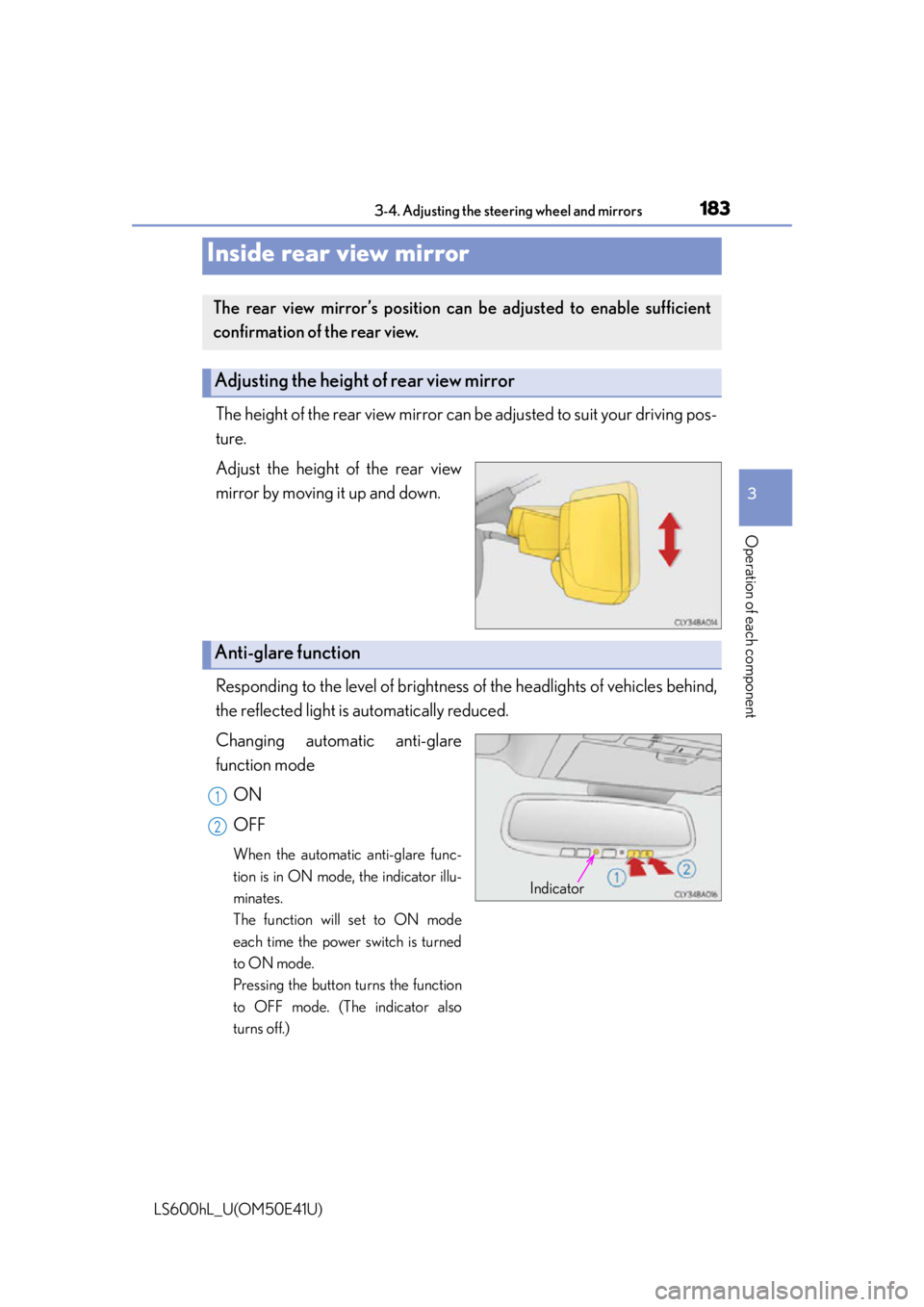
The height of the rear view mirror can be adjusted to suit your driving pos-
ture.
Adjust the height of the rear view
mirror by moving it up and down.
Responding to the level of brightness of the headlights of vehicles behind,
the reflected light is automatically reduced.
Changing automatic anti-glare
function mode
ON
OFF
When the automatic anti-glare func-
tion is in ON mode, the indicator illu-
minates.
The function will set to ON mode
each time the power switch is turned
to ON mode.
Pressing the button turns the function
to OFF mode. (The indicator also
turns off.)
Inside rear view mirror
The rear view mirror’s position can be adjusted to enable sufficient
confirmation of the rear view.
Adjusting the height of rear view mirror
Anti-glare function
Indicator
1
2
Page 186 of 620
1843-4. Adjusting the steering wheel and mirrors
LS600hL_U(OM50E41U)
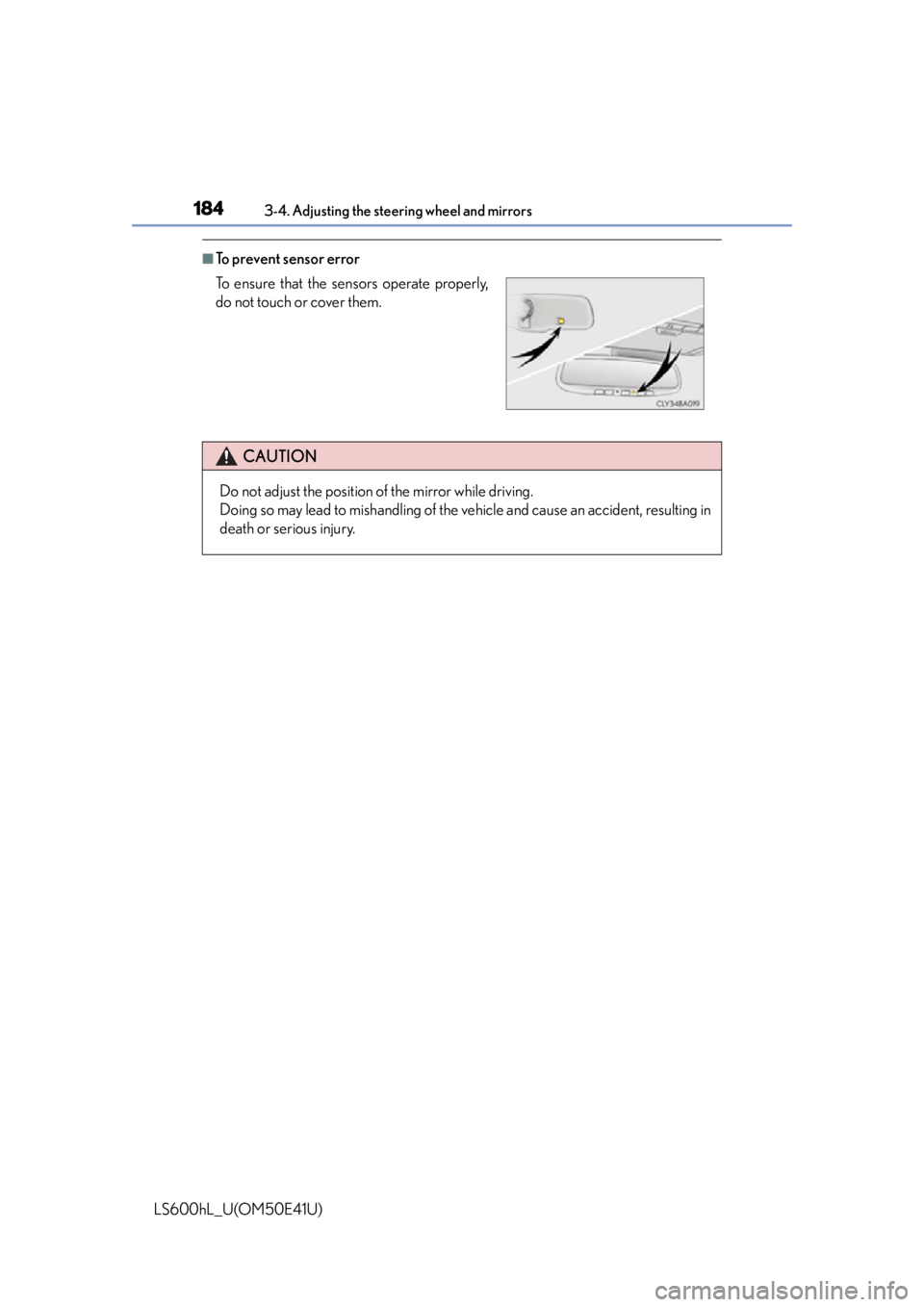
■To prevent sensor error
To ensure that the sensors operate properly,
do not touch or cover them.
CAUTION
Do not adjust the position of the mirror while driving.
Doing so may lead to mishandling of the vehicle and cause an accident, resulting in
death or serious injury.
Page 187 of 620
1853-4. Adjusting the steering wheel and mirrors
3
Operation of each component
LS600hL_U(OM50E41U)
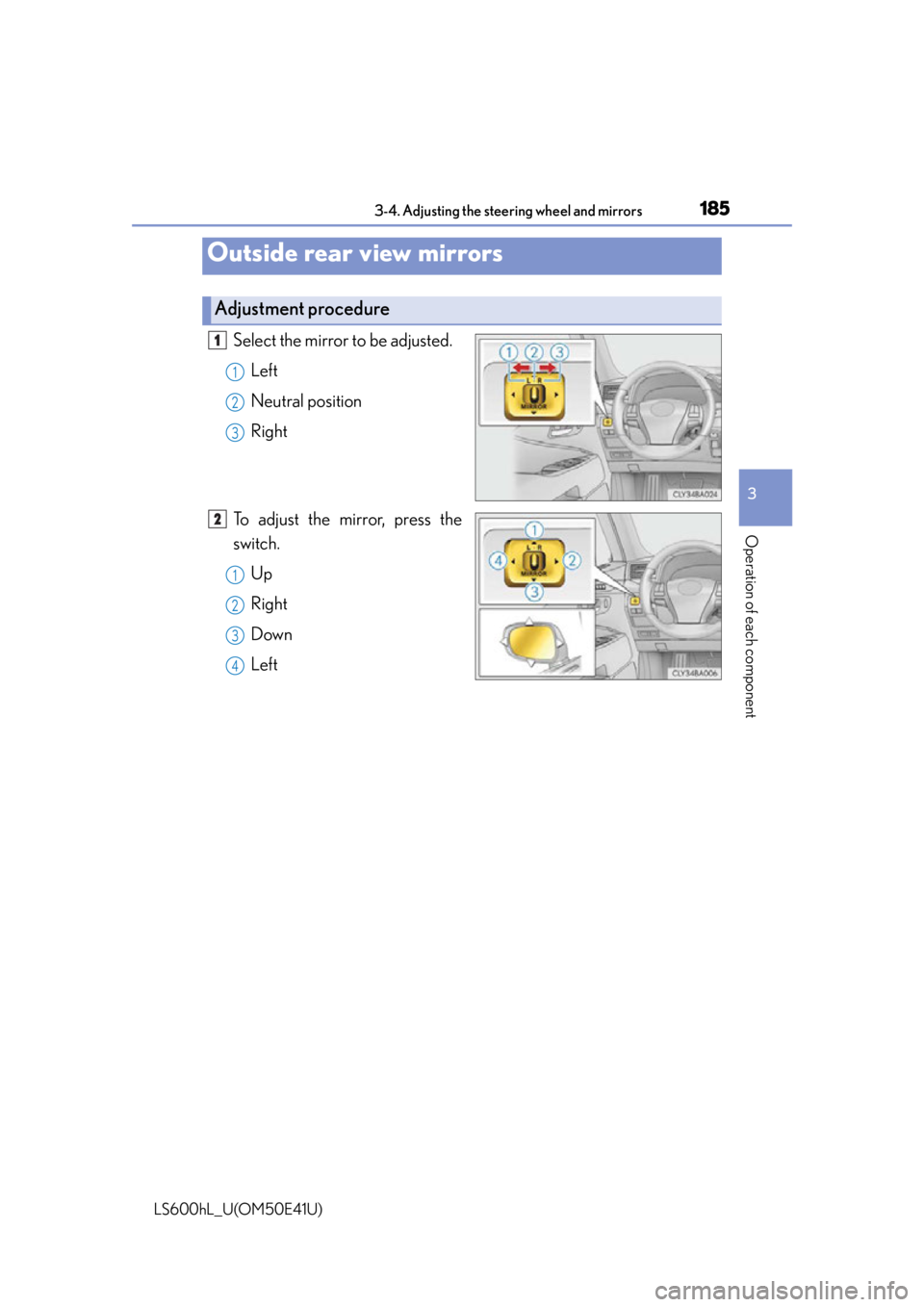
Select the mirror to be adjusted.Left
Neutral position
Right
To adjust the mirror, press the
switch. Up
Right
Down
Left
Outside rear view mirrors
Adjustment procedure
1
1
2
3
2
1
2
3
4
Page 188 of 620
1863-4. Adjusting the steering wheel and mirrors
LS600hL_U(OM50E41U)
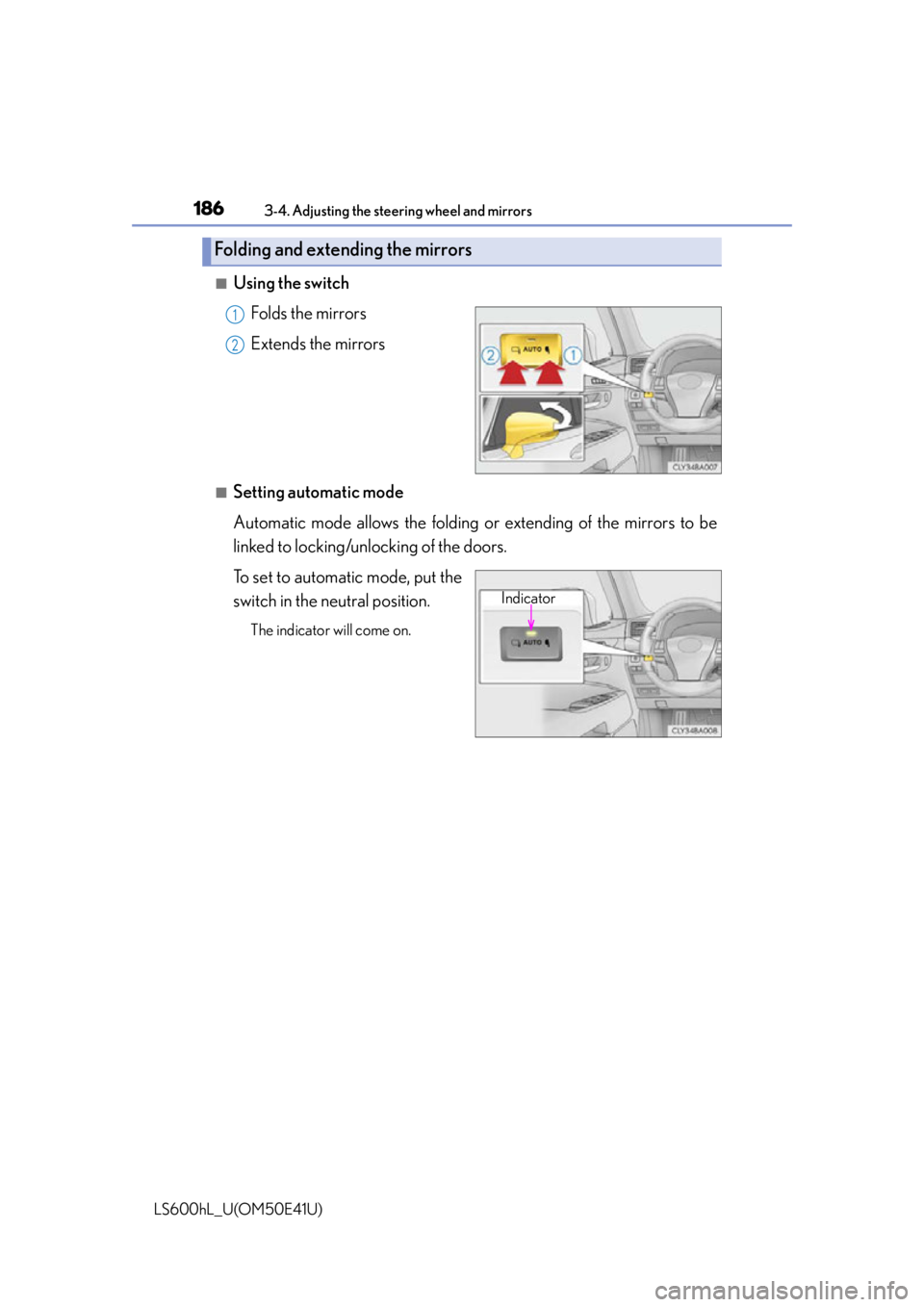
■Using the switchFolds the mirrors
Extends the mirrors
■Setting automatic mode
Automatic mode allows the folding or extending of the mirrors to be
linked to locking/unlocking of the doors.
To set to automatic mode, put the
switch in the neutral position.
The indicator will come on.
Folding and extending the mirrors
1
2
Indicator