remote start LEXUS LS600H 2015 User Guide
[x] Cancel search | Manufacturer: LEXUS, Model Year: 2015, Model line: LS600H, Model: LEXUS LS600H 2015Pages: 620, PDF Size: 7.66 MB
Page 193 of 620
1913-5. Opening, closing the windows and moon roof
3
Operation of each component
LS600hL_U(OM50E41U)
■Door lock linked window operation
●The power windows can be closed using the entry function. (P. 1 2 7 )
●The power windows can be opened and closed using the mechanical key.
( P. 5 2 4 )
■Customization
Settings (e.g. linked door lock operation) can be changed.
(Customizable features P. 5 6 4 )
CAUTION
Observe the following precautions.
Failure to do so may result in death or serious injury.
■Closing the windows
●The driver is responsible for all the powe r window operations, including the oper-
ation for the passengers. In order to prev ent accidental operation, especially by a
child, do not let a child operate the power windows. It is possible for children and
other passengers to have body parts caught in the power window. Also, when
riding with a child, it is recommended to use the window lock switch. ( P. 1 8 9 )
●Check to make sure that all passengers do not have any part of their body in a
position where it could be caught when a window is being operated.
●When using the smart access system with push-button start, wireless remote
control or mechanical key and operatin g the power windows, operate the power
window after checking to make sure that there is no possibility of any passenger
having any of their body parts caught in the window. Also do not let a child oper-
ate window by the smart access system wi th push-button start, wireless remote
control or mechanical key. It is possible for children and other passengers to get
caught in the power window.
●When exiting the vehicle, turn the power switch off, carry the key and exit the
vehicle along with the child. There may be accidental operation, due to mischief,
etc., that may possibly lead to an accident.
■Jam protection function
●Never use any part of your body to inte ntionally activate the jam protection func-
tion.
●The jam protection function may not work if something gets caught just before
the window fully closes.
Page 197 of 620
1953-5. Opening, closing the windows and moon roof
3
Operation of each component
LS600hL_U(OM50E41U)
■Moon roof open warning buzzer
The buzzer sounds and a message is shown on the multi-information display in the
instrument cluster when the power switch is turned off and the driver’s door is
opened with the moon roof open.
■Customization
Settings (e.g. linked door lock operation) can be changed.
(Customizable features P. 5 6 4 )
CAUTION
Observe the following precautions.
Failure to do so may cause death or serious injury.
■Opening the moon roof
●Do not allow any passengers to put thei r hands or heads outside the vehicle while
it is moving.
●Do not sit on top of the moon roof.
■Closing the moon roof
●The driver is responsible for moon roof opening and closing operations.
In order to prevent accidental operation, especially by a child, do not let a child
operate the moon roof. It is possible for children and other passengers to have
body parts caught in the moon roof.
●Check to make sure that all passengers do not have any part of their body in a
position where it could be caught wh en the moon roof is being operated.
●When using the smart access system with push-button start, wireless remote
control or mechanical key and operating the moon roof, operate the moon roof
after checking to make sure that there is no possibility of any passenger having
any of their body parts caught in the moon roof. Also, do not let a child operate
moon roof by the smart access system wi th push-button start, wireless remote
control or mechanical key. It is possible for children and other passengers to get
caught in the moon roof.
●When exiting the vehicle, turn the power switch off, carry the key and exit the
vehicle along with the child. There may be accidental operation, due to mischief,
etc., that may possibly lead to an accident.
■Jam protection function
●Never use any part of your body to inte ntionally activate the jam protection func-
tion.
●The jam protection function may not work if something gets caught just before
the moon roof fully closes.
Page 332 of 620
330
LS600hL_U(OM50E41U)
5-1. Remote Touch screen
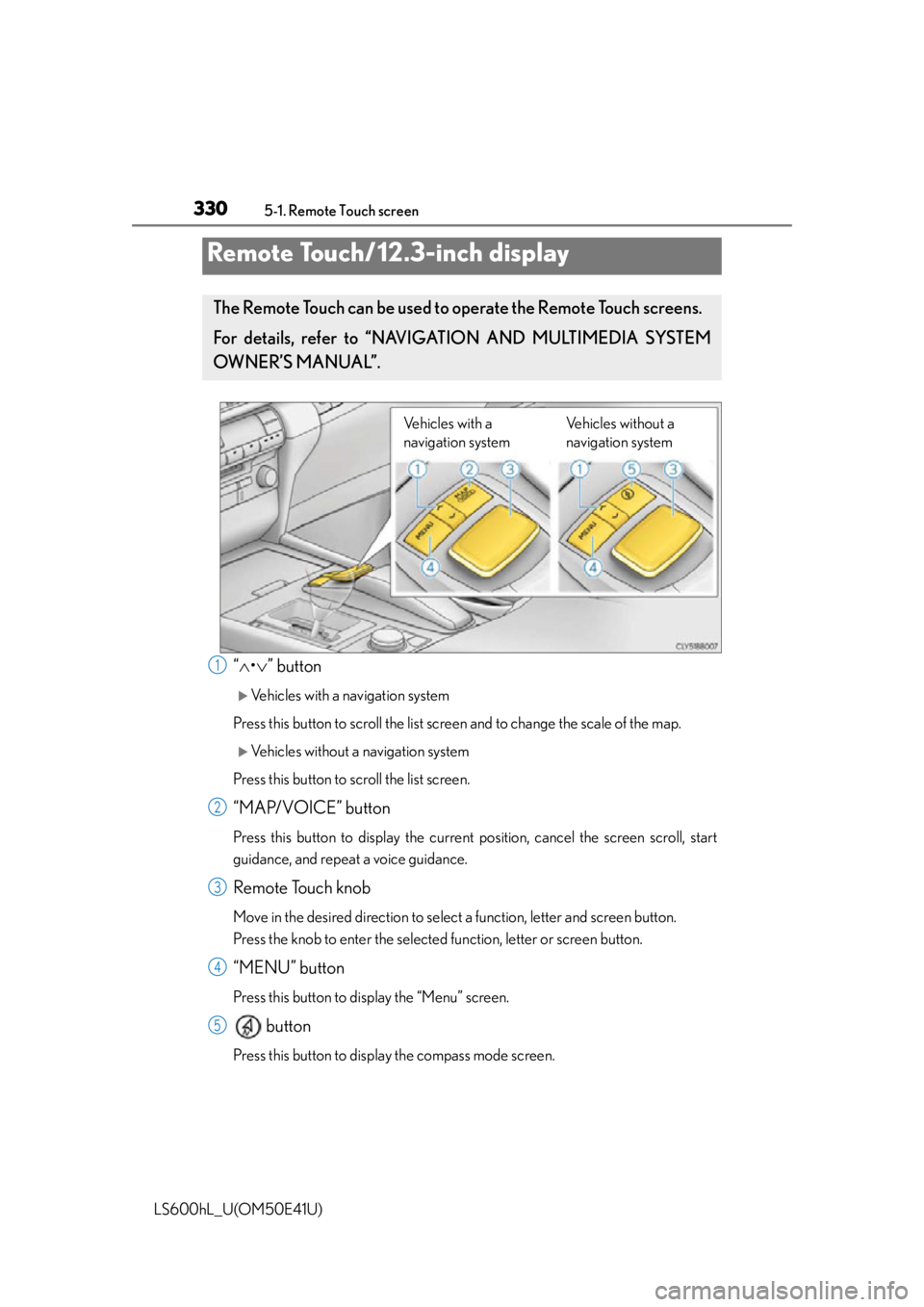
“ • ” button
Vehicles with a navigation system
Press this button to scroll the list sc reen and to change the scale of the map.
Vehicles without a navigation system
Press this button to scroll the list screen.
“MAP/VOICE” button
Press this button to display the current position, cancel the screen scroll, start
guidance, and repeat a voice guidance.
Remote Touch knob
Move in the desired direction to select a function, letter and screen button.
Press the knob to enter the selected function, letter or screen button.
“MENU” button
Press this button to display the “Menu” screen.
button
Press this button to displa y the compass mode screen.
Remote Touch/12.3-inch display
The Remote Touch can be used to operate the Remote Touch screens.
For details, refer to “NAVIGATION AND MULTIMEDIA SYSTEM
OWNER’S MANUAL”.
Vehicles with a
navigation system Vehicles without a
navigation system
1
2
3
4
5
Page 408 of 620
4065-6. Other interior features
LS600hL_U(OM50E41U)
Press and hold the vehicle’s programmed HomeLink button for 2
seconds and release it. Repeat this step once again. The garage door
may open.
If the garage door opens, the programming process is complete. If the door
does not open, press and release the button a third time. This third press
and release will complete the programming process by opening the
garage door.
The ceiling mounted garage door open er motor should now recognize the
HomeLink
signal and operate the garage door.
Repeat the steps above to program another rolling code system for
any of the remaining HomeLink
buttons.
■Programming an entry gate (for U.S.A. owners)/Programming all
devices in the Canadian market
Place your transmitter 1 to 3 in. (2 5 to 75 mm) away from the surface
of the HomeLink
.
Keep the HomeLink indicator light in view while programming.
Press and hold the selected HomeLink button.
Repeatedly press and release (c ycle) the device’s remote control
button for two seconds each until step 4 is completed.
When the indicator light on the HomeLink
compatible transceiver
starts to flash rapidl y, release the buttons.
Test the operation of the HomeLink
by pressing the newly pro-
grammed button. Check to see if the gate/device operates correctly.
Repeat the steps above to progra m another device for each of the
remaining HomeLink
buttons.
■Programming other devices
To program other devices such as home security systems, home door
locks or lighting, contact your Lexus dealer for assistance.
■Reprogramming a button
The individual HomeLink
buttons cannot be erased but can be repro-
grammed. To reprogram a button, follow the “Reprogramming a
HomeLink
button” instructions.
3
4
1
2
3
4
5
6
Page 475 of 620
4736-3. Do-it-yourself maintenance
6
Maintenance and care
LS600hL_U(OM50E41U)
■Use a CR1632 lithium battery
●Batteries can be purchased at your Lexus dealer, local electrical appliance shops
or camera stores.
●Replace only with the same or equivalent type recommended by the manufacturer.
●Dispose of used batteries according to local laws.
■When the card key battery needs to be replaced (if equipped)
The battery for the card key is available only at Lexus dealers. Your Lexus dealer can
replace the battery for you.
■If the electronic key battery is depleted
The following symptoms may occur:
●The smart access system with push-button start and wireless remote control will
not function properly.
●The operational range will be reduced.
CAUTION
■Removed battery and other parts
These parts are small and if swallowed by a child, they can cause choking. Keep
away from children. Failure to do so could result in death or serious injury.
NOTICE
■For normal operation after replacing the battery
Observe the following precautions to prevent accidents:
●Always work with dry hands.
Moisture may cause the battery to rust.
●Do not touch or move any other co mponent inside the remote control.
●Do not bend either of the battery terminals.
Page 526 of 620
5247-2. Steps to take in an emergency
LS600hL_U(OM50E41U)
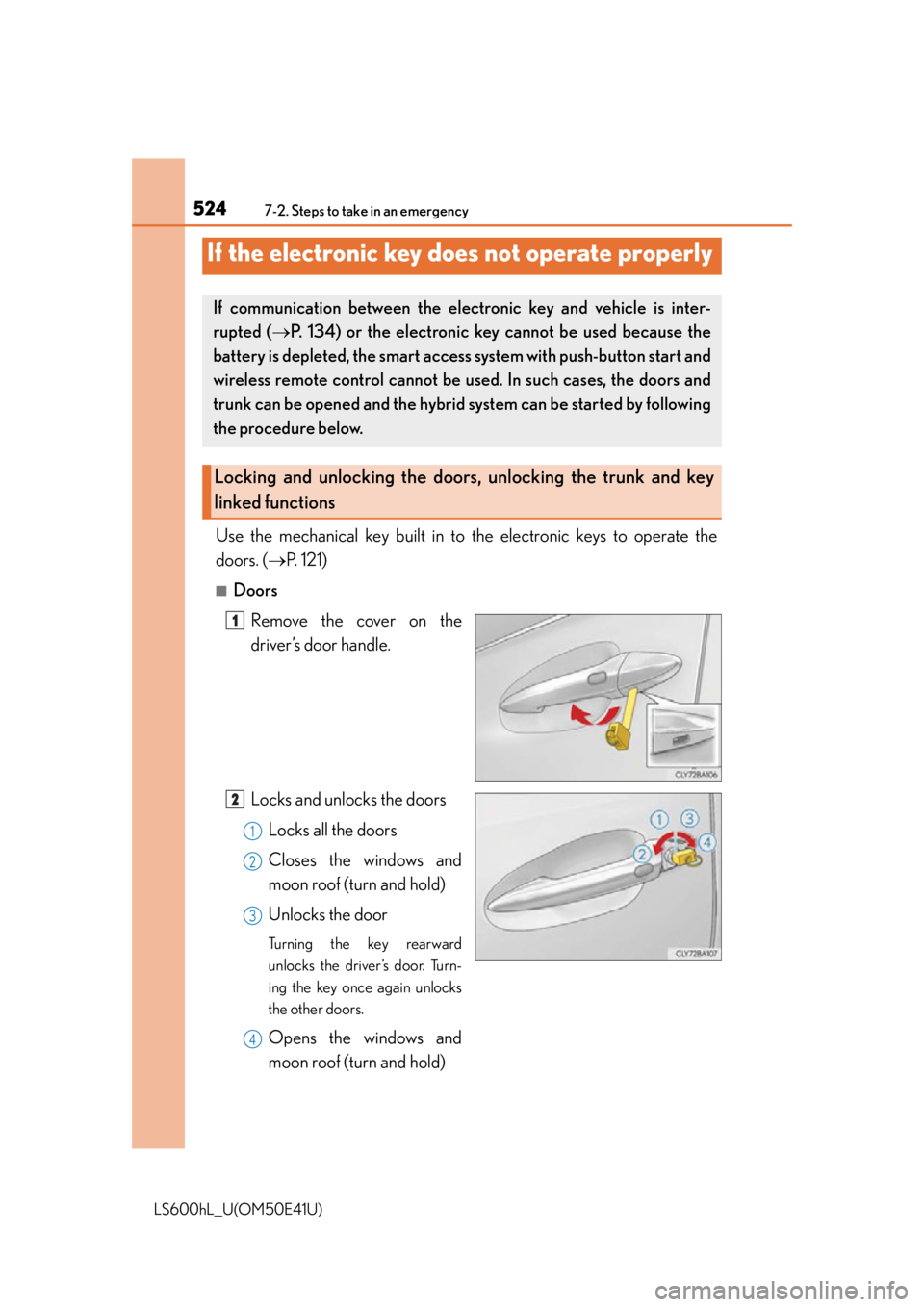
Use the mechanical key built in to the electronic keys to operate the
doors. ( P. 121)
■Doors
Remove the cover on the
driver’s door handle.
Locks and unlocks the doorsLocks all the doors
Closes the windows and
moon roof (turn and hold)
Unlocks the door
Turning the key rearward
unlocks the driver’s door. Turn-
ing the key once again unlocks
the other doors.
Opens the windows and
moon roof (turn and hold)
If the electronic key does not operate properly
If communication between the ele ctronic key and vehicle is inter-
rupted ( P. 134) or the electronic key cannot be used because the
battery is depleted, the smart access system with push-button start and
wireless remote control cannot be us ed. In such cases, the doors and
trunk can be opened and the hybrid system can be started by following
the procedure below.
Locking and unlocking the doors, unlocking the trunk and key
linked functions
1
2
1
2
3
4
Page 530 of 620
5287-2. Steps to take in an emergency
LS600hL_U(OM50E41U)
Maintain the engine speed of the second vehicle and start the hybrid
system of your vehicle by turning the power switch to ON mode.
Make sure the “READY” indicator co mes on. If the indicator does not
come on, contact your Lexus dealer.
Once the hybrid system has started, remove the jumper cables in the
exact reverse order from wh ich they were connected.
Once the hybrid system starts, have the vehicle inspected at your Lexus
dealer as soon as possible.
■Starting the hybrid system when the 12-volt battery is discharged
The hybrid system cannot be started by push-starting.
■To prevent 12-volt battery discharge
●Turn off the headlights and the audio system while the hybrid system is off.
●Turn off any unnecessary electrical compon ents when the vehicle is running at a
low speed for an extended period, such as in heavy traffic.
■When the 12-volt battery is removed or discharged
The hybrid system may not start.
( P. 4 5 1 )
■Charging the 12-volt battery
The electricity stored in the 12-volt battery will discharge gradually even when the
vehicle is not in use, due to natural discharge and the draining effects of certain elec-
trical appliances. If the vehicle is left for a long time, the 12-volt battery may dis-
charge, and the hybrid system may be unable to start. (The 12-volt battery recharges
automatically while the hybrid system is operating.)
■When recharging or replacing the 12-volt battery
●Make sure that the key is not inside the vehicle when recharging or replacing the
12-volt battery. The key may be locked in the vehicle if the alarm is activated.
( P. 9 1 )
●In some cases, it may not be possible to unlock the doors using the smart access
system with push-button start when the 12-volt battery is discharged. Use the wire-
less remote control or the mechanical key to lock or unlock the doors.
■If the 12-volt battery is discharged
The information stored in the computer will be deleted.
If the 12-volt battery is discharged, have the vehicle inspected by your Lexus dealer.
5
6
7
Page 568 of 620
5668-2. Customization
LS600hL_U(OM50E41U)
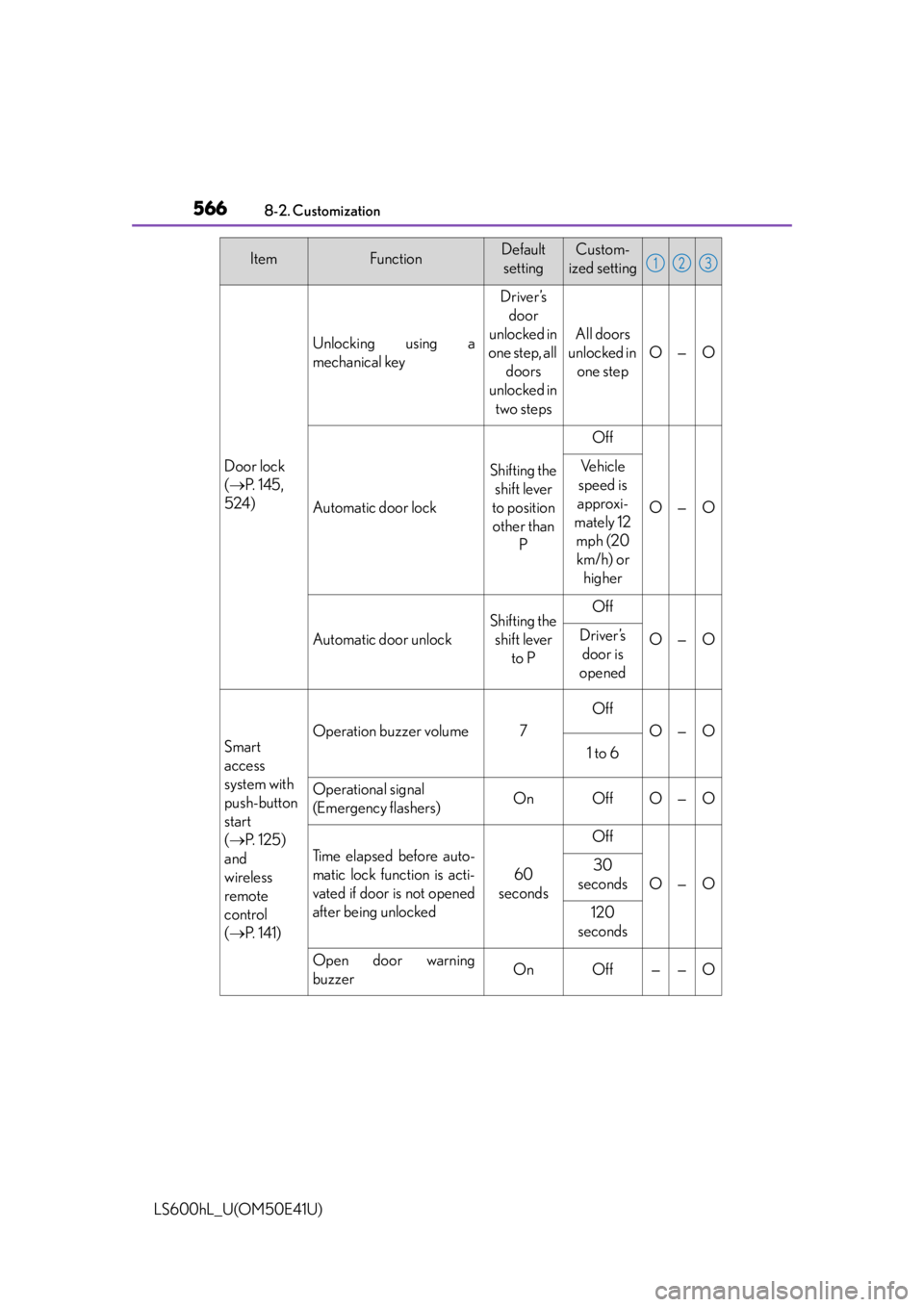
Door lock
( P. 1 4 5 ,
524)
Unlocking using a
mechanical key
Driver’s door
unlocked in
one step, all doors
unlocked in
two steps
All doors
unlocked in one step
O—O
Automatic door lock
Shifting the shift lever
to position other than P
Off
O—O
Ve h i c l e
speed is
approxi-
mately 12 mph (20 km/h) or higher
Automatic door unlock
Shifting the shift lever to POff
O—ODriver’s door is
opened
Smart
access
system with
push-button
start
( P. 1 2 5 )
and
wireless
remote
control
( P. 141)
Operation buzzer volume7
Off
O—O
1 to 6
Operational signal
(Emergency flashers)OnOffO—O
Ti m e e l a p s e d b e f o r e a u t o -
matic lock function is acti-
vated if door is not opened
after being unlocked
60
seconds
Off
O—O
30
seconds
120
seconds
Open door warning
buzzerOnOff——O
ItemFunctionDefault settingCustom-
ized setting123
Page 569 of 620
5678-2. Customization
8
Vehicle specifications
LS600hL_U(OM50E41U)
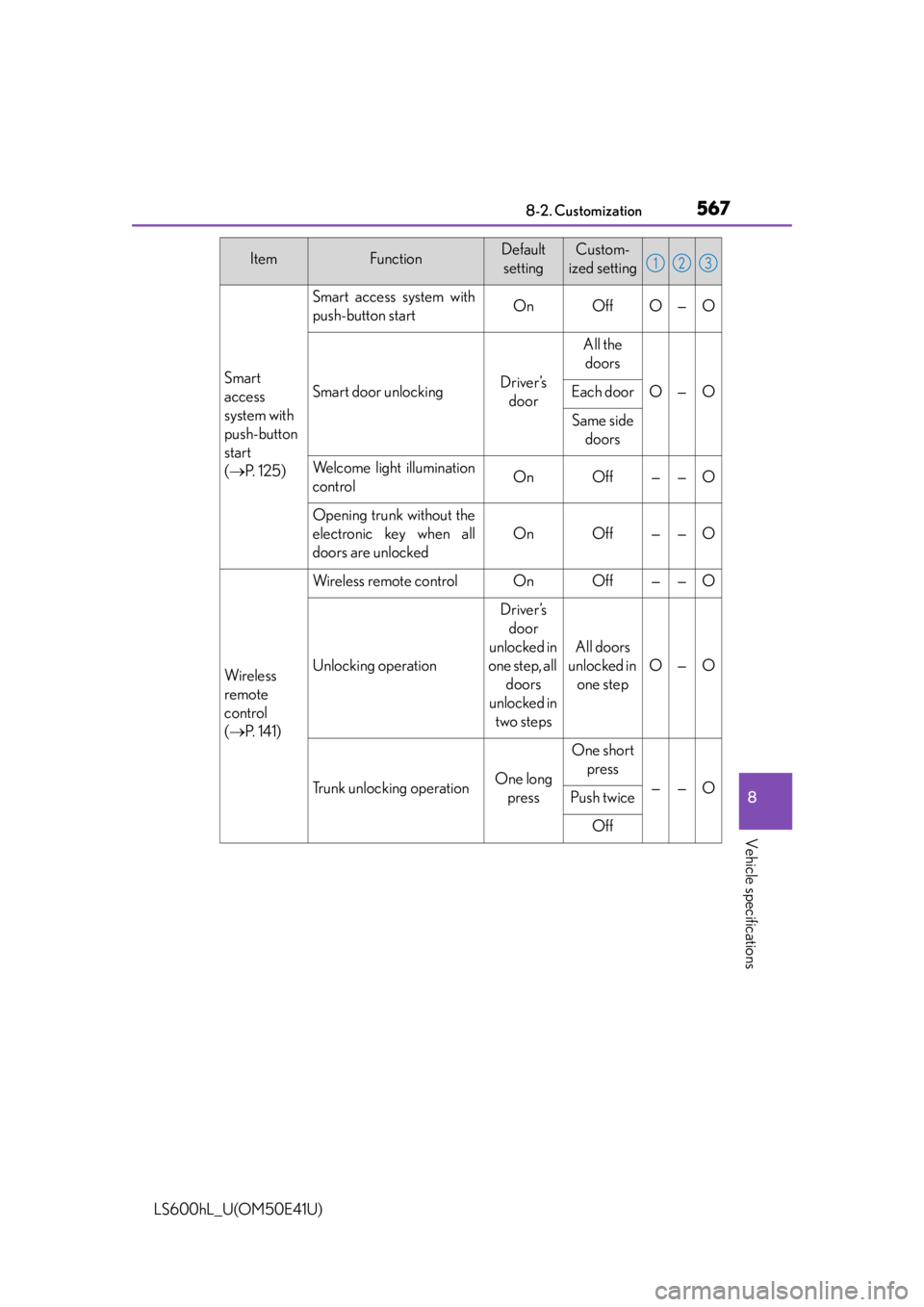
Smart
access
system with
push-button
start
( P. 1 2 5 )
Smart access system with
push-button startOnOffO—O
Smart door unlockingDriver’s
door
All the doors
O—OEach door
Same side doors
Welcome light illumination
controlOnOff——O
Opening trunk without the
electronic key when all
doors are unlocked
OnOff——O
Wi re less
remote
control
( P. 141)
Wireless remote controlOnOff——O
Unlocking operation
Driver’s
door
unlocked in
one step, all doors
unlocked in two steps
All doors
unlocked in one step
O—O
Trunk unlocking operationOne long press
One short press
——OPush twice
Off
ItemFunctionDefault settingCustom-
ized setting123
Page 574 of 620
5728-2. Customization
LS600hL_U(OM50E41U)
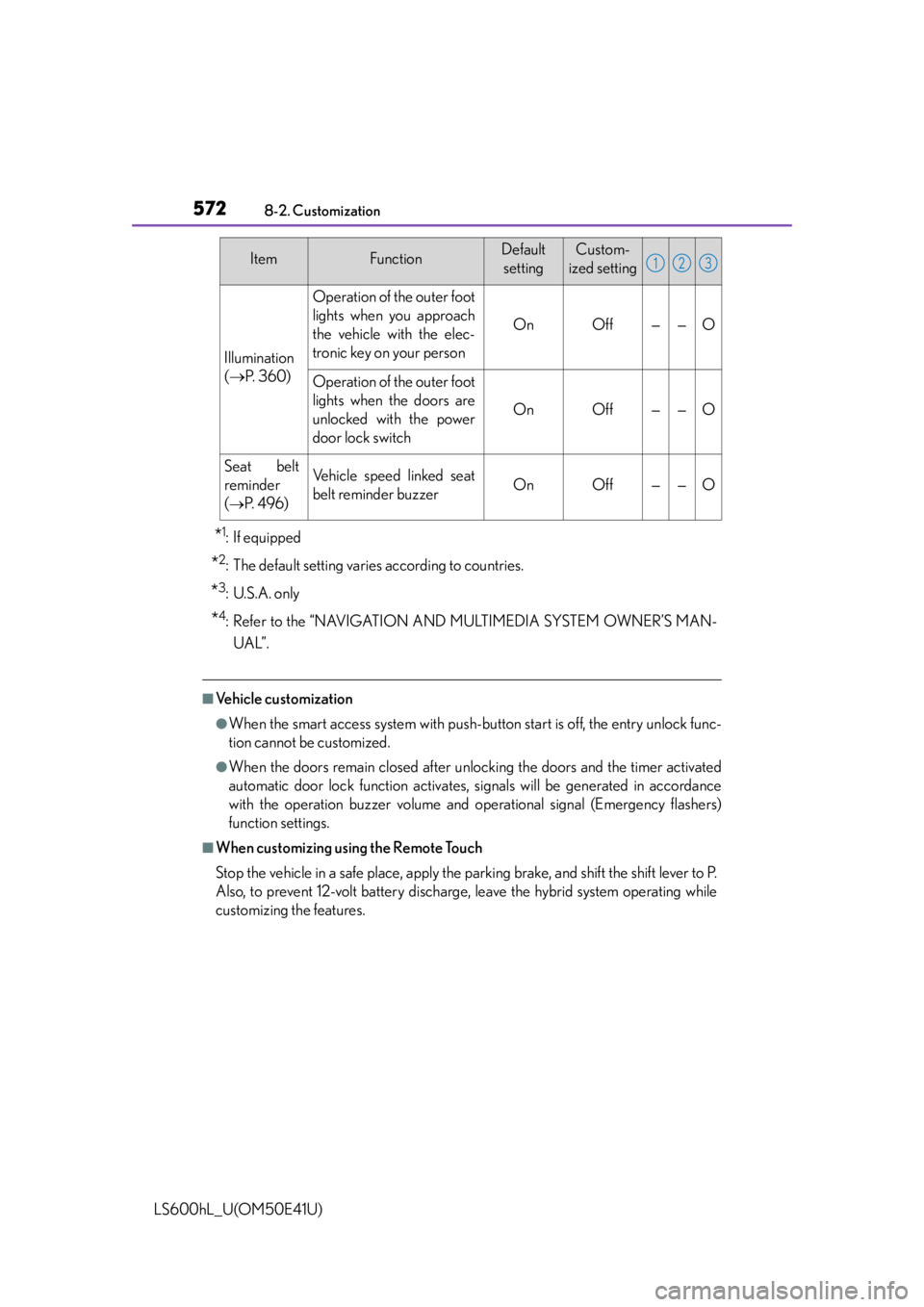
*1:If equipped
*2: The default setting varies according to countries.
*3: U.S.A. only
*4: Refer to the “NAVIGATION AND MULTIMEDIA SYSTEM OWNER’S MAN-UAL”.
■Vehicle customization
●When the smart access system with push-button start is off, the entry unlock func-
tion cannot be customized.
●When the doors remain closed after un locking the doors and the timer activated
automatic door lock function activates, signals will be generated in accordance
with the operation buzzer volume and operational signal (Emergency flashers)
function settings.
■When customizing using the Remote Touch
Stop the vehicle in a safe place, apply the parking brake, and shift the shift lever to P.
Also, to prevent 12-volt battery discharge, leave the hybrid system operating while
customizing the features.
Illumination
( P. 3 6 0 )
Operation of the outer foot
lights when you approach
the vehicle with the elec-
tronic key on your person
OnOff——O
Operation of the outer foot
lights when the doors are
unlocked with the power
door lock switch
OnOff——O
Seat belt
reminder
(
P. 4 9 6 )
Vehicle speed linked seat
belt reminder buzzerOnOff——O
ItemFunctionDefault
settingCustom-
ized setting123