remote start LEXUS LS600H 2015 Owners Manual
[x] Cancel search | Manufacturer: LEXUS, Model Year: 2015, Model line: LS600H, Model: LEXUS LS600H 2015Pages: 620, PDF Size: 7.66 MB
Page 4 of 620

TABLE OF CONTENTS2
LS600hL_U(OM50E41U)For your information ................................... 8
Reading this manual................................... 14
How to search ..............................................15
Pictorial index ............................................... 16
1-1. For safe use
Before driving................................. 32
For safety drive............................... 34
Seat belts .......................................... 36
SRS airbags ......................................42
Front passenger occupant classification system.................. 55
Safety information for children ..................................... 61
Child restraint systems ................62
Installing child restraints............. 66
Exhaust gas precautions .............75
1-2. Hybrid system Hybrid system features................ 76
Hybrid system precautions.........81
1-3. Theft deterrent system Immobilizer system ......................88
Alarm ................................................. 90 2. Instrument cluster
Warning lights and indicators....................................... 94
Gauges and meters ..................... 99
Multi-information display ........ 105
Energy monitor/ consumption screen ................. 112
3-1. Key information Keys ...................................................120
3-2. Opening, closing and locking the doors and
trunk
Smart access system with push-button start ......................125
Wireless remote control ............ 141
Doors ................................................ 145
Trunk.................................................. 149
3-3. Adjusting the seats Front seats.......................................156
Power rear seat............................. 162
Driving position memory.......... 172
Rear seat position memory......................................... 177
Head restraints ............................. 179
3-4. Adjusting the steering wheel and mirrors
Steering wheel ..............................182
Inside rear view mirror ............. 183
Outside rear view mirrors .......................................... 185
1For safety and security
2Instrument cluster
3Operation of
each component
Page 14 of 620
12
LS600hL_U(OM50E41U)The SRS airbag and seat belt pretensioner devices in your Lexus contain explosive
chemicals. If the vehicle is scrapped with
the airbags and seat belt pretensioners left
as they are, this may cause an accident such as fire. Be sure to have the systems of
the SRS airbag and seat belt pretensioner removed and disposed of by a qualified
service shop or by your Lexus deal er before you scrap your vehicle.
Special handling may apply, See www.dt sc.ca.gov/hazardouswaste/perchlorate.
Your vehicle has components that may contain perchlorate. These components may
include airbag, seat belt pretensioners, and wireless remote control batteries.
Scrapping of your Lexus
Perchlorate Material
CAUTION
■General precautions while driving
Driving under the influence: Never drive your vehicle when under the influence of
alcohol or drugs that have impaired your ability to operate your vehicle. Alcohol
and certain drugs delay reaction time, impa ir judgment and reduce coordination,
which could lead to an accident that could result in death or serious injury.
Defensive driving: Always drive defensively. Anticipate mistakes that other drivers
or pedestrians might make and be ready to avoid accidents.
Driver distraction: Always give your full attention to driving. Anything that distracts
the driver, such as adjusting controls, ta lking on a cellular phone or reading can
result in a collision with resulting death or serious injury to you, your occupants or
others.
■General precaution regarding children’s safety
Never leave children unattended in the vehicle, and never allow children to have or
use the key.
Children may be able to start the vehicle or shift the vehicle into neutral. There is
also a danger that children may injure th emselves by playing with the windows, the
moon roof, or other features of the vehicle. In addition, heat build-up or extremely
cold temperatures inside the vehicle can be fatal to children.
Page 92 of 620
901-3. Theft deterrent system
LS600hL_U(OM50E41U)
The alarm uses light and sound to give an alert when an intrusion is
detected.
The alarm is triggered in the following situations when the alarm is set:
●A locked door or trunk is unlocked or opened in any way other than
using the entry function, wireless remote control or mechanical key.
(The doors will lock again automatically.)
●The hood is opened.
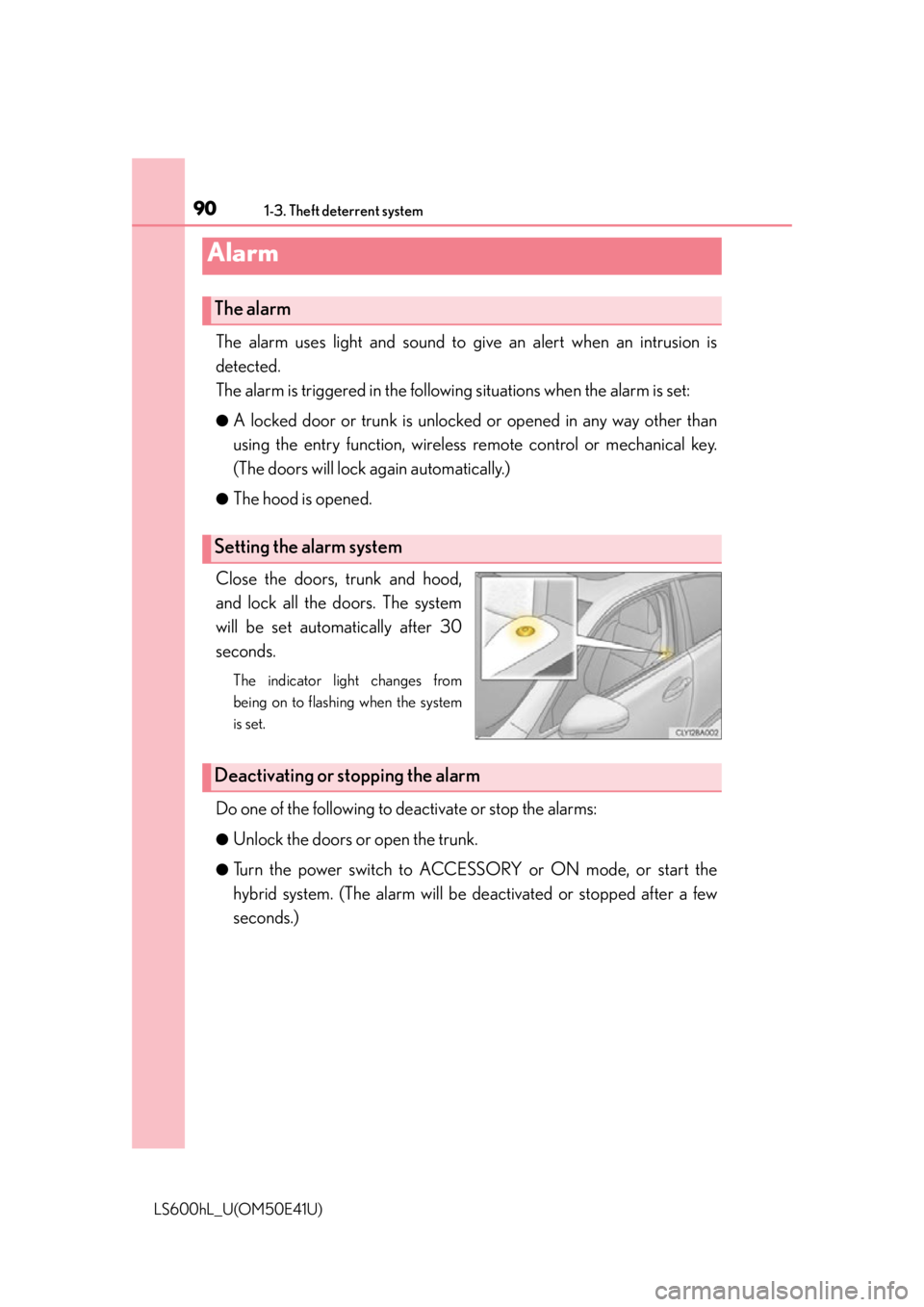
Close the doors, trunk and hood,
and lock all the doors. The system
will be set automatically after 30
seconds.
The indicator light changes from
being on to flashing when the system
is set.
Do one of the following to deactivate or stop the alarms:
●Unlock the doors or open the trunk.
●Turn the power switch to ACCESS ORY or ON mode, or start the
hybrid system. (The alarm will be deactivated or stopped after a few
seconds.)
Alarm
The alarm
Setting the alarm system
Deactivating or stopping the alarm
Page 121 of 620

119
Operation of
each component
3
LS600hL_U(OM50E41U) 3-1. Key information
Keys .................................................. 120
3-2. Opening, closing and locking the doors and
trunk
Smart access system with push-button start...................... 125
Wireless remote control ............ 141
Doors ................................................145
Trunk ..................................................149
3-3. Adjusting the seats Front seats ...................................... 156
Power rear seat .............................162
Driving position memory .......... 172
Rear seat position memory......................................... 177
Head restraints .............................179
3-4. Adjusting the steering wheel and mirrors
Steering wheel ............................. 182
Inside rear view mirror.............. 183
Outside rear view mirrors .......................................... 185
3-5. Opening, closing the windows and moon roof
Power windows ............................ 189
Moon roof ...................................... 192
Page 122 of 620
120
LS600hL_U(OM50E41U)
3-1. Key information
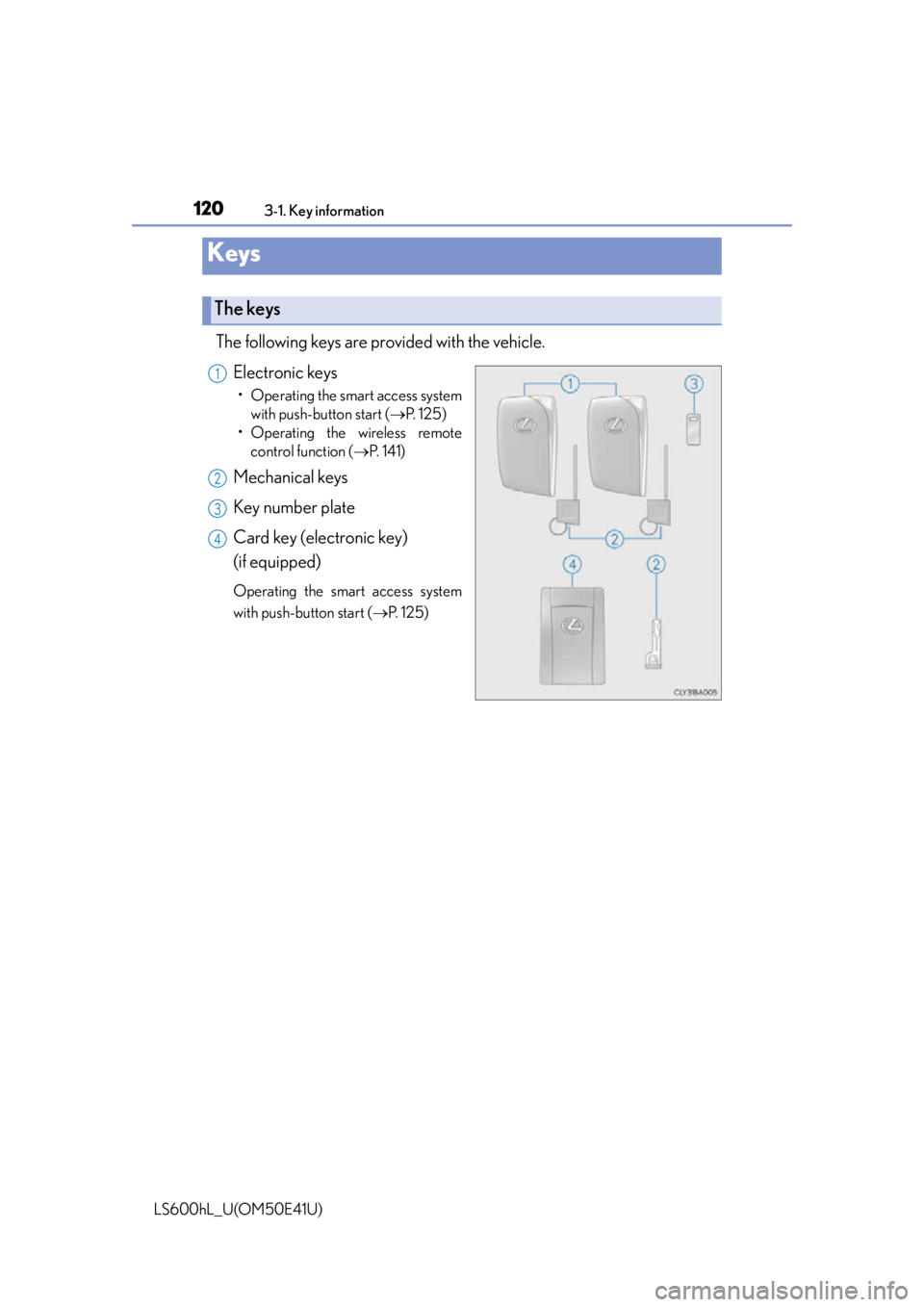
The following keys are provided with the vehicle.Electronic keys
• Operating the smart access systemwith push-button start ( P. 125)
• Operating the wireless remote control function ( P. 141)
Mechanical keys
Key number plate
Card key (electronic key)
(if equipped)
Operating the smart access system
with push-button start ( P. 125)
Keys
The keys
1
2
3
4
Page 136 of 620

1343-2. Opening, closing and locking the doors and trunk
LS600hL_U(OM50E41U)
■Conditions affecting operation
The smart access system with push-button start uses weak radio waves. In the follow-
ing situations, the communication between the electronic key and the vehicle may be
affected, preventing the smar t access system with push-button start, wireless remote
control and immobilizer system from operating properly. (Ways of coping: P. 5 2 4 )
●When the electronic ke y battery is depleted
●Near a TV tower, electric power plant, gas station, radio station, large display, air-
port or other facility that generates strong radio waves or electrical noise
●When carrying a portable radio, cellular phone, cordless phone or other wireless
communication device
●When the electronic key is in contact with, or is covered by the following metallic
objects
• Cards to which aluminum foil is attached
• Cigarette boxes that have aluminum foil inside
• Metallic wallets or bags
•Coins
• Hand warmers made of metal
• Media such as CDs and DVDs
●When multiple electronic keys are in the vicinity
●When other wireless keys (that emit radio waves) are being used nearby
●When carrying the electronic key togeth er with the following devices that emit
radio waves
• Another vehicle’s electronic key or a wireless key that emits radio waves
• Personal computers or person al digital assistants (PDAs)
• Digital audio players
• Portable game systems
●If window tint with a metallic content or metallic objects are attached to the rear
window
Page 137 of 620

1353-2. Opening, closing and locking the doors and trunk
3
Operation of each component
LS600hL_U(OM50E41U)
■Note for the entry function
●Even when the electronic key is within the effective range (detection areas), the
system may not operate properly in the following cases:
• The electronic key is too close to the window or outside door handle, near the
ground, or in a high place when the doors are locked or unlocked.
• The electronic key is near the ground or in a high place, or too close to the rear bumper center when the trunk is opened.
• The electronic key is on the instrument pa nel, rear package tray or floor, or in the
door pockets or glove box when the hybrid system is started or power switch
modes are changed.
●Do not leave the electronic key on top of the instrument panel or near the door
pockets when exiting the vehicle. Depending on the radio wave reception condi-
tions, it may be detected by the ante nna outside the cabin and the door will
become lockable from the outside, possibly trapping the electronic key inside the
vehicle.
●As long as the electronic key is within the effective range, the doors may be locked
or unlocked by anyone. However, only th e doors detecting the electronic key can
be used to unlock the vehicle.
●Even if the electronic key is not inside the vehicle, it may be possible to start the
hybrid system if the electronic key is near the window.
●The doors may unlock if a large amount of water splashes on the door handle, such
as in the rain or in a car wash when the electronic key is within the effective range.
(The doors will automatically be locked after approximately 60 seconds if the
doors are not opened and closed.)
●Gripping the door handle when wearing a glove may not unlock the door.
●If the wireless remote control is used to lock the doors when the electronic key is
near the vehicle, there is a possibility that the door may not be unlocked by the
entry function. (Use the wireless re mote control to unlock the doors.)
●A sudden approach to the effective rang e or door handle may prevent the doors
from being unlocked. In this case, return the door handle to the original position
and check that the doors unlock befo re pulling the door handle again.
Page 139 of 620

1373-2. Opening, closing and locking the doors and trunk
3
Operation of each component
LS600hL_U(OM50E41U)
■Electronic key battery depletion
●The standard battery life is 1 to 2 years. (The card key battery life is about a year and
a half.)
●If the battery is low, an alarm will sound in the cabin when the hybrid system is
started or stopped. ( P. 1 3 0 )
●The battery becomes depleted even if the electronic key is not used because the
key always receives radio waves. If the smart access system with push-button start
or the wireless remote control does not operate, or the detection area becomes
smaller, the battery may be depleted. Replace the battery when necessary.
( P. 4 7 2 )
●To avoid serious deterioration, do not leave the electronic key within 3 ft. (1 m) of
the following electrical appliances that produce a magnetic field:
•TVs
•Personal computers
• Cellular phones, cordless phones and battery chargers
• Recharging cellular phones or cordless phones
•Table lamps
• Induction cookers
■When the electronic key battery is fully depleted
P. 4 7 2
■Customization
Settings (e. g. smart access system with push-button start) can be changed.
(Customizable features P. 5 6 4 )
Page 177 of 620
1753-3. Adjusting the seats
3
Operation of each component
LS600hL_U(OM50E41U)
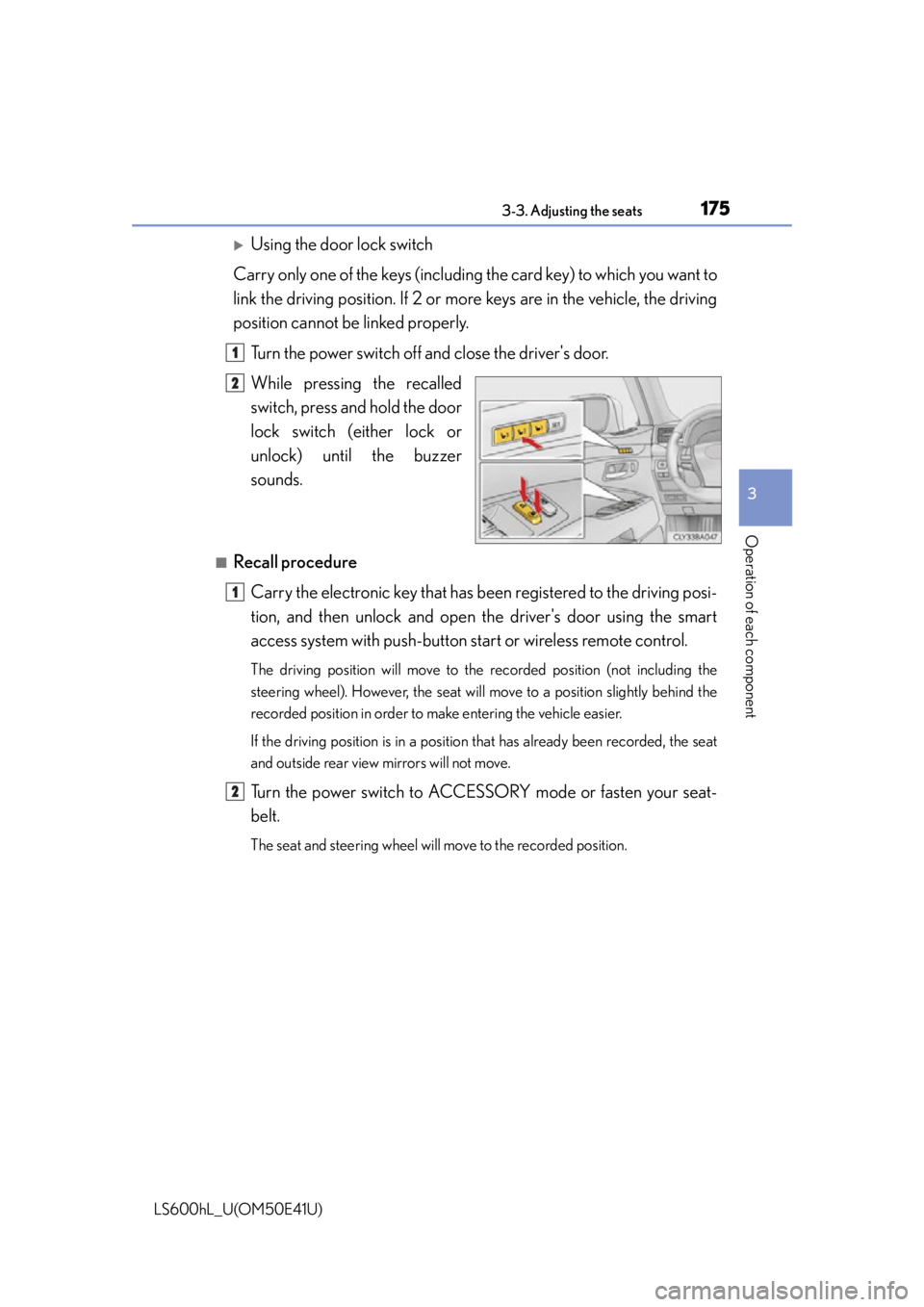
Using the door lock switch
Carry only one of the keys (including the card key) to which you want to
link the driving position. If 2 or mo re keys are in the vehicle, the driving
position cannot be linked properly.
Turn the power switch off and close the driver's door.
While pressing the recalled
switch, press and hold the door
lock switch (either lock or
unlock) unt il the buzzer
sounds.
■Recall procedure
Carry the electronic key that has b een registered to the driving posi-
tion, and then unlock and open the driver's door using the smart
access system with pu sh-button start or wireless remote control.
The driving position will move to the recorded position (not including the
steering wheel). However, the seat will move to a position slightly behind the
recorded position in order to make entering the vehicle easier.
If the driving position is in a position that has already been recorded, the seat
and outside rear view mirrors will not move.
Turn the power switch to ACCESSORY mode or fasten your seat-
belt.
The seat and steering wheel will move to the recorded position.
1
2
1
2
Page 178 of 620
1763-3. Adjusting the seats
LS600hL_U(OM50E41U)
■Cancelation procedure
Using the wireless remote control
Turn the power switch off and close the driver’s door.
While pressing the “SET” switch, press on the wireless remote
control until the buzzer sounds.
Using the door lock switch
Carry only the key you want to canc el and then close the driver's door.
If 2 or more keys are in the vehi cle, the driving position cannot be can-
celed properly.
Turn the power switch off and close the driver’s door.
While pressing the “SET” switch, press the lock or unlock side on the
door lock switch until the buzzer sounds.
■Recalling the driving position using the memory recall function
●Different driving positions can be registered for each electronic key. Therefore, the
driving position that is recalled may be different depending on the key being car-
ried.
●If a door other than the driver's door is unlocked with the smart access system with
push-button start, the driving position cann ot be recalled. In this case, press the
driving position switch which has been set.
■ Seat operation automatic st op function (4-seat models)
If a front seat is likely to come into contact with the retractable table or the ottoman
during seat operation or activation of the power easy access system, a buzzer will
sound and seat slide operation will be stopped partway.
(A warning message will be shown on the multi-information display.)
CAUTION
■Seat adjustment caution
Take care during seat adjustment so that the seat does not strike the rear passen-
ger or squeeze your body against the steering wheel.
1
2
1
2