trunk LEXUS LS600H 2015 User Guide
[x] Cancel search | Manufacturer: LEXUS, Model Year: 2015, Model line: LS600H, Model: LEXUS LS600H 2015Pages: 620, PDF Size: 7.66 MB
Page 93 of 620
911-3. Theft deterrent system
1
For safety and security
LS600hL_U(OM50E41U)
■System maintenance
The vehicle has a maintenance-free type alarm system.
■Items to check before locking the vehicle
To prevent unexpected triggering of the alarm and vehicle theft, make sure of the fol-
lowing:
●Nobody is in the vehicle.
●The windows and moon roof are closed before the alarm is set.
●No valuables or other personal items are left in the vehicle.
■Triggering of the alarm
The alarm may be triggered in the following situations:
(Stopping the alarm deactivates the alarm system.)
■Alarm-operated door lock
●When the alarm is operating, the doors ar e locked automatically to prevent intrud-
ers.
●Do not leave the key inside the vehicle when the alarm is operating, and make sure
the key is not inside the vehicle when rech arging or replacing the 12-volt battery.
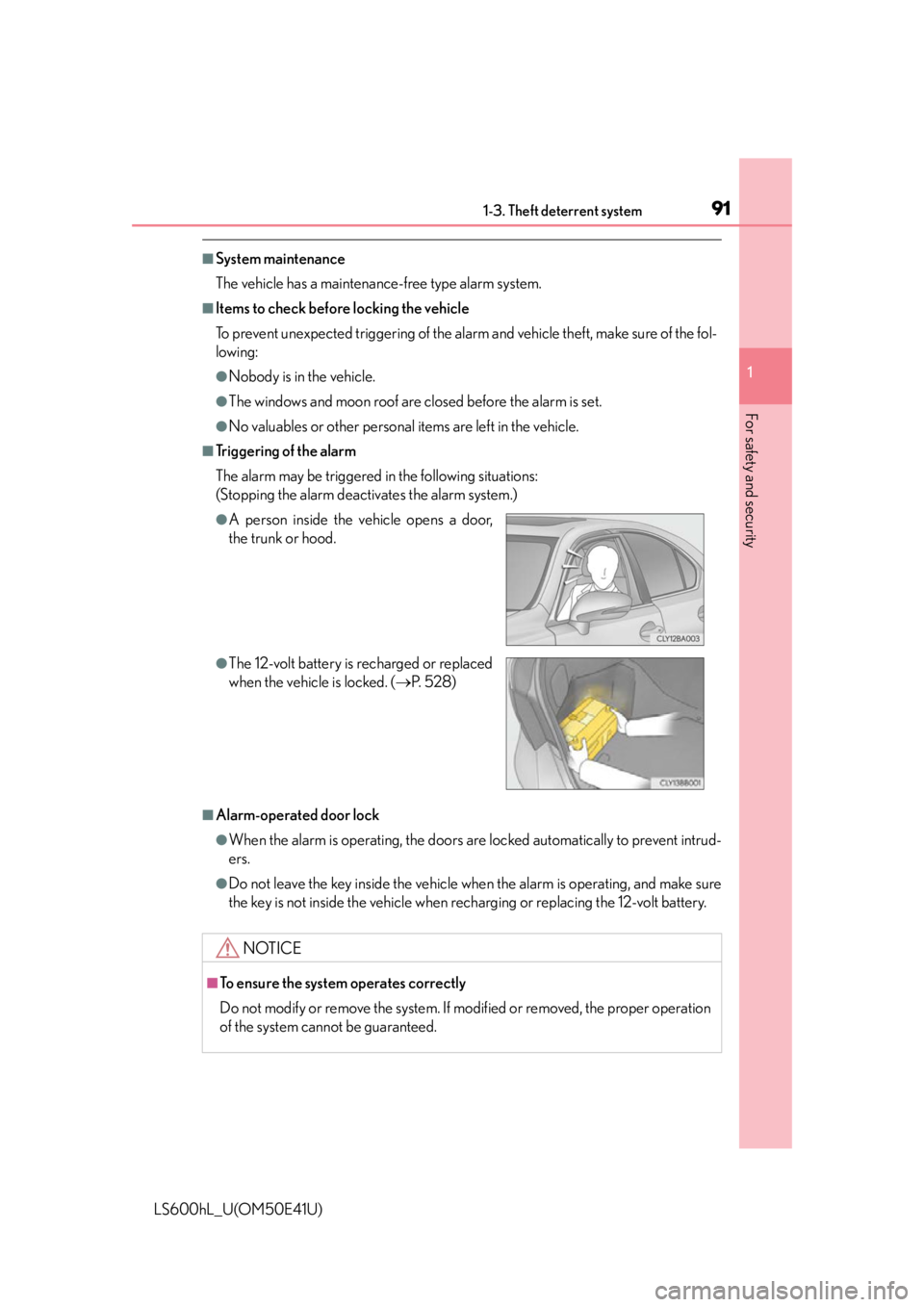
●A person inside the vehicle opens a door,
the trunk or hood.
●The 12-volt battery is recharged or replaced
when the vehicle is locked. (P. 5 2 8 )
NOTICE
■To ensure the system operates correctly
Do not modify or remove the system. If modified or removed, the proper operation
of the system cannot be guaranteed.
Page 121 of 620

119
Operation of
each component
3
LS600hL_U(OM50E41U) 3-1. Key information
Keys .................................................. 120
3-2. Opening, closing and locking the doors and
trunk
Smart access system with push-button start...................... 125
Wireless remote control ............ 141
Doors ................................................145
Trunk ..................................................149
3-3. Adjusting the seats Front seats ...................................... 156
Power rear seat .............................162
Driving position memory .......... 172
Rear seat position memory......................................... 177
Head restraints .............................179
3-4. Adjusting the steering wheel and mirrors
Steering wheel ............................. 182
Inside rear view mirror.............. 183
Outside rear view mirrors .......................................... 185
3-5. Opening, closing the windows and moon roof
Power windows ............................ 189
Moon roof ...................................... 192
Page 124 of 620
1223-1. Key information
LS600hL_U(OM50E41U)
■Electronic keys
●Part of the electronic key uses leather. Refer to P. 422 for details on cleaning the
leather portion.
●When cleaning the metallic portion, wet a cloth and firmly wring out any excess
water from it, then thoroughly wipe off any dirt.
●When not using the electronic key for an extended period of time, store it in a dry
place of normal temperature away from direct sunlight and interior light after
removing any dirt.
■Card key (if equipped)
●The card key is not waterproof.
●The mechanical key that is stored inside the card key should be used only if a prob-
lem arises, such as when the card key does not operate properly.
●If it is difficult to take out the mechanic al key, push down the lock release button
using a pen tip etc. If it is still difficult to pull it out, use a coin etc.
■When required to leave the vehicle’s key with a parking attendant
Turn the trunk opener main switch off and lock the glove box as circumstances
demand. ( P. 150, 366)
Remove the mechanical key for your own use and provide the attendant with the
electronic key only.
■If you lose your mechanical keys
New genuine mechanical keys can be made by your Lexus dealer using the other
mechanical key and the key number stamped on your key number plate. Keep the
plate in a safe place such as your wallet, not in the vehicle.
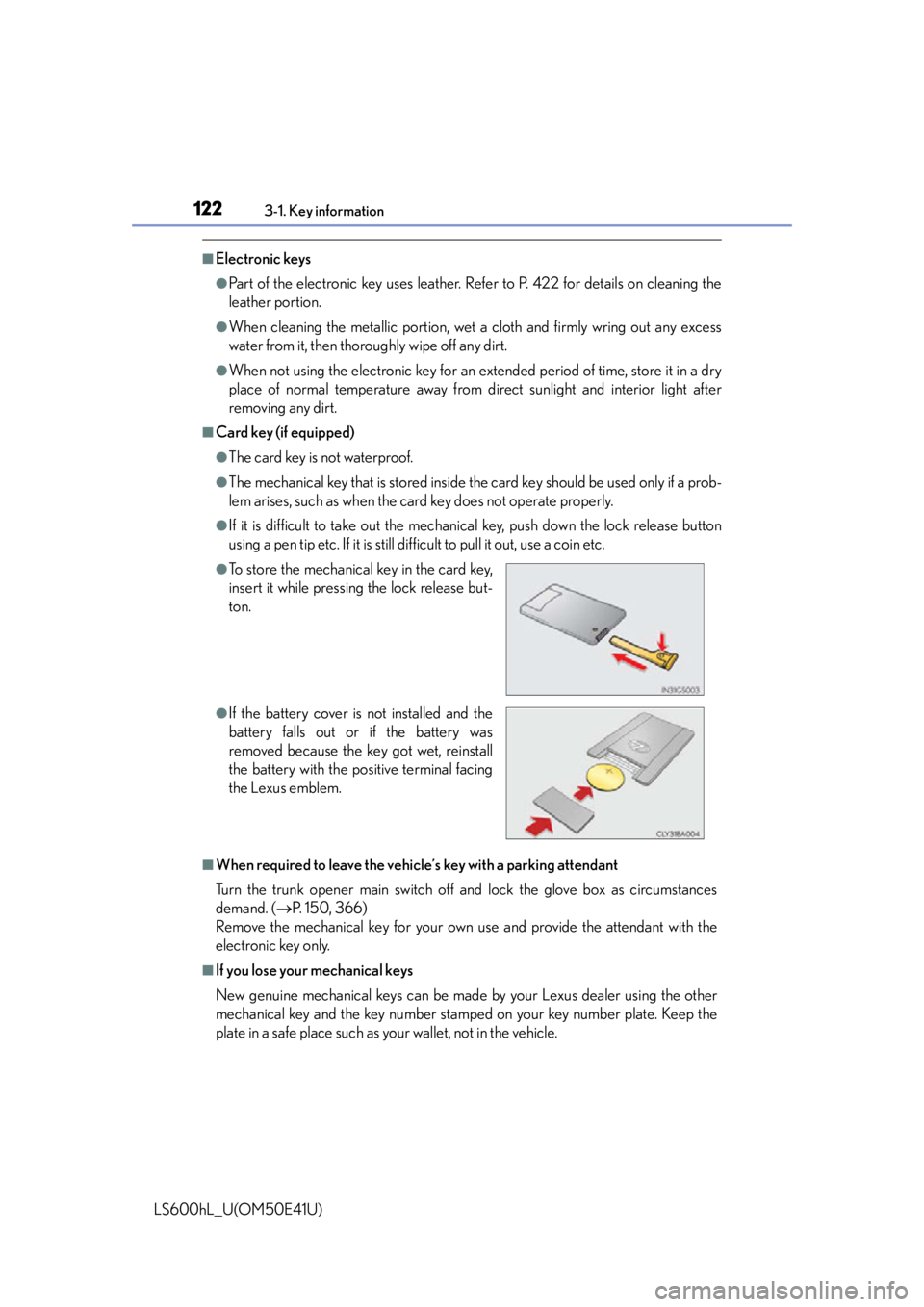
●To store the mechanical key in the card key,
insert it while pressing the lock release but-
ton.
●If the battery cover is not installed and the
battery falls out or if the battery was
removed because the key got wet, reinstall
the battery with the po sitive terminal facing
the Lexus emblem.
Page 127 of 620
125
3
Operation of each component
LS600hL_U(OM50E41U)
3-2. Opening, closing and locking the doors and trunk
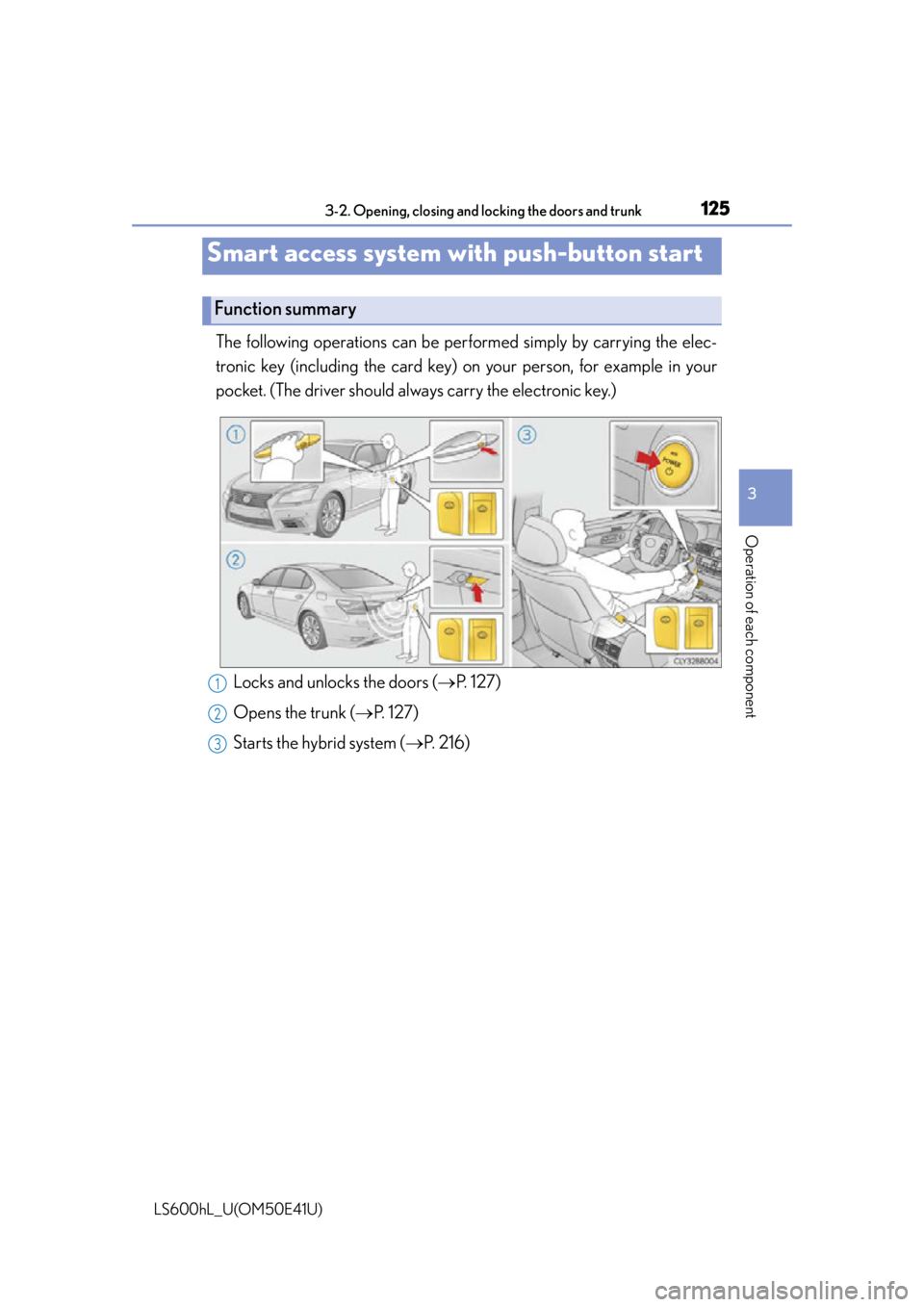
The following operations can be performed simply by carrying the elec-
tronic key (including the card key) on your person, for example in your
pocket. (The driver should always carry the electronic key.)
Smart access system with push-button start
Function summary
Locks and unlocks the doors ( P. 127)
Opens the trunk ( P. 127)
Starts the hybrid system ( P. 2 1 6 )1
2
3
Page 128 of 620

1263-2. Opening, closing and locking the doors and trunk
LS600hL_U(OM50E41U)
■Operation signals
Doors:
A buzzer sounds and the emergency flashe rs flash to indicate that the doors have
been locked/unlocked. (Locked: Once; Unlocked: Twice)
Tr u n k :
A buzzer sounds to indicate that the trunk has been unlocked.
Windows and moon roof:
A buzzer sounds to indicate that the windows and moon roof are operating.
■Security feature
If a door is not opened within approx imately 60 seconds after the vehicle is
unlocked, the security feature automatically locks the vehicle again.
■Welcome light illumination control
The side marker, parking, tail and license plate lights automatically turn on at night
when the doors are unlocked using the entr y function or wireless remote control if
the headlight switch is in the “AUTO” position.
Page 129 of 620
1273-2. Opening, closing and locking the doors and trunk
3
Operation of each component
LS600hL_U(OM50E41U)
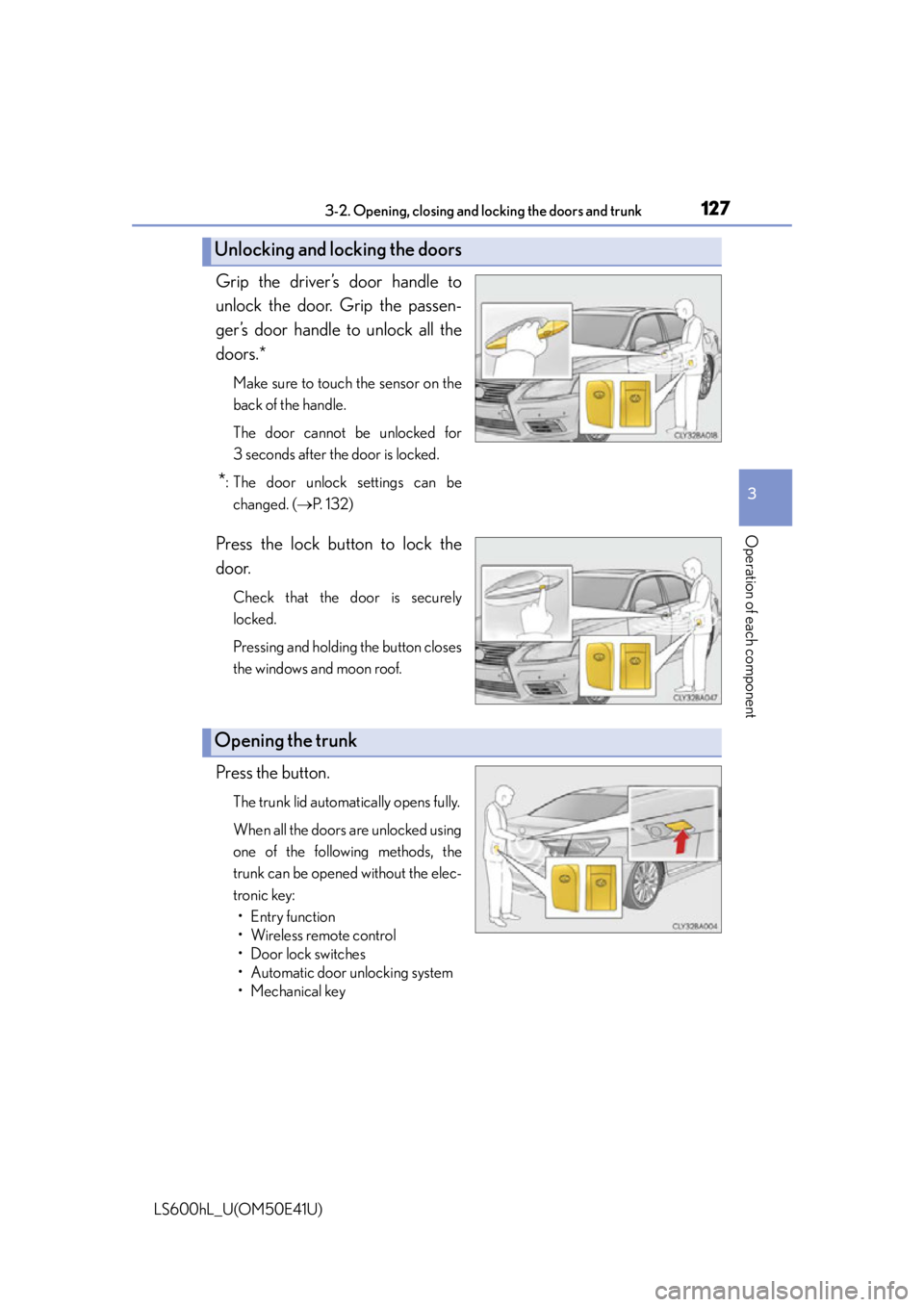
Grip the driver’s door handle to
unlock the door. Grip the passen-
ger’s door handle to unlock all the
doors.*
Make sure to touch the sensor on the
back of the handle.
The door cannot be unlocked for
3 seconds after the door is locked.
*: The door unlock settings can bechanged. ( P. 1 3 2 )
Press the lock button to lock the
door.
Check that the door is securely
locked.
Pressing and holding the button closes
the windows and moon roof.
Press the button.
The trunk lid automatically opens fully.
When all the doors are unlocked using
one of the following methods, the
trunk can be opened without the elec-
tronic key:
• Entry function
•Wireless remote control
• Door lock switches
• Automatic door unlocking system
• Mechanical key
Unlocking and locking the doors
Opening the trunk
Page 130 of 620
1283-2. Opening, closing and locking the doors and trunk
LS600hL_U(OM50E41U)
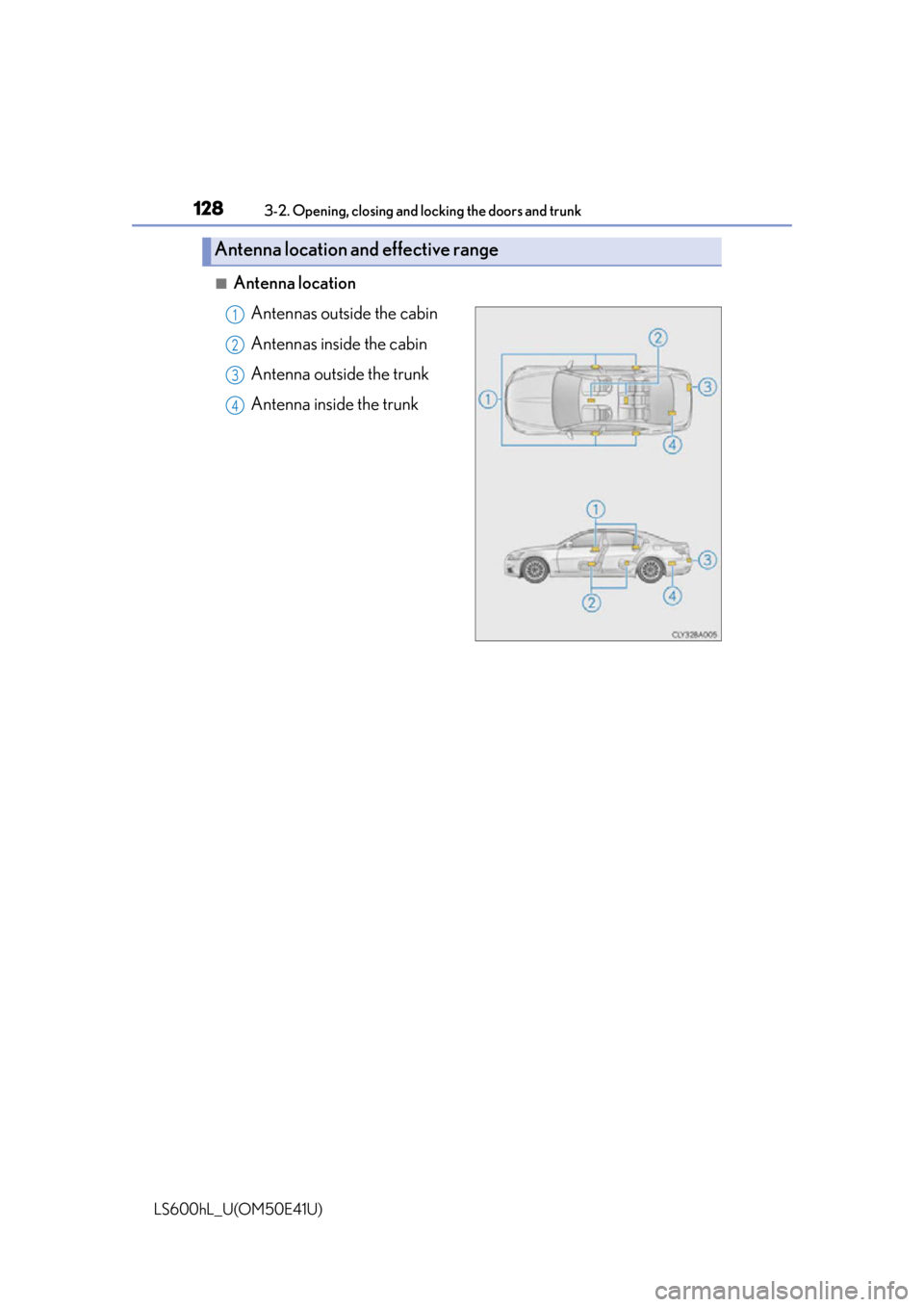
■Antenna location
Antennas outside the cabin
Antennas inside the cabin
Antenna outside the trunk
Antenna inside the trunk
Antenna location and effective range
1
2
3
34
Page 131 of 620
1293-2. Opening, closing and locking the doors and trunk
3
Operation of each component
LS600hL_U(OM50E41U)
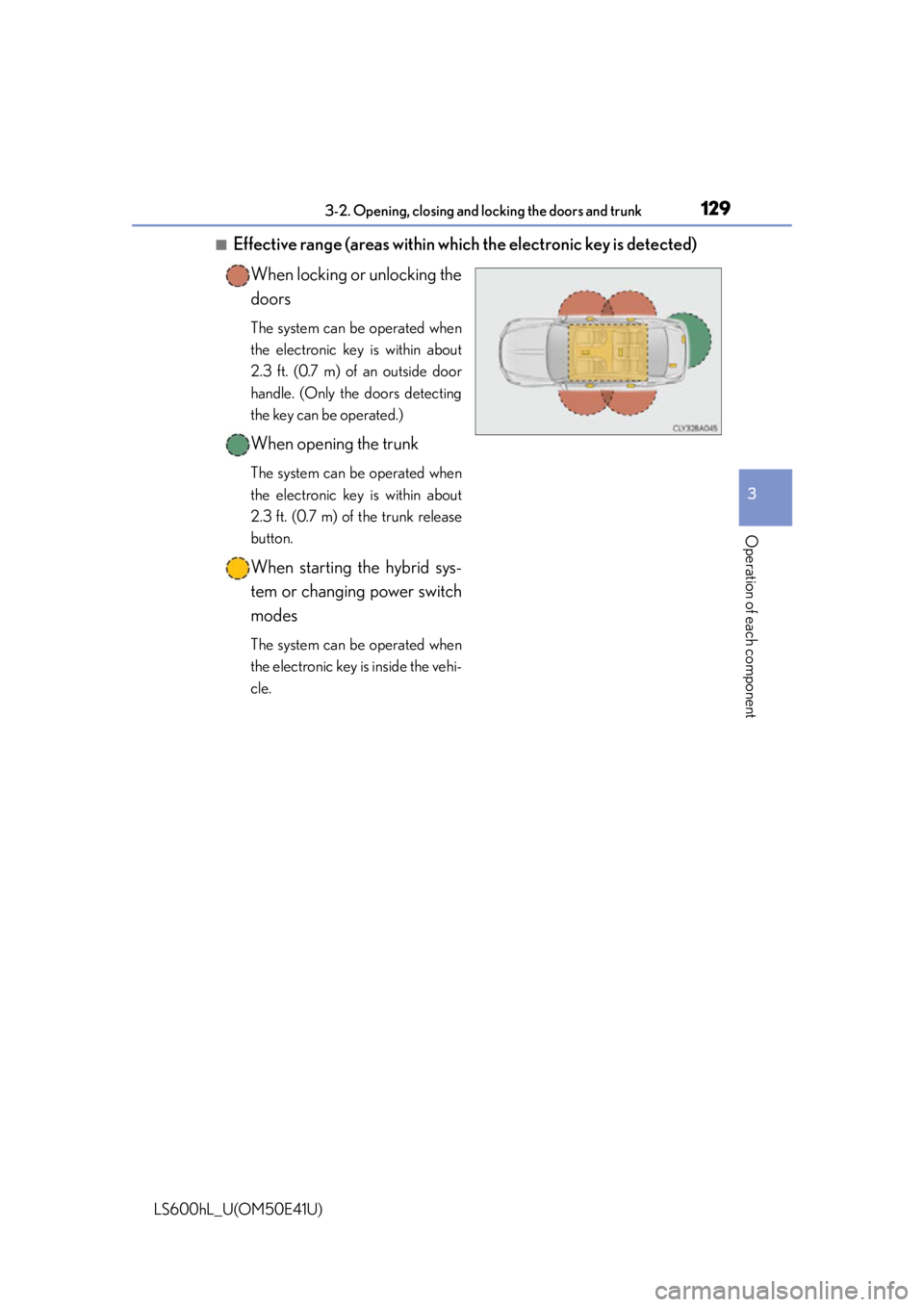
■Effective range (areas within which the electronic key is detected)When locking or unlocking the
doors
The system can be operated when
the electronic key is within about
2.3 ft. (0.7 m) of an outside door
handle. (Only the doors detecting
the key can be operated.)
When opening the trunk
The system can be operated when
the electronic key is within about
2.3 ft. (0.7 m) of the trunk release
button.
When starting the hybrid sys-
tem or changing power switch
modes
The system can be operated when
the electronic key is inside the vehi-
cle.
Page 132 of 620
1303-2. Opening, closing and locking the doors and trunk
LS600hL_U(OM50E41U)
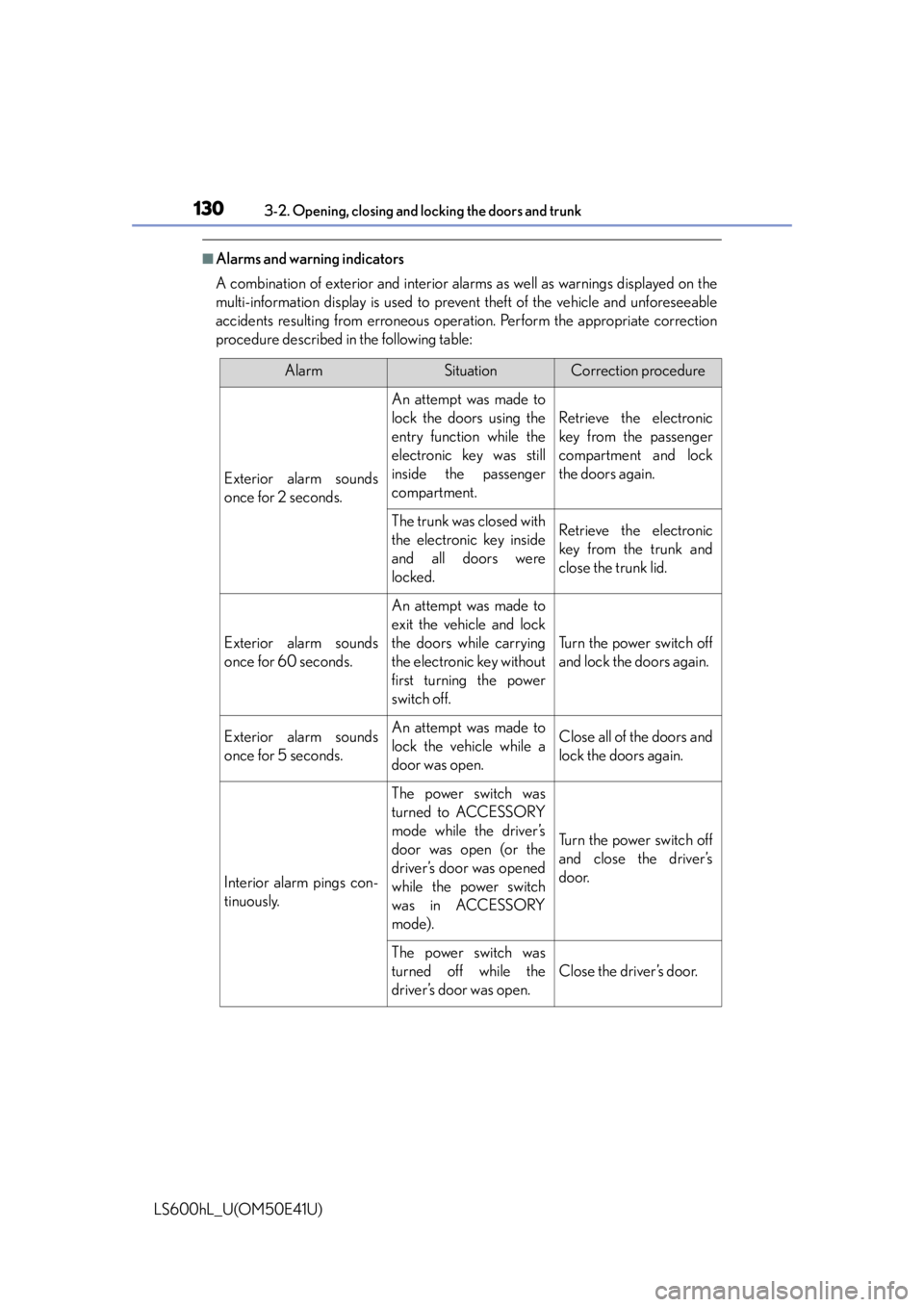
■Alarms and warning indicators
A combination of exterior and interior alar ms as well as warnings displayed on the
multi-information display is used to prev ent theft of the vehicle and unforeseeable
accidents resulting from erroneous operat ion. Perform the appropriate correction
procedure described in the following table:
AlarmSituationCorrection procedure
Exterior alarm sounds
once for 2 seconds.
An attempt was made to
lock the doors using the
entry function while the
electronic key was still
inside the passenger
compartment.
Retrieve the electronic
key from the passenger
compartment and lock
the doors again.
The trunk was closed with
the electronic key inside
and all doors were
locked.Retrieve the electronic
key from the trunk and
close the trunk lid.
Exterior alarm sounds
once for 60 seconds.
An attempt was made to
exit the vehicle and lock
the doors while carrying
the electronic key without
first turning the power
switch off.
Turn the power switch off
and lock the doors again.
Exterior alarm sounds
once for 5 seconds.An attempt was made to
lock the vehicle while a
door was open.Close all of the doors and
lock the doors again.
Interior alarm pings con-
tinuously.
The power switch was
turned to ACCESSORY
mode while the driver’s
door was open (or the
driver’s door was opened
while the power switch
was in ACCESSORY
mode).
Turn the power switch off
and close the driver’s
door.
The power switch was
turned off while the
driver’s door was open.
Close the driver’s door.
Page 133 of 620
1313-2. Opening, closing and locking the doors and trunk
3
Operation of each component
LS600hL_U(OM50E41U)
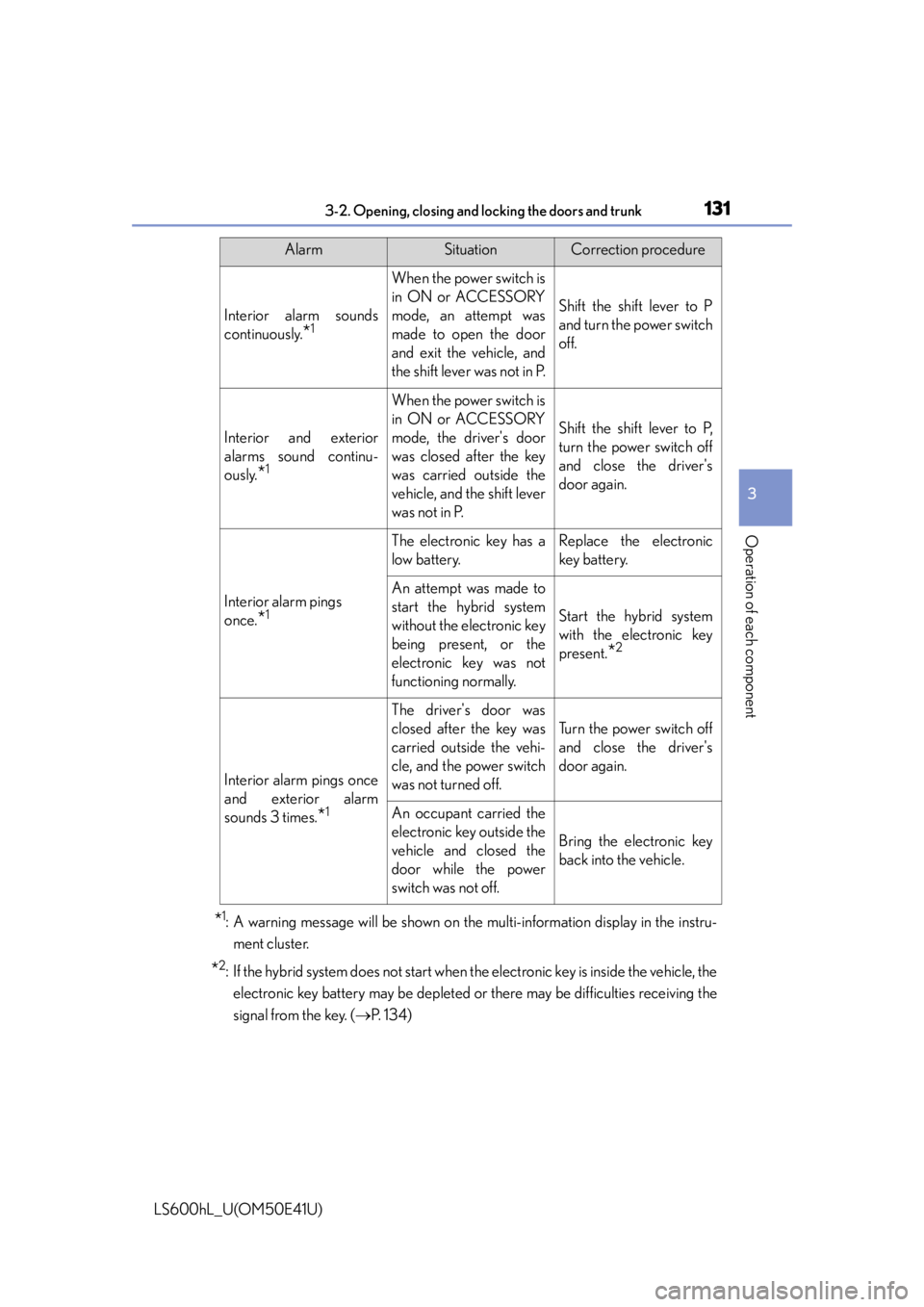
*1: A warning message will be shown on the multi-information display in the instru-
ment cluster.
*2: If the hybrid system does not start when the electronic key is inside the vehicle, the
electronic key battery may be depleted or there may be difficulties receiving the
signal from the key. ( P. 1 3 4 )
Interior alarm sounds
continuously.
*1
When the power switch is
in ON or ACCESSORY
mode, an attempt was
made to open the door
and exit the vehicle, and
the shift lever was not in P.
Shift the shift lever to P
and turn the power switch
off.
Interior and exterior
alarms sound continu-
ously.
*1
When the power switch is
in ON or ACCESSORY
mode, the driver's door
was closed after the key
was carried outside the
vehicle, and the shift lever
was not in P.
Shift the shift lever to P,
turn the power switch off
and close the driver's
door again.
Interior alarm pings
once.
*1
The electronic key has a
low battery.Replace the electronic
key battery.
An attempt was made to
start the hybrid system
without the electronic key
being present, or the
electronic key was not
functioning normally.
Start the hybrid system
with the electronic key
present.
*2
Interior alarm pings once
and exterior alarm
sounds 3 times.
*1
The driver's door was
closed after the key was
carried outside the vehi-
cle, and the power switch
was not turned off.
Turn the power switch off
and close the driver's
door again.
An occupant carried the
electronic key outside the
vehicle and closed the
door while the power
switch was not off.
Bring the electronic key
back into the vehicle.
AlarmSituationCorrection procedure