ESP LEXUS LS600H 2015 Owner's Manual
[x] Cancel search | Manufacturer: LEXUS, Model Year: 2015, Model line: LS600H, Model: LEXUS LS600H 2015Pages: 620, PDF Size: 7.66 MB
Page 201 of 620

1994-1. Before driving
4
Driving
LS600hL_U(OM50E41U)
Make sure that the parking brake is set and shift the shift lever to D.
Gently depress the accelerator pedal.
Release the parking brake.
■When starting off on a uphill
Hill-start assist control will operate. (P. 2 8 9 )
■Driving in the rain
●Drive carefully when it is raining, because visibility will be reduced, the windows
may become fogged-up, and the road will be slippery.
●Drive carefully when it starts to rain, because the road surface will be especially
slippery.
●Refrain from high speeds when driving on an expressway in the rain, because there
may be a layer of water between the tires and the road surface, preventing the
steering and brakes from operating properly.
■Breaking in your new Lexus
To extend the life of the vehicle, observing the following precautions is recom-
mended:
●For the first 186 miles (300 km):
Avoid sudden stops.
●For the first 621 miles (1000 km):
• Do not drive at extremely high speeds.
• Avoid sudden acceleration.
• Do not drive continuously in low gears.
• Do not drive at a constant speed for extended periods.
Starting off on a steep uphill
1
2
3
Page 203 of 620

2014-1. Before driving
4
Driving
LS600hL_U(OM50E41U)
CAUTION
Observe the following precautions.
Failure to do so may result in death or serious injury.
■When starting the vehicle
Always keep your foot on the brake pedal while stopped with the hybrid system
operating. This prevents the vehicle from creeping.
■When driving the vehicle
●Do not drive if you are unfamiliar with the location of the brake and accelerator
pedals to avoid depressing the wrong pedal.
• Accidentally depressing the accelerator pedal instead of the brake pedal will
result in sudden acceleration that may lead to an accident.
• When backing up, you may twist your body around, leading to a difficulty in operating the pedals. Make sure to operate the pedals properly.
• Make sure to keep a correct driving posture even when moving the vehicle only slightly. This allows you to depres s the brake and accelerator pedals prop-
erly.
• Depress the brake pedal using your right foot. Depressing the brake pedal using your left foot may delay response in an emergency, resulting in an acci-
dent.
●When the hybrid vehicle is driven using the electric motor only, no engine noise is
made. As such, pedestrians, people riding bicycles or other people and vehicles
in the surrounding area may not realize that the vehicle is approaching. Even with
the Vehicle Proximity Notification System active, people may not realize the vehi-
cle is approaching when the surrounding area is noisy and so forth. Therefore,
take extra care while driving.
●Do not drive the vehicle over or stop the vehicle near flammable materials.
The exhaust system and exhaust gases can be extremely hot. These hot parts may
cause a fire if there is any flammable material nearby.
Page 226 of 620
2244-2. Driving procedures
LS600hL_U(OM50E41U)
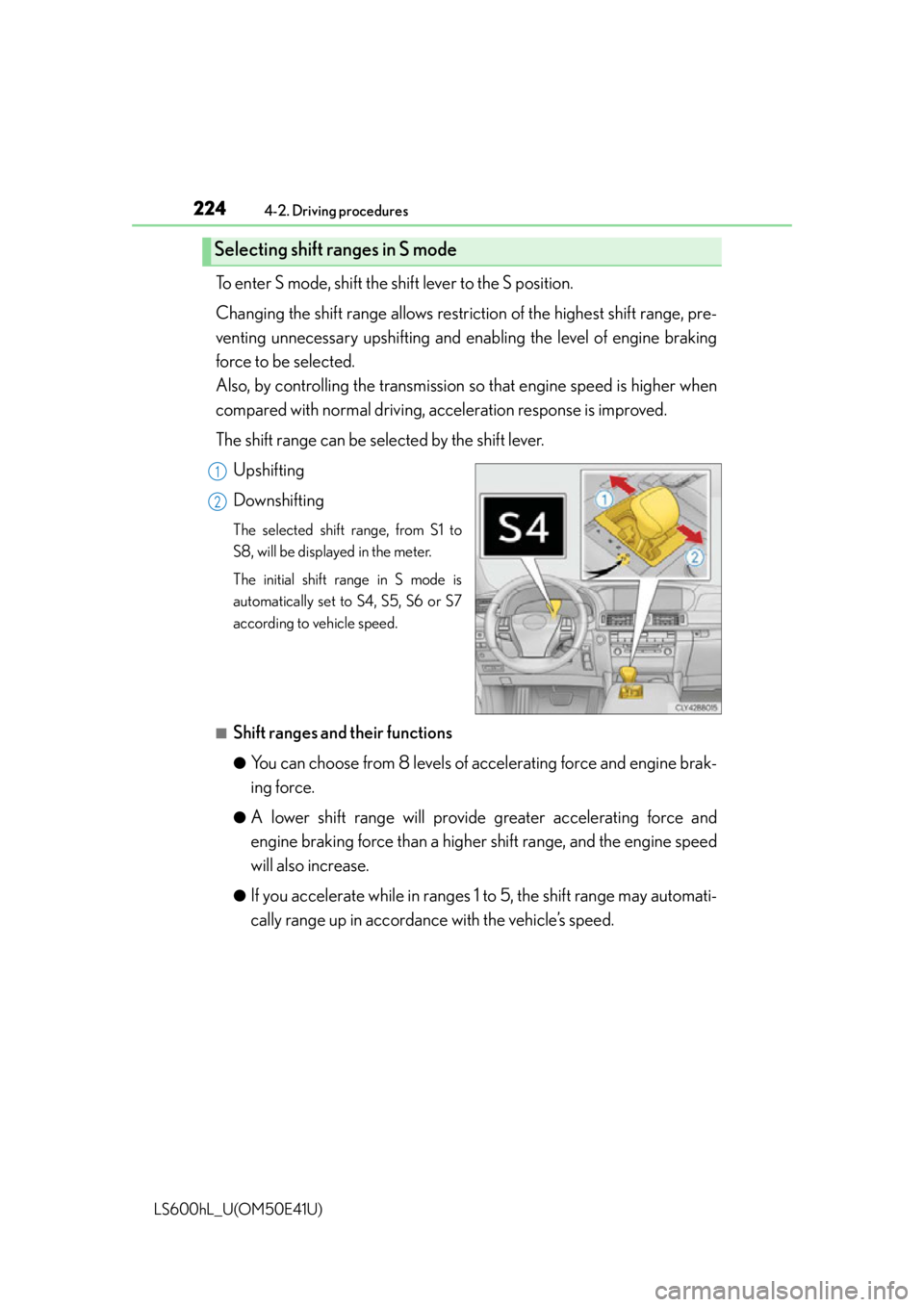
To enter S mode, shift the shift lever to the S position.
Changing the shift range allows restriction of the highest shift range, pre-
venting unnecessary upshifting and enabling the level of engine braking
force to be selected.
Also, by controlling the transmission so that engine speed is higher when
compared with normal driving, acceleration response is improved.
The shift range can be selected by the shift lever.
Upshifting
Downshifting
The selected shift range, from S1 to
S8, will be displayed in the meter.
The initial shift range in S mode is
automatically set to S4, S5, S6 or S7
according to vehicle speed.
■Shift ranges and their functions
●You can choose from 8 levels of accelerating force and engine brak-
ing force.
●A lower shift range will provid e greater accelerating force and
engine braking force than a higher shift range, and the engine speed
will also increase.
●If you accelerate while in ranges 1 to 5, the shift range may automati-
cally range up in accordance with the vehicle’s speed.
Selecting shift ranges in S mode
1
2
Page 262 of 620
2604-5. Using the driving support systems
LS600hL_U(OM50E41U)
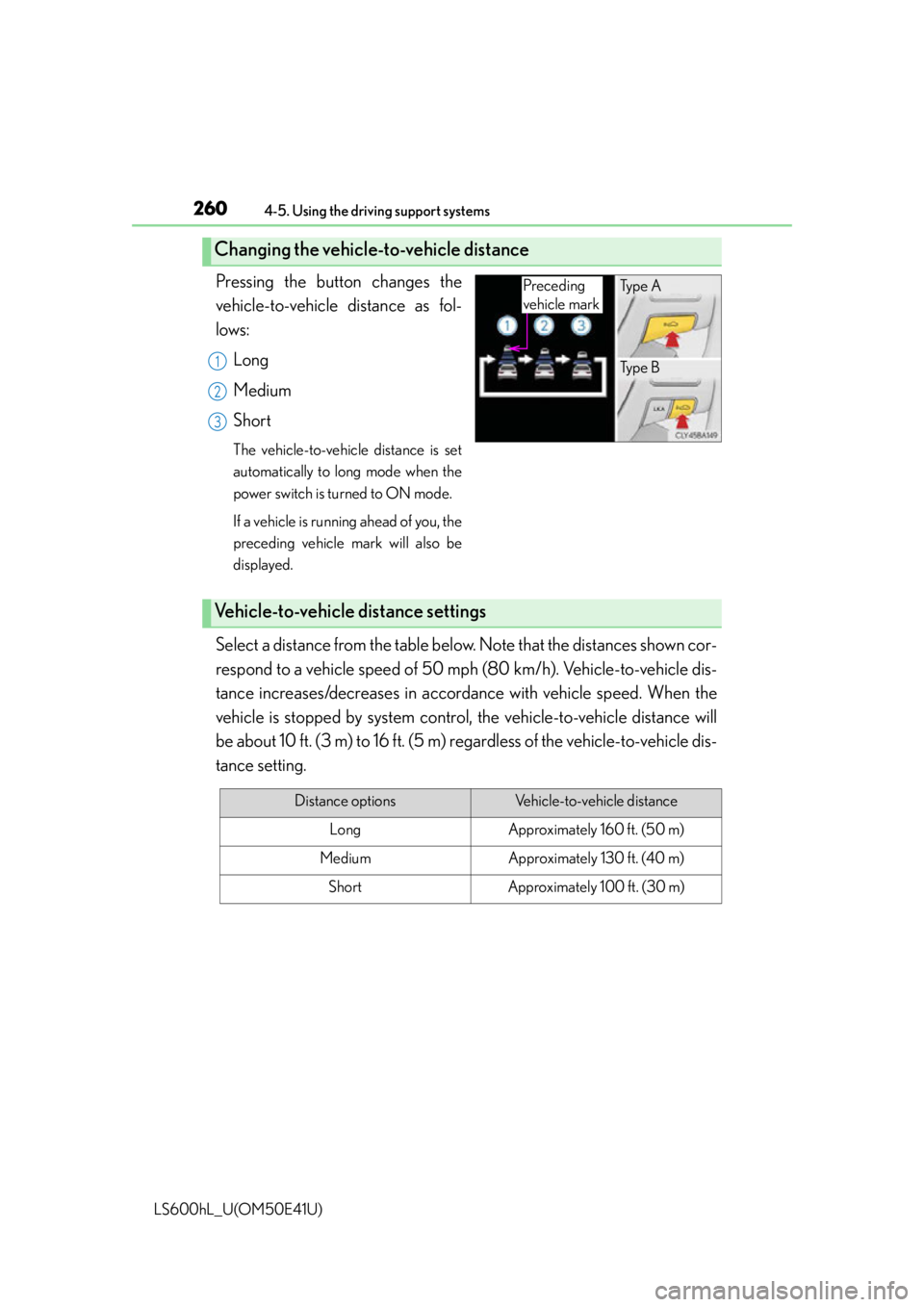
Pressing the button changes the
vehicle-to-vehicle distance as fol-
lows:Long
Medium
Short
The vehicle-to-vehicle distance is set
automatically to lo ng mode when the
power switch is turned to ON mode.
If a vehicle is running ahead of you, the
preceding vehicle mark will also be
displayed.
Select a distance from the table belo w. Note that the distances shown cor-
respond to a vehicle speed of 50 mph (80 km/h). Vehicle-to-vehicle dis-
tance increases/decreases in accordan ce with vehicle speed. When the
vehicle is stopped by system control, the vehicle-to-vehicle distance will
be about 10 ft. (3 m) to 16 ft. (5 m) re gardless of the vehicle-to-vehicle dis-
tance setting.
Changing the vehicle- to-vehicle distance
Preceding
vehicle markTy p e A
Ty p e B
1
2
3
Vehicle-to-vehicle distance settings
Distance optionsVehicle-to-vehicle distance
LongApproximately 160 ft. (50 m)
MediumApproximately 130 ft. (40 m)
ShortApproximately 100 ft. (30 m)
Page 265 of 620
2634-5. Using the driving support systems
4
Driving
LS600hL_U(OM50E41U)
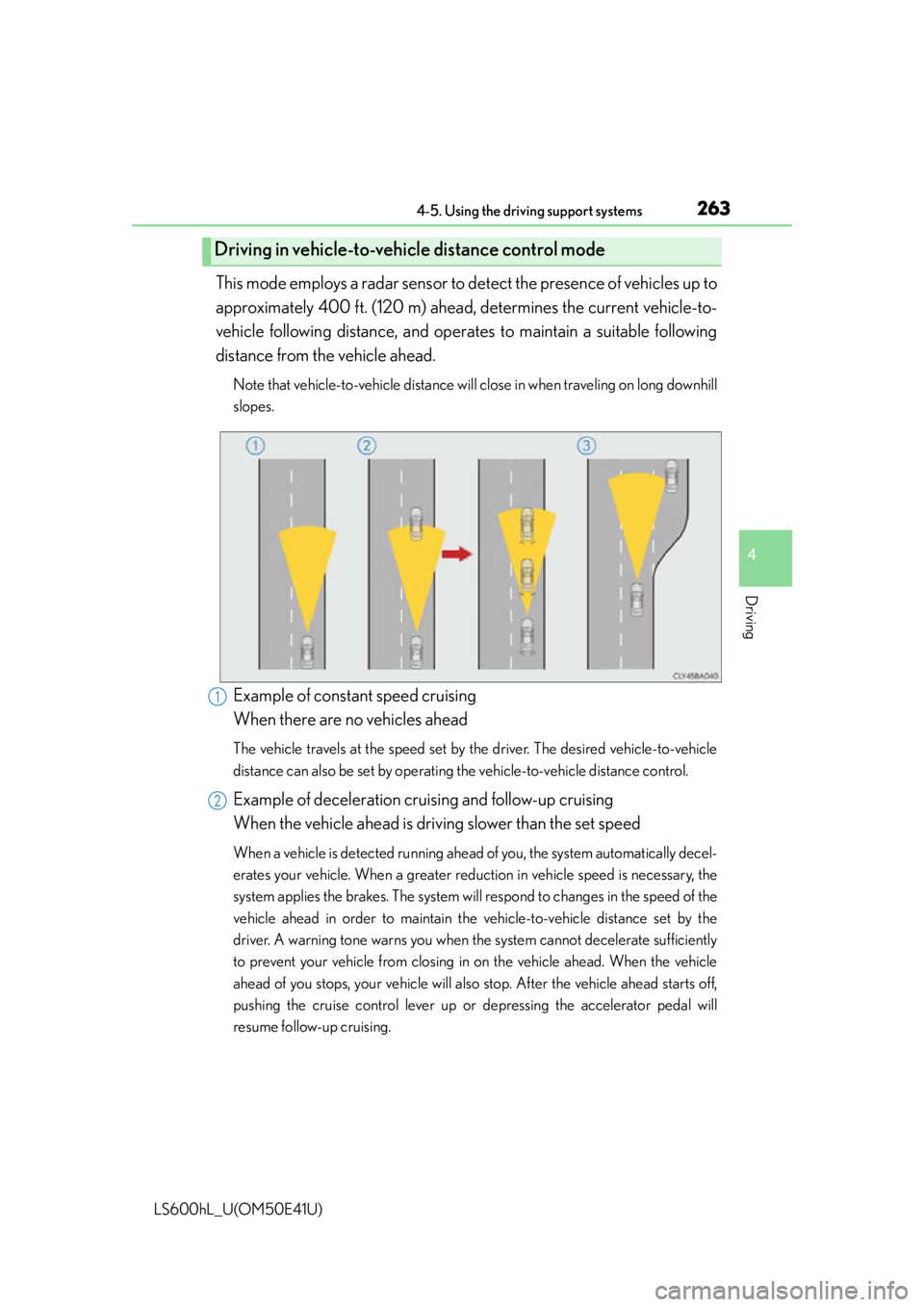
This mode employs a radar sensor to detect the presence of vehicles up to
approximately 400 ft. (120 m) ahead, determines the current vehicle-to-
vehicle following distance, and opera tes to maintain a suitable following
distance from the vehicle ahead.
Note that vehicle-to-vehicle distance will close in when traveling on long downhill
slopes.
Example of constant speed cruising
When there are no vehicles ahead
The vehicle travels at the speed set by the driver. The desired vehicle-to-vehicle
distance can also be set by operating the vehicle-to-vehicle distance control.
Example of deceleration cruising and follow-up cruising
When the vehicle ahead is driving slower than the set speed
When a vehicle is detected running ahead of you, the system automatically decel-
erates your vehicle. When a greater reduction in vehicle speed is necessary, the
system applies the brakes. The system will respond to changes in the speed of the
vehicle ahead in order to maintain the vehicle-to-vehicle distance set by the
driver. A warning tone warns you when the system cannot decelerate sufficiently
to prevent your vehicle from closing in on the vehicle ahead. When the vehicle
ahead of you stops, your vehicle will also stop. After the vehicle ahead starts off,
pushing the cruise control lever up or depressing the accelerator pedal will
resume follow-up cruising.
Driving in vehicle-to-vehicle distance control mode
1
2
Page 270 of 620

2684-5. Using the driving support systems
LS600hL_U(OM50E41U)
■Certification for the dynamic radar cruise control with full-speed range
For vehicles sold in the U.S.A.
FCC ID: HYQDNMWR004
This device complies with part 15 of the FCC Rules. Operation is subject to the fol-
lowing two conditions: (1) This device may not cause harmful interference, and (2)
this device must accept any interference received, including interference that may
cause undesired operation.
FCC WARNING
Changes or modifications not expressly ap proved by the party responsible for com-
pliance could void the user’s authority to operate the equipment.
Radiofrequency radiation exposure Information:
This equipment complies with FCC radiation exposure limits set forth for an uncon-
trolled environment.
This equipment should be in stalled and operated with minimum distance of 20 cm
between the radiator (a ntenna) and your body.
This transmitter must not be co-located or operating in conjunction with any other
antenna or transmitter.
For vehicles sold in Canada
This device complies with Industry Canada licence-exempt RSS standard(s).
Operation is subject to the following two conditions: (1) this device may not cause
interference, and (2) this device must acc ept any interference, including interfer-
ence that may cause undesired operation of the device.
Page 273 of 620

2714-5. Using the driving support systems
4
Driving
LS600hL_U(OM50E41U)
CAUTION
■When the sensor may not be correctly detecting a vehicle ahead
Apply the brakes as necessary when any of the following types of vehicles are in
front of you.
As the sensor may not be able to correctly detect these types of vehicles, the
approach warning ( P. 264) will not be activated, and a fatal or serious accident
may result.
●Vehicles traveling at low speeds
●Vehicles that are stationary
●Motorcycles traveling in the same lane
●Vehicles with small rear ends (trailers with no load on board etc.)
●Vehicles that cut in suddenly
Details about other people/objects the system will not detect:
P. 2 6 9
■Conditions under which the vehicle-to-veh icle distance control may not function
correctly
Apply the brakes as necessary in the following conditions as the radar sensor may
not be able to correctly detect vehicles ahead, and a fatal or serious accident may
result:
●When water or snow splashed by the su rrounding vehicles hinders the function-
ing of the sensor
●When your vehicle is tilted upwards (due to a heavy load in the trunk etc.)
●When the road curves or when the lanes are narrow
●When steering wheel operation or your position in the lane is unstable
●When the vehicle ahead decelerates suddenly as the system is not able to
respond to sudden braking.
Details about limitations:
P. 2 6 9
Details about unsuitable conditions:
P. 2 7 0
Page 282 of 620

2804-5. Using the driving support systems
LS600hL_U(OM50E41U)
●When driving on a road surface that is wet due to rain, previous rainfall, standing
water, etc.
●When the vehicle experiences strong up-and-down motion such as when driving
on an extremely rough road or on a seam in the pavement
●When headlight brightness at nighttime is reduced due to dirt on the lenses, or
when the headlights are misaligned
●When driving with a strong crosswind
●When driving on winding roads or roads that are uneven
●When driving on rough or unpaved roads
■When changing the tires
Depending on the tires used, sufficient performance may not be maintainable.
■Warning messages for LKA
Warning messages are used to indicate a system malfunction or to inform the driver
of the need for caution while driving. ( P. 5 0 3 )
CAUTION
■Before using the LKA system
Do not rely solely on the LKA system. The LKA system does not drive the vehicle
automatically, nor does it reduce the amount of care you need to take. As such, the
driver must always assume full responsi bility for understanding his/her surround-
ings, for operating the steering wheel to correct the driving line, and for driving
safely.
Inappropriate or negligent driving could lead to an accident.
■To avoid operating the LKA by mistake
Switch the LKA off using the LKA switch when not in use.
Page 287 of 620
2854-5. Using the driving support systems
4
Driving
LS600hL_U(OM50E41U)
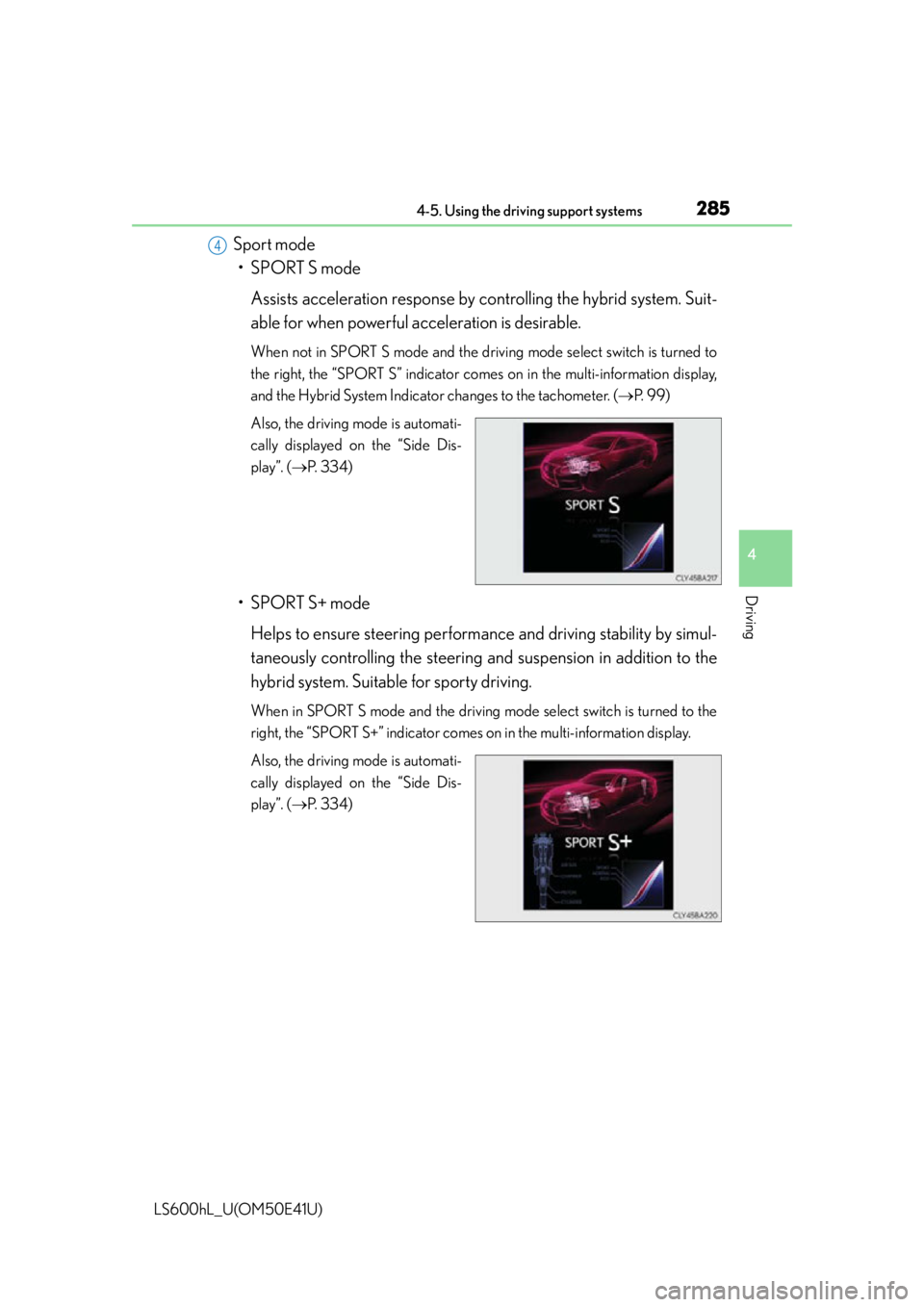
Sport mode• SPORT S mode
Assists acceleration response by controlling the hybrid system. Suit-
able for when powerful acceleration is desirable.
When not in SPORT S mode and the driving mode select switch is turned to
the right, the “SPORT S” indicator comes on in the multi-information display,
and the Hybrid System Indicator changes to the tachometer. (P. 9 9 )
Also, the driving mode is automati-
cally displayed on the “Side Dis-
play”. ( P. 3 3 4 )
• SPORT S+ mode
Helps to ensure steering performa nce and driving stability by simul-
taneously controlling the steering an d suspension in addition to the
hybrid system. Suitable for sporty driving.
When in SPORT S mode and the driving mode select switch is turned to the
right, the “SPORT S+” indicator comes on in the multi-information display.
Also, the driving mode is automati-
cally displayed on the “Side Dis-
play”. (P. 3 3 4 )
4
Page 291 of 620
2894-5. Using the driving support systems
4
Driving
LS600hL_U(OM50E41U)
◆ABS (Anti-lock Brake System)
Helps to prevent wheel lock when the brakes are applied suddenly, or if
the brakes are applied while dri ving on a slippery road surface
◆Brake assist
Generates an increased level of br aking force after the brake pedal is
depressed when the system detects a panic stop situation
◆VSC (Vehicle Stability Control)
Helps the driver to control skidding when swerving suddenly or turning
on slippery road surfaces
◆TRAC (Traction Control)
Helps to maintain drive power and prevent the drive wheels from spin-
ning when starting the vehicle or accelerating on slippery roads
◆Hill-start assist control
Helps to prevent the vehicle from ro lling backward when starting on an
incline or slippery slope
◆VGRS (Variable Gear Ratio Steering)
Adjusts the wheel turning angle in accordance with the vehicle speed
and steering wheel movement
Driving assist systems
To help enhance driving safety an d performance, the following systems
operate automatically in response to various driving situations. Be
aware, however, that these systems are supplementary and should not
be relied upon too heavily when operating the vehicle.