key LEXUS LS600H 2015 Owner's Manual
[x] Cancel search | Manufacturer: LEXUS, Model Year: 2015, Model line: LS600H, Model: LEXUS LS600H 2015Pages: 620, PDF Size: 7.66 MB
Page 136 of 620

1343-2. Opening, closing and locking the doors and trunk
LS600hL_U(OM50E41U)
■Conditions affecting operation
The smart access system with push-button start uses weak radio waves. In the follow-
ing situations, the communication between the electronic key and the vehicle may be
affected, preventing the smar t access system with push-button start, wireless remote
control and immobilizer system from operating properly. (Ways of coping: P. 5 2 4 )
●When the electronic ke y battery is depleted
●Near a TV tower, electric power plant, gas station, radio station, large display, air-
port or other facility that generates strong radio waves or electrical noise
●When carrying a portable radio, cellular phone, cordless phone or other wireless
communication device
●When the electronic key is in contact with, or is covered by the following metallic
objects
• Cards to which aluminum foil is attached
• Cigarette boxes that have aluminum foil inside
• Metallic wallets or bags
•Coins
• Hand warmers made of metal
• Media such as CDs and DVDs
●When multiple electronic keys are in the vicinity
●When other wireless keys (that emit radio waves) are being used nearby
●When carrying the electronic key togeth er with the following devices that emit
radio waves
• Another vehicle’s electronic key or a wireless key that emits radio waves
• Personal computers or person al digital assistants (PDAs)
• Digital audio players
• Portable game systems
●If window tint with a metallic content or metallic objects are attached to the rear
window
Page 137 of 620

1353-2. Opening, closing and locking the doors and trunk
3
Operation of each component
LS600hL_U(OM50E41U)
■Note for the entry function
●Even when the electronic key is within the effective range (detection areas), the
system may not operate properly in the following cases:
• The electronic key is too close to the window or outside door handle, near the
ground, or in a high place when the doors are locked or unlocked.
• The electronic key is near the ground or in a high place, or too close to the rear bumper center when the trunk is opened.
• The electronic key is on the instrument pa nel, rear package tray or floor, or in the
door pockets or glove box when the hybrid system is started or power switch
modes are changed.
●Do not leave the electronic key on top of the instrument panel or near the door
pockets when exiting the vehicle. Depending on the radio wave reception condi-
tions, it may be detected by the ante nna outside the cabin and the door will
become lockable from the outside, possibly trapping the electronic key inside the
vehicle.
●As long as the electronic key is within the effective range, the doors may be locked
or unlocked by anyone. However, only th e doors detecting the electronic key can
be used to unlock the vehicle.
●Even if the electronic key is not inside the vehicle, it may be possible to start the
hybrid system if the electronic key is near the window.
●The doors may unlock if a large amount of water splashes on the door handle, such
as in the rain or in a car wash when the electronic key is within the effective range.
(The doors will automatically be locked after approximately 60 seconds if the
doors are not opened and closed.)
●Gripping the door handle when wearing a glove may not unlock the door.
●If the wireless remote control is used to lock the doors when the electronic key is
near the vehicle, there is a possibility that the door may not be unlocked by the
entry function. (Use the wireless re mote control to unlock the doors.)
●A sudden approach to the effective rang e or door handle may prevent the doors
from being unlocked. In this case, return the door handle to the original position
and check that the doors unlock befo re pulling the door handle again.
Page 138 of 620

1363-2. Opening, closing and locking the doors and trunk
LS600hL_U(OM50E41U)
■When the vehicle is not driven for extended periods
To prevent theft of the vehicle, do not leave the electronic key within 6 ft. (2 m) of the
vehicle.
■Alarm
Using the smart access system with push-but ton start to lock the doors will set the
alarm system. ( P. 9 0 )
■To operate the system properly
●Make sure to carry the electronic key wh en operating the system. Do not get the
electronic key too close to the vehicle wh en operating the system from the outside
of the vehicle.
Depending on the position and holding co ndition of the electronic key, the key
may not be detected correctly and the system may not operate properly. (The
alarm may go off accidentally, or the door lock prevention function may not oper-
ate.)
●Do not leave the electronic key inside the trunk.
The key confinement prevention function may not operate, depending on the loca-
tion of the key (close to a spare tire, the in side edge of the trunk), conditions (inside
a metal bag, close to metallic objects) and the radio waves in the surrounding area.
( P. 151)
■If the smart access system with push-button start does not operate properly
●Locking and unlocking the doors and trunk: Use the mechanical key. ( P. 5 2 4 )
●Starting the hybrid system: P. 5 2 6
Page 139 of 620

1373-2. Opening, closing and locking the doors and trunk
3
Operation of each component
LS600hL_U(OM50E41U)
■Electronic key battery depletion
●The standard battery life is 1 to 2 years. (The card key battery life is about a year and
a half.)
●If the battery is low, an alarm will sound in the cabin when the hybrid system is
started or stopped. ( P. 1 3 0 )
●The battery becomes depleted even if the electronic key is not used because the
key always receives radio waves. If the smart access system with push-button start
or the wireless remote control does not operate, or the detection area becomes
smaller, the battery may be depleted. Replace the battery when necessary.
( P. 4 7 2 )
●To avoid serious deterioration, do not leave the electronic key within 3 ft. (1 m) of
the following electrical appliances that produce a magnetic field:
•TVs
•Personal computers
• Cellular phones, cordless phones and battery chargers
• Recharging cellular phones or cordless phones
•Table lamps
• Induction cookers
■When the electronic key battery is fully depleted
P. 4 7 2
■Customization
Settings (e. g. smart access system with push-button start) can be changed.
(Customizable features P. 5 6 4 )
Page 144 of 620
1423-2. Opening, closing and locking the doors and trunk
LS600hL_U(OM50E41U)
■Operation signals
Doors:
A buzzer sounds and the emergency flashe rs flash to indicate that the doors have
been locked/unlocked. (Locked: once; Unlocked: twice)
Tr u n k :
A buzzer sounds to indicate that the trunk has been opened.
Windows and moon roof:
A buzzer sounds to indicate that the windows and moon roof are operating.
■Welcome light illumination control
P. 1 2 6
■Door lock buzzer
If an attempt to lock the doors is made when a door is not fully closed, a buzzer
sounds continuously for 5 se conds. Fully close the door to stop the buzzer, and lock
the vehicle once more.
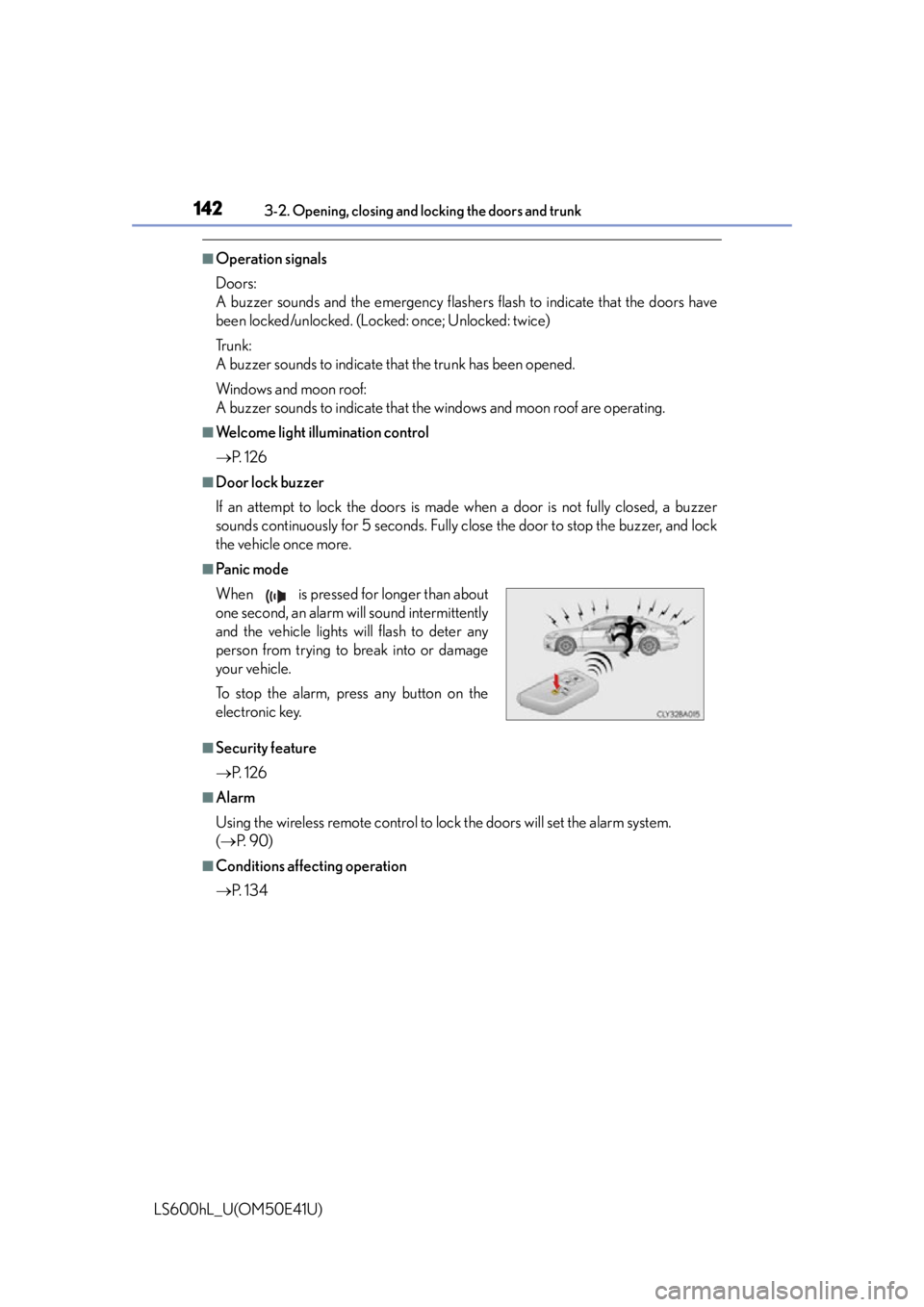
■Pa n i c m o d e
■Security feature
P. 1 2 6
■Alarm
Using the wireless remote control to lo ck the doors will set the alarm system.
( P. 9 0 )
■Conditions affecting operation
P. 1 3 4
When is pressed for longer than about
one second, an alarm will sound intermittently
and the vehicle lights will flash to deter any
person from trying to break into or damage
your vehicle.
To stop the alarm, press any button on the
electronic key.
Page 145 of 620

1433-2. Opening, closing and locking the doors and trunk
3
Operation of each component
LS600hL_U(OM50E41U)
■If the wireless remote control does not operate properly
Locking and unlocking the doors and trunk: Use the mechanical key. (P. 5 2 4 )
■Electronic key battery depletion
P. 1 3 7
■When the electronic key battery is fully depleted
P. 4 7 2
■Customization
Settings (e.g. wireless remote control system) can be changed.
(Customizable features P. 5 6 4 )
■Certification for wireless remote control
For vehicles sold in Hawaii, Guam and Puerto Rico
FCC ID: NI4TMRF-002
FCC ID: HYQ14ACX
FCC ID: HYQ14AEB
NOTE:
This device complies with part 15 of the FCC Rules. Operation is subject to the fol-
lowing two conditions: (1) This device may not cause harmful interference, and (2)
this device must accept any interference received, including interference that may
cause undesire d operation.
FCC WARNING:
Changes or modifications not expressly ap proved by the party responsible for com-
pliance could void the user’s authority to operate the equipment.
Page 148 of 620
1463-2. Opening, closing and locking the doors and trunk
LS600hL_U(OM50E41U)
Move the inside lock button to the lock position.
Close the door.
The door cannot be locked if the power switch is in ACCESSORY or ON
mode, or the electronic ke y is left inside the vehicle.
The key may not be detected correc tly and the door may be locked.
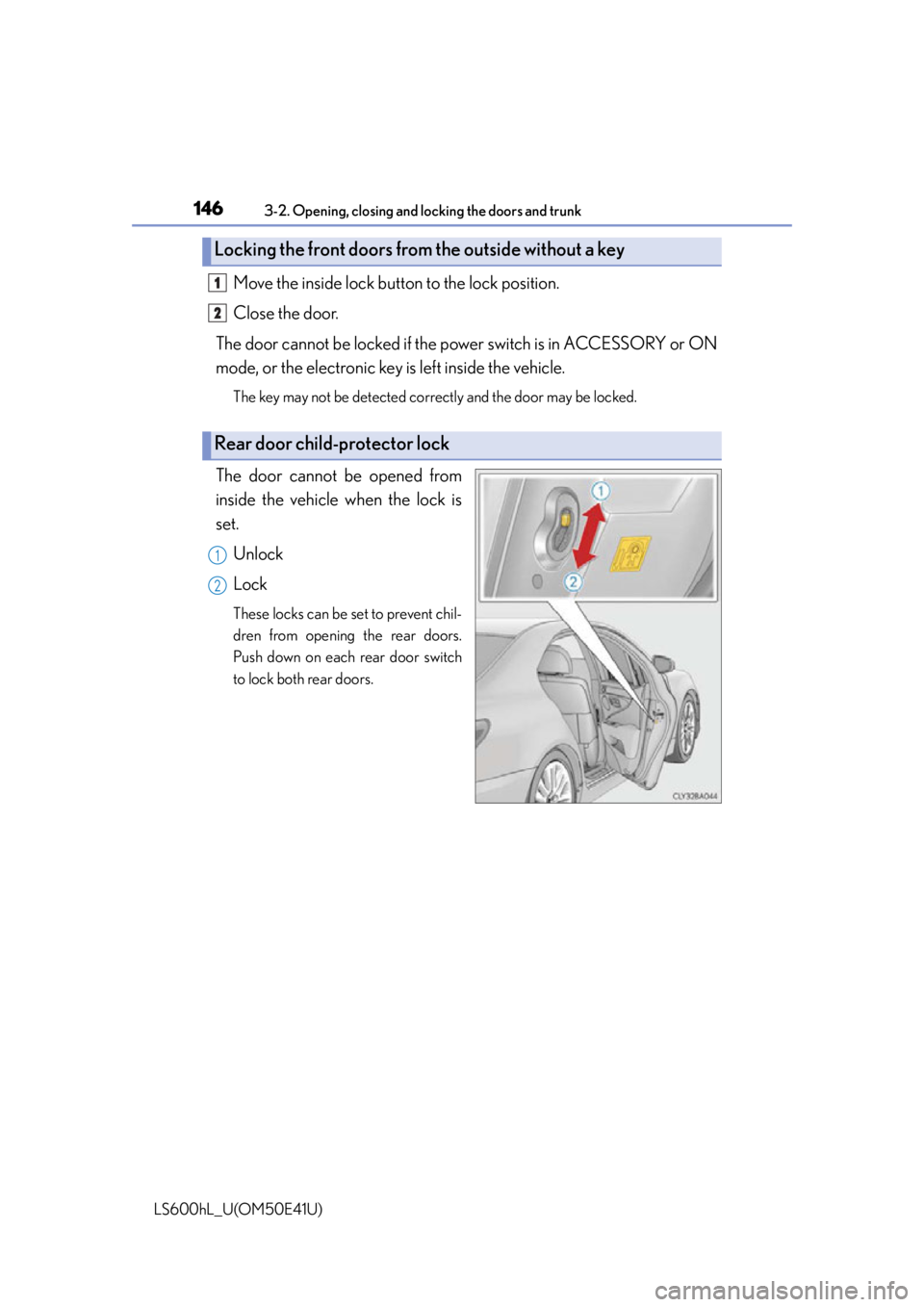
The door cannot be opened from
inside the vehicle when the lock is
set.
Unlock
Lock
These locks can be set to prevent chil-
dren from opening the rear doors.
Push down on each rear door switch
to lock both rear doors.
Locking the front doors from the outside without a key
Rear door child-protector lock
1
2
1
2
Page 149 of 620
1473-2. Opening, closing and locking the doors and trunk
3
Operation of each component
LS600hL_U(OM50E41U)
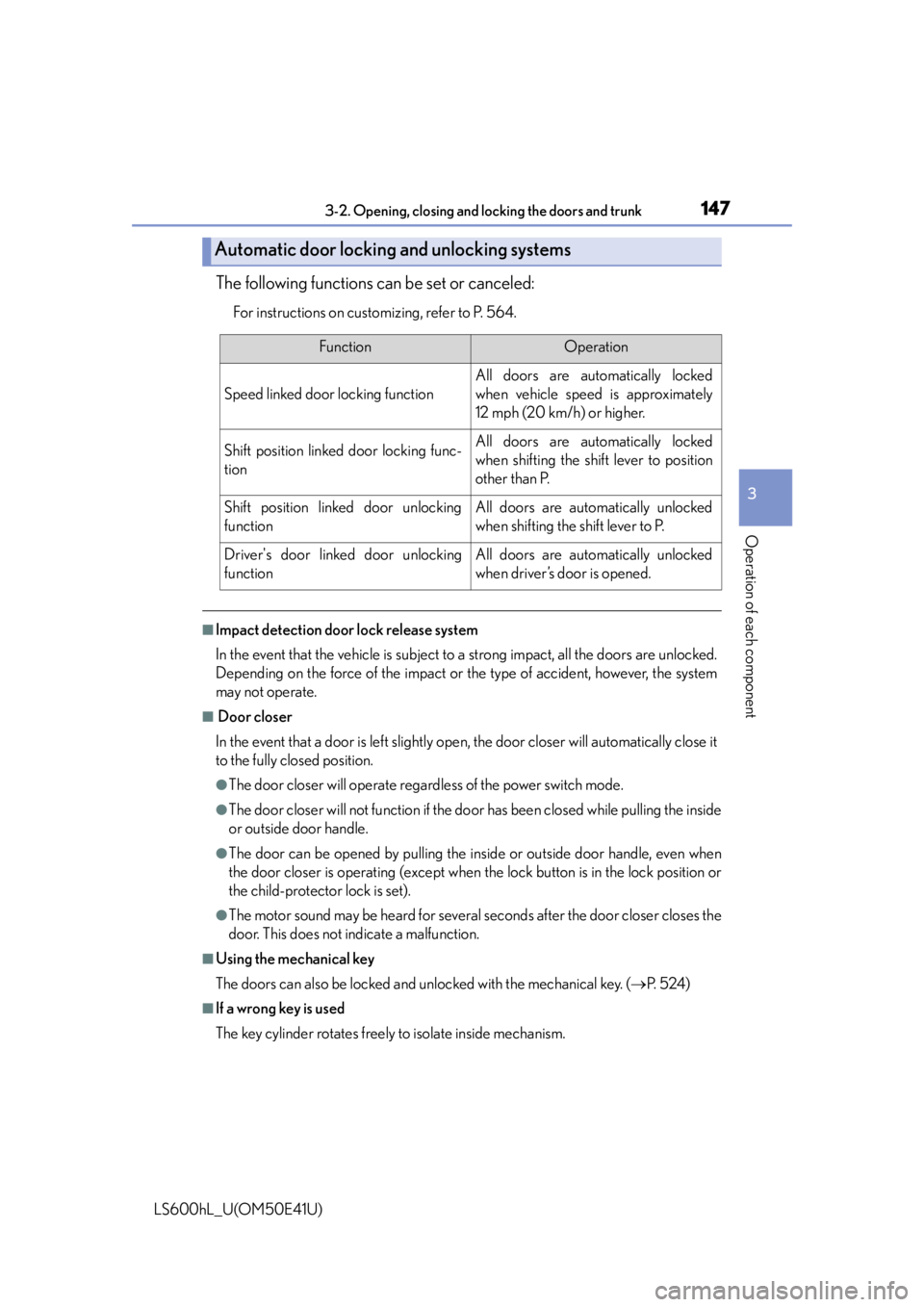
The following functions can be set or canceled:
For instructions on customizing, refer to P. 564.
■Impact detection door lock release system
In the event that the vehicle is subject to a strong impact, all the doors are unlocked.
Depending on the force of the impact or the type of accident, however, the system
may not operate.
■ Door closer
In the event that a door is left slightly open, the door closer will automatically close it
to the fully closed position.
●The door closer will operate regardless of the power switch mode.
●The door closer will not function if the do or has been closed while pulling the inside
or outside door handle.
●The door can be opened by pulling the in side or outside door handle, even when
the door closer is operating (except when the lock button is in the lock position or
the child-protector lock is set).
●The motor sound may be heard for several se conds after the door closer closes the
door. This does not indicate a malfunction.
■Using the mechanical key
The doors can also be locked and unlocked with the mechanical key. ( P. 5 2 4 )
■If a wrong key is used
The key cylinder rotates freely to isolate inside mechanism.
Automatic door locking and unlocking systems
FunctionOperation
Speed linked door locking function
All doors are automatically locked
when vehicle speed is approximately
12 mph (20 km/h) or higher.
Shift position linked door locking func-
tionAll doors are automatically locked
when shifting the shift lever to position
other than P.
Shift position linked door unlocking
functionAll doors are automatically unlocked
when shifting the shift lever to P.
Driver's door linked door unlocking
functionAll doors are automatically unlocked
when driver’s door is opened.
Page 150 of 620
1483-2. Opening, closing and locking the doors and trunk
LS600hL_U(OM50E41U)
■Customization
Settings (e.g. unlocking function using a key) can be changed.
(Customizable features P. 5 6 4 )
CAUTION
■To prevent an accident
Observe the following precautions while driving the vehicle.
Failure to do so may result in a door opening and an occupant throwing out of the
vehicle, resulting in death or serious injury.
●Ensure that all doors are properly closed and locked.
●Do not pull the inside handle of the doors while driving.
Be especially careful for the front doors, as the doors may be opened even if the
inside lock buttons are in locked position.
●Set the rear door child-protector locks when children are seated in the rear seats.
■Door closer
In the event that a door is left slightly open, the door closer will automatically close
it to the fully closed position.
If the child-protector lock is set, the door closer will not stop during operation even
if an attempt is made to open the door from inside the vehicle. Be careful not to
catch fingers or anything else in the door . Failure to do so may result in serious
injury.
NOTICE
■ To prevent door closer malfunction
Do not frequently repeat opening and closing of doors, or apply excessive force to
a door while the door closer is operating.
Page 153 of 620
1513-2. Opening, closing and locking the doors and trunk
3
Operation of each component
LS600hL_U(OM50E41U)
■Trunk lid light/trunk light
The trunk lid light/trunk light turns on when the trunk is opened.
■Trunk easy closer
In the event that the trunk lid is left slightly open, the trunk easy closer will automati-
cally close it to the fully closed position.
■Function to prevent the trunk being locked with the electronic key inside (when all
the doors are locked)
Closing the trunk lid with the electronic key left inside the trunk will sound an alarm.
In this case, the trunk lid can be opened by pressing the button on the trunk lid.
■Overload protection function
The trunk lid will not operate when excessiv e load is present on the top of the trunk
lid.
■Fall-down protection function
While the trunk lid is opening automatically, applying excessive force to it will stop
the opening operation to prevent the trunk lid from rapidly falling down.
■Jam protection function
While the trunk lid is closing automatically, the trunk lid will stop closing and open if
something gets caught.
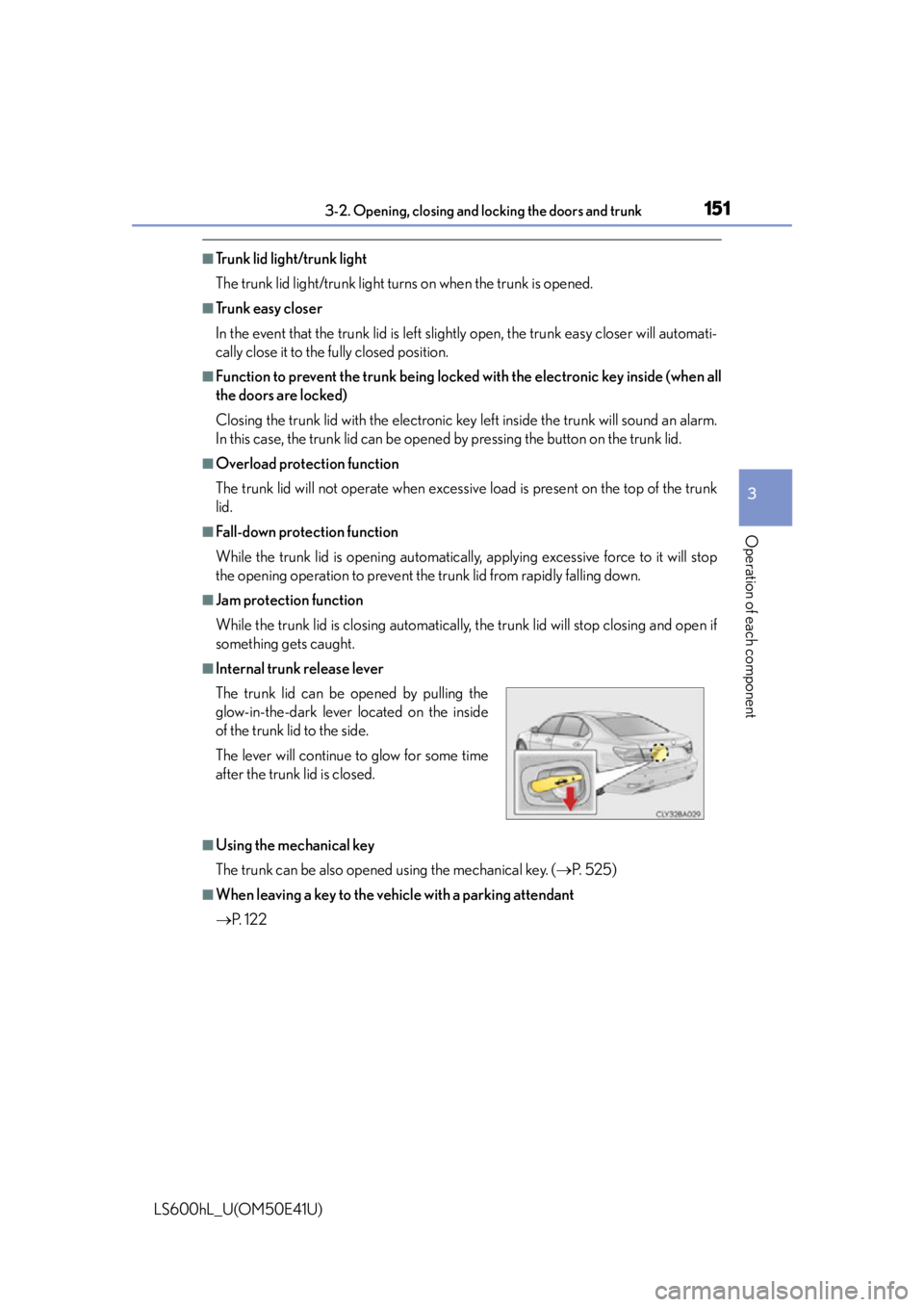
■Internal trunk release lever
■Using the mechanical key
The trunk can be also opened using the mechanical key. ( P. 525)
■When leaving a key to the vehicle with a parking attendant
P. 1 2 2
The trunk lid can be opened by pulling the
glow-in-the-dark lever located on the inside
of the trunk lid to the side.
The lever will continue
to glow for some time
after the trunk lid is closed.