key LEXUS LS600H 2015 Workshop Manual
[x] Cancel search | Manufacturer: LEXUS, Model Year: 2015, Model line: LS600H, Model: LEXUS LS600H 2015Pages: 620, PDF Size: 7.66 MB
Page 527 of 620
5257-2. Steps to take in an emergency
7
When trouble arises
LS600hL_U(OM50E41U)
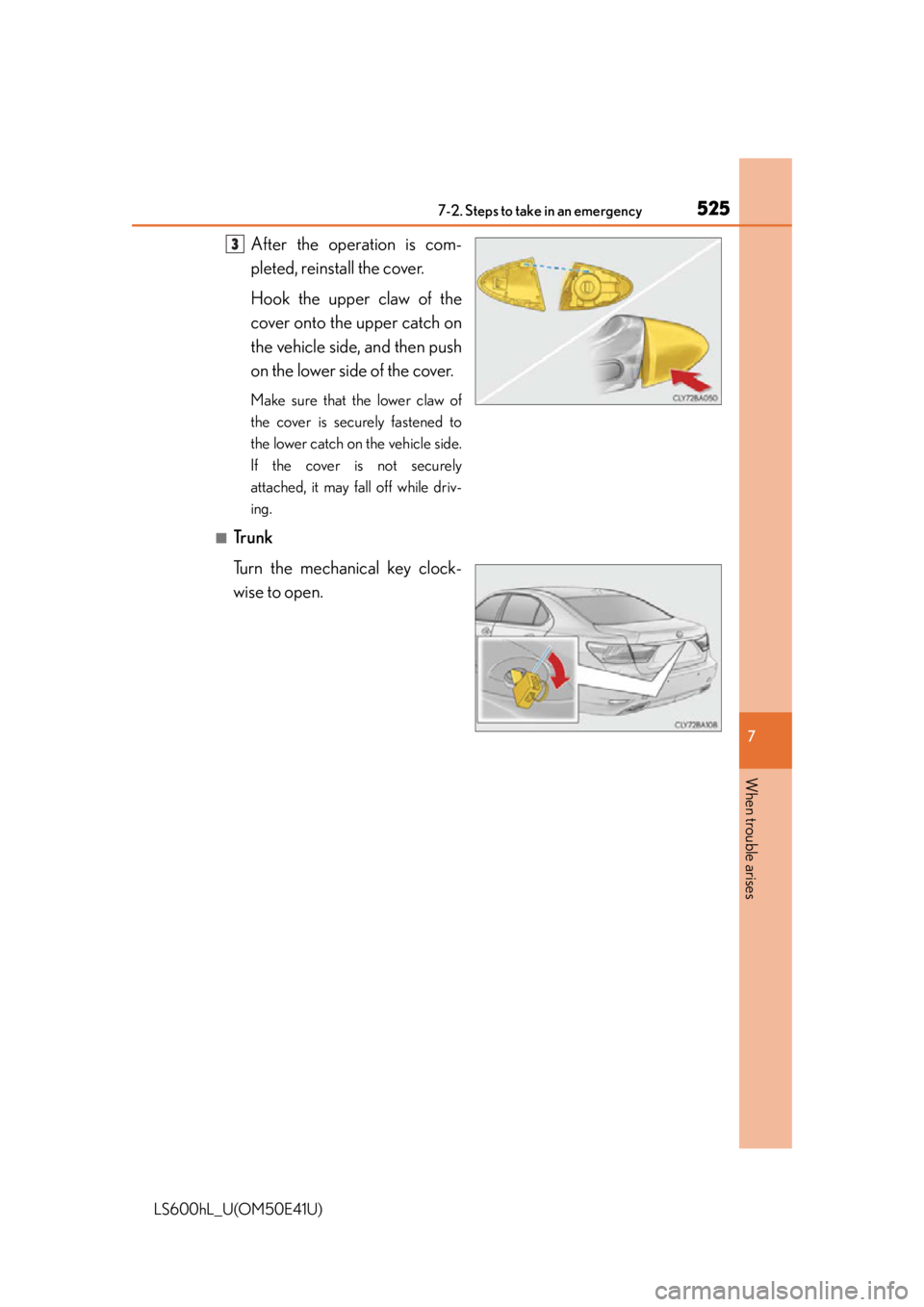
After the operation is com-
pleted, reinstall the cover.
Hook the upper claw of the
cover onto the upper catch on
the vehicle side, and then push
on the lower side of the cover.
Make sure that the lower claw of
the cover is securely fastened to
the lower catch on the vehicle side.
If the cover is not securely
attached, it may fall off while driv-
ing.
■Trunk
Turn the mechanical key clock-
wise to open.
3
Page 528 of 620
5267-2. Steps to take in an emergency
LS600hL_U(OM50E41U)
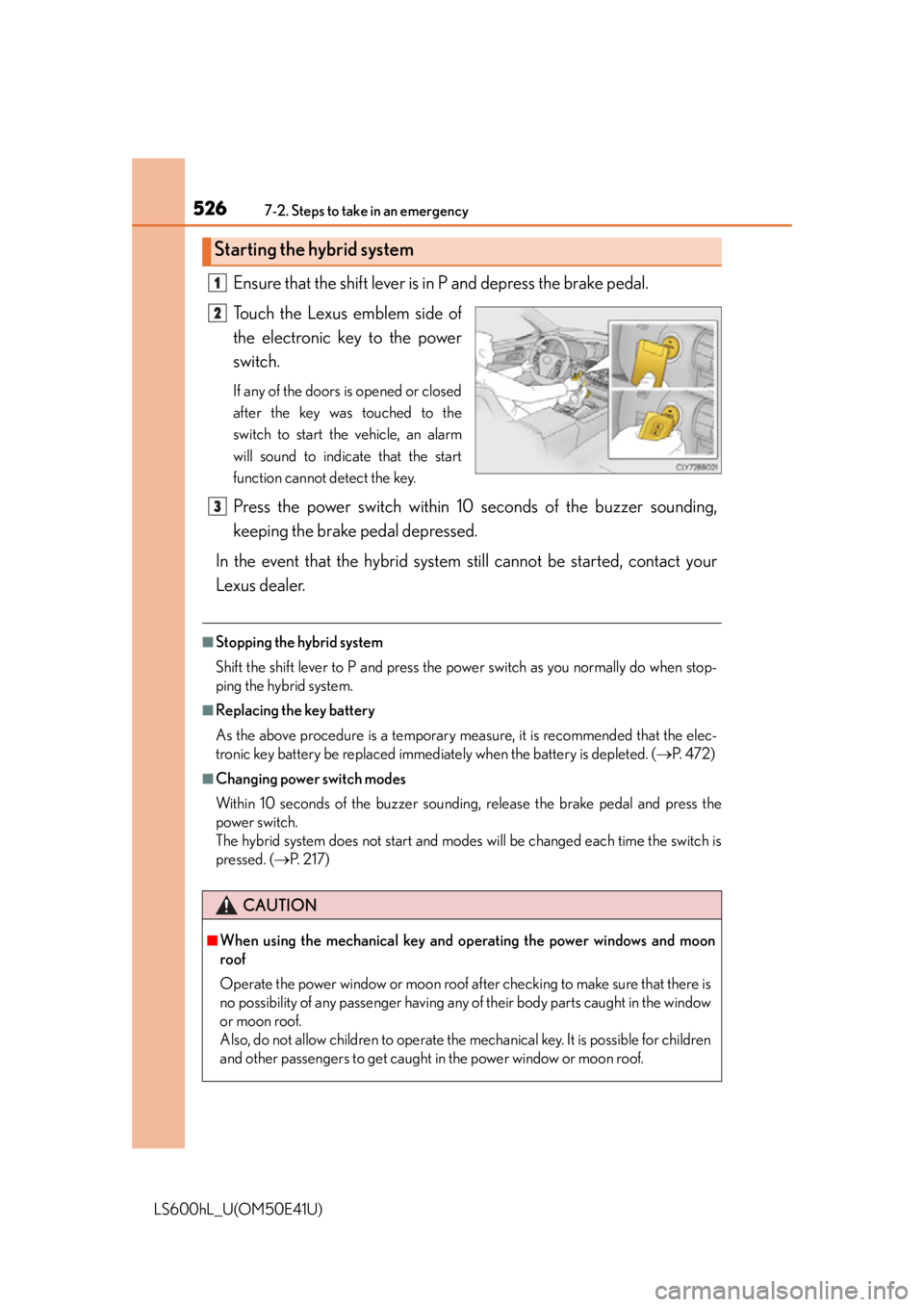
Ensure that the shift lever is in P and depress the brake pedal.
Touch the Lexus emblem side of
the electronic key to the power
switch.
If any of the doors is opened or closed
after the key was touched to the
switch to start the vehicle, an alarm
will sound to indicate that the start
function cannot detect the key.
Press the power switch within 10 seconds of the buzzer sounding,
keeping the brake pedal depressed.
In the event that the hybrid system still cannot be started, contact your
Lexus dealer.
■Stopping the hybrid system
Shift the shift lever to P and press the power switch as you normally do when stop-
ping the hybrid system.
■Replacing the key battery
As the above procedure is a temporary meas ure, it is recommended that the elec-
tronic key battery be replaced immediately when the battery is depleted. ( P. 4 7 2 )
■Changing power switch modes
Within 10 seconds of the buzzer soundi ng, release the brake pedal and press the
power switch.
The hybrid system does not start and modes will be changed each time the switch is
pressed. ( P. 2 1 7 )
Starting the hybrid system
1
2
CAUTION
■When using the mechanical key and operating the power windows and moon
roof
Operate the power window or moon roof af ter checking to make sure that there is
no possibility of any passenger having any of their body parts caught in the window
or moon roof.
Also, do not allow children to operate the mechanical key. It is possible for children
and other passengers to get caught in the power window or moon roof.
3
Page 529 of 620
5277-2. Steps to take in an emergency
7
When trouble arises
LS600hL_U(OM50E41U)
If you have a set of jumper (or booster) cables and a second vehicle with a
12-volt battery, you can jump start your vehicle by following the steps
below.
Open the trunk lid and remove the 12-volt battery cover. ( P. 450)
In the event that the trunk opener cannot be used, use the mechanical key to open
the trunk. ( P. 5 2 4 )
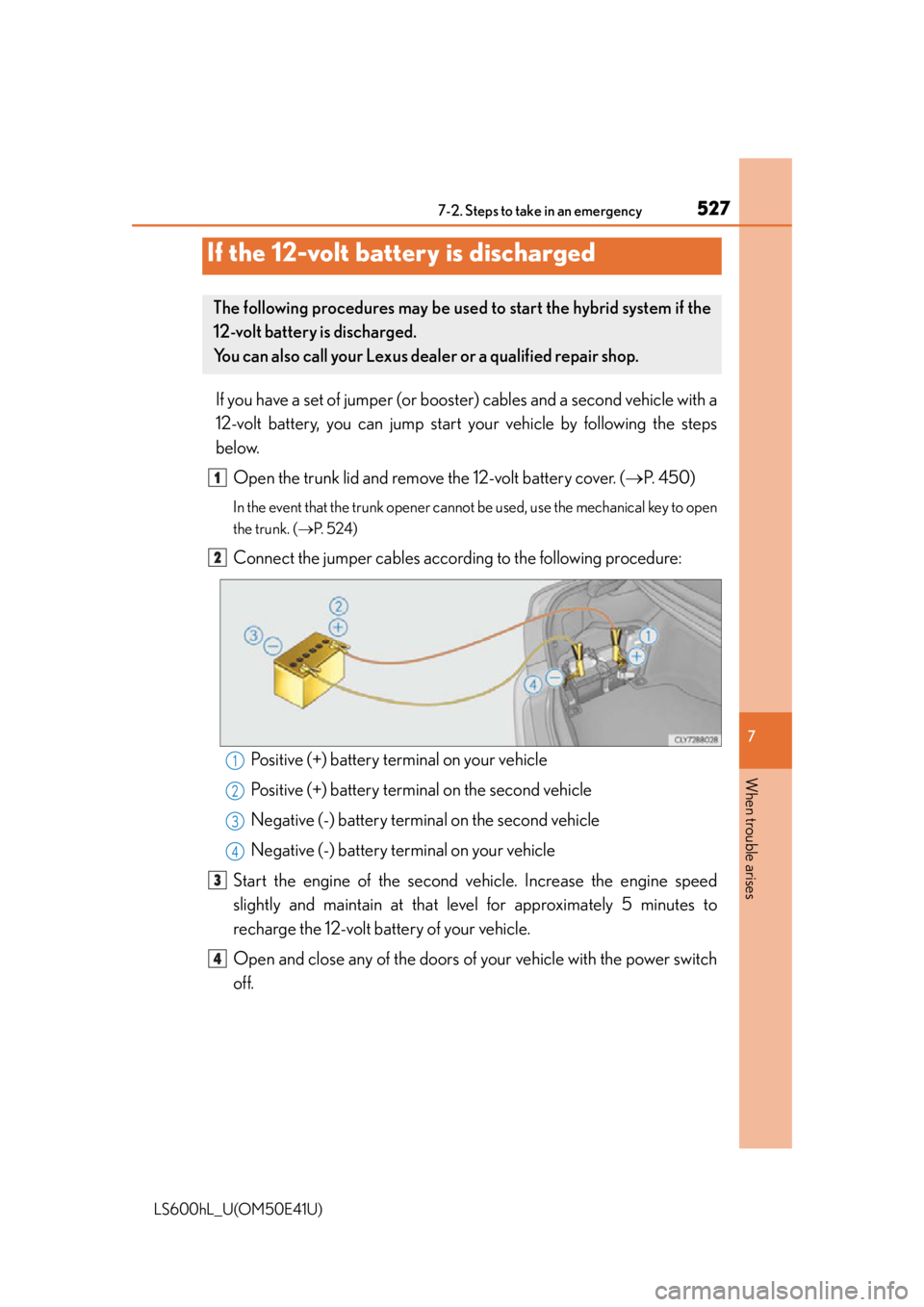
Connect the jumper cables according to the following procedure:
Positive (+) battery terminal on your vehicle
Positive (+) battery terminal on the second vehicle
Negative (-) battery terminal on the second vehicle
Negative (-) battery terminal on your vehicle
Start the engine of the second ve hicle. Increase the engine speed
slightly and maintain at that le vel for approximately 5 minutes to
recharge the 12-volt battery of your vehicle.
Open and close any of th e doors of your vehicle with the power switch
off.
If the 12-volt battery is discharged
The following procedures may be used to start the hybrid system if the
12-volt battery is discharged.
You can also call your Lexus dealer or a qualified repair shop.
1
2
1
2
3
4
3
4
Page 530 of 620

5287-2. Steps to take in an emergency
LS600hL_U(OM50E41U)
Maintain the engine speed of the second vehicle and start the hybrid
system of your vehicle by turning the power switch to ON mode.
Make sure the “READY” indicator co mes on. If the indicator does not
come on, contact your Lexus dealer.
Once the hybrid system has started, remove the jumper cables in the
exact reverse order from wh ich they were connected.
Once the hybrid system starts, have the vehicle inspected at your Lexus
dealer as soon as possible.
■Starting the hybrid system when the 12-volt battery is discharged
The hybrid system cannot be started by push-starting.
■To prevent 12-volt battery discharge
●Turn off the headlights and the audio system while the hybrid system is off.
●Turn off any unnecessary electrical compon ents when the vehicle is running at a
low speed for an extended period, such as in heavy traffic.
■When the 12-volt battery is removed or discharged
The hybrid system may not start.
( P. 4 5 1 )
■Charging the 12-volt battery
The electricity stored in the 12-volt battery will discharge gradually even when the
vehicle is not in use, due to natural discharge and the draining effects of certain elec-
trical appliances. If the vehicle is left for a long time, the 12-volt battery may dis-
charge, and the hybrid system may be unable to start. (The 12-volt battery recharges
automatically while the hybrid system is operating.)
■When recharging or replacing the 12-volt battery
●Make sure that the key is not inside the vehicle when recharging or replacing the
12-volt battery. The key may be locked in the vehicle if the alarm is activated.
( P. 9 1 )
●In some cases, it may not be possible to unlock the doors using the smart access
system with push-button start when the 12-volt battery is discharged. Use the wire-
less remote control or the mechanical key to lock or unlock the doors.
■If the 12-volt battery is discharged
The information stored in the computer will be deleted.
If the 12-volt battery is discharged, have the vehicle inspected by your Lexus dealer.
5
6
7
Page 568 of 620
5668-2. Customization
LS600hL_U(OM50E41U)
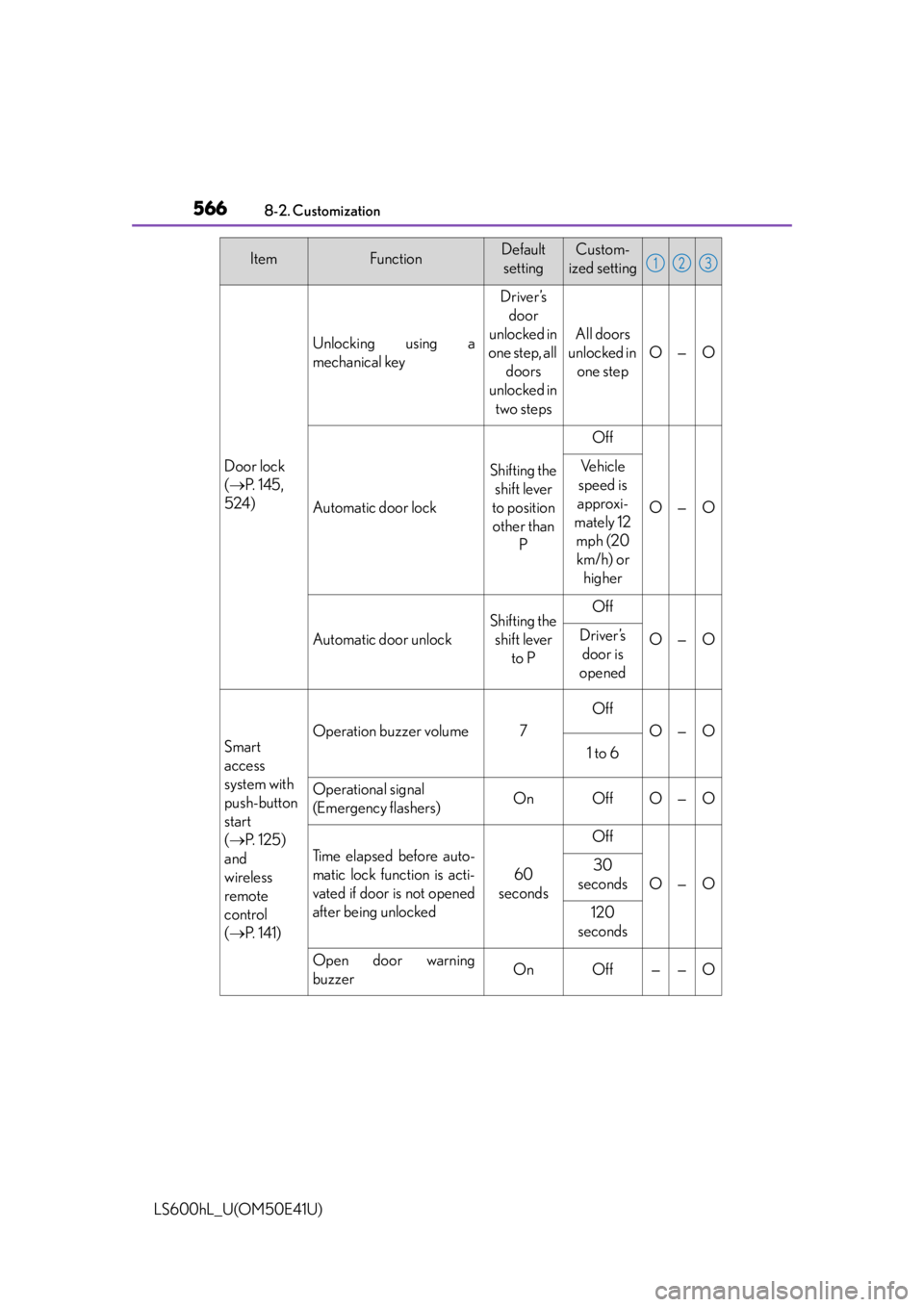
Door lock
( P. 1 4 5 ,
524)
Unlocking using a
mechanical key
Driver’s door
unlocked in
one step, all doors
unlocked in
two steps
All doors
unlocked in one step
O—O
Automatic door lock
Shifting the shift lever
to position other than P
Off
O—O
Ve h i c l e
speed is
approxi-
mately 12 mph (20 km/h) or higher
Automatic door unlock
Shifting the shift lever to POff
O—ODriver’s door is
opened
Smart
access
system with
push-button
start
( P. 1 2 5 )
and
wireless
remote
control
( P. 141)
Operation buzzer volume7
Off
O—O
1 to 6
Operational signal
(Emergency flashers)OnOffO—O
Ti m e e l a p s e d b e f o r e a u t o -
matic lock function is acti-
vated if door is not opened
after being unlocked
60
seconds
Off
O—O
30
seconds
120
seconds
Open door warning
buzzerOnOff——O
ItemFunctionDefault settingCustom-
ized setting123
Page 569 of 620
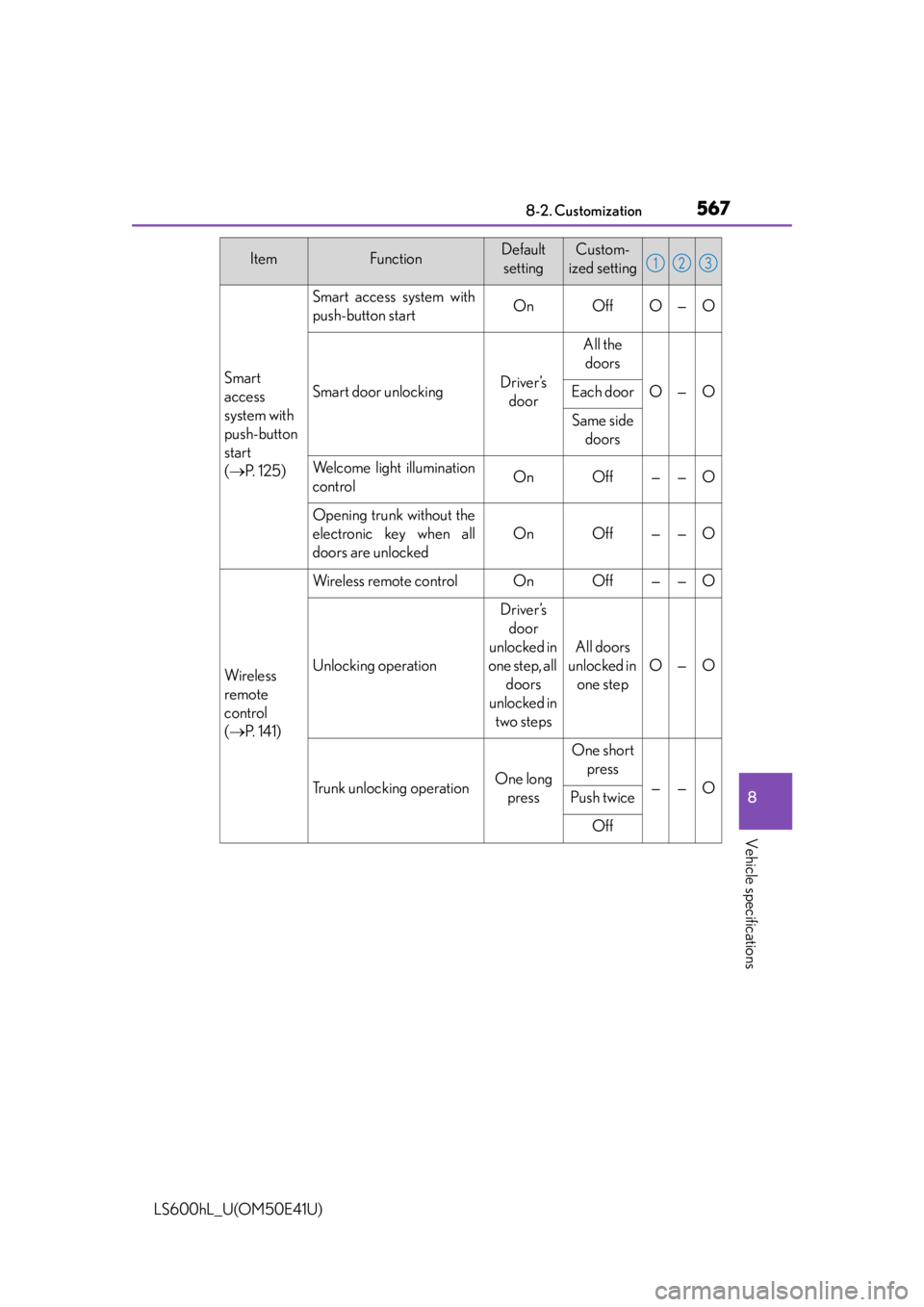
5678-2. Customization
8
Vehicle specifications
LS600hL_U(OM50E41U)
Smart
access
system with
push-button
start
( P. 1 2 5 )
Smart access system with
push-button startOnOffO—O
Smart door unlockingDriver’s
door
All the doors
O—OEach door
Same side doors
Welcome light illumination
controlOnOff——O
Opening trunk without the
electronic key when all
doors are unlocked
OnOff——O
Wi re less
remote
control
( P. 141)
Wireless remote controlOnOff——O
Unlocking operation
Driver’s
door
unlocked in
one step, all doors
unlocked in two steps
All doors
unlocked in one step
O—O
Trunk unlocking operationOne long press
One short press
——OPush twice
Off
ItemFunctionDefault settingCustom-
ized setting123
Page 570 of 620
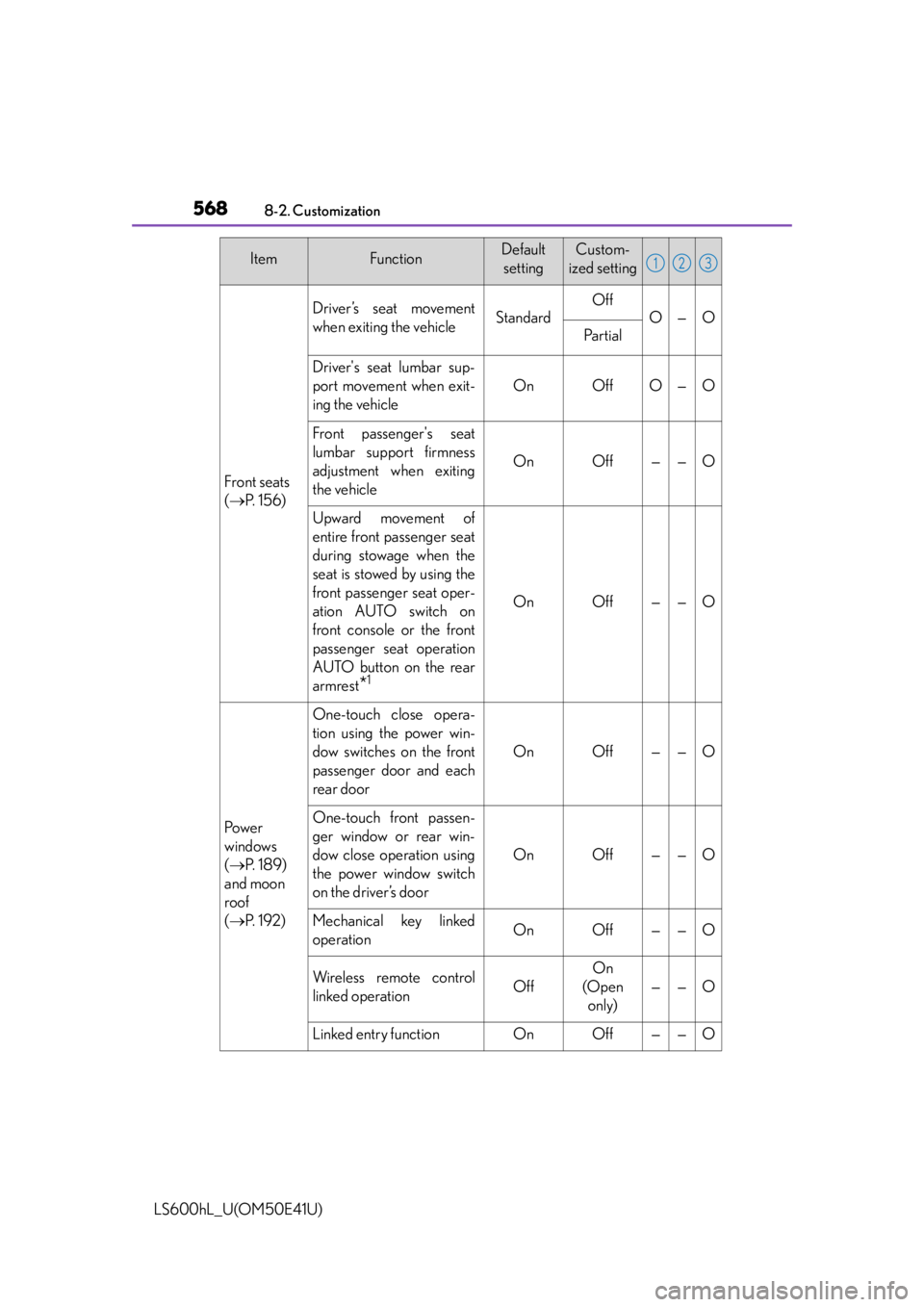
5688-2. Customization
LS600hL_U(OM50E41U)
Front seats
( P. 1 5 6 )
Driver’s seat movement
when exiting the vehicleStandard
Off
O—O
Pa r t i a l
Driver's seat lumbar sup-
port movement when exit-
ing the vehicle
OnOffO—O
Front passenger's seat
lumbar support firmness
adjustment when exiting
the vehicle
OnOff——O
Upward movement of
entire front passenger seat
during stowage when the
seat is stowed by using the
front passenger seat oper-
ation AUTO switch on
front console or the front
passenger seat operation
AUTO button on the rear
armrest
*1
OnOff——O
Po w e r
windows
( P. 1 8 9 )
and moon
roof
( P. 1 9 2 )
One-touch close opera-
tion using the power win-
dow switches on the front
passenger door and each
rear door
OnOff——O
One-touch front passen-
ger window or rear win-
dow close operation using
the power window switch
on the driver’s door
OnOff——O
Mechanical key linked
operationOnOff——O
Wireless remote control
linked operationOff
On
(Open only)
——O
Linked entry functionOnOff——O
ItemFunctionDefault settingCustom-
ized setting123
Page 573 of 620
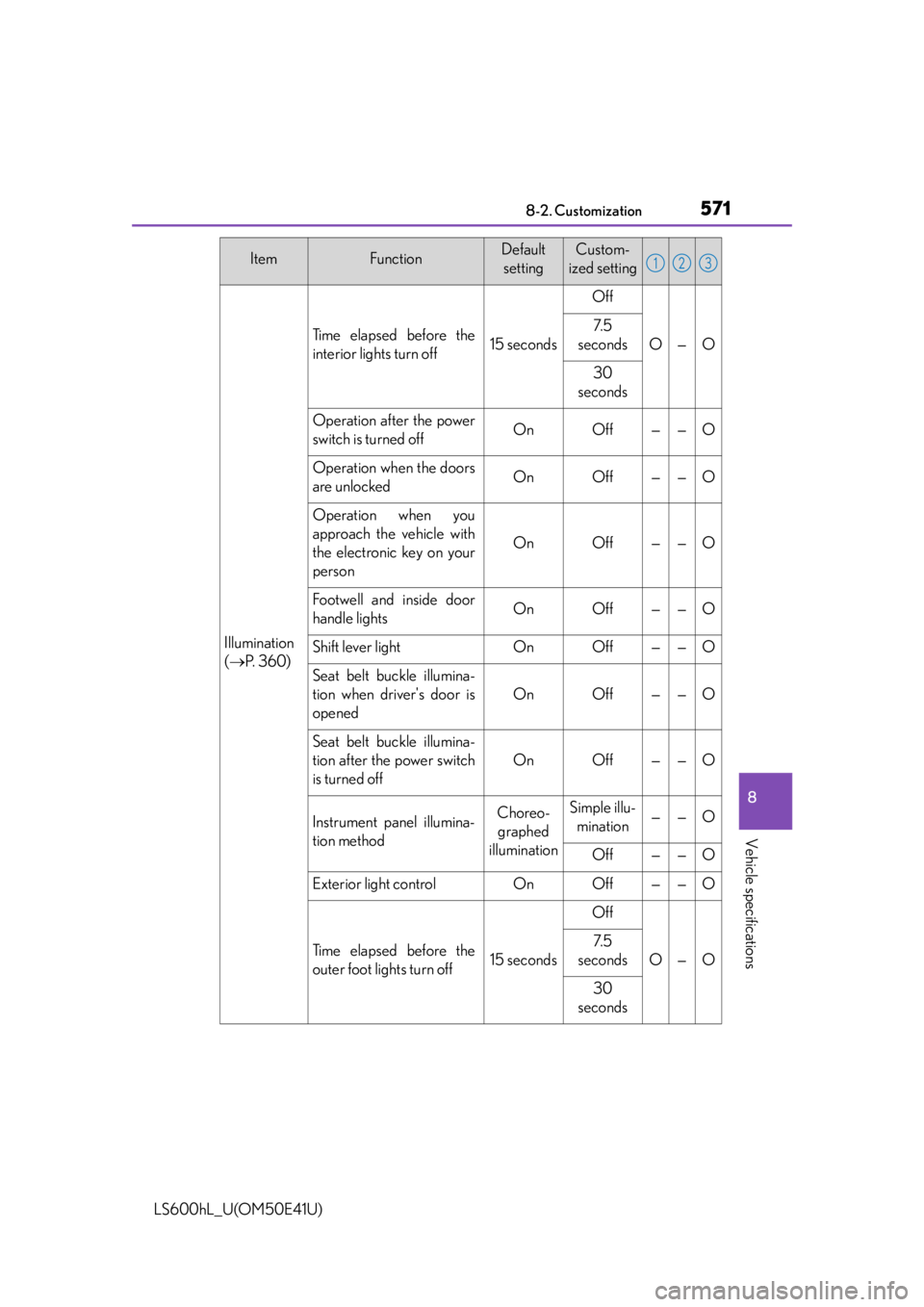
5718-2. Customization
8
Vehicle specifications
LS600hL_U(OM50E41U)
Illumination
( P. 3 6 0 )
Ti m e e l a p s e d b e f o r e t h e
interior lights turn off15 seconds
Off
O—O
7. 5
seconds
30
seconds
Operation after the power
switch is turned offOnOff——O
Operation when the doors
are unlockedOnOff——O
Operation when you
approach the vehicle with
the electronic key on your
person
OnOff——O
Footwell and inside door
handle lightsOnOff——O
Shift lever lightOnOff——O
Seat belt buckle illumina-
tion when driver's door is
opened
OnOff——O
Seat belt buckle illumina-
tion after the power switch
is turned off
OnOff——O
Instrument panel illumina-
tion methodChoreo- graphed
illuminationSimple illu- mination——O
Off——O
Exterior light controlOnOff——O
Ti m e e l a p s e d b e f o r e t h e
outer foot lights turn off15 seconds
Off
O—O
7. 5
seconds
30
seconds
ItemFunctionDefault settingCustom-
ized setting123
Page 574 of 620
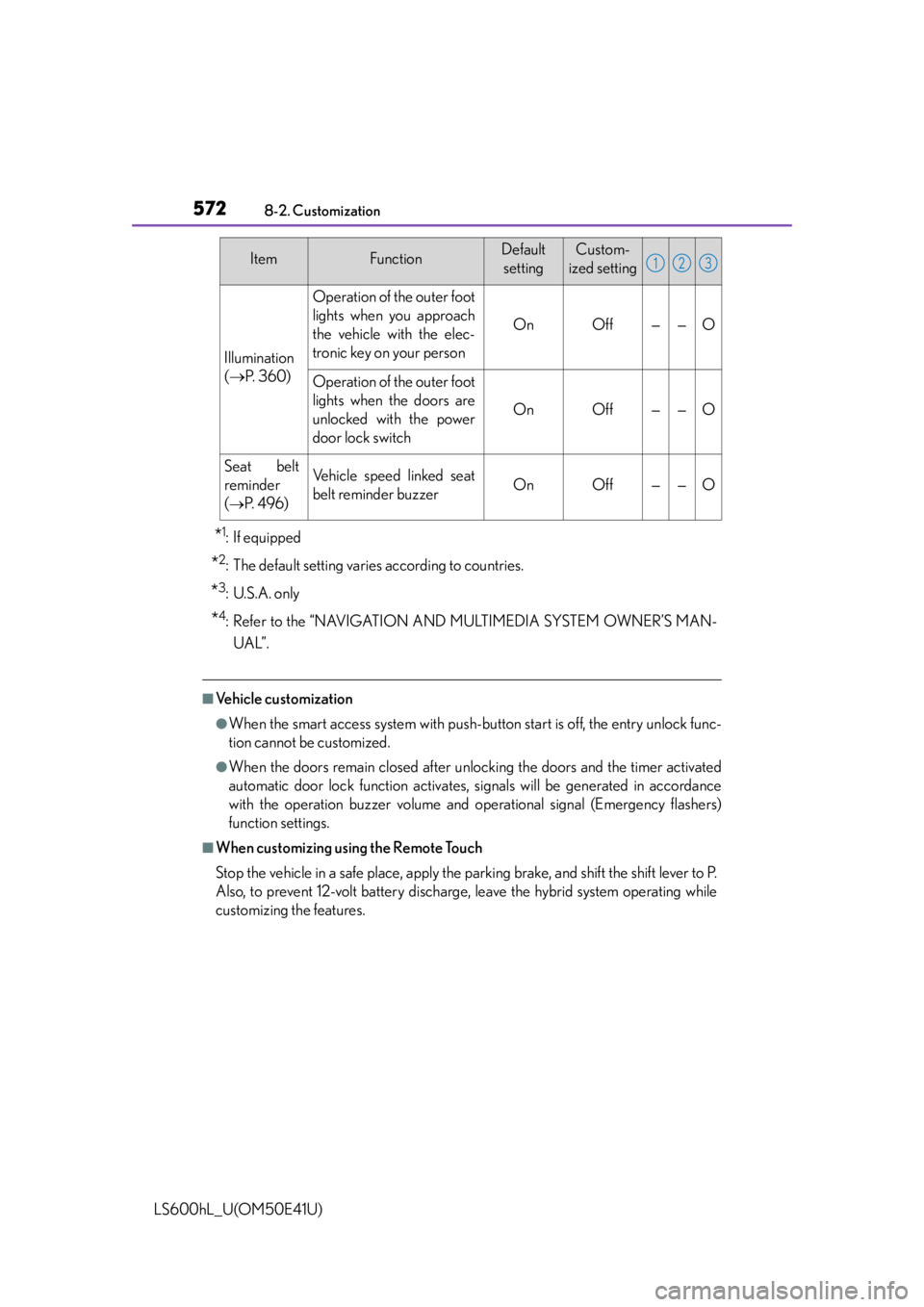
5728-2. Customization
LS600hL_U(OM50E41U)
*1:If equipped
*2: The default setting varies according to countries.
*3: U.S.A. only
*4: Refer to the “NAVIGATION AND MULTIMEDIA SYSTEM OWNER’S MAN-UAL”.
■Vehicle customization
●When the smart access system with push-button start is off, the entry unlock func-
tion cannot be customized.
●When the doors remain closed after un locking the doors and the timer activated
automatic door lock function activates, signals will be generated in accordance
with the operation buzzer volume and operational signal (Emergency flashers)
function settings.
■When customizing using the Remote Touch
Stop the vehicle in a safe place, apply the parking brake, and shift the shift lever to P.
Also, to prevent 12-volt battery discharge, leave the hybrid system operating while
customizing the features.
Illumination
( P. 3 6 0 )
Operation of the outer foot
lights when you approach
the vehicle with the elec-
tronic key on your person
OnOff——O
Operation of the outer foot
lights when the doors are
unlocked with the power
door lock switch
OnOff——O
Seat belt
reminder
(
P. 4 9 6 )
Vehicle speed linked seat
belt reminder buzzerOnOff——O
ItemFunctionDefault
settingCustom-
ized setting123
Page 594 of 620
592
LS600hL_U(OM50E41U)
What to do if... (Troubleshooting)
What to do if... (Troubleshooting)
●If you lose your mechanical keys, new genuine mechanical keys
can be made by your Lexus dealer. ( P. 122)
●If you lose your electronic keys, the risk of vehicle theft
increases significantly. Contact your Lexus dealer immediately.
( P. 1 2 4 )
●Is the electronic key battery weak or depleted? ( P. 4 7 2 )
●Is the power switch in ON mode?
When locking the doors, turn the power switch off. ( P. 217)
●Is the electronic key left inside the vehicle?
When locking the doors, make sure that you have the elec-
tronic key on your person.
●The function may not operate pr operly due to the condition of
the radio wave. ( P. 1 3 4 )
If you have a problem, check the following before contacting your
Lexus dealer.
The doors cannot be locked, unlocked, opened or closed
You lose your keys
The doors cannot be locked or unlocked