remote control LEXUS LS600H 2015 Owner's Manual
[x] Cancel search | Manufacturer: LEXUS, Model Year: 2015, Model line: LS600H, Model: LEXUS LS600H 2015Pages: 620, PDF Size: 7.66 MB
Page 152 of 620
1503-2. Opening, closing and locking the doors and trunk
LS600hL_U(OM50E41U)
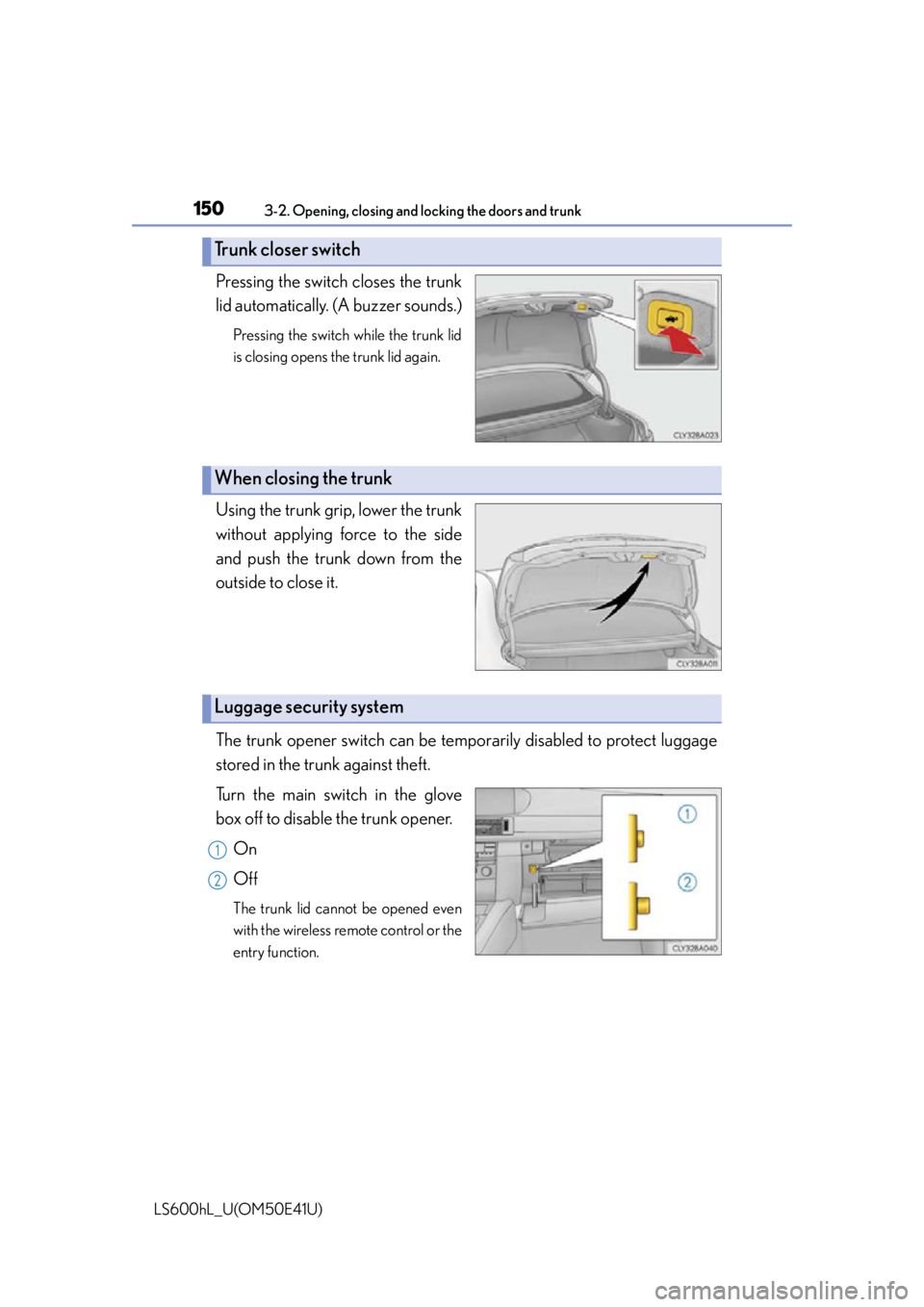
Pressing the switch closes the trunk
lid automatically. (A buzzer sounds.)
Pressing the switch while the trunk lid
is closing opens the trunk lid again.
Using the trunk gr ip, lower the trunk
without applying force to the side
and push the trunk down from the
outside to close it.
The trunk opener switch can be tempor arily disabled to protect luggage
stored in the trunk against theft.
Turn the main switch in the glove
box off to disable the trunk opener.
On
Off
The trunk lid cannot be opened even
with the wireless remote control or the
entry function.
Trunk closer switch
When closing the trunk
Luggage security system
1
2
Page 176 of 620
1743-3. Adjusting the seats
LS600hL_U(OM50E41U)
Each electronic key (including a card key) can be registered to recall your
preferred driving position.
■Registering procedure
Record your driving position to switch “1”, “2” or “3” before performing
the following:
Using the wireless remote control
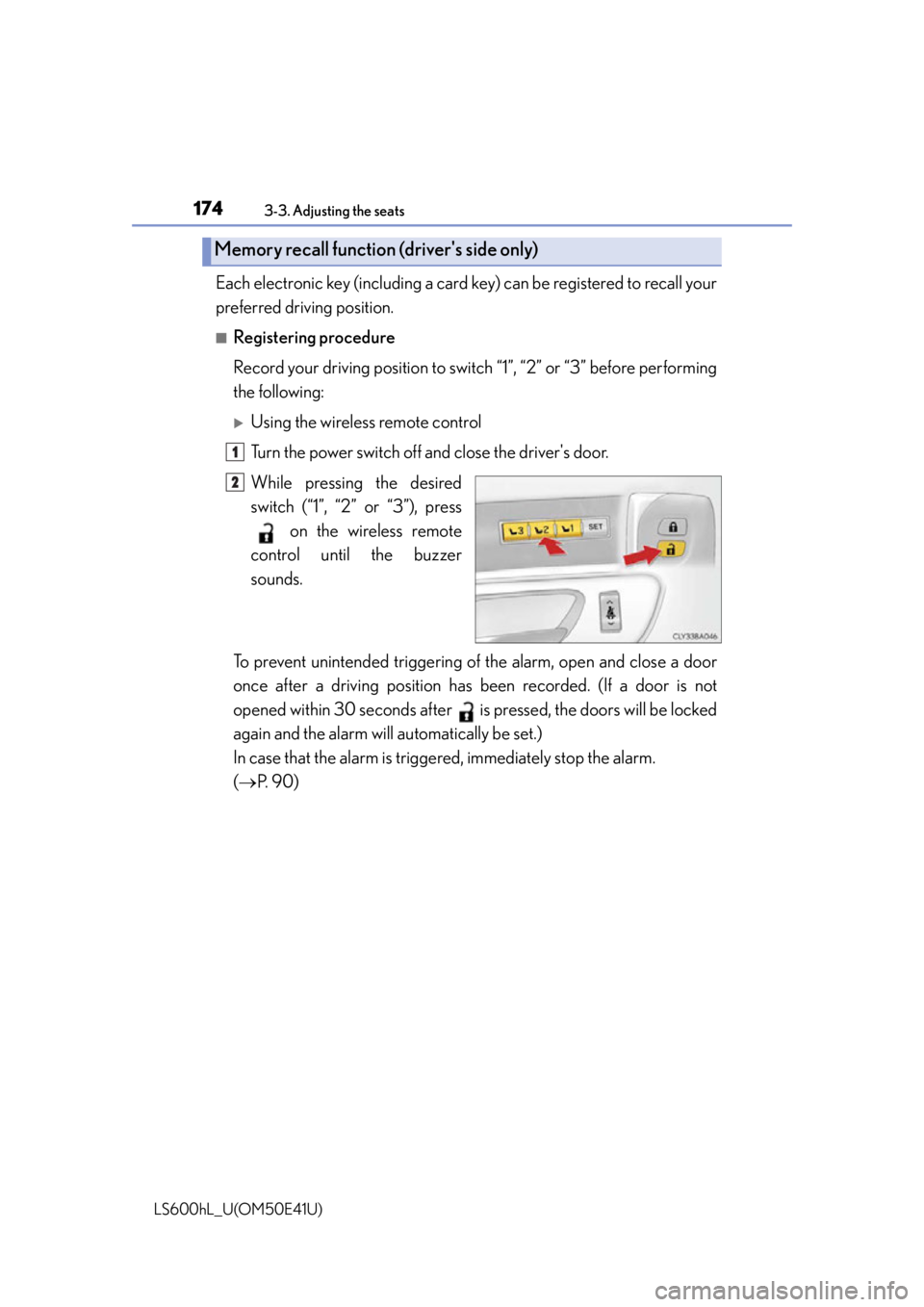
Turn the power switch off and close the driver's door.
While pressing the desired
switch (“1”, “2” or “3”), press on the wireless remote
control until the buzzer
sounds.
To prevent unintended triggering of the alarm, open and close a door
once after a driving position has be en recorded. (If a door is not
opened within 30 seconds after is pr essed, the doors will be locked
again and the alarm will automatically be set.)
In case that the alarm is triggere d, immediately stop the alarm.
( P. 9 0 )
Memory recall function (driver's side only)
1
2
Page 177 of 620
1753-3. Adjusting the seats
3
Operation of each component
LS600hL_U(OM50E41U)
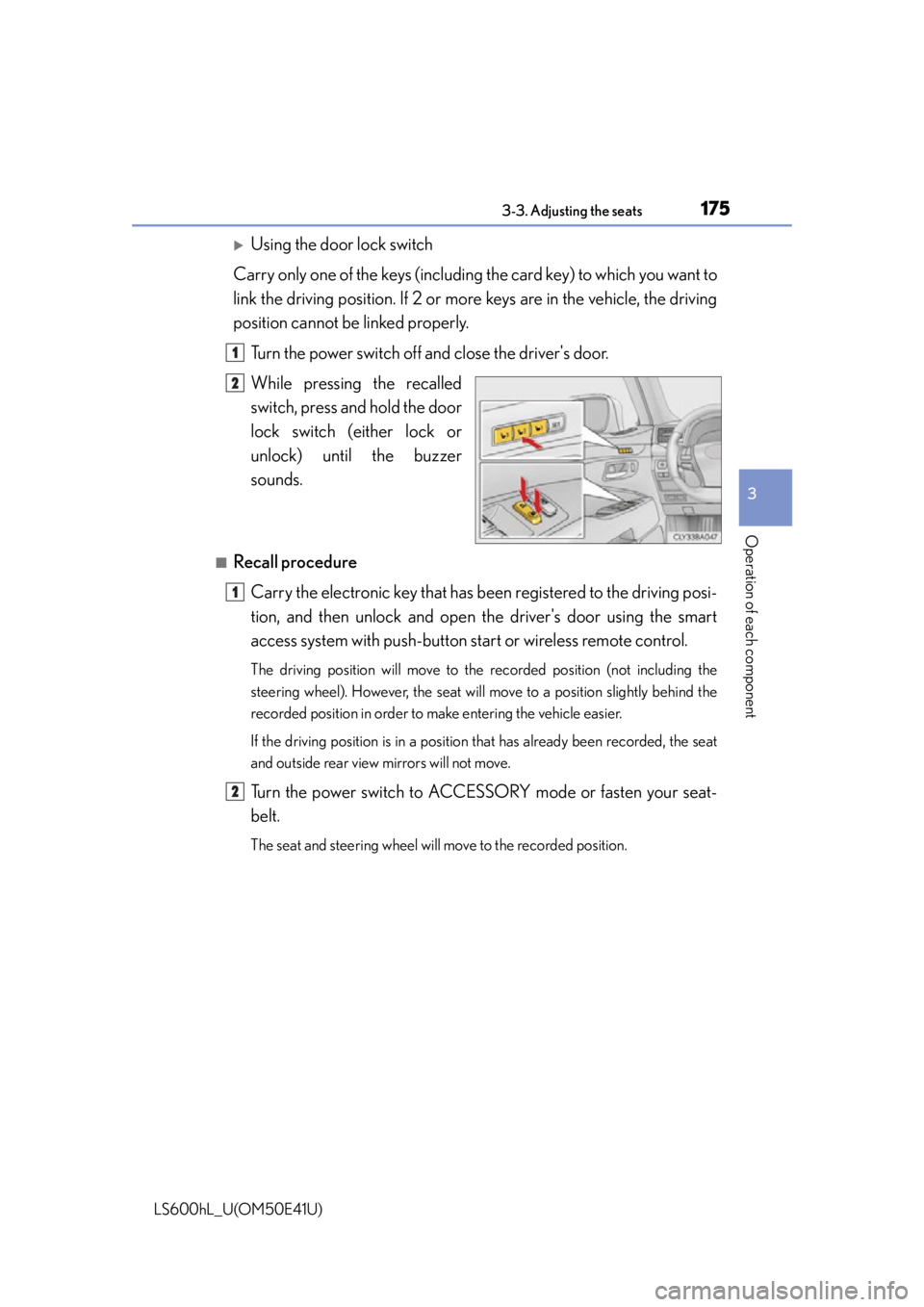
Using the door lock switch
Carry only one of the keys (including the card key) to which you want to
link the driving position. If 2 or mo re keys are in the vehicle, the driving
position cannot be linked properly.
Turn the power switch off and close the driver's door.
While pressing the recalled
switch, press and hold the door
lock switch (either lock or
unlock) unt il the buzzer
sounds.
■Recall procedure
Carry the electronic key that has b een registered to the driving posi-
tion, and then unlock and open the driver's door using the smart
access system with pu sh-button start or wireless remote control.
The driving position will move to the recorded position (not including the
steering wheel). However, the seat will move to a position slightly behind the
recorded position in order to make entering the vehicle easier.
If the driving position is in a position that has already been recorded, the seat
and outside rear view mirrors will not move.
Turn the power switch to ACCESSORY mode or fasten your seat-
belt.
The seat and steering wheel will move to the recorded position.
1
2
1
2
Page 178 of 620
1763-3. Adjusting the seats
LS600hL_U(OM50E41U)
■Cancelation procedure
Using the wireless remote control
Turn the power switch off and close the driver’s door.
While pressing the “SET” switch, press on the wireless remote
control until the buzzer sounds.
Using the door lock switch
Carry only the key you want to canc el and then close the driver's door.
If 2 or more keys are in the vehi cle, the driving position cannot be can-
celed properly.
Turn the power switch off and close the driver’s door.
While pressing the “SET” switch, press the lock or unlock side on the
door lock switch until the buzzer sounds.
■Recalling the driving position using the memory recall function
●Different driving positions can be registered for each electronic key. Therefore, the
driving position that is recalled may be different depending on the key being car-
ried.
●If a door other than the driver's door is unlocked with the smart access system with
push-button start, the driving position cann ot be recalled. In this case, press the
driving position switch which has been set.
■ Seat operation automatic st op function (4-seat models)
If a front seat is likely to come into contact with the retractable table or the ottoman
during seat operation or activation of the power easy access system, a buzzer will
sound and seat slide operation will be stopped partway.
(A warning message will be shown on the multi-information display.)
CAUTION
■Seat adjustment caution
Take care during seat adjustment so that the seat does not strike the rear passen-
ger or squeeze your body against the steering wheel.
1
2
1
2
Page 193 of 620
1913-5. Opening, closing the windows and moon roof
3
Operation of each component
LS600hL_U(OM50E41U)
■Door lock linked window operation
●The power windows can be closed using the entry function. (P. 1 2 7 )
●The power windows can be opened and closed using the mechanical key.
( P. 5 2 4 )
■Customization
Settings (e.g. linked door lock operation) can be changed.
(Customizable features P. 5 6 4 )
CAUTION
Observe the following precautions.
Failure to do so may result in death or serious injury.
■Closing the windows
●The driver is responsible for all the powe r window operations, including the oper-
ation for the passengers. In order to prev ent accidental operation, especially by a
child, do not let a child operate the power windows. It is possible for children and
other passengers to have body parts caught in the power window. Also, when
riding with a child, it is recommended to use the window lock switch. ( P. 1 8 9 )
●Check to make sure that all passengers do not have any part of their body in a
position where it could be caught when a window is being operated.
●When using the smart access system with push-button start, wireless remote
control or mechanical key and operatin g the power windows, operate the power
window after checking to make sure that there is no possibility of any passenger
having any of their body parts caught in the window. Also do not let a child oper-
ate window by the smart access system wi th push-button start, wireless remote
control or mechanical key. It is possible for children and other passengers to get
caught in the power window.
●When exiting the vehicle, turn the power switch off, carry the key and exit the
vehicle along with the child. There may be accidental operation, due to mischief,
etc., that may possibly lead to an accident.
■Jam protection function
●Never use any part of your body to inte ntionally activate the jam protection func-
tion.
●The jam protection function may not work if something gets caught just before
the window fully closes.
Page 197 of 620
1953-5. Opening, closing the windows and moon roof
3
Operation of each component
LS600hL_U(OM50E41U)
■Moon roof open warning buzzer
The buzzer sounds and a message is shown on the multi-information display in the
instrument cluster when the power switch is turned off and the driver’s door is
opened with the moon roof open.
■Customization
Settings (e.g. linked door lock operation) can be changed.
(Customizable features P. 5 6 4 )
CAUTION
Observe the following precautions.
Failure to do so may cause death or serious injury.
■Opening the moon roof
●Do not allow any passengers to put thei r hands or heads outside the vehicle while
it is moving.
●Do not sit on top of the moon roof.
■Closing the moon roof
●The driver is responsible for moon roof opening and closing operations.
In order to prevent accidental operation, especially by a child, do not let a child
operate the moon roof. It is possible for children and other passengers to have
body parts caught in the moon roof.
●Check to make sure that all passengers do not have any part of their body in a
position where it could be caught wh en the moon roof is being operated.
●When using the smart access system with push-button start, wireless remote
control or mechanical key and operating the moon roof, operate the moon roof
after checking to make sure that there is no possibility of any passenger having
any of their body parts caught in the moon roof. Also, do not let a child operate
moon roof by the smart access system wi th push-button start, wireless remote
control or mechanical key. It is possible for children and other passengers to get
caught in the moon roof.
●When exiting the vehicle, turn the power switch off, carry the key and exit the
vehicle along with the child. There may be accidental operation, due to mischief,
etc., that may possibly lead to an accident.
■Jam protection function
●Never use any part of your body to inte ntionally activate the jam protection func-
tion.
●The jam protection function may not work if something gets caught just before
the moon roof fully closes.
Page 214 of 620
2124-1. Before driving
LS600hL_U(OM50E41U)
CAUTION
■Things that must not be carried in the trunk
The following things may cause a fire if loaded in the trunk:
●Receptacles containing gasoline
●Aerosol cans
■Storage precautions
Observe the following precautions.
Failure to do so may prevent the pedals from being depressed properly, may block
the driver’s vision, or may result in items hitting the driver or passengers, possibly
causing an accident.
●Stow cargo and luggage in the trunk whenever possible.
●Do not place cargo or luggage in or on the following locations.
• At the feet of the driver
• On the front passenger or rear seats (when stacking items)
• On the package tray
• On the instrument panel
•On the dashboard
• In front of the Remote Touch screen
●Secure all items in the occupant compartment.
■Capacity and distribution
●Do not exceed the maximum axle weight rating or the total vehicle weight rating.
●Even if the total load of occupant’s weight and the cargo load is less than the total
load capacity, do not apply the load unevenly. Improper loading may cause dete-
rioration of steering or braking control which may cause death or serious injury.
Page 331 of 620
329
Interior features5
LS600hL_U(OM50E41U)5-1. Remote Touch screen
Remote Touch/12.3-inch display ......................................... 330
5-2. Lexus Climate Concierge Lexus Climate Concierge ..................................335
5-3. Using the air conditioning system and defogger
Front automatic air conditioning system ...............336
Rear air conditioning system ........................................... 351
Rear window and outside rear view mirror
defoggers .................................. 358
Windshield wiper de-icer..........................................359 5-4. Using the interior lights
Interior lights list .........................360• Interior lights ............................361
• Personal lights ....................... 362
5-5. Using the storage features List of storage features ............ 364• Glove box ............................... 366
• Coin holder ............................ 367
• Door pockets ......................... 367
• Cup holders ...........................368
• Console box........................... 369
• Auxiliary boxes ....................... 371
Trunk features .............................. 373
5-6. Other interior features Sun visors and vanity mirrors .......................................... 376
Clock............................................... 378
Ashtrays ......................................... 379
Cigarette lighters ...................... 380
Power outlets ...............................382
Heated steering wheel ............385
Climate control seats ............... 387
Armrest .......................................... 392
Retractable table ........................ 393
Rear sunshade............................. 395
Rear door sunshades................398
Coat hooks .................................... 401
Assist grips.................................... 402
Garage door opener................ 403
LEXUS Enform Safety Connect ....................................... 410
Page 334 of 620
3325-1. Remote Touch screen
LS600hL_U(OM50E41U)
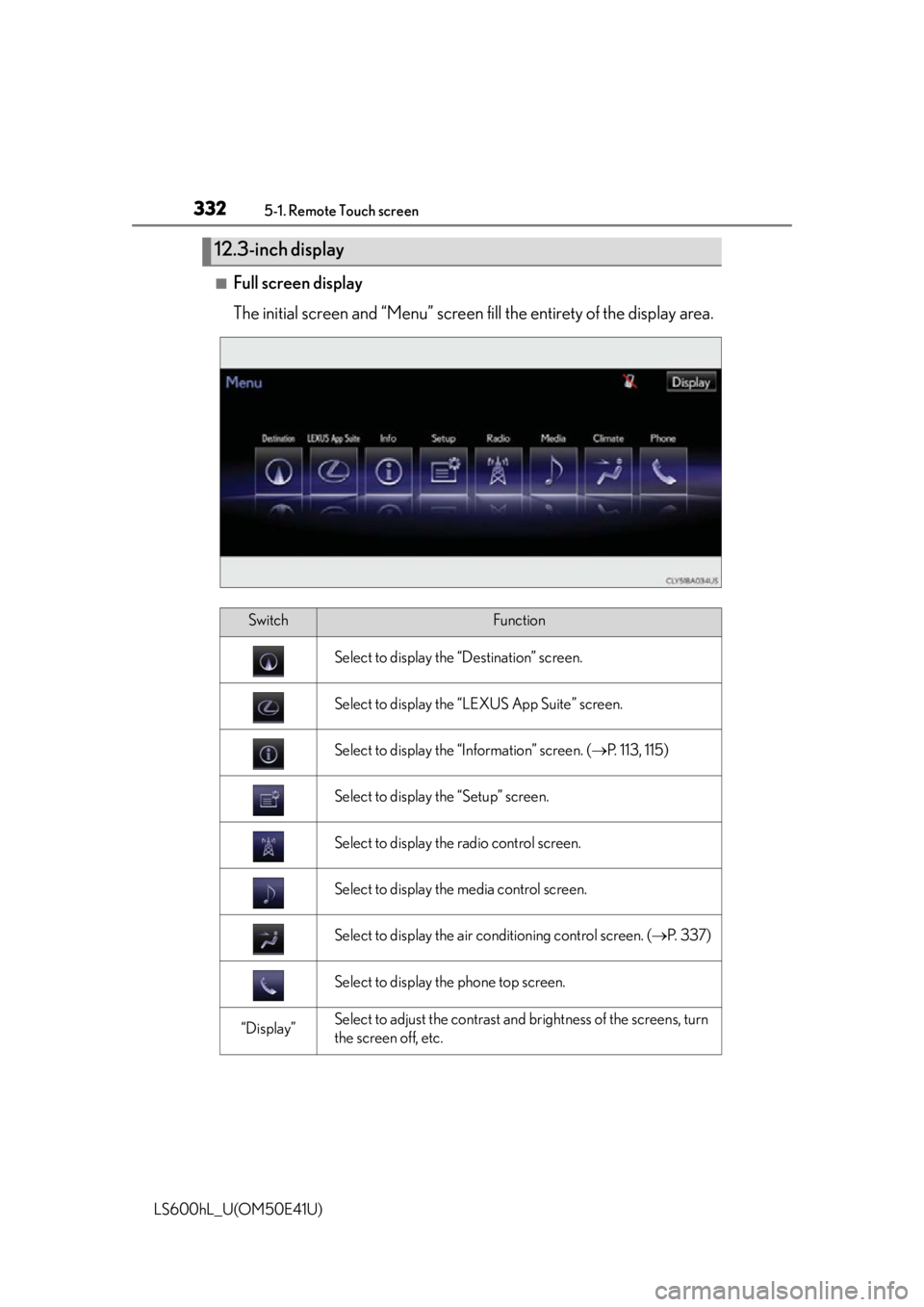
■Full screen display
The initial screen and “Menu” screen fill the entirety of the display area.
12.3-inch display
SwitchFunction
Select to display the “Destination” screen.
Select to display the “LEXUS App Suite” screen.
Select to display the “Information” screen. ( P. 113, 115)
Select to display the “Setup” screen.
Select to display the radio control screen.
Select to display the media control screen.
Select to display the air conditioning control screen. ( P. 3 3 7 )
Select to display the phone top screen.
“Display”Select to adjust the contrast and brightness of the screens, turn
the screen off, etc.
Page 338 of 620
336
LS600hL_U(OM50E41U)
5-3. Using the air conditioning system and defogger
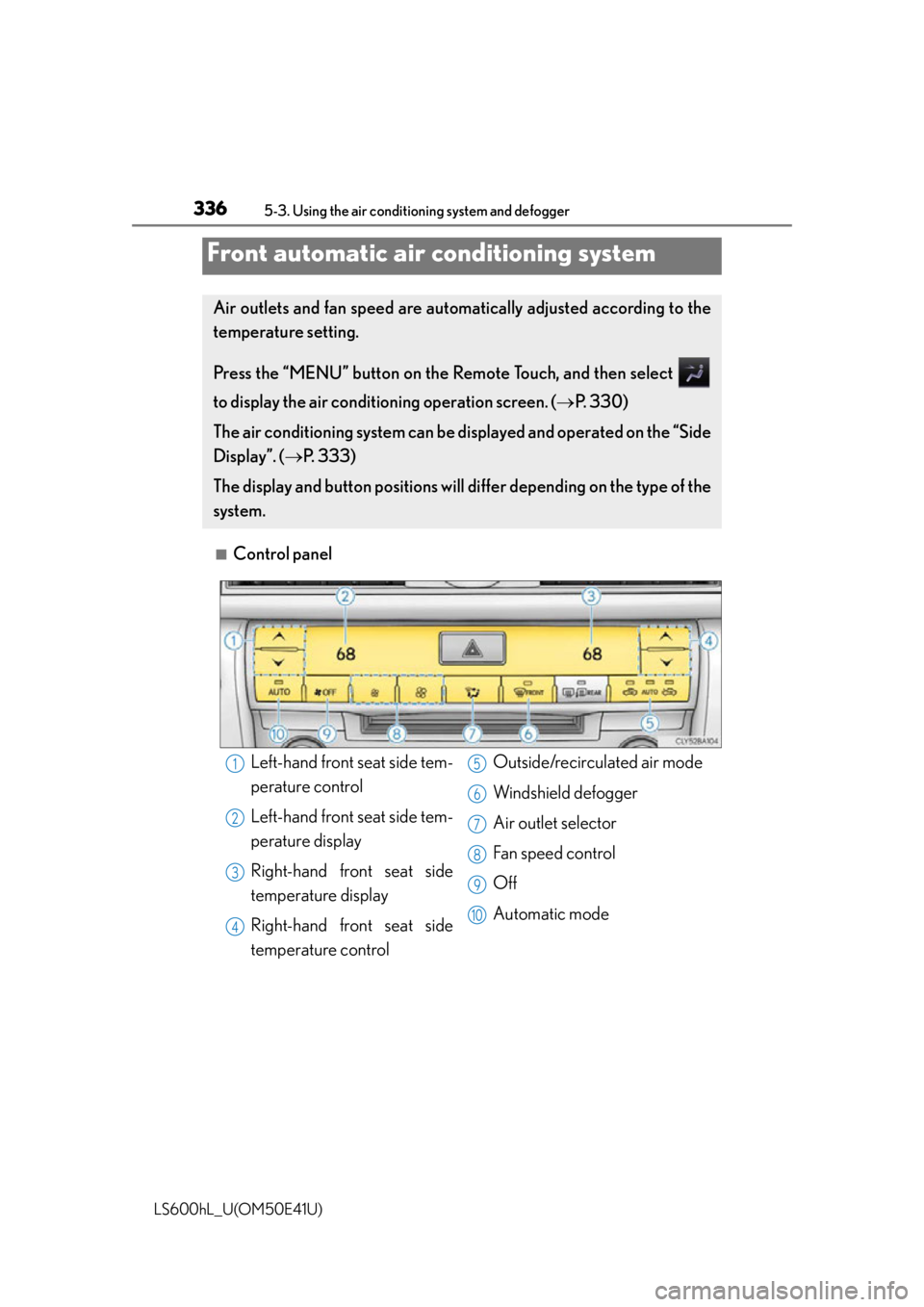
■Control panel
Front automatic air conditioning system
Air outlets and fan speed are automatically adjusted according to the
temperature setting.
Press the “MENU” button on the Remote Touch, and then select
to display the air conditioning operation screen. ( P. 3 3 0 )
The air conditioning system can be di splayed and operated on the “Side
Display”. ( P. 3 3 3 )
The display and button positions will di ffer depending on the type of the
system.
Left-hand front seat side tem-
perature control
Left-hand front seat side tem-
perature display
Right-hand front seat side
temperature display
Right-hand front seat side
temperature control Outside/recirculated air mode
Windshield defogger
Air outlet selector
Fan speed control
Off
Automatic mode1
2
3
4
5
6
7
8
9
10