warning LEXUS LS600H 2015 Owner's Manual
[x] Cancel search | Manufacturer: LEXUS, Model Year: 2015, Model line: LS600H, Model: LEXUS LS600H 2015Pages: 620, PDF Size: 7.66 MB
Page 98 of 620
962. Instrument cluster
LS600hL_U(OM50E41U)
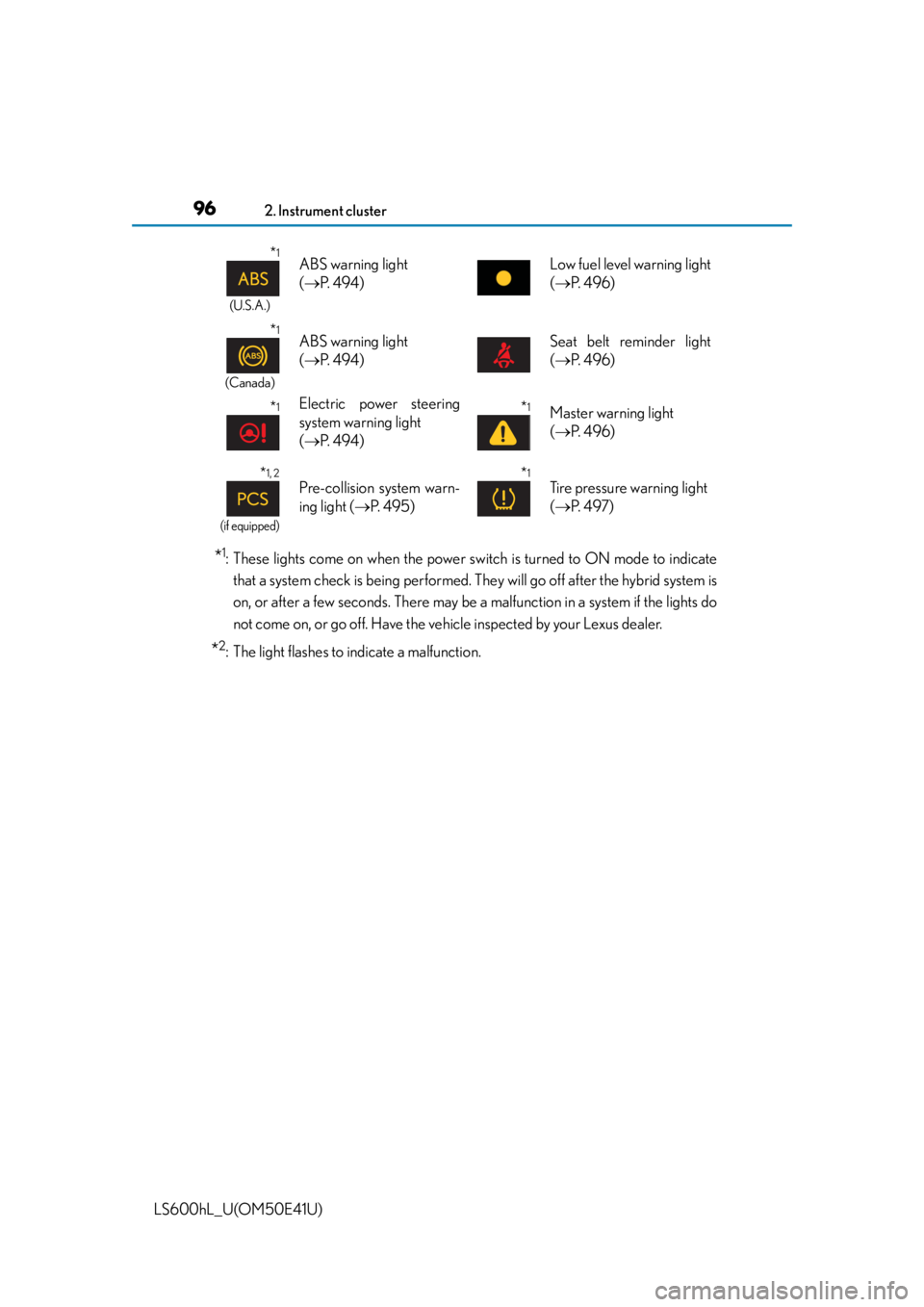
*1: These lights come on when the power switch is turned to ON mode to indicatethat a system check is being performed. They will go off after the hybrid system is
on, or after a few seconds. There may be a malfunction in a system if the lights do
not come on, or go off. Have the vehicle inspected by your Lexus dealer.
*2: The light flashes to indicate a malfunction.
*1
(U.S.A.)
ABS warning light
( P. 4 9 4 )Low fuel level warning light
( P. 4 9 6 )
*1
(Canada)
ABS warning light
( P. 4 9 4 )Seat belt reminder light
( P. 4 9 6 )
*1Electric power steering
system warning light
( P. 4 9 4 )*1Master warning light
( P. 4 9 6 )
*1, 2
(if equipped)
Pre-collision system warn-
ing light ( P. 495)*1
Tire pressure warning light
( P. 4 9 7 )
Page 100 of 620
982. Instrument cluster
LS600hL_U(OM50E41U)
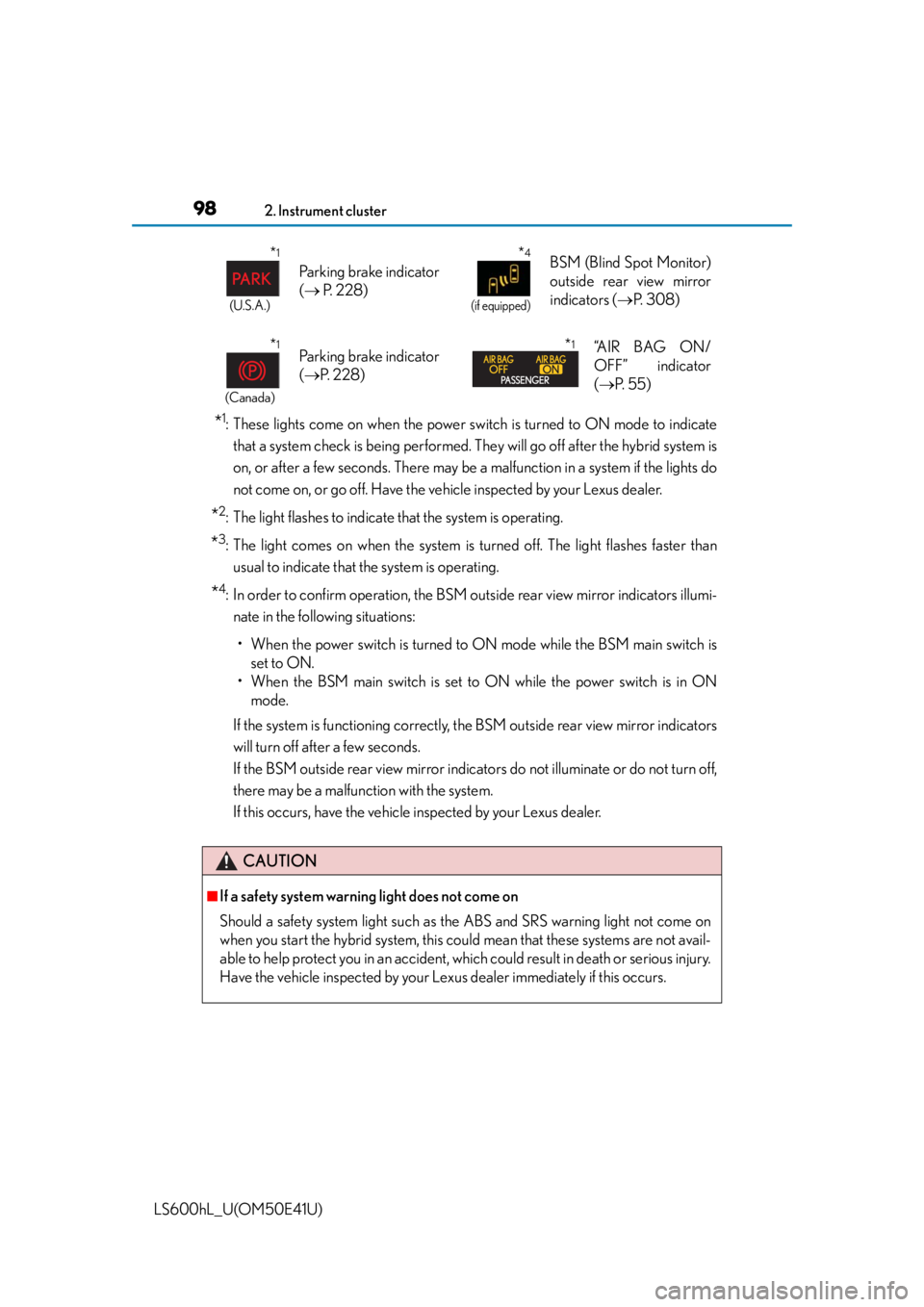
*1: These lights come on when the power switch is turned to ON mode to indicatethat a system check is being performed. They will go off after the hybrid system is
on, or after a few seconds. There may be a malfunction in a system if the lights do
not come on, or go off. Have the vehicle inspected by your Lexus dealer.
*2: The light flashes to indicate that the system is operating.
*3: The light comes on when the system is turned off. The light flashes faster than
usual to indicate that the system is operating.
*4: In order to confirm operation, the BSM ou tside rear view mirror indicators illumi-
nate in the following situations:
• When the power switch is turned to ON mode while the BSM main switch is set to ON.
• When the BSM main switch is set to ON while the power switch is in ON mode.
If the system is functioning correctly, the BSM outside rear view mirror indicators
will turn off after a few seconds.
If the BSM outside rear view mirror indicato rs do not illuminate or do not turn off,
there may be a malfunction with the system.
If this occurs, have the vehicle inspected by your Lexus dealer.
*1
(U.S.A.)
Parking brake indicator
( P. 2 2 8 )
*4
(if equipped)
BSM (Blind Spot Monitor)
outside rear view mirror
indicators ( P. 3 0 8 )
*1
(Canada)
Parking brake indicator
( P. 2 2 8 )*1“A I R B A G O N /
OFF” indicator
( P. 5 5 )
CAUTION
■If a safety system warning light does not come on
Should a safety system light such as the ABS and SRS warning light not come on
when you start the hybrid system, this co uld mean that these systems are not avail-
able to help protect you in an accident, wh ich could result in death or serious injury.
Have the vehicle inspected by your Lexus dealer immediately if this occurs.
Page 107 of 620
1052. Instrument cluster
2
Instrument cluster
LS600hL_U(OM50E41U)
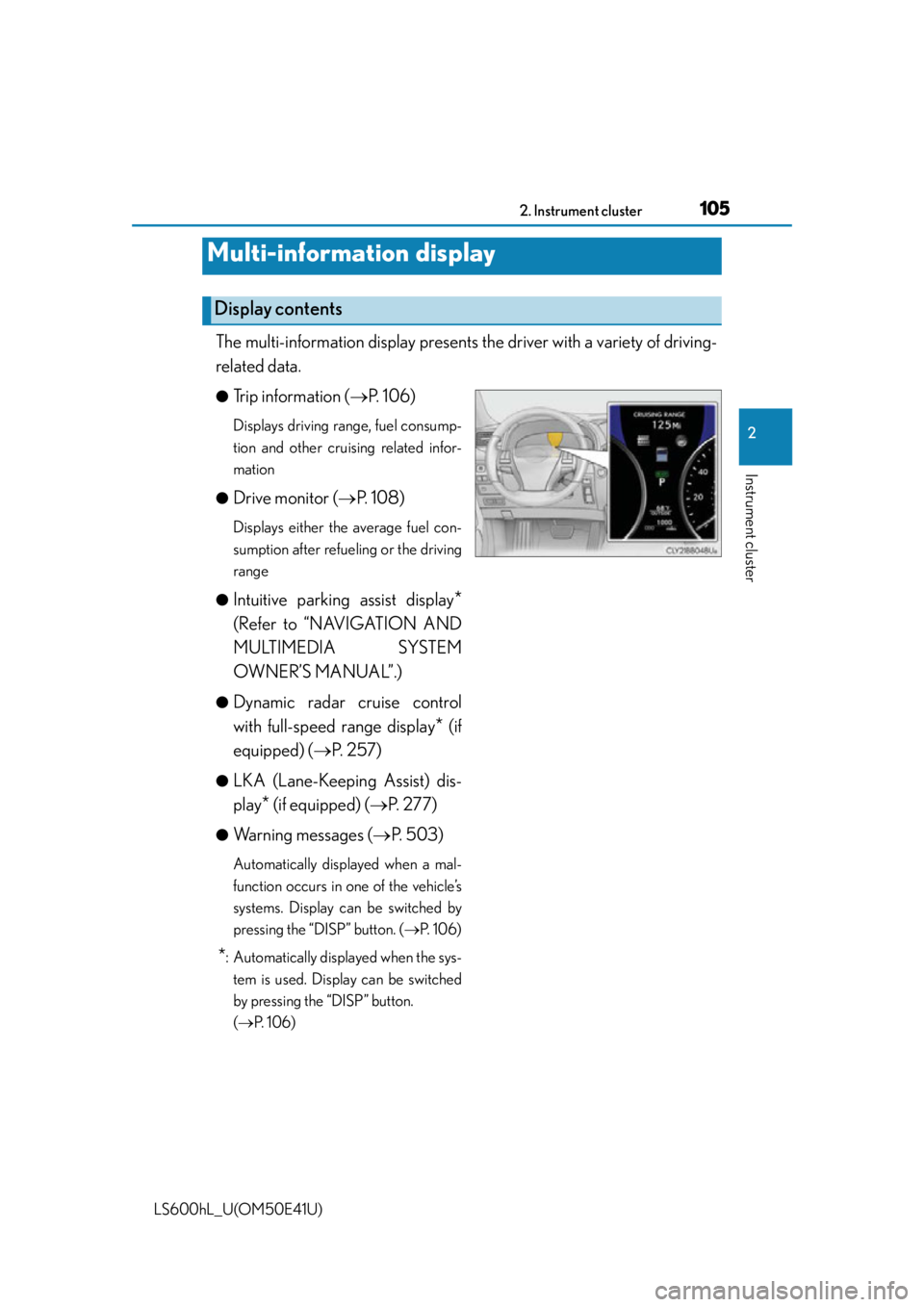
The multi-information display presents the driver with a variety of driving-
related data.
●Trip information ( P. 1 0 6 )
Displays driving range, fuel consump-
tion and other cruising related infor-
mation
●
Drive monitor ( P. 1 0 8 )
Displays either the average fuel con-
sumption after refueling or the driving
range
●
Intuitive parking assist display*
(Refer to “NAVIGATION AND
MULTIMEDIA SYSTEM
OWNER’S MANUAL”.)
●Dynamic radar cruise control
with full-speed range display
* (if
equipped) ( P. 257)
●LKA (Lane-Keeping Assist) dis-
play
* (if equipped) ( P. 277)
●Warning messages ( P. 503)
Automatically displayed when a mal-
function occurs in one of the vehicle’s
systems. Display can be switched by
pressing the “DISP” button. ( P. 1 0 6 )
*: Automatically displayed when the sys-
tem is used. Display can be switched
by pressing the “DISP” button.
( P. 1 0 6 )
Multi-information display
Display contents
Page 110 of 620
1082. Instrument cluster
LS600hL_U(OM50E41U)
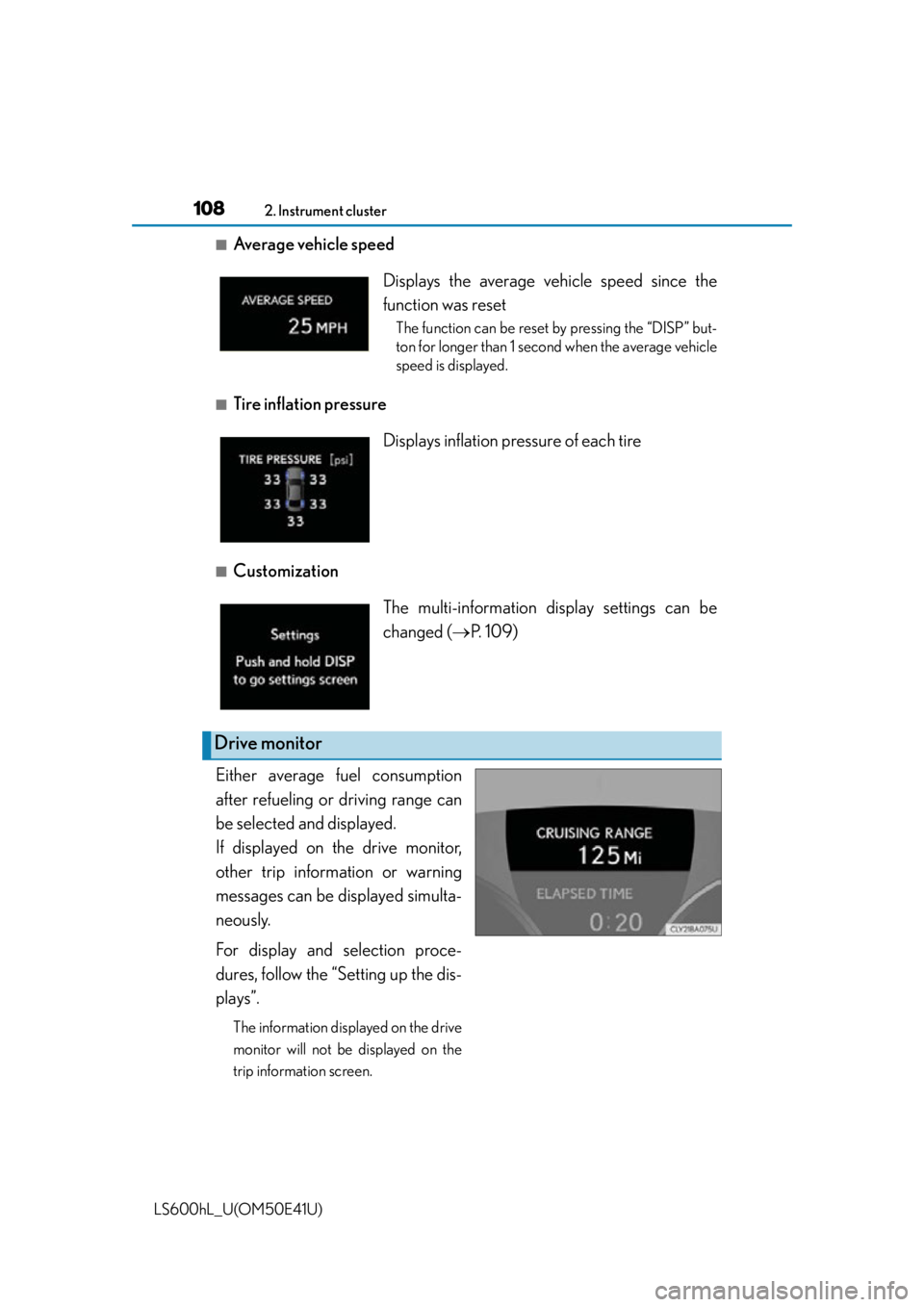
■Average vehicle speed
■Tire inflation pressure
■Customization
Either average fuel consumption
after refueling or driving range can
be selected and displayed.
If displayed on the drive monitor,
other trip information or warning
messages can be di splayed simulta-
neously.
For display and selection proce-
dures, follow the “Setting up the dis-
plays”.
The information displayed on the drive
monitor will not be displayed on the
trip information screen.
Displays the average vehicle speed since the
function was reset
The function can be reset by pressing the “DISP” but-
ton for longer than 1 second when the average vehicle
speed is displayed.
Displays inflation pres sure of each tire
The multi-information display settings can be
changed (P. 1 0 9 )
Drive monitor
Page 132 of 620
1303-2. Opening, closing and locking the doors and trunk
LS600hL_U(OM50E41U)
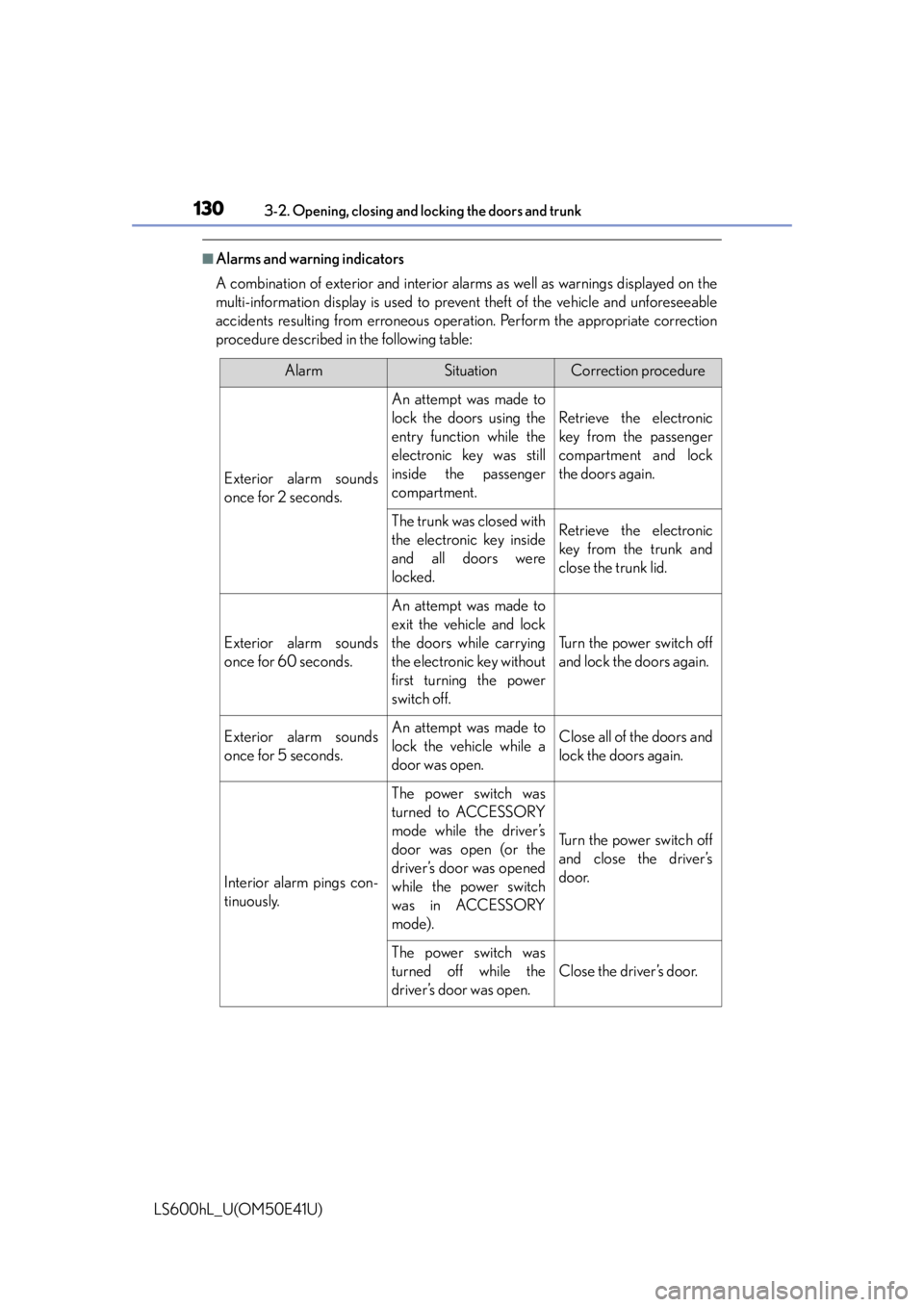
■Alarms and warning indicators
A combination of exterior and interior alar ms as well as warnings displayed on the
multi-information display is used to prev ent theft of the vehicle and unforeseeable
accidents resulting from erroneous operat ion. Perform the appropriate correction
procedure described in the following table:
AlarmSituationCorrection procedure
Exterior alarm sounds
once for 2 seconds.
An attempt was made to
lock the doors using the
entry function while the
electronic key was still
inside the passenger
compartment.
Retrieve the electronic
key from the passenger
compartment and lock
the doors again.
The trunk was closed with
the electronic key inside
and all doors were
locked.Retrieve the electronic
key from the trunk and
close the trunk lid.
Exterior alarm sounds
once for 60 seconds.
An attempt was made to
exit the vehicle and lock
the doors while carrying
the electronic key without
first turning the power
switch off.
Turn the power switch off
and lock the doors again.
Exterior alarm sounds
once for 5 seconds.An attempt was made to
lock the vehicle while a
door was open.Close all of the doors and
lock the doors again.
Interior alarm pings con-
tinuously.
The power switch was
turned to ACCESSORY
mode while the driver’s
door was open (or the
driver’s door was opened
while the power switch
was in ACCESSORY
mode).
Turn the power switch off
and close the driver’s
door.
The power switch was
turned off while the
driver’s door was open.
Close the driver’s door.
Page 133 of 620
1313-2. Opening, closing and locking the doors and trunk
3
Operation of each component
LS600hL_U(OM50E41U)
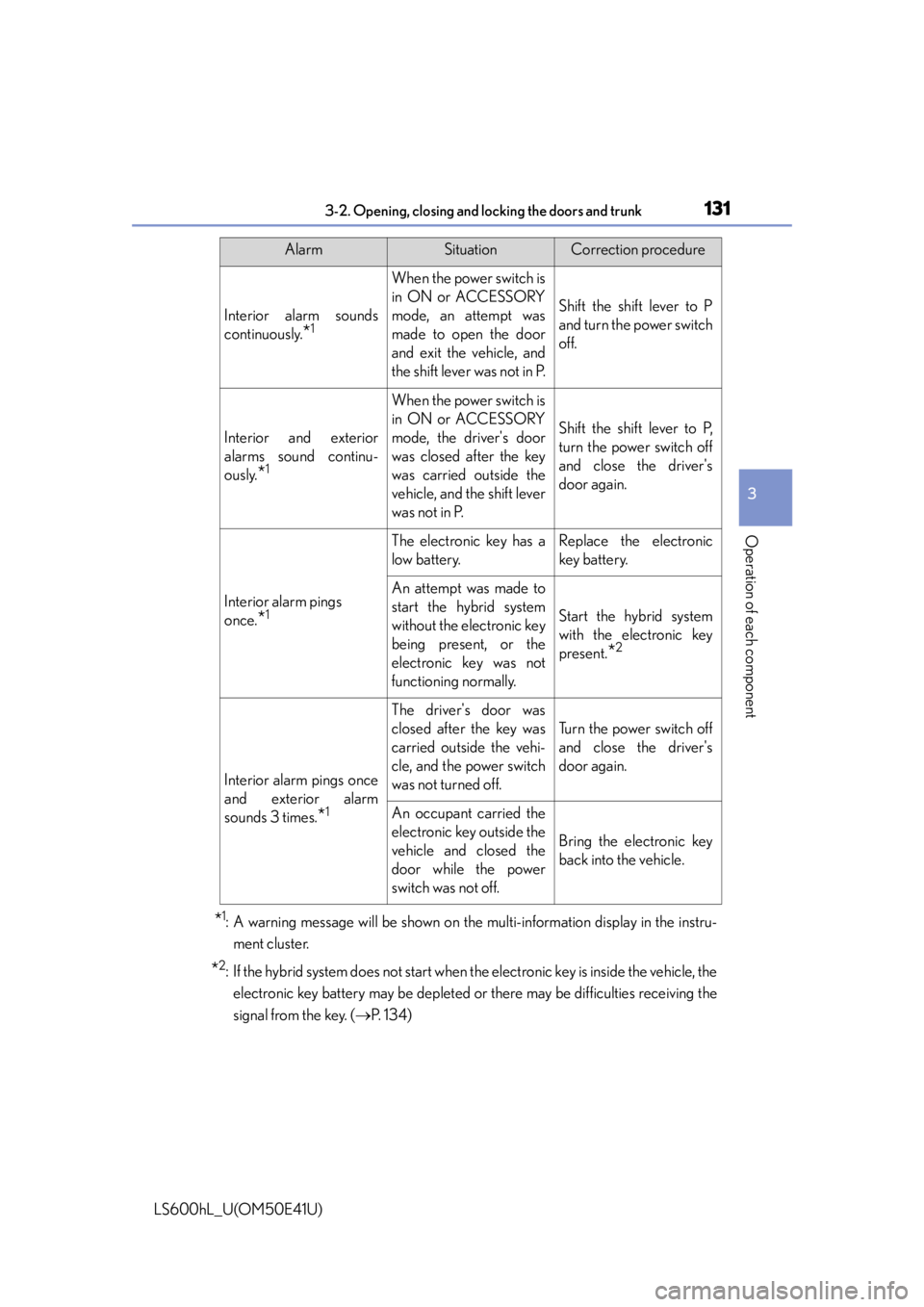
*1: A warning message will be shown on the multi-information display in the instru-
ment cluster.
*2: If the hybrid system does not start when the electronic key is inside the vehicle, the
electronic key battery may be depleted or there may be difficulties receiving the
signal from the key. ( P. 1 3 4 )
Interior alarm sounds
continuously.
*1
When the power switch is
in ON or ACCESSORY
mode, an attempt was
made to open the door
and exit the vehicle, and
the shift lever was not in P.
Shift the shift lever to P
and turn the power switch
off.
Interior and exterior
alarms sound continu-
ously.
*1
When the power switch is
in ON or ACCESSORY
mode, the driver's door
was closed after the key
was carried outside the
vehicle, and the shift lever
was not in P.
Shift the shift lever to P,
turn the power switch off
and close the driver's
door again.
Interior alarm pings
once.
*1
The electronic key has a
low battery.Replace the electronic
key battery.
An attempt was made to
start the hybrid system
without the electronic key
being present, or the
electronic key was not
functioning normally.
Start the hybrid system
with the electronic key
present.
*2
Interior alarm pings once
and exterior alarm
sounds 3 times.
*1
The driver's door was
closed after the key was
carried outside the vehi-
cle, and the power switch
was not turned off.
Turn the power switch off
and close the driver's
door again.
An occupant carried the
electronic key outside the
vehicle and closed the
door while the power
switch was not off.
Bring the electronic key
back into the vehicle.
AlarmSituationCorrection procedure
Page 140 of 620

1383-2. Opening, closing and locking the doors and trunk
LS600hL_U(OM50E41U)
■Certification for the smart access system with push-button start
For vehicles sold in the U.S.A.
FCC ID: NI4TMLF-4
NOTE:
This device complies with part 15 of the FCC Rules. Operation is subject to the fol-
lowing two conditions: (1) This device may not cause harmful interference, and (2)
this device must accept any interference received, including interference that may
cause undesired operation.
FCC WARNING:
Changes or modifications not expressly ap proved by the party responsible for com-
pliance could void the user’s authority to operate the equipment.
For vehicles sold in Canada
NOTE:
This device complies with Industry Cana da licence-exempt RSS standard(s). Oper-
ation is subject to the following two conditio ns: (1) this device may not cause interfer-
ence, and (2) this device must accept any interference, including interference that
may cause undesired operation of the device.
Page 145 of 620

1433-2. Opening, closing and locking the doors and trunk
3
Operation of each component
LS600hL_U(OM50E41U)
■If the wireless remote control does not operate properly
Locking and unlocking the doors and trunk: Use the mechanical key. (P. 5 2 4 )
■Electronic key battery depletion
P. 1 3 7
■When the electronic key battery is fully depleted
P. 4 7 2
■Customization
Settings (e.g. wireless remote control system) can be changed.
(Customizable features P. 5 6 4 )
■Certification for wireless remote control
For vehicles sold in Hawaii, Guam and Puerto Rico
FCC ID: NI4TMRF-002
FCC ID: HYQ14ACX
FCC ID: HYQ14AEB
NOTE:
This device complies with part 15 of the FCC Rules. Operation is subject to the fol-
lowing two conditions: (1) This device may not cause harmful interference, and (2)
this device must accept any interference received, including interference that may
cause undesire d operation.
FCC WARNING:
Changes or modifications not expressly ap proved by the party responsible for com-
pliance could void the user’s authority to operate the equipment.
Page 146 of 620

1443-2. Opening, closing and locking the doors and trunk
LS600hL_U(OM50E41U)
For vehicles sold in the mainland U.S.A.
FCC ID: NI4TMRF-002
FCC ID: HYQ14ACX
FCC ID: HYQ14AEB
FCC ID: NI4TMRF-001
FCC ID: HYQ14ADF
FCC ID: HYQ14AEF
NOTE:
This device complies with part 15 of the FCC Rules. Operation is subject to the fol-
lowing two conditions: (1) This device may not cause harmful interference, and (2)
this device must accept any interference received, including interference that may
cause undesire d operation.
FCC WARNING:
Changes or modifications not expressly ap proved by the party responsible for com-
pliance could void the user’s authority to operate the equipment.
For vehicles sold in Canada
NOTE:
This device complies with Industry Cana da licence-exempt RSS standard(s). Oper-
ation is subject to the following two conditio ns: (1) this device may not cause interfer-
ence, and (2) this device must accept any interference, including interference that
may cause undesired operation of the device.
Page 162 of 620

1603-3. Adjusting the seats
LS600hL_U(OM50E41U)
■Operating the front passenger's seat from the rear seat (4-seat models)
The front passenger's seat can be operated when the power switch is in ON mode.
However, in the following situations, the front passenger's seat does not move even
when the switch is operated:
●The weight of an occupant or heavy object etc. is detected on the front passenger's
seat.
●The front passenger's seat belt is fastened.
●The front passenger's door is open. (The front seat will not move forward.)
■Seat cushion automatic length adjustment (driver's seat)
If the front of the cushion gets too close to the area around the instrument panel
when the seat position is being adjusted, the seat cushion will automatically retract.
■Seat operation automatic stop function (4-seat models)
If a front seat is likely to come into contact with the retractable table or the ottoman
during seat operation or activation of the power easy access system, a buzzer will
sound and seat slide operation will be stopped partway.
(A warning message will be shown on the multi-information display.)
■Power easy access system operations
●When exiting the vehicle, the power easy access system may not operate if the seat
is already close to the rearmost position, etc.
●If the seat position is adjusted during the power easy a ccess system operation, the
operation will stop.
●If the seat position is adjusted during or after the power easy access system opera-
tion when the driver is exiting the vehicle, the power easy access system will not
operate when entering the vehicle.
■Customization
The distance that the driver’s seat move s backward during the power easy access
system can be changed. (Customizable features P. 5 6 4 )