warning LEXUS LS600H 2015 Workshop Manual
[x] Cancel search | Manufacturer: LEXUS, Model Year: 2015, Model line: LS600H, Model: LEXUS LS600H 2015Pages: 620, PDF Size: 7.66 MB
Page 294 of 620
2924-5. Using the driving support systems
LS600hL_U(OM50E41U)
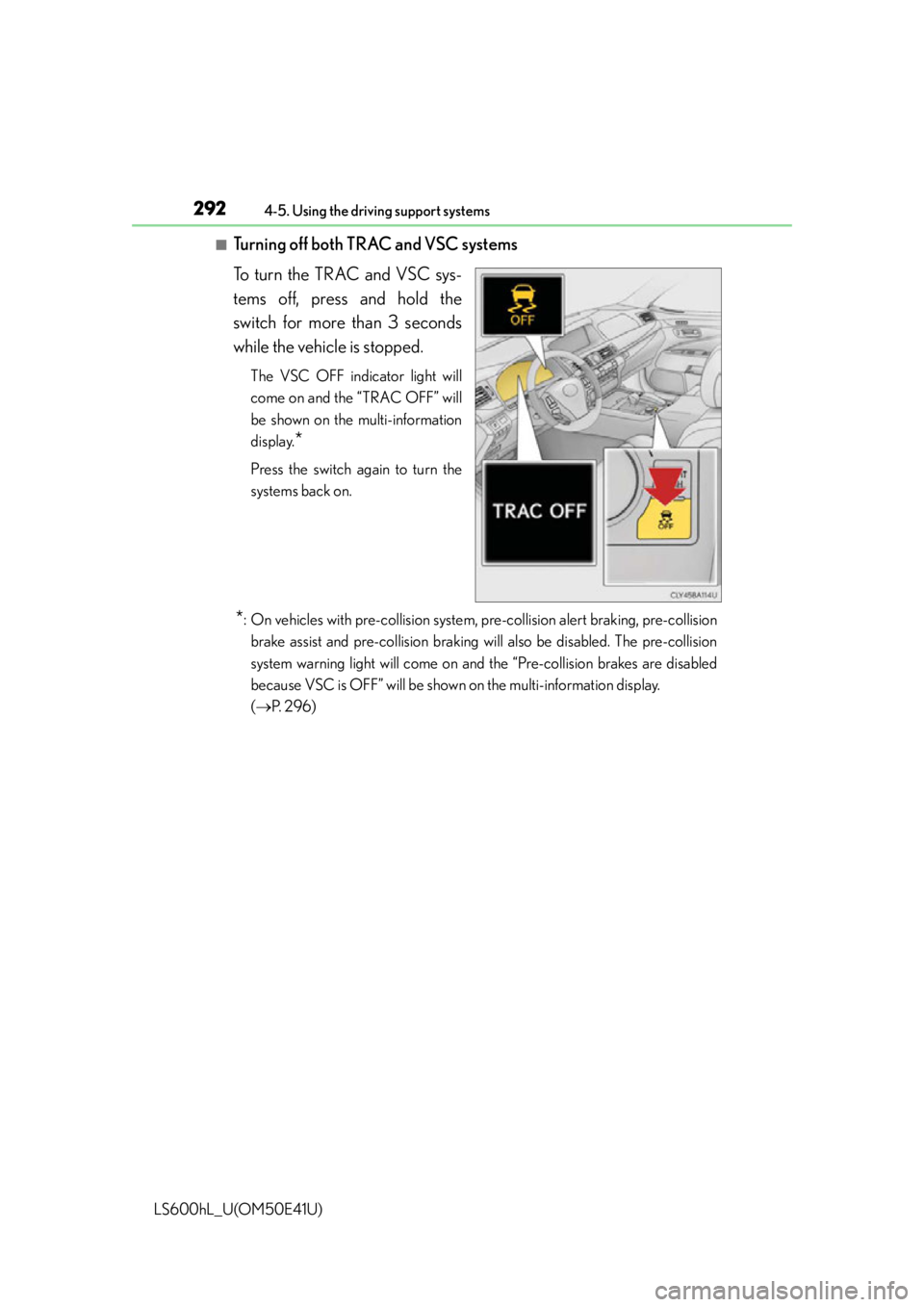
■Turning off both TRAC and VSC systems
To turn the TRAC and VSC sys-
tems off, press and hold the
switch for more than 3 seconds
while the vehicle is stopped.
The VSC OFF indicator light will
come on and the “TRAC OFF” will
be shown on the multi-information
display.
*
Press the switch again to turn the
systems back on.
*: On vehicles with pre-collision system, pre-collision alert braking, pre-collisionbrake assist and pre-collision braking will also be disabled. The pre-collision
system warning light will come on an d the “Pre-collision brakes are disabled
because VSC is OFF” will be shown on the multi-information display.
( P. 2 9 6 )
Page 296 of 620

2944-5. Using the driving support systems
LS600hL_U(OM50E41U)
■Reactivation of the TRAC system linked to vehicle speed
When only the TRAC system is turned off, the TRAC system will turn on when vehi-
cle speed increases. However, when both TRAC/VSC systems are turned off, the
systems will not turn on even when vehicle speed increases.
■Reduced effectiveness of the EPS system
The effectiveness of the EPS system is reduced to prevent the system from overheat-
ing when there is frequent steering input ov er an extended period of time. The steer-
ing wheel may feel heavy as a result.
* Should this occur, refrain from excessive
steering input or stop the vehicle and tu rn the hybrid system off. The EPS system
should return to normal within 10 minutes.
*: If the LKA (Lane-Keeping Assist) system cannot operate in this case, a warning
message will be shown on the multi-information display.
CAUTION
■The ABS does not operate effectively when
●The limits of tire gripping performance have been exceeded (such as excessively
worn tires on a snow covered road).
●The vehicle hydroplanes while driving at high speed on wet or slick roads.
■Stopping distance when the ABS is operating may exceed that of normal condi-
tions
The ABS is not designed to shorten the ve hicle’s stopping distance. Always main-
tain a safe distance from the vehicle in front of you, especially in the following situa-
tions:
●When driving on dirt, gravel or snow-covered roads
●When driving with tire chains
●When driving over bumps in the road
●When driving over roads with potholes or uneven surfaces
Page 298 of 620
2964-5. Using the driving support systems
LS600hL_U(OM50E41U)
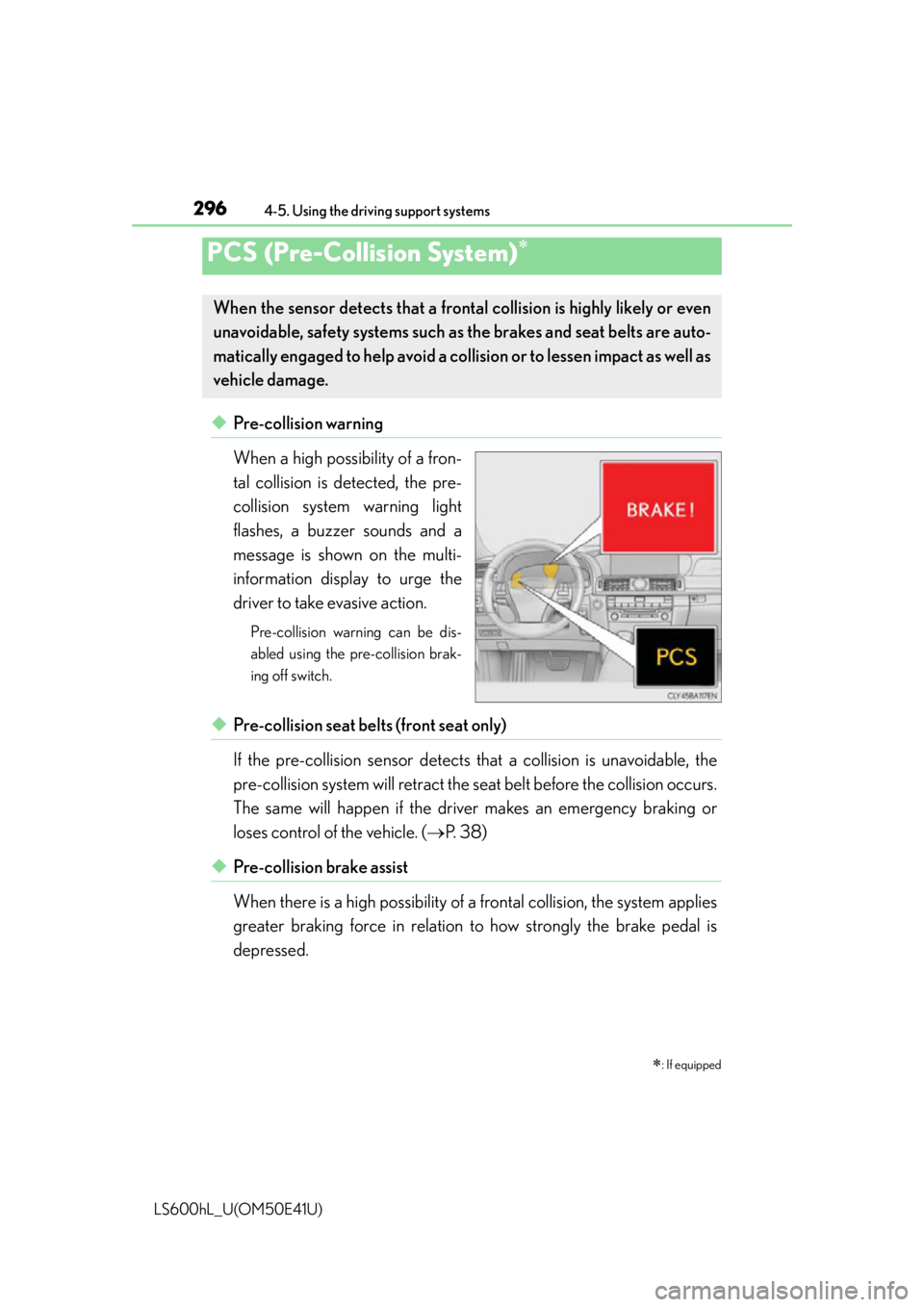
◆Pre-collision warning
When a high possibility of a fron-
tal collision is detected, the pre-
collision system warning light
flashes, a buzzer sounds and a
message is shown on the multi-
information display to urge the
driver to take evasive action.
Pre-collision warning can be dis-
abled using the pre-collision brak-
ing off switch.
◆Pre-collision seat belts (front seat only)
If the pre-collision sensor detects that a collision is unavoidable, the
pre-collision system will retract the seat belt before the collision occurs.
The same will happen if the dr iver makes an emergency braking or
loses control of the vehicle. ( P. 38)
◆Pre-collision brake assist
When there is a high possibility of a frontal collision, the system applies
greater braking force in relation to how strongly the brake pedal is
depressed.
PCS (Pre-Collision System)
: If equipped
When the sensor detects that a fron tal collision is highly likely or even
unavoidable, safety systems such as the brakes and seat belts are auto-
matically engaged to help avoid a co llision or to lessen impact as well as
vehicle damage.
Page 299 of 620

2974-5. Using the driving support systems
4
Driving
LS600hL_U(OM50E41U)
◆Pre-collision braking
When there is a high possibility of a frontal collision, the system warns
the driver using a warning light, war ning display and buzzer. If the sys-
tem determines that a collision is unavoidable, the brakes are automati-
cally applied to help avoid a collision or to reduce the collision speed.
When the vehicle is being stopped by pre-collision braking, the brake
will be engaged for a maximum of 2 seconds and then released auto-
matically. This pre-collisio n braking can be canceled by depressing the
accelerator pedal or brake pedal.
Pre-collision braking can be disabled us ing the pre-collision braking off switch.
◆Suspension control
When there is a high possibility of a frontal collision, the operation of
suspension control helps prevent the front of the vehicle from dropping
when the brakes are applied suddenly.
◆Steering gear control (VGRS) (vehicles with camera sensors)
When the system determines that a collision is unavoidable, the steer-
ing gear ratio is changed to help improve the response to steering
input.
◆Driver monitor system (if equipped)
When the system determines that there is a possibility of a collision, and
either the driver is not facing forwar d or the driver’s eyes are closed,
pre-collision warnings are given in advance to warn the driver. If the
system determines that the conditions to operate pre-collision alert
braking have been met even when th e possibility of a collision increases
further, pre-collision alert braking will operate.
Pre-collision alert braking can be disabled using the pre-collision braking off
switch.
Page 300 of 620
2984-5. Using the driving support systems
LS600hL_U(OM50E41U)
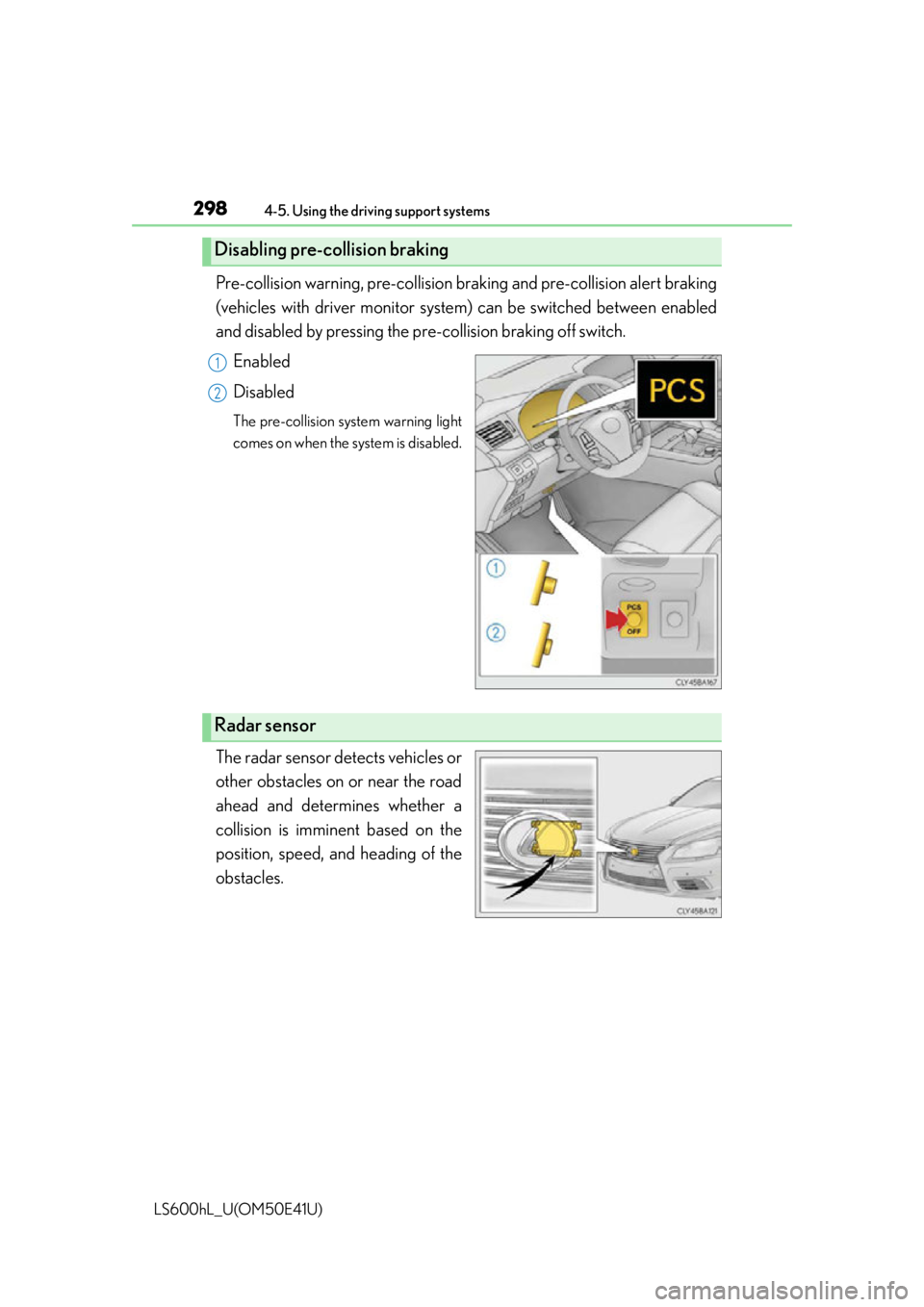
Pre-collision warning, pre-collision braking and pre-collision alert braking
(vehicles with driver monitor system) can be switched between enabled
and disabled by pressing the pr e-collision braking off switch.
Enabled
Disabled
The pre-collision system warning light
comes on when the system is disabled.
The radar sensor detects vehicles or
other obstacles on or near the road
ahead and determines whether a
collision is imminent based on the
position, speed, and heading of the
obstacles.
Disabling pre-collision braking
1
2
Radar sensor
Page 302 of 620

3004-5. Using the driving support systems
LS600hL_U(OM50E41U)
■The pre-collision system is operational when
●Pre-collision warning:
Vehicles without camera sensors
• The pre-collision braking off switch is not pressed.
• Vehicle speed is greater than about 10 mph (15 km/h).
• The speed at which your vehicle is approaching the obstacle or the vehicle run- ning ahead of you is greater than about 10 mph (15 km/h).
Vehicles with camera sensors
• The pre-collision braking off switch is not pressed.
• Vehicle speed is greater than about 4 mph (5 km/h).
• The speed at which your vehicle is approaching the obstacle or the vehicle run- ning ahead of you is greater than about 4 mph (5 km/h).
●Pre-collision seat belts (operating conditions A):
• Vehicle speed is greater than about 19 mph (30 km/h).
• The system detects sudd en braking or skidding.
• The front occupants are wearing a seat belt.
●Pre-collision seat belts (operating conditions B):
• Vehicle speed is greater than about 4 mph (5 km/h).
• The speed at which your vehicle is approaching the obstacle or the vehicle run- ning ahead of you is greater than about 19 mph (30 km/h).
• The front occupants are wearing a seat belt.
●Pre-collision brake assist:
• The VSC OFF switch is not pressed.
• Vehicle speed is greater than about 19 mph (30 km/h).
• The speed at which your vehicle is approaching the obstacle or the vehicle run- ning ahead of you is greater than about 19 mph (30 km/h).
• The brake pedal is depressed.
●Pre-collision braking:
Vehicles without camera sensors
• The pre-collision braking off switch is not pressed.
• The VSC OFF switch is not pressed.
• Vehicle speed is greater than about 10 mph (15 km/h).
• The speed at which your vehicle is approaching the obstacle or the vehicle run- ning ahead of you is greater than about 10 mph (15 km/h).
Vehicles with camera sensors
• The pre-collision braking off switch is not pressed.
• The VSC OFF switch is not pressed.
• Vehicle speed is greater than about 4 mph (5 km/h).
• The speed at which your vehicle is approaching the obstacle or the vehicle run- ning ahead of you is greater than about 4 mph (5 km/h).
Page 305 of 620

3034-5. Using the driving support systems
4
Driving
LS600hL_U(OM50E41U)
■Situations in which the pre-collision system does not function properly
The system may not function effectively in situations such as the following:
●On roads with sharp bends or uneven surfaces
●If a vehicle suddenly moves in front of your vehicle, such as at an intersection
●If a vehicle suddenly cuts in front of your vehicle, such as when overtaking
●In inclement weather such as heavy rain, fog, snow or sand storms
●If the vehicle is skidding when VSC is not operating
●When an extreme change in vehicle height occurs
●When only part of your vehicle’s front en d collides with, or contacts, a vehicle or
object in a frontal collision
●When the radar sensor moves off position due to its surrounding area being sub-
jected to a strong impact
●If an obstacle in front of the vehicle is small
●When the system judges that the driver performed a collision avoidance operation
via the accelerator pedal, brake pedal, or steering wheel
■Automatic cancelation of the pre-collision system
When a malfunction occurs due to sensor co ntamination, etc. that results in the sen-
sors being unable to detect obstacles, the pre-collision system will be automatically
disabled. In this case, the system will not activate even if there is a collision possibility.
■When there is a malfunction in the system
The pre-collision system warning light will flash and warning messages will be dis-
played. ( P. 495, 503)
Page 306 of 620

3044-5. Using the driving support systems
LS600hL_U(OM50E41U)
■Certification for the pre-collision system
For vehicles sold in the U.S.A.
FCC ID: HYQDNMWR004
This device complies with part 15 of the FCC Rules. Operation is subject to the fol-
lowing two conditions: (1) This device may not cause harmful interference, and (2)
this device must accept any interference received, including interference that may
cause undesired operation.
FCC WARNING
Changes or modifications not expressly ap proved by the party responsible for com-
pliance could void the user’s authority to operate the equipment.
Radiofrequency radiation exposure Information:
This equipment complies with FCC radiation exposure limits set forth for an uncon-
trolled environment.
This equipment should be in stalled and operated with minimum distance of 20 cm
between the radiator (a ntenna) and your body.
This transmitter must not be co-located or operating in conjunction with any other
antenna or transmitter.
For vehicles sold in Canada
This device complies with Industry Canada licence-exempt RSS standard(s).
Operation is subject to the following two conditions: (1) this device may not cause
interference, and (2) this device must acc ept any interference, including interfer-
ence that may cause undesired operation of the device.
Page 311 of 620

3094-5. Using the driving support systems
4
Driving
LS600hL_U(OM50E41U)
■The outside rear view mirror indicators visibility
When under strong sunlight, the outside rear view mirror indicator may be difficult to
see.
■Rear Cross Traffic Alert buzzer hearing
Rear Cross Traffic Alert function may be difficult to hear over loud noises such as
high audio volume.
■When there is a malfunction in the Blind Spot Monitor
If a system malfunction is detected due to any of the following reasons, warning mes-
sages will be displayed: ( P. 5 0 3 )
●There is a malfunction with the sensors
●The sensors have become dirty
●The outside temperature is extremely high or low
●The sensor voltage has become abnormal
Outside rear view mirror indicators
Blind Spot Monitor function:
When a vehicle is detected in the blind sp ot, the outside rear view mirror indica-
tor comes on while the turn signal lever is not operated and the outside rear view
mirror indicator flashes while the turn signal lever is operated.
Rear Cross Traffic Alert function:
When a vehicle approaching from the right or left rear of the vehicle is detected,
the outside rear view mirror indicators flash.
Rear Cross Traffic Alert buzzer (Rear Cross Traffic Alert function only)
When a vehicle approaching from the right or left rear of the vehicle is detected,
a buzzer sounds from behind the rear seat.
2
3
Page 312 of 620

3104-5. Using the driving support systems
LS600hL_U(OM50E41U)
■Certification for the Blind Spot Monitor
For vehicles sold in the U.S.A.
FCC ID : OAYSRR2A
This device complies with part 15 of the FCC Rules. Operation is subject to the fol-
lowing two conditions:
(1) This device may not cause harmful interference, and
(2) this device must accept any interferen ce received, including interference that
may cause undesired operation.
FCC Warning
Changes or modifications not expressly ap proved by the party responsible for com-
pliance could void the user's authority to operate the equipment.
For vehicles sold in Canada
Applicable law : Canada 310
This device complies with Industry Cana da licence-exempt RSS standard(s). Oper-
ation is subject to the following two conditio ns: (1) this device may not cause interfer-
ence, and (2) this device must accept any interference, including interference that
may cause undesired operation of the device.
Frequency bands : 24.05 - 24.25GHz
Output power : less than 20 milliwatts