light LEXUS LS600H 2017 Owners Manual
[x] Cancel search | Manufacturer: LEXUS, Model Year: 2017, Model line: LS600H, Model: LEXUS LS600H 2017Pages: 676, PDF Size: 35.25 MB
Page 357 of 676
3574-5. Using the driving support systems
4
Driving
LS600h/LS600hL_EE(OM50G20E)
CAUTION
■Handling the camera sensors (if equipped)
Observe the following to ensure that the PCS functions effectively:
●Keep the windshield clean at all times.
PCS effectiveness may be reduced due to the presence of raindrops, condensa-
tion, ice or snow on the windshield.
●Do not subject the camera sensor to a st rong impact or force, and do not disas-
semble the camera sensor.
●Do not change the installation position of the camera sensor, or remove and rein-
stall it. The direction of the camera sensor is precisely adjusted.
●When the windshield fogs up, use the wi ndshield defogger to dry the windshield.
During cold weather, using the heater with air blowing to the feet may allow the
upper part of the windshield to fog up, having a negative effect on the images.
●Do not place anything on the dashboard.
Images reflected on the windshield may reduce the effectiveness of the camera
sensor.
●Do not scratch the camera lens, or let it get dirty.
●Do not attach a sticker or other items to the windshield near the camera sensor.
■Headlights (vehicles with camera sensors)
●Observe the following to ensure proper near-infrared ray projection:
• Keep the headlights clean at all times.
• The detection performance may deteriorate if the high beams are misaligned
or inoperative.
●The near-infrared ray transmitters project strong energy that is not visible.
Although the transmitters normally turn off when the vehicle is stopped, never
look into the headlights for your safety.
Page 358 of 676
3584-5. Using the driving support systems
LS600h/LS600hL_EE(OM50G20E)
CAUTION
■Determining the direction the driver is facing and whether the driver’s eyes are
open or closed (vehicles with driver monitor system)
The direction the driver is facing and whether the driver’s eyes are open or closed
may not be determined correctly if the following conditions exist:
●There is an object between the driver monitor sensor and the driver’s face, such
as when the sensor is blocked.
●A part of the driver’s face is covered.
●The sensor or the driver’s face is exposed to intense light such as sunlight.
●The driving posture is improper.
●The vehicle is parked.
■Handling the driver monitor sensor (vehicles with driver monitor system)
Observe the following to ensure the driver monitor sensor can function effectively.
Failure to do so may result in a malfunction or may prevent the system from cor-
rectly determining the direction the driver is facing and whether the driver’s eyes
are open or closed, resulting in an unexpected accident.
●Do not disassemble, damage, lift or pull on the sensor.
●Do not touch the sensor while driving.
●Do not wet or spill water on the sensor.
●Do not drop anything on or allow anything to hit against the sensor. Do not sub-
ject the sensor to an impact.
●Make sure that there are no scratches, dirt or stickers on the side of the sensor
that faces the driver.
●Do not place any objects in front of the side of the sensor that faces the driver or
cover the sensor.
Page 360 of 676
3604-5. Using the driving support systems
LS600h/LS600hL_EE(OM50G20E)
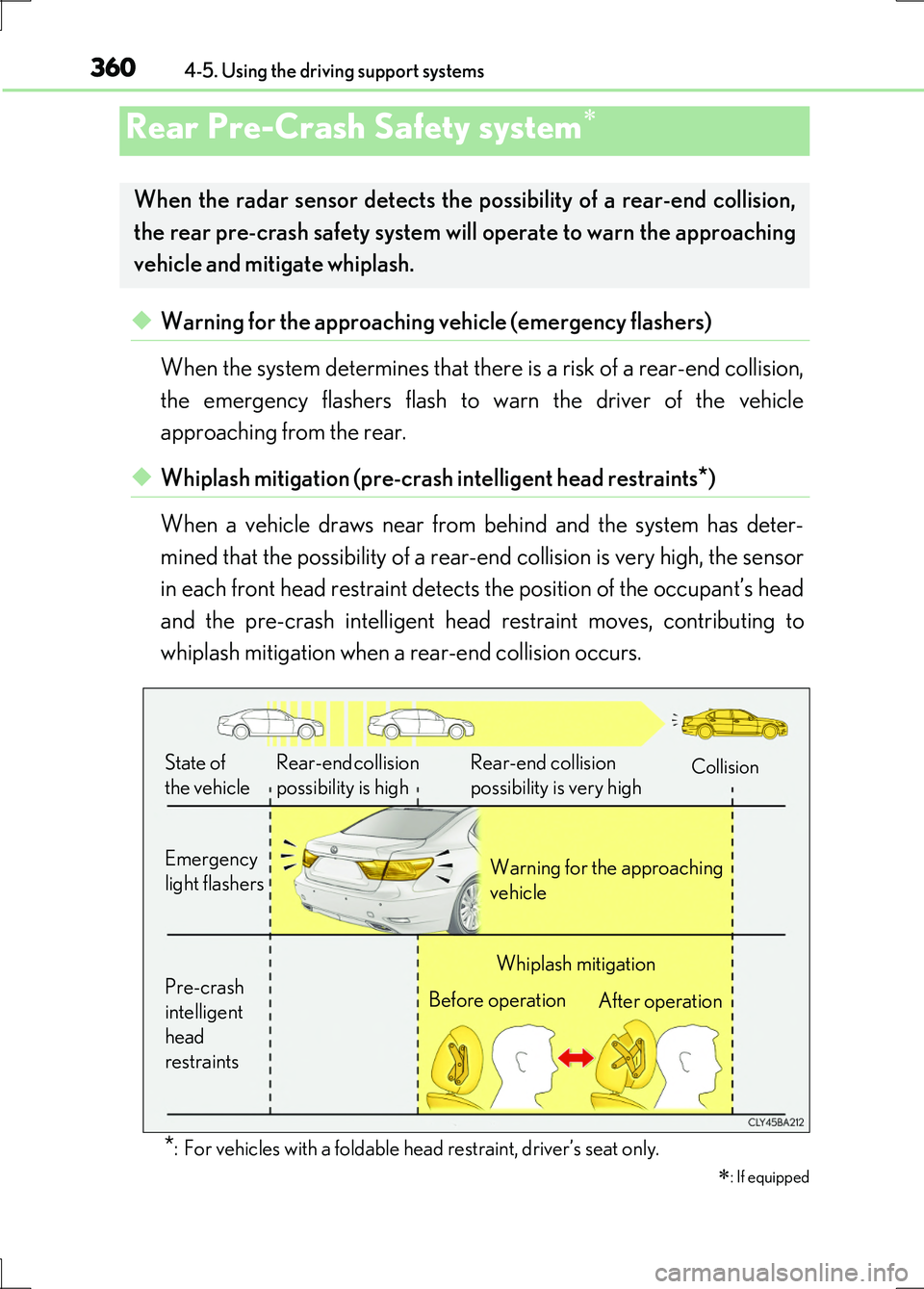
◆Warning for the approaching vehicle (emergency flashers)
When the system determines that there is a risk of a rear-end collision,
the emergency flashers flash to warn the driver of the vehicle
approaching from the rear.
◆Whiplash mitigation (pre-crash intelligent head restraints*)
When a vehicle draws near from behind and the system has deter-
mined that the possibility of a rear-end collision is very high, the sensor
in each front head restraint detects the position of the occupant’s head
and the pre-crash intelligent head restraint moves, contributing to
whiplash mitigation when a rear-end collision occurs.
*: For vehicles with a foldable head restraint, driver’s seat only.
Rear Pre-Crash Safety system
: If equipped
When the radar sensor detects the possibility of a rear-end collision,
the rear pre-crash safety system will operate to warn the approaching
vehicle and mitigate whiplash.
Rear-end collision
possibility is high
Rear-end collision
possibility is very highCollision
Emergency
light flashers Warning for the approaching
vehicle
Pre-crash
intelligent
head
restraints
Whiplash mitigation
Before operation After operation
State of
the vehicle
Page 361 of 676
3614-5. Using the driving support systems
4
Driving
LS600h/LS600hL_EE(OM50G20E)
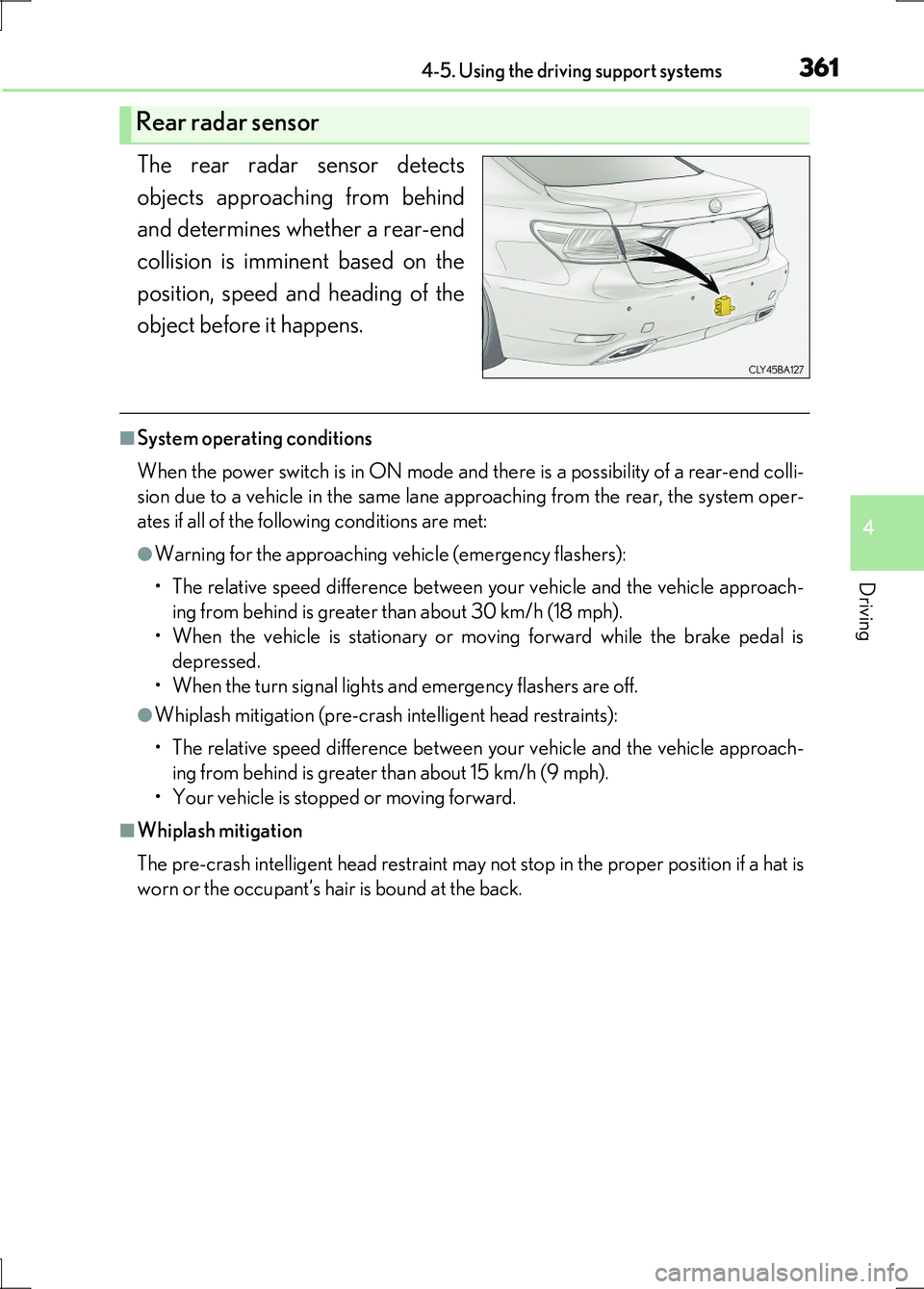
The rear radar sensor detects
objects approaching from behind
and determines whether a rear-end
collision is imminent based on the
position, speed and heading of the
object before it happens.
■System operating conditions
When the power switch is in ON mode and there is a possibility of a rear-end colli-
sion due to a vehicle in the same lane approaching from the rear, the system oper-
ates if all of the following conditions are met:
●Warning for the approaching vehicle (emergency flashers):
• The relative speed difference between your vehicle and the vehicle approach-
ing from behind is greater than about 30 km/h (18 mph).
• When the vehicle is stationary or moving forward while the brake pedal is
depressed.
• When the turn signal lights and emergency flashers are off.
●Whiplash mitigation (pre-crash intelligent head restraints):
• The relative speed difference between your vehicle and the vehicle approach-
ing from behind is greater than about 15 km/h (9 mph).
• Your vehicle is stopped or moving forward.
■Whiplash mitigation
The pre-crash intelligent head restraint may not stop in the proper position if a hat is
worn or the occupant’s hair is bound at the back.
Rear radar sensor
Page 362 of 676
3624-5. Using the driving support systems
LS600h/LS600hL_EE(OM50G20E)
■Conditions in which it is hard for the sensor to detect objects
The rear pre-crash safety system is not a system that can detect all possible rear-end
collisions. The system may not operate in th e following situations. Always be aware of
the surrounding conditions.
●The vehicle posture is abnormal.
●The sensor may not detect objects such as bicycles and motorcycles.
●Raindrops, ice or snow are attached to the rear bumper.
●The road has curves or is bumpy.
●A rear-end collision occurs from an angle or with a large offset.
■Conditions that may trigger the system even if there is no danger of a rear-end col-
lision
●Another vehicle drives past just behind your vehicle when your vehicle is stopped
to turn right or left.
●Another vehicle drives past just beside your vehicle when your vehicle is stopped
on the side of the road.
●The vehicle behind you passes your vehicle from a short distance while your vehicle
is moving.
●The vehicle behind you approaches your vehicle rapidly to a close distance while
your vehicle is moving or stopped.
■When there is a malfunction in the system
Warning lights and/or warning messages will turn on or flash. ( P. 557, 563)
Page 365 of 676
3654-5. Using the driving support systems
4
Driving
LS600h/LS600hL_EE(OM50G20E)
CAUTION
■Precautions for the radar sensor and rear bumper
The rear bumper of vehicles with a rear pre-crash safety system is a functional part
that has radio wave permeability. Observe the following to ensure the system can
function effectively:
●Keep the rear bumper clean at all times.
Raindrops, ice or snow may dete riorate radar sensor performance.
●Do not subject the radar sensor or surrounding area to a strong impact.
If the sensor moves even slightly out of position, the system may malfunction. If the
sensor or surrounding area is subjected to a strong impact, always have the area
inspected and repaired by any authorized Lexus dealer or repairer, or another
duly qualified and equipped professional.
●Do not disassemble the radar sensor.
●Do not attach a towing hitch, bike holder, protective film or stickers to the center
portion of the rear bumper.
●Do not replace the rear bumper with non-genuine parts or modify it.
●For painting or repair of the rear bumper, consult with any authorized Lexus
dealer or repairer, or another duly qualified and equipped professional.
■Precaution for the pre-crash intelligent head restraints
Do not put head restraint covers.
Page 367 of 676
3674-5. Using the driving support systems
4
Driving
LS600h/LS600hL_EE(OM50G20E)
■The outside rear view mirror indicators visibility
When under strong sunlight, the outside rear view mirror indicator may be difficult to
see.
■Rear Crossing Traffic Alert buzzer hearing
Rear Crossing Traffic Alert function may be difficult to hear over loud noises such as
high audio volume.
■When there is a malfunction in the Blind Spot Monitor
If a system malfunction is detected due to any of the following reasons, warning mes-
sages will be displayed: ( P. 563)
●There is a malfunction with the sensors
●The sensors have become dirty
●The outside temperature is extremely high or low
●The sensor voltage has become abnormal
Outside rear view mirror indicators
Blind Spot Monitor function:
When a vehicle is detected in the blind spot, the outside rear view mirror indica-
tor comes on while the turn signal lever is not operated. If the turn signal lever is
operated toward the detected side, the outside rear view mirror indicator flashes.
Rear Crossing Traffic Alert function:
When a vehicle approaching from the right or left rear of the vehicle is detected,
the outside rear view mirror indicators flash.
Rear Crossing Traffic Alert buzzer (Rear Crossing Traffic Alert func-
tion only)
When a vehicle approaching from the right or left rear of the vehicle is detected,
a buzzer sounds from behind the rear seat.
2
3
Page 370 of 676
3704-5. Using the driving support systems
LS600h/LS600hL_EE(OM50G20E)
CAUTION
■Handling the radar sensor
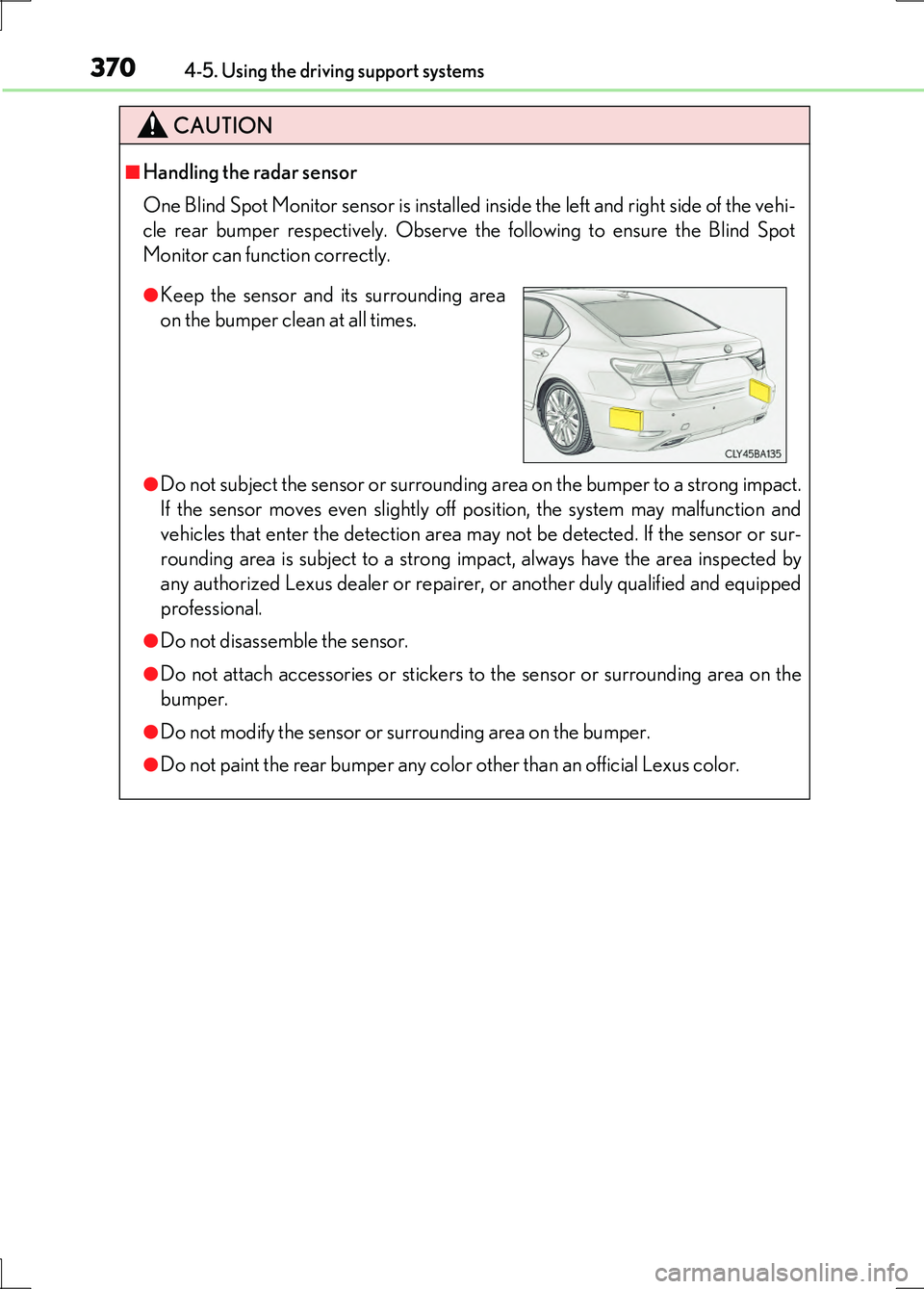
One Blind Spot Monitor sensor is installed inside the left and right side of the vehi-
cle rear bumper respectively. Observe the following to ensure the Blind Spot
Monitor can function correctly.
●Do not subject the sensor or surrounding area on the bumper to a strong impact.
If the sensor moves even slightly off position, the system may malfunction and
vehicles that enter the detection area may not be detected. If the sensor or sur-
rounding area is subject to a strong impact, always have the area inspected by
any authorized Lexus dealer or repairer, or another duly qualified and equipped
professional.
●Do not disassemble the sensor.
●Do not attach accessories or stickers to the sensor or surrounding area on the
bumper.
●Do not modify the sensor or surrounding area on the bumper.
●Do not paint the rear bumper any color other than an official Lexus color.
●Keep the sensor and its surrounding area
on the bumper clean at all times.
Page 377 of 676
3774-5. Using the driving support systems
4
Driving
LS600h/LS600hL_EE(OM50G20E)
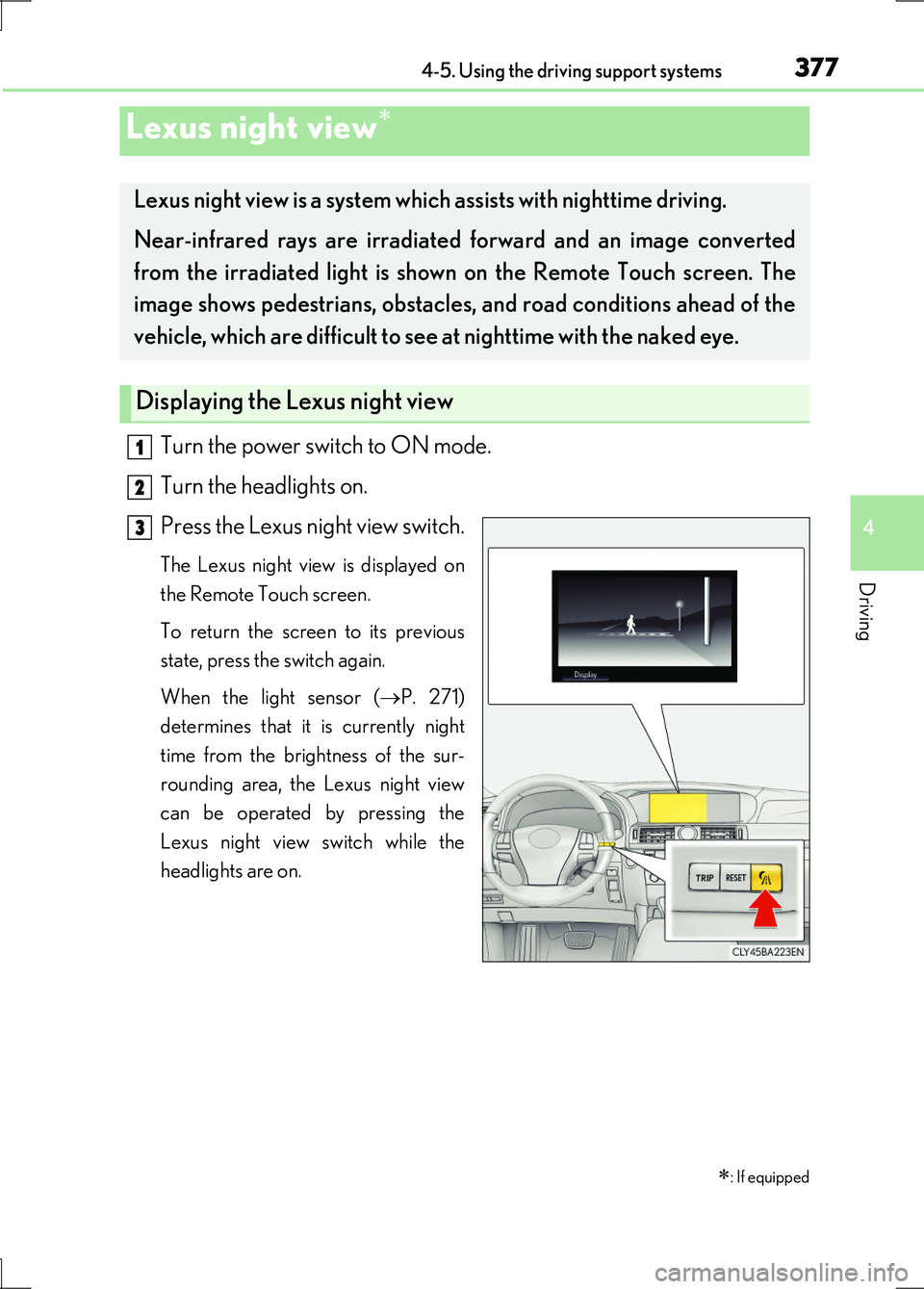
Turn the power switch to ON mode.
Turn the headlights on.
Press the Lexus night view switch.
The Lexus night view is displayed on
the Remote Touch screen.
To return the screen to its previous
state, press the switch again.
When the light sensor ( P. 271)
determines that it is currently night
time from the brightness of the sur-
rounding area, the Lexus night view
can be operated by pressing the
Lexus night view switch while the
headlights are on.
Lexus night view
: If equipped
Lexus night view is a system which assists with nighttime driving.
Near-infrared rays are irradiated forward and an image converted
from the irradiated light is show n on the Remote Touch screen. The
image shows pedestrians, obstacles, and road conditions ahead of the
vehicle, which are difficult to see at nighttime with the naked eye.
Displaying the Lexus night view
1
2
3
Page 380 of 676
3804-5. Using the driving support systems
LS600h/LS600hL_EE(OM50G20E)
CAUTION
■Before using the Lexus night view
Never depend on this system only.
Lexus night view is intended as a supplemental aid to help you see pedestrians and
road conditions ahead of the vehicle. As there are limits to the system, do not rely
solely on the system while in use, and drive safely while observing the following
precautions.
■When using the Lexus night view
Observe the following precautions.
Failure to do so may cause an accident resulting in death or serious injury.
●Never drive while looking at the Lexus night view screen only.
●Do not look continuously at the Lexus ni ght view screen while driving. Pedestri-
ans, objects etc. ahead of the vehicle may be overlooked by the system. The sys-
tem should always be used as a supplemental aid only.
●Lexus night view is designed to help you see objects better when driving in dark-
ness on a road with few curves. Do not use the Lexus night view in well-lit areas or
on roads with many curves or slopes. There may be areas that cannot be dis-
played by the system due to the road conditions (curve size, gradient, etc.)
●Lexus night view may be unable to project some features at an appropriate level
of brightness. Some or all parts of certain features may be dark or difficult to see.
Do not rely solely on the Lexus night view, and drive carefully while checking the
surroundings for safety, as you would with a normal vehicle. Also, the following
features and conditions may not be displayed clearly.
Features that are difficult to display:
• Clothing of a pedestrian made of a certain kind of material (ex. leather jackets)
• The characters on signs and billboards
• The information on road signs
Conditions in which display is difficult:
• Unfavorable weather conditions such as rain, fog, snowfall, snow storms etc.
• There are large puddles of water on the road surface following rainfall
• The area of the windshield in front of the camera is fogged up, dirty or icy
• The areas around the headlights are covered with ice, snow, mud etc.
• The 12-volt battery voltage is remarkably low
• There are bright lights ahead of the vehicle