ESP LEXUS LS600H 2017 User Guide
[x] Cancel search | Manufacturer: LEXUS, Model Year: 2017, Model line: LS600H, Model: LEXUS LS600H 2017Pages: 676, PDF Size: 35.25 MB
Page 219 of 676
2193-4. Adjusting the steering wheel and mirrors
3
Operation of each component
LS600h/LS600hL_EE(OM50G20E)
The height of the rear view mirror can be adjusted to suit your driving pos-
ture.
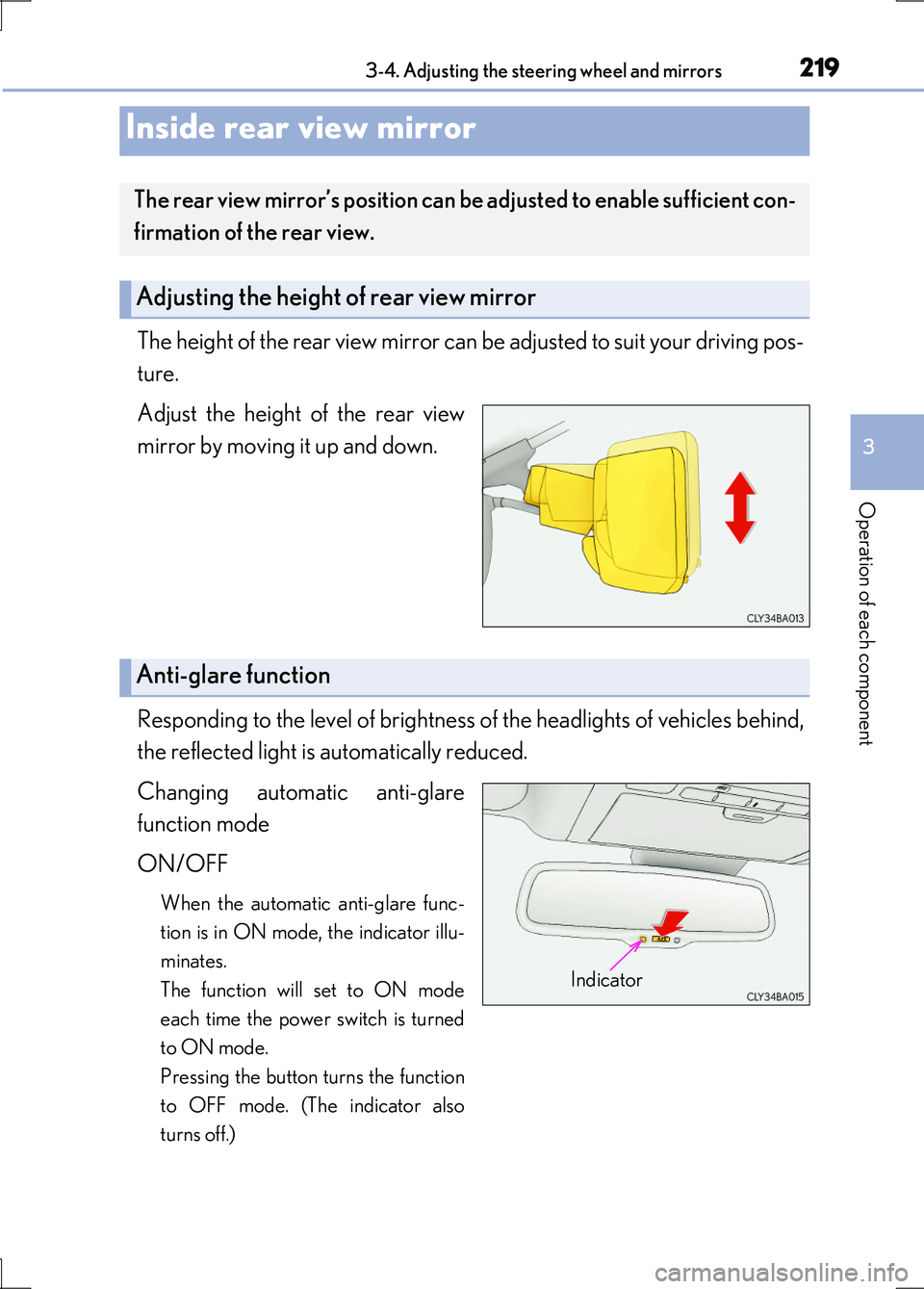
Adjust the height of the rear view
mirror by moving it up and down.
Responding to the level of brightness of the headlights of vehicles behind,
the reflected light is automatically reduced.
Changing automatic anti-glare
function mode
ON/OFF
When the automatic anti-glare func-
tion is in ON mode, the indicator illu-
minates.
The function will set to ON mode
each time the power switch is turned
to ON mode.
Pressing the button turns the function
to OFF mode. (The indicator also
turns off.)
Inside rear view mirror
The rear view mirror’s position can be adjusted to enable sufficient con-
firmation of the rear view.
Adjusting the height of rear view mirror
Anti-glare function
Indicator
Page 227 of 676
2273-5. Opening, closing the windows and moon roof
3
Operation of each component
LS600h/LS600hL_EE(OM50G20E)
■Door lock linked window operation
●The power windows can be closed using the entry function. (P. 151)
●The power windows can be opened and closed using the mechanical key.
( P. 603)
■Customization
Settings (e.g. linked door lock operation) can be changed.
(Customizable features P. 634)
CAUTION
Observe the following precautions.
Failure to do so may result in death or serious injury.
■Closing the windows
●The driver is responsible for all the power window operations, including the oper-
ation for the passengers. In order to prevent accidental operation, especially by a
child, do not let a child operate the power windows. It is possible for children and
other passengers to have body parts caug ht in the power window. Also, when rid-
ing with a child, it is recommended to use the window lock switch. ( P. 225)
●Check to make sure that all passengers do not have any part of their body in a
position where it could be caught when a window is being operated.
●When using the smart entry & start system, wireless remote control or mechani-
cal key and operating the power windows, operate the power window after
checking to make sure that there is no possibility of any passenger having any of
their body parts caught in the window. Also do not let a child operate window by
the smart entry & start system, wireless remote control or mechanical key. It is
possible for children and other passengers to get caught in the power window.
●When exiting the vehicle, turn the power switch off, carry the key and exit the
vehicle along with the child. There may be accidental operation, due to mischief,
etc., that may possibly lead to an accident.
Page 232 of 676
2323-5. Opening, closing the windows and moon roof
LS600h/LS600hL_EE(OM50G20E)
■Moon roof open warning buzzer
The buzzer sounds and a message is shown on the multi-information display in the
instrument cluster when the power switch is turned off and the driver’s door is
opened with the moon roof open.
■Customization
Settings (e.g. linked door lock operation) can be changed.
(Customizable features P. 634)
CAUTION
Observe the following precautions.
Failure to do so may cause death or serious injury.
■Opening the moon roof
●Do not allow any passengers to put their hands or heads outside the vehicle while
it is moving.
●Do not sit on top of the moon roof.
■Closing the moon roof
●The driver is responsible for moon roof opening and closing operations.
In order to prevent accidental operation, especially by a child, do not let a child
operate the moon roof. It is possible for children and other passengers to have
body parts caught in the moon roof.
●Check to make sure that all passengers do not have any part of their body in a
position where it could be caught when the moon roof is being operated.
●When using the smart entry & start system, wireless remote control or mechani-
cal key and operating the moon roof, operate the moon roof after checking to
make sure that there is no possibility of any passenger having any of their body
parts caught in the moon roof. Also, do not let a child operate moon roof by the
smart entry & start system, wireless remote control or mechanical key. It is possi-
ble for children and other passengers to get caught in the moon roof.
●When exiting the vehicle, turn the power switch off, carry the key and exit the vehicle
along with the child. There may be accidental operation, due to mischief, etc., that may possibly lead to an accident.
■Jam protection function
●Never use any part of your body to intentionally activate the jam protection func-
tion.
●The jam protection function may not work if something gets caught just before
the moon roof fully closes.
Page 235 of 676
2354-1. Before driving
4
Driving
LS600h/LS600hL_EE(OM50G20E)
Make sure that the parking brake is set and shift the shift lever to D.
Gently depress the accelerator pedal.
Release the parking brake.
■When starting off on a uphill
Hill-start assist control will operate. ( P. 338)
■Driving in the rain
●Drive carefully when it is raining, because visibility will be reduced, the windows
may become fogged-up, and the road will be slippery.
●Drive carefully when it starts to rain, because the road surface will be especially
slippery.
●Refrain from high speeds when driving on an expressway in the rain, because there
may be a layer of water between the tires and the road surface, preventing the
steering and brakes from operating properly.
■Breaking in your new Lexus
To extend the life of the vehicle, observing the following precautions is recom-
mended:
●For the first 300 km (186 miles):
Avoid sudden stops.
●For the first 1000 km (621 miles):
• Do not drive at extremely high speeds.
• Avoid sudden acceleration.
• Do not drive continuously in low gears.
• Do not drive at a constant speed for extended periods.
Starting off on a steep uphill
1
2
3
Page 237 of 676
2374-1. Before driving
4
Driving
LS600h/LS600hL_EE(OM50G20E)
CAUTION
Observe the following precautions.
Failure to do so may result in death or serious injury.
■When starting the vehicle
Always keep your foot on the brake pedal while stopped with the hybrid system
operating. This prevents the vehicle from creeping.
■When driving the vehicle
●Do not drive if you are unfamiliar with the location of the brake and accelerator
pedals to avoid depressing the wrong pedal.
• Accidentally depressing the accelerator pedal instead of the brake pedal will
result in sudden acceleration that may lead to an accident.
• When backing up, you may twist your body around, leading to a difficulty in
operating the pedals. Make sure to operate the pedals properly.
• Make sure to keep a correct driving posture even when moving the vehicle
only slightly. This allows you to depress the brake and accelerator pedals prop-
erly.
• Depress the brake pedal using your right foot. Depressing the brake pedal
using your left foot may delay response in an emergency, resulting in an acci-
dent.
●The driver should pay extra attention to pedestrians when the vehicle is powered
only by the electric motor (traction motor). Because there is no engine noise, the
pedestrians may misjudge the vehicle’s movement.
●Do not drive the vehicle over or stop the vehicle near flammable materials.
The exhaust system and exhaust gases can be extremely hot. These hot parts may
cause a fire if there is any flammable material nearby.
Page 256 of 676
2564-2. Driving procedures
LS600h/LS600hL_EE(OM50G20E)
To drive using temporary shift range selection, operate the “-” paddle shift
switch while the shift lever is in the D position.
Changing the shift range allows restri ction of the highest shift range, pre-
venting unnecessary upshifting and en abling the level of engine braking
force to be selected.
Also, by controlling the transmission so that engine speed is higher when
compared with normal driving, acceleration response is improved.
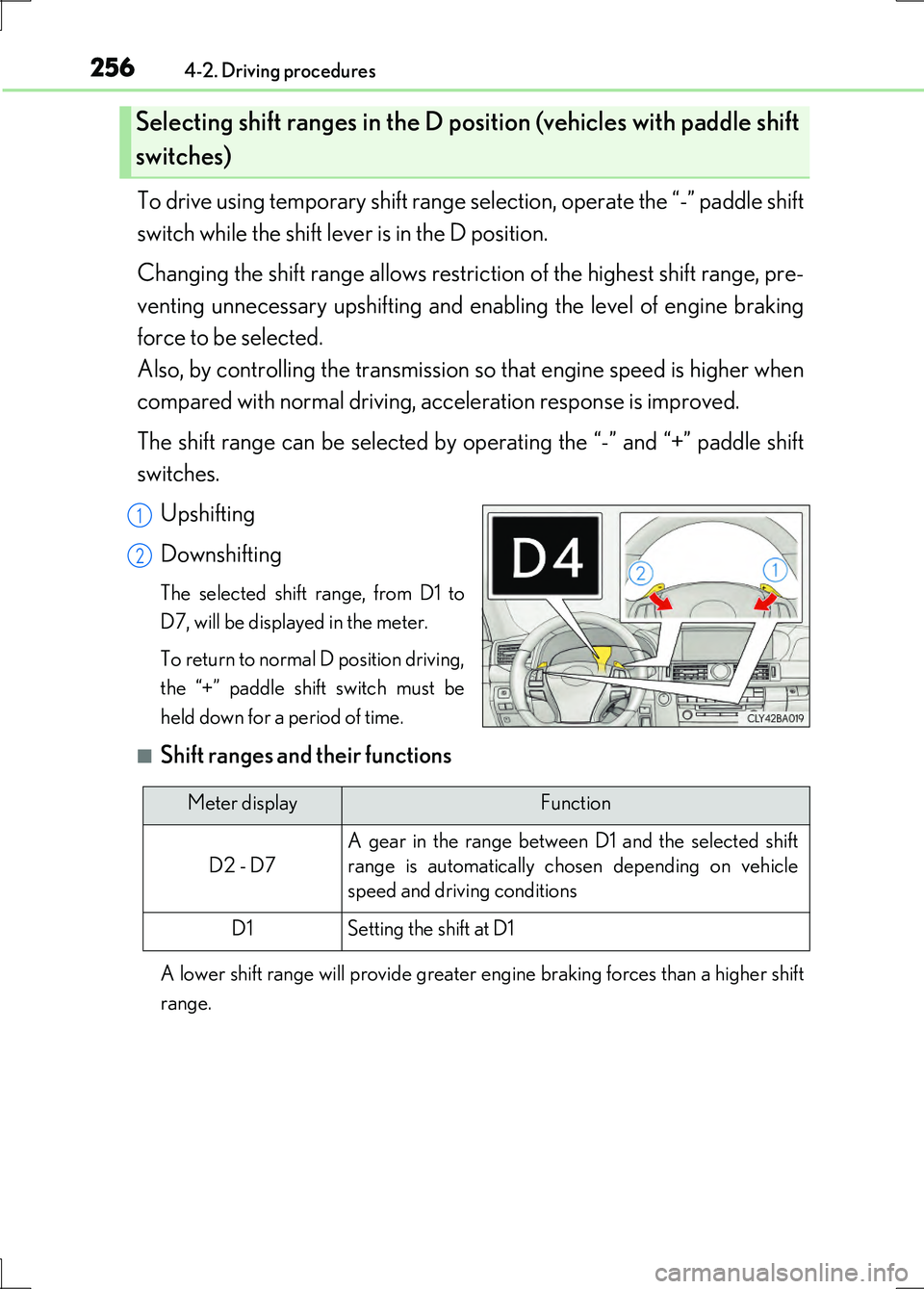
The shift range can be selected by operating the “-” and “+” paddle shift
switches.
Upshifting
Downshifting
The selected shift range, from D1 to
D7, will be displayed in the meter.
To return to normal D position driving,
the “+” paddle shift switch must be
held down for a period of time.
■Shift ranges and their functions
A lower shift range will provide greater engine braking forces than a higher shift
range.
Selecting shift ranges in the D position (vehicles with paddle shift
switches)
1
2
Meter displayFunction
D2 - D7
A gear in the range between D1 and the selected shift
range is automatically chosen depending on vehicle
speed and driving conditions
D1Setting the shift at D1
Page 257 of 676
2574-2. Driving procedures
4
Driving
LS600h/LS600hL_EE(OM50G20E)
To enter S mode, shift the shift lever to the S position.
Changing the shift range allows restri ction of the highest shift range, pre-
venting unnecessary upshifting and en abling the level of engine braking
force to be selected.
Also, by controlling the transmission so that engine speed is higher when
compared with normal driving, acceleration response is improved.
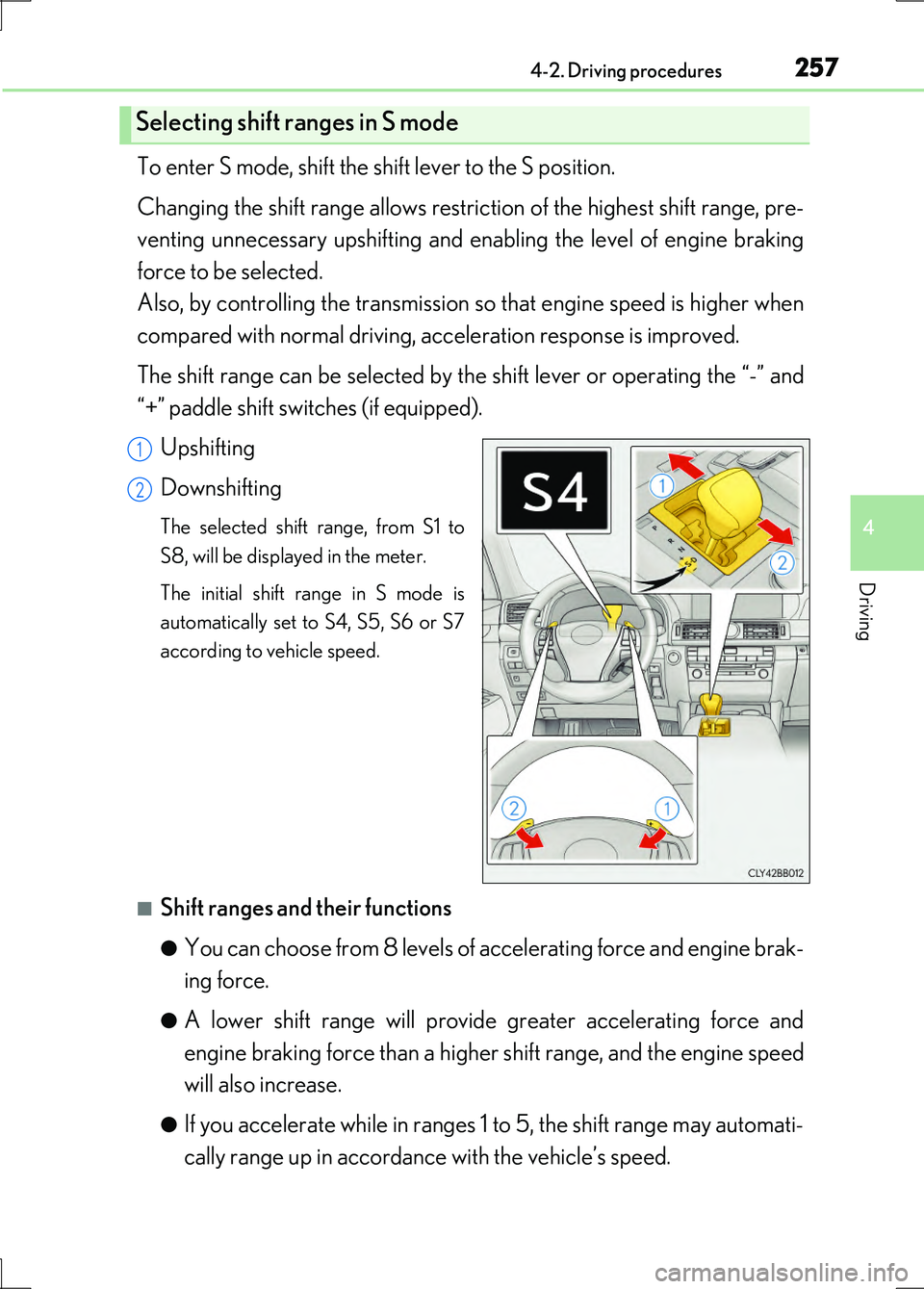
The shift range can be selected by the shift lever or operating the “-” and
“+” paddle shift switches (if equipped).
Upshifting
Downshifting
The selected shift range, from S1 to
S8, will be displayed in the meter.
The initial shift range in S mode is
automatically set to S4, S5, S6 or S7
according to vehicle speed.
■Shift ranges and their functions
●You can choose from 8 levels of accelerating force and engine brak-
ing force.
●A lower shift range will provide greater accelerating force and
engine braking force than a higher shift range, and the engine speed
will also increase.
●If you accelerate while in ranges 1 to 5, the shift range may automati-
cally range up in accordance with the vehicle’s speed.
Selecting shift ranges in S mode
1
2
Page 296 of 676
2964-5. Using the driving support systems
LS600h/LS600hL_EE(OM50G20E)
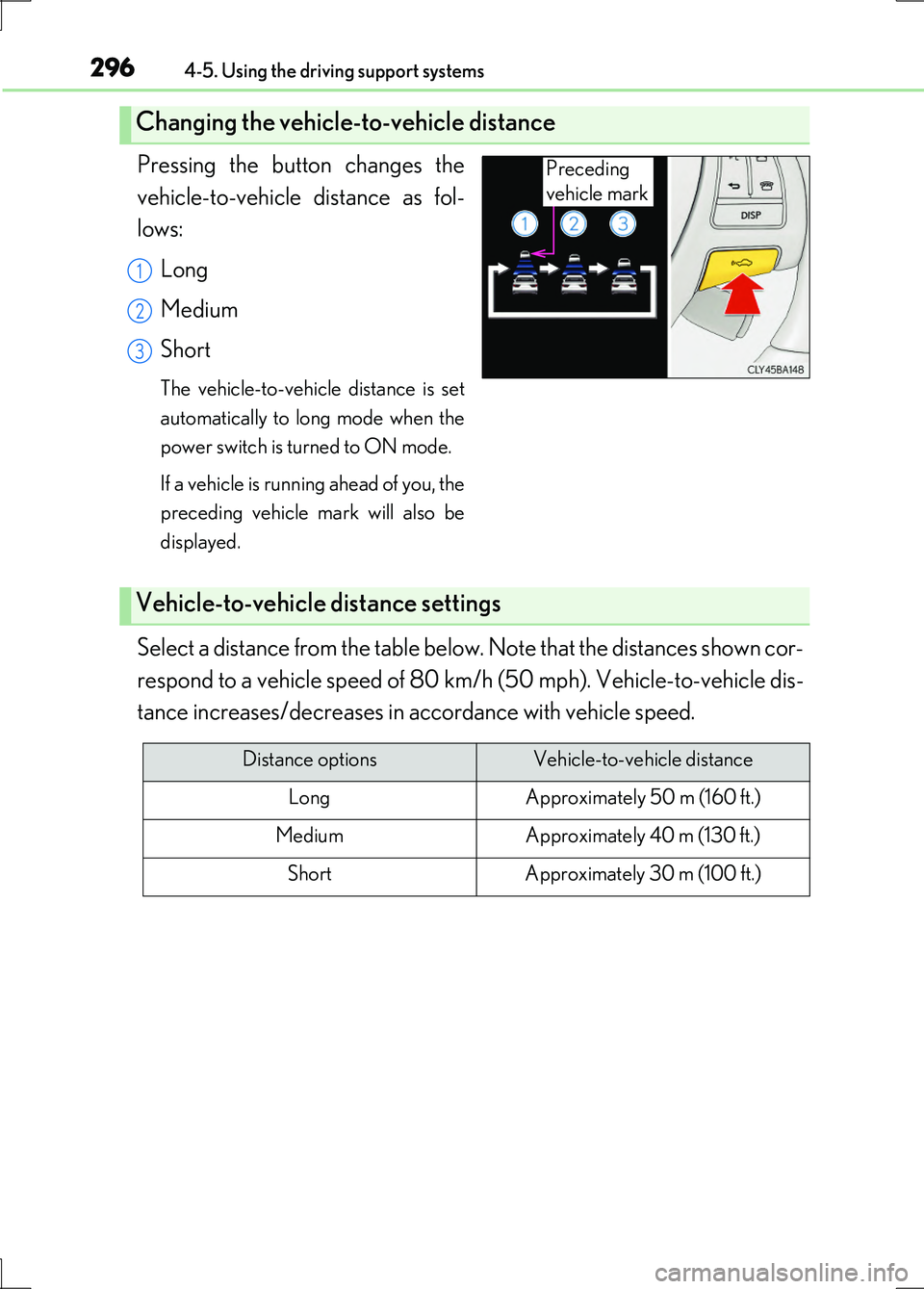
Pressing the button changes the
vehicle-to-vehicle distance as fol-
lows:
Long
Medium
Short
The vehicle-to-vehicle distance is set
automatically to long mode when the
power switch is turned to ON mode.
If a vehicle is running ahead of you, the
preceding vehicle mark will also be
displayed.
Select a distance from the table below. Note that the distances shown cor-
respond to a vehicle speed of 80 km/h (50 mph). Vehicle-to-vehicle dis-
tance increases/decreases in accordance with vehicle speed.
Changing the vehicle-to-vehicle distance
Preceding
vehicle mark
1
2
3
Vehicle-to-vehicle distance settings
Distance optionsVehicle-to-vehicle distance
LongApproximately 50 m (160 ft.)
MediumApproximately 40 m (130 ft.)
ShortApproximately 30 m (100 ft.)
Page 310 of 676
3104-5. Using the driving support systems
LS600h/LS600hL_EE(OM50G20E)
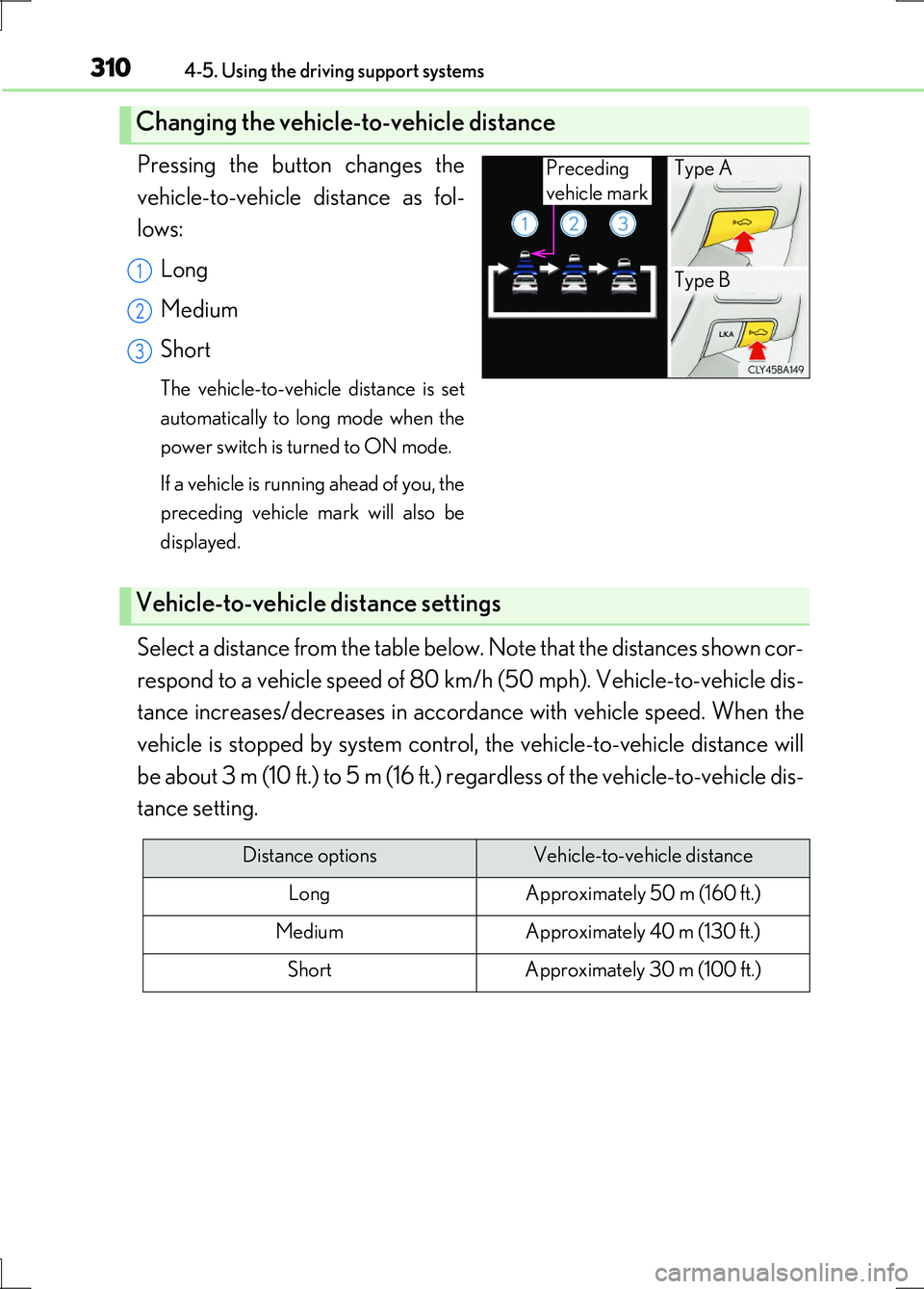
Pressing the button changes the
vehicle-to-vehicle distance as fol-
lows:
Long
Medium
Short
The vehicle-to-vehicle distance is set
automatically to long mode when the
power switch is turned to ON mode.
If a vehicle is running ahead of you, the
preceding vehicle mark will also be
displayed.
Select a distance from the table below. Note that the distances shown cor-
respond to a vehicle speed of 80 km/h (50 mph). Vehicle-to-vehicle dis-
tance increases/decreases in accorda nce with vehicle speed. When the
vehicle is stopped by system control, the vehicle-to-vehicle distance will
be about 3 m (10 ft.) to 5 m (16 ft.) regardless of the vehicle-to-vehicle dis-
tance setting.
Changing the vehicle-to-vehicle distance
Preceding
vehicle mark
Type A
Type B1
2
3
Vehicle-to-vehicle distance settings
Distance optionsVehicle-to-vehicle distance
LongApproximately 50 m (160 ft.)
MediumApproximately 40 m (130 ft.)
ShortApproximately 30 m (100 ft.)
Page 313 of 676
3134-5. Using the driving support systems
4
Driving
LS600h/LS600hL_EE(OM50G20E)
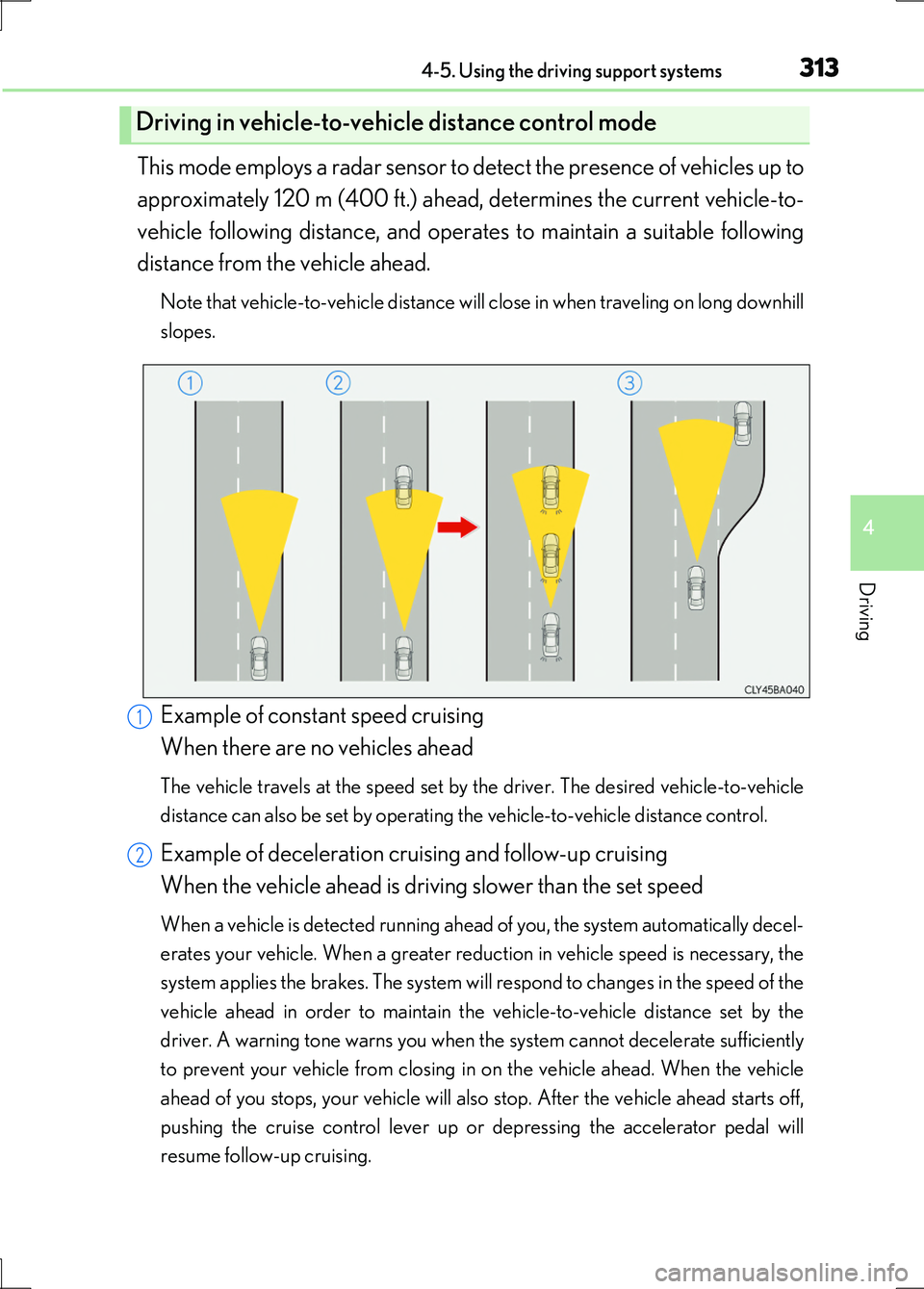
This mode employs a radar sensor to detect the presence of vehicles up to
approximately 120 m (400 ft.) ahead, determines the current vehicle-to-
vehicle following distance, and operates to maintain a suitable following
distance from the vehicle ahead.
Note that vehicle-to-vehicle distance will close in when traveling on long downhill
slopes.
Example of constant speed cruising
When there are no vehicles ahead
The vehicle travels at the speed set by the driver. The desired vehicle-to-vehicle
distance can also be set by operating the vehicle-to-vehicle distance control.
Example of deceleration cruising and follow-up cruising
When the vehicle ahead is driving slower than the set speed
When a vehicle is detected running ahead of you, the system automatically decel-
erates your vehicle. When a greater reduction in vehicle speed is necessary, the
system applies the brakes. The system will respond to changes in the speed of the
vehicle ahead in order to maintain the vehicle-to-vehicle distance set by the
driver. A warning tone warns you when the system cannot decelerate sufficiently
to prevent your vehicle from closing in on the vehicle ahead. When the vehicle
ahead of you stops, your vehicle will also stop. After the vehicle ahead starts off,
pushing the cruise control lever up or depressing the accelerator pedal will
resume follow-up cruising.
Driving in vehicle-to-vehicle distance control mode
1
2