ESP LEXUS LS600H 2017 Owner's Manual
[x] Cancel search | Manufacturer: LEXUS, Model Year: 2017, Model line: LS600H, Model: LEXUS LS600H 2017Pages: 676, PDF Size: 35.25 MB
Page 331 of 676
3314-5. Using the driving support systems
4
Driving
LS600h/LS600hL_EE(OM50G20E)
●When driving on a road surface that is wet due to rain, previous rainfall, standing
water, etc.
●When the vehicle experiences strong up-and-down motion such as when driving
on an extremely rough road or on a seam in the pavement
●When headlight brightness at nighttime is reduced due to dirt on the lenses, or
when the headlights are misaligned
●When driving with a strong crosswind
●When driving on winding roads or roads that are uneven
●When driving on rough or unpaved roads
■When changing the tires
Depending on the tires used, such as snow tires, etc., sufficient performance may not
be maintainable.
■Warning messages for LKA
Warning messages are used to indicate a system malfunction or to inform the driver
of the need for caution while driving. ( P. 563)
CAUTION
■Before using the LKA system
Do not rely solely on the LKA system. The LKA system does not drive the vehicle
automatically, nor does it reduce the amount of care you need to take. As such, the
driver must always assume full responsibility for understanding his/her
surroundings, for operating the steering wheel to correct the driving line, and for
driving safely.
Inappropriate or negligent driving could lead to an accident.
■To avoid operating the LKA by mistake
Switch the LKA off using the LKA switch when not in use.
Page 335 of 676
3354-5. Using the driving support systems
4
Driving
LS600h/LS600hL_EE(OM50G20E)
Sport mode
• SPORT S mode
Assists acceleration response by controlling the hybrid system. Suit-
able for when powerful acceleration is desirable.
When not in SPORT S mode and the driv ing mode select switch is turned to
the right, the “SPORT S” indicator comes on in the multi-information display,
and the Hybrid System Indicator changes to the tachometer. ( P. 115)
• SPORT S+ mode
Helps to ensure steering performance and driving stability by simul-
taneously controlling the steering and suspension in addition to the
hybrid system. Suitable for sporty driving.
When in SPORT S mode and the driving mo de select switch is turned to the
right, the “SPORT S+” indicator comes on in the multi-information display.
■Operation of the air conditioni ng system in Eco drive mode
Eco drive mode controls the heating/cooling operations and fan speed of the air
conditioning system to enhance fuel efficiency ( P. 399). To improve air condition-
ing performance, adjust the fan speed or turn off Eco drive mode.
■Sport mode automatic deactivation
Sport mode is automatically deactivated if the power switch is turned off after driving
in sport mode.
■Driving mode pop-up display
When the driving mode is changed, the selected driving mode will be temporarily
displayed on the side display. ( P. 396)
4
Page 338 of 676
3384-5. Using the driving support systems
LS600h/LS600hL_EE(OM50G20E)
◆ABS (Anti-lock Brake System)
Helps to prevent wheel lock when the brakes are applied suddenly, or if
the brakes are applied while driv ing on a slippery road surface
◆Brake assist
Generates an increased level of braking force after the brake pedal is
depressed when the system detects a panic stop situation
◆VSC (Vehicle Stability Control)
Helps the driver to control skidding when swerving suddenly or turning
on slippery road surfaces
◆TRC (Traction Control)
Helps to maintain drive power and prevent the drive wheels from spin-
ning when starting the vehicle or accelerating on slippery roads
◆Hill-start assist control
Helps to prevent the vehicle from rolling backward when starting on an
incline or slippery slope
◆VGRS (Variable Gear Ratio Steering)
Adjusts the wheel turning angle in accordance with the vehicle speed
and steering wheel movement
Driving assist systems
To help enhance driving safety and performance, the following systems
operate automatically in response to various driving situations. Be
aware, however, that these system s are supplementary and should not
be relied upon too heavily when operating the vehicle.
Page 344 of 676
3444-5. Using the driving support systems
LS600h/LS600hL_EE(OM50G20E)
CAUTION
■The ABS does not operate effectively when
●Tires with inadequate gripping ability are used (such as excessively worn tires on
a snow covered road).
●The vehicle hydroplanes while driving at high speed on wet or slick roads.
■Stopping distance when the ABS is operating may exceed that of normal condi-
tions
The ABS is not designed to shorten the vehicle’s stopping distance. Always main-
tain a safe distance from the vehicle in front of you, especially in the following situa-
tions:
●When driving on dirt, gravel or snow-covered roads
●When driving with tire chains
●When driving over bumps in the road
●When driving over roads with potholes or uneven surfaces
■TRC may not operate effectively when
Directional control and power may not be achievable while driving on slippery
road surfaces, even if the TRC system is operating.
Do not drive the vehicle in conditions where stability and power may be lost.
■Hill- start assist control does not operate effectively when
Do not overly rely on the hill-start assist control. The hill-start assist control may not
operate effectively on steep inclines and roads covered with ice.
■When the VSC is activated
The slip indicator light flashes. Always drive carefully. Reckless driving may cause
an accident. Exercise particular care when the indicator light flashes.
■When the TRC/VSC systems are turned off
Be especially careful and drive at a speed appropriate to the road conditions. As
these are the systems to help ensure vehicle stability and driving force, do not turn
the TRC/VSC systems off unless necessary.
Page 347 of 676
3474-5. Using the driving support systems
4
Driving
LS600h/LS600hL_EE(OM50G20E)
◆Pre-crash braking
When there is a high possibility of a frontal collision, the system warns
the driver using a warning light, warning display and buzzer. If the sys-
tem determines that a collision is unavoidable, the brakes are automati-
cally applied to help avoid a collision or to reduce the collision speed.
When the vehicle is being stopped by pre-crash braking, the brake will
be engaged for a maximum of 2 seconds and then released automati-
cally. This pre-crash braking can be canceled by depressing the accel-
erator pedal or brake pedal.
Pre-crash braking can be disabled using the pre-crash braking off switch.
◆Suspension control
When there is a high possibility of a frontal collision, the operation of
suspension control helps prevent the front of the vehicle from dropping
when the brakes are applied suddenly.
◆Steering gear control (VGRS) (vehicles with camera sensors)
When the system determines that a collision is unavoidable, the steer-
ing gear ratio is changed to help improve the response to steering
input.
◆Driver monitor system (if equipped)
When the system determines that there is a possibility of a collision, and
either the driver is not facing forward or the driver’s eyes are closed,
pre-crash warnings are given in adva nce to warn the driver. If the sys-
tem determines that the conditions to operate pre-crash alert braking
have been met even when the possibility of a collision increases further,
pre-crash alert braking will operate.
Pre-crash alert braking can be disabled using the pre-crash braking off switch.
Page 356 of 676
3564-5. Using the driving support systems
LS600h/LS600hL_EE(OM50G20E)
CAUTION
■Limitations of the pre-crash safety system
The driver is solely responsible for safe driving. Always drive safely, taking care to
observe your surroundings.
Do not use the pre-crash safety system instead of normal braking operations under
any circumstances. This system will not prevent collisions or lessen damage or inju-
ries in all cases. Do not overly rely on this system. Failure to do so may cause an
accident, resulting in death or serious injury.
This system has been designed to help avoid and reduce the impact of collisions.
However, the system operates differently depending on the situation ( P. 350,
352). As a result, the same level of performance may not be expected in all cases.
Also, the pre-crash safety brakes may not operate if the driver is depressing the
brake pedal or turning the steering wheel, as the system will determine such condi-
tions as collision avoidance operations.
■Handling the radar sensor
Observe the following to ensure the pre-crash safety system can function effec-
tively. Otherwise, the system may not function correctly and could result in an acci-
dent.
●Keep the sensor and grille cover clean at all times.
Clean the sensor and grille cover with a soft cloth so you do not mark or damage
them.
●Do not subject the sensor or surrounding area to a strong impact.
If the sensor moves even slightly off position, the system may malfunction. If the
sensor or surrounding area is subject to a strong impact, always have the area
inspected and adjusted by any authorized Lexus dealer or repairer, or another
duly qualified and equipped professional.
●Do not disassemble the sensor.
●Do not attach accessories or stickers to the sensor, grille cover or surrounding
area.
●Do not modify or paint the sensor and grille cover.
●If the radar sensor needs to be replaced, contact any authorized Lexus dealer or
repairer, or another duly qualified and equipped professional.
Page 370 of 676
3704-5. Using the driving support systems
LS600h/LS600hL_EE(OM50G20E)
CAUTION
■Handling the radar sensor
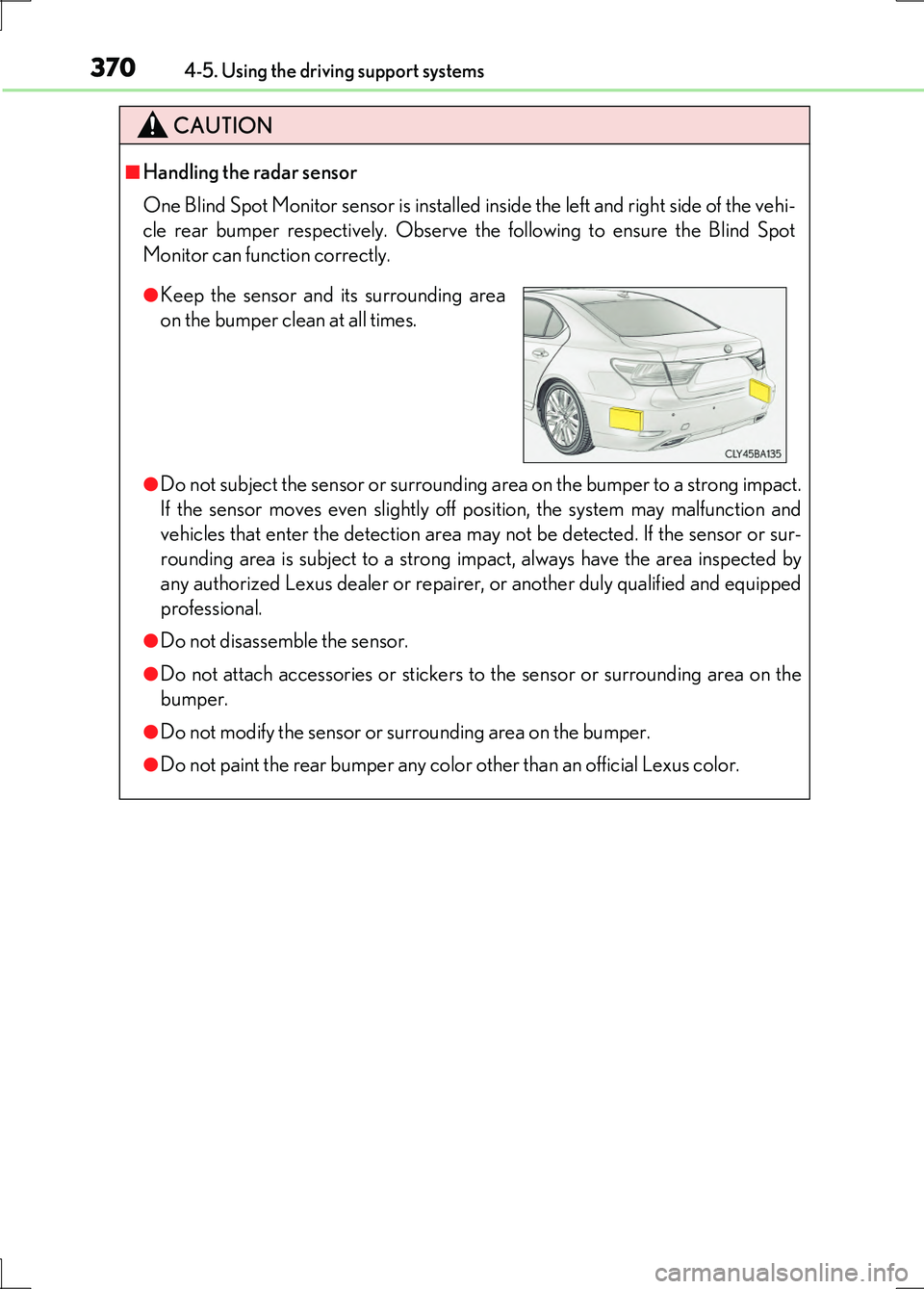
One Blind Spot Monitor sensor is installed inside the left and right side of the vehi-
cle rear bumper respectively. Observe the following to ensure the Blind Spot
Monitor can function correctly.
●Do not subject the sensor or surrounding area on the bumper to a strong impact.
If the sensor moves even slightly off position, the system may malfunction and
vehicles that enter the detection area may not be detected. If the sensor or sur-
rounding area is subject to a strong impact, always have the area inspected by
any authorized Lexus dealer or repairer, or another duly qualified and equipped
professional.
●Do not disassemble the sensor.
●Do not attach accessories or stickers to the sensor or surrounding area on the
bumper.
●Do not modify the sensor or surrounding area on the bumper.
●Do not paint the rear bumper any color other than an official Lexus color.
●Keep the sensor and its surrounding area
on the bumper clean at all times.
Page 372 of 676
3724-5. Using the driving support systems
LS600h/LS600hL_EE(OM50G20E)
■The Blind Spot Monitor function is operational when
●The BSM main switch is set to on
●Vehicle speed is greater than approximately 16 km/h (10 mph).
■The Blind Spot Monitor function will detect a vehicle when
●A vehicle in an adjacent lane overtakes your vehicle.
●Another vehicle enters the detection area when it changes lanes.
■Conditions under which the Blind Spot Monitor function will not detect a vehicle
The Blind Spot Monitor function is not designed to detect the following types of vehi-
cles and/or objects:
●Small motorcycles, bicycles, pedestrians etc.*
●Vehicles traveling in the opposite direction
●Guardrails, walls, signs, parked vehicles and similar stationary objects*
●Following vehicles that are in the same lane*
●Vehicles driving 2 lanes across from your vehicle*
*: Depending on conditions, detection of a vehicle and/or object may occur.
CAUTION
■Cautions regarding the use of the system
The driver is solely responsible for safe driving. Always drive safely, taking care to
observe your surroundings.
The Blind Spot Monitor function is a supplementary function which alerts the
driver that a vehicle is present in the blind spot. Do not overly rely on the Blind Spot
Monitor function. The function cannot judge if it is safe to change lanes, therefore
over reliance could cause an accident resulting in death or serious injury.
According to conditions, the system may not function correctly. Therefore the
driver’s own visual confirmation of safety is necessary.
Page 374 of 676
3744-5. Using the driving support systems
LS600h/LS600hL_EE(OM50G20E)
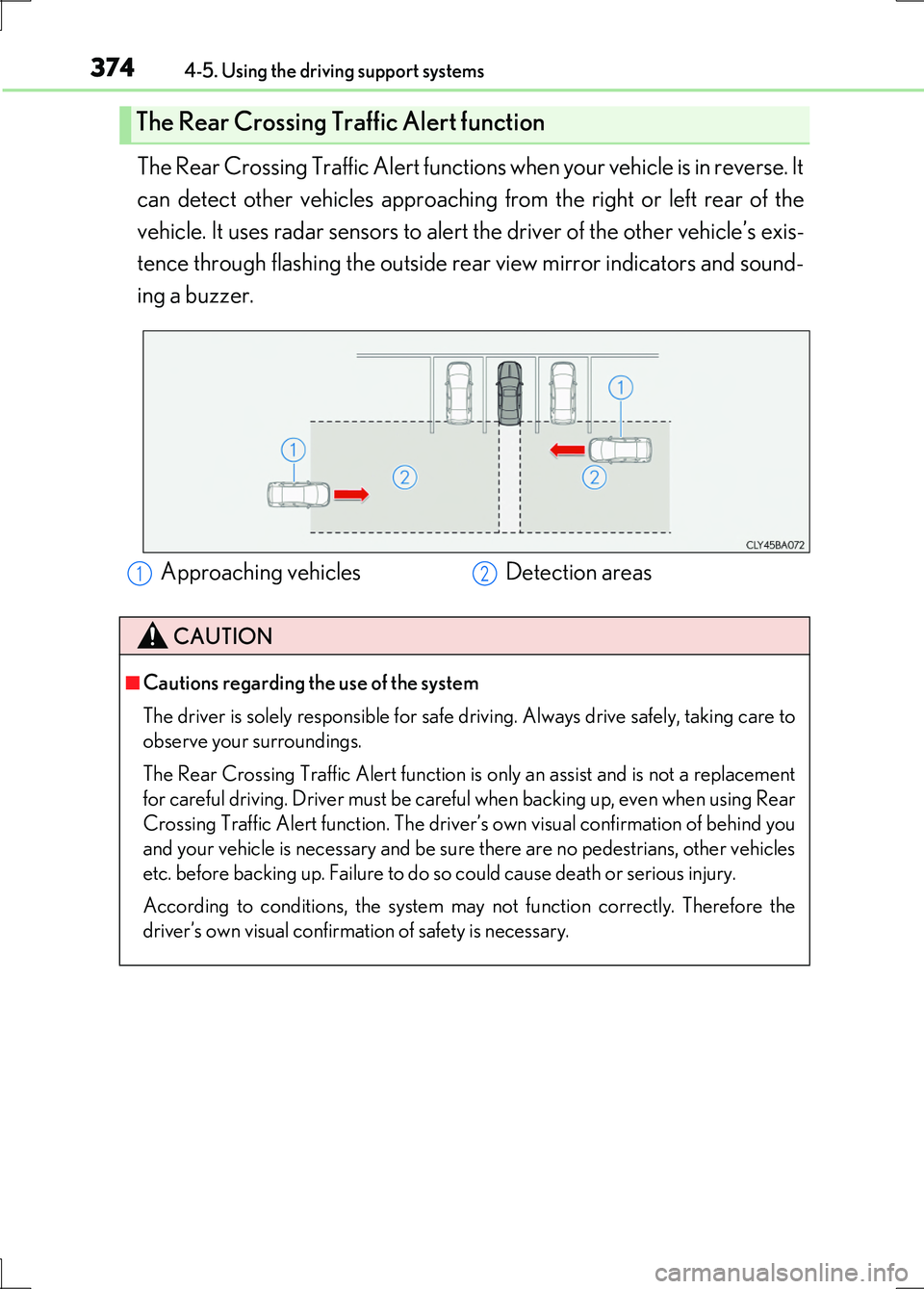
The Rear Crossing Traffic Alert functions when your vehicle is in reverse. It
can detect other vehicles approaching from the right or left rear of the
vehicle. It uses radar sensors to alert the driver of the other vehicle’s exis-
tence through flashing the outside rear view mirror indicators and sound-
ing a buzzer.
The Rear Crossing Tr affic Alert function
Approaching vehicles Detection areas
CAUTION
■Cautions regarding the use of the system
The driver is solely responsible for safe driving. Always drive safely, taking care to
observe your surroundings.
The Rear Crossing Traffic Alert function is only an assist and is not a replacement
for careful driving. Driver must be careful when backing up, even when using Rear
Crossing Traffic Alert function. The driver’s own visual confirmation of behind you
and your vehicle is necessary and be sure there are no pedestrians, other vehicles
etc. before backing up. Failure to do so could cause death or serious injury.
According to conditions, the system may not function correctly. Therefore the
driver’s own visual confirmation of safety is necessary.
12
Page 375 of 676
3754-5. Using the driving support systems
4
Driving
LS600h/LS600hL_EE(OM50G20E)
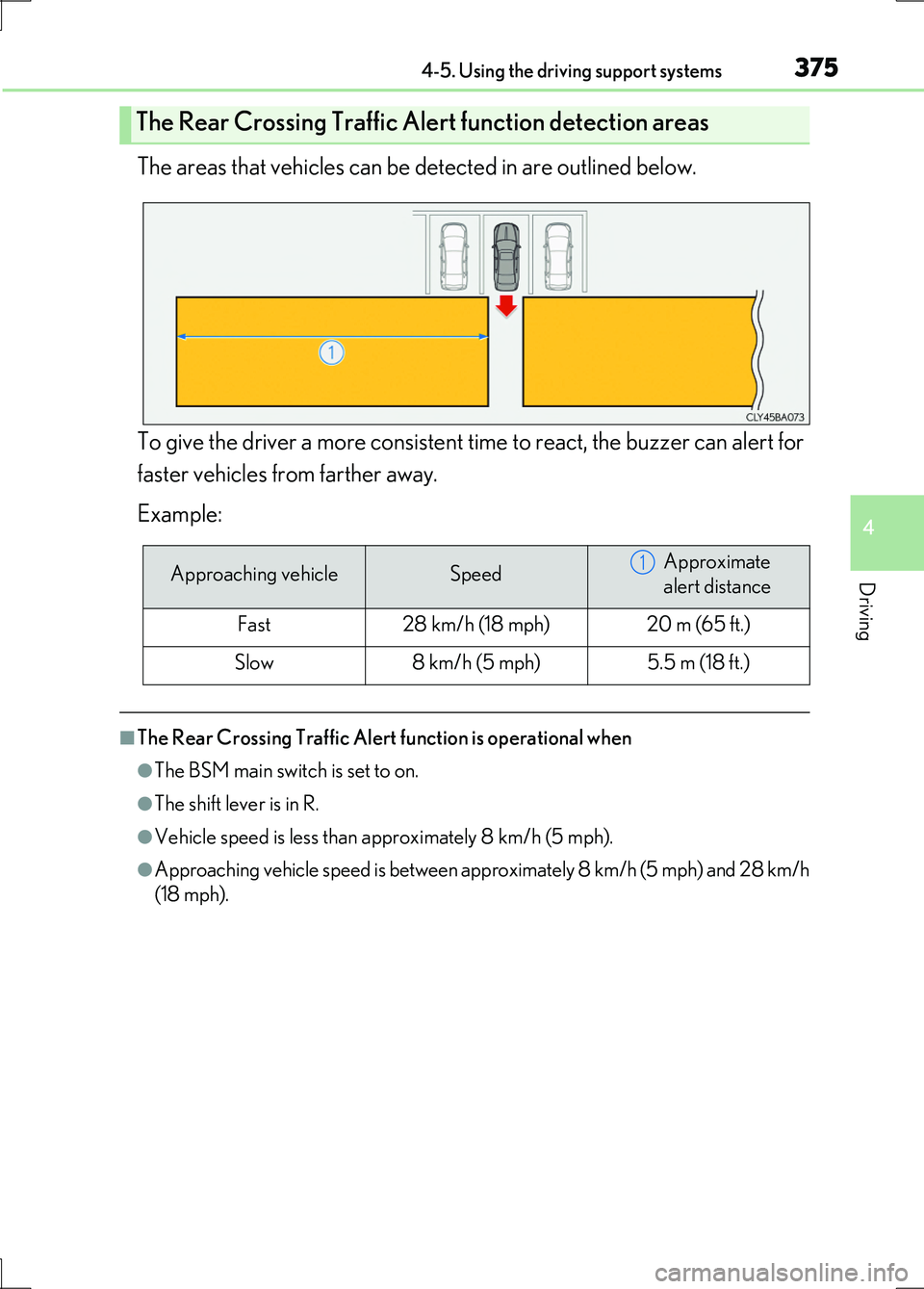
The areas that vehicles can be detected in are outlined below.
To give the driver a more consistent time to react, the buzzer can alert for
faster vehicles from farther away.
Example:
■The Rear Crossing Traffic Alert function is operational when
●The BSM main switch is set to on.
●The shift lever is in R.
●Vehicle speed is less than approximately 8 km/h (5 mph).
●Approaching vehicle speed is between approximately 8 km/h (5 mph) and 28 km/h
(18 mph).
The Rear Crossing Traffic Al ert function detection areas
Approaching vehicleSpeedApproximate
alert distance
Fast28 km/h (18 mph)20 m (65 ft.)
Slow8 km/h (5 mph)5.5 m (18 ft.)
1