brakes LEXUS LS600H 2017 User Guide
[x] Cancel search | Manufacturer: LEXUS, Model Year: 2017, Model line: LS600H, Model: LEXUS LS600H 2017Pages: 676, PDF Size: 35.25 MB
Page 303 of 676
3034-5. Using the driving support systems
4
Driving
LS600h/LS600hL_EE(OM50G20E)
CAUTION
■Before using dynamic radar cruise control
Do not overly rely on vehicle-to-vehicle distance control.
Be aware of the set speed. If automatic deceleration/acceleration is not appropri-
ate, adjust the vehicle speed, as well as the distance between your vehicle and vehi-
cles ahead by applying the brakes etc.
■Cautions regarding the driving assist systems
Observe the following precautions.
Failure to do so may cause an accident resulting in death or serious injury.
●Assisting the driver to measure following distance
The dynamic radar cruise control is only intended to help the driver in determin-
ing the following distance between the driver’s own vehicle and a designated
vehicle traveling ahead. It is not a mechanism that allows careless or inattentive
driving, and it is not a system that can assist the driver in low-visibility conditions. It
is still necessary for driver to pay close attention to the vehicle’s surroundings.
●Assisting the driver to judge proper following distance
The dynamic radar cruise control determines whether the following distance
between the driver’s own vehicle and a designated vehicle traveling ahead is
appropriate or not. It is not capable of making any other type of judgement.
Therefore, it is absolutely necessary for the driver to remain vigilant and to deter-
mine whether or not there is a possibility of danger in any given situation.
●Assisting the driver to operate the vehicle
The dynamic radar cruise control has no capability to prevent or avoid a collision
with a vehicle traveling ahead. Therefore, if there is ever any danger, the driver
must take immediate and direct control of the vehicle and act appropriately in
order to ensure the safety of all involved.
Page 305 of 676
3054-5. Using the driving support systems
4
Driving
LS600h/LS600hL_EE(OM50G20E)
CAUTION
■When the sensor may not be correctly detecting the vehicle ahead
Apply the brakes as necessary when any of the following types of vehicles are in
front of you.
As the sensor may not be able to correctly detect these types of vehicles, the
approach warning ( P. 299) will not be activated, and a fatal or serious accident
may result.
●Vehicles that cut in suddenly
●Vehicles traveling at low speeds
●Vehicles that are not moving
●Vehicles with small rear ends (trailers with no load on board etc.)
●Motorcycles traveling in the same lane
■Conditions under which the vehicle-to-veh icle distance control may not function
correctly
Apply the brakes as necessary in the following conditions as the radar sensor may
not be able to correctly detect vehicles ahead, and a fatal or serious accident may
result:
●When water or snow thrown up by the surrounding vehicles hinders the function-
ing of the sensor
●When your vehicle is pointing upwards (caused by a heavy load in the trunk etc.)
●When the road curves or when the lanes are narrow
●When steering wheel operation or your position in the lane is unstable
●When the vehicle ahead of you decelerates suddenly
Page 312 of 676
3124-5. Using the driving support systems
LS600h/LS600hL_EE(OM50G20E)
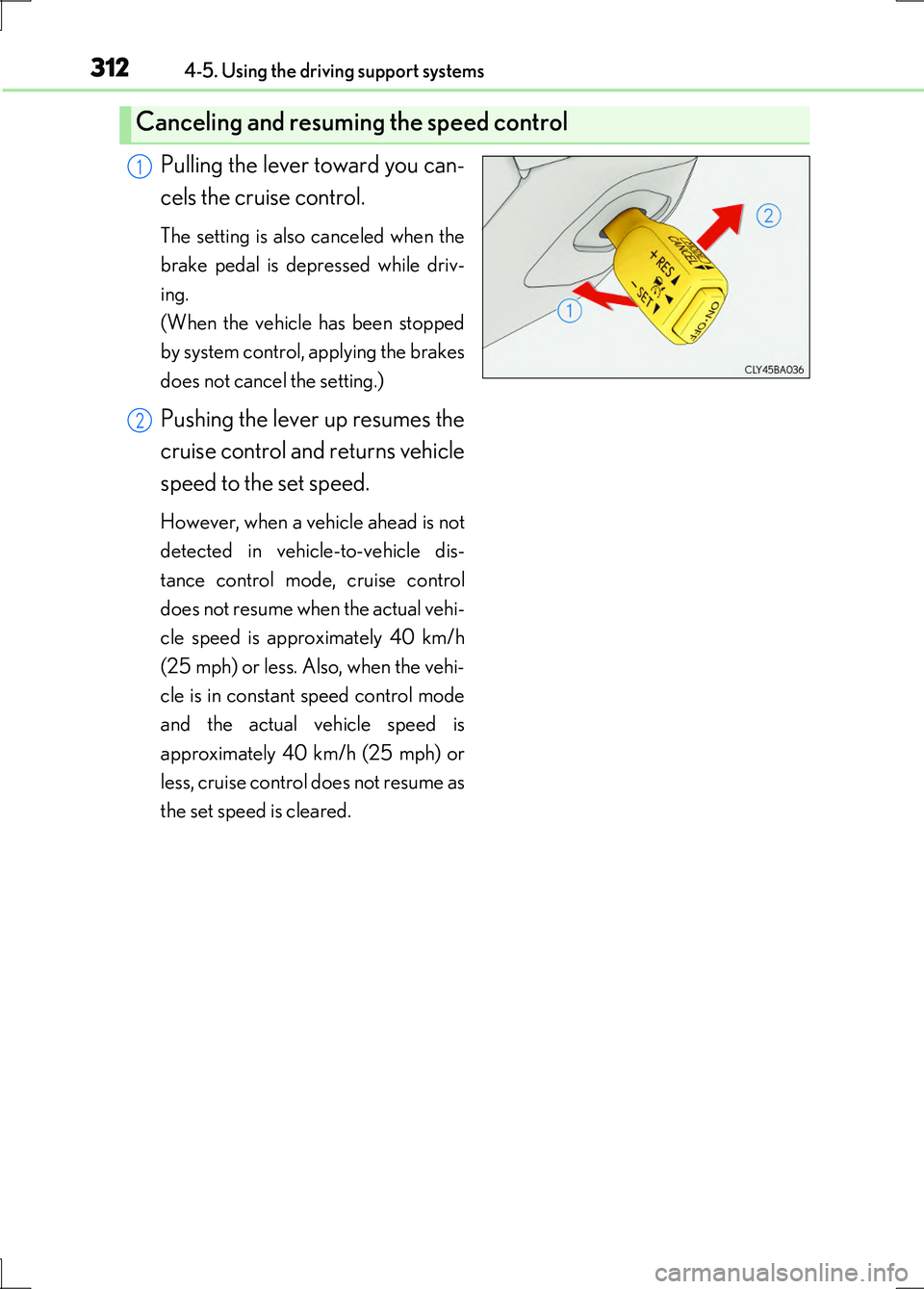
Pulling the lever toward you can-
cels the cruise control.
The setting is also canceled when the
brake pedal is depressed while driv-
ing.
(When the vehicle has been stopped
by system control, applying the brakes
does not cancel the setting.)
Pushing the lever up resumes the
cruise control and returns vehicle
speed to the set speed.
However, when a vehicle ahead is not
detected in vehicle-to-vehicle dis-
tance control mode, cruise control
does not resume when the actual vehi-
cle speed is approximately 40 km/h
(25 mph) or less. Also, when the vehi-
cle is in constant speed control mode
and the actual vehicle speed is
approximately 40 km/h (25 mph) or
less, cruise control does not resume as
the set speed is cleared.
Canceling and resuming the speed control
1
2
Page 313 of 676
3134-5. Using the driving support systems
4
Driving
LS600h/LS600hL_EE(OM50G20E)
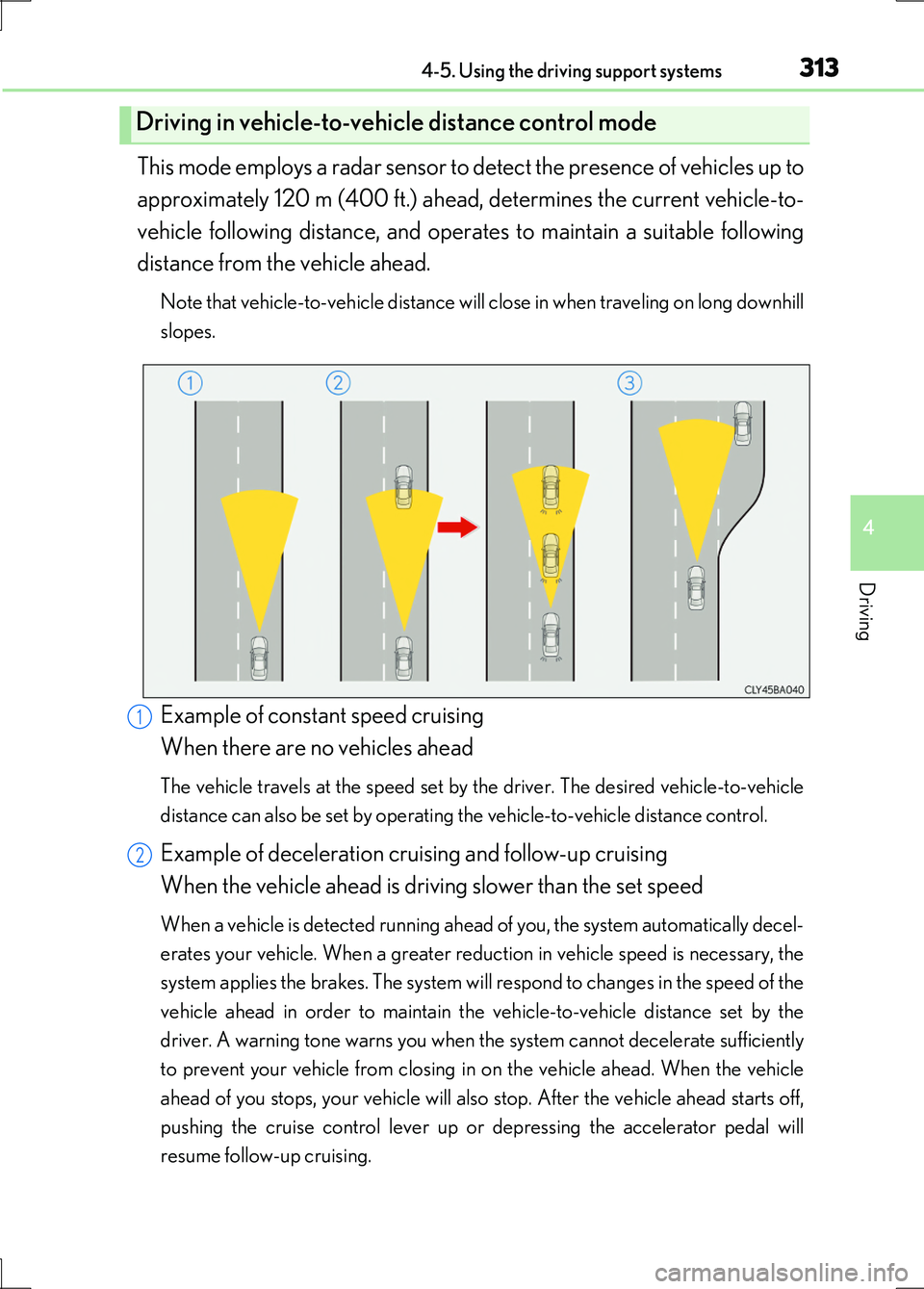
This mode employs a radar sensor to detect the presence of vehicles up to
approximately 120 m (400 ft.) ahead, determines the current vehicle-to-
vehicle following distance, and operates to maintain a suitable following
distance from the vehicle ahead.
Note that vehicle-to-vehicle distance will close in when traveling on long downhill
slopes.
Example of constant speed cruising
When there are no vehicles ahead
The vehicle travels at the speed set by the driver. The desired vehicle-to-vehicle
distance can also be set by operating the vehicle-to-vehicle distance control.
Example of deceleration cruising and follow-up cruising
When the vehicle ahead is driving slower than the set speed
When a vehicle is detected running ahead of you, the system automatically decel-
erates your vehicle. When a greater reduction in vehicle speed is necessary, the
system applies the brakes. The system will respond to changes in the speed of the
vehicle ahead in order to maintain the vehicle-to-vehicle distance set by the
driver. A warning tone warns you when the system cannot decelerate sufficiently
to prevent your vehicle from closing in on the vehicle ahead. When the vehicle
ahead of you stops, your vehicle will also stop. After the vehicle ahead starts off,
pushing the cruise control lever up or depressing the accelerator pedal will
resume follow-up cruising.
Driving in vehicle-to-vehicle distance control mode
1
2
Page 314 of 676
3144-5. Using the driving support systems
LS600h/LS600hL_EE(OM50G20E)
Example of acceleration
When there are no longer any vehicles ahead driving slower than the
set speed
The system accelerates until the set speed is reached. The system then returns to
constant speed cruising.
When your vehicle is too close to a vehicle ahead, and sufficient auto-
matic deceleration via the cruise control is not possible, the display will
flash and the buzzer will sound to alert the driver. An example of this
would be if another driver cuts in front of you while you are following a
vehicle. Apply the brakes to ensure an appropriate vehicle-to-vehicle dis-
tance.
■Warnings may not occur when
In the following instances, there is a possibility that the warnings will not
occur:
●When the speed of the vehicle ahead matches or exceeds your vehi-
cle speed
●When the vehicle ahead is traveling at an extremely slow speed
●Immediately after the cruise control speed was set
●At the instant the accelerator is applied
Approach warning
3
Page 320 of 676
3204-5. Using the driving support systems
LS600h/LS600hL_EE(OM50G20E)
CAUTION
■Before using dynamic radar cruise control with full-speed range
Do not overly rely on vehicle-to-vehicle distance control.
Be aware of the set speed. If automatic deceleration/acceleration is not appropri-
ate, adjust the vehicle speed, as well as the distance between your vehicle and vehi-
cles ahead by applying the brakes etc.
■Cautions regarding the driving assist systems
Observe the following precautions.
Failure to do so may cause an accident resulting in death or serious injury.
●Assisting the driver to measure following distance
The dynamic radar cruise control with full-speed range is only intended to help
the driver in determining the following distance between the driver’s own vehicle
and a designated vehicle traveling ahead. It is not a mechanism that allows care-
less or inattentive driving, and it is not a system that can assist the driver in low-vis-
ibility conditions. It is still necessary for driver to pay close attention to the
vehicle’s surroundings.
●Assisting the driver to judge proper following distance
The dynamic radar cruise control with full-speed range determines whether the
following distance between the driver’s own vehicle and a designated vehicle
traveling ahead is appropriate or not. It is not capable of making any other type of
judgement. Therefore, it is absolutely necessary for the driver to remain vigilant
and to determine whether or not there is a possibility of danger in any given situa-
tion.
●Assisting the driver to operate the vehicle
The dynamic radar cruise control with full-speed range has no capability to pre-
vent or avoid a collision with a vehicle traveling ahead. Therefore, if there is ever
any danger, the driver must take immediate and direct control of the vehicle and
act appropriately in order to ensure the safety of all involved.
Page 322 of 676
3224-5. Using the driving support systems
LS600h/LS600hL_EE(OM50G20E)
CAUTION
■When the sensor may not be correctly detecting the vehicle ahead
Apply the brakes as necessary when any of the following types of vehicles are in
front of you.
As the sensor may not be able to correctly detect these types of vehicles, the
approach warning ( P. 314) will not be activated, and a fatal or serious accident
may result.
●Vehicles that cut in suddenly
●Vehicles traveling at low speeds
●Vehicles that are not moving
●Vehicles with small rear ends (trailers with no load on board etc.)
●Motorcycles traveling in the same lane
■Conditions under which the vehicle-to-veh icle distance control may not function
correctly
Apply the brakes as necessary in the following conditions as the radar sensor may
not be able to correctly detect vehicles ahead, and a fatal or serious accident may
result:
●When water or snow thrown up by the surrounding vehicles hinders the function-
ing of the sensor
●When your vehicle is pointing upwards (caused by a heavy load in the trunk etc.)
●When the road curves or when the lanes are narrow
●When steering wheel operation or your position in the lane is unstable
●When the vehicle ahead of you decelerates suddenly
Page 338 of 676
3384-5. Using the driving support systems
LS600h/LS600hL_EE(OM50G20E)
◆ABS (Anti-lock Brake System)
Helps to prevent wheel lock when the brakes are applied suddenly, or if
the brakes are applied while driv ing on a slippery road surface
◆Brake assist
Generates an increased level of braking force after the brake pedal is
depressed when the system detects a panic stop situation
◆VSC (Vehicle Stability Control)
Helps the driver to control skidding when swerving suddenly or turning
on slippery road surfaces
◆TRC (Traction Control)
Helps to maintain drive power and prevent the drive wheels from spin-
ning when starting the vehicle or accelerating on slippery roads
◆Hill-start assist control
Helps to prevent the vehicle from rolling backward when starting on an
incline or slippery slope
◆VGRS (Variable Gear Ratio Steering)
Adjusts the wheel turning angle in accordance with the vehicle speed
and steering wheel movement
Driving assist systems
To help enhance driving safety and performance, the following systems
operate automatically in response to various driving situations. Be
aware, however, that these system s are supplementary and should not
be relied upon too heavily when operating the vehicle.
Page 339 of 676
3394-5. Using the driving support systems
4
Driving
LS600h/LS600hL_EE(OM50G20E)
◆EPS (Electric Power Steering)
Employs an electric motor to reduce the amount of effort needed to
turn the steering wheel
◆Active stabilizer suspension system (if equipped)
Reduces sway when cornering according to steering wheel movement
and the selected driving mode, in order to maintain a stable vehicle
posture
◆VDIM (Vehicle Dynamics Integrated Management)
Provides integrated control of the ABS, brake assist, TRC, VSC, hill-
start assist control, EPS and VGRS systems
Helps to maintain vehicle stability when swerving on slippery road sur-
faces by controlling the brakes, hybrid system output, steering assist,
and steering ratio
◆PCS (Pre-Crash Safety system) (if equipped)
P. 346
◆Rear Pre-Crash Safety system (if equipped)
P. 360
◆Emergency brake signal
When the brakes are applied suddenly, the stop lights automatically
flash to alert the vehicle behind
◆BSM (Blind Spot Monitor) (if equipped)
P. 366
Page 341 of 676
3414-5. Using the driving support systems
4
Driving
LS600h/LS600hL_EE(OM50G20E)
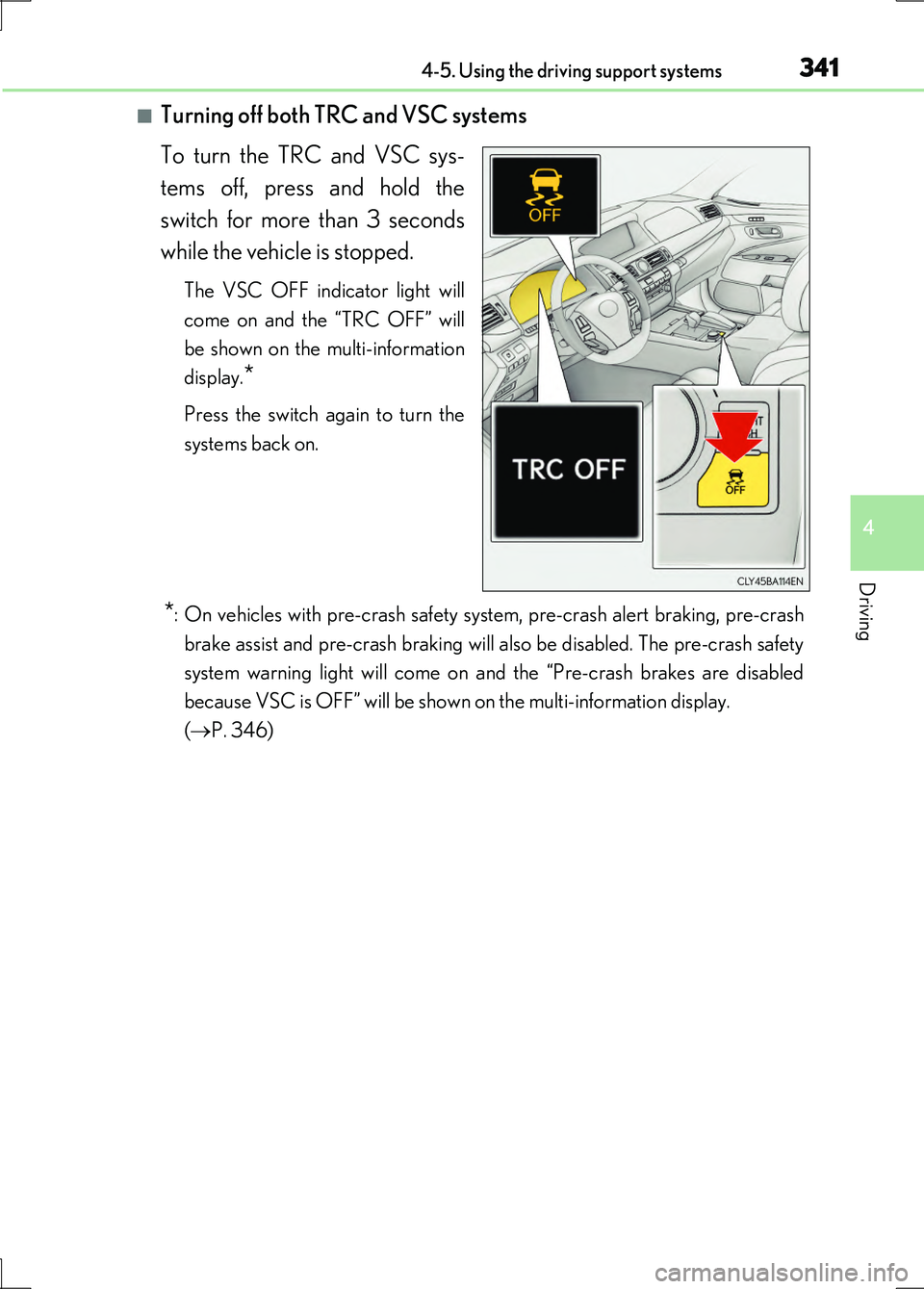
■Turning off both TRC and VSC systems
To turn the TRC and VSC sys-
tems off, press and hold the
switch for more than 3 seconds
while the vehicle is stopped.
The VSC OFF indicator light will
come on and the “TRC OFF” will
be shown on the multi-information
display.*
Press the switch again to turn the
systems back on.
*: On vehicles with pre-crash safety system, pre-crash alert braking, pre-crash
brake assist and pre-crash braking will also be disabled. The pre-crash safety
system warning light will come on and the “Pre-crash brakes are disabled
because VSC is OFF” will be shown on the multi-information display.
( P. 346)