fuel LEXUS LS600H 2017 User Guide
[x] Cancel search | Manufacturer: LEXUS, Model Year: 2017, Model line: LS600H, Model: LEXUS LS600H 2017Pages: 676, PDF Size: 35.25 MB
Page 94 of 676
941-2. Hybrid system
LS600h/LS600hL_EE(OM50G20E)
CAUTION
■Hybrid battery (traction battery)
●Your vehicle contains a sealed nickel-metal hydride battery. Never resell, hand
over or modify the hybrid battery. To prevent accidents, hybrid batteries that have
been removed from a disposed vehicle are collected through any authorized
Lexus dealer or repairer, or another du ly qualified and equipped professional. Do
not dispose of the battery yourself.
Unless the battery is properly collected, the following may occur, resulting in
death or serious injury:
• The hybrid battery may be illegally disposed of or dumped, and it is hazardous
to the environment or someone may touch a high voltage part, resulting in an
electric shock.
• The hybrid battery is intended to be used exclusively with your hybrid vehicle.
If the hybrid battery is used outside of your vehicle or modified in any way,
accidents such as electric shock, heat generation, smoke generation, an
explosion and electrolyte leakage may occur.
When reselling or handing over your vehicle, the possibility of an accident is
extremely high because the person receiving the vehicle may not be aware of
these dangers.
●If your vehicle is disposed of without the hybrid battery having been removed,
there is a danger of serious electric shock if high voltage parts, cables and their
connectors are touched. In the event that your vehicle must be disposed of, the
hybrid battery must be disposed of by any authorized Lexus dealer or repairer, or
another duly qualified and equipped professional. If the hybrid battery is not dis-
posed of properly, it may cause electric shock that can result in death or serious
injury.
■Emergency shut off system
●Carefully check to see if there are exposed high voltage parts or cables. Never
touch the parts or cables. ( P. 89)
●Carefully inspect the ground under the vehicle. If you find that liquid has leaked
onto the ground, the fuel system may have been damaged. Leave the vehicle as
soon as possible.
Page 112 of 676
1122. Instrument cluster
LS600h/LS600hL_EE(OM50G20E)
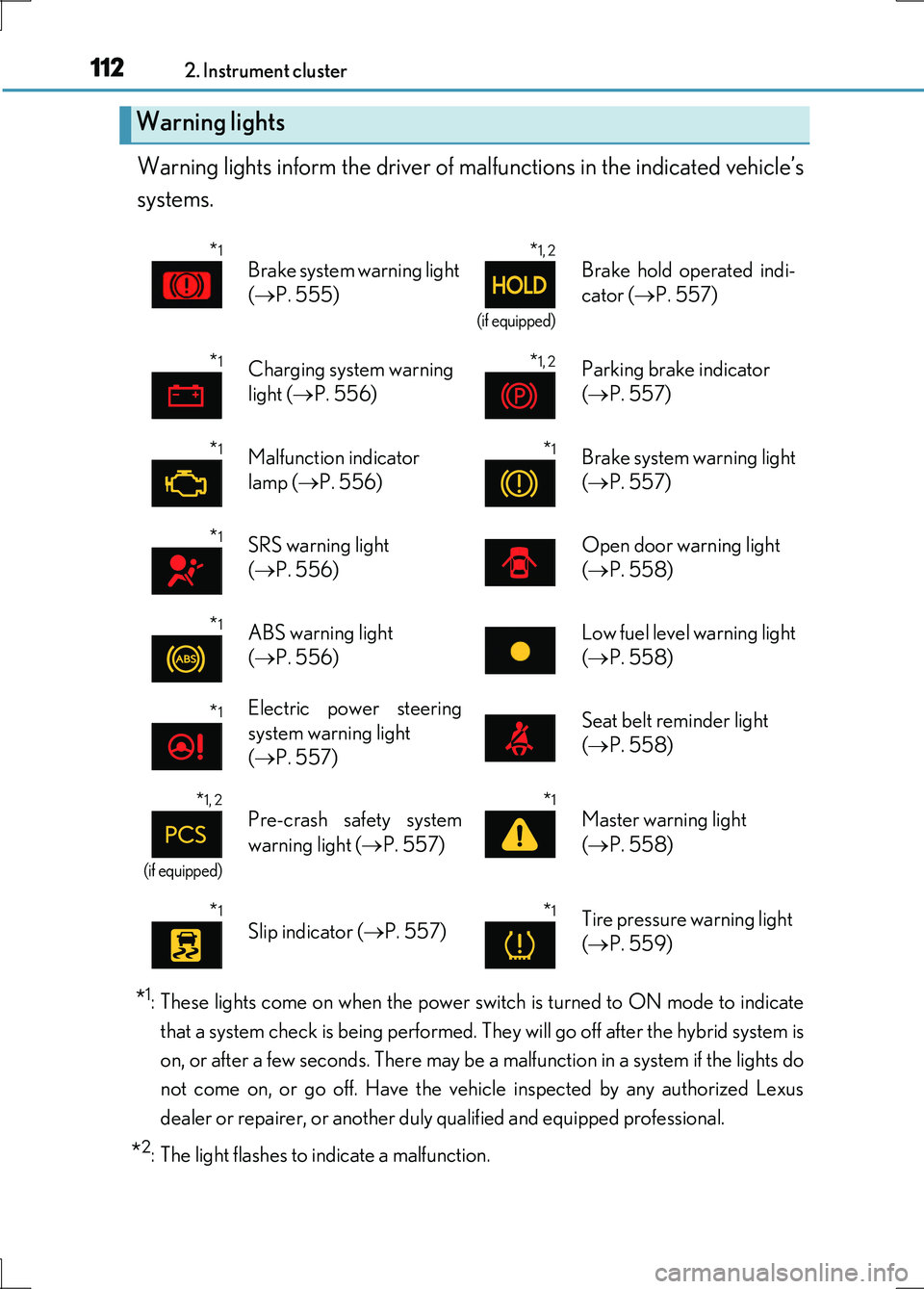
Warning lights inform the driver of malfunctions in the indicated vehicle’s
systems.
*1: These lights come on when the power switch is turned to ON mode to indicate
that a system check is being performed. They will go off after the hybrid system is
on, or after a few seconds. There may be a malfunction in a system if the lights do
not come on, or go off. Have the vehi cle inspected by any authorized Lexus
dealer or repairer, or another duly qualified and equipped professional.
*2: The light flashes to indicate a malfunction.
Warning lights
*1
Brake system warning light
( P. 555)
*1, 2
(if equipped)
Brake hold operated indi-
cator ( P. 557)
*1Charging system warning
light ( P. 556)
*1, 2Parking brake indicator
( P. 557)
*1Malfunction indicator
lamp ( P. 556)
*1Brake system warning light
( P. 557)
*1SRS warning light
( P. 556)
Open door warning light
( P. 558)
*1ABS warning light
( P. 556)
Low fuel level warning light
( P. 558)
*1Electric power steering
system warning light
( P. 557)
Seat belt reminder light
( P. 558)
*1, 2
(if equipped)
Pre-crash safety system
warning light ( P. 557)
*1
Master warning light
( P. 558)
*1
Slip indicator (P. 557)*1Tire pressure warning light
( P. 559)
Page 116 of 676
1162. Instrument cluster
LS600h/LS600hL_EE(OM50G20E)
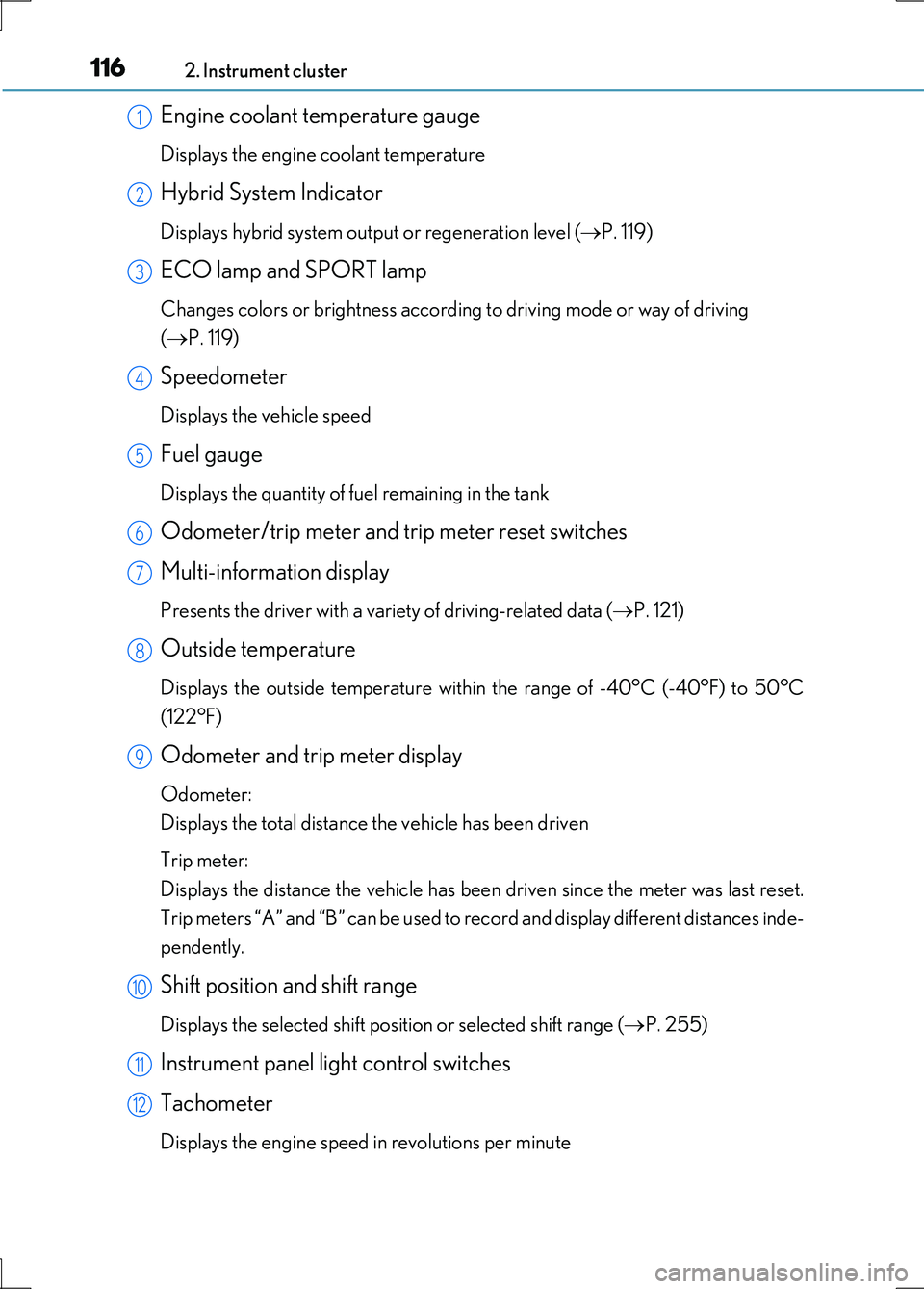
Engine coolant temperature gauge
Displays the engine coolant temperature
Hybrid System Indicator
Displays hybrid system output or regeneration level (P. 119)
ECO lamp and SPORT lamp
Changes colors or brightness according to driving mode or way of driving
( P. 119)
Speedometer
Displays the vehicle speed
Fuel gauge
Displays the quantity of fuel remaining in the tank
Odometer/trip meter and trip meter reset switches
Multi-information display
Presents the driver with a variety of driving-related data ( P. 121)
Outside temperature
Displays the outside temperature within the range of -40°C (-40°F) to 50°C
(122°F)
Odometer and trip meter display
Odometer:
Displays the total distance the vehicle has been driven
Trip meter:
Displays the distance the vehicle has been driven since the meter was last reset.
Trip meters “A” and “B” can be used to record and display different distances inde-
pendently.
Shift position and shift range
Displays the selected shift position or selected shift range ( P. 255)
Instrument panel light control switches
Tachometer
Displays the engine speed in revolutions per minute
1
2
3
4
5
6
7
8
9
10
11
12
Page 120 of 676
1202. Instrument cluster
LS600h/LS600hL_EE(OM50G20E)
■Tachometer
Hybrid System Indicator switches to the tachometer when driving mode is in sport
mode.
■Engine speed
On hybrid vehicles, engine speed is precisely controlled in order to help improve
fuel efficiency and reduce exhaust emissions etc.
There are times when the engine speed that is displayed may differ even when vehi-
cle operation and driving conditions are the same.
■Outside temperature display
In the following situations, the correct outside temperature may not be displayed, or
the display may take longer than normal to change.
●When stopped, or driving at low speeds (less than 20 km/h [12 mph])
●When the outside temperature has changed suddenly (at the entrance/exit of a
garage, tunnel, etc.)
■Customization
Settings (e.g. on/off operation of ECO lamp) can be changed.
(Customizable features P. 636)
NOTICE
■To prevent damage to the engine and its components
●Do not let the indicator needle of the tachometer enter the red zone, which indi-
cates the maximum engine speed.
●The engine may be overheating if the engine coolant temperature gauge is in the
red zone (H). In this case, immediately stop the vehicle in a safe place, and check
the engine after it has cooled completely. ( P. 611)
Page 121 of 676
1212. Instrument cluster
2
Instrument cluster
LS600h/LS600hL_EE(OM50G20E)
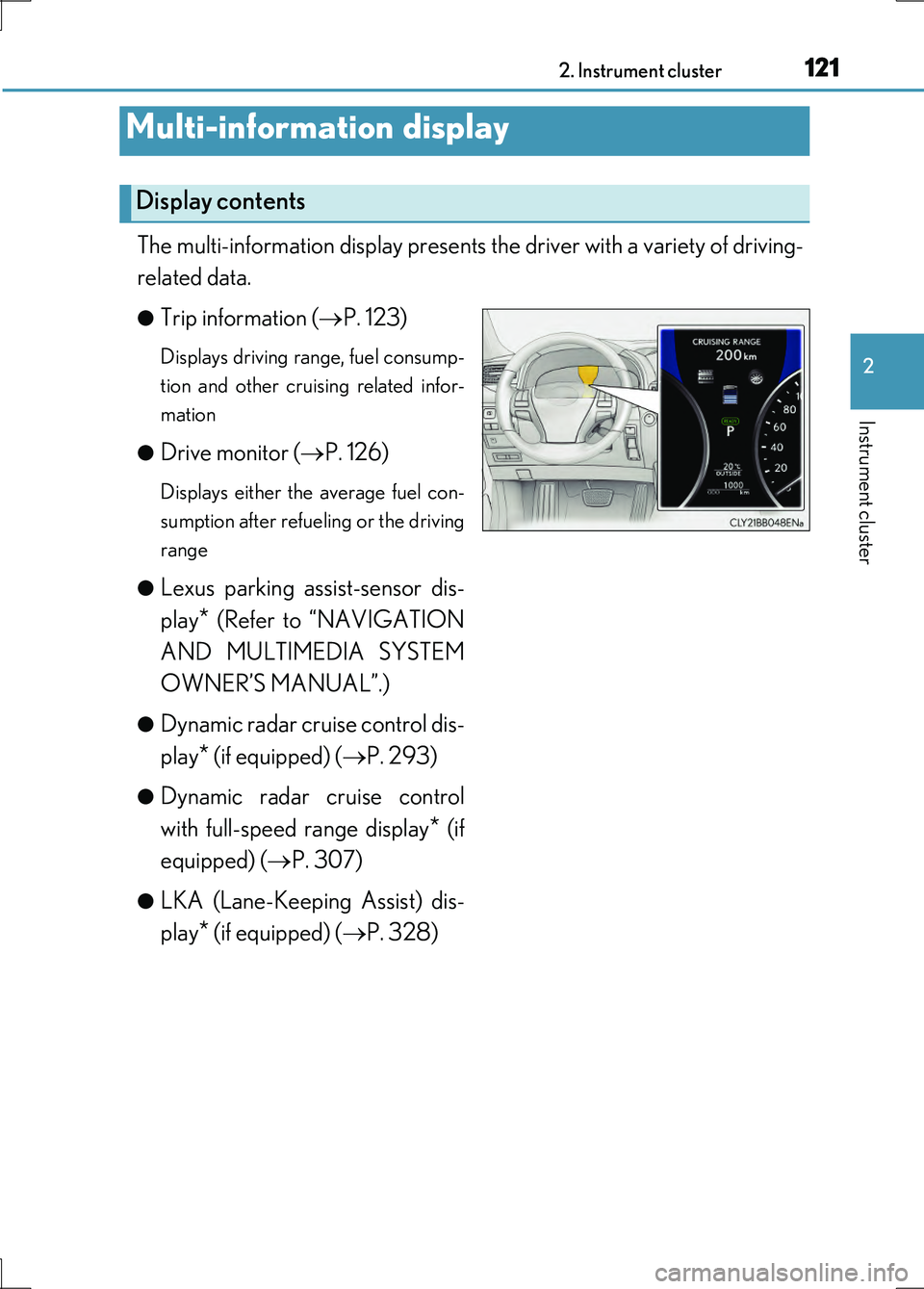
The multi-information display presents the driver with a variety of driving-
related data.
●Trip information ( P. 123)
Displays driving range, fuel consump-
tion and other cruising related infor-
mation
●Drive monitor ( P. 126)
Displays either the average fuel con-
sumption after refueling or the driving
range
●Lexus parking assist-sensor dis-
play* (Refer to “NAVIGATION
AND MULTIMEDIA SYSTEM
OWNER’S MANUAL”.)
●Dynamic radar cruise control dis-
play* (if equipped) ( P. 293)
●Dynamic radar cruise control
with full-speed range display* (if
equipped) ( P. 307)
●LKA (Lane-Keeping Assist) dis-
play* (if equipped) ( P. 328)
Multi-information display
Display contents
Page 123 of 676
1232. Instrument cluster
2
Instrument cluster
LS600h/LS600hL_EE(OM50G20E)
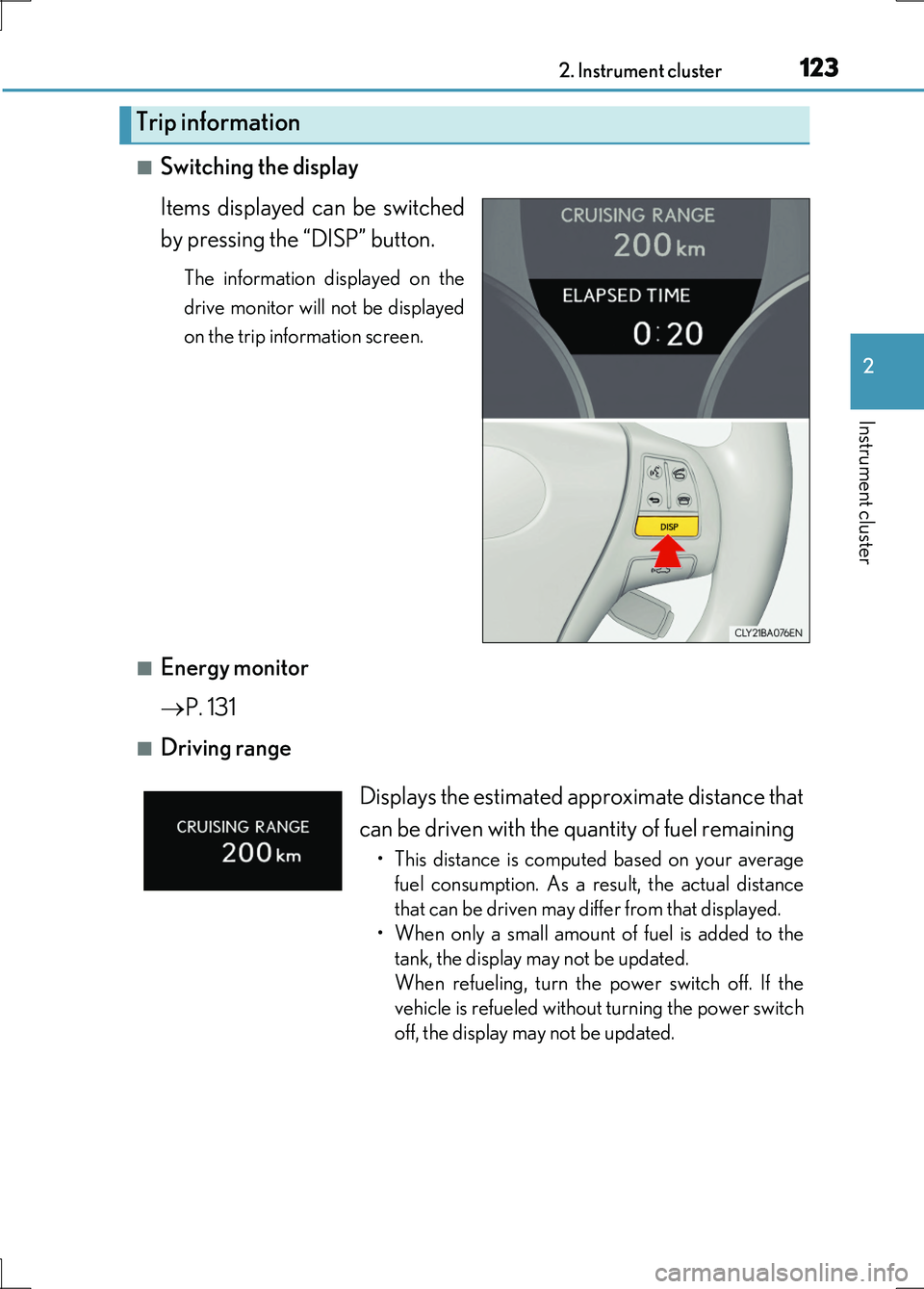
■Switching the display
Items displayed can be switched
by pressing the “DISP” button.
The information displayed on the
drive monitor will not be displayed
on the trip information screen.
■Energy monitor
P. 131
■Driving range
Trip information
Displays the estimated approximate distance that
can be driven with the quantity of fuel remaining
• This distance is computed based on your average
fuel consumption. As a result, the actual distance
that can be driven may differ from that displayed.
• When only a small amount of fuel is added to the
tank, the display may not be updated.
When refueling, turn the power switch off. If the
vehicle is refueled without turning the power switch
off, the display may not be updated.
Page 124 of 676
1242. Instrument cluster
LS600h/LS600hL_EE(OM50G20E)
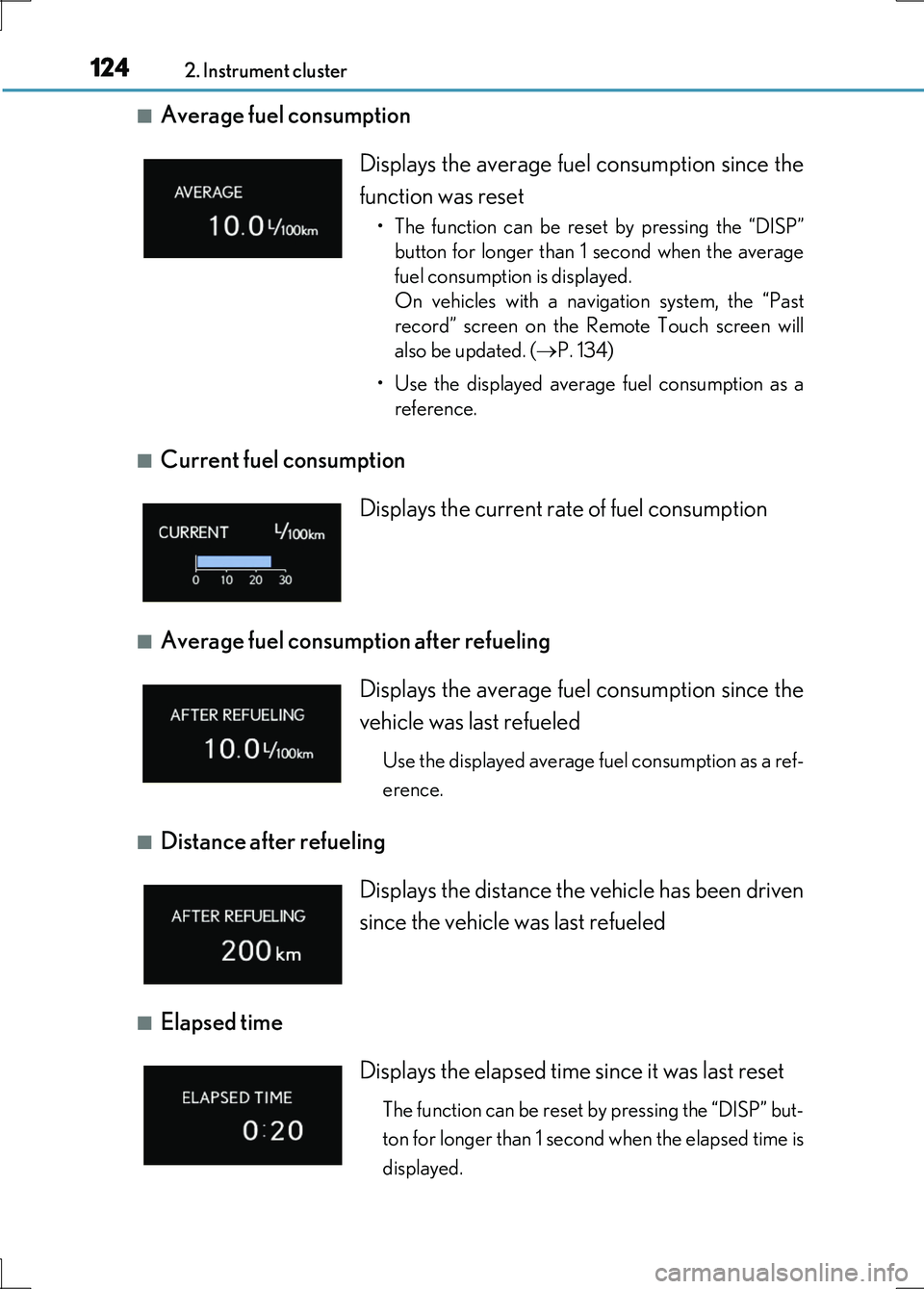
■Average fuel consumption
■Current fuel consumption
■Average fuel consumption after refueling
■Distance after refueling
■Elapsed time
Displays the average fuel consumption since the
function was reset
• The function can be reset by pressing the “DISP”
button for longer than 1 second when the average
fuel consumption is displayed.
On vehicles with a navigation system, the “Past
record” screen on the Remote Touch screen will
also be updated. ( P. 134)
• Use the displayed average fuel consumption as a
reference.
Displays the current rate of fuel consumption
Displays the average fuel consumption since the
vehicle was last refueled
Use the displayed average fuel consumption as a ref-
erence.
Displays the distance the vehicle has been driven
since the vehicle was last refueled
Displays the elapsed time since it was last reset
The function can be reset by pressing the “DISP” but-
ton for longer than 1 second when the elapsed time is
displayed.
Page 126 of 676
1262. Instrument cluster
LS600h/LS600hL_EE(OM50G20E)
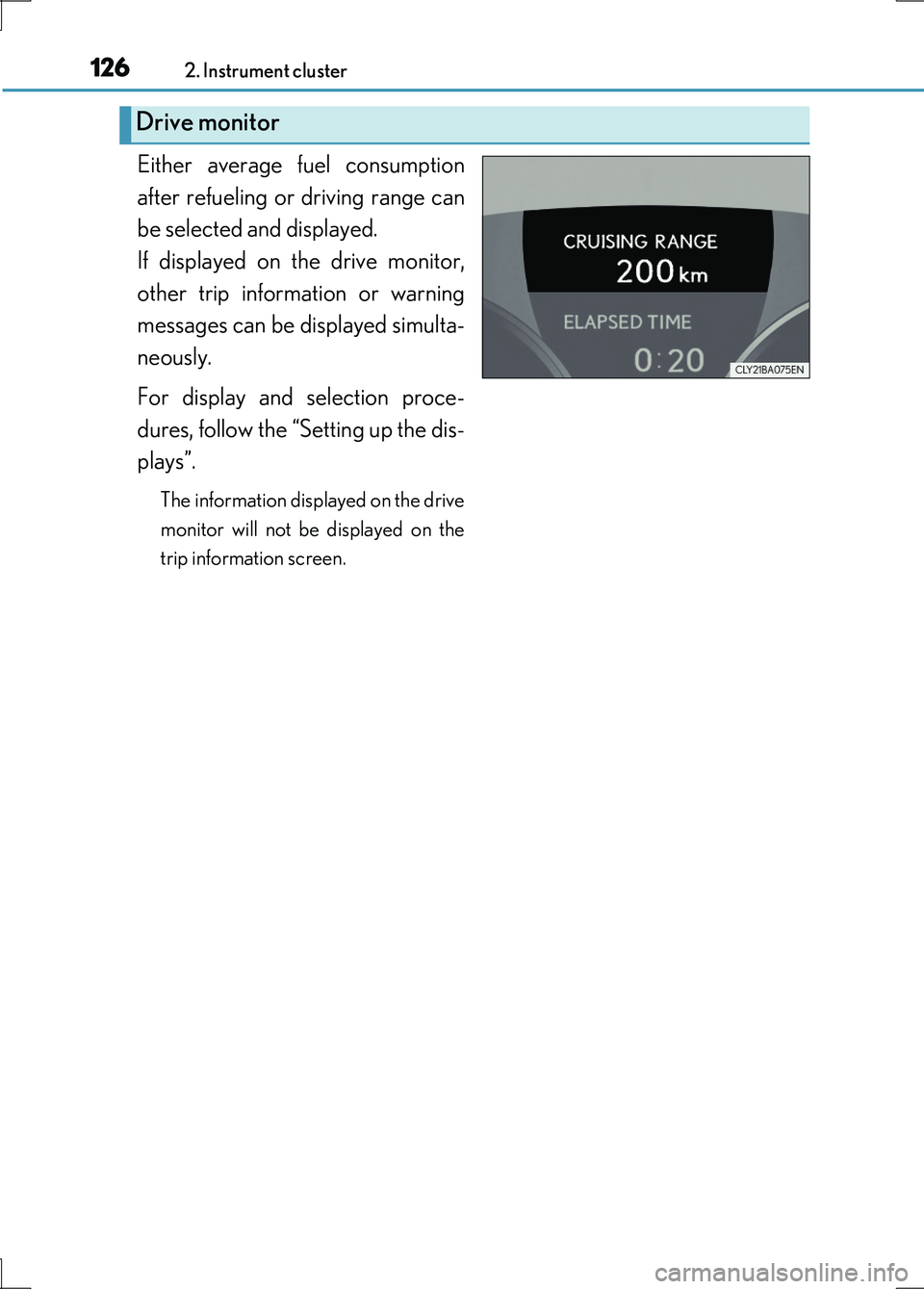
Either average fuel consumption
after refueling or driving range can
be selected and displayed.
If displayed on the drive monitor,
other trip information or warning
messages can be displayed simulta-
neously.
For display and selection proce-
dures, follow the “Setting up the dis-
plays”.
The information displayed on the drive
monitor will not be displayed on the
trip information screen.
Drive monitor
Page 128 of 676
1282. Instrument cluster
LS600h/LS600hL_EE(OM50G20E)
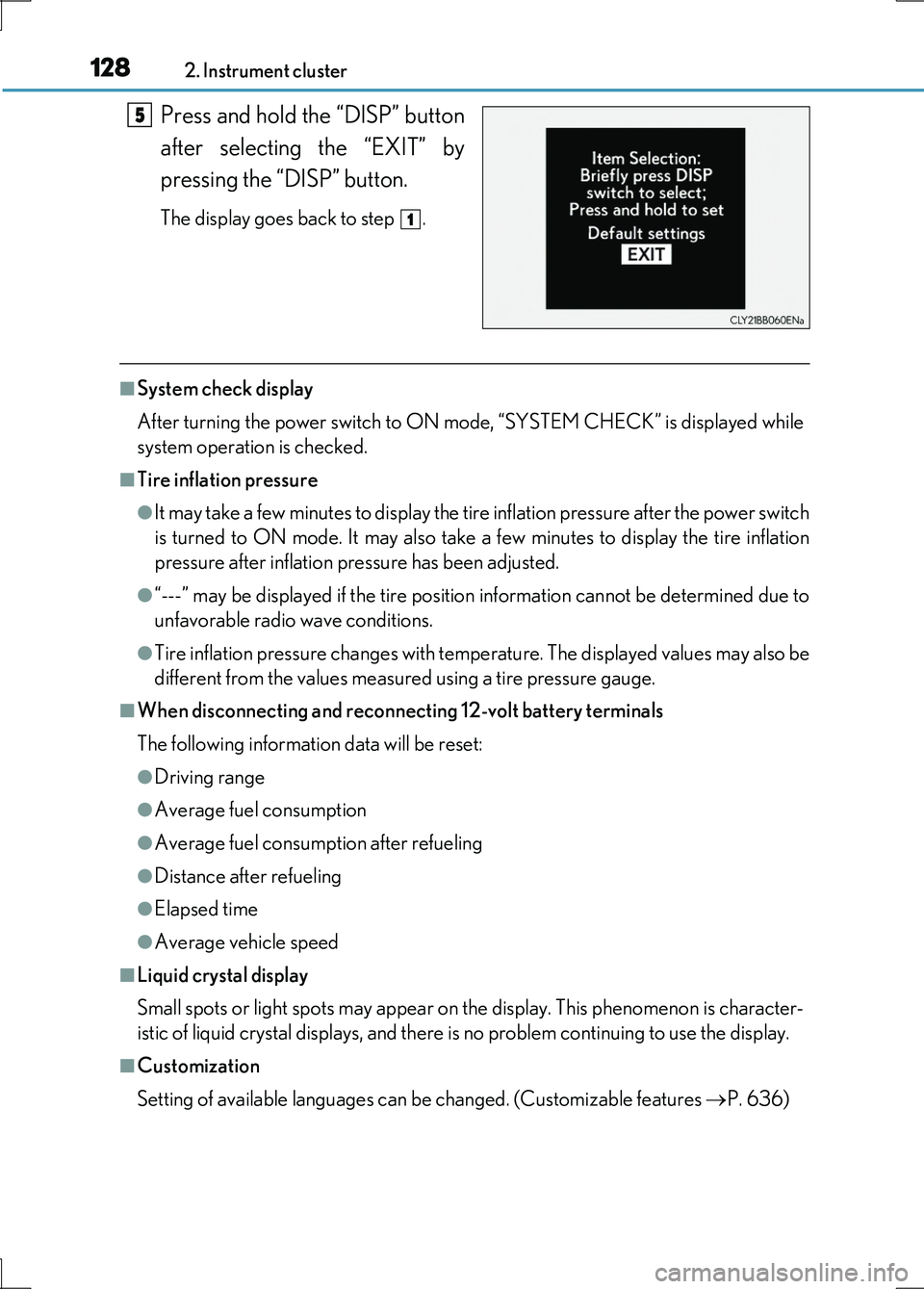
Press and hold the “DISP” button
after selecting the “EXIT” by
pressing the “DISP” button.
The display goes back to step .
■System check display
After turning the power switch to ON mode, “SYSTEM CHECK” is displayed while
system operation is checked.
■Tire inflation pressure
●It may take a few minutes to display the tire inflation pressure after the power switch
is turned to ON mode. It may also take a few minutes to display the tire inflation
pressure after inflation pressure has been adjusted.
●“---” may be displayed if the tire position information cannot be determined due to
unfavorable radio wave conditions.
●Tire inflation pressure changes with temperature. The displayed values may also be
different from the values measured using a tire pressure gauge.
■When disconnecting and reconnecting 12-volt battery terminals
The following information data will be reset:
●Driving range
●Average fuel consumption
●Average fuel consumption after refueling
●Distance after refueling
●Elapsed time
●Average vehicle speed
■Liquid crystal display
Small spots or light spots may appear on the display. This phenomenon is character-
istic of liquid crystal displays, and there is no problem continuing to use the display.
■Customization
Setting of available languages can be changed. (Customizable features P. 636)
5
1
Page 133 of 676
1332. Instrument cluster
2
Instrument cluster
LS600h/LS600hL_EE(OM50G20E)
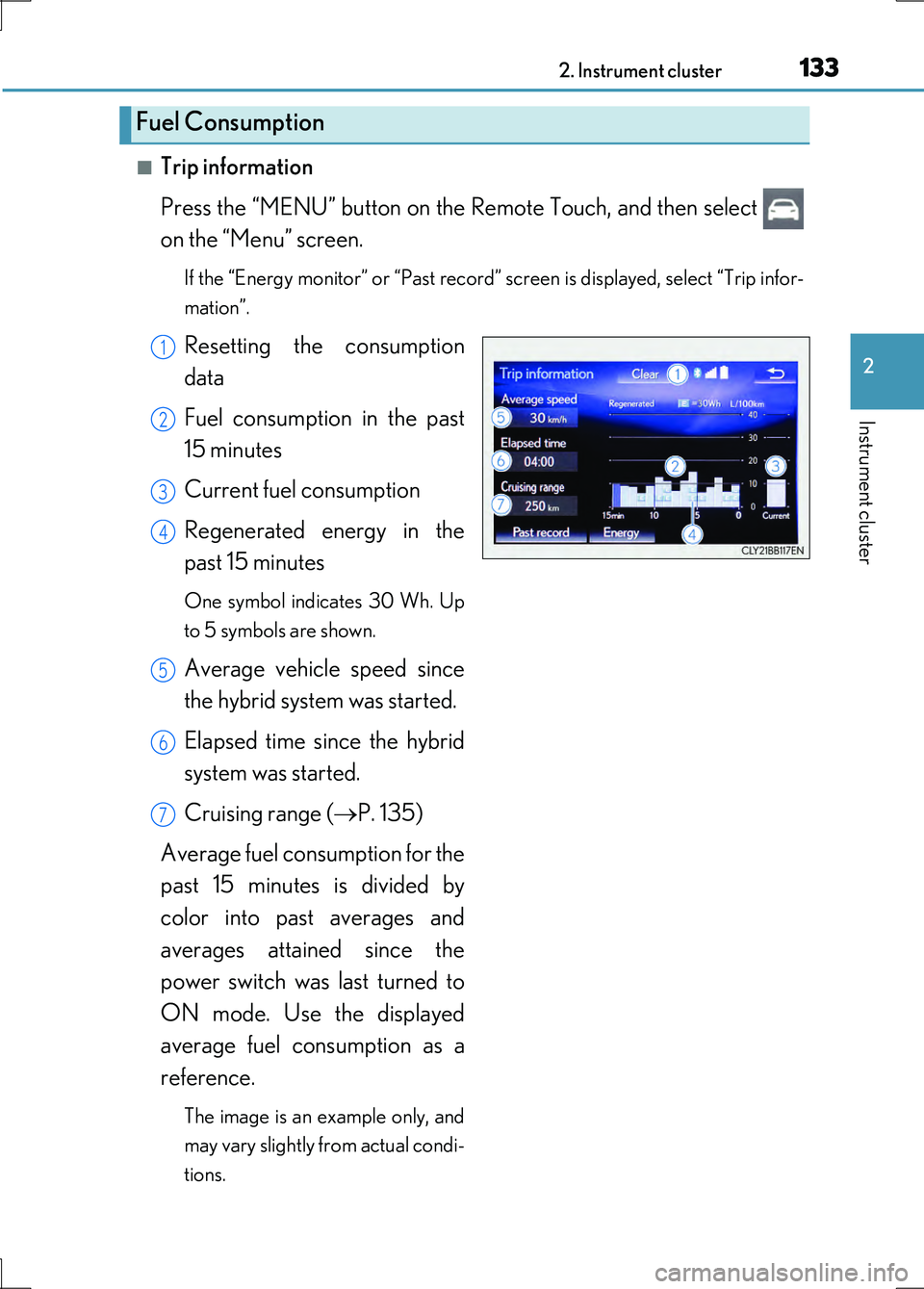
■Trip information
Press the “MENU” button on the Remote Touch, and then select
on the “Menu” screen.
If the “Energy monitor” or “Past record” screen is displayed, select “Trip infor-
mation”.
Resetting the consumption
data
Fuel consumption in the past
15 minutes
Current fuel consumption
Regenerated energy in the
past 15 minutes
One symbol indicates 30 Wh. Up
to 5 symbols are shown.
Average vehicle speed since
the hybrid system was started.
Elapsed time since the hybrid
system was started.
Cruising range ( P. 135)
Average fuel consumption for the
past 15 minutes is divided by
color into past averages and
averages attained since the
power switch was last turned to
ON mode. Use the displayed
average fuel consumption as a
reference.
The image is an example only, and
may vary slightly from actual condi-
tions.
Fuel Consumption
1
2
3
4
5
6
7