reset LEXUS LS600H 2017 User Guide
[x] Cancel search | Manufacturer: LEXUS, Model Year: 2017, Model line: LS600H, Model: LEXUS LS600H 2017Pages: 676, PDF Size: 35.25 MB
Page 134 of 676
1342. Instrument cluster
LS600h/LS600hL_EE(OM50G20E)
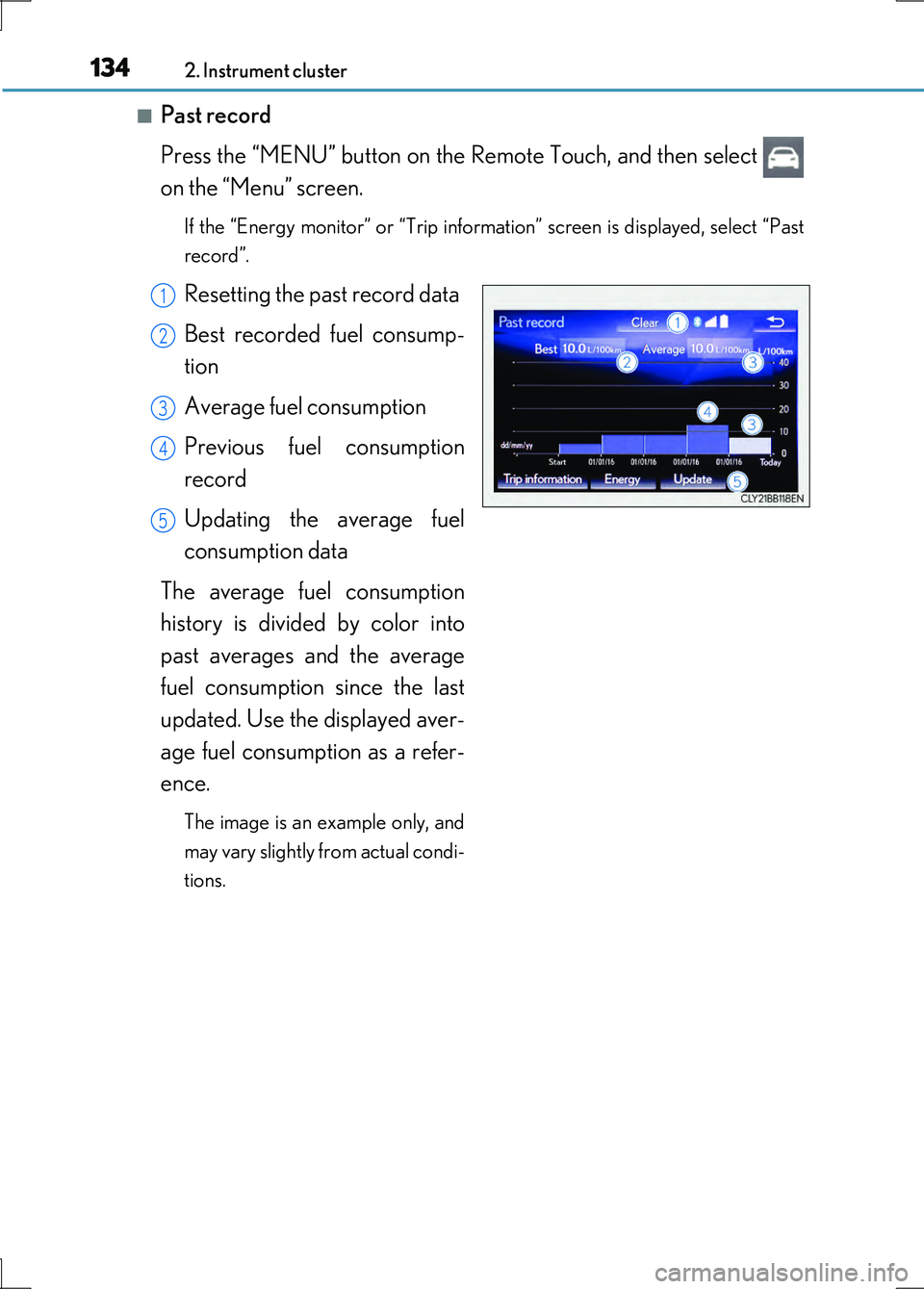
■Past record
Press the “MENU” button on the Remote Touch, and then select
on the “Menu” screen.
If the “Energy monitor” or “Trip information” screen is displayed, select “Past
record”.
Resetting the past record data
Best recorded fuel consump-
tion
Average fuel consumption
Previous fuel consumption
record
Updating the average fuel
consumption data
The average fuel consumption
history is divided by color into
past averages and the average
fuel consumption since the last
updated. Use the displayed aver-
age fuel consumption as a refer-
ence.
The image is an example only, and
may vary slightly from actual condi-
tions.
1
2
3
4
5
Page 135 of 676
1352. Instrument cluster
2
Instrument cluster
LS600h/LS600hL_EE(OM50G20E)
■Updating the past record data
Update the average fuel consumption by selecting “Update” to measure the current
fuel consumption again.
■Resetting the data
The fuel consumption data can be deleted by selecting “Clear”.
■Cruising range
Displays the estimated maximum distance that can be driven with the quantity of fuel
remaining.
This distance is computed based on your average fuel consumption.
As a result, the actual distance that can be driven may differ from that displayed.
Page 207 of 676
2073-3. Adjusting the seats
3
Operation of each component
LS600h/LS600hL_EE(OM50G20E)
Your preferred driving position (the position of the driver’s seat, steering
wheel, outside rear view mirrors and he ight of seat belt shoulder anchor)
can be recorded and recalled by pressing a switch.
Three different driving positions can be recorded into memory.
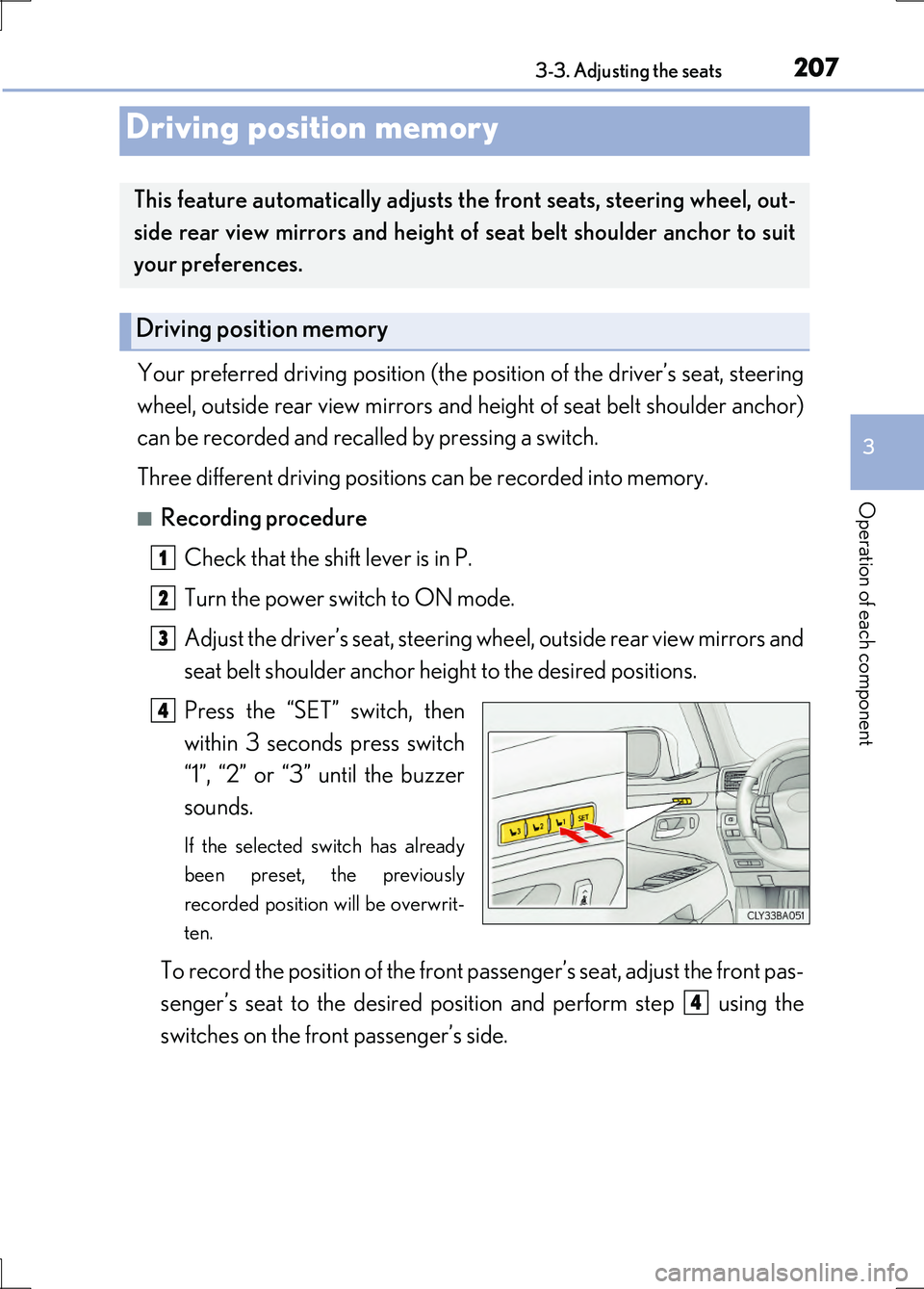
■Recording procedure
Check that the shift lever is in P.
Turn the power switch to ON mode.
Adjust the driver’s seat, steering wheel, outside rear view mirrors and
seat belt shoulder anchor height to the desired positions.
Press the “SET” switch, then
within 3 seconds press switch
“1”, “2” or “3” until the buzzer
sounds.
If the selected switch has already
been preset, the previously
recorded position will be overwrit-
ten.
To record the position of the front passenger’s seat, adjust the front pas-
senger’s seat to the desired posi tion and perform step using the
switches on the front passenger’s side.
Driving position memory
This feature automatically adjusts the front seats, steering wheel, out-
side rear view mirrors and height of seat belt shoulder anchor to suit
your preferences.
Driving position memory
1
2
3
4
4
Page 212 of 676
2123-3. Adjusting the seats
LS600h/LS600hL_EE(OM50G20E)
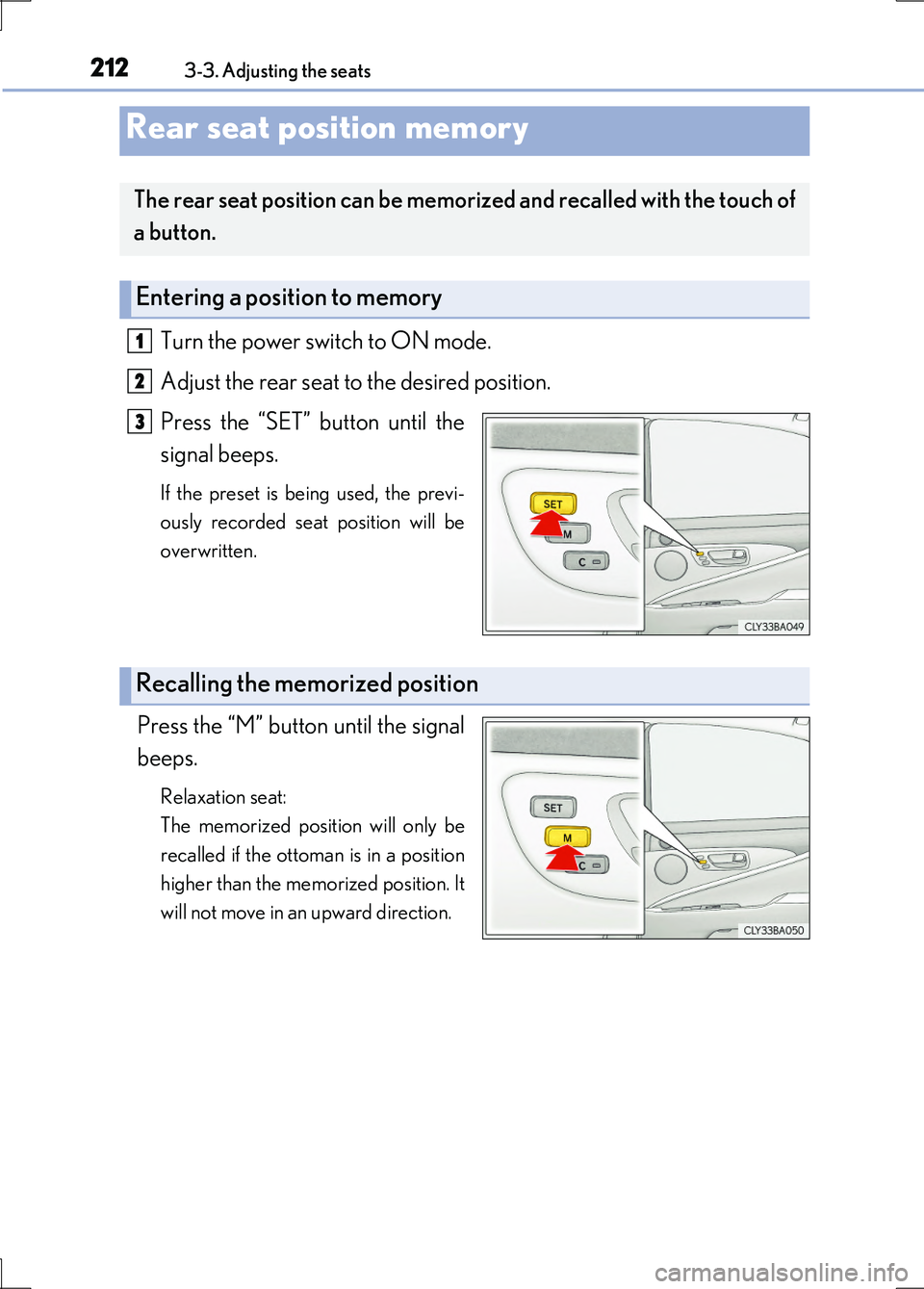
Turn the power switch to ON mode.
Adjust the rear seat to the desired position.
Press the “SET” button until the
signal beeps.
If the preset is being used, the previ-
ously recorded seat position will be
overwritten.
Press the “M” button until the signal
beeps.
Relaxation seat:
The memorized position will only be
recalled if the ottoman is in a position
higher than the memorized position. It
will not move in an upward direction.
Rear seat position memory
The rear seat position can be memorized and recalled with the touch of
a button.
Entering a position to memory
1
2
3
Recalling the memorized position
Page 291 of 676
2914-5. Using the driving support systems
4
Driving
LS600h/LS600hL_EE(OM50G20E)
■Cruise control can be set when
●The shift lever is in D or range 4 or higher of S has been selected.
●Range 4 or higher has been selected by using the paddle shift.
(vehicles with paddle shift switch)
●Vehicle speed is above approximately 40 km/h (25 mph).
■Accelerating after setting the vehicle speed
●The vehicle can be accelerated normally. After acceleration, the set speed
resumes.
●Even without canceling the cruise control, the set speed can be increased by first
accelerating the vehicle to the desired speed and then pushing the lever down to
set the new speed.
■Automatic cruise control cancelation
Cruise control will stop maintaining the vehicle speed in any of the following situa-
tions.
●Actual vehicle speed falls more than approximately 16 km/h (10 mph) below the
preset vehicle speed.
At this time, the memorized set speed is not retained.
●Actual vehicle speed is below approximately 40 km/h (25 mph).
●VSC is activated.
●TRC is activated for a period of time.
●When the VSC or TRC system is turned off by pressing the VSC OFF switch.
■If the warning message for the cruise control is shown on the multi-information dis-
play
Press the “ON•OFF” button once to deactivate the system, and then press the but-
ton again to reactivate the system.
If the cruise control speed cannot be set or if the cruise control cancels immediately
after being activated, there may be a malfunction in the cruise control system. Have
the vehicle inspected by any authorized Lexus dealer or repairer, or another duly
qualified and equipped professional.
Page 509 of 676
5096-3. Do-it-yourself maintenance
6
Maintenance and care
LS600h/LS600hL_EE(OM50G20E)
■How to initialize the tire pressure warning system
Park the vehicle in a safe place and turn the power switch off.
Initialization cannot be performed while the vehicle is moving.
Adjust the tire inflation pressure to the specified cold tire inflation
pressure level. ( P. 630)
Make sure to adjust the tire pressure to the specified cold tire inflation pres-
sure level. The tire pressure warning system will operate based on this pressure
level.
Turn the power switch to ON mode.
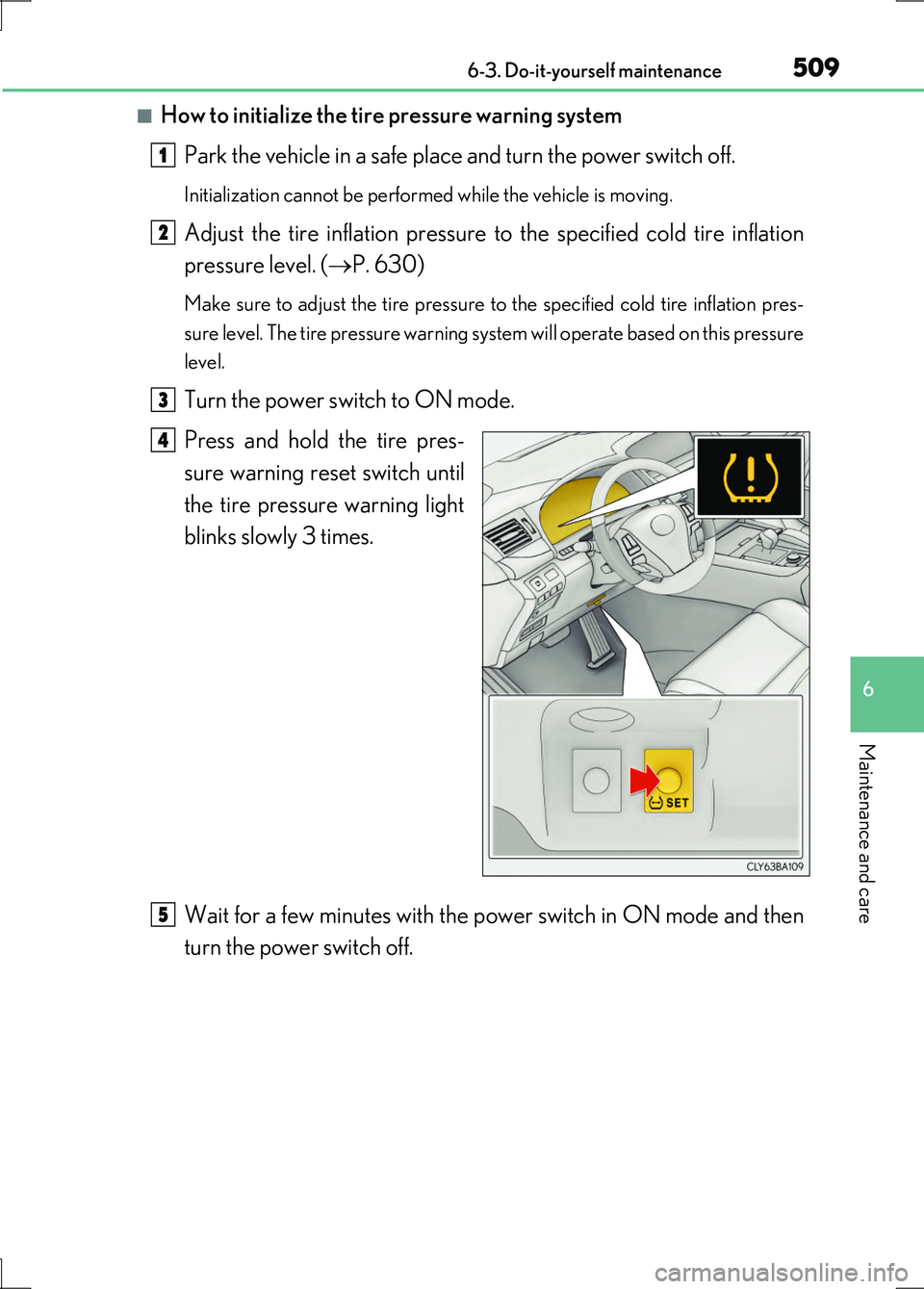
Press and hold the tire pres-
sure warning reset switch until
the tire pressure warning light
blinks slowly 3 times.
Wait for a few minutes with the power switch in ON mode and then
turn the power switch off.
1
2
3
4
5
Page 512 of 676
5126-3. Do-it-yourself maintenance
LS600h/LS600hL_EE(OM50G20E)
■The initialization operation
●Make sure to carry out initialization after adjusting the tire inflation pressure.
Also, make sure the tires are cold before carrying out initialization or tire inflation
pressure adjustment.
●If you have accidentally turned the power switch off during initialization, it is not
necessary to press the reset switch again as initialization will restart automatically
when the power switch has been turned to ON mode for the next time.
●If you accidentally press the reset switch when initialization is not necessary, adjust
the tire inflation pressure to the specified level when the tires are cold, and conduct
initialization again.
■Warning performance of the tire pressure warning system
The warning of the tire pressure warning system will change in accordance with driv-
ing conditions. For this reason, the system may give a warning even if the tire pres-
sure does not reach a low enough level, or if the pressure is higher than the pressure
that was adjusted to when the system was initialized.
■When initialization of the tire pressure warning system has failed
Initialization can be completed in a few minutes. However, in the following cases, the
settings have not been recorded and the system will not operate properly. If
repeated attempts to record tire inflation pressure settings are unsuccessful, have
the vehicle inspected by any authorized Lexus dealer or repairer, or another duly
qualified and equipped professional.
●When operating the tire pressure warning reset switch, the tire pressure warning
light does not blink 3 times.
●After carrying out the initialization procedure, the tire pressure warning light blinks
for 1 minute then stays on after driving for 20 minutes.
■Registering ID codes (except for Israel)
The ID codes of the tire pressure warning valve and transmitters for two sets of
wheels can be registered.
It is not necessary to register the ID codes when replacing normal tires with snow
tires, if the ID codes for the wheels of both normal tires and snow tires are registered
beforehand.
For information about changing ID codes, ask any authorized Lexus dealer or
repairer, or another duly qualified and equipped professional.
Page 523 of 676
5236-3. Do-it-yourself maintenance
6
Maintenance and care
LS600h/LS600hL_EE(OM50G20E)
CAUTION
■When inspecting or replacing tires
Observe the following precautions to prevent accidents.
Failure to do so may cause damage to parts of the drive train as well as dangerous
handling characteristics, which may lead to an accident resulting in death or seri-
ous injury.
●Do not mix tires of different makes, models or tread patterns.
Also, do not mix tires of remarkably different treadwear.
●Do not use tire sizes other than those recommended by Lexus.
●Do not mix differently constructed tires (radial, bias-belted or bias-ply tires).
●Do not mix summer, all season and snow tires.
●Do not use tires that have been used on another vehicle.
Do not use tires if you do not kno w how they were used previously.
■When initializing the tire pressure warning system
Do not operate the tire pressure warning reset switch without first adjusting the tire
inflation pressure to the specified level. Otherwise, the tire pressure warning light
may not come on even if the tire inflation pressure is low, or it may come on when
the tire inflation pressure is actually normal.
■Caution regarding interference with electronic devices
●Users of any electrical medical device other than implantable cardiac pacemak-
ers, cardiac resynchronization therapy-pacemakers or implantable cardioverter
defibrillators should consult the manufacturer of the device for information about
its operation under the influence of radio waves.
Radio waves could have unexpected effects on the operation of such medical
devices.
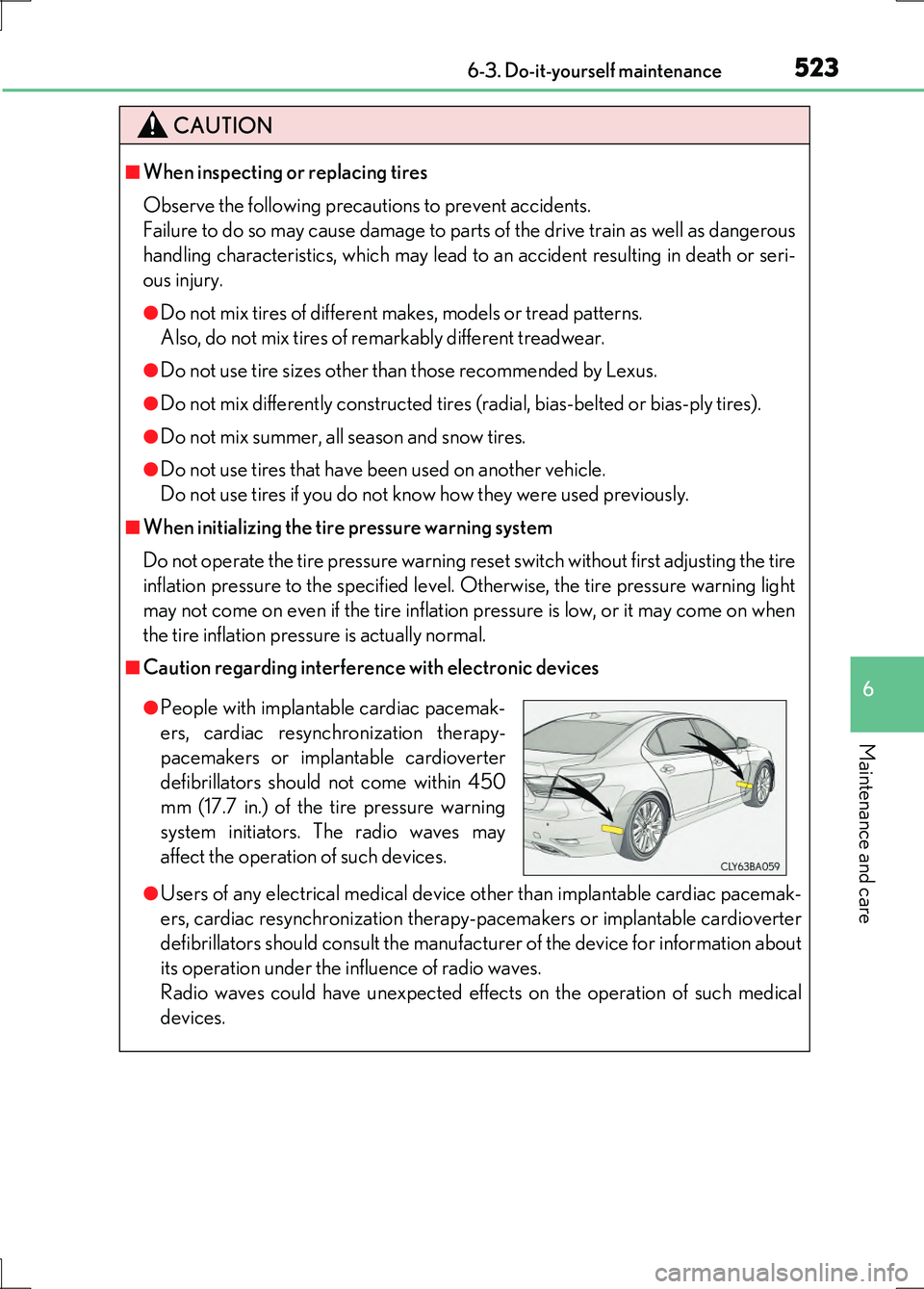
●People with implantable cardiac pacemak-
ers, cardiac resynchronization therapy-
pacemakers or implantable cardioverter
defibrillators should not come within 450
mm (17.7 in.) of the tire pressure warning
system initiators. The radio waves may
affect the operation of such devices.
Page 530 of 676
5306-3. Do-it-yourself maintenance
LS600h/LS600hL_EE(OM50G20E)
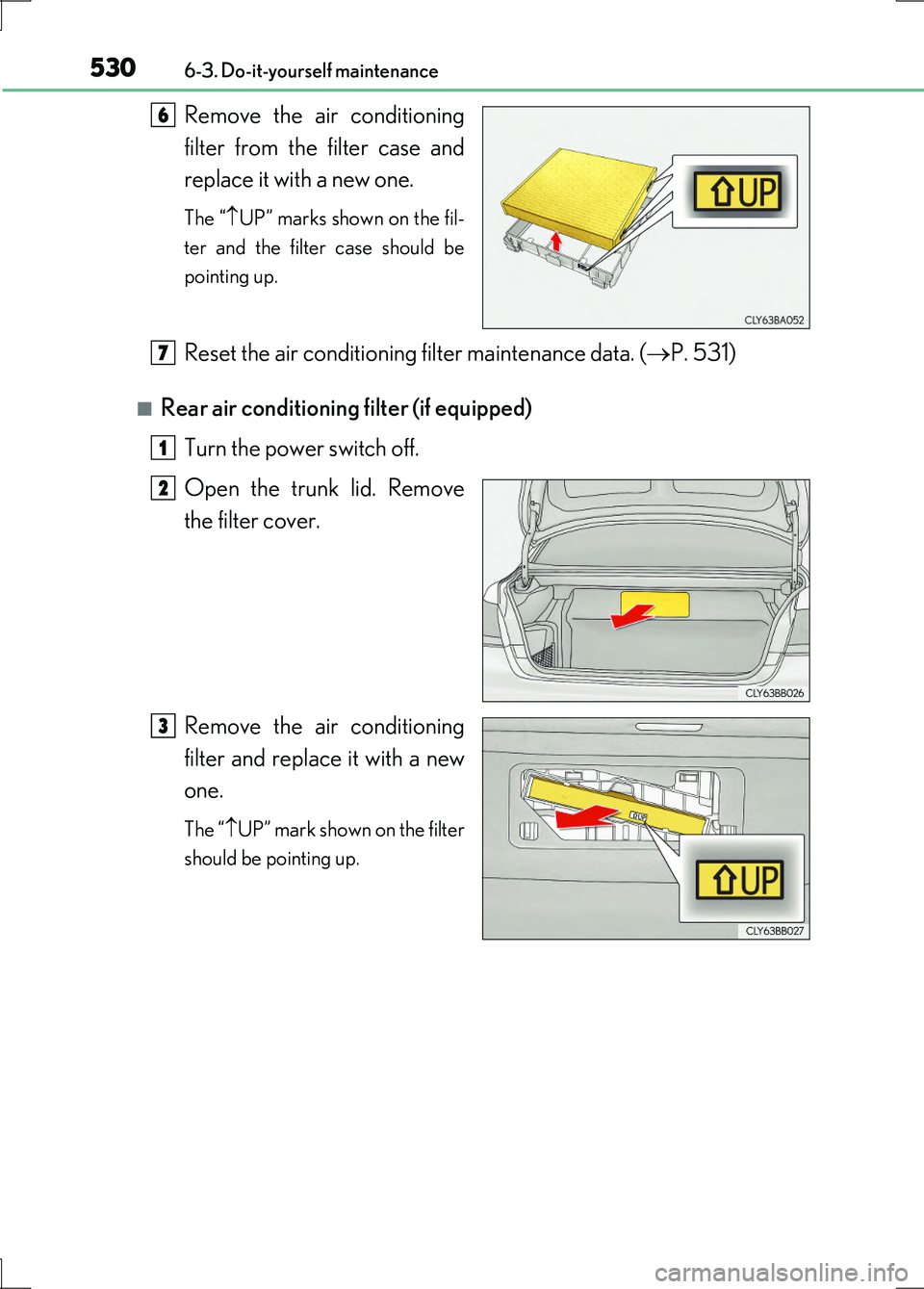
Remove the air conditioning
filter from the filter case and
replace it with a new one.
The “ UP” marks shown on the fil-
ter and the filter case should be
pointing up.
Reset the air conditioning filter maintenance data. ( P. 531)
■Rear air conditioning filter (if equipped)
Turn the power switch off.
Open the trunk lid. Remove
the filter cover.
Remove the air conditioning
filter and replace it with a new
one.
The “ UP” mark shown on the filter
should be pointing up.
6
7
1
2
33
Page 531 of 676
5316-3. Do-it-yourself maintenance
6
Maintenance and care
LS600h/LS600hL_EE(OM50G20E)
■Checking interval
Front air conditioning filter
Inspect and replace the air conditioning filter when a message is appeared on the
multi-information display. In dusty areas or areas with heavy traffic flow, early
replacement may be required. (For scheduled maintenance information, please
refer to the “Lexus Service Booklet” or “Lexus Warranty Booklet”.)
Rear air conditioning filter (if equipped)
Replace every 15000 km (9000 miles).
■If air flow from the vents decreases dramatically
The filter may be clogged. Check the filter and replace if necessary.
■After changing the front air conditioning filter
The front air conditioning filter maintenance data should be reset. Perform the fol-
lowing procedures:
Turn the power switch to ON mode.
Press and hold (on the air conditioning panel) for 4 seconds or more.
A buzzer will sound to indicate that the maintenance data has been successfully
reset.
■Rear air conditioning filter (if equipped)
If it is necessary to clean or replace the filter, contact any authorized Lexus dealer or
repairer, or another duly qualified and equipped professional.
■Climate control seat filter (if equipped)
Filters are installed in the seats. When it is necessary to clean or replace the filters,
contact any authorized Lexus dealer or repairer, or another duly qualified and
equipped professional.
NOTICE
■When using the air conditioning system
Make sure that a filter is always installed.
Using the air conditioning system without a filter may cause damage to the system.
1
2