reset LEXUS LS600H 2017 Owners Manual
[x] Cancel search | Manufacturer: LEXUS, Model Year: 2017, Model line: LS600H, Model: LEXUS LS600H 2017Pages: 676, PDF Size: 35.25 MB
Page 18 of 676
18Pictorial index
LS600h/LS600hL_EE(OM50G20E)
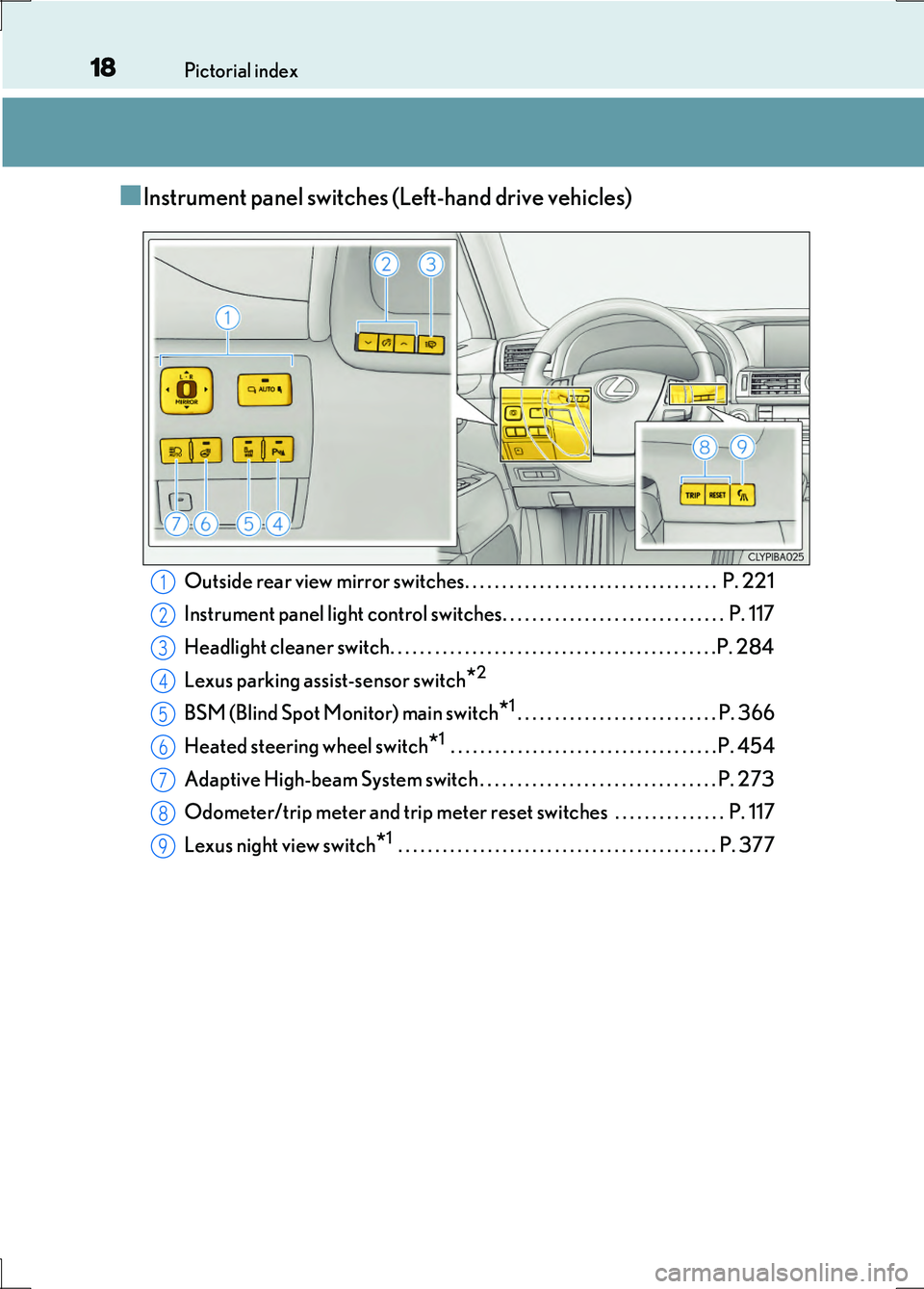
■Instrument panel switches (Left-hand drive vehicles)
Outside rear view mirror switches. . . . . . . . . . . . . . . . . . . . . . . . . . . . . . . . . . P. 221
Instrument panel light control switches. . . . . . . . . . . . . . . . . . . . . . . . . . . . . . P. 117
Headlight cleaner switch. . . . . . . . . . . . . . . . . . . . . . . . . . . . . . . . . . . . . . . . . . . .P. 284
Lexus parking assist-sensor switch*2
BSM (Blind Spot Monitor) main switch*1. . . . . . . . . . . . . . . . . . . . . . . . . . . P. 366
Heated steering wheel switch*1 . . . . . . . . . . . . . . . . . . . . . . . . . . . . . . . . . . . . P. 454
Adaptive High-beam System switch . . . . . . . . . . . . . . . . . . . . . . . . . . . . . . . . P. 273
Odometer/trip meter and trip meter reset sw itches . . . . . . . . . . . . . . . P. 117
Lexus night view switch*1 . . . . . . . . . . . . . . . . . . . . . . . . . . . . . . . . . . . . . . . . . . . P. 377
1
2
3
4
5
6
7
8
9
Page 19 of 676
19Pictorial index
LS600h/LS600hL_EE(OM50G20E)
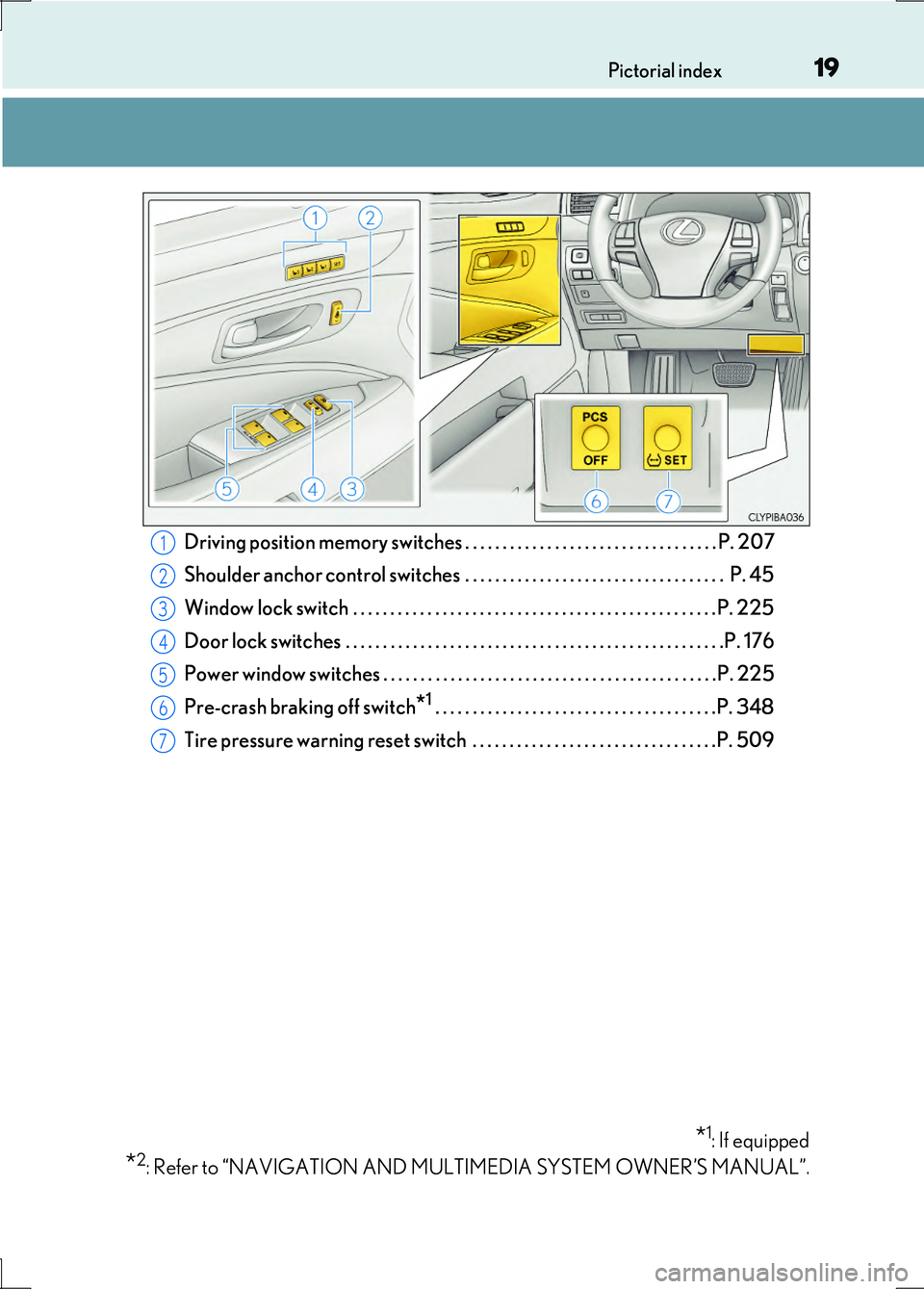
Driving position memory switches . . . . . . . . . . . . . . . . . . . . . . . . . . . . . . . . . . P. 207
Shoulder anchor control switches . . . . . . . . . . . . . . . . . . . . . . . . . . . . . . . . . . . P. 45
Window lock switch . . . . . . . . . . . . . . . . . . . . . . . . . . . . . . . . . . . . . . . . . . . . . . . . . P. 225
Door lock switches . . . . . . . . . . . . . . . . . . . . . . . . . . . . . . . . . . . . . . . . . . . . . . . . . . .P. 176
Power window switches . . . . . . . . . . . . . . . . . . . . . . . . . . . . . . . . . . . . . . . . . . . . .P. 225
Pre-crash braking off switch*1 . . . . . . . . . . . . . . . . . . . . . . . . . . . . . . . . . . . . . .P. 348
Tire pressure warning reset switch . . . . . . . . . . . . . . . . . . . . . . . . . . . . . . . . .P. 509
*1: If equipped
*2: Refer to “NAVIGATION AND MULTIMEDIA SYSTEM OWNER’S MANUAL”.
1
2
3
4
5
6
7
Page 26 of 676
26Pictorial index
LS600h/LS600hL_EE(OM50G20E)
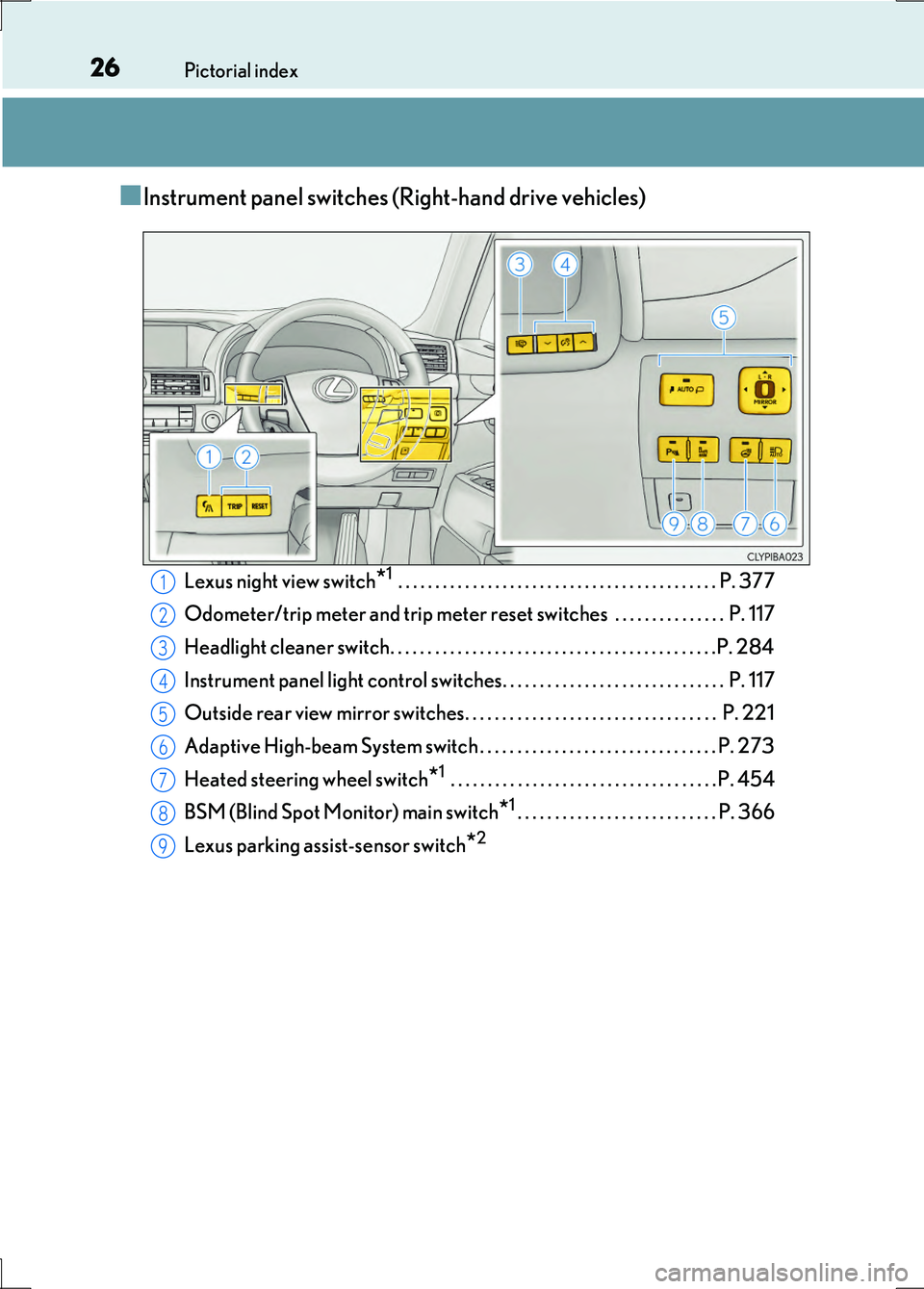
■Instrument panel switches (Right-hand drive vehicles)
Lexus night view switch*1 . . . . . . . . . . . . . . . . . . . . . . . . . . . . . . . . . . . . . . . . . . . P. 377
Odometer/trip meter and trip meter reset sw itches . . . . . . . . . . . . . . . P. 117
Headlight cleaner switch. . . . . . . . . . . . . . . . . . . . . . . . . . . . . . . . . . . . . . . . . . . .P. 284
Instrument panel light control switches. . . . . . . . . . . . . . . . . . . . . . . . . . . . . . P. 117
Outside rear view mirror switches. . . . . . . . . . . . . . . . . . . . . . . . . . . . . . . . . . P. 221
Adaptive High-beam System switch . . . . . . . . . . . . . . . . . . . . . . . . . . . . . . . . P. 273
Heated steering wheel switch*1 . . . . . . . . . . . . . . . . . . . . . . . . . . . . . . . . . . . . P. 454
BSM (Blind Spot Monitor) main switch*1. . . . . . . . . . . . . . . . . . . . . . . . . . . P. 366
Lexus parking assist-sensor switch*2
1
2
3
4
5
6
7
8
9
Page 27 of 676
27Pictorial index
LS600h/LS600hL_EE(OM50G20E)
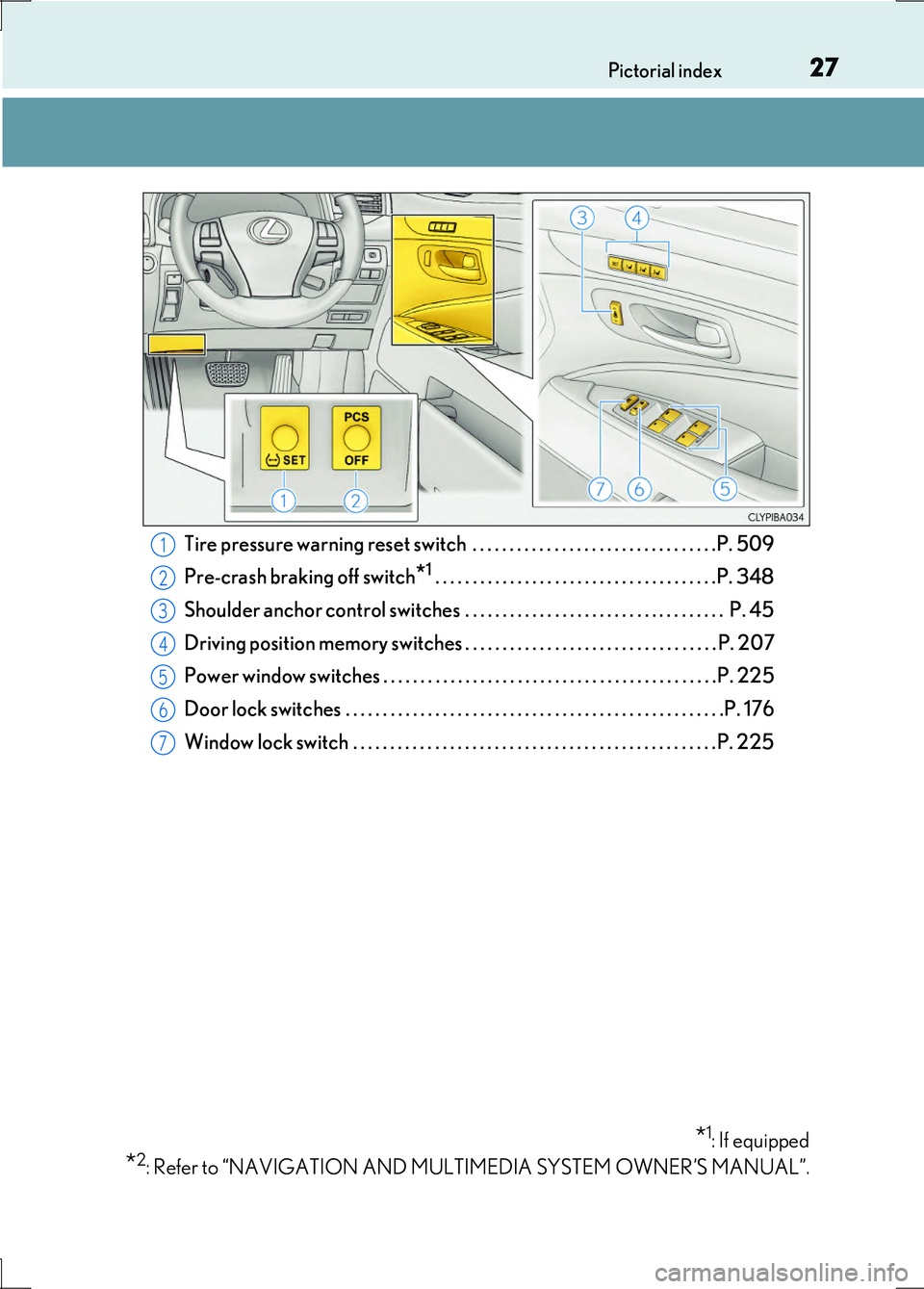
Tire pressure warning reset switch . . . . . . . . . . . . . . . . . . . . . . . . . . . . . . . . .P. 509
Pre-crash braking off switch*1 . . . . . . . . . . . . . . . . . . . . . . . . . . . . . . . . . . . . . .P. 348
Shoulder anchor control switches . . . . . . . . . . . . . . . . . . . . . . . . . . . . . . . . . . . P. 45
Driving position memory switches . . . . . . . . . . . . . . . . . . . . . . . . . . . . . . . . . . P. 207
Power window switches . . . . . . . . . . . . . . . . . . . . . . . . . . . . . . . . . . . . . . . . . . . . .P. 225
Door lock switches . . . . . . . . . . . . . . . . . . . . . . . . . . . . . . . . . . . . . . . . . . . . . . . . . . .P. 176
Window lock switch . . . . . . . . . . . . . . . . . . . . . . . . . . . . . . . . . . . . . . . . . . . . . . . . . P. 225
*1: If equipped
*2: Refer to “NAVIGATION AND MULTIMEDIA SYSTEM OWNER’S MANUAL”.
1
2
3
4
5
6
7
Page 116 of 676
1162. Instrument cluster
LS600h/LS600hL_EE(OM50G20E)
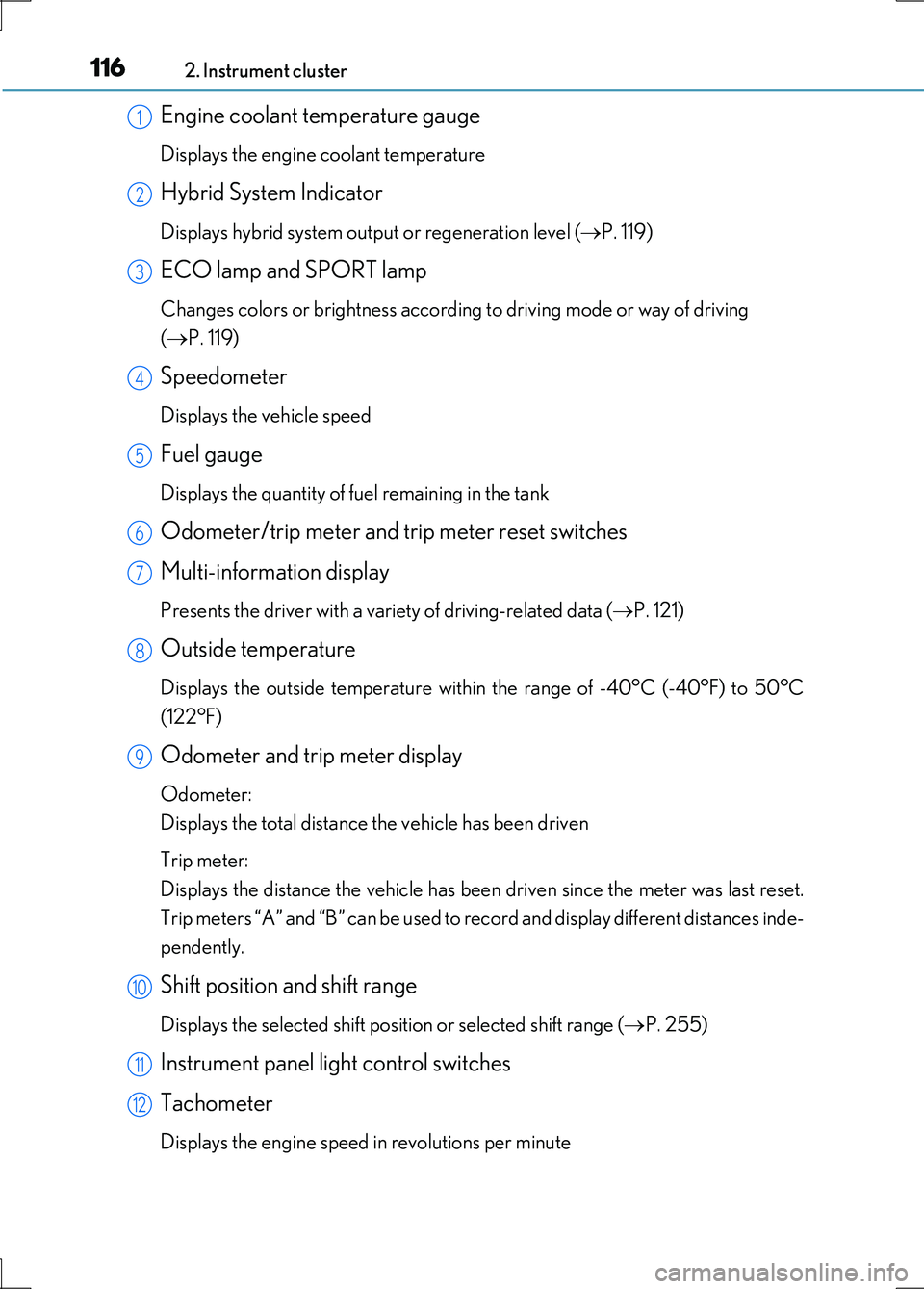
Engine coolant temperature gauge
Displays the engine coolant temperature
Hybrid System Indicator
Displays hybrid system output or regeneration level (P. 119)
ECO lamp and SPORT lamp
Changes colors or brightness according to driving mode or way of driving
( P. 119)
Speedometer
Displays the vehicle speed
Fuel gauge
Displays the quantity of fuel remaining in the tank
Odometer/trip meter and trip meter reset switches
Multi-information display
Presents the driver with a variety of driving-related data ( P. 121)
Outside temperature
Displays the outside temperature within the range of -40°C (-40°F) to 50°C
(122°F)
Odometer and trip meter display
Odometer:
Displays the total distance the vehicle has been driven
Trip meter:
Displays the distance the vehicle has been driven since the meter was last reset.
Trip meters “A” and “B” can be used to record and display different distances inde-
pendently.
Shift position and shift range
Displays the selected shift position or selected shift range ( P. 255)
Instrument panel light control switches
Tachometer
Displays the engine speed in revolutions per minute
1
2
3
4
5
6
7
8
9
10
11
12
Page 117 of 676
1172. Instrument cluster
2
Instrument cluster
LS600h/LS600hL_EE(OM50G20E)
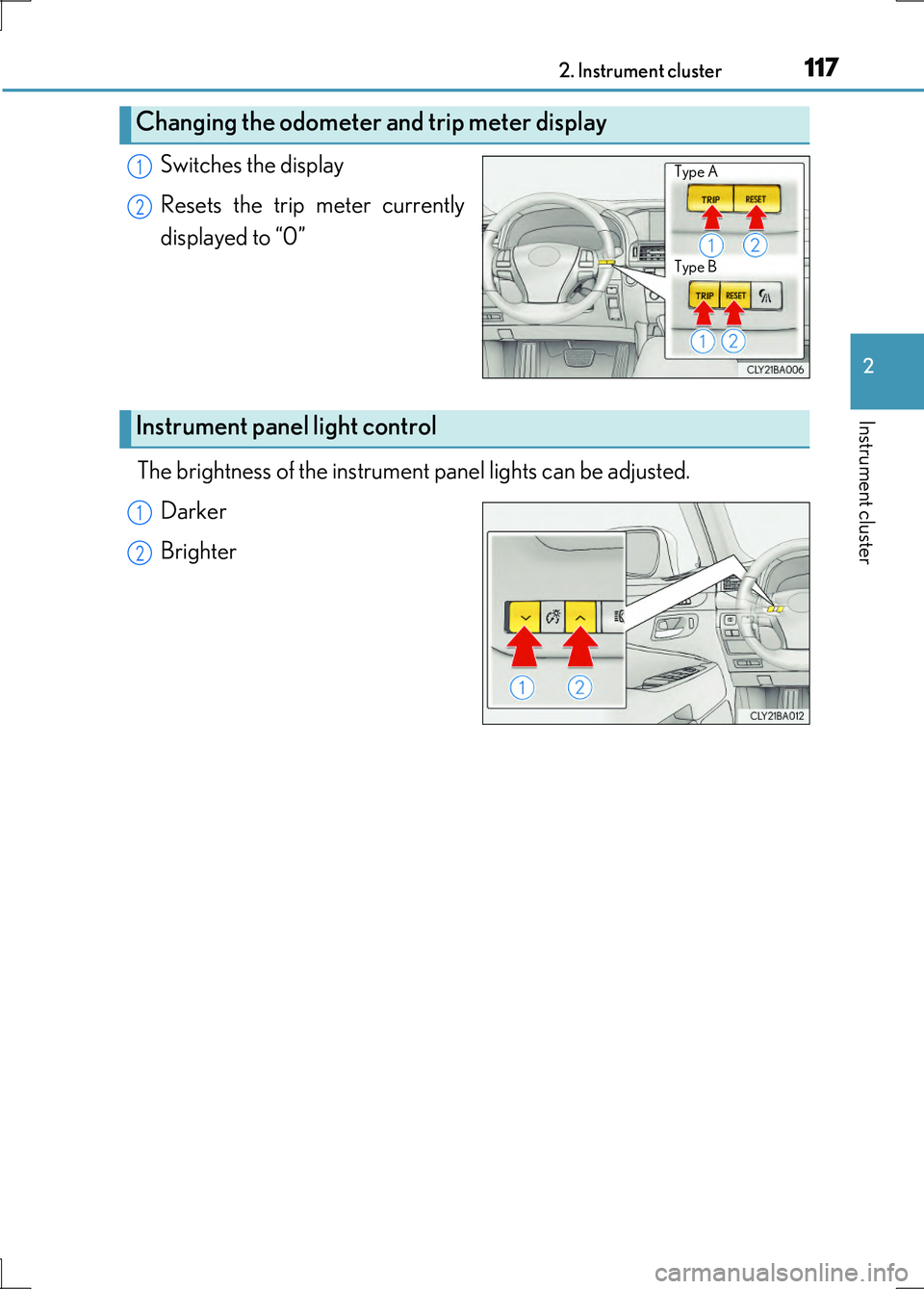
Switches the display
Resets the trip meter currently
displayed to “0”
The brightness of the instrument panel lights can be adjusted.
Darker
Brighter
Changing the odometer and trip meter display
Type A
Type B
1
2
Instrument panel light control
1
2
Page 124 of 676
1242. Instrument cluster
LS600h/LS600hL_EE(OM50G20E)
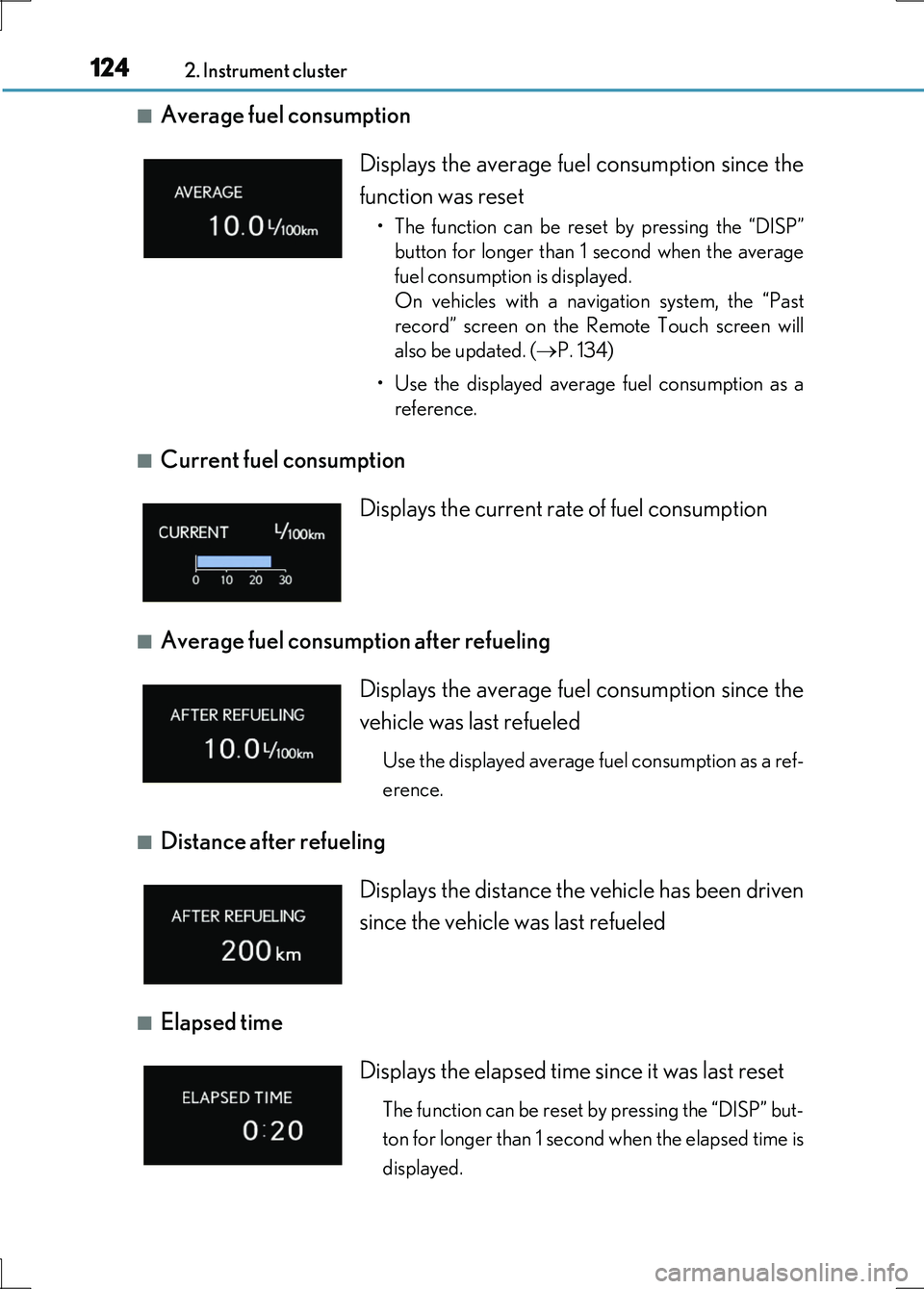
■Average fuel consumption
■Current fuel consumption
■Average fuel consumption after refueling
■Distance after refueling
■Elapsed time
Displays the average fuel consumption since the
function was reset
• The function can be reset by pressing the “DISP”
button for longer than 1 second when the average
fuel consumption is displayed.
On vehicles with a navigation system, the “Past
record” screen on the Remote Touch screen will
also be updated. ( P. 134)
• Use the displayed average fuel consumption as a
reference.
Displays the current rate of fuel consumption
Displays the average fuel consumption since the
vehicle was last refueled
Use the displayed average fuel consumption as a ref-
erence.
Displays the distance the vehicle has been driven
since the vehicle was last refueled
Displays the elapsed time since it was last reset
The function can be reset by pressing the “DISP” but-
ton for longer than 1 second when the elapsed time is
displayed.
Page 125 of 676
1252. Instrument cluster
2
Instrument cluster
LS600h/LS600hL_EE(OM50G20E)
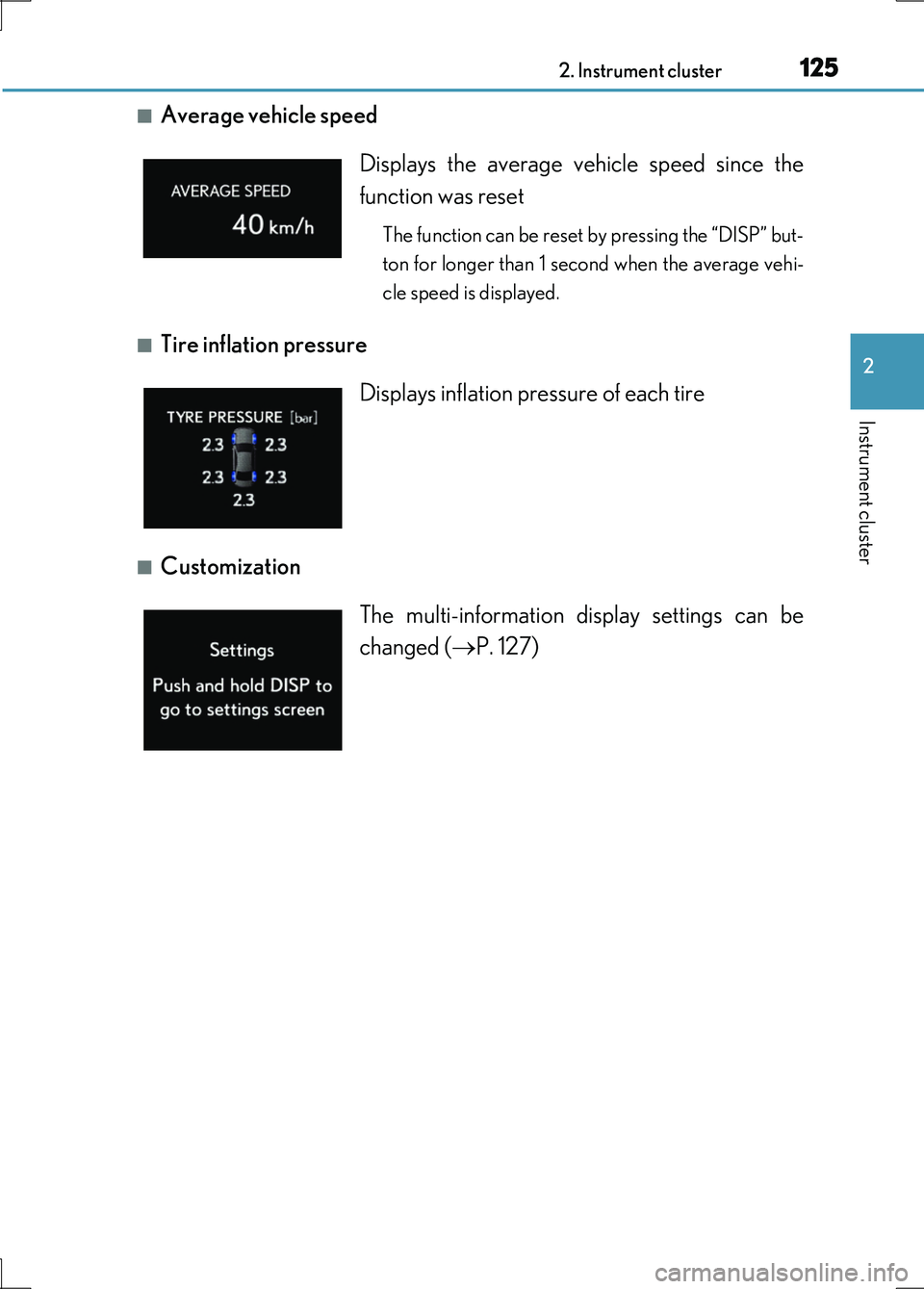
■Average vehicle speed
■Tire inflation pressure
■Customization
Displays the average vehicle speed since the
function was reset
The function can be reset by pressing the “DISP” but-
ton for longer than 1 second when the average vehi-
cle speed is displayed.
Displays inflation pressure of each tire
The multi-information display settings can be
changed ( P. 127)
Page 128 of 676
1282. Instrument cluster
LS600h/LS600hL_EE(OM50G20E)
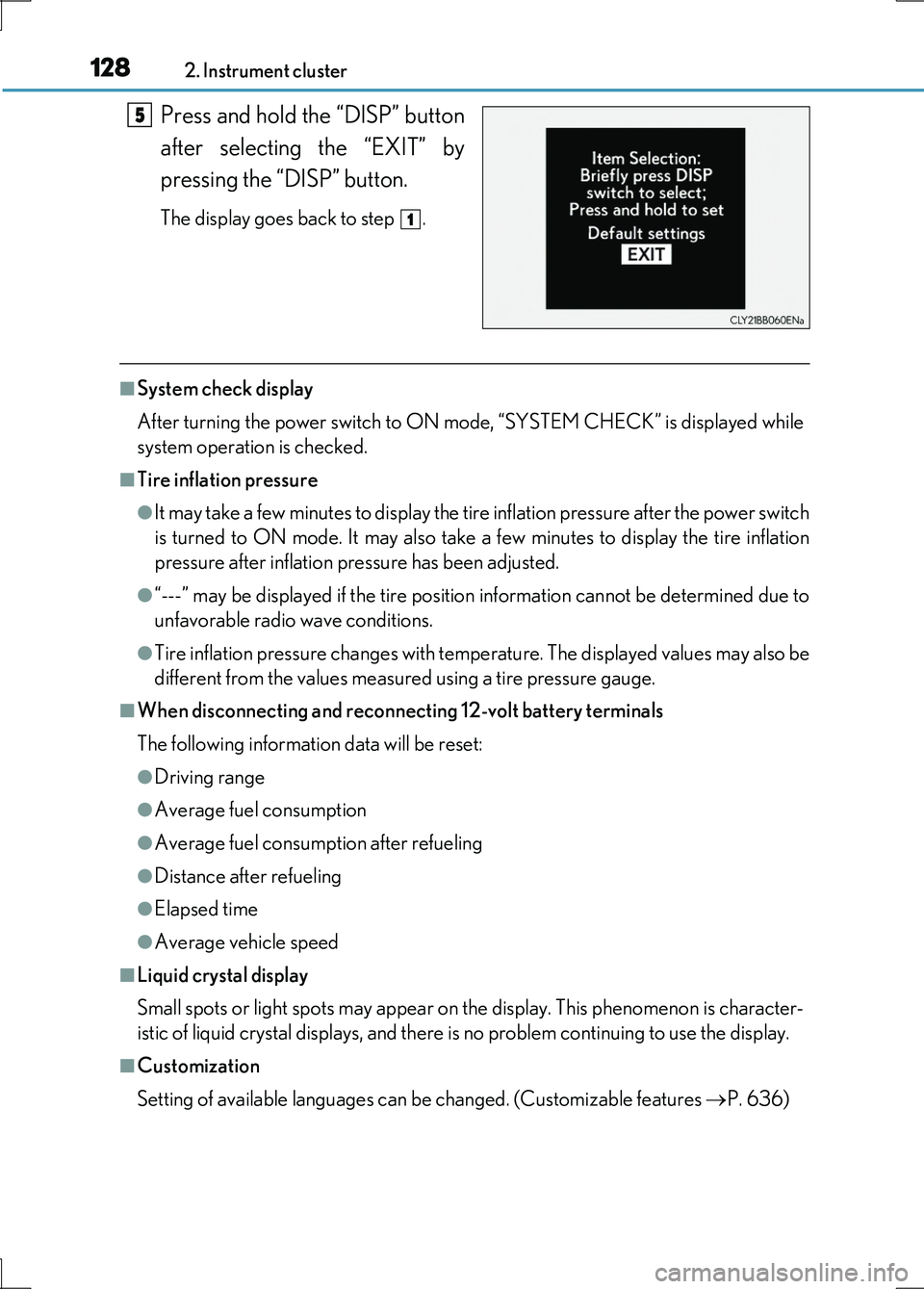
Press and hold the “DISP” button
after selecting the “EXIT” by
pressing the “DISP” button.
The display goes back to step .
■System check display
After turning the power switch to ON mode, “SYSTEM CHECK” is displayed while
system operation is checked.
■Tire inflation pressure
●It may take a few minutes to display the tire inflation pressure after the power switch
is turned to ON mode. It may also take a few minutes to display the tire inflation
pressure after inflation pressure has been adjusted.
●“---” may be displayed if the tire position information cannot be determined due to
unfavorable radio wave conditions.
●Tire inflation pressure changes with temperature. The displayed values may also be
different from the values measured using a tire pressure gauge.
■When disconnecting and reconnecting 12-volt battery terminals
The following information data will be reset:
●Driving range
●Average fuel consumption
●Average fuel consumption after refueling
●Distance after refueling
●Elapsed time
●Average vehicle speed
■Liquid crystal display
Small spots or light spots may appear on the display. This phenomenon is character-
istic of liquid crystal displays, and there is no problem continuing to use the display.
■Customization
Setting of available languages can be changed. (Customizable features P. 636)
5
1
Page 133 of 676
1332. Instrument cluster
2
Instrument cluster
LS600h/LS600hL_EE(OM50G20E)
■Trip information
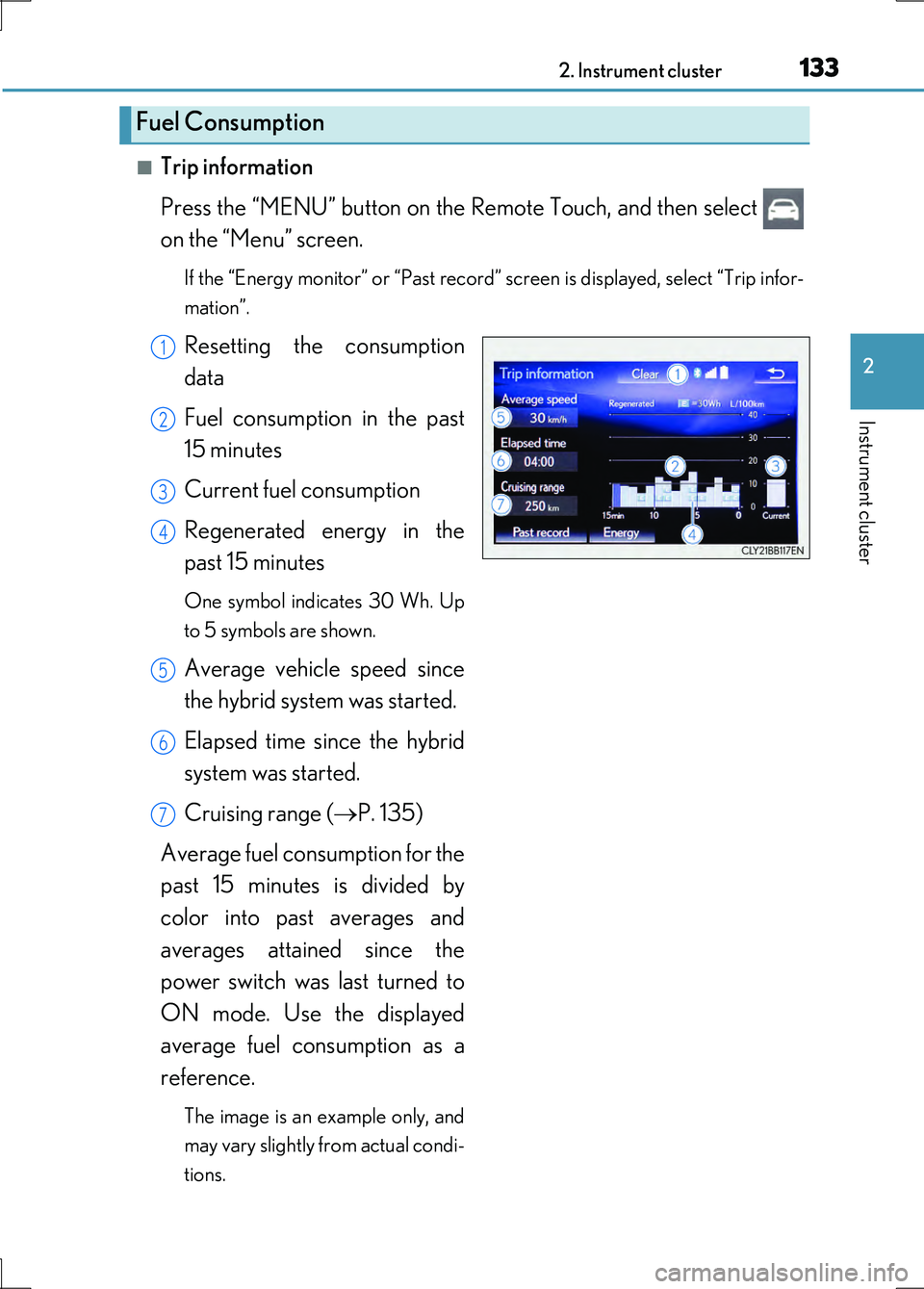
Press the “MENU” button on the Remote Touch, and then select
on the “Menu” screen.
If the “Energy monitor” or “Past record” screen is displayed, select “Trip infor-
mation”.
Resetting the consumption
data
Fuel consumption in the past
15 minutes
Current fuel consumption
Regenerated energy in the
past 15 minutes
One symbol indicates 30 Wh. Up
to 5 symbols are shown.
Average vehicle speed since
the hybrid system was started.
Elapsed time since the hybrid
system was started.
Cruising range ( P. 135)
Average fuel consumption for the
past 15 minutes is divided by
color into past averages and
averages attained since the
power switch was last turned to
ON mode. Use the displayed
average fuel consumption as a
reference.
The image is an example only, and
may vary slightly from actual condi-
tions.
Fuel Consumption
1
2
3
4
5
6
7