steering LEXUS LS600H 2017 User Guide
[x] Cancel search | Manufacturer: LEXUS, Model Year: 2017, Model line: LS600H, Model: LEXUS LS600H 2017Pages: 676, PDF Size: 35.25 MB
Page 59 of 676
591-1. For safe use
1
For safety and security
LS600h/LS600hL_EE(OM50G20E)
■When to contact any authorized Lexus dealer or repairer, or another duly qualified
and equipped professional
In the following cases, the vehicle will require inspection and/or repair. Contact any
authorized Lexus dealer or repairer, or another duly qualified and equipped profes-
sional as soon as possible.
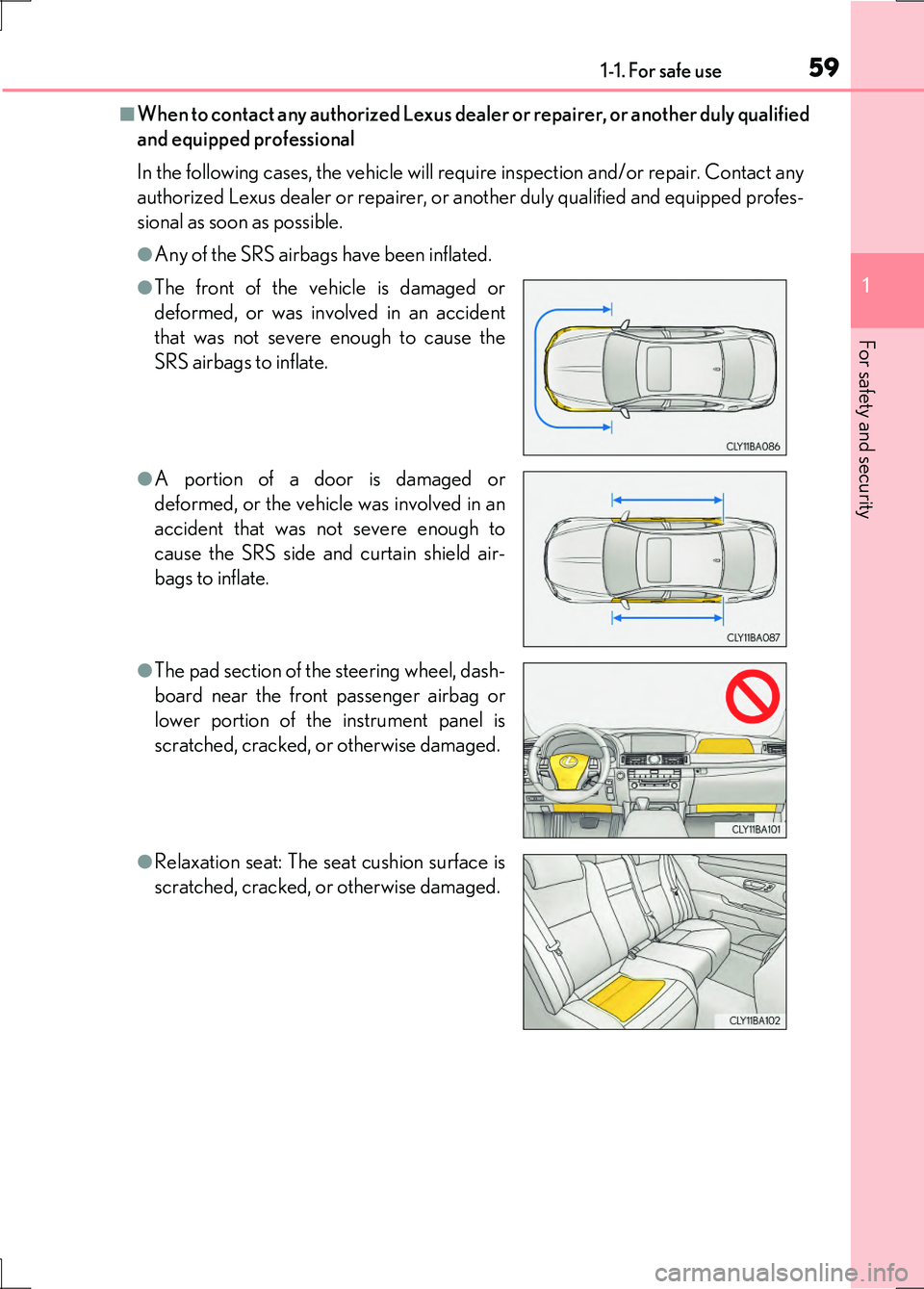
●Any of the SRS airbags have been inflated.
●The front of the vehicle is damaged or
deformed, or was involved in an accident
that was not severe enough to cause the
SRS airbags to inflate.
●A portion of a door is damaged or
deformed, or the vehicle was involved in an
accident that was not severe enough to
cause the SRS side and curtain shield air-
bags to inflate.
●The pad section of the steering wheel, dash-
board near the front passenger airbag or
lower portion of the instrument panel is
scratched, cracked, or otherwise damaged.
●Relaxation seat: The seat cushion surface is
scratched, cracked, or otherwise damaged.
Page 112 of 676
1122. Instrument cluster
LS600h/LS600hL_EE(OM50G20E)
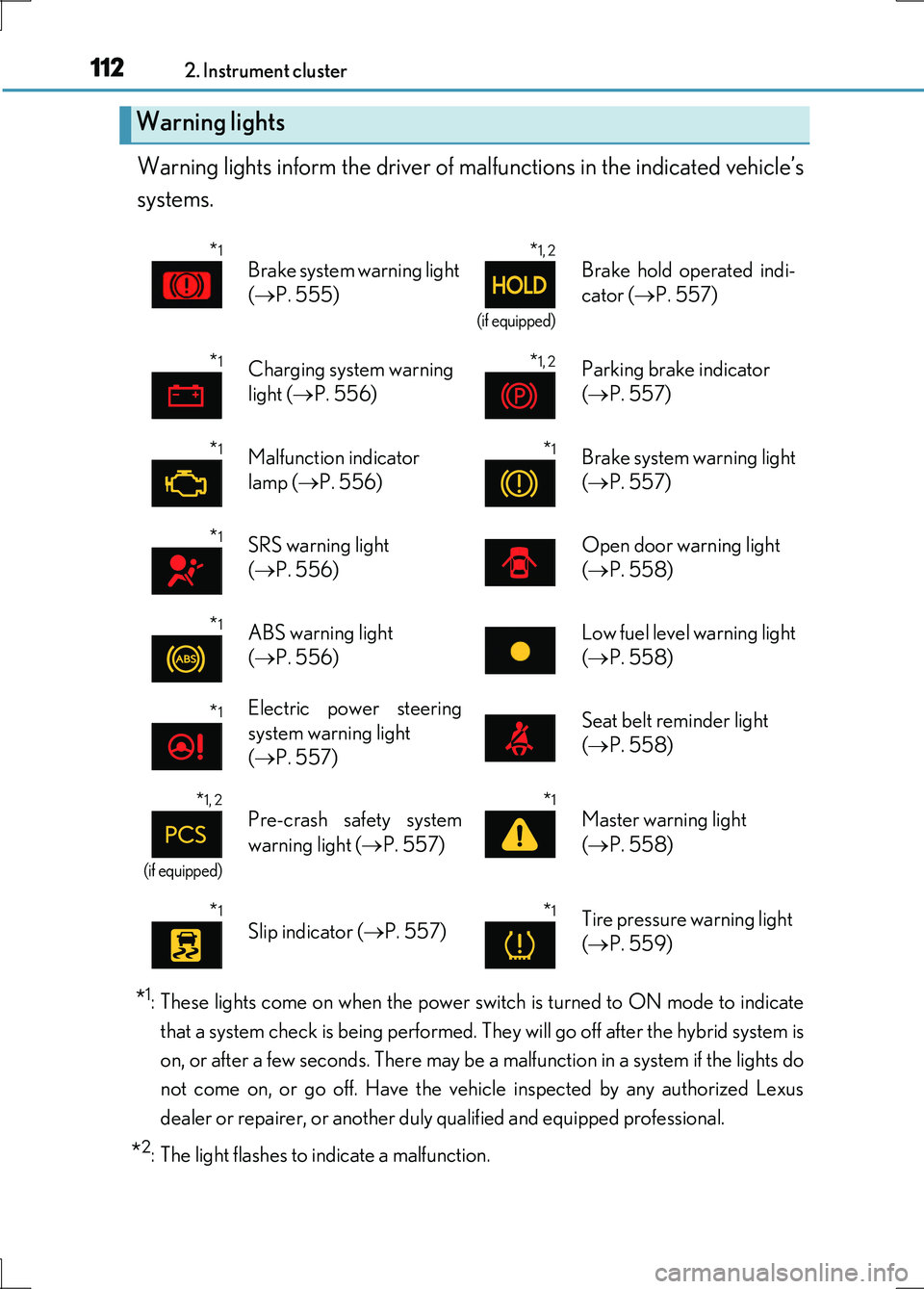
Warning lights inform the driver of malfunctions in the indicated vehicle’s
systems.
*1: These lights come on when the power switch is turned to ON mode to indicate
that a system check is being performed. They will go off after the hybrid system is
on, or after a few seconds. There may be a malfunction in a system if the lights do
not come on, or go off. Have the vehi cle inspected by any authorized Lexus
dealer or repairer, or another duly qualified and equipped professional.
*2: The light flashes to indicate a malfunction.
Warning lights
*1
Brake system warning light
( P. 555)
*1, 2
(if equipped)
Brake hold operated indi-
cator ( P. 557)
*1Charging system warning
light ( P. 556)
*1, 2Parking brake indicator
( P. 557)
*1Malfunction indicator
lamp ( P. 556)
*1Brake system warning light
( P. 557)
*1SRS warning light
( P. 556)
Open door warning light
( P. 558)
*1ABS warning light
( P. 556)
Low fuel level warning light
( P. 558)
*1Electric power steering
system warning light
( P. 557)
Seat belt reminder light
( P. 558)
*1, 2
(if equipped)
Pre-crash safety system
warning light ( P. 557)
*1
Master warning light
( P. 558)
*1
Slip indicator (P. 557)*1Tire pressure warning light
( P. 559)
Page 131 of 676
1312. Instrument cluster
2
Instrument cluster
LS600h/LS600hL_EE(OM50G20E)
■Remote Touch screen (P. 390)
Press the “MENU” button on the Remote Touch, and then select
on the “Menu” screen.
If the “Trip information” or “Past record” screen is displayed, select “Energy”.
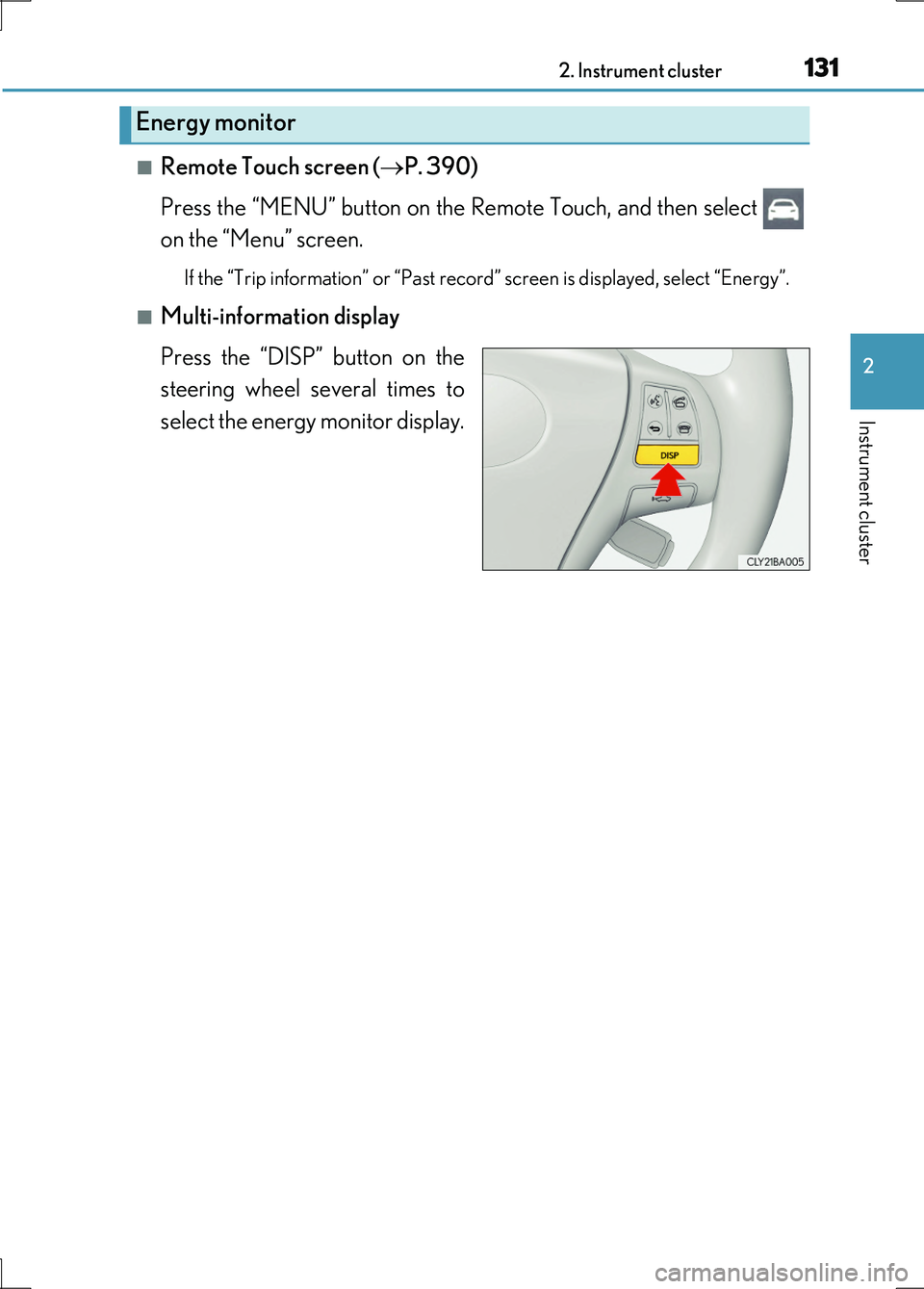
■Multi-information display
Press the “DISP” button on the
steering wheel several times to
select the energy monitor display.
Energy monitor
Page 139 of 676
139
3
Operation of
each component
LS600h/LS600hL_EE(OM50G20E)
3-1. Key information
Keys .................................................. 140
3-2. Opening, closing and
locking the doors
and trunk
Smart entry & start system ...... 149
Wireless remote control............ 171
Doors ................................................176
Trunk ................................................ 180
3-3. Adjusting the seats
Front seats...................................... 187
Power rear seat ........................... 194
Driving position memory ........ 207
Rear seat position memory......212
Head restraints .............................214
3-4. Adjusting the steering
wheel and mirrors
Steering wheel ............................. 218
Inside rear view mirror ..............219
Outside rear view mirrors........221
3-5. Opening, closing the
windows and moon roof
Power windows .......................... 225
Moon roof ..................................... 229
Page 190 of 676
1903-3. Adjusting the seats
LS600h/LS600hL_EE(OM50G20E)
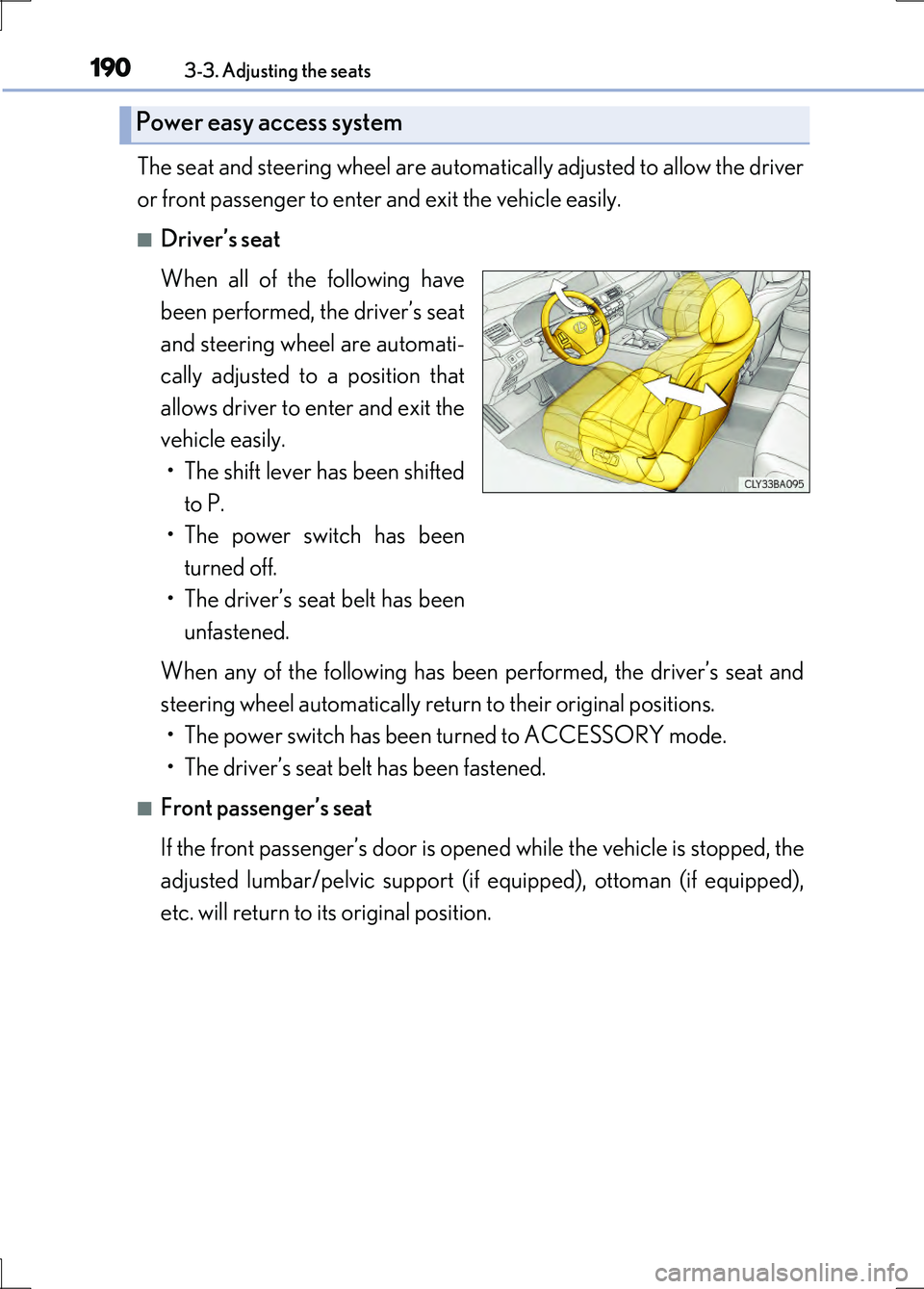
The seat and steering wheel are automatically adjusted to allow the driver
or front passenger to enter and exit the vehicle easily.
■Driver’s seat
When all of the following have
been performed, the driver’s seat
and steering wheel are automati-
cally adjusted to a position that
allows driver to enter and exit the
vehicle easily.
• The shift lever has been shifted
to P.
• The power switch has been
turned off.
• The driver’s seat belt has been
unfastened.
When any of the following has been performed, the driver’s seat and
steering wheel automatically return to their original positions.
• The power switch has been turned to ACCESSORY mode.
• The driver’s seat belt has been fastened.
■Front passenger’s seat
If the front passenger’s door is opened while the vehicle is stopped, the
adjusted lumbar/pelvic support ( if equipped), ottoman (if equipped),
etc. will return to its original position.
Power easy access system
Page 207 of 676
2073-3. Adjusting the seats
3
Operation of each component
LS600h/LS600hL_EE(OM50G20E)
Your preferred driving position (the position of the driver’s seat, steering
wheel, outside rear view mirrors and he ight of seat belt shoulder anchor)
can be recorded and recalled by pressing a switch.
Three different driving positions can be recorded into memory.
■Recording procedure
Check that the shift lever is in P.
Turn the power switch to ON mode.
Adjust the driver’s seat, steering wheel, outside rear view mirrors and
seat belt shoulder anchor height to the desired positions.
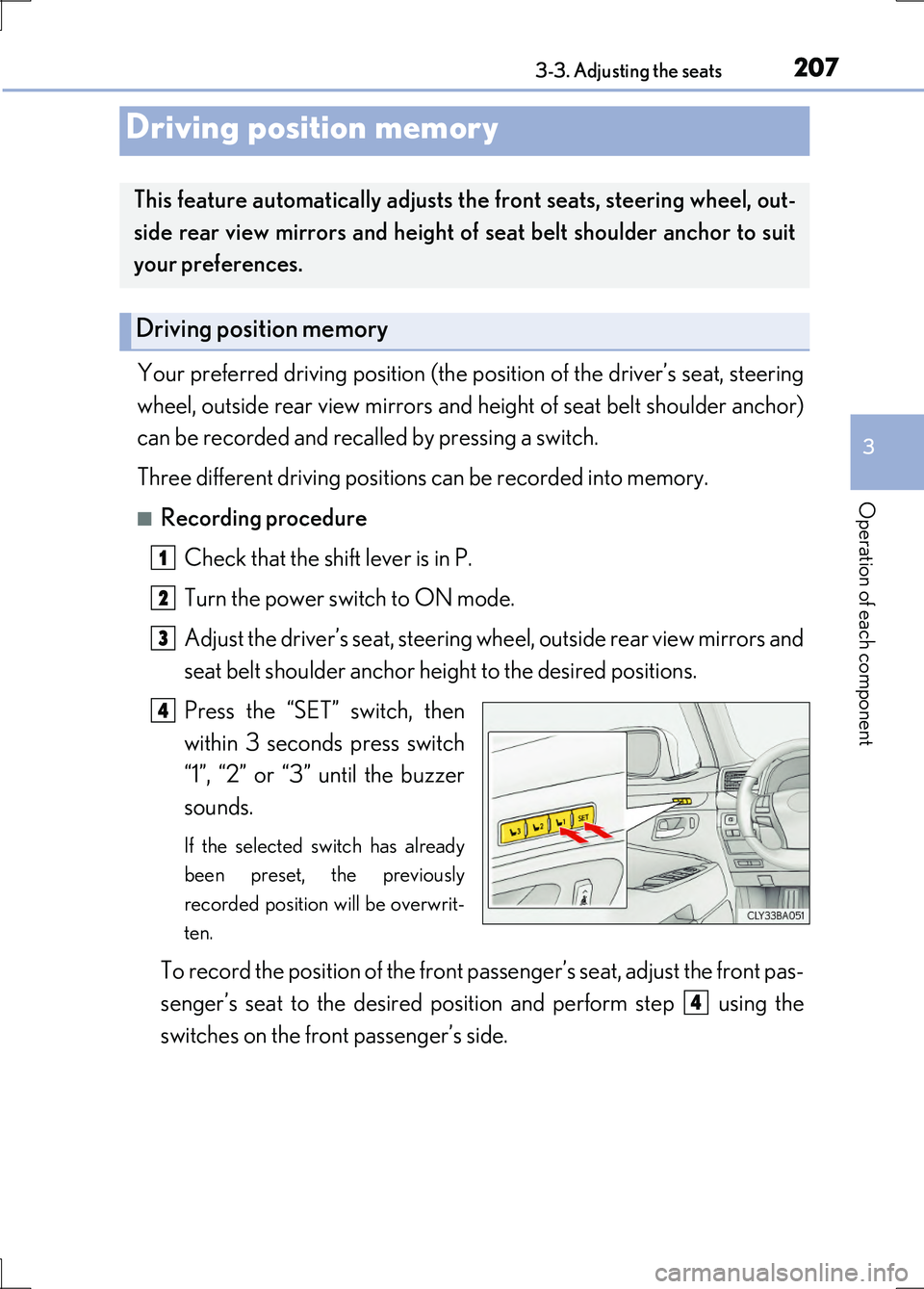
Press the “SET” switch, then
within 3 seconds press switch
“1”, “2” or “3” until the buzzer
sounds.
If the selected switch has already
been preset, the previously
recorded position will be overwrit-
ten.
To record the position of the front passenger’s seat, adjust the front pas-
senger’s seat to the desired posi tion and perform step using the
switches on the front passenger’s side.
Driving position memory
This feature automatically adjusts the front seats, steering wheel, out-
side rear view mirrors and height of seat belt shoulder anchor to suit
your preferences.
Driving position memory
1
2
3
4
4
Page 208 of 676
2083-3. Adjusting the seats
LS600h/LS600hL_EE(OM50G20E)
■Recall procedure
Check that the shift lever is in P.
Turn the power switch to ON mode.
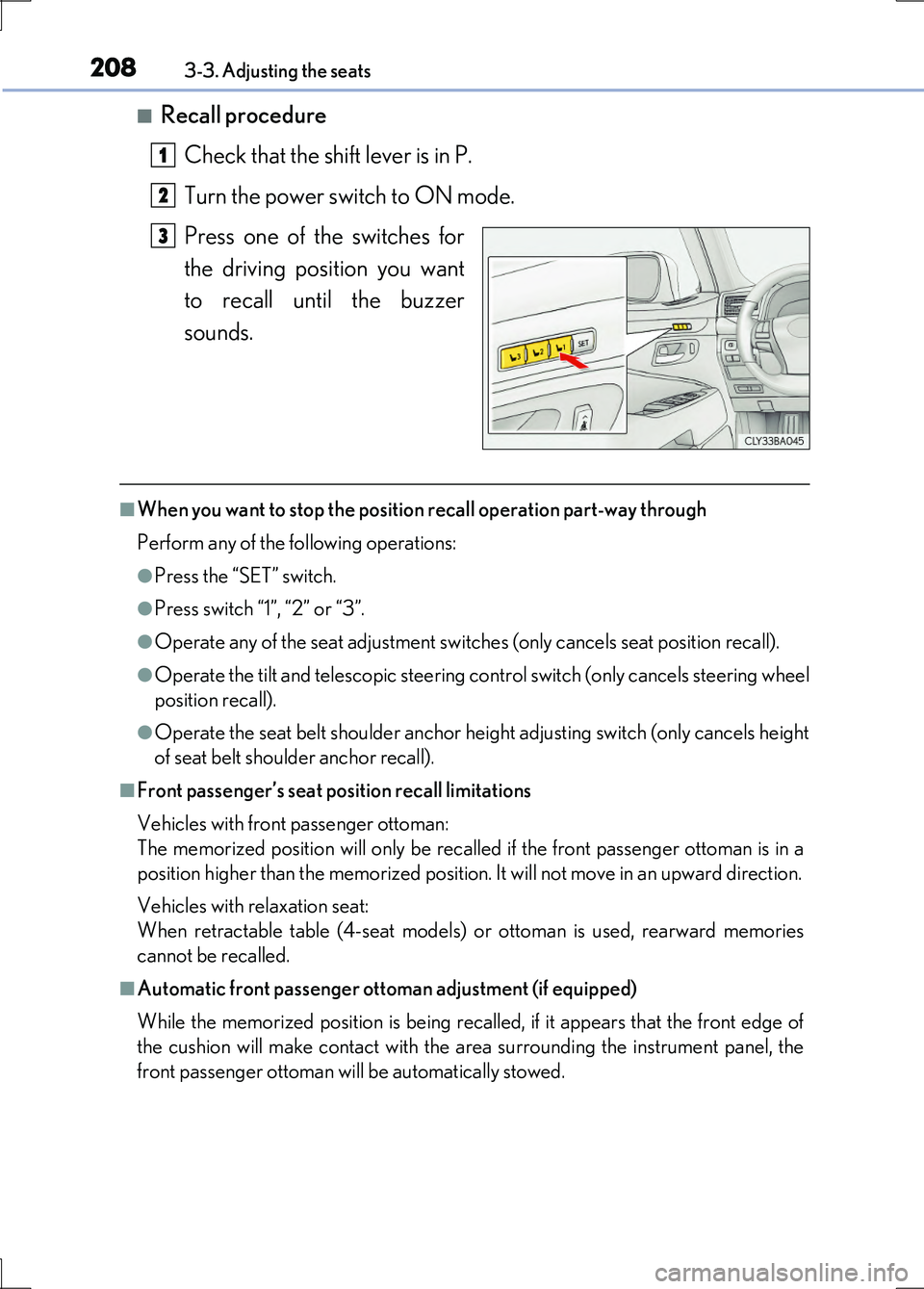
Press one of the switches for
the driving position you want
to recall until the buzzer
sounds.
■When you want to stop the position recall operation part-way through
Perform any of the following operations:
●Press the “SET” switch.
●Press switch “1”, “2” or “3”.
●Operate any of the seat adjustment switches (only cancels seat position recall).
●Operate the tilt and telescopic steering control switch (only cancels steering wheel
position recall).
●Operate the seat belt shoulder anchor height adjusting switch (only cancels height
of seat belt shoulder anchor recall).
■Front passenger’s seat position recall limitations
Vehicles with front passenger ottoman:
The memorized position will only be recalled if the front passenger ottoman is in a
position higher than the memorized position. It will not move in an upward direction.
Vehicles with relaxation seat:
When retractable table (4-seat models) or ottoman is used, rearward memories
cannot be recalled.
■Automatic front passenger ottoman adjustment (if equipped)
While the memorized position is being recalled, if it appears that the front edge of
the cushion will make contact with the area surrounding the instrument panel, the
front passenger ottoman will be automatically stowed.
1
2
3
Page 209 of 676
2093-3. Adjusting the seats
3
Operation of each component
LS600h/LS600hL_EE(OM50G20E)
■Operating the driving position memory after turning the power switch off
Driver’s seat:
Recorded driving positions (except the steering wheel position) can be recalled up
to 180 seconds after the driver’s door is opened and up to 60 seconds after it is
closed again.
Front passenger’s seat:
Recorded seat positions can be recalled up to 180 seconds after the front passen-
ger’s door is opened.
■In order to correctly use the driving position memory function
If a seat position is already in the furthest possible position and the seat is operated in
the same direction, the recorded position may be slightly different when it is recalled.
Each electronic key (including a card key) can be registered to recall your
preferred driving position.
■Registering procedure
Record your driving position to switch “1”, “2” or “3” before performing
the following:
Using the wireless remote control
Turn the power switch off and close the driver’s door.
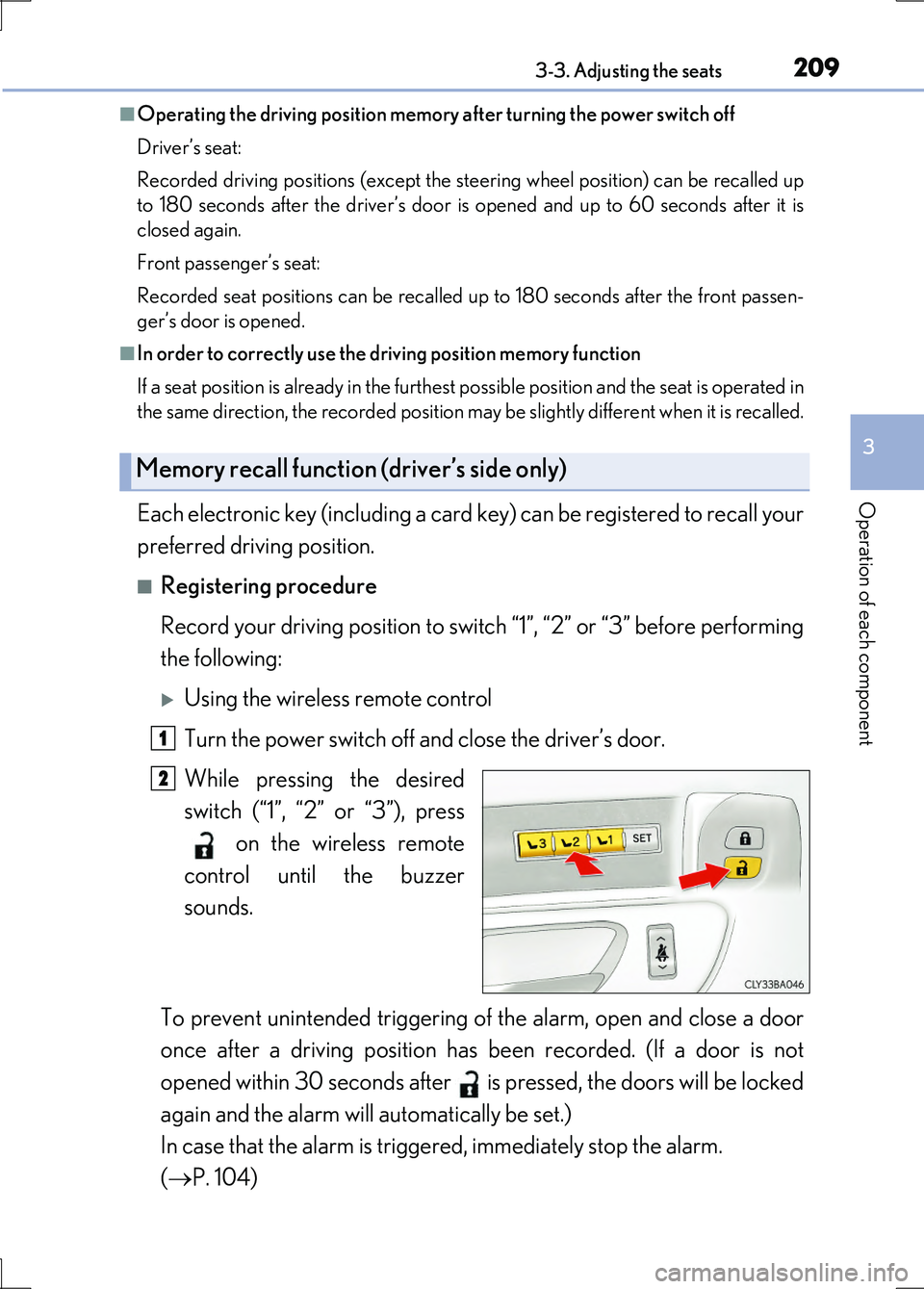
While pressing the desired
switch (“1”, “2” or “3”), press
on the wireless remote
control until the buzzer
sounds.
To prevent unintended triggering of the alarm, open and close a door
once after a driving position has been recorded. (If a door is not
opened within 30 seconds after is pressed, the doors will be locked
again and the alarm will automatically be set.)
In case that the alarm is triggered, immediately stop the alarm.
( P. 104)
Memory recall function (driver’s side only)
1
2
Page 210 of 676
2103-3. Adjusting the seats
LS600h/LS600hL_EE(OM50G20E)
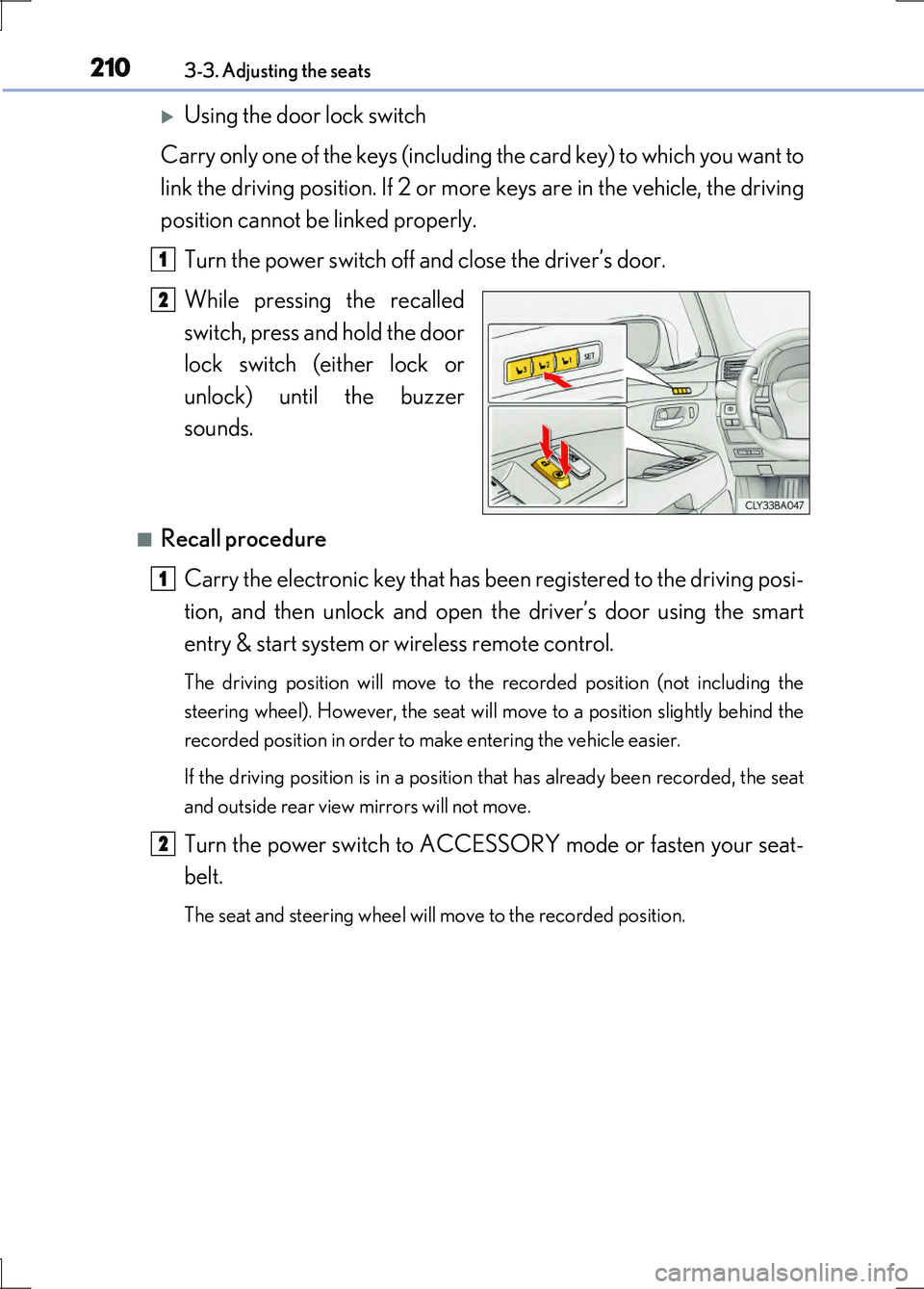
Using the door lock switch
Carry only one of the keys (including the card key) to which you want to
link the driving position. If 2 or more keys are in the vehicle, the driving
position cannot be linked properly.
Turn the power switch off and close the driver’s door.
While pressing the recalled
switch, press and hold the door
lock switch (either lock or
unlock) until the buzzer
sounds.
■Recall procedure
Carry the electronic key that has be en registered to the driving posi-
tion, and then unlock and open the driver’s door using the smart
entry & start system or wireless remote control.
The driving position will move to the recorded position (not including the
steering wheel). However, the seat will move to a position slightly behind the
recorded position in order to make entering the vehicle easier.
If the driving position is in a position that has already been recorded, the seat
and outside rear view mirrors will not move.
Turn the power switch to ACCESSORY mode or fasten your seat-
belt.
The seat and steering wheel will move to the recorded position.
1
2
1
2
Page 211 of 676
2113-3. Adjusting the seats
3
Operation of each component
LS600h/LS600hL_EE(OM50G20E)
■Cancelation procedure
Using the wireless remote control
Turn the power switch off and close the driver’s door.
While pressing the “SET” switch, press on the wireless remote
control until the buzzer sounds.
Using the door lock switch
Carry only the key you want to cancel and then close the driver’s door.
If 2 or more keys are in the vehicl e, the driving position cannot be can-
celed properly.
Turn the power switch off and close the driver’s door.
While pressing the “SET” switch, press the lock or unlock side on the
door lock switch until the buzzer sounds.
■Recalling the driving position using the memory recall function
●Different driving positions can be registered for each electronic key. Therefore, the
driving position that is recalled may be different depending on the key being car-
ried.
●If a door other than the driver’s door is unlocked with the smart entry & start sys-
tem, the driving position cannot be recalled. In this case, press the driving position
switch which has been set.
■ Seat operation automatic stop function (vehicles with relaxation seat)
If a front seat is likely to come into contact with the retractable table (4-seat models)
or the ottoman during seat operation or activation of the power easy access system,
a buzzer will sound and seat slide operation will be stopped partway.
(A warning message will be shown on the multi-information display.)
CAUTION
■Seat adjustment caution
Take care during seat adjustment so that the seat does not strike the rear passen-
ger or squeeze your body against the steering wheel.
1
2
1
2