steering LEXUS LS600H 2017 Owner's Guide
[x] Cancel search | Manufacturer: LEXUS, Model Year: 2017, Model line: LS600H, Model: LEXUS LS600H 2017Pages: 676, PDF Size: 35.25 MB
Page 243 of 676
2434-1. Before driving
4
Driving
LS600h/LS600hL_EE(OM50G20E)
NOTICE
■When driving the vehicle
●Do not depress the accelerator and brake pedals at the same time during driving,
as this may restrain the hybrid system output.
●Do not use the accelerator pedal or depress the accelerator and brake pedals at
the same time to hold the vehicle on a hill.
■When parking the vehicle
Always set the parking brake, and shift the shift lever to P. Failure to do so may
cause the vehicle to move or the vehicle may accelerate suddenly if the accelera-
tor pedal is accidentally depressed.
■Avoiding damage to vehicle parts
●Do not turn the steering wheel fully in either direction and hold it there for an
extended period of time.
Doing so may damage the power steering motor.
●When driving over bumps in the road, drive as slowly as possible to avoid damag-
ing the wheels, underside of the vehicle, etc.
■If you get a flat tire while driving
A flat or damaged tire may cause the following situations. Hold the steering wheel
firmly and gradually depress the brake pedal to slow down the vehicle.
●It may be difficult to control your vehicle.
●The vehicle will make abnormal sounds or vibrations.
●The vehicle will lean abnormally.
Information on what to do in case of a flat tire ( P. 567, 578)
Page 245 of 676
2454-1. Before driving
4
Driving
LS600h/LS600hL_EE(OM50G20E)
Cargo and luggage
Take notice of the following information about storage precautions,
cargo capacity and load:
CAUTION
■Things that must not be carried in the trunk
The following things may cause a fire if loaded in the trunk:
●Receptacles containing gasoline
●Aerosol cans
■Storage precautions
Observe the following precautions.
Failure to do so may prevent the pedals from being depressed properly, may block
the driver’s vision, or may result in items hitting the driver or passengers, possibly
causing an accident.
●Stow cargo and luggage in the trunk whenever possible.
●Do not place cargo or luggage in or on the following locations.
• At the feet of the driver
• On the front passenger or rear seats (when stacking items)
• On the package tray
• On the instrument panel
• On the dashboard
• In front of the Remote Touch screen
●Secure all items in the occupant compartment.
■Load and distribution
●Do not overload your vehicle.
●Do not apply loads unevenly.
Improper loading may cause deterioration of steering or braking control which
may cause death or serious injury.
Page 249 of 676
2494-2. Driving procedures
4
Driving
LS600h/LS600hL_EE(OM50G20E)
■Auto power off function
If the vehicle is left in ACCESSORY mode for more than 20 minutes with the shift
lever in P, the power switch will automatically turn off.
■Sounds and vibrations specific to a hybrid vehicle
P. 88
■Electronic key battery depletion
P. 162
■When the ambient temperature is low, such as during winter driving conditions
It may take time until the “READY” indicator comes on.
■Conditions affecting operation
P. 159
■Notes for the entry function
P. 160
■If the hybrid system does not start
The immobilizer system may not have been deactivated. ( P. 96)
Contact any authorized Lexus dealer or repairer, or another duly qualified and
equipped professional.
■Steering lock
After turning the power switch off and opening and closing the doors, the steering
wheel will be locked due to the steering lock function. Operating the power switch
again automatically cancels the steering lock.
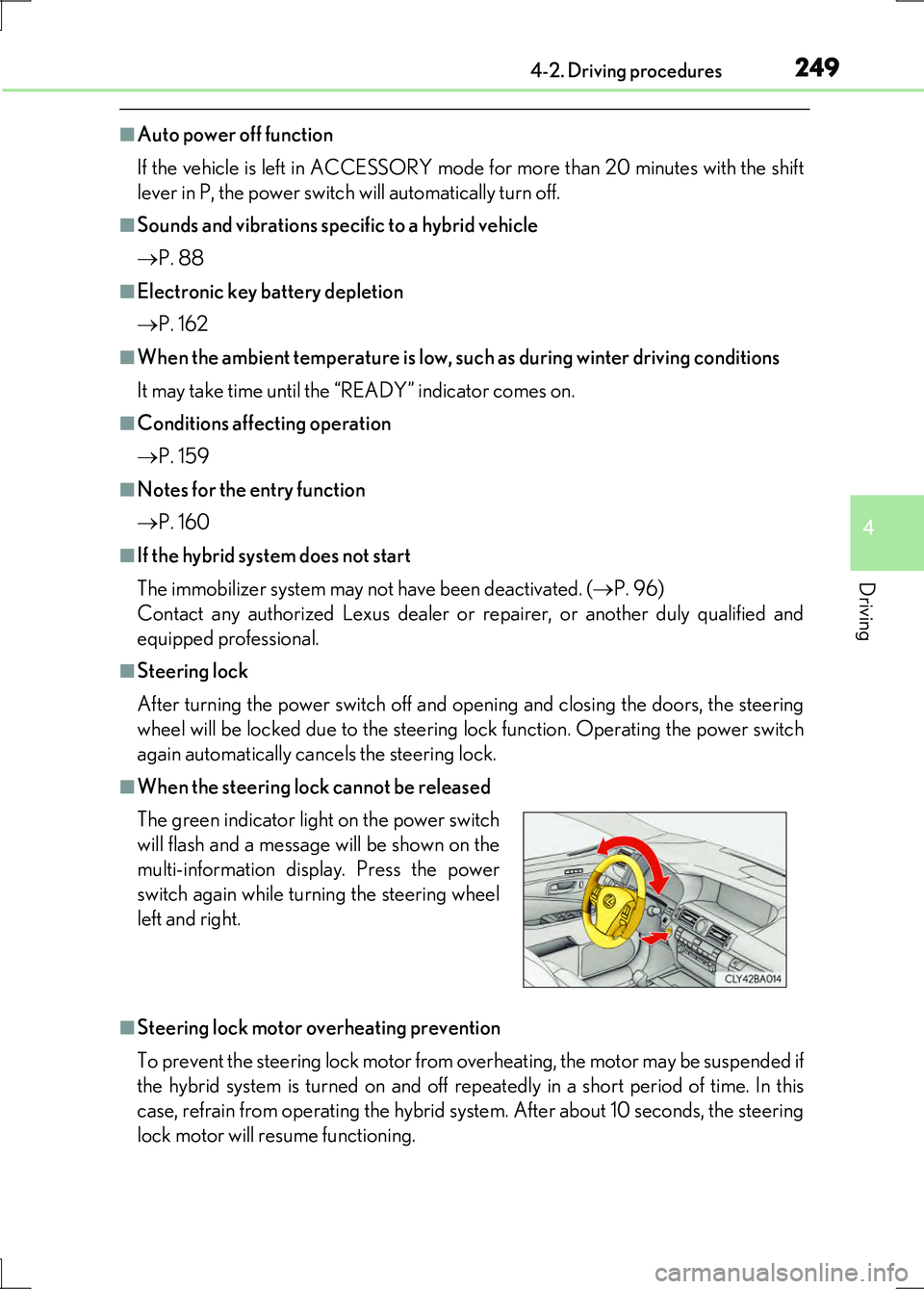
■When the steering lock cannot be released
■Steering lock motor overheating prevention
To prevent the steering lock motor from overheating, the motor may be suspended if
the hybrid system is turned on and off repe atedly in a short period of time. In this
case, refrain from operating the hybrid system. After about 10 seconds, the steering
lock motor will resume functioning.
The green indicator light on the power switch
will flash and a message will be shown on the
multi-information display. Press the power
switch again while turning the steering wheel
left and right.
Page 250 of 676
2504-2. Driving procedures
LS600h/LS600hL_EE(OM50G20E)
■When the power switch indicator flashes in amber
The system may be malfunctioning. Have the vehicle inspected by any authorized
Lexus dealer or repairer, or another duly qualified and equipped professional imme-
diately.
■If the “READY” indicator does not come on
If the “READY” indicator does not come on when you press the power switch with
the shift lever in P and the brake pedal depressed, contact any authorized Lexus
dealer or repairer, or another duly qualified and equipped professional immediately.
■If the hybrid system is malfunctioning
P. 563
■If the electronic key battery is depleted
P. 532
■If the smart entry & start system has been deactivated in a customized setting
P. 603
CAUTION
■When starting the hybrid system
Always start the hybrid system while sitting in the driver’s seat. Do not depress the
accelerator pedal while starting the hybrid system under any circumstances.
Doing so may cause an accident resulting in death or serious injury.
■Caution while driving
If hybrid system failure occurs while the vehicle is moving, do not lock or open the
doors until the vehicle reaches a safe and complete stop. Activation of the steering
lock in this circumstance may lead to an accident, resulting in death or serious
injury.
■Stopping the hybrid system in an emergency
If you want to stop the hybrid system in an emergency while driving the vehicle,
press and hold the power switch for more than 2 seconds, or press it briefly 3 times
or more in succession. ( P. 547)
However, do not touch the power switch while driving except in an emergency.
Turning the hybrid system off while driving will not cause loss of steering or braking
control, however, power assist to the steering will be lost. This will make it more dif-
ficult to steer smoothly, so you should pull over and stop the vehicle as soon as it is
safe to do so.
Page 271 of 676
2714-3. Operating the lights and wipers
4
Driving
LS600h/LS600hL_EE(OM50G20E)
AFS (Adaptive Front-lighting System) secures excellent visibility at inter-
sections and on curves by automatically adjusting the direction of the light
axis of the headlights according to vehicle speed and the degree of the
tire’s angle as controlled by steering input.
AFS operates at speeds of 10 km/h (6 mph) or higher.
■Daytime running light system
To make your vehicle more visible to othe r drivers during daytime driving, the day-
time running lights turn on automatically whenever the hybrid system is started and
the parking brake is released with the headlight switch off or in the position. (Illu-
minate brighter than the front position lights.)
Daytime running lights are not designed for use at night.
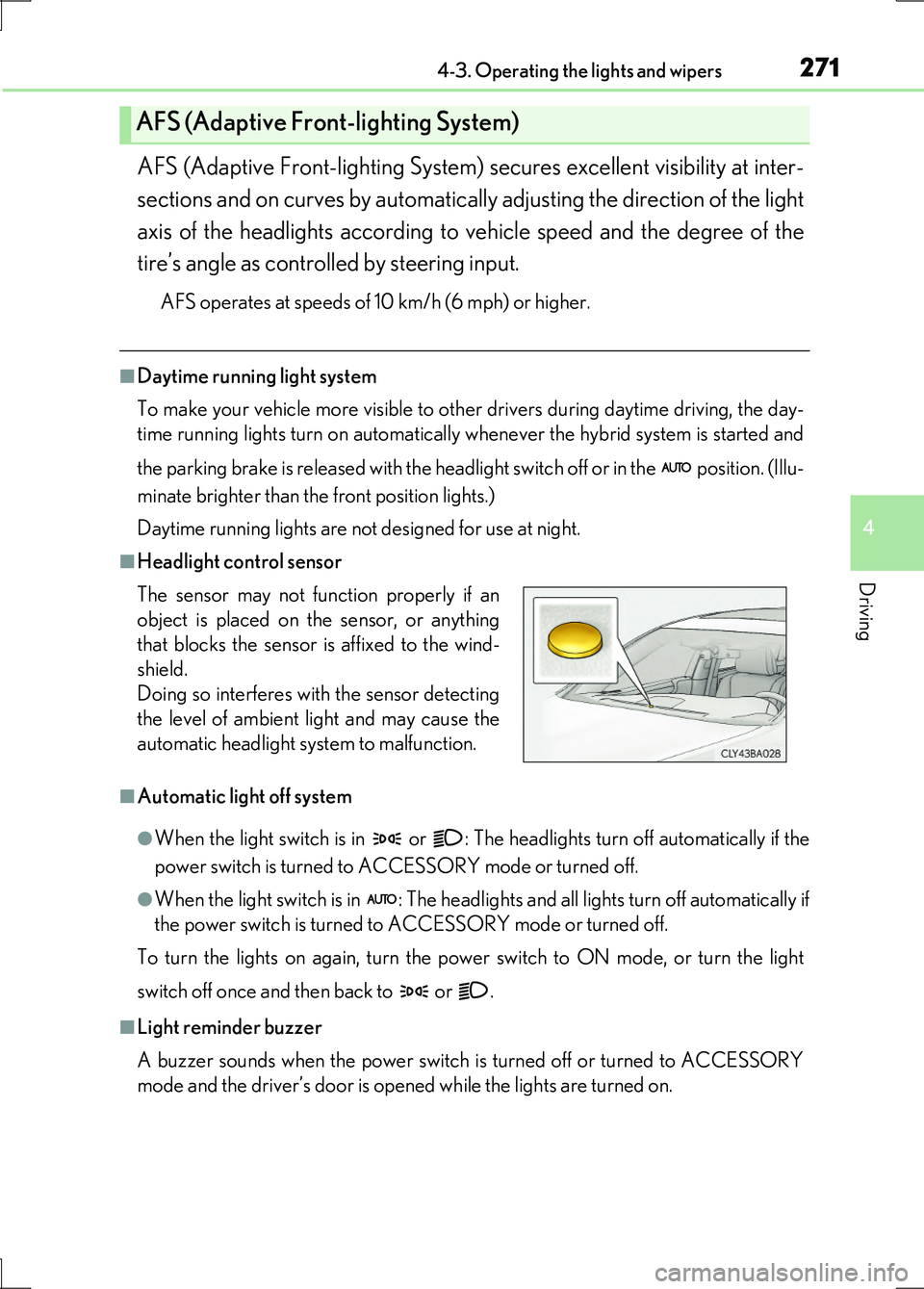
■Headlight control sensor
■Automatic light off system
●When the light switch is in or : The headlights turn off automatically if the
power switch is turned to ACCESSORY mode or turned off.
●When the light switch is in : The headlights and all lights turn off automatically if
the power switch is turned to ACCESSORY mode or turned off.
To turn the lights on again, turn the po wer switch to ON mode, or turn the light
switch off once and then back to or .
■Light reminder buzzer
A buzzer sounds when the power switch is turned off or turned to ACCESSORY
mode and the driver’s door is opened while the lights are turned on.
AFS (Adaptive Front-lighting System)
The sensor may not function properly if an
object is placed on the sensor, or anything
that blocks the sensor is affixed to the wind-
shield.
Doing so interferes with the sensor detecting
the level of ambient light and may cause the
automatic headlight system to malfunction.
Page 305 of 676
3054-5. Using the driving support systems
4
Driving
LS600h/LS600hL_EE(OM50G20E)
CAUTION
■When the sensor may not be correctly detecting the vehicle ahead
Apply the brakes as necessary when any of the following types of vehicles are in
front of you.
As the sensor may not be able to correctly detect these types of vehicles, the
approach warning ( P. 299) will not be activated, and a fatal or serious accident
may result.
●Vehicles that cut in suddenly
●Vehicles traveling at low speeds
●Vehicles that are not moving
●Vehicles with small rear ends (trailers with no load on board etc.)
●Motorcycles traveling in the same lane
■Conditions under which the vehicle-to-veh icle distance control may not function
correctly
Apply the brakes as necessary in the following conditions as the radar sensor may
not be able to correctly detect vehicles ahead, and a fatal or serious accident may
result:
●When water or snow thrown up by the surrounding vehicles hinders the function-
ing of the sensor
●When your vehicle is pointing upwards (caused by a heavy load in the trunk etc.)
●When the road curves or when the lanes are narrow
●When steering wheel operation or your position in the lane is unstable
●When the vehicle ahead of you decelerates suddenly
Page 322 of 676
3224-5. Using the driving support systems
LS600h/LS600hL_EE(OM50G20E)
CAUTION
■When the sensor may not be correctly detecting the vehicle ahead
Apply the brakes as necessary when any of the following types of vehicles are in
front of you.
As the sensor may not be able to correctly detect these types of vehicles, the
approach warning ( P. 314) will not be activated, and a fatal or serious accident
may result.
●Vehicles that cut in suddenly
●Vehicles traveling at low speeds
●Vehicles that are not moving
●Vehicles with small rear ends (trailers with no load on board etc.)
●Motorcycles traveling in the same lane
■Conditions under which the vehicle-to-veh icle distance control may not function
correctly
Apply the brakes as necessary in the following conditions as the radar sensor may
not be able to correctly detect vehicles ahead, and a fatal or serious accident may
result:
●When water or snow thrown up by the surrounding vehicles hinders the function-
ing of the sensor
●When your vehicle is pointing upwards (caused by a heavy load in the trunk etc.)
●When the road curves or when the lanes are narrow
●When steering wheel operation or your position in the lane is unstable
●When the vehicle ahead of you decelerates suddenly
Page 325 of 676
3254-5. Using the driving support systems
4
Driving
LS600h/LS600hL_EE(OM50G20E)
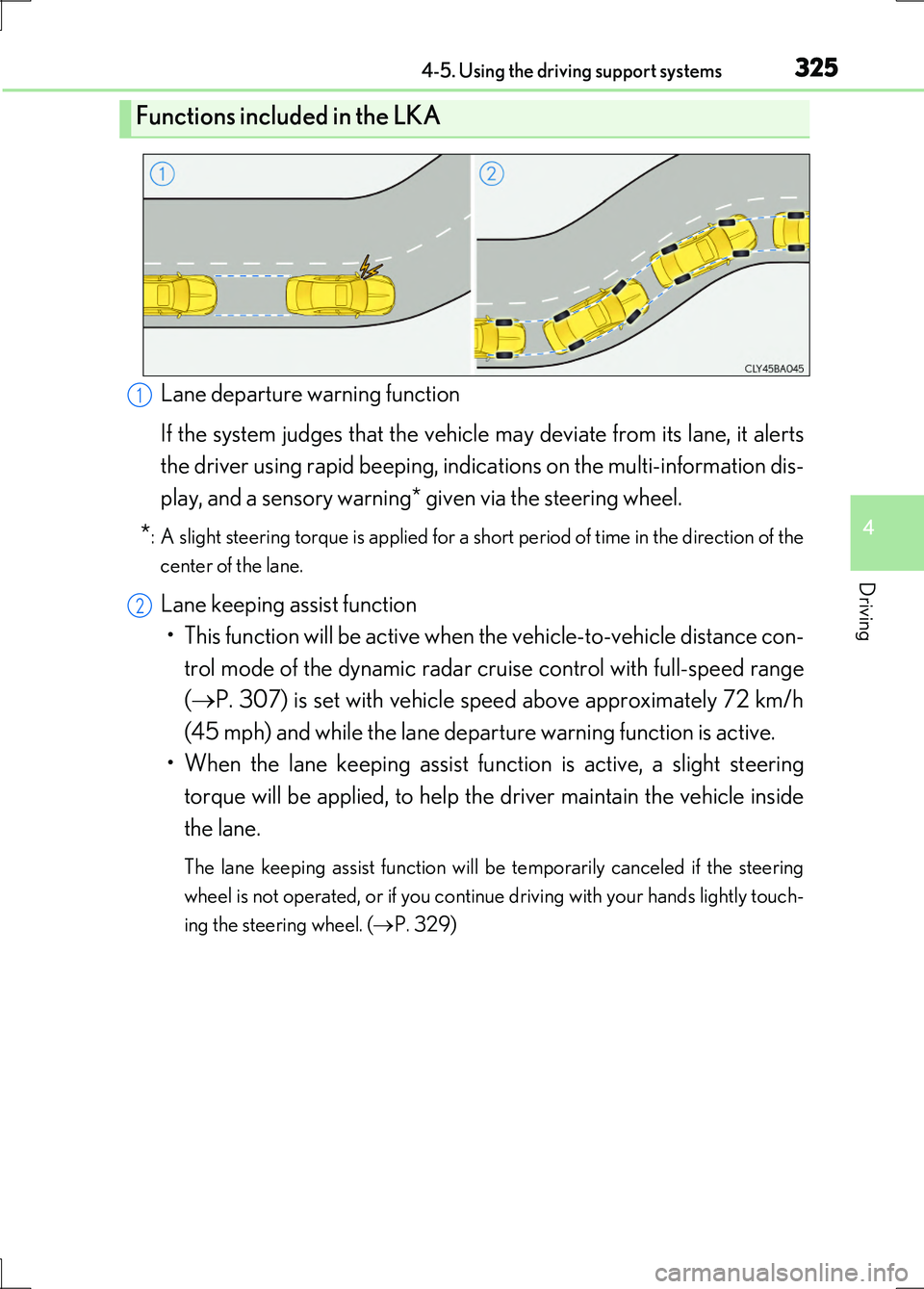
Lane departure warning function
If the system judges that the vehicle may deviate from its lane, it alerts
the driver using rapid beeping, indications on the multi-information dis-
play, and a sensory warning* given via the steering wheel.
*: A slight steering torque is applied for a short period of time in the direction of the
center of the lane.
Lane keeping assist function
• This function will be active when the vehicle-to-vehicle distance con-
trol mode of the dynamic radar crui se control with full-speed range
( P. 307) is set with vehicle speed above approximately 72 km/h
(45 mph) and while the lane departure warning function is active.
• When the lane keeping assist function is active, a slight steering
torque will be applied, to help th e driver maintain the vehicle inside
the lane.
The lane keeping assist function will be temporarily canceled if the steering
wheel is not operated, or if you continue driving with your hands lightly touch-
ing the steering wheel. ( P. 329)
Functions included in the LKA
1
2
Page 328 of 676
3284-5. Using the driving support systems
LS600h/LS600hL_EE(OM50G20E)
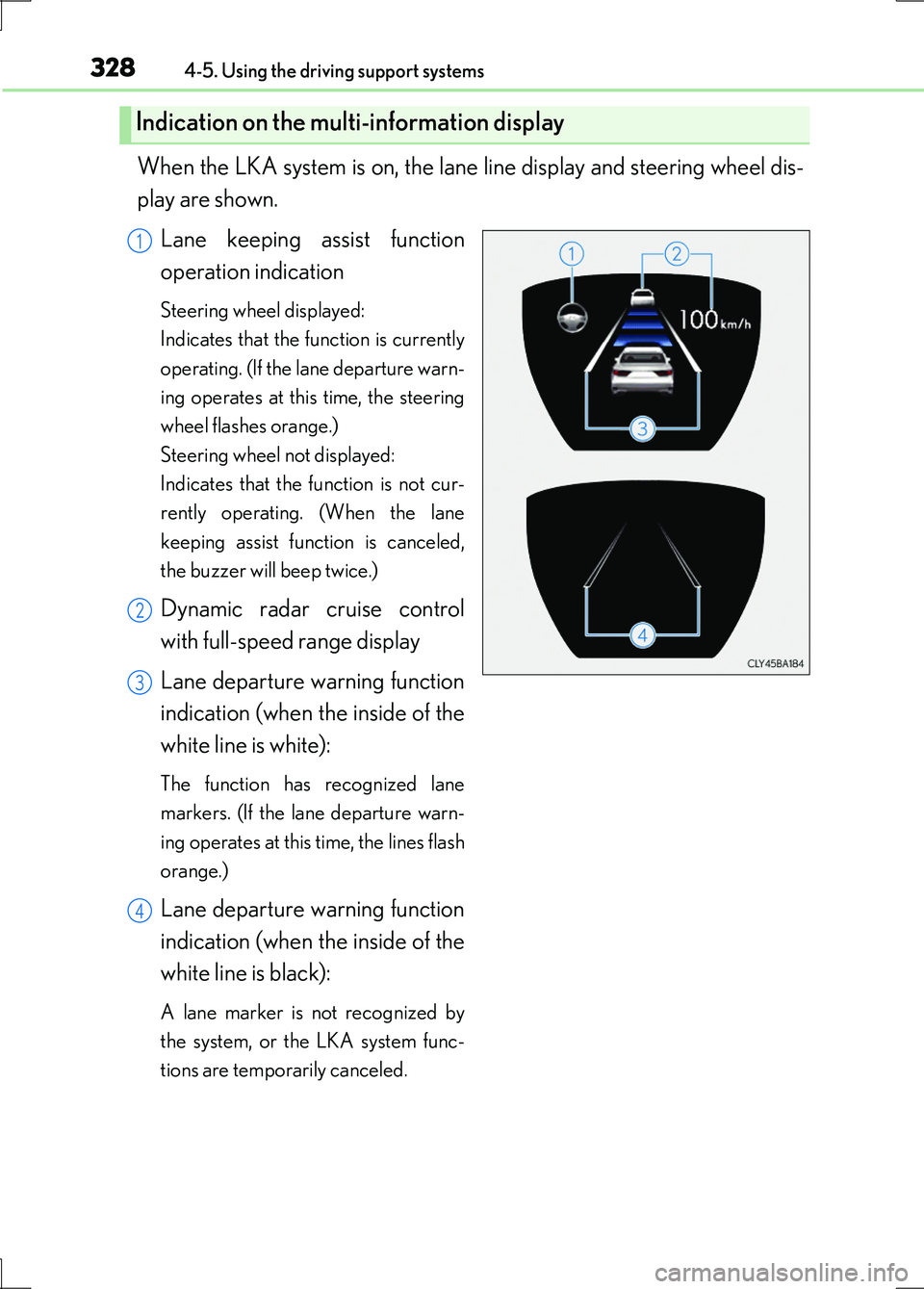
When the LKA system is on, the lane line display and steering wheel dis-
play are shown.
Lane keeping assist function
operation indication
Steering wheel displayed:
Indicates that the function is currently
operating. (If the lane departure warn-
ing operates at this time, the steering
wheel flashes orange.)
Steering wheel not displayed:
Indicates that the function is not cur-
rently operating. (When the lane
keeping assist function is canceled,
the buzzer will beep twice.)
Dynamic radar cruise control
with full-speed range display
Lane departure warning function
indication (when the inside of the
white line is white):
The function has recognized lane
markers. (If the lane departure warn-
ing operates at this time, the lines flash
orange.)
Lane departure warning function
indication (when the inside of the
white line is black):
A lane marker is not recognized by
the system, or the LKA system func-
tions are temporarily canceled.
Indication on the multi-information display
1
2
3
4
Page 329 of 676
3294-5. Using the driving support systems
4
Driving
LS600h/LS600hL_EE(OM50G20E)
■Temporary cancelation of the LKA system functions
If any of the following occurs, the LKA system functions will be temporarily canceled.
The functions will resume after the necessary operating conditions have returned.
●The steering wheel is turned as far as necessary to cause the vehicle to change
lanes.
●When the system detects no-handed driving. (The lane keeping assist function will
be temporarily canceled, but the lane departure warning function will continue.)
●The turn signal lever is operated.
●The vehicle speed deviates from the operating range of the LKA system functions.
(The buzzer will beep twice when the lane keeping assist function is being
canceled.)
●When the lane lines cannot be recognized while driving. (The buzzer will beep
twice when the lane keeping assist function is being canceled.)
●When the wiper switch is in the high spee d position or is set to “AUTO” mode with
the wipers operating at high speed. (The lane keeping assist function will be tempo-
rarily canceled, but the lane departure warning function will continue.)
●If the vehicle crosses a line for approximately half a minute or more. (The lane keep-
ing assist function will be temporarily canceled, but the lane departure warning
function will continue.)
●When the lane departure warning function is activated.
The lane departure warning function will not operate again for several seconds
after it has been activated, even if the vehicle leaves the lane again.
■The lane departure warning
It may be difficult to feel the sensory warning depending on the road conditions.
■No-handed driving warning
If the steering wheel is not operated for approximately 15 seconds on a straight road
or approximately 5 seconds on a curve, the buzzer will beep twice, indicators on the
multi-information display will flash, and the lane keeping assist function will be tem-
porarily canceled. If you drive the vehicle with your hands lightly touching the steer-
ing wheel, this may also be detected as no-handed driving.