change time LEXUS LS600H 2017 Owner's Manual
[x] Cancel search | Manufacturer: LEXUS, Model Year: 2017, Model line: LS600H, Model: LEXUS LS600H 2017Pages: 676, PDF Size: 35.25 MB
Page 405 of 676
4055-3. Using the air conditioning system and defogger
5
Interior features
LS600h/LS600hL_EE(OM50G20E)
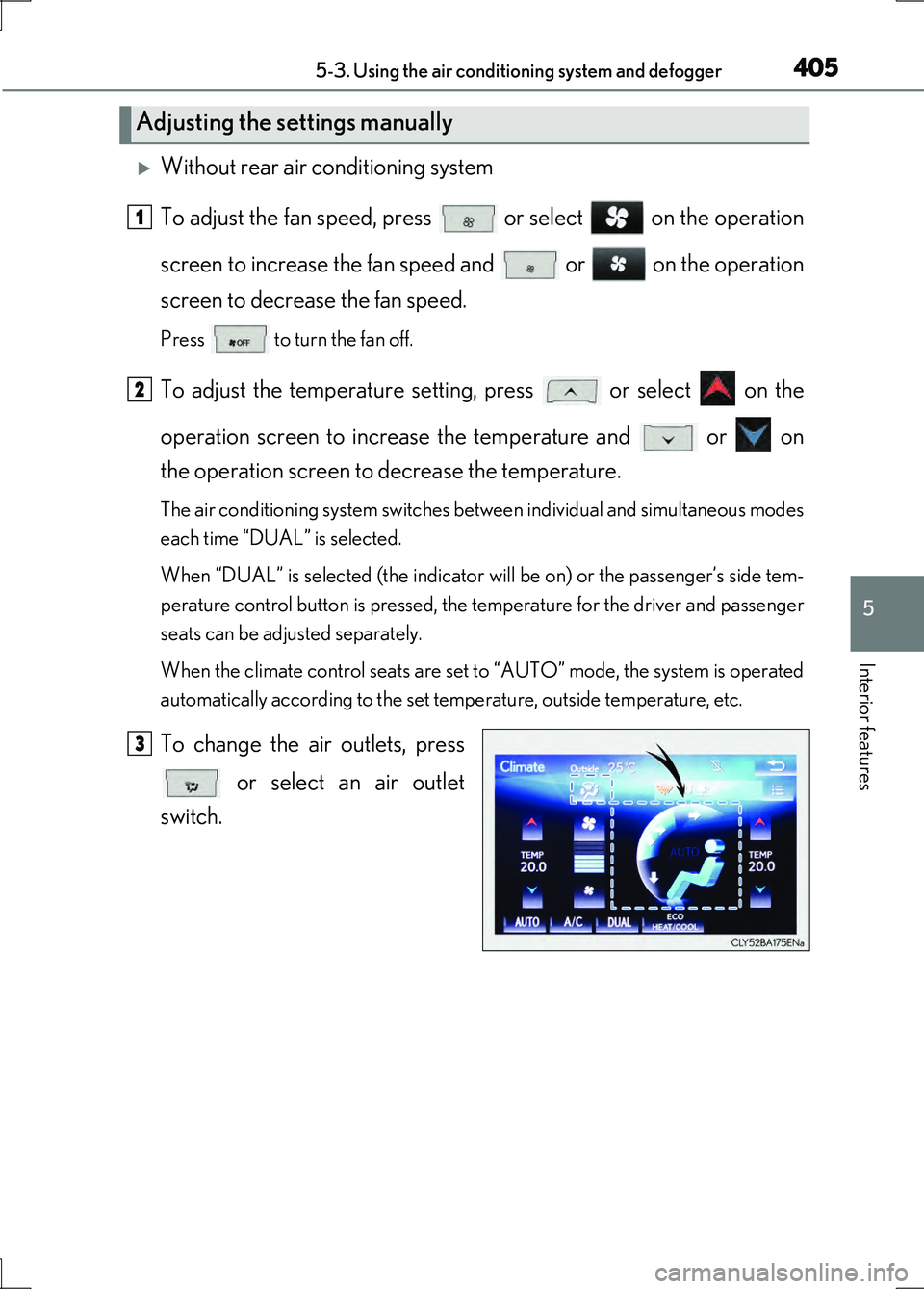
Without rear air conditioning system
To adjust the fan speed, press or select on the operation
screen to increase the fan speed and or on the operation
screen to decrease the fan speed.
Press to turn the fan off.
To adjust the temperature setting, press or select on the
operation screen to increase the temperature and or on
the operation screen to decrease the temperature.
The air conditioning system switches between individual and simultaneous modes
each time “DUAL” is selected.
When “DUAL” is selected (the indicator will be on) or the passenger’s side tem-
perature control button is pressed, the temperature for the driver and passenger
seats can be adjusted separately.
When the climate control seats are set to “AUTO” mode, the system is operated
automatically according to the set temperature, outside temperature, etc.
To change the air outlets, press
or select an air outlet
switch.
Adjusting the settings manually
1
2
3
Page 406 of 676
4065-3. Using the air conditioning system and defogger
LS600h/LS600hL_EE(OM50G20E)
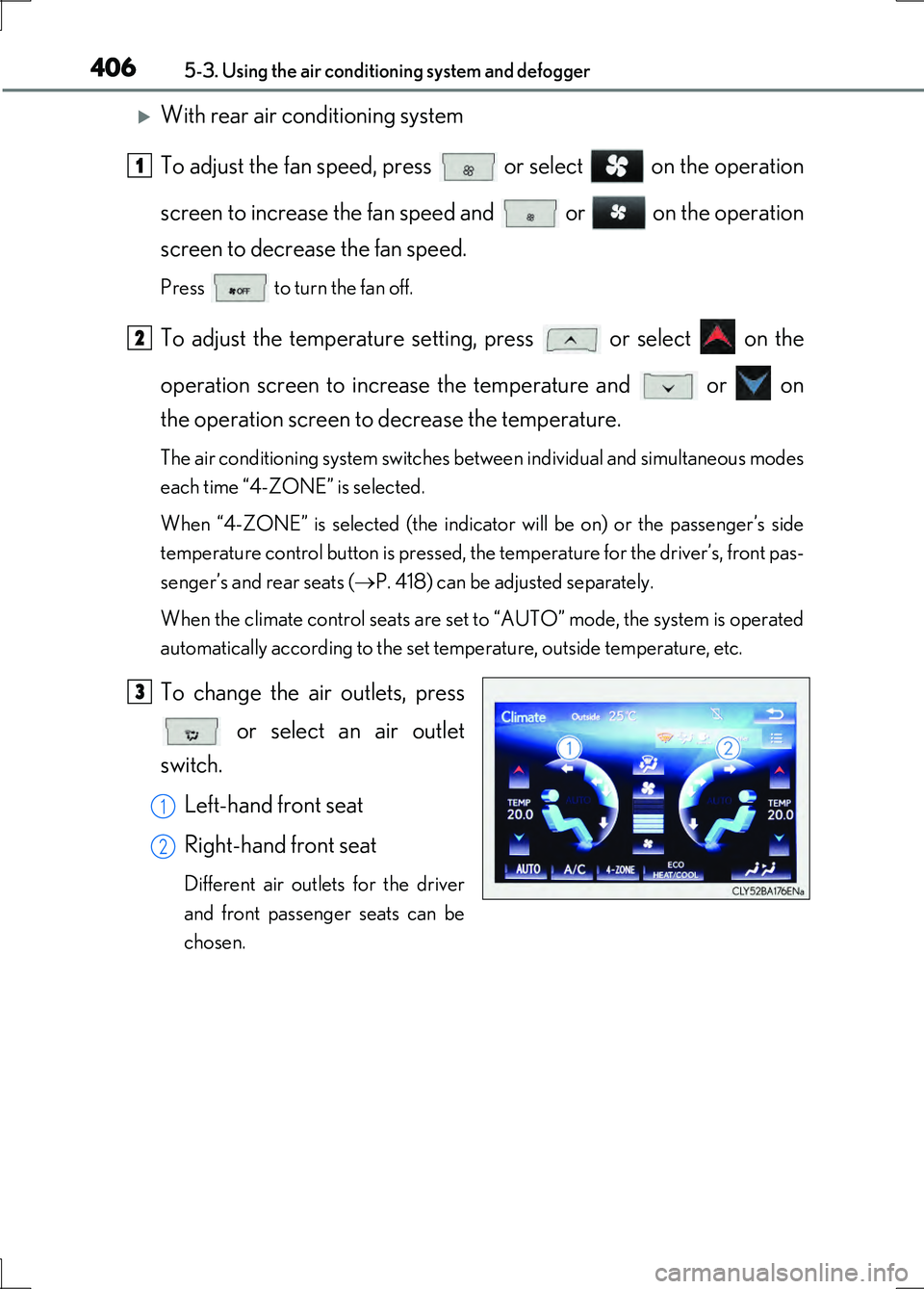
With rear air conditioning system
To adjust the fan speed, press or select on the operation
screen to increase the fan speed and or on the operation
screen to decrease the fan speed.
Press to turn the fan off.
To adjust the temperature setting, press or select on the
operation screen to increase the temperature and or on
the operation screen to decrease the temperature.
The air conditioning system switches between individual and simultaneous modes
each time “4-ZONE” is selected.
When “4-ZONE” is selected (the indicator will be on) or the passenger’s side
temperature control button is pressed, the temperature for the driver’s, front pas-
senger’s and rear seats ( P. 418) can be adjusted separately.
When the climate control seats are set to “AUTO” mode, the system is operated
automatically according to the set temperature, outside temperature, etc.
To change the air outlets, press
or select an air outlet
switch.
Left-hand front seat
Right-hand front seat
Different air outlets for the driver
and front passenger seats can be
chosen.
1
2
3
1
2
Page 420 of 676
4205-3. Using the air conditioning system and defogger
LS600h/LS600hL_EE(OM50G20E)
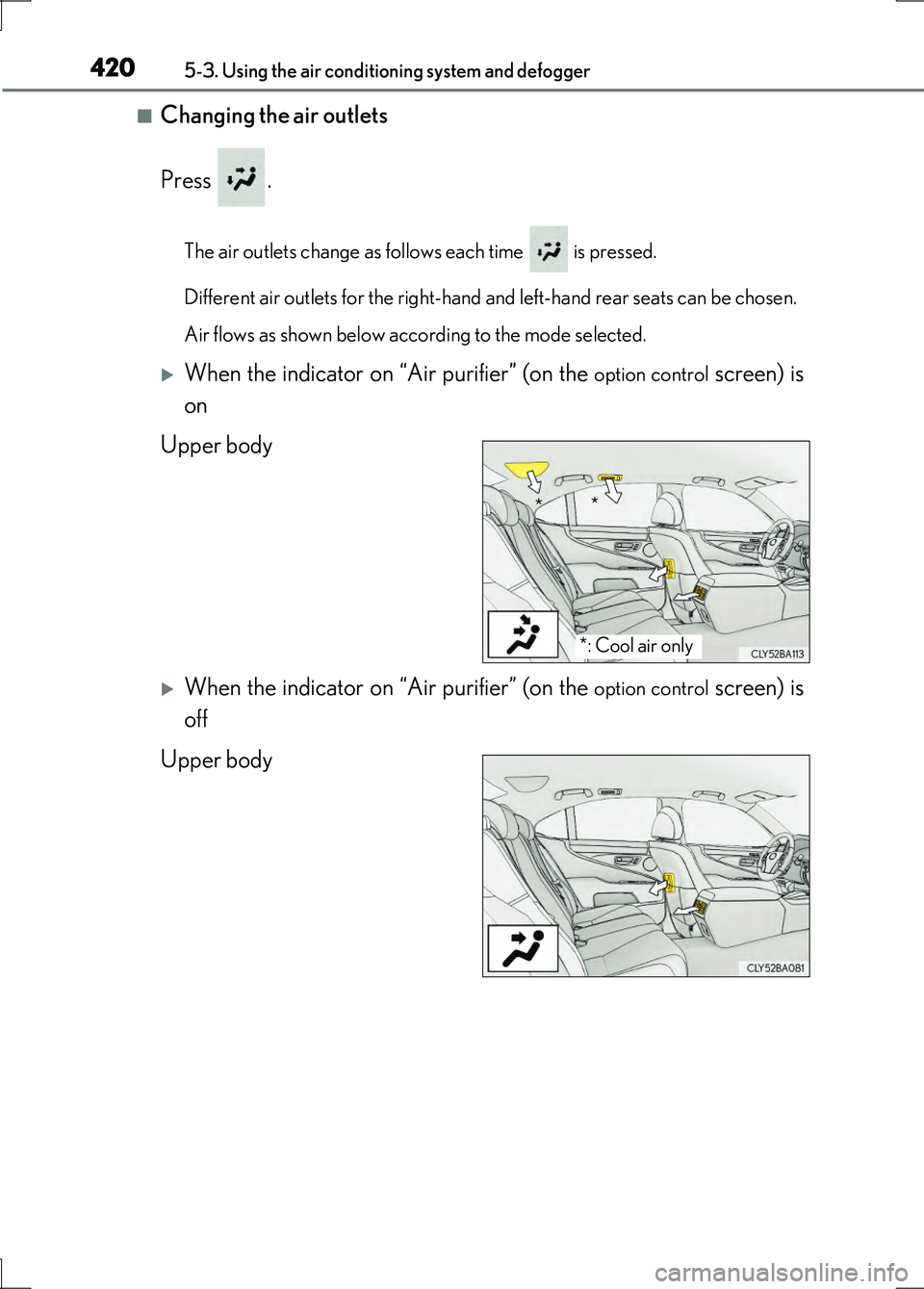
■Changing the air outlets
Press .
The air outlets change as follows each time is pressed.
Different air outlets for the right-hand and left-hand rear seats can be chosen.
Air flows as shown below according to the mode selected.
When the indicator on “Air purifier” (on the option control screen) is
on
Upper body
When the indicator on “Air purifier” (on the option control screen) is
off
Upper body
*: Cool air only
* *
Page 430 of 676
4305-4. Using the interior lights
LS600h/LS600hL_EE(OM50G20E)
■Illuminated entry system
The lights automatically turn on/off according to power switch mode, the presence
of the electronic key, whether the doors are locked/unlocked, and whether the doors
are opened/closed.
■To prevent the 12-volt battery from being discharged
If the following lights remain on when the power switch is turned off, the lights will go
off automatically after 20 minutes:
●Interior lights
●Door courtesy lights
●Personal lights
●Inside door handle lights
●Seat belt buckle lights
●Footwell lights
●Power switch light
■Customization
Settings (e.g. The time elapsed before lights turn off) can be changed.
(Customizable features P. 634)
NOTICE
■To prevent 12-volt battery discharge
Do not leave the lights on longer than necessary when the hybrid system is off.
Page 512 of 676
5126-3. Do-it-yourself maintenance
LS600h/LS600hL_EE(OM50G20E)
■The initialization operation
●Make sure to carry out initialization after adjusting the tire inflation pressure.
Also, make sure the tires are cold before carrying out initialization or tire inflation
pressure adjustment.
●If you have accidentally turned the power switch off during initialization, it is not
necessary to press the reset switch again as initialization will restart automatically
when the power switch has been turned to ON mode for the next time.
●If you accidentally press the reset switch when initialization is not necessary, adjust
the tire inflation pressure to the specified level when the tires are cold, and conduct
initialization again.
■Warning performance of the tire pressure warning system
The warning of the tire pressure warning system will change in accordance with driv-
ing conditions. For this reason, the system may give a warning even if the tire pres-
sure does not reach a low enough level, or if the pressure is higher than the pressure
that was adjusted to when the system was initialized.
■When initialization of the tire pressure warning system has failed
Initialization can be completed in a few minutes. However, in the following cases, the
settings have not been recorded and the system will not operate properly. If
repeated attempts to record tire inflation pressure settings are unsuccessful, have
the vehicle inspected by any authorized Lexus dealer or repairer, or another duly
qualified and equipped professional.
●When operating the tire pressure warning reset switch, the tire pressure warning
light does not blink 3 times.
●After carrying out the initialization procedure, the tire pressure warning light blinks
for 1 minute then stays on after driving for 20 minutes.
■Registering ID codes (except for Israel)
The ID codes of the tire pressure warning valve and transmitters for two sets of
wheels can be registered.
It is not necessary to register the ID codes when replacing normal tires with snow
tires, if the ID codes for the wheels of both normal tires and snow tires are registered
beforehand.
For information about changing ID codes, ask any authorized Lexus dealer or
repairer, or another duly qualified and equipped professional.
Page 605 of 676
6057-2. Steps to take in an emergency
7
When trouble arises
LS600h/LS600hL_EE(OM50G20E)
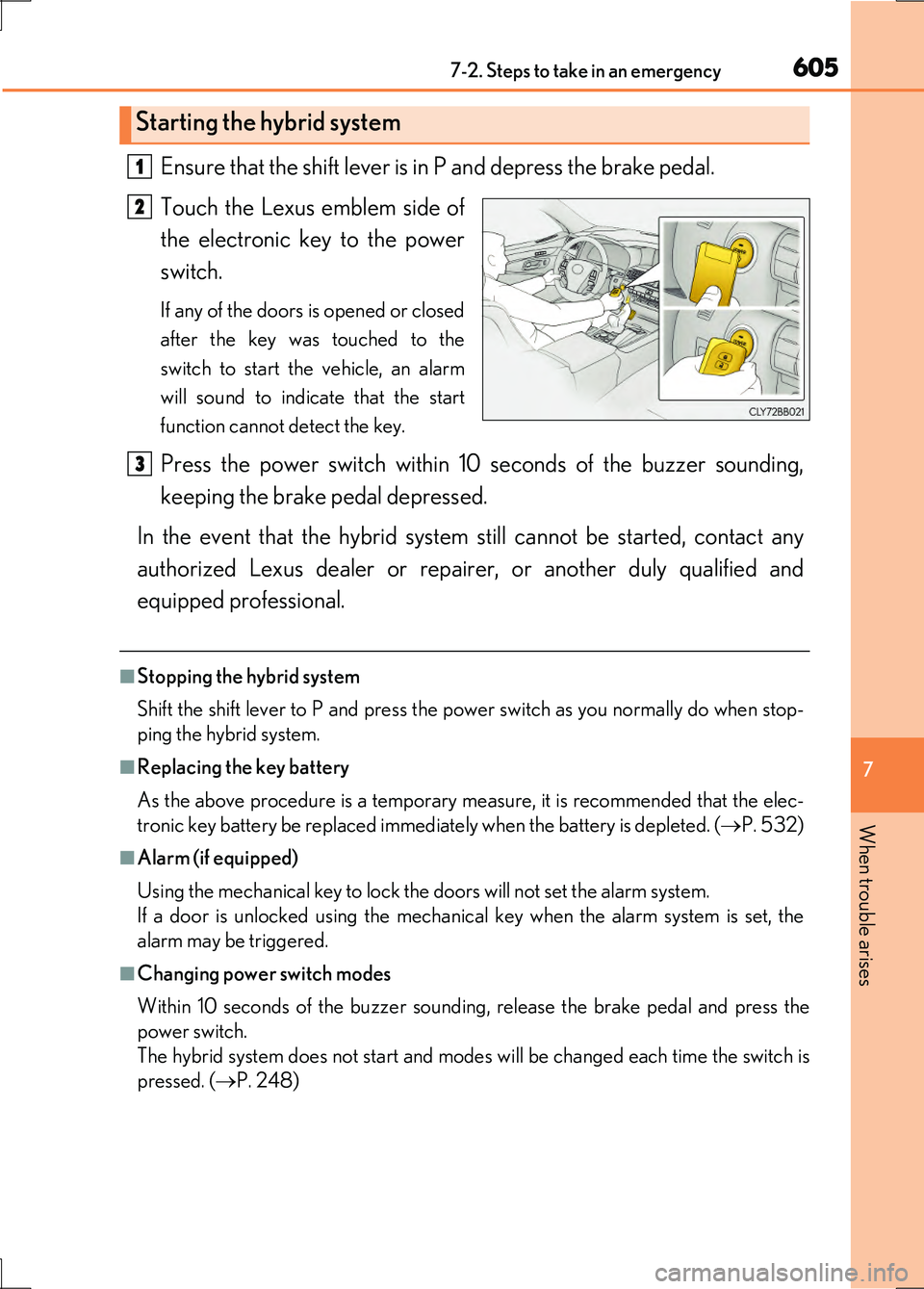
Ensure that the shift lever is in P and depress the brake pedal.
Touch the Lexus emblem side of
the electronic key to the power
switch.
If any of the doors is opened or closed
after the key was touched to the
switch to start the vehicle, an alarm
will sound to indicate that the start
function cannot detect the key.
Press the power switch within 10 seconds of the buzzer sounding,
keeping the brake pedal depressed.
In the event that the hybrid system still cannot be started, contact any
authorized Lexus dealer or repairer, or another duly qualified and
equipped professional.
■Stopping the hybrid system
Shift the shift lever to P and press the power switch as you normally do when stop-
ping the hybrid system.
■Replacing the key battery
As the above procedure is a temporary measure, it is recommended that the elec-
tronic key battery be replaced immediately when the battery is depleted. ( P. 532)
■Alarm (if equipped)
Using the mechanical key to lock the doors will not set the alarm system.
If a door is unlocked using the mechanical key when the alarm system is set, the
alarm may be triggered.
■Changing power switch modes
Within 10 seconds of the buzzer sounding, release the brake pedal and press the
power switch.
The hybrid system does not start and modes will be changed each time the switch is
pressed. ( P. 248)
Starting the hybrid system
1
2
3
Page 641 of 676
641
8
8-2. Customization
Vehicle specifications
LS600h/LS600hL_EE(OM50G20E)
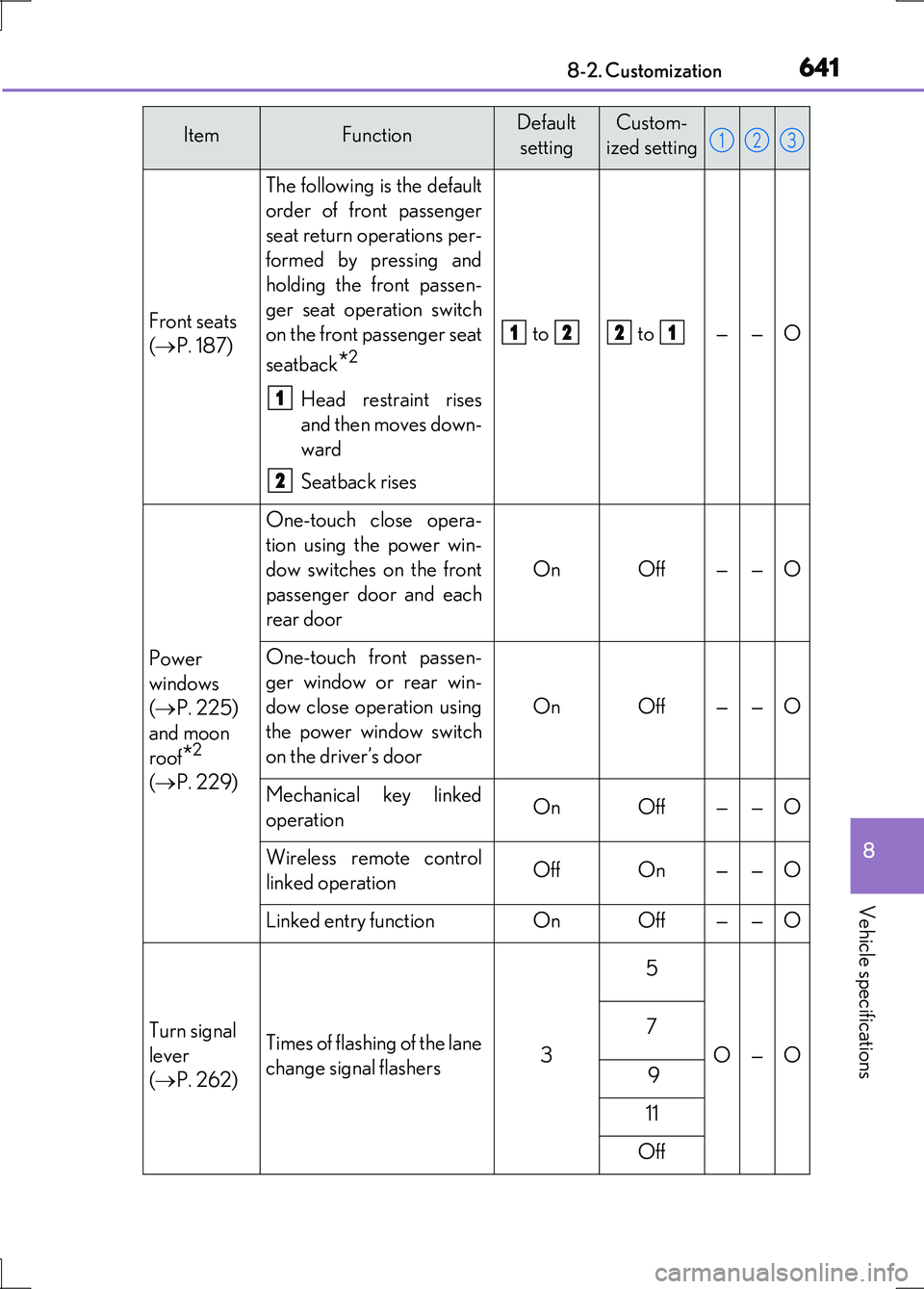
Front seats
( P. 187)
The following is the default
order of front passenger
seat return operations per-
formed by pressing and
holding the front passen-
ger seat operation switch
on the front passenger seat
seatback*2
Head restraint rises
and then moves down-
ward
Seatback rises
to to ——O
Power
windows
( P. 225)
and moon
roof*2
( P. 229)
One-touch close opera-
tion using the power win-
dow switches on the front
passenger door and each
rear door
OnOff——O
One-touch front passen-
ger window or rear win-
dow close operation using
the power window switch
on the driver’s door
OnOff——O
Mechanical key linked
operationOnOff——O
Wireless remote control
linked operationOffOn——O
Linked entry functionOnOff——O
Turn signal
lever
( P. 262)
Times of flashing of the lane
change signal flashers3
5
O—O
7
9
11
Off
ItemFunctionDefault
setting
Custom-
ized setting123
1
2
1221