lock LEXUS LS600H 2017 Manual PDF
[x] Cancel search | Manufacturer: LEXUS, Model Year: 2017, Model line: LS600H, Model: LEXUS LS600H 2017Pages: 676, PDF Size: 35.25 MB
Page 209 of 676
2093-3. Adjusting the seats
3
Operation of each component
LS600h/LS600hL_EE(OM50G20E)
■Operating the driving position memory after turning the power switch off
Driver’s seat:
Recorded driving positions (except the steering wheel position) can be recalled up
to 180 seconds after the driver’s door is opened and up to 60 seconds after it is
closed again.
Front passenger’s seat:
Recorded seat positions can be recalled up to 180 seconds after the front passen-
ger’s door is opened.
■In order to correctly use the driving position memory function
If a seat position is already in the furthest possible position and the seat is operated in
the same direction, the recorded position may be slightly different when it is recalled.
Each electronic key (including a card key) can be registered to recall your
preferred driving position.
■Registering procedure
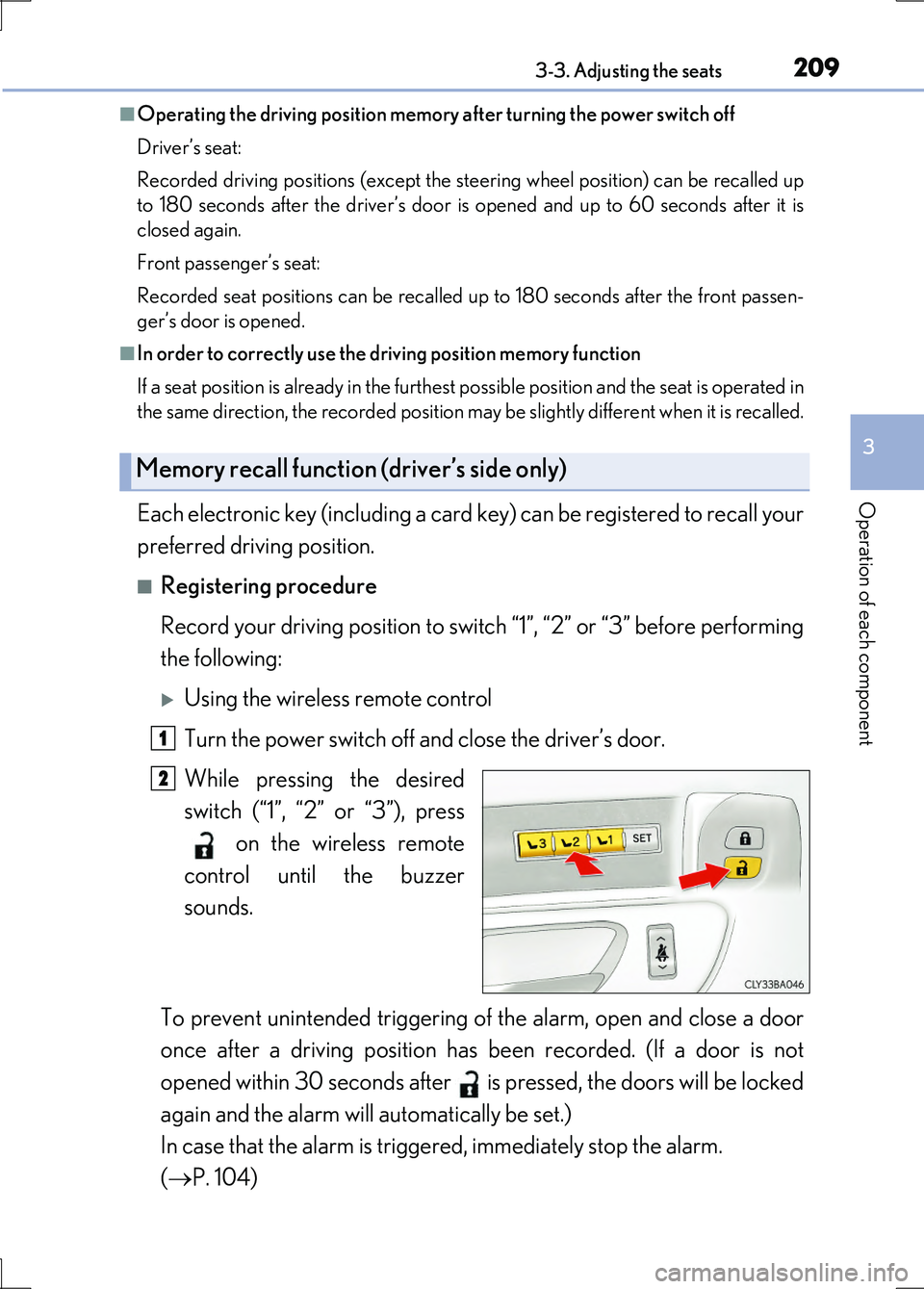
Record your driving position to switch “1”, “2” or “3” before performing
the following:
Using the wireless remote control
Turn the power switch off and close the driver’s door.
While pressing the desired
switch (“1”, “2” or “3”), press
on the wireless remote
control until the buzzer
sounds.
To prevent unintended triggering of the alarm, open and close a door
once after a driving position has been recorded. (If a door is not
opened within 30 seconds after is pressed, the doors will be locked
again and the alarm will automatically be set.)
In case that the alarm is triggered, immediately stop the alarm.
( P. 104)
Memory recall function (driver’s side only)
1
2
Page 210 of 676
2103-3. Adjusting the seats
LS600h/LS600hL_EE(OM50G20E)
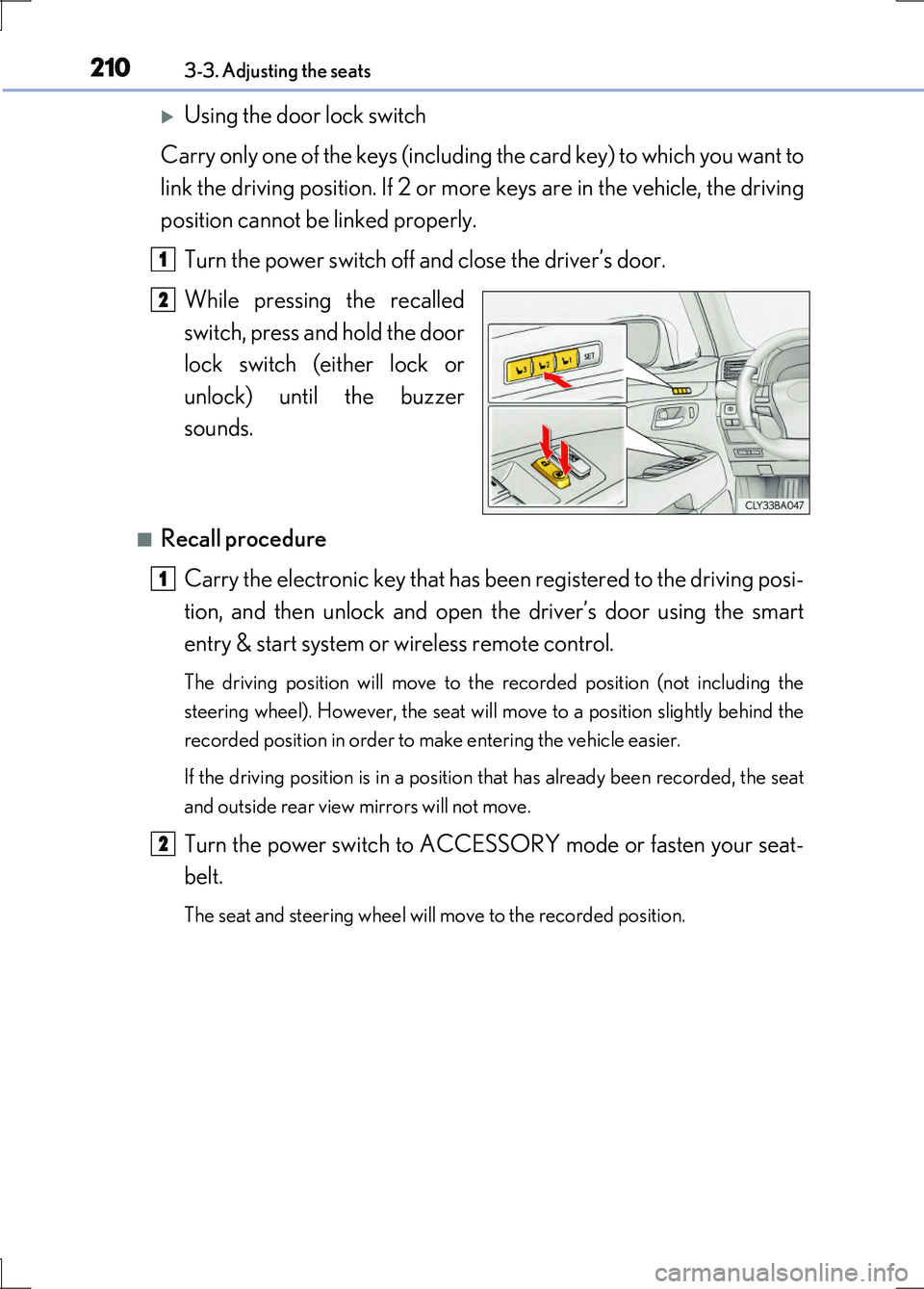
Using the door lock switch
Carry only one of the keys (including the card key) to which you want to
link the driving position. If 2 or more keys are in the vehicle, the driving
position cannot be linked properly.
Turn the power switch off and close the driver’s door.
While pressing the recalled
switch, press and hold the door
lock switch (either lock or
unlock) until the buzzer
sounds.
■Recall procedure
Carry the electronic key that has be en registered to the driving posi-
tion, and then unlock and open the driver’s door using the smart
entry & start system or wireless remote control.
The driving position will move to the recorded position (not including the
steering wheel). However, the seat will move to a position slightly behind the
recorded position in order to make entering the vehicle easier.
If the driving position is in a position that has already been recorded, the seat
and outside rear view mirrors will not move.
Turn the power switch to ACCESSORY mode or fasten your seat-
belt.
The seat and steering wheel will move to the recorded position.
1
2
1
2
Page 211 of 676
2113-3. Adjusting the seats
3
Operation of each component
LS600h/LS600hL_EE(OM50G20E)
■Cancelation procedure
Using the wireless remote control
Turn the power switch off and close the driver’s door.
While pressing the “SET” switch, press on the wireless remote
control until the buzzer sounds.
Using the door lock switch
Carry only the key you want to cancel and then close the driver’s door.
If 2 or more keys are in the vehicl e, the driving position cannot be can-
celed properly.
Turn the power switch off and close the driver’s door.
While pressing the “SET” switch, press the lock or unlock side on the
door lock switch until the buzzer sounds.
■Recalling the driving position using the memory recall function
●Different driving positions can be registered for each electronic key. Therefore, the
driving position that is recalled may be different depending on the key being car-
ried.
●If a door other than the driver’s door is unlocked with the smart entry & start sys-
tem, the driving position cannot be recalled. In this case, press the driving position
switch which has been set.
■ Seat operation automatic stop function (vehicles with relaxation seat)
If a front seat is likely to come into contact with the retractable table (4-seat models)
or the ottoman during seat operation or activation of the power easy access system,
a buzzer will sound and seat slide operation will be stopped partway.
(A warning message will be shown on the multi-information display.)
CAUTION
■Seat adjustment caution
Take care during seat adjustment so that the seat does not strike the rear passen-
ger or squeeze your body against the steering wheel.
1
2
1
2
Page 214 of 676
2143-3. Adjusting the seats
LS600h/LS600hL_EE(OM50G20E)
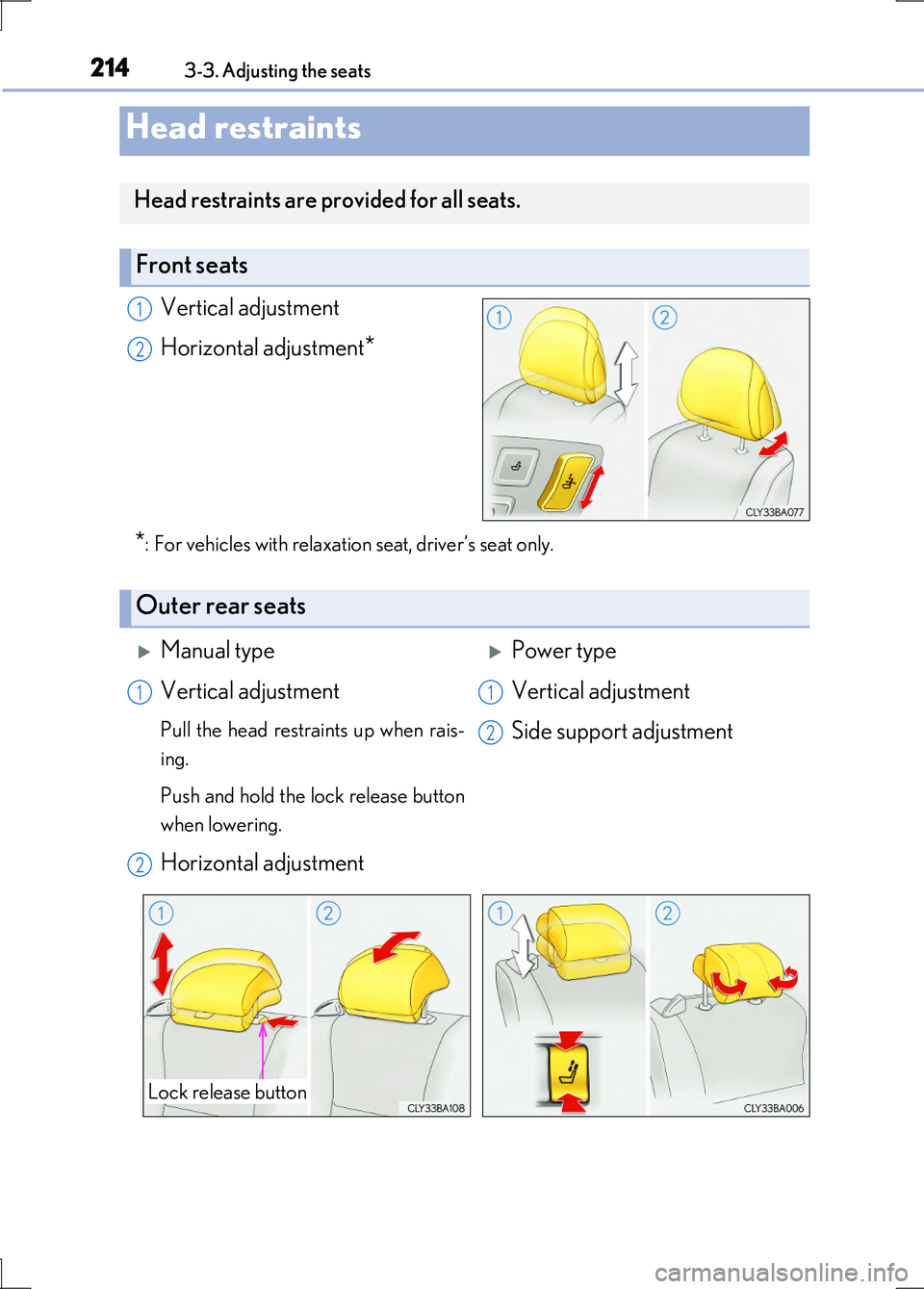
Vertical adjustment
Horizontal adjustment*
*: For vehicles with relaxation seat, driver’s seat only.
Head restraints
Head restraints are provided for all seats.
Front seats
1
2
Outer rear seats
Manual typePower type
Vertical adjustment
Pull the head restraints up when rais-
ing.
Push and hold the lock release button
when lowering.
Horizontal adjustment
Vertical adjustment
Side support adjustment
1
2
1
2
Lock release button
Page 217 of 676
2173-3. Adjusting the seats
3
Operation of each component
LS600h/LS600hL_EE(OM50G20E)
CAUTION
■Head restraint precautions
Observe the following precautions regarding the head restraints. Failure to do so
may result in death or serious injury.
●Use the head restraints designed for each respective seat.
●Adjust the head restraints to the correct position at all times.
●Manual type: After adjusting the head restraints, push down on them and make
sure they are locked in position.
●Do not drive with the head restraints removed.
■The active head restraint on the front passenger seat (if equipped)
Do not place anything, such as a cushion, on the front passenger’s seat.
Doing so will disperse the passenger’s weight, which may prevents the sensor from
detecting the passenger’s weight properly. As a result, the active head restraint
may not activate in the event of an accident.
■Active head restraint precautions (if equipped)
●Do not put head restraint covers.
●For removal, installation, modification, disassembly or disposal of the active head
restraints, contact at any authorized Lexus dealer or repairer, or another duly
qualified and equipped professional.
Inappropriate handling of the active head restraints may prevent them from oper-
ating properly during an accident.
Page 222 of 676
2223-4. Adjusting the steering wheel and mirrors
LS600h/LS600hL_EE(OM50G20E)
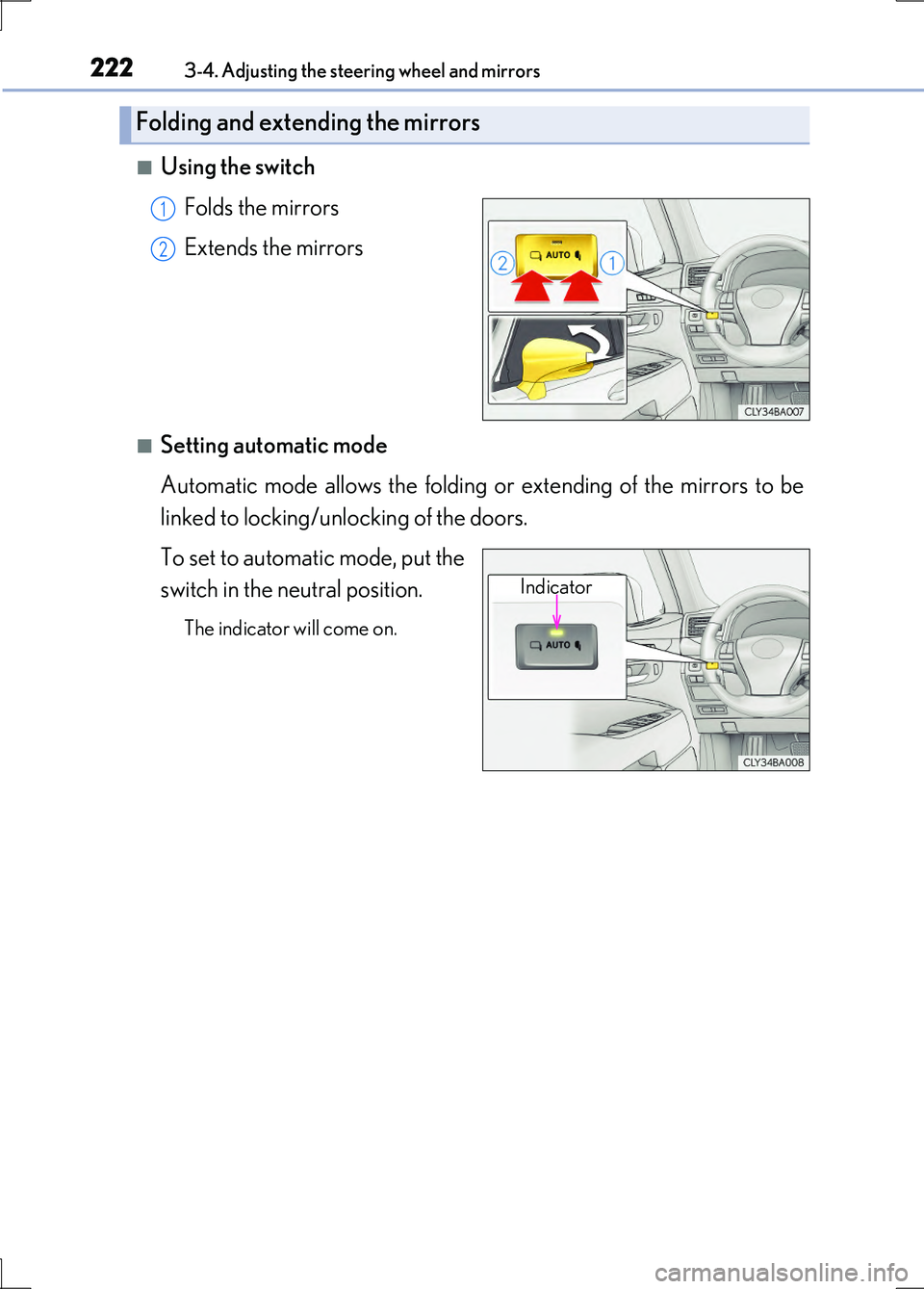
■Using the switch
Folds the mirrors
Extends the mirrors
■Setting automatic mode
Automatic mode allows the folding or extending of the mirrors to be
linked to locking/unlocking of the doors.
To set to automatic mode, put the
switch in the neutral position.
The indicator will come on.
Folding and extending the mirrors
1
2
Indicator
Page 225 of 676
225
3
Operation of each component
LS600h/LS600hL_EE(OM50G20E)
3-5. Opening, closing the windows and moon roof
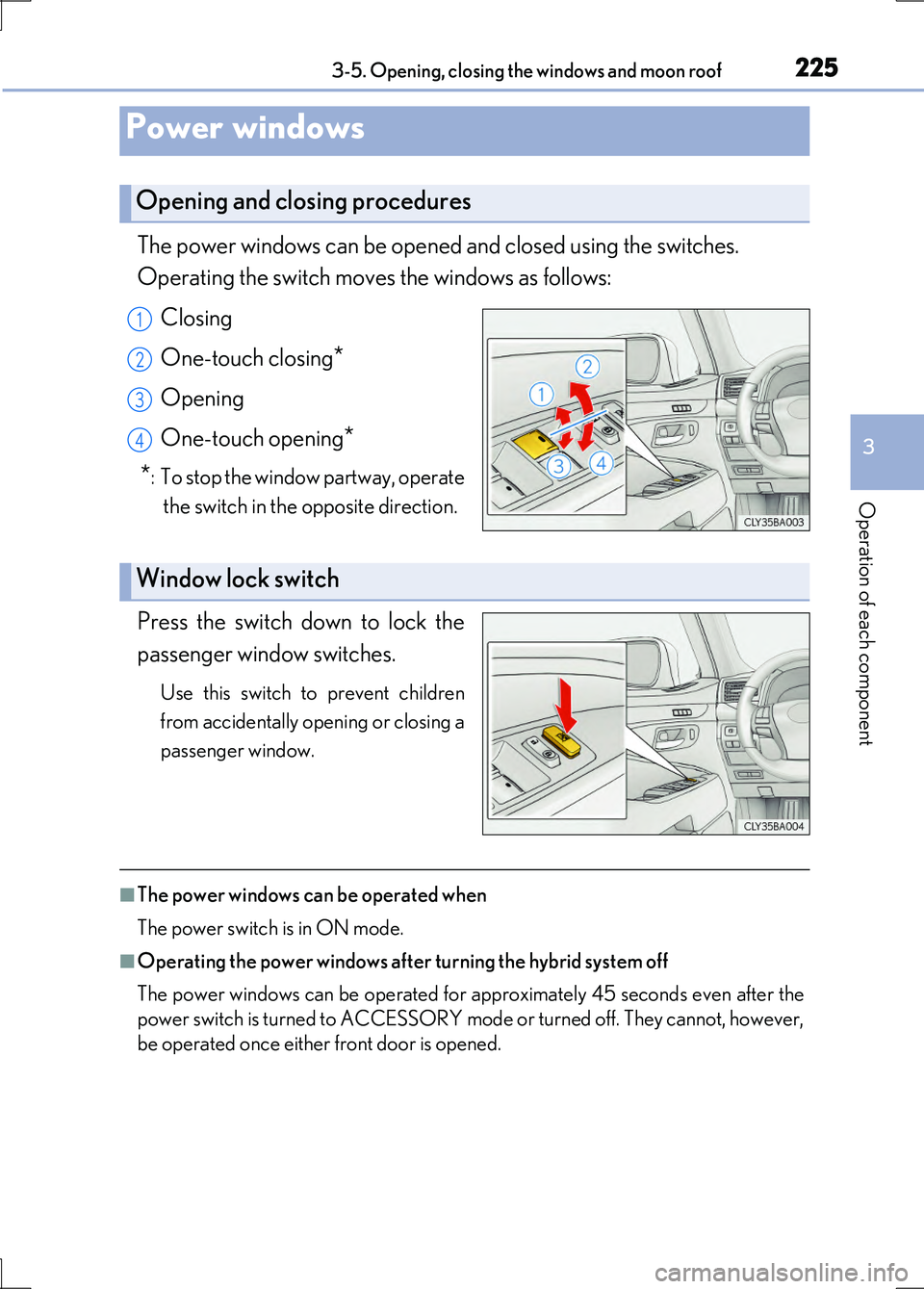
The power windows can be opened and closed using the switches.
Operating the switch moves the windows as follows:
Closing
One-touch closing*
Opening
One-touch opening*
*:To stop the window partway, operate
the switch in the opposite direction.
Press the switch down to lock the
passenger window switches.
Use this switch to prevent children
from accidentally opening or closing a
passenger window.
■The power windows can be operated when
The power switch is in ON mode.
■Operating the power windows after turning the hybrid system off
The power windows can be operated for approximately 45 seconds even after the
power switch is turned to ACCESSORY mode or turned off. They cannot, however,
be operated once either front door is opened.
Power windows
Opening and closing procedures
1
2
3
4
Window lock switch
Page 227 of 676
2273-5. Opening, closing the windows and moon roof
3
Operation of each component
LS600h/LS600hL_EE(OM50G20E)
■Door lock linked window operation
●The power windows can be closed using the entry function. (P. 151)
●The power windows can be opened and closed using the mechanical key.
( P. 603)
■Customization
Settings (e.g. linked door lock operation) can be changed.
(Customizable features P. 634)
CAUTION
Observe the following precautions.
Failure to do so may result in death or serious injury.
■Closing the windows
●The driver is responsible for all the power window operations, including the oper-
ation for the passengers. In order to prevent accidental operation, especially by a
child, do not let a child operate the power windows. It is possible for children and
other passengers to have body parts caug ht in the power window. Also, when rid-
ing with a child, it is recommended to use the window lock switch. ( P. 225)
●Check to make sure that all passengers do not have any part of their body in a
position where it could be caught when a window is being operated.
●When using the smart entry & start system, wireless remote control or mechani-
cal key and operating the power windows, operate the power window after
checking to make sure that there is no possibility of any passenger having any of
their body parts caught in the window. Also do not let a child operate window by
the smart entry & start system, wireless remote control or mechanical key. It is
possible for children and other passengers to get caught in the power window.
●When exiting the vehicle, turn the power switch off, carry the key and exit the
vehicle along with the child. There may be accidental operation, due to mischief,
etc., that may possibly lead to an accident.
Page 230 of 676
2303-5. Opening, closing the windows and moon roof
LS600h/LS600hL_EE(OM50G20E)
■The moon roof can be operated when
The power switch is in ON mode.
■Operating the moon roof after turning the hybrid system off
The moon roof can be operated for approximately 45 seconds after the power
switch is turned to ACCESSORY mode or turned off. It cannot, however, be oper-
ated once either front door is opened.
■Jam protection function
If an object is detected between the moon roof and the frame while the moon roof is
closing or tilting down, travel is stop ped and the moon roof opens slightly.
■Sunshade
The sunshade can be opened and closed manually. However, the sunshade will open
automatically when the moon roof is opened.
■Door lock linked moon roof operation
●The moon roof can be closed using the entry function. ( P. 151)
●The moon roof can be opened and closed using the mechanical key. (P. 603)
Page 232 of 676
2323-5. Opening, closing the windows and moon roof
LS600h/LS600hL_EE(OM50G20E)
■Moon roof open warning buzzer
The buzzer sounds and a message is shown on the multi-information display in the
instrument cluster when the power switch is turned off and the driver’s door is
opened with the moon roof open.
■Customization
Settings (e.g. linked door lock operation) can be changed.
(Customizable features P. 634)
CAUTION
Observe the following precautions.
Failure to do so may cause death or serious injury.
■Opening the moon roof
●Do not allow any passengers to put their hands or heads outside the vehicle while
it is moving.
●Do not sit on top of the moon roof.
■Closing the moon roof
●The driver is responsible for moon roof opening and closing operations.
In order to prevent accidental operation, especially by a child, do not let a child
operate the moon roof. It is possible for children and other passengers to have
body parts caught in the moon roof.
●Check to make sure that all passengers do not have any part of their body in a
position where it could be caught when the moon roof is being operated.
●When using the smart entry & start system, wireless remote control or mechani-
cal key and operating the moon roof, operate the moon roof after checking to
make sure that there is no possibility of any passenger having any of their body
parts caught in the moon roof. Also, do not let a child operate moon roof by the
smart entry & start system, wireless remote control or mechanical key. It is possi-
ble for children and other passengers to get caught in the moon roof.
●When exiting the vehicle, turn the power switch off, carry the key and exit the vehicle
along with the child. There may be accidental operation, due to mischief, etc., that may possibly lead to an accident.
■Jam protection function
●Never use any part of your body to intentionally activate the jam protection func-
tion.
●The jam protection function may not work if something gets caught just before
the moon roof fully closes.