lock LEXUS LS600H 2017 Owners Manual
[x] Cancel search | Manufacturer: LEXUS, Model Year: 2017, Model line: LS600H, Model: LEXUS LS600H 2017Pages: 676, PDF Size: 35.25 MB
Page 283 of 676
2834-3. Operating the lights and wipers
4
Driving
LS600h/LS600hL_EE(OM50G20E)
CAUTION
■Caution regarding the use of windshield wipers in “AUTO” mode
The windshield wipers may operate unexpectedly if the sensor is touched or the
windshield is subject to vibration in “AUTO” mode. Take care that your fingers or
anything else do not become caught in the windshield wipers.
■Caution regarding the use of washer fluid
When it is cold, do not use the washer fluid until the windshield becomes warm.
The fluid may freeze on the windshield and cause low visibility. This may lead to an
accident, resulting in death or serious injury.
NOTICE
■When the windshield is dry
Do not use the wipers, as they may damage the windshield.
■When there is no washer fluid spray from the nozzle
Damage to the washer fluid pump may be caused if the lever is pulled toward you
and held continually.
■When a nozzle becomes blocked
In this case, contact any authorized Lexus dealer or repairer, or another duly quali-
fied and equipped professional.
Do not try to clear it with a pin or other object. The nozzle will be damaged.
Page 338 of 676
3384-5. Using the driving support systems
LS600h/LS600hL_EE(OM50G20E)
◆ABS (Anti-lock Brake System)
Helps to prevent wheel lock when the brakes are applied suddenly, or if
the brakes are applied while driv ing on a slippery road surface
◆Brake assist
Generates an increased level of braking force after the brake pedal is
depressed when the system detects a panic stop situation
◆VSC (Vehicle Stability Control)
Helps the driver to control skidding when swerving suddenly or turning
on slippery road surfaces
◆TRC (Traction Control)
Helps to maintain drive power and prevent the drive wheels from spin-
ning when starting the vehicle or accelerating on slippery roads
◆Hill-start assist control
Helps to prevent the vehicle from rolling backward when starting on an
incline or slippery slope
◆VGRS (Variable Gear Ratio Steering)
Adjusts the wheel turning angle in accordance with the vehicle speed
and steering wheel movement
Driving assist systems
To help enhance driving safety and performance, the following systems
operate automatically in response to various driving situations. Be
aware, however, that these system s are supplementary and should not
be relied upon too heavily when operating the vehicle.
Page 352 of 676
3524-5. Using the driving support systems
LS600h/LS600hL_EE(OM50G20E)
■Conditions that may trigger the system even if there is no danger of a collision
In any of the following situations where the frontal area of the radar sensor is inter-
rupted, the radar sensor may detect possibility of a frontal collision and the system
may be activated.
●When passing by an oncoming vehicle in a curve or a turn to the right or the left.
●When rapidly approaching an obstacle ahead (e.g. preceding vehicle, toll gate bar-
rier, etc.)
●When there is a structural object (billboard, low ceiling, fluorescent light, etc.)
above the uphill road ahead
●When driving on a narrow road or through under a low overhead structure (bridge,
tunnel, fly-under, etc.)
●When driving on an uneven road surface
●When there is a metal object, bump, or protrusion on the road surface
●When vehicle front part is raised or lowered depending on loading conditions
●When the direction of radar sensor is misaligned by strong impact applied on an
area around the radar sensor, etc.
●When there is an obstacle (guard rail, etc.) by the roadside at the entrance to a
curve
●When the front of your vehicle is pointing upwards (caused by putting a heavy load
in the trunk etc.)
●When driving through an area filled with steam or smoke
When the system is activated in the situatio ns described above, there is also a possi-
bility that the seat belts will retract quickly and the brakes may be applied with a force
greater than normal. When the seat belt is locked in the retracted position, stop the
vehicle in a safe place, release the seat belt and refasten it.
■Obstacles not detected
The radar sensor cannot detect plastic obstacles such as traffic cones. There may
also be occasions when the sensor cannot detect pedestrians, animals, bicycles,
motorcycles, trees, or snowdrifts.
■A camera sensor cannot detect obstacles in the following situations:
●A camera sensor is directly receiving intense light, such as sunlight.
●Visibility is poor because of bad weather or other reasons.
●The sensor temperature is extremely high.
●The headlights are not turned on in darkness such as at night or in a tunnel.
Page 358 of 676
3584-5. Using the driving support systems
LS600h/LS600hL_EE(OM50G20E)
CAUTION
■Determining the direction the driver is facing and whether the driver’s eyes are
open or closed (vehicles with driver monitor system)
The direction the driver is facing and whether the driver’s eyes are open or closed
may not be determined correctly if the following conditions exist:
●There is an object between the driver monitor sensor and the driver’s face, such
as when the sensor is blocked.
●A part of the driver’s face is covered.
●The sensor or the driver’s face is exposed to intense light such as sunlight.
●The driving posture is improper.
●The vehicle is parked.
■Handling the driver monitor sensor (vehicles with driver monitor system)
Observe the following to ensure the driver monitor sensor can function effectively.
Failure to do so may result in a malfunction or may prevent the system from cor-
rectly determining the direction the driver is facing and whether the driver’s eyes
are open or closed, resulting in an unexpected accident.
●Do not disassemble, damage, lift or pull on the sensor.
●Do not touch the sensor while driving.
●Do not wet or spill water on the sensor.
●Do not drop anything on or allow anything to hit against the sensor. Do not sub-
ject the sensor to an impact.
●Make sure that there are no scratches, dirt or stickers on the side of the sensor
that faces the driver.
●Do not place any objects in front of the side of the sensor that faces the driver or
cover the sensor.
Page 381 of 676
3814-5. Using the driving support systems
4
Driving
LS600h/LS600hL_EE(OM50G20E)
CAUTION
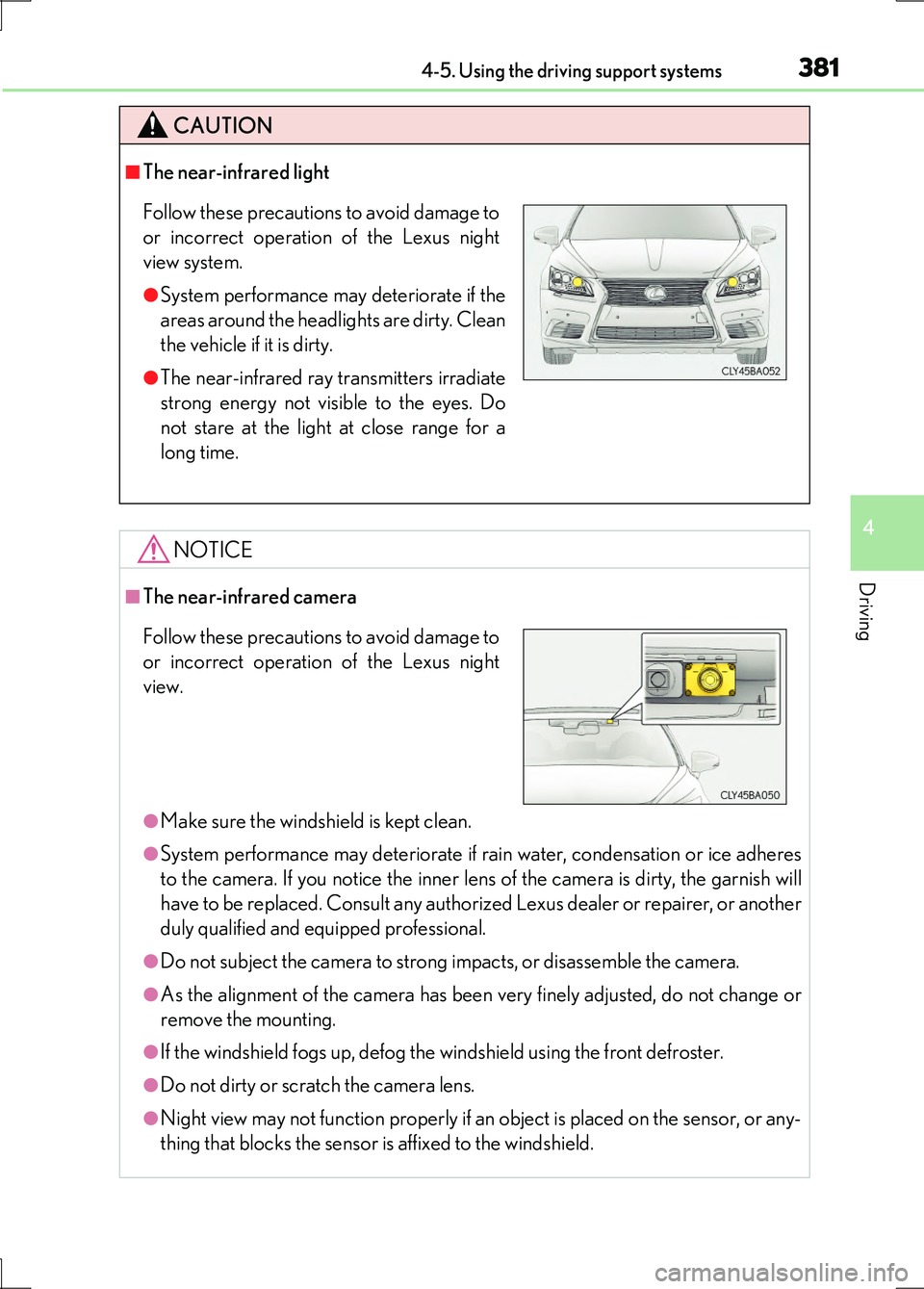
■The near-infrared light
NOTICE
■The near-infrared camera
●Make sure the windshield is kept clean.
●System performance may deteriorate if rain water, condensation or ice adheres
to the camera. If you notice the inner lens of the camera is dirty, the garnish will
have to be replaced. Consult any authorized Lexus dealer or repairer, or another
duly qualified and equipped professional.
●Do not subject the camera to strong impacts, or disassemble the camera.
●As the alignment of the camera has been very finely adjusted, do not change or
remove the mounting.
●If the windshield fogs up, defog the windshield using the front defroster.
●Do not dirty or scratch the camera lens.
●Night view may not function properly if an object is placed on the sensor, or any-
thing that blocks the sensor is affixed to the windshield.
Follow these precautions to avoid damage to
or incorrect operation of the Lexus night
view system.
●System performance may deteriorate if the
areas around the headlights are dirty. Clean
the vehicle if it is dirty.
●The near-infrared ray transmitters irradiate
strong energy not visible to the eyes. Do
not stare at the light at close range for a
long time.
Follow these precautions to avoid damage to
or incorrect operation of the Lexus night
view.
Page 385 of 676
3854-6. Driving tips
4
Driving
LS600h/LS600hL_EE(OM50G20E)
Perform the following according to the driving conditions:
●Do not try to forcibly open a window or move a wiper that is frozen.
Pour warm water over the frozen area to melt the ice. Wipe away the
water immediately to prevent it from freezing.
●To ensure proper operation of the climate control system fan, remove
any snow that has accumulated on the air inlet vents in front of the wind-
shield.
●Check for and remove any excess ice or snow that may have accumu-
lated on the exterior lights, vehicle’s roof, chassis, around the tires or on
the brakes.
●Remove any snow or mud from the bottom of your shoes before getting
in the vehicle.
Accelerate the vehicle slowly, keep a safe distance between you and the
vehicle ahead, and drive at a reduced speed suitable to road conditions.
●Park the vehicle and move the shift lever to P without setting the park-
ing brake. The parking brake may free ze up, preventing it from being
released. If the vehicle is parked without setting the parking brake,
make sure to block the wheels.
Failure to do so may be dangerous because it may cause the vehicle to
move unexpectedly, possibly leading to an accident.
●If the vehicle is parked without setting the parking brake, confirm that
the shift lever cannot be moved out of P*.
*: The shift lever will be locked if it is attempted to be shifted from P to any other
position without depressing the brake pedal. If the shift lever can be shifted
from P, there may be a problem with the shift lock system. Have the vehicle
inspected by any authorized Lexus dealer or repairer, or another duly qualified
and equipped professional.
Before driving the vehicle
When driving the vehicle
When parking the vehicle
Page 389 of 676
389
5Interior features
LS600h/LS600hL_EE(OM50G20E)
5-1. Remote Touch screen
Remote Touch ............................ 390
12.3-inch display.........................394
5-2. Lexus Climate Concierge
Lexus Climate Concierge..... 398
5-3. Using the air conditioning
system and defogger
Front automatic air
conditioning system ...............399
Rear air conditioning
system ........................................... 418
Rear window and
outside rear view
mirror defoggers .....................425
Windshield wiper de-icer ....... 426
5-4. Using the interior lights
Interior lights list.......................... 427
• Interior lights ..........................428
• Personal lights ....................... 429
5-5. Using the storage
features
List of storage features ............. 431
• Glove box ............................... 433
• Coin holder ............................ 434
• Door pockets......................... 434
• Cup holders ........................... 435
• Console box .......................... 437
• Auxiliary boxes ..................... 439
Trunk features ............................. 442
5-6. Other interior features
Sun visors and vanity
mirrors ......................................... 445
Clock .............................................. 447
Ashtrays .........................................448
Cigarette lighters....................... 449
Power outlets................................ 451
Heated steering wheel ............ 454
Climate control seats/
seat heaters ............................... 456
Armrest............................................461
Retractable table........................ 462
Rear sunshade ............................ 464
Rear door sunshades ............... 468
Coat hooks ................................... 472
Assist grips.................................... 473
Page 411 of 676
4115-3. Using the air conditioning system and defogger
5
Interior features
LS600h/LS600hL_EE(OM50G20E)
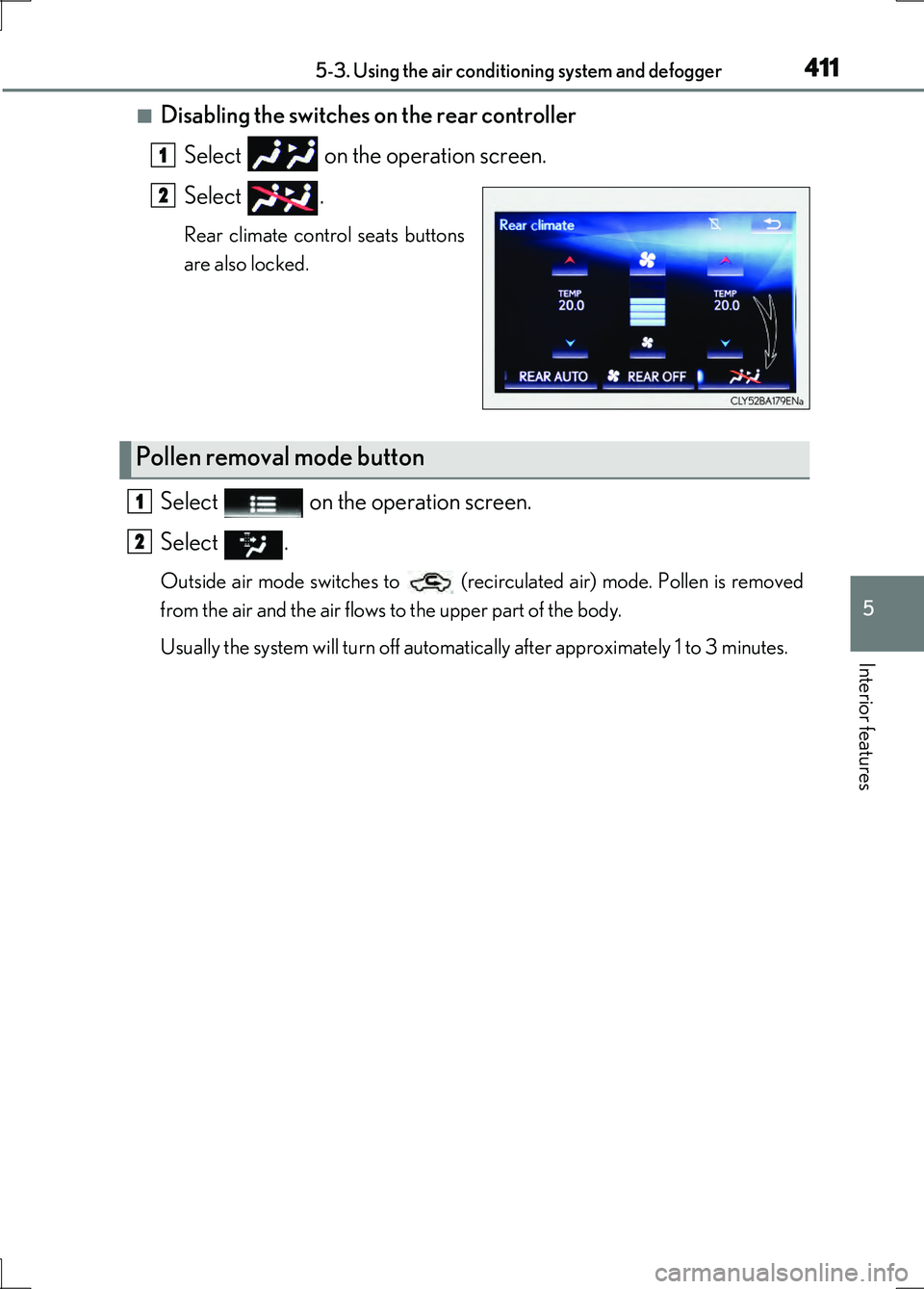
■Disabling the switches on the rear controller Select on the operation screen.
Select .
Rear climate control seats buttons
are also locked.
Select on the operation screen.
Select .
Outside air mode switches to (recirculated air) mode. Pollen is removed
from the air and the air flows to the upper part of the body.
Usually the system will turn off automatically after approximately 1 to 3 minutes.
1
2
Pollen removal mode button
1
2
Page 417 of 676
4175-3. Using the air conditioning system and defogger
5
Interior features
LS600h/LS600hL_EE(OM50G20E)
■Air conditioning filter
P. 529
■Customization
Some functions can be customized. (Customizable features P. 634)
CAUTION
■To prevent the windshield from fogging up
Do not use during cool air operation in extremely humid weather. The dif-
ference between the temperature of the outside air and that of the windshield can
cause the outer surface of the windshield to fog up, blocking your vision.
■nanoe
Do not disassemble or repair the generator because it contains high voltage parts.
Contact any authorized Lexus dealer or repairer, or another duly qualified and
equipped professional if the generator needs repair.
NOTICE
■To prevent 12-volt battery discharge
Do not leave the air conditioning system on longer than necessary when the hybrid
system is off.
■To prevent damage to the nanoe
Do not insert anything into the driver’s side vent, attach anything to it, or use sprays
around the driver’s side vent. These th ings may cause the generator not to work
properly.
Page 418 of 676
4185-3. Using the air conditioning system and defogger
LS600h/LS600hL_EE(OM50G20E)
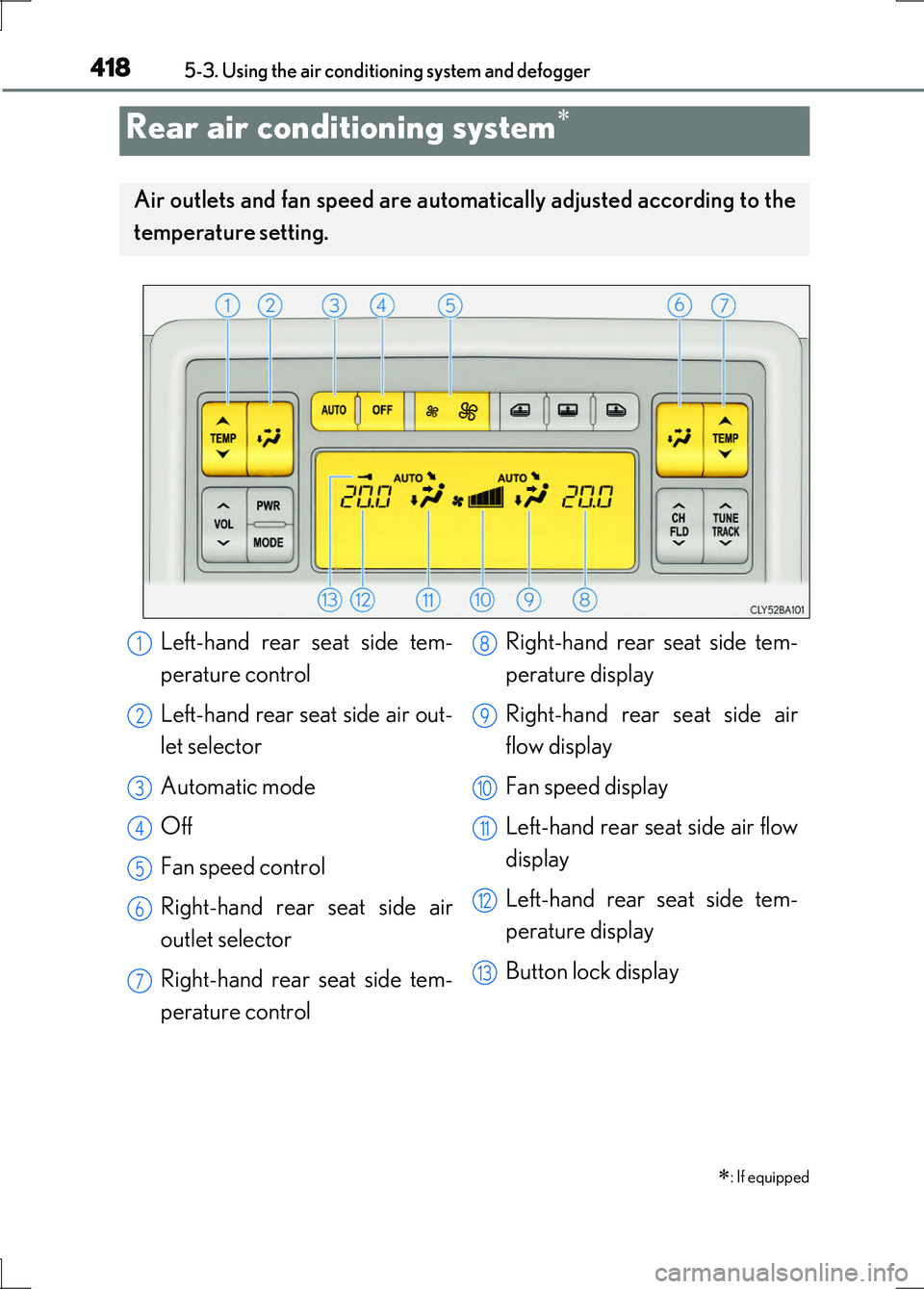
Rear air conditioning system
: If equipped
Air outlets and fan speed are automatically adjusted according to the
temperature setting.
Left-hand rear seat side tem-
perature control
Left-hand rear seat side air out-
let selector
Automatic mode
Off
Fan speed control
Right-hand rear seat side air
outlet selector
Right-hand rear seat side tem-
perature control
Right-hand rear seat side tem-
perature display
Right-hand rear seat side air
flow display
Fan speed display
Left-hand rear seat side air flow
display
Left-hand rear seat side tem-
perature display
Button lock display
1
2
3
4
5
6
7
8
9
10
11
12
13