door lock LEXUS LX470 2007 User Guide
[x] Cancel search | Manufacturer: LEXUS, Model Year: 2007, Model line: LX470, Model: LEXUS LX470 2007Pages: 426, PDF Size: 10.95 MB
Page 25 of 426

7
1-2. Opening, closing and locking the doors
1
Before driving
Automatic door locking and unlocking systemsThe following functions can be set or canceled:
■ Setting and canceling the functions
To switch between setting and canceling, follow the procedure below:
Close all the doors and turn the ig nition key to the “ON” position.
(Perform step 2 within 10 seconds.)
Shift the shift lever to “P” or “N”,
press and hold the driver's door
lock switch (
or ) for 5 sec-
onds then release.
The shift lever and switch positions
corresponding to the desired func-
tion to be set or canceled are
shown as follows.
FunctionOperation
Shift position linked door
locking functionShifting the shift lever out of “P” locks all doors.
Shift position linked door
unlocking functionShifting the shift lever to “P” unlocks all doors.
Speed linked door locking
functionAll doors are locked when the vehicle speed is
approximately 12 mph (20 km/h) or higher.
Driver's door linked door
unlocking functionAll doors are unlocked when the driver's door is
opened within 10 seconds after turning the igni-
tion key to the “LOCK” position.
STEP1
STEP2
Page 26 of 426
8
1-2. Opening, closing and locking the doors
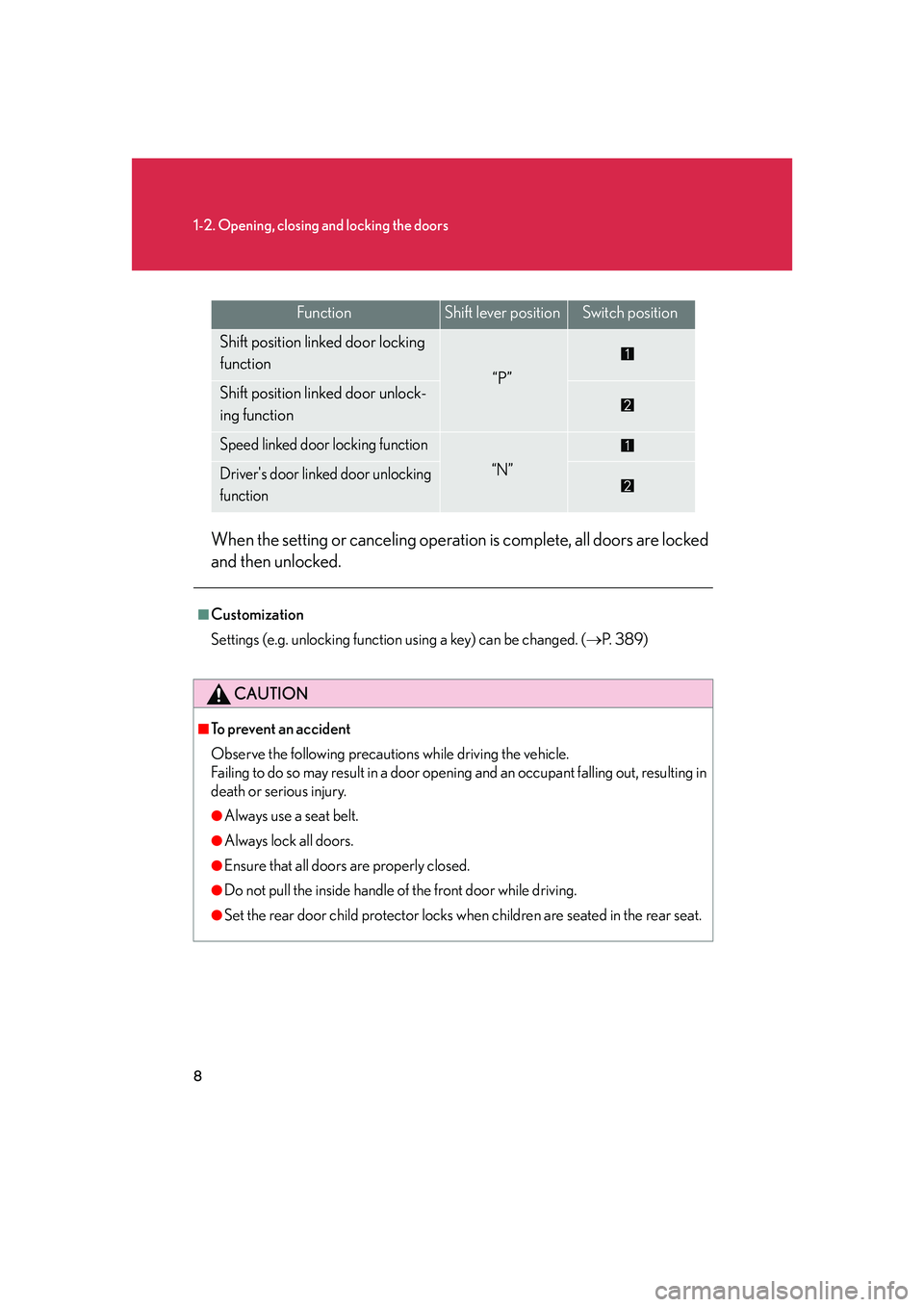
When the setting or canceling operation is complete, all doors are locked
and then unlocked.
FunctionShift lever positionSwitch position
Shift position linked door locking
function
“P”Shift position linked door unlock-
ing function
Speed linked door locking function
“N”Driver's door linked door unlocking
function
■Customization
Settings (e.g. unlocking function using a key) can be changed. ( P. 3 8 9 )
CAUTION
■To prevent an accident
Observe the following precautions while driving the vehicle.
Failing to do so may result in a door open ing and an occupant falling out, resulting in
death or serious injury.
●Always use a seat belt.
●Always lock all doors.
●Ensure that all doors are properly closed.
●Do not pull the inside handle of the front door while driving.
●Set the rear door child protector locks when children are seated in the rear seat.
Page 27 of 426

9
1
1-2. Opening, closing and locking the doors
Before driving
Back door
The back door can be locked/unlocked using a key, wireless remote con-
trol or door lock switch.
■Key
Unlocks the door
Locks the door
Open the door
■ Wireless remote control
P. 3
■ Door lock switch
Locks the door
Unlocks the door
Page 28 of 426
10
1-2. Opening, closing and locking the doors
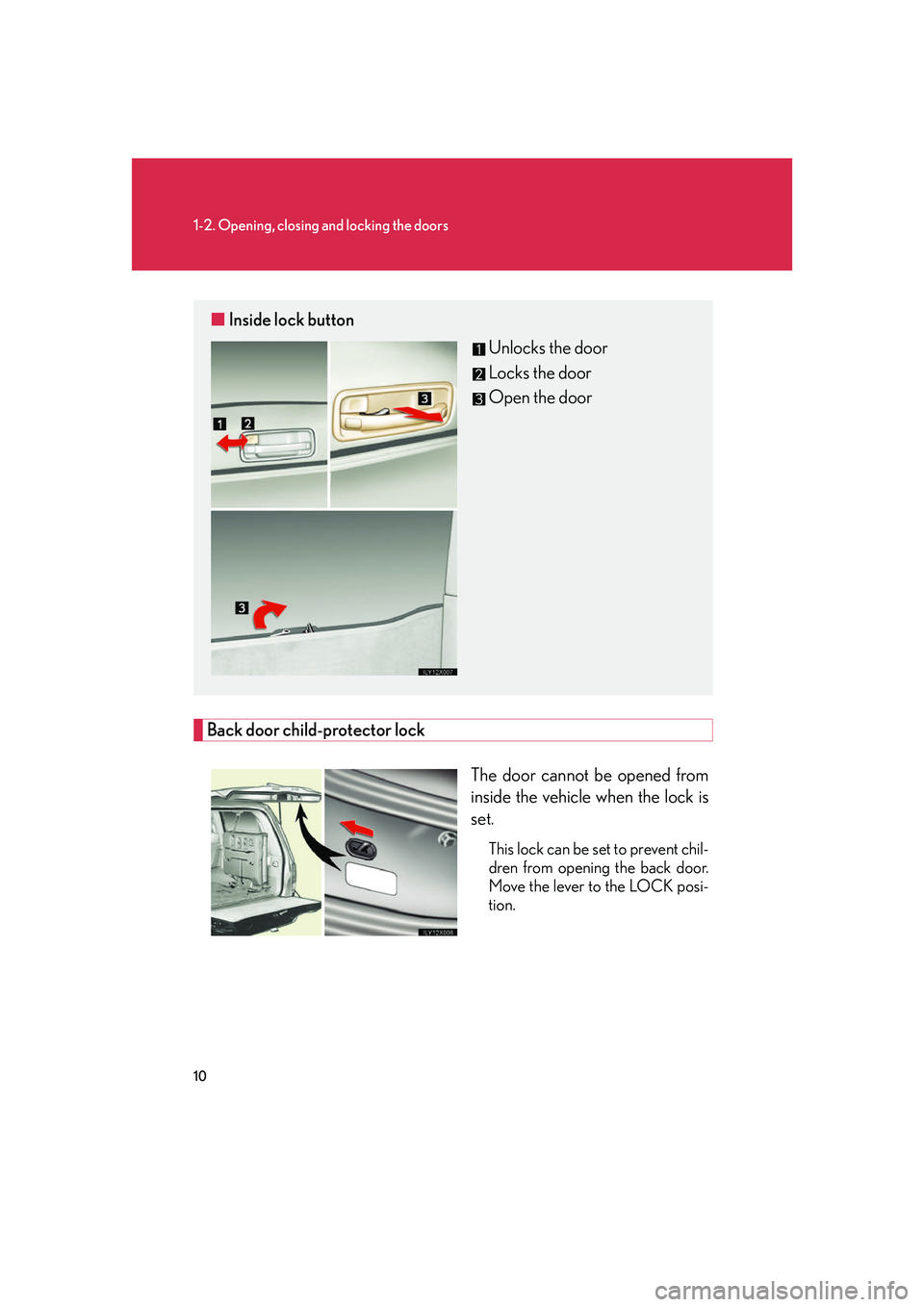
Back door child-protector lockThe door cannot be opened from
inside the vehicle when the lock is
set.
This lock can be set to prevent chil-
dren from opening the back door.
Move the lever to the LOCK posi-
tion.
■ Inside lock button
Unlocks the door
Locks the door
Open the door
Page 29 of 426

11
1-2. Opening, closing and locking the doors
1
Before driving
Rear step bumperThe rear step bumper is for rear
end protection and easier step-up
loading.
CAUTION
Observe the following precautions.
Falling to do so may result in death or serious injury.
■While driving
●Keep the back door closed.
This not only keeps personal belongings from being thrown out, but also prevents
exhaust gases from entering the vehicle.
●Do not get on the rear step bumper.
NOTICE
■To prevent damage to the back door components
●Do not apply any force, paint or let an y other foreign matter on the damper.
●Make sure there is nothing in the doorway before closing.
●Do not allow more than one person to get on the rear step bumper at a time.
Page 47 of 426
29
1-3. Adjustable components
1
Before driving
CAUTION
■Seat belt damage and wear
●Do not damage the seat belts by allowing the belt, plate or buckle to be jammed
in the door.
●Inspect the seat belt system periodically. Check for cuts, fraying, and loose parts.
Do not use a damaged seat belt until it is replaced. Damaged seat belts cannot
protect an occupant from death or serious injury.
●Ensure that the belt and tab are locked and the belt is not twisted. If the seat belt
does not function correctly, immediately contact your Lexus dealer.
●Replace the seat assembly, including the belts, if your vehicle has been involved in
a serious accident, even if there is no obvious damage.
●Do not attempt to install, remove, modify , disassemble or dispose of a seat belt.
Have any necessary repairs carried out by your Lexus dealer. Inappropriate han-
dling of the pretensioner may cause it to activate or operate improperly and may
cause death or serious injury.
■Using a seat belt extender
●Do not wear the seat belt extender, if you can fasten the seat belt without the
extender.
●Do not use the seat belt extender when installing a child restraint system, because
the belt will not securely hold the child restraint system, increasing the risk of
death or serious injury in the event of a collision.
●The personalized extender may not be safe on another vehicle, when used by
another person, or at a different seatin g position other than the one originally
intended.
NOTICE
■When using a seat belt extender
When releasing the seat belt, press on the buckle release button on the extender,
not on the seat belt.
This helps prevent damage to the vehi cle interior and the extender itself.
Page 56 of 426
38
1-4. Opening and closing the windows and moon roof
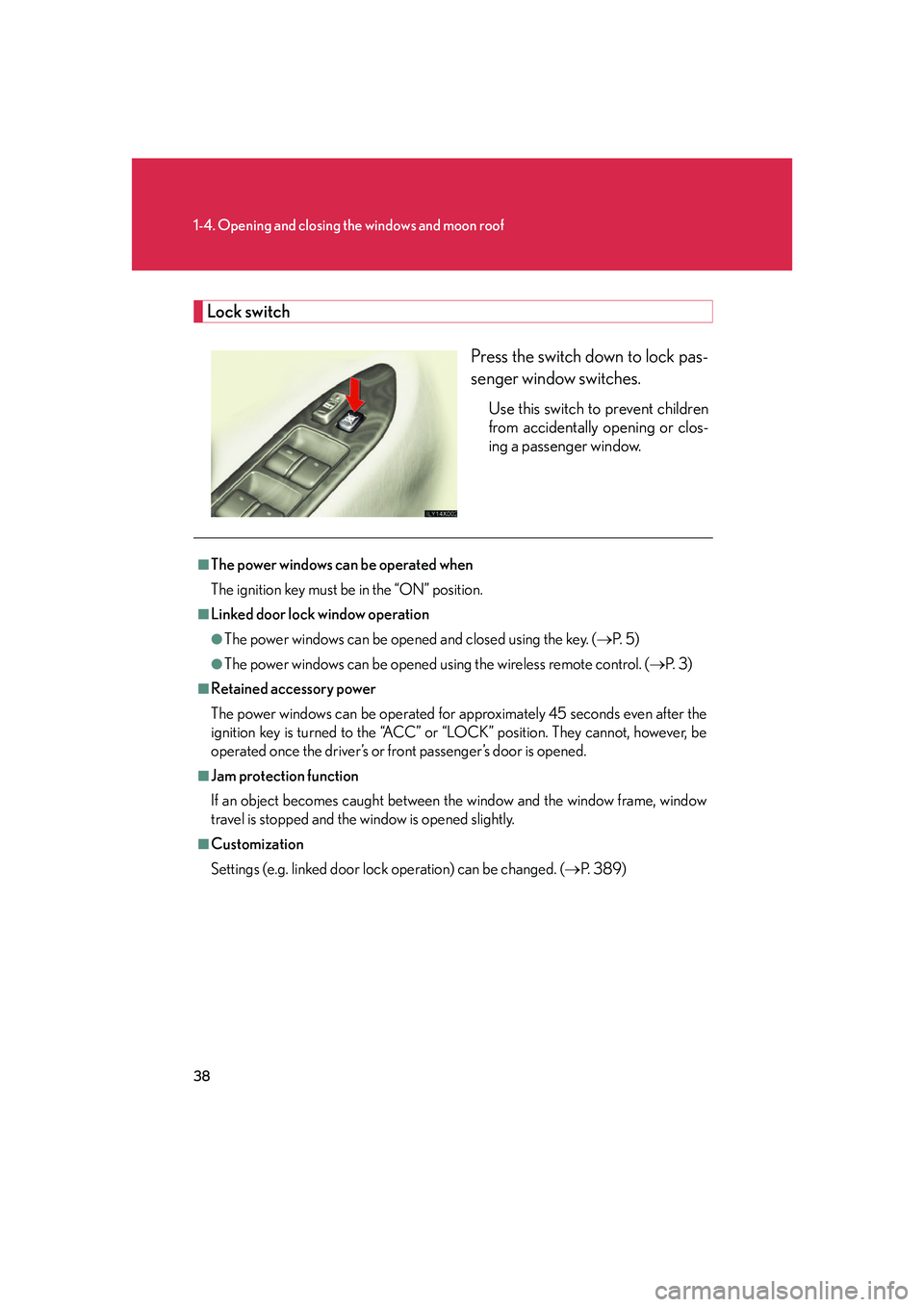
Lock switchPress the switch down to lock pas-
senger window switches.
Use this switch to prevent children
from accidentally opening or clos-
ing a passenger window.
■The power windows can be operated when
The ignition key must be in the “ON” position.
■Linked door lock window operation
●The power windows can be opened and closed using the key. ( P. 5 )
●The power windows can be opened using the wireless remote control. ( P. 3 )
■Retained accessory power
The power windows can be operated for ap proximately 45 seconds even after the
ignition key is turned to the “ACC” or “LOCK” position. They cannot, however, be
operated once the driver’s or fr ont passenger’s door is opened.
■Jam protection function
If an object becomes caught between th e window and the window frame, window
travel is stopped and the window is opened slightly.
■Customization
Settings (e.g. linked door lock operation) can be changed. ( P. 3 8 9 )
Page 60 of 426

42
1-4. Opening and closing the windows and moon roof
■The moon roof can be operated when
The ignition key must be in the “ON” position.
■Linked door lock moon roof operation
●The moon roof can be opened and closed using the key. (P. 5 )
●The moon roof can be opened using the wireless remote control. ( P. 3 )
■Retained accessory power
The moon roof can be operated for approx imately 45 seconds even after the igni-
tion key is turned to the “ACC” or “LOCK” position. It cannot, however, be operated
once the driver’s or front passenger’s door is opened.
■Jam protection function
If an object is detected between the moon roof and the frame while closing or tilting
down, travel is stopped and the moon roof opens slightly.
■Sunshade
The sunshade can be opened and closed manually. However, the sunshade will
open automatically when the moon roof is opened.
■When the battery is disconnected
The moon roof must be initialized in order to ensure proper operation.
Push and hold the “SLIDE” switch or “TILT” switch until the moon roof is
closed fully.
To ensure the initialization is complete, make sure automatic opening and
closing functions work properly.
■Customization
Settings (e.g. linked door lock operation) can be changed. ( P. 3 8 9 )
STEP1
STEP2
Page 67 of 426

49
1
1-6. Anti-theft system
Before driving
Alarm
The system sounds the alarm and flashes the vehicle lights when an attempt
to steal the vehicle is detected.
■ Triggering of the alarm
The alarm is triggered in the following situations.
●A locked door is unlocked or opened in any way other than using
the wireless remote door lock functi on or key. (The doors will lock
again automatically)
● The hood is opened while the vehicle is locked.
■ Setting the alarm system
Close the doors and hood, and
lock all doors. The system will be
set automatically after 30 sec-
onds.
The indicator light changes from
being on to flashing when the
system is set.
■Deactivating or stopping the alarm
Do one of the following to deactivate or stop the alarm.
● Unlock the doors.
● Start the engine. (The alarm will be deactivated or stopped after a
few seconds.)
Page 68 of 426

50
1-6. Anti-theft system
■Items to check before locking the vehicle
To prevent unexpected triggering of the alarm and vehicle theft, make sure of the
following.
●Nobody is in the vehicle.
●The windows and moon roof are closed before the alarm is set.
●No valuables or other personal items are left in the vehicle.
■Tr i g g e r i n g o f t h e a l a r m
The alarm may be triggered in the following situations.
(Stopping the alarm deactivates the alarm system.)
●A person inside the vehicle opens a door or hood.
●The battery is recharged or replaced when the vehicle is locked.
■Pa n i c m o d e
When PANIC is pushed and held, an alarm
will sound to deter any person from trying to
break into or damage your vehicle.
To stop the alarm, push any button on the
wireless remote control.