door lock LEXUS LX470 2007 Owner's Manual
[x] Cancel search | Manufacturer: LEXUS, Model Year: 2007, Model line: LX470, Model: LEXUS LX470 2007Pages: 426, PDF Size: 10.95 MB
Page 106 of 426

88
2-1. Driving procedures
Driving the vehicle
Starting on a steep inclineFirmly set the parking brake and shift the shift lever to “D”.
Gently depress the accelerator pedal.
Release the parking brake.
The following procedures should be observed to ensure safe driving.
■ Starting the engine ( P. 9 5 )
■ Driving
With the brake pedal depressed, shift the shift lever to “D”. (P. 9 8 )
Release the parking brake. ( P. 103)
Gradually release the brake peda l and gently push the accel-
erator pedal to accelerate the vehicle.
■ Stopping
With the shift lever in “D”, push the brake pedal.
If necessary, set the parking brake.
When the vehicle is stopped for an extended period of time, shift the
shift lever to “P” or “N”. (
P. 9 8 )
■Parking the vehicle
With the shift lever in “D”, push the brake pedal.
Set the parking brake. ( P. 103)
Shift the shift lever to “P”. ( P. 9 8 )
Turn the ignition key to stop the engine.
Lock the door, making sure that you have the key on your per-
son.
STEP1
STEP2
STEP3
STEP1
STEP2
STEP1
STEP2
STEP3
STEP4
STEP5
STEP1
STEP2
STEP3
Page 131 of 426
113
2-3. Operating the lights and windshield wipers
2
When driving
■Daytime running light system
To make your vehicle more visible to other drivers, the headlights turn on automati-
cally (at a reduced intensity) whenever the engine is started and the parking brake
is released. Daytime running lights are not designed for use at night.
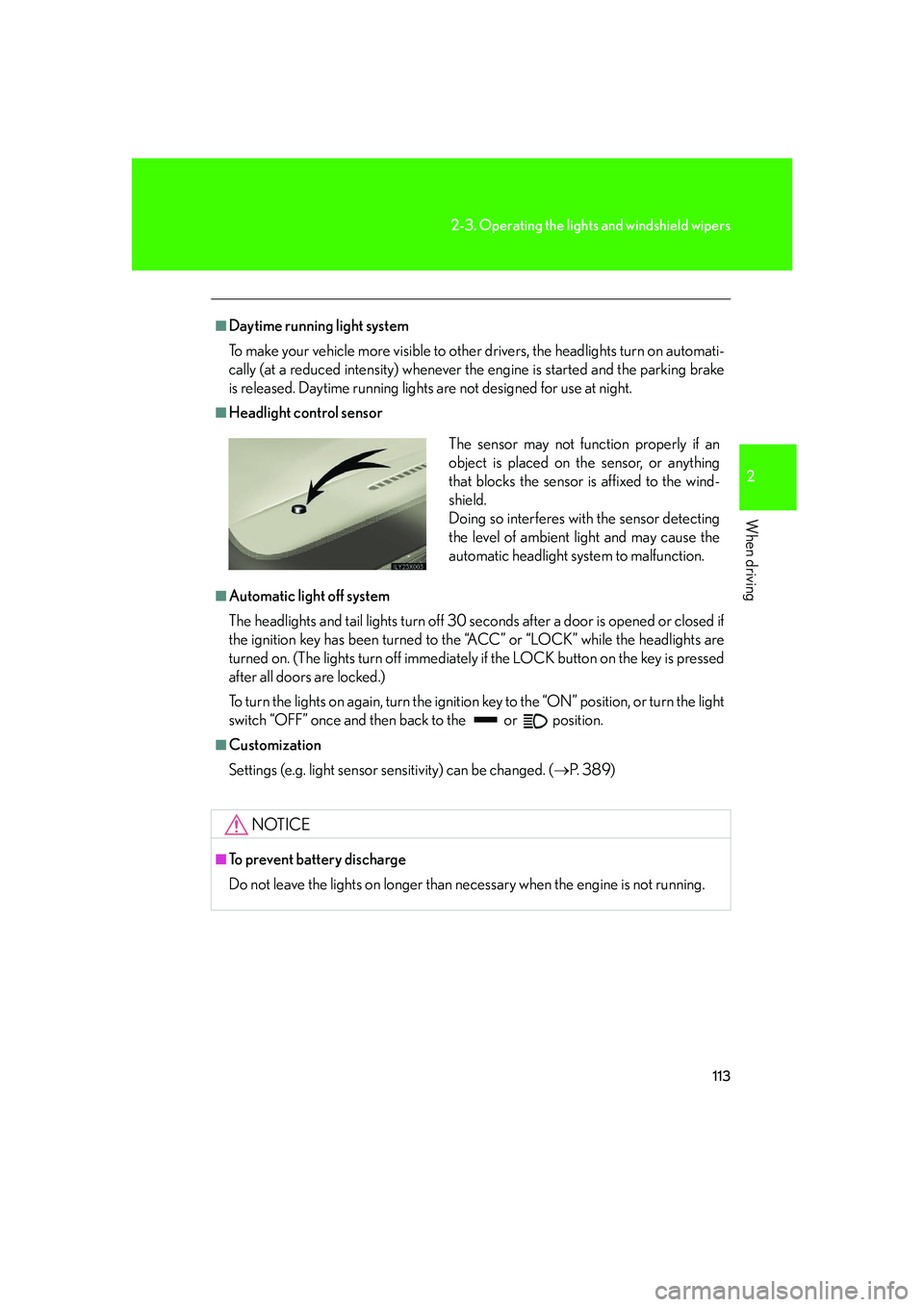
■Headlight control sensor
■Automatic light off system
The headlights and tail lights turn off 30 seconds after a door is opened or closed if
the ignition key has been turned to the “ACC” or “LOCK” while the headlights are
turned on. (The lights turn off immediately if the LOCK button on the key is pressed
after all doors are locked.)
To turn the lights on again, turn the ignition key to the “ON” position, or turn the light
switch “OFF” once and then back to the or position.
■Customization
Settings (e.g. light sensor sensitivity) can be changed. ( P. 3 8 9 )
NOTICE
■To prevent battery discharge
Do not leave the lights on longer than necessary when the engine is not running.
The sensor may not function properly if an
object is placed on the sensor, or anything
that blocks the sensor is affixed to the wind-
shield.
Doing so interferes with the sensor detecting
the level of ambient light and may cause the
automatic headlight system to malfunction.
Page 189 of 426

Interior features3
171
3-1. Using the air conditioning system and defogger ........... 172
Automatic air conditioning system (without navigation
system).......................................... 172
Rear air conditioning controls........................................ 180
Rear window and outside rear view mirror defoggers........... 182
3-2. Using the audio system ......... 183 Audio system type (without navigation system) .................. 183
Using the radio ............................ 185
Using the cassette player........ 194
Using the CD player .................. 197
Optimal use of the audio system ......................................... 204
Using the steering switches ...................................... 206
Rear seat audio system .......... 209 3-3. Using the interior lights ........ 212
Interior lights list .......................... 212
3-4. Using the storage features ................................... 215
List of storage features ............ 215
3-5. Other interior features......... 221 Sun visors ....................................... 221
Vanity mirror ............................... 222
Clock.............................................. 223
Outside temperature display ......................................... 224
Ashtrays ........................................ 225
Cigarette lighter ........................ 227
Power outlet ................................ 228
Seat heaters ................................ 230
Coat hooks .................................. 232
Armrest ......................................... 233
Floor mats .................................... 234
Luggage compartment features....................................... 235
Garage door opener............... 237
Compass....................................... 242
Lexus Link System .................... 246
Page 230 of 426

212
3-3. Using the interior lights
Interior lights list
■Customization
Setting (e.g. The time elapsed before lights turn off) can be changed. (
P. 3 8 9 )
Illuminated entry system: The various lights automatically turn on/off
whether the doors are locked/unlocked and whether the doors are open/
closed.
Running board lights
Vanity lights
Front personal lights (P. 213)
Rear personal lights ( P. 213)
Front interior light ( P. 213)
Rear interior light ( P. 213)
Door courtesy lights
Glove box light
Page 255 of 426

237
3-5. Other interior features
3
Interior features
Garage door opener
The garage door opener (HomeLink Universal Transceiver) is manufactured
under license from HomeLink.
Programming the HomeLink (for U.S.A. owners)
The HomeLink
compatible transceiver in your vehicle has 3 buttons
which can be programmed to operate 3 different devices. Refer to the
programming method below appropriate for the device.
Buttons
Indicator
■ Programming the HomeLink
Point the remote control for the
device 1 to 3 in . (25 to 75 mm)
from the HomeLink
control but-
tons.
Keep the indicator light on the
HomeLink in view while pro-
gramming.
The garage door opener can be pr ogrammed to operate garage doors,
gates, entry doors, door locks, home lighting systems, and security systems,
and other devices.
STEP1
Page 258 of 426

240
3-5. Other interior features
Test the operation of the HomeLink by pressing the newly pro-
grammed button. Check to see if the gate/device operates cor-
rectly.
Repeat the steps above to program another device for each of
the remaining HomeLink
buttons.
■ Programming other devices
To program other devices such as home security systems, home door
locks or lighting, contact your au thorized Lexus dealer for assistance.
■ Reprogramming a button
The individual HomeLink
buttons cannot be erased but can be
reprogrammed. To reprogram a butto n, follow the “Programming the
HomeLink
” instructions.
Operating the HomeLink
Press the appropriate HomeLink button. The HomeLink indicator
light on the HomeLink transceiver should turn on.
The HomeLink continues to send a signal fo r up to 20 seconds as long as
the button is pressed.
Erasing the entire HomeLink memory (all three programs)
Press and hold down the 2 outside
buttons for 20 seconds until the
indicator light flashes.
If you sell your vehicle, be sure to
erase the programs stored in the
HomeLink
memory.
STEP5
STEP6
Page 262 of 426

244
3-5. Other interior features
Wait a few seconds until the compass direction is displayed.
The calibration is complete.
■Circling calibration
If “C” appears on the display, drive
the vehicle at 5 mph (8 km/h) or
less in a circle until a direction is
displayed.
If there is not enough space to
drive in a circle, drive around the
block until the direction is dis-
played.
STEP4
■Conditions unfavorable to correct operation
The compass may not show the correct direction in the following conditions:
●The vehicle is stopped immediately after turning.
●The vehicle is on an inclined surface.
●The vehicle is in a place where the earth's magnetic field is subject to interfer-
ence by artificial magnetic fields (underground car park/parking lot, under a
steel tower, between buildings, roof car pa rk/parking lot, near an intersection,
near a large vehicle, etc.).
●The vehicle has become magnetized.
(There is a magnet or metal object near the inside rear view mirror.)
●The battery has been disconnected.
●A door is open.
Page 264 of 426

246
3-5. Other interior features
Lexus Link System (if equipped)
The Lexus Link System is a communication service that uses Global Posi-
tioning System (GPS) data and cellular service to provide you with safety,
security and convenience. This system is only operational in GPS and cellu-
lar coverage areas. Button operation and voice commands are used to
operate the system. To operate the system, follow the voice guidance
instructions. For details about service and subscription, call the Lexus Link
Call Center at 1-800-25-LEXUS (1-800-255-3987) (toll-free).
■ Buttons
Voice keypad button
Volume control
Phone button
“SERVICES” button
Emergency button
■ Services
The Lexus Link System offers the following services.
● Airbag deployment notification ( P. 2 4 8 )
● Emergency assistance ( P. 2 4 8 )
● Stolen vehicle location assistance ( P. 2 4 9 )
● Remote horn/lights and remote door lock/unlock ( P. 2 4 9 )
● Advisor record ( P. 250)
● Personal calling ( P. 250)
● Other services ( P. 2 4 9 )
Operating the Lexus Link Sy stem during a Bluetooth phone call will ter-
minate the Bluetooth phone call.
Page 267 of 426
249
3-5. Other interior features
3
Interior features
Stolen vehicle location assistance
If your vehicle is stolen, call the Lexus Link Call Center at 1-800-25-
LEXUS (1-800-255-3987) (toll-free) and select the option for Lexus Link.
To protect subscribers’ privacy, the location of a vehicle will not be provided to
anyone other than a law enforcement authority.
Remote horn/lights and remote door lock/unlock
The remote operations are performed by contacting the Lexus Link Call
Center from the outside of the vehicle. When necessary, call the Lexus Link
Call Center at 1-800-25-LEXUS (1-800-255-3987) (toll-free) and
select the option for Lexus Link.
● In the case that you forget to lock the vehicle or you are locked out, the
Lexus Link Call Center can send a sig nal to lock or unlock the vehicle
remotely.
● In the case that you forget where yo u parked the vehicle, such as in a
large parking lot, the Lexus Link Call Center can send a signal to flash the
headlights and sound the horn to help you locate the vehicle.
When contacting the Lexus Link Call Center from the outside of the vehicle,
you need the Lexus Link PIN (Personal Identification Number). Write the PIN
down and carry it with you.
Other services
Press the button in the vehicle or ca ll the Lexus Link Call Center at 1-
800-25-LEXUS (1-800-255-3987) (toll- free), and then select the option
for Lexus Link. The services provided will depend on the service plan level.
Page 287 of 426
269
4-2. Maintenance
4
Maintenance and care
Vehicle exterior
ItemsCheck points
Steering wheel
• Moves smoothly?
• Has correct free play?
• No strange noises?
ItemsCheck points
Doors• Operate smoothly?
Engine hood• The lock system works properly?
Fluid leaks• Is there any leakage after parking?
Ti r e
• Inflation pressure is correct?
• Tire surfaces not worn or dam-aged?
• Tires rotated according to the
maintenance schedule?
• Wheel nuts are not loose?
CAUTION
■If the engine is running
Turn off the engine and ensure that there is adequate ventilation before performing
maintenance checks.